Chapter 9 – Software Evolution
Chapter 9 Software Evolution 1
30/10/2014
Topics covered
 Evolution processes
 Legacy systems
 Software maintenance
Chapter 9 Software Evolution 2
30/10/2014
Software change
 Software change is inevitable
 New requirements emerge when the software is used;
 The business environment changes;
 Errors must be repaired;
 New computers and equipment is added to the system;
 The performance or reliability of the system may have to be
improved.
 A key problem for all organizations is implementing and
managing change to their existing software systems.
Chapter 9 Software Evolution 3
30/10/2014
Importance of evolution
 Organisations have huge investments in their software
systems - they are critical business assets.
 To maintain the value of these assets to the business,
they must be changed and updated.
 The majority of the software budget in large companies
is devoted to changing and evolving existing software
rather than developing new software.
Chapter 9 Software Evolution 4
30/10/2014
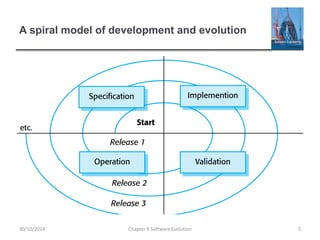
A spiral model of development and evolution
Chapter 9 Software Evolution 5
30/10/2014
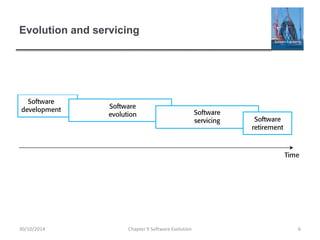
Evolution and servicing
Chapter 9 Software Evolution 6
30/10/2014
Evolution and servicing
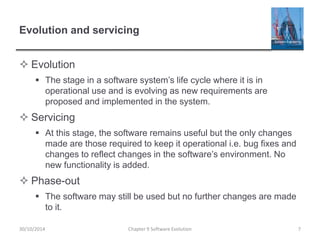
 Evolution
 The stage in a software system’s life cycle where it is in
operational use and is evolving as new requirements are
proposed and implemented in the system.
 Servicing
 At this stage, the software remains useful but the only changes
made are those required to keep it operational i.e. bug fixes and
changes to reflect changes in the software’s environment. No
new functionality is added.
 Phase-out
 The software may still be used but no further changes are made
to it.
Chapter 9 Software Evolution 7
30/10/2014
Evolution processes
Chapter 9 Software Evolution 8
30/10/2014
Evolution processes
 Software evolution processes depend on
 The type of software being maintained;
 The development processes used;
 The skills and experience of the people involved.
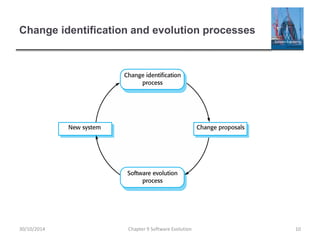
 Proposals for change are the driver for system evolution.
 Should be linked with components that are affected by the
change, thus allowing the cost and impact of the change to be
estimated.
 Change identification and evolution continues throughout
the system lifetime.
Chapter 9 Software Evolution 9
30/10/2014
Change identification and evolution processes
Chapter 9 Software Evolution 10
30/10/2014
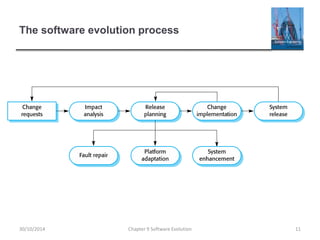
The software evolution process
Chapter 9 Software Evolution 11
30/10/2014
Change implementation
Chapter 9 Software Evolution 12
30/10/2014
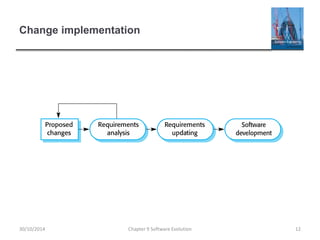
Change implementation
 Iteration of the development process where the revisions
to the system are designed, implemented and tested.
 A critical difference is that the first stage of change
implementation may involve program understanding,
especially if the original system developers are not
responsible for the change implementation.
 During the program understanding phase, you have to
understand how the program is structured, how it
delivers functionality and how the proposed change
might affect the program.
Chapter 9 Software Evolution 13
30/10/2014
Urgent change requests
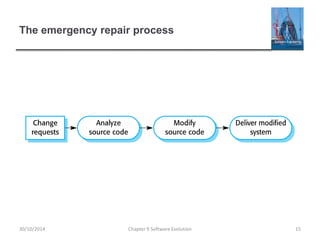
 Urgent changes may have to be implemented without
going through all stages of the software engineering
process
 If a serious system fault has to be repaired to allow normal
operation to continue;
 If changes to the system’s environment (e.g. an OS upgrade)
have unexpected effects;
 If there are business changes that require a very rapid response
(e.g. the release of a competing product).
Chapter 9 Software Evolution 14
30/10/2014
The emergency repair process
Chapter 9 Software Evolution 15
30/10/2014
Agile methods and evolution
 Agile methods are based on incremental development so
the transition from development to evolution is a
seamless one.
 Evolution is simply a continuation of the development process
based on frequent system releases.
 Automated regression testing is particularly valuable
when changes are made to a system.
 Changes may be expressed as additional user stories.
Chapter 9 Software Evolution 16
30/10/2014
Handover problems
 Where the development team have used an agile
approach but the evolution team is unfamiliar with agile
methods and prefer a plan-based approach.
 The evolution team may expect detailed documentation to
support evolution and this is not produced in agile processes.
 Where a plan-based approach has been used for
development but the evolution team prefer to use agile
methods.
 The evolution team may have to start from scratch developing
automated tests and the code in the system may not have been
refactored and simplified as is expected in agile development.
Chapter 9 Software Evolution 17
30/10/2014
Legacy systems
Chapter 9 Software Evolution 18
30/10/2014
Legacy systems
 Legacy systems are older systems that rely on
languages and technology that are no longer used for
new systems development.
 Legacy software may be dependent on older hardware,
such as mainframe computers and may have associated
legacy processes and procedures.
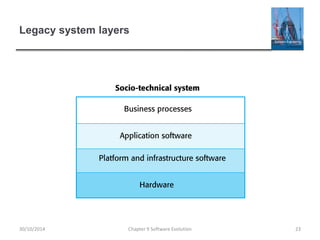
 Legacy systems are not just software systems but are
broader socio-technical systems that include hardware,
software, libraries and other supporting software and
business processes.
Chapter 9 Software Evolution 19
30/10/2014
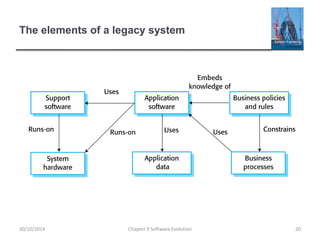
The elements of a legacy system
Chapter 9 Software Evolution 20
30/10/2014
Legacy system components
 System hardware Legacy systems may have been
written for hardware that is no longer available.
 Support software The legacy system may rely on a
range of support software, which may be obsolete or
unsupported.
 Application software The application system that
provides the business services is usually made up of a
number of application programs.
 Application data These are data that are processed by
the application system. They may be inconsistent,
duplicated or held in different databases.
Chapter 9 Software Evolution 21
30/10/2014
Legacy system components
 Business processes These are processes that are used
in the business to achieve some business objective.
 Business processes may be designed around a legacy
system and constrained by the functionality that it
provides.
 Business policies and rules These are definitions of how
the business should be carried out and constraints on
the business. Use of the legacy application system may
be embedded in these policies and rules.
Chapter 9 Software Evolution 22
30/10/2014
Legacy system layers
Chapter 9 Software Evolution 23
30/10/2014
Legacy system replacement
 Legacy system replacement is risky and expensive so
businesses continue to use these systems
 System replacement is risky for a number of reasons
 Lack of complete system specification
 Tight integration of system and business processes
 Undocumented business rules embedded in the legacy system
 New software development may be late and/or over budget
Chapter 9 Software Evolution 24
30/10/2014
Legacy system change
 Legacy systems are expensive to change for a number
of reasons:
 No consistent programming style
 Use of obsolete programming languages with few people
available with these language skills
 Inadequate system documentation
 System structure degradation
 Program optimizations may make them hard to understand
 Data errors, duplication and inconsistency
Chapter 9 Software Evolution 25
30/10/2014
Legacy system management
 Organisations that rely on legacy systems must choose
a strategy for evolving these systems
 Scrap the system completely and modify business processes so
that it is no longer required;
 Continue maintaining the system;
 Transform the system by re-engineering to improve its
maintainability;
 Replace the system with a new system.
 The strategy chosen should depend on the system
quality and its business value.
Chapter 9 Software Evolution 26
30/10/2014
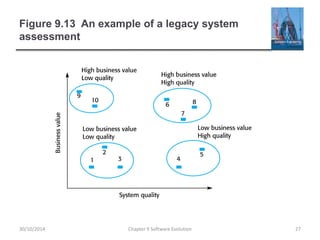
Figure 9.13 An example of a legacy system
assessment
Chapter 9 Software Evolution 27
30/10/2014
Legacy system categories
 Low quality, low business value
 These systems should be scrapped.
 Low-quality, high-business value
 These make an important business contribution but are
expensive to maintain. Should be re-engineered or replaced if a
suitable system is available.
 High-quality, low-business value
 Replace with COTS, scrap completely or maintain.
 High-quality, high business value
 Continue in operation using normal system maintenance.
Chapter 9 Software Evolution 28
30/10/2014
Business value assessment
 Assessment should take different viewpoints into
account
 System end-users;
 Business customers;
 Line managers;
 IT managers;
 Senior managers.
 Interview different stakeholders and collate results.
Chapter 9 Software Evolution 29
30/10/2014
Issues in business value assessment
 The use of the system
 If systems are only used occasionally or by a small number of
people, they may have a low business value.
 The business processes that are supported
 A system may have a low business value if it forces the use of
inefficient business processes.
 System dependability
 If a system is not dependable and the problems directly affect
business customers, the system has a low business value.
 The system outputs
 If the business depends on system outputs, then the system has
a high business value.
Chapter 9 Software Evolution 30
30/10/2014
System quality assessment
 Business process assessment
 How well does the business process support the current goals of
the business?
 Environment assessment
 How effective is the system’s environment and how expensive is
it to maintain?
 Application assessment
 What is the quality of the application software system?
Chapter 9 Software Evolution 31
30/10/2014
Business process assessment
 Use a viewpoint-oriented approach and seek answers
from system stakeholders
 Is there a defined process model and is it followed?
 Do different parts of the organisation use different processes for
the same function?
 How has the process been adapted?
 What are the relationships with other business processes and
are these necessary?
 Is the process effectively supported by the legacy application
software?
 Example - a travel ordering system may have a low
business value because of the widespread use of web-
based ordering.
Chapter 9 Software Evolution 32
30/10/2014
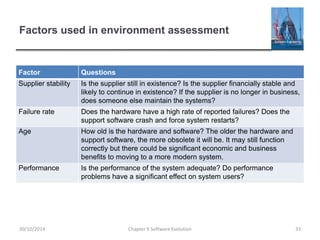
Factors used in environment assessment
Factor Questions
Supplier stability Is the supplier still in existence? Is the supplier financially stable and
likely to continue in existence? If the supplier is no longer in business,
does someone else maintain the systems?
Failure rate Does the hardware have a high rate of reported failures? Does the
support software crash and force system restarts?
Age How old is the hardware and software? The older the hardware and
support software, the more obsolete it will be. It may still function
correctly but there could be significant economic and business
benefits to moving to a more modern system.
Performance Is the performance of the system adequate? Do performance
problems have a significant effect on system users?
Chapter 9 Software Evolution 33
30/10/2014
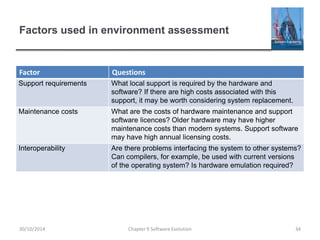
Factors used in environment assessment
Factor Questions
Support requirements What local support is required by the hardware and
software? If there are high costs associated with this
support, it may be worth considering system replacement.
Maintenance costs What are the costs of hardware maintenance and support
software licences? Older hardware may have higher
maintenance costs than modern systems. Support software
may have high annual licensing costs.
Interoperability Are there problems interfacing the system to other systems?
Can compilers, for example, be used with current versions
of the operating system? Is hardware emulation required?
Chapter 9 Software Evolution 34
30/10/2014
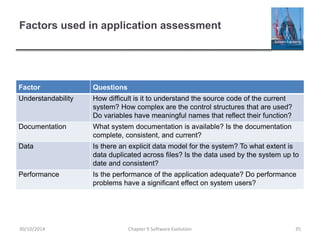
Factors used in application assessment
Factor Questions
Understandability How difficult is it to understand the source code of the current
system? How complex are the control structures that are used?
Do variables have meaningful names that reflect their function?
Documentation What system documentation is available? Is the documentation
complete, consistent, and current?
Data Is there an explicit data model for the system? To what extent is
data duplicated across files? Is the data used by the system up to
date and consistent?
Performance Is the performance of the application adequate? Do performance
problems have a significant effect on system users?
Chapter 9 Software Evolution 35
30/10/2014
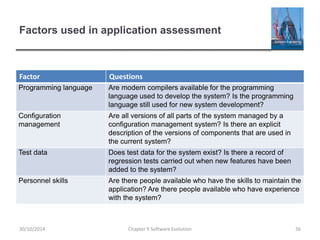
Factors used in application assessment
Factor Questions
Programming language Are modern compilers available for the programming
language used to develop the system? Is the programming
language still used for new system development?
Configuration
management
Are all versions of all parts of the system managed by a
configuration management system? Is there an explicit
description of the versions of components that are used in
the current system?
Test data Does test data for the system exist? Is there a record of
regression tests carried out when new features have been
added to the system?
Personnel skills Are there people available who have the skills to maintain the
application? Are there people available who have experience
with the system?
Chapter 9 Software Evolution 36
30/10/2014
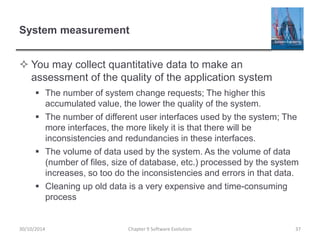
System measurement
 You may collect quantitative data to make an
assessment of the quality of the application system
 The number of system change requests; The higher this
accumulated value, the lower the quality of the system.
 The number of different user interfaces used by the system; The
more interfaces, the more likely it is that there will be
inconsistencies and redundancies in these interfaces.
 The volume of data used by the system. As the volume of data
(number of files, size of database, etc.) processed by the system
increases, so too do the inconsistencies and errors in that data.
 Cleaning up old data is a very expensive and time-consuming
process
Chapter 9 Software Evolution 37
30/10/2014
Software maintenance
Chapter 9 Software Evolution 38
30/10/2014
Software maintenance
 Modifying a program after it has been put into use.
 The term is mostly used for changing custom software.
Generic software products are said to evolve to create
new versions.
 Maintenance does not normally involve major changes to
the system’s architecture.
 Changes are implemented by modifying existing
components and adding new components to the system.
Chapter 9 Software Evolution 39
30/10/2014
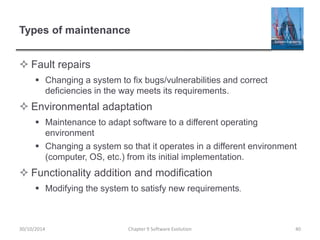
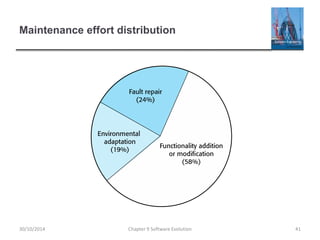
Types of maintenance
 Fault repairs
 Changing a system to fix bugs/vulnerabilities and correct
deficiencies in the way meets its requirements.
 Environmental adaptation
 Maintenance to adapt software to a different operating
environment
 Changing a system so that it operates in a different environment
(computer, OS, etc.) from its initial implementation.
 Functionality addition and modification
 Modifying the system to satisfy new requirements.
Chapter 9 Software Evolution 40
30/10/2014
Maintenance effort distribution
Chapter 9 Software Evolution 41
30/10/2014
Maintenance costs
 Usually greater than development costs (2* to
100* depending on the application).
 Affected by both technical and non-technical
factors.
 Increases as software is maintained.
Maintenance corrupts the software structure so
makes further maintenance more difficult.
 Ageing software can have high support costs
(e.g. old languages, compilers etc.).
Chapter 9 Software Evolution 42
30/10/2014
Maintenance costs
 It is usually more expensive to add new features to a
system during maintenance than it is to add the same
features during development
 A new team has to understand the programs being maintained
 Separating maintenance and development means there is no
incentive for the development team to write maintainable
software
 Program maintenance work is unpopular
• Maintenance staff are often inexperienced and have limited domain
knowledge.
 As programs age, their structure degrades and they become
harder to change
Chapter 9 Software Evolution 43
30/10/2014
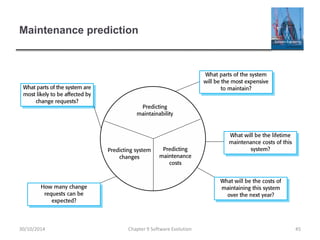
Maintenance prediction
 Maintenance prediction is concerned with assessing
which parts of the system may cause problems and have
high maintenance costs
 Change acceptance depends on the maintainability of the
components affected by the change;
 Implementing changes degrades the system and reduces its
maintainability;
 Maintenance costs depend on the number of changes and costs
of change depend on maintainability.
Chapter 9 Software Evolution 44
30/10/2014
Maintenance prediction
Chapter 9 Software Evolution 45
30/10/2014
Change prediction
 Predicting the number of changes requires and
understanding of the relationships between a system
and its environment.
 Tightly coupled systems require changes whenever the
environment is changed.
 Factors influencing this relationship are
 Number and complexity of system interfaces;
 Number of inherently volatile system requirements;
 The business processes where the system is used.
Chapter 9 Software Evolution 46
30/10/2014
Complexity metrics
 Predictions of maintainability can be made by assessing
the complexity of system components.
 Studies have shown that most maintenance effort is
spent on a relatively small number of system
components.
 Complexity depends on
 Complexity of control structures;
 Complexity of data structures;
 Object, method (procedure) and module size.
Chapter 9 Software Evolution 47
30/10/2014
Process metrics
 Process metrics may be used to assess maintainability
 Number of requests for corrective maintenance;
 Average time required for impact analysis;
 Average time taken to implement a change request;
 Number of outstanding change requests.
 If any or all of these is increasing, this may indicate a
decline in maintainability.
Chapter 9 Software Evolution 48
30/10/2014
Software reengineering
 Restructuring or rewriting part or all of a
legacy system without changing its
functionality.
 Applicable where some but not all sub-systems
of a larger system require frequent
maintenance.
 Reengineering involves adding effort to make
them easier to maintain. The system may be re-
structured and re-documented.
Chapter 9 Software Evolution 49
30/10/2014
Advantages of reengineering
 Reduced risk
 There is a high risk in new software development. There may be
development problems, staffing problems and specification
problems.
 Reduced cost
 The cost of re-engineering is often significantly less than the
costs of developing new software.
Chapter 9 Software Evolution 50
30/10/2014
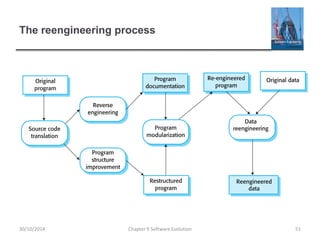
The reengineering process
Chapter 9 Software Evolution 51
30/10/2014
Reengineering process activities
 Source code translation
 Convert code to a new language.
 Reverse engineering
 Analyse the program to understand it;
 Program structure improvement
 Restructure automatically for understandability;
 Program modularisation
 Reorganise the program structure;
 Data reengineering
 Clean-up and restructure system data.
Chapter 9 Software Evolution 52
30/10/2014
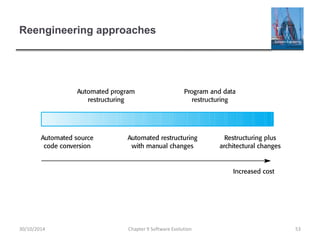
Reengineering approaches
Chapter 9 Software Evolution 53
30/10/2014
Reengineering cost factors
 The quality of the software to be reengineered.
 The tool support available for reengineering.
 The extent of the data conversion which is required.
 The availability of expert staff for reengineering.
 This can be a problem with old systems based on technology
that is no longer widely used.
Chapter 9 Software Evolution 54
30/10/2014
Refactoring
 Refactoring is the process of making improvements to a
program to slow down degradation through change.
 You can think of refactoring as ‘preventative
maintenance’ that reduces the problems of future
change.
 Refactoring involves modifying a program to improve its
structure, reduce its complexity or make it easier to
understand.
 When you refactor a program, you should not add
functionality but rather concentrate on program
improvement.
Chapter 9 Software Evolution 55
30/10/2014
Refactoring and reengineering
 Re-engineering takes place after a system has been
maintained for some time and maintenance costs are
increasing. You use automated tools to process and re-
engineer a legacy system to create a new system that is
more maintainable.
 Refactoring is a continuous process of improvement
throughout the development and evolution process. It is
intended to avoid the structure and code degradation
that increases the costs and difficulties of maintaining a
system.
Chapter 9 Software Evolution 56
30/10/2014
‘Bad smells’ in program code
 Duplicate code
 The same or very similar code may be included at different
places in a program. This can be removed and implemented as a
single method or function that is called as required.
 Long methods
 If a method is too long, it should be redesigned as a number of
shorter methods.
 Switch (case) statements
 These often involve duplication, where the switch depends on
the type of a value. The switch statements may be scattered
around a program. In object-oriented languages, you can often
use polymorphism to achieve the same thing.
Chapter 9 Software Evolution 57
30/10/2014
‘Bad smells’ in program code
 Data clumping
 Data clumps occur when the same group of data items (fields in
classes, parameters in methods) re-occur in several places in a
program. These can often be replaced with an object that
encapsulates all of the data.
 Speculative generality
 This occurs when developers include generality in a program in
case it is required in the future. This can often simply be
removed.
Chapter 9 Software Evolution 58
30/10/2014
Key points
 Software development and evolution can be thought of
as an integrated, iterative process that can be
represented using a spiral model.
 For custom systems, the costs of software maintenance
usually exceed the software development costs.
 The process of software evolution is driven by requests
for changes and includes change impact analysis,
release planning and change implementation.
 Legacy systems are older software systems, developed
using obsolete software and hardware technologies, that
remain useful for a business.
Chapter 9 Software Evolution 59
30/10/2014
Key points
 It is often cheaper and less risky to maintain a legacy
system than to develop a replacement system using
modern technology.
 The business value of a legacy system and the quality of
the application should be assessed to help decide if a
system should be replaced, transformed or maintained.
 There are 3 types of software maintenance, namely bug
fixing, modifying software to work in a new environment,
and implementing new or changed requirements.
Chapter 9 Software Evolution 60
30/10/2014
Key points
 Software re-engineering is concerned with re-structuring
and re-documenting software to make it easier to
understand and change.
 Refactoring, making program changes that preserve
functionality, is a form of preventative maintenance.
Chapter 9 Software Evolution 61
30/10/2014

Ch9 - Evolution

  • 1.
    Chapter 9 –Software Evolution Chapter 9 Software Evolution 1 30/10/2014
  • 2.
    Topics covered  Evolutionprocesses  Legacy systems  Software maintenance Chapter 9 Software Evolution 2 30/10/2014
  • 3.
    Software change  Softwarechange is inevitable  New requirements emerge when the software is used;  The business environment changes;  Errors must be repaired;  New computers and equipment is added to the system;  The performance or reliability of the system may have to be improved.  A key problem for all organizations is implementing and managing change to their existing software systems. Chapter 9 Software Evolution 3 30/10/2014
  • 4.
    Importance of evolution Organisations have huge investments in their software systems - they are critical business assets.  To maintain the value of these assets to the business, they must be changed and updated.  The majority of the software budget in large companies is devoted to changing and evolving existing software rather than developing new software. Chapter 9 Software Evolution 4 30/10/2014
  • 5.
    A spiral modelof development and evolution Chapter 9 Software Evolution 5 30/10/2014
  • 6.
    Evolution and servicing Chapter9 Software Evolution 6 30/10/2014
  • 7.
    Evolution and servicing Evolution  The stage in a software system’s life cycle where it is in operational use and is evolving as new requirements are proposed and implemented in the system.  Servicing  At this stage, the software remains useful but the only changes made are those required to keep it operational i.e. bug fixes and changes to reflect changes in the software’s environment. No new functionality is added.  Phase-out  The software may still be used but no further changes are made to it. Chapter 9 Software Evolution 7 30/10/2014
  • 8.
    Evolution processes Chapter 9Software Evolution 8 30/10/2014
  • 9.
    Evolution processes  Softwareevolution processes depend on  The type of software being maintained;  The development processes used;  The skills and experience of the people involved.  Proposals for change are the driver for system evolution.  Should be linked with components that are affected by the change, thus allowing the cost and impact of the change to be estimated.  Change identification and evolution continues throughout the system lifetime. Chapter 9 Software Evolution 9 30/10/2014
  • 10.
    Change identification andevolution processes Chapter 9 Software Evolution 10 30/10/2014
  • 11.
    The software evolutionprocess Chapter 9 Software Evolution 11 30/10/2014
  • 12.
    Change implementation Chapter 9Software Evolution 12 30/10/2014
  • 13.
    Change implementation  Iterationof the development process where the revisions to the system are designed, implemented and tested.  A critical difference is that the first stage of change implementation may involve program understanding, especially if the original system developers are not responsible for the change implementation.  During the program understanding phase, you have to understand how the program is structured, how it delivers functionality and how the proposed change might affect the program. Chapter 9 Software Evolution 13 30/10/2014
  • 14.
    Urgent change requests Urgent changes may have to be implemented without going through all stages of the software engineering process  If a serious system fault has to be repaired to allow normal operation to continue;  If changes to the system’s environment (e.g. an OS upgrade) have unexpected effects;  If there are business changes that require a very rapid response (e.g. the release of a competing product). Chapter 9 Software Evolution 14 30/10/2014
  • 15.
    The emergency repairprocess Chapter 9 Software Evolution 15 30/10/2014
  • 16.
    Agile methods andevolution  Agile methods are based on incremental development so the transition from development to evolution is a seamless one.  Evolution is simply a continuation of the development process based on frequent system releases.  Automated regression testing is particularly valuable when changes are made to a system.  Changes may be expressed as additional user stories. Chapter 9 Software Evolution 16 30/10/2014
  • 17.
    Handover problems  Wherethe development team have used an agile approach but the evolution team is unfamiliar with agile methods and prefer a plan-based approach.  The evolution team may expect detailed documentation to support evolution and this is not produced in agile processes.  Where a plan-based approach has been used for development but the evolution team prefer to use agile methods.  The evolution team may have to start from scratch developing automated tests and the code in the system may not have been refactored and simplified as is expected in agile development. Chapter 9 Software Evolution 17 30/10/2014
  • 18.
    Legacy systems Chapter 9Software Evolution 18 30/10/2014
  • 19.
    Legacy systems  Legacysystems are older systems that rely on languages and technology that are no longer used for new systems development.  Legacy software may be dependent on older hardware, such as mainframe computers and may have associated legacy processes and procedures.  Legacy systems are not just software systems but are broader socio-technical systems that include hardware, software, libraries and other supporting software and business processes. Chapter 9 Software Evolution 19 30/10/2014
  • 20.
    The elements ofa legacy system Chapter 9 Software Evolution 20 30/10/2014
  • 21.
    Legacy system components System hardware Legacy systems may have been written for hardware that is no longer available.  Support software The legacy system may rely on a range of support software, which may be obsolete or unsupported.  Application software The application system that provides the business services is usually made up of a number of application programs.  Application data These are data that are processed by the application system. They may be inconsistent, duplicated or held in different databases. Chapter 9 Software Evolution 21 30/10/2014
  • 22.
    Legacy system components Business processes These are processes that are used in the business to achieve some business objective.  Business processes may be designed around a legacy system and constrained by the functionality that it provides.  Business policies and rules These are definitions of how the business should be carried out and constraints on the business. Use of the legacy application system may be embedded in these policies and rules. Chapter 9 Software Evolution 22 30/10/2014
  • 23.
    Legacy system layers Chapter9 Software Evolution 23 30/10/2014
  • 24.
    Legacy system replacement Legacy system replacement is risky and expensive so businesses continue to use these systems  System replacement is risky for a number of reasons  Lack of complete system specification  Tight integration of system and business processes  Undocumented business rules embedded in the legacy system  New software development may be late and/or over budget Chapter 9 Software Evolution 24 30/10/2014
  • 25.
    Legacy system change Legacy systems are expensive to change for a number of reasons:  No consistent programming style  Use of obsolete programming languages with few people available with these language skills  Inadequate system documentation  System structure degradation  Program optimizations may make them hard to understand  Data errors, duplication and inconsistency Chapter 9 Software Evolution 25 30/10/2014
  • 26.
    Legacy system management Organisations that rely on legacy systems must choose a strategy for evolving these systems  Scrap the system completely and modify business processes so that it is no longer required;  Continue maintaining the system;  Transform the system by re-engineering to improve its maintainability;  Replace the system with a new system.  The strategy chosen should depend on the system quality and its business value. Chapter 9 Software Evolution 26 30/10/2014
  • 27.
    Figure 9.13 Anexample of a legacy system assessment Chapter 9 Software Evolution 27 30/10/2014
  • 28.
    Legacy system categories Low quality, low business value  These systems should be scrapped.  Low-quality, high-business value  These make an important business contribution but are expensive to maintain. Should be re-engineered or replaced if a suitable system is available.  High-quality, low-business value  Replace with COTS, scrap completely or maintain.  High-quality, high business value  Continue in operation using normal system maintenance. Chapter 9 Software Evolution 28 30/10/2014
  • 29.
    Business value assessment Assessment should take different viewpoints into account  System end-users;  Business customers;  Line managers;  IT managers;  Senior managers.  Interview different stakeholders and collate results. Chapter 9 Software Evolution 29 30/10/2014
  • 30.
    Issues in businessvalue assessment  The use of the system  If systems are only used occasionally or by a small number of people, they may have a low business value.  The business processes that are supported  A system may have a low business value if it forces the use of inefficient business processes.  System dependability  If a system is not dependable and the problems directly affect business customers, the system has a low business value.  The system outputs  If the business depends on system outputs, then the system has a high business value. Chapter 9 Software Evolution 30 30/10/2014
  • 31.
    System quality assessment Business process assessment  How well does the business process support the current goals of the business?  Environment assessment  How effective is the system’s environment and how expensive is it to maintain?  Application assessment  What is the quality of the application software system? Chapter 9 Software Evolution 31 30/10/2014
  • 32.
    Business process assessment Use a viewpoint-oriented approach and seek answers from system stakeholders  Is there a defined process model and is it followed?  Do different parts of the organisation use different processes for the same function?  How has the process been adapted?  What are the relationships with other business processes and are these necessary?  Is the process effectively supported by the legacy application software?  Example - a travel ordering system may have a low business value because of the widespread use of web- based ordering. Chapter 9 Software Evolution 32 30/10/2014
  • 33.
    Factors used inenvironment assessment Factor Questions Supplier stability Is the supplier still in existence? Is the supplier financially stable and likely to continue in existence? If the supplier is no longer in business, does someone else maintain the systems? Failure rate Does the hardware have a high rate of reported failures? Does the support software crash and force system restarts? Age How old is the hardware and software? The older the hardware and support software, the more obsolete it will be. It may still function correctly but there could be significant economic and business benefits to moving to a more modern system. Performance Is the performance of the system adequate? Do performance problems have a significant effect on system users? Chapter 9 Software Evolution 33 30/10/2014
  • 34.
    Factors used inenvironment assessment Factor Questions Support requirements What local support is required by the hardware and software? If there are high costs associated with this support, it may be worth considering system replacement. Maintenance costs What are the costs of hardware maintenance and support software licences? Older hardware may have higher maintenance costs than modern systems. Support software may have high annual licensing costs. Interoperability Are there problems interfacing the system to other systems? Can compilers, for example, be used with current versions of the operating system? Is hardware emulation required? Chapter 9 Software Evolution 34 30/10/2014
  • 35.
    Factors used inapplication assessment Factor Questions Understandability How difficult is it to understand the source code of the current system? How complex are the control structures that are used? Do variables have meaningful names that reflect their function? Documentation What system documentation is available? Is the documentation complete, consistent, and current? Data Is there an explicit data model for the system? To what extent is data duplicated across files? Is the data used by the system up to date and consistent? Performance Is the performance of the application adequate? Do performance problems have a significant effect on system users? Chapter 9 Software Evolution 35 30/10/2014
  • 36.
    Factors used inapplication assessment Factor Questions Programming language Are modern compilers available for the programming language used to develop the system? Is the programming language still used for new system development? Configuration management Are all versions of all parts of the system managed by a configuration management system? Is there an explicit description of the versions of components that are used in the current system? Test data Does test data for the system exist? Is there a record of regression tests carried out when new features have been added to the system? Personnel skills Are there people available who have the skills to maintain the application? Are there people available who have experience with the system? Chapter 9 Software Evolution 36 30/10/2014
  • 37.
    System measurement  Youmay collect quantitative data to make an assessment of the quality of the application system  The number of system change requests; The higher this accumulated value, the lower the quality of the system.  The number of different user interfaces used by the system; The more interfaces, the more likely it is that there will be inconsistencies and redundancies in these interfaces.  The volume of data used by the system. As the volume of data (number of files, size of database, etc.) processed by the system increases, so too do the inconsistencies and errors in that data.  Cleaning up old data is a very expensive and time-consuming process Chapter 9 Software Evolution 37 30/10/2014
  • 38.
    Software maintenance Chapter 9Software Evolution 38 30/10/2014
  • 39.
    Software maintenance  Modifyinga program after it has been put into use.  The term is mostly used for changing custom software. Generic software products are said to evolve to create new versions.  Maintenance does not normally involve major changes to the system’s architecture.  Changes are implemented by modifying existing components and adding new components to the system. Chapter 9 Software Evolution 39 30/10/2014
  • 40.
    Types of maintenance Fault repairs  Changing a system to fix bugs/vulnerabilities and correct deficiencies in the way meets its requirements.  Environmental adaptation  Maintenance to adapt software to a different operating environment  Changing a system so that it operates in a different environment (computer, OS, etc.) from its initial implementation.  Functionality addition and modification  Modifying the system to satisfy new requirements. Chapter 9 Software Evolution 40 30/10/2014
  • 41.
    Maintenance effort distribution Chapter9 Software Evolution 41 30/10/2014
  • 42.
    Maintenance costs  Usuallygreater than development costs (2* to 100* depending on the application).  Affected by both technical and non-technical factors.  Increases as software is maintained. Maintenance corrupts the software structure so makes further maintenance more difficult.  Ageing software can have high support costs (e.g. old languages, compilers etc.). Chapter 9 Software Evolution 42 30/10/2014
  • 43.
    Maintenance costs  Itis usually more expensive to add new features to a system during maintenance than it is to add the same features during development  A new team has to understand the programs being maintained  Separating maintenance and development means there is no incentive for the development team to write maintainable software  Program maintenance work is unpopular • Maintenance staff are often inexperienced and have limited domain knowledge.  As programs age, their structure degrades and they become harder to change Chapter 9 Software Evolution 43 30/10/2014
  • 44.
    Maintenance prediction  Maintenanceprediction is concerned with assessing which parts of the system may cause problems and have high maintenance costs  Change acceptance depends on the maintainability of the components affected by the change;  Implementing changes degrades the system and reduces its maintainability;  Maintenance costs depend on the number of changes and costs of change depend on maintainability. Chapter 9 Software Evolution 44 30/10/2014
  • 45.
    Maintenance prediction Chapter 9Software Evolution 45 30/10/2014
  • 46.
    Change prediction  Predictingthe number of changes requires and understanding of the relationships between a system and its environment.  Tightly coupled systems require changes whenever the environment is changed.  Factors influencing this relationship are  Number and complexity of system interfaces;  Number of inherently volatile system requirements;  The business processes where the system is used. Chapter 9 Software Evolution 46 30/10/2014
  • 47.
    Complexity metrics  Predictionsof maintainability can be made by assessing the complexity of system components.  Studies have shown that most maintenance effort is spent on a relatively small number of system components.  Complexity depends on  Complexity of control structures;  Complexity of data structures;  Object, method (procedure) and module size. Chapter 9 Software Evolution 47 30/10/2014
  • 48.
    Process metrics  Processmetrics may be used to assess maintainability  Number of requests for corrective maintenance;  Average time required for impact analysis;  Average time taken to implement a change request;  Number of outstanding change requests.  If any or all of these is increasing, this may indicate a decline in maintainability. Chapter 9 Software Evolution 48 30/10/2014
  • 49.
    Software reengineering  Restructuringor rewriting part or all of a legacy system without changing its functionality.  Applicable where some but not all sub-systems of a larger system require frequent maintenance.  Reengineering involves adding effort to make them easier to maintain. The system may be re- structured and re-documented. Chapter 9 Software Evolution 49 30/10/2014
  • 50.
    Advantages of reengineering Reduced risk  There is a high risk in new software development. There may be development problems, staffing problems and specification problems.  Reduced cost  The cost of re-engineering is often significantly less than the costs of developing new software. Chapter 9 Software Evolution 50 30/10/2014
  • 51.
    The reengineering process Chapter9 Software Evolution 51 30/10/2014
  • 52.
    Reengineering process activities Source code translation  Convert code to a new language.  Reverse engineering  Analyse the program to understand it;  Program structure improvement  Restructure automatically for understandability;  Program modularisation  Reorganise the program structure;  Data reengineering  Clean-up and restructure system data. Chapter 9 Software Evolution 52 30/10/2014
  • 53.
    Reengineering approaches Chapter 9Software Evolution 53 30/10/2014
  • 54.
    Reengineering cost factors The quality of the software to be reengineered.  The tool support available for reengineering.  The extent of the data conversion which is required.  The availability of expert staff for reengineering.  This can be a problem with old systems based on technology that is no longer widely used. Chapter 9 Software Evolution 54 30/10/2014
  • 55.
    Refactoring  Refactoring isthe process of making improvements to a program to slow down degradation through change.  You can think of refactoring as ‘preventative maintenance’ that reduces the problems of future change.  Refactoring involves modifying a program to improve its structure, reduce its complexity or make it easier to understand.  When you refactor a program, you should not add functionality but rather concentrate on program improvement. Chapter 9 Software Evolution 55 30/10/2014
  • 56.
    Refactoring and reengineering Re-engineering takes place after a system has been maintained for some time and maintenance costs are increasing. You use automated tools to process and re- engineer a legacy system to create a new system that is more maintainable.  Refactoring is a continuous process of improvement throughout the development and evolution process. It is intended to avoid the structure and code degradation that increases the costs and difficulties of maintaining a system. Chapter 9 Software Evolution 56 30/10/2014
  • 57.
    ‘Bad smells’ inprogram code  Duplicate code  The same or very similar code may be included at different places in a program. This can be removed and implemented as a single method or function that is called as required.  Long methods  If a method is too long, it should be redesigned as a number of shorter methods.  Switch (case) statements  These often involve duplication, where the switch depends on the type of a value. The switch statements may be scattered around a program. In object-oriented languages, you can often use polymorphism to achieve the same thing. Chapter 9 Software Evolution 57 30/10/2014
  • 58.
    ‘Bad smells’ inprogram code  Data clumping  Data clumps occur when the same group of data items (fields in classes, parameters in methods) re-occur in several places in a program. These can often be replaced with an object that encapsulates all of the data.  Speculative generality  This occurs when developers include generality in a program in case it is required in the future. This can often simply be removed. Chapter 9 Software Evolution 58 30/10/2014
  • 59.
    Key points  Softwaredevelopment and evolution can be thought of as an integrated, iterative process that can be represented using a spiral model.  For custom systems, the costs of software maintenance usually exceed the software development costs.  The process of software evolution is driven by requests for changes and includes change impact analysis, release planning and change implementation.  Legacy systems are older software systems, developed using obsolete software and hardware technologies, that remain useful for a business. Chapter 9 Software Evolution 59 30/10/2014
  • 60.
    Key points  Itis often cheaper and less risky to maintain a legacy system than to develop a replacement system using modern technology.  The business value of a legacy system and the quality of the application should be assessed to help decide if a system should be replaced, transformed or maintained.  There are 3 types of software maintenance, namely bug fixing, modifying software to work in a new environment, and implementing new or changed requirements. Chapter 9 Software Evolution 60 30/10/2014
  • 61.
    Key points  Softwarere-engineering is concerned with re-structuring and re-documenting software to make it easier to understand and change.  Refactoring, making program changes that preserve functionality, is a form of preventative maintenance. Chapter 9 Software Evolution 61 30/10/2014