DNS Server Experiment
● ทดสอบ domain จริง
– resolve จาก 8.8.8.8, 8.8.4.4 Google Public DNS
– ทดสอบจาก
http://www.kloth.net/services/nslookup.php
http://bwachter.lart.info/tools/dig
http://dig.menandmice.com/
http://www.cman.jp/network/support/nslookup.html
http://www.geektools.com/digtool.php
● การ update ข้อมูลแบบ dynamic
3.
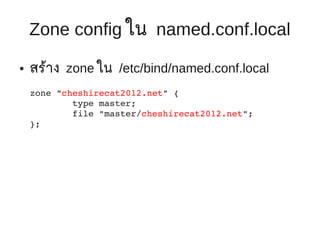
Zone config ในnamed.conf.local
● สร้าง zone ใน /etc/bind/named.conf.local
zone "cheshirecat2012.net" {
type master;
file "master/cheshirecat2012.net";
};
4.
Zone file data
● ไฟล์ /var/cache/bind/master/$YOURDOMAIN
/var/cache/bind/master/cheshirecat2012.net
$ORIGIN .
$TTL 40
cheshirecat2012.net IN SOA ns.cheshirecat2012.net. root.cheshirecat2012.net. (
2012112705 ; serial
40 ; refresh (4 hours)
10 ; retry (1 hour)
120 ; expire (4 weeks)
40 ; minimum (4 hours)
)
NS lsasvr.coe.psu.ac.th. ;; For forwarding
MX 10 mx.cheshirecat2012.net.
$ORIGIN cheshirecat2012.net.
@ A 192.100.77.175
ns A 192.100.77.175
mx A 192.100.77.175
www A 192.100.77.175
Dynamic Update RR
● ปกติ server จะใช้ static address ไม่ได้รบ ip จาก
ั
dhcp server
● แต่ในบางกรณี เช่น Home Network ใช้ ADSL
● IP จะ dynamic allocate ทุกครั้งที่เชื่อมต่อ
● เราสามารถ แก้ไข IP แบบอัตโนมัติได้ดวย
้
nsupdate (คำาสั่งใน package dnsutils)
18.
ข้อควรคำานึง
● Manual Modified Zone กับ Dynamic Update
Zone อยู่ร่วมกัน ไม่ค่อยดีเท่าไหร่
● ควรแยก Zone ต่างหาก
● ในที่นี้ให้ใช้ sub domain
19.
Sub domain
● ใช้ “dyn.$MYDOMAIN” (dynamic address sub
domain)
– Sub domain: dyn.cheshirecat2012.net
– เพิ่ม Zone file for sub domain
– เพิ่ม “allow-update” config
20.
Sub domain (cont)
● เพิ่ม “dyn” sub domain
zone "dyn.cheshirecat2012.net" {
type master;
file "master/dyn.cheshirecat2012.net";
allowupdate { 127.0.0.1; };
};
● เพิ่ม zone file
/var/cache/bind/master/dyn.$YOURDOMAIN
21.
Sub domain (cont)
● Zone file for dyn subdomain
$ORIGIN dyn.cheshirecat2012.net.
$TTL 40
@ IN SOA ns.cheshirecat2012.net. root.cheshirecat2012.net. (
1 ; serial
40 ; refresh (4 hours)
10 ; retry (1 hour)
120 ; expire (4 weeks)
40 ; minimum (4 hours)
)
@ NS lsasvr.coe.psu.ac.th. ;; For forwarding
www 30 IN A 192.100.77.175
22.
Sub domain (cont)
● Zone file ของ domain หลัก
(cheshirecat2012.net) จะต้องระบุ NS ของ
subdomain (dyn.cheshirecat2012.net)
ซึ่งในที่นคือ server ตัวเดียวกัน
ี้
$ORIGIN cheshirecat2012.net.
@ A 192.100.77.175
ns A 192.100.77.175
mx A 192.100.77.175
www A 192.100.77.175
dyn IN NS lsasvr.coe.psu.ac.th.
dyn IN NS 172.30.XX.XXX
23.
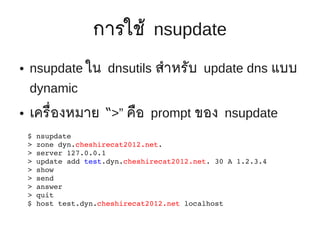
การใช้ nsupdate
● nsupdate ใน dnsutils สำาหรับ update dns แบบ
dynamic
● เครื่องหมาย “>” คือ prompt ของ nsupdate
$ nsupdate
> zone dyn.cheshirecat2012.net.
> server 127.0.0.1
> update add test.dyn.cheshirecat2012.net. 30 A 1.2.3.4
> show
> send
> answer
> quit
$ host test.dyn.cheshirecat2012.net localhost
การใช้ nsupdate (cont)
● การ update สามารถ update จาก server อื่นๆได้
● แต่ถ้าจะทำา ควรทีจะกำาหนดให้ใช้ public key ในการ
่
อนุญาต ให้เข้าถึงและแก้ไขข้อมูลใน zone ได้
● เนื่องจาก ค่อนข้างซับซ้อน จะไม่พูดถึงในที่นี้
28.
เรื่องอื่นๆ (not coverhere)
● Secondary DNS
– กำาหนด zone ที่มี type เป็ น slave
– ระบุตำาแหน่งไฟล์ ทีจะเก็บ zone data
่
– ระบุ master ip address (Primary DNS Server)
– บน Primary DNS ระบุ Allow transfer, Allow








![Bug#691613: apt: [intl:th] update thai program translation](https://cdn.slidesharecdn.com/ss_thumbnails/bug691613aptintlthupdatethaiprogramtranslation-121226134624-phpapp01-thumbnail.jpg?width=640&height=640&fit=bounds)


