Digital Design
•
Prof. Dr. Mohamed El-sayed Wahed
•
Professor of Computer Science
•
Facility Of Computer and Information System
•
Suez Canal University
•
M. Morris Mano
•
Emeritus Professor of Computer Engineering
•
California State University, Los Angeles
•
Michael D. Ciletti
•
Emeritus Professor of Electrical and Computer
Engineering University of Colorado at Colorado Springs
Digital Design
Digital Systems and Binary Numbers
1
Digital System
1
Binary Numbers
2
Number‐Base Conversions
3
Octal and Hexadecimal Numbers
4
Complements of Numbers
5
Signed Binary Numbers
6
Binary Codes
7
Binary Storage and Registers
8
Binary Logic
9
Chapter Summary
•
The following is a brief summary of the topics
that are covered in each chapter.
•
Chapter 1 presents the various binary systems
suitable for representing information in digital
systems. The binary number system is
explained and binary codes are illustrated.
Examples are given for addition and
subtraction of signed binary numbers and
decimal numbers in binary coded decimal
(BCD) format.
DIGITAL SYSTEMS
•
•
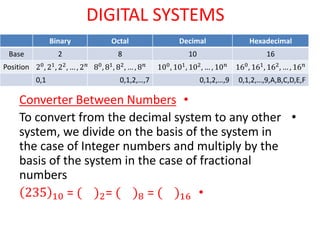
Converter Between Numbers
•
To convert from the decimal system to any other
system, we divide on the basis of the system in
the case of Integer numbers and multiply by the
basis of the system in the case of fractional
numbers
•
235 10 = ( )2= ( )8 = ( )16
Hexadecimal
Decimal
Octal
Binary
16
10
8
2
Base
160
, 161
, 162
, … , 16𝑛
100
, 101
, 102
, … , 10𝑛
80
, 81
, 82
, … , 8𝑛
20
, 21
, 22
, … , 2𝑛
Position
0,1,2,…,9,A,B,C,D,E,F
0,1,2,…,9
0,1,2,…,7
0,1
Reminder
Binary Number
Decimal Number
2
235
1
2
117
1
2
58
0
2
29
1
2
14
0
2
7
1
2
3
1
2
1
1
2
0
235 10 = ( 11101011)2
Reminder
Octal Number
Decimal Number
8
235
3
8
29
5
8
3
3
8
0
Reminder
Hexadecimal Number
Decimal Number
16
235
B 11
16
14
E 14
16
0
235 10 = ( 353)8
235 10 = ( 𝐸𝐵 )16
•
235.15 10 = ( )2
• 0.15 x 2 = 0.30 0
• 0.3 x 2 = 0.6 0
• 0.6 x 2 = 0.2 1
• 0.2 x 2 = 0.4 0
• 235.15 10 = (11101011.001)2
•
235.15 10 = ( )8
• 0.15 x 8 = 0.2 1
• 0.2x 8 = 0.6 1
• 0.6 x 8 = 0.8 4 235.15 10 = (353.114)8
•
Convert (0.513)10 to octal.
•
0.513 * 8 = 4.104
•
0.104 * 8 = 0.832
•
0.832 * 8 = 6.656
•
0.656 * 8 = 5.248
•
0.248 * 8 = 1.984
•
0.984 * 8 = 7.872
•
0.513 10 = (0.406517)8
•
235.15 10 = ( )16
• 0.15 x 16 = 0.0 15
• 235.15 10 = (𝐸𝐵. 𝐹)2
435.513 10 = 16
Reminder
Hexadecimal Number
Decimal Number
16
435
3
16
27
11 B
16
1
1
16
0
.513 X 16=8.208 8
0.208 X 16 = 3.328 3
0.328x16 = 5.248 5
435.513 10 = 1𝐵3.835 16
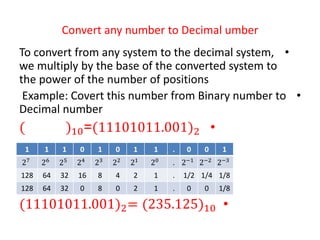
Convert any number to Decimal umber
•
To convert from any system to the decimal system,
we multiply by the base of the converted system to
the power of the number of positions
•
Example: Covert this number from Binary number to
Decimal number
•
(11101011.001)2
=
( )10
•
(11101011.001)2= (235.125)10
1
0
0
.
1
1
0
1
0
1
1
1
2−3
2−2
2−1
.
20
21
22
23
24
25
26
27
1/8
1/4
1/2
.
1
2
4
8
16
32
64
128
1/8
0
0
.
1
2
0
8
0
32
64
128
Example: Covert this number from Hexadecimal
number to Decimal number
•
1𝐵3.835 16 = 10
•
1𝐵3.835 16 = 435. 5129 10
5
3
8
.
3
B
1
16−3
16−2
16−1
.
160
161
162
1/4096
1/256
1/16
.
1
16
256
5/4096
3/256
8/16
.
3
176
256
Example: Covert this number from Octal
number to Decimal number
•
765.735 8 = 10
•
765.735 8 = 501. 931 10
5
3
7
.
5
6
7
8−3
8−2
8−1
.
80
81
82
1/512
1/64
1/8
.
1
8
64
5/512
3/64
7/8
.
5
48
448
To convert from binary to octal, we divide the binary number into triple
packages, and to convert from binary to Hexadecimal, we divide the
binary number into quadruple packages and multiply the base of the
binary system by the power of the number of positions
•
Example: Covert this number from Binary number to Octal
number and Hexadecimal number
( 11101011.10011)2= ( )8 = ( )16
1
1
0
20
21
22
1
2
0
3
1
0
1
20
21
22
1
0
4
5
1
1
0
20
21
22
1
2
0
3
0
0
1
20
21
22
0
0
2
4
1
1
21
22
2
4
6
0
1
1
1
20
21
22
23
0
2
4
8
1
1
0
1
20
21
22
23
1
2
0
8
1
0
0
1
20
21
22
23
1
0
0
8
0
0
1
21
22
23
0
0
8
Conversion from octal or hexadecimal to binary
•
Conversion from octal or hexadecimal to binary is
done by reversing the preceding procedure. Each
octal digit is converted to its three‐digit binary
equivalent. Similarly, each hexadecimal digit is
converted to its four‐digit binary equivalent. The
procedure is illustrated in the following examples
Arithmetic operations
•
Arithmetic operations with numbers in base r follow the same
rules as for decimal numbers. When a base other than the
familiar base 10 is used, one must be careful to use only the
r‐allowable digits.
•
Examples of addition, subtraction, and multiplication of two
binary numbers are as follows:
S
S O F NUMBER
COMPLEMENT
•
Given a number N in base r having n digits, the (r - 1)>s
complement of N, i.e., its diminished radix complement, is
defined as (rn - 1) - N. For decimal numbers, r = 10 and r - 1
= 9, so the 9’s complement of N is (10 n - 1) - N. In this case,
10 n represents a number that consists of a single 1
followed by n 0’s. 10 n - 1 is a number represented by n 9’s.
For example, if n = 4, we have 104 = 10,000 and 104 - 1 =
9999. It follows that the 9’s complement of a decimal
number is obtained by subtracting each digit from 9. Here
are some numerical examples:
•
The 9>s complement of 546700 is 999999 - 546700 =
453299.
•
The 9>s complement of 012398 is 999999 - 012398 =
•
The 1’s complement of 1011000 is 0100111.
•
The 1’s complement of 0101101 is 1010010.
•
the 10’s complement of 012398 is 987602
•
and
•
the 10’s complement of 246700 is 753300
•
the 2’s complement of 1101100 is 0010100
•
and
•
the 2’s complement of 0110111 is 1001001
Subtraction with Complements
Using 10’s complement, subtract 72532 - 3250.
Ch. 1.pdf
Ch. 1.pdf

Ch. 1.pdf

  • 1.
    Digital Design • Prof. Dr.Mohamed El-sayed Wahed • Professor of Computer Science • Facility Of Computer and Information System • Suez Canal University • M. Morris Mano • Emeritus Professor of Computer Engineering • California State University, Los Angeles • Michael D. Ciletti • Emeritus Professor of Electrical and Computer Engineering University of Colorado at Colorado Springs
  • 2.
    Digital Design Digital Systemsand Binary Numbers 1 Digital System 1 Binary Numbers 2 Number‐Base Conversions 3 Octal and Hexadecimal Numbers 4 Complements of Numbers 5 Signed Binary Numbers 6 Binary Codes 7 Binary Storage and Registers 8 Binary Logic 9
  • 3.
    Chapter Summary • The followingis a brief summary of the topics that are covered in each chapter. • Chapter 1 presents the various binary systems suitable for representing information in digital systems. The binary number system is explained and binary codes are illustrated. Examples are given for addition and subtraction of signed binary numbers and decimal numbers in binary coded decimal (BCD) format.
  • 4.
    DIGITAL SYSTEMS • • Converter BetweenNumbers • To convert from the decimal system to any other system, we divide on the basis of the system in the case of Integer numbers and multiply by the basis of the system in the case of fractional numbers • 235 10 = ( )2= ( )8 = ( )16 Hexadecimal Decimal Octal Binary 16 10 8 2 Base 160 , 161 , 162 , … , 16𝑛 100 , 101 , 102 , … , 10𝑛 80 , 81 , 82 , … , 8𝑛 20 , 21 , 22 , … , 2𝑛 Position 0,1,2,…,9,A,B,C,D,E,F 0,1,2,…,9 0,1,2,…,7 0,1
  • 5.
  • 6.
    Reminder Octal Number Decimal Number 8 235 3 8 29 5 8 3 3 8 0 Reminder HexadecimalNumber Decimal Number 16 235 B 11 16 14 E 14 16 0 235 10 = ( 353)8 235 10 = ( 𝐸𝐵 )16
  • 7.
    • 235.15 10 =( )2 • 0.15 x 2 = 0.30 0 • 0.3 x 2 = 0.6 0 • 0.6 x 2 = 0.2 1 • 0.2 x 2 = 0.4 0 • 235.15 10 = (11101011.001)2
  • 8.
    • 235.15 10 =( )8 • 0.15 x 8 = 0.2 1 • 0.2x 8 = 0.6 1 • 0.6 x 8 = 0.8 4 235.15 10 = (353.114)8 • Convert (0.513)10 to octal. • 0.513 * 8 = 4.104 • 0.104 * 8 = 0.832 • 0.832 * 8 = 6.656 • 0.656 * 8 = 5.248 • 0.248 * 8 = 1.984 • 0.984 * 8 = 7.872 • 0.513 10 = (0.406517)8
  • 9.
    • 235.15 10 =( )16 • 0.15 x 16 = 0.0 15 • 235.15 10 = (𝐸𝐵. 𝐹)2 435.513 10 = 16 Reminder Hexadecimal Number Decimal Number 16 435 3 16 27 11 B 16 1 1 16 0 .513 X 16=8.208 8 0.208 X 16 = 3.328 3 0.328x16 = 5.248 5 435.513 10 = 1𝐵3.835 16
  • 10.
    Convert any numberto Decimal umber • To convert from any system to the decimal system, we multiply by the base of the converted system to the power of the number of positions • Example: Covert this number from Binary number to Decimal number • (11101011.001)2 = ( )10 • (11101011.001)2= (235.125)10 1 0 0 . 1 1 0 1 0 1 1 1 2−3 2−2 2−1 . 20 21 22 23 24 25 26 27 1/8 1/4 1/2 . 1 2 4 8 16 32 64 128 1/8 0 0 . 1 2 0 8 0 32 64 128
  • 11.
    Example: Covert thisnumber from Hexadecimal number to Decimal number • 1𝐵3.835 16 = 10 • 1𝐵3.835 16 = 435. 5129 10 5 3 8 . 3 B 1 16−3 16−2 16−1 . 160 161 162 1/4096 1/256 1/16 . 1 16 256 5/4096 3/256 8/16 . 3 176 256
  • 12.
    Example: Covert thisnumber from Octal number to Decimal number • 765.735 8 = 10 • 765.735 8 = 501. 931 10 5 3 7 . 5 6 7 8−3 8−2 8−1 . 80 81 82 1/512 1/64 1/8 . 1 8 64 5/512 3/64 7/8 . 5 48 448
  • 13.
    To convert frombinary to octal, we divide the binary number into triple packages, and to convert from binary to Hexadecimal, we divide the binary number into quadruple packages and multiply the base of the binary system by the power of the number of positions • Example: Covert this number from Binary number to Octal number and Hexadecimal number ( 11101011.10011)2= ( )8 = ( )16 1 1 0 20 21 22 1 2 0 3 1 0 1 20 21 22 1 0 4 5 1 1 0 20 21 22 1 2 0 3 0 0 1 20 21 22 0 0 2 4 1 1 21 22 2 4 6 0 1 1 1 20 21 22 23 0 2 4 8 1 1 0 1 20 21 22 23 1 2 0 8 1 0 0 1 20 21 22 23 1 0 0 8 0 0 1 21 22 23 0 0 8
  • 14.
    Conversion from octalor hexadecimal to binary • Conversion from octal or hexadecimal to binary is done by reversing the preceding procedure. Each octal digit is converted to its three‐digit binary equivalent. Similarly, each hexadecimal digit is converted to its four‐digit binary equivalent. The procedure is illustrated in the following examples
  • 15.
    Arithmetic operations • Arithmetic operationswith numbers in base r follow the same rules as for decimal numbers. When a base other than the familiar base 10 is used, one must be careful to use only the r‐allowable digits. • Examples of addition, subtraction, and multiplication of two binary numbers are as follows:
  • 16.
    S S O FNUMBER COMPLEMENT • Given a number N in base r having n digits, the (r - 1)>s complement of N, i.e., its diminished radix complement, is defined as (rn - 1) - N. For decimal numbers, r = 10 and r - 1 = 9, so the 9’s complement of N is (10 n - 1) - N. In this case, 10 n represents a number that consists of a single 1 followed by n 0’s. 10 n - 1 is a number represented by n 9’s. For example, if n = 4, we have 104 = 10,000 and 104 - 1 = 9999. It follows that the 9’s complement of a decimal number is obtained by subtracting each digit from 9. Here are some numerical examples: • The 9>s complement of 546700 is 999999 - 546700 = 453299. • The 9>s complement of 012398 is 999999 - 012398 =
  • 17.
    • The 1’s complementof 1011000 is 0100111. • The 1’s complement of 0101101 is 1010010. • the 10’s complement of 012398 is 987602 • and • the 10’s complement of 246700 is 753300 • the 2’s complement of 1101100 is 0010100 • and • the 2’s complement of 0110111 is 1001001
  • 18.
    Subtraction with Complements Using10’s complement, subtract 72532 - 3250.