 CARD LAYOUT
PRESENTED :
H.KAJAMOINUDEEN MCA..,
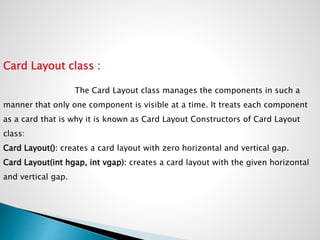
Card Layout class :
The Card Layout class manages the components in such a
manner that only one component is visible at a time. It treats each component
as a card that is why it is known as Card Layout Constructors of Card Layout
class:
Card Layout(): creates a card layout with zero horizontal and vertical gap.
Card Layout(int hgap, int vgap): creates a card layout with the given horizontal
and vertical gap.
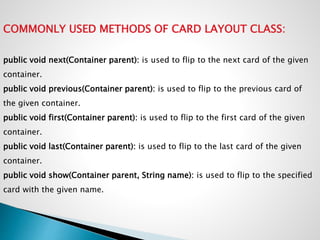
COMMONLY USED METHODS OF CARD LAYOUT CLASS:
public void next(Container parent): is used to flip to the next card of the given
container.
public void previous(Container parent): is used to flip to the previous card of
the given container.
public void first(Container parent): is used to flip to the first card of the given
container.
public void last(Container parent): is used to flip to the last card of the given
container.
public void show(Container parent, String name): is used to flip to the specified
card with the given name.
EXAMPLE PROGRAM
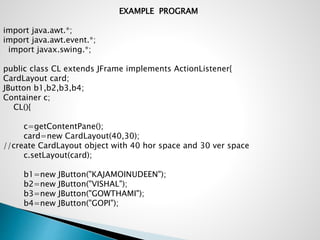
import java.awt.*;
import java.awt.event.*;
import javax.swing.*;
public class CL extends JFrame implements ActionListener{
CardLayout card;
JButton b1,b2,b3,b4;
Container c;
CL(){
c=getContentPane();
card=new CardLayout(40,30);
//create CardLayout object with 40 hor space and 30 ver space
c.setLayout(card);
b1=new JButton("KAJAMOINUDEEN");
b2=new JButton("VISHAL");
b3=new JButton("GOWTHAMI");
b4=new JButton("GOPI");
b1.addActionListener(this);
b2.addActionListener(this);
b3.addActionListener(this);
b4.addActionListener(this);
c.add("a",b1);c.add("b",b2);c.add("c",b3);c.add("d",b4);
}
public void actionPerformed(ActionEvent e) {
card.next(c);
}
public static void main(String[] args) {
CardLayoutExample cl=new CardLayoutExample();
cl.setSize(400,400);
cl.setVisible(true);
cl.setDefaultCloseOperation(EXIT_ON_CLOSE);
}
}
2. EXAMPLE PROGRAM
import java.awt.*;
import java.awt.event.*;
import javax.swing.*;
public class SwingLayoutDemo {
private JFrame mainFrame;
private JLabel headerLabel;
private JLabel statusLabel;
private JPanel controlPanel;
private JLabel msglabel;
public SwingLayoutDemo(){
prepareGUI();
}
public static void main(String[] args){
SwingLayoutDemo swingLayoutDemo = new SwingLayoutDemo();
swingLayoutDemo.showCardLayoutDemo();
}
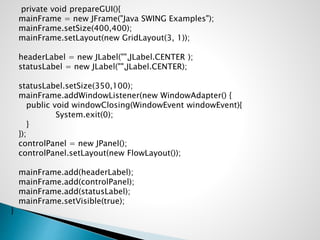
private void prepareGUI(){
mainFrame = new JFrame("Java SWING Examples");
mainFrame.setSize(400,400);
mainFrame.setLayout(new GridLayout(3, 1));
headerLabel = new JLabel("",JLabel.CENTER );
statusLabel = new JLabel("",JLabel.CENTER);
statusLabel.setSize(350,100);
mainFrame.addWindowListener(new WindowAdapter() {
public void windowClosing(WindowEvent windowEvent){
System.exit(0);
}
});
controlPanel = new JPanel();
controlPanel.setLayout(new FlowLayout());
mainFrame.add(headerLabel);
mainFrame.add(controlPanel);
mainFrame.add(statusLabel);
mainFrame.setVisible(true);
}
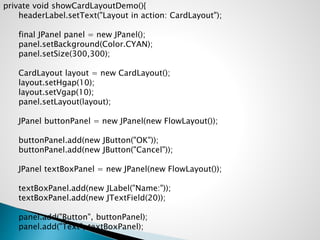
private void showCardLayoutDemo(){
headerLabel.setText("Layout in action: CardLayout");
final JPanel panel = new JPanel();
panel.setBackground(Color.CYAN);
panel.setSize(300,300);
CardLayout layout = new CardLayout();
layout.setHgap(10);
layout.setVgap(10);
panel.setLayout(layout);
JPanel buttonPanel = new JPanel(new FlowLayout());
buttonPanel.add(new JButton("OK"));
buttonPanel.add(new JButton("Cancel"));
JPanel textBoxPanel = new JPanel(new FlowLayout());
textBoxPanel.add(new JLabel("Name:"));
textBoxPanel.add(new JTextField(20));
panel.add("Button", buttonPanel);
panel.add("Text", textBoxPanel);
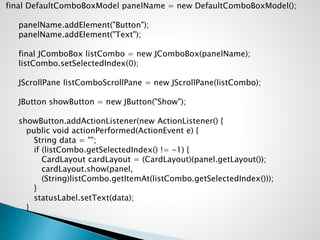
final DefaultComboBoxModel panelName = new DefaultComboBoxModel();
panelName.addElement("Button");
panelName.addElement("Text");
final JComboBox listCombo = new JComboBox(panelName);
listCombo.setSelectedIndex(0);
JScrollPane listComboScrollPane = new JScrollPane(listCombo);
JButton showButton = new JButton("Show");
showButton.addActionListener(new ActionListener() {
public void actionPerformed(ActionEvent e) {
String data = "";
if (listCombo.getSelectedIndex() != -1) {
CardLayout cardLayout = (CardLayout)(panel.getLayout());
cardLayout.show(panel,
(String)listCombo.getItemAt(listCombo.getSelectedIndex()));
}
statusLabel.setText(data);
}
});
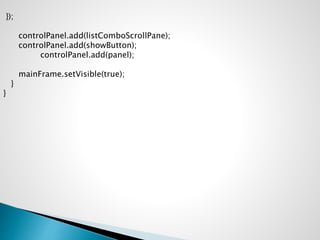
controlPanel.add(listComboScrollPane);
controlPanel.add(showButton);
controlPanel.add(panel);
mainFrame.setVisible(true);
}
}

Ccard Layout

  • 1.
     CARD LAYOUT PRESENTED: H.KAJAMOINUDEEN MCA..,
  • 2.
    Card Layout class: The Card Layout class manages the components in such a manner that only one component is visible at a time. It treats each component as a card that is why it is known as Card Layout Constructors of Card Layout class: Card Layout(): creates a card layout with zero horizontal and vertical gap. Card Layout(int hgap, int vgap): creates a card layout with the given horizontal and vertical gap.
  • 3.
    COMMONLY USED METHODSOF CARD LAYOUT CLASS: public void next(Container parent): is used to flip to the next card of the given container. public void previous(Container parent): is used to flip to the previous card of the given container. public void first(Container parent): is used to flip to the first card of the given container. public void last(Container parent): is used to flip to the last card of the given container. public void show(Container parent, String name): is used to flip to the specified card with the given name.
  • 4.
    EXAMPLE PROGRAM import java.awt.*; importjava.awt.event.*; import javax.swing.*; public class CL extends JFrame implements ActionListener{ CardLayout card; JButton b1,b2,b3,b4; Container c; CL(){ c=getContentPane(); card=new CardLayout(40,30); //create CardLayout object with 40 hor space and 30 ver space c.setLayout(card); b1=new JButton("KAJAMOINUDEEN"); b2=new JButton("VISHAL"); b3=new JButton("GOWTHAMI"); b4=new JButton("GOPI");
  • 5.
    b1.addActionListener(this); b2.addActionListener(this); b3.addActionListener(this); b4.addActionListener(this); c.add("a",b1);c.add("b",b2);c.add("c",b3);c.add("d",b4); } public void actionPerformed(ActionEvente) { card.next(c); } public static void main(String[] args) { CardLayoutExample cl=new CardLayoutExample(); cl.setSize(400,400); cl.setVisible(true); cl.setDefaultCloseOperation(EXIT_ON_CLOSE); } }
  • 6.
    2. EXAMPLE PROGRAM importjava.awt.*; import java.awt.event.*; import javax.swing.*; public class SwingLayoutDemo { private JFrame mainFrame; private JLabel headerLabel; private JLabel statusLabel; private JPanel controlPanel; private JLabel msglabel; public SwingLayoutDemo(){ prepareGUI(); } public static void main(String[] args){ SwingLayoutDemo swingLayoutDemo = new SwingLayoutDemo(); swingLayoutDemo.showCardLayoutDemo(); }
  • 7.
    private void prepareGUI(){ mainFrame= new JFrame("Java SWING Examples"); mainFrame.setSize(400,400); mainFrame.setLayout(new GridLayout(3, 1)); headerLabel = new JLabel("",JLabel.CENTER ); statusLabel = new JLabel("",JLabel.CENTER); statusLabel.setSize(350,100); mainFrame.addWindowListener(new WindowAdapter() { public void windowClosing(WindowEvent windowEvent){ System.exit(0); } }); controlPanel = new JPanel(); controlPanel.setLayout(new FlowLayout()); mainFrame.add(headerLabel); mainFrame.add(controlPanel); mainFrame.add(statusLabel); mainFrame.setVisible(true); }
  • 8.
    private void showCardLayoutDemo(){ headerLabel.setText("Layoutin action: CardLayout"); final JPanel panel = new JPanel(); panel.setBackground(Color.CYAN); panel.setSize(300,300); CardLayout layout = new CardLayout(); layout.setHgap(10); layout.setVgap(10); panel.setLayout(layout); JPanel buttonPanel = new JPanel(new FlowLayout()); buttonPanel.add(new JButton("OK")); buttonPanel.add(new JButton("Cancel")); JPanel textBoxPanel = new JPanel(new FlowLayout()); textBoxPanel.add(new JLabel("Name:")); textBoxPanel.add(new JTextField(20)); panel.add("Button", buttonPanel); panel.add("Text", textBoxPanel);
  • 9.
    final DefaultComboBoxModel panelName= new DefaultComboBoxModel(); panelName.addElement("Button"); panelName.addElement("Text"); final JComboBox listCombo = new JComboBox(panelName); listCombo.setSelectedIndex(0); JScrollPane listComboScrollPane = new JScrollPane(listCombo); JButton showButton = new JButton("Show"); showButton.addActionListener(new ActionListener() { public void actionPerformed(ActionEvent e) { String data = ""; if (listCombo.getSelectedIndex() != -1) { CardLayout cardLayout = (CardLayout)(panel.getLayout()); cardLayout.show(panel, (String)listCombo.getItemAt(listCombo.getSelectedIndex())); } statusLabel.setText(data); }
  • 10.