JAVA CARD AND FLOW LAYOUT
SUBMITTED TO:
XYZ
(Assistant Professor)
(Department of Computer Science and Engineering)
SUBMITTED BY:
TABLE OF CONTENT
• What is Java CardLayout
• Methods of CardLayout
• Example of CardLayout
• Java flow Layout
• Constructors of FlowLayout class
JAVA CARD LAYOUT
The CardLayout class manages the components in such a way that only one component is visible
at a time. It treats each component as a card in the container. Only one card is visible at a time,
and the container acts as a stack of cards. The first component added to a CardLayout object is the
visible component when the container is first displayed.
Constructors of CardLayout Class:
1.CardLayout(): creates a card layout with zero horizontal and vertical gap.
2.CardLayout(int hgap, int vgap): creates a card layout with the given horizontal and vertical
Commonly Used Methods of CardLayout Class:
•public void next(Container parent): is used to flip to the next card of the given container.
•public void previous(Container parent): is used to flip to the previous card of the given
container.
•public void first(Container parent): is used to flip to the first card of the given container.
•public void last(Container parent): is used to flip to the last card of the given container.
•public void show(Container parent, String name): is used to flip to the specified card
with the given name.
Example of CardLayout Class Using Default Constructor:
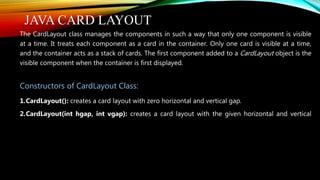
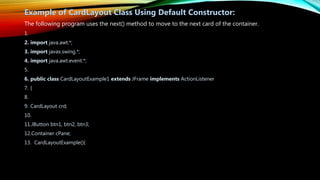
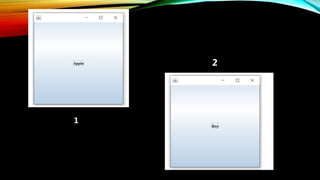
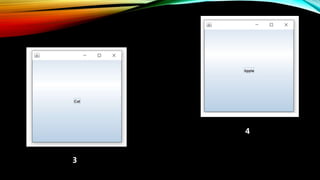
The following program uses the next() method to move to the next card of the container.
1.
2. import java.awt.*;
3. import javax.swing.*;
4. import java.awt.event.*;
5.
6. public class CardLayoutExample1 extends JFrame implements ActionListener
7. {
8.
9. CardLayout crd;
10.
11.JButton btn1, btn2, btn3;
12.Container cPane;
13. CardLayoutExample(){
16.cPane = getContentPane();
17.
18.
19.crd = new CardLayout();
20.
21.cPane.setLayout(crd);
22.
23.
24.btn1 = new JButton("Apple");
25.btn2 = new JButton("Boy");
26.btn3 = new JButton("Cat");
27.
28.
29.btn1.addActionListener(this);
30.btn2.addActionListener(this);
31.btn3.addActionListener(this);
34.cPane.add("a", btn1);
35.cPane.add("b", btn2);
36.cPane.add("c", btn3);
37.}
38.public void actionPerformed(ActionEvent e)
39.{
40.
41.crd.next(cPane);
42.}
43.
44.
45.public static void main(String argvs[])
46.{
47.CardLayoutExample1 crdl = new CardLayoutExample1();
48.
49.
50.crdl.setSize(300, 300);
51.crdl.setVisible(true);
52.crdl.setDefaultCloseOperation(EXIT_ON_CLOSE);
53.}
54.}
1
2
3
4
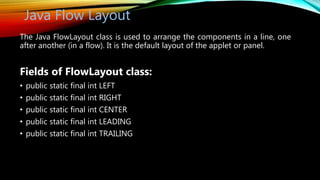
Java Flow Layout
The Java FlowLayout class is used to arrange the components in a line, one
after another (in a flow). It is the default layout of the applet or panel.
Fields of FlowLayout class:
• public static final int LEFT
• public static final int RIGHT
• public static final int CENTER
• public static final int LEADING
• public static final int TRAILING
Constructors of FlowLayout class:
• FlowLayout(): creates a flow layout with centered alignment and a default 5 unit
horizontal and vertical gap.
• Ex:- FlowLayout fl = new FlowLayout();
• FlowLayout(int align): creates a flow layout with the given alignment and a default
5 unit horizontal and vertical gap.
• Ex:- FlowLayout fl = new FlowLayout(FlowLayout.Left);
• FlowLayout(int align, int hgap, int vgap): creates a flow layout with the given
alignment and the given horizontal and vertical gap.
• Ex:- FlowLayout fl = new FlowLayout(FlowLayout.Left,H30,V20);
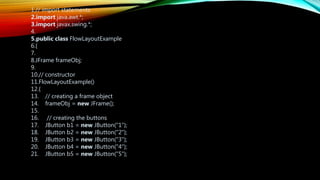
1.// import statements
2.import java.awt.*;
3.import javax.swing.*;
4.
5.public class FlowLayoutExample
6.{
7.
8.JFrame frameObj;
9.
10.// constructor
11.FlowLayoutExample()
12.{
13. // creating a frame object
14. frameObj = new JFrame();
15.
16. // creating the buttons
17. JButton b1 = new JButton("1");
18. JButton b2 = new JButton("2");
19. JButton b3 = new JButton("3");
20. JButton b4 = new JButton("4");
21. JButton b5 = new JButton("5");
22. JButton b6 = new JButton("6");
23. JButton b7 = new JButton("7");
24. JButton b8 = new JButton("8");
25. JButton b9 = new JButton("9");
26. JButton b10 = new JButton("10");
27.Public void init (){
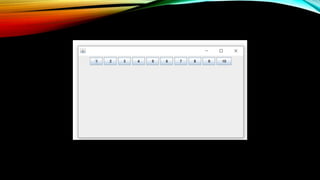
28.frameObj.setLayout(new FlowLayout());
29. // adding the buttons to frame
30. frameObj.add(b1); frameObj.add(b2); frameObj.add(b3); frameObj.add(b4);
31. frameObj.add(b5); frameObj.add(b6); frameObj.add(b7); frameObj.add(b8);
32. frameObj.add(b9); frameObj.add(b10);
33. // therefore, alignment is center
34.}
35. // main method
36.public static void main(String argvs[])
37.{
38. new FlowLayoutExample();
39.}
40.}
Java card and flow layout

Java card and flow layout

  • 1.
    JAVA CARD ANDFLOW LAYOUT SUBMITTED TO: XYZ (Assistant Professor) (Department of Computer Science and Engineering) SUBMITTED BY:
  • 2.
    TABLE OF CONTENT •What is Java CardLayout • Methods of CardLayout • Example of CardLayout • Java flow Layout • Constructors of FlowLayout class
  • 3.
    JAVA CARD LAYOUT TheCardLayout class manages the components in such a way that only one component is visible at a time. It treats each component as a card in the container. Only one card is visible at a time, and the container acts as a stack of cards. The first component added to a CardLayout object is the visible component when the container is first displayed. Constructors of CardLayout Class: 1.CardLayout(): creates a card layout with zero horizontal and vertical gap. 2.CardLayout(int hgap, int vgap): creates a card layout with the given horizontal and vertical
  • 4.
    Commonly Used Methodsof CardLayout Class: •public void next(Container parent): is used to flip to the next card of the given container. •public void previous(Container parent): is used to flip to the previous card of the given container. •public void first(Container parent): is used to flip to the first card of the given container. •public void last(Container parent): is used to flip to the last card of the given container. •public void show(Container parent, String name): is used to flip to the specified card with the given name.
  • 5.
    Example of CardLayoutClass Using Default Constructor: The following program uses the next() method to move to the next card of the container. 1. 2. import java.awt.*; 3. import javax.swing.*; 4. import java.awt.event.*; 5. 6. public class CardLayoutExample1 extends JFrame implements ActionListener 7. { 8. 9. CardLayout crd; 10. 11.JButton btn1, btn2, btn3; 12.Container cPane; 13. CardLayoutExample(){
  • 6.
    16.cPane = getContentPane(); 17. 18. 19.crd= new CardLayout(); 20. 21.cPane.setLayout(crd); 22. 23. 24.btn1 = new JButton("Apple"); 25.btn2 = new JButton("Boy"); 26.btn3 = new JButton("Cat"); 27. 28. 29.btn1.addActionListener(this); 30.btn2.addActionListener(this); 31.btn3.addActionListener(this); 34.cPane.add("a", btn1); 35.cPane.add("b", btn2); 36.cPane.add("c", btn3);
  • 7.
    37.} 38.public void actionPerformed(ActionEvente) 39.{ 40. 41.crd.next(cPane); 42.} 43. 44. 45.public static void main(String argvs[]) 46.{ 47.CardLayoutExample1 crdl = new CardLayoutExample1(); 48. 49. 50.crdl.setSize(300, 300); 51.crdl.setVisible(true); 52.crdl.setDefaultCloseOperation(EXIT_ON_CLOSE); 53.} 54.}
  • 8.
  • 9.
  • 10.
    Java Flow Layout TheJava FlowLayout class is used to arrange the components in a line, one after another (in a flow). It is the default layout of the applet or panel. Fields of FlowLayout class: • public static final int LEFT • public static final int RIGHT • public static final int CENTER • public static final int LEADING • public static final int TRAILING
  • 11.
    Constructors of FlowLayoutclass: • FlowLayout(): creates a flow layout with centered alignment and a default 5 unit horizontal and vertical gap. • Ex:- FlowLayout fl = new FlowLayout(); • FlowLayout(int align): creates a flow layout with the given alignment and a default 5 unit horizontal and vertical gap. • Ex:- FlowLayout fl = new FlowLayout(FlowLayout.Left); • FlowLayout(int align, int hgap, int vgap): creates a flow layout with the given alignment and the given horizontal and vertical gap. • Ex:- FlowLayout fl = new FlowLayout(FlowLayout.Left,H30,V20);
  • 12.
    1.// import statements 2.importjava.awt.*; 3.import javax.swing.*; 4. 5.public class FlowLayoutExample 6.{ 7. 8.JFrame frameObj; 9. 10.// constructor 11.FlowLayoutExample() 12.{ 13. // creating a frame object 14. frameObj = new JFrame(); 15. 16. // creating the buttons 17. JButton b1 = new JButton("1"); 18. JButton b2 = new JButton("2"); 19. JButton b3 = new JButton("3"); 20. JButton b4 = new JButton("4"); 21. JButton b5 = new JButton("5");
  • 13.
    22. JButton b6= new JButton("6"); 23. JButton b7 = new JButton("7"); 24. JButton b8 = new JButton("8"); 25. JButton b9 = new JButton("9"); 26. JButton b10 = new JButton("10"); 27.Public void init (){ 28.frameObj.setLayout(new FlowLayout()); 29. // adding the buttons to frame 30. frameObj.add(b1); frameObj.add(b2); frameObj.add(b3); frameObj.add(b4); 31. frameObj.add(b5); frameObj.add(b6); frameObj.add(b7); frameObj.add(b8); 32. frameObj.add(b9); frameObj.add(b10); 33. // therefore, alignment is center 34.} 35. // main method 36.public static void main(String argvs[]) 37.{ 38. new FlowLayoutExample(); 39.} 40.}