Case Study:
Using Terraform and
Packer to deploy go
applications to AWS
Patrick Bolduan
April 2017
Presenter CV
Patrick Bolduan
Digital Technology Department, Global Digital Division
ASICS Corporation
20 years building web applications (product/app dev/ops)
12 years involved platform operations (MTV/ASICS)
16 years in Japan
よろしく
ASICS Corporation
Global Headquarters: Kobe
Global presence: Over 240 countries
Digital Presence: Over 50 countries
Global Brands
ASICS, Onitsuka Tiger, ASICS Tiger, Haglöfs, Runkeeper
talk {
start = true
section {
name = “Business context for this talk”
Digital platform operations for
ASICS Corporation
Story time
2015
ASICS Corporation
Global Headquarters: Kobe
Global presence: Over 240 countries
Digital Presence: Over 50 countries
Global Brands
ASICS, Onitsuka Tiger, ASICS Tiger, Haglöfs, Runkeeper
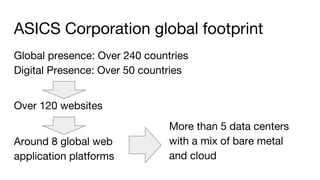
ASICS Corporation global footprint
Global presence: Over 240 countries
Digital Presence: Over 50 countries
Over 120 websites
Around 8 global web
application platforms
More than 5 data centers
with a mix of bare metal
and cloud
ASICS Corporation ops team
(all outsourced)
(to multiple vendors)
Outsourced ops challenges
● Ops practices inconsistent across vendors
● Missed opportunities for leveraging scale
● Performance varied from poor to just “OK”
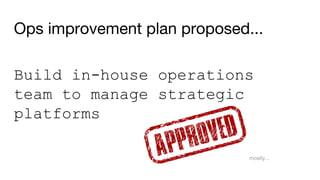
Ops improvement plan proposed...
Build in-house operations
team to manage strategic
platforms
mostly...
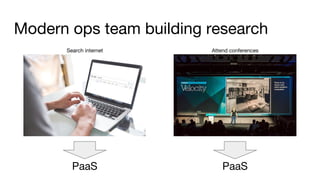
Modern ops team building research
PaaS PaaS
Search internet Attend conferences
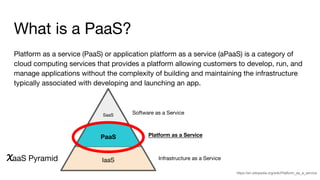
What is a PaaS?
Platform as a service (PaaS) or application platform as a service (aPaaS) is a category of
cloud computing services that provides a platform allowing customers to develop, run, and
manage applications without the complexity of building and maintaining the infrastructure
typically associated with developing and launching an app.
https://en.wikipedia.org/wiki/Platform_as_a_service
IaaS
PaaS
SaaS Software as a Service
Platform as a Service
Infrastructure as a ServiceXaaS Pyramid
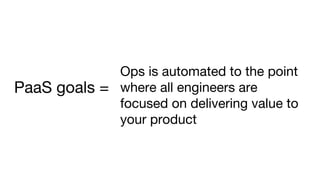
Ops is automated to the point
where all engineers are
focused on delivering value to
your product
PaaS goals =
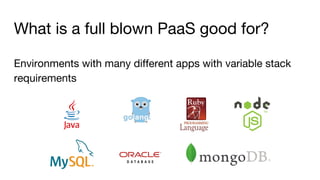
What is a full blown PaaS good for?
Environments with many different apps with variable stack
requirements
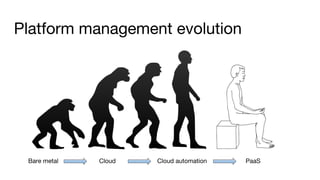
Platform management evolution
Bare metal Cloud Cloud automation PaaS
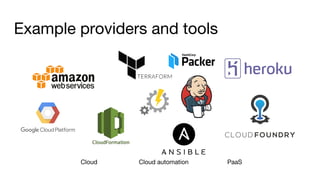
Example providers and tools
Cloud Cloud automation PaaS
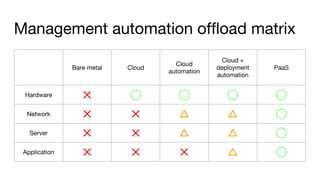
Management automation offload matrix
Bare metal Cloud
Cloud
automation
Cloud +
deployment
automation
PaaS
Hardware ✕ ◯ ◯ ◯ ◯
Network ✕ ✕ △ △ ◯
Server ✕ ✕ △ △ ◯
Application ✕ ✕ ✕ △ ◯
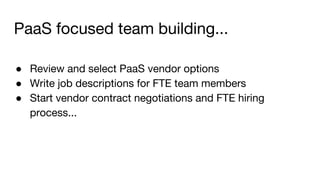
PaaS focused team building...
● Review and select PaaS vendor options
● Write job descriptions for FTE team members
● Start vendor contract negotiations and FTE hiring
process...
2016
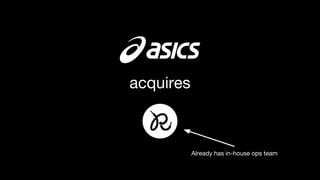
Already has in-house ops team
acquires
This is good news for ASICS ops
(but team planning needs to be reset)
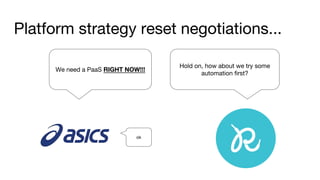
We need a PaaS RIGHT NOW!!!
Hold on, how about we try some
automation first?
Platform strategy reset negotiations...
ok
}
section {
name = “Case study: automation with Terraform and Packer”
Walk before you run
Initial project: automation for a
single web app
Initial project: app stack
● Cloud infrastructure: AWS
● Infrastructure automation: Terraform
● Deploy automation: Packer
● The app: QOR – golang CMS
Project: https://getqor.com
Github: https://github.com/qor/qor
Initial project: target end state
Project: https://getqor.com
Github: https://github.com/qor/qor
● Automated infrastructure management
● Manually triggered consistent app deploys
● Ability to create ad hoc full copies of production
Functional walkthrough
ASICS selected AWS as our
public cloud provider
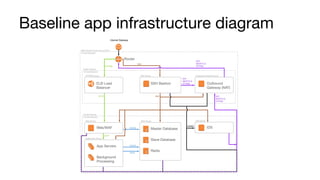
Baseline app infrastructure diagram
The repo
Terraform repo tree structure
|____base
|____env-dev
|____env-production
|____env-[other envs...]
|____modules
| |____app_tier
| |____data_tier
| |____edge_tier
| |____network
|____packer
| |____application-sub-repo
Based on https://charity.wtf/2016/03/30/terraform-vpc-and-why-you-want-a-tfstate-file-per-env/
Terraform repo tree structure
|____base
|____env-dev
|____env-production
|____env-[other envs...]
|____modules
| |____app_tier
| |____data_tier
| |____edge_tier
| |____network
|____packer
| |____application-sub-repo
Shared infrastructure
configurations
Terraform repo tree structure
|____base
|____env-dev
|____env-production
|____env-[other envs...]
|____modules
| |____app_tier
| |____data_tier
| |____edge_tier
| |____network
|____packer
| |____application-sub-repo
Environment specific
variations
Terraform repo tree structure
|____base
|____env-dev
|____env-production
|____env-[other envs...]
|____modules
| |____app_tier
| |____data_tier
| |____edge_tier
| |____network
|____packer
| |____application-sub-repo
Application build
tools for all envs
Terraform repo tree structure
|____base
|____env-dev
|____env-production
|____env-[other envs...]
|____modules
| |____app_tier
| |____data_tier
| |____edge_tier
| |____network
|____packer
| |____application-sub-repo
Application
submodule
What is Terraform?
Terraform is a cloud management automation tool
Why was Terraform used in this case?
Terraform has robust cloud feature automation capabilities
and simple code structure
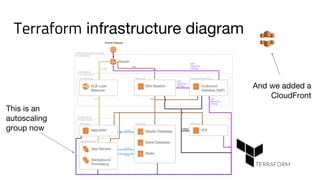
Terraform infrastructure diagram
This is an
autoscaling
group now
And we added a
CloudFront
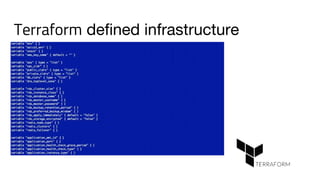
Terraform defined infrastructure
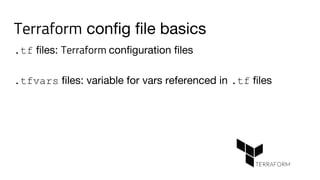
Terraform config file basics
.tf files: Terraform configuration files
.tfvars files: variable for vars referenced in .tf files
We will be looking at .tf files today
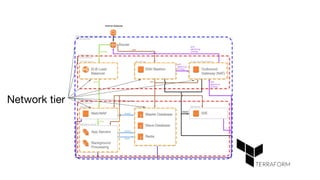
Network tier
|____base
|____env-dev
|____env-production
|____env-[other envs...]
|____modules
| |____app_tier
| |____data_tier
| |____edge_tier
| |____network
|____packer
| |____application-sub-repo
Network tier
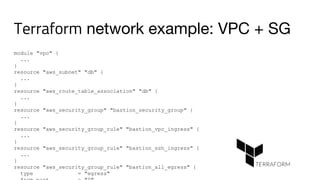
module "vpc" {
...
}
resource "aws_subnet" "db" {
...
}
resource "aws_route_table_association" "db" {
...
}
resource "aws_security_group" "bastion_security_group" {
...
}
resource "aws_security_group_rule" "bastion_vpc_ingress" {
...
}
resource "aws_security_group_rule" "bastion_ssh_ingress" {
...
}
resource "aws_security_group_rule" "bastion_all_egress" {
type = "egress"
Terraform network example: VPC + SG
Terraform network example: ssh bastion
resource "aws_security_group_rule" "bastion_ssh_ingress" {
type = "ingress"
from_port = "22"
to_port = "22"
protocol = "tcp"
cidr_blocks = ["0.0.0.0/0"]
security_group_id = "${aws_security_group.bastion_security_group.id}"
}
data "aws_ami" "bastion_ami" {
most_recent = true
filter {
name = "name"
values = ["${var.bastion_ami_name}"]
}
owners = ["amazon"]
}
resource "aws_instance" "bastion_instance" {
ami = "${data.aws_ami.bastion_ami.id}"
instance_type = "${var.bastion_instance_type}"
instance_initiated_shutdown_behavior = "terminate"
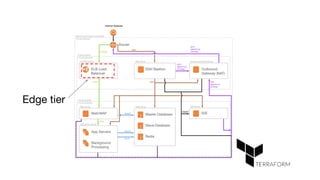
Edge tier
|____base
|____env-dev
|____env-production
|____env-[other envs...]
|____modules
| |____app_tier
| |____data_tier
| |____edge_tier
| |____network
|____packer
| |____application-sub-repo
Edge tier
Terraform edge example: ALB
resource "aws_alb" "application" {
name = "tf-lb-app-${var.stack}-${var.env}"
internal = false
security_groups = ["${aws_security_group.lb_app_security_group.id}"]
subnets = ["${var.lb_subnets}"]
idle_timeout = "${var.idle_timeout}"
access_logs {
bucket = "${var.log_bucket}"
prefix = "logs/alb"
}
tags {
Name = "tf-lb-app-${var.stack}-${var.env}"
}
depends_on = ["aws_s3_bucket_policy.log_bucket_policy"]
}
Terraform edge example: CloudFront
resource "aws_cloudfront_distribution" "static_cloudfront" {
origin {
domain_name = "${var.static_bucket}.s3.amazonaws.com"
origin_id = "${var.static_bucket}"
s3_origin_config {
origin_access_identity = "${aws_identity.static_cloudfront.cloudfront_path}"
}
}
enabled = true
comment = "Terraform-managed distribution for ${var.stack}-${var.env}"
default_root_object = "index.html"
aliases = ["${compact(concat(list(domain),var.static_dns_aliases))}"]
http_version = "http2"
price_class = "${var.cloudfront_price_class}"
default_cache_behavior {
allowed_methods = ["DELETE", "GET", "HEAD", "POST", "PUT"]
cached_methods = ["GET", "HEAD"]
target_origin_id = "${var.static_bucket}"
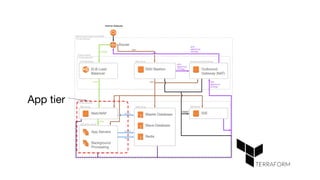
App tier
|____base
|____env-dev
|____env-production
|____env-[other envs...]
|____modules
| |____app_tier
| |____data_tier
| |____edge_tier
| |____network
|____packer
| |____application-sub-repo
App tier
Terraform app example: ASG
data "aws_ami" "application_ami" {
most_recent = true
filter {
name = "image-id"
values = ["${var.application_ami_id}"]
}
owners = ["self","amazon"]
}
resource "aws_autoscaling_group" "application_asg" {
name =
"tf-asg-app-${var.stack}-${var.env}-${aws_launch_configuration.application_lc.name}"
vpc_zone_identifier = ["${var.application_subnets}"]
min_size = "${var.app_min_size}"
max_size = "${var.app_max_size}"
desired_capacity = "${var.app_desired_capacity}"
wait_for_elb_capacity = "${var.app_desired_capacity}"
health_check_grace_period = "${var.health_check_grace_period}"
health_check_type = "${var.health_check_type}"
termination_policies = ["OldestLaunchConfiguration",
"ClosestToNextInstanceHour", "Default"]
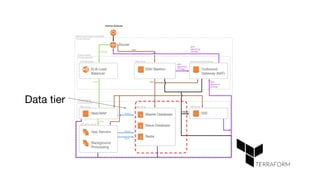
Data tier
|____base
|____env-dev
|____env-production
|____env-[other envs...]
|____modules
| |____app_tier
| |____data_tier
| |____edge_tier
| |____network
|____packer
| |____application-sub-repo
Data tier
Terraform data example: Aurora cluster
resource "aws_rds_cluster" "aurora" {
cluster_identifier = "tf-rds-${var.stack}-${var.env}"
availability_zones = "${var.azs}"
database_name = "${var.database_name}"
master_username = "${var.master_username}"
master_password = "${var.master_password}"
backup_retention_period = "${var.backup_retention_period}"
preferred_backup_window = "${var.preferred_backup_window}"
vpc_security_group_ids = ["${aws_security_group.aurora_sg.id}"]
storage_encrypted = "${var.storage_encrypted}"
kms_key_id = "${aws_kms_key.asics_digital_rds_key.arn}"
apply_immediately = "${var.apply_immediately}"
db_subnet_group_name = "${aws_db_subnet_group.aurora_subnet_group.id}"
db_cluster_parameter_group_name = "${aws_rds_cpg.aurora_cpg.id}"
lifecycle {
prevent_destroy = "true"
}
}
resource "aws_rds_cluster_instance" "aurora_instance" {
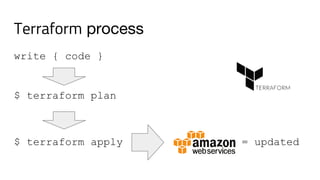
Terraform process
write { code }
$ terraform plan
$ terraform apply = updated
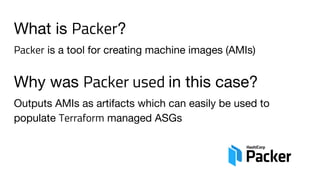
What is Packer?
Packer is a tool for creating machine images (AMIs)
Why was Packer used in this case?
Outputs AMIs as artifacts which can easily be used to
populate Terraform managed ASGs
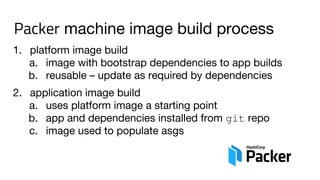
Packer machine image build process
1. platform image build
a. image with bootstrap dependencies to app builds
b. reusable – update as required by dependencies
2. application image build
a. uses platform image a starting point
b. app and dependencies installed from git repo
c. image used to populate asgs
Packer folder tree structure
|____application.json
|____bootstrap.sh
|____build.sh
|____deploy.pp
|____dev.yaml
|____[other dev].yaml
|____platform.json
|____prod.yaml
|____provision.pp
|____staging.yaml
|____application-sub-repo
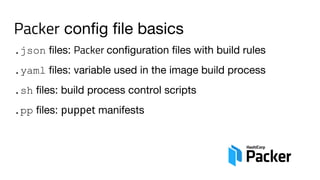
Packer config file basics
.json files: Packer configuration files with build rules
.yaml files: variable used in the image build process
.sh files: build process control scripts
.pp files: puppet manifests
|____application.json
|____bootstrap.sh
|____build.sh
|____deploy.pp
|____dev.yaml
|____[other dev].yaml
|____platform.json
|____prod.yaml
|____provision.pp
|____staging.yaml
|____application-sub-repo
Packer configs
Packer json example: app build config
{
"variables": {
"aws_default_region": "{{env `AWS_DEFAULT_REGION`}}",
"source_ami": "{{env `PLATFORM_AMI`}}",
"tier": "{{env `APP_TIER`}}"
},
"builders": [{
"type": "amazon-ebs",
"region": "{{user `aws_default_region`}}",
"source_ami": "{{user `source_ami`}}",
"instance_type": "m3.medium",
"ssh_username": "ec2-user",
"ami_name": "asics-cms-application-{{timestamp}}",
"tags": {
"Name": "asics-cms-{{user `tier`}}-application"
}
}],
"provisioners": [
{
"type": "file",
|____application.json
|____bootstrap.sh
|____build.sh
|____deploy.pp
|____dev.yaml
|____[other dev].yaml
|____platform.json
|____prod.yaml
|____provision.pp
|____staging.yaml
|____application-sub-repo
Packer var files
Packer yaml example: app build vars
app_config:
ASICS3_DB_NAME: "asics3"
ASICS3_DB_USER: "******"
ASICS3_DB_PASSWORD: "******"
ASICS3_DB_HOST: "[RDS cluster details].rds.amazonaws.com"
ASICS3_ENV: "dev"
QOR_AWS_REGION: "us-west-2"
QOR_AWS_ACCESS_KEY_ID: ""
QOR_AWS_SECRET_ACCESS_KEY: ""
S3Bucket: "[S3 bucket name]"
ASICS3_HTTP_ADDR: ":8000"
GOPATH: "/go"
QOR_AWS_CLOUD_FRONT_DOMAIN: "https://[cloudfront host].asics.digital"
|____application.json
|____bootstrap.sh
|____build.sh
|____deploy.pp
|____dev.yaml
|____[other dev].yaml
|____platform.json
|____prod.yaml
|____provision.pp
|____staging.yaml
|____application-sub-repo
Build scripts
Packer sh example: app build script
#!/bin/bash
set +e
echo "*** Configuring golang..."
source /etc/profile.d/golang.sh
echo "*** Sourcing env vars..."
source /go/.envrc
echo "*** Changing to source directory..."
cd /go/src/github.com/[repo root]/asics3
echo "*** Installing glide..."
go get github.com/Masterminds/glide
echo "*** Workaround for go4.org TLS issue..."
mkdir -p "/root/.glide/cache/src" &&
git clone https://github.com/camlistore/go4 
/root/.glide/cache/src/https-go4.org
|____application.json
|____bootstrap.sh
|____build.sh
|____deploy.pp
|____dev.yaml
|____[other dev].yaml
|____platform.json
|____prod.yaml
|____provision.pp
|____staging.yaml
|____application-sub-repo
puppet manifests
Packer pp example: puppet manifest
# install golang
#
$workspace = '/go'
$workdirs = [
"${workspace}/bin",
"${workspace}/pkg",
"${workspace}/src",
]
$app_user = 'app'
$hiera_datadir = '/etc/puppet/hieradata'
# we need augeas for later on
yumrepo { 'epel':
enabled => 1,
} ->
package { 'ruby-augeas':
ensure => 'present',
Packer platform build
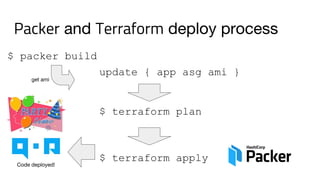
Packer and Terraform deploy process
update { app asg ami }
$ terraform plan
$ terraform apply
$ packer build
Code deployed!
get ami
2017
Operational metrics
Ops team manual task offload
● >90% ops tasks automated with Terraform
● Some manual task remain: SSL cert, production DNS
● Ongoing tasks: perf monitoring, architectures changes
App dev team impact
● Long* deploy process: packer build → terraform apply
● Easy to provision number of identical dev environments
● Reliable cross environment testing
*For this case Packer builds take between 15 and 20 minutes.
General impact
● 3 more apps have been automated after initial project
● Overall manual ops team tasks going down
● App teams have reliable access to test environments
● All environments are consistent across dev process
● General impact: very positive
Other critical resources
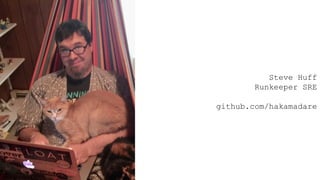
Steve Huff
Runkeeper SRE
github.com/hakamadare
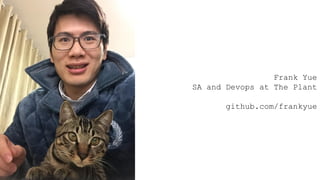
Frank Yue
SA and Devops at The Plant
github.com/frankyue
}
section {
name = “Next steps and takeaways”
Next steps for ASICS ops
● Automate deploy process with Jenkins and Ansible
● Trigger app deploys with git commits
● Apply learnings to other app environments
● Iterate and improve capabilities towards PaaS
Takeaways
● PaaS still relatively new as a concept
● Lots of opportunities to reduce burden of ops tasks
● “Ideal ops state” will depend on your needs
Honorable mention
● Have a plan for managing keys and secrets
}
Thank you
Questions?
Twitter: @ahq_p
Keybase: asicspatrick
Github: asicspatrick

Case Study: Using Terraform and Packer to deploy go applications to AWS

  • 1.
    Case Study: Using Terraformand Packer to deploy go applications to AWS Patrick Bolduan April 2017
  • 2.
    Presenter CV Patrick Bolduan DigitalTechnology Department, Global Digital Division ASICS Corporation 20 years building web applications (product/app dev/ops) 12 years involved platform operations (MTV/ASICS) 16 years in Japan よろしく
  • 3.
    ASICS Corporation Global Headquarters:Kobe Global presence: Over 240 countries Digital Presence: Over 50 countries Global Brands ASICS, Onitsuka Tiger, ASICS Tiger, Haglöfs, Runkeeper
  • 4.
  • 5.
    section { name =“Business context for this talk”
  • 6.
    Digital platform operationsfor ASICS Corporation
  • 7.
  • 8.
  • 9.
    ASICS Corporation Global Headquarters:Kobe Global presence: Over 240 countries Digital Presence: Over 50 countries Global Brands ASICS, Onitsuka Tiger, ASICS Tiger, Haglöfs, Runkeeper
  • 10.
    ASICS Corporation globalfootprint Global presence: Over 240 countries Digital Presence: Over 50 countries Over 120 websites Around 8 global web application platforms More than 5 data centers with a mix of bare metal and cloud
  • 11.
    ASICS Corporation opsteam (all outsourced) (to multiple vendors)
  • 12.
    Outsourced ops challenges ●Ops practices inconsistent across vendors ● Missed opportunities for leveraging scale ● Performance varied from poor to just “OK”
  • 13.
    Ops improvement planproposed... Build in-house operations team to manage strategic platforms mostly...
  • 14.
    Modern ops teambuilding research PaaS PaaS Search internet Attend conferences
  • 15.
    What is aPaaS? Platform as a service (PaaS) or application platform as a service (aPaaS) is a category of cloud computing services that provides a platform allowing customers to develop, run, and manage applications without the complexity of building and maintaining the infrastructure typically associated with developing and launching an app. https://en.wikipedia.org/wiki/Platform_as_a_service IaaS PaaS SaaS Software as a Service Platform as a Service Infrastructure as a ServiceXaaS Pyramid
  • 16.
    Ops is automatedto the point where all engineers are focused on delivering value to your product PaaS goals =
  • 17.
    What is afull blown PaaS good for? Environments with many different apps with variable stack requirements
  • 18.
    Platform management evolution Baremetal Cloud Cloud automation PaaS
  • 19.
    Example providers andtools Cloud Cloud automation PaaS
  • 20.
    Management automation offloadmatrix Bare metal Cloud Cloud automation Cloud + deployment automation PaaS Hardware ✕ ◯ ◯ ◯ ◯ Network ✕ ✕ △ △ ◯ Server ✕ ✕ △ △ ◯ Application ✕ ✕ ✕ △ ◯
  • 21.
    PaaS focused teambuilding... ● Review and select PaaS vendor options ● Write job descriptions for FTE team members ● Start vendor contract negotiations and FTE hiring process...
  • 22.
  • 23.
    Already has in-houseops team acquires
  • 24.
    This is goodnews for ASICS ops (but team planning needs to be reset)
  • 25.
    We need aPaaS RIGHT NOW!!! Hold on, how about we try some automation first? Platform strategy reset negotiations... ok
  • 26.
    } section { name =“Case study: automation with Terraform and Packer”
  • 27.
  • 28.
    Initial project: automationfor a single web app
  • 29.
    Initial project: appstack ● Cloud infrastructure: AWS ● Infrastructure automation: Terraform ● Deploy automation: Packer ● The app: QOR – golang CMS Project: https://getqor.com Github: https://github.com/qor/qor
  • 30.
    Initial project: targetend state Project: https://getqor.com Github: https://github.com/qor/qor ● Automated infrastructure management ● Manually triggered consistent app deploys ● Ability to create ad hoc full copies of production
  • 31.
  • 33.
    ASICS selected AWSas our public cloud provider
  • 34.
  • 36.
  • 37.
    Terraform repo treestructure |____base |____env-dev |____env-production |____env-[other envs...] |____modules | |____app_tier | |____data_tier | |____edge_tier | |____network |____packer | |____application-sub-repo Based on https://charity.wtf/2016/03/30/terraform-vpc-and-why-you-want-a-tfstate-file-per-env/
  • 38.
    Terraform repo treestructure |____base |____env-dev |____env-production |____env-[other envs...] |____modules | |____app_tier | |____data_tier | |____edge_tier | |____network |____packer | |____application-sub-repo Shared infrastructure configurations
  • 39.
    Terraform repo treestructure |____base |____env-dev |____env-production |____env-[other envs...] |____modules | |____app_tier | |____data_tier | |____edge_tier | |____network |____packer | |____application-sub-repo Environment specific variations
  • 40.
    Terraform repo treestructure |____base |____env-dev |____env-production |____env-[other envs...] |____modules | |____app_tier | |____data_tier | |____edge_tier | |____network |____packer | |____application-sub-repo Application build tools for all envs
  • 41.
    Terraform repo treestructure |____base |____env-dev |____env-production |____env-[other envs...] |____modules | |____app_tier | |____data_tier | |____edge_tier | |____network |____packer | |____application-sub-repo Application submodule
  • 43.
    What is Terraform? Terraformis a cloud management automation tool Why was Terraform used in this case? Terraform has robust cloud feature automation capabilities and simple code structure
  • 44.
    Terraform infrastructure diagram Thisis an autoscaling group now And we added a CloudFront
  • 45.
  • 46.
    Terraform config filebasics .tf files: Terraform configuration files .tfvars files: variable for vars referenced in .tf files
  • 47.
    We will belooking at .tf files today
  • 48.
  • 49.
    |____base |____env-dev |____env-production |____env-[other envs...] |____modules | |____app_tier ||____data_tier | |____edge_tier | |____network |____packer | |____application-sub-repo Network tier
  • 50.
    module "vpc" { ... } resource"aws_subnet" "db" { ... } resource "aws_route_table_association" "db" { ... } resource "aws_security_group" "bastion_security_group" { ... } resource "aws_security_group_rule" "bastion_vpc_ingress" { ... } resource "aws_security_group_rule" "bastion_ssh_ingress" { ... } resource "aws_security_group_rule" "bastion_all_egress" { type = "egress" Terraform network example: VPC + SG
  • 51.
    Terraform network example:ssh bastion resource "aws_security_group_rule" "bastion_ssh_ingress" { type = "ingress" from_port = "22" to_port = "22" protocol = "tcp" cidr_blocks = ["0.0.0.0/0"] security_group_id = "${aws_security_group.bastion_security_group.id}" } data "aws_ami" "bastion_ami" { most_recent = true filter { name = "name" values = ["${var.bastion_ami_name}"] } owners = ["amazon"] } resource "aws_instance" "bastion_instance" { ami = "${data.aws_ami.bastion_ami.id}" instance_type = "${var.bastion_instance_type}" instance_initiated_shutdown_behavior = "terminate"
  • 52.
  • 53.
    |____base |____env-dev |____env-production |____env-[other envs...] |____modules | |____app_tier ||____data_tier | |____edge_tier | |____network |____packer | |____application-sub-repo Edge tier
  • 54.
    Terraform edge example:ALB resource "aws_alb" "application" { name = "tf-lb-app-${var.stack}-${var.env}" internal = false security_groups = ["${aws_security_group.lb_app_security_group.id}"] subnets = ["${var.lb_subnets}"] idle_timeout = "${var.idle_timeout}" access_logs { bucket = "${var.log_bucket}" prefix = "logs/alb" } tags { Name = "tf-lb-app-${var.stack}-${var.env}" } depends_on = ["aws_s3_bucket_policy.log_bucket_policy"] }
  • 55.
    Terraform edge example:CloudFront resource "aws_cloudfront_distribution" "static_cloudfront" { origin { domain_name = "${var.static_bucket}.s3.amazonaws.com" origin_id = "${var.static_bucket}" s3_origin_config { origin_access_identity = "${aws_identity.static_cloudfront.cloudfront_path}" } } enabled = true comment = "Terraform-managed distribution for ${var.stack}-${var.env}" default_root_object = "index.html" aliases = ["${compact(concat(list(domain),var.static_dns_aliases))}"] http_version = "http2" price_class = "${var.cloudfront_price_class}" default_cache_behavior { allowed_methods = ["DELETE", "GET", "HEAD", "POST", "PUT"] cached_methods = ["GET", "HEAD"] target_origin_id = "${var.static_bucket}"
  • 56.
  • 57.
    |____base |____env-dev |____env-production |____env-[other envs...] |____modules | |____app_tier ||____data_tier | |____edge_tier | |____network |____packer | |____application-sub-repo App tier
  • 58.
    Terraform app example:ASG data "aws_ami" "application_ami" { most_recent = true filter { name = "image-id" values = ["${var.application_ami_id}"] } owners = ["self","amazon"] } resource "aws_autoscaling_group" "application_asg" { name = "tf-asg-app-${var.stack}-${var.env}-${aws_launch_configuration.application_lc.name}" vpc_zone_identifier = ["${var.application_subnets}"] min_size = "${var.app_min_size}" max_size = "${var.app_max_size}" desired_capacity = "${var.app_desired_capacity}" wait_for_elb_capacity = "${var.app_desired_capacity}" health_check_grace_period = "${var.health_check_grace_period}" health_check_type = "${var.health_check_type}" termination_policies = ["OldestLaunchConfiguration", "ClosestToNextInstanceHour", "Default"]
  • 59.
  • 60.
    |____base |____env-dev |____env-production |____env-[other envs...] |____modules | |____app_tier ||____data_tier | |____edge_tier | |____network |____packer | |____application-sub-repo Data tier
  • 61.
    Terraform data example:Aurora cluster resource "aws_rds_cluster" "aurora" { cluster_identifier = "tf-rds-${var.stack}-${var.env}" availability_zones = "${var.azs}" database_name = "${var.database_name}" master_username = "${var.master_username}" master_password = "${var.master_password}" backup_retention_period = "${var.backup_retention_period}" preferred_backup_window = "${var.preferred_backup_window}" vpc_security_group_ids = ["${aws_security_group.aurora_sg.id}"] storage_encrypted = "${var.storage_encrypted}" kms_key_id = "${aws_kms_key.asics_digital_rds_key.arn}" apply_immediately = "${var.apply_immediately}" db_subnet_group_name = "${aws_db_subnet_group.aurora_subnet_group.id}" db_cluster_parameter_group_name = "${aws_rds_cpg.aurora_cpg.id}" lifecycle { prevent_destroy = "true" } } resource "aws_rds_cluster_instance" "aurora_instance" {
  • 62.
    Terraform process write {code } $ terraform plan $ terraform apply = updated
  • 64.
    What is Packer? Packeris a tool for creating machine images (AMIs) Why was Packer used in this case? Outputs AMIs as artifacts which can easily be used to populate Terraform managed ASGs
  • 65.
    Packer machine imagebuild process 1. platform image build a. image with bootstrap dependencies to app builds b. reusable – update as required by dependencies 2. application image build a. uses platform image a starting point b. app and dependencies installed from git repo c. image used to populate asgs
  • 66.
    Packer folder treestructure |____application.json |____bootstrap.sh |____build.sh |____deploy.pp |____dev.yaml |____[other dev].yaml |____platform.json |____prod.yaml |____provision.pp |____staging.yaml |____application-sub-repo
  • 67.
    Packer config filebasics .json files: Packer configuration files with build rules .yaml files: variable used in the image build process .sh files: build process control scripts .pp files: puppet manifests
  • 68.
  • 69.
    Packer json example:app build config { "variables": { "aws_default_region": "{{env `AWS_DEFAULT_REGION`}}", "source_ami": "{{env `PLATFORM_AMI`}}", "tier": "{{env `APP_TIER`}}" }, "builders": [{ "type": "amazon-ebs", "region": "{{user `aws_default_region`}}", "source_ami": "{{user `source_ami`}}", "instance_type": "m3.medium", "ssh_username": "ec2-user", "ami_name": "asics-cms-application-{{timestamp}}", "tags": { "Name": "asics-cms-{{user `tier`}}-application" } }], "provisioners": [ { "type": "file",
  • 70.
  • 71.
    Packer yaml example:app build vars app_config: ASICS3_DB_NAME: "asics3" ASICS3_DB_USER: "******" ASICS3_DB_PASSWORD: "******" ASICS3_DB_HOST: "[RDS cluster details].rds.amazonaws.com" ASICS3_ENV: "dev" QOR_AWS_REGION: "us-west-2" QOR_AWS_ACCESS_KEY_ID: "" QOR_AWS_SECRET_ACCESS_KEY: "" S3Bucket: "[S3 bucket name]" ASICS3_HTTP_ADDR: ":8000" GOPATH: "/go" QOR_AWS_CLOUD_FRONT_DOMAIN: "https://[cloudfront host].asics.digital"
  • 72.
  • 73.
    Packer sh example:app build script #!/bin/bash set +e echo "*** Configuring golang..." source /etc/profile.d/golang.sh echo "*** Sourcing env vars..." source /go/.envrc echo "*** Changing to source directory..." cd /go/src/github.com/[repo root]/asics3 echo "*** Installing glide..." go get github.com/Masterminds/glide echo "*** Workaround for go4.org TLS issue..." mkdir -p "/root/.glide/cache/src" && git clone https://github.com/camlistore/go4 /root/.glide/cache/src/https-go4.org
  • 74.
  • 75.
    Packer pp example:puppet manifest # install golang # $workspace = '/go' $workdirs = [ "${workspace}/bin", "${workspace}/pkg", "${workspace}/src", ] $app_user = 'app' $hiera_datadir = '/etc/puppet/hieradata' # we need augeas for later on yumrepo { 'epel': enabled => 1, } -> package { 'ruby-augeas': ensure => 'present',
  • 76.
  • 77.
    Packer and Terraformdeploy process update { app asg ami } $ terraform plan $ terraform apply $ packer build Code deployed! get ami
  • 78.
  • 79.
  • 80.
    Ops team manualtask offload ● >90% ops tasks automated with Terraform ● Some manual task remain: SSL cert, production DNS ● Ongoing tasks: perf monitoring, architectures changes
  • 81.
    App dev teamimpact ● Long* deploy process: packer build → terraform apply ● Easy to provision number of identical dev environments ● Reliable cross environment testing *For this case Packer builds take between 15 and 20 minutes.
  • 82.
    General impact ● 3more apps have been automated after initial project ● Overall manual ops team tasks going down ● App teams have reliable access to test environments ● All environments are consistent across dev process ● General impact: very positive
  • 83.
  • 84.
  • 85.
    Frank Yue SA andDevops at The Plant github.com/frankyue
  • 86.
    } section { name =“Next steps and takeaways”
  • 87.
    Next steps forASICS ops ● Automate deploy process with Jenkins and Ansible ● Trigger app deploys with git commits ● Apply learnings to other app environments ● Iterate and improve capabilities towards PaaS
  • 88.
    Takeaways ● PaaS stillrelatively new as a concept ● Lots of opportunities to reduce burden of ops tasks ● “Ideal ops state” will depend on your needs
  • 89.
    Honorable mention ● Havea plan for managing keys and secrets
  • 90.
  • 91.
  • 92.