Career Portfolio
OF JOSHUA TOVAR
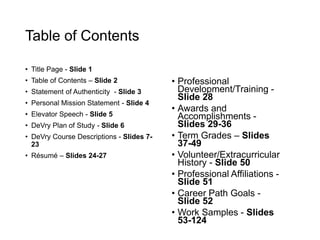
Table of Contents
• Title Page - Slide 1
• Table of Contents – Slide 2
• Statement of Authenticity - Slide 3
• Personal Mission Statement - Slide 4
• Elevator Speech - Slide 5
• DeVry Plan of Study - Slide 6
• DeVry Course Descriptions - Slides 7-
23
• Résumé – Slides 24-27
• Professional
Development/Training -
Slide 28
• Awards and
Accomplishments -
Slides 29-36
• Term Grades – Slides
37-49
• Volunteer/Extracurricular
History - Slide 50
• Professional Affiliations -
Slide 51
• Career Path Goals -
Slide 52
• Work Samples - Slides
53-124
Statement of Authenticity
• Hello. This portfolio belongs to Joshua Tovar: the author of all
material / content contained within this presentation. This is my
original work and honest representation of my skills and
abilities.
Personal Mission Statement
• I want to be able to leave my mark on this generation. When it
is all said and done, I want everyone who knew me to
remember me for me: original, different, and unique.
• I am an avid critical thinker who loves putting my IT knowledge
and creativity to the test. I will do everything in my power to
analyze the business requirements, dissect its pieces, and find
the appropriate solution.
Elevator Speech
• Hello. My name is Joshua
Tovar. I graduated from
DeVry University on June
29th, 2014 earning a Bachelor
of Science degree in
Computer Information
Systems. During my time as
an IT Support Technician (as
well as an IT Intern), I gained
experience in troubleshooting
Apple hardware and system
related issues; a skill that’s
placed alongside my
knowledge of Microsoft
operating systems.
• I am still starting out in my IT
career. I feel there is still so
much out there to learn and
grasp from. I would love to be
able to use the skills that I’ve
learned at DeVry University
as well as my time as an IT
Support Technician to help
your company in any way,
shape, or form imaginable!
DeVry Plan of Study
Current Class(es)
Completed all of my undergraduate studies.
Graduated on June 29th, 2014.
DeVry Course Descriptions: System
Concepts Courses
CIS115 – Logic & Design:
This course introduces basics of programming logic, as well as algorithm design and
development, including constants, variables, expressions, arrays, files and control
structures for sequential, iterative and decision processing. Students learn to design
and document program specifications using tools such as flowcharts, structure charts
and pseudocode. Program specification validation through desk-checking and walk-
throughs is also covered.
Visual Logic is the primary software tool used.
DeVry Course Descriptions: System
Concepts Courses
CIS206 – Architecture & Operating Systems with Lab:
This course introduces operating system concepts by examining various operating
systems such as Windows, UNIX and Linux. Students also study typical desktop
system hardware, architecture and configuration.
DeVry Course Descriptions: System
Concepts Courses
CIS246 – Connectivity with Lab:
This course covers fundamentals of data communication and computer networking,
including the Open Systems Interconnection (OSI) model. Network architecture and
configurations such as local area networks (LANs) and wide area networks (WANs)
are addressed.
DeVry Course Descriptions: System
Concepts Courses
COMP100 – Computer Applications for Business with Lab:
This course introduces basic concepts and principles underlying personal productivity
tools widely used in business such as word processors, spreadsheets, email and web
browsers. Students also learn basic computer terminology and concepts. Hands-on
exercises provide students with experience in use of PCs and current personal
productivity tools.
DeVry Course Descriptions: System
Concepts Courses
SEC280 – Principles of Information Systems Security:
This course provides a broad overview of information systems security in
organizations. Topics include security concepts and mechanisms; mandatory and
discretionary controls; basic cryptography and its applications; intrusion detection and
prevention; information systems assurance; and anonymity and privacy. Various
types of controls used in information systems, as well as security issues surrounding
the computer and computer-generated data, are also addressed.
DeVry Course Descriptions:
Programming Courses
CIS170B – Programming with Lab:
This course introduces basics of coding programs from program specifications,
including use of an integrated development environment (IDE), language syntax, as
well as debugger tools and techniques. Students also learn to develop programs that
manipulate simple data structures such as arrays, as well as different types of files.
C# is the primary programming language used.
Visual Studio is the primary software tool used.
DeVry Course Descriptions:
Programming Courses
CIS247A – Object-Oriented Programming with Lab:
This course introduces object-oriented programming concepts including objects,
classes, encapsulation, polymorphism and inheritance. Using an object-oriented
programming language, students design, code, test and document business-oriented
programs.
C# is the primary programming language used.
Visual Studio is the primary software tool used.
DeVry Course Descriptions:
Programming Courses
CIS355A – Business Application Programming with Lab:
Building on analysis, programming and database skills developed in previous
courses, this course introduces fundamental principles and concepts of developing
programs that support typical business processing activities and needs such as
transaction processing and report generation. Students develop business-oriented
programs that deal with error handling, data validation and file handling.
Java is the primary programming language used.
Eclipse is the primary software tool used.
DeVry Course Descriptions: Systems
Development Courses
CIS321 – Structured Analysis and Design:
This course introduces the systems analysis and design process using information
systems methodologies and techniques to analyze business activities and solve
problems. Students learn to identify, define and document business problems and
then develop information system models to solve them.
Visio is the primary software tool used.
DeVry Course Descriptions: Systems
Development Courses
CIS336 – Introduction to Database with Lab:
This course introduces concepts and methods fundamental to database development
and use including data analysis and modeling, as well as structured query language
(SQL). Students also explore basic functions and features of a database
management system (DBMS), with emphasis on the relational model.
Oracle is the primary software tool used.
DeVry Course Descriptions: Systems
Development Courses
CIS339 – Object-Oriented Analysis and Design:
Building on the foundation established in CIS321, students explore techniques, tools
and methods used in the object-oriented approach to developing applications.
Students learn how to model and design system requirements using tools such as
Unified Modeling Language (UML), use cases and scenarios, class diagrams and
sequence diagrams.
Visio is the primary software tool used.
DeVry Course Descriptions: Web
Courses
CIS363A – Web Interface Design w/ Lab:
This course introduces web design and basic programming techniques for
developing effective and useful websites. Coursework emphasizes website structure
and navigational models, practical and legal usability considerations, and
performance factors related to using various types of media and tools such as
hypertext markup language (HTML), cascading style sheets (CSS), dynamic HTML
(DHTML) and scripting.
Dreamweaver is the primary software tool used.
DeVry Course Descriptions: Web
Courses
CIS407A - Web Application Development with Lab:
This course builds on analysis, interface design and programming skills learned in
previous courses and introduces basics of design, coding and scripting, as well as
database connectivity for web-based applications. A programming language such as
Visual Basic.Net, C++.Net or C#.Net is used to implement web-based applications.
ASP.Net using C# via Visual Studio is the primary software tool used.
DeVry Course Descriptions: Web
Courses
SEC370 - Web Security:
This course examines issues involved in protecting web-based applications from
external threats while safeguarding customer privacy and accessibility. Students
examine external threats to an organization’s systems and develop strategies that
support systems and business goals.
DeVry Course Descriptions: Web
Courses
WEB320 - Principles of E-Commerce:
This course provides comprehensive coverage of a broad spectrum of e-commerce
principles, models and practices. Topics include Internet marketing and retailing;
payment and order fulfillment; and various e-commerce models such as business-
to-business (B2B) and consumer-to-consumer (C2C).
DeVry Course Descriptions: Web
Courses
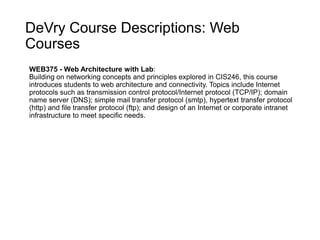
WEB375 - Web Architecture with Lab:
Building on networking concepts and principles explored in CIS246, this course
introduces students to web architecture and connectivity. Topics include Internet
protocols such as transmission control protocol/Internet protocol (TCP/IP); domain
name server (DNS); simple mail transfer protocol (smtp), hypertext transfer protocol
(http) and file transfer protocol (ftp); and design of an Internet or corporate intranet
infrastructure to meet specific needs.
DeVry Course Descriptions: Web
Courses
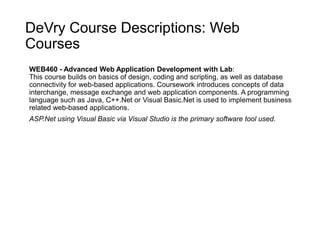
WEB460 - Advanced Web Application Development with Lab:
This course builds on basics of design, coding and scripting, as well as database
connectivity for web-based applications. Coursework introduces concepts of data
interchange, message exchange and web application components. A programming
language such as Java, C++.Net or Visual Basic.Net is used to implement business
related web-based applications.
ASP.Net using Visual Basic via Visual Studio is the primary software tool used.
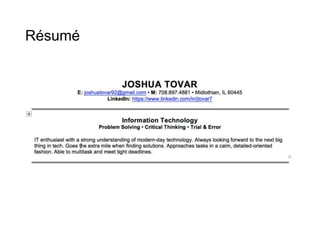
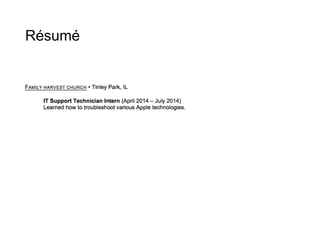
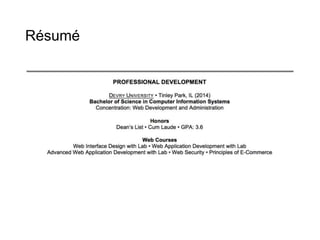
Résumé
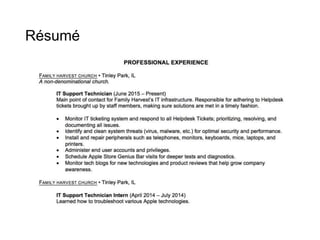
Résumé
Résumé
Résumé
Professional Development / Training
• Information will be available soon.
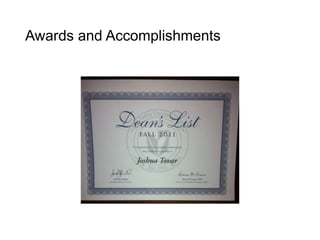
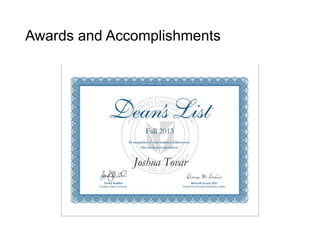
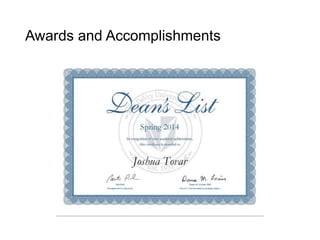
Awards and Accomplishments
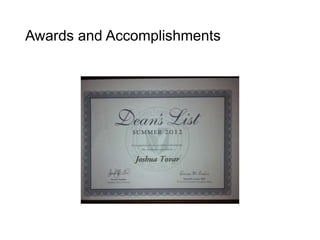
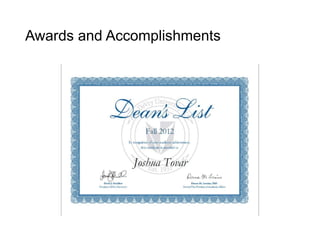
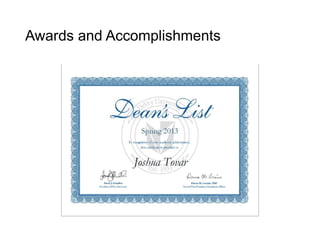
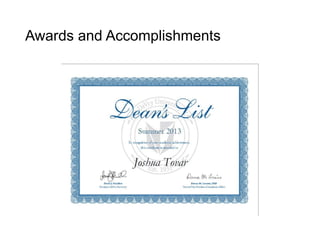
• Cumulative GPA: 3.6
• Scholastic Honors: Cum Laude
• Maintained 4.0 GPA via Junior and Senior year
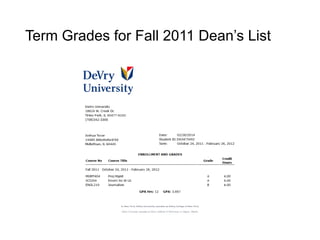
Term Grades for Fall 2011 Dean’s List
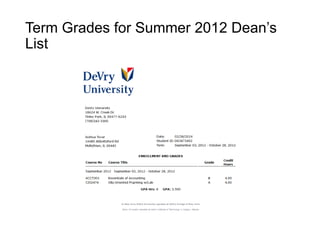
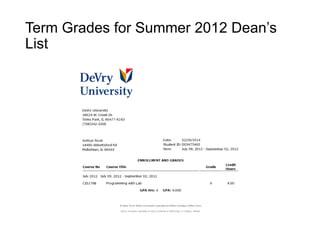
Term Grades for Summer 2012 Dean’s
List
Term Grades for Summer 2012 Dean’s
List
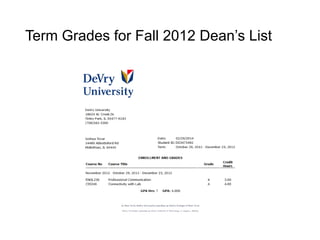
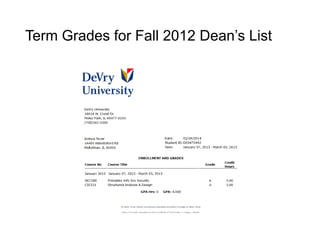
Term Grades for Fall 2012 Dean’s List
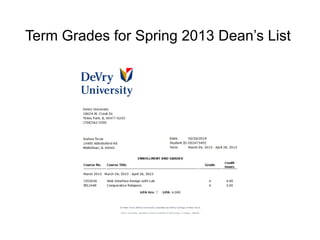
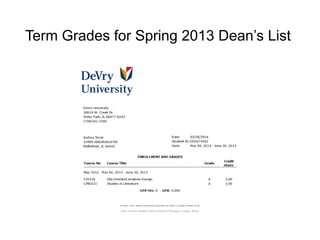
Term Grades for Spring 2013 Dean’s List
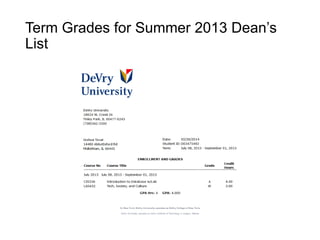
Term Grades for Summer 2013 Dean’s
List
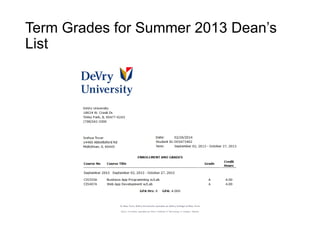
Term Grades for Summer 2013 Dean’s
List
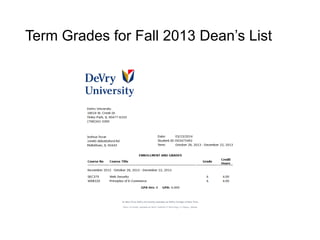
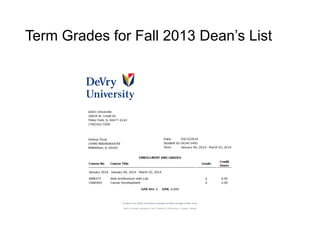
Term Grades for Fall 2013 Dean’s List
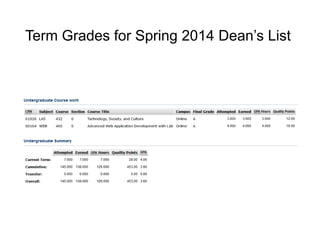
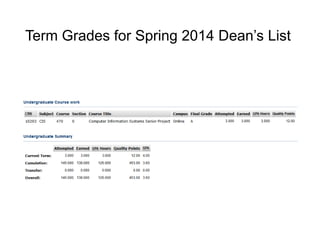
Term Grades for Spring 2014 Dean’s List
Volunteer History / Extra Curricular
Activities
• Attended Journey Classes at Family Harvest where we
developed personal habits, discovered unique gifts, and
cultivated a greater relationship with faith and foundation.
Professional Affiliations
• Information will be available soon.
Career Path / Goals
• My one-year goal consists of
obtaining an Entry-Level
position in the field of IT. I’m
just starting out, so I want to
get a feel for what’s out there.
• My two-year goal is to
improve and enhance my IT
skills. By now, I should have
an idea of what particular
field of IT I want to be in.
• My five-year goal is to have
mastered and honed my IT
concepts to a tee, ultimately
being able to teach the next
generation of IT enthusiasts.
Work Samples
• The following slides are samples of the work that I’ve
completed throughout my time at DeVry University. Of them,
you’ll see screenshots of websites that I created, programs that
I’ve coded, and the like. Zoom in on some of the screenshots if
need be, or view in Full-Screen mode.
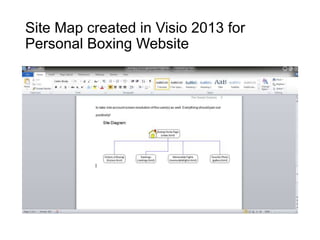
Site Map created in Visio 2013 for
Personal Boxing Website
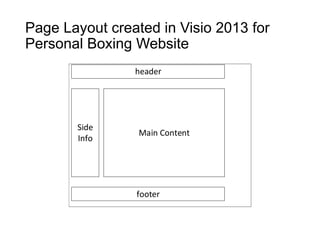
Page Layout created in Visio 2013 for
Personal Boxing Website
header
Side
Info
Main Content
footer
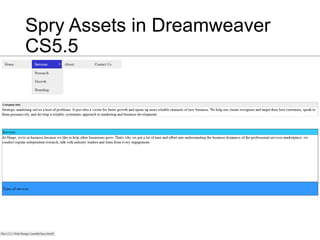
Spry Assets in Dreamweaver
CS5.5
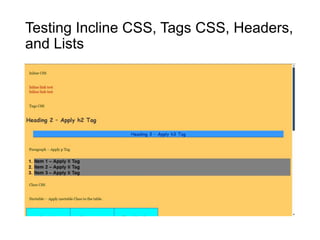
Testing Incline CSS, Tags CSS, Headers,
and Lists
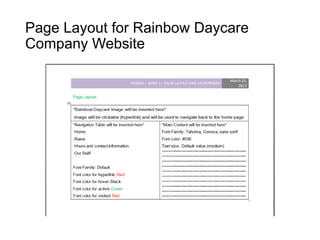
Page Layout for Rainbow Daycare
Company Website
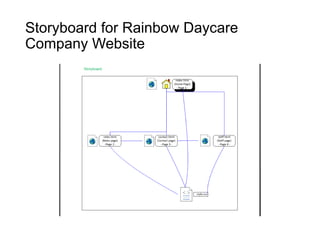
Storyboard for Rainbow Daycare
Company Website
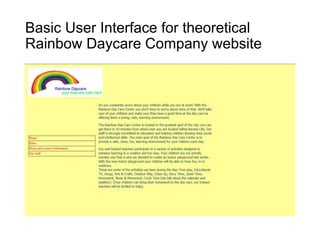
Basic User Interface for theoretical
Rainbow Daycare Company website
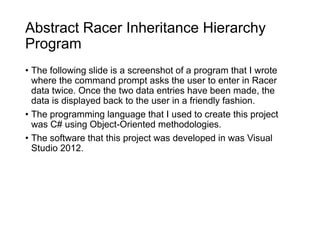
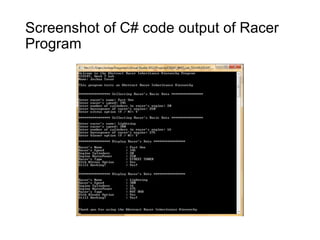
Abstract Racer Inheritance Hierarchy
Program
• The following slide is a screenshot of a program that I wrote
where the command prompt asks the user to enter in Racer
data twice. Once the two data entries have been made, the
data is displayed back to the user in a friendly fashion.
• The programming language that I used to create this project
was C# using Object-Oriented methodologies.
• The software that this project was developed in was Visual
Studio 2012.
Screenshot of C# code output of Racer
Program
Password Program
• The following screenshots are of a GUI (Graphical User
Interface) program that I created entitled “Password Program”.
The purpose of the program was to provide and demonstrate
data validation for entering passwords.
• If the password that was entered matches the second
verification entry, a pop up box will come up saying that the 2
passwords match. If the passwords don’t match, a pop up box
will come up saying that the passwords do not match.
• The programming language used was C# and the software that
the project was developed in was Visual Studio 2012.
Password Program
• Upon launch of the program,
the user is first prompted to
this Window:
Password Program
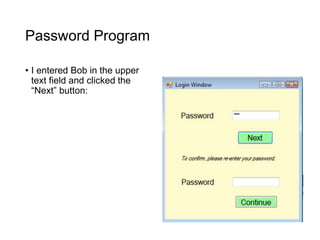
• I entered Bob in the upper
text field and clicked the
“Next” button:
Password Program
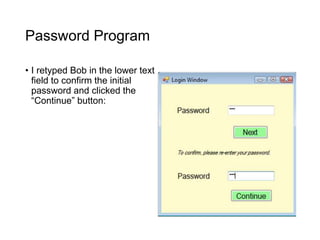
• I retyped Bob in the lower text
field to confirm the initial
password and clicked the
“Continue” button:
Password Program
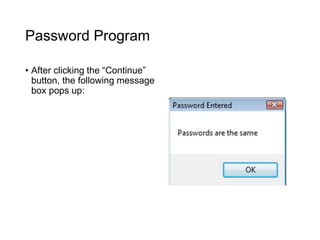
• After clicking the “Continue”
button, the following message
box pops up:
Password Program
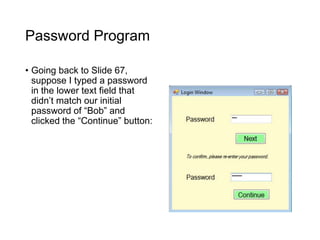
• Going back to Slide 67,
suppose I typed a password
in the lower text field that
didn’t match our initial
password of “Bob” and
clicked the “Continue” button:
Password Program
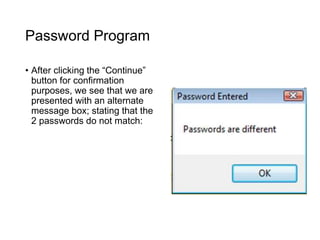
• After clicking the “Continue”
button for confirmation
purposes, we see that we are
presented with an alternate
message box; stating that the
2 passwords do not match:
Capstone Course Presentation
• The URL below will lead you to my group’s final Capstone
Course presentation.
• The topic that we presented on was Nanorobotics.
• The course was LAS432 – Tech, Society, and Culture.
• https://join.adobeconnect.com/p42g142p79b/?launcher=false&f
csContent=true&pbMode=normal
Senior Project Presentation
• The URL below will lead you to my group's final Senior Project
presentation.
• The case study that we presented on was Taylor’s Professional
Services.
• The course was CIS470 - Computer Information Systems
Senior Project.
• https://join.adobeconnect.com/p3afycq16hv/?launcher=false&fc
sContent=true&pbMode=normal
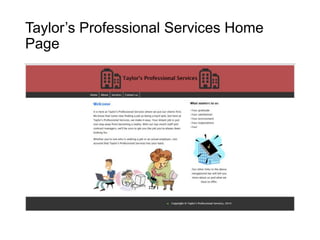
Taylor’s Professional Services
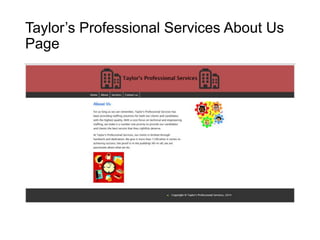
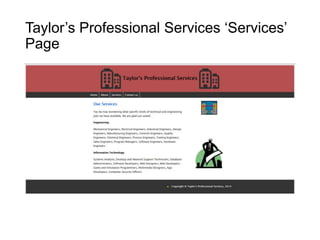
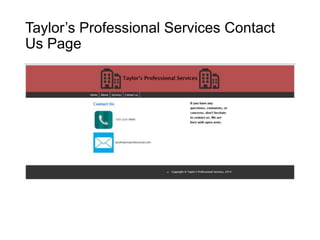
• In the slides that follow, you will see screenshots of the first
rendition of the User Interface that I created for my group’s
Senior Project.
• Taylor’s Professional Services is a technical and engineering
staffing service. When a TPS client company determines that it
will need a temporary professional or scientific employee, it
issues a staffing request against the contract it previously
negotiated with TPS.
• The web languages utilized were HTML and CSS, and the
I.D.E. used was Dreamweaver CS5.5.
Taylor’s Professional Services Home
Page
Taylor’s Professional Services About Us
Page
Taylor’s Professional Services ‘Services’
Page
Taylor’s Professional Services Contact
Us Page
Taylor’s Professional Services Front-End
Design Forms
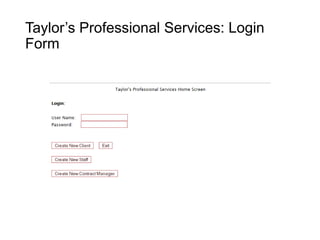
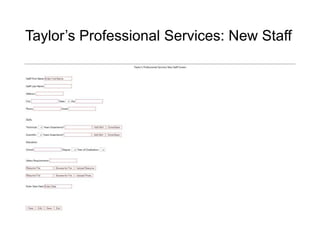
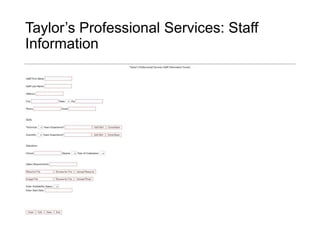
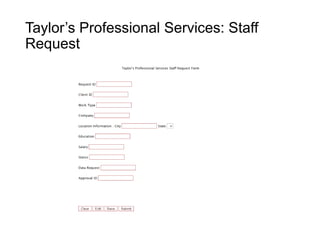
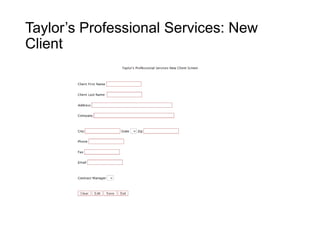
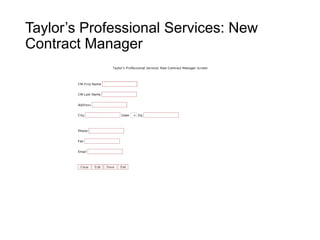
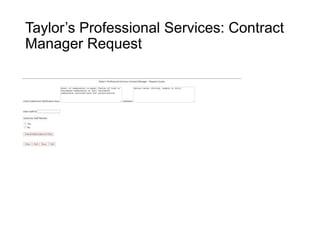
• In the slides that follow, you will see screenshots of renditions
of Front-End Design Web Forms that I designed for my group’s
Senior Project.
• For color, I used the same shade of red that I used via the
header of the U.I. (i.e., Slides 74-77) for the font and the
buttons: #b55050
• The web languages utilized were HTML and CSS, and the
I.D.E. used was Dreamweaver CS5.5.
Taylor’s Professional Services: Login
Form
Taylor’s Professional Services: New Staff
Taylor’s Professional Services: Staff
Information
Taylor’s Professional Services: Staff
Request
Taylor’s Professional Services: New
Client
Taylor’s Professional Services: New
Contract Manager
Taylor’s Professional Services: Contract
Manager Request
Basic ASP Page and Cross-Page
Posting
• In this lab, I developed credit card information checkout pages
of an online book store. Such pages are necessary in any
developed e-commerce application. In these pages, users are
required to enter information related to their payment and
shipping options.
• There are two pages to this website. On the first page, the user
provides personal, payment, and shipping information for the
order submitted. The second page summarizes the user's input
and requires the user to confirm.
• The programming language used was Visual Basic, the
framework used was ASP.NET, and the I.D.E. used was Visual
Studio 2012.
Basic ASP Page and Cross-Page
Posting
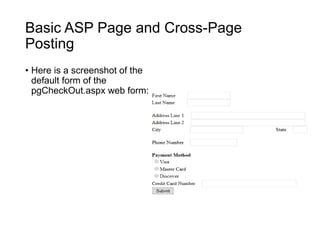
• Here is a screenshot of the
default form of the
pgCheckOut.aspx web form:
Basic ASP Page and Cross-Page
Posting
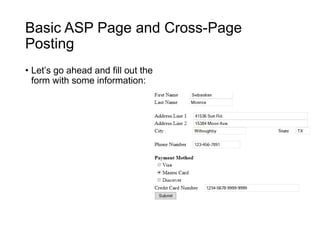
• Let’s go ahead and fill out the
form with some information:
Basic ASP Page and Cross-Page
Posting
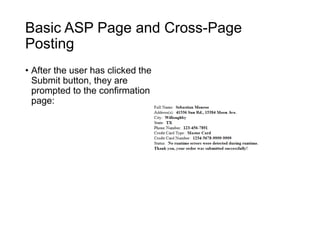
• After the user has clicked the
Submit button, they are
prompted to the confirmation
page:
Creating a Business Layer Class to Send
an E-mail
• In this Web Application, step-by-step procedures will be shown
on how to create a class and implement an e-mail send feature
in ASP.NET
• The programming language used was Visual Basic, the
framework used was ASP.NET, and the I.D.E. used was Visual
Studio 2012.
Creating a Business Layer Class to Send
an E-mail
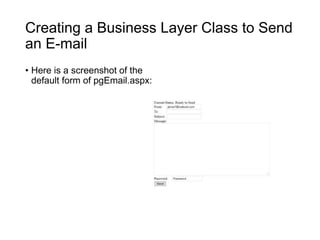
• Here is a screenshot of the
default form of pgEmail.aspx:
Creating a Business Layer Class to Send
an E-mail
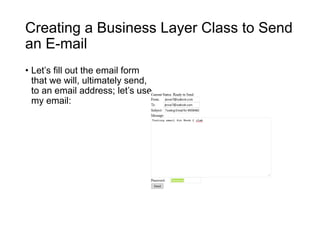
• Let’s fill out the email form
that we will, ultimately send,
to an email address; let’s use
my email:
Creating a Business Layer Class to Send
an E-mail
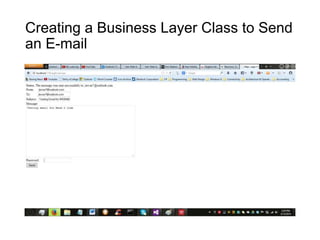
• In the slide to follow, you will see a screenshot of the form filled
out.
• Once we have finished filling out the email form and clicked the
“Send” button, we notice the status (lblStatus) has changed;
notifying us that the message was sent successfully to my
email address.
Creating a Business Layer Class to Send
an E-mail
Creating a Business Layer Class to Send
an E-mail
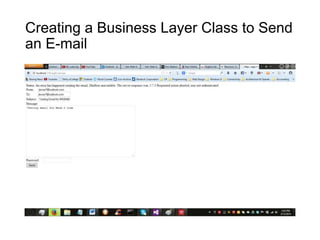
• Now, let’s check my email in Outlook.com to see if the email
was sent successfully.
• We see that, indeed, I am notified by my web email address:
Creating a Business Layer Class to Send
an E-mail
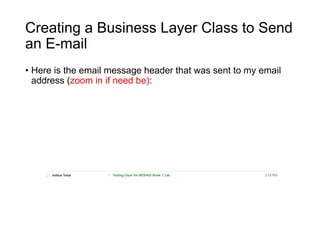
• Here is the email message header that was sent to my email
address (zoom in if need be):
Creating a Business Layer Class to Send
an E-mail
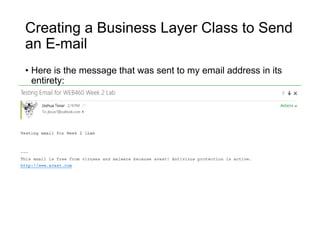
• Here is the message that was sent to my email address in its
entirety:
Creating a Business Layer Class to Send
an E-mail
• In the slide to follow, let’s go ahead and attempt an additional
procedure for validation purposes.
• You will be presented with a screenshot of the user attempting
to send an email. This time around, however, let’s say they
forgot to enter in his / her password when clicking the “Send”
button (i.e., they left the password text field blank); the following
error message appears as our current status (lblStatus)
Creating a Business Layer Class to Send
an E-mail
Create and Use a Web Service
• In this web application, I connect to a Microsoft Access
Database to look up an employee address by last name. In
order to accomplish this, I created a Web Service to call from
our application and implement a Find feature.
• The programming language used was Visual Basic, the
framework used was ASP.NET, and the I.D.E. used was Visual
Studio 2012.
Create and Use a Web Service
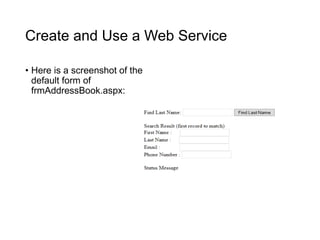
• Here is a screenshot of the
default form of
frmAddressBook.aspx:
Create and Use a Web Service
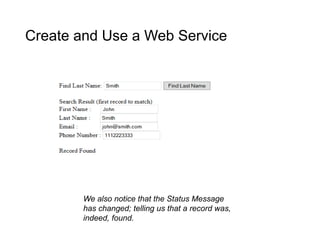
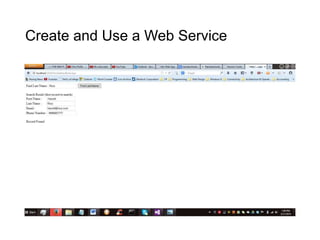
• Given the names in the database, when we enter the last name
“Smith” and click the Find Last Name button, the following
Search Results come up in the slide to follow.
Create and Use a Web Service
We also notice that the Status Message
has changed; telling us that a record was,
indeed, found.
Create and Use a Web Service
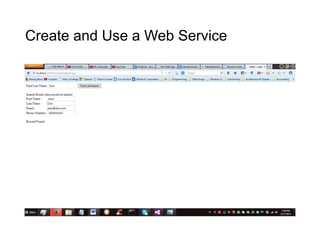
• Given the names in the database, when we enter the last name
“Doe” and click the Find Last Name button, the following
Search Results come up in the slide to follow.
Create and Use a Web Service
• Given the names in the database, when we enter the last name
“Rice” and click the Find Last Name button, the following
Search Results come up in the slide to follow.
Create and Use a Web Service
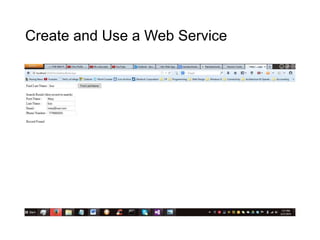
• Given the names in the database, when we enter the last name
“Sue” and click the Find Last Name button, the following Search
Results come up in the slide to follow.
Create and Use a Web Service
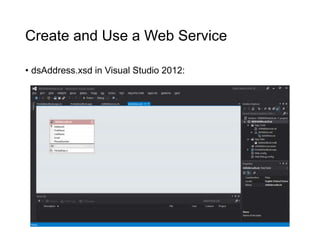
• dsAddress.xsd in Visual Studio 2012:
Create and Use a Web Service
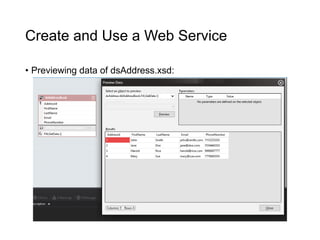
• Previewing data of dsAddress.xsd:
Create and Use a Web Service
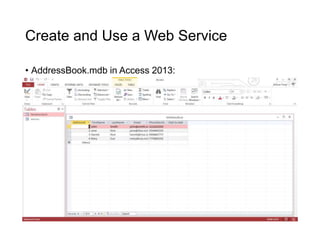
• AddressBook.mdb in Access 2013:
Using XML and Dataset Object
• In this project, I created a Web Application that was able to read
and manipulate XML data using the DataSet object.
• The programming language used was Visual Basic, the
framework used was ASP.NET, and the I.D.E. used was Visual
Studio 2012.
Using XML and Dataset Object
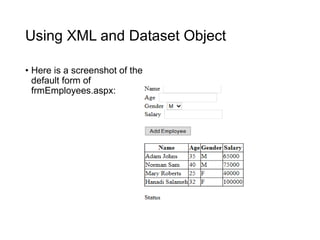
• Here is a screenshot of the
default form of
frmEmployees.aspx:
Using XML and Dataset Object
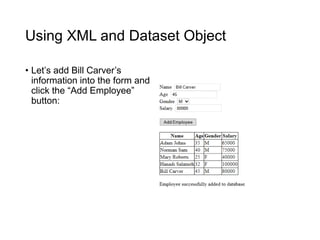
• Let’s add Bill Carver’s
information into the form and
click the “Add Employee”
button:
Using XML and Dataset Object
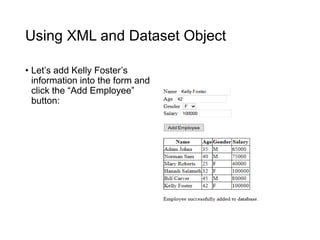
• Let’s add Kelly Foster’s
information into the form and
click the “Add Employee”
button:
Using XML and Dataset Object
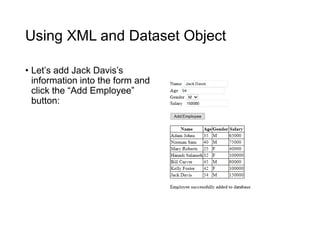
• Let’s add Jack Davis’s
information into the form and
click the “Add Employee”
button:
Web Application That Modifies Database
Records
• In this Web Application, I gave the user the ability to search for
a user record based on the AddressID and then update address
information in the database. Any changes made by the user will
be automatically displayed in the GridView on the form.
• The programming language used was Visual Basic, the
framework used was ASP.NET, and the I.D.E. used was Visual
Studio 2012.
Web Application That Modifies Database
Records
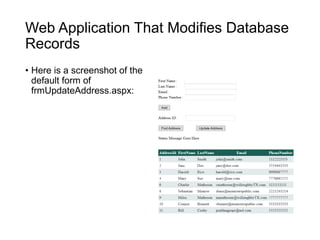
• Here is a screenshot of the
default form of
frmUpdateAddress.aspx:
Web Application That Modifies Database
Records
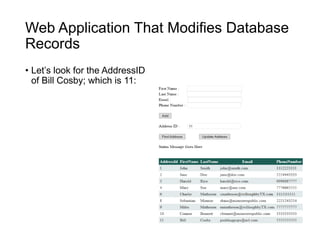
• Let’s look for the AddressID
of Bill Cosby; which is 11:
Web Application That Modifies Database
Records
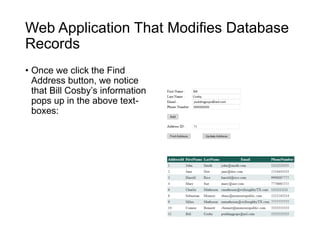
• Once we click the Find
Address button, we notice
that Bill Cosby’s information
pops up in the above text-
boxes:
Web Application That Modifies Database
Records
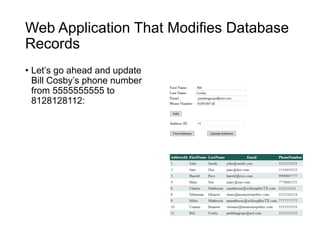
• Let’s go ahead and update
Bill Cosby’s phone number
from 5555555555 to
8128128112:
Web Application That Modifies Database
Records
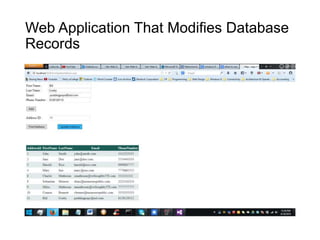
• In the slide to follow, we will notice that when we click the
Update Address button, we will see in the Phone Number
section of the GridView that Bill Cosby’s phone number did,
indeed, change from 5555555555 to 8128128112
Web Application That Modifies Database
Records

Career Portfolio

  • 1.
  • 2.
    Table of Contents •Title Page - Slide 1 • Table of Contents – Slide 2 • Statement of Authenticity - Slide 3 • Personal Mission Statement - Slide 4 • Elevator Speech - Slide 5 • DeVry Plan of Study - Slide 6 • DeVry Course Descriptions - Slides 7- 23 • Résumé – Slides 24-27 • Professional Development/Training - Slide 28 • Awards and Accomplishments - Slides 29-36 • Term Grades – Slides 37-49 • Volunteer/Extracurricular History - Slide 50 • Professional Affiliations - Slide 51 • Career Path Goals - Slide 52 • Work Samples - Slides 53-124
  • 3.
    Statement of Authenticity •Hello. This portfolio belongs to Joshua Tovar: the author of all material / content contained within this presentation. This is my original work and honest representation of my skills and abilities.
  • 4.
    Personal Mission Statement •I want to be able to leave my mark on this generation. When it is all said and done, I want everyone who knew me to remember me for me: original, different, and unique. • I am an avid critical thinker who loves putting my IT knowledge and creativity to the test. I will do everything in my power to analyze the business requirements, dissect its pieces, and find the appropriate solution.
  • 5.
    Elevator Speech • Hello.My name is Joshua Tovar. I graduated from DeVry University on June 29th, 2014 earning a Bachelor of Science degree in Computer Information Systems. During my time as an IT Support Technician (as well as an IT Intern), I gained experience in troubleshooting Apple hardware and system related issues; a skill that’s placed alongside my knowledge of Microsoft operating systems. • I am still starting out in my IT career. I feel there is still so much out there to learn and grasp from. I would love to be able to use the skills that I’ve learned at DeVry University as well as my time as an IT Support Technician to help your company in any way, shape, or form imaginable!
  • 6.
    DeVry Plan ofStudy Current Class(es) Completed all of my undergraduate studies. Graduated on June 29th, 2014.
  • 7.
    DeVry Course Descriptions:System Concepts Courses CIS115 – Logic & Design: This course introduces basics of programming logic, as well as algorithm design and development, including constants, variables, expressions, arrays, files and control structures for sequential, iterative and decision processing. Students learn to design and document program specifications using tools such as flowcharts, structure charts and pseudocode. Program specification validation through desk-checking and walk- throughs is also covered. Visual Logic is the primary software tool used.
  • 8.
    DeVry Course Descriptions:System Concepts Courses CIS206 – Architecture & Operating Systems with Lab: This course introduces operating system concepts by examining various operating systems such as Windows, UNIX and Linux. Students also study typical desktop system hardware, architecture and configuration.
  • 9.
    DeVry Course Descriptions:System Concepts Courses CIS246 – Connectivity with Lab: This course covers fundamentals of data communication and computer networking, including the Open Systems Interconnection (OSI) model. Network architecture and configurations such as local area networks (LANs) and wide area networks (WANs) are addressed.
  • 10.
    DeVry Course Descriptions:System Concepts Courses COMP100 – Computer Applications for Business with Lab: This course introduces basic concepts and principles underlying personal productivity tools widely used in business such as word processors, spreadsheets, email and web browsers. Students also learn basic computer terminology and concepts. Hands-on exercises provide students with experience in use of PCs and current personal productivity tools.
  • 11.
    DeVry Course Descriptions:System Concepts Courses SEC280 – Principles of Information Systems Security: This course provides a broad overview of information systems security in organizations. Topics include security concepts and mechanisms; mandatory and discretionary controls; basic cryptography and its applications; intrusion detection and prevention; information systems assurance; and anonymity and privacy. Various types of controls used in information systems, as well as security issues surrounding the computer and computer-generated data, are also addressed.
  • 12.
    DeVry Course Descriptions: ProgrammingCourses CIS170B – Programming with Lab: This course introduces basics of coding programs from program specifications, including use of an integrated development environment (IDE), language syntax, as well as debugger tools and techniques. Students also learn to develop programs that manipulate simple data structures such as arrays, as well as different types of files. C# is the primary programming language used. Visual Studio is the primary software tool used.
  • 13.
    DeVry Course Descriptions: ProgrammingCourses CIS247A – Object-Oriented Programming with Lab: This course introduces object-oriented programming concepts including objects, classes, encapsulation, polymorphism and inheritance. Using an object-oriented programming language, students design, code, test and document business-oriented programs. C# is the primary programming language used. Visual Studio is the primary software tool used.
  • 14.
    DeVry Course Descriptions: ProgrammingCourses CIS355A – Business Application Programming with Lab: Building on analysis, programming and database skills developed in previous courses, this course introduces fundamental principles and concepts of developing programs that support typical business processing activities and needs such as transaction processing and report generation. Students develop business-oriented programs that deal with error handling, data validation and file handling. Java is the primary programming language used. Eclipse is the primary software tool used.
  • 15.
    DeVry Course Descriptions:Systems Development Courses CIS321 – Structured Analysis and Design: This course introduces the systems analysis and design process using information systems methodologies and techniques to analyze business activities and solve problems. Students learn to identify, define and document business problems and then develop information system models to solve them. Visio is the primary software tool used.
  • 16.
    DeVry Course Descriptions:Systems Development Courses CIS336 – Introduction to Database with Lab: This course introduces concepts and methods fundamental to database development and use including data analysis and modeling, as well as structured query language (SQL). Students also explore basic functions and features of a database management system (DBMS), with emphasis on the relational model. Oracle is the primary software tool used.
  • 17.
    DeVry Course Descriptions:Systems Development Courses CIS339 – Object-Oriented Analysis and Design: Building on the foundation established in CIS321, students explore techniques, tools and methods used in the object-oriented approach to developing applications. Students learn how to model and design system requirements using tools such as Unified Modeling Language (UML), use cases and scenarios, class diagrams and sequence diagrams. Visio is the primary software tool used.
  • 18.
    DeVry Course Descriptions:Web Courses CIS363A – Web Interface Design w/ Lab: This course introduces web design and basic programming techniques for developing effective and useful websites. Coursework emphasizes website structure and navigational models, practical and legal usability considerations, and performance factors related to using various types of media and tools such as hypertext markup language (HTML), cascading style sheets (CSS), dynamic HTML (DHTML) and scripting. Dreamweaver is the primary software tool used.
  • 19.
    DeVry Course Descriptions:Web Courses CIS407A - Web Application Development with Lab: This course builds on analysis, interface design and programming skills learned in previous courses and introduces basics of design, coding and scripting, as well as database connectivity for web-based applications. A programming language such as Visual Basic.Net, C++.Net or C#.Net is used to implement web-based applications. ASP.Net using C# via Visual Studio is the primary software tool used.
  • 20.
    DeVry Course Descriptions:Web Courses SEC370 - Web Security: This course examines issues involved in protecting web-based applications from external threats while safeguarding customer privacy and accessibility. Students examine external threats to an organization’s systems and develop strategies that support systems and business goals.
  • 21.
    DeVry Course Descriptions:Web Courses WEB320 - Principles of E-Commerce: This course provides comprehensive coverage of a broad spectrum of e-commerce principles, models and practices. Topics include Internet marketing and retailing; payment and order fulfillment; and various e-commerce models such as business- to-business (B2B) and consumer-to-consumer (C2C).
  • 22.
    DeVry Course Descriptions:Web Courses WEB375 - Web Architecture with Lab: Building on networking concepts and principles explored in CIS246, this course introduces students to web architecture and connectivity. Topics include Internet protocols such as transmission control protocol/Internet protocol (TCP/IP); domain name server (DNS); simple mail transfer protocol (smtp), hypertext transfer protocol (http) and file transfer protocol (ftp); and design of an Internet or corporate intranet infrastructure to meet specific needs.
  • 23.
    DeVry Course Descriptions:Web Courses WEB460 - Advanced Web Application Development with Lab: This course builds on basics of design, coding and scripting, as well as database connectivity for web-based applications. Coursework introduces concepts of data interchange, message exchange and web application components. A programming language such as Java, C++.Net or Visual Basic.Net is used to implement business related web-based applications. ASP.Net using Visual Basic via Visual Studio is the primary software tool used.
  • 24.
  • 25.
  • 26.
  • 27.
  • 28.
    Professional Development /Training • Information will be available soon.
  • 29.
  • 30.
  • 31.
  • 32.
  • 33.
  • 34.
  • 35.
  • 36.
    Awards and Accomplishments •Cumulative GPA: 3.6 • Scholastic Honors: Cum Laude • Maintained 4.0 GPA via Junior and Senior year
  • 37.
    Term Grades forFall 2011 Dean’s List
  • 38.
    Term Grades forSummer 2012 Dean’s List
  • 39.
    Term Grades forSummer 2012 Dean’s List
  • 40.
    Term Grades forFall 2012 Dean’s List
  • 41.
    Term Grades forFall 2012 Dean’s List
  • 42.
    Term Grades forSpring 2013 Dean’s List
  • 43.
    Term Grades forSpring 2013 Dean’s List
  • 44.
    Term Grades forSummer 2013 Dean’s List
  • 45.
    Term Grades forSummer 2013 Dean’s List
  • 46.
    Term Grades forFall 2013 Dean’s List
  • 47.
    Term Grades forFall 2013 Dean’s List
  • 48.
    Term Grades forSpring 2014 Dean’s List
  • 49.
    Term Grades forSpring 2014 Dean’s List
  • 50.
    Volunteer History /Extra Curricular Activities • Attended Journey Classes at Family Harvest where we developed personal habits, discovered unique gifts, and cultivated a greater relationship with faith and foundation.
  • 51.
  • 52.
    Career Path /Goals • My one-year goal consists of obtaining an Entry-Level position in the field of IT. I’m just starting out, so I want to get a feel for what’s out there. • My two-year goal is to improve and enhance my IT skills. By now, I should have an idea of what particular field of IT I want to be in. • My five-year goal is to have mastered and honed my IT concepts to a tee, ultimately being able to teach the next generation of IT enthusiasts.
  • 53.
    Work Samples • Thefollowing slides are samples of the work that I’ve completed throughout my time at DeVry University. Of them, you’ll see screenshots of websites that I created, programs that I’ve coded, and the like. Zoom in on some of the screenshots if need be, or view in Full-Screen mode.
  • 54.
    Site Map createdin Visio 2013 for Personal Boxing Website
  • 55.
    Page Layout createdin Visio 2013 for Personal Boxing Website header Side Info Main Content footer
  • 57.
    Spry Assets inDreamweaver CS5.5
  • 58.
    Testing Incline CSS,Tags CSS, Headers, and Lists
  • 59.
    Page Layout forRainbow Daycare Company Website
  • 60.
    Storyboard for RainbowDaycare Company Website
  • 61.
    Basic User Interfacefor theoretical Rainbow Daycare Company website
  • 62.
    Abstract Racer InheritanceHierarchy Program • The following slide is a screenshot of a program that I wrote where the command prompt asks the user to enter in Racer data twice. Once the two data entries have been made, the data is displayed back to the user in a friendly fashion. • The programming language that I used to create this project was C# using Object-Oriented methodologies. • The software that this project was developed in was Visual Studio 2012.
  • 63.
    Screenshot of C#code output of Racer Program
  • 64.
    Password Program • Thefollowing screenshots are of a GUI (Graphical User Interface) program that I created entitled “Password Program”. The purpose of the program was to provide and demonstrate data validation for entering passwords. • If the password that was entered matches the second verification entry, a pop up box will come up saying that the 2 passwords match. If the passwords don’t match, a pop up box will come up saying that the passwords do not match. • The programming language used was C# and the software that the project was developed in was Visual Studio 2012.
  • 65.
    Password Program • Uponlaunch of the program, the user is first prompted to this Window:
  • 66.
    Password Program • Ientered Bob in the upper text field and clicked the “Next” button:
  • 67.
    Password Program • Iretyped Bob in the lower text field to confirm the initial password and clicked the “Continue” button:
  • 68.
    Password Program • Afterclicking the “Continue” button, the following message box pops up:
  • 69.
    Password Program • Goingback to Slide 67, suppose I typed a password in the lower text field that didn’t match our initial password of “Bob” and clicked the “Continue” button:
  • 70.
    Password Program • Afterclicking the “Continue” button for confirmation purposes, we see that we are presented with an alternate message box; stating that the 2 passwords do not match:
  • 71.
    Capstone Course Presentation •The URL below will lead you to my group’s final Capstone Course presentation. • The topic that we presented on was Nanorobotics. • The course was LAS432 – Tech, Society, and Culture. • https://join.adobeconnect.com/p42g142p79b/?launcher=false&f csContent=true&pbMode=normal
  • 72.
    Senior Project Presentation •The URL below will lead you to my group's final Senior Project presentation. • The case study that we presented on was Taylor’s Professional Services. • The course was CIS470 - Computer Information Systems Senior Project. • https://join.adobeconnect.com/p3afycq16hv/?launcher=false&fc sContent=true&pbMode=normal
  • 73.
    Taylor’s Professional Services •In the slides that follow, you will see screenshots of the first rendition of the User Interface that I created for my group’s Senior Project. • Taylor’s Professional Services is a technical and engineering staffing service. When a TPS client company determines that it will need a temporary professional or scientific employee, it issues a staffing request against the contract it previously negotiated with TPS. • The web languages utilized were HTML and CSS, and the I.D.E. used was Dreamweaver CS5.5.
  • 74.
  • 75.
  • 76.
  • 77.
  • 78.
    Taylor’s Professional ServicesFront-End Design Forms • In the slides that follow, you will see screenshots of renditions of Front-End Design Web Forms that I designed for my group’s Senior Project. • For color, I used the same shade of red that I used via the header of the U.I. (i.e., Slides 74-77) for the font and the buttons: #b55050 • The web languages utilized were HTML and CSS, and the I.D.E. used was Dreamweaver CS5.5.
  • 79.
  • 80.
  • 81.
  • 82.
  • 83.
  • 84.
  • 85.
    Taylor’s Professional Services:Contract Manager Request
  • 86.
    Basic ASP Pageand Cross-Page Posting • In this lab, I developed credit card information checkout pages of an online book store. Such pages are necessary in any developed e-commerce application. In these pages, users are required to enter information related to their payment and shipping options. • There are two pages to this website. On the first page, the user provides personal, payment, and shipping information for the order submitted. The second page summarizes the user's input and requires the user to confirm. • The programming language used was Visual Basic, the framework used was ASP.NET, and the I.D.E. used was Visual Studio 2012.
  • 87.
    Basic ASP Pageand Cross-Page Posting • Here is a screenshot of the default form of the pgCheckOut.aspx web form:
  • 88.
    Basic ASP Pageand Cross-Page Posting • Let’s go ahead and fill out the form with some information:
  • 89.
    Basic ASP Pageand Cross-Page Posting • After the user has clicked the Submit button, they are prompted to the confirmation page:
  • 90.
    Creating a BusinessLayer Class to Send an E-mail • In this Web Application, step-by-step procedures will be shown on how to create a class and implement an e-mail send feature in ASP.NET • The programming language used was Visual Basic, the framework used was ASP.NET, and the I.D.E. used was Visual Studio 2012.
  • 91.
    Creating a BusinessLayer Class to Send an E-mail • Here is a screenshot of the default form of pgEmail.aspx:
  • 92.
    Creating a BusinessLayer Class to Send an E-mail • Let’s fill out the email form that we will, ultimately send, to an email address; let’s use my email:
  • 93.
    Creating a BusinessLayer Class to Send an E-mail • In the slide to follow, you will see a screenshot of the form filled out. • Once we have finished filling out the email form and clicked the “Send” button, we notice the status (lblStatus) has changed; notifying us that the message was sent successfully to my email address.
  • 94.
    Creating a BusinessLayer Class to Send an E-mail
  • 95.
    Creating a BusinessLayer Class to Send an E-mail • Now, let’s check my email in Outlook.com to see if the email was sent successfully. • We see that, indeed, I am notified by my web email address:
  • 96.
    Creating a BusinessLayer Class to Send an E-mail • Here is the email message header that was sent to my email address (zoom in if need be):
  • 97.
    Creating a BusinessLayer Class to Send an E-mail • Here is the message that was sent to my email address in its entirety:
  • 98.
    Creating a BusinessLayer Class to Send an E-mail • In the slide to follow, let’s go ahead and attempt an additional procedure for validation purposes. • You will be presented with a screenshot of the user attempting to send an email. This time around, however, let’s say they forgot to enter in his / her password when clicking the “Send” button (i.e., they left the password text field blank); the following error message appears as our current status (lblStatus)
  • 99.
    Creating a BusinessLayer Class to Send an E-mail
  • 100.
    Create and Usea Web Service • In this web application, I connect to a Microsoft Access Database to look up an employee address by last name. In order to accomplish this, I created a Web Service to call from our application and implement a Find feature. • The programming language used was Visual Basic, the framework used was ASP.NET, and the I.D.E. used was Visual Studio 2012.
  • 101.
    Create and Usea Web Service • Here is a screenshot of the default form of frmAddressBook.aspx:
  • 102.
    Create and Usea Web Service • Given the names in the database, when we enter the last name “Smith” and click the Find Last Name button, the following Search Results come up in the slide to follow.
  • 103.
    Create and Usea Web Service We also notice that the Status Message has changed; telling us that a record was, indeed, found.
  • 104.
    Create and Usea Web Service • Given the names in the database, when we enter the last name “Doe” and click the Find Last Name button, the following Search Results come up in the slide to follow.
  • 105.
    Create and Usea Web Service
  • 106.
    Create and Usea Web Service • Given the names in the database, when we enter the last name “Rice” and click the Find Last Name button, the following Search Results come up in the slide to follow.
  • 107.
    Create and Usea Web Service
  • 108.
    Create and Usea Web Service • Given the names in the database, when we enter the last name “Sue” and click the Find Last Name button, the following Search Results come up in the slide to follow.
  • 109.
    Create and Usea Web Service
  • 110.
    Create and Usea Web Service • dsAddress.xsd in Visual Studio 2012:
  • 111.
    Create and Usea Web Service • Previewing data of dsAddress.xsd:
  • 112.
    Create and Usea Web Service • AddressBook.mdb in Access 2013:
  • 113.
    Using XML andDataset Object • In this project, I created a Web Application that was able to read and manipulate XML data using the DataSet object. • The programming language used was Visual Basic, the framework used was ASP.NET, and the I.D.E. used was Visual Studio 2012.
  • 114.
    Using XML andDataset Object • Here is a screenshot of the default form of frmEmployees.aspx:
  • 115.
    Using XML andDataset Object • Let’s add Bill Carver’s information into the form and click the “Add Employee” button:
  • 116.
    Using XML andDataset Object • Let’s add Kelly Foster’s information into the form and click the “Add Employee” button:
  • 117.
    Using XML andDataset Object • Let’s add Jack Davis’s information into the form and click the “Add Employee” button:
  • 118.
    Web Application ThatModifies Database Records • In this Web Application, I gave the user the ability to search for a user record based on the AddressID and then update address information in the database. Any changes made by the user will be automatically displayed in the GridView on the form. • The programming language used was Visual Basic, the framework used was ASP.NET, and the I.D.E. used was Visual Studio 2012.
  • 119.
    Web Application ThatModifies Database Records • Here is a screenshot of the default form of frmUpdateAddress.aspx:
  • 120.
    Web Application ThatModifies Database Records • Let’s look for the AddressID of Bill Cosby; which is 11:
  • 121.
    Web Application ThatModifies Database Records • Once we click the Find Address button, we notice that Bill Cosby’s information pops up in the above text- boxes:
  • 122.
    Web Application ThatModifies Database Records • Let’s go ahead and update Bill Cosby’s phone number from 5555555555 to 8128128112:
  • 123.
    Web Application ThatModifies Database Records • In the slide to follow, we will notice that when we click the Update Address button, we will see in the Phone Number section of the GridView that Bill Cosby’s phone number did, indeed, change from 5555555555 to 8128128112
  • 124.
    Web Application ThatModifies Database Records

Editor's Notes

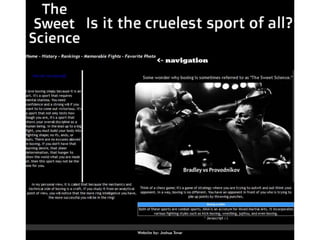
  • #57 Personal Boxing Website created in Dreamweaver CS5.5