Introduction to Datamining using WEKA 
Anto Satriyo Nugroho 
Center for Information & Communication Technology 
Agency for the Assessment & Application of Technology, Indonesia 
Email: asnugroho@ieee.org
2 
Practicing WEKA 
• What is WEKA ? 
• Formatting the data into ARFF 
• Klasifikasi 
– Tahapan membangun classifier 
– Contoh kasus : Klasifikasi bunga iris 
– Tahapan membangun classifier 
– Merangkum hasil eksperimen k-Nearest Neighbor Classifier 
– Eksperimen memakai classifier yang lain (JST, SVM) 
– Classification of cancers based on gene expression 
– Parkinson Disease Detection 
• K-Means Clustering
3 
What is WEKA ? 
• Machine learning/data mining software written in Java (distributed under 
the GNU Public License) 
• Used for research, education, and applications 
• Complements “Data Mining” by Witten & Frank 
• Main features: 
– Comprehensive set of data pre-processing tools, learning algorithms 
and evaluation methods 
– Graphical user interfaces (incl. data visualization) 
– Environment for comparing learning algorithms 
• Weka versions 
– WEKA 3.4: “book version” compatible with description in data mining 
book 
– WEKA 3.5: “developer version” with lots of improvements
Formatting Data into ARFF (Attribute Relation File Format) 
4 
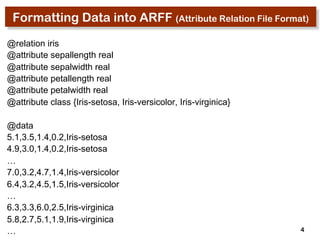
@relation iris 
@attribute sepallength real 
@attribute sepalwidth real 
@attribute petallength real 
@attribute petalwidth real 
@attribute class {Iris-setosa, Iris-versicolor, Iris-virginica} 
@data 
5.1,3.5,1.4,0.2,Iris-setosa 
4.9,3.0,1.4,0.2,Iris-setosa 
… 
7.0,3.2,4.7,1.4,Iris-versicolor 
6.4,3.2,4.5,1.5,Iris-versicolor 
… 
6.3,3.3,6.0,2.5,Iris-virginica 
5.8,2.7,5.1,1.9,Iris-virginica 
…
5 
Practicing WEKA 
• What is WEKA ? 
• Formatting the data into ARFF 
• Klasifikasi 
– Tahapan membangun classifier 
– Contoh kasus : Klasifikasi bunga iris 
– Tahapan membangun classifier 
– Merangkum hasil eksperimen k-Nearest Neighbor Classifier 
– Eksperimen memakai classifier yang lain (JST, SVM) 
– Classification of cancers based on gene expression 
– Parkinson Disease Detection 
• K-Means Clustering
6 
Tahapan membangun Classifier 
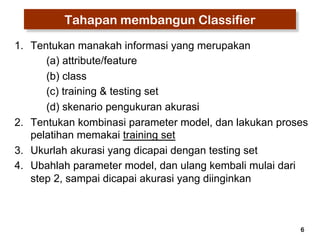
1. Tentukan manakah informasi yang merupakan 
(a) attribute/feature 
(b) class 
(c) training & testing set 
(d) skenario pengukuran akurasi 
2. Tentukan kombinasi parameter model, dan lakukan proses 
pelatihan memakai training set 
3. Ukurlah akurasi yang dicapai dengan testing set 
4. Ubahlah parameter model, dan ulang kembali mulai dari 
step 2, sampai dicapai akurasi yang diinginkan
7 
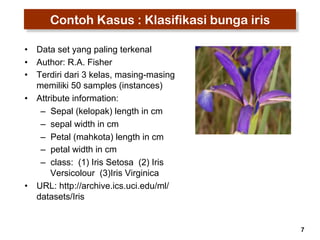
Contoh Kasus : Klasifikasi bunga iris 
• Data set yang paling terkenal 
• Author: R.A. Fisher 
• Terdiri dari 3 kelas, masing-masing 
memiliki 50 samples (instances) 
• Attribute information: 
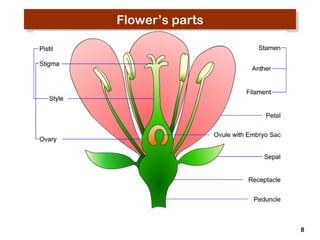
– Sepal (kelopak) length in cm 
– sepal width in cm 
– Petal (mahkota) length in cm 
– petal width in cm 
– class: (1) Iris Setosa (2) Iris 
Versicolour (3)Iris Virginica 
• URL: http://archive.ics.uci.edu/ml/ 
datasets/Iris
8 
Flower’s parts
9 
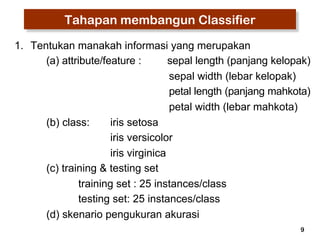
Tahapan membangun Classifier 
1. Tentukan manakah informasi yang merupakan 
(a) attribute/feature : sepal length (panjang kelopak) 
sepal width (lebar kelopak) 
petal length (panjang mahkota) 
petal width (lebar mahkota) 
(b) class: iris setosa 
iris versicolor 
iris virginica 
(c) training & testing set 
training set : 25 instances/class 
testing set: 25 instances/class 
(d) skenario pengukuran akurasi
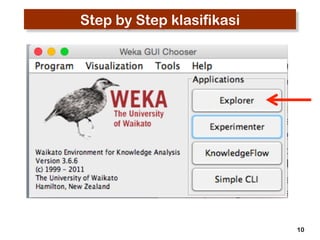
Step by Step klasifikasi 
10
11 
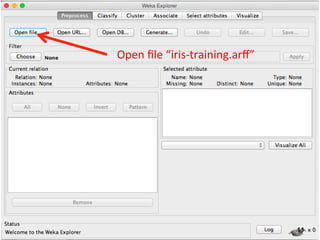
Open 
file 
“iris-­‐training.arff”
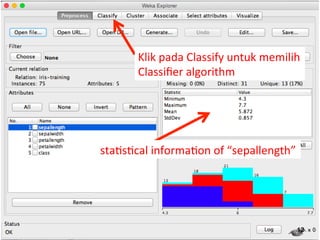
Klik 
pada 
Classify 
untuk 
memilih 
Classifier 
algorithm 
12 
sta3s3cal 
informa3on 
of 
“sepallength”
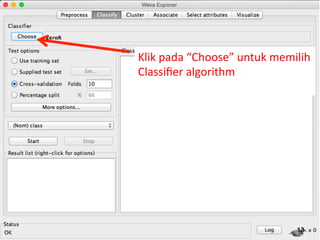
Klik 
pada 
“Choose” 
untuk 
memilih 
Classifier 
algorithm 
13
14 
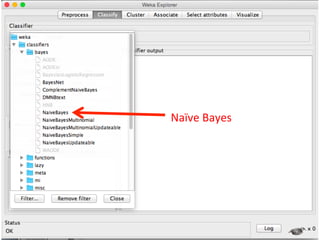
Naïve 
Bayes 
SMO 
( 
implementasi 
SVM)
15 
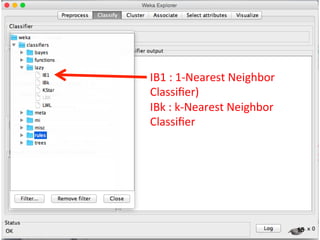
IB1 
: 
1-­‐Nearest 
Neighbor 
Classifier) 
IBk 
: 
k-­‐Nearest 
Neighbor 
Classifier
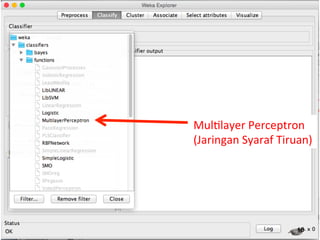
Mul3layer 
Perceptron 
(Jaringan 
Syaraf 
Tiruan) 
16
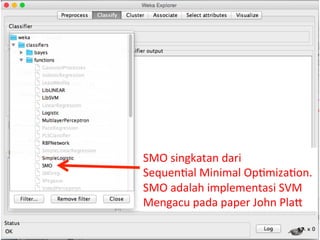
SMO 
singkatan 
dari 
Sequen3al 
Minimal 
Op3miza3on. 
SMO 
adalah 
implementasi 
SVM 
Mengacu 
pada 
paper 
John 
PlaQ 
17
18 
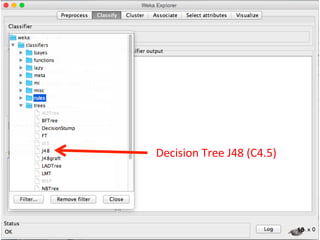
Decision 
Tree 
J48 
(C4.5)
19 
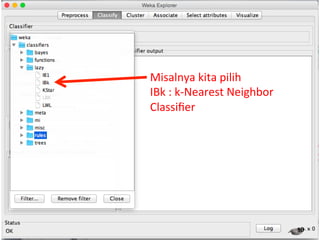
Misalnya 
kita 
pilih 
IBk 
: 
k-­‐Nearest 
Neighbor 
Classifier
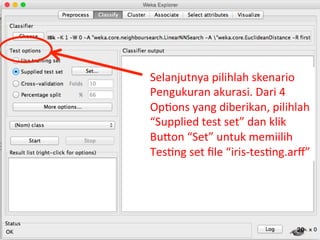
Selanjutnya 
pilihlah 
skenario 
Pengukuran 
akurasi. 
Dari 
4 
Op3ons 
yang 
diberikan, 
pilihlah 
“Supplied 
test 
set” 
dan 
klik 
BuQon 
“Set” 
untuk 
memiilih 
Tes3ng 
set 
file 
“iris-­‐tes3ng.arff” 
20
21 
Tahapan membangun Classifier 
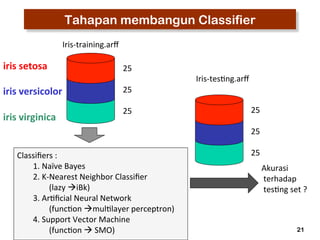
Iris-­‐training.arff 
Iris-­‐tes3ng.arff 
25 
25 
25 
25 
25 
Classifiers 
: 
25 
1. 
Naïve 
Bayes 
2. 
K-­‐Nearest 
Neighbor 
Classifier 
(lazy 
àiBk) 
3. 
Ar3ficial 
Neural 
Network 
(func3on 
àmul3layer 
perceptron) 
4. 
Support 
Vector 
Machine 
(func3on 
à 
SMO) 
Akurasi 
terhadap 
tes3ng 
set 
? 
iris 
setosa 
iris 
versicolor 
iris 
virginica
22 
Apakah yang dimaksud “mengukur akurasi” 
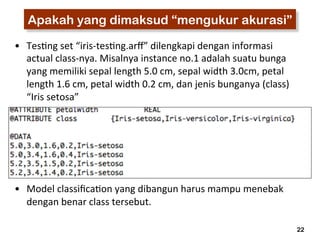
• Tes3ng 
set 
“iris-­‐tes3ng.arff” 
dilengkapi 
dengan 
informasi 
actual 
class-­‐nya. 
Misalnya 
instance 
no.1 
adalah 
suatu 
bunga 
yang 
memiliki 
sepal 
length 
5.0 
cm, 
sepal 
width 
3.0cm, 
petal 
length 
1.6 
cm, 
petal 
width 
0.2 
cm, 
dan 
jenis 
bunganya 
(class) 
“Iris 
setosa” 
• Model 
classifica3on 
yang 
dibangun 
harus 
mampu 
menebak 
dengan 
benar 
class 
tersebut.
23 
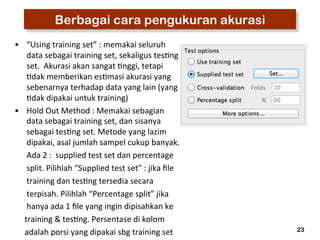
Berbagai cara pengukuran akurasi 
• “Using 
training 
set” 
: 
memakai 
seluruh 
data 
sebagai 
training 
set, 
sekaligus 
tes3ng 
set. 
Akurasi 
akan 
sangat 
3nggi, 
tetapi 
3dak 
memberikan 
es3masi 
akurasi 
yang 
sebenarnya 
terhadap 
data 
yang 
lain 
(yang 
3dak 
dipakai 
untuk 
training) 
• Hold 
Out 
Method 
: 
Memakai 
sebagian 
data 
sebagai 
training 
set, 
dan 
sisanya 
sebagai 
tes3ng 
set. 
Metode 
yang 
lazim 
dipakai, 
asal 
jumlah 
sampel 
cukup 
banyak. 
Ada 
2 
: 
supplied 
test 
set 
dan 
percentage 
split. 
Pilihlah 
“Supplied 
test 
set” 
: 
jika 
file 
training 
dan 
tes3ng 
tersedia 
secara 
terpisah. 
Pilihlah 
“Percentage 
split” 
jika 
hanya 
ada 
1 
file 
yang 
ingin 
dipisahkan 
ke 
training 
& 
tes3ng. 
Persentase 
di 
kolom 
adalah 
porsi 
yang 
dipakai 
sbg 
training 
set
24 
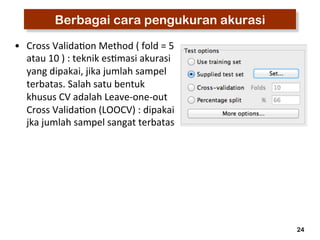
Berbagai cara pengukuran akurasi 
• Cross 
Valida3on 
Method 
( 
fold 
= 
5 
atau 
10 
) 
: 
teknik 
es3masi 
akurasi 
yang 
dipakai, 
jika 
jumlah 
sampel 
terbatas. 
Salah 
satu 
bentuk 
khusus 
CV 
adalah 
Leave-­‐one-­‐out 
Cross 
Valida3on 
(LOOCV) 
: 
dipakai 
jka 
jumlah 
sampel 
sangat 
terbatas
25 
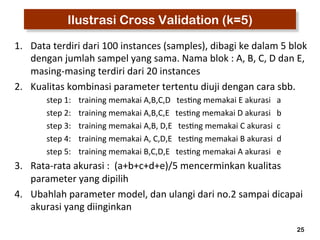
Ilustrasi Cross Validation (k=5) 
1. Data 
terdiri 
dari 
100 
instances 
(samples), 
dibagi 
ke 
dalam 
5 
blok 
dengan 
jumlah 
sampel 
yang 
sama. 
Nama 
blok 
: 
A, 
B, 
C, 
D 
dan 
E, 
masing-­‐masing 
terdiri 
dari 
20 
instances 
2. Kualitas 
kombinasi 
parameter 
tertentu 
diuji 
dengan 
cara 
sbb. 
step 
1: 
training 
memakai 
A,B,C,D 
tes3ng 
memakai 
E 
akurasi 
a 
step 
2: 
training 
memakai 
A,B,C,E 
tes3ng 
memakai 
D 
akurasi 
b 
step 
3: 
training 
memakai 
A,B, 
D,E 
tes3ng 
memakai 
C 
akurasi 
c 
step 
4: 
training 
memakai 
A, 
C,D,E 
tes3ng 
memakai 
B 
akurasi 
d 
step 
5: 
training 
memakai 
B,C,D,E 
tes3ng 
memakai 
A 
akurasi 
e 
3. Rata-­‐rata 
akurasi 
: 
(a+b+c+d+e)/5 
mencerminkan 
kualitas 
parameter 
yang 
dipilih 
4. Ubahlah 
parameter 
model, 
dan 
ulangi 
dari 
no.2 
sampai 
dicapai 
akurasi 
yang 
diinginkan
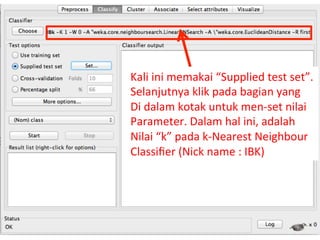
Kali 
ini 
memakai 
“Supplied 
test 
set”. 
Selanjutnya 
klik 
pada 
bagian 
yang 
Di 
dalam 
kotak 
untuk 
men-­‐set 
nilai 
Parameter. 
Dalam 
hal 
ini, 
adalah 
Nilai 
“k” 
pada 
k-­‐Nearest 
Neighbour 
Classifier 
(Nick 
name 
: 
IBK) 
26
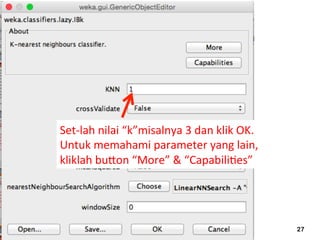
27 
Set-­‐lah 
nilai 
“k”misalnya 
3 
dan 
klik 
OK. 
Untuk 
memahami 
parameter 
yang 
lain, 
kliklah 
buQon 
“More” 
& 
“Capabili3es”
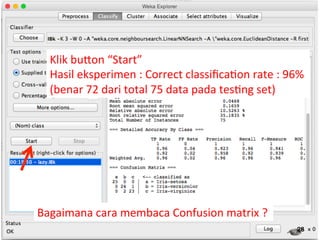
Klik 
buQon 
“Start” 
Hasil 
eksperimen 
: 
Correct 
classifica3on 
rate 
: 
96% 
(benar 
72 
dari 
total 
75 
data 
pada 
tes3ng 
set) 
28 
Bagaimana 
cara 
membaca 
Confusion 
matrix 
?
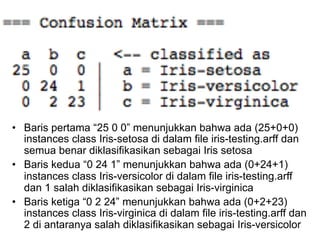
• Baris pertama “25 0 0” menunjukkan bahwa ada (25+0+0) 
instances class Iris-setosa di dalam file iris-testing.arff dan 
semua benar diklasifikasikan sebagai Iris setosa 
• Baris kedua “0 24 1” menunjukkan bahwa ada (0+24+1) 
instances class Iris-versicolor di dalam file iris-testing.arff 
dan 1 salah diklasifikasikan sebagai Iris-virginica 
• Baris ketiga “0 2 24” menunjukkan bahwa ada (0+2+23) 
instances class Iris-virginica di dalam file iris-testing.arff dan 
2 di antaranya salah diklasifikasikan sebagai Iris-versicolor
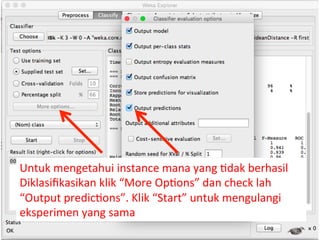
Untuk 
mengetahui 
instance 
mana 
yang 
3dak 
berhasil 
Diklasifikasikan 
klik 
“More 
Op3ons” 
dan 
check 
lah 
“Output 
predic3ons”. 
Klik 
“Start” 
untuk 
mengulangi 
eksperimen 
yang 
sama
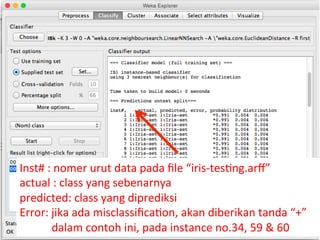
Inst# 
: 
nomer 
urut 
data 
pada 
file 
“iris-­‐tes3ng.arff” 
actual 
: 
class 
yang 
sebenarnya 
predicted: 
class 
yang 
diprediksi 
Error: 
jika 
ada 
misclassifica3on, 
akan 
diberikan 
tanda 
“+” 
dalam 
contoh 
ini, 
pada 
instance 
no.34, 
59 
& 
60
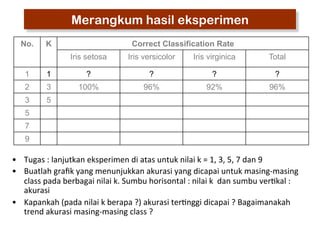
Merangkum hasil eksperimen 
No. K Correct Classification Rate 
Iris setosa Iris versicolor Iris virginica Total 
1 1 ? ? ? ? 
2 3 100% 96% 92% 96% 
3 5 
5 
7 
9 
• Tugas 
: 
lanjutkan 
eksperimen 
di 
atas 
untuk 
nilai 
k 
= 
1, 
3, 
5, 
7 
dan 
9 
• Buatlah 
grafik 
yang 
menunjukkan 
akurasi 
yang 
dicapai 
untuk 
masing-­‐masing 
class 
pada 
berbagai 
nilai 
k. 
Sumbu 
horisontal 
: 
nilai 
k 
dan 
sumbu 
ver3kal 
: 
akurasi 
• Kapankah 
(pada 
nilai 
k 
berapa 
?) 
akurasi 
ter3nggi 
dicapai 
? 
Bagaimanakah 
trend 
akurasi 
masing-­‐masing 
class 
?
33 
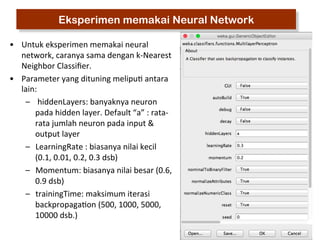
Eksperimen memakai Neural Network 
• Untuk 
eksperimen 
memakai 
neural 
network, 
caranya 
sama 
dengan 
k-­‐Nearest 
Neighbor 
Classifier. 
• Parameter 
yang 
dituning 
melipu3 
antara 
lain: 
– 
hiddenLayers: 
banyaknya 
neuron 
pada 
hidden 
layer. 
Default 
“a” 
: 
rata-­‐ 
rata 
jumlah 
neuron 
pada 
input 
& 
output 
layer 
– LearningRate 
: 
biasanya 
nilai 
kecil 
(0.1, 
0.01, 
0.2, 
0.3 
dsb) 
– Momentum: 
biasanya 
nilai 
besar 
(0.6, 
0.9 
dsb) 
– trainingTime: 
maksimum 
iterasi 
backpropaga3on 
(500, 
1000, 
5000, 
10000 
dsb.)
34 
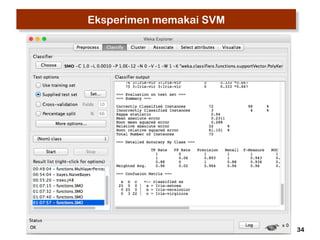
Eksperimen memakai SVM
35 
Eksperimen memakai SVM 
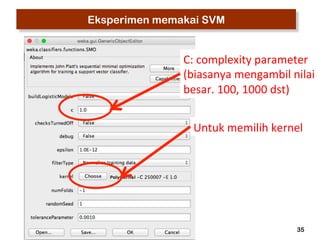
C: 
complexity 
parameter 
(biasanya 
mengambil 
nilai 
besar. 
100, 
1000 
dst) 
Untuk 
memilih 
kernel
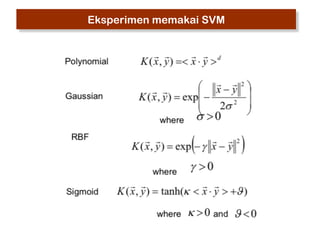
Eksperimen memakai SVM
37 
Classification of cancers based on gene expression 
• Biological reference: 
Classification and diagnostic prediction of cancers using gene 
expression profiling and artificial neural networks, 
J. Khan, et al., Nature Medicine 7, pp.673-679, 2001 (http:// 
www.thep.lu.se/~carsten/pubs/lu_tp_01_06.pdf ) 
• Data is available from http://research.nhgri.nih.gov/microarray/ 
Supplement/ 
• Small Round Blue Cell Tumors (SRBCT) has two class: 
– Ewing Family of Tumors (EWS) 
– NB: Neuroblastoma 
– BL: Burkitt lymphomas 
– RMS: Rhabdomyosarcoma : RMS 
• Characteristic of the data 
– Training samples : 63 (EWS:23 BL:8 NB:12 RMS:20) 
– Testing samples: 20 (EWS:6 BL:3 NB:6 RMS:5) 
– Number of features (attributes): 2308
Classification of cancers based on gene expression 
Experiment using k-Nearest Neighbor Classifier 
• Training and testing set are given as separated arff file 
• Use training set to build a classifier: k-Nearest Neighbor (k=1) 
• Evaluate its performance on the testing set. 
• Change the value of k into 3,5,7 and 9 and repeat step 1 to 3 for each 
38 
value. 
Experiment using Artificial Neural Network 
• Do the same experiment using Multilayer Perceptron Artificial Neural 
Network for various parameter setting (hidden neurons, learning rate, 
momentum, maximum iteration). Make at least five parameter settings.
39 
Parkinson Disease Detection 
Max Little (Oxford University) recorded speech signals and measured the 
biomedical voice from 31 people, 23 with Parkinson Disease (PD). In the 
dataset which will be distributed during final examination, each column in the 
table is a particular voice measure, and each row corresponds one of 195 voice 
recording from these individuals ("name" column). The main aim of the data is 
to discriminate healthy people from those with PD, according to "status" column 
which is set to 0 for healthy and 1 for PD. There are around six recordings per 
patient, making a total of 195 instances. (Ref. 'Exploiting Nonlinear Recurrence 
and Fractal Scaling Properties for Voice Disorder Detection', Little MA, 
McSharry PE, Roberts SJ, Costello DAE, Moroz IM. BioMedical Engineering 
OnLine 2007, 6:23, 26 June 2007). 
Experiment using k-Nearest Neighbor Classifier 
Conduct classification experiments using k-Nearest Neighbor Classifier and 
Support Vector Machines, by using 50% of the data as training set and the rest 
as testing set. Try at least 5 different values of k for k-Nearest neighbor, and 
draw a graph show the relationship between k and classification rate. In case 
of Support Vector Machine experiments, try several parameter combinations by 
modifying the type of Kernel and its parameters (at least 5 experiments). 
Compare and discuss the results obtained by both classifiers. Which of them 
achieved higher accuracy ?
40 
Parkinson Disease Detection 
Max Little (Oxford University) recorded speech signals and measured the 
biomedical voice from 31 people, 23 with Parkinson Disease (PD). In the 
dataset which will be distributed during final examination, each column in the 
table is a particular voice measure, and each row corresponds one of 195 voice 
recording from these individuals ("name" column). The main aim of the data is 
to discriminate healthy people from those with PD, according to "status" column 
which is set to 0 for healthy and 1 for PD. There are around six recordings per 
patient, making a total of 195 instances. (Ref. 'Exploiting Nonlinear Recurrence 
and Fractal Scaling Properties for Voice Disorder Detection', Little MA, 
McSharry PE, Roberts SJ, Costello DAE, Moroz IM. BioMedical Engineering 
OnLine 2007, 6:23, 26 June 2007). 
Experiment using k-Nearest Neighbor Classifier 
Conduct classification experiments using k-Nearest Neighbor Classifier and 
Support Vector Machines, by using 50% of the data as training set and the rest 
as testing set. Try at least 5 different values of k for k-Nearest neighbor, and 
draw a graph show the relationship between k and classification rate. In case 
of Support Vector Machine experiments, try several parameter combinations by 
modifying the type of Kernel and its parameters (at least 5 experiments). 
Compare and discuss the results obtained by both classifiers. Which of them 
achieved higher accuracy ?
41 
Practicing WEKA 
• What is WEKA ? 
• Formatting the data into ARFF 
• Klasifikasi 
– Tahapan membangun classifier 
– Contoh kasus : Klasifikasi bunga iris 
– Tahapan membangun classifier 
– Merangkum hasil eksperimen k-Nearest Neighbor Classifier 
– Eksperimen memakai classifier yang lain (JST, SVM) 
– Classification of cancers based on gene expression 
– Parkinson Disease Detection 
• K-Means Clustering
42 
K-Means Clustering : Step by Step 
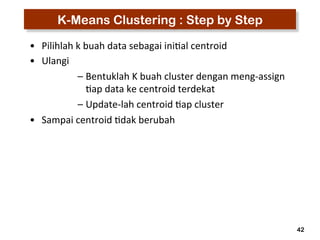
• Pilihlah 
k 
buah 
data 
sebagai 
ini3al 
centroid 
• Ulangi 
– Bentuklah 
K 
buah 
cluster 
dengan 
meng-­‐assign 
3ap 
data 
ke 
centroid 
terdekat 
– Update-­‐lah 
centroid 
3ap 
cluster 
• Sampai 
centroid 
3dak 
berubah
43 
K-Means Clustering : Step by Step
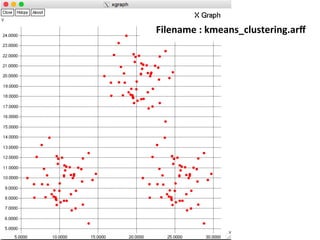
Filename 
: 
kmeans_clustering.arff
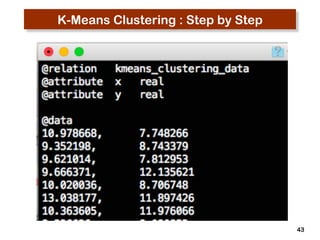
45 
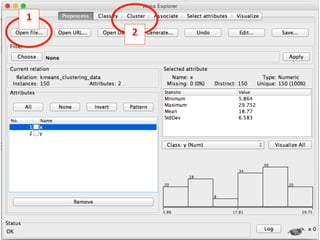
1 
2
46 
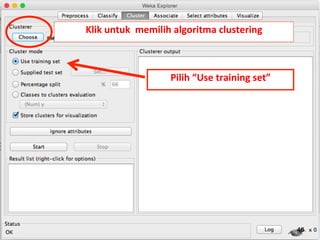
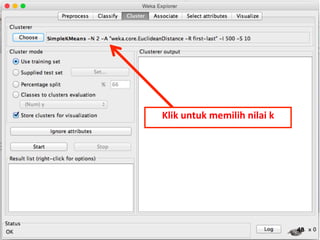
Klik 
untuk 
memilih 
algoritma 
clustering 
Pilih 
“Use 
training 
set”
47
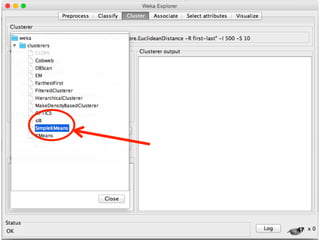
48 
Klik 
untuk 
memilih 
nilai 
k
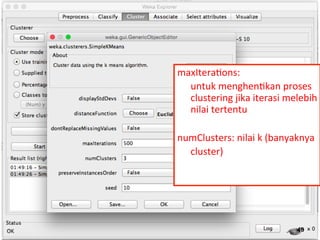
maxItera3ons: 
untuk 
menghen3kan 
proses 
clustering 
jika 
iterasi 
melebih 
nilai 
tertentu 
numClusters: 
nilai 
k 
(banyaknya 
cluster) 
49
50 
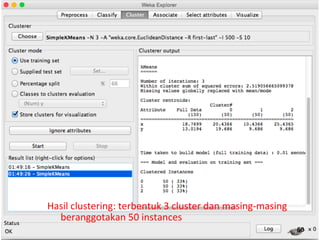
Hasil 
clustering: 
terbentuk 
3 
cluster 
dan 
masing-­‐masing 
beranggotakan 
50 
instances
51 
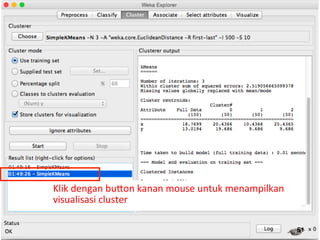
Klik 
dengan 
buQon 
kanan 
mouse 
untuk 
menampilkan 
visualisasi 
cluster
52 
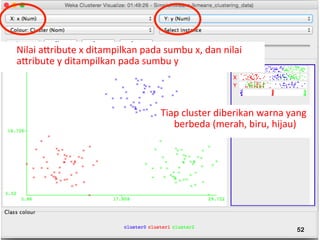
Nilai 
aQribute 
x 
ditampilkan 
pada 
sumbu 
x, 
dan 
nilai 
aQribute 
y 
ditampilkan 
pada 
sumbu 
y 
Tiap 
cluster 
diberikan 
warna 
yang 
berbeda 
(merah, 
biru, 
hijau)

Cara pemakaian weka

  • 1.
    Introduction to Dataminingusing WEKA Anto Satriyo Nugroho Center for Information & Communication Technology Agency for the Assessment & Application of Technology, Indonesia Email: asnugroho@ieee.org
  • 2.
    2 Practicing WEKA • What is WEKA ? • Formatting the data into ARFF • Klasifikasi – Tahapan membangun classifier – Contoh kasus : Klasifikasi bunga iris – Tahapan membangun classifier – Merangkum hasil eksperimen k-Nearest Neighbor Classifier – Eksperimen memakai classifier yang lain (JST, SVM) – Classification of cancers based on gene expression – Parkinson Disease Detection • K-Means Clustering
  • 3.
    3 What isWEKA ? • Machine learning/data mining software written in Java (distributed under the GNU Public License) • Used for research, education, and applications • Complements “Data Mining” by Witten & Frank • Main features: – Comprehensive set of data pre-processing tools, learning algorithms and evaluation methods – Graphical user interfaces (incl. data visualization) – Environment for comparing learning algorithms • Weka versions – WEKA 3.4: “book version” compatible with description in data mining book – WEKA 3.5: “developer version” with lots of improvements
  • 4.
    Formatting Data intoARFF (Attribute Relation File Format) 4 @relation iris @attribute sepallength real @attribute sepalwidth real @attribute petallength real @attribute petalwidth real @attribute class {Iris-setosa, Iris-versicolor, Iris-virginica} @data 5.1,3.5,1.4,0.2,Iris-setosa 4.9,3.0,1.4,0.2,Iris-setosa … 7.0,3.2,4.7,1.4,Iris-versicolor 6.4,3.2,4.5,1.5,Iris-versicolor … 6.3,3.3,6.0,2.5,Iris-virginica 5.8,2.7,5.1,1.9,Iris-virginica …
  • 5.
    5 Practicing WEKA • What is WEKA ? • Formatting the data into ARFF • Klasifikasi – Tahapan membangun classifier – Contoh kasus : Klasifikasi bunga iris – Tahapan membangun classifier – Merangkum hasil eksperimen k-Nearest Neighbor Classifier – Eksperimen memakai classifier yang lain (JST, SVM) – Classification of cancers based on gene expression – Parkinson Disease Detection • K-Means Clustering
  • 6.
    6 Tahapan membangunClassifier 1. Tentukan manakah informasi yang merupakan (a) attribute/feature (b) class (c) training & testing set (d) skenario pengukuran akurasi 2. Tentukan kombinasi parameter model, dan lakukan proses pelatihan memakai training set 3. Ukurlah akurasi yang dicapai dengan testing set 4. Ubahlah parameter model, dan ulang kembali mulai dari step 2, sampai dicapai akurasi yang diinginkan
  • 7.
    7 Contoh Kasus: Klasifikasi bunga iris • Data set yang paling terkenal • Author: R.A. Fisher • Terdiri dari 3 kelas, masing-masing memiliki 50 samples (instances) • Attribute information: – Sepal (kelopak) length in cm – sepal width in cm – Petal (mahkota) length in cm – petal width in cm – class: (1) Iris Setosa (2) Iris Versicolour (3)Iris Virginica • URL: http://archive.ics.uci.edu/ml/ datasets/Iris
  • 8.
  • 9.
    9 Tahapan membangunClassifier 1. Tentukan manakah informasi yang merupakan (a) attribute/feature : sepal length (panjang kelopak) sepal width (lebar kelopak) petal length (panjang mahkota) petal width (lebar mahkota) (b) class: iris setosa iris versicolor iris virginica (c) training & testing set training set : 25 instances/class testing set: 25 instances/class (d) skenario pengukuran akurasi
  • 10.
    Step by Stepklasifikasi 10
  • 11.
    11 Open file “iris-­‐training.arff”
  • 12.
    Klik pada Classify untuk memilih Classifier algorithm 12 sta3s3cal informa3on of “sepallength”
  • 13.
    Klik pada “Choose” untuk memilih Classifier algorithm 13
  • 14.
    14 Naïve Bayes SMO ( implementasi SVM)
  • 15.
    15 IB1 : 1-­‐Nearest Neighbor Classifier) IBk : k-­‐Nearest Neighbor Classifier
  • 16.
  • 17.
    SMO singkatan dari Sequen3al Minimal Op3miza3on. SMO adalah implementasi SVM Mengacu pada paper John PlaQ 17
  • 18.
    18 Decision Tree J48 (C4.5)
  • 19.
    19 Misalnya kita pilih IBk : k-­‐Nearest Neighbor Classifier
  • 20.
    Selanjutnya pilihlah skenario Pengukuran akurasi. Dari 4 Op3ons yang diberikan, pilihlah “Supplied test set” dan klik BuQon “Set” untuk memiilih Tes3ng set file “iris-­‐tes3ng.arff” 20
  • 21.
    21 Tahapan membangunClassifier Iris-­‐training.arff Iris-­‐tes3ng.arff 25 25 25 25 25 Classifiers : 25 1. Naïve Bayes 2. K-­‐Nearest Neighbor Classifier (lazy àiBk) 3. Ar3ficial Neural Network (func3on àmul3layer perceptron) 4. Support Vector Machine (func3on à SMO) Akurasi terhadap tes3ng set ? iris setosa iris versicolor iris virginica
  • 22.
    22 Apakah yangdimaksud “mengukur akurasi” • Tes3ng set “iris-­‐tes3ng.arff” dilengkapi dengan informasi actual class-­‐nya. Misalnya instance no.1 adalah suatu bunga yang memiliki sepal length 5.0 cm, sepal width 3.0cm, petal length 1.6 cm, petal width 0.2 cm, dan jenis bunganya (class) “Iris setosa” • Model classifica3on yang dibangun harus mampu menebak dengan benar class tersebut.
  • 23.
    23 Berbagai carapengukuran akurasi • “Using training set” : memakai seluruh data sebagai training set, sekaligus tes3ng set. Akurasi akan sangat 3nggi, tetapi 3dak memberikan es3masi akurasi yang sebenarnya terhadap data yang lain (yang 3dak dipakai untuk training) • Hold Out Method : Memakai sebagian data sebagai training set, dan sisanya sebagai tes3ng set. Metode yang lazim dipakai, asal jumlah sampel cukup banyak. Ada 2 : supplied test set dan percentage split. Pilihlah “Supplied test set” : jika file training dan tes3ng tersedia secara terpisah. Pilihlah “Percentage split” jika hanya ada 1 file yang ingin dipisahkan ke training & tes3ng. Persentase di kolom adalah porsi yang dipakai sbg training set
  • 24.
    24 Berbagai carapengukuran akurasi • Cross Valida3on Method ( fold = 5 atau 10 ) : teknik es3masi akurasi yang dipakai, jika jumlah sampel terbatas. Salah satu bentuk khusus CV adalah Leave-­‐one-­‐out Cross Valida3on (LOOCV) : dipakai jka jumlah sampel sangat terbatas
  • 25.
    25 Ilustrasi CrossValidation (k=5) 1. Data terdiri dari 100 instances (samples), dibagi ke dalam 5 blok dengan jumlah sampel yang sama. Nama blok : A, B, C, D dan E, masing-­‐masing terdiri dari 20 instances 2. Kualitas kombinasi parameter tertentu diuji dengan cara sbb. step 1: training memakai A,B,C,D tes3ng memakai E akurasi a step 2: training memakai A,B,C,E tes3ng memakai D akurasi b step 3: training memakai A,B, D,E tes3ng memakai C akurasi c step 4: training memakai A, C,D,E tes3ng memakai B akurasi d step 5: training memakai B,C,D,E tes3ng memakai A akurasi e 3. Rata-­‐rata akurasi : (a+b+c+d+e)/5 mencerminkan kualitas parameter yang dipilih 4. Ubahlah parameter model, dan ulangi dari no.2 sampai dicapai akurasi yang diinginkan
  • 26.
    Kali ini memakai “Supplied test set”. Selanjutnya klik pada bagian yang Di dalam kotak untuk men-­‐set nilai Parameter. Dalam hal ini, adalah Nilai “k” pada k-­‐Nearest Neighbour Classifier (Nick name : IBK) 26
  • 27.
    27 Set-­‐lah nilai “k”misalnya 3 dan klik OK. Untuk memahami parameter yang lain, kliklah buQon “More” & “Capabili3es”
  • 28.
    Klik buQon “Start” Hasil eksperimen : Correct classifica3on rate : 96% (benar 72 dari total 75 data pada tes3ng set) 28 Bagaimana cara membaca Confusion matrix ?
  • 29.
    • Baris pertama“25 0 0” menunjukkan bahwa ada (25+0+0) instances class Iris-setosa di dalam file iris-testing.arff dan semua benar diklasifikasikan sebagai Iris setosa • Baris kedua “0 24 1” menunjukkan bahwa ada (0+24+1) instances class Iris-versicolor di dalam file iris-testing.arff dan 1 salah diklasifikasikan sebagai Iris-virginica • Baris ketiga “0 2 24” menunjukkan bahwa ada (0+2+23) instances class Iris-virginica di dalam file iris-testing.arff dan 2 di antaranya salah diklasifikasikan sebagai Iris-versicolor
  • 30.
    Untuk mengetahui instance mana yang 3dak berhasil Diklasifikasikan klik “More Op3ons” dan check lah “Output predic3ons”. Klik “Start” untuk mengulangi eksperimen yang sama
  • 31.
    Inst# : nomer urut data pada file “iris-­‐tes3ng.arff” actual : class yang sebenarnya predicted: class yang diprediksi Error: jika ada misclassifica3on, akan diberikan tanda “+” dalam contoh ini, pada instance no.34, 59 & 60
  • 32.
    Merangkum hasil eksperimen No. K Correct Classification Rate Iris setosa Iris versicolor Iris virginica Total 1 1 ? ? ? ? 2 3 100% 96% 92% 96% 3 5 5 7 9 • Tugas : lanjutkan eksperimen di atas untuk nilai k = 1, 3, 5, 7 dan 9 • Buatlah grafik yang menunjukkan akurasi yang dicapai untuk masing-­‐masing class pada berbagai nilai k. Sumbu horisontal : nilai k dan sumbu ver3kal : akurasi • Kapankah (pada nilai k berapa ?) akurasi ter3nggi dicapai ? Bagaimanakah trend akurasi masing-­‐masing class ?
  • 33.
    33 Eksperimen memakaiNeural Network • Untuk eksperimen memakai neural network, caranya sama dengan k-­‐Nearest Neighbor Classifier. • Parameter yang dituning melipu3 antara lain: – hiddenLayers: banyaknya neuron pada hidden layer. Default “a” : rata-­‐ rata jumlah neuron pada input & output layer – LearningRate : biasanya nilai kecil (0.1, 0.01, 0.2, 0.3 dsb) – Momentum: biasanya nilai besar (0.6, 0.9 dsb) – trainingTime: maksimum iterasi backpropaga3on (500, 1000, 5000, 10000 dsb.)
  • 34.
  • 35.
    35 Eksperimen memakaiSVM C: complexity parameter (biasanya mengambil nilai besar. 100, 1000 dst) Untuk memilih kernel
  • 36.
  • 37.
    37 Classification ofcancers based on gene expression • Biological reference: Classification and diagnostic prediction of cancers using gene expression profiling and artificial neural networks, J. Khan, et al., Nature Medicine 7, pp.673-679, 2001 (http:// www.thep.lu.se/~carsten/pubs/lu_tp_01_06.pdf ) • Data is available from http://research.nhgri.nih.gov/microarray/ Supplement/ • Small Round Blue Cell Tumors (SRBCT) has two class: – Ewing Family of Tumors (EWS) – NB: Neuroblastoma – BL: Burkitt lymphomas – RMS: Rhabdomyosarcoma : RMS • Characteristic of the data – Training samples : 63 (EWS:23 BL:8 NB:12 RMS:20) – Testing samples: 20 (EWS:6 BL:3 NB:6 RMS:5) – Number of features (attributes): 2308
  • 38.
    Classification of cancersbased on gene expression Experiment using k-Nearest Neighbor Classifier • Training and testing set are given as separated arff file • Use training set to build a classifier: k-Nearest Neighbor (k=1) • Evaluate its performance on the testing set. • Change the value of k into 3,5,7 and 9 and repeat step 1 to 3 for each 38 value. Experiment using Artificial Neural Network • Do the same experiment using Multilayer Perceptron Artificial Neural Network for various parameter setting (hidden neurons, learning rate, momentum, maximum iteration). Make at least five parameter settings.
  • 39.
    39 Parkinson DiseaseDetection Max Little (Oxford University) recorded speech signals and measured the biomedical voice from 31 people, 23 with Parkinson Disease (PD). In the dataset which will be distributed during final examination, each column in the table is a particular voice measure, and each row corresponds one of 195 voice recording from these individuals ("name" column). The main aim of the data is to discriminate healthy people from those with PD, according to "status" column which is set to 0 for healthy and 1 for PD. There are around six recordings per patient, making a total of 195 instances. (Ref. 'Exploiting Nonlinear Recurrence and Fractal Scaling Properties for Voice Disorder Detection', Little MA, McSharry PE, Roberts SJ, Costello DAE, Moroz IM. BioMedical Engineering OnLine 2007, 6:23, 26 June 2007). Experiment using k-Nearest Neighbor Classifier Conduct classification experiments using k-Nearest Neighbor Classifier and Support Vector Machines, by using 50% of the data as training set and the rest as testing set. Try at least 5 different values of k for k-Nearest neighbor, and draw a graph show the relationship between k and classification rate. In case of Support Vector Machine experiments, try several parameter combinations by modifying the type of Kernel and its parameters (at least 5 experiments). Compare and discuss the results obtained by both classifiers. Which of them achieved higher accuracy ?
  • 40.
    40 Parkinson DiseaseDetection Max Little (Oxford University) recorded speech signals and measured the biomedical voice from 31 people, 23 with Parkinson Disease (PD). In the dataset which will be distributed during final examination, each column in the table is a particular voice measure, and each row corresponds one of 195 voice recording from these individuals ("name" column). The main aim of the data is to discriminate healthy people from those with PD, according to "status" column which is set to 0 for healthy and 1 for PD. There are around six recordings per patient, making a total of 195 instances. (Ref. 'Exploiting Nonlinear Recurrence and Fractal Scaling Properties for Voice Disorder Detection', Little MA, McSharry PE, Roberts SJ, Costello DAE, Moroz IM. BioMedical Engineering OnLine 2007, 6:23, 26 June 2007). Experiment using k-Nearest Neighbor Classifier Conduct classification experiments using k-Nearest Neighbor Classifier and Support Vector Machines, by using 50% of the data as training set and the rest as testing set. Try at least 5 different values of k for k-Nearest neighbor, and draw a graph show the relationship between k and classification rate. In case of Support Vector Machine experiments, try several parameter combinations by modifying the type of Kernel and its parameters (at least 5 experiments). Compare and discuss the results obtained by both classifiers. Which of them achieved higher accuracy ?
  • 41.
    41 Practicing WEKA • What is WEKA ? • Formatting the data into ARFF • Klasifikasi – Tahapan membangun classifier – Contoh kasus : Klasifikasi bunga iris – Tahapan membangun classifier – Merangkum hasil eksperimen k-Nearest Neighbor Classifier – Eksperimen memakai classifier yang lain (JST, SVM) – Classification of cancers based on gene expression – Parkinson Disease Detection • K-Means Clustering
  • 42.
    42 K-Means Clustering: Step by Step • Pilihlah k buah data sebagai ini3al centroid • Ulangi – Bentuklah K buah cluster dengan meng-­‐assign 3ap data ke centroid terdekat – Update-­‐lah centroid 3ap cluster • Sampai centroid 3dak berubah
  • 43.
    43 K-Means Clustering: Step by Step
  • 44.
  • 45.
  • 46.
    46 Klik untuk memilih algoritma clustering Pilih “Use training set”
  • 47.
  • 48.
    48 Klik untuk memilih nilai k
  • 49.
    maxItera3ons: untuk menghen3kan proses clustering jika iterasi melebih nilai tertentu numClusters: nilai k (banyaknya cluster) 49
  • 50.
    50 Hasil clustering: terbentuk 3 cluster dan masing-­‐masing beranggotakan 50 instances
  • 51.
    51 Klik dengan buQon kanan mouse untuk menampilkan visualisasi cluster
  • 52.
    52 Nilai aQribute x ditampilkan pada sumbu x, dan nilai aQribute y ditampilkan pada sumbu y Tiap cluster diberikan warna yang berbeda (merah, biru, hijau)