(instructions for Apple/iOS)
Canvas Mobile App
+
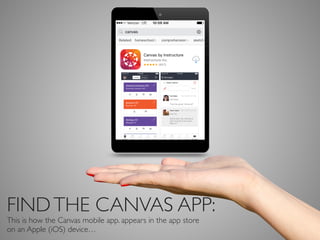
FINDTHE CANVAS APP:
This is how the Canvas mobile app. appears in the app store
on an Apple (iOS) device…
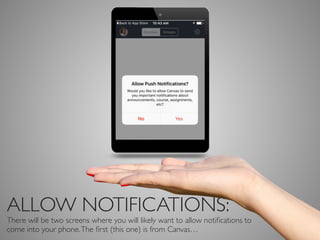
ALLOW NOTIFICATIONS:
There will be two screens where you will likely want to allow notifications to
come into your phone.The first (this one) is from Canvas…
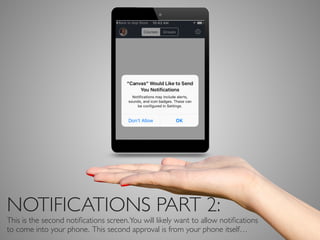
NOTIFICATIONS PART 2:
This is the second notifications screen.You will likely want to allow notifications
to come into your phone. This second approval is from your phone itself…
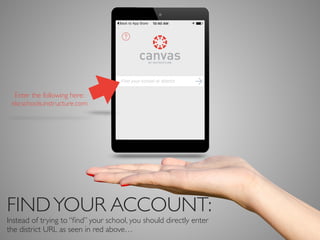
FINDYOUR ACCOUNT:
Instead of trying to “find” your school, you could directly enter
the district URL as seen here: canvas.nkcschools.org…
Enter the following here:
“North Kansas City Schools”
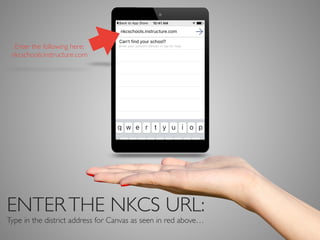
ENTERTHE NKCS URL:
Type in the district address for Canvas as seen in red above…
Enter the following here:
nkcschools.instructure.com
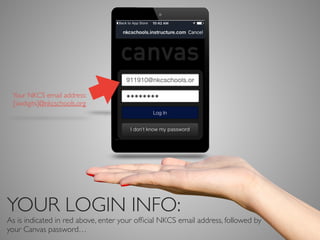
YOUR LOGIN INFO:
As is indicated in red above, enter your official NKCS User ID, followed by your
password…
Your NKCS User ID #
[sixdigits]
######
SUCCESS!
And now you are ready to access your class!Take some extra time to click
through all of the options available to you within the app…

Canvas mobile app install - NKCS eCampus

  • 1.
  • 2.
    FINDTHE CANVAS APP: Thisis how the Canvas mobile app. appears in the app store on an Apple (iOS) device…
  • 3.
    ALLOW NOTIFICATIONS: There willbe two screens where you will likely want to allow notifications to come into your phone.The first (this one) is from Canvas…
  • 4.
    NOTIFICATIONS PART 2: Thisis the second notifications screen.You will likely want to allow notifications to come into your phone. This second approval is from your phone itself…
  • 5.
    FINDYOUR ACCOUNT: Instead oftrying to “find” your school, you could directly enter the district URL as seen here: canvas.nkcschools.org… Enter the following here: “North Kansas City Schools”
  • 6.
    ENTERTHE NKCS URL: Typein the district address for Canvas as seen in red above… Enter the following here: nkcschools.instructure.com
  • 7.
    YOUR LOGIN INFO: Asis indicated in red above, enter your official NKCS User ID, followed by your password… Your NKCS User ID # [sixdigits] ######
  • 8.
    SUCCESS! And now youare ready to access your class!Take some extra time to click through all of the options available to you within the app…