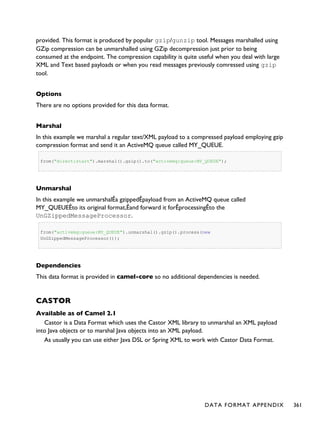
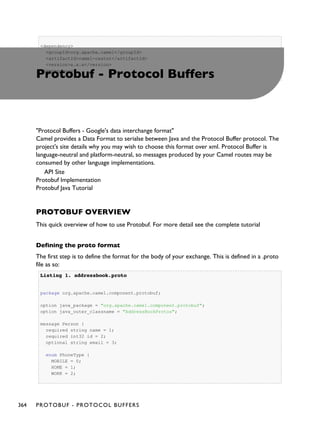
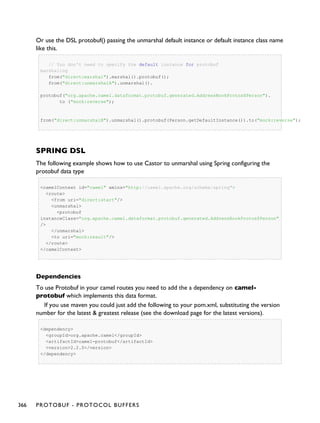
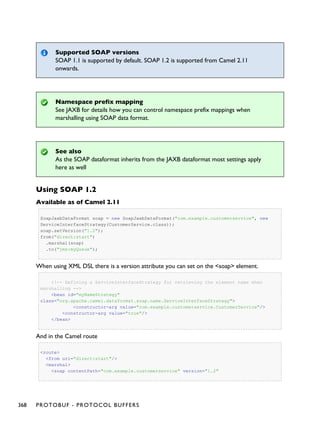
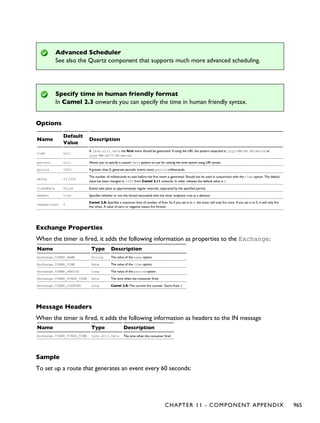
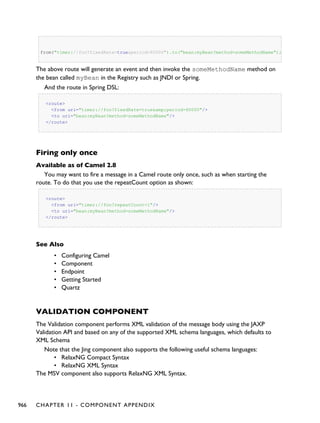
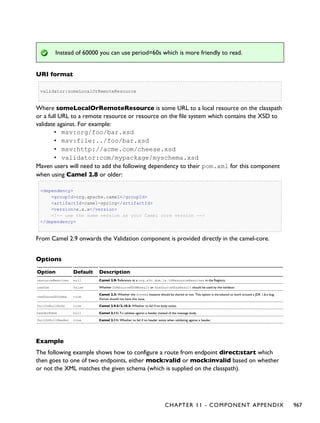
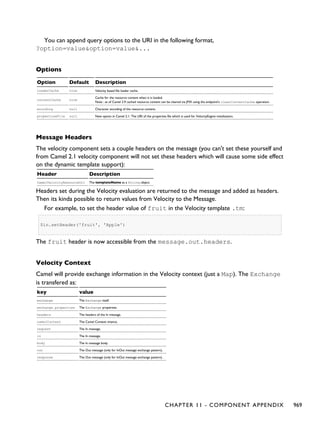
Apache Camel
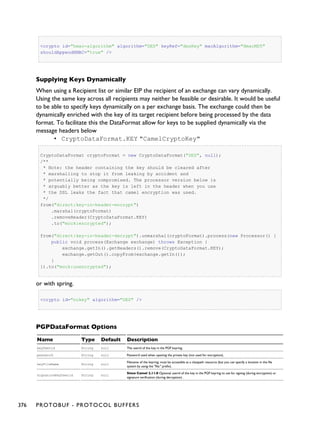
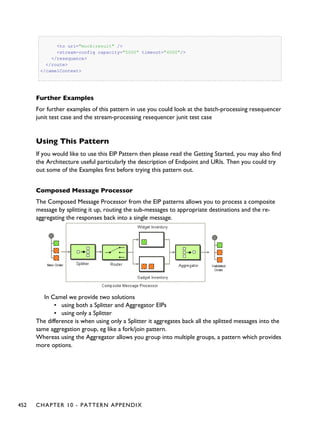
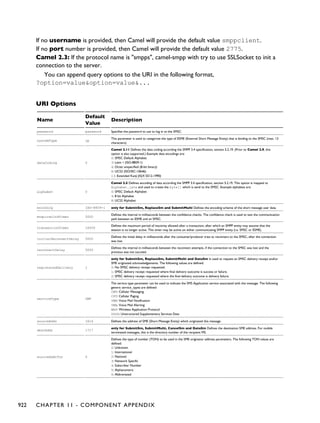
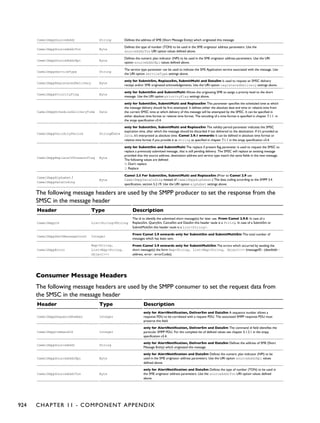
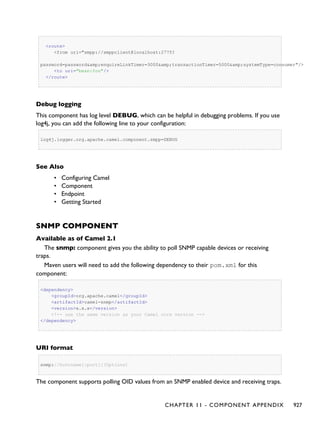
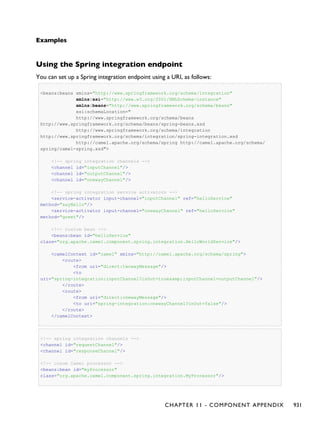
U S ER G U IDE
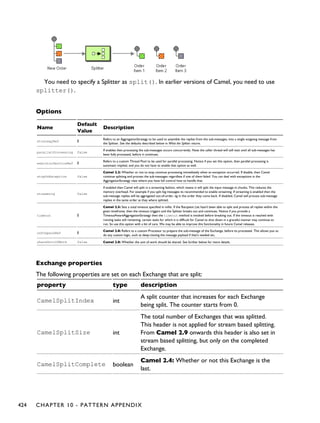
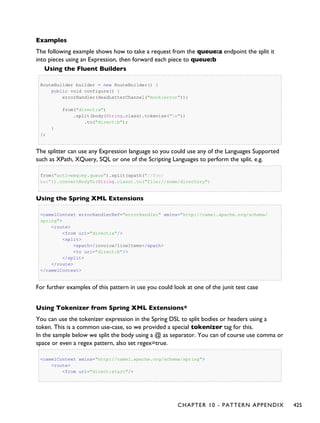
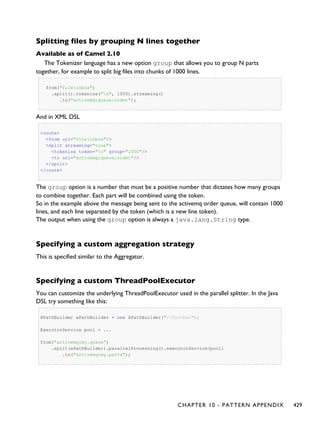
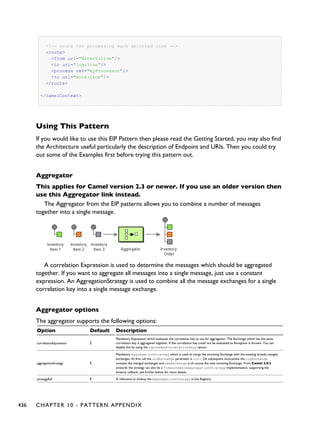
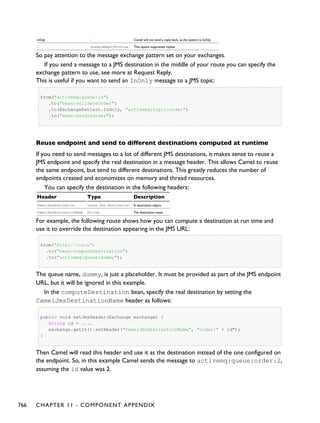
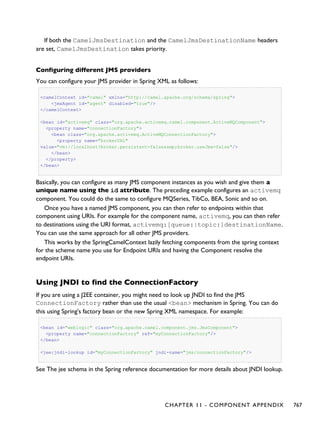
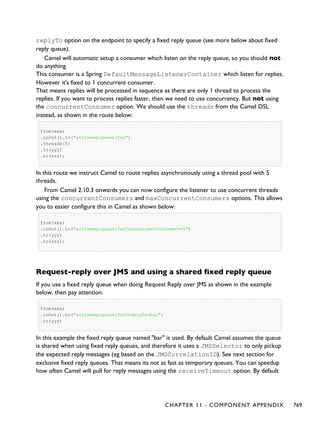
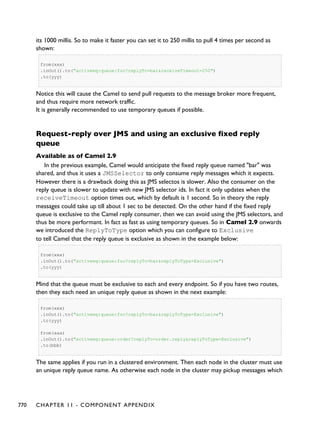
Version 2.11.0
Copyright 2007-2013, Apache Software Foundation
Table of Contents
Table of Contents......................................................................... ii
Chapter 1
Introduction ...................................................................................1
Chapter 1
Quickstart.......................................................................................1
Chapter 1
Getting Started..............................................................................7
Chapter 1
Architecture................................................................................ 17
Chapter 1
Enterprise Integration Patterns.............................................. 37
Chapter 1
Cook Book ................................................................................... 42
Chapter 1
Tutorials..................................................................................... 122
Chapter 1
Language Appendix.................................................................. 221
Chapter 1
DataFormat Appendix............................................................. 297
Chapter 1
Pattern Appendix..................................................................... 383
Chapter 1
Component Appendix ............................................................. 532
Index................................................................................................0
ii APACHE CAMEL
CHAPTER 1
°°°°
Introduction
Apache Camel ª is a versatile open-source integration framework based on known Enterprise
Integration Patterns.
Camel empowers you to define routing and mediation rules in a variety of domain-specific
languages, including a Java-based Fluent API, Spring or Blueprint XML Configuration files, and a
Scala DSL. This means you get smart completion of routing rules in your IDE, whether in a Java,
Scala or XML editor.
Apache Camel uses URIs to work directly with any kind of Transport or messaging model
such as HTTP, ActiveMQ, JMS, JBI, SCA, MINA or CXF, as well as pluggable Components and
Data Format options. Apache Camel is a small library with minimal dependencies for easy
embedding in any Java application. Apache Camel lets you work with the same API regardless
which kind of Transport is used - so learn the API once and you can interact with all the
Components provided out-of-box.
Apache Camel provides support for Bean Binding and seamless integration with popular
frameworks such as Spring, Blueprint and Guice. Camel also has extensive support for unit
testing your routes.
The following projects can leverage Apache Camel as a routing and mediation engine:
• Apache ServiceMix - a popular distributed open source ESB and JBI container
• Apache ActiveMQ - a mature, widely used open source message broker
• Apache CXF - a smart web services suite (JAX-WS and JAX-RS)
• Apache Karaf - a small OSGi based runtime in which applications can be deployed
• Apache MINA - a high-performance NIO-driven networking framework
So don't get the hump - try Camel today!
CHAPTER 1 - INTRODUCTION 1
Too many buzzwords - what exactly is Camel?
Okay, so the description above is technology focused.
There's a great discussion about Camel at Stack Overflow. We suggest you view the
post, read the comments, and browse the suggested links for more details.
2 CHAPTER 1 - INTRODUCTION
CHAPTER 2
°°°°
Quickstart
To start using Apache Camel quickly, you can read through some simple examples in this
chapter. For readers who would like a more thorough introduction, please skip ahead to
Chapter 3.
WALK THROUGH AN EXAMPLE CODE
This mini-guide takes you through the source code of a simple example.
Camel can be configured either by using Spring or directly in Java - which this example does.
This example is available in the examplescamel-example-jms-file directory of
the Camel distribution.
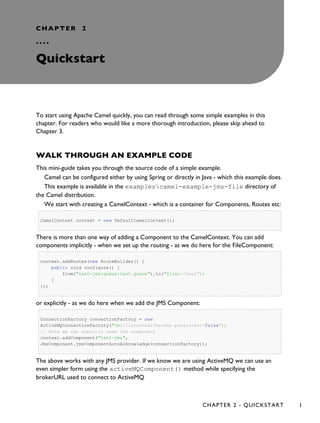
We start with creating a CamelContext - which is a container for Components, Routes etc:
CamelContext context = new DefaultCamelContext();
There is more than one way of adding a Component to the CamelContext. You can add
components implicitly - when we set up the routing - as we do here for the FileComponent:
context.addRoutes(new RouteBuilder() {
public void configure() {
from("test-jms:queue:test.queue").to("file://test");
}
});
or explicitly - as we do here when we add the JMS Component:
ConnectionFactory connectionFactory = new
ActiveMQConnectionFactory("vm://localhost?broker.persistent=false");
// Note we can explicit name the component
context.addComponent("test-jms",
JmsComponent.jmsComponentAutoAcknowledge(connectionFactory));
The above works with any JMS provider. If we know we are using ActiveMQ we can use an
even simpler form using the activeMQComponent() method while specifying the
brokerURL used to connect to ActiveMQ
CHAPTER 2 - QUICKSTART 1
camelContext.addComponent("activemq",
activeMQComponent("vm://localhost?broker.persistent=false"));
In normal use, an external system would be firing messages or events directly into Camel
through one if its Components but we are going to use the ProducerTemplate which is a really
easy way for testing your configuration:
ProducerTemplate template = context.createProducerTemplate();
Next you must start the camel context. If you are using Spring to configure the camel context
this is automatically done for you; though if you are using a pure Java approach then you just
need to call the start() method
camelContext.start();
This will start all of the configured routing rules.
So after starting the CamelContext, we can fire some objects into camel:
for (int i = 0; i < 10; i++) {
template.sendBody("test-jms:queue:test.queue", "Test Message: " + i);
}
WHAT HAPPENS?
From the ProducerTemplate - we send objects (in this case text) into the CamelContext to the
Component test-jms:queue:test.queue. These text objects will be converted automatically into
JMS Messages and posted to a JMS Queue named test.queue. When we set up the Route, we
configured the FileComponent to listen of the test.queue.
The File FileComponent will take messages off the Queue, and save them to a directory
named test. Every message will be saved in a file that corresponds to its destination and message
id.
Finally, we configured our own listener in the Route - to take notifications from the
FileComponent and print them out as text.
That's it!
If you have the time then use 5 more minutes to Walk through another example that
demonstrates the Spring DSL (XML based) routing.
2 CHAPTER 2 - QUICKSTART
WALK THROUGH ANOTHER EXAMPLE
Introduction
Continuing the walk from our first example, we take a closer look at the routing and explain a
few pointers - so you won't walk into a bear trap, but can enjoy an after-hours walk to the local
pub for a large beer
First we take a moment to look at the Enterprise Integration Patterns - the base pattern
catalog for integration scenarios. In particular we focus on Pipes and Filters - a central pattern.
This is used to route messages through a sequence of processing steps, each performing a
specific function - much like the Java Servlet Filters.
Pipes and filters
In this sample we want to process a message in a sequence of steps where each steps can
perform their specific function. In our example we have a JMS queue for receiving new orders.
When an order is received we need to process it in several steps:
▪ validate
▪ register
▪ send confirm email
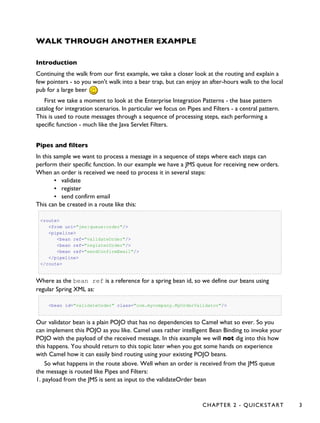
This can be created in a route like this:
<route>
<from uri="jms:queue:order"/>
<pipeline>
<bean ref="validateOrder"/>
<bean ref="registerOrder"/>
<bean ref="sendConfirmEmail"/>
</pipeline>
</route>
Where as the bean ref is a reference for a spring bean id, so we define our beans using
regular Spring XML as:
<bean id="validateOrder" class="com.mycompany.MyOrderValidator"/>
Our validator bean is a plain POJO that has no dependencies to Camel what so ever. So you
can implement this POJO as you like. Camel uses rather intelligent Bean Binding to invoke your
POJO with the payload of the received message. In this example we will not dig into this how
this happens. You should return to this topic later when you got some hands on experience
with Camel how it can easily bind routing using your existing POJO beans.
So what happens in the route above. Well when an order is received from the JMS queue
the message is routed like Pipes and Filters:
1. payload from the JMS is sent as input to the validateOrder bean
CHAPTER 2 - QUICKSTART 3
Pipeline is default
In the route above we specify pipeline but it can be omitted as its default, so
you can write the route as:
<route>
<from uri="jms:queue:order"/>
<bean ref="validateOrder"/>
<bean ref="registerOrder"/>
<bean ref="sendConfirmEmail"/>
</route>
This is commonly used not to state the pipeline.
An example where the pipeline needs to be used, is when using a multicast and "one" of
the endpoints to send to (as a logical group) is a pipeline of other endpoints. For example.
<route>
<from uri="jms:queue:order"/>
<multicast>
<to uri="log:org.company.log.Category"/>
<pipeline>
<bean ref="validateOrder"/>
<bean ref="registerOrder"/>
<bean ref="sendConfirmEmail"/>
</pipeline>
</multicast>
</route>
The above sends the order (from jms:queue:order) to two locations at the same time,
our log component, and to the "pipeline" of beans which goes one to the other. If you
consider the opposite, sans the <pipeline>
<route>
<from uri="jms:queue:order"/>
<multicast>
<to uri="log:org.company.log.Category"/>
<bean ref="validateOrder"/>
<bean ref="registerOrder"/>
<bean ref="sendConfirmEmail"/>
</multicast>
</route>
you would see that multicast would not "flow" the message from one bean to the next, but
rather send the order to all 4 endpoints (1x log, 3x bean) in parallel, which is not (for this
4 CHAPTER 2 - QUICKSTART
example) what we want. We need the message to flow to the validateOrder, then to the
registerOrder, then the sendConfirmEmail so adding the pipeline, provides this facility.
2. the output from validateOrder bean is sent as input to the registerOrder bean
3. the output from registerOrder bean is sent as input to the sendConfirmEmail bean
Using Camel Components
In the route lets imagine that the registration of the order has to be done by sending data to a
TCP socket that could be a big mainframe. As Camel has many Components we will use the
camel-mina component that supports TCP connectivity. So we change the route to:
<route>
<from uri="jms:queue:order"/>
<bean ref="validateOrder"/>
<to uri="mina:tcp://mainframeip:4444?textline=true"/>
<bean ref="sendConfirmEmail"/>
</route>
What we now have in the route is a to type that can be used as a direct replacement for the
bean type. The steps is now:
1. payload from the JMS is sent as input to the validateOrder bean
2. the output from validateOrder bean is sent as text to the mainframe using TCP
3. the output from mainframe is sent back as input to the sendConfirmEmai bean
What to notice here is that the to is not the end of the route (the world ) in this
example it's used in the middle of the Pipes and Filters. In fact we can change the bean types to
to as well:
<route>
<from uri="jms:queue:order"/>
<to uri="bean:validateOrder"/>
<to uri="mina:tcp://mainframeip:4444?textline=true"/>
<to uri="bean:sendConfirmEmail"/>
</route>
As the to is a generic type we must state in the uri scheme which component it is. So we must
write bean: for the Bean component that we are using.
CHAPTER 2 - QUICKSTART 5
Conclusion
This example was provided to demonstrate the Spring DSL (XML based) as opposed to the
pure Java DSL from the first example. And as well to point about that the to doesn't have to be
the last node in a route graph.
This example is also based on the in-only message exchange pattern. What you must
understand as well is the in-out message exchange pattern, where the caller expects a
response. We will look into this in another example.
See also
▪ Examples
▪ Tutorials
▪ User Guide
6 CHAPTER 2 - QUICKSTART
CHAPTER 3
°°°°
Getting Started with Apache
Camel
THE ENTERPRISE INTEGRATION PATTERNS (EIP) BOOK
The purpose of a "patterns" book is not to advocate new techniques that the authors have
invented, but rather to document existing best practices within a particular field. By doing this,
the authors of a patterns book hope to spread knowledge of best practices and promote a
vocabulary for discussing architectural designs.
One of the most famous patterns books is Design Patterns: Elements of Reusable Object-oriented
Software by Erich Gamma, Richard Helm, Ralph Johnson and John Vlissides, commonly known as
the "Gang of Four" (GoF) book. Since the publication of Design Patterns, many other pattern
books, of varying quality, have been written. One famous patterns book is called Enterprise
Integration Patterns: Designing, Building, and Deploying Messaging Solutions by Gregor Hohpe and
Bobby Woolf. It is common for people to refer to this book by its initials EIP. As the subtitle of
EIP suggests, the book focuses on design patterns for asynchronous messaging systems. The
book discusses 65 patterns. Each pattern is given a textual name and most are also given a
graphical symbol, intended to be used in architectural diagrams.
THE CAMEL PROJECT
Camel (http://camel.apache.org) is an open-source, Java-based project that helps the user
implement many of the design patterns in the EIP book. Because Camel implements many of the
design patterns in the EIP book, it would be a good idea for people who work with Camel to
have the EIP book as a reference.
ONLINE DOCUMENTATION FOR CAMEL
The documentation is all under the Documentation category on the right-side menu of the
Camel website (also available in PDF form. Camel-related books are also available, in particular
the Camel in Action book, presently serving as the Camel bible--it has a free Chapter One
(pdf), which is highly recommended to read to get more familiar with Camel.
CHAPTER 3 - GETTING STARTED WITH APACHE CAMEL 7
A useful tip for navigating the online documentation
The breadcrumbs at the top of the online Camel documentation can help you navigate between
parent and child subsections.
For example, If you are on the "Languages" documentation page then the left-hand side of the
reddish bar contains the following links.
Apache Camel > Documentation > Architecture > Languages
As you might expect, clicking on "Apache Camel" takes you back to the home page of the
Apache Camel project, and clicking on "Documentation" takes you to the main documentation
page. You can interpret the "Architecture" and "Languages" buttons as indicating you are in the
"Languages" section of the "Architecture" chapter. Adding browser bookmarks to pages that
you frequently reference can also save time.
ONLINE JAVADOC DOCUMENTATION
The Apache Camel website provides Javadoc documentation. It is important to note that the
Javadoc documentation is spread over several independent Javadoc hierarchies rather than being
all contained in a single Javadoc hierarchy. In particular, there is one Javadoc hierarchy for the
core APIs of Camel, and a separate Javadoc hierarchy for each component technology supported
by Camel. For example, if you will be using Camel with ActiveMQ and FTP then you need to
look at the Javadoc hierarchies for the core API and Spring API.
CONCEPTS AND TERMINOLOGY FUNDAMENTAL TO CAMEL
In this section some of the concepts and terminology that are fundamental to Camel are
explained. This section is not meant as a complete Camel tutorial, but as a first step in that
direction.
Endpoint
The term endpoint is often used when talking about inter-process communication. For example,
in client-server communication, the client is one endpoint and the server is the other endpoint.
Depending on the context, an endpoint might refer to an address, such as a host:port pair for
TCP-based communication, or it might refer to a software entity that is contactable at that
address. For example, if somebody uses "www.example.com:80" as an example of an endpoint,
they might be referring to the actual port at that host name (that is, an address), or they might
be referring to the web server (that is, software contactable at that address). Often, the
distinction between the address and software contactable at that address is not an important
one.
Some middleware technologies make it possible for several software entities to be contactable
at the same physical address. For example, CORBA is an object-oriented, remote-procedure-
8 CHAPTER 3 - GETTING STARTED WITH APACHE CAMEL
call (RPC) middleware standard. If a CORBA server process contains several objects then a
client can communicate with any of these objects at the same physical address (host:port), but a
client communicates with a particular object via that object's logical address (called an IOR in
CORBA terminology), which consists of the physical address (host:port) plus an id that uniquely
identifies the object within its server process. (An IOR contains some additional information
that is not relevant to this present discussion.) When talking about CORBA, some people may
use the term "endpoint" to refer to a CORBA server's physical address, while other people may
use the term to refer to the logical address of a single CORBA object, and other people still
might use the term to refer to any of the following:
• The physical address (host:port) of the CORBA server process
• The logical address (host:port plus id) of a CORBA object.
• The CORBA server process (a relatively heavyweight software entity)
• A CORBA object (a lightweight software entity)
Because of this, you can see that the term endpoint is ambiguous in at least two ways. First, it is
ambiguous because it might refer to an address or to a software entity contactable at that
address. Second, it is ambiguous in the granularity of what it refers to: a heavyweight versus
lightweight software entity, or physical address versus logical address. It is useful to understand
that different people use the term endpoint in slightly different (and hence ambiguous) ways
because Camel's usage of this term might be different to whatever meaning you had previously
associated with the term.
Camel provides out-of-the-box support for endpoints implemented with many different
communication technologies. Here are some examples of the Camel-supported endpoint
technologies.
• A JMS queue.
• A web service.
• A file. A file may sound like an unlikely type of endpoint, until you realize that in some
systems one application might write information to a file and, later, another
application might read that file.
• An FTP server.
• An email address. A client can send a message to an email address, and a server can
read an incoming message from a mail server.
• A POJO (plain old Java object).
In a Camel-based application, you create (Camel wrappers around) some endpoints and
connect these endpoints with routes, which I will discuss later in Section 4.8 ("Routes,
RouteBuilders and Java DSL"). Camel defines a Java interface called Endpoint. Each Camel-
supported endpoint has a class that implements this Endpoint interface. As I discussed in
Section 3.3 ("Online Javadoc documentation"), Camel provides a separate Javadoc hierarchy for
each communications technology supported by Camel. Because of this, you will find
documentation on, say, the JmsEndpoint class in the JMS Javadoc hierarchy, while
documentation for, say, the FtpEndpoint class is in the FTP Javadoc hierarchy.
CHAPTER 3 - GETTING STARTED WITH APACHE CAMEL 9
CamelContext
A CamelContext object represents the Camel runtime system. You typically have one
CamelContext object in an application. A typical application executes the following steps.
1. Create a CamelContext object.
2. Add endpoints Ð and possibly Components, which are discussed in Section 4.5
("Components") Ð to the CamelContext object.
3. Add routes to the CamelContext object to connect the endpoints.
4. Invoke the start() operation on the CamelContext object. This starts Camel-
internal threads that are used to process the sending, receiving and processing of
messages in the endpoints.
5. Eventually invoke the stop() operation on the CamelContext object. Doing this
gracefully stops all the endpoints and Camel-internal threads.
Note that the CamelContext.start() operation does not block indefinitely. Rather, it
starts threads internal to each Component and Endpoint and then start() returns.
Conversely, CamelContext.stop() waits for all the threads internal to each Endpoint
and Component to terminate and then stop() returns.
If you neglect to call CamelContext.start() in your application then messages will not be
processed because internal threads will not have been created.
If you neglect to call CamelContext.stop() before terminating your application then the
application may terminate in an inconsistent state. If you neglect to call
CamelContext.stop() in a JUnit test then the test may fail due to messages not having
had a chance to be fully processed.
CamelTemplate
Camel used to have a class called CamelClient, but this was renamed to be
CamelTemplate to be similar to a naming convention used in some other open-source
projects, such as the TransactionTemplate and JmsTemplate classes in Spring.
The CamelTemplate class is a thin wrapper around the CamelContext class. It has
methods that send a Message or Exchange Ð both discussed in Section 4.6 ("Message and
Exchange")) Ð to an Endpoint Ð discussed in Section 4.1 ("Endpoint"). This provides a way to
enter messages into source endpoints, so that the messages will move along routes Ð discussed
in Section 4.8 ("Routes, RouteBuilders and Java DSL") Ð to destination endpoints.
The Meaning of URL, URI, URN and IRI
Some Camel methods take a parameter that is a URI string. Many people know that a URI is
"something like a URL" but do not properly understand the relationship between URI and URL,
or indeed its relationship with other acronyms such as IRI and URN.
Most people are familiar with URLs (uniform resource locators), such as "http://...", "ftp://...",
"mailto:...". Put simply, a URL specifies the location of a resource.
A URI (uniform resource identifier) is a URL or a URN. So, to fully understand what URI means,
10 CHAPTER 3 - GETTING STARTED WITH APACHE CAMEL
you need to first understand what is a URN.
URN is an acronym for uniform resource name. There are may "unique identifier" schemes in the
world, for example, ISBNs (globally unique for books), social security numbers (unique within a
country), customer numbers (unique within a company's customers database) and telephone
numbers. Each "unique identifier" scheme has its own notation. A URN is a wrapper for
different "unique identifier" schemes. The syntax of a URN is "urn:<scheme-name>:<unique-
identifier>". A URN uniquely identifies a resource, such as a book, person or piece of equipment.
By itself, a URN does not specify the location of the resource. Instead, it is assumed that a
registry provides a mapping from a resource's URN to its location. The URN specification does
not state what form a registry takes, but it might be a database, a server application, a wall chart
or anything else that is convenient. Some hypothetical examples of URNs are
"urn:employee:08765245", "urn:customer:uk:3458:hul8" and
"urn:foo:0000-0000-9E59-0000-5E-2". The <scheme-name> ("employee", "customer" and "foo"
in these examples) part of a URN implicitly defines how to parse and interpret the <unique-
identifier> that follows it. An arbitrary URN is meaningless unless: (1) you know the semantics
implied by the <scheme-name>, and (2) you have access to the registry appropriate for the
<scheme-name>. A registry does not have to be public or globally accessible. For example,
"urn:employee:08765245" might be meaningful only within a specific company.
To date, URNs are not (yet) as popular as URLs. For this reason, URI is widely misused as a
synonym for URL.
IRI is an acronym for internationalized resource identifier. An IRI is simply an internationalized
version of a URI. In particular, a URI can contain letters and digits in the US-ASCII character
set, while a IRI can contain those same letters and digits, and also European accented characters,
Greek letters, Chinese ideograms and so on.
Components
Component is confusing terminology; EndpointFactory would have been more appropriate because
a Component is a factory for creating Endpoint instances. For example, if a Camel-based
application uses several JMS queues then the application will create one instance of the
JmsComponent class (which implements the Component interface), and then the application
invokes the createEndpoint() operation on this JmsComponent object several times.
Each invocation of JmsComponent.createEndpoint() creates an instance of the
JmsEndpoint class (which implements the Endpoint interface). Actually, application-level
code does not invoke Component.createEndpoint() directly. Instead, application-level
code normally invokes CamelContext.getEndpoint(); internally, the CamelContext
object finds the desired Component object (as I will discuss shortly) and then invokes
createEndpoint() on it.
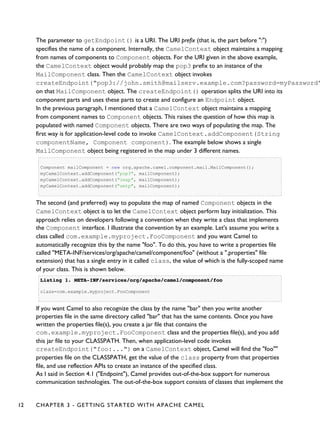
Consider the following code.
myCamelContext.getEndpoint("pop3://john.smith@mailserv.example.com?password=myPassword");
CHAPTER 3 - GETTING STARTED WITH APACHE CAMEL 11
The parameter to getEndpoint() is a URI. The URI prefix (that is, the part before ":")
specifies the name of a component. Internally, the CamelContext object maintains a mapping
from names of components to Component objects. For the URI given in the above example,
the CamelContext object would probably map the pop3 prefix to an instance of the
MailComponent class. Then the CamelContext object invokes
createEndpoint("pop3://john.smith@mailserv.example.com?password=myPassword"
on that MailComponent object. The createEndpoint() operation splits the URI into its
component parts and uses these parts to create and configure an Endpoint object.
In the previous paragraph, I mentioned that a CamelContext object maintains a mapping
from component names to Component objects. This raises the question of how this map is
populated with named Component objects. There are two ways of populating the map. The
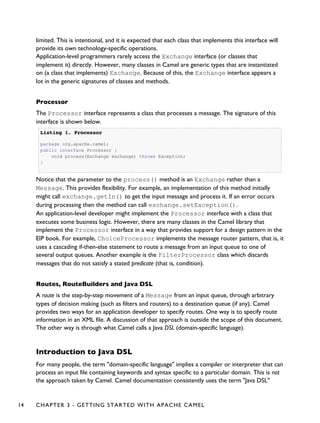
first way is for application-level code to invoke CamelContext.addComponent(String
componentName, Component component). The example below shows a single
MailComponent object being registered in the map under 3 different names.
Component mailComponent = new org.apache.camel.component.mail.MailComponent();
myCamelContext.addComponent("pop3", mailComponent);
myCamelContext.addComponent("imap", mailComponent);
myCamelContext.addComponent("smtp", mailComponent);
The second (and preferred) way to populate the map of named Component objects in the
CamelContext object is to let the CamelContext object perform lazy initialization. This
approach relies on developers following a convention when they write a class that implements
the Component interface. I illustrate the convention by an example. Let's assume you write a
class called com.example.myproject.FooComponent and you want Camel to
automatically recognize this by the name "foo". To do this, you have to write a properties file
called "META-INF/services/org/apache/camel/component/foo" (without a ".properties" file
extension) that has a single entry in it called class, the value of which is the fully-scoped name
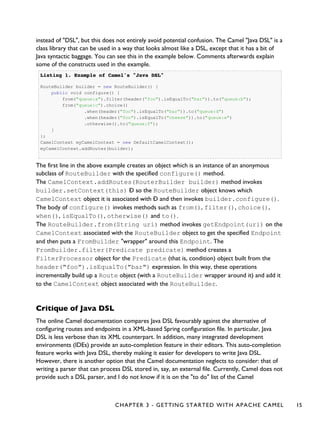
of your class. This is shown below.
Listing 1.Listing 1. META-INF/services/org/apache/camel/component/fooMETA-INF/services/org/apache/camel/component/foo
class=com.example.myproject.FooComponent
If you want Camel to also recognize the class by the name "bar" then you write another
properties file in the same directory called "bar" that has the same contents. Once you have
written the properties file(s), you create a jar file that contains the
com.example.myproject.FooComponent class and the properties file(s), and you add
this jar file to your CLASSPATH. Then, when application-level code invokes
createEndpoint("foo:...") on a CamelContext object, Camel will find the "foo""
properties file on the CLASSPATH, get the value of the class property from that properties
file, and use reflection APIs to create an instance of the specified class.
As I said in Section 4.1 ("Endpoint"), Camel provides out-of-the-box support for numerous
communication technologies. The out-of-the-box support consists of classes that implement the
12 CHAPTER 3 - GETTING STARTED WITH APACHE CAMEL
Component interface plus properties files that enable a CamelContext object to populate
its map of named Component objects.
Earlier in this section I gave the following example of calling
CamelContext.getEndpoint().
myCamelContext.getEndpoint("pop3://john.smith@mailserv.example.com?password=myPassword");
When I originally gave that example, I said that the parameter to getEndpoint() was a URI.
I said that because the online Camel documentation and the Camel source code both claim the
parameter is a URI. In reality, the parameter is restricted to being a URL. This is because when
Camel extracts the component name from the parameter, it looks for the first ":", which is a
simplistic algorithm. To understand why, recall from Section 4.4 ("The Meaning of URL, URI,
URN and IRI") that a URI can be a URL or a URN. Now consider the following calls to
getEndpoint.
myCamelContext.getEndpoint("pop3:...");
myCamelContext.getEndpoint("jms:...");
myCamelContext.getEndpoint("urn:foo:...");
myCamelContext.getEndpoint("urn:bar:...");
Camel identifies the components in the above example as "pop3", "jms", "urn" and "urn". It
would be more useful if the latter components were identified as "urn:foo" and "urn:bar" or,
alternatively, as "foo" and "bar" (that is, by skipping over the "urn:" prefix). So, in practice you
must identify an endpoint with a URL (a string of the form "<scheme>:...") rather than with a
URN (a string of the form "urn:<scheme>:..."). This lack of proper support for URNs means the
you should consider the parameter to getEndpoint() as being a URL rather than (as
claimed) a URI.
Message and Exchange
The Message interface provides an abstraction for a single message, such as a request, reply
or exception message.
There are concrete classes that implement the Message interface for each Camel-supported
communications technology. For example, the JmsMessage class provides a JMS-specific
implementation of the Message interface. The public API of the Message interface provides
get- and set-style methods to access the message id, body and individual header fields of a
messge.
The Exchange interface provides an abstraction for an exchange of messages, that is, a
request message and its corresponding reply or exception message. In Camel terminology, the
request, reply and exception messages are called in, out and fault messages.
There are concrete classes that implement the Exchange interface for each Camel-supported
communications technology. For example, the JmsExchange class provides a JMS-specific
implementation of the Exchange interface. The public API of the Exchange interface is quite
CHAPTER 3 - GETTING STARTED WITH APACHE CAMEL 13
limited. This is intentional, and it is expected that each class that implements this interface will
provide its own technology-specific operations.
Application-level programmers rarely access the Exchange interface (or classes that
implement it) directly. However, many classes in Camel are generic types that are instantiated
on (a class that implements) Exchange. Because of this, the Exchange interface appears a
lot in the generic signatures of classes and methods.
Processor
The Processor interface represents a class that processes a message. The signature of this
interface is shown below.
Listing 1.Listing 1. ProcessorProcessor
package org.apache.camel;
public interface Processor {
void process(Exchange exchange) throws Exception;
}
Notice that the parameter to the process() method is an Exchange rather than a
Message. This provides flexibility. For example, an implementation of this method initially
might call exchange.getIn() to get the input message and process it. If an error occurs
during processing then the method can call exchange.setException().
An application-level developer might implement the Processor interface with a class that
executes some business logic. However, there are many classes in the Camel library that
implement the Processor interface in a way that provides support for a design pattern in the
EIP book. For example, ChoiceProcessor implements the message router pattern, that is, it
uses a cascading if-then-else statement to route a message from an input queue to one of
several output queues. Another example is the FilterProcessor class which discards
messages that do not satisfy a stated predicate (that is, condition).
Routes, RouteBuilders and Java DSL
A route is the step-by-step movement of a Message from an input queue, through arbitrary
types of decision making (such as filters and routers) to a destination queue (if any). Camel
provides two ways for an application developer to specify routes. One way is to specify route
information in an XML file. A discussion of that approach is outside the scope of this document.
The other way is through what Camel calls a Java DSL (domain-specific language).
Introduction to Java DSL
For many people, the term "domain-specific language" implies a compiler or interpreter that can
process an input file containing keywords and syntax specific to a particular domain. This is not
the approach taken by Camel. Camel documentation consistently uses the term "Java DSL"
14 CHAPTER 3 - GETTING STARTED WITH APACHE CAMEL
instead of "DSL", but this does not entirely avoid potential confusion. The Camel "Java DSL" is a
class library that can be used in a way that looks almost like a DSL, except that it has a bit of
Java syntactic baggage. You can see this in the example below. Comments afterwards explain
some of the constructs used in the example.
Listing 1.Listing 1. Example of Camel's "Java DSL"Example of Camel's "Java DSL"
RouteBuilder builder = new RouteBuilder() {
public void configure() {
from("queue:a").filter(header("foo").isEqualTo("bar")).to("queue:b");
from("queue:c").choice()
.when(header("foo").isEqualTo("bar")).to("queue:d")
.when(header("foo").isEqualTo("cheese")).to("queue:e")
.otherwise().to("queue:f");
}
};
CamelContext myCamelContext = new DefaultCamelContext();
myCamelContext.addRoutes(builder);
The first line in the above example creates an object which is an instance of an anonymous
subclass of RouteBuilder with the specified configure() method.
The CamelContext.addRoutes(RouterBuilder builder) method invokes
builder.setContext(this) Ð so the RouteBuilder object knows which
CamelContext object it is associated with Ð and then invokes builder.configure().
The body of configure() invokes methods such as from(), filter(), choice(),
when(), isEqualTo(), otherwise() and to().
The RouteBuilder.from(String uri) method invokes getEndpoint(uri) on the
CamelContext associated with the RouteBuilder object to get the specified Endpoint
and then puts a FromBuilder "wrapper" around this Endpoint. The
FromBuilder.filter(Predicate predicate) method creates a
FilterProcessor object for the Predicate (that is, condition) object built from the
header("foo").isEqualTo("bar") expression. In this way, these operations
incrementally build up a Route object (with a RouteBuilder wrapper around it) and add it
to the CamelContext object associated with the RouteBuilder.
Critique of Java DSL
The online Camel documentation compares Java DSL favourably against the alternative of
configuring routes and endpoints in a XML-based Spring configuration file. In particular, Java
DSL is less verbose than its XML counterpart. In addition, many integrated development
environments (IDEs) provide an auto-completion feature in their editors. This auto-completion
feature works with Java DSL, thereby making it easier for developers to write Java DSL.
However, there is another option that the Camel documentation neglects to consider: that of
writing a parser that can process DSL stored in, say, an external file. Currently, Camel does not
provide such a DSL parser, and I do not know if it is on the "to do" list of the Camel
CHAPTER 3 - GETTING STARTED WITH APACHE CAMEL 15
maintainers. I think that a DSL parser would offer a significant benefit over the current Java
DSL. In particular, the DSL would have a syntactic definition that could be expressed in a
relatively short BNF form. The effort required by a Camel user to learn how to use DSL by
reading this BNF would almost certainly be significantly less than the effort currently required
to study the API of the RouterBuilder classes.
Continue Learning about Camel
Return to the main Getting Started page for additional introductory reference information.
16 CHAPTER 3 - GETTING STARTED WITH APACHE CAMEL
CHAPTER 4
°°°°
Architecture
Camel uses a Java based Routing Domain Specific Language (DSL) or an Xml Configuration to
configure routing and mediation rules which are added to a CamelContext to implement the
various Enterprise Integration Patterns.
At a high level Camel consists of a CamelContext which contains a collection of Component
instances. A Component is essentially a factory of Endpoint instances. You can explicitly
configure Component instances in Java code or an IoC container like Spring or Guice, or they
can be auto-discovered using URIs.
An Endpoint acts rather like a URI or URL in a web application or a Destination in a JMS
system; you can communicate with an endpoint; either sending messages to it or consuming
messages from it. You can then create a Producer or Consumer on an Endpoint to exchange
messages with it.
The DSL makes heavy use of pluggable Languages to create an Expression or Predicate to
make a truly powerful DSL which is extensible to the most suitable language depending on your
needs. The following languages are supported
• Bean Language for using Java for expressions
• Constant
• the unified EL from JSP and JSF
• Header
• JXPath
• Mvel
• OGNL
• Ref Language
• Property
• Scripting Languages such as
◦ BeanShell
◦ JavaScript
◦ Groovy
◦ Python
◦ PHP
◦ Ruby
• Simple
◦ File Language
• Spring Expression Language
• SQL
CHAPTER 4 - ARCHITECTURE 17
• Tokenizer
• XPath
• XQuery
• VTD-XML
Most of these languages is also supported used as Annotation Based Expression Language.
For a full details of the individual languages see the Language Appendix
URIS
Camel makes extensive use of URIs to allow you to refer to endpoints which are lazily created
by a Component if you refer to them within Routes.
Current Supported URIs
Component / ArtifactId / URI Description
AHC / camel-ahc
ahc:hostname:[port]
To call external HTTP services
using Async Http Client
AMQP / camel-amqp
amqp:[topic:]destinationName
For Messaging with AMQP
protocol
APNS / camel-apns
apns:notify[?options]
For sending notifications to Apple
iOS devices
Atom / camel-atom
atom:uri
Working with Apache Abdera for
atom integration, such as
consuming an atom feed.
Avro / camel-avro
avro:http://hostname[:port][?options]
Working with Apache Avro for
data serialization.
18 CHAPTER 4 - ARCHITECTURE
important
Make sure to read How do I configure endpoints to learn more about configuring
endpoints. For example how to refer to beans in the Registry or how to use raw
values for password options, and using property placeholders etc.
AWS-CW / camel-aws
aws-cw://namespace[?options]
For working with Amazon's
CloudWatch (CW).
AWS-DDB / camel-aws
aws-ddb://tableName[?options]
For working with Amazon's
DynamoDB (DDB).
AWS-SDB / camel-aws
aws-sdb://domainName[?options]
For working with Amazon's
SimpleDB (SDB).
AWS-SES / camel-aws
aws-ses://from[?options]
For working with Amazon's
Simple Email Service (SES).
AWS-SNS / camel-aws
aws-sns://topicname[?options]
For Messaging with Amazon's
Simple Notification Service (SNS).
AWS-SQS / camel-aws
aws-sqs://queuename[?options]
For Messaging with Amazon's
Simple Queue Service (SQS).
AWS-S3 / camel-aws
aws-s3://bucketname[?options]
For working with Amazon's
Simple Storage Service (S3).
CHAPTER 4 - ARCHITECTURE 19
Bean / camel-core
bean:beanName[?method=someMethod]
Uses the Bean Binding to bind
message exchanges to beans in the
Registry. Is also used for exposing
and invoking POJO (Plain Old Java
Objects).
Bean Validation / camel-bean-validator
bean-validator:something
Validates the payload of a message
using the Java Validation API (JSR
303 and JAXP Validation) and its
reference implementation
Hibernate Validator
Browse / camel-core
browse:someName
Provides a simple
BrowsableEndpoint which can be
useful for testing, visualisation
tools or debugging. The exchanges
sent to the endpoint are all
available to be browsed.
Cache / camel-cache
cache://cachename[?options]
The cache component facilitates
creation of caching endpoints and
processors using EHCache as the
cache implementation.
Class / camel-core
class:className[?method=someMethod]
Uses the Bean Binding to bind
message exchanges to beans in the
Registry. Is also used for exposing
and invoking POJO (Plain Old Java
Objects).
CMIS / camel-cmis
cmis://cmisServerUrl[?options]
Uses the Apache Chemistry client
API to interface with CMIS
supporting CMS
Cometd / camel-cometd
cometd://host:port/channelname
Used to deliver messages using
the jetty cometd implementation
of the bayeux protocol
20 CHAPTER 4 - ARCHITECTURE
Context / camel-context
context:camelContextId:localEndpointName
Used to refer to endpoints within
a separate CamelContext to
provide a simple black box
composition approach so that
routes can be combined into a
CamelContext and then used as a
black box component inside other
routes in other CamelContexts
ControlBus / camel-core
controlbus:command[?options]
ControlBus EIP that allows to
send messages to Endpoints for
managing and monitoring your
Camel applications.
CouchDB / camel-couchdb
couchdb:http://hostname[:port]/database[?options]
To integrate with Apache
CouchDB.
Crypto (Digital Signatures) / camel-crypto
crypto:sign:name[?options]
crypto:verify:name[?options]
Used to sign and verify exchanges
using the Signature Service of the
Java Cryptographic Extension.
CXF / camel-cxf
cxf:address[?serviceClass=...]
Working with Apache CXF for
web services integration
CXF Bean / camel-cxf
cxf:bean name
Proceess the exchange using a
JAX WS or JAX RS annotated
bean from the registry. Requires
less configuration than the above
CXF Component
CXFRS / camel-cxf
cxfrs:address[?resourcesClasses=...]
Working with Apache CXF for
REST services integration
CHAPTER 4 - ARCHITECTURE 21
DataSet / camel-core
dataset:name
For load & soak testing the
DataSet provides a way to create
huge numbers of messages for
sending to Components or
asserting that they are consumed
correctly
Direct / camel-core
direct:name
Synchronous call to another
endpoint from same
CamelContext.
Direct-VM / camel-core
direct-vm:name
Synchronous call to another
endpoint in another
CamelContext running in the
same JVM.
DNS / camel-dns
dns:operation
To lookup domain information
and run DNS queries using
DNSJava
EJB / camel-ejb
ejb:ejbName[?method=someMethod]
Uses the Bean Binding to bind
message exchanges to EJBs. It
works like the Bean component
but just for accessing EJBs.
Supports EJB 3.0 onwards.
ElasticSearch / camel-elasticsearch
elasticsearch://clusterName
For interfacing with an
ElasticSearch server.
Event / camel-spring
event://default
spring-event://default
Working with Spring
ApplicationEvents
EventAdmin / camel-eventadmin
eventadmin:topic
Receiving OSGi EventAdmin
events
22 CHAPTER 4 - ARCHITECTURE
Exec / camel-exec
exec://executable[?options]
For executing system commands
File / camel-core
file://nameOfFileOrDirectory
Sending messages to a file or
polling a file or directory.
Flatpack / camel-flatpack
flatpack:[fixed|delim]:configFile
Processing fixed width or
delimited files or messages using
the FlatPack library
FOP / camel-fop
fop:outputFormat
Renders the message into
different output formats using
Apache FOP
FreeMarker / camel-freemarker
freemarker:someTemplateResource
Generates a response using a
FreeMarker template
FTP / camel-ftp
ftp://host[:port]/fileName
Sending and receiving files over
FTP.
FTPS / camel-ftp
ftps://host[:port]/fileName
Sending and receiving files over
FTP Secure (TLS and SSL).
GAuth / camel-gae
gauth://name[?options]
Used by web applications to
implement an OAuth consumer.
See also Camel Components for
Google App Engine.
GHttp / camel-gae
ghttp://hostname[:port][/path][?options]
ghttp:///path[?options]
Provides connectivity to the URL
fetch service of Google App
Engine but can also be used to
receive messages from servlets.
See also Camel Components for
Google App Engine.
CHAPTER 4 - ARCHITECTURE 23
GLogin / camel-gae
glogin://hostname[:port][?options]
Used by Camel applications
outside Google App Engine (GAE)
for programmatic login to GAE
applications. See also Camel
Components for Google App
Engine.
GTask / camel-gae
gtask://queue-name
Supports asynchronous message
processing on Google App Engine
by using the task queueing service
as message queue. See also Camel
Components for Google App
Engine.
GMail / camel-gae
gmail://user@gmail.com[?options]
gmail://user@googlemail.com[?options]
Supports sending of emails via the
mail service of Google App
Engine. See also Camel
Components for Google App
Engine.
Google Guava EventBus / camel-guava-eventbus
guava-eventbus:busName[?eventClass=className]
The Google Guava EventBus
allows publish-subscribe-style
communication between
components without requiring the
components to explicitly register
with one another (and thus be
aware of each other). This
component provides integration
bridge between Camel and
Google Guava EventBus
infrastructure.
Hazelcast / camel-hazelcast
hazelcast://[type]:cachename[?options]
Hazelcast is a data grid entirely
implemented in Java (single jar).
This component supports map,
multimap, seda, queue, set, atomic
number and simple cluster
support.
HBase / camel-hbase
hbase://table[?options]
For reading/writing from/to an
HBase store (Hadoop database)
24 CHAPTER 4 - ARCHITECTURE
HDFS / camel-hdfs
hdfs://path[?options]
For reading/writing from/to an
HDFS filesystem
HL7 / camel-hl7
mina:tcp://hostname[:port]
For working with the HL7 MLLP
protocol and the HL7 model using
the HAPI library
HTTP / camel-http
http://hostname[:port]
For calling out to external HTTP
servers using Apache HTTP Client
3.x
HTTP4 / camel-http4
http4://hostname[:port]
For calling out to external HTTP
servers using Apache HTTP Client
4.x
iBATIS / camel-ibatis
ibatis://statementName
Performs a query, poll, insert,
update or delete in a relational
database using Apache iBATIS
IMAP / camel-mail
imap://hostname[:port]
Receiving email using IMAP
IRC / camel-irc
irc:host[:port]/#room
For IRC communication
JavaSpace / camel-javaspace
javaspace:jini://host?spaceName=mySpace?...
Sending and receiving messages
through JavaSpace
JBI / servicemix-camel
jbi:serviceName
For JBI integration such as
working with Apache ServiceMix
CHAPTER 4 - ARCHITECTURE 25
jclouds / jclouds
jclouds:[blobstore|computservice]:provider
For interacting with cloud
compute & blobstore service via
jclouds
JCR / camel-jcr
jcr://user:password@repository/path/to/node
Storing a message in a JCR
compliant repository like Apache
Jackrabbit
JDBC / camel-jdbc
jdbc:dataSourceName?options
For performing JDBC queries and
operations
Jetty / camel-jetty
jetty:url
For exposing services over HTTP
JMS / camel-jms
jms:[topic:]destinationName
Working with JMS providers
JMX / camel-jmx
jmx://platform?options
For working with JMX notification
listeners
JPA / camel-jpa
jpa://entityName
For using a database as a queue via
the JPA specification for working
with OpenJPA, Hibernate or
TopLink
Jsch / camel-jsch
scp://localhost/destination
Support for the scp protocol
JT/400 / camel-jt400
jt400://user:pwd@system/<path_to_dtaq>
For integrating with data queues
on an AS/400 (aka System i, IBM i,
i5, ...) system
26 CHAPTER 4 - ARCHITECTURE
Kestrel / camel-kestrel
kestrel://[addresslist/]queuename[?options]
For producing to or consuming
from Kestrel queues
Krati / camel-krati
krati://[path to datastore/][?options]
For producing to or consuming to
Krati datastores
Language / camel-core
language://languageName[:script][?options]
Executes Languages scripts
LDAP / camel-ldap
ldap:host[:port]?base=...[&scope=<scope>]
Performing searches on LDAP
servers (<scope> must be one of
object|onelevel|subtree)
Log / camel-core
log:loggingCategory[?level=ERROR]
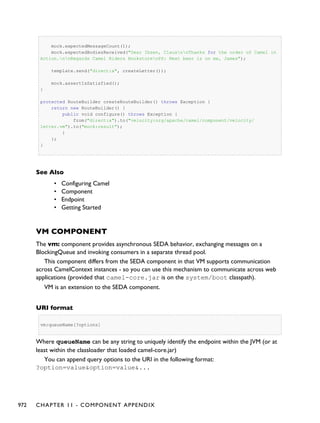
Uses Jakarta Commons Logging to
log the message exchange to some
underlying logging system like
log4j
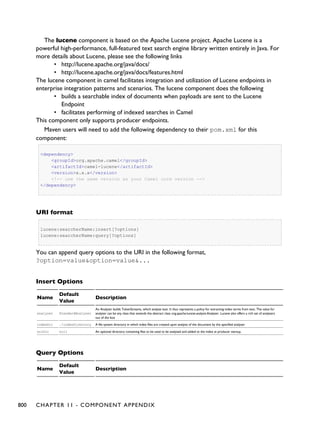
Lucene / camel-lucene
lucene:searcherName:insert[?analyzer=<analyzer>]
lucene:searcherName:query[?analyzer=<analyzer>]
Uses Apache Lucene to perform
Java-based indexing and full text
based searches using advanced
analysis/tokenization capabilities
Mail / camel-mail
mail://user-info@host:port
Sending and receiving email
MINA / camel-mina
[tcp|udp|vm]:host[:port]
Working with Apache MINA
Mock / camel-core
mock:name
For testing routes and mediation
rules using mocks
CHAPTER 4 - ARCHITECTURE 27
MongoDB / camel-mongodb
mongodb:connection?options
Interacts with MongoDB
databases and collections. Offers
producer endpoints to perform
CRUD-style operations and more
against databases and collections,
as well as consumer endpoints to
listen on collections and dispatch
objects to Camel routes
MQTT / camel-mqtt
mqtt:name
Component for communicating
with MQTT M2M message
brokers
MSV / camel-msv
msv:someLocalOrRemoteResource
Validates the payload of a message
using the MSV Library
MyBatis / camel-mybatis
mybatis://statementName
Performs a query, poll, insert,
update or delete in a relational
database using MyBatis
Nagios / camel-nagios
nagios://host[:port]?options
Sending passive checks to Nagios
using JSendNSCA
Netty / camel-netty
netty:tcp//host[:port]?options
netty:udp//host[:port]?options
Working with TCP and UDP
protocols using Java NIO based
capabilities offered by the JBoss
Netty community project
Pax-Logging / camel-paxlogging
paxlogging:appender
Receiving Pax-Logging events in
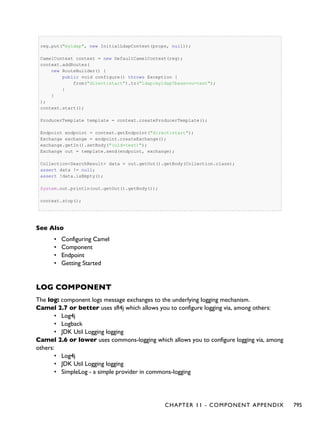
OSGi
POP / camel-mail
pop3://user-info@host:port
Receiving email using POP3 and
JavaMail
28 CHAPTER 4 - ARCHITECTURE
Printer / camel-printer
lpr://host:port/path/to/printer[?options]
The printer component facilitates
creation of printer endpoints to
local, remote and wireless
printers. The endpoints provide
the ability to print camel directed
payloads when utilized on camel
routes.
Properties / camel-core
properties://key[?options]
The properties component
facilitates using property
placeholders directly in endpoint
uri definitions.
Quartz / camel-quartz
quartz://groupName/timerName
Provides a scheduled delivery of
messages using the Quartz
scheduler
Quickfix / camel-quickfix
quickfix-server:config file
quickfix-client:config-file
Implementation of the QuickFix
for Java engine which allow to
send/receive FIX messages
Ref / camel-core
ref:name
Component for lookup of existing
endpoints bound in the Registry.
Restlet / camel-restlet
restlet:restletUrl[?options]
Component for consuming and
producing Restful resources using
Restlet
RMI / camel-rmi
rmi://host[:port]
Working with RMI
RNC / camel-jing
rnc:/relativeOrAbsoluteUri
Validates the payload of a message
using RelaxNG Compact Syntax
CHAPTER 4 - ARCHITECTURE 29
RNG / camel-jing
rng:/relativeOrAbsoluteUri
Validates the payload of a message
using RelaxNG
Routebox / camel-routebox
routebox:routeboxName[?options]
Facilitates the creation of
specialized endpoints that offer
encapsulation and a strategy/map
based indirection service to a
collection of camel routes hosted
in an automatically created or
user injected camel context
RSS / camel-rss
rss:uri
Working with ROME for RSS
integration, such as consuming an
RSS feed.
SEDA / camel-core
seda:name
Asynchronous call to another
endpoint in the same Camel
Context
SERVLET / camel-servlet
servlet:uri
For exposing services over HTTP
through the servlet which is
deployed into the Web container.
SFTP / camel-ftp
sftp://host[:port]/fileName
Sending and receiving files over
SFTP (FTP over SSH).
Sip / camel-sip
sip://user@host[:port]?[options]
sips://user@host[:port]?[options]
Publish/Subscribe communication
capability using the Telecom SIP
protocol. RFC3903 - Session
Initiation Protocol (SIP) Extension
for Event
SJMS / camel-sjms
sjms:[topic:]destinationName?[options]
A ground up implementation of a
JMS client
30 CHAPTER 4 - ARCHITECTURE
SMTP / camel-mail
smtp://user-info@host[:port]
Sending email using SMTP and
JavaMail
SMPP / camel-smpp
smpp://user-info@host[:port]?options
To send and receive SMS using
Short Messaging Service Center
using the JSMPP library
SNMP / camel-snmp
snmp://host[:port]?options
Polling OID values and receiving
traps using SNMP via SNMP4J
library
Solr / camel-solr
solr://host[:port]/solr?[options]
Uses the Solrj client API to
interface with an Apache Lucene
Solr server
SpringBatch / camel-spring-batch
spring-batch:job[?options]
To bridge Camel and Spring Batch
SpringIntegration / camel-spring-integration
spring-integration:defaultChannelName
The bridge component of Camel
and Spring Integration
Spring LDAP / camel-spring-ldap
spring-ldap:spring-ldap-template-bean?options
Camel wrapper for Spring LDAP
Spring Redis / camel-spring-redis
spring-redis:restletUrl[?options]
Component for consuming and
producing from Redis key-value
store Redis
Spring Web Services / camel-spring-ws
spring-ws:[mapping-type:]address[?options]
Client-side support for accessing
web services, and server-side
support for creating your own
contract-first web services using
Spring Web Services
CHAPTER 4 - ARCHITECTURE 31
SQL / camel-sql
sql:select * from table where id=#
Performing SQL queries using
JDBC
SSH component / camel-ssh
ssh:[username[:password]@]host[:port][?options]
For sending commands to a SSH
server
StAX / camel-stax
stax:contentHandlerClassName
Process messages through a SAX
ContentHandler.
Stream / camel-stream
stream:[in|out|err|file]
Read or write to an input/output/
error/file stream rather like unix
pipes
StringTemplate / camel-stringtemplate
string-template:someTemplateResource
Generates a response using a
String Template
Stub / camel-core
stub:someOtherCamelUri
Allows you to stub out some
physical middleware endpoint for
easier testing or debugging
TCP / camel-mina
mina:tcp://host:port
Working with TCP protocols
using Apache MINA
Test / camel-spring
test:expectedMessagesEndpointUri
Creates a Mock endpoint which
expects to receive all the message
bodies that could be polled from
the given underlying endpoint
Timer / camel-core
timer://name
A timer endpoint
32 CHAPTER 4 - ARCHITECTURE
Twitter / camel-twitter
twitter://[endpoint]?[options]
A twitter endpoint
UDP / camel-mina
mina:udp://host:port
Working with UDP protocols
using Apache MINA
Validation / camel-core (camel-spring for Camel 2.8 or
older)
validation:someLocalOrRemoteResource
Validates the payload of a message
using XML Schema and JAXP
Validation
Velocity / camel-velocity
velocity:someTemplateResource
Generates a response using an
Apache Velocity template
VM / camel-core
vm:name
Asynchronous call to another
endpoint in the same JVM
Websocket / camel-websocket
websocket://host:port/path
Communicating with Websocket
clients
XMPP / camel-xmpp
xmpp://host:port/room
Working with XMPP and Jabber
XQuery / camel-saxon
xquery:someXQueryResource
Generates a response using an
XQuery template
XSLT / camel-core (camel-spring for Camel 2.8 or
older)
xslt:someTemplateResource
Generates a response using an
XSLT template
CHAPTER 4 - ARCHITECTURE 33
Zookeeper / camel-zookeeper
zookeeper://host:port/path
Working with ZooKeeper
cluster(s)
URI's for external components
Other projects and companies have also created Camel components to integrate additional
functionality into Camel. These components may be provided under licenses that are not
compatible with the Apache License, use libraries that are not compatible, etc... These
components are not supported by the Camel team, but we provide links here to help users find
the additional functionality.
Component / ArtifactId / URI License Description
ActiveMQ / activemq-camel
activemq:[topic:]destinationName
Apache
For JMS
Messaging with
Apache
ActiveMQ
ActiveMQ Journal / activemq-core
activemq.journal:directory-on-filesystem
Apache
Uses ActiveMQ's
fast disk
journaling
implementation
to store message
bodies in a
rolling log file
Activiti / activiti-camel
activiti:camelProcess:serviceTask
Apache
For working
with Activiti, a
light-weight
workflow and
Business Process
Management
(BPM) platform
which supports
BPMN 2
Db4o / camel-db4o in camel-extra
db4o://className
GPL
For using a db4o
datastore as a
queue via the
db4o library
34 CHAPTER 4 - ARCHITECTURE
Esper / camel-esper in camel-extra
esper:name
GPL
Working with
the Esper Library
for Event Stream
Processing
Hibernate / camel-hibernate in camel-extra
hibernate://entityName
GPL
For using a
database as a
queue via the
Hibernate library
JGroups / camel-jgroups in camel-extra
jgroups://clusterName
LGPL
The jgroups:
component
provides
exchange of
messages
between Camel
infrastructure
and JGroups
clusters.
NMR / servicemix-nmr
nmr://serviceName
Apache
Integration with
the Normalized
Message Router
BUS in
ServiceMix 4.x
Scalate / scalate-camel
scalate:templateName
Apache
Uses the given
Scalate template
to transform the
message
Smooks / camel-smooks in camel-extra.
unmarshal(edi)
GPL
For working
with EDI parsing
using the
Smooks library.
This component
is deprecated
as Smooks now
provides Camel
integration out
of the box
CHAPTER 4 - ARCHITECTURE 35
Spring Neo4j / camel-spring-neo4j in camel-extra
spring-neo4j:http://hostname[:port]/database[?options]
to bee
clarified
Component for
producing to
Neo4j datastore
using the Spring
Data Neo4j
library
ZeroMQ / camel-zeromq in camel-extra.
zeromq:(tcp|ipc)://hostname:port
LGPL
The ZeroMQ
component
allows you to
consumer or
produce
messages using
ZeroMQ.
For a full details of the individual components see the Component Appendix
36 CHAPTER 4 - ARCHITECTURE
CHAPTER 5
°°°°
Enterprise Integration Patterns
Camel supports most of the Enterprise Integration Patterns from the excellent book of the
same name by Gregor Hohpe and Bobby Woolf. Its a highly recommended book, particularly
for users of Camel.
PATTERN INDEX
There now follows a list of the Enterprise Integration Patterns from the book along with
examples of the various patterns using Apache Camel
Messaging Systems
Message
Channel
How does one application communicate with another using
messaging?
Message
How can two applications connected by a message channel
exchange a piece of information?
Pipes and
Filters
How can we perform complex processing on a message while
maintaining independence and flexibility?
Message
Router
How can you decouple individual processing steps so that
messages can be passed to different filters depending on a set of
conditions?
Message
Translator
How can systems using different data formats communicate with
each other using messaging?
Message
Endpoint
How does an application connect to a messaging channel to send
and receive messages?
CHAPTER 5 - ENTERPRISE INTEGRATION PATTERNS 37
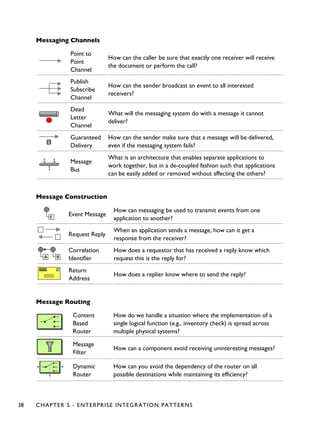
Messaging Channels
Point to
Point
Channel
How can the caller be sure that exactly one receiver will receive
the document or perform the call?
Publish
Subscribe
Channel
How can the sender broadcast an event to all interested
receivers?
Dead
Letter
Channel
What will the messaging system do with a message it cannot
deliver?
Guaranteed
Delivery
How can the sender make sure that a message will be delivered,
even if the messaging system fails?
Message
Bus
What is an architecture that enables separate applications to
work together, but in a de-coupled fashion such that applications
can be easily added or removed without affecting the others?
Message Construction
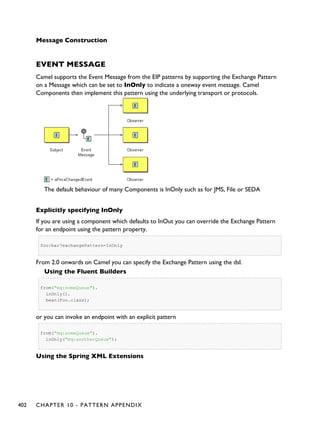
Event Message
How can messaging be used to transmit events from one
application to another?
Request Reply
When an application sends a message, how can it get a
response from the receiver?
Correlation
Identifier
How does a requestor that has received a reply know which
request this is the reply for?
Return
Address
How does a replier know where to send the reply?
Message Routing
Content
Based
Router
How do we handle a situation where the implementation of a
single logical function (e.g., inventory check) is spread across
multiple physical systems?
Message
Filter
How can a component avoid receiving uninteresting messages?
Dynamic
Router
How can you avoid the dependency of the router on all
possible destinations while maintaining its efficiency?
38 CHAPTER 5 - ENTERPRISE INTEGRATION PATTERNS
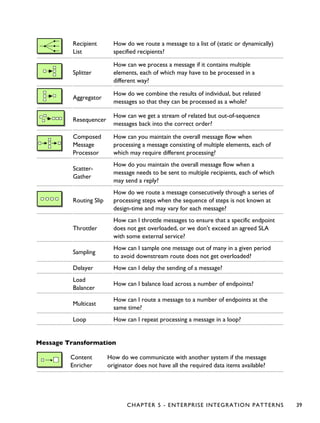
Recipient
List
How do we route a message to a list of (static or dynamically)
specified recipients?
Splitter
How can we process a message if it contains multiple
elements, each of which may have to be processed in a
different way?
Aggregator
How do we combine the results of individual, but related
messages so that they can be processed as a whole?
Resequencer
How can we get a stream of related but out-of-sequence
messages back into the correct order?
Composed
Message
Processor
How can you maintain the overall message flow when
processing a message consisting of multiple elements, each of
which may require different processing?
Scatter-
Gather
How do you maintain the overall message flow when a
message needs to be sent to multiple recipients, each of which
may send a reply?
Routing Slip
How do we route a message consecutively through a series of
processing steps when the sequence of steps is not known at
design-time and may vary for each message?
Throttler
How can I throttle messages to ensure that a specific endpoint
does not get overloaded, or we don't exceed an agreed SLA
with some external service?
Sampling
How can I sample one message out of many in a given period
to avoid downstream route does not get overloaded?
Delayer How can I delay the sending of a message?
Load
Balancer
How can I balance load across a number of endpoints?
Multicast
How can I route a message to a number of endpoints at the
same time?
Loop How can I repeat processing a message in a loop?
Message Transformation
Content
Enricher
How do we communicate with another system if the message
originator does not have all the required data items available?
CHAPTER 5 - ENTERPRISE INTEGRATION PATTERNS 39
Content
Filter
How do you simplify dealing with a large message, when you are
interested only in a few data items?
Claim
Check
How can we reduce the data volume of message sent across the
system without sacrificing information content?
Normalizer
How do you process messages that are semantically equivalent,
but arrive in a different format?
Sort How can I sort the body of a message?
Validate How can I validate a message?
Messaging Endpoints
Messaging
Mapper
How do you move data between domain objects and the
messaging infrastructure while keeping the two independent of
each other?
Event Driven
Consumer
How can an application automatically consume messages as they
become available?
Polling
Consumer
How can an application consume a message when the
application is ready?
Competing
Consumers
How can a messaging client process multiple messages
concurrently?
Message
Dispatcher
How can multiple consumers on a single channel coordinate
their message processing?
Selective
Consumer
How can a message consumer select which messages it wishes
to receive?
Durable
Subscriber
How can a subscriber avoid missing messages while it's not
listening for them?
Idempotent
Consumer
How can a message receiver deal with duplicate messages?
Transactional
Client
How can a client control its transactions with the messaging
system?
Messaging
Gateway
How do you encapsulate access to the messaging system from
the rest of the application?
40 CHAPTER 5 - ENTERPRISE INTEGRATION PATTERNS
Service
Activator
How can an application design a service to be invoked both via
various messaging technologies and via non-messaging
techniques?
System Management
ControlBus
How can we effectively administer a messaging system that is
distributed across multiple platforms and a wide geographic area?
Detour
How can you route a message through intermediate steps to
perform validation, testing or debugging functions?
Wire Tap
How do you inspect messages that travel on a point-to-point
channel?
Message
History
How can we effectively analyze and debug the flow of messages
in a loosely coupled system?
Log How can I log processing a message?
For a full breakdown of each pattern see the Book Pattern Appendix
CHAPTER 5 - ENTERPRISE INTEGRATION PATTERNS 41
CookBook
This document describes various recipes for working with Camel
• Bean Integration describes how to work with beans and Camel in a loosely coupled
way so that your beans do not have to depend on any Camel APIs
◦ Annotation Based Expression Language binds expressions to method
parameters
◦ Bean Binding defines which methods are invoked and how the Message is
converted into the parameters of the method when it is invoked
◦ Bean Injection for injecting Camel related resources into your POJOs
◦ Parameter Binding Annotations for extracting various headers, properties
or payloads from a Message
◦ POJO Consuming for consuming and possibly routing messages from Camel
◦ POJO Producing for producing camel messages from your POJOs
◦ RecipientList Annotation for creating a Recipient List from a POJO method
◦ Using Exchange Pattern Annotations describes how pattern annotations can
be used to change the behaviour of method invocations
• Hiding Middleware describes how to avoid your business logic being coupled to any
particular middleware APIs allowing you to easily switch from in JVM SEDA to JMS,
ActiveMQ, Hibernate, JPA, JDBC, iBATIS or JavaSpace etc.
• Visualisation describes how to visualise your Enterprise Integration Patterns to help
you understand your routing rules
• Business Activity Monitoring (BAM) for monitoring business processes across systems
• Extract Transform Load (ETL) to load data into systems or databases
• Testing for testing distributed and asynchronous systems using a messaging approach
◦ Camel Test for creating test cases using a single Java class for all your
configuration and routing
◦ Spring Testing uses Spring Test together with either XML or Java Config to
dependency inject your test classes
◦ Guice uses Guice to dependency inject your test classes
• Templating is a great way to create service stubs to be able to test your system
without some back end system.
• Database for working with databases
• Parallel Processing and Ordering on how using parallel processing and SEDA or JMS
based load balancing can be achieved.
• Asynchronous Processing in Camel Routes.
• Implementing Virtual Topics on other JMS providers shows how to get the effect of
Virtual Topics and avoid issues with JMS durable topics
• Camel Transport for CXF describes how to put the Camel context into the CXF
transport layer.
42 COOKBOOK
• Fine Grained Control Over a Channel describes how to deliver a sequence of
messages over a single channel and then stopping any more messages being sent over
that channel. Typically used for sending data over a socket and then closing the
socket.
• EventNotifier to log details about all sent Exchanges shows how to let Camels
EventNotifier log all sent to endpoint events and how long time it took.
• Loading routes from XML files into an existing CamelContext.
• Using MDC logging with Camel
• Running Camel standalone and have it keep running shows how to keep Camel
running when you run it standalone.
• Hazelcast Idempotent Repository Tutorial shows how to avoid to consume duplicated
messages in a clustered environment.
• How to use Camel as a HTTP proxy between a client and server shows how to use
Camel as a HTTP adapter/proxy between a client and HTTP service.
BEAN INTEGRATION
Camel supports the integration of beans and POJOs in a number of ways
Annotations
If a bean is defined in Spring XML or scanned using the Spring component scanning mechanism
and a <camelContext> is used or a CamelBeanPostProcessor then we process a
number of Camel annotations to do various things such as injecting resources or producing,
consuming or routing messages.
• POJO Consuming to consume and possibly route messages from Camel
• POJO Producing to make it easy to produce camel messages from your POJOs
• DynamicRouter Annotation for creating a Dynamic Router from a POJO method
• RecipientList Annotation for creating a Recipient List from a POJO method
• RoutingSlip Annotation for creating a Routing Slip for a POJO method
• Bean Injection to inject Camel related resources into your POJOs
• Using Exchange Pattern Annotations describes how the pattern annotations can be
used to change the behaviour of method invocations with Spring Remoting or POJO
Producing
Bean Component
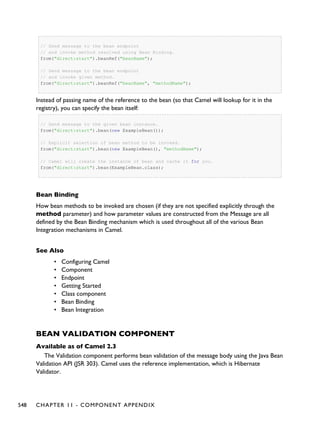
The Bean component allows one to invoke a particular method. Alternately the Bean
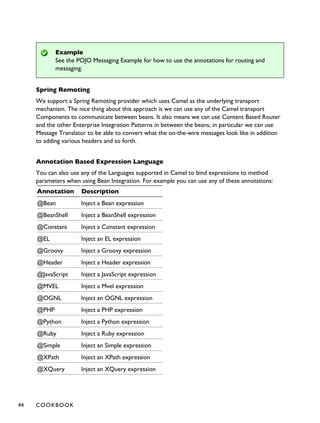
component supports the creation of a proxy via ProxyHelper to a Java interface; which the
implementation just sends a message containing a BeanInvocation to some Camel endpoint.
COOKBOOK 43
Example
See the POJO Messaging Example for how to use the annotations for routing and
messaging.
Spring Remoting
We support a Spring Remoting provider which uses Camel as the underlying transport
mechanism. The nice thing about this approach is we can use any of the Camel transport
Components to communicate between beans. It also means we can use Content Based Router
and the other Enterprise Integration Patterns in between the beans; in particular we can use
Message Translator to be able to convert what the on-the-wire messages look like in addition
to adding various headers and so forth.
Annotation Based Expression Language
You can also use any of the Languages supported in Camel to bind expressions to method
parameters when using Bean Integration. For example you can use any of these annotations:
Annotation Description
@Bean Inject a Bean expression
@BeanShell Inject a BeanShell expression
@Constant Inject a Constant expression
@EL Inject an EL expression
@Groovy Inject a Groovy expression
@Header Inject a Header expression
@JavaScript Inject a JavaScript expression
@MVEL Inject a Mvel expression
@OGNL Inject an OGNL expression
@PHP Inject a PHP expression
@Python Inject a Python expression
@Ruby Inject a Ruby expression
@Simple Inject an Simple expression
@XPath Inject an XPath expression
@XQuery Inject an XQuery expression
44 COOKBOOK
Bean binding
Whenever Camel invokes a bean method via one of the above methods (Bean
component, Spring Remoting or POJO Consuming) then the Bean Binding
mechanism is used to figure out what method to use (if it is not explicit) and how to
bind the Message to the parameters possibly using the Parameter Binding
Annotations or using a method name option.
Example:
public class Foo {
@MessageDriven(uri = "activemq:my.queue")
public void doSomething(@XPath("/foo/bar/text()") String correlationID, @Body
String body) {
// process the inbound message here
}
}
Advanced example using @Bean
And an example of using the the @Bean binding annotation, where you can use a Pojo where
you can do whatever java code you like:
public class Foo {
@MessageDriven(uri = "activemq:my.queue")
public void doSomething(@Bean("myCorrelationIdGenerator") String correlationID,
@Body String body) {
// process the inbound message here
}
}
And then we can have a spring bean with the id myCorrelationIdGenerator where we
can compute the id.
public class MyIdGenerator {
private UserManager userManager;
public String generate(@Header(name = "user") String user, @Body String payload)
throws Exception {
User user = userManager.lookupUser(user);
String userId = user.getPrimaryId();
COOKBOOK 45
String id = userId + generateHashCodeForPayload(payload);
return id;
}
}
The Pojo MyIdGenerator has one public method that accepts two parameters. However we
have also annotated this one with the @Header and @Body annotation to help Camel know
what to bind here from the Message from the Exchange being processed.
Of course this could be simplified a lot if you for instance just have a simple id generator.
But we wanted to demonstrate that you can use the Bean Binding annotations anywhere.
public class MySimpleIdGenerator {
public static int generate() {
// generate a unique id
return 123;
}
}
And finally we just need to remember to have our bean registered in the Spring Registry:
<bean id="myCorrelationIdGenerator" class="com.mycompany.MySimpleIdGenerator"/>
Example using Groovy
In this example we have an Exchange that has a User object stored in the in header. This User
object has methods to get some user information. We want to use Groovy to inject an
expression that extracts and concats the fullname of the user into the fullName parameter.
public void doSomething(@Groovy("$request.header['user'].firstName
$request.header['user'].familyName) String fullName, @Body String body) {
// process the inbound message here
}
Groovy supports GStrings that is like a template where we can insert $ placeholders that will
be evaluated by Groovy.
BEAN BINDING
Bean Binding in Camel defines both which methods are invoked and also how the Message is
converted into the parameters of the method when it is invoked.
46 COOKBOOK
Choosing the method to invoke
The binding of a Camel Message to a bean method call can occur in different ways, in the
following order of importance:
• if the message contains the header CamelBeanMethodName then that method
is invoked, converting the body to the type of the method's argument.
◦ From Camel 2.8 onwards you can qualify parameter types to select
exactly which method to use among overloads with the same name (see
below for more details).
◦ From Camel 2.9 onwards you can specify parameter values directly in the
method option (see below for more details).
• you can explicitly specify the method name in the DSL or when using POJO
Consuming or POJO Producing
• if the bean has a method marked with the @Handler annotation, then that method
is selected
• if the bean can be converted to a Processor using the Type Converter mechanism,
then this is used to process the message. The ActiveMQ component uses this
mechanism to allow any JMS MessageListener to be invoked directly by Camel
without having to write any integration glue code. You can use the same mechanism
to integrate Camel into any other messaging/remoting frameworks.
• if the body of the message can be converted to a BeanInvocation (the default payload
used by the ProxyHelper) component - then that is used to invoke the method and
pass its arguments
• otherwise the type of the body is used to find a matching method; an error is thrown
if a single method cannot be chosen unambiguously.
• you can also use Exchange as the parameter itself, but then the return type must be
void.
• if the bean class is private (or package-private), interface methods will be preferred
(from Camel 2.9 onwards) since Camel can't invoke class methods on such beans
In cases where Camel cannot choose a method to invoke, an
AmbiguousMethodCallException is thrown.
By default the return value is set on the outbound message body.
Parameter binding
When a method has been chosen for invokation, Camel will bind to the parameters of the
method.
The following Camel-specific types are automatically bound:
▪ org.apache.camel.Exchange
▪ org.apache.camel.Message
▪ org.apache.camel.CamelContext
▪ org.apache.camel.TypeConverter
▪ org.apache.camel.spi.Registry
COOKBOOK 47
▪ java.lang.Exception
So, if you declare any of these types, they will be provided by Camel. Note that Exception
will bind to the caught exception of the Exchange - so it's often usable if you
employ a Pojo to handle, e.g., an onException route.
What is most interesting is that Camel will also try to bind the body of the Exchange to the
first parameter of the method signature (albeit not of any of the types above). So if, for
instance, we declare a parameter as String body, then Camel will bind the IN body to this
type. Camel will also automatically convert to the type declared in the method signature.
Let's review some examples:
Below is a simple method with a body binding. Camel will bind the IN body to the body
parameter and convert it to a String.
public String doSomething(String body)
In the following sample we got one of the automatically-bound types as well - for instance, a
Registry that we can use to lookup beans.
public String doSomething(String body, Registry registry)
We can use Exchange as well:
public String doSomething(String body, Exchange exchange)
You can also have multiple types:
public String doSomething(String body, Exchange exchange, TypeConverter converter)
And imagine you use a Pojo to handle a given custom exception InvalidOrderException
- we can then bind that as well:
public String badOrder(String body, InvalidOrderException invalid)
Notice that we can bind to it even if we use a sub type of java.lang.Exception as Camel
still knows it's an exception and can bind the cause (if any exists).
So what about headers and other stuff? Well now it gets a bit tricky - so we can use
annotations to help us, or specify the binding in the method name option.
See the following sections for more detail.
Binding Annotations
You can use the Parameter Binding Annotations to customize how parameter values are
created from the Message
48 COOKBOOK
Examples
For example, a Bean such as:
public class Bar {
public String doSomething(String body) {
// process the in body and return whatever you want
return "Bye World";
}
Or the Exchange example. Notice that the return type must be void when there is only a
single parameter of the type org.apache.camel.Exchange:
public class Bar {
public void doSomething(Exchange exchange) {
// process the exchange
exchange.getIn().setBody("Bye World");
}
@Handler
You can mark a method in your bean with the @Handler annotation to indicate that this
method should be used for Bean Binding.
This has an advantage as you need not specify a method name in the Camel route, and
therefore do not run into problems after renaming the method in an IDE that can't find all its
references.
public class Bar {
@Handler
public String doSomething(String body) {
// process the in body and return whatever you want
return "Bye World";
}
Parameter binding using method option
Available as of Camel 2.9
Camel uses the following rules to determine if it's a parameter value in the method option
▪ The value is either true or false which denotes a boolean value
▪ The value is a numeric value such as 123 or 7
▪ The value is a String enclosed with either single or double quotes
▪ The value is null which denotes a null value
COOKBOOK 49
▪ It can be evaluated using the Simple language, which means you can use, e.g., body,
header.foo and other Simple tokens. Notice the tokens must be enclosed with ${ }.
Any other value is consider to be a type declaration instead - see the next section about
specifying types for overloaded methods.
When invoking a Bean you can instruct Camel to invoke a specific method by providing the
method name:
.bean(OrderService.class, "doSomething")
Here we tell Camel to invoke the doSomething method - Camel handles the parameters'
binding. Now suppose the method has 2 parameters, and the 2nd parameter is a boolean where
we want to pass in a true value:
public void doSomething(String payload, boolean highPriority) {
...
}
This is now possible in Camel 2.9 onwards:
.bean(OrderService.class, "doSomething(*, true)")
In the example above, we defined the first parameter using the wild card symbol *, which tells
Camel to bind this parameter to any type, and let Camel figure this out. The 2nd parameter has
a fixed value of true. Instead of the wildcard symbol we can instruct Camel to use the
message body as shown:
.bean(OrderService.class, "doSomething(${body}, true)")
The syntax of the parameters is using the Simple expression language so we have to use ${ }
placeholders in the body to refer to the message body.
If you want to pass in a null value, then you can explicit define this in the method option as
shown below:
.to("bean:orderService?method=doSomething(null, true)")
Specifying null as a parameter value instructs Camel to force passing a null value.
Besides the message body, you can pass in the message headers as a java.util.Map:
.bean(OrderService.class, "doSomethingWithHeaders(${body}, ${headers})")
You can also pass in other fixed values besides booleans. For example, you can pass in a String
and an integer:
50 COOKBOOK
.bean(MyBean.class, "echo('World', 5)")
In the example above, we invoke the echo method with two parameters. The first has the
content 'World' (without quotes), and the 2nd has the value of 5.
Camel will automatically convert these values to the parameters' types.
Having the power of the Simple language allows us to bind to message headers and other
values such as:
.bean(OrderService.class, "doSomething(${body}, ${header.high})")
You can also use the OGNL support of the Simple expression language. Now suppose the
message body is an object which has a method named asXml. To invoke the asXml method
we can do as follows:
.bean(OrderService.class, "doSomething(${body.asXml}, ${header.high})")
Instead of using .bean as shown in the examples above, you may want to use .to instead as
shown:
.to("bean:orderService?method=doSomething(${body.asXml}, ${header.high})")
Using type qualifiers to select among overloaded methods
Available as of Camel 2.8
If you have a Bean with overloaded methods, you can now specify parameter types in the
method name so Camel can match the method you intend to use.
Given the following bean:
Listing 1.Listing 1. MyBeanMyBean
public static final class MyBean {
public String hello(String name) {
return "Hello " + name;
}
public String hello(String name, @Header("country") String country) {
return "Hello " + name + " you are from " + country;
}
public String times(String name, @Header("times") int times) {
StringBuilder sb = new StringBuilder();
for (int i = 0; i < times; i++) {
sb.append(name);
}
COOKBOOK 51
return sb.toString();
}
public String times(byte[] data, @Header("times") int times) {
String s = new String(data);
StringBuilder sb = new StringBuilder();
for (int i = 0; i < times; i++) {
sb.append(s);
if (i < times - 1) {
sb.append(",");
}
}
return sb.toString();
}
public String times(String name, int times, char separator) {
StringBuilder sb = new StringBuilder();
for (int i = 0; i < times; i++) {
sb.append(name);
if (i < times - 1) {
sb.append(separator);
}
}
return sb.toString();
}
}
Then the MyBean has 2 overloaded methods with the names hello and times. So if we
want to use the method which has 2 parameters we can do as follows in the Camel route:
Listing 1.Listing 1. Invoke 2 parameter methodInvoke 2 parameter method
from("direct:start")
.bean(MyBean.class, "hello(String,String)")
.to("mock:result");
We can also use a * as wildcard so we can just say we want to execute the method with 2
parameters we do
Listing 1.Listing 1. Invoke 2 parameter method using wildcardInvoke 2 parameter method using wildcard
from("direct:start")
.bean(MyBean.class, "hello(*,*)")
.to("mock:result");
By default Camel will match the type name using the simple name, e.g. any leading package name
will be disregarded. However if you want to match using the FQN, then specify the FQN type
and Camel will leverage that. So if you have a com.foo.MyOrder and you want to match
against the FQN, and not the simple name "MyOrder", then follow this example:
52 COOKBOOK
.bean(OrderService.class, "doSomething(com.foo.MyOrder)")
Bean Injection
We support the injection of various resources using @EndpointInject. This can be used to
inject
• Endpoint instances which can be used for testing when used with Mock endpoints; see
the Spring Testing for an example.
• ProducerTemplate instances for POJO Producing
• client side proxies for POJO Producing which is a simple approach to Spring
Remoting
Parameter Binding Annotations
Annotations can be used to define an Expression or to extract various headers, properties or
payloads from a Message when invoking a bean method (see Bean Integration for more detail of
how to invoke bean methods) together with being useful to help disambiguate which method to
invoke.
If no annotations are used then Camel assumes that a single parameter is the body of the
message. Camel will then use the Type Converter mechanism to convert from the expression
value to the actual type of the parameter.
The core annotations are as follows
Annotation Meaning Parameter
@Body To bind to an inbound message body Ê
@ExchangeException To bind to an Exception set on the exchange Ê
@Header To bind to an inbound message header
String name
of the header
@Headers
To bind to the Map of the inbound message
headers
Ê
@OutHeaders
To bind to the Map of the outbound message
headers
Ê
@Property To bind to a named property on the exchange
String name
of the
property
@Properties To bind to the property map on the exchange Ê
COOKBOOK 53
Camel currently only supports either specifying parameter binding or type per
parameter in the method name option. You cannot specify both at the same time,
such as
doSomething(com.foo.MyOrder ${body}, boolean ${header.high})
This may change in the future.
camel-core
The annotations below are all part of camel-core and thus does not require
camel-spring or Spring. These annotations can be used with the Bean
component or when invoking beans in the DSL
@Handler
Not part as a type parameter but stated in this
table anyway to spread the good word that we have
this annotation in Camel now. See more at Bean
Binding.
Ê
The follow annotations @Headers, @OutHeaders and @Properties binds to the backing
java.util.Map so you can alter the content of these maps directly, for instance using the
put method to add a new entry. See the OrderService class at Exception Clause for such an
example. You can use @Header("myHeader") and @Property("myProperty") to
access the backing java.util.Map.
Example
In this example below we have a @Consume consumer (like message driven) that consumes
JMS messages from the activemq queue. We use the @Header and @Body parameter binding
annotations to bind from the JMSMessage to the method parameters.
public class Foo {
@Consume(uri = "activemq:my.queue")
public void doSomething(@Header("JMSCorrelationID") String correlationID, @Body
String body) {
// process the inbound message here
}
}
54 COOKBOOK
In the above Camel will extract the value of Message.getJMSCorrelationID(), then using the
Type Converter to adapt the value to the type of the parameter if required - it will inject the
parameter value for the correlationID parameter. Then the payload of the message will be
converted to a String and injected into the body parameter.
You don't necessarily need to use the @Consume annotation if you don't want to as you
could also make use of the Camel DSL to route to the bean's method as well.
Using the DSL to invoke the bean method
Here is another example which does not use POJO Consuming annotations but instead uses
the DSL to route messages to the bean method
public class Foo {
public void doSomething(@Header("JMSCorrelationID") String correlationID, @Body
String body) {
// process the inbound message here
}
}
The routing DSL then looks like this
from("activemq:someQueue").
to("bean:myBean");
Here myBean would be looked up in the Registry (such as JNDI or the Spring
ApplicationContext), then the body of the message would be used to try figure out what
method to call.
If you want to be explicit you can use
from("activemq:someQueue").
to("bean:myBean?methodName=doSomething");
And here we have a nifty example for you to show some great power in Camel. You can mix
and match the annotations with the normal parameters, so we can have this example with
annotations and the Exchange also:
public void doSomething(@Header("user") String user, @Body String body, Exchange
exchange) {
exchange.getIn().setBody(body + "MyBean");
}
COOKBOOK 55
Annotation Based Expression Language
You can also use any of the Languages supported in Camel to bind expressions to method
parameters when using Bean Integration. For example you can use any of these annotations:
Annotation Description
@Bean Inject a Bean expression
@BeanShell Inject a BeanShell expression
@Constant Inject a Constant expression
@EL Inject an EL expression
@Groovy Inject a Groovy expression
@Header Inject a Header expression
@JavaScript Inject a JavaScript expression
@MVEL Inject a Mvel expression
@OGNL Inject an OGNL expression
@PHP Inject a PHP expression
@Python Inject a Python expression
@Ruby Inject a Ruby expression
@Simple Inject an Simple expression
@XPath Inject an XPath expression
@XQuery Inject an XQuery expression
Example:
public class Foo {
@MessageDriven(uri = "activemq:my.queue")
public void doSomething(@XPath("/foo/bar/text()") String correlationID, @Body
String body) {
// process the inbound message here
}
}
56 COOKBOOK
Advanced example using @Bean
And an example of using the the @Bean binding annotation, where you can use a Pojo where
you can do whatever java code you like:
public class Foo {
@MessageDriven(uri = "activemq:my.queue")
public void doSomething(@Bean("myCorrelationIdGenerator") String correlationID,
@Body String body) {
// process the inbound message here
}
}
And then we can have a spring bean with the id myCorrelationIdGenerator where we
can compute the id.
public class MyIdGenerator {
private UserManager userManager;
public String generate(@Header(name = "user") String user, @Body String payload)
throws Exception {
User user = userManager.lookupUser(user);
String userId = user.getPrimaryId();
String id = userId + generateHashCodeForPayload(payload);
return id;
}
}
The Pojo MyIdGenerator has one public method that accepts two parameters. However we
have also annotated this one with the @Header and @Body annotation to help Camel know
what to bind here from the Message from the Exchange being processed.
Of course this could be simplified a lot if you for instance just have a simple id generator.
But we wanted to demonstrate that you can use the Bean Binding annotations anywhere.
public class MySimpleIdGenerator {
public static int generate() {
// generate a unique id
return 123;
}
}
And finally we just need to remember to have our bean registered in the Spring Registry:
<bean id="myCorrelationIdGenerator" class="com.mycompany.MySimpleIdGenerator"/>
COOKBOOK 57
Example using Groovy
In this example we have an Exchange that has a User object stored in the in header. This User
object has methods to get some user information. We want to use Groovy to inject an
expression that extracts and concats the fullname of the user into the fullName parameter.
public void doSomething(@Groovy("$request.header['user'].firstName
$request.header['user'].familyName) String fullName, @Body String body) {
// process the inbound message here
}
Groovy supports GStrings that is like a template where we can insert $ placeholders that will
be evaluated by Groovy.
@Consume
To consume a message you use the @Consume annotation to mark a particular method of a
bean as being a consumer method. The uri of the annotation defines the Camel Endpoint to
consume from.
e.g. lets invoke the onCheese() method with the String body of the inbound JMS message
from ActiveMQ on the cheese queue; this will use the Type Converter to convert the JMS
ObjectMessage or BytesMessage to a String - or just use a TextMessage from JMS
public class Foo {
@Consume(uri="activemq:cheese")
public void onCheese(String name) {
...
}
}
The Bean Binding is then used to convert the inbound Message to the parameter list used to
invoke the method .
What this does is basically create a route that looks kinda like this
from(uri).bean(theBean, "methodName");
Using context option to apply only a certain CamelContext
See the warning above.
You can use the context option to specify which CamelContext the consumer should
only apply for. For example:
58 COOKBOOK
When using more than one CamelContext
When you use more than 1 CamelContext you might end up with each of them
creating a POJO Consuming; therefore use the option context on @Consume
that allows you to specify which CamelContext id/name you want it to apply for.
@Consume(uri="activemq:cheese", context="camel-1")
public void onCheese(String name) {
The consumer above will only be created for the CamelContext that have the context id =
camel-1. You set this id in the XML tag:
<camelContext id="camel-1" ...>
Using an explicit route
If you want to invoke a bean method from many different endpoints or within different complex
routes in different circumstances you can just use the normal routing DSL or the Spring XML
configuration file.
For example
from(uri).beanRef("myBean", "methodName");
which will then look up in the Registry and find the bean and invoke the given bean name. (You
can omit the method name and have Camel figure out the right method based on the method
annotations and body type).
Use the Bean endpoint
You can always use the bean endpoint
from(uri).to("bean:myBean?method=methodName");
Using a property to define the endpoint
Available as of Camel 2.11
COOKBOOK 59
The following annotations @Consume, @Produce, @EndpointInject, now offers a
property attribute you can use to define the endpoint as a property on the bean. Then
Camel will use the getter method to access the property.
For example
public class MyService {
private String serviceEndpoint;
public void setServiceEndpoint(String uri) {
this.serviceEndpoint = uri;
}
public String getServiceEndpoint() {
return serviceEndpoint
}
@Consume(property = "serviceEndpoint")
public void onService(String input) {
...
}
}
The bean MyService has a property named serviceEndpoint which has getter/setter for
the property. Now we want to use the bean for POJO Consuming, and hence why we use
@Consume in the onService method. Notice how we use the property =
"serviceEndpoint to configure the property that has the endpoint url.
If you define the bean in Spring XML or Blueprint, then you can configure the property as
follows:
<bean id="myService" class="com.foo.MyService">
<property name="serviceEndpoint" value="activemq:queue:foo"/>
</bean>
This allows you to configure the bean using any standard IoC style.
Camel offers a naming convention which allows you to not have to explicit name the
property.
Camel uses this algorithm to find the getter method. The method must be a getXXX method.
1. Use the property name if explicit given
2. If no property name was configured, then use the method name
3. Try to get the property with name*Endpoint* (eg with Endpoint as postfix)
4. Try to get the property with the name as is (eg no postfix or postfix)
5. If the property name starts with on then omit that, and try step 3 and 4 again.
So in the example above, we could have defined the @Consume annotation as
60 COOKBOOK
This applies for them all
The explanation below applies for all the three annotations, eg @Consume,
@Produce, and @EndpointInject
@Consume(property = "service")
public void onService(String input) {
Now the property is named 'service' which then would match step 3 from the algorithm, and
have Camel invoke the getServiceEndpoint method.
We could also have omitted the property attribute, to make it implicit
@Consume
public void onService(String input) {
Now Camel matches step 5, and loses the prefix on in the name, and looks for 'service' as the
property. And because there is a getServiceEndpoint method, Camel will use that.
Which approach to use?
Using the @Consume annotations are simpler when you are creating a simple route with a
single well defined input URI.
However if you require more complex routes or the same bean method needs to be
invoked from many places then please use the routing DSL as shown above.
There are two different ways to send messages to any Camel Endpoint from a POJO
@EndpointInject
To allow sending of messages from POJOs you can use the @EndpointInject annotation. This
will inject a ProducerTemplate so that the bean can participate in message exchanges.
e.g. lets send a message to the foo.bar queue in ActiveMQ at some point
public class Foo {
@EndpointInject(uri="activemq:foo.bar")
ProducerTemplate producer;
public void doSomething() {
if (whatever) {
producer.sendBody("<hello>world!</hello>");
}
COOKBOOK 61
}
}
The downside of this is that your code is now dependent on a Camel API, the
ProducerTemplate. The next section describes how to remove this
Hiding the Camel APIs from your code using @Produce
We recommend Hiding Middleware APIs from your application code so the next option might
be more suitable.
You can add the @Produce annotation to an injection point (a field or property setter) using a
ProducerTemplate or using some interface you use in your business logic. e.g.
public interface MyListener {
String sayHello(String name);
}
public class MyBean {
@Produce(uri = "activemq:foo")
protected MyListener producer;
public void doSomething() {
// lets send a message
String response = producer.sayHello("James");
}
}
Here Camel will automatically inject a smart client side proxy at the @Produce annotation - an
instance of the MyListener instance. When we invoke methods on this interface the method call
is turned into an object and using the Camel Spring Remoting mechanism it is sent to the
endpoint - in this case the ActiveMQ endpoint to queue foo; then the caller blocks for a
response.
If you want to make asynchronous message sends then use an @InOnly annotation on the
injection point.
@RECIPIENTLIST ANNOTATION
We support the use of @RecipientList on a bean method to easily create a dynamic Recipient
List using a Java method.
62 COOKBOOK
See POJO Consuming for how to use a property on the bean as endpoint
configuration, eg using the property attribute on @Produce, @EndpointInject.
Simple Example using @Consume and @RecipientList
package com.acme.foo;
public class RouterBean {
@Consume(uri = "activemq:foo")
@RecipientList
public String[] route(String body) {
return new String[]{"activemq:bar", "activemq:whatnot"};
}
}
For example if the above bean is configured in Spring when using a <camelContext>
element as follows
<?xml version="1.0" encoding="UTF-8"?>
<beans xmlns="http://www.springframework.org/schema/beans"
xmlns:xsi="http://www.w3.org/2001/XMLSchema-instance"
xsi:schemaLocation="
http://www.springframework.org/schema/beans http://www.springframework.org/
schema/beans/spring-beans.xsd
http://camel.apache.org/schema/spring http://camel.apache.org/schema/spring/
camel-spring.xsd
">
<camelContext xmlns="http://activemq.apache.org/camel/schema/spring"/>
<bean id="myRecipientList" class="com.acme.foo.RouterBean"/>
</beans>
then a route will be created consuming from the foo queue on the ActiveMQ component
which when a message is received the message will be forwarded to the endpoints defined by
the result of this method call - namely the bar and whatnot queues.
How it works
The return value of the @RecipientList method is converted to either a java.util.Collection /
java.util.Iterator or array of objects where each element is converted to an Endpoint or a String,
or if you are only going to route to a single endpoint then just return either an Endpoint object
or an object that can be converted to a String. So the following methods are all valid
COOKBOOK 63
@RecipientList
public String[] route(String body) { ... }
@RecipientList
public List<String> route(String body) { ... }
@RecipientList
public Endpoint route(String body) { ... }
@RecipientList
public Endpoint[] route(String body) { ... }
@RecipientList
public Collection<Endpoint> route(String body) { ... }
@RecipientList
public URI route(String body) { ... }
@RecipientList
public URI[] route(String body) { ... }
Then for each endpoint or URI the message is forwarded a separate copy to that endpoint.
You can then use whatever Java code you wish to figure out what endpoints to route to; for
example you can use the Bean Binding annotations to inject parts of the message body or
headers or use Expression values on the message.
More Complex Example Using DSL
In this example we will use more complex Bean Binding, plus we will use a separate route to
invoke the Recipient List
public class RouterBean2 {
@RecipientList
public String route(@Header("customerID") String custID String body) {
if (custID == null) return null;
return "activemq:Customers.Orders." + custID;
}
}
public class MyRouteBuilder extends RouteBuilder {
protected void configure() {
from("activemq:Orders.Incoming").recipientList(bean("myRouterBean", "route"));
}
}
Notice how we are injecting some headers or expressions and using them to determine the
recipients using Recipient List EIP.
See the Bean Integration for more details.
64 COOKBOOK
USING EXCHANGE PATTERN ANNOTATIONS
When working with POJO Producing or Spring Remoting you invoke methods which typically
by default are InOut for Request Reply. That is there is an In message and an Out for the result.
Typically invoking this operation will be synchronous, the caller will block until the server
returns a result.
Camel has flexible Exchange Pattern support - so you can also support the Event Message
pattern to use InOnly for asynchronous or one way operations. These are often called 'fire and
forget' like sending a JMS message but not waiting for any response.
From 1.5 onwards Camel supports annotations for specifying the message exchange pattern
on regular Java methods, classes or interfaces.
Specifying InOnly methods
Typically the default InOut is what most folks want but you can customize to use InOnly using
an annotation.
public interface Foo {
Object someInOutMethod(String input);
String anotherInOutMethod(Cheese input);
@InOnly
void someInOnlyMethod(Document input);
}
The above code shows three methods on an interface; the first two use the default InOut
mechanism but the someInOnlyMethod uses the InOnly annotation to specify it as being a
oneway method call.
Class level annotations
You can also use class level annotations to default all methods in an interface to some pattern
such as
@InOnly
public interface Foo {
void someInOnlyMethod(Document input);
void anotherInOnlyMethod(String input);
}
Annotations will also be detected on base classes or interfaces. So for example if you created a
client side proxy for
COOKBOOK 65
public class MyFoo implements Foo {
...
}
Then the methods inherited from Foo would be InOnly.
Overloading a class level annotation
You can overload a class level annotation on specific methods. A common use case for this is if
you have a class or interface with many InOnly methods but you want to just annote one or
two methods as InOut
@InOnly
public interface Foo {
void someInOnlyMethod(Document input);
void anotherInOnlyMethod(String input);
@InOut
String someInOutMethod(String input);
}
In the above Foo interface the someInOutMethod will be InOut
Using your own annotations
You might want to create your own annotations to represent a group of different bits of
metadata; such as combining synchrony, concurrency and transaction behaviour.
So you could annotate your annotation with the @Pattern annotation to default the
exchange pattern you wish to use.
For example lets say we want to create our own annotation called @MyAsyncService
@Retention(RetentionPolicy.RUNTIME)
@Target({ElementType.TYPE, ElementType.METHOD})
// lets add the message exchange pattern to it
@Pattern(ExchangePattern.InOnly)
// lets add some other annotations - maybe transaction behaviour?
public @interface MyAsyncService {
}
Now we can use this annotation and Camel will figure out the correct exchange pattern...
66 COOKBOOK
public interface Foo {
void someInOnlyMethod(Document input);
void anotherInOnlyMethod(String input);
@MyAsyncService
String someInOutMethod(String input);
}
When writing software these days, its important to try and decouple as much middleware code
from your business logic as possible.
This provides a number of benefits...
• you can choose the right middleware solution for your deployment and switch at any
time
• you don't have to spend a large amount of time learning the specifics of any particular
technology, whether its JMS or JavaSpace or Hibernate or JPA or iBATIS whatever
For example if you want to implement some kind of message passing, remoting, reliable load
balancing or asynchronous processing in your application we recommend you use Camel
annotations to bind your services and business logic to Camel Components which means you
can then easily switch between things like
• in JVM messaging with SEDA
• using JMS via ActiveMQ or other JMS providers for reliable load balancing, grid or
publish and subscribe
• for low volume, but easier administration since you're probably already using a
database you could use
◦ Hibernate or JPA to use an entity bean / table as a queue
◦ iBATIS to work with SQL
◦ JDBC for raw SQL access
• use JavaSpace
How to decouple from middleware APIs
The best approach when using remoting is to use Spring Remoting which can then use any
messaging or remoting technology under the covers. When using Camel's implementation you
can then use any of the Camel Components along with any of the Enterprise Integration
Patterns.
Another approach is to bind Java beans to Camel endpoints via the Bean Integration. For
example using POJO Consuming and POJO Producing you can avoid using any Camel APIs to
decouple your code both from middleware APIs and Camel APIs!
COOKBOOK 67
VISUALISATION
Camel supports the visualisation of your Enterprise Integration Patterns using the GraphViz
DOT files which can either be rendered directly via a suitable GraphViz tool or turned into
HTML, PNG or SVG files via the Camel Maven Plugin.
Here is a typical example of the kind of thing we can generate
If you click on the actual generated htmlyou will see that you can navigate from an EIP node
to its pattern page, along with getting hover-over tool tips ec.
How to generate
See Camel Dot Maven Goal or the other maven goals Camel Maven Plugin
For OS X users
If you are using OS X then you can open the DOT file using graphviz which will then
automatically re-render if it changes, so you end up with a real time graphical representation of
the topic and queue hierarchies!
Also if you want to edit the layout a little before adding it to a wiki to distribute to your
team, open the DOT file with OmniGraffle then just edit away
BUSINESS ACTIVITY MONITORING
The Camel BAM module provides a Business Activity Monitoring (BAM) framework for
testing business processes across multiple message exchanges on different Endpoint instances.
Consider, for example, a simple system in which you submit Purchase Orders into system A
and then receive Invoices from system B. You might want to test that, for a given Purchase
Order, you receive a matching Invoice from system B within a specific time period.
How Camel BAM Works
Camel BAM uses a Correlation Identifier on an input message to determine the Process Instance
to which it belongs. The process instance is an entity bean which can maintain state for each
Activity (where an activity typically maps to a single endpoint - such as the submission of
Purchase Orders or the receipt of Invoices).
You can then add rules to be triggered when a message is received on any activity - such as
to set time expectations or perform real time reconciliation of values across activities.
68 COOKBOOK
Simple Example
The following example shows how to perform some time based rules on a simple business
process of 2 activities - A and B - which correspond with Purchase Orders and Invoices in the
example above. If you would like to experiment with this scenario, you may edit this Test Case,
which defines the activities and rules, and then tests that they work.
return new ProcessBuilder(jpaTemplate, transactionTemplate) {
public void configure() throws Exception {
// let's define some activities, correlating on an XPath on the message bodies
ActivityBuilder a = activity("seda:a").name("a")
.correlate(xpath("/hello/@id"));
ActivityBuilder b = activity("seda:b").name("b")
.correlate(xpath("/hello/@id"));
// now let's add some rules
b.starts().after(a.completes())
.expectWithin(seconds(1))
.errorIfOver(seconds(errorTimeout)).to("mock:overdue");
}
};
As you can see in the above example, we first define two activities, and then rules to specify
when we expect them to complete for a process instance and when an error condition should
be raised.p. The ProcessBuilder is a RouteBuilder and can be added to any CamelContext.
Complete Example
For a complete example please see the BAM Example, which is part of the standard Camel
Examples
Use Cases
In the world of finance, a common requirement is tracking trades. Often a trader will submit a
Front Office Trade which then flows through the Middle Office and Back Office through various
systems to settle the trade so that money is exchanged. You may wish to test that the front and
back office trades match up within a certain time period; if they don't match or a back office
trade does not arrive within a required amount of time, you might signal an alarm.
EXTRACT TRANSFORM LOAD (ETL)
The ETL (Extract, Transform, Load) is a mechanism for loading data into systems or databases
using some kind of Data Format from a variety of sources; often files then using Pipes and
Filters, Message Translator and possible other Enterprise Integration Patterns.
COOKBOOK 69
So you could query data from various Camel Components such as File, HTTP or JPA,
perform multiple patterns such as Splitter or Message Translator then send the messages to
some other Component.
To show how this all fits together, try the ETL Example
MOCK COMPONENT
Testing of distributed and asynchronous processing is notoriously difficult. The Mock, Test and
DataSet endpoints work great with the Camel Testing Framework to simplify your unit and
integration testing using Enterprise Integration Patterns and Camel's large range of Components
together with the powerful Bean Integration.
The Mock component provides a powerful declarative testing mechanism, which is similar to
jMock in that it allows declarative expectations to be created on any Mock endpoint before a
test begins. Then the test is run, which typically fires messages to one or more endpoints, and
finally the expectations can be asserted in a test case to ensure the system worked as expected.
This allows you to test various things like:
• The correct number of messages are received on each endpoint,
• The correct payloads are received, in the right order,
• Messages arrive on an endpoint in order, using some Expression to create an order
testing function,
• Messages arrive match some kind of Predicate such as that specific headers have
certain values, or that parts of the messages match some predicate, such as by
evaluating an XPath or XQuery Expression.
Note that there is also the Test endpoint which is a Mock endpoint, but which uses a second
endpoint to provide the list of expected message bodies and automatically sets up the Mock
endpoint assertions. In other words, it's a Mock endpoint that automatically sets up its
assertions from some sample messages in a File or database, for example.
URI format
mock:someName[?options]
Where someName can be any string that uniquely identifies the endpoint.
You can append query options to the URI in the following format,
?option=value&option=value&...
Options
Option Default Description
reportGroup null A size to use a throughput logger for reporting
70 COOKBOOK
Mock endpoints keep received Exchanges in memory indefinitely
Remember that Mock is designed for testing. When you add Mock endpoints to a
route, each Exchange sent to the endpoint will be stored (to allow for later
validation) in memory until explicitly reset or the JVM is restarted. If you are
sending high volume and/or large messages, this may cause excessive memory use. If
your goal is to test deployable routes inline, consider using NotifyBuilder or
AdviceWith in your tests instead of adding Mock endpoints to routes directly.
From Camel 2.10 onwards there are two new options retainFirst, and retainLast
that can be used to limit the number of messages the Mock endpoints keep in memory.
Simple Example
Here's a simple example of Mock endpoint in use. First, the endpoint is resolved on the
context. Then we set an expectation, and then, after the test has run, we assert that our
expectations have been met.
MockEndpoint resultEndpoint = context.resolveEndpoint("mock:foo", MockEndpoint.class);
resultEndpoint.expectedMessageCount(2);
// send some messages
...
// now lets assert that the mock:foo endpoint received 2 messages
resultEndpoint.assertIsSatisfied();
You typically always call the assertIsSatisfied() method to test that the expectations were met
after running a test.
Camel will by default wait 10 seconds when the assertIsSatisfied() is invoked. This
can be configured by setting the setResultWaitTime(millis) method.
Using assertPeriod
Available as of Camel 2.7
When the assertion is satisfied then Camel will stop waiting and continue from the
assertIsSatisfied method. That means if a new message arrives on the mock endpoint,
just a bit later, that arrival will not affect the outcome of the assertion. Suppose you do want to
test that no new messages arrives after a period thereafter, then you can do that by setting the
setAssertPeriod method, for example:
COOKBOOK 71
MockEndpoint resultEndpoint = context.resolveEndpoint("mock:foo", MockEndpoint.class);
resultEndpoint.setAssertPeriod(5000);
resultEndpoint.expectedMessageCount(2);
// send some messages
...
// now lets assert that the mock:foo endpoint received 2 messages
resultEndpoint.assertIsSatisfied();
Setting expectations
You can see from the javadoc of MockEndpoint the various helper methods you can use to set
expectations. The main methods are as follows:
Method Description
expectedMessageCount(int) To define the expected message count on the endpoint.
expectedMinimumMessageCount(int) To define the minimum number of expected messages on the endpoint.
expectedBodiesReceived(...) To define the expected bodies that should be received (in order).
expectedHeaderReceived(...) To define the expected header that should be received
expectsAscending(Expression) To add an expectation that messages are received in order, using the given Expression to compare messages.
expectsDescending(Expression) To add an expectation that messages are received in order, using the given Expression to compare messages.
expectsNoDuplicates(Expression)
To add an expectation that no duplicate messages are received; using an Expression to calculate a unique identifier for each message. This
could be something like the JMSMessageID if using JMS, or some unique reference number within the message.
Here's another example:
resultEndpoint.expectedBodiesReceived("firstMessageBody", "secondMessageBody",
"thirdMessageBody");
Adding expectations to specific messages
In addition, you can use the message(int messageIndex) method to add assertions about a
specific message that is received.
For example, to add expectations of the headers or body of the first message (using zero-
based indexing like java.util.List), you can use the following code:
resultEndpoint.message(0).header("foo").isEqualTo("bar");
There are some examples of the Mock endpoint in use in the camel-core processor tests.
Mocking existing endpoints
Available as of Camel 2.7
Camel now allows you to automatically mock existing endpoints in your Camel routes.
72 COOKBOOK
How it works
Important: The endpoints are still in action. What happens differently is that a
Mock endpoint is injected and receives the message first and then delegates the
message to the target endpoint. You can view this as a kind of intercept and
delegate or endpoint listener.
Suppose you have the given route below:
Listing 1.Listing 1. RouteRoute
@Override
protected RouteBuilder createRouteBuilder() throws Exception {
return new RouteBuilder() {
@Override
public void configure() throws Exception {
from("direct:start").to("direct:foo").to("log:foo").to("mock:result");
from("direct:foo").transform(constant("Bye World"));
}
};
}
You can then use the adviceWith feature in Camel to mock all the endpoints in a given
route from your unit test, as shown below:
Listing 1.Listing 1. adviceWith mocking all endpointsadviceWith mocking all endpoints
public void testAdvisedMockEndpoints() throws Exception {
// advice the first route using the inlined AdviceWith route builder
// which has extended capabilities than the regular route builder
context.getRouteDefinitions().get(0).adviceWith(context, new
AdviceWithRouteBuilder() {
@Override
public void configure() throws Exception {
// mock all endpoints
mockEndpoints();
}
});
getMockEndpoint("mock:direct:start").expectedBodiesReceived("Hello World");
getMockEndpoint("mock:direct:foo").expectedBodiesReceived("Hello World");
getMockEndpoint("mock:log:foo").expectedBodiesReceived("Bye World");
getMockEndpoint("mock:result").expectedBodiesReceived("Bye World");
template.sendBody("direct:start", "Hello World");
assertMockEndpointsSatisfied();
// additional test to ensure correct endpoints in registry
assertNotNull(context.hasEndpoint("direct:start"));
COOKBOOK 73
assertNotNull(context.hasEndpoint("direct:foo"));
assertNotNull(context.hasEndpoint("log:foo"));
assertNotNull(context.hasEndpoint("mock:result"));
// all the endpoints was mocked
assertNotNull(context.hasEndpoint("mock:direct:start"));
assertNotNull(context.hasEndpoint("mock:direct:foo"));
assertNotNull(context.hasEndpoint("mock:log:foo"));
}
Notice that the mock endpoints is given the uri mock:<endpoint>, for example
mock:direct:foo. Camel logs at INFO level the endpoints being mocked:
INFO Adviced endpoint [direct://foo] with mock endpoint [mock:direct:foo]
Its also possible to only mock certain endpoints using a pattern. For example to mock all log
endpoints you do as shown:
Listing 1.Listing 1. adviceWith mocking only log endpoints using a patternadviceWith mocking only log endpoints using a pattern
public void testAdvisedMockEndpointsWithPattern() throws Exception {
// advice the first route using the inlined AdviceWith route builder
// which has extended capabilities than the regular route builder
context.getRouteDefinitions().get(0).adviceWith(context, new
AdviceWithRouteBuilder() {
@Override
public void configure() throws Exception {
// mock only log endpoints
mockEndpoints("log*");
}
});
// now we can refer to log:foo as a mock and set our expectations
getMockEndpoint("mock:log:foo").expectedBodiesReceived("Bye World");
getMockEndpoint("mock:result").expectedBodiesReceived("Bye World");
template.sendBody("direct:start", "Hello World");
assertMockEndpointsSatisfied();
// additional test to ensure correct endpoints in registry
assertNotNull(context.hasEndpoint("direct:start"));
assertNotNull(context.hasEndpoint("direct:foo"));
assertNotNull(context.hasEndpoint("log:foo"));
assertNotNull(context.hasEndpoint("mock:result"));
// only the log:foo endpoint was mocked
assertNotNull(context.hasEndpoint("mock:log:foo"));
assertNull(context.hasEndpoint("mock:direct:start"));
assertNull(context.hasEndpoint("mock:direct:foo"));
}
74 COOKBOOK
Mocked endpoints are without parameters
Endpoints which are mocked will have their parameters stripped off. For example
the endpoint "log:foo?showAll=true" will be mocked to the following endpoint
"mock:log:foo". Notice the parameters have been removed.
The pattern supported can be a wildcard or a regular expression. See more details about this at
Intercept as its the same matching function used by Camel.
Mocking existing endpoints using the camel-test component
Instead of using the adviceWith to instruct Camel to mock endpoints, you can easily enable
this behavior when using the camel-test Test Kit.
The same route can be tested as follows. Notice that we return "*" from the
isMockEndpoints method, which tells Camel to mock all endpoints.
If you only want to mock all log endpoints you can return "log*" instead.
Listing 1.Listing 1. isMockEndpoints using camel-test kitisMockEndpoints using camel-test kit
public class IsMockEndpointsJUnit4Test extends CamelTestSupport {
@Override
public String isMockEndpoints() {
// override this method and return the pattern for which endpoints to mock.
// use * to indicate all
return "*";
}
@Test
public void testMockAllEndpoints() throws Exception {
// notice we have automatic mocked all endpoints and the name of the endpoints
is "mock:uri"
getMockEndpoint("mock:direct:start").expectedBodiesReceived("Hello World");
getMockEndpoint("mock:direct:foo").expectedBodiesReceived("Hello World");
getMockEndpoint("mock:log:foo").expectedBodiesReceived("Bye World");
getMockEndpoint("mock:result").expectedBodiesReceived("Bye World");
template.sendBody("direct:start", "Hello World");
assertMockEndpointsSatisfied();
// additional test to ensure correct endpoints in registry
assertNotNull(context.hasEndpoint("direct:start"));
assertNotNull(context.hasEndpoint("direct:foo"));
assertNotNull(context.hasEndpoint("log:foo"));
assertNotNull(context.hasEndpoint("mock:result"));
// all the endpoints was mocked
assertNotNull(context.hasEndpoint("mock:direct:start"));
COOKBOOK 75
Mind that mocking endpoints causes the messages to be copied when they arrive on
the mock.
That means Camel will use more memory. This may not be suitable when you send
in a lot of messages.
assertNotNull(context.hasEndpoint("mock:direct:foo"));
assertNotNull(context.hasEndpoint("mock:log:foo"));
}
@Override
protected RouteBuilder createRouteBuilder() throws Exception {
return new RouteBuilder() {
@Override
public void configure() throws Exception {
from("direct:start").to("direct:foo").to("log:foo").to("mock:result");
from("direct:foo").transform(constant("Bye World"));
}
};
}
}
Mocking existing endpoints with XML DSL
If you do not use the camel-test component for unit testing (as shown above) you can use a
different approach when using XML files for routes.
The solution is to create a new XML file used by the unit test and then include the intended
XML file which has the route you want to test.
Suppose we have the route in the camel-route.xml file:
Listing 1.Listing 1. camel-route.xmlcamel-route.xml
<!-- this camel route is in the camel-route.xml file -->
<camelContext xmlns="http://camel.apache.org/schema/spring">
<route>
<from uri="direct:start"/>
<to uri="direct:foo"/>
<to uri="log:foo"/>
<to uri="mock:result"/>
</route>
<route>
<from uri="direct:foo"/>
<transform>
<constant>Bye World</constant>
76 COOKBOOK
</transform>
</route>
</camelContext>
Then we create a new XML file as follows, where we include the camel-route.xml file and
define a spring bean with the class
org.apache.camel.impl.InterceptSendToMockEndpointStrategy which tells
Camel to mock all endpoints:
Listing 1.Listing 1. test-camel-route.xmltest-camel-route.xml
<!-- the Camel route is defined in another XML file -->
<import resource="camel-route.xml"/>
<!-- bean which enables mocking all endpoints -->
<bean id="mockAllEndpoints"
class="org.apache.camel.impl.InterceptSendToMockEndpointStrategy"/>
Then in your unit test you load the new XML file (test-camel-route.xml) instead of
camel-route.xml.
To only mock all Log endpoints you can define the pattern in the constructor for the bean:
<bean id="mockAllEndpoints"
class="org.apache.camel.impl.InterceptSendToMockEndpointStrategy">
<constructor-arg index="0" value="log*"/>
</bean>
Mocking endpoints and skip sending to original endpoint
Available as of Camel 2.10
Sometimes you want to easily mock and skip sending to a certain endpoints. So the message
is detoured and send to the mock endpoint only. From Camel 2.10 onwards you can now use
the mockEndpointsAndSkip method using AdviceWith or the [Test Kit]. The example
below will skip sending to the two endpoints "direct:foo", and "direct:bar".
Listing 1.Listing 1. adviceWith mock and skip sending to endpointsadviceWith mock and skip sending to endpoints
public void testAdvisedMockEndpointsWithSkip() throws Exception {
// advice the first route using the inlined AdviceWith route builder
// which has extended capabilities than the regular route builder
context.getRouteDefinitions().get(0).adviceWith(context, new
AdviceWithRouteBuilder() {
@Override
public void configure() throws Exception {
// mock sending to direct:foo and direct:bar and skip send to it
COOKBOOK 77
mockEndpointsAndSkip("direct:foo", "direct:bar");
}
});
getMockEndpoint("mock:result").expectedBodiesReceived("Hello World");
getMockEndpoint("mock:direct:foo").expectedMessageCount(1);
getMockEndpoint("mock:direct:bar").expectedMessageCount(1);
template.sendBody("direct:start", "Hello World");
assertMockEndpointsSatisfied();
// the message was not send to the direct:foo route and thus not sent to the seda
endpoint
SedaEndpoint seda = context.getEndpoint("seda:foo", SedaEndpoint.class);
assertEquals(0, seda.getCurrentQueueSize());
}
The same example using the Test Kit
Listing 1.Listing 1. isMockEndpointsAndSkip using camel-test kitisMockEndpointsAndSkip using camel-test kit
public class IsMockEndpointsAndSkipJUnit4Test extends CamelTestSupport {
@Override
public String isMockEndpointsAndSkip() {
// override this method and return the pattern for which endpoints to mock,
// and skip sending to the original endpoint.
return "direct:foo";
}
@Test
public void testMockEndpointAndSkip() throws Exception {
// notice we have automatic mocked the direct:foo endpoints and the name of
the endpoints is "mock:uri"
getMockEndpoint("mock:result").expectedBodiesReceived("Hello World");
getMockEndpoint("mock:direct:foo").expectedMessageCount(1);
template.sendBody("direct:start", "Hello World");
assertMockEndpointsSatisfied();
// the message was not send to the direct:foo route and thus not sent to the
seda endpoint
SedaEndpoint seda = context.getEndpoint("seda:foo", SedaEndpoint.class);
assertEquals(0, seda.getCurrentQueueSize());
}
@Override
protected RouteBuilder createRouteBuilder() throws Exception {
return new RouteBuilder() {
@Override
public void configure() throws Exception {
from("direct:start").to("direct:foo").to("mock:result");
78 COOKBOOK
from("direct:foo").transform(constant("Bye World")).to("seda:foo");
}
};
}
}
Limiting the number of messages to keep
Available as of Camel 2.10
The Mock endpoints will by default keep a copy of every Exchange that it received. So if you
test with a lot of messages, then it will consume memory.
From Camel 2.10 onwards we have introduced two options retainFirst and
retainLast that can be used to specify to only keep N'th of the first and/or last Exchanges.
For example in the code below, we only want to retain a copy of the first 5 and last 5
Exchanges the mock receives.
MockEndpoint mock = getMockEndpoint("mock:data");
mock.setRetainFirst(5);
mock.setRetainLast(5);
mock.expectedMessageCount(2000);
...
mock.assertIsSatisfied();
Using this has some limitations. The getExchanges() and getReceivedExchanges()
methods on the MockEndpoint will return only the retained copies of the Exchanges. So in
the example above, the list will contain 10 Exchanges; the first five, and the last five.
The retainFirst and retainLast options also have limitations on which expectation
methods you can use. For example the expectedXXX methods that work on message bodies,
headers, etc. will only operate on the retained messages. In the example above they can test
only the expectations on the 10 retained messages.
Testing with arrival times
Available as of Camel 2.7
The Mock endpoint stores the arrival time of the message as a property on the Exchange.
Date time = exchange.getProperty(Exchange.RECEIVED_TIMESTAMP, Date.class);
You can use this information to know when the message arrived on the mock. But it also
provides foundation to know the time interval between the previous and next message arrived
COOKBOOK 79
on the mock. You can use this to set expectations using the arrives DSL on the Mock
endpoint.
For example to say that the first message should arrive between 0-2 seconds before the
next you can do:
mock.message(0).arrives().noLaterThan(2).seconds().beforeNext();
You can also define this as that 2nd message (0 index based) should arrive no later than 0-2
seconds after the previous:
mock.message(1).arrives().noLaterThan(2).seconds().afterPrevious();
You can also use between to set a lower bound. For example suppose that it should be
between 1-4 seconds:
mock.message(1).arrives().between(1, 4).seconds().afterPrevious();
You can also set the expectation on all messages, for example to say that the gap between them
should be at most 1 second:
mock.allMessages().arrives().noLaterThan(1).seconds().beforeNext();
See Also
• Configuring Camel
• Component
• Endpoint
• Getting Started
• Spring Testing
• Testing
TESTING
Testing is a crucial activity in any piece of software development or integration. Typically Camel
Riders use various different technologies wired together in a variety of patterns with different
expression languages together with different forms of Bean Integration and Dependency
Injection so its very easy for things to go wrong! . Testing is the crucial weapon to ensure
that things work as you would expect.
Camel is a Java library so you can easily wire up tests in whatever unit testing framework
you use (JUnit 3.x (deprecated), 4.x, or TestNG). However the Camel project has tried to
80 COOKBOOK
time units
In the example above we use seconds as the time unit, but Camel offers
milliseconds, and minutes as well.
make the testing of Camel as easy and powerful as possible so we have introduced the following
features.
Testing mechanisms
The following mechanisms are supported
Name Component Description
Camel
Test
camel-
test
Is a standalone Java library letting you easily create Camel test
cases using a single Java class for all your configuration and
routing without using Spring or Guice for Dependency
InjectionÊwhich does not require an in-depth knowledge of
Spring + Spring Test or Guice. ÊSupports JUnit 3.x
(deprecated) and JUnit 4.x based tests.
Spring
Testing
camel-
test-
spring
Supports JUnit 3.x (deprecated) or JUnit 4.x based tests that
bootstrap a test environment using Spring without needing to
be familiar with Spring Test. ÊThe Êplain JUnit 3.x/4.x based
tests work very similar to the test support classes in camel-
test. ÊAlso supports Spring Test based tests that use the
declarative style of test configuration and injection common in
Spring Test. ÊThe Spring Test based tests provide feature
parity with the plain JUnit 3.x/4.x based testing approach.
ÊNotice camel-test-spring is a new component in
Camel 2.10 onwards. For older Camel release use camel-
test which has built-in Spring Testing.
Blueprint
Testing
camel-
test-
blueprint
Camel 2.10: Provides the ability to do unit testing on
blueprint configurations
Guice
camel-
guice
Uses Guice to dependency inject your test classes
COOKBOOK 81
Camel
TestNG
camel-testng
Supports plain TestNG based testsÊwith or
withoutÊSpringÊorÊGuiceÊforÊDependency InjectionÊwhich
does not require an in-depth knowledge of Spring + Spring
Test or Guice. ÊAlso from Camel 2.10 onwards, this
component supports Spring TestÊbased tests that use the
declarative style of test configuration and injection common in
Spring Test and described in more detail under Spring Testing.
In all approaches the test classes look pretty much the same in that they all reuse the Camel
binding and injection annotations.
Camel Test Example
Here is the Camel Test example.
public class FilterTest extends CamelTestSupport {
@EndpointInject(uri = "mock:result")
protected MockEndpoint resultEndpoint;
@Produce(uri = "direct:start")
protected ProducerTemplate template;
@Test
public void testSendMatchingMessage() throws Exception {
String expectedBody = "<matched/>";
resultEndpoint.expectedBodiesReceived(expectedBody);
template.sendBodyAndHeader(expectedBody, "foo", "bar");
resultEndpoint.assertIsSatisfied();
}
@Test
public void testSendNotMatchingMessage() throws Exception {
resultEndpoint.expectedMessageCount(0);
template.sendBodyAndHeader("<notMatched/>", "foo", "notMatchedHeaderValue");
resultEndpoint.assertIsSatisfied();
}
@Override
protected RouteBuilder createRouteBuilder() {
return new RouteBuilder() {
public void configure() {
from("direct:start").filter(header("foo").isEqualTo("bar")).to("mock:result");
}
82 COOKBOOK
};
}
}
Notice how it derives from the Camel helper class CamelTestSupport but has no Spring or
Guice dependency injection configuration but instead overrides the createRouteBuilder()
method.
Spring Test with XML Config Example
Here is the Spring Testing example using XML Config.
@ContextConfiguration
public class FilterTest extends SpringRunWithTestSupport {
@EndpointInject(uri = "mock:result")
protected MockEndpoint resultEndpoint;
@Produce(uri = "direct:start")
protected ProducerTemplate template;
@DirtiesContext
@Test
public void testSendMatchingMessage() throws Exception {
String expectedBody = "<matched/>";
resultEndpoint.expectedBodiesReceived(expectedBody);
template.sendBodyAndHeader(expectedBody, "foo", "bar");
resultEndpoint.assertIsSatisfied();
}
@DirtiesContext
@Test
public void testSendNotMatchingMessage() throws Exception {
resultEndpoint.expectedMessageCount(0);
template.sendBodyAndHeader("<notMatched/>", "foo", "notMatchedHeaderValue");
resultEndpoint.assertIsSatisfied();
}
}
Notice that we use @DirtiesContext on the test methods to force Spring Testing to
automatically reload the CamelContext after each test method - this ensures that the tests
don't clash with each other (e.g. one test method sending to an endpoint that is then reused in
another test method).
COOKBOOK 83
Also notice the use of @ContextConfiguration to indicate that by default we should
look for the FilterTest-context.xml on the classpath to configure the test case which looks like
this
<beans xmlns="http://www.springframework.org/schema/beans"
xmlns:xsi="http://www.w3.org/2001/XMLSchema-instance"
xmlns:context="http://www.springframework.org/schema/context"
xsi:schemaLocation="
http://www.springframework.org/schema/beans http://www.springframework.org/
schema/beans/spring-beans.xsd
http://camel.apache.org/schema/spring http://camel.apache.org/schema/spring/
camel-spring.xsd
">
<camelContext xmlns="http://camel.apache.org/schema/spring">
<route>
<from uri="direct:start"/>
<filter>
<xpath>$foo = 'bar'</xpath>
<to uri="mock:result"/>
</filter>
</route>
</camelContext>
</beans>
Spring Test with Java Config Example
Here is the Spring Testing example using Java Config.
For more information see Spring Java Config.
@ContextConfiguration(
locations =
"org.apache.camel.spring.javaconfig.patterns.FilterTest$ContextConfig",
loader = JavaConfigContextLoader.class)
public class FilterTest extends AbstractJUnit4SpringContextTests {
@EndpointInject(uri = "mock:result")
protected MockEndpoint resultEndpoint;
@Produce(uri = "direct:start")
protected ProducerTemplate template;
@DirtiesContext
@Test
public void testSendMatchingMessage() throws Exception {
String expectedBody = "<matched/>";
resultEndpoint.expectedBodiesReceived(expectedBody);
84 COOKBOOK
template.sendBodyAndHeader(expectedBody, "foo", "bar");
resultEndpoint.assertIsSatisfied();
}
@DirtiesContext
@Test
public void testSendNotMatchingMessage() throws Exception {
resultEndpoint.expectedMessageCount(0);
template.sendBodyAndHeader("<notMatched/>", "foo", "notMatchedHeaderValue");
resultEndpoint.assertIsSatisfied();
}
@Configuration
public static class ContextConfig extends SingleRouteCamelConfiguration {
@Bean
public RouteBuilder route() {
return new RouteBuilder() {
public void configure() {
from("direct:start").filter(header("foo").isEqualTo("bar")).to("mock:result");
}
};
}
}
}
This is similar to the XML Config example above except that there is no XML file and instead
the nested ContextConfig class does all of the configuration; so your entire test case is
contained in a single Java class. We currently have to reference by class name this class in the
@ContextConfiguration which is a bit ugly. Please vote for SJC-238 to address this and
make Spring Test work more cleanly with Spring JavaConfig.
Its totally optional but for the ContextConfig implementation we derive from
SingleRouteCamelConfiguration which is a helper Spring Java Config class which will
configure the CamelContext for us and then register the RouteBuilder we create.
Since Camel 2.11.0 you can use the CamelSpringJUnit4ClassRunner with
CamelSpringDelegatingTestContextLoader like example using Java Config with
CamelSpringJUnit4ClassRunner.
@RunWith(CamelSpringJUnit4ClassRunner.class)
@ContextConfiguration(
classes = {CamelSpringDelegatingTestContextLoaderTest.TestConfig.class},
// Since Camel 2.11.0
loader = CamelSpringDelegatingTestContextLoader.class
)
@MockEndpoints
public class CamelSpringDelegatingTestContextLoaderTest {
COOKBOOK 85
@EndpointInject(uri = "mock:direct:end")
protected MockEndpoint endEndpoint;
@EndpointInject(uri = "mock:direct:error")
protected MockEndpoint errorEndpoint;
@Produce(uri = "direct:test")
protected ProducerTemplate testProducer;
@Configuration
public static class TestConfig extends SingleRouteCamelConfiguration {
@Bean
@Override
public RouteBuilder route() {
return new RouteBuilder() {
@Override
public void configure() throws Exception {
from("direct:test").errorHandler(deadLetterChannel("direct:error")).to("direct:end");
from("direct:error").log("Received message on direct:error
endpoint.");
from("direct:end").log("Received message on direct:end endpoint.");
}
};
}
}
@Test
public void testRoute() throws InterruptedException {
endEndpoint.expectedMessageCount(1);
errorEndpoint.expectedMessageCount(0);
testProducer.sendBody("<name>test</name>");
endEndpoint.assertIsSatisfied();
errorEndpoint.assertIsSatisfied();
}
}
.
Spring Test with XML Config and Declarative Configuration
Example
Here is a Camel test support enhancedÊSpring TestingÊexample using XML Config and pure
Spring Test based configuration of the Camel Context.
86 COOKBOOK
@RunWith(CamelSpringJUnit4ClassRunner.class)
@ContextConfiguration
// Put here to prevent Spring context caching across tests and test methods since some
tests inherit
// from this test and therefore use the same Spring context. Also because we want to
reset the
// Camel context and mock endpoints between test methods automatically.
@DirtiesContext(classMode = ClassMode.AFTER_EACH_TEST_METHOD)
public class CamelSpringJUnit4ClassRunnerPlainTest {
@Autowired
protected CamelContext camelContext;
@Autowired
protected CamelContext camelContext2;
@EndpointInject(uri = "mock:a", context = "camelContext")
protected MockEndpoint mockA;
@EndpointInject(uri = "mock:b", context = "camelContext")
protected MockEndpoint mockB;
@EndpointInject(uri = "mock:c", context = "camelContext2")
protected MockEndpoint mockC;
@Produce(uri = "direct:start", context = "camelContext")
protected ProducerTemplate start;
@Produce(uri = "direct:start2", context = "camelContext2")
protected ProducerTemplate start2;
@Test
public void testPositive() throws Exception {
assertEquals(ServiceStatus.Started, camelContext.getStatus());
assertEquals(ServiceStatus.Started, camelContext2.getStatus());
mockA.expectedBodiesReceived("David");
mockB.expectedBodiesReceived("Hello David");
mockC.expectedBodiesReceived("David");
start.sendBody("David");
start2.sendBody("David");
MockEndpoint.assertIsSatisfied(camelContext);
}
@Test
public void testJmx() throws Exception {
assertEquals(DefaultManagementStrategy.class,
camelContext.getManagementStrategy().getClass());
}
@Test
public void testShutdownTimeout() throws Exception {
COOKBOOK 87
assertEquals(10, camelContext.getShutdownStrategy().getTimeout());
assertEquals(TimeUnit.SECONDS,
camelContext.getShutdownStrategy().getTimeUnit());
}
@Test
public void testStopwatch() {
StopWatch stopWatch = StopWatchTestExecutionListener.getStopWatch();
assertNotNull(stopWatch);
assertTrue(stopWatch.taken() < 100);
}
@Test
public void testExcludedRoute() {
assertNotNull(camelContext.getRoute("excludedRoute"));
}
@Test
public void testProvidesBreakpoint() {
assertNull(camelContext.getDebugger());
assertNull(camelContext2.getDebugger());
}
@SuppressWarnings("deprecation")
@Test
public void testLazyLoadTypeConverters() {
assertTrue(camelContext.isLazyLoadTypeConverters());
assertTrue(camelContext2.isLazyLoadTypeConverters());
}
}
Notice how a custom test runner is used with theÊ@RunWithÊannotation to support the
features ofÊCamelTestSupportÊthrough annotations on the test class. ÊSeeÊSpring
TestingÊfor a list of annotations you can use in your tests.
Blueprint Test
Here is the Blueprint Testing example using XML Config.
// to use camel-test-blueprint, then extend the CamelBlueprintTestSupport class,
// and add your unit tests methods as shown below.
public class DebugBlueprintTest extends CamelBlueprintTestSupport {
// override this method, and return the location of our Blueprint XML file to be
used for testing
@Override
protected String getBlueprintDescriptor() {
return "org/apache/camel/test/blueprint/camelContext.xml";
}
88 COOKBOOK
// here we have regular Junit @Test method
@Test
public void testRoute() throws Exception {
// set mock expectations
getMockEndpoint("mock:a").expectedMessageCount(1);
// send a message
template.sendBody("direct:start", "World");
// assert mocks
assertMockEndpointsSatisfied();
}
}
Also notice the use of getBlueprintDescriptors to indicate that by default we should
look for the camelContext.xml in the package to configure the test case which looks like this
<blueprint xmlns="http://www.osgi.org/xmlns/blueprint/v1.0.0"
xmlns:xsi="http://www.w3.org/2001/XMLSchema-instance"
xsi:schemaLocation="
http://www.osgi.org/xmlns/blueprint/v1.0.0 http://www.osgi.org/xmlns/
blueprint/v1.0.0/blueprint.xsd">
<camelContext xmlns="http://camel.apache.org/schema/blueprint">
<route>
<from uri="direct:start"/>
<transform>
<simple>Hello ${body}</simple>
</transform>
<to uri="mock:a"/>
</route>
</camelContext>
</blueprint>
Testing endpoints
Camel provides a number of endpoints which can make testing easier.
Name Description
DataSet
For load & soak testing this endpoint provides a way to create huge numbers of
messages for sending to Components and asserting that they are consumed
correctly
COOKBOOK 89
Mock
For testing routes and mediation rules using mocks and allowing assertions to be
added to an endpoint
Test
Creates a Mock endpoint which expects to receive all the message bodies that
could be polled from the given underlying endpoint
The main endpoint is the Mock endpoint which allows expectations to be added to different
endpoints; you can then run your tests and assert that your expectations are met at the end.
Stubbing out physical transport technologies
If you wish to test out a route but want to avoid actually using a real physical transport (for
example to unit test a transformation route rather than performing a full integration test) then
the following endpoints can be useful.
Name Description
Direct
Direct invocation of the consumer from the producer so that single threaded
(non-SEDA) in VM invocation is performed which can be useful to mock out
physical transports
SEDA
Delivers messages asynchonously to consumers via a
java.util.concurrent.BlockingQueue which is good for testing asynchronous
transports
Stub
Works like SEDA but does not validate the endpoint uri, which makes stubbing
much easier.
Testing existing routes
Camel provides some features to aid during testing of existing routes where you cannot or will
not use Mock etc. For example you may have a production ready route which you want to test
with some 3rd party API which sends messages into this route.
Name Description
NotifyBuilder
Allows you to be notified when a certain condition has occurred. For
example when the route has completed 5 messages. You can build complex
expressions to match your criteria when to be notified.
AdviceWith
Allows you to advice or enhance an existing route using a RouteBuilder
style. For example you can add interceptors to intercept sending outgoing
messages to assert those messages are as expected.
90 COOKBOOK
CAMEL TEST
As a simple alternative to using Spring Testing or Guice the camel-test module was
introduced so you can perform powerful Testing of your Enterprise Integration Patterns easily.
Adding to your pom.xml
To get started using Camel Test you will need to add an entry to your pom.xml
JUnit
<dependency>
<groupId>org.apache.camel</groupId>
<artifactId>camel-test</artifactId>
<version>${camel-version}</version>
<scope>test</scope>
</dependency>
TestNG
Available as of Camel 2.8
<dependency>
<groupId>org.apache.camel</groupId>
<artifactId>camel-testng</artifactId>
<version>${camel-version}</version>
<scope>test</scope>
</dependency>
You might also want to add slf4j and log4j to ensure nice logging messages (and maybe adding a
log4j.properties file into your src/test/resources directory).
<dependency>
<groupId>org.slf4j</groupId>
<artifactId>slf4j-log4j12</artifactId>
<scope>test</scope>
</dependency>
<dependency>
<groupId>log4j</groupId>
<artifactId>log4j</artifactId>
<scope>test</scope>
</dependency>
COOKBOOK 91
The camel-test JAR is using JUnit. There is an alternative camel-testng JAR
(Camel 2.8 onwards) using the TestNG test framework.
Writing your test
You firstly need to derive from the class
CamelTestSupportÊ(org.apache.camel.test.CamelTestSupport,
org.apache.camel.test.junit4.CamelTestSupport, or org.apache.camel.testng.CamelTestSupport
for JUnit 3.x, JUnit 4.x, and TestNG, respectively)Êand typically you will need to override the
createRouteBuilder() orÊcreateRouteBuilders()Êmethod to create routes to be
tested.
Here is an example.
public class FilterTest extends CamelTestSupport {
@EndpointInject(uri = "mock:result")
protected MockEndpoint resultEndpoint;
@Produce(uri = "direct:start")
protected ProducerTemplate template;
@Test
public void testSendMatchingMessage() throws Exception {
String expectedBody = "<matched/>";
resultEndpoint.expectedBodiesReceived(expectedBody);
template.sendBodyAndHeader(expectedBody, "foo", "bar");
resultEndpoint.assertIsSatisfied();
}
@Test
public void testSendNotMatchingMessage() throws Exception {
resultEndpoint.expectedMessageCount(0);
template.sendBodyAndHeader("<notMatched/>", "foo", "notMatchedHeaderValue");
resultEndpoint.assertIsSatisfied();
}
@Override
protected RouteBuilder createRouteBuilder() {
return new RouteBuilder() {
public void configure() {
from("direct:start").filter(header("foo").isEqualTo("bar")).to("mock:result");
}
};
92 COOKBOOK
}
}
Notice how you can use the various Camel binding and injection annotations to inject individual
Endpoint objects - particularly the Mock endpoints which are very useful for Testing. Also you
can inject producer objects such as ProducerTemplate or some application code interface for
sending messages or invoking services.
Features Provided by CamelTestSupport
The various CamelTestSupport classes provide a standard set of behaviors relating to the
CamelContext used to host the route(s) under test. ÊThe classes provide a number of methods
that allow a test to alter the configuration of the CamelContext used. ÊThe following table
describes the available customization methods and the default behavior of tests that are built
from aÊCamelTestSupport class.
Method Name Description
boolean isUseRouteBuilder()
If the route builders from returned fromÊcreateRoute
createRouteBuilders() should be added to the Cam
the test should be started.
boolean isUseAdviceWith()
If the CamelContext use in the test should be automatic
test methods are invoked.
Override when using advice withÊand return true. ÊThis
adviceWith is to be used, and theÊCamelContextÊwill no
beforeÊthe advice with takes place. This delay helps by e
with has been property setup before theÊCamelContext
boolean isCreateCamelContextPerClass() SeeÊSetup CamelContext once per class, or per every te
String isMockEndpoints()
Triggers the auto-mocking of endpoints whose URIs mat
ÊThe defaultÊfilter is null which disables this feature. ÊRe
endpoints.
ÊSeeÊorg.apache.camel.impl.InterceptSendToMockEndpo
details on the registration of the mock endpoints.
COOKBOOK 93
Its important to start the CamelContext manually from the unit test after you are
done doing all the advice with.
boolean isUseDebugger()
If this method returns true, theÊdebugBefore(Excha
Processor processor, ProcessorDefinition<?>
definition,ÊString id, String label)ÊandÊ
debugAfter(Exchange exchange, Processor pr
ProcessorDefinition<?> definition,ÊString id,
timeTaken)Êmethods are invoked for each processor
routes.
int getShutdownTimeout()
Returns the number of seconds that Camel should wait f
shutdown. ÊUseful for decreasing test times when a mes
the end of the test.
boolean useJmx() If JMX should be disabled on the CamelContext used in
JndiRegistry createRegistry()
Provides a hook for adding objects into the registry. ÊOv
to bind objects to the registry before test methods are in
useOverridePropertiesWithPropertiesComponent
Camel 2.10: Allows to add/override properties when U
PropertyPlaceholder in Camel.
ignoreMissingLocationWithPropertiesComponent
Camel 2.10: Allows to control if Camel should ignore
properties.
JNDI
Camel uses a Registry to allow you to configure Component or Endpoint instances or Beans
used in your routes. If you are not using Spring or [OSGi] then JNDI is used as the default
registry implementation.
So you will also need to create a jndi.properties file in your src/test/resources
directory so that there is a default registry available to initialise the CamelContext.
Here is an example jndi.properties file
java.naming.factory.initial = org.apache.camel.util.jndi.CamelInitialContextFactory
Dynamically assigning ports
Available as of Camel 2.7
Tests that use port numbers will fail if that port is already on use.
AvailablePortFinder provides methods for finding unused port numbers at runtime.
94 COOKBOOK
// Get the next available port number starting from the default starting port of 1024
int port1 = AvailablePortFinder.getNextAvailable();
/*
* Get another port. Note that just getting a port number does not reserve it so
* we look starting one past the last port number we got.
*/
int port2 = AvailablePortFinder.getNextAvailable(port1 + 1);
Setup CamelContext once per class, or per every test method
Available as of Camel 2.8
The Camel Test kit will by default setup and shutdown CamelContext per every test
method in your test class. So for example if you have 3 test methods, then CamelContext is
started and shutdown after each test, that is 3 times.
You may want to do this once, to share the CamelContext between test methods, to speedup
unit testing. This requires to use JUnit 4! In your unit test method you have to extend the
org.apache.camel.test.junit4.CamelTestSupport or the
org.apache.camel.test.junit4.CamelSpringTestSupport test class and
override the isCreateCamelContextPerClass method and return true as shown in
the following example:
Listing 1.Listing 1. Setup CamelContext once per classSetup CamelContext once per class
public class FilterCreateCamelContextPerClassTest extends CamelTestSupport {
@Override
public boolean isCreateCamelContextPerClass() {
// we override this method and return true, to tell Camel test-kit that
// it should only create CamelContext once (per class), so we will
// re-use the CamelContext between each test method in this class
return true;
}
@Test
public void testSendMatchingMessage() throws Exception {
String expectedBody = "<matched/>";
getMockEndpoint("mock:result").expectedBodiesReceived(expectedBody);
template.sendBodyAndHeader("direct:start", expectedBody, "foo", "bar");
assertMockEndpointsSatisfied();
}
@Test
public void testSendNotMatchingMessage() throws Exception {
getMockEndpoint("mock:result").expectedMessageCount(0);
template.sendBodyAndHeader("direct:start", "<notMatched/>", "foo",
COOKBOOK 95
TestNG
This feature is also supported in camel-testng
Beware
When using this the CamelContext will keep state between tests, so have that in
mind. So if your unit tests start to fail for no apparent reason, it could be due this
fact. So use this feature with a bit of care.
"notMatchedHeaderValue");
assertMockEndpointsSatisfied();
}
@Override
protected RouteBuilder createRouteBuilder() {
return new RouteBuilder() {
public void configure() {
from("direct:start").filter(header("foo").isEqualTo("bar")).to("mock:result");
}
};
}
}
See Also
• Testing
• Mock
• Test
SPRING TESTING
Testing is a crucial part of any development or integration work. The Spring Framework offers
a number of features that makes it easy to test while using Spring for Inversion of Control
which works with JUnit 3.x, JUnit 4.x, and TestNG.
We can use Spring for IoC and the Camel Mock and Test endpoints to create sophisticated
integration/unit tests that are easy to run and debug inside your IDE. ÊThere are three
supported approaches for testing with Spring in Camel.
96 COOKBOOK
Name
Testing
Frameworks
Supported
Description
CamelSpringTestSupport
• JUnit 3.x
(deprecated)
• JUnit 4.x
• TestNG -
Camel 2.8
Provided by org.apache.camel.test.CamelSpringTestSuppo
org.apache.camel.testng.CamelSpringTestSupport. ÊThese
TestÊbut do not support Spring annotations on the test c
Plain Spring Test
• JUnit 3.x
• JUnit 4.x
• TestNG
Extend the abstract base classes
(org.springframework.test.context.junit38.AbstractJUnit3
etc.)Êprovided in Spring Test or use the Spring Test JUni
not have feature parity withÊorg.apache.camel.test.Came
org.apache.camel.testng.CamelSpringTestSupport.
Camel Enhanced Spring
Test
• JUnit 4.x -
Camel
2.10
• TestNG -
Camel
2.10
Use the org.apache.camel.test.junit4.CamelSpringJUnit4C
org.apache.camel.testng.AbstractCamelTestNGSpringCo
org.apache.camel.test.junit4.CamelTestSupport and also s
and @ContextConfiguration.
CamelSpringTestSupport
org.apache.camel.test.CamelSpringTestSupport,
org.apache.camel.test.junit4.CamelSpringTestSupport, and
org.apache.camel.testng.CamelSpringTestSupportÊextend their non-Spring aware counterparts
(org.apache.camel.test.CamelTestSupport, org.apache.camel.test.junit4.CamelTestSupport, and
org.apache.camel.testng.CamelTestSupport) and deliver integration with Spring into your test
classes. ÊInstead ofÊinstantiatingÊthe CamelContext and routes programmatically, these classes
rely on a Spring context to wire the needed components together. ÊIf your test extends one of
these classes, you must provide the Spring context by implementing the following method.
COOKBOOK 97
protected abstract AbstractApplicationContext createApplicationContext();
You are responsible for the instantiation of the Spring context in the method implementation.
ÊAll of the features available in the non-Spring aware counterparts from Camel Test are
available in your test.
Plain Spring Test
In this approach, your test classes directly inherit from the Spring Test abstract test classes or
use the JUnit 4.x test runner provided in Spring Test. ÊThis approach
supportsÊdependencyÊinjection into your test class and the full suite of Spring Test annotations
but does not support the features provided by the CamelSpringTestSupport classes.
Plain Spring Test using JUnit 3.x with XML Config Example
Here is a simple unit test using JUnit 3.x support from Spring Test usingÊXML Config.
@ContextConfiguration
public class FilterTest extends SpringRunWithTestSupport {
@EndpointInject(uri = "mock:result")
protected MockEndpoint resultEndpoint;
@Produce(uri = "direct:start")
protected ProducerTemplate template;
@DirtiesContext
@Test
public void testSendMatchingMessage() throws Exception {
String expectedBody = "<matched/>";
resultEndpoint.expectedBodiesReceived(expectedBody);
template.sendBodyAndHeader(expectedBody, "foo", "bar");
resultEndpoint.assertIsSatisfied();
}
@DirtiesContext
@Test
public void testSendNotMatchingMessage() throws Exception {
resultEndpoint.expectedMessageCount(0);
template.sendBodyAndHeader("<notMatched/>", "foo", "notMatchedHeaderValue");
resultEndpoint.assertIsSatisfied();
}
}
98 COOKBOOK
Notice that we useÊ@DirtiesContextÊon the test methods to forceÊSpring TestingÊto
automatically reload theÊCamelContextÊafter each test method - this ensures that the tests
don't clash with each other (e.g. one test method sending to an endpoint that is then reused in
another test method).
Also notice the use ofÊ@ContextConfigurationÊto indicate that by default we should
look for theÊFilterTest-context.xml on the classpathÊto configure the test case which looks like
this
<beans xmlns="http://www.springframework.org/schema/beans"
xmlns:xsi="http://www.w3.org/2001/XMLSchema-instance"
xmlns:context="http://www.springframework.org/schema/context"
xsi:schemaLocation="
http://www.springframework.org/schema/beans http://www.springframework.org/
schema/beans/spring-beans.xsd
http://camel.apache.org/schema/spring http://camel.apache.org/schema/spring/
camel-spring.xsd
">
<camelContext xmlns="http://camel.apache.org/schema/spring">
<route>
<from uri="direct:start"/>
<filter>
<xpath>$foo = 'bar'</xpath>
<to uri="mock:result"/>
</filter>
</route>
</camelContext>
</beans>
This test will load a Spring XML configuration file calledFilterTest-context.xmlÊfrom the
classpath in the same package structure as the FilterTest class and initialize it along with any
Camel routes we define inside it, then inject theCamelContextinstance into our test case.
For instance, like this maven folder layout:
src/test/java/org/apache/camel/spring/patterns/FilterTest.java
src/test/resources/org/apache/camel/spring/patterns/FilterTest-context.xml
Plain Spring Test using JUnit 4.x with Java Config Example
You can completely avoid using an XML configuration file by using Spring Java Config. ÊHere is a
unit test using JUnit 4.x support from Spring Test usingÊJava Config.
@ContextConfiguration(
locations =
"org.apache.camel.spring.javaconfig.patterns.FilterTest$ContextConfig",
COOKBOOK 99
loader = JavaConfigContextLoader.class)
public class FilterTest extends AbstractJUnit4SpringContextTests {
@EndpointInject(uri = "mock:result")
protected MockEndpoint resultEndpoint;
@Produce(uri = "direct:start")
protected ProducerTemplate template;
@DirtiesContext
@Test
public void testSendMatchingMessage() throws Exception {
String expectedBody = "<matched/>";
resultEndpoint.expectedBodiesReceived(expectedBody);
template.sendBodyAndHeader(expectedBody, "foo", "bar");
resultEndpoint.assertIsSatisfied();
}
@DirtiesContext
@Test
public void testSendNotMatchingMessage() throws Exception {
resultEndpoint.expectedMessageCount(0);
template.sendBodyAndHeader("<notMatched/>", "foo", "notMatchedHeaderValue");
resultEndpoint.assertIsSatisfied();
}
@Configuration
public static class ContextConfig extends SingleRouteCamelConfiguration {
@Bean
public RouteBuilder route() {
return new RouteBuilder() {
public void configure() {
from("direct:start").filter(header("foo").isEqualTo("bar")).to("mock:result");
}
};
}
}
}
This is similar to the XML Config example above except that there is no XML file and instead
the nested ContextConfig class does all of the configuration; so your entire test case is
contained in a single Java class. We currently have to reference by class name this class in the
@ContextConfiguration which is a bit ugly. Please vote for SJC-238 to address this and
make Spring Test work more cleanly with Spring JavaConfig.
100 COOKBOOK
Plain Spring Test using JUnit 4.x Runner with XML Config
You can avoid extending Spring classes by using the SpringJUnit4ClassRunner provided by
Spring Test. ÊThis custom JUnit runner means you are free to choose your own class hierarchy
while retaining all the capabilities of Spring Test.
@RunWith(SpringJUnit4ClassRunner.class)
@ContextConfiguration
public class MyCamelTest {
Ê Ê @Autowired
Ê Ê protected CamelContext camelContext;
Ê Ê @EndpointInject(uri = "mock:foo")
Ê Ê protected MockEndpoint foo;
@Test
@DirtiesContext
Ê Ê public void testMocksAreValid() throws Exception {
...Ê Ê Ê Ê
Ê Ê Ê Ê foo.message(0).header("bar").isEqualTo("ABC");
Ê Ê Ê Ê MockEndpoint.assertIsSatisfied(camelContext);
Ê Ê }
}
Camel Enhanced Spring Test
Using org.apache.camel.test.junit4.CamelSpringJUnit4ClassRunnerÊrunner with
theÊ@RunWithÊannotation or extending
org.apache.camel.testng.AbstractCamelTestNGSpringContextTests provides the full feature set
of Spring Test with support for the feature set provided in the CamelTestSupport classes. ÊA
number of Camel specific annotations have been developed in order to provide for declarative
manipulation of the Camel context(s) involved in the test. ÊThese annotations free your test
classes from having to inherit from the CamelSpringTestSupport classes and also reduce the
amount of code required to customize the tests.
Annotation Class
Applies
To
Description
org.apache.camel.test.spring.DisableJmx Class
Indicates if JMX should be globally disable
bootstrapped Êduring the test through th
application contexts.
COOKBOOK 101
org.apache.camel.test.spring.ExcludeRoutes Class
Indicates if certain route builder classes s
ÊInitializes a org.apache.camel.spi.Package
of given classes from being resolved. Typ
exclude certain routes,Êwhich might othe
discovered and initialized.
org.apache.camel.test.spring.LazyLoadTypeConverters
(Deprecated)
Class
Indicates if theÊCamelContexts that are b
the use of Spring TestÊloaded application
type converters.
org.apache.camel.test.spring.MockEndpoints Class
Triggers the auto-mocking of endpoints w
filter.Ê The defaultÊfilter is "*" which mat
ÊSeeÊorg.apache.camel.impl.InterceptSen
details on the registration of the mock en
org.apache.camel.test.spring.MockEndpointsAndSkip Class
Triggers the auto-mocking of endpoints w
filter.Ê The defaultÊfilter is "*", which mat
ÊSeeÊorg.apache.camel.impl.InterceptSen
details on the registration of the mock en
skip sending the message to matched end
org.apache.camel.test.spring.ProvidesBreakpoint Method
Indicates that the annotated method retu
anÊorg.apache.camel.spi.BreakpointÊfor u
interceptingÊtraffic to all endpoints or sim
IDE for debugging.Ê The method mustÊbe
and return org.apache.camel.spi.Breakpoi
org.apache.camel.test.spring.ShutdownTimeout Class
Indicates to set the shutdown timeout of
through theÊuse of Spring Test loaded ap
is used, the timeout isÊautomatically redu
framework.
org.apache.camel.test.spring.UseAdviceWith Class
Indicates the use of adviceWith() within t
withÊthis annotation and UseAdviceWith
anyÊCamelContexts bootstrapped during
Test loadedÊapplication contexts will not
author is responsible forÊinjecting the Ca
executing CamelContext#start()Êon them
advice has been applied to the routes in t
The following example illustrates the use of the @MockEndpointsÊannotation in order to
setup mock endpoints as interceptors on all endpoints using the Camel Log component and the
@DisableJmx annotation to enable JMX which is disabled during tests by default. ÊNote that
we still use the @DirtiesContext annotation to ensure that the CamelContext, routes, and
mock endpoints are reinitialized between test methods.
102 COOKBOOK
@RunWith(CamelSpringJUnit4ClassRunner.class)
@ContextConfiguration
@DirtiesContext(classMode = ClassMode.AFTER_EACH_TEST_METHOD)
@MockEndpoints("log:*")
@DisableJmx(false)
public class CamelSpringJUnit4ClassRunnerPlainTest {
@Autowired
protected CamelContext camelContext2;
protected MockEndpoint mockB;
@EndpointInject(uri = "mock:c", context = "camelContext2")
protected MockEndpoint mockC;
@Produce(uri = "direct:start2", context = "camelContext2")
protected ProducerTemplate start2;
@EndpointInject(uri = "mock:log:org.apache.camel.test.junit4.spring", context =
"camelContext2")
protected MockEndpoint mockLog;
@Test
public void testPositive() throws Exception {
mockC.expectedBodiesReceived("David");
mockLog.expectedBodiesReceived("Hello David");
start2.sendBody("David");
MockEndpoint.assertIsSatisfied(camelContext);
}
Adding more Mock expectations
If you wish to programmatically add any new assertions to your test you can easily do so with
the following. Notice how we use @EndpointInject to inject a Camel endpoint into our code
then the Mock API to add an expectation on a specific message.
@ContextConfiguration
public class MyCamelTest extends AbstractJUnit38SpringContextTests {
@Autowired
protected CamelContext camelContext;
@EndpointInject(uri = "mock:foo")
protected MockEndpoint foo;
public void testMocksAreValid() throws Exception {
// lets add more expectations
foo.message(0).header("bar").isEqualTo("ABC");
COOKBOOK 103
MockEndpoint.assertIsSatisfied(camelContext);
}
}
Further processing the received messages
Sometimes once a Mock endpoint has received some messages you want to then process them
further to add further assertions that your test case worked as you expect.
So you can then process the received message exchanges if you like...
@ContextConfiguration
public class MyCamelTest extends AbstractJUnit38SpringContextTests {
@Autowired
protected CamelContext camelContext;
@EndpointInject(uri = "mock:foo")
protected MockEndpoint foo;
public void testMocksAreValid() throws Exception {
// lets add more expectations...
MockEndpoint.assertIsSatisfied(camelContext);
// now lets do some further assertions
List<Exchange> list = foo.getReceivedExchanges();
for (Exchange exchange : list) {
Message in = exchange.getIn();
...
}
}
}
Sending and receiving messages
It might be that the Enterprise Integration Patterns you have defined in either Spring XML or
using the Java DSL do all of the sending and receiving and you might just work with the Mock
endpoints as described above. However sometimes in a test case its useful to explicitly send or
receive messages directly.
To send or receive messages you should use the Bean Integration mechanism. For example
to send messages inject a ProducerTemplate using the @EndpointInject annotation then call the
various send methods on this object to send a message to an endpoint. To consume messages
use the @MessageDriven annotation on a method to have the method invoked when a message
is received.
104 COOKBOOK
public class Foo {
@EndpointInject(uri="activemq:foo.bar")
ProducerTemplate producer;
public void doSomething() {
// lets send a message!
producer.sendBody("<hello>world!</hello>");
}
// lets consume messages from the 'cheese' queue
@MessageDriven(uri="activemq:cheese")
public void onCheese(String name) {
...
}
}
See Also
• A real example test case using Mock and Spring along with its Spring XML
• Bean Integration
• Mock endpoint
• Test endpoint
CAMEL GUICE
We have support for Google Guice as a dependency injection framework.
Maven users will need to add the following dependency to their pom.xml for this
component:
<dependency>
<groupId>org.apache.camel</groupId>
<artifactId>camel-guice</artifactId>
<version>x.x.x</version>
<!-- use the same version as your Camel core version -->
</dependency>
Dependency Injecting Camel with Guice
The GuiceCamelContext is designed to work nicely inside Guice. You then need to bind it
using some Guice Module.
The camel-guice library comes with a number of reusable Guice Modules you can use if you
wish - or you can bind the GuiceCamelContext yourself in your own module.
• CamelModule is the base module which binds the GuiceCamelContext but leaves it
up you to bind the RouteBuilder instances
COOKBOOK 105
• CamelModuleWithRouteTypes extends CamelModule so that in the constructor of
the module you specify the RouteBuilder classes or instances to use
• CamelModuleWithMatchingRoutes extends CamelModule so that all bound
RouteBuilder instances will be injected into the CamelContext or you can supply an
optional Matcher to find RouteBuilder instances matching some kind of predicate.
So you can specify the exact RouteBuilder instances you want
Injector injector = Guice.createInjector(new
CamelModuleWithRouteTypes(MyRouteBuilder.class, AnotherRouteBuilder.class));
// if required you can lookup the CamelContext
CamelContext camelContext = injector.getInstance(CamelContext.class);
Or inject them all
Injector injector = Guice.createInjector(new CamelModuleWithRouteTypes());
// if required you can lookup the CamelContext
CamelContext camelContext = injector.getInstance(CamelContext.class);
You can then use Guice in the usual way to inject the route instances or any other dependent
objects.
Bootstrapping with JNDI
A common pattern used in J2EE is to bootstrap your application or root objects by looking
them up in JNDI. This has long been the approach when working with JMS for example -
looking up the JMS ConnectionFactory in JNDI for example.
You can follow a similar pattern with Guice using the GuiceyFruit JNDI Provider which lets
you bootstrap Guice from a jndi.properties file which can include the Guice Modules to
create along with environment specific properties you can inject into your modules and objects.
If the jndi.properties is conflict with other component, you can specify the jndi
properties file name in the Guice Main with option -j or -jndiProperties with the properties file
location to let Guice Main to load right jndi properties file.
Configuring Component, Endpoint or RouteBuilder instances
You can use Guice to dependency inject whatever objects you need to create, be it an
Endpoint, Component, RouteBuilder or arbitrary bean used within a route.
The easiest way to do this is to create your own Guice Module class which extends one of
the above module classes and add a provider method for each object you wish to create. A
provider method is annotated with @Provides as follows
public class MyModule extends CamelModuleWithMatchingRoutes {
106 COOKBOOK
@Provides
@JndiBind("jms")
JmsComponent jms(@Named("activemq.brokerURL") String brokerUrl) {
return JmsComponent.jmsComponent(new ActiveMQConnectionFactory(brokerUrl));
}
}
You can optionally annotate the method with @JndiBind to bind the object to JNDI at some
name if the object is a component, endpoint or bean you wish to refer to by name in your
routes.
You can inject any environment specific properties (such as URLs, machine names,
usernames/passwords and so forth) from the jndi.properties file easily using the @Named
annotation as shown above. This allows most of your configuration to be in Java code which is
typesafe and easily refactorable - then leaving some properties to be environment specific (the
jndi.properties file) which you can then change based on development, testing, production etc.
Creating multiple RouteBuilder instances per type
It is sometimes useful to create multiple instances of a particular RouteBuilder with different
configurations.
To do this just create multiple provider methods for each configuration; or create a single
provider method that returns a collection of RouteBuilder instances.
For example
import org.apache.camel.guice.CamelModuleWithMatchingRoutes;
import com.google.common.collect.Lists;
public class MyModule extends CamelModuleWithMatchingRoutes {
@Provides
@JndiBind("foo")
Collection<RouteBuilder> foo(@Named("fooUrl") String fooUrl) {
return Lists.newArrayList(new MyRouteBuilder(fooUrl), new
MyRouteBuilder("activemq:CheeseQueue"));
}
}
See Also
• there are a number of Examples you can look at to see Guice and Camel being used
such as Guice JMS Example
• Guice Maven Plugin for running your Guice based routes via Maven
COOKBOOK 107
TEMPLATING
When you are testing distributed systems its a very common requirement to have to stub out
certain external systems with some stub so that you can test other parts of the system until a
specific system is available or written etc.
A great way to do this is using some kind of Template system to generate responses to
requests generating a dynamic message using a mostly-static body.
There are a number of templating components included in the Camel distribution you could
use
• FreeMarker
• StringTemplate
• Velocity
• XQuery
• XSLT
or the following external Camel components
• Scalate
Example
Here's a simple example showing how we can respond to InOut requests on the My.Queue
queue on ActiveMQ with a template generated response. The reply would be sent back to the
JMSReplyTo Destination.
from("activemq:My.Queue").
to("velocity:com/acme/MyResponse.vm");
If you want to use InOnly and consume the message and send it to another destination you
could use
from("activemq:My.Queue").
to("velocity:com/acme/MyResponse.vm").
to("activemq:Another.Queue");
See Also
• Mock for details of mock endpoint testing (as opposed to template based stubs).
DATABASE
Camel can work with databases in a number of different ways. This document tries to outline
the most common approaches.
108 COOKBOOK
Database endpoints
Camel provides a number of different endpoints for working with databases
• JPA for working with hibernate, openjpa or toplink. When consuming from the
endpoints entity beans are read (and deleted/updated to mark as processed) then
when producing to the endpoints they are written to the database (via insert/update).
• iBATIS similar to the above but using Apache iBATIS
• JDBC similar though using explicit SQL
Database pattern implementations
Various patterns can work with databases as follows
• Idempotent Consumer
• Aggregator
• BAM for business activity monitoring
PARALLEL PROCESSING AND ORDERING
It is a common requirement to want to use parallel processing of messages for throughput and
load balancing, while at the same time process certain kinds of messages in order.
How to achieve parallel processing
You can send messages to a number of Camel Components to achieve parallel processing and
load balancing such as
• SEDA for in-JVM load balancing across a thread pool
• ActiveMQ or JMS for distributed load balancing and parallel processing
• JPA for using the database as a poor mans message broker
When processing messages concurrently, you should consider ordering and concurrency issues.
These are described below
Concurrency issues
Note that there is no concurrency or locking issue when using ActiveMQ, JMS or SEDA by
design; they are designed for highly concurrent use. However there are possible concurrency
issues in the Processor of the messages i.e. what the processor does with the message?
For example if a processor of a message transfers money from one account to another
account; you probably want to use a database with pessimistic locking to ensure that operation
takes place atomically.
COOKBOOK 109
Ordering issues
As soon as you send multiple messages to different threads or processes you will end up with
an unknown ordering across the entire message stream as each thread is going to process
messages concurrently.
For many use cases the order of messages is not too important. However for some
applications this can be crucial. e.g. if a customer submits a purchase order version 1, then
amends it and sends version 2; you don't want to process the first version last (so that you
loose the update). Your Processor might be clever enough to ignore old messages. If not you
need to preserve order.
Recommendations
This topic is large and diverse with lots of different requirements; but from a high level here are
our recommendations on parallel processing, ordering and concurrency
• for distributed locking, use a database by default, they are very good at it
• to preserve ordering across a JMS queue consider using Exclusive Consumers in the
ActiveMQ component
• even better are Message Groups which allows you to preserve ordering across
messages while still offering parallelisation via the JMSXGroupID header to
determine what can be parallelized
• if you receive messages out of order you could use the Resequencer to put them
back together again
A good rule of thumb to help reduce ordering problems is to make sure each single can be
processed as an atomic unit in parallel (either without concurrency issues or using say, database
locking); or if it can't, use a Message Group to relate the messages together which need to be
processed in order by a single thread.
Using Message Groups with Camel
To use a Message Group with Camel you just need to add a header to the output JMS message
based on some kind of Correlation Identifier to correlate messages which should be processed
in order by a single thread - so that things which don't correlate together can be processed
concurrently.
For example the following code shows how to create a message group using an XPath
expression taking an invoice's product code as the Correlation Identifier
from("activemq:a").setHeader("JMSXGroupID", xpath("/invoice/
productCode")).to("activemq:b");
You can of course use the Xml Configuration if you prefer
110 COOKBOOK
ASYNCHRONOUS PROCESSING
Overview
Camel supports a more complex asynchronous processing model. The asynchronous
processors implement the AsyncProcessor interface which is derived from the more
synchronous Processor interface. There are advantages and disadvantages when using
asynchronous processing when compared to using the standard synchronous processing model.
Advantages:
• Processing routes that are composed fully of asynchronous processors do not use up
threads waiting for processors to complete on blocking calls. This can increase the
scalability of your system by reducing the number of threads needed to process the
same workload.
• Processing routes can be broken up into SEDA processing stages where different
thread pools can process the different stages. This means that your routes can be
processed concurrently.
Disadvantages:
• Implementing asynchronous processors is more complex than implementing the
synchronous versions.
When to Use
We recommend that processors and components be implemented the more simple
synchronous APIs unless you identify a performance of scalability requirement that dictates
otherwise. A Processor whose process() method blocks for a long time would be good
candidates for being converted into an asynchronous processor.
Interface Details
public interface AsyncProcessor extends Processor {
boolean process(Exchange exchange, AsyncCallback callback);
}
The AsyncProcessor defines a single process() method which is very similar to it's
synchronous Processor.process() brethren. Here are the differences:
• A non-null AsyncCallback MUST be supplied which will be notified when the
exchange processing is completed.
• It MUST not throw any exceptions that occurred while processing the exchange.
Any such exceptions must be stored on the exchange's Exception property.
• It MUST know if it will complete the processing synchronously or asynchronously.
The method will return true if it does complete synchronously, otherwise it returns
false.
COOKBOOK 111
Supported versions
The information on this page applies for Camel 2.4 onwards. Before Camel 2.4 the
asynchronous processing is only implemented for JBI where as in Camel 2.4
onwards we have implemented it in many other areas. See more at Asynchronous
Routing Engine.
• When the processor has completed processing the exchange, it must call the
callback.done(boolean sync) method. The sync parameter MUST match
the value returned by the process() method.
Implementing Processors that Use the AsyncProcessor API
All processors, even synchronous processors that do not implement the AsyncProcessor
interface, can be coerced to implement the AsyncProcessor interface. This is usually done when
you are implementing a Camel component consumer that supports asynchronous completion of
the exchanges that it is pushing through the Camel routes. Consumers are provided a
Processor object when created. All Processor object can be coerced to a AsyncProcessor using
the following API:
Processor processor = ...
AsyncProcessor asyncProcessor = AsyncProcessorTypeConverter.convert(processor);
For a route to be fully asynchronous and reap the benefits to lower Thread usage, it must start
with the consumer implementation making use of the asynchronous processing API. If it called
the synchronous process() method instead, the consumer's thread would be forced to be
blocked and in use for the duration that it takes to process the exchange.
It is important to take note that just because you call the asynchronous API, it does not
mean that the processing will take place asynchronously. It only allows the possibility that it can
be done without tying up the caller's thread. If the processing happens asynchronously is
dependent on the configuration of the Camel route.
Normally, the the process call is passed in an inline inner AsyncCallback class instance which
can reference the exchange object that was declared final. This allows it to finish up any post
processing that is needed when the called processor is done processing the exchange. See
below for an example.
final Exchange exchange = ...
AsyncProcessor asyncProcessor = ...
asyncProcessor.process(exchange, new AsyncCallback() {
public void done(boolean sync) {
if (exchange.isFailed()) {
112 COOKBOOK
... // do failure processing.. perhaps rollback etc.
} else {
... // processing completed successfully, finish up
// perhaps commit etc.
}
}
});
Asynchronous Route Sequence Scenarios
Now that we have understood the interface contract of the AsyncProcessor, and have seen
how to make use of it when calling processors, lets looks a what the thread model/sequence
scenarios will look like for some sample routes.
The Jetty component's consumers support async processing by using continuations. Suffice
to say it can take a http request and pass it to a camel route for async processing. If the
processing is indeed async, it uses Jetty continuation so that the http request is 'parked' and the
thread is released. Once the camel route finishes processing the request, the jetty component
uses the AsyncCallback to tell Jetty to 'un-park' the request. Jetty un-parks the request, the http
response returned using the result of the exchange processing.
Notice that the jetty continuations feature is only used "If the processing is indeed async".
This is why AsyncProcessor.process() implementations MUST accurately report if request is
completed synchronously or not.
The jhc component's producer allows you to make HTTP requests and implement the
AsyncProcessor interface. A route that uses both the jetty asynchronous consumer and the jhc
asynchronous producer will be a fully asynchronous route and has some nice attributes that can
be seen if we take a look at a sequence diagram of the processing route. For the route:
from("jetty:http://localhost:8080/service").to("jhc:http://localhost/service-impl");
The sequence diagram would look something like this:
The diagram simplifies things by making it looks like processors implement the
AsyncCallback interface when in reality the AsyncCallback interfaces are inline inner classes, but
it illustrates the processing flow and shows how 2 separate threads are used to complete the
processing of the original http request. The first thread is synchronous up until processing hits
the jhc producer which issues the http request. It then reports that the exchange processing
will complete async since it will use a NIO to complete getting the response back. Once the jhc
component has received a full response it uses AsyncCallback.done() method to notify
the caller. These callback notifications continue up until it reaches the original jetty consumer
which then un-parks the http request and completes it by providing the response.
COOKBOOK 113
Mixing Synchronous and Asynchronous Processors
It is totally possible and reasonable to mix the use of synchronous and asynchronous
processors/components. The pipeline processor is the backbone of a Camel processing route. It
glues all the processing steps together. It is implemented as an AsyncProcessor and supports
interleaving synchronous and asynchronous processors as the processing steps in the pipeline.
Lets say we have 2 custom processors, MyValidator and MyTransformation, both of which
are synchronous processors. Lets say we want to load file from the data/in directory validate
them with the MyValidator() processor, Transform them into JPA java objects using
MyTransformation and then insert them into the database using the JPA component. Lets say
that the transformation process takes quite a bit of time and we want to allocate 20 threads to
do parallel transformations of the input files. The solution is to make use of the thread
processor. The thread is AsyncProcessor that forces subsequent processing in asynchronous
thread from a thread pool.
The route might look like:
from("file:data/in").process(new MyValidator()).threads(20).process(new
MyTransformation()).to("jpa:PurchaseOrder");
The sequence diagram would look something like this:
You would actually have multiple threads executing the 2nd part of the thread sequence.
Staying synchronous in an AsyncProcessor
Generally speaking you get better throughput processing when you process things
synchronously. This is due to the fact that starting up an asynchronous thread and doing a
context switch to it adds a little bit of of overhead. So it is generally encouraged that
AsyncProcessors do as much work as they can synchronously. When they get to a step that
would block for a long time, at that point they should return from the process call and let the
caller know that it will be completing the call asynchronously.
IMPLEMENTING VIRTUAL TOPICS ON OTHER JMS
PROVIDERS
ActiveMQ supports Virtual Topics since durable topic subscriptions kinda suck (see this page
for more detail) mostly since they don't support Competing Consumers.
Most folks want Queue semantics when consuming messages; so that you can support
Competing Consumers for load balancing along with things like Message Groups and Exclusive
Consumers to preserve ordering or partition the queue across consumers.
However if you are using another JMS provider you can implement Virtual Topics by
switching to ActiveMQ or you can use the following Camel pattern.
114 COOKBOOK
First here's the ActiveMQ approach.
• send to activemq:topic:VirtualTopic.Orders
• for consumer A consume from activemq:Consumer.A.VirtualTopic.Orders
When using another message broker use the following pattern
• send to jms:Orders
• add this route with a to() for each logical durable topic subscriber
from("jms:Orders").to("jms:Consumer.A", "jms:Consumer.B", ...);
• for consumer A consume from jms:Consumer.A
WHAT'S THE CAMEL TRANSPORT FOR CXF
In CXF you offer or consume a webservice by defining it«s address. The first part of the
address specifies the protocol to use. For example address="http://localhost:9000" in an
endpoint configuration means your service will be offered using the http protocol on port 9000
of localhost. When you integrate Camel Tranport into CXF you get a new transport "camel".
So you can specify address="camel://direct:MyEndpointName" to bind the CXF service address
to a camel direct endpoint.
Technically speaking Camel transport for CXF is a component which implements the CXF
transport API with the Camel core library. This allows you to use camel«s routing engine and
integration patterns support smoothly together with your CXF services.
INTEGRATE CAMEL INTO CXF TRANSPORT LAYER
To include the Camel Tranport into your CXF bus you use the CamelTransportFactory. You
can do this in Java as well as in Spring.
Setting up the Camel Transport in Spring
You can use the following snippet in your applicationcontext if you want to configure anything
special. If you only want to activate the camel transport you do not have to do anything in your
application context. As soon as you include the camel-cxf-transport jar (or camel-cxf.jar if your
camel version is less than 2.7.x) in your app cxf will scan the jar and load a
CamelTransportFactory for you.
<!-- you don't need to specify the CamelTransportFactory configuration as it is auto
load by CXF bus -->
<bean class="org.apache.camel.component.cxf.transport.CamelTransportFactory">
<property name="bus" ref="cxf" />
<property name="camelContext" ref="camelContext" />
<!-- checkException new added in Camel 2.1 and Camel 1.6.2 -->
COOKBOOK 115
<!-- If checkException is true , CamelDestination will check the outMessage's
exception and set it into camel exchange. You can also override this value
in CamelDestination's configuration. The default value is false.
This option should be set true when you want to leverage the camel's error
handler to deal with fault message -->
<property name="checkException" value="true" />
<property name="transportIds">
<list>
<value>http://cxf.apache.org/transports/camel</value>
</list>
</property>
</bean>
Integrating the Camel Transport in a programmatic way
Camel transport provides a setContext method that you could use to set the Camel context
into the transport factory. If you want this factory take effect, you need to register the factory
into the CXF bus. Here is a full example for you.
import org.apache.cxf.Bus;
import org.apache.cxf.BusFactory;
import org.apache.cxf.transport.ConduitInitiatorManager;
import org.apache.cxf.transport.DestinationFactoryManager;
...
BusFactory bf = BusFactory.newInstance();
Bus bus = bf.createBus();
CamelTransportFactory camelTransportFactory = new CamelTransportFactory();
// set up the CamelContext which will be use by the CamelTransportFactory
camelTransportFactory.setCamelContext(context)
// if you are using CXF higher then 2.4.x the
camelTransportFactory.setBus(bus);
// if you are lower CXF, you need to register the ConduitInitiatorManager and
DestinationFactoryManager like below
// register the conduit initiator
ConduitInitiatorManager cim = bus.getExtension(ConduitInitiatorManager.class);
cim.registerConduitInitiator(CamelTransportFactory.TRANSPORT_ID,
camelTransportFactory);
// register the destination factory
DestinationFactoryManager dfm = bus.getExtension(DestinationFactoryManager.class);
dfm.registerDestinationFactory(CamelTransportFactory.TRANSPORT_ID,
camelTransportFactory);
// set or bus as the default bus for cxf
BusFactory.setDefaultBus(bus);
116 COOKBOOK
CONFIGURE THE DESTINATION AND CONDUIT WITH
SPRING
Namespace
The elements used to configure an Camel transport endpoint are defined in the namespace
http://cxf.apache.org/transports/camel. It is commonly referred to using the
prefix camel. In order to use the Camel transport configuration elements you will need to add
the lines shown below to the beans element of your endpoint's configuration file. In addition,
you will need to add the configuration elements' namespace to the xsi:schemaLocation
attribute.
Listing 1.Listing 1. Adding the Configuration NamespaceAdding the Configuration Namespace
<beans ...
xmlns:camel="http://cxf.apache.org/transports/camel
...
xsi:schemaLocation="...
http://cxf.apache.org/transports/camel
http://cxf.apache.org/transports/camel.xsd
...>
The destination element
You configure an Camel transport server endpoint using the camel:destination element
and its children. The camel:destination element takes a single attribute, name, the
specifies the WSDL port element that corresponds to the endpoint. The value for the name
attribute takes the form portQName.camel-destination. The example below shows the
camel:destination element that would be used to add configuration for an endpoint that
was specified by the WSDL fragment <port binding="widgetSOAPBinding"
name="widgetSOAPPort> if the endpoint's target namespace was
http://widgets.widgetvendor.net.
Listing 1.Listing 1. camel:destination Elementcamel:destination Element
...
<camel:destination name="{http://widgets/
widgetvendor.net}widgetSOAPPort.http-destination>
<camelContext id="context" xmlns="http://activemq.apache.org/camel/schema/spring">
<route>
<from uri="direct:EndpointC" />
<to uri="direct:EndpointD" />
</route>
</camelContext>
</camel:destination>
COOKBOOK 117
<!-- new added feature since Camel 2.11.x
<camel:destination name="{http://widgets/
widgetvendor.net}widgetSOAPPort.camel-destination" camelContextId="context" />
...
The camel:destination element for Spring has a number of child elements that specify
configuration information. They are described below.
Element Description
camel-
spring:camelContext
You can specify the camel context in the camel destination
camel:camelContextRef
The camel context id which you want inject into the camel
destination
The conduit element
You configure an Camel transport client using the camel:conduit element and its children.
The camel:conduit element takes a single attribute, name, that specifies the WSDL port
element that corresponds to the endpoint. The value for the name attribute takes the form
portQName.camel-conduit. For example, the code below shows the camel:conduit
element that would be used to add configuration for an endpoint that was specified by the
WSDL fragment <port binding="widgetSOAPBinding"
name="widgetSOAPPort> if the endpoint's target namespace was
http://widgets.widgetvendor.net.
Listing 1.Listing 1. http-conf:conduit Elementhttp-conf:conduit Element
...
<camelContext id="conduit_context" xmlns="http://activemq.apache.org/camel/schema/
spring">
<route>
<from uri="direct:EndpointA" />
<to uri="direct:EndpointB" />
</route>
</camelContext>
<camel:conduit name="{http://widgets/widgetvendor.net}widgetSOAPPort.camel-conduit">
<camel:camelContextRef>conduit_context</camel:camelContextRef>
</camel:conduit>
<!-- new added feature since Camel 2.11.x
<camel:conduit name="{http://widgets/widgetvendor.net}widgetSOAPPort.camel-conduit"
camelContextId="conduit_context" />
<camel:conduit name="*.camel-conduit">
118 COOKBOOK
<!-- you can also using the wild card to specify the camel-conduit that you want to
configure -->
...
</camel:conduit>
...
The camel:conduit element has a number of child elements that specify configuration
information. They are described below.
Element Description
camel-
spring:camelContext
You can specify the camel context in the camel conduit
camel:camelContextRef
The camel context id which you want inject into the
camel conduit
CONFIGURE THE DESTINATION AND CONDUIT WITH
BLUEPRINT
From Camel 2.11.x, Camel Transport supports to be configured with Blueprint
If you are using blueprint, you should use the the namespace
http://cxf.apache.org/transports/camel/blueprint and import the schema
like the blow.
Listing 1.Listing 1. Adding the Configuration Namespace for blueprintAdding the Configuration Namespace for blueprint
<beans ...
xmlns:camel="http://cxf.apache.org/transports/camel/blueprint"
...
xsi:schemaLocation="...
http://cxf.apache.org/transports/camel/blueprint
http://cxf.apache.org/schmemas/blueprint/camel.xsd
...>
In blueprint camel:conduit camel:destination only has one camelContextId
attribute, they doesn't support to specify the camel context in the camel destination.
<camel:conduit id="*.camel-conduit" camelContextId="camel1" />
<camel:destination id="*.camel-destination" camelContextId="camel1" />
COOKBOOK 119
EXAMPLE USING CAMEL AS A LOAD BALANCER FOR CXF
This example show how to use the camel load balance feature in CXF, and you need load the
configuration file in CXF and publish the endpoints on the address "camel://direct:EndpointA"
and "camel://direct:EndpointB"
<beans xmlns="http://www.springframework.org/schema/beans"
xmlns:xsi="http://www.w3.org/2001/XMLSchema-instance"
xmlns:camel="http://cxf.apache.org/transports/camel"
xsi:schemaLocation="
http://www.springframework.org/schema/beans
http://www.springframework.org/schema/beans/spring-beans.xsd
http://cxf.apache.org/transports/camel http://cxf.apache.org/transports/
camel.xsd
http://camel.apache.org/schema/cxf http://camel.apache.org/schema/cxf/
cxfEndpoint.xsd
http://camel.apache.org/schema/spring http://camel.apache.org/schema/spring/
camel-spring.xsd
">
<!-- Enable bridge between Camel Property Placeholder and Spring Property
placeholder so we can use system properties
to dynamically set the port number for unit testing the example. -->
<bean id="bridgePropertyPlaceholder"
class="org.apache.camel.spring.spi.BridgePropertyPlaceholderConfigurer"/>
<bean id = "roundRobinRef"
class="org.apache.camel.processor.loadbalancer.RoundRobinLoadBalancer" />
<camelContext id="dest_context" xmlns="http://camel.apache.org/schema/spring">
<route>
<from uri="jetty:http://localhost:{{port}}/GreeterContext/GreeterPort"/>
<loadBalance ref="roundRobinRef">
<to uri="direct:EndpointA"/>
<to uri="direct:EndpointB"/>
</loadBalance>
</route>
</camelContext>
<!-- Inject the camel context to the Camel transport's destination -->
<camel:destination name="{http://apache.org/
hello_world_soap_http}CamelPort.camel-destination">
<camel:camelContextRef>dest_context</camel:camelContextRef>
</camel:destination>
</beans>
COMPLETE HOWTO AND EXAMPLE FOR ATTACHING
CAMEL TO CXF
Better JMS Transport for CXF Webservice using Apache CamelÊ
120 COOKBOOK
INTRODUCTION
When sending an Exchange to an Endpoint you can either use a Route or a ProducerTemplate.
This works fine in many scenarios. However you may need to guarantee that an exchange is
delivered to the same endpoint that you delivered a previous exchange on. For example in the
case of delivering a batch of exchanges to a MINA socket you may need to ensure that they are
all delivered through the same socket connection. Furthermore once the batch of exchanges
have been delivered the protocol requirements may be such that you are responsible for
closing the socket.
USING A PRODUCER
To achieve fine grained control over sending exchanges you will need to program directly to a
Producer. Your code will look similar to:
CamelContext camelContext = ...
// Obtain an endpoint and create the producer we will be using.
Endpoint endpoint = camelContext.getEndpoint("someuri:etc");
Producer producer = endpoint.createProducer();
producer.start();
try {
// For each message to send...
Object requestMessage = ...
Exchange exchangeToSend = producer.createExchange();
exchangeToSend().setBody(requestMessage);
producer.process(exchangeToSend);
...
} finally {
// Tidy the producer up.
producer.stop();
}
In the case of using Apache MINA the producer.stop() invocation will cause the socket to be
closed.
COOKBOOK 121
Tutorials
There now follows the documentation on camel tutorials
We have a number of tutorials as listed below. The tutorials often comes with source code
which is either available in the Camel Download or attached to the wiki page.
• OAuth Tutorial
This tutorial demonstrates how to implement OAuth for a web application with
Camel's gauth component. The sample application of this tutorial is also online at
http://gauthcloud.appspot.com/
• Tutorial for Camel on Google App Engine
This tutorial demonstrates the usage of the Camel Components for Google App
Engine. The sample application of this tutorial is also online at
http://camelcloud.appspot.com/
• Tutorial on Spring Remoting with JMS
This tutorial is focused on different techniques with Camel for Client-Server
communication.
• Report Incident - This tutorial introduces Camel steadily and is based on a real life
integration problem
This is a very long tutorial beginning from the start; its for entry level to Camel. Its
based on a real life integration, showing how Camel can be introduced in an existing
solution. We do this in baby steps. The tutorial is currently work in progress, so
check it out from time to time. The tutorial explains some of the inner building blocks
Camel uses under the covers. This is good knowledge to have when you start using
Camel on a higher abstract level where it can do wonders in a few lines of routing
DSL.
• Using Camel with ServiceMix a tutorial on using Camel inside Apache ServiceMix.
• Better JMS Transport for CXF Webservice using Apache Camel Describes how to
use the Camel Transport for CXF to attach a CXF Webservice to a JMS Queue
• Tutorial how to use good old Axis 1.4 with Camel
This tutorial shows that Camel does work with the good old frameworks such as
AXIS that is/was widely used for WebService.
• Tutorial on using Camel in a Web Application
This tutorial gives an overview of how to use Camel inside Tomcat, Jetty or any other
servlet engine
• Tutorial on Camel 1.4 for Integration
Another real-life scenario. The company sells widgets, with a somewhat unique
business process (their customers periodically report what they've purchased in order
to get billed). However every customer uses a different data format and protocol.
This tutorial goes through the process of integrating (and testing!) several customers
122 TUTORIALS
Notice
These tutorials listed below, is hosted at Apache. We offer the Articles page where
we have a link collection for 3rd party Camel material, such as tutorials, blog posts,
published articles, videos, pod casts, presentations, and so forth.
If you have written a Camel related article, then we are happy to provide a link to it. You can
contact the Camel Team, for example using the Mailing Lists, (or post a tweet with the word
Apache Camel).
and their electronic reporting of the widgets they've bought, along with the company's
response.
• Tutorial how to build a Service Oriented Architecture using Camel with OSGI -
Updated 20/11/2009
The tutorial has been designed in two parts. The first part introduces basic concept to
create a simple SOA solution using Camel and OSGI and deploy it in a OSGI Server
like Apache Felix Karaf and Spring DM Server while the second extends the
ReportIncident tutorial part 4 to show How we can separate the different layers
(domain, service, ...) of an application and deploy them in separate bundles. The Web
Application has also be modified in order to communicate to the OSGI bundles.
• Several of the vendors on the Commercial Camel Offerings page also offer various
tutorials, webinars, examples, etc.... that may be useful.
• Examples
While not actual tutorials you might find working through the source of the various
Examples useful.
TUTORIAL ON SPRING REMOTING WITH JMS
Ê
PREFACE
This tutorial aims to guide the reader through the stages of creating a project which uses Camel
to facilitate the routing of messages from a JMS queue to a Spring service. The route works in a
synchronous fashion returning a response to the client.
• Tutorial on Spring Remoting with JMS
• Preface
• Prerequisites
• Distribution
• About
• Create the Camel Project
• Update the POM with Dependencies
TUTORIALS 123
Thanks
This tutorial was kindly donated to Apache Camel by Martin Gilday.
• Writing the Server
• Create the Spring Service
• Define the Camel Routes
• Configure Spring
• Run the Server
• Writing The Clients
• Client Using The ProducerTemplate
• Client Using Spring Remoting
• Client Using Message Endpoint EIP Pattern
• Run the Clients
• Using the Camel Maven Plugin
• Using Camel JMX
• See Also
PREREQUISITES
This tutorial uses Maven to setup the Camel project and for dependencies for artifacts.
DISTRIBUTION
This sample is distributed with the Camel distribution as examples/camel-example-
spring-jms.
ABOUT
This tutorial is a simple example that demonstrates more the fact how well Camel is seamless
integrated with Spring to leverage the best of both worlds. This sample is client server solution
using JMS messaging as the transport. The sample has two flavors of servers and also for clients
demonstrating different techniques for easy communication.
The Server is a JMS message broker that routes incoming messages to a business service that
does computations on the received message and returns a response.
The EIP patterns used in this sample are:
Pattern Description
Message
Channel
We need a channel so the Clients can communicate with the server.
124 TUTORIALS
Message The information is exchanged using the Camel Message interface.
Message
Translator
This is where Camel shines as the message exchange between the Server and
the Clients are text based strings with numbers. However our business service
uses int for numbers. So Camel can do the message translation automatically.
Message
Endpoint
It should be easy to send messages to the Server from the the clients. This is
archived with Camels powerful Endpoint pattern that even can be more
powerful combined with Spring remoting. The tutorial have clients using each
kind of technique for this.
Point to
Point
Channel
We using JMS queues so there are only one receive of the message exchange
Event
Driven
Consumer
Yes the JMS broker is of course event driven and only reacts when the client
sends a message to the server.
We use the following Camel components:
Component Description
ActiveMQ We use Apache ActiveMQ as the JMS broker on the Server side
Bean
We use the bean binding to easily route the messages to our business
service. This is a very powerful component in Camel.
File In the AOP enabled Server we store audit trails as files.
JMS Used for the JMS messaging
CREATE THE CAMEL PROJECT
mvn archetype:create -DgroupId=org.example -DartifactId=CamelWithJmsAndSpring
Update the POM with Dependencies
First we need to have dependencies for the core Camel jars, its spring, jms components and
finally ActiveMQ as the message broker.
<!-- required by both client and server -->
<dependency>
<groupId>org.apache.camel</groupId>
<artifactId>camel-core</artifactId>
</dependency>
TUTORIALS 125
For the purposes of the tutorial a single Maven project will be used for both the
client and server. Ideally you would break your application down into the
appropriate components.
<dependency>
<groupId>org.apache.camel</groupId>
<artifactId>camel-jms</artifactId>
</dependency>
<dependency>
<groupId>org.apache.camel</groupId>
<artifactId>camel-spring</artifactId>
</dependency>
<dependency>
<groupId>org.apache.activemq</groupId>
<artifactId>activemq-camel</artifactId>
</dependency>
<dependency>
<groupId>org.apache.activemq</groupId>
<artifactId>activemq-pool</artifactId>
</dependency>
As we use spring xml configuration for the ActiveMQ JMS broker we need this dependency:
<!-- xbean is required for ActiveMQ broker configuration in the spring xml file -->
<dependency>
<groupId>org.apache.xbean</groupId>
<artifactId>xbean-spring</artifactId>
</dependency>
WRITING THE SERVER
Create the Spring Service
For this example the Spring service (= our business service) on the server will be a simple
multiplier which trebles in the received value.
public interface Multiplier {
/**
* Multiplies the given number by a pre-defined constant.
*
* @param originalNumber The number to be multiplied
* @return The result of the multiplication
126 TUTORIALS
*/
int multiply(int originalNumber);
}
And the implementation of this service is:
@Service(value = "multiplier")
public class Treble implements Multiplier {
public int multiply(final int originalNumber) {
return originalNumber * 3;
}
}
Notice that this class has been annotated with the @Service spring annotation. This ensures
that this class is registered as a bean in the registry with the given name multiplier.
Define the Camel Routes
public class ServerRoutes extends RouteBuilder {
@Override
public void configure() throws Exception {
// route from the numbers queue to our business that is a spring bean
registered with the id=multiplier
// Camel will introspect the multiplier bean and find the best candidate of
the method to invoke.
// You can add annotations etc to help Camel find the method to invoke.
// As our multiplier bean only have one method its easy for Camel to find the
method to use.
from("jms:queue:numbers").to("multiplier");
// Camel has several ways to configure the same routing, we have defined some
of them here below
// as above but with the bean: prefix
//from("jms:queue:numbers").to("bean:multiplier");
// beanRef is using explicit bean bindings to lookup the multiplier bean and
invoke the multiply method
//from("jms:queue:numbers").beanRef("multiplier", "multiply");
// the same as above but expressed as a URI configuration
//from("jms:queue:numbers").to("bean:multiplier?methodName=multiply");
}
}
TUTORIALS 127
This defines a Camel route from the JMS queue named numbers to the Spring bean named
multiplier. Camel will create a consumer to the JMS queue which forwards all received
messages onto the the Spring bean, using the method named multiply.
Configure Spring
The Spring config file is placed under META-INF/spring as this is the default location used
by the Camel Maven Plugin, which we will later use to run our server.
First we need to do the standard scheme declarations in the top. In the camel-server.xml we
are using spring beans as the default bean: namespace and springs context:. For configuring
ActiveMQ we use broker: and for Camel we of course have camel:. Notice that we don't
use version numbers for the camel-spring schema. At runtime the schema is resolved in the
Camel bundle. If we use a specific version number such as 1.4 then its IDE friendly as it would
be able to import it and provide smart completion etc. See Xml Reference for further details.
<beans xmlns="http://www.springframework.org/schema/beans"
xmlns:xsi="http://www.w3.org/2001/XMLSchema-instance"
xmlns:context="http://www.springframework.org/schema/context"
xmlns:camel="http://camel.apache.org/schema/spring"
xmlns:broker="http://activemq.apache.org/schema/core"
xsi:schemaLocation="
http://www.springframework.org/schema/beans http://www.springframework.org/
schema/beans/spring-beans.xsd
http://www.springframework.org/schema/context http://www.springframework.org/
schema/context/spring-context.xsd
http://camel.apache.org/schema/spring http://camel.apache.org/schema/spring/
camel-spring.xsd
http://activemq.apache.org/schema/core http://activemq.apache.org/schema/core/
activemq-core.xsd">
We use Spring annotations for doing IoC dependencies and its component-scan features comes
to the rescue as it scans for spring annotations in the given package name:
<!-- let Spring do its IoC stuff in this package -->
<context:component-scan base-package="org.apache.camel.example.server"/>
Camel will of course not be less than Spring in this regard so it supports a similar feature for
scanning of Routes. This is configured as shown below.
Notice that we also have enabled the JMXAgent so we will be able to introspect the Camel
Server with a JMX Console.
<!-- declare a camel context that scans for classes that is RouteBuilder
in the package org.apache.camel.example.server -->
<camel:camelContext id="camel-server">
<camel:package>org.apache.camel.example.server</camel:package>
<!-- enable JMX connector so we can connect to the server and browse mbeans -->
<!-- Camel will log at INFO level the service URI to use for connecting with
128 TUTORIALS
jconsole -->
<camel:jmxAgent id="agent" createConnector="true"/>
</camel:camelContext>
The ActiveMQ JMS broker is also configured in this xml file. We set it up to listen on TCP port
61610.
<!-- lets configure the ActiveMQ JMS broker server -->
<broker:broker useJmx="true" persistent="false" brokerName="myBroker">
<broker:transportConnectors>
<!-- expose a VM transport for in-JVM transport between AMQ and Camel on the
server side -->
<broker:transportConnector name="vm" uri="vm://myBroker"/>
<!-- expose a TCP transport for clients to use -->
<broker:transportConnector name="tcp" uri="tcp://localhost:${tcp.port}"/>
</broker:transportConnectors>
</broker:broker>
As this examples uses JMS then Camel needs a JMS component that is connected with the
ActiveMQ broker. This is configured as shown below:
<!-- lets configure the Camel ActiveMQ to use the embedded ActiveMQ broker declared
above -->
<bean id="jms" class="org.apache.activemq.camel.component.ActiveMQComponent">
<property name="brokerURL" value="vm://myBroker"/>
</bean>
Notice: The JMS component is configured in standard Spring beans, but the gem is that the
bean id can be referenced from Camel routes - meaning we can do routing using the JMS
Component by just using jms: prefix in the route URI. What happens is that Camel will find in
the Spring Registry for a bean with the id="jms". Since the bean id can have arbitrary name you
could have named it id="jmsbroker" and then referenced to it in the routing as
from="jmsbroker:queue:numbers).to("multiplier");
We use the vm protocol to connect to the ActiveMQ server as its embedded in this
application.
component-
scan
Defines the package to be scanned for Spring stereotype annotations, in this
case, to load the "multiplier" bean
camel-
context
Defines the package to be scanned for Camel routes. Will find the
ServerRoutes class and create the routes contained within it
jms bean Creates the Camel JMS component
TUTORIALS 129
Run the Server
The Server is started using the org.apache.camel.spring.Main class that can start
camel-spring application out-of-the-box. The Server can be started in several flavors:
▪ as a standard java main application - just start the
org.apache.camel.spring.Main class
▪ using maven jave:exec
▪ using camel:run
In this sample as there are two servers (with and without AOP) we have prepared some
profiles in maven to start the Server of your choice.
The server is started with:
mvn compile exec:java -PCamelServer
WRITING THE CLIENTS
This sample has three clients demonstrating different Camel techniques for communication
▪ CamelClient using the ProducerTemplate for Spring template style coding
▪ CamelRemoting using Spring Remoting
▪ CamelEndpoint using the Message Endpoint EIP pattern using a neutral Camel API
Client Using The ProducerTemplate
We will initially create a client by directly using ProducerTemplate. We will later create a
client which uses Spring remoting to hide the fact that messaging is being used.
<beans xmlns="http://www.springframework.org/schema/beans"
xmlns:xsi="http://www.w3.org/2001/XMLSchema-instance"
xmlns:camel="http://camel.apache.org/schema/spring"
xmlns:context="http://www.springframework.org/schema/context"
xsi:schemaLocation="
http://www.springframework.org/schema/beans http://www.springframework.org/
schema/beans/spring-beans.xsd
http://www.springframework.org/schema/context http://www.springframework.org/
schema/context/spring-context.xsd
http://camel.apache.org/schema/spring http://camel.apache.org/schema/spring/
camel-spring.xsd">
<camel:camelContext id="camel-client">
<camel:template id="camelTemplate"/>
</camel:camelContext>
<!-- Camel JMSProducer to be able to send messages to a remote Active MQ server -->
<bean id="jms" class="org.apache.activemq.camel.component.ActiveMQComponent">
130 TUTORIALS
<property name="brokerURL" value="tcp://localhost:${tcp.port}"/>
</bean>
The client will not use the Camel Maven Plugin so the Spring XML has been placed in src/main/
resources to not conflict with the server configs.
camelContext The Camel context is defined but does not contain any routes
template The ProducerTemplate is used to place messages onto the JMS queue
jms bean
This initialises the Camel JMS component, allowing us to place messages
onto the queue
And the CamelClient source code:
public static void main(final String[] args) throws Exception {
System.out.println("Notice this client requires that the CamelServer is already
running!");
ApplicationContext context = new
ClassPathXmlApplicationContext("camel-client.xml");
// get the camel template for Spring template style sending of messages (=
producer)
ProducerTemplate camelTemplate = context.getBean("camelTemplate",
ProducerTemplate.class);
System.out.println("Invoking the multiply with 22");
// as opposed to the CamelClientRemoting example we need to define the service URI
in this java code
int response = (Integer)camelTemplate.sendBody("jms:queue:numbers",
ExchangePattern.InOut, 22);
System.out.println("... the result is: " + response);
System.exit(0);
}
The ProducerTemplate is retrieved from a Spring ApplicationContext and used to
manually place a message on the "numbers" JMS queue. The requestBody method will use
the exchange pattern InOut, which states that the call should be synchronous, and that the
caller expects a response.
Before running the client be sure that both the ActiveMQ broker and the CamelServer
are running.
Client Using Spring Remoting
Spring Remoting "eases the development of remote-enabled services". It does this by allowing
you to invoke remote services through your regular Java interface, masking that a remote
service is being called.
TUTORIALS 131
<!-- Camel proxy for a given service, in this case the JMS queue -->
<camel:proxy
id="multiplierProxy"
serviceInterface="org.apache.camel.example.server.Multiplier"
serviceUrl="jms:queue:numbers"/>
The snippet above only illustrates the different and how Camel easily can setup and use Spring
Remoting in one line configurations.
The proxy will create a proxy service bean for you to use to make the remote invocations.
The serviceInterface property details which Java interface is to be implemented by the
proxy. serviceUrl defines where messages sent to this proxy bean will be directed. Here we
define the JMS endpoint with the "numbers" queue we used when working with Camel template
directly. The value of the id property is the name that will be the given to the bean when it is
exposed through the Spring ApplicationContext. We will use this name to retrieve the
service in our client. I have named the bean multiplierProxy simply to highlight that it is not the
same multiplier bean as is being used by CamelServer. They are in completely independent
contexts and have no knowledge of each other. As you are trying to mask the fact that
remoting is being used in a real application you would generally not include proxy in the name.
And the Java client source code:
public static void main(final String[] args) {
System.out.println("Notice this client requires that the CamelServer is already
running!");
ApplicationContext context = new
ClassPathXmlApplicationContext("camel-client-remoting.xml");
// just get the proxy to the service and we as the client can use the "proxy" as
it was
// a local object we are invoking. Camel will under the covers do the remote
communication
// to the remote ActiveMQ server and fetch the response.
Multiplier multiplier = context.getBean("multiplierProxy", Multiplier.class);
System.out.println("Invoking the multiply with 33");
int response = multiplier.multiply(33);
System.out.println("... the result is: " + response);
System.exit(0);
}
Again, the client is similar to the original client, but with some important differences.
1. The Spring context is created with the new camel-client-remoting.xml
2. We retrieve the proxy bean instead of a ProducerTemplate. In a non-trivial
example you would have the bean injected as in the standard Spring manner.
3. The multiply method is then called directly. In the client we are now working to an
interface. There is no mention of Camel or JMS inside our Java code.
132 TUTORIALS
Client Using Message Endpoint EIP Pattern
This client uses the Message Endpoint EIP pattern to hide the complexity to communicate to
the Server. The Client uses the same simple API to get hold of the endpoint, create an
exchange that holds the message, set the payload and create a producer that does the send and
receive. All done using the same neutral Camel API for all the components in Camel. So if the
communication was socket TCP based you just get hold of a different endpoint and all the java
code stays the same. That is really powerful.
Okay enough talk, show me the code!
public static void main(final String[] args) throws Exception {
System.out.println("Notice this client requires that the CamelServer is already
running!");
ApplicationContext context = new
ClassPathXmlApplicationContext("camel-client.xml");
CamelContext camel = context.getBean("camel-client", CamelContext.class);
// get the endpoint from the camel context
Endpoint endpoint = camel.getEndpoint("jms:queue:numbers");
// create the exchange used for the communication
// we use the in out pattern for a synchronized exchange where we expect a response
Exchange exchange = endpoint.createExchange(ExchangePattern.InOut);
// set the input on the in body
// must be correct type to match the expected type of an Integer object
exchange.getIn().setBody(11);
// to send the exchange we need an producer to do it for us
Producer producer = endpoint.createProducer();
// start the producer so it can operate
producer.start();
// let the producer process the exchange where it does all the work in this
oneline of code
System.out.println("Invoking the multiply with 11");
producer.process(exchange);
// get the response from the out body and cast it to an integer
int response = exchange.getOut().getBody(Integer.class);
System.out.println("... the result is: " + response);
// stop and exit the client
producer.stop();
System.exit(0);
}
Switching to a different component is just a matter of using the correct endpoint. So if we had
defined a TCP endpoint as: "mina:tcp://localhost:61610" then its just a matter of
getting hold of this endpoint instead of the JMS and all the rest of the java code is exactly the
same.
TUTORIALS 133
Run the Clients
The Clients is started using their main class respectively.
▪ as a standard java main application - just start their main class
▪ using maven jave:exec
In this sample we start the clients using maven:
mvn compile exec:java -PCamelClient
mvn compile exec:java -PCamelClientRemoting
mvn compile exec:java -PCamelClientEndpoint
Also see the Maven pom.xml file how the profiles for the clients is defined.
USING THE CAMEL MAVEN PLUGIN
The Camel Maven Plugin allows you to run your Camel routes directly from Maven. This
negates the need to create a host application, as we did with Camel server, simply to start up
the container. This can be very useful during development to get Camel routes running quickly.
Listing 1.Listing 1. pom.xmlpom.xml
<build>
<plugins>
<plugin>
<groupId>org.apache.camel</groupId>
<artifactId>camel-maven-plugin</artifactId>
</plugin>
</plugins>
</build>
All that is required is a new plugin definition in your Maven POM. As we have already placed
our Camel config in the default location (camel-server.xml has been placed in META-INF/
spring/) we do not need to tell the plugin where the route definitions are located. Simply run
mvn camel:run.
USING CAMEL JMX
Camel has extensive support for JMX and allows us to inspect the Camel Server at runtime. As
we have enabled the JMXAgent in our tutorial we can fire up the jconsole and connect to the
following service URI: service:jmx:rmi:///jndi/rmi://localhost:1099/
jmxrmi/camel. Notice that Camel will log at INFO level the JMX Connector URI:
...
DefaultInstrumentationAgent INFO JMX connector thread started on
service:jmx:rmi:///jndi/rmi://claus-acer:1099/jmxrmi/camel
...
134 TUTORIALS
In the screenshot below we can see the route and its performance metrics:
SEE ALSO
• Spring Remoting with JMS Example on Amin Abbaspour's Weblog
TUTORIAL - CAMEL-EXAMPLE-REPORTINCIDENT
INTRODUCTION
Creating this tutorial was inspired by a real life use-case I discussed over the phone with a
colleague. He was working at a client whom uses a heavy-weight integration platform from a
very large vendor. He was in talks with developer shops to implement a new integration on this
platform. His trouble was the shop tripled the price when they realized the platform of choice.
So I was wondering how we could do this integration with Camel. Can it be done, without
tripling the cost .
This tutorial is written during the development of the integration. I have decided to start off
with a sample that isn't Camel's but standard Java and then plugin Camel as we goes. Just as
when people needed to learn Spring you could consume it piece by piece, the same goes with
Camel.
The target reader is person whom hasn't experience or just started using Camel.
MOTIVATION FOR THIS TUTORIAL
I wrote this tutorial motivated as Camel lacked an example application that was based on the
web application deployment model. The entire world hasn't moved to pure OSGi deployments
yet.
THE USE-CASE
The goal is to allow staff to report incidents into a central administration. For that they use
client software where they report the incident and submit it to the central administration. As
this is an integration in a transition phase the administration should get these incidents by email
whereas they are manually added to the database. The client software should gather the
incident and submit the information to the integration platform that in term will transform the
report into an email and send it to the central administrator for manual processing.
The figure below illustrates this process. The end users reports the incidents using the client
applications. The incident is sent to the central integration platform as webservice. The
TUTORIALS 135
The full source code for this tutorial as complete is part of the Apache Camel
distribution in the examples/camel-example-reportincident directory
integration platform will process the incident and send an OK acknowledgment back to the
client. Then the integration will transform the message to an email and send it to the
administration mail server. The users in the administration will receive the emails and take it
from there.
In EIP patterns
We distill the use case as EIP patterns:
PARTS
This tutorial is divided into sections and parts:
Section A: Existing Solution, how to slowly use Camel
Part 1 - This first part explain how to setup the project and get a webservice exposed using
Apache CXF. In fact we don't touch Camel yet.
Part 2 - Now we are ready to introduce Camel piece by piece (without using Spring or any
XML configuration file) and create the full feature integration. This part will introduce different
Camel's concepts and How we can build our solution using them like :
▪ CamelContext
▪ Endpoint, Exchange & Producer
▪ Components : Log, File
Part 3 - Continued from part 2 where we implement that last part of the solution with the
event driven consumer and how to send the email through the Mail component.
Section B: The Camel Solution
Part 4 - We now turn into the path of Camel where it excels - the routing.
Part 5 - Is about how embed Camel with Spring and using CXF endpoints directly in Camel
Part 6 - Showing a alternative solution primarily using XML instead of Java code
LINKS
▪ Introduction
▪ Part 1
▪ Part 2
▪ Part 3
136 TUTORIALS
Using Axis 2
See this blog entry by Sagara demonstrating how to use Apache Axis 2 instead of
Apache CXF as the web service framework.
▪ Part 4
▪ Part 5
▪ Part 6
PART 1
PREREQUISITES
This tutorial uses the following frameworks:
• Maven 3.0.4
• Apache Camel 2.10.0
• Apache CXF 2.6.1
• Spring 3.0.7
Note: The sample project can be downloaded, see the resources section.
INITIAL PROJECT SETUP
We want the integration to be a standard .war application that can be deployed in any web
container such as Tomcat, Jetty or even heavy weight application servers such as WebLogic or
WebSphere. There fore we start off with the standard Maven webapp project that is created
with the following long archetype command:
mvn archetype:create -DgroupId=org.apache.camel
-DartifactId=camel-example-reportincident -DarchetypeArtifactId=maven-archetype-webapp
Notice that the groupId etc. doens't have to be org.apache.camel it can be
com.mycompany.whatever. But I have used these package names as the example is an official
part of the Camel distribution.
Then we have the basic maven folder layout. We start out with the webservice part where
we want to use Apache CXF for the webservice stuff. So we add this to the pom.xml
<properties>
<cxf-version>2.6.1</cxf-version>
</properties>
TUTORIALS 137
<dependency>
<groupId>org.apache.cxf</groupId>
<artifactId>cxf-rt-core</artifactId>
<version>${cxf-version}</version>
</dependency>
<dependency>
<groupId>org.apache.cxf</groupId>
<artifactId>cxf-rt-frontend-jaxws</artifactId>
<version>${cxf-version}</version>
</dependency>
<dependency>
<groupId>org.apache.cxf</groupId>
<artifactId>cxf-rt-transports-http</artifactId>
<version>${cxf-version}</version>
</dependency>
DEVELOPING THE WEBSERVICE
As we want to develop webservice with the contract first approach we create our .wsdl file. As
this is a example we have simplified the model of the incident to only include 8 fields. In real life
the model would be a bit more complex, but not to much.
We put the wsdl file in the folder src/main/webapp/WEB-INF/wsdl and name the
file report_incident.wsdl.
<?xml version="1.0" encoding="ISO-8859-1"?>
<wsdl:definitions xmlns:soap="http://schemas.xmlsoap.org/wsdl/soap/"
xmlns:tns="http://reportincident.example.camel.apache.org"
xmlns:xs="http://www.w3.org/2001/XMLSchema"
xmlns:http="http://schemas.xmlsoap.org/wsdl/http/"
xmlns:wsdl="http://schemas.xmlsoap.org/wsdl/"
targetNamespace="http://reportincident.example.camel.apache.org">
<!-- Type definitions for input- and output parameters for webservice -->
<wsdl:types>
<xs:schema targetNamespace="http://reportincident.example.camel.apache.org">
<xs:element name="inputReportIncident">
<xs:complexType>
<xs:sequence>
<xs:element type="xs:string"
name="incidentId"/>
<xs:element type="xs:string"
name="incidentDate"/>
<xs:element type="xs:string"
name="givenName"/>
<xs:element type="xs:string"
name="familyName"/>
<xs:element type="xs:string"
name="summary"/>
<xs:element type="xs:string"
138 TUTORIALS
name="details"/>
<xs:element type="xs:string"
name="email"/>
<xs:element type="xs:string"
name="phone"/>
</xs:sequence>
</xs:complexType>
</xs:element>
<xs:element name="outputReportIncident">
<xs:complexType>
<xs:sequence>
<xs:element type="xs:string"
name="code"/>
</xs:sequence>
</xs:complexType>
</xs:element>
</xs:schema>
</wsdl:types>
<!-- Message definitions for input and output -->
<wsdl:message name="inputReportIncident">
<wsdl:part name="parameters" element="tns:inputReportIncident"/>
</wsdl:message>
<wsdl:message name="outputReportIncident">
<wsdl:part name="parameters" element="tns:outputReportIncident"/>
</wsdl:message>
<!-- Port (interface) definitions -->
<wsdl:portType name="ReportIncidentEndpoint">
<wsdl:operation name="ReportIncident">
<wsdl:input message="tns:inputReportIncident"/>
<wsdl:output message="tns:outputReportIncident"/>
</wsdl:operation>
</wsdl:portType>
<!-- Port bindings to transports and encoding - HTTP, document literal
encoding is used -->
<wsdl:binding name="ReportIncidentBinding" type="tns:ReportIncidentEndpoint">
<soap:binding transport="http://schemas.xmlsoap.org/soap/http"/>
<wsdl:operation name="ReportIncident">
<soap:operation
soapAction="http://reportincident.example.camel.apache.org/ReportIncident"
style="document"/>
<wsdl:input>
<soap:body parts="parameters" use="literal"/>
</wsdl:input>
<wsdl:output>
<soap:body parts="parameters" use="literal"/>
</wsdl:output>
</wsdl:operation>
</wsdl:binding>
<!-- Service definition -->
TUTORIALS 139
<wsdl:service name="ReportIncidentService">
<wsdl:port name="ReportIncidentPort"
binding="tns:ReportIncidentBinding">
<soap:address
location="http://reportincident.example.camel.apache.org"/>
</wsdl:port>
</wsdl:service>
</wsdl:definitions>
CXF wsdl2java
Then we integration the CXF wsdl2java generator in the pom.xml so we have CXF generate
the needed POJO classes for our webservice contract.
However at first we must configure maven to live in the modern world of Java 1.6 so we must
add this to the pom.xml
<!-- to compile with 1.6 -->
<plugin>
<groupId>org.apache.maven.plugins</groupId>
<artifactId>maven-compiler-plugin</artifactId>
<configuration>
<source>1.6</source>
<target>1.6</target>
</configuration>
</plugin>
And then we can add the CXF wsdl2java code generator that will hook into the compile goal so
its automatic run all the time:
<!-- CXF wsdl2java generator, will plugin to the compile goal
-->
<plugin>
<groupId>org.apache.cxf</groupId>
<artifactId>cxf-codegen-plugin</artifactId>
<version>${cxf-version}</version>
<executions>
<execution>
<id>generate-sources</id>
<phase>generate-sources</phase>
<configuration>
<sourceRoot>${basedir}/target/
generated/src/main/java</sourceRoot>
<wsdlOptions>
<wsdlOption>
<wsdl>${basedir}/src/main/webapp/WEB-INF/wsdl/report_incident.wsdl</wsdl>
</wsdlOption>
</wsdlOptions>
140 TUTORIALS
</configuration>
<goals>
<goal>wsdl2java</goal>
</goals>
</execution>
</executions>
</plugin>
You are now setup and should be able to compile the project. So running the mvn compile
should run the CXF wsdl2java and generate the source code in the folder
&{basedir}/target/generated/src/main/java that we specified in the pom.xml
above. Since its in the target/generated/src/main/java maven will pick it up and
include it in the build process.
Configuration of the web.xml
Next up is to configure the web.xml to be ready to use CXF so we can expose the webservice.
As Spring is the center of the universe, or at least is a very important framework in today's Java
land we start with the listener that kick-starts Spring. This is the usual piece of code:
<!-- the listener that kick-starts Spring -->
<listener>
<listener-class>org.springframework.web.context.ContextLoaderListener</listener-class>
</listener>
And then we have the CXF part where we define the CXF servlet and its URI mappings to
which we have chosen that all our webservices should be in the path /webservices/
<!-- CXF servlet -->
<servlet>
<servlet-name>CXFServlet</servlet-name>
<servlet-class>org.apache.cxf.transport.servlet.CXFServlet</servlet-class>
<load-on-startup>1</load-on-startup>
</servlet>
<!-- all our webservices are mapped under this URI pattern -->
<servlet-mapping>
<servlet-name>CXFServlet</servlet-name>
<url-pattern>/webservices/*</url-pattern>
</servlet-mapping>
Then the last piece of the puzzle is to configure CXF, this is done in a spring XML that we link
to fron the web.xml by the standard Spring contextConfigLocation property in the
web.xml
TUTORIALS 141
<!-- location of spring xml files -->
<context-param>
<param-name>contextConfigLocation</param-name>
<param-value>classpath:cxf-config.xml</param-value>
</context-param>
We have named our CXF configuration file cxf-config.xml and its located in the root of
the classpath. In Maven land that is we can have the cxf-config.xml file in the src/
main/resources folder. We could also have the file located in the WEB-INF folder for
instance <param-value>/WEB-INF/cxf-config.xml</param-value>.
Getting rid of the old jsp world
The maven archetype that created the basic folder structure also created a sample .jsp file
index.jsp. This file src/main/webapp/index.jsp should be deleted.
Configuration of CXF
The cxf-config.xml is as follows:
<beans xmlns="http://www.springframework.org/schema/beans"
xmlns:xsi="http://www.w3.org/2001/XMLSchema-instance"
xmlns:jaxws="http://cxf.apache.org/jaxws"
xsi:schemaLocation="
http://www.springframework.org/schema/beans http://www.springframework.org/
schema/beans/spring-beans.xsd
http://cxf.apache.org/jaxws http://cxf.apache.org/schemas/jaxws.xsd">
<import resource="classpath:META-INF/cxf/cxf.xml"/>
<import resource="classpath:META-INF/cxf/cxf-extension-soap.xml"/>
<import resource="classpath:META-INF/cxf/cxf-servlet.xml"/>
<!-- implementation of the webservice -->
<bean id="reportIncidentEndpoint"
class="org.apache.camel.example.reportincident.ReportIncidentEndpointImpl"/>
<!-- export the webservice using jaxws -->
<jaxws:endpoint id="reportIncident"
implementor="#reportIncidentEndpoint"
address="/incident"
wsdlLocation="/WEB-INF/wsdl/report_incident.wsdl"
endpointName="s:ReportIncidentPort"
serviceName="s:ReportIncidentService"
xmlns:s="http://reportincident.example.camel.apache.org"/>
</beans>
The configuration is standard CXF and is documented at the Apache CXF website.
The 3 import elements is needed by CXF and they must be in the file.
142 TUTORIALS
Noticed that we have a spring bean reportIncidentEndpoint that is the implementation
of the webservice endpoint we let CXF expose.
Its linked from the jaxws element with the implementator attribute as we use the # mark to
identify its a reference to a spring bean. We could have stated the classname directly as
implementor="org.apache.camel.example.reportincident.ReportIncidentEndpoint
but then we lose the ability to let the ReportIncidentEndpoint be configured by spring.
The address attribute defines the relative part of the URL of the exposed webservice.
wsdlLocation is an optional parameter but for persons like me that likes contract-first we
want to expose our own .wsdl contracts and not the auto generated by the frameworks, so
with this attribute we can link to the real .wsdl file. The last stuff is needed by CXF as you could
have several services so it needs to know which this one is. Configuring these is quite easy as all
the information is in the wsdl already.
Implementing the ReportIncidentEndpoint
Phew after all these meta files its time for some java code so we should code the implementor
of the webservice. So we fire up mvn compile to let CXF generate the POJO classes for our
webservice and we are ready to fire up a Java editor.
You can use mvn idea:idea or mvn eclipse:eclipse to create project files for
these editors so you can load the project. However IDEA has been smarter lately and can load
a pom.xml directly.
As we want to quickly see our webservice we implement just a quick and dirty as it can get.
At first beware that since its jaxws and Java 1.5 we get annotations for the money, but they
reside on the interface so we can remove them from our implementations so its a nice plain
POJO again:
package org.apache.camel.example.reportincident;
/**
* The webservice we have implemented.
*/
public class ReportIncidentEndpointImpl implements ReportIncidentEndpoint {
public OutputReportIncident reportIncident(InputReportIncident parameters) {
System.out.println("Hello ReportIncidentEndpointImpl is called from " +
parameters.getGivenName());
OutputReportIncident out = new OutputReportIncident();
out.setCode("OK");
return out;
}
}
We just output the person that invokes this webservice and returns a OK response. This class
should be in the maven source root folder src/main/java under the package name
TUTORIALS 143
org.apache.camel.example.reportincident. Beware that the maven archetype
tool didn't create the src/main/java folder, so you should create it manually.
To test if we are home free we run mvn clean compile.
Running our webservice
Now that the code compiles we would like to run it inside a web container, for this purpose
we make use of Jetty which we will bootstrap using it's plugin
org.mortbay.jetty:maven-jetty-plugin:
<build>
<plugins>
...
<!-- so we can run mvn jetty:run -->
<plugin>
<groupId>org.mortbay.jetty</groupId>
<artifactId>maven-jetty-plugin</artifactId>
<version>${jetty-version}</version>
</plugin>
Notice: We make use of the Jetty version being defined inside the Camel's Parent POM.
So to see if everything is in order we fire up jetty with mvn jetty:run and if everything
is okay you should be able to access http://localhost:8080.
Jetty is smart that it will list the correct URI on the page to our web application, so just click on
the link. This is smart as you don't have to remember the exact web context URI for your
application - just fire up the default page and Jetty will help you.
So where is the damn webservice then? Well as we did configure the web.xml to instruct
the CXF servlet to accept the pattern /webservices/* we should hit this URL to get the
attention of CXF: http://localhost:8080/camel-example-reportincident/
webservices.
Ê
Hitting the webservice
Now we have the webservice running in a standard .war application in a standard web container
such as Jetty we would like to invoke the webservice and see if we get our code executed.
Unfortunately this isn't the easiest task in the world - its not so easy as a REST URL, so we
need tools for this. So we fire up our trusty webservice tool SoapUI and let it be the one to fire
the webservice request and see the response.
Using SoapUI we sent a request to our webservice and we got the expected OK response
and the console outputs the System.out so we are ready to code.
Ê
144 TUTORIALS
Remote Debugging
Okay a little sidestep but wouldn't it be cool to be able to debug your code when its fired up
under Jetty? As Jetty is started from maven, we need to instruct maven to use debug mode.
Se we set the MAVEN_OPTS environment to start in debug mode and listen on port 5005.
MAVEN_OPTS=-Xmx512m -XX:MaxPermSize=128m -Xdebug
-Xrunjdwp:transport=dt_socket,server=y,suspend=n,address=5005
Then you need to restart Jetty so its stopped with ctrl + c. Remember to start a new shell to
pickup the new environment settings. And start jetty again.
Then we can from our IDE attach a remote debugger and debug as we want.
First we configure IDEA to attach to a remote debugger on port 5005:
Ê
Then we set a breakpoint in our code ReportIncidentEndpoint and hit the SoapUI
once again and we are breaked at the breakpoint where we can inspect the parameters:
Ê
Adding a unit test
Oh so much hard work just to hit a webservice, why can't we just use an unit test to invoke
our webservice? Yes of course we can do this, and that's the next step.
First we create the folder structure src/test/java and src/test/resources. We
then create the unit test in the src/test/java folder.
package org.apache.camel.example.reportincident;
import junit.framework.TestCase;
/**
* Plain JUnit test of our webservice.
*/
public class ReportIncidentEndpointTest extends TestCase {
}
Here we have a plain old JUnit class. As we want to test webservices we need to start and
expose our webservice in the unit test before we can test it. And JAXWS has pretty decent
methods to help us here, the code is simple as:
import javax.xml.ws.Endpoint;
...
TUTORIALS 145
private static String ADDRESS = "http://localhost:9090/unittest";
protected void startServer() throws Exception {
// We need to start a server that exposes or webservice during the unit testing
// We use jaxws to do this pretty simple
ReportIncidentEndpointImpl server = new ReportIncidentEndpointImpl();
Endpoint.publish(ADDRESS, server);
}
The Endpoint class is the javax.xml.ws.Endpoint that under the covers looks for a
provider and in our case its CXF - so its CXF that does the heavy lifting of exposing out
webservice on the given URL address. Since our class ReportIncidentEndpointImpl implements
the interface ReportIncidentEndpoint that is decorated with all the jaxws annotations it
got all the information it need to expose the webservice. Below is the CXF wsdl2java generated
interface:
/*
*
*/
package org.apache.camel.example.reportincident;
import javax.jws.WebMethod;
import javax.jws.WebParam;
import javax.jws.WebResult;
import javax.jws.WebService;
import javax.jws.soap.SOAPBinding;
import javax.jws.soap.SOAPBinding.ParameterStyle;
import javax.xml.bind.annotation.XmlSeeAlso;
/**
* This class was generated by Apache CXF 2.1.1
* Wed Jul 16 12:40:31 CEST 2008
* Generated source version: 2.1.1
*
*/
/*
*
*/
@WebService(targetNamespace = "http://reportincident.example.camel.apache.org", name =
"ReportIncidentEndpoint")
@XmlSeeAlso({ObjectFactory.class})
@SOAPBinding(parameterStyle = SOAPBinding.ParameterStyle.BARE)
public interface ReportIncidentEndpoint {
/*
146 TUTORIALS
*
*/
@SOAPBinding(parameterStyle = SOAPBinding.ParameterStyle.BARE)
@WebResult(name = "outputReportIncident", targetNamespace =
"http://reportincident.example.camel.apache.org", partName = "parameters")
@WebMethod(operationName = "ReportIncident", action =
"http://reportincident.example.camel.apache.org/ReportIncident")
public OutputReportIncident reportIncident(
@WebParam(partName = "parameters", name = "inputReportIncident",
targetNamespace = "http://reportincident.example.camel.apache.org")
InputReportIncident parameters
);
}
Next up is to create a webservice client so we can invoke our webservice. For this we actually
use the CXF framework directly as its a bit more easier to create a client using this framework
than using the JAXWS style. We could have done the same for the server part, and you should
do this if you need more power and access more advanced features.
import org.apache.cxf.jaxws.JaxWsProxyFactoryBean;
...
protected ReportIncidentEndpoint createCXFClient() {
// we use CXF to create a client for us as its easier than JAXWS and works
JaxWsProxyFactoryBean factory = new JaxWsProxyFactoryBean();
factory.setServiceClass(ReportIncidentEndpoint.class);
factory.setAddress(ADDRESS);
return (ReportIncidentEndpoint) factory.create();
}
So now we are ready for creating a unit test. We have the server and the client. So we just
create a plain simple unit test method as the usual junit style:
public void testRendportIncident() throws Exception {
startServer();
ReportIncidentEndpoint client = createCXFClient();
InputReportIncident input = new InputReportIncident();
input.setIncidentId("123");
input.setIncidentDate("2008-07-16");
input.setGivenName("Claus");
input.setFamilyName("Ibsen");
input.setSummary("bla bla");
input.setDetails("more bla bla");
input.setEmail("davsclaus@apache.org");
input.setPhone("+45 2962 7576");
OutputReportIncident out = client.reportIncident(input);
TUTORIALS 147
assertEquals("Response code is wrong", "OK", out.getCode());
}
Now we are nearly there. But if you run the unit test with mvn test then it will fail. Why!!!
Well its because that CXF needs is missing some dependencies during unit testing. In fact it
needs the web container, so we need to add this to our pom.xml.
<!-- cxf web container for unit testing -->
<dependency>
<groupId>org.apache.cxf</groupId>
<artifactId>cxf-rt-transports-http-jetty</artifactId>
<version>${cxf-version}</version>
<scope>test</scope>
</dependency>
Well what is that, CXF also uses Jetty for unit test - well its just shows how agile, embedable
and popular Jetty is.
So lets run our junit test with, and it reports:
mvn test
Tests run: 1, Failures: 0, Errors: 0, Skipped: 0
[INFO] BUILD SUCCESSFUL
Yep thats it for now. We have a basic project setup.
END OF PART 1
Thanks for being patient and reading all this more or less standard Maven, Spring, JAXWS and
Apache CXF stuff. Its stuff that is well covered on the net, but I wanted a full fledged tutorial on
a maven project setup that is web service ready with Apache CXF. We will use this as a base
for the next part where we demonstrate how Camel can be digested slowly and piece by piece
just as it was back in the times when was introduced and was learning the Spring framework
that we take for granted today.
RESOURCES
• Apache CXF user guide
LINKS
▪ Introduction
▪ Part 1
148 TUTORIALS
▪ Part 2
▪ Part 3
▪ Part 4
▪ Part 5
▪ Part 6
PART 2
ADDING CAMEL
In this part we will introduce Camel so we start by adding Camel to our pom.xml:
<properties>
...
<camel-version>1.4.0</camel-version>
</properties>
<!-- camel -->
<dependency>
<groupId>org.apache.camel</groupId>
<artifactId>camel-core</artifactId>
<version>${camel-version}</version>
</dependency>
That's it, only one dependency for now.
Now we turn towards our webservice endpoint implementation where we want to let Camel
have a go at the input we receive. As Camel is very non invasive its basically a .jar file then we
can just grap Camel but creating a new instance of DefaultCamelContext that is the
hearth of Camel its context.
CamelContext camel = new DefaultCamelContext();
In fact we create a constructor in our webservice and add this code:
private CamelContext camel;
public ReportIncidentEndpointImpl() throws Exception {
// create the camel context that is the "heart" of Camel
camel = new DefaultCamelContext();
// add the log component
camel.addComponent("log", new LogComponent());
// start Camel
TUTORIALS 149
Synchronize IDE
If you continue from part 1, remember to update your editor project settings since
we have introduce new .jar files. For instance IDEA has a feature to synchronize
with Maven projects.
camel.start();
}
LOGGING THE "HELLO WORLD"
Here at first we want Camel to log the givenName and familyName parameters we
receive, so we add the LogComponent with the key log. And we must start Camel before
its ready to act.
Then we change the code in the method that is invoked by Apache CXF when a webservice
request arrives. We get the name and let Camel have a go at it in the new method we create
sendToCamel:
public OutputReportIncident reportIncident(InputReportIncident parameters) {
String name = parameters.getGivenName() + " " + parameters.getFamilyName();
// let Camel do something with the name
sendToCamelLog(name);
OutputReportIncident out = new OutputReportIncident();
out.setCode("OK");
return out;
}
Next is the Camel code. At first it looks like there are many code lines to do a simple task of
logging the name - yes it is. But later you will in fact realize this is one of Camels true power. Its
concise API. Hint: The same code can be used for any component in Camel.
private void sendToCamelLog(String name) {
try {
// get the log component
Component component = camel.getComponent("log");
// create an endpoint and configure it.
// Notice the URI parameters this is a common pratice in Camel to configure
// endpoints based on URI.
// com.mycompany.part2 = the log category used. Will log at INFO level as
default
Endpoint endpoint = component.createEndpoint("log:com.mycompany.part2");
150 TUTORIALS
Component Documentation
The Log and File components is documented as well, just click on the links. Just
return to this documentation later when you must use these components for real.
// create an Exchange that we want to send to the endpoint
Exchange exchange = endpoint.createExchange();
// set the in message payload (=body) with the name parameter
exchange.getIn().setBody(name);
// now we want to send the exchange to this endpoint and we then need a
producer
// for this, so we create and start the producer.
Producer producer = endpoint.createProducer();
producer.start();
// process the exchange will send the exchange to the log component, that
will process
// the exchange and yes log the payload
producer.process(exchange);
// stop the producer, we want to be nice and cleanup
producer.stop();
} catch (Exception e) {
// we ignore any exceptions and just rethrow as runtime
throw new RuntimeException(e);
}
}
Okay there are code comments in the code block above that should explain what is happening.
We run the code by invoking our unit test with maven mvn test, and we should get this log
line:
INFO: Exchange[BodyType:String, Body:Claus Ibsen]
WRITE TO FILE - EASY WITH THE SAME CODE STYLE
Okay that isn't to impressive, Camel can log Well I promised that the above code style can
be used for any component, so let's store the payload in a file. We do this by adding the file
component to the Camel context
TUTORIALS 151
// add the file component
camel.addComponent("file", new FileComponent());
And then we let camel write the payload to the file after we have logged, by creating a new
method sendToCamelFile. We want to store the payload in filename with the incident id so
we need this parameter also:
// let Camel do something with the name
sendToCamelLog(name);
sendToCamelFile(parameters.getIncidentId(), name);
And then the code that is 99% identical. We have change the URI configuration when we create
the endpoint as we pass in configuration parameters to the file component.
And then we need to set the output filename and this is done by adding a special header to the
exchange. That's the only difference:
private void sendToCamelFile(String incidentId, String name) {
try {
// get the file component
Component component = camel.getComponent("file");
// create an endpoint and configure it.
// Notice the URI parameters this is a common pratice in Camel to configure
// endpoints based on URI.
// file://target instructs the base folder to output the files. We put in
the target folder
// then its actumatically cleaned by mvn clean
Endpoint endpoint = component.createEndpoint("file://target");
// create an Exchange that we want to send to the endpoint
Exchange exchange = endpoint.createExchange();
// set the in message payload (=body) with the name parameter
exchange.getIn().setBody(name);
// now a special header is set to instruct the file component what the
output filename
// should be
exchange.getIn().setHeader(FileComponent.HEADER_FILE_NAME, "incident-" +
incidentId + ".txt");
// now we want to send the exchange to this endpoint and we then need a
producer
// for this, so we create and start the producer.
Producer producer = endpoint.createProducer();
producer.start();
// process the exchange will send the exchange to the file component, that
will process
// the exchange and yes write the payload to the given filename
producer.process(exchange);
152 TUTORIALS
// stop the producer, we want to be nice and cleanup
producer.stop();
} catch (Exception e) {
// we ignore any exceptions and just rethrow as runtime
throw new RuntimeException(e);
}
}
After running our unit test again with mvn test we have a output file in the target folder:
D:demopart-two>type targetincident-123.txt
Claus Ibsen
FULLY JAVA BASED CONFIGURATION OF ENDPOINTS
In the file example above the configuration was URI based. What if you want 100% java setter
based style, well this is of course also possible. We just need to cast to the component specific
endpoint and then we have all the setters available:
// create the file endpoint, we cast to FileEndpoint because then we can do
// 100% java settter based configuration instead of the URI sting based
// must pass in an empty string, or part of the URI configuration if
wanted
FileEndpoint endpoint = (FileEndpoint)component.createEndpoint("");
endpoint.setFile(new File("target/subfolder"));
endpoint.setAutoCreate(true);
That's it. Now we have used the setters to configure the FileEndpoint that it should store
the file in the folder target/subfolder. Of course Camel now stores the file in the subfolder.
D:demopart-two>type targetsubfolderincident-123.txt
Claus Ibsen
LESSONS LEARNED
Okay I wanted to demonstrate how you can be in 100% control of the configuration and usage
of Camel based on plain Java code with no hidden magic or special XML or other configuration
files. Just add the camel-core.jar and you are ready to go.
You must have noticed that the code for sending a message to a given endpoint is the same
for both the log and file, in fact any Camel endpoint. You as the client shouldn't bother with
component specific code such as file stuff for file components, jms stuff for JMS messaging etc.
TUTORIALS 153
This is what the Message Endpoint EIP pattern is all about and Camel solves this very very nice -
a key pattern in Camel.
REDUCING CODE LINES
Now that you have been introduced to Camel and one of its masterpiece patterns solved
elegantly with the Message Endpoint its time to give productive and show a solution in fewer
code lines, in fact we can get it down to 5, 4, 3, 2 .. yes only 1 line of code.
The key is the ProducerTemplate that is a Spring'ish xxxTemplate based producer.
Meaning that it has methods to send messages to any Camel endpoints. First of all we need to
get hold of such a template and this is done from the CamelContext
private ProducerTemplate template;
public ReportIncidentEndpointImpl() throws Exception {
...
// get the ProducerTemplate thst is a Spring'ish xxxTemplate based producer
for very
// easy sending exchanges to Camel.
template = camel.createProducerTemplate();
// start Camel
camel.start();
}
Now we can use template for sending payloads to any endpoint in Camel. So all the logging
gabble can be reduced to:
template.sendBody("log:com.mycompany.part2.easy", name);
And the same goes for the file, but we must also send the header to instruct what the output
filename should be:
String filename = "easy-incident-" + incidentId + ".txt";
template.sendBodyAndHeader("file://target/subfolder", name,
FileComponent.HEADER_FILE_NAME, filename);
REDUCING EVEN MORE CODE LINES
Well we got the Camel code down to 1-2 lines for sending the message to the component that
does all the heavy work of wring the message to a file etc. But we still got 5 lines to initialize
Camel.
154 TUTORIALS
camel = new DefaultCamelContext();
camel.addComponent("log", new LogComponent());
camel.addComponent("file", new FileComponent());
template = camel.createProducerTemplate();
camel.start();
This can also be reduced. All the standard components in Camel is auto discovered on-the-fly
so we can remove these code lines and we are down to 3 lines.
Okay back to the 3 code lines:
camel = new DefaultCamelContext();
template = camel.createProducerTemplate();
camel.start();
Later will we see how we can reduce this to ... in fact 0 java code lines. But the 3 lines will do
for now.
MESSAGE TRANSLATION
Okay lets head back to the over goal of the integration. Looking at the EIP diagrams at the
introduction page we need to be able to translate the incoming webservice to an email. Doing
so we need to create the email body. When doing the message translation we could put up our
sleeves and do it manually in pure java with a StringBuilder such as:
private String createMailBody(InputReportIncident parameters) {
StringBuilder sb = new StringBuilder();
sb.append("Incident ").append(parameters.getIncidentId());
sb.append(" has been reported on the ").append(parameters.getIncidentDate());
sb.append(" by ").append(parameters.getGivenName());
sb.append(" ").append(parameters.getFamilyName());
// and the rest of the mail body with more appends to the string builder
return sb.toString();
}
But as always it is a hardcoded template for the mail body and the code gets kinda ugly if the
mail message has to be a bit more advanced. But of course it just works out-of-the-box with
just classes already in the JDK.
Lets use a template language instead such as Apache Velocity. As Camel have a component
for Velocity integration we will use this component. Looking at the Component List overview
we can see that camel-velocity component uses the artifactId camel-velocity so therefore
we need to add this to the pom.xml
TUTORIALS 155
Component auto discovery
When an endpoint is requested with a scheme that Camel hasn't seen before it will
try to look for it in the classpath. It will do so by looking for special Camel
component marker files that reside in the folder META-INF/services/org/
apache/camel/component. If there are files in this folder it will read them as
the filename is the scheme part of the URL. For instance the log component is
defined in this file META-INF/services/org/apache/component/log
and its content is:
class=org.apache.camel.component.log.LogComponent
The class property defines the component implementation.
Tip: End-users can create their 3rd party components using the same technique and have
them been auto discovered on-the-fly.
<dependency>
<groupId>org.apache.camel</groupId>
<artifactId>camel-velocity</artifactId>
<version>${camel-version}</version>
</dependency>
And now we have a Spring conflict as Apache CXF is dependent on Spring 2.0.8 and camel-
velocity is dependent on Spring 2.5.5. To remedy this we could wrestle with the pom.xml
with excludes settings in the dependencies or just bring in another dependency camel-
spring:
<dependency>
<groupId>org.apache.camel</groupId>
<artifactId>camel-spring</artifactId>
<version>${camel-version}</version>
</dependency>
In fact camel-spring is such a vital part of Camel that you will end up using it in nearly all
situations - we will look into how well Camel is seamless integration with Spring in part 3. For
now its just another dependency.
We create the mail body with the Velocity template and create the file src/main/
resources/MailBody.vm. The content in the MailBody.vm file is:
Incident $body.incidentId has been reported on the $body.incidentDate by
$body.givenName $body.familyName.
156 TUTORIALS
The person can be contact by:
- email: $body.email
- phone: $body.phone
Summary: $body.summary
Details:
$body.details
This is an auto generated email. You can not reply.
Letting Camel creating the mail body and storing it as a file is as easy as the following 3 code
lines:
private void generateEmailBodyAndStoreAsFile(InputReportIncident parameters) {
// generate the mail body using velocity template
// notice that we just pass in our POJO (= InputReportIncident) that we
// got from Apache CXF to Velocity.
Object response = template.sendBody("velocity:MailBody.vm", parameters);
// Note: the response is a String and can be cast to String if needed
// store the mail in a file
String filename = "mail-incident-" + parameters.getIncidentId() + ".txt";
template.sendBodyAndHeader("file://target/subfolder", response,
FileComponent.HEADER_FILE_NAME, filename);
}
What is impressive is that we can just pass in our POJO object we got from Apache CXF to
Velocity and it will be able to generate the mail body with this object in its context. Thus we
don't need to prepare anything before we let Velocity loose and generate our mail body.
Notice that the template method returns a object with out response. This object contains
the mail body as a String object. We can cast to String if needed.
If we run our unit test with mvn test we can in fact see that Camel has produced the file
and we can type its content:
D:demopart-two>type targetsubfoldermail-incident-123.txt
Incident 123 has been reported on the 2008-07-16 by Claus Ibsen.
The person can be contact by:
- email: davsclaus@apache.org
- phone: +45 2962 7576
Summary: bla bla
Details:
more bla bla
This is an auto generated email. You can not reply.
TUTORIALS 157
FIRST PART OF THE SOLUTION
What we have seen here is actually what it takes to build the first part of the integration flow.
Receiving a request from a webservice, transform it to a mail body and store it to a file, and
return an OK response to the webservice. All possible within 10 lines of code. So lets wrap it
up here is what it takes:
/**
* The webservice we have implemented.
*/
public class ReportIncidentEndpointImpl implements ReportIncidentEndpoint {
private CamelContext camel;
private ProducerTemplate template;
public ReportIncidentEndpointImpl() throws Exception {
// create the camel context that is the "heart" of Camel
camel = new DefaultCamelContext();
// get the ProducerTemplate thst is a Spring'ish xxxTemplate based producer
for very
// easy sending exchanges to Camel.
template = camel.createProducerTemplate();
// start Camel
camel.start();
}
public OutputReportIncident reportIncident(InputReportIncident parameters) {
// transform the request into a mail body
Object mailBody = template.sendBody("velocity:MailBody.vm", parameters);
// store the mail body in a file
String filename = "mail-incident-" + parameters.getIncidentId() + ".txt";
template.sendBodyAndHeader("file://target/subfolder", mailBody,
FileComponent.HEADER_FILE_NAME, filename);
// return an OK reply
OutputReportIncident out = new OutputReportIncident();
out.setCode("OK");
return out;
}
}
Okay I missed by one, its in fact only 9 lines of java code and 2 fields.
END OF PART 2
I know this is a bit different introduction to Camel to how you can start using it in your
projects just as a plain java .jar framework that isn't invasive at all. I took you through the
158 TUTORIALS
coding parts that requires 6 - 10 lines to send a message to an endpoint, buts it's important to
show the Message Endpoint EIP pattern in action and how its implemented in Camel. Yes of
course Camel also has to one liners that you can use, and will use in your projects for sending
messages to endpoints. This part has been about good old plain java, nothing fancy with Spring,
XML files, auto discovery, OGSi or other new technologies. I wanted to demonstrate the basic
building blocks in Camel and how its setup in pure god old fashioned Java. There are plenty of
eye catcher examples with one liners that does more than you can imagine - we will come
there in the later parts.
Okay part 3 is about building the last pieces of the solution and now it gets interesting since
we have to wrestle with the event driven consumer.
Brew a cup of coffee, tug the kids and kiss the wife, for now we will have us some fun with the
Camel. See you in part 3.
LINKS
▪ Introduction
▪ Part 1
▪ Part 2
▪ Part 3
▪ Part 4
▪ Part 5
▪ Part 6
PART 3
RECAP
Lets just recap on the solution we have now:
public class ReportIncidentEndpointImpl implements ReportIncidentEndpoint {
private CamelContext camel;
private ProducerTemplate template;
public ReportIncidentEndpointImpl() throws Exception {
// create the camel context that is the "heart" of Camel
camel = new DefaultCamelContext();
// get the ProducerTemplate thst is a Spring'ish xxxTemplate based producer
for very
// easy sending exchanges to Camel.
template = camel.createProducerTemplate();
TUTORIALS 159
// start Camel
camel.start();
}
/**
* This is the last solution displayed that is the most simple
*/
public OutputReportIncident reportIncident(InputReportIncident parameters) {
// transform the request into a mail body
Object mailBody = template.sendBody("velocity:MailBody.vm", parameters);
// store the mail body in a file
String filename = "mail-incident-" + parameters.getIncidentId() + ".txt";
template.sendBodyAndHeader("file://target/subfolder", mailBody,
FileComponent.HEADER_FILE_NAME, filename);
// return an OK reply
OutputReportIncident out = new OutputReportIncident();
out.setCode("OK");
return out;
}
}
This completes the first part of the solution: receiving the message using webservice, transform
it to a mail body and store it as a text file.
What is missing is the last part that polls the text files and send them as emails. Here is where
some fun starts, as this requires usage of the Event Driven Consumer EIP pattern to react when
new files arrives. So lets see how we can do this in Camel. There is a saying: Many roads lead to
Rome, and that is also true for Camel - there are many ways to do it in Camel.
ADDING THE EVENT DRIVEN CONSUMER
We want to add the consumer to our integration that listen for new files, we do this by
creating a private method where the consumer code lives. We must register our consumer in
Camel before its started so we need to add, and there fore we call the method
addMailSenderConsumer in the constructor below:
public ReportIncidentEndpointImpl() throws Exception {
// create the camel context that is the "heart" of Camel
camel = new DefaultCamelContext();
// get the ProducerTemplate thst is a Spring'ish xxxTemplate based producer
for very
// easy sending exchanges to Camel.
template = camel.createProducerTemplate();
// add the event driven consumer that will listen for mail files and process
160 TUTORIALS
them
addMailSendConsumer();
// start Camel
camel.start();
}
The consumer needs to be consuming from an endpoint so we grab the endpoint from Camel
we want to consume. It's file://target/subfolder. Don't be fooled this endpoint
doesn't have to 100% identical to the producer, i.e. the endpoint we used in the previous part
to create and store the files. We could change the URL to include some options, and to make it
more clear that it's possible we setup a delay value to 10 seconds, and the first poll starts after
2 seconds. This is done by adding
?consumer.delay=10000&consumer.initialDelay=2000 to the URL.
When we have the endpoint we can create the consumer (just as in part 1 where we created a
producer}. Creating the consumer requires a Processor where we implement the java code
what should happen when a message arrives. To get the mail body as a String object we can use
the getBody method where we can provide the type we want in return.
Sending the email is still left to be implemented, we will do this later. And finally we must
remember to start the consumer otherwise its not active and won't listen for new files.
private void addMailSendConsumer() throws Exception {
// Grab the endpoint where we should consume. Option - the first poll starts
after 2 seconds
Endpoint endpint = camel.getEndpoint("file://target/
subfolder?consumer.initialDelay=2000");
// create the event driven consumer
// the Processor is the code what should happen when there is an event
// (think it as the onMessage method)
Consumer consumer = endpint.createConsumer(new Processor() {
public void process(Exchange exchange) throws Exception {
// get the mail body as a String
String mailBody = exchange.getIn().getBody(String.class);
// okay now we are read to send it as an email
System.out.println("Sending email..." + mailBody);
}
});
// star the consumer, it will listen for files
consumer.start();
}
Before we test it we need to be aware that our unit test is only catering for the first part of the
solution, receiving the message with webservice, transforming it using Velocity and then storing
it as a file - it doesn't test the Event Driven Consumer we just added. As we are eager to see it
TUTORIALS 161
URL Configuration
The URL configuration in Camel endpoints is just like regular URL we know from
the Internet. You use ? and & to set the options.
Camel Type Converter
Why don't we just cast it as we always do in Java? Well the biggest advantage when
you provide the type as a parameter you tell Camel what type you want and Camel
can automatically convert it for you, using its flexible Type Converter mechanism.
This is a great advantage, and you should try to use this instead of regular type
casting.
in action, we just do a common trick adding some sleep in our unit test, that gives our Event
Driven Consumer time to react and print to System.out. We will later refine the test:
public void testRendportIncident() throws Exception {
...
OutputReportIncident out = client.reportIncident(input);
assertEquals("Response code is wrong", "OK", out.getCode());
// give the event driven consumer time to react
Thread.sleep(10 * 1000);
}
We run the test with mvn clean test and have eyes fixed on the console output.
During all the output in the console, we see that our consumer has been triggered, as we want.
2008-07-19 12:09:24,140 [mponent@1f12c4e] DEBUG FileProcessStrategySupport - Locking
the file: targetsubfoldermail-incident-123.txt ...
Sending email...Incident 123 has been reported on the 2008-07-16 by Claus Ibsen.
The person can be contact by:
- email: davsclaus@apache.org
- phone: +45 2962 7576
Summary: bla bla
Details:
more bla bla
This is an auto generated email. You can not reply.
2008-07-19 12:09:24,156 [mponent@1f12c4e] DEBUG FileConsumer - Done processing file:
targetsubfoldermail-incident-123.txt. Status is: OK
162 TUTORIALS
SENDING THE EMAIL
Sending the email requires access to a SMTP mail server, but the implementation code is very
simple:
private void sendEmail(String body) {
// send the email to your mail server
String url =
"smtp://someone@localhost?password=secret&to=incident@mycompany.com";
template.sendBodyAndHeader(url, body, "subject", "New incident reported");
}
And just invoke the method from our consumer:
// okay now we are read to send it as an email
System.out.println("Sending email...");
sendEmail(mailBody);
System.out.println("Email sent");
UNIT TESTING MAIL
For unit testing the consumer part we will use a mock mail framework, so we add this to our
pom.xml:
<!-- unit testing mail using mock -->
<dependency>
<groupId>org.jvnet.mock-javamail</groupId>
<artifactId>mock-javamail</artifactId>
<version>1.7</version>
<scope>test</scope>
</dependency>
Then we prepare our integration to run with or without the consumer enabled. We do this to
separate the route into the two parts:
▪ receive the webservice, transform and save mail file and return OK as repose
▪ the consumer that listen for mail files and send them as emails
So we change the constructor code a bit:
public ReportIncidentEndpointImpl() throws Exception {
init(true);
}
public ReportIncidentEndpointImpl(boolean enableConsumer) throws Exception {
init(enableConsumer);
}
TUTORIALS 163
private void init(boolean enableConsumer) throws Exception {
// create the camel context that is the "heart" of Camel
camel = new DefaultCamelContext();
// get the ProducerTemplate thst is a Spring'ish xxxTemplate based producer
for very
// easy sending exchanges to Camel.
template = camel.createProducerTemplate();
// add the event driven consumer that will listen for mail files and process
them
if (enableConsumer) {
addMailSendConsumer();
}
// start Camel
camel.start();
}
Then remember to change the ReportIncidentEndpointTest to pass in false in the
ReportIncidentEndpointImpl constructor.
And as always run mvn clean test to be sure that the latest code changes works.
ADDING NEW UNIT TEST
We are now ready to add a new unit test that tests the consumer part so we create a new test
class that has the following code structure:
/**
* Plain JUnit test of our consumer.
*/
public class ReportIncidentConsumerTest extends TestCase {
private ReportIncidentEndpointImpl endpoint;
public void testConsumer() throws Exception {
// we run this unit test with the consumer, hence the true parameter
endpoint = new ReportIncidentEndpointImpl(true);
}
}
As we want to test the consumer that it can listen for files, read the file content and send it as
an email to our mailbox we will test it by asserting that we receive 1 mail in our mailbox and
that the mail is the one we expect. To do so we need to grab the mailbox with the mockmail
API. This is done as simple as:
164 TUTORIALS
public void testConsumer() throws Exception {
// we run this unit test with the consumer, hence the true parameter
endpoint = new ReportIncidentEndpointImpl(true);
// get the mailbox
Mailbox box = Mailbox.get("incident@mycompany.com");
assertEquals("Should not have mails", 0, box.size());
How do we trigger the consumer? Well by creating a file in the folder it listen for. So we could
use plain java.io.File API to create the file, but wait isn't there an smarter solution? ... yes Camel
of course. Camel can do amazing stuff in one liner codes with its ProducerTemplate, so we
need to get a hold of this baby. We expose this template in our ReportIncidentEndpointImpl
but adding this getter:
protected ProducerTemplate getTemplate() {
return template;
}
Then we can use the template to create the file in one code line:
// drop a file in the folder that the consumer listen
// here is a trick to reuse Camel! so we get the producer template and just
// fire a message that will create the file for us
endpoint.getTemplate().sendBodyAndHeader("file://target/
subfolder?append=false", "Hello World",
FileComponent.HEADER_FILE_NAME, "mail-incident-test.txt");
Then we just need to wait a little for the consumer to kick in and do its work and then we
should assert that we got the new mail. Easy as just:
// let the consumer have time to run
Thread.sleep(3 * 1000);
// get the mock mailbox and check if we got mail ;)
assertEquals("Should have got 1 mail", 1, box.size());
assertEquals("Subject wrong", "New incident reported",
box.get(0).getSubject());
assertEquals("Mail body wrong", "Hello World", box.get(0).getContent());
}
The final class for the unit test is:
/**
* Plain JUnit test of our consumer.
*/
public class ReportIncidentConsumerTest extends TestCase {
TUTORIALS 165
private ReportIncidentEndpointImpl endpoint;
public void testConsumer() throws Exception {
// we run this unit test with the consumer, hence the true parameter
endpoint = new ReportIncidentEndpointImpl(true);
// get the mailbox
Mailbox box = Mailbox.get("incident@mycompany.com");
assertEquals("Should not have mails", 0, box.size());
// drop a file in the folder that the consumer listen
// here is a trick to reuse Camel! so we get the producer template and just
// fire a message that will create the file for us
endpoint.getTemplate().sendBodyAndHeader("file://target/
subfolder?append=false", "Hello World",
FileComponent.HEADER_FILE_NAME, "mail-incident-test.txt");
// let the consumer have time to run
Thread.sleep(3 * 1000);
// get the mock mailbox and check if we got mail ;)
assertEquals("Should have got 1 mail", 1, box.size());
assertEquals("Subject wrong", "New incident reported",
box.get(0).getSubject());
assertEquals("Mail body wrong", "Hello World", box.get(0).getContent());
}
}
END OF PART 3
Okay we have reached the end of part 3. For now we have only scratched the surface of what
Camel is and what it can do. We have introduced Camel into our integration piece by piece and
slowly added more and more along the way. And the most important is: you as the
developer never lost control. We hit a sweet spot in the webservice implementation
where we could write our java code. Adding Camel to the mix is just to use it as a regular java
code, nothing magic. We were in control of the flow, we decided when it was time to translate
the input to a mail body, we decided when the content should be written to a file. This is very
important to not lose control, that the bigger and heavier frameworks tend to do. No names
mentioned, but boy do developers from time to time dislike these elephants. And Camel is no
elephant.
I suggest you download the samples from part 1 to 3 and try them out. It is great basic
knowledge to have in mind when we look at some of the features where Camel really excel -
the routing domain language.
From part 1 to 3 we touched concepts such as::
▪ Endpoint
▪ URI configuration
166 TUTORIALS
▪ Consumer
▪ Producer
▪ Event Driven Consumer
▪ Component
▪ CamelContext
▪ ProducerTemplate
▪ Processor
▪ Type Converter
LINKS
▪ Introduction
▪ Part 1
▪ Part 2
▪ Part 3
▪ Part 4
▪ Part 5
▪ Part 6
PART 4
INTRODUCTION
This section is about regular Camel. The examples presented here in this section is much more
in common of all the examples we have in the Camel documentation.
ROUTING
Camel is particular strong as a light-weight and agile routing and mediation framework. In
this part we will introduce the routing concept and how we can introduce this into our
solution.
Looking back at the figure from the Introduction page we want to implement this routing.
Camel has support for expressing this routing logic using Java as a DSL (Domain Specific
Language). In fact Camel also has DSL for XML and Scala. In this part we use the Java DSL as its
the most powerful and all developers know Java. Later we will introduce the XML version that
is very well integrated with Spring.
Before we jump into it, we want to state that this tutorial is about Developers not
loosing control. In my humble experience one of the key fears of developers is that they are
forced into a tool/framework where they loose control and/or power, and the possible is now
impossible. So in this part we stay clear with this vision and our starting point is as follows:
TUTORIALS 167
If you have been reading the previous 3 parts then, this quote applies:
you must unlearn what you have learned
Master Yoda, Star Wars IV
So we start all over again!
▪ We have generated the webservice source code using the CXF wsdl2java generator
and we have our ReportIncidentEndpointImpl.java file where we as a Developer feels
home and have the power.
So the starting point is:
/**
* The webservice we have implemented.
*/
public class ReportIncidentEndpointImpl implements ReportIncidentEndpoint {
/**
* This is the last solution displayed that is the most simple
*/
public OutputReportIncident reportIncident(InputReportIncident parameters) {
// WE ARE HERE !!!
return null;
}
}
Yes we have a simple plain Java class where we have the implementation of the webservice. The
cursor is blinking at the WE ARE HERE block and this is where we feel home. More or less any
Java Developers have implemented webservices using a stack such as: Apache AXIS, Apache
CXF or some other quite popular framework. They all allow the developer to be in control and
implement the code logic as plain Java code. Camel of course doesn't enforce this to be any
different. Okay the boss told us to implement the solution from the figure in the Introduction
page and we are now ready to code.
RouteBuilder
RouteBuilder is the hearth in Camel of the Java DSL routing. This class does all the heavy
lifting of supporting EIP verbs for end-users to express the routing. It does take a little while to
get settled and used to, but when you have worked with it for a while you will enjoy its power
and realize it is in fact a little language inside Java itself. Camel is the only integration
framework we are aware of that has Java DSL, all the others are usually only XML based.
As an end-user you usually use the RouteBuilder as of follows:
▪ create your own Route class that extends RouteBuilder
168 TUTORIALS
▪ implement your routing DSL in the configure method
So we create a new class ReportIncidentRoutes and implement the first part of the routing:
import org.apache.camel.builder.RouteBuilder;
public class ReportIncidentRoutes extends RouteBuilder {
public void configure() throws Exception {
// direct:start is a internal queue to kick-start the routing in our example
// we use this as the starting point where you can send messages to
direct:start
from("direct:start")
// to is the destination we send the message to our velocity endpoint
// where we transform the mail body
.to("velocity:MailBody.vm");
}
}
What to notice here is the configure method. Here is where all the action is. Here we have
the Java DSL langauge, that is expressed using the fluent builder syntax that is also known
from Hibernate when you build the dynamic queries etc. What you do is that you can stack
methods separating with the dot.
In the example above we have a very common routing, that can be distilled from pseudo
verbs to actual code with:
▪ from A to B
▪ From Endpoint A To Endpoint B
▪ from("endpointA").to("endpointB")
▪ from("direct:start").to("velocity:MailBody.vm");
from("direct:start") is the consumer that is kick-starting our routing flow. It will wait for
messages to arrive on the direct queue and then dispatch the message.
to("velocity:MailBody.vm") is the producer that will receive a message and let Velocity
generate the mail body response.
So what we have implemented so far with our ReportIncidentRoutes RouteBuilder is this
part of the picture:
Adding the RouteBuilder
Now we have our RouteBuilder we need to add/connect it to our CamelContext that is the
hearth of Camel. So turning back to our webservice implementation class
ReportIncidentEndpointImpl we add this constructor to the code, to create the CamelContext
and add the routes from our route builder and finally to start it.
TUTORIALS 169
private CamelContext context;
public ReportIncidentEndpointImpl() throws Exception {
// create the context
context = new DefaultCamelContext();
// append the routes to the context
context.addRoutes(new ReportIncidentRoutes());
// at the end start the camel context
context.start();
}
Okay how do you use the routes then? Well its just as before we use a ProducerTemplate to
send messages to Endpoints, so we just send to the direct:start endpoint and it will take it
from there.
So we implement the logic in our webservice operation:
/**
* This is the last solution displayed that is the most simple
*/
public OutputReportIncident reportIncident(InputReportIncident parameters) {
Object mailBody = context.createProducerTemplate().sendBody("direct:start",
parameters);
System.out.println("Body:" + mailBody);
// return an OK reply
OutputReportIncident out = new OutputReportIncident();
out.setCode("OK");
return out;
}
Notice that we get the producer template using the createProducerTemplate method on
the CamelContext. Then we send the input parameters to the direct:start endpoint and it
will route it to the velocity endpoint that will generate the mail body. Since we use direct as
the consumer endpoint (=from) and its a synchronous exchange we will get the response
back from the route. And the response is of course the output from the velocity endpoint.
We have now completed this part of the picture:
UNIT TESTING
Now is the time we would like to unit test what we got now. So we call for camel and its great
test kit. For this to work we need to add it to the pom.xml
170 TUTORIALS
About creating ProducerTemplate
In the example above we create a new ProducerTemplate when the
reportIncident method is invoked. However in reality you should only create
the template once and re-use it. See this FAQ entry.
<dependency>
<groupId>org.apache.camel</groupId>
<artifactId>camel-core</artifactId>
<version>1.4.0</version>
<scope>test</scope>
<type>test-jar</type>
</dependency>
After adding it to the pom.xml you should refresh your Java Editor so it pickups the new jar.
Then we are ready to create out unit test class.
We create this unit test skeleton, where we extend this class ContextTestSupport
package org.apache.camel.example.reportincident;
import org.apache.camel.ContextTestSupport;
import org.apache.camel.builder.RouteBuilder;
/**
* Unit test of our routes
*/
public class ReportIncidentRoutesTest extends ContextTestSupport {
}
ContextTestSupport is a supporting unit test class for much easier unit testing with
Apache Camel. The class is extending JUnit TestCase itself so you get all its glory. What we
need to do now is to somehow tell this unit test class that it should use our route builder as
this is the one we gonna test. So we do this by implementing the createRouteBuilder
method.
@Override
protected RouteBuilder createRouteBuilder() throws Exception {
return new ReportIncidentRoutes();
}
That is easy just return an instance of our route builder and this unit test will use our routes.
We then code our unit test method that sends a message to the route and assert that its
transformed to the mail body using the Velocity template.
TUTORIALS 171
It is quite common in Camel itself to unit test using routes defined as an anonymous
inner class, such as illustrated below:
protected RouteBuilder createRouteBuilder() throws Exception {
return new RouteBuilder() {
public void configure() throws Exception {
// TODO: Add your routes here, such as:
from("jms:queue:inbox").to("file://target/out");
}
};
}
The same technique is of course also possible for end-users of Camel to create parts of your
routes and test them separately in many test classes.
However in this tutorial we test the real route that is to be used for production, so we just
return an instance of the real one.
public void testTransformMailBody() throws Exception {
// create a dummy input with some input data
InputReportIncident parameters = createInput();
// send the message (using the sendBody method that takes a parameters as the
input body)
// to "direct:start" that kick-starts the route
// the response is returned as the out object, and its also the body of the
response
Object out = context.createProducerTemplate().sendBody("direct:start",
parameters);
// convert the response to a string using camel converters. However we could
also have casted it to
// a string directly but using the type converters ensure that Camel can
convert it if it wasn't a string
// in the first place. The type converters in Camel is really powerful and you
will later learn to
// appreciate them and wonder why its not build in Java out-of-the-box
String body = context.getTypeConverter().convertTo(String.class, out);
// do some simple assertions of the mail body
assertTrue(body.startsWith("Incident 123 has been reported on the 2008-07-16
by Claus Ibsen."));
}
/**
* Creates a dummy request to be used for input
*/
protected InputReportIncident createInput() {
InputReportIncident input = new InputReportIncident();
172 TUTORIALS
input.setIncidentId("123");
input.setIncidentDate("2008-07-16");
input.setGivenName("Claus");
input.setFamilyName("Ibsen");
input.setSummary("bla bla");
input.setDetails("more bla bla");
input.setEmail("davsclaus@apache.org");
input.setPhone("+45 2962 7576");
return input;
}
ADDING THE FILE BACKUP
The next piece of puzzle that is missing is to store the mail body as a backup file. So we turn
back to our route and the EIP patterns. We use the Pipes and Filters pattern here to chain the
routing as:
public void configure() throws Exception {
from("direct:start")
.to("velocity:MailBody.vm")
// using pipes-and-filters we send the output from the previous to the next
.to("file://target/subfolder");
}
Notice that we just add a 2nd .to on the newline. Camel will default use the Pipes and Filters
pattern here when there are multi endpoints chained liked this. We could have used the
pipeline verb to let out stand out that its the Pipes and Filters pattern such as:
from("direct:start")
// using pipes-and-filters we send the output from the previous to the next
.pipeline("velocity:MailBody.vm", "file://target/subfolder");
But most people are using the multi .to style instead.
We re-run out unit test and verifies that it still passes:
Running org.apache.camel.example.reportincident.ReportIncidentRoutesTest
Tests run: 1, Failures: 0, Errors: 0, Skipped: 0, Time elapsed: 1.157 sec
But hey we have added the file producer endpoint and thus a file should also be created as the
backup file. If we look in the target/subfolder we can see that something happened.
On my humble laptop it created this folder: targetsubfolderID-claus-acer. So the file
producer create a sub folder named ID-claus-acer what is this? Well Camel auto
generates an unique filename based on the unique message id if not given instructions to use a
fixed filename. In fact it creates another sub folder and name the file as: targetsubfolderID-
TUTORIALS 173
claus-acer3750-12191485589211-0 where 1-0 is the file with the mail body. What we want is
to use our own filename instead of this auto generated filename. This is archived by adding a
header to the message with the filename to use. So we need to add this to our route and
compute the filename based on the message content.
Setting the filename
For starters we show the simple solution and build from there. We start by setting a constant
filename, just to verify that we are on the right path, to instruct the file producer what filename
to use. The file producer uses a special header FileComponent.HEADER_FILE_NAME to
set the filename.
What we do is to send the header when we "kick-start" the routing as the header will be
propagated from the direct queue to the file producer. What we need to do is to use the
ProducerTemplate.sendBodyAndHeader method that takes both a body and a
header. So we change out webservice code to include the filename also:
public OutputReportIncident reportIncident(InputReportIncident parameters) {
// create the producer template to use for sending messages
ProducerTemplate producer = context.createProducerTemplate();
// send the body and the filename defined with the special header key
Object mailBody = producer.sendBodyAndHeader("direct:start", parameters,
FileComponent.HEADER_FILE_NAME, "incident.txt");
System.out.println("Body:" + mailBody);
// return an OK reply
OutputReportIncident out = new OutputReportIncident();
out.setCode("OK");
return out;
}
However we could also have used the route builder itself to configure the constant filename as
shown below:
public void configure() throws Exception {
from("direct:start")
.to("velocity:MailBody.vm")
// set the filename to a constant before the file producer receives the
message
.setHeader(FileComponent.HEADER_FILE_NAME, constant("incident.txt"))
.to("file://target/subfolder");
}
But Camel can be smarter and we want to dynamic set the filename based on some of the input
parameters, how can we do this?
Well the obvious solution is to compute and set the filename from the webservice
implementation, but then the webservice implementation has such logic and we want this
decoupled, so we could create our own POJO bean that has a method to compute the
174 TUTORIALS
filename. We could then instruct the routing to invoke this method to get the computed
filename. This is a string feature in Camel, its Bean binding. So lets show how this can be done:
Using Bean Language to compute the filename
First we create our plain java class that computes the filename, and it has 100% no
dependencies to Camel what so ever.
/**
* Plain java class to be used for filename generation based on the reported incident
*/
public class FilenameGenerator {
public String generateFilename(InputReportIncident input) {
// compute the filename
return "incident-" + input.getIncidentId() + ".txt";
}
}
The class is very simple and we could easily create unit tests for it to verify that it works as
expected. So what we want now is to let Camel invoke this class and its generateFilename with
the input parameters and use the output as the filename. Pheeeww is this really possible out-of-
the-box in Camel? Yes it is. So lets get on with the show. We have the code that computes the
filename, we just need to call it from our route using the Bean Language:
public void configure() throws Exception {
from("direct:start")
// set the filename using the bean language and call the FilenameGenerator
class.
// the 2nd null parameter is optional methodname, to be used to avoid
ambiguity.
// if not provided Camel will try to figure out the best method to invoke,
as we
// only have one method this is very simple
.setHeader(FileComponent.HEADER_FILE_NAME,
BeanLanguage.bean(FilenameGenerator.class, null))
.to("velocity:MailBody.vm")
.to("file://target/subfolder");
}
Notice that we use the bean language where we supply the class with our bean to invoke.
Camel will instantiate an instance of the class and invoke the suited method. For completeness
and ease of code readability we add the method name as the 2nd parameter
.setHeader(FileComponent.HEADER_FILE_NAME,
BeanLanguage.bean(FilenameGenerator.class, "generateFilename"))
TUTORIALS 175
Then other developers can understand what the parameter is, instead of null.
Now we have a nice solution, but as a sidetrack I want to demonstrate the Camel has other
languages out-of-the-box, and that scripting language is a first class citizen in Camel where it etc.
can be used in content based routing. However we want it to be used for the filename
generation.
Whatever worked for you we have now implemented the backup of the data files:
SENDING THE EMAIL
What we need to do before the solution is completed is to actually send the email with the mail
body we generated and stored as a file. In the previous part we did this with a File consumer,
that we manually added to the CamelContext. We can do this quite easily with the routing.
import org.apache.camel.builder.RouteBuilder;
public class ReportIncidentRoutes extends RouteBuilder {
public void configure() throws Exception {
// first part from the webservice -> file backup
from("direct:start")
.setHeader(FileComponent.HEADER_FILE_NAME, bean(FilenameGenerator.class,
"generateFilename"))
.to("velocity:MailBody.vm")
.to("file://target/subfolder");
// second part from the file backup -> send email
from("file://target/subfolder")
// set the subject of the email
.setHeader("subject", constant("new incident reported"))
// send the email
.to("smtp://someone@localhost?password=secret&to=incident@mycompany.com");
}
}
The last 3 lines of code does all this. It adds a file consumer from("file://target/
subfolder"), sets the mail subject, and finally send it as an email.
The DSL is really powerful where you can express your routing integration logic.
So we completed the last piece in the picture puzzle with just 3 lines of code.
We have now completed the integration:
176 TUTORIALS
Using a script language to set the filename
We could do as in the previous parts where we send the computed filename as a message
header when we "kick-start" the route. But we want to learn new stuff so we look for a
different solution using some of Camels many Languages. As OGNL is a favorite language of
mine (used by WebWork) so we pick this baby for a Camel ride. For starters we must add it
to our pom.xml:
<dependency>
<groupId>org.apache.camel</groupId>
<artifactId>camel-ognl</artifactId>
<version>${camel-version}</version>
</dependency>
And remember to refresh your editor so you got the new .jars.
We want to construct the filename based on this syntax: mail-incident-#ID#.txt
where #ID# is the incident id from the input parameters. As OGNL is a language that can
invoke methods on bean we can invoke the getIncidentId() on the message body and
then concat it with the fixed pre and postfix strings.
In OGNL glory this is done as:
"'mail-incident-' + request.body.incidentId + '.txt'"
where request.body.incidentId computes to:
▪ request is the IN message. See the OGNL for other predefined objects
available
▪ body is the body of the in message
▪ incidentId will invoke the getIncidentId() method on the body.
The rest is just more or less regular plain code where we can concat
strings.
Now we got the expression to dynamic compute the filename on the fly we need to set it on
our route so we turn back to our route, where we can add the OGNL expression:
public void configure() throws Exception {
from("direct:start")
// we need to set the filename and uses OGNL for this
.setHeader(FileComponent.HEADER_FILE_NAME,
OgnlExpression.ognl("'mail-incident-' + request.body.incidentId + '.txt'"))
TUTORIALS 177
// using pipes-and-filters we send the output from the previous
to the next
.pipeline("velocity:MailBody.vm", "file://target/subfolder");
}
And since we are on Java 1.5 we can use the static import of ognl so we have:
import static org.apache.camel.language.ognl.OgnlExpression.ognl;
...
.setHeader(FileComponent.HEADER_FILE_NAME, ognl("'mail-incident-' +
request.body.incidentId + '.txt'"))
Notice the import static also applies for all the other languages, such as the Bean Language
we used previously.
CONCLUSION
We have just briefly touched the routing in Camel and shown how to implement them using
the fluent builder syntax in Java. There is much more to the routing in Camel than shown
here, but we are learning step by step. We continue in part 5. See you there.
LINKS
▪ Introduction
▪ Part 1
▪ Part 2
▪ Part 3
▪ Part 4
▪ Part 5
▪ Part 6
BETTER JMS TRANSPORT FOR CXF WEBSERVICE USING
APACHE CAMEL
Configuring JMS in Apache CXF before Version 2.1.3 is possible but not really easy or nice. This
article shows how to use Apache Camel to provide a better JMS Transport for CXF.
Update: Since CXF 2.1.3 there is a new way of configuring JMS (Using the
JMSConfigFeature). It makes JMS config for CXF as easy as with Camel. Using Camel for JMS is
still a good idea if you want to use the rich feature of Camel for routing and other Integration
Scenarios that CXF does not support.
178 TUTORIALS
You can find the original announcement for this Tutorial and some additional info on
Christian Schneider«s Blog
So how to connect Apache Camel and CXF
The best way to connect Camel and CXF is using the Camel transport for CXF. This is a camel
module that registers with cxf as a new transport. It is quite easy to configure.
<bean class="org.apache.camel.component.cxf.transport.CamelTransportFactory">
<property name="bus" ref="cxf" />
<property name="camelContext" ref="camelContext" />
<property name="transportIds">
<list>
<value>http://cxf.apache.org/transports/camel</value>
</list>
</property>
</bean>
This bean registers with CXF and provides a new transport prefix camel:// that can be used in
CXF address configurations. The bean references a bean cxf which will be already present in
your config. The other refrenceis a camel context. We will later define this bean to provide the
routing config.
How is JMS configured in Camel
In camel you need two things to configure JMS. A ConnectionFactory and a JMSComponent. As
ConnectionFactory you can simply set up the normal Factory your JMS provider offers or bind
a JNDI ConnectionFactory. In this example we use the ConnectionFactory provided by
ActiveMQ.
<bean id="jmsConnectionFactory" class="org.apache.activemq.ActiveMQConnectionFactory">
<property name="brokerURL" value="tcp://localhost:61616" />
</bean>
Then we set up the JMSComponent. It offers a new transport prefix to camel that we simply
call jms. If we need several JMSComponents we can differentiate them by their name.
<bean id="jms" class="org.apache.camel.component.jms.JmsComponent">
<property name="connectionFactory" ref="jmsConnectionFactory" />
<property name="useMessageIDAsCorrelationID" value="true" />
</bean>
You can find more details about the JMSComponent at the Camel Wiki. For example you find
the complete configuration options and a JNDI sample there.
TUTORIALS 179
Setting up the CXF client
We will configure a simple CXF webservice client. It will use stub code generated from a wsdl.
The webservice client will be configured to use JMS directly. You can also use a direct: Endpoint
and do the routing to JMS in the Camel Context.
<client id="CustomerService" xmlns="http://cxf.apache.org/jaxws"
xmlns:customer="http://customerservice.example.com/"
serviceName="customer:CustomerServiceService"
endpointName="customer:CustomerServiceEndpoint"
address="camel:jms:queue:CustomerService"
serviceClass="com.example.customerservice.CustomerService">
</client>
We explicitly configure serviceName and endpointName so they are not read from the wsdl.
The names we use are arbitrary and have no further function but we set them to look nice. The
serviceclass points to the service interface that was generated from the wsdl. Now the
important thing is address. Here we tell cxf to use the camel transport, use the JmsComponent
who registered the prefix "jms" and use the queue "CustomerService".
Setting up the CamelContext
As we do not need additional routing an empty CamelContext bean will suffice.
<camelContext id="camelContext" xmlns="http://activemq.apache.org/camel/schema/spring">
</camelContext>
Running the Example
• Download the example project here
• Follow the readme.txt
Conclusion
As you have seen in this example you can use Camel to connect services to JMS easily while
being able to also use the rich integration features of Apache Camel.
TUTORIAL USING AXIS 1.4 WITH APACHE CAMEL
• Tutorial using Axis 1.4 with Apache Camel
• Prerequisites
• Distribution
• Introduction
• Setting up the project to run Axis
180 TUTORIALS
Removed from distribution
This example has been removed from Camel 2.9 onwards. Apache Axis 1.4 is a
very old and unsupported framework. We encourage users to use CXF instead of
Axis.
• Maven 2
• wsdl
• Configuring Axis
• Running the Example
• Integrating Spring
• Using Spring
• Integrating Camel
• CamelContext
• Store a file backup
• Running the example
• Unit Testing
• Smarter Unit Testing with Spring
• Unit Test calling WebService
• Annotations
• The End
• See Also
Prerequisites
This tutorial uses Maven 2 to setup the Camel project and for dependencies for artifacts.
Distribution
This sample is distributed with the Camel 1.5 distribution as examples/camel-example-
axis.
Introduction
Apache Axis is/was widely used as a webservice framework. So in line with some of the other
tutorials to demonstrate how Camel is not an invasive framework but is flexible and integrates
well with existing solution.
We have an existing solution that exposes a webservice using Axis 1.4 deployed as web
applications. This is a common solution. We use contract first so we have Axis generated
source code from an existing wsdl file. Then we show how we introduce Spring and Camel to
integrate with Axis.
This tutorial uses the following frameworks:
TUTORIALS 181
• Maven 2.0.9
• Apache Camel 1.5.0
• Apache Axis 1.4
• Spring 2.5.5
Setting up the project to run Axis
This first part is about getting the project up to speed with Axis. We are not touching Camel or
Spring at this time.
Maven 2
Axis dependencies is available for maven 2 so we configure our pom.xml as:
<dependency>
<groupId>org.apache.axis</groupId>
<artifactId>axis</artifactId>
<version>1.4</version>
</dependency>
<dependency>
<groupId>org.apache.axis</groupId>
<artifactId>axis-jaxrpc</artifactId>
<version>1.4</version>
</dependency>
<dependency>
<groupId>org.apache.axis</groupId>
<artifactId>axis-saaj</artifactId>
<version>1.4</version>
</dependency>
<dependency>
<groupId>axis</groupId>
<artifactId>axis-wsdl4j</artifactId>
<version>1.5.1</version>
</dependency>
<dependency>
<groupId>commons-discovery</groupId>
<artifactId>commons-discovery</artifactId>
<version>0.4</version>
</dependency>
<dependency>
<groupId>log4j</groupId>
<artifactId>log4j</artifactId>
<version>1.2.14</version>
</dependency>
182 TUTORIALS
Then we need to configure maven to use Java 1.5 and the Axis maven plugin that generates the
source code based on the wsdl file:
<!-- to compile with 1.5 -->
<plugin>
<groupId>org.apache.maven.plugins</groupId>
<artifactId>maven-compiler-plugin</artifactId>
<configuration>
<source>1.5</source>
<target>1.5</target>
</configuration>
</plugin>
<plugin>
<groupId>org.codehaus.mojo</groupId>
<artifactId>axistools-maven-plugin</artifactId>
<configuration>
<sourceDirectory>src/main/resources/</sourceDirectory>
<packageSpace>com.mycompany.myschema</packageSpace>
<testCases>false</testCases>
<serverSide>true</serverSide>
<subPackageByFileName>false</subPackageByFileName>
</configuration>
<executions>
<execution>
<goals>
<goal>wsdl2java</goal>
</goals>
</execution>
</executions>
</plugin>
wsdl
We use the same .wsdl file as the Tutorial-Example-ReportIncident and copy it to src/main/
webapp/WEB-INF/wsdl
<?xml version="1.0" encoding="ISO-8859-1"?>
<wsdl:definitions xmlns:soap="http://schemas.xmlsoap.org/wsdl/soap/"
xmlns:tns="http://reportincident.example.camel.apache.org"
xmlns:xs="http://www.w3.org/2001/XMLSchema"
xmlns:http="http://schemas.xmlsoap.org/wsdl/http/"
xmlns:wsdl="http://schemas.xmlsoap.org/wsdl/"
targetNamespace="http://reportincident.example.camel.apache.org">
<!-- Type definitions for input- and output parameters for webservice -->
<wsdl:types>
<xs:schema targetNamespace="http://reportincident.example.camel.apache.org">
<xs:element name="inputReportIncident">
<xs:complexType>
TUTORIALS 183
<xs:sequence>
<xs:element type="xs:string"
name="incidentId"/>
<xs:element type="xs:string"
name="incidentDate"/>
<xs:element type="xs:string"
name="givenName"/>
<xs:element type="xs:string"
name="familyName"/>
<xs:element type="xs:string"
name="summary"/>
<xs:element type="xs:string"
name="details"/>
<xs:element type="xs:string"
name="email"/>
<xs:element type="xs:string"
name="phone"/>
</xs:sequence>
</xs:complexType>
</xs:element>
<xs:element name="outputReportIncident">
<xs:complexType>
<xs:sequence>
<xs:element type="xs:string"
name="code"/>
</xs:sequence>
</xs:complexType>
</xs:element>
</xs:schema>
</wsdl:types>
<!-- Message definitions for input and output -->
<wsdl:message name="inputReportIncident">
<wsdl:part name="parameters" element="tns:inputReportIncident"/>
</wsdl:message>
<wsdl:message name="outputReportIncident">
<wsdl:part name="parameters" element="tns:outputReportIncident"/>
</wsdl:message>
<!-- Port (interface) definitions -->
<wsdl:portType name="ReportIncidentEndpoint">
<wsdl:operation name="ReportIncident">
<wsdl:input message="tns:inputReportIncident"/>
<wsdl:output message="tns:outputReportIncident"/>
</wsdl:operation>
</wsdl:portType>
<!-- Port bindings to transports and encoding - HTTP, document literal
encoding is used -->
<wsdl:binding name="ReportIncidentBinding" type="tns:ReportIncidentEndpoint">
<soap:binding transport="http://schemas.xmlsoap.org/soap/http"/>
<wsdl:operation name="ReportIncident">
<soap:operation
184 TUTORIALS
soapAction="http://reportincident.example.camel.apache.org/ReportIncident"
style="document"/>
<wsdl:input>
<soap:body parts="parameters" use="literal"/>
</wsdl:input>
<wsdl:output>
<soap:body parts="parameters" use="literal"/>
</wsdl:output>
</wsdl:operation>
</wsdl:binding>
<!-- Service definition -->
<wsdl:service name="ReportIncidentService">
<wsdl:port name="ReportIncidentPort"
binding="tns:ReportIncidentBinding">
<soap:address
location="http://reportincident.example.camel.apache.org"/>
</wsdl:port>
</wsdl:service>
</wsdl:definitions>
Configuring Axis
Okay we are now setup for the contract first development and can generate the source file. For
now we are still only using standard Axis and not Spring nor Camel. We still need to setup Axis
as a web application so we configure the web.xml in src/main/webapp/WEB-INF/
web.xml as:
<servlet>
<servlet-name>axis</servlet-name>
<servlet-class>org.apache.axis.transport.http.AxisServlet</servlet-class>
</servlet>
<servlet-mapping>
<servlet-name>axis</servlet-name>
<url-pattern>/services/*</url-pattern>
</servlet-mapping>
The web.xml just registers Axis servlet that is handling the incoming web requests to its servlet
mapping. We still need to configure Axis itself and this is done using its special configuration file
server-config.wsdd. We nearly get this file for free if we let Axis generate the source
code so we run the maven goal:
mvn axistools:wsdl2java
TUTORIALS 185
The tool will generate the source code based on the wsdl and save the files to the following
folder:
.targetgenerated-sourcesaxistoolswsdl2javaorgapachecamelexamplereportincident
deploy.wsdd
InputReportIncident.java
OutputReportIncident.java
ReportIncidentBindingImpl.java
ReportIncidentBindingStub.java
ReportIncidentService_PortType.java
ReportIncidentService_Service.java
ReportIncidentService_ServiceLocator.java
undeploy.wsdd
This is standard Axis and so far no Camel or Spring has been touched. To implement our
webservice we will add our code, so we create a new class
AxisReportIncidentService that implements the port type interface where we can
implement our code logic what happens when the webservice is invoked.
package org.apache.camel.example.axis;
import org.apache.camel.example.reportincident.InputReportIncident;
import org.apache.camel.example.reportincident.OutputReportIncident;
import org.apache.camel.example.reportincident.ReportIncidentService_PortType;
import java.rmi.RemoteException;
/**
* Axis webservice
*/
public class AxisReportIncidentService implements ReportIncidentService_PortType {
public OutputReportIncident reportIncident(InputReportIncident parameters) throws
RemoteException {
System.out.println("Hello AxisReportIncidentService is called from " +
parameters.getGivenName());
OutputReportIncident out = new OutputReportIncident();
out.setCode("OK");
return out;
}
}
Now we need to configure Axis itself and this is done using its server-config.wsdd file.
We nearly get this for for free from the auto generated code, we copy the stuff from
deploy.wsdd and made a few modifications:
<?xml version="1.0" encoding="UTF-8"?>
<deployment xmlns="http://xml.apache.org/axis/wsdd/" xmlns:java="http://xml.apache.org/
186 TUTORIALS
axis/wsdd/providers/java">
<!-- global configuration -->
<globalConfiguration>
<parameter name="sendXsiTypes" value="true"/>
<parameter name="sendMultiRefs" value="true"/>
<parameter name="sendXMLDeclaration" value="true"/>
<parameter name="axis.sendMinimizedElements" value="true"/>
</globalConfiguration>
<handler name="URLMapper" type="java:org.apache.axis.handlers.http.URLMapper"/>
<!-- this service is from deploy.wsdd -->
<service name="ReportIncidentPort" provider="java:RPC" style="document"
use="literal">
<parameter name="wsdlTargetNamespace"
value="http://reportincident.example.camel.apache.org"/>
<parameter name="wsdlServiceElement" value="ReportIncidentService"/>
<parameter name="schemaUnqualified"
value="http://reportincident.example.camel.apache.org"/>
<parameter name="wsdlServicePort" value="ReportIncidentPort"/>
<parameter name="className"
value="org.apache.camel.example.reportincident.ReportIncidentBindingImpl"/>
<parameter name="wsdlPortType" value="ReportIncidentService"/>
<parameter name="typeMappingVersion" value="1.2"/>
<operation name="reportIncident" qname="ReportIncident"
returnQName="retNS:outputReportIncident"
xmlns:retNS="http://reportincident.example.camel.apache.org"
returnType="rtns:>outputReportIncident"
xmlns:rtns="http://reportincident.example.camel.apache.org"
soapAction="http://reportincident.example.camel.apache.org/
ReportIncident" >
<parameter qname="pns:inputReportIncident"
xmlns:pns="http://reportincident.example.camel.apache.org"
type="tns:>inputReportIncident"
xmlns:tns="http://reportincident.example.camel.apache.org"/>
</operation>
<parameter name="allowedMethods" value="reportIncident"/>
<typeMapping
xmlns:ns="http://reportincident.example.camel.apache.org"
qname="ns:>outputReportIncident"
type="java:org.apache.camel.example.reportincident.OutputReportIncident"
serializer="org.apache.axis.encoding.ser.BeanSerializerFactory"
deserializer="org.apache.axis.encoding.ser.BeanDeserializerFactory"
encodingStyle=""
/>
<typeMapping
xmlns:ns="http://reportincident.example.camel.apache.org"
qname="ns:>inputReportIncident"
type="java:org.apache.camel.example.reportincident.InputReportIncident"
serializer="org.apache.axis.encoding.ser.BeanSerializerFactory"
deserializer="org.apache.axis.encoding.ser.BeanDeserializerFactory"
encodingStyle=""
/>
</service>
TUTORIALS 187
<!-- part of Axis configuration -->
<transport name="http">
<requestFlow>
<handler type="URLMapper"/>
<handler
type="java:org.apache.axis.handlers.http.HTTPAuthHandler"/>
</requestFlow>
</transport>
</deployment>
The globalConfiguration and transport is not in the deploy.wsdd file so you gotta write
that yourself. The service is a 100% copy from deploy.wsdd. Axis has more configuration to it
than shown here, but then you should check the Axis documentation.
What we need to do now is important, as we need to modify the above configuration to use
our webservice class than the default one, so we change the classname parameter to our class
AxisReportIncidentService:
<parameter name="className"
value="org.apache.camel.example.axis.AxisReportIncidentService"/>
Running the Example
Now we are ready to run our example for the first time, so we use Jetty as the quick web
container using its maven command:
mvn jetty:run
Then we can hit the web browser and enter this URL: http://localhost:8080/
camel-example-axis/services and you should see the famous Axis start page with the
text And now... Some Services.
Clicking on the .wsdl link shows the wsdl file, but what. It's an auto generated one and not
our original .wsdl file. So we need to fix this ASAP and this is done by configuring Axis in the
server-config.wsdd file:
<service name="ReportIncidentPort" provider="java:RPC" style="document"
use="literal">
<wsdlFile>/WEB-INF/wsdl/report_incident.wsdl</wsdlFile>
...
We do this by adding the wsdlFile tag in the service element where we can point to the real
.wsdl file.
188 TUTORIALS
Integrating Spring
First we need to add its dependencies to the pom.xml.
<dependency>
<groupId>org.springframework</groupId>
<artifactId>spring-web</artifactId>
<version>2.5.5</version>
</dependency>
Spring is integrated just as it would like to, we add its listener to the web.xml and a context
parameter to be able to configure precisely what spring xml files to use:
<context-param>
<param-name>contextConfigLocation</param-name>
<param-value>
classpath:axis-example-context.xml
</param-value>
</context-param>
<listener>
<listener-class>org.springframework.web.context.ContextLoaderListener</listener-class>
</listener>
Next is to add a plain spring XML file named axis-example-context.xml in the src/main/
resources folder.
<?xml version="1.0" encoding="UTF-8"?>
<beans xmlns="http://www.springframework.org/schema/beans"
xmlns:xsi="http://www.w3.org/2001/XMLSchema-instance"
xsi:schemaLocation="
http://www.springframework.org/schema/beans http://www.springframework.org/
schema/beans/spring-beans-2.5.xsd">
</beans>
The spring XML file is currently empty. We hit jetty again with mvn jetty:run just to make
sure Spring was setup correctly.
Using Spring
We would like to be able to get hold of the Spring ApplicationContext from our webservice so
we can get access to the glory spring, but how do we do this? And our webservice class
AxisReportIncidentService is created and managed by Axis we want to let Spring do this. So we
have two problems.
TUTORIALS 189
We solve these problems by creating a delegate class that Axis creates, and this delegate
class gets hold on Spring and then gets our real webservice as a spring bean and invoke the
service.
First we create a new class that is 100% independent from Axis and just a plain POJO. This is
our real service.
package org.apache.camel.example.axis;
import org.apache.camel.example.reportincident.InputReportIncident;
import org.apache.camel.example.reportincident.OutputReportIncident;
/**
* Our real service that is not tied to Axis
*/
public class ReportIncidentService {
public OutputReportIncident reportIncident(InputReportIncident parameters) {
System.out.println("Hello ReportIncidentService is called from " +
parameters.getGivenName());
OutputReportIncident out = new OutputReportIncident();
out.setCode("OK");
return out;
}
}
So now we need to get from AxisReportIncidentService to this one ReportIncidentService using
Spring. Well first of all we add our real service to spring XML configuration file so Spring can
handle its lifecycle:
<?xml version="1.0" encoding="UTF-8"?>
<beans xmlns="http://www.springframework.org/schema/beans"
xmlns:xsi="http://www.w3.org/2001/XMLSchema-instance"
xsi:schemaLocation="
http://www.springframework.org/schema/beans http://www.springframework.org/
schema/beans/spring-beans-2.5.xsd">
<bean id="incidentservice"
class="org.apache.camel.example.axis.ReportIncidentService"/>
</beans>
And then we need to modify AxisReportIncidentService to use Spring to lookup the spring bean
id="incidentservice" and delegate the call. We do this by extending the spring class
org.springframework.remoting.jaxrpc.ServletEndpointSupport so the
refactored code is:
190 TUTORIALS
package org.apache.camel.example.axis;
import org.apache.camel.example.reportincident.InputReportIncident;
import org.apache.camel.example.reportincident.OutputReportIncident;
import org.apache.camel.example.reportincident.ReportIncidentService_PortType;
import org.springframework.remoting.jaxrpc.ServletEndpointSupport;
import java.rmi.RemoteException;
/**
* Axis webservice
*/
public class AxisReportIncidentService extends ServletEndpointSupport implements
ReportIncidentService_PortType {
public OutputReportIncident reportIncident(InputReportIncident parameters) throws
RemoteException {
// get hold of the spring bean from the application context
ReportIncidentService service = (ReportIncidentService)
getApplicationContext().getBean("incidentservice");
// delegate to the real service
return service.reportIncident(parameters);
}
}
To see if everything is okay we run mvn jetty:run.
In the code above we get hold of our service at each request by looking up in the application
context. However Spring also supports an init method where we can do this once. So we
change the code to:
public class AxisReportIncidentService extends ServletEndpointSupport implements
ReportIncidentService_PortType {
private ReportIncidentService service;
@Override
protected void onInit() throws ServiceException {
// get hold of the spring bean from the application context
service = (ReportIncidentService)
getApplicationContext().getBean("incidentservice");
}
public OutputReportIncident reportIncident(InputReportIncident parameters) throws
RemoteException {
// delegate to the real service
return service.reportIncident(parameters);
}
}
TUTORIALS 191
So now we have integrated Axis with Spring and we are ready for Camel.
Integrating Camel
Again the first step is to add the dependencies to the maven pom.xml file:
<dependency>
<groupId>org.apache.camel</groupId>
<artifactId>camel-core</artifactId>
<version>1.5.0</version>
</dependency>
<dependency>
<groupId>org.apache.camel</groupId>
<artifactId>camel-spring</artifactId>
<version>1.5.0</version>
</dependency>
Now that we have integrated with Spring then we easily integrate with Camel as Camel works
well with Spring.
We choose to integrate Camel in the Spring XML file so we add the camel namespace and the
schema location:
xmlns:camel="http://activemq.apache.org/camel/schema/spring"
http://activemq.apache.org/camel/schema/spring http://activemq.apache.org/camel/schema/
spring/camel-spring.xsd"
CamelContext
CamelContext is the heart of Camel its where all the routes, endpoints, components, etc. is
registered. So we setup a CamelContext and the spring XML files looks like:
<?xml version="1.0" encoding="UTF-8"?>
<beans xmlns="http://www.springframework.org/schema/beans"
xmlns:xsi="http://www.w3.org/2001/XMLSchema-instance"
xmlns:camel="http://activemq.apache.org/camel/schema/spring"
xsi:schemaLocation="
http://www.springframework.org/schema/beans http://www.springframework.org/
schema/beans/spring-beans-2.5.xsd
http://activemq.apache.org/camel/schema/spring http://activemq.apache.org/
camel/schema/spring/camel-spring.xsd">
<bean id="incidentservice"
class="org.apache.camel.example.axis.ReportIncidentService"/>
<camel:camelContext id="camel">
<!-- TODO: Here we can add Camel stuff -->
192 TUTORIALS
Camel does not require Spring
Camel does not require Spring, we could easily have used Camel without Spring,
but most users prefer to use Spring also.
</camel:camelContext>
</beans>
Store a file backup
We want to store the web service request as a file before we return a response. To do this we
want to send the file content as a message to an endpoint that produces the file. So we need to
do two steps:
▪ configure the file backup endpoint
▪ send the message to the endpoint
The endpoint is configured in spring XML so we just add it as:
<camel:camelContext id="camelContext">
<!-- endpoint named backup that is configued as a file component -->
<camel:endpoint id="backup" uri="file://target?append=false"/>
</camel:camelContext>
In the CamelContext we have defined our endpoint with the id backup and configured it use
the URL notation that we know from the internet. Its a file scheme that accepts a context
and some options. The contest is target and its the folder to store the file. The option is just
as the internet with ? and & for subsequent options. We configure it to not append, meaning
than any existing file will be overwritten. See the File component for options and how to use
the camel file endpoint.
Next up is to be able to send a message to this endpoint. The easiest way is to use a
ProducerTemplate. A ProducerTemplate is inspired by Spring template pattern with for
instance JmsTemplate or JdbcTemplate in mind. The template that all the grunt work and
exposes a simple interface to the end-user where he/she can set the payload to send. Then the
template will do proper resource handling and all related issues in that regard. But how do we
get hold of such a template? Well the CamelContext is able to provide one. This is done by
configuring the template on the camel context in the spring XML as:
<camel:camelContext id="camelContext">
<!-- producer template exposed with this id -->
<camel:template id="camelTemplate"/>
TUTORIALS 193
<!-- endpoint named backup that is configued as a file component -->
<camel:endpoint id="backup" uri="file://target?append=false"/>
</camel:camelContext>
Then we can expose a ProducerTemplate property on our service with a setter in the Java
code as:
public class ReportIncidentService {
private ProducerTemplate template;
public void setTemplate(ProducerTemplate template) {
this.template = template;
}
And then let Spring handle the dependency inject as below:
<bean id="incidentservice"
class="org.apache.camel.example.axis.ReportIncidentService">
<!-- set the producer template to use from the camel context below -->
<property name="template" ref="camelTemplate"/>
</bean>
Now we are ready to use the producer template in our service to send the payload to the
endpoint. The template has many sendXXX methods for this purpose. But before we send
the payload to the file endpoint we must also specify what filename to store the file as. This is
done by sending meta data with the payload. In Camel metadata is sent as headers. Headers is
just a plain Map<String, Object>. So if we needed to send several metadata then we
could construct an ordinary HashMap and put the values in there. But as we just need to send
one header with the filename Camel has a convenient send method sendBodyAndHeader so
we choose this one.
public OutputReportIncident reportIncident(InputReportIncident parameters) {
System.out.println("Hello ReportIncidentService is called from " +
parameters.getGivenName());
String data = parameters.getDetails();
// store the data as a file
String filename = parameters.getIncidentId() + ".txt";
// send the data to the endpoint and the header contains what filename it
should be stored as
template.sendBodyAndHeader("backup", data, "org.apache.camel.file.name",
filename);
OutputReportIncident out = new OutputReportIncident();
out.setCode("OK");
194 TUTORIALS
return out;
}
The template in the code above uses 4 parameters:
▪ the endpoint name, in this case the id referring to the endpoint defined in Spring XML
in the camelContext element.
▪ the payload, can be any kind of object
▪ the key for the header, in this case a Camel keyword to set the filename
▪ and the value for the header
Running the example
We start our integration with maven using mvn jetty:run. Then we open a browser and
hit http://localhost:8080. Jetty is so smart that it display a frontpage with links to the
deployed application so just hit the link and you get our application. Now we hit append
/services to the URL to access the Axis frontpage. The URL should be
http://localhost:8080/camel-example-axis/services.
You can then test it using a web service test tools such as SoapUI.
Hitting the service will output to the console
2008-09-06 15:01:41.718::INFO: Started SelectChannelConnector @ 0.0.0.0:8080
[INFO] Started Jetty Server
Hello ReportIncidentService is called from Ibsen
And there should be a file in the target subfolder.
dir target /b
123.txt
Unit Testing
We would like to be able to unit test our ReportIncidentService class. So we add junit to
the maven dependency:
<dependency>
<groupId>junit</groupId>
<artifactId>junit</artifactId>
<version>3.8.2</version>
<scope>test</scope>
</dependency>
And then we create a plain junit testcase for our service class.
TUTORIALS 195
package org.apache.camel.example.axis;
import junit.framework.TestCase;
import org.apache.camel.example.reportincident.InputReportIncident;
import org.apache.camel.example.reportincident.OutputReportIncident;
/**
* Unit test of service
*/
public class ReportIncidentServiceTest extends TestCase {
public void testIncident() {
ReportIncidentService service = new ReportIncidentService();
InputReportIncident input = createDummyIncident();
OutputReportIncident output = service.reportIncident(input);
assertEquals("OK", output.getCode());
}
protected InputReportIncident createDummyIncident() {
InputReportIncident input = new InputReportIncident();
input.setEmail("davsclaus@apache.org");
input.setIncidentId("12345678");
input.setIncidentDate("2008-07-13");
input.setPhone("+45 2962 7576");
input.setSummary("Failed operation");
input.setDetails("The wrong foot was operated.");
input.setFamilyName("Ibsen");
input.setGivenName("Claus");
return input;
}
}
Then we can run the test with maven using: mvn test. But we will get a failure:
Running org.apache.camel.example.axis.ReportIncidentServiceTest
Hello ReportIncidentService is called from Claus
Tests run: 1, Failures: 0, Errors: 1, Skipped: 0, Time elapsed: 0.235 sec <<< FAILURE!
Results :
Tests in error:
testIncident(org.apache.camel.example.axis.ReportIncidentServiceTest)
Tests run: 1, Failures: 0, Errors: 1, Skipped: 0
What is the problem? Well our service uses a CamelProducer (the template) to send a message
to the file endpoint so the message will be stored in a file. What we need is to get hold of such
a producer and inject it on our service, by calling the setter.
196 TUTORIALS
Since Camel is very light weight and embedable we are able to create a CamelContext and
add the endpoint in our unit test code directly. We do this to show how this is possible:
private CamelContext context;
@Override
protected void setUp() throws Exception {
super.setUp();
// CamelContext is just created like this
context = new DefaultCamelContext();
// then we can create our endpoint and set the options
FileEndpoint endpoint = new FileEndpoint();
// the endpoint must have the camel context set also
endpoint.setCamelContext(context);
// our output folder
endpoint.setFile(new File("target"));
// and the option not to append
endpoint.setAppend(false);
// then we add the endpoint just in java code just as the spring XML, we
register it with the "backup" id.
context.addSingletonEndpoint("backup", endpoint);
// finally we need to start the context so Camel is ready to rock
context.start();
}
@Override
protected void tearDown() throws Exception {
super.tearDown();
// and we are nice boys so we stop it to allow resources to clean up
context.stop();
}
So now we are ready to set the ProducerTemplate on our service, and we get a hold of that
baby from the CamelContext as:
public void testIncident() {
ReportIncidentService service = new ReportIncidentService();
// get a producer template from the camel context
ProducerTemplate template = context.createProducerTemplate();
// inject it on our service using the setter
service.setTemplate(template);
InputReportIncident input = createDummyIncident();
OutputReportIncident output = service.reportIncident(input);
assertEquals("OK", output.getCode());
}
And this time when we run the unit test its a success:
TUTORIALS 197
Results :
Tests run: 1, Failures: 0, Errors: 0, Skipped: 0
We would like to test that the file exists so we add these two lines to our test method:
// should generate a file also
File file = new File("target/" + input.getIncidentId() + ".txt");
assertTrue("File should exists", file.exists());
Smarter Unit Testing with Spring
The unit test above requires us to assemble the Camel pieces manually in java code. What if we
would like our unit test to use our spring configuration file axis-example-context.xml
where we already have setup the endpoint. And of course we would like to test using this
configuration file as this is the real file we will use. Well hey presto the xml file is a spring
ApplicationContext file and spring is able to load it, so we go the spring path for unit testing.
First we add the spring-test jar to our maven dependency:
<dependency>
<groupId>org.springframework</groupId>
<artifactId>spring-test</artifactId>
<scope>test</scope>
</dependency>
And then we refactor our unit test to be a standard spring unit class. What we need to do is to
extend AbstractJUnit38SpringContextTests instead of TestCase in our unit test.
Since Spring 2.5 embraces annotations we will use one as well to instruct what our xml
configuration file is located:
@ContextConfiguration(locations = "classpath:axis-example-context.xml")
public class ReportIncidentServiceTest extends AbstractJUnit38SpringContextTests {
What we must remember to add is the classpath: prefix as our xml file is located in src/
main/resources. If we omit the prefix then Spring will by default try to locate the xml file
in the current package and that is org.apache.camel.example.axis. If the xml file is located
outside the classpath you can use file: prefix instead. So with these two modifications we can
get rid of all the setup and teardown code we had before and now we will test our real
configuration.
The last change is to get hold of the producer template and now we can just refer to the
bean id it has in the spring xml file:
198 TUTORIALS
<!-- producer template exposed with this id -->
<camel:template id="camelTemplate"/>
So we get hold of it by just getting it from the spring ApplicationContext as all spring users is
used to do:
// get a producer template from the the spring context
ProducerTemplate template = (ProducerTemplate)
applicationContext.getBean("camelTemplate");
// inject it on our service using the setter
service.setTemplate(template);
Now our unit test is much better, and a real power of Camel is that is fits nicely with Spring
and you can use standard Spring'ish unit test to test your Camel applications as well.
Unit Test calling WebService
What if you would like to execute a unit test where you send a webservice request to the
AxisReportIncidentService how do we unit test this one? Well first of all the code is
merely just a delegate to our real service that we have just tested, but nevertheless its a good
question and we would like to know how. Well the answer is that we can exploit that fact that
Jetty is also a slim web container that can be embedded anywhere just as Camel can. So we add
this to our pom.xml:
<dependency>
<groupId>org.mortbay.jetty</groupId>
<artifactId>jetty</artifactId>
<version>${jetty-version}</version>
<scope>test</scope>
</dependency>
Then we can create a new class AxisReportIncidentServiceTest to unit test with Jetty.
The code to setup Jetty is shown below with code comments:
public class AxisReportIncidentServiceTest extends TestCase {
private Server server;
private void startJetty() throws Exception {
// create an embedded Jetty server
server = new Server();
// add a listener on port 8080 on localhost (127.0.0.1)
Connector connector = new SelectChannelConnector();
connector.setPort(8080);
connector.setHost("127.0.0.1");
TUTORIALS 199
server.addConnector(connector);
// add our web context path
WebAppContext wac = new WebAppContext();
wac.setContextPath("/unittest");
// set the location of the exploded webapp where WEB-INF is located
// this is a nice feature of Jetty where we can point to src/main/webapp
wac.setWar("./src/main/webapp");
server.setHandler(wac);
// then start Jetty
server.setStopAtShutdown(true);
server.start();
}
@Override
protected void setUp() throws Exception {
super.setUp();
startJetty();
}
@Override
protected void tearDown() throws Exception {
super.tearDown();
server.stop();
}
}
Now we just need to send the incident as a webservice request using Axis. So we add the
following code:
public void testReportIncidentWithAxis() throws Exception {
// the url to the axis webservice exposed by jetty
URL url = new URL("http://localhost:8080/unittest/services/
ReportIncidentPort");
// Axis stuff to get the port where we can send the webservice request
ReportIncidentService_ServiceLocator locator = new
ReportIncidentService_ServiceLocator();
ReportIncidentService_PortType port = locator.getReportIncidentPort(url);
// create input to send
InputReportIncident input = createDummyIncident();
// send the webservice and get the response
OutputReportIncident output = port.reportIncident(input);
assertEquals("OK", output.getCode());
// should generate a file also
File file = new File("target/" + input.getIncidentId() + ".txt");
assertTrue("File should exists", file.exists());
}
200 TUTORIALS
protected InputReportIncident createDummyIncident() {
InputReportIncident input = new InputReportIncident();
input.setEmail("davsclaus@apache.org");
input.setIncidentId("12345678");
input.setIncidentDate("2008-07-13");
input.setPhone("+45 2962 7576");
input.setSummary("Failed operation");
input.setDetails("The wrong foot was operated.");
input.setFamilyName("Ibsen");
input.setGivenName("Claus");
return input;
}
And now we have an unittest that sends a webservice request using good old Axis.
Annotations
Both Camel and Spring has annotations that can be used to configure and wire trivial settings
more elegantly. Camel has the endpoint annotation @EndpointInjected that is just what
we need. With this annotation we can inject the endpoint into our service. The annotation
takes either a name or uri parameter. The name is the bean id in the Registry. The uri is the
URI configuration for the endpoint. Using this you can actually inject an endpoint that you have
not defined in the camel context. As we have defined our endpoint with the id backup we use
the name parameter.
@EndpointInject(name = "backup")
private ProducerTemplate template;
Camel is smart as @EndpointInjected supports different kinds of object types. We like
the ProducerTemplate so we just keep it as it is.
Since we use annotations on the field directly we do not need to set the property in the spring
xml file so we change our service bean:
<bean id="incidentservice"
class="org.apache.camel.example.axis.ReportIncidentService"/>
Running the unit test with mvn test reveals that it works nicely.
And since we use the @EndpointInjected that refers to the endpoint with the id
backup directly we can loose the template tag in the xml, so its shorter:
<bean id="incidentservice"
class="org.apache.camel.example.axis.ReportIncidentService"/>
<camel:camelContext id="camelContext">
TUTORIALS 201
<!-- producer template exposed with this id -->
<camel:template id="camelTemplate"/>
<!-- endpoint named backup that is configued as a file component -->
<camel:endpoint id="backup" uri="file://target?append=false"/>
</camel:camelContext>
And the final touch we can do is that since the endpoint is injected with concrete endpoint to
use we can remove the "backup" name parameter when we send the message. So we change
from:
// send the data to the endpoint and the header contains what filename it
should be stored as
template.sendBodyAndHeader("backup", data, "org.apache.camel.file.name",
filename);
To without the name:
// send the data to the endpoint and the header contains what filename it
should be stored as
template.sendBodyAndHeader(data, "org.apache.camel.file.name", filename);
Then we avoid to duplicate the name and if we rename the endpoint name then we don't forget
to change it in the code also.
The End
This tutorial hasn't really touched the one of the key concept of Camel as a powerful routing
and mediation framework. But we wanted to demonstrate its flexibility and that it integrates
well with even older frameworks such as Apache Axis 1.4.
Check out the other tutorials on Camel and the other examples.
Note that the code shown here also applies to Camel 1.4 so actually you can get started
right away with the released version of Camel. As this time of writing Camel 1.5 is work in
progress.
See Also
▪ Tutorials
▪ Examples
202 TUTORIALS
TUTORIAL ON USING CAMEL IN A WEB APPLICATION
Camel has been designed to work great with the Spring framework; so if you are already a
Spring user you can think of Camel as just a framework for adding to your Spring XML files.
So you can follow the usual Spring approach to working with web applications; namely to
add the standard Spring hook to load a /WEB-INF/applicationContext.xml file. In that
file you can include your usual Camel XML configuration.
Step1: Edit your web.xml
To enable spring add a context loader listener to your /WEB-INF/web.xml file
<?xml version="1.0" encoding="UTF-8"?>
<web-app xmlns="http://java.sun.com/xml/ns/javaee"
xmlns:xsi="http://www.w3.org/2001/XMLSchema-instance"
xsi:schemaLocation="http://java.sun.com/xml/ns/javaee http://java.sun.com/xml/
ns/javaee/web-app_2_5.xsd"
version="2.5">
<listener>
<listener-class>org.springframework.web.context.ContextLoaderListener</listener-class>
</listener>
</web-app>
This will cause Spring to boot up and look for the /WEB-INF/applicationContext.xml
file.
Step 2: Create a /WEB-INF/applicationContext.xml file
Now you just need to create your Spring XML file and add your camel routes or configuration.
For example
<?xml version="1.0" encoding="UTF-8"?>
<beans xmlns="http://www.springframework.org/schema/beans"
xmlns:xsi="http://www.w3.org/2001/XMLSchema-instance"
xmlns:context="http://www.springframework.org/schema/context"
xsi:schemaLocation="
http://www.springframework.org/schema/beans
http://www.springframework.org/schema/beans/spring-beans-2.5.xsd
http://www.springframework.org/schema/context
http://www.springframework.org/schema/context/spring-context-2.5.xsd
http://camel.apache.org/schema/spring
http://camel.apache.org/schema/spring/camel-spring.xsd">
<camelContext xmlns="http://camel.apache.org/schema/spring">
<route>
TUTORIALS 203
<from uri="seda:foo"/>
<to uri="mock:results"/>
</route>
</camelContext>
</beans>
Then boot up your web application and you're good to go!
Hints and Tips
If you use Maven to build your application your directory tree will look like this...
src/main/webapp/WEB-INF
web.xml
applicationContext.xml
You should update your Maven pom.xml to enable WAR packaging/naming like this...
<project>
...
<packaging>war</packaging>
...
<build>
<finalName>[desired WAR file name]</finalName>
...
</build>
To enable more rapid development we highly recommend the jetty:run maven plugin.
Please refer to the help for more information on using jetty:run - but briefly if you add the
following to your pom.xml
<build>
<plugins>
<plugin>
<groupId>org.mortbay.jetty</groupId>
<artifactId>maven-jetty-plugin</artifactId>
<configuration>
<webAppConfig>
<contextPath>/</contextPath>
</webAppConfig>
<scanIntervalSeconds>10</scanIntervalSeconds>
</configuration>
</plugin>
</plugins>
</build>
Then you can run your web application as follows
204 TUTORIALS
mvn jetty:run
Then Jetty will also monitor your target/classes directory and your src/main/webapp directory
so that if you modify your spring XML, your web.xml or your java code the web application will
be restarted, re-creating your Camel routes.
If your unit tests take a while to run, you could miss them out when running your web
application via
mvn -Dtest=false jetty:run
TUTORIAL BUSINESS PARTNERS
BACKGROUND AND INTRODUCTION
Business Background
So there's a company, which we'll call Acme. Acme sells widgets, in a fairly unusual way. Their
customers are responsible for telling Acme what they purchased. The customer enters into
their own systems (ERP or whatever) which widgets they bought from Acme. Then at some
point, their systems emit a record of the sale which needs to go to Acme so Acme can bill them
for it. Obviously, everyone wants this to be as automated as possible, so there needs to be
integration between the customer's system and Acme.
Sadly, Acme's sales people are, technically speaking, doormats. They tell all their prospects,
"you can send us the data in whatever format, using whatever protocols, whatever. You just
can't change once it's up and running."
The result is pretty much what you'd expect. Taking a random sample of 3 customers:
• Customer 1: XML over FTP
• Customer 2: CSV over HTTP
• Customer 3: Excel via e-mail
Now on the Acme side, all this has to be converted to a canonical XML format and submitted
to the Acme accounting system via JMS. Then the Acme accounting system does its stuff and
sends an XML reply via JMS, with a summary of what it processed (e.g. 3 line items accepted,
line item #2 in error, total invoice $123.45). Finally, that data needs to be formatted into an e-
mail, and sent to a contact at the customer in question ("Dear Joyce, we received an invoice on
1/2/08. We accepted 3 line items totaling $123.45, though there was an error with line items
#2 [invalid quantity ordered]. Thank you for your business. Love, Acme.").
So it turns out Camel can handle all this:
• Listen for HTTP, e-mail, and FTP files
• Grab attachments from the e-mail messages
TUTORIALS 205
Under Construction
This tutorial is a work in progress.
• Convert XML, XLS, and CSV files to a canonical XML format
• read and write JMS messages
• route based on company ID
• format e-mails using Velocity templates
• send outgoing e-mail messages
Tutorial Background
This tutorial will cover all that, plus setting up tests along the way.
Before starting, you should be familiar with:
• Camel concepts including the CamelContext, Routes, Components and Endpoints,
and Enterprise Integration Patterns
• Configuring Camel with the XML or Java DSL
You'll learn:
• How to set up a Maven build for a Camel project
• How to transform XML, CSV, and Excel data into a standard XML format with Camel
◦ How to write POJOs (Plain Old Java Objects), Velocity templates, and XSLT
stylesheets that are invoked by Camel routes for message transformation
• How to configure simple and complex Routes in Camel, using either the XML or the
Java DSL format
• How to set up unit tests that load a Camel configuration and test Camel routes
• How to use Camel's Data Formats to automatically convert data between Java objects
and XML, CSV files, etc.
• How to send and receive e-mail from Camel
• How to send and receive JMS messages from Camel
• How to use Enterprise Integration Patterns including Message Router and Pipes and
Filters
◦ How to use various languages to express content-based routing rules in
Camel
• How to deal with Camel messages, headers, and attachments
You may choose to treat this as a hands-on tutorial, and work through building the code and
configuration files yourself. Each of the sections gives detailed descriptions of the steps that
need to be taken to get the components and routes working in Camel, and takes you through
tests to make sure they are working as expected.
But each section also links to working copies of the source and configuration files, so if you
don't want the hands-on approach, you can simply review and/or download the finished files.
206 TUTORIALS
High-Level Diagram
Here's more or less what the integration process looks like.
First, the input from the customers to Acme:
And then, the output from Acme to the customers:
Tutorial Tasks
To get through this scenario, we're going to break it down into smaller pieces, implement and
test those, and then try to assemble the big scenario and test that.
Here's what we'll try to accomplish:
1. Create a Maven build for the project
2. Get sample files for the customer Excel, CSV, and XML input
3. Get a sample file for the canonical XML format that Acme's accounting system uses
4. Create an XSD for the canonical XML format
5. Create JAXB POJOs corresponding to the canonical XSD
6. Create an XSLT stylesheet to convert the Customer 1 (XML over FTP) messages to
the canonical format
7. Create a unit test to ensure that a simple Camel route invoking the XSLT stylesheet
works
8. Create a POJO that converts a List<List<String>> to the above JAXB POJOs
◦ Note that Camel can automatically convert CSV input to a List of Lists of
Strings representing the rows and columns of the CSV, so we'll use this
POJO to handle Customer 2 (CSV over HTTP)
9. Create a unit test to ensure that a simple Camel route invoking the CSV processing
works
10. Create a POJO that converts a Customer 3 Excel file to the above JAXB POJOs
(using POI to read Excel)
11. Create a unit test to ensure that a simple Camel route invoking the Excel processing
works
12. Create a POJO that reads an input message, takes an attachment off the message, and
replaces the body of the message with the attachment
◦ This is assuming for Customer 3 (Excel over e-mail) that the e-mail contains
a single Excel file as an attachment, and the actual e-mail body is throwaway
13. Build a set of Camel routes to handle the entire input (Customer -> Acme) side of
the scenario.
14. Build unit tests for the Camel input.
15. TODO: Tasks for the output (Acme -> Customer) side of the scenario
TUTORIALS 207
LET'S GET STARTED!
Step 1: Initial Maven build
We'll use Maven for this project as there will eventually be quite a few dependencies and it's
nice to have Maven handle them for us. You should have a current version of Maven (e.g. 2.0.9)
installed.
You can start with a pretty empty project directory and a Maven POM file, or use a simple
JAR archetype to create one.
Here's a sample POM. We've added a dependency on camel-core, and set the compile
version to 1.5 (so we can use annotations):
Listing 1.Listing 1. pom.xmlpom.xml
<?xml version="1.0" encoding="UTF-8"?>
<project xmlns="http://maven.apache.org/POM/4.0.0">
<modelVersion>4.0.0</modelVersion>
<groupId>org.apache.camel.tutorial</groupId>
<artifactId>business-partners</artifactId>
<version>1.0-SNAPSHOT</version>
<name>Camel Business Partners Tutorial</name>
<dependencies>
<dependency>
<artifactId>camel-core</artifactId>
<groupId>org.apache.camel</groupId>
<version>1.4.0</version>
</dependency>
</dependencies>
<build>
<plugins>
<plugin>
<groupId>org.apache.maven.plugins</groupId>
<artifactId>maven-compiler-plugin</artifactId>
<configuration>
<source>1.5</source>
<target>1.5</target>
</configuration>
</plugin>
</plugins>
</build>
</project>
Step 2: Get Sample Files
You can make up your own if you like, but here are the "off the shelf" ones. You can save
yourself some time by downloading these to src/test/resources in your Maven project.
• Customer 1 (XML): input-customer1.xml
• Customer 2 (CSV): input-customer2.csv
• Customer 3 (Excel): input-customer3.xls
208 TUTORIALS
• Canonical Acme XML Request: canonical-acme-request.xml
• Canonical Acme XML Response: TODO
If you look at these files, you'll see that the different input formats use different field names and/
or ordering, because of course the sales guys were totally OK with that. Sigh.
Step 3: XSD and JAXB Beans for the Canonical XML Format
Here's the sample of the canonical XML file:
<?xml version="1.0" encoding="UTF-8"?>
<invoice xmlns="http://activemq.apache.org/camel/tutorial/partners/invoice">
<partner-id>2</partner-id>
<date-received>9/12/2008</date-received>
<line-item>
<product-id>134</product-id>
<description>A widget</description>
<quantity>3</quantity>
<item-price>10.45</item-price>
<order-date>6/5/2008</order-date>
</line-item>
<!-- // more line-item elements here -->
<order-total>218.82</order-total>
</invoice>
If you're ambitions, you can write your own XSD (XML Schema) for files that look like this, and
save it to src/main/xsd.
Solution: If not, you can download mine, and save that to save it to src/main/xsd.
Generating JAXB Beans
Down the road we'll want to deal with the XML as Java POJOs. We'll take a moment now to
set up those XML binding POJOs. So we'll update the Maven POM to generate JAXB beans
from the XSD file.
We need a dependency:
<dependency>
<artifactId>camel-jaxb</artifactId>
<groupId>org.apache.camel</groupId>
<version>1.4.0</version>
</dependency>
And a plugin configured:
<plugin>
<groupId>org.codehaus.mojo</groupId>
<artifactId>jaxb2-maven-plugin</artifactId>
TUTORIALS 209
<executions>
<execution>
<goals>
<goal>xjc</goal>
</goals>
</execution>
</executions>
</plugin>
That should do it (it automatically looks for XML Schemas in src/main/xsd to generate
beans for). Run mvn install and it should emit the beans into target/generated-
sources/jaxb. Your IDE should see them there, though you may need to update the
project to reflect the new settings in the Maven POM.
Step 4: Initial Work on Customer 1 Input (XML over FTP)
To get a start on Customer 1, we'll create an XSLT template to convert the Customer 1
sample file into the canonical XML format, write a small Camel route to test it, and build that
into a unit test. If we get through this, we can be pretty sure that the XSLT template is valid and
can be run safely in Camel.
Create an XSLT template
Start with the Customer 1 sample input. You want to create an XSLT template to generate
XML like the canonical XML sample above Ð an invoice element with line-item
elements (one per item in the original XML document). If you're especially clever, you can
populate the current date and order total elements too.
Solution: My sample XSLT template isn't that smart, but it'll get you going if you don't
want to write one of your own.
Create a unit test
Here's where we get to some meaty Camel work. We need to:
• Set up a unit test
• That loads a Camel configuration
• That has a route invoking our XSLT
• Where the test sends a message to the route
• And ensures that some XML comes out the end of the route
The easiest way to do this is to set up a Spring context that defines the Camel stuff, and then
use a base unit test class from Spring that knows how to load a Spring context to run tests
against. So, the procedure is:
210 TUTORIALS
Set Up a Skeletal Camel/Spring Unit Test
1. Add dependencies on Camel-Spring, and the Spring test JAR (which will automatically
bring in JUnit 3.8.x) to your POM:
<dependency>
<artifactId>camel-spring</artifactId>
<groupId>org.apache.camel</groupId>
<version>1.4.0</version>
</dependency>
<dependency>
<artifactId>spring-test</artifactId>
<groupId>org.springframework</groupId>
<version>2.5.5</version>
<scope>test</scope>
</dependency>
2. Create a new unit test class in src/test/java/your-package-here, perhaps
called XMLInputTest.java
3. Make the test extend Spring's AbstractJUnit38SpringContextTests class, so it can load
a Spring context for the test
4. Create a Spring context configuration file in src/test/resources, perhaps
called XMLInputTest-context.xml
5. In the unit test class, use the class-level @ContextConfiguration annotation to
indicate that a Spring context should be loaded
◦ By default, this looks for a Context configuration file called
TestClassName-context.xml in a subdirectory corresponding to the
package of the test class. For instance, if your test class was
org.apache.camel.tutorial.XMLInputTest, it would look for
org/apache/camel/tutorial/XMLInputTest-context.xml
◦ To override this default, use the locations attribute on the
@ContextConfiguration annotation to provide specific context file
locations (starting each path with a / if you don't want it to be relative to
the package directory). My solution does this so I can put the context file
directly in src/test/resources instead of in a package directory
under there.
6. Add a CamelContext instance variable to the test class, with the @Autowired
annotation. That way Spring will automatically pull the CamelContext out of the
Spring context and inject it into our test class.
7. Add a ProducerTemplate instance variable and a setUp method that instantiates it
from the CamelContext. We'll use the ProducerTemplate later to send messages to
the route.
protected ProducerTemplate<Exchange> template;
TUTORIALS 211
protected void setUp() throws Exception {
super.setUp();
template = camelContext.createProducerTemplate();
}
8. Put in an empty test method just for the moment (so when we run this we can see
that "1 test succeeded")
9. Add the Spring <beans> element (including the Camel Namespace) with an empty
<camelContext> element to the Spring context, like this:
<?xml version="1.0" encoding="UTF-8"?>
<beans xmlns="http://www.springframework.org/schema/beans"
xmlns:xsi="http://www.w3.org/2001/XMLSchema-instance"
xsi:schemaLocation="http://www.springframework.org/schema/beans
http://www.springframework.org/schema/beans/
spring-beans-2.5.xsd
http://activemq.apache.org/camel/schema/spring
http://activemq.apache.org/camel/schema/spring/
camel-spring-1.4.0.xsd">
<camelContext id="camel" xmlns="http://activemq.apache.org/camel/schema/
spring">
</camelContext>
</beans>
Test it by running mvn install and make sure there are no build errors. So far it doesn't test
much; just that your project and test and source files are all organized correctly, and the one
empty test method completes successfully.
Solution: Your test class might look something like this:
• src/test/java/org/apache/camel/tutorial/XMLInputTest.java
• src/test/resources/XMLInputTest-context.xml (same as just above)
Flesh Out the Unit Test
So now we're going to write a Camel route that applies the XSLT to the sample Customer 1
input file, and makes sure that some XML output comes out:
1. Save the input-customer1.xml file to src/test/resources
2. Save your XSLT file (created in the previous step) to src/main/resources
3. Write a Camel Route, either right in the Spring XML, or using the Java DSL (in
another class under src/test/java somewhere). This route should use the Pipes
and Filters integration pattern to:
1. Start from the endpoint direct:start (which lets the test conveniently pass
messages into the route)
2. Call the endpoint xslt:YourXSLTFile.xsl (to transform the message with the
specified XSLT template)
212 TUTORIALS
3. Send the result to the endpoint mock:finish (which lets the test verify the
route output)
4. Add a test method to the unit test class that:
1. Get a reference to the Mock endpoint mock:finish using code like this:
MockEndpoint finish = MockEndpoint.resolve(camelContext,
"mock:finish");
2. Set the expectedMessageCount on that endpoint to 1
3. Get a reference to the Customer 1 input file, using code like this:
InputStream in =
XMLInputTest.class.getResourceAsStream("/input-partner1.xml");
assertNotNull(in);
4. Send that InputStream as a message to the direct:start endpoint,
using code like this:
template.sendBody("direct:start", in);
Note that we can send the sample file body in several formats (File,
InputStream, String, etc.) but in this case an InputStream is pretty
convenient.
5. Ensure that the message made it through the route to the final endpoint, by
testing all configured Mock endpoints like this:
MockEndpoint.assertIsSatisfied(camelContext);
6. If you like, inspect the final message body using some code like
finish.getExchanges().get(0).getIn().getBody().
▪ If you do this, you'll need to know what format that body is Ð
String, byte array, InputStream, etc.
5. Run your test with mvn install and make sure the build completes successfully.
Solution: Your finished test might look something like this:
• src/test/java/org/apache/camel/tutorial/XMLInputTest.java
• For XML Configuration:
◦ src/test/resources/XMLInputTest-context.xml
• Or, for Java DSL Configuration:
◦ src/test/resources/XMLInputTest-dsl-context.xml
◦ src/test/java/org/apache/camel/tutorial/routes/XMLInputTestRoute.java
TUTORIALS 213
Test Base Class
Once your test class is working, you might want to extract things like the
@Autowired CamelContext, the ProducerTemplate, and the setUp method to a
custom base class that you extend with your other tests.
Step 5: Initial Work on Customer 2 Input (CSV over HTTP)
To get a start on Customer 2, we'll create a POJO to convert the Customer 2 sample CSV data
into the JAXB POJOs representing the canonical XML format, write a small Camel route to test
it, and build that into a unit test. If we get through this, we can be pretty sure that the CSV
conversion and JAXB handling is valid and can be run safely in Camel.
Create a CSV-handling POJO
To begin with, CSV is a known data format in Camel. Camel can convert a CSV file to a List
(representing rows in the CSV) of Lists (representing cells in the row) of Strings (the data for
each cell). That means our POJO can just assume the data coming in is of type
List<List<String>>, and we can declare a method with that as the argument.
Looking at the JAXB code in target/generated-sources/jaxb, it looks like an
Invoice object represents the whole document, with a nested list of LineItemType objects
for the line items. Therefore our POJO method will return an Invoice (a document in the
canonical XML format).
So to implement the CSV-to-JAXB POJO, we need to do something like this:
1. Create a new class under src/main/java, perhaps called CSVConverterBean.
2. Add a method, with one argument of type List<List<String>> and the return
type Invoice
◦ You may annotate the argument with @Body to specifically designate it as
the body of the incoming message
3. In the method, the logic should look roughly like this:
1. Create a new Invoice, using the method on the generated
ObjectFactory class
2. Loop through all the rows in the incoming CSV (the outer List)
3. Skip the first row, which contains headers (column names)
4. For the other rows:
1. Create a new LineItemType (using the ObjectFactory
again)
2. Pick out all the cell values (the Strings in the inner List) and put
them into the correct fields of the LineItemType
▪ Not all of the values will actually go into the line item in
this example
214 TUTORIALS
▪ You may hardcode the column ordering based on the
sample data file, or else try to read it dynamically from
the headers in the first line
▪ Note that you'll need to use a JAXB
DatatypeFactory to create the
XMLGregorianCalendar values that JAXB uses for
the date fields in the XML Ð which probably means
using a SimpleDateFormat to parse the date and
setting that date on a GregorianCalendar
3. Add the line item to the invoice
5. Populate the partner ID, date of receipt, and order total on the Invoice
6. Throw any exceptions out of the method, so Camel knows something went
wrong
7. Return the finished Invoice
Solution: Here's an example of what the CSVConverterBean might look like.
Create a unit test
Start with a simple test class and test Spring context like last time, perhaps based on the name
CSVInputTest:
Listing 1.Listing 1. CSVInputTest.javaCSVInputTest.java
/**
* A test class the ensure we can convert Partner 2 CSV input files to the
* canonical XML output format, using JAXB POJOs.
*/
@ContextConfiguration(locations = "/CSVInputTest-context.xml")
public class CSVInputTest extends AbstractJUnit38SpringContextTests {
@Autowired
protected CamelContext camelContext;
protected ProducerTemplate<Exchange> template;
protected void setUp() throws Exception {
super.setUp();
template = camelContext.createProducerTemplate();
}
public void testCSVConversion() {
// TODO
}
}
Listing 1.Listing 1. CSVInputTest-context.xmlCSVInputTest-context.xml
<?xml version="1.0" encoding="UTF-8"?>
<beans xmlns="http://www.springframework.org/schema/beans"
xmlns:xsi="http://www.w3.org/2001/XMLSchema-instance"
TUTORIALS 215
xsi:schemaLocation="http://www.springframework.org/schema/beans
http://www.springframework.org/schema/beans/
spring-beans-2.5.xsd
http://activemq.apache.org/camel/schema/spring
http://activemq.apache.org/camel/schema/spring/
camel-spring-1.4.0.xsd">
<camelContext id="camel" xmlns="http://activemq.apache.org/camel/schema/spring">
<!-- TODO -->
</camelContext>
</beans>
Now the meaty part is to flesh out the test class and write the Camel routes.
1. Update the Maven POM to include CSV Data Format support:
<dependency>
<artifactId>camel-csv</artifactId>
<groupId>org.apache.camel</groupId>
<version>1.4.0</version>
</dependency>
2. Write the routes (right in the Spring XML context, or using the Java DSL) for the
CSV conversion process, again using the Pipes and Filters pattern:
1. Start from the endpoint direct:CSVstart (which lets the test conveniently
pass messages into the route). We'll name this differently than the starting
point for the previous test, in case you use the Java DSL and put all your
routes in the same package (which would mean that each test would load
the DSL routes for several tests.)
2. This time, there's a little preparation to be done. Camel doesn't know that
the initial input is a CSV, so it won't be able to convert it to the expected
List<List<String>> without a little hint. For that, we need an
unmarshal transformation in the route. The unmarshal method (in the
DSL) or element (in the XML) takes a child indicating the format to
unmarshal; in this case that should be csv.
3. Next invoke the POJO to transform the message with a
bean:CSVConverter endpoint
4. As before, send the result to the endpoint mock:finish (which lets the test
verify the route output)
5. Finally, we need a Spring <bean> element in the Spring context XML file
(but outside the <camelContext> element) to define the Spring bean
that our route invokes. This Spring bean should have a name attribute that
matches the name used in the bean endpoint (CSVConverter in the
example above), and a class attribute that points to the CSV-to-JAXB
POJO class you wrote above (such as,
org.apache.camel.tutorial.CSVConverterBean). When
216 TUTORIALS
Spring is in the picture, any bean endpoints look up Spring beans with the
specified name.
3. Write a test method in the test class, which should look very similar to the previous
test class:
1. Get the MockEndpoint for the final endpoint, and tell it to expect one
message
2. Load the Partner 2 sample CSV file from the ClassPath, and send it as the
body of a message to the starting endpoint
3. Verify that the final MockEndpoint is satisfied (that is, it received one
message) and examine the message body if you like
▪ Note that we didn't marshal the JAXB POJOs to XML in this test,
so the final message should contain an Invoice as the body. You
could write a simple line of code to get the Exchange (and
Message) from the MockEndpoint to confirm that.
4. Run this new test with mvn install and make sure it passes and the build completes
successfully.
Solution: Your finished test might look something like this:
• src/test/java/org/apache/camel/tutorial/CSVInputTest.java
• For XML Configuration:
◦ src/test/resources/CSVInputTest-context.xml
• Or, for Java DSL Configuration:
◦ src/test/resources/CSVInputTest-dsl-context.xml
◦ src/test/java/org/apache/camel/tutorial/routes/CSVInputTestRoute.java
Step 6: Initial Work on Customer 3 Input (Excel over e-mail)
To get a start on Customer 3, we'll create a POJO to convert the Customer 3 sample Excel
data into the JAXB POJOs representing the canonical XML format, write a small Camel route
to test it, and build that into a unit test. If we get through this, we can be pretty sure that the
Excel conversion and JAXB handling is valid and can be run safely in Camel.
Create an Excel-handling POJO
Camel does not have a data format handler for Excel by default. We have two options Ð create
an Excel DataFormat (so Camel can convert Excel spreadsheets to something like the CSV
List<List<String>> automatically), or create a POJO that can translate Excel data
manually. For now, the second approach is easier (if we go the DataFormat route, we need
code to both read and write Excel files, whereas otherwise read-only will do).
So, we need a POJO with a method that takes something like an InputStream or
byte[] as an argument, and returns in Invoice as before. The process should look
something like this:
1. Update the Maven POM to include POI support:
TUTORIALS 217
<dependency>
<artifactId>poi</artifactId>
<groupId>org.apache.poi</groupId>
<version>3.1-FINAL</version>
</dependency>
2. Create a new class under src/main/java, perhaps called
ExcelConverterBean.
3. Add a method, with one argument of type InputStream and the return type
Invoice
◦ You may annotate the argument with @Body to specifically designate it as
the body of the incoming message
4. In the method, the logic should look roughly like this:
1. Create a new Invoice, using the method on the generated
ObjectFactory class
2. Create a new HSSFWorkbook from the InputStream, and get the first
sheet from it
3. Loop through all the rows in the sheet
4. Skip the first row, which contains headers (column names)
5. For the other rows:
1. Create a new LineItemType (using the ObjectFactory
again)
2. Pick out all the cell values and put them into the correct fields of
the LineItemType (you'll need some data type conversion
logic)
▪ Not all of the values will actually go into the line item in
this example
▪ You may hardcode the column ordering based on the
sample data file, or else try to read it dynamically from
the headers in the first line
▪ Note that you'll need to use a JAXB
DatatypeFactory to create the
XMLGregorianCalendar values that JAXB uses for
the date fields in the XML Ð which probably means
setting the date from a date cell on a
GregorianCalendar
3. Add the line item to the invoice
6. Populate the partner ID, date of receipt, and order total on the Invoice
7. Throw any exceptions out of the method, so Camel knows something went
wrong
8. Return the finished Invoice
Solution: Here's an example of what the ExcelConverterBean might look like.
218 TUTORIALS
Create a unit test
The unit tests should be pretty familiar now. The test class and context for the Excel bean
should be quite similar to the CSV bean.
1. Create the basic test class and corresponding Spring Context XML configuration file
2. The XML config should look a lot like the CSV test, except:
◦ Remember to use a different start endpoint name if you're using the Java
DSL and not use separate packages per test
◦ You don't need the unmarshal step since the Excel POJO takes the raw
InputStream from the source endpoint
◦ You'll declare a <bean> and endpoint for the Excel bean prepared above
instead of the CSV bean
3. The test class should look a lot like the CSV test, except use the right input file name
and start endpoint name.
Solution: Your finished test might look something like this:
• src/test/java/org/apache/camel/tutorial/ExcelInputTest.java
• For XML Configuration:
◦ src/test/resources/ExcelInputTest-context.xml
• Or, for Java DSL Configuration:
◦ src/test/resources/ExcelInputTest-dsl-context.xml
◦ src/test/java/org/apache/camel/tutorial/routes/ExcelInputTestRoute.java
Step 7: Put this all together into Camel routes for the Customer Input
With all the data type conversions working, the next step is to write the real routes that listen
for HTTP, FTP, or e-mail input, and write the final XML output to an ActiveMQ queue. Along
the way these routes will use the data conversions we've developed above.
So we'll create 3 routes to start with, as shown in the diagram back at the beginning:
1. Accept XML orders over FTP from Customer 1 (we'll assume the FTP server dumps
files in a local directory on the Camel machine)
2. Accept CSV orders over HTTP from Customer 2
3. Accept Excel orders via e-mail from Customer 3 (we'll assume the messages are sent
to an account we can access via IMAP)
...
Step 8: Create a unit test for the Customer Input Routes
TUTORIALS 219
Logging
You may notice that your tests emit a lot less output all of a sudden. The
dependency on POI brought in Log4J and configured commons-logging to use it, so
now we need a log4j.properties file to configure log output. You can use the
attached one (snarfed from ActiveMQ) or write your own; either way save it to
src/main/resources to ensure you continue to see log output.
220 TUTORIALS
Languages Supported Appendix
To support flexible and powerful Enterprise Integration Patterns Camel supports various
Languages to create an Expression or Predicate within either the Routing Domain Specific
Language or the Xml Configuration. The following languages are supported
BEAN LANGUAGE
The purpose of the Bean Language is to be able to implement an Expression or Predicate using
a simple method on a bean.
So the idea is you specify a bean name which will then be resolved in the Registry such as
the Spring ApplicationContext then a method is invoked to evaluate the Expression or
Predicate.
If no method name is provided then one is attempted to be chosen using the rules for Bean
Binding; using the type of the message body and using any annotations on the bean methods.
The Bean Binding rules are used to bind the Message Exchange to the method parameters;
so you can annotate the bean to extract headers or other expressions such as XPath or
XQuery from the message.
Using Bean Expressions from the Java DSL
from("activemq:topic:OrdersTopic").
filter().method("myBean", "isGoldCustomer").
to("activemq:BigSpendersQueue");
Using Bean Expressions from XML
<route>
<from uri="activemq:topic:OrdersTopic"/>
<filter>
<method bean="myBean" method="isGoldCustomer"/>
<to uri="activemq:BigSpendersQueue"/>
</filter>
</route>
LANGUAGES SUPPORTED APPENDIX 221
Writing the expression bean
The bean in the above examples is just any old Java Bean with a method called
isGoldCustomer() that returns some object that is easily converted to a boolean value in this
case, as its used as a predicate.
So we could implement it like this...
public class MyBean {
public boolean isGoldCustomer(Exchange exchange) {
...
}
}
We can also use the Bean Integration annotations. For example you could do...
public boolean isGoldCustomer(String body) {...}
or
public boolean isGoldCustomer(@Header(name = "foo") Integer fooHeader) {...}
So you can bind parameters of the method to the Exchange, the Message or individual headers,
properties, the body or other expressions.
Non registry beans
The Bean Language also supports invoking beans that isn't registered in the Registry. This is
usable for quickly to invoke a bean from Java DSL where you don't need to register the bean in
the Registry such as the Spring ApplicationContext.
Camel can instantiate the bean and invoke the method if given a class or invoke an already
existing instance. This is illustrated from the example below:
from("activemq:topic:OrdersTopic").
filter().expression(BeanLanguage(MyBean.class, "isGoldCustomer")).
to("activemq:BigSpendersQueue");
The 2nd parameter isGoldCustomer is an optional parameter to explicit set the method
name to invoke. If not provided Camel will try to invoke the best suited method. If case of
ambiguity Camel will thrown an Exception. In these situations the 2nd parameter can solve this
problem. Also the code is more readable if the method name is provided. The 1st parameter
can also be an existing instance of a Bean such as:
private MyBean my;
222 LANGUAGES SUPPORTED APPENDIX
from("activemq:topic:OrdersTopic").
filter().expression(BeanLanguage.bean(my, "isGoldCustomer")).
to("activemq:BigSpendersQueue");
In Camel 2.2 onwards you can avoid the BeanLanguage and have it just as:
private MyBean my;
from("activemq:topic:OrdersTopic").
filter().expression(bean(my, "isGoldCustomer")).
to("activemq:BigSpendersQueue");
Which also can be done in a bit shorter and nice way:
private MyBean my;
from("activemq:topic:OrdersTopic").
filter().method(my, "isGoldCustomer").
to("activemq:BigSpendersQueue");
Other examples
We have some test cases you can look at if it'll help
• MethodFilterTest is a JUnit test case showing the Java DSL use of the bean expression
being used in a filter
• aggregator.xml is a Spring XML test case for the Aggregator which uses a bean
method call to test for the completion of the aggregation.
Dependencies
The Bean language is part of camel-core.
CONSTANT EXPRESSION LANGUAGE
The Constant Expression Language is really just a way to specify constant strings as a type of
expression.
Example usage
The setHeader element of the Spring DSL can utilize a constant expression like:
<route>
<from uri="seda:a"/>
LANGUAGES SUPPORTED APPENDIX 223
<setHeader headerName="theHeader">
<constant>the value</constant>
</setHeader>
<to uri="mock:b"/>
</route>
in this case, the Message coming from the seda:a Endpoint will have 'theHeader' header set to
the constant value 'the value'.
And the same example using Java DSL:
from("seda:a").setHeader("theHeader", constant("the value")).to("mock:b");
Dependencies
The Constant language is part of camel-core.
EL
Camel supports the unified JSP and JSF Expression Language via the JUEL to allow an Expression
or Predicate to be used in the DSL or Xml Configuration.
For example you could use EL inside a Message Filter in XML
<route>
<from uri="seda:foo"/>
<filter>
<el>${in.headers.foo == 'bar'}</el>
<to uri="seda:bar"/>
</filter>
</route>
You could also use slightly different syntax, e.g. if the header name is not a valid identifier:
<route>
<from uri="seda:foo"/>
<filter>
<el>${in.headers['My Header'] == 'bar'}</el>
<to uri="seda:bar"/>
</filter>
</route>
You could use EL to create an Predicate in a Message Filter or as an Expression for a Recipient
List
224 LANGUAGES SUPPORTED APPENDIX
Variables
Variable Type Description
exchange Exchange the Exchange object
in Message the exchange.in message
out Message the exchange.out message
Samples
You can use EL dot notation to invoke operations. If you for instance have a body that contains
a POJO that has a getFamiliyName method then you can construct the syntax as follows:
"$in.body.familyName"
Dependencies
To use EL in your camel routes you need to add the a dependency on camel-juel which
implements the EL language.
If you use maven you could just add the following to your pom.xml, substituting the version
number for the latest & greatest release (see the download page for the latest versions).
<dependency>
<groupId>org.apache.camel</groupId>
<artifactId>camel-juel</artifactId>
<version>x.x.x</version>
</dependency>
Otherwise you'll also need to include JUEL.
HEADER EXPRESSION LANGUAGE
The Header Expression Language allows you to extract values of named headers.
Example usage
The recipientList element of the Spring DSL can utilize a header expression like:
<route>
<from uri="direct:a" />
<!-- use comma as a delimiter for String based values -->
<recipientList delimiter=",">
LANGUAGES SUPPORTED APPENDIX 225
<header>myHeader</header>
</recipientList>
</route>
In this case, the list of recipients are contained in the header 'myHeader'.
And the same example in Java DSL:
from("direct:a").recipientList(header("myHeader"));
And with a slightly different syntax where you use the builder to the fullest (i.e. avoid using
parameters but using stacked operations, notice that header is not a parameter but a stacked
method call)
from("direct:a").recipientList().header("myHeader");
Dependencies
The Header language is part of camel-core.
JXPATH
Camel supports JXPath to allow XPath expressions to be used on beans in an Expression or
Predicate to be used in the DSL or Xml Configuration. For example you could use JXPath to
create an Predicate in a Message Filter or as an Expression for a Recipient List.
You can use XPath expressions directly using smart completion in your IDE as follows
from("queue:foo").filter().
jxpath("/in/body/foo").
to("queue:bar")
Variables
Variable Type Description
this Exchange the Exchange object
in Message the exchange.in message
out Message the exchange.out message
226 LANGUAGES SUPPORTED APPENDIX
Options
Option Type Description
lenient boolean
Camel 2.11/2.10.5: Allows to turn lenient on the JXPathContext.
When turned on this allows the JXPath expression to evaluate against
expressions and message bodies which may be invalid / missing data.
See more details at the JXPath Documentation This option is by
default false.
Using XML configuration
If you prefer to configure your routes in your Spring XML file then you can use JXPath
expressions as follows
<beans xmlns="http://www.springframework.org/schema/beans"
xmlns:xsi="http://www.w3.org/2001/XMLSchema-instance"
xsi:schemaLocation="
http://www.springframework.org/schema/beans http://www.springframework.org/
schema/beans/spring-beans.xsd
http://camel.apache.org/schema/spring http://camel.apache.org/schema/spring/
camel-spring.xsd">
<camelContext id="camel" xmlns="http://activemq.apache.org/camel/schema/spring">
<route>
<from uri="activemq:MyQueue"/>
<filter>
<jxpath>in/body/name = 'James'</xpath>
<to uri="mqseries:SomeOtherQueue"/>
</filter>
</route>
</camelContext>
</beans>
Examples
Here is a simple example using a JXPath expression as a predicate in a Message Filter
from("direct:start").
filter().jxpath("in/body/name='James'").
to("mock:result");
JXPATH INJECTION
You can use Bean Integration to invoke a method on a bean and use various languages such as
JXPath to extract a value from the message and bind it to a method parameter.
LANGUAGES SUPPORTED APPENDIX 227
For example
public class Foo {
@MessageDriven(uri = "activemq:my.queue")
public void doSomething(@JXPath("in/body/foo") String correlationID, @Body String
body) {
// process the inbound message here
}
}
Loading script from external resource
Available as of Camel 2.11
You can externalize the script and have Camel load it from a resource such as
"classpath:", "file:", or "http:".
This is done using the following syntax: "resource:scheme:location", eg to refer to a
file on the classpath you can do:
.setHeader("myHeader").jxpath("resource:classpath:myjxpath.txt")
Dependencies
To use JXpath in your camel routes you need to add the a dependency on camel-jxpath
which implements the JXpath language.
If you use maven you could just add the following to your pom.xml, substituting the version
number for the latest & greatest release (see the download page for the latest versions).
<dependency>
<groupId>org.apache.camel</groupId>
<artifactId>camel-jxpath</artifactId>
<version>x.x.x</version>
</dependency>
Otherwise, you'll also need Commons JXPath.
MVEL
Camel allows Mvel to be used as an Expression or Predicate the DSL or Xml Configuration.
You could use Mvel to create an Predicate in a Message Filter or as an Expression for a
Recipient List
228 LANGUAGES SUPPORTED APPENDIX
You can use Mvel dot notation to invoke operations. If you for instance have a body that
contains a POJO that has a getFamiliyName method then you can construct the syntax as
follows:
"request.body.familyName"
// or
"getRequest().getBody().getFamilyName()"
Variables
Variable Type Description
this Exchange the Exchange is the root object
exchange Exchange the Exchange object
exception Throwable the Exchange exception (if any)
exchangeId String the exchange id
fault Message the Fault message (if any)
request Message the exchange.in message
response Message the exchange.out message (if any)
properties Map the exchange properties
property(name) Object the property by the given name
property(name, type) Type the property by the given name as the given type
Samples
For example you could use Mvel inside a Message Filter in XML
<route>
<from uri="seda:foo"/>
<filter>
<mvel>request.headers.foo == 'bar'</mvel>
<to uri="seda:bar"/>
</filter>
</route>
And the sample using Java DSL:
from("seda:foo").filter().mvel("request.headers.foo == 'bar'").to("seda:bar");
LANGUAGES SUPPORTED APPENDIX 229
Loading script from external resource
Available as of Camel 2.11
You can externalize the script and have Camel load it from a resource such as
"classpath:", "file:", or "http:".
This is done using the following syntax: "resource:scheme:location", eg to refer to a
file on the classpath you can do:
.setHeader("myHeader").mvel("resource:classpath:script.mvel")
Dependencies
To use Mvel in your camel routes you need to add the a dependency on camel-mvel which
implements the Mvel language.
If you use maven you could just add the following to your pom.xml, substituting the version
number for the latest & greatest release (see the download page for the latest versions).
<dependency>
<groupId>org.apache.camel</groupId>
<artifactId>camel-mvel</artifactId>
<version>x.x.x</version>
</dependency>
Otherwise, you'll also need MVEL
OGNL
Camel allows OGNL to be used as an Expression or Predicate the DSL or Xml Configuration.
You could use OGNL to create an Predicate in a Message Filter or as an Expression for a
Recipient List
You can use OGNL dot notation to invoke operations. If you for instance have a body that
contains a POJO that has a getFamiliyName method then you can construct the syntax as
follows:
"request.body.familyName"
// or
"getRequest().getBody().getFamilyName()"
Variables
Variable Type Description
230 LANGUAGES SUPPORTED APPENDIX
this Exchange the Exchange is the root object
exchange Exchange the Exchange object
exception Throwable the Exchange exception (if any)
exchangeId String the exchange id
fault Message the Fault message (if any)
request Message the exchange.in message
response Message the exchange.out message (if any)
properties Map the exchange properties
property(name) Object the property by the given name
property(name, type) Type the property by the given name as the given type
Samples
For example you could use OGNL inside a Message Filter in XML
<route>
<from uri="seda:foo"/>
<filter>
<ognl>request.headers.foo == 'bar'</ognl>
<to uri="seda:bar"/>
</filter>
</route>
And the sample using Java DSL:
from("seda:foo").filter().ognl("request.headers.foo == 'bar'").to("seda:bar");
Loading script from external resource
Available as of Camel 2.11
You can externalize the script and have Camel load it from a resource such as
"classpath:", "file:", or "http:".
This is done using the following syntax: "resource:scheme:location", eg to refer to a
file on the classpath you can do:
.setHeader("myHeader").ognl("resource:classpath:myognl.txt")
LANGUAGES SUPPORTED APPENDIX 231
Dependencies
To use OGNL in your camel routes you need to add the a dependency on camel-ognl which
implements the OGNL language.
If you use maven you could just add the following to your pom.xml, substituting the version
number for the latest & greatest release (see the download page for the latest versions).
<dependency>
<groupId>org.apache.camel</groupId>
<artifactId>camel-ognl</artifactId>
<version>x.x.x</version>
</dependency>
Otherwise, you'll also need OGNL
PROPERTY EXPRESSION LANGUAGE
The Property Expression Language allows you to extract values of named exchange properties.
Example usage
The recipientList element of the Spring DSL can utilize a property expression like:
<route>
<from uri="direct:a" />
<recipientList>
<property>myProperty</property>
</recipientList>
</route>
In this case, the list of recipients are contained in the property 'myProperty'.
And the same example in Java DSL:
from("direct:a").recipientList(property("myProperty"));
And with a slightly different syntax where you use the builder to the fullest (i.e. avoid using
parameters but using stacked operations, notice that property is not a parameter but a stacked
method call)
from("direct:a").recipientList().property("myProperty");
Dependencies
The Property language is part of camel-core.
232 LANGUAGES SUPPORTED APPENDIX
SCRIPTING LANGUAGES
Camel supports a number of scripting languages which can be used to create an Expression or
Predicate via the standard JSR 223 which is a standard part of Java 6.
The following scripting languages are integrated into the DSL:
Language DSL keyword
EL el
Groovy groovy
JavaScript javaScript
JoSQL sql
JXPath jxpath
MVEL mvel
OGNL ognl
PHP php
Python python
Ruby ruby
XPath xpath
XQuery xquery
However any JSR 223 scripting language can be used using the generic DSL methods.
ScriptContext
The JSR-223 scripting languages ScriptContext is pre configured with the following attributes all
set at ENGINE_SCOPE:
Attribute Type Value
context org.apache.camel.CamelContext
The Camel
Context
exchange org.apache.camel.Exchange
The
current
Exchange
request org.apache.camel.Message
The IN
message
response org.apache.camel.Message
The OUT
message
LANGUAGES SUPPORTED APPENDIX 233
properties org.apache.camel.builder.script.PropertiesFunction
Camel
2.9:
Function
with a
resolve
method to
make it
easier to
use
Camels
Properties
component
from
scripts. See
further
below for
example.
Attributes
You can add your own attributes with the attribute(name, value) DSL method, such
as:
In the sample below we add an attribute user that is an object we already have instantiated
as myUser. This object has a getFirstName() method that we want to set as header on the
message. We use the groovy language to concat the first and last name into a single string that
is returned.
from("direct:in").setHeader("name").groovy("'$user.firstName
$user.lastName'").attribute("user", myUser).to("seda:users");
Any scripting language
Camel can run any JSR-223 scripting languages using the script DSL method such as:
from("direct:in").setHeader("firstName").script("jaskel",
"user.firstName").attribute("user", myUser).to("seda:users");
This is a bit different using the Spring DSL where you use the expression element that
doesn't support setting attributes (yet):
234 LANGUAGES SUPPORTED APPENDIX
<from uri="direct:in"/>
<setHeader headerName="firstName">
<expression language="jaskel">user.firstName</expression>
</setHeader>
<to uri="seda:users"/>
You can also use predicates e.g. in a Filter:
<filter>
<language
language="beanshell">request.getHeaders().get("Foo").equals("Bar")</language>
<to uri="direct:next" />
</filter>
See Scripting Languages for the list of languages with explicit DSL support.
Some languages without specific DSL support but known to work with these generic
methods include:
Language Implementation language="..." value
BeanShell BeanShell 2.0b5 beanshell or bsh
Additional arguments to ScriptingEngine
Available as of Camel 2.8
You can provide additional arguments to the ScriptingEngine using a header on the
Camel message with the key CamelScriptArguments.
See this example:
public void testArgumentsExample() throws Exception {
if (!ScriptTestHelper.canRunTestOnThisPlatform()) {
return;
}
getMockEndpoint("mock:result").expectedMessageCount(0);
getMockEndpoint("mock:unmatched").expectedMessageCount(1);
// additional arguments to ScriptEngine
Map<String, Object> arguments = new HashMap<String, Object>();
arguments.put("foo", "bar");
arguments.put("baz", 7);
// those additional arguments is provided as a header on the Camel Message
template.sendBodyAndHeader("direct:start", "hello", ScriptBuilder.ARGUMENTS,
arguments);
assertMockEndpointsSatisfied();
}
LANGUAGES SUPPORTED APPENDIX 235
Using properties function
Available as of Camel 2.9
If you need to use the Properties component from a script to lookup property placeholders,
then its a bit cumbersome to do so.
For example to set a header name myHeader with a value from a property placeholder, which
key is provided in a header named "foo".
.setHeader("myHeader").groovy("context.resolvePropertyPlaceholders('{{' +
request.headers.get('foo') + '}}')")
From Camel 2.9 onwards you can now use the properties function and the same example is
simpler:
.setHeader("myHeader").groovy("properties.resolve(request.headers.get('foo'))")
Loading script from external resource
Available as of Camel 2.11
You can externalize the script and have Camel load it from a resource such as
"classpath:", "file:", or "http:".
This is done using the following syntax: "resource:scheme:location", eg to refer to a
file on the classpath you can do:
.setHeader("myHeader").groovy("resource:classpath:mygroovy.groovy")
Dependencies
To use scripting languages in your camel routes you need to add the a dependency on camel-
script which integrates the JSR-223 scripting engine.
If you use maven you could just add the following to your pom.xml, substituting the version
number for the latest & greatest release (see the download page for the latest versions).
<dependency>
<groupId>org.apache.camel</groupId>
<artifactId>camel-script</artifactId>
<version>x.x.x</version>
</dependency>
236 LANGUAGES SUPPORTED APPENDIX
SEE ALSO
• Languages
• DSL
• Xml Configuration
BEANSHELL
Camel supports BeanShell among other Scripting Languages to allow an Expression or Predicate
to be used in the DSL or Xml Configuration.
To use a BeanShell expression use the following Java code:
...choice()
.when(script("beanshell", "request.getHeaders().get("foo").equals("bar")"))
.to("...")
Or the something like this in your Spring XML:
<filter>
<language language="beanshell">request.getHeaders().get("Foo") == null</language>
...
You could follow the examples above to create an Predicate in a Message Filter or as an
Expression for a Recipient List
ScriptContext
The JSR-223 scripting languages ScriptContext is pre configured with the following attributes all
set at ENGINE_SCOPE:
Attribute Type Value
context org.apache.camel.CamelContext
The Camel
Context
exchange org.apache.camel.Exchange
The
current
Exchange
request org.apache.camel.Message
The IN
message
response org.apache.camel.Message
The OUT
message
LANGUAGES SUPPORTED APPENDIX 237
BeanShell Issues
You must use BeanShell 2.0b5 or greater. Note that as of 2.0b5 BeanShell cannot
compile scripts, which causes Camel releases before 2.6 to fail when configured
with BeanShell expressions.
properties org.apache.camel.builder.script.PropertiesFunction
Camel
2.9:
Function
with a
resolve
method to
make it
easier to
use
Camels
Properties
component
from
scripts. See
further
below for
example.
Attributes
You can add your own attributes with the attribute(name, value) DSL method, such
as:
In the sample below we add an attribute user that is an object we already have instantiated
as myUser. This object has a getFirstName() method that we want to set as header on the
message. We use the groovy language to concat the first and last name into a single string that
is returned.
from("direct:in").setHeader("name").groovy("'$user.firstName
$user.lastName'").attribute("user", myUser).to("seda:users");
Any scripting language
Camel can run any JSR-223 scripting languages using the script DSL method such as:
238 LANGUAGES SUPPORTED APPENDIX
from("direct:in").setHeader("firstName").script("jaskel",
"user.firstName").attribute("user", myUser).to("seda:users");
This is a bit different using the Spring DSL where you use the expression element that
doesn't support setting attributes (yet):
<from uri="direct:in"/>
<setHeader headerName="firstName">
<expression language="jaskel">user.firstName</expression>
</setHeader>
<to uri="seda:users"/>
You can also use predicates e.g. in a Filter:
<filter>
<language
language="beanshell">request.getHeaders().get("Foo").equals("Bar")</language>
<to uri="direct:next" />
</filter>
See Scripting Languages for the list of languages with explicit DSL support.
Some languages without specific DSL support but known to work with these generic
methods include:
Language Implementation language="..." value
BeanShell BeanShell 2.0b5 beanshell or bsh
Additional arguments to ScriptingEngine
Available as of Camel 2.8
You can provide additional arguments to the ScriptingEngine using a header on the
Camel message with the key CamelScriptArguments.
See this example:
public void testArgumentsExample() throws Exception {
if (!ScriptTestHelper.canRunTestOnThisPlatform()) {
return;
}
getMockEndpoint("mock:result").expectedMessageCount(0);
getMockEndpoint("mock:unmatched").expectedMessageCount(1);
// additional arguments to ScriptEngine
Map<String, Object> arguments = new HashMap<String, Object>();
arguments.put("foo", "bar");
LANGUAGES SUPPORTED APPENDIX 239
arguments.put("baz", 7);
// those additional arguments is provided as a header on the Camel Message
template.sendBodyAndHeader("direct:start", "hello", ScriptBuilder.ARGUMENTS,
arguments);
assertMockEndpointsSatisfied();
}
Using properties function
Available as of Camel 2.9
If you need to use the Properties component from a script to lookup property placeholders,
then its a bit cumbersome to do so.
For example to set a header name myHeader with a value from a property placeholder, which
key is provided in a header named "foo".
.setHeader("myHeader").groovy("context.resolvePropertyPlaceholders('{{' +
request.headers.get('foo') + '}}')")
From Camel 2.9 onwards you can now use the properties function and the same example is
simpler:
.setHeader("myHeader").groovy("properties.resolve(request.headers.get('foo'))")
Loading script from external resource
Available as of Camel 2.11
You can externalize the script and have Camel load it from a resource such as
"classpath:", "file:", or "http:".
This is done using the following syntax: "resource:scheme:location", eg to refer to a
file on the classpath you can do:
.setHeader("myHeader").groovy("resource:classpath:mygroovy.groovy")
Dependencies
To use scripting languages in your camel routes you need to add the a dependency on camel-
script which integrates the JSR-223 scripting engine.
If you use maven you could just add the following to your pom.xml, substituting the version
number for the latest & greatest release (see the download page for the latest versions).
240 LANGUAGES SUPPORTED APPENDIX
<dependency>
<groupId>org.apache.camel</groupId>
<artifactId>camel-script</artifactId>
<version>x.x.x</version>
</dependency>
JAVASCRIPT
Camel supports JavaScript/ECMAScript among other Scripting Languages to allow an Expression
or Predicate to be used in the DSL or Xml Configuration.
To use a JavaScript expression use the following Java code
... javaScript("someJavaScriptExpression") ...
For example you could use the javaScript function to create an Predicate in a Message Filter
or as an Expression for a Recipient List
Example
In the sample below we use JavaScript to create a Predicate use in the route path, to route
exchanges from admin users to a special queue.
from("direct:start")
.choice()
.when().javaScript("request.headers.get('user') ==
'admin'").to("seda:adminQueue")
.otherwise()
.to("seda:regularQueue");
And a Spring DSL sample as well:
<route>
<from uri="direct:start"/>
<choice>
<when>
<javaScript>request.headers.get('user') == 'admin'</javaScript>
<to uri="seda:adminQueue"/>
</when>
<otherwise>
<to uri="seda:regularQueue"/>
</otherwise>
</choice>
</route>
LANGUAGES SUPPORTED APPENDIX 241
ScriptContext
The JSR-223 scripting languages ScriptContext is pre configured with the following attributes all
set at ENGINE_SCOPE:
Attribute Type Value
context org.apache.camel.CamelContext
The Camel
Context
exchange org.apache.camel.Exchange
The
current
Exchange
request org.apache.camel.Message
The IN
message
response org.apache.camel.Message
The OUT
message
properties org.apache.camel.builder.script.PropertiesFunction
Camel
2.9:
Function
with a
resolve
method to
make it
easier to
use
Camels
Properties
component
from
scripts. See
further
below for
example.
Attributes
You can add your own attributes with the attribute(name, value) DSL method, such
as:
In the sample below we add an attribute user that is an object we already have instantiated
as myUser. This object has a getFirstName() method that we want to set as header on the
message. We use the groovy language to concat the first and last name into a single string that
is returned.
242 LANGUAGES SUPPORTED APPENDIX
from("direct:in").setHeader("name").groovy("'$user.firstName
$user.lastName'").attribute("user", myUser).to("seda:users");
Any scripting language
Camel can run any JSR-223 scripting languages using the script DSL method such as:
from("direct:in").setHeader("firstName").script("jaskel",
"user.firstName").attribute("user", myUser).to("seda:users");
This is a bit different using the Spring DSL where you use the expression element that
doesn't support setting attributes (yet):
<from uri="direct:in"/>
<setHeader headerName="firstName">
<expression language="jaskel">user.firstName</expression>
</setHeader>
<to uri="seda:users"/>
You can also use predicates e.g. in a Filter:
<filter>
<language
language="beanshell">request.getHeaders().get("Foo").equals("Bar")</language>
<to uri="direct:next" />
</filter>
See Scripting Languages for the list of languages with explicit DSL support.
Some languages without specific DSL support but known to work with these generic
methods include:
Language Implementation language="..." value
BeanShell BeanShell 2.0b5 beanshell or bsh
Additional arguments to ScriptingEngine
Available as of Camel 2.8
You can provide additional arguments to the ScriptingEngine using a header on the
Camel message with the key CamelScriptArguments.
See this example:
LANGUAGES SUPPORTED APPENDIX 243
public void testArgumentsExample() throws Exception {
if (!ScriptTestHelper.canRunTestOnThisPlatform()) {
return;
}
getMockEndpoint("mock:result").expectedMessageCount(0);
getMockEndpoint("mock:unmatched").expectedMessageCount(1);
// additional arguments to ScriptEngine
Map<String, Object> arguments = new HashMap<String, Object>();
arguments.put("foo", "bar");
arguments.put("baz", 7);
// those additional arguments is provided as a header on the Camel Message
template.sendBodyAndHeader("direct:start", "hello", ScriptBuilder.ARGUMENTS,
arguments);
assertMockEndpointsSatisfied();
}
Using properties function
Available as of Camel 2.9
If you need to use the Properties component from a script to lookup property placeholders,
then its a bit cumbersome to do so.
For example to set a header name myHeader with a value from a property placeholder, which
key is provided in a header named "foo".
.setHeader("myHeader").groovy("context.resolvePropertyPlaceholders('{{' +
request.headers.get('foo') + '}}')")
From Camel 2.9 onwards you can now use the properties function and the same example is
simpler:
.setHeader("myHeader").groovy("properties.resolve(request.headers.get('foo'))")
Loading script from external resource
Available as of Camel 2.11
You can externalize the script and have Camel load it from a resource such as
"classpath:", "file:", or "http:".
This is done using the following syntax: "resource:scheme:location", eg to refer to a
file on the classpath you can do:
244 LANGUAGES SUPPORTED APPENDIX
.setHeader("myHeader").groovy("resource:classpath:mygroovy.groovy")
Dependencies
To use scripting languages in your camel routes you need to add the a dependency on camel-
script which integrates the JSR-223 scripting engine.
If you use maven you could just add the following to your pom.xml, substituting the version
number for the latest & greatest release (see the download page for the latest versions).
<dependency>
<groupId>org.apache.camel</groupId>
<artifactId>camel-script</artifactId>
<version>x.x.x</version>
</dependency>
GROOVY
Camel supports Groovy among other Scripting Languages to allow an Expression or Predicate
to be used in the DSL or Xml Configuration.
To use a Groovy expression use the following Java code
... groovy("someGroovyExpression") ...
For example you could use the groovy function to create an Predicate in a Message Filter or
as an Expression for a Recipient List
Example
// lets route if a line item is over $100
from("queue:foo").filter(groovy("request.lineItems.any { i -> i.value > 100
}")).to("queue:bar")
And the Spring DSL:
<route>
<from uri="queue:foo"/>
<filter>
<groovy>request.lineItems.any { i -> i.value > 100 }</groovy>
<to uri="queue:bar"/>
</filter>
</route>
LANGUAGES SUPPORTED APPENDIX 245
ScriptContext
The JSR-223 scripting languages ScriptContext is pre configured with the following attributes all
set at ENGINE_SCOPE:
Attribute Type Value
context org.apache.camel.CamelContext
The Camel
Context
exchange org.apache.camel.Exchange
The
current
Exchange
request org.apache.camel.Message
The IN
message
response org.apache.camel.Message
The OUT
message
properties org.apache.camel.builder.script.PropertiesFunction
Camel
2.9:
Function
with a
resolve
method to
make it
easier to
use
Camels
Properties
component
from
scripts. See
further
below for
example.
Attributes
You can add your own attributes with the attribute(name, value) DSL method, such
as:
In the sample below we add an attribute user that is an object we already have instantiated
as myUser. This object has a getFirstName() method that we want to set as header on the
message. We use the groovy language to concat the first and last name into a single string that
is returned.
246 LANGUAGES SUPPORTED APPENDIX
from("direct:in").setHeader("name").groovy("'$user.firstName
$user.lastName'").attribute("user", myUser).to("seda:users");
Any scripting language
Camel can run any JSR-223 scripting languages using the script DSL method such as:
from("direct:in").setHeader("firstName").script("jaskel",
"user.firstName").attribute("user", myUser).to("seda:users");
This is a bit different using the Spring DSL where you use the expression element that
doesn't support setting attributes (yet):
<from uri="direct:in"/>
<setHeader headerName="firstName">
<expression language="jaskel">user.firstName</expression>
</setHeader>
<to uri="seda:users"/>
You can also use predicates e.g. in a Filter:
<filter>
<language
language="beanshell">request.getHeaders().get("Foo").equals("Bar")</language>
<to uri="direct:next" />
</filter>
See Scripting Languages for the list of languages with explicit DSL support.
Some languages without specific DSL support but known to work with these generic
methods include:
Language Implementation language="..." value
BeanShell BeanShell 2.0b5 beanshell or bsh
Additional arguments to ScriptingEngine
Available as of Camel 2.8
You can provide additional arguments to the ScriptingEngine using a header on the
Camel message with the key CamelScriptArguments.
See this example:
LANGUAGES SUPPORTED APPENDIX 247
public void testArgumentsExample() throws Exception {
if (!ScriptTestHelper.canRunTestOnThisPlatform()) {
return;
}
getMockEndpoint("mock:result").expectedMessageCount(0);
getMockEndpoint("mock:unmatched").expectedMessageCount(1);
// additional arguments to ScriptEngine
Map<String, Object> arguments = new HashMap<String, Object>();
arguments.put("foo", "bar");
arguments.put("baz", 7);
// those additional arguments is provided as a header on the Camel Message
template.sendBodyAndHeader("direct:start", "hello", ScriptBuilder.ARGUMENTS,
arguments);
assertMockEndpointsSatisfied();
}
Using properties function
Available as of Camel 2.9
If you need to use the Properties component from a script to lookup property placeholders,
then its a bit cumbersome to do so.
For example to set a header name myHeader with a value from a property placeholder, which
key is provided in a header named "foo".
.setHeader("myHeader").groovy("context.resolvePropertyPlaceholders('{{' +
request.headers.get('foo') + '}}')")
From Camel 2.9 onwards you can now use the properties function and the same example is
simpler:
.setHeader("myHeader").groovy("properties.resolve(request.headers.get('foo'))")
Loading script from external resource
Available as of Camel 2.11
You can externalize the script and have Camel load it from a resource such as
"classpath:", "file:", or "http:".
This is done using the following syntax: "resource:scheme:location", eg to refer to a
file on the classpath you can do:
248 LANGUAGES SUPPORTED APPENDIX
.setHeader("myHeader").groovy("resource:classpath:mygroovy.groovy")
Dependencies
To use scripting languages in your camel routes you need to add the a dependency on camel-
script which integrates the JSR-223 scripting engine.
If you use maven you could just add the following to your pom.xml, substituting the version
number for the latest & greatest release (see the download page for the latest versions).
<dependency>
<groupId>org.apache.camel</groupId>
<artifactId>camel-script</artifactId>
<version>x.x.x</version>
</dependency>
PYTHON
Camel supports Python among other Scripting Languages to allow an Expression or Predicate
to be used in the DSL or Xml Configuration.
To use a Python expression use the following Java code
... python("somePythonExpression") ...
For example you could use the python function to create an Predicate in a Message Filter or
as an Expression for a Recipient List
Example
In the sample below we use Python to create a Predicate use in the route path, to route
exchanges from admin users to a special queue.
from("direct:start")
.choice()
.when().python("request.headers['user'] == 'admin'").to("seda:adminQueue")
.otherwise()
.to("seda:regularQueue");
And a Spring DSL sample as well:
<route>
<from uri="direct:start"/>
LANGUAGES SUPPORTED APPENDIX 249
<choice>
<when>
<python>request.headers['user'] == 'admin'</python>
<to uri="seda:adminQueue"/>
</when>
<otherwise>
<to uri="seda:regularQueue"/>
</otherwise>
</choice>
</route>
ScriptContext
The JSR-223 scripting languages ScriptContext is pre configured with the following attributes all
set at ENGINE_SCOPE:
Attribute Type Value
context org.apache.camel.CamelContext
The Camel
Context
exchange org.apache.camel.Exchange
The
current
Exchange
request org.apache.camel.Message
The IN
message
response org.apache.camel.Message
The OUT
message
250 LANGUAGES SUPPORTED APPENDIX
properties org.apache.camel.builder.script.PropertiesFunction
Camel
2.9:
Function
with a
resolve
method to
make it
easier to
use
Camels
Properties
component
from
scripts. See
further
below for
example.
Attributes
You can add your own attributes with the attribute(name, value) DSL method, such
as:
In the sample below we add an attribute user that is an object we already have instantiated
as myUser. This object has a getFirstName() method that we want to set as header on the
message. We use the groovy language to concat the first and last name into a single string that
is returned.
from("direct:in").setHeader("name").groovy("'$user.firstName
$user.lastName'").attribute("user", myUser).to("seda:users");
Any scripting language
Camel can run any JSR-223 scripting languages using the script DSL method such as:
from("direct:in").setHeader("firstName").script("jaskel",
"user.firstName").attribute("user", myUser).to("seda:users");
This is a bit different using the Spring DSL where you use the expression element that
doesn't support setting attributes (yet):
LANGUAGES SUPPORTED APPENDIX 251
<from uri="direct:in"/>
<setHeader headerName="firstName">
<expression language="jaskel">user.firstName</expression>
</setHeader>
<to uri="seda:users"/>
You can also use predicates e.g. in a Filter:
<filter>
<language
language="beanshell">request.getHeaders().get("Foo").equals("Bar")</language>
<to uri="direct:next" />
</filter>
See Scripting Languages for the list of languages with explicit DSL support.
Some languages without specific DSL support but known to work with these generic
methods include:
Language Implementation language="..." value
BeanShell BeanShell 2.0b5 beanshell or bsh
Additional arguments to ScriptingEngine
Available as of Camel 2.8
You can provide additional arguments to the ScriptingEngine using a header on the
Camel message with the key CamelScriptArguments.
See this example:
public void testArgumentsExample() throws Exception {
if (!ScriptTestHelper.canRunTestOnThisPlatform()) {
return;
}
getMockEndpoint("mock:result").expectedMessageCount(0);
getMockEndpoint("mock:unmatched").expectedMessageCount(1);
// additional arguments to ScriptEngine
Map<String, Object> arguments = new HashMap<String, Object>();
arguments.put("foo", "bar");
arguments.put("baz", 7);
// those additional arguments is provided as a header on the Camel Message
template.sendBodyAndHeader("direct:start", "hello", ScriptBuilder.ARGUMENTS,
arguments);
assertMockEndpointsSatisfied();
}
252 LANGUAGES SUPPORTED APPENDIX
Using properties function
Available as of Camel 2.9
If you need to use the Properties component from a script to lookup property placeholders,
then its a bit cumbersome to do so.
For example to set a header name myHeader with a value from a property placeholder, which
key is provided in a header named "foo".
.setHeader("myHeader").groovy("context.resolvePropertyPlaceholders('{{' +
request.headers.get('foo') + '}}')")
From Camel 2.9 onwards you can now use the properties function and the same example is
simpler:
.setHeader("myHeader").groovy("properties.resolve(request.headers.get('foo'))")
Loading script from external resource
Available as of Camel 2.11
You can externalize the script and have Camel load it from a resource such as
"classpath:", "file:", or "http:".
This is done using the following syntax: "resource:scheme:location", eg to refer to a
file on the classpath you can do:
.setHeader("myHeader").groovy("resource:classpath:mygroovy.groovy")
Dependencies
To use scripting languages in your camel routes you need to add the a dependency on camel-
script which integrates the JSR-223 scripting engine.
If you use maven you could just add the following to your pom.xml, substituting the version
number for the latest & greatest release (see the download page for the latest versions).
<dependency>
<groupId>org.apache.camel</groupId>
<artifactId>camel-script</artifactId>
<version>x.x.x</version>
</dependency>
LANGUAGES SUPPORTED APPENDIX 253
PHP
Camel supports PHP among other Scripting Languages to allow an Expression or Predicate to
be used in the DSL or Xml Configuration.
To use a PHP expression use the following Java code
... php("somePHPExpression") ...
For example you could use the php function to create an Predicate in a Message Filter or as an
Expression for a Recipient List
ScriptContext
The JSR-223 scripting languages ScriptContext is pre configured with the following attributes all
set at ENGINE_SCOPE:
Attribute Type Value
context org.apache.camel.CamelContext
The Camel
Context
exchange org.apache.camel.Exchange
The
current
Exchange
request org.apache.camel.Message
The IN
message
response org.apache.camel.Message
The OUT
message
254 LANGUAGES SUPPORTED APPENDIX
properties org.apache.camel.builder.script.PropertiesFunction
Camel
2.9:
Function
with a
resolve
method to
make it
easier to
use
Camels
Properties
component
from
scripts. See
further
below for
example.
Attributes
You can add your own attributes with the attribute(name, value) DSL method, such
as:
In the sample below we add an attribute user that is an object we already have instantiated
as myUser. This object has a getFirstName() method that we want to set as header on the
message. We use the groovy language to concat the first and last name into a single string that
is returned.
from("direct:in").setHeader("name").groovy("'$user.firstName
$user.lastName'").attribute("user", myUser).to("seda:users");
Any scripting language
Camel can run any JSR-223 scripting languages using the script DSL method such as:
from("direct:in").setHeader("firstName").script("jaskel",
"user.firstName").attribute("user", myUser).to("seda:users");
This is a bit different using the Spring DSL where you use the expression element that
doesn't support setting attributes (yet):
LANGUAGES SUPPORTED APPENDIX 255
<from uri="direct:in"/>
<setHeader headerName="firstName">
<expression language="jaskel">user.firstName</expression>
</setHeader>
<to uri="seda:users"/>
You can also use predicates e.g. in a Filter:
<filter>
<language
language="beanshell">request.getHeaders().get("Foo").equals("Bar")</language>
<to uri="direct:next" />
</filter>
See Scripting Languages for the list of languages with explicit DSL support.
Some languages without specific DSL support but known to work with these generic
methods include:
Language Implementation language="..." value
BeanShell BeanShell 2.0b5 beanshell or bsh
Additional arguments to ScriptingEngine
Available as of Camel 2.8
You can provide additional arguments to the ScriptingEngine using a header on the
Camel message with the key CamelScriptArguments.
See this example:
public void testArgumentsExample() throws Exception {
if (!ScriptTestHelper.canRunTestOnThisPlatform()) {
return;
}
getMockEndpoint("mock:result").expectedMessageCount(0);
getMockEndpoint("mock:unmatched").expectedMessageCount(1);
// additional arguments to ScriptEngine
Map<String, Object> arguments = new HashMap<String, Object>();
arguments.put("foo", "bar");
arguments.put("baz", 7);
// those additional arguments is provided as a header on the Camel Message
template.sendBodyAndHeader("direct:start", "hello", ScriptBuilder.ARGUMENTS,
arguments);
assertMockEndpointsSatisfied();
}
256 LANGUAGES SUPPORTED APPENDIX
Using properties function
Available as of Camel 2.9
If you need to use the Properties component from a script to lookup property placeholders,
then its a bit cumbersome to do so.
For example to set a header name myHeader with a value from a property placeholder, which
key is provided in a header named "foo".
.setHeader("myHeader").groovy("context.resolvePropertyPlaceholders('{{' +
request.headers.get('foo') + '}}')")
From Camel 2.9 onwards you can now use the properties function and the same example is
simpler:
.setHeader("myHeader").groovy("properties.resolve(request.headers.get('foo'))")
Loading script from external resource
Available as of Camel 2.11
You can externalize the script and have Camel load it from a resource such as
"classpath:", "file:", or "http:".
This is done using the following syntax: "resource:scheme:location", eg to refer to a
file on the classpath you can do:
.setHeader("myHeader").groovy("resource:classpath:mygroovy.groovy")
Dependencies
To use scripting languages in your camel routes you need to add the a dependency on camel-
script which integrates the JSR-223 scripting engine.
If you use maven you could just add the following to your pom.xml, substituting the version
number for the latest & greatest release (see the download page for the latest versions).
<dependency>
<groupId>org.apache.camel</groupId>
<artifactId>camel-script</artifactId>
<version>x.x.x</version>
</dependency>
LANGUAGES SUPPORTED APPENDIX 257
RUBY
Camel supports Ruby among other Scripting Languages to allow an Expression or Predicate to
be used in the DSL or Xml Configuration.
To use a Ruby expression use the following Java code
... ruby("someRubyExpression") ...
For example you could use the ruby function to create an Predicate in a Message Filter or as
an Expression for a Recipient List
Example
In the sample below we use Ruby to create a Predicate use in the route path, to route
exchanges from admin users to a special queue.
from("direct:start")
.choice()
.when().ruby("$request.headers['user'] == 'admin'").to("seda:adminQueue")
.otherwise()
.to("seda:regularQueue");
And a Spring DSL sample as well:
<route>
<from uri="direct:start"/>
<choice>
<when>
<ruby>$request.headers['user'] == 'admin'</ruby>
<to uri="seda:adminQueue"/>
</when>
<otherwise>
<to uri="seda:regularQueue"/>
</otherwise>
</choice>
</route>
ScriptContext
The JSR-223 scripting languages ScriptContext is pre configured with the following attributes all
set at ENGINE_SCOPE:
Attribute Type Value
context org.apache.camel.CamelContext
The Camel
Context
258 LANGUAGES SUPPORTED APPENDIX
exchange org.apache.camel.Exchange
The
current
Exchange
request org.apache.camel.Message
The IN
message
response org.apache.camel.Message
The OUT
message
properties org.apache.camel.builder.script.PropertiesFunction
Camel
2.9:
Function
with a
resolve
method to
make it
easier to
use
Camels
Properties
component
from
scripts. See
further
below for
example.
Attributes
You can add your own attributes with the attribute(name, value) DSL method, such
as:
In the sample below we add an attribute user that is an object we already have instantiated
as myUser. This object has a getFirstName() method that we want to set as header on the
message. We use the groovy language to concat the first and last name into a single string that
is returned.
from("direct:in").setHeader("name").groovy("'$user.firstName
$user.lastName'").attribute("user", myUser).to("seda:users");
Any scripting language
Camel can run any JSR-223 scripting languages using the script DSL method such as:
LANGUAGES SUPPORTED APPENDIX 259
from("direct:in").setHeader("firstName").script("jaskel",
"user.firstName").attribute("user", myUser).to("seda:users");
This is a bit different using the Spring DSL where you use the expression element that
doesn't support setting attributes (yet):
<from uri="direct:in"/>
<setHeader headerName="firstName">
<expression language="jaskel">user.firstName</expression>
</setHeader>
<to uri="seda:users"/>
You can also use predicates e.g. in a Filter:
<filter>
<language
language="beanshell">request.getHeaders().get("Foo").equals("Bar")</language>
<to uri="direct:next" />
</filter>
See Scripting Languages for the list of languages with explicit DSL support.
Some languages without specific DSL support but known to work with these generic
methods include:
Language Implementation language="..." value
BeanShell BeanShell 2.0b5 beanshell or bsh
Additional arguments to ScriptingEngine
Available as of Camel 2.8
You can provide additional arguments to the ScriptingEngine using a header on the
Camel message with the key CamelScriptArguments.
See this example:
public void testArgumentsExample() throws Exception {
if (!ScriptTestHelper.canRunTestOnThisPlatform()) {
return;
}
getMockEndpoint("mock:result").expectedMessageCount(0);
getMockEndpoint("mock:unmatched").expectedMessageCount(1);
// additional arguments to ScriptEngine
Map<String, Object> arguments = new HashMap<String, Object>();
arguments.put("foo", "bar");
260 LANGUAGES SUPPORTED APPENDIX
arguments.put("baz", 7);
// those additional arguments is provided as a header on the Camel Message
template.sendBodyAndHeader("direct:start", "hello", ScriptBuilder.ARGUMENTS,
arguments);
assertMockEndpointsSatisfied();
}
Using properties function
Available as of Camel 2.9
If you need to use the Properties component from a script to lookup property placeholders,
then its a bit cumbersome to do so.
For example to set a header name myHeader with a value from a property placeholder, which
key is provided in a header named "foo".
.setHeader("myHeader").groovy("context.resolvePropertyPlaceholders('{{' +
request.headers.get('foo') + '}}')")
From Camel 2.9 onwards you can now use the properties function and the same example is
simpler:
.setHeader("myHeader").groovy("properties.resolve(request.headers.get('foo'))")
Loading script from external resource
Available as of Camel 2.11
You can externalize the script and have Camel load it from a resource such as
"classpath:", "file:", or "http:".
This is done using the following syntax: "resource:scheme:location", eg to refer to a
file on the classpath you can do:
.setHeader("myHeader").groovy("resource:classpath:mygroovy.groovy")
Dependencies
To use scripting languages in your camel routes you need to add the a dependency on camel-
script which integrates the JSR-223 scripting engine.
If you use maven you could just add the following to your pom.xml, substituting the version
number for the latest & greatest release (see the download page for the latest versions).
LANGUAGES SUPPORTED APPENDIX 261
<dependency>
<groupId>org.apache.camel</groupId>
<artifactId>camel-script</artifactId>
<version>x.x.x</version>
</dependency>
SIMPLE EXPRESSION LANGUAGE
The Simple Expression Language was a really simple language you can use, but has since grown
more powerful. Its primarily intended for being a really small and simple language for evaluating
Expression and Predicate without requiring any new dependencies or knowledge of XPath; so
its ideal for testing in camel-core. Its ideal to cover 95% of the common use cases when you
need a little bit of expression based script in your Camel routes.
However for much more complex use cases you are generally recommended to choose a
more expressive and powerful language such as:
• SpEL
• Mvel
• Groovy
• JavaScript
• EL
• OGNL
• one of the supported Scripting Languages
The simple language uses ${body} placeholders for complex expressions where the
expression contains constant literals. The ${ } placeholders can be omitted if the expression is
only the token itself.
To get the body of the in message: "body", or "in.body" or "${body}".
A complex expression must use ${ } placeholders, such as: "Hello
${in.header.name} how are you?".
You can have multiple functions in the same expression: "Hello ${in.header.name}
this is ${in.header.me} speaking".
However you can not nest functions in Camel 2.8.x or older (i.e. having another ${ }
placeholder in an existing, is not allowed).
From Camel 2.9 onwards you can nest functions.
Variables
Variable Type Description
camelId String Camel 2.10: the CamelContext name
camelContext.OGNL Object Camel 2.11: the CamelContext invoked using a Camel OGNL expression.
exchangeId String Camel 2.3: the exchange id
id String the input message id
body Object the input body
262 LANGUAGES SUPPORTED APPENDIX
Alternative syntax
From Camel 2.5 onwards you can also use the alternative syntax which uses
$simple{ } as placeholders.
This can be used in situations to avoid clashes when using for example Spring
property placeholder together with Camel.
Configuring result type
From Camel 2.8 onwards you can configure the result type of the Simple
expression. For example to set the type as a java.lang.Boolean or a
java.lang.Integer etc.
File language is now merged with Simple language
From Camel 2.2 onwards, the File Language is now merged with Simple language
which means you can use all the file syntax directly within the simple language.
Simple Language Changes in Camel 2.9 onwards
The Simple language have been improved from Camel 2.9 onwards to use a better
syntax parser, which can do index precise error messages, so you know exactly
what is wrong and where the problem is. For example if you have made a typo in
one of the operators, then previously the parser would not be able to detect this,
and cause the evaluation to be true. There is a few changes in the syntax which are
no longer backwards compatible. When using Simple language as a Predicate then
the literal text must be enclosed in either single or double quotes. For example:
"${body} == 'Camel'". Notice how we have single quotes around the literal.
The old style of using "body" and "header.foo" to refer to the message body
and header is @deprecated, and its encouraged to always use ${ } tokens for the
built-in functions.
The range operator now requires the range to be in single quote as well as shown:
"${header.zip} between '30000..39999'".
in.body Object the input body
body.OGNL Object Camel 2.3: the input body invoked using a Camel OGNL expression.
in.body.OGNL Object Camel 2.3: the input body invoked using a Camel OGNL expression.
bodyAs(type) Type Camel 2.3: Converts the body to the given type determined by its classname. The converted body can be null.
mandatoryBodyAs(type) Type Camel 2.5: Converts the body to the given type determined by its classname, and expects the body to be not null.
LANGUAGES SUPPORTED APPENDIX 263
out.body Object the output body
header.foo Object refer to the input foo header
header[foo] Object Camel 2.9.2: refer to the input foo header
headers.foo Object refer to the input foo header
headers[foo] Object Camel 2.9.2: refer to the input foo header
in.header.foo Object refer to the input foo header
in.header[foo] Object Camel 2.9.2: refer to the input foo header
in.headers.foo Object refer to the input foo header
in.headers[foo] Object Camel 2.9.2: refer to the input foo header
header.foo[bar] Object Camel 2.3: regard input foo header as a map and perform lookup on the map with bar as key
in.header.foo[bar] Object Camel 2.3: regard input foo header as a map and perform lookup on the map with bar as key
in.headers.foo[bar] Object Camel 2.3: regard input foo header as a map and perform lookup on the map with bar as key
header.foo.OGNL Object Camel 2.3: refer to the input foo header and invoke its value using a Camel OGNL expression.
in.header.foo.OGNL Object Camel 2.3: refer to the input foo header and invoke its value using a Camel OGNL expression.
in.headers.foo.OGNL Object Camel 2.3: refer to the input foo header and invoke its value using a Camel OGNL expression.
out.header.foo Object refer to the out header foo
out.header[foo] Object Camel 2.9.2: refer to the out header foo
out.headers.foo Object refer to the out header foo
out.headers[foo] Object Camel 2.9.2: refer to the out header foo
headerAs(key,type) Type Camel 2.5: Converts the header to the given type determined by its classname
headers Map Camel 2.9: refer to the input headers
in.headers Map Camel 2.9: refer to the input headers
property.foo Object refer to the foo property on the exchange
property[foo] Object Camel 2.9.2: refer to the foo property on the exchange
property.foo.OGNL Object Camel 2.8: refer to the foo property on the exchange and invoke its value using a Camel OGNL expression.
sys.foo String refer to the system property
sysenv.foo String Camel 2.3: refer to the system environment
exception Object
Camel 2.4: Refer to the exception object on the exchange, is null if no exception set on exchange. Will fallback and grab caught
exceptions (Exchange.EXCEPTION_CAUGHT) if the Exchange has any.
exception.OGNL Object Camel 2.4: Refer to the exchange exception invoked using a Camel OGNL expression object
exception.message String
Refer to the exception.message on the exchange, is null if no exception set on exchange. Will fallback and grab caught exceptions
(Exchange.EXCEPTION_CAUGHT) if the Exchange has any.
exception.stacktrace String
Camel 2.6. Refer to the exception.stracktrace on the exchange, is null if no exception set on exchange. Will fallback and grab
caught exceptions (Exchange.EXCEPTION_CAUGHT) if the Exchange has any.
date:command:pattern String
Date formatting using the java.text.SimpleDataFormat patterns. Supported commands are: now for current timestamp,
in.header.xxx or header.xxx to use the Date object in the IN header with the key xxx. out.header.xxx to use the Date
object in the OUT header with the key xxx.
bean:bean expression Object
Invoking a bean expression using the Bean language. Specifying a method name you must use dot as separator. We also support the
?method=methodname syntax that is used by the Bean component.
properties:locations:key String Camel 2.3: Lookup a property with the given key. The locations option is optional. See more at Using PropertyPlaceholder.
routeId String Camel 2.11: Returns the id of the current route the Exchange is being routed.
threadName String Camel 2.3: Returns the name of the current thread. Can be used for logging purpose.
ref:xxx Object Camel 2.6: To lookup a bean from the Registry with the given id.
type:name.field Object
Camel 2.11: To refer to a type or field by its FQN name. To refer to a field you can append .FIELD_NAME. For example you can
refer to the constant field from Exchange as: org.apache.camel.Exchange.FILE_NAME
.
OGNL expression support
Available as of Camel 2.3
The Simple and Bean language now supports a Camel OGNL notation for invoking beans in
a chain like fashion.
Suppose the Message IN body contains a POJO which has a getAddress() method.
264 LANGUAGES SUPPORTED APPENDIX
Then you can use Camel OGNL notation to access the address object:
simple("${body.address}")
simple("${body.address.street}")
simple("${body.address.zip}")
Camel understands the shorthand names for getters, but you can invoke any method or use the
real name such as:
simple("${body.address}")
simple("${body.getAddress.getStreet}")
simple("${body.address.getZip}")
simple("${body.doSomething}")
You can also use the null safe operator (?.) to avoid NPE if for example the body does NOT
have an address
simple("${body?.address?.street}")
Its also possible to index in Map or List types, so you can do:
simple("${body[foo].name}")
To assume the body is Map based and lookup the value with foo as key, and invoke the
getName method on that value.
You can access the Map or List objects directly using their key name (with or without dots) :
simple("${body[foo]}")
simple("${body[this.is.foo]}")
Suppose there was no value with the key foo then you can use the null safe operator to avoid
the NPE as shown:
simple("${body[foo]?.name}")
You can also access List types, for example to get lines from the address you can do:
simple("${body.address.lines[0]}")
simple("${body.address.lines[1]}")
simple("${body.address.lines[2]}")
There is a special last keyword which can be used to get the last value from a list.
LANGUAGES SUPPORTED APPENDIX 265
If the key has space, then you must enclose the key with quotes, for example 'foo
bar':
simple("${body['foo bar'].name}")
simple("${body.address.lines[last]}")
And to get the 2nd last you can subtract a number, so we can use last-1 to indicate this:
simple("${body.address.lines[last-1]}")
And the 3rd last is of course:
simple("${body.address.lines[last-2]}")
And yes you can combine this with the operator support as shown below:
simple("${body.address.zip} > 1000")
Operator support
The parser is limited to only support a single operator.
To enable it the left value must be enclosed in ${ }. The syntax is:
${leftValue} OP rightValue
Where the rightValue can be a String literal enclosed in ' ', null, a constant value or
another expression enclosed in ${ }.
Camel will automatically type convert the rightValue type to the leftValue type, so its able to eg.
convert a string into a numeric so you can use > comparison for numeric values.
The following operators are supported:
Operator Description
== equals
> greater than
>= greater than or equals
266 LANGUAGES SUPPORTED APPENDIX
Important
There must be spaces around the operator.
< less than
<= less than or equals
!= not equals
contains For testing if contains in a string based value
not
contains
For testing if not contains in a string based value
regex
For matching against a given regular expression pattern defined as a String
value
not regex
For not matching against a given regular expression pattern defined as a String
value
in For matching if in a set of values, each element must be separated by comma.
not in
For matching if not in a set of values, each element must be separated by
comma.
is For matching if the left hand side type is an instanceof the value.
not is For matching if the left hand side type is not an instanceof the value.
range
For matching if the left hand side is within a range of values defined as
numbers: from..to. From Camel 2.9 onwards the range values must be
enclosed in single quotes.
not range
For matching if the left hand side is not within a range of values defined as
numbers: from..to. From Camel 2.9 onwards the range values must be
enclosed in single quotes.
And the following unary operators can be used:
Operator Description
++
Camel 2.9: To increment a number by one. The left hand side must be a
function, otherwise parsed as literal.
--
Camel 2.9: To decrement a number by one. The left hand side must be a
function, otherwise parsed as literal.
LANGUAGES SUPPORTED APPENDIX 267
Camel 2.9.3 to 2.10.x To escape a value, eg $, to indicate a $ sign.
Special: Use n for new line, t for tab, and r for carriage return. Notice:
Escaping is not supported using the File Language. Notice: From Camel 2.11
onwards the escape character is no longer support, but replaced with the
following three special escaping.
n Camel 2.11: To use newline character.
t Camel 2.11: To use tab character.
r Camel 2.11: To use carriage return character.
And the following logical operators can be used to group expressions:
Operator Description
and
deprecated use && instead. The logical and operator is used to group two
expressions.
or
deprecated use || instead. The logical or operator is used to group two
expressions.
&& Camel 2.9: The logical and operator is used to group two expressions.
|| Camel 2.9: The logical or operator is used to group two expressions.
The syntax for AND is:
${leftValue} OP rightValue and ${leftValue} OP rightValue
And the syntax for OR is:
${leftValue} OP rightValue or ${leftValue} OP rightValue
Some examples:
simple("${in.header.foo} == 'foo'")
// here Camel will type convert '100' into the type of in.header.bar and if its an
Integer '100' will also be converter to an Integer
simple("${in.header.bar} == '100'")
simple("${in.header.bar} == 100")
// 100 will be converter to the type of in.header.bar so we can do > comparison
simple("${in.header.bar} > 100")
// testing for null
simple("${in.header.baz} == null")
268 LANGUAGES SUPPORTED APPENDIX
Using and,or operators
In Camel 2.4 or older the and or or can only be used once in a simple
language expression. From Camel 2.5 onwards you can use these operators
multiple times.
Comparing with different types
When you compare with different types such as String and int, then you have to
take a bit care. Camel will use the type from the left hand side as 1st priority. And
fallback to the right hand side type if both values couldn't be compared based on
that type.
This means you can flip the values to enforce a specific type. Suppose the bar value
above is a String. Then you can flip the equation:
simple("100 < ${in.header.bar}")
which then ensures the int type is used as 1st priority.
This may change in the future if the Camel team improves the binary comparison
operations to prefer numeric types over String based. It's most often the String type which
causes problem when comparing with numbers.
// testing for not null
simple("${in.header.baz} != null")
And a bit more advanced example where the right value is another expression
simple("${in.header.date} == ${date:now:yyyyMMdd}")
simple("${in.header.type} == ${bean:orderService?method=getOrderType}")
And an example with contains, testing if the title contains the word Camel
simple("${in.header.title} contains 'Camel'")
And an example with regex, testing if the number header is a 4 digit value:
simple("${in.header.number} regex 'd{4}'")
LANGUAGES SUPPORTED APPENDIX 269
And finally an example if the header equals any of the values in the list. Each element must be
separated by comma, and no space around.
This also works for numbers etc, as Camel will convert each element into the type of the left
hand side.
simple("${in.header.type} in 'gold,silver'")
And for all the last 3 we also support the negate test using not:
simple("${in.header.type} not in 'gold,silver'")
And you can test if the type is a certain instance, eg for instance a String
simple("${in.header.type} is 'java.lang.String'")
We have added a shorthand for all java.lang types so you can write it as:
simple("${in.header.type} is 'String'")
Ranges are also supported. The range interval requires numbers and both from and end are
inclusive. For instance to test whether a value is between 100 and 199:
simple("${in.header.number} range 100..199")
Notice we use .. in the range without spaces. Its based on the same syntax as Groovy.
From Camel 2.9 onwards the range value must be in single quotes
simple("${in.header.number} range '100..199'")
Using and / or
If you have two expressions you can combine them with the and or or operator.
For instance:
simple("${in.header.title} contains 'Camel' and ${in.header.type'} == 'gold'")
And of course the or is also supported. The sample would be:
simple("${in.header.title} contains 'Camel' or ${in.header.type'} == 'gold'")
270 LANGUAGES SUPPORTED APPENDIX
Can be used in Spring XML
As the Spring XML does not have all the power as the Java DSL with all its various
builder methods, you have to resort to use some other languages
for testing with simple operators. Now you can do this with the simple language. In
the sample below we want to test if the header is a widget order:
<from uri="seda:orders">
<filter>
<simple>${in.header.type} == 'widget'</simple>
<to uri="bean:orderService?method=handleWidget"/>
</filter>
</from>
Camel 2.9 onwards
Use && or || from Camel 2.9 onwards.
Notice: Currently and or or can only be used once in a simple language expression. This
might change in the future.
So you cannot do:
simple("${in.header.title} contains 'Camel' and ${in.header.type'} == 'gold' and
${in.header.number} range 100..200")
Samples
In the Spring XML sample below we filter based on a header value:
<from uri="seda:orders">
<filter>
<simple>${in.header.foo}</simple>
<to uri="mock:fooOrders"/>
</filter>
</from>
The Simple language can be used for the predicate test above in the Message Filter pattern,
where we test if the in message has a foo header (a header with the key foo exists). If the
expression evaluates to true then the message is routed to the mock:fooOrders endpoint,
otherwise its lost in the deep blue sea .
The same example in Java DSL:
LANGUAGES SUPPORTED APPENDIX 271
from("seda:orders")
.filter().simple("${in.header.foo}").to("seda:fooOrders");
You can also use the simple language for simple text concatenations such as:
from("direct:hello").transform().simple("Hello ${in.header.user} how are
you?").to("mock:reply");
Notice that we must use ${ } placeholders in the expression now to allow Camel to parse it
correctly.
And this sample uses the date command to output current date.
from("direct:hello").transform().simple("The today is ${date:now:yyyyMMdd} and its
a great day.").to("mock:reply");
And in the sample below we invoke the bean language to invoke a method on a bean to be
included in the returned string:
from("direct:order").transform().simple("OrderId:
${bean:orderIdGenerator}").to("mock:reply");
Where orderIdGenerator is the id of the bean registered in the Registry. If using Spring
then its the Spring bean id.
If we want to declare which method to invoke on the order id generator bean we must
prepend .method name such as below where we invoke the generateId method.
from("direct:order").transform().simple("OrderId:
${bean:orderIdGenerator.generateId}").to("mock:reply");
We can use the ?method=methodname option that we are familiar with the Bean
component itself:
from("direct:order").transform().simple("OrderId:
${bean:orderIdGenerator?method=generateId}").to("mock:reply");
And from Camel 2.3 onwards you can also convert the body to a given type, for example to
ensure its a String you can do:
<transform>
<simple>Hello ${bodyAs(String)} how are you?</simple>
</transform>
272 LANGUAGES SUPPORTED APPENDIX
There are a few types which have a shorthand notation, so we can use String instead of
java.lang.String. These are: byte[], String, Integer, Long. All other types
must use their FQN name, e.g. org.w3c.dom.Document.
Its also possible to lookup a value from a header Map in Camel 2.3 onwards:
<transform>
<simple>The gold value is ${header.type[gold]}</simple>
</transform>
In the code above we lookup the header with name type and regard it as a java.util.Map
and we then lookup with the key gold and return the value.
If the header is not convertible to Map an exception is thrown. If the header with name type
does not exist null is returned.
From Camel 2.9 onwards you can nest functions, such as shown below:
<setHeader headerName="myHeader">
<simple>${properties:${header.someKey}}</simple>
</setHeader>
Referring to constants or enums
Available as of Camel 2.11
Suppose you have an enum for customers
public enum Customer {
GOLD, SILVER, BRONZE
}
And in a Content Based Router we can use the Simple language to refer to this enum, to check
the message which enum it matches.
from("direct:start")
.choice()
.when().simple("${header.customer} ==
${type:org.apache.camel.processor.Customer.GOLD}")
.to("mock:gold")
.when().simple("${header.customer} ==
${type:org.apache.camel.processor.Customer.SILVER}")
.to("mock:silver")
.otherwise()
.to("mock:other");
LANGUAGES SUPPORTED APPENDIX 273
Using new lines or tabs in XML DSLs
Available as of Camel 2.9.3
From Camel 2.9.3 onwards its easier to specify new lines or tabs in XML DSLs as you can
escape the value now
<transform>
<simple>The following textnis on a new line</simple>
</transform>
Setting result type
Available as of Camel 2.8
You can now provide a result type to the Simple expression, which means the result of the
evaluation will be converted to the desired type. This is most useable to define types such as
booleans, integers, etc.
For example to set a header as a boolean type you can do:
.setHeader("cool", simple("true", Boolean.class))
And in XML DSL
<setHeader headerName="cool">
<!-- use resultType to indicate that the type should be a java.lang.Boolean -->
<simple resultType="java.lang.Boolean">true</simple>
</setHeader>
Changing function start and end tokens
Available as of Camel 2.9.1
You can configure the function start and end tokens - ${ } using the setters
changeFunctionStartToken and changeFunctionEndToken on
SimpleLanguage, using Java code. From Spring XML you can define a <bean> tag with the
new changed tokens in the properties as shown below:
<!-- configure Simple to use custom prefix/suffix tokens -->
<bean id="simple" class="org.apache.camel.language.simple.SimpleLanguage">
<property name="functionStartToken" value="["/>
<property name="functionEndToken" value="]"/>
</bean>
In the example above we use [ ] as the changed tokens.
274 LANGUAGES SUPPORTED APPENDIX
Notice by changing the start/end token you change those in all the Camel applications which
share the same camel-core on their classpath.
For example in an OSGi server this may affect many applications, where as a Web Application
as a WAR file it only affects the Web Application.
Loading script from external resource
Available as of Camel 2.11
You can externalize the script and have Camel load it from a resource such as
"classpath:", "file:", or "http:".
This is done using the following syntax: "resource:scheme:location", eg to refer to a
file on the classpath you can do:
.setHeader("myHeader").simple("resource:classpath:mysimple.txt")
Dependencies
The Simple language is part of camel-core.
FILE EXPRESSION LANGUAGE
The File Expression Language is an extension to the Simple language, adding file related
capabilities. These capabilities are related to common use cases working with file path and
names. The goal is to allow expressions to be used with the File and FTP components for
setting dynamic file patterns for both consumer and producer.
Syntax
This language is an extension to the Simple language so the Simple syntax applies also. So the
table below only lists the additional.
As opposed to Simple language File Language also supports Constant expressions so you can
enter a fixed filename.
All the file tokens use the same expression name as the method on the java.io.File
object, for instance file:absolute refers to the java.io.File.getAbsolute()
method. Notice that not all expressions are supported by the current Exchange. For instance
the FTP component supports some of the options, where as the File component supports all of
them.
Expression Type
File
Consumer
File
Producer
FTP
Consumer
FTP
Producer
Description
file:name String yes no yes no
refers to the file name (is relative to the
starting directory, see note below)
LANGUAGES SUPPORTED APPENDIX 275
File language is now merged with Simple language
From Camel 2.2 onwards, the file language is now merged with Simple language
which means you can use all the file syntax directly within the simple language.
file:name.ext String yes no yes no
Camel 2.3: refers to the file extension
only
file:name.noext String yes no yes no
refers to the file name with no extension
(is relative to the starting directory, see
note below)
file:onlyname String yes no yes no
refers to the file name only with no leading
paths.
file:onlyname.noext String yes no yes no
refers to the file name only with no
extension and with no leading paths.
file:ext String yes no yes no refers to the file extension only
file:parent String yes no yes no refers to the file parent
file:path String yes no yes no refers to the file path
file:absolute Boolean yes no no no
refers to whether the file is regarded as
absolute or relative
file:absolute.path String yes no no no refers to the absolute file path
file:length Long yes no yes no
refers to the file length returned as a Long
type
file:size Long yes no yes no
Camel 2.5: refers to the file length
returned as a Long type
file:modified Date yes no yes no
efers to the file last modified returned as a
Date type
date:command:pattern String yes yes yes yes
for date formatting using the
java.text.SimepleDataFormat
patterns. Is an extension to the Simple
language. Additional command is: file
(consumers only) for the last modified
timestamp of the file. Notice: all the
commands from the Simple language can
also be used.
File token example
Relative paths
We have a java.io.File handle for the file hello.txt in the following relative
directory: .filelanguagetest. And we configure our endpoint to use this starting
directory .filelanguage. The file tokens will return as:
Expression Returns
file:name testhello.txt
file:name.ext txt
file:name.noext testhello
file:onlyname hello.txt
276 LANGUAGES SUPPORTED APPENDIX
file:onlyname.noext hello
file:ext txt
file:parent filelanguagetest
file:path filelanguagetesthello.txt
file:absolute false
file:absolute.path workspacecamelcamel-coretargetfilelanguagetesthello.txt
Absolute paths
We have a java.io.File handle for the file hello.txt in the following absolute
directory: workspacecamelcamel-coretargetfilelanguagetest. And
we configure out endpoint to use the absolute starting directory workspacecamel
camel-coretargetfilelanguage. The file tokens will return as:
Expression Returns
file:name testhello.txt
file:name.ext txt
file:name.noext testhello
file:onlyname hello.txt
file:onlyname.noext hello
file:ext txt
file:parent workspacecamelcamel-coretargetfilelanguagetest
file:path workspacecamelcamel-coretargetfilelanguagetesthello.txt
file:absolute true
file:absolute.path workspacecamelcamel-coretargetfilelanguagetesthello.txt
Samples
You can enter a fixed Constant expression such as myfile.txt:
fileName="myfile.txt"
Lets assume we use the file consumer to read files and want to move the read files to backup
folder with the current date as a sub folder. This can be archieved using an expression like:
LANGUAGES SUPPORTED APPENDIX 277
fileName="backup/${date:now:yyyyMMdd}/${file:name.noext}.bak"
relative folder names are also supported so suppose the backup folder should be a sibling folder
then you can append .. as:
fileName="../backup/${date:now:yyyyMMdd}/${file:name.noext}.bak"
As this is an extension to the Simple language we have access to all the goodies from this
language also, so in this use case we want to use the in.header.type as a parameter in the
dynamic expression:
fileName="../backup/${date:now:yyyyMMdd}/type-${in.header.type}/backup-of-${file:name.noext}.bak"
If you have a custom Date you want to use in the expression then Camel supports retrieving
dates from the message header.
fileName="orders/
order-${in.header.customerId}-${date:in.header.orderDate:yyyyMMdd}.xml"
And finally we can also use a bean expression to invoke a POJO class that generates some
String output (or convertible to String) to be used:
fileName="uniquefile-${bean:myguidgenerator.generateid}.txt"
And of course all this can be combined in one expression where you can use the File Language,
Simple and the Bean language in one combined expression. This is pretty powerful for those
common file path patterns.
Using Spring PropertyPlaceholderConfigurer together with the File
component
In Camel you can use the File Language directly from the Simple language which makes a
Content Based Router easier to do in Spring XML, where we can route based on file
extensions as shown below:
<from uri="file://input/orders"/>
<choice>
<when>
<simple>${file:ext} == 'txt'</simple>
<to uri="bean:orderService?method=handleTextFiles"/>
</when>
<when>
<simple>${file:ext} == 'xml'</simple>
278 LANGUAGES SUPPORTED APPENDIX
<to uri="bean:orderService?method=handleXmlFiles"/>
</when>
<otherwise>
<to uri="bean:orderService?method=handleOtherFiles"/>
</otherwise>
</choice>
If you use the fileName option on the File endpoint to set a dynamic filename using the File
Language then make sure you
use the alternative syntax (available from Camel 2.5 onwards) to avoid clashing with Springs
PropertyPlaceholderConfigurer.
Listing 1.Listing 1. bundle-context.xmlbundle-context.xml
<bean id="propertyPlaceholder"
class="org.springframework.beans.factory.config.PropertyPlaceholderConfigurer">
<property name="location" value="classpath:bundle-context.cfg" />
</bean>
<bean id="sampleRoute" class="SampleRoute">
<property name="fromEndpoint" value="${fromEndpoint}" />
<property name="toEndpoint" value="${toEndpoint}" />
</bean>
Listing 1.Listing 1. bundle-context.cfgbundle-context.cfg
fromEndpoint=activemq:queue:test
toEndpoint=file://fileRoute/out?fileName=test-$simple{date:now:yyyyMMdd}.txt
Notice how we use the $simple{ } syntax in the toEndpoint above.
If you don't do this, there is a clash and Spring will throw an exception like
org.springframework.beans.factory.BeanDefinitionStoreException:
Invalid bean definition with name 'sampleRoute' defined in class path resource
[bundle-context.xml]:
Could not resolve placeholder 'date:now:yyyyMMdd'
Dependencies
The File language is part of camel-core.
SQL LANGUAGE
The SQL support is added by JoSQL and is primarily used for performing SQL queries on in-
memory objects. If you prefer to perform actual database queries then check out the JPA
component.
LANGUAGES SUPPORTED APPENDIX 279
Looking for the SQL component
Camel has both a SQL language and a SQL Component. This page is about the SQL
language. Click on SQL Component if you are looking for the component instead.
To use SQL in your camel routes you need to add the a dependency on camel-josql which
implements the SQL language.
If you use maven you could just add the following to your pom.xml, substituting the version
number for the latest & greatest release (see the download page for the latest versions).
<dependency>
<groupId>org.apache.camel</groupId>
<artifactId>camel-josql</artifactId>
<version>2.5.0</version>
</dependency>
Camel supports SQL to allow an Expression or Predicate to be used in the DSL or Xml
Configuration. For example you could use SQL to create an Predicate in a Message Filter or as
an Expression for a Recipient List.
from("queue:foo").setBody().sql("select * from MyType").to("queue:bar")
And the spring DSL:
<from uri="queue:foo"/>
<setBody>
<sql>select * from MyType</sql>
</setBody>
<to uri="queue:bar"/>
Variables
Variable Type Description
exchange Exchange the Exchange object
in Message the exchange.in message
out Message the exchange.out message
the property
key
Object the Exchange properties
the header key Object the exchange.in headers
280 LANGUAGES SUPPORTED APPENDIX
the variable key Object
if any additional variables is added using setVariables
method
Loading script from external resource
Available as of Camel 2.11
You can externalize the script and have Camel load it from a resource such as
"classpath:", "file:", or "http:".
This is done using the following syntax: "resource:scheme:location", eg to refer to a
file on the classpath you can do:
.setHeader("myHeader").sql("resource:classpath:mysql.sql")
XPATH
Camel supports XPath to allow an Expression or Predicate to be used in the DSL or Xml
Configuration. For example you could use XPath to create an Predicate in a Message Filter or
as an Expression for a Recipient List.
from("queue:foo").
filter().xpath("//foo")).
to("queue:bar")
from("queue:foo").
choice().xpath("//foo")).to("queue:bar").
otherwise().to("queue:others");
Namespaces
You can easily use namespaces with XPath expressions using the Namespaces helper class.
Namespaces ns = new Namespaces("c", "http://acme.com/cheese");
from("direct:start").filter().
xpath("/c:person[@name='James']", ns).
to("mock:result");
LANGUAGES SUPPORTED APPENDIX 281
Variables
Variables in XPath is defined in different namespaces. The default namespace is
http://camel.apache.org/schema/spring.
Namespace URI
Local
part
Type Description
http://camel.apache.org/xml/in/ in Message
the exchange.in
message
http://camel.apache.org/xml/out/ out Message
the exchange.out
message
http://camel.apache.org/xml/function/ functions Object
Camel 2.5: Additional
functions
http://camel.apache.org/xml/variables/
environment-variables
env Object
OS environment
variables
http://camel.apache.org/xml/variables/
system-properties
system Object Java System properties
http://camel.apache.org/xml/variables/
exchange-property
Ê Object the exchange property
Camel will resolve variables according to either:
▪ namespace given
▪ no namespace given
Namespace given
If the namespace is given then Camel is instructed exactly what to return. However when
resolving either in or out Camel will try to resolve a header with the given local part first, and
return it. If the local part has the value body then the body is returned instead.
No namespace given
If there is no namespace given then Camel resolves only based on the local part. Camel will try
to resolve a variable in the following steps:
▪ from variables that has been set using the variable(name, value) fluent
builder
▪ from message.in.header if there is a header with the given key
▪ from exchange.properties if there is a property with the given key
282 LANGUAGES SUPPORTED APPENDIX
Functions
Camel adds the following XPath functions that can be used to access the exchange:
Function Argument Type Description
in:body none Object Will return the in message body.
in:header
the header
name
Object Will return the in message header.
out:body none Object Will return the out message body.
out:header
the header
name
Object Will return the out message header.
function:properties
key for
property
String
Camel 2.5: To lookup a property using the
Properties component (property
placeholders).
function:simple
simple
expression
Object
Camel 2.5: To evaluate a Simple
expression.
Notice: function:properties and function:simple is not supported when the
return type is a NodeSet, such as when using with a Splitter EIP.
Here's an example showing some of these functions in use.
from("direct:start").choice()
.when().xpath("in:header('foo') = 'bar'").to("mock:x")
.when().xpath("in:body() = '<two/>'").to("mock:y")
.otherwise().to("mock:z");
And the new functions introduced in Camel 2.5:
// setup properties component
PropertiesComponent properties = new PropertiesComponent();
properties.setLocation("classpath:org/apache/camel/builder/xml/myprop.properties");
context.addComponent("properties", properties);
// myprop.properties contains the following properties
// foo=Camel
// bar=Kong
from("direct:in").choice()
// $type is a variable for the header with key type
// here we use the properties function to lookup foo from the properties files
// which at runtime will be evaluted to 'Camel'
.when().xpath("$type = function:properties('foo')")
.to("mock:camel")
// here we use the simple language to evaluate the expression
// which at runtime will be evaluated to 'Donkey Kong'
.when().xpath("//name = function:simple('Donkey ${properties:bar}')")
LANGUAGES SUPPORTED APPENDIX 283
.to("mock:donkey")
.otherwise()
.to("mock:other")
.end();
Using XML configuration
If you prefer to configure your routes in your Spring XML file then you can use XPath
expressions as follows
<beans xmlns="http://www.springframework.org/schema/beans"
xmlns:xsi="http://www.w3.org/2001/XMLSchema-instance"
xsi:schemaLocation="
http://www.springframework.org/schema/beans http://www.springframework.org/
schema/beans/spring-beans.xsd
http://camel.apache.org/schema/spring http://camel.apache.org/schema/spring/
camel-spring.xsd">
<camelContext id="camel" xmlns="http://activemq.apache.org/camel/schema/spring"
xmlns:foo="http://example.com/person">
<route>
<from uri="activemq:MyQueue"/>
<filter>
<xpath>/foo:person[@name='James']</xpath>
<to uri="mqseries:SomeOtherQueue"/>
</filter>
</route>
</camelContext>
</beans>
Notice how we can reuse the namespace prefixes, foo in this case, in the XPath expression for
easier namespace based XPath expressions!
See also this discussion on the mailinglist about using your own namespaces with xpath
Setting result type
The XPath expression will return a result type using native XML objects such as
org.w3c.dom.NodeList. But many times you want a result type to be a String. To do this
you have to instruct the XPath which result type to use.
In Java DSL:
xpath("/foo:person/@id", String.class)
In Spring DSL you use the resultType attribute to provide a fully qualified classname:
284 LANGUAGES SUPPORTED APPENDIX
<xpath resultType="java.lang.String">/foo:person/@id</xpath>
In @XPath:
Available as of Camel 2.1
@XPath(value = "concat('foo-',//order/name/)", resultType = String.class) String name)
Where we use the xpath function concat to prefix the order name with foo-. In this case we
have to specify that we want a String as result type so the concat function works.
Using XPath on Headers
Available as of Camel 2.11
Some users may have XML stored in a header. To apply an XPath to a header's value you
can do this by defining the 'headerName' attribute.
In XML DSL:
<camelContext id="xpathHeaderNameTest" xmlns="http://camel.apache.org/schema/
blueprint">
<route>
<from uri="direct:in"/>
<choice>
<when>
<!-- use headerName attribute to refer to a header -->
<xpath headerName="invoiceDetails">/invoice/@orderType = 'premium'</xpath>
<to uri="mock:premium"/>
</when>
<when>
<!-- use headerName attribute to refer to a header -->
<xpath headerName="invoiceDetails">/invoice/@orderType = 'standard'</xpath>
<to uri="mock:standard"/>
</when>
<otherwise>
<to uri="mock:unknown"/>
</otherwise>
</choice>
</route>
</camelContext>
Examples
Here is a simple example using an XPath expression as a predicate in a Message Filter
LANGUAGES SUPPORTED APPENDIX 285
from("direct:start").
filter().xpath("/person[@name='James']").
to("mock:result");
If you have a standard set of namespaces you wish to work with and wish to share them across
many different XPath expressions you can use the NamespaceBuilder as shown in this example
// lets define the namespaces we'll need in our filters
Namespaces ns = new Namespaces("c", "http://acme.com/cheese")
.add("xsd", "http://www.w3.org/2001/XMLSchema");
// now lets create an xpath based Message Filter
from("direct:start").
filter(ns.xpath("/c:person[@name='James']")).
to("mock:result");
In this sample we have a choice construct. The first choice evaulates if the message has a header
key type that has the value Camel.
The 2nd choice evaluates if the message body has a name tag <name> which values is Kong.
If neither is true the message is routed in the otherwise block:
from("direct:in").choice()
// using $headerName is special notation in Camel to get the header key
.when().xpath("$type = 'Camel'")
.to("mock:camel")
// here we test for the body name tag
.when().xpath("//name = 'Kong'")
.to("mock:donkey")
.otherwise()
.to("mock:other")
.end();
And the spring XML equivalent of the route:
<camelContext xmlns="http://camel.apache.org/schema/spring">
<route>
<from uri="direct:in"/>
<choice>
<when>
<xpath>$type = 'Camel'</xpath>
<to uri="mock:camel"/>
</when>
<when>
<xpath>//name = 'Kong'</xpath>
<to uri="mock:donkey"/>
</when>
<otherwise>
<to uri="mock:other"/>
</otherwise>
286 LANGUAGES SUPPORTED APPENDIX
</choice>
</route>
</camelContext>
XPATH INJECTION
You can use Bean Integration to invoke a method on a bean and use various languages such as
XPath to extract a value from the message and bind it to a method parameter.
The default XPath annotation has SOAP and XML namespaces available. If you want to use
your own namespace URIs in an XPath expression you can use your own copy of the XPath
annotation to create whatever namespace prefixes you want to use.
import java.lang.annotation.ElementType;
import java.lang.annotation.Retention;
import java.lang.annotation.RetentionPolicy;
import java.lang.annotation.Target;
import org.w3c.dom.NodeList;
import org.apache.camel.component.bean.XPathAnnotationExpressionFactory;
import org.apache.camel.language.LanguageAnnotation;
import org.apache.camel.language.NamespacePrefix;
@Retention(RetentionPolicy.RUNTIME)
@Target({ElementType.FIELD, ElementType.METHOD, ElementType.PARAMETER})
@LanguageAnnotation(language = "xpath", factory =
XPathAnnotationExpressionFactory.class)
public @interface MyXPath {
String value();
// You can add the namespaces as the default value of the annotation
NamespacePrefix[] namespaces() default {
@NamespacePrefix(prefix = "n1", uri = "http://example.org/ns1"),
@NamespacePrefix(prefix = "n2", uri = "http://example.org/ns2")};
Class<?> resultType() default NodeList.class;
}
i.e. cut and paste upper code to your own project in a different package and/or annotation
name then add whatever namespace prefix/uris you want in scope when you use your
annotation on a method parameter. Then when you use your annotation on a method
parameter all the namespaces you want will be available for use in your XPath expression.
For example
public class Foo {
LANGUAGES SUPPORTED APPENDIX 287
@MessageDriven(uri = "activemq:my.queue")
public void doSomething(@MyXPath("/ns1:foo/ns2:bar/text()") String correlationID,
@Body String body) {
// process the inbound message here
}
}
Using XPathBuilder without an Exchange
Available as of Camel 2.3
You can now use the org.apache.camel.builder.XPathBuilder without the
need for an Exchange. This comes handy if you want to use it as a helper to do custom xpath
evaluations.
It requires that you pass in a CamelContext since a lot of the moving parts inside the
XPathBuilder requires access to the Camel Type Converter and hence why CamelContext is
needed.
For example you can do something like this:
boolean matches = XPathBuilder.xpath("/foo/bar/@xyz").matches(context, "<foo><bar
xyz='cheese'/></foo>"));
This will match the given predicate.
You can also evaluate for example as shown in the following three examples:
String name = XPathBuilder.xpath("foo/bar").evaluate(context,
"<foo><bar>cheese</bar></foo>", String.class);
Integer number = XPathBuilder.xpath("foo/bar").evaluate(context,
"<foo><bar>123</bar></foo>", Integer.class);
Boolean bool = XPathBuilder.xpath("foo/bar").evaluate(context,
"<foo><bar>true</bar></foo>", Boolean.class);
Evaluating with a String result is a common requirement and thus you can do it a bit simpler:
String name = XPathBuilder.xpath("foo/bar").evaluate(context,
"<foo><bar>cheese</bar></foo>");
Using Saxon with XPathBuilder
Available as of Camel 2.3
You need to add camel-saxon as dependency to your project.
288 LANGUAGES SUPPORTED APPENDIX
Its now easier to use Saxon with the XPathBuilder which can be done in several ways as
shown below.
Where as the latter ones are the easiest ones.
Using a factory
// create a Saxon factory
XPathFactory fac = new net.sf.saxon.xpath.XPathFactoryImpl();
// create a builder to evaluate the xpath using the saxon factory
XPathBuilder builder = XPathBuilder.xpath("tokenize(/foo/bar, '_')[2]").factory(fac);
// evaluate as a String result
String result = builder.evaluate(context, "<foo><bar>abc_def_ghi</bar></foo>");
assertEquals("def", result);
Using ObjectModel
// create a builder to evaluate the xpath using saxon based on its object model uri
XPathBuilder builder = XPathBuilder.xpath("tokenize(/foo/bar,
'_')[2]").objectModel("http://saxon.sf.net/jaxp/xpath/om");
// evaluate as a String result
String result = builder.evaluate(context, "<foo><bar>abc_def_ghi</bar></foo>");
assertEquals("def", result);
The easy one
// create a builder to evaluate the xpath using saxon
XPathBuilder builder = XPathBuilder.xpath("tokenize(/foo/bar, '_')[2]").saxon();
// evaluate as a String result
String result = builder.evaluate(context, "<foo><bar>abc_def_ghi</bar></foo>");
assertEquals("def", result);
Setting a custom XPathFactory using System Property
Available as of Camel 2.3
Camel now supports reading the JVM system property
javax.xml.xpath.XPathFactory that can be used to set a custom XPathFactory to
use.
This unit test shows how this can be done to use Saxon instead:
// set system property with the XPath factory to use which is Saxon
System.setProperty(XPathFactory.DEFAULT_PROPERTY_NAME + ":" + "http://saxon.sf.net/
jaxp/xpath/om", "net.sf.saxon.xpath.XPathFactoryImpl");
LANGUAGES SUPPORTED APPENDIX 289
// create a builder to evaluate the xpath using saxon
XPathBuilder builder = XPathBuilder.xpath("tokenize(/foo/bar, '_')[2]");
// evaluate as a String result
String result = builder.evaluate(context, "<foo><bar>abc_def_ghi</bar></foo>");
assertEquals("def", result);
Camel will log at INFO level if it uses a non default XPathFactory such as:
XPathBuilder INFO Using system property
javax.xml.xpath.XPathFactory:http://saxon.sf.net/jaxp/xpath/om with value:
net.sf.saxon.xpath.XPathFactoryImpl when creating XPathFactory
To use Apache Xerces you can configure the system property
-Djavax.xml.xpath.XPathFactory=org.apache.xpath.jaxp.XPathFactoryImpl
Enabling Saxon from Spring DSL
Available as of Camel 2.10
Similarly to Java DSL, to enable Saxon from Spring DSL you have three options:
Specifying the factory
<xpath factoryRef="saxonFactory"
resultType="java.lang.String">current-dateTime()</xpath>
Specifying the object model
<xpath objectModel="http://saxon.sf.net/jaxp/xpath/om"
resultType="java.lang.String">current-dateTime()</xpath>
Shortcut
<xpath saxon="true" resultType="java.lang.String">current-dateTime()</xpath>
Namespace auditing to aid debugging
Available as of Camel 2.10
A large number of XPath-related issues that users frequently face are linked to the usage of
namespaces. You may have some misalignment between the namespaces present in your
message and those that your XPath expression is aware of or referencing. XPath predicates or
expressions that are unable to locate the XML elements and attributes due to namespaces
290 LANGUAGES SUPPORTED APPENDIX
issues may simply look like "they are not working", when in reality all there is to it is a lack of
namespace definition.
Namespaces in XML are completely necessary, and while we would love to simplify their
usage by implementing some magic or voodoo to wire namespaces automatically, truth is that
any action down this path would disagree with the standards and would greatly hinder
interoperability.
Therefore, the utmost we can do is assist you in debugging such issues by adding two new
features to the XPath Expression Language and are thus accesible from both predicates and
expressions.
Logging the Namespace Context of your XPath expression/
predicate
Every time a new XPath expression is created in the internal pool, Camel will log the
namespace context of the expression under the
org.apache.camel.builder.xml.XPathBuilder logger. Since Camel represents
Namespace Contexts in a hierarchical fashion (parent-child relationships), the entire tree is
output in a recursive manner with the following format:
[me: {prefix -> namespace}, {prefix -> namespace}], [parent: [me: {prefix ->
namespace}, {prefix -> namespace}], [parent: [me: {prefix -> namespace}]]]
Any of these options can be used to activate this logging:
1. Enable TRACE logging on the
org.apache.camel.builder.xml.XPathBuilder logger, or some parent
logger such as org.apache.camel or the root logger
2. Enable the logNamespaces option as indicated in Auditing Namespaces, in which
case the logging will occur on the INFO level
Auditing namespaces
Camel is able to discover and dump all namespaces present on every incoming message before
evaluating an XPath expression, providing all the richness of information you need to help you
analyse and pinpoint possible namespace issues.
To achieve this, it in turn internally uses another specially tailored XPath expression to
extract all namespace mappings that appear in the message, displaying the prefix and the full
namespace URI(s) for each individual mapping.
Some points to take into account:
• The implicit XML namespace (xmlns:xml="http://www.w3.org/XML/1998/namespace")
is suppressed from the output because it adds no value
• Default namespaces are listed under the DEFAULT keyword in the output
LANGUAGES SUPPORTED APPENDIX 291
• Keep in mind that namespaces can be remapped under different scopes. Think of a
top-level 'a' prefix which in inner elements can be assigned a different namespace, or
the default namespace changing in inner scopes. For each discovered prefix, all
associated URIs are listed.
You can enable this option in Java DSL and Spring DSL.
Java DSL:
XPathBuilder.xpath("/foo:person/@id", String.class).logNamespaces()
Spring DSL:
<xpath logNamespaces="true" resultType="String">/foo:person/@id</xpath>
The result of the auditing will be appear at the INFO level under the
org.apache.camel.builder.xml.XPathBuilder logger and will look like the
following:
2012-01-16 13:23:45,878 [stSaxonWithFlag] INFO XPathBuilder - Namespaces discovered
in message:
{xmlns:a=[http://apache.org/camel], DEFAULT=[http://apache.org/default],
xmlns:b=[http://apache.org/camelA, http://apache.org/camelB]}
Loading script from external resource
Available as of Camel 2.11
You can externalize the script and have Camel load it from a resource such as
"classpath:", "file:", or "http:".
This is done using the following syntax: "resource:scheme:location", eg to refer to a
file on the classpath you can do:
.setHeader("myHeader").xpath("resource:classpath:myxpath.txt", String.class)
Dependencies
The XPath language is part of camel-core.
XQUERY
Camel supports XQuery to allow an Expression or Predicate to be used in the DSL or Xml
Configuration. For example you could use XQuery to create an Predicate in a Message Filter or
as an Expression for a Recipient List.
292 LANGUAGES SUPPORTED APPENDIX
Options
Name Default Value Description
allowStAX false Camel 2.8.3/2.9: Whether to allow using StAX as the javax.xml.transform.Source.
Examples
from("queue:foo").filter().
xquery("//foo").
to("queue:bar")
You can also use functions inside your query, in which case you need an explicit type
conversion (or you will get a org.w3c.dom.DOMException: HIERARCHY_REQUEST_ERR) by
passing the Class as a second argument to the xquery() method.
from("direct:start").
recipientList().xquery("concat('mock:foo.', /person/@city)", String.class);
Variables
The IN message body will be set as the contextItem. Besides this these Variables is also
added as parameters:
Variable Type Description
exchange Exchange The current Exchange
in.body Object The In message's body
out.body Object The OUT message's body (if any)
in.headers.* Object
You can access the value of exchange.in.headers with key foo
by using the variable which name is in.headers.foo
out.headers.* Object
You can access the value of exchange.out.headers with key foo
by using the variable which name is out.headers.foo variable
key name Object
Any exchange.properties and exchange.in.headers and any
additional parameters set using setParameters(Map).
These parameters is added with they own key name, for
instance if there is an IN header with the key name foo then its
added as foo.
LANGUAGES SUPPORTED APPENDIX 293
Using XML configuration
If you prefer to configure your routes in your Spring XML file then you can use XPath
expressions as follows
<beans xmlns="http://www.springframework.org/schema/beans"
xmlns:xsi="http://www.w3.org/2001/XMLSchema-instance"
xmlns:foo="http://example.com/person"
xsi:schemaLocation="
http://www.springframework.org/schema/beans http://www.springframework.org/
schema/beans/spring-beans.xsd
http://camel.apache.org/schema/spring http://camel.apache.org/schema/spring/
camel-spring.xsd">
<camelContext id="camel" xmlns="http://activemq.apache.org/camel/schema/spring">
<route>
<from uri="activemq:MyQueue"/>
<filter>
<xquery>/foo:person[@name='James']</xquery>
<to uri="mqseries:SomeOtherQueue"/>
</filter>
</route>
</camelContext>
</beans>
Notice how we can reuse the namespace prefixes, foo in this case, in the XPath expression for
easier namespace based XQuery expressions!
When you use functions in your XQuery expression you need an explicit type conversion
which is done in the xml configuration via the @type attribute:
<xquery type="java.lang.String">concat('mock:foo.', /person/@city)</xquery>
Using XQuery as an endpoint
Sometimes an XQuery expression can be quite large; it can essentally be used for Templating.
So you may want to use an XQuery Endpoint so you can route using XQuery templates.
The following example shows how to take a message of an ActiveMQ queue (MyQueue) and
transform it using XQuery and send it to MQSeries.
<camelContext id="camel" xmlns="http://camel.apache.org/schema/spring">
<route>
<from uri="activemq:MyQueue"/>
<to uri="xquery:com/acme/someTransform.xquery"/>
<to uri="mqseries:SomeOtherQueue"/>
</route>
</camelContext>
294 LANGUAGES SUPPORTED APPENDIX
Examples
Here is a simple example using an XQuery expression as a predicate in a Message Filter
from("direct:start").filter().xquery("/person[@name='James']").to("mock:result");
This example uses XQuery with namespaces as a predicate in a Message Filter
Namespaces ns = new Namespaces("c", "http://acme.com/cheese");
from("direct:start").
filter().xquery("/c:person[@name='James']", ns).
to("mock:result");
Learning XQuery
XQuery is a very powerful language for querying, searching, sorting and returning XML. For
help learning XQuery try these tutorials
• Mike Kay's XQuery Primer
• the W3Schools XQuery Tutorial
You might also find the XQuery function reference useful
Loading script from external resource
Available as of Camel 2.11
You can externalize the script and have Camel load it from a resource such as
"classpath:", "file:", or "http:".
This is done using the following syntax: "resource:scheme:location", eg to refer to a
file on the classpath you can do:
.setHeader("myHeader").xquery("resource:classpath:myxquery.txt", String.class)
Dependencies
To use XQuery in your camel routes you need to add the a dependency on camel-saxon
which implements the XQuery language.
If you use maven you could just add the following to your pom.xml, substituting the version
number for the latest & greatest release (see the download page for the latest versions).
<dependency>
<groupId>org.apache.camel</groupId>
<artifactId>camel-saxon</artifactId>
LANGUAGES SUPPORTED APPENDIX 295
<version>x.x.x</version>
</dependency>
296 LANGUAGES SUPPORTED APPENDIX
Data Format Appendix
DATA FORMAT
Camel supports a pluggable DataFormat to allow messages to be marshalled to and from binary
or text formats to support a kind of Message Translator.
The following data formats are currently supported:
• Standard JVM object marshalling
◦ Serialization
◦ String
• Object marshalling
◦ Avro
◦ JSON
◦ Protobuf
• Object/XML marshalling
◦ Castor
◦ JAXB
◦ XmlBeans
◦ XStream
◦ JiBX
• Object/XML/Webservice marshalling
◦ SOAP
• Direct JSON / XML marshalling
◦ XmlJson
• Flat data structure marshalling
◦ BeanIO
◦ Bindy
◦ CSV
◦ EDI
◦ Flatpack DataFormat
• Domain specific marshalling
◦ HL7 DataFormat
• Compression
◦ GZip data format
◦ Zip DataFormat
◦ Zip File DataFormat
• Security
◦ Crypto
◦ PGP
◦ XMLSecurity DataFormat
DATA FORMAT APPENDIX 297
• Misc.
◦ Base64
◦ Custom DataFormat - to use your own custom implementation
◦ RSS
◦ TidyMarkup
◦ Syslog
And related is the following Type Converters:
▪ Dozer Type Conversion
Unmarshalling
If you receive a message from one of the Camel Components such as File, HTTP or JMS you
often want to unmarshal the payload into some bean so that you can process it using some
Bean Integration or perform Predicate evaluation and so forth. To do this use the unmarshal
word in the DSL in Java or the Xml Configuration.
For example
DataFormat jaxb = new JaxbDataFormat("com.acme.model");
from("activemq:My.Queue").
unmarshal(jaxb).
to("mqseries:Another.Queue");
The above uses a named DataFormat of jaxb which is configured with a number of Java package
names. You can if you prefer use a named reference to a data format which can then be defined
in your Registry such as via your Spring XML file.
You can also use the DSL itself to define the data format as you use it. For example the
following uses Java serialization to unmarshal a binary file then send it as an ObjectMessage to
ActiveMQ
from("file://foo/bar").
unmarshal().serialization().
to("activemq:Some.Queue");
Marshalling
Marshalling is the opposite of unmarshalling, where a bean is marshalled into some binary or
textual format for transmission over some transport via a Camel Component. Marshalling is
used in the same way as unmarshalling above; in the DSL you can use a DataFormat instance,
you can configure the DataFormat dynamically using the DSL or you can refer to a named
instance of the format in the Registry.
The following example unmarshals via serialization then marshals using a named JAXB data
format to perform a kind of Message Translator
298 DATA FORMAT APPENDIX
from("file://foo/bar").
unmarshal().serialization().
marshal("jaxb").
to("activemq:Some.Queue");
Using Spring XML
This example shows how to configure the data type just once and reuse it on multiple routes
<camelContext id="camel" xmlns="http://camel.apache.org/schema/spring">
<dataFormats>
<jaxb id="myJaxb" prettyPrint="true" contextPath="org.apache.camel.example"/>
</dataFormats>
<route>
<from uri="direct:start"/>
<marshal ref="myJaxb"/>
<to uri="direct:marshalled"/>
</route>
<route>
<from uri="direct:marshalled"/>
<unmarshal ref="myJaxb"/>
<to uri="mock:result"/>
</route>
</camelContext>
You can also define reusable data formats as Spring beans
<bean id="myJaxb" class="org.apache.camel.model.dataformat.JaxbDataFormat">
<property name="prettyPrint" value="true"/>
<property name="contextPath" value="org.apache.camel.example"/>
</bean>
SERIALIZATION
Serialization is a Data Format which uses the standard Java Serialization mechanism to
unmarshal a binary payload into Java objects or to marshal Java objects into a binary blob.
For example the following uses Java serialization to unmarshal a binary file then send it as an
ObjectMessage to ActiveMQ
from("file://foo/bar").
unmarshal().serialization().
to("activemq:Some.Queue");
DATA FORMAT APPENDIX 299
Dependencies
This data format is provided in camel-core so no additional dependencies is needed.
JAXB
JAXB is a Data Format which uses the JAXB2 XML marshalling standard which is included in
Java 6 to unmarshal an XML payload into Java objects or to marshal Java objects into an XML
payload.
Using the Java DSL
For example the following uses a named DataFormat of jaxb which is configured with a number
of Java package names to initialize the JAXBContext.
DataFormat jaxb = new JaxbDataFormat("com.acme.model");
from("activemq:My.Queue").
unmarshal(jaxb).
to("mqseries:Another.Queue");
You can if you prefer use a named reference to a data format which can then be defined in your
Registry such as via your Spring XML file. e.g.
from("activemq:My.Queue").
unmarshal("myJaxbDataType").
to("mqseries:Another.Queue");
Using Spring XML
The following example shows how to use JAXB to unmarshal using Spring configuring the jaxb
data type
<camelContext id="camel" xmlns="http://camel.apache.org/schema/spring">
<route>
<from uri="direct:start"/>
<unmarshal>
<jaxb prettyPrint="true" contextPath="org.apache.camel.example"/>
</unmarshal>
<to uri="mock:result"/>
</route>
</camelContext>
This example shows how to configure the data type just once and reuse it on multiple routes.
300 DATA FORMAT APPENDIX
<camelContext id="camel" xmlns="http://camel.apache.org/schema/spring">
<dataFormats>
<jaxb id="myJaxb" prettyPrint="true" contextPath="org.apache.camel.example"/>
</dataFormats>
<route>
<from uri="direct:start"/>
<marshal ref="myJaxb"/>
<to uri="direct:marshalled"/>
</route>
<route>
<from uri="direct:marshalled"/>
<unmarshal ref="myJaxb"/>
<to uri="mock:result"/>
</route>
</camelContext>
Partial marshalling/unmarshalling
This feature is new to Camel 2.2.0.
JAXB 2 supports marshalling and unmarshalling XML tree fragments. By default JAXB looks for
@XmlRootElement annotation on given class to operate on whole XML tree. This is useful
but not always - sometimes generated code does not have @XmlRootElement annotation,
sometimes you need unmarshall only part of tree.
In that case you can use partial unmarshalling. To enable this behaviours you need set property
partClass. Camel will pass this class to JAXB's unmarshaler.
<camelContext id="camel" xmlns="http://camel.apache.org/schema/spring">
<route>
<from uri="direct:marshal"/>
<marshal>
<jaxb prettyPrint="false" contextPath="org.apache.camel.example"
partClass="org.apache.camel.example.PurchaseOrder"
fragment="true"
partNamespace="{http://example.camel.org/apache}po" />
</marshal>
<to uri="mock:marshal"/>
</route>
<route>
<from uri="direct:unmarshal"/>
<unmarshal>
<jaxb prettyPrint="false" contextPath="org.apache.camel.example"
partClass="org.apache.camel.example.Partial" />
</unmarshal>
<to uri="mock:unmarshal"/>
</route>
</camelContext>
DATA FORMAT APPENDIX 301
Multiple context paths
It is possible to use this data format with more than one context path. You can
specify context path using : as separator, for example
com.mycompany:com.mycompany2. Note that this is handled by JAXB
implementation and might change if you use different vendor than RI.
For marshalling you have to add partNamespace attribute with QName of destination
namespace. Example of Spring DSL you can find above.
Fragment
This feature is new to Camel 2.8.0.
JaxbDataFormat has new property fragment which can set the the
Marshaller.JAXB_FRAGMENT encoding property on the JAXB Marshaller. If you don't
want the JAXB Marshaller to generate the XML declaration, you can set this option to be true.
The default value of this property is fales.
Ignoring the NonXML Character
This feature is new to Camel 2.2.0.
JaxbDataFromat supports to ignore the NonXML Character, you just need to set the
filterNonXmlChars property to be true, JaxbDataFormat will replace the NonXML character
with " " when it is marshaling or unmarshaling the message. You can also do it by setting the
Exchange property Exchange.FILTER_NON_XML_CHARS.
Ê JDK 1.5 JDK 1.6+
Filtering in use StAX API and implementation No
Filtering not in use StAX API only No
This feature has been tested with Woodstox 3.2.9 and Sun JDK 1.6 StAX implementation.
Working with the ObjectFactory
If you use XJC to create the java class from the schema, you will get an ObjectFactory for you
JAXB context. Since the ObjectFactory uses JAXBElement to hold the reference of the schema
and element instance value, jaxbDataformat will ignore the JAXBElement by default and you will
get the element instance value instead of the JAXBElement object form the unmarshaled
message body.
If you want to get the JAXBElement object form the unmarshaled message body, you need to
set the JaxbDataFormat object's ignoreJAXBElement property to be false.
302 DATA FORMAT APPENDIX
Setting encoding
You can set the encoding option to use when marshalling. Its the
Marshaller.JAXB_ENCODING encoding property on the JAXB Marshaller.
You can setup which encoding to use when you declare the JAXB data format. You can also
provide the encoding in the Exchange property Exchange.CHARSET_NAME. This property
will overrule the encoding set on the JAXB data format.
In this Spring DSL we have defined to use iso-8859-1 as the encoding:
<camelContext id="camel" xmlns="http://camel.apache.org/schema/spring">
<route>
<from uri="direct:start"/>
<marshal>
<jaxb prettyPrint="false" encoding="iso-8859-1"
contextPath="org.apache.camel.example"/>
</marshal>
<to uri="mock:result"/>
</route>
</camelContext>
Controlling namespace prefix mapping
Available as of Camel 2.11
When marshalling using JAXB or SOAP then the JAXB implementation will automatic assign
namespace prefixes, such as ns2, ns3, ns4 etc. To control this mapping, Camel allows you to
refer to a map which contains the desired mapping.
Notice this requires having JAXB-RI 2.1 or better (from SUN) on the classpath, as the
mapping functionality is dependent on the implementation of JAXB, whether its supported.
For example in Spring XML we can define a Map with the mapping. In the mapping file below,
we map SOAP to use soap as prefix. While our custom namespace
"http://www.mycompany.com/foo/2" is not using any prefix.
<util:map id="myMap">
<entry key="http://www.w3.org/2003/05/soap-envelope" value="soap"/>
<!-- we dont want any prefix for our namespace -->
<entry key="http://www.mycompany.com/foo/2" value=""/>
</util:map>
To use this in JAXB or SOAP you refer to this map, using the namespacePrefixRef
attribute as shown below. Then Camel will lookup in the Registry a java.util.Map with the
id "myMap", which was what we defined above.
<marshal>
<soapjaxb version="1.2" contextPath="com.mycompany.foo"
DATA FORMAT APPENDIX 303
namespacePrefixRef="myMap"/>
</marshal>
Schema validation
Available as of Camel 2.11
The JAXB Data Format supports validation by marshalling and unmarshalling from/to XML.
Your can use the prefix classpath:, file:* or *http: to specify how the resource should by
resolved. You can separate multiple schema files by using the ',' character.
Using the Java DSL, you can configure it in the following way:
JaxbDataFormat jaxbDataFormat = new JaxbDataFormat();
jaxbDataFormat.setContextPath(Person.class.getPackage().getName());
jaxbDataFormat.setSchema("classpath:person.xsd,classpath:address.xsd");
You can do the same using the XML DSL:
<marshal>
<jaxb id="jaxb" schema="classpath:person.xsd,classpath:address.xsd"/>
</marshal>
Dependencies
To use JAXB in your camel routes you need to add the a dependency on camel-jaxb which
implements this data format.
If you use maven you could just add the following to your pom.xml, substituting the version
number for the latest & greatest release (see the download page for the latest versions).
<dependency>
<groupId>org.apache.camel</groupId>
<artifactId>camel-jaxb</artifactId>
<version>x.x.x</version>
</dependency>
XMLBEANS
XmlBeans is a Data Format which uses the XmlBeans library to unmarshal an XML payload into
Java objects or to marshal Java objects into an XML payload.
304 DATA FORMAT APPENDIX
from("activemq:My.Queue").
unmarshal().xmlBeans().
to("mqseries:Another.Queue");
Dependencies
To use XmlBeans in your camel routes you need to add the dependency on camel-
xmlbeans which implements this data format.
If you use maven you could just add the following to your pom.xml, substituting the version
number for the latest & greatest release (see the download page for the latest versions).
<dependency>
<groupId>org.apache.camel</groupId>
<artifactId>camel-xmlbeans</artifactId>
<version>x.x.x</version>
<!-- use the same version as your Camel core version -->
</dependency>
XSTREAM
XStream is a Data Format which uses the XStream library to marshal and unmarshal Java
objects to and from XML.
// lets turn Object messages into XML then send to MQSeries
from("activemq:My.Queue").
marshal().xstream().
to("mqseries:Another.Queue");
XMLInputFactory and XMLOutputFactory
The XStream library uses the javax.xml.stream.XMLInputFactory and
javax.xml.stream.XMLOutputFactory, you can control which implementation of this
factory should be used.
The Factory is discovered using this algorithm:
1. Use the javax.xml.stream.XMLInputFactory ,
javax.xml.stream.XMLOutputFactory system property.
2. Use the lib/xml.stream.properties file in the JRE_HOME directory.
3. Use the Services API, if available, to determine the classname by looking in the META-INF/
services/javax.xml.stream.XMLInputFactory, META-INF/services/
javax.xml.stream.XMLOutputFactory files in jars available to the JRE.
4. Use the platform default XMLInputFactory,XMLOutputFactory instance.
DATA FORMAT APPENDIX 305
How to set the XML encoding in Xstream DataFormat?
From Camel 2.2.0, you can set the encoding of XML in Xstream DataFormat by setting the
Exchange's property with the key Exchange.CHARSET_NAME, or setting the encoding
property on Xstream from DSL or Spring config.
from("activemq:My.Queue").
marshal().xstream("UTF-8").
to("mqseries:Another.Queue");
<camelContext id="camel" xmlns="http://camel.apache.org/schema/spring">
<!-- we define the json xstream data formats to be used (xstream is default) -->
<dataFormats>
<xstream id="xstream-utf8" encoding="UTF-8"/>
<xstream id="xstream-default"/>
</dataFormats>
<route>
<from uri="direct:in"/>
<marshal ref="xstream-default"/>
<to uri="mock:result"/>
</route>
<route>
<from uri="direct:in-UTF-8"/>
<marshal ref="xstream-utf8"/>
<to uri="mock:result"/>
</route>
</camelContext>
Dependencies
To use XStream in your camel routes you need to add the a dependency on camel-xstream
which implements this data format.
If you use maven you could just add the following to your pom.xml, substituting the version
number for the latest & greatest release (see the download page for the latest versions).
<dependency>
<groupId>org.apache.camel</groupId>
<artifactId>camel-xstream</artifactId>
<version>x.x.x</version>
</dependency>
306 DATA FORMAT APPENDIX
CSV
The CSV Data Format uses Apache Commons CSV to handle CSV payloads (Comma Separated
Values) such as those exported/imported by Excel.
Options
Option Type Description
config CSVConfig Can be used to set a custom CSVConfig object.
strategy CSVStrategy
Can be used to set a custom CSVStrategy; the default
is CSVStrategy.DEFAULT_STRATEGY.
autogenColumns boolean
Whether or not columns are auto-generated in the
resulting CSV. The default value is true; subsequent
messages use the previously created columns with new
fields being added at the end of the line.
delimiter String
Camel 2.4: The column delimiter to use; the default
value is ",".
skipFirstLine boolean
Camel 2.10: Whether or not to skip the first line of
CSV input when unmarshalling (e.g. if the content has
headers on the first line); the default value is false.
Marshalling a Map to CSV
The component allows you to marshal a Java Map (or any other message type that can be
converted in a Map) into a CSV payload.
An example: if you send a message with this map...
Map<String, Object> body = new HashMap<String, Object>();
body.put("foo", "abc");
body.put("bar", 123);
... through this route ...
from("direct:start").
marshal().csv().
to("mock:result");
... you will end up with a String containing this CSV message
abc,123
DATA FORMAT APPENDIX 307
Sending the Map below through this route will result in a CSV message that looks like
foo,bar
Unmarshalling a CSV message into a Java List
Unmarshalling will transform a CSV messsage into a Java List with CSV file lines (containing
another List with all the field values).
An example: we have a CSV file with names of persons, their IQ and their current activity.
Jack Dalton, 115, mad at Averell
Joe Dalton, 105, calming Joe
William Dalton, 105, keeping Joe from killing Averell
Averell Dalton, 80, playing with Rantanplan
Lucky Luke, 120, capturing the Daltons
We can now use the CSV component to unmarshal this file:
from("file:src/test/resources/?fileName=daltons.csv&noop=true").
unmarshal().csv().
to("mock:daltons");
The resulting message will contain a List<List<String>> like...
List<List<String>> data = (List<List<String>>) exchange.getIn().getBody();
for (List<String> line : data) {
LOG.debug(String.format("%s has an IQ of %s and is currently %s",
line.get(0), line.get(1), line.get(2)));
}
Marshalling a List<Map> to CSV
Available as of Camel 2.1
If you have multiple rows of data you want to be marshalled into CSV format you can now
store the message payload as a List<Map<String, Object>> object where the list
contains a Map for each row.
File Poller of CSV, then unmarshaling
Given a bean which can handle the incoming data...
Listing 1.Listing 1. MyCsvHandler.javaMyCsvHandler.java
// Some comments here
public void doHandleCsvData(List<List<String>> csvData)
{
308 DATA FORMAT APPENDIX
// do magic here
}
... your route then looks as follows
<route>
<!-- poll every 10 seconds -->
<from uri="file:///some/path/to/pickup/
csvfiles?delete=true&amp;consumer.delay=10000" />
<unmarshal><csv /></unmarshal>
<to uri="bean:myCsvHandler?method=doHandleCsvData" />
</route>
Marshaling with a pipe as delimiter
Using the Spring/XML DSL:
<route>
<from uri="direct:start" />
<marshal>
<csv delimiter="|" />
</marshal>
<to uri="bean:myCsvHandler?method=doHandleCsv" />
</route>
Or the Java DSL:
CsvDataFormat csv = new CsvDataFormat();
CSVConfig config = new CSVConfig();
config.setDelimiter('|');
csv.setConfig(config);
from("direct:start")
.marshal(csv)
.convertBodyTo(String.class)
.to("bean:myCsvHandler?method=doHandleCsv");
CsvDataFormat csv = new CsvDataFormat();
csv.setDelimiter("|");
from("direct:start")
.marshal(csv)
.convertBodyTo(String.class)
.to("bean:myCsvHandler?method=doHandleCsv");
DATA FORMAT APPENDIX 309
Using autogenColumns, configRef and strategyRef attributes inside XML
DSL
Available as of Camel 2.9.2 / 2.10
You can customize the CSV Data Format to make use of your own CSVConfig and/or
CSVStrategy. Also note that the default value of the autogenColumns option is true.
The following example should illustrate this customization.
<route>
<from uri="direct:start" />
<marshal>
<!-- make use of a strategy other than the default one which is
'org.apache.commons.csv.CSVStrategy.DEFAULT_STRATEGY' -->
<csv autogenColumns="false" delimiter="|" configRef="csvConfig"
strategyRef="excelStrategy" />
</marshal>
<convertBodyTo type="java.lang.String" />
<to uri="mock:result" />
</route>
<bean id="csvConfig" class="org.apache.commons.csv.writer.CSVConfig">
<property name="fields">
<list>
<bean class="org.apache.commons.csv.writer.CSVField">
<property name="name" value="orderId" />
</bean>
<bean class="org.apache.commons.csv.writer.CSVField">
<property name="name" value="amount" />
</bean>
</list>
</property>
</bean>
<bean id="excelStrategy"
class="org.springframework.beans.factory.config.FieldRetrievingFactoryBean">
<property name="staticField"
value="org.apache.commons.csv.CSVStrategy.EXCEL_STRATEGY" />
</bean>
Using skipFirstLine option while unmarshaling
Available as of Camel 2.10
You can instruct the CSV Data Format to skip the first line which contains the CSV headers.
Using the Spring/XML DSL:
<route>
<from uri="direct:start" />
<unmarshal>
<csv skipFirstLine="true" />
310 DATA FORMAT APPENDIX
</unmarshal>
<to uri="bean:myCsvHandler?method=doHandleCsv" />
</route>
Or the Java DSL:
CsvDataFormat csv = new CsvDataFormat();
csv.setSkipFirstLine(true);
from("direct:start")
.unmarshal(csv)
.to("bean:myCsvHandler?method=doHandleCsv");
Unmarshaling with a pipe as delimiter
Using the Spring/XML DSL:
<route>
<from uri="direct:start" />
<unmarshal>
<csv delimiter="|" />
</unmarshal>
<to uri="bean:myCsvHandler?method=doHandleCsv" />
</route>
Or the Java DSL:
CsvDataFormat csv = new CsvDataFormat();
CSVStrategy strategy = CSVStrategy.DEFAULT_STRATEGY;
strategy.setDelimiter('|');
csv.setStrategy(strategy);
from("direct:start")
.unmarshal(csv)
.to("bean:myCsvHandler?method=doHandleCsv");
CsvDataFormat csv = new CsvDataFormat();
csv.setDelimiter("|");
from("direct:start")
.unmarshal(csv)
.to("bean:myCsvHandler?method=doHandleCsv");
CsvDataFormat csv = new CsvDataFormat();
CSVConfig csvConfig = new CSVConfig();
DATA FORMAT APPENDIX 311
csvConfig.setDelimiter(";");
csv.setConfig(csvConfig);
from("direct:start")
.unmarshal(csv)
.to("bean:myCsvHandler?method=doHandleCsv");
Dependencies
To use CSV in your Camel routes you need to add a dependency on camel-csv, which
implements this data format.
If you use Maven you can just add the following to your pom.xml, substituting the version
number for the latest and greatest release (see the download page for the latest versions).
<dependency>
<groupId>org.apache.camel</groupId>
<artifactId>camel-csv</artifactId>
<version>x.x.x</version>
</dependency>
The String Data Format is a textual based format that supports encoding.
Options
Option Default Description
charset null
To use a specific charset for encoding. If not provided Camel will use
the JVM default charset.
Marshal
In this example we marshal the file content to String object in UTF-8 encoding.
from("file://data.csv").marshal().string("UTF-8").to("jms://myqueue");
Unmarshal
In this example we unmarshal the payload from the JMS queue to a String object using UTF-8
encoding, before its processed by the newOrder processor.
from("jms://queue/order").unmarshal().string("UTF-8").processRef("newOrder");
312 DATA FORMAT APPENDIX
Issue in CSVConfig
It looks like that
CSVConfig csvConfig = new CSVConfig();
csvConfig.setDelimiter(';');
doesn't work. You have to set the delimiter as a String!
Dependencies
This data format is provided in camel-core so no additional dependencies is needed.
HL7 DataFormat
The HL7 component ships with a HL7 data format that can be used to format between
String and HL7 model objects.
▪ marshal = from Message to byte stream (can be used when returning as response
using the HL7 MLLP codec)
▪ unmarshal = from byte stream to Message (can be used when receiving streamed
data from the HL7 MLLP
To use the data format, simply instantiate an instance and invoke the marshal or unmarshal
operation in the route builder:
DataFormat hl7 = new HL7DataFormat();
...
from("direct:hl7in").marshal(hl7).to("jms:queue:hl7out");
In the sample above, the HL7 is marshalled from a HAPI Message object to a byte stream and
put on a JMS queue.
The next example is the opposite:
DataFormat hl7 = new HL7DataFormat();
...
from("jms:queue:hl7out").unmarshal(hl7).to("patientLookupService");
Here we unmarshal the byte stream into a HAPI Message object that is passed to our patient
lookup service.
Notice there is a shorthand syntax in Camel for well-known data formats that is commonly
used.
Then you don't need to create an instance of the HL7DataFormat object:
DATA FORMAT APPENDIX 313
Segment separators
As of Camel 2.11, unmarshal does not automatically fix segment separators
anymore by converting n to r. If you
need this conversion,
org.apache.camel.component.hl7.HL7#convertLFToCR provides a
handy Expression for this purpose.
from("direct:hl7in").marshal().hl7().to("jms:queue:hl7out");
from("jms:queue:hl7out").unmarshal().hl7().to("patientLookupService");
EDI DATAFORMAT
We encourage end users to look at the Smooks which supports EDI and Camel natively.
FLATPACK DATAFORMAT
The Flatpack component ships with the Flatpack data format that can be used to format
between fixed width or delimited text messages to a List of rows as Map.
▪ marshal = from List<Map<String, Object>> to OutputStream (can be
converted to String)
▪ unmarshal = from java.io.InputStream (such as a File or String) to a
java.util.List as an
org.apache.camel.component.flatpack.DataSetList instance.
The result of the operation will contain all the data. If you need to process each row
one by one you can split the exchange, using Splitter.
Notice: The Flatpack library does currently not support header and trailers for the marshal
operation.
Options
The data format has the following options:
Option Default Description
definition null
The flatpack pzmap configuration file. Can be
omitted in simpler situations, but its preferred to
use the pzmap.
fixed false Delimited or fixed.
314 DATA FORMAT APPENDIX
Serializable messages
As of HAPI 2.0 (used by Camel 2.11), the HL7v2 model classes are fully
serializable. So you can put HL7v2 messages directly into a JMS queue (i.e. without
calling marshal() and read them again directly from the queue (i.e. without
calling unmarshal().
ignoreFirstRecord true
Whether the first line is ignored for delimited files
(for the column headers).
textQualifier " If the text is qualified with a char such as ".
delimiter , The delimiter char (could be ; , or similar)
parserFactory null Uses the default Flatpack parser factory.
allowShortLines false
Camel 2.9.7 and 2.10.5 onwards: Allows for
lines to be shorter than expected and ignores the
extra characters.
ignoreExtraColumns false
Camel 2.9.7 and 2.10.5 onwards: Allows for
lines to be longer than expected and ignores the
extra characters.
Usage
To use the data format, simply instantiate an instance and invoke the marshal or unmarshal
operation in the route builder:
FlatpackDataFormat fp = new FlatpackDataFormat();
fp.setDefinition(new ClassPathResource("INVENTORY-Delimited.pzmap.xml"));
...
from("file:order/in").unmarshal(df).to("seda:queue:neworder");
The sample above will read files from the order/in folder and unmarshal the input using the
Flatpack configuration file INVENTORY-Delimited.pzmap.xml that configures the
structure of the files. The result is a DataSetList object we store on the SEDA queue.
FlatpackDataFormat df = new FlatpackDataFormat();
df.setDefinition(new ClassPathResource("PEOPLE-FixedLength.pzmap.xml"));
df.setFixed(true);
df.setIgnoreFirstRecord(false);
from("seda:people").marshal(df).convertBodyTo(String.class).to("jms:queue:people");
DATA FORMAT APPENDIX 315
In the code above we marshal the data from a Object representation as a List of rows as
Maps. The rows as Map contains the column name as the key, and the the corresponding
value. This structure can be created in Java code from e.g. a processor. We marshal the data
according to the Flatpack format and convert the result as a String object and store it on a
JMS queue.
Dependencies
To use Flatpack in your camel routes you need to add the a dependency on camel-flatpack
which implements this data format.
If you use maven you could just add the following to your pom.xml, substituting the version
number for the latest & greatest release (see the download page for the latest versions).
<dependency>
<groupId>org.apache.camel</groupId>
<artifactId>camel-flatpack</artifactId>
<version>x.x.x</version>
</dependency>
JSON
JSON is a Data Format to marshal and unmarshal Java objects to and from JSON.
For JSON to object marshalling, Camel provides integration with three popular JSON
libraries:
▪ The XStream library and Jettsion
▪ The Jackson library
▪ Camel 2.10: The GSon library
By default Camel uses the XStream library.
Using JSON data format with the XStream library
// lets turn Object messages into json then send to MQSeries
from("activemq:My.Queue").
marshal().json().
to("mqseries:Another.Queue");
Using JSON data format with the Jackson library
// lets turn Object messages into json then send to MQSeries
from("activemq:My.Queue").
316 DATA FORMAT APPENDIX
Direct, bi-directional JSON <=> XML conversions
As of Camel 2.10, Camel supports direct, bi-directional JSON <=> XML
conversions via the camel-xmljson data format, which is documented separately.
marshal().json(JsonLibrary.Jackson).
to("mqseries:Another.Queue");
Using JSON data format with the GSON library
// lets turn Object messages into json then send to MQSeries
from("activemq:My.Queue").
marshal().json(JsonLibrary.Gson).
to("mqseries:Another.Queue");
Using JSON in Spring DSL
When using Data Format in Spring DSL you need to declare the data formats first. This is done
in the DataFormats XML tag.
<dataFormats>
<!-- here we define a Json data format with the id jack and that it should
use the TestPojo as the class type when
doing unmarshal. The unmarshalTypeName is optional, if not provided
Camel will use a Map as the type -->
<json id="jack" library="Jackson"
unmarshalTypeName="org.apache.camel.component.jackson.TestPojo"/>
</dataFormats>
And then you can refer to this id in the route:
<route>
<from uri="direct:back"/>
<unmarshal ref="jack"/>
<to uri="mock:reverse"/>
</route>
Excluding POJO fields from marshalling
As of Camel 2.10
When marshalling a POJO to JSON you might want to exclude certain fields from the JSON
DATA FORMAT APPENDIX 317
output. With Jackson you can use JSON views to accomplish this. First create one or more
marker classes.
public class Views {
static class Weight { }
static class Age { }
}
Use the marker classes with the @JsonView annotation to include/exclude certain fields. The
annotation also works on getters.
@JsonView(Views.Age.class)
private int age = 30;
private int height = 190;
@JsonView(Views.Weight.class)
private int weight = 70;
Finally use the Camel JacksonDataFormat to marshall the above POJO to JSON.
JacksonDataFormat ageViewFormat = new JacksonDataFormat(TestPojoView.class,
Views.Age.class);
from("direct:inPojoAgeView").marshal(ageViewFormat);
Note that the weight field is missing in the resulting JSON:
{"age":30, "height":190}
The GSON library supports a similar feature through the notion of ExclusionStrategies:
/**
* Strategy to exclude {@link ExcludeAge} annotated fields
*/
protected static class AgeExclusionStrategy implements ExclusionStrategy {
@Override
public boolean shouldSkipField(FieldAttributes f) {
return f.getAnnotation(ExcludeAge.class) != null;
}
@Override
public boolean shouldSkipClass(Class<?> clazz) {
return false;
}
}
318 DATA FORMAT APPENDIX
The GsonDataFormat accepts an ExclusionStrategy in its constructor:
GsonDataFormat ageExclusionFormat = new GsonDataFormat(TestPojoExclusion.class, new
AgeExclusionStrategy());
from("direct:inPojoExcludeAge").marshal(ageExclusionFormat);
The line above will exclude fields annotated with @ExcludeAge when marshalling to JSON.
Configuring field naming policy
Available as of Camel 2.11
The GSON library supports specifying policies and strategies for mapping from json to
POJO fields. A common naming convention is to map json fields using lower case with
underscores.
We may have this JSON string
{
"id" : 123,
"first_name" : "Donald"
"last_name" : "Duck"
}
Which we want to map to a POJO that has getter/setters as
public class PersonPojo {
private int id;
private String firstName;
private String lastName;
public int getId() {
return id;
}
public void setId(int id) {
this.id = id;
}
public String getFirstName() {
return firstName;
}
public void setFirstName(String firstName) {
this.firstName = firstName;
}
public String getLastName() {
return lastName;
}
DATA FORMAT APPENDIX 319
public void setLastName(String lastName) {
this.lastName = lastName;
}
}
Then we can configure the org.apache.camel.component.gson.GsonDataFormat
in a Spring XML files as shown below. Notice we use fieldNamingPolicy property to set
the field mapping. This property is an enum from GSon
com.google.gson.FieldNamingPolicy which has a number of pre defined mappings.
If you need full control you can use the property FieldNamingStrategy and implement a
custom com.google.gson.FieldNamingStrategy where you can control the
mapping.
<!-- define the gson data format, where we configure the data format using the
properties -->
<bean id="gson" class="org.apache.camel.component.gson.GsonDataFormat">
<!-- we want to unmarshal to person pojo -->
<property name="unmarshalType"
value="org.apache.camel.component.gson.PersonPojo"/>
<!-- we want to map fields to use lower case and underscores -->
<property name="fieldNamingPolicy" value="LOWER_CASE_WITH_UNDERSCORES"/>
</bean>
And use it in Camel routes by referring to its bean id as shown:
<camelContext xmlns="http://camel.apache.org/schema/spring">
<route>
<from uri="direct:inPojo"/>
<marshal ref="gson"/>
</route>
<route>
<from uri="direct:backPojo"/>
<unmarshal ref="gson"/>
</route>
</camelContext>
Dependencies for XStream
To use JSON in your camel routes you need to add the a dependency on camel-xstream
which implements this data format.
If you use maven you could just add the following to your pom.xml, substituting the version
number for the latest & greatest release (see the download page for the latest versions).
320 DATA FORMAT APPENDIX
<dependency>
<groupId>org.apache.camel</groupId>
<artifactId>camel-xstream</artifactId>
<version>2.9.2</version>
</dependency>
Dependencies for Jackson
To use JSON in your camel routes you need to add the a dependency on camel-jackson
which implements this data format.
If you use maven you could just add the following to your pom.xml, substituting the version
number for the latest & greatest release (see the download page for the latest versions).
<dependency>
<groupId>org.apache.camel</groupId>
<artifactId>camel-jackson</artifactId>
<version>2.9.2</version>
</dependency>
Dependencies for GSON
To use JSON in your camel routes you need to add the a dependency on camel-gson which
implements this data format.
If you use maven you could just add the following to your pom.xml, substituting the version
number for the latest & greatest release (see the download page for the latest versions).
<dependency>
<groupId>org.apache.camel</groupId>
<artifactId>camel-gson</artifactId>
<version>2.10.0</version>
</dependency>
The Zip Data Format is a message compression and de-compression format. Messages
marshalled using Zip compression can be unmarshalled using Zip decompression just prior to
being consumed at the endpoint. The compression capability is quite useful when you deal with
large XML and Text based payloads. It facilitates more optimal use of network bandwidth while
incurring a small cost in order to compress and decompress payloads at the endpoint.
Options
Option Default Description
DATA FORMAT APPENDIX 321
About using with Files
The Zip data format, does not (yet) have special support for files. Which means that
when using big files, the entire file content is loaded into memory.
This is subject to change in the future, to allow a streaming based solution to have a
low memory footprint.
compressionLevel null
To specify a specific compression Level use
java.util.zip.Deflater settings. The possible
settings areÊ
ÊÊÊÊÊÊÊÊÊ - Deflater.BEST_SPEED
ÊÊÊÊÊÊÊÊÊ - Deflater.BEST_COMPRESSION
ÊÊÊÊÊÊÊÊÊ - Deflater.DEFAULT_COMPRESSION
If compressionLevel is not explicitly specified the
compressionLevel employed is
Deflater.DEFAULT_COMPRESSION
Marshal
In this example we marshal a regular text/XML payload to a compressed payload employing zip
compression Deflater.BEST_COMPRESSION and send it an ActiveMQ queue called
MY_QUEUE.
from("direct:start").marshal().zip(Deflater.BEST_COMPRESSION).to("activemq:queue:MY_QUEUE");
Alternatively if you would like to use the default setting you could send it as
from("direct:start").marshal().zip().to("activemq:queue:MY_QUEUE");
Unmarshal
In this example we unmarshalÊa zippedÊpayload from an ActiveMQ queue called
MY_QUEUEÊto its original format,Êand forward it forÊprocessingÊto the
UnZippedMessageProcessor. Note that the compression Level employed during the marshalling
should be identical to the one employed during unmarshalling to avoid errors.
from("activemq:queue:MY_QUEUE").unmarshal().zip().process(new
UnZippedMessageProcessor());Ê
322 DATA FORMAT APPENDIX
Dependencies
This data format is provided in camel-core so no additional dependencies is needed.
TIDYMARKUP
TidyMarkup is a Data Format that uses the TagSoup to tidy up HTML. It can be used to parse
ugly HTML and return it as pretty wellformed HTML.
TidyMarkup only supports the unmarshal operation as we really don't want to turn well
formed HTML into ugly HTML
Java DSL Example
An example where the consumer provides some HTML
from("file://site/inbox").unmarshal().tidyMarkup().to("file://site/blogs");
Spring XML Example
The following example shows how to use TidyMarkup to unmarshal using Spring
<camelContext id="camel" xmlns="http://camel.apache.org/schema/spring">
<route>
<from uri="file://site/inbox"/>
<unmarshal>
<tidyMarkup/>
</unmarshal>
<to uri="file://site/blogs"/>
</route>
</camelContext>
Dependencies
To use TidyMarkup in your camel routes you need to add the a dependency on camel-
tagsoup which implements this data format.
If you use maven you could just add the following to your pom.xml, substituting the version
number for the latest & greatest release (see the download page for the latest versions).
<dependency>
<groupId>org.apache.camel</groupId>
<artifactId>camel-tagsoup</artifactId>
<version>x.x.x</version>
</dependency>
DATA FORMAT APPENDIX 323
Camel eats our own dog food soap
We had some issues in our pdf Manual where we had some strange symbols. So
Jonathan used this data format to tidy up the wiki html pages that are used as base
for rendering the pdf manuals. And then the mysterious symbols vanished.
BINDY
The goal of this component is to allow the parsing/binding of non-structured data (or to be
more precise non-XML data)
to/from Java Beans that have binding mappings defined with annotations. Using Bindy, you can
bind data from sources such as :
▪ CSV records,
▪ Fixed-length records,
▪ FIX messages,
▪ or almost any other non-structured data
to one or many Plain Old Java Object (POJO). Bindy converts the data according to the type of
the java property. POJOs can be linked together with one-to-many relationships available in
some cases. Moreover, for data type like Date, Double, Float, Integer, Short, Long and
BigDecimal, you can provide the pattern to apply during the formatting of the property.
For the BigDecimal numbers, you can also define the precision and the decimal or grouping
separators.
Type
Format
Type
Pattern
example
Link
Date DateFormat "dd-MM-yyyy"
http://java.sun.com/j2se/1.5.0/docs/api/java/
text/SimpleDateFormat.html
Decimal* Decimalformat "##.###.###"
http://java.sun.com/j2se/1.5.0/docs/api/java/
text/DecimalFormat.html
Decimal* = Double, Integer, Float, Short, Long
To work with camel-bindy, you must first define your model in a package (e.g.
com.acme.model) and for each model class (e.g. Order, Client, Instrument, ...) add the required
annotations (described hereafter) to the Class or field.
ANNOTATIONS
The annotations created allow to map different concept of your model to the POJO like :
▪ Type of record (csv, key value pair (e.g. FIX message), fixed length ...),
▪ Link (to link object in another object),
▪ DataField and their properties (int, type, ...),
▪ KeyValuePairField (for key = value format like we have in FIX financial messages),
324 DATA FORMAT APPENDIX
Format supported
This first release only support comma separated values fields and key value pair
fields (e.g. : FIX messages).
▪ Section (to identify header, body and footer section),
▪ OneToMany
This section will describe them :
1. CsvRecord
The CsvRecord annotation is used to identified the root class of the model. It represents a
record = a line of a CSV file and can be linked to several children model classes.
Annotation name Record type Level
CsvRecord csv Class
Parameter name type Info
separator string
mandatory - can be ',' or ';' or 'anything'. This value is
interpreted as a regular expression. If you want to use
a sign which has a special meaning in regular
expressions, e.g. the '|' sign, than you have to mask it,
like '
|'
skipFirstLine boolean
optional - default value = false - allow to skip the first
line of the CSV file
crlf string
optional - possible values = WINDOWS,UNIX,MAC,
or custom; default value = WINDOWS - allow to
define the carriage return character to use. If you
specify a value other than the three listed before, the
value you enter (custom) will be used as the CRLF
character(s)
generateHeaderColumns boolean
optional - default value = false - uses to generate the
header columns of the CSV generates
isOrdered boolean
optional - default value = false - allow to change the
order of the fields when CSV is generated
quote String
Camel 2.8.3/2.9: option - allow to specify a quote
character of the fields when CSV is generated
DATA FORMAT APPENDIX 325
Ê Ê
This annotation is associated to the root class of the
model and must be declared one time.
case 1 : separator = ','
The separator used to segregate the fields in the CSV record is ',' :
10, J, Pauline, M, XD12345678, Fortis Dynamic 15/15, 2500, USD,08-01-2009
@CsvRecord( separator = "," )
public Class Order {
...
}
case 2 : separator = ';'
Compare to the previous case, the separator here is ';' instead of ',' :
10; J; Pauline; M; XD12345678; Fortis Dynamic 15/15; 2500; USD; 08-01-2009
@CsvRecord( separator = ";" )
public Class Order {
...
}
case 3 : separator = '|'
Compare to the previous case, the separator here is '|' instead of ';' :
10| J| Pauline| M| XD12345678| Fortis Dynamic 15/15| 2500| USD| 08-01-2009
@CsvRecord( separator = "|" )
public Class Order {
...
}
case 4 : separator = '","'
Applies for Camel 2.8.2 or older
When the field to be parsed of the CSV record contains ',' or ';' which is also used as
separator, we whould find another strategy
to tell camel bindy how to handle this case. To define the field containing the data with a
comma, you will use simple or double quotes
as delimiter (e.g : '10', 'Street 10, NY', 'USA' or "10", "Street 10, NY", "USA").
Remark : In this case, the first and last character of the line which are a simple or double quotes
will removed by bindy
"10","J","Pauline"," M","XD12345678","Fortis Dynamic 15,15" 2500","USD","08-01-2009"
@CsvRecord( separator = "","" )
public Class Order {
326 DATA FORMAT APPENDIX
...
}
From Camel 2.8.3/2.9 or never bindy will automatic detect if the record is enclosed with
either single or double quotes and automatic remove those quotes when unmarshalling from
CSV to Object. Therefore do not include the quotes in the separator, but simple do as below:
"10","J","Pauline"," M","XD12345678","Fortis Dynamic 15,15" 2500","USD","08-01-2009"
@CsvRecord( separator = "," )
public Class Order {
...
}
Notice that if you want to marshal from Object to CSV and use quotes, then you need to
specify which quote character to use, using the quote attribute on the @CsvRecord as shown
below:
@CsvRecord( separator = ",", quote = """ )
public Class Order {
...
}
case 5 : separator & skipfirstline
The feature is interesting when the client wants to have in the first line of the file, the name
of the data fields :
order id, client id, first name, last name, isin code, instrument name, quantity, currency, date
To inform bindy that this first line must be skipped during the parsing process, then we use
the attribute :
@CsvRecord(separator = ",", skipFirstLine = true)
public Class Order {
...
}
case 6 : generateHeaderColumns
To add at the first line of the CSV generated, the attribute generateHeaderColumns must be
set to true in the annotation like this :
@CsvRecord( generateHeaderColumns = true )
public Class Order {
...
}
As a result, Bindy during the unmarshaling process will generate CSV like this :
DATA FORMAT APPENDIX 327
order id, client id, first name, last name, isin code, instrument name, quantity, currency, date
10, J, Pauline, M, XD12345678, Fortis Dynamic 15/15, 2500, USD,08-01-2009
case 7 : carriage return
If the platform where camel-bindy will run is not Windows but Macintosh or Unix, than you
can change the crlf property like this. Three values are available : WINDOWS, UNIX or MAC
@CsvRecord(separator = ",", crlf="MAC")
public Class Order {
...
}
Additionally, if for some reason you need to add a different line ending character, you can opt
to specify it using the crlf parameter. In the following example, we can end the line with a
comma followed by the newline character:
@CsvRecord(separator = ",", crlf=",n")
public Class Order {
...
}
case 8 : isOrdered
Sometimes, the order to follow during the creation of the CSV record from the model is
different from the order used during the parsing. Then, in this case, we can use the attribute
isOrdered = true to indicate this in combination with attribute 'position' of the DataField
annotation.
@CsvRecord(isOrdered = true)
public Class Order {
@DataField(pos = 1, position = 11)
private int orderNr;
@DataField(pos = 2, position = 10)
private String clientNr;
...
}
Remark : pos is used to parse the file, stream while positions is used to generate the CSV
2. Link
The link annotation will allow to link objects together.
Annotation name Record type Level
Link all Class & Property
328 DATA FORMAT APPENDIX
Parameter
name
type Info
linkType LinkType
optional - by default the value is LinkType.oneToOne - so you
are not obliged to mention it
Ê Ê Only one-to-one relation is allowed.
e.g : If the model Class Client is linked to the Order class, then use annotation Link in the
Order class like this :
Listing 1.Listing 1. Property LinkProperty Link
@CsvRecord(separator = ",")
public class Order {
@DataField(pos = 1)
private int orderNr;
@Link
private Client client;
...
AND for the class Client :
Listing 1.Listing 1. Class LinkClass Link
@Link
public class Client {
...
}
3. DataField
The DataField annotation defines the property of the field. Each datafield is identified by its
position in the record, a type (string, int, date, ...) and optionally of a pattern
Annotation name Record type Level
DataField all Property
Parameter name type Info
pos int mandatory - digit number starting from 1 to ...
pattern string
optional - default value = "" - will be used to format
Decimal, Date, ...
length int
optional - represents the length of the field for fixed
length format
DATA FORMAT APPENDIX 329
precision int
optional - represents the precision to be used when
the Decimal number will be formatted/parsed
pattern string
optional - default value = "" - is used by the Java
Formater (SimpleDateFormat by example) to format/
validate data
position int
optional - must be used when the position of the field
in the CSV generated must be different compare to
pos
required boolean optional - default value = "false"
trim boolean optional - default value = "false"
defaultValue string
optional - default value = "" - defines the field's default
value when the respective CSV field is empty/not
available
impliedDecimalSeparator boolean
Camel 2.11: optional - default value = "false" -
Indicates if there is a decimal point implied at a
specified location
lengthPos int
Camel 2.11: optional - can be used to identifyÊa
data field in a fixed-length record that defines the
fixed length for this field
delimiter string
Camel 2.11: optional - can be used to demarcate
the end of a variable-length field within a fixed-length
record
case 1 : pos
This parameter/attribute represents the position of the field in the csv record
Listing 1.Listing 1. PositionPosition
@CsvRecord(separator = ",")
public class Order {
@DataField(pos = 1)
private int orderNr;
@DataField(pos = 5)
private String isinCode;
...
}
As you can see in this example the position starts at '1' but continues at '5' in the class Order.
The numbers from '2' to '4' are defined in the class Client (see here after).
Listing 1.Listing 1. Position continues in another model classPosition continues in another model class
330 DATA FORMAT APPENDIX
public class Client {
@DataField(pos = 2)
private String clientNr;
@DataField(pos = 3)
private String firstName;
@DataField(pos = 4)
private String lastName;
...
}
case 2 : pattern
The pattern allows to enrich or validates the format of your data
Listing 1.Listing 1. PatternPattern
@CsvRecord(separator = ",")
public class Order {
@DataField(pos = 1)
private int orderNr;
@DataField(pos = 5)
private String isinCode;
@DataField(name = "Name", pos = 6)
private String instrumentName;
@DataField(pos = 7, precision = 2)
private BigDecimal amount;
@DataField(pos = 8)
private String currency;
@DataField(pos = 9, pattern = "dd-MM-yyyy") -- pattern used during parsing or when
the date is created
private Date orderDate;
...
}
case 3 : precision
The precision is helpful when you want to define the decimal part of your number
Listing 1.Listing 1. PrecisionPrecision
@CsvRecord(separator = ",")
public class Order {
@DataField(pos = 1)
private int orderNr;
DATA FORMAT APPENDIX 331
@Link
private Client client;
@DataField(pos = 5)
private String isinCode;
@DataField(name = "Name", pos = 6)
private String instrumentName;
@DataField(pos = 7, precision = 2) -- precision
private BigDecimal amount;
@DataField(pos = 8)
private String currency;
@DataField(pos = 9, pattern = "dd-MM-yyyy")
private Date orderDate;
...
}
case 4 : Position is different in output
The position attribute will inform bindy how to place the field in the CSV record generated.
By default, the position used corresponds to the position defined with the attribute 'pos'. If the
position is different (that means that we have an asymetric processus comparing marshaling
from unmarshaling) than we can use 'position' to indicate this.
Here is an example
Listing 1.Listing 1. Position is different in outputPosition is different in output
@CsvRecord(separator = ",")
public class Order {
@CsvRecord(separator = ",", isOrdered = true)
public class Order {
// Positions of the fields start from 1 and not from 0
@DataField(pos = 1, position = 11)
private int orderNr;
@DataField(pos = 2, position = 10)
private String clientNr;
@DataField(pos = 3, position = 9)
private String firstName;
@DataField(pos = 4, position = 8)
private String lastName;
@DataField(pos = 5, position = 7)
private String instrumentCode;
332 DATA FORMAT APPENDIX
@DataField(pos = 6, position = 6)
private String instrumentNumber;
...
}
case 5 : required
If a field is mandatory, simply use the attribute 'required' setted to true
Listing 1.Listing 1. RequiredRequired
@CsvRecord(separator = ",")
public class Order {
@DataField(pos = 1)
private int orderNr;
@DataField(pos = 2, required = true)
private String clientNr;
@DataField(pos = 3, required = true)
private String firstName;
@DataField(pos = 4, required = true)
private String lastName;
...
}
If this field is not present in the record, than an error will be raised by the parser with the
following information :
Some fields are missing (optional or mandatory), line :
case 6 : trim
If a field has leading and/or trailing spaces which should be removed before they are
processed, simply use the attribute 'trim' setted to true
Listing 1.Listing 1. TrimTrim
@CsvRecord(separator = ",")
public class Order {
@DataField(pos = 1, trim = true)
private int orderNr;
@DataField(pos = 2, trim = true)
private Integer clientNr;
@DataField(pos = 3, required = true)
private String firstName;
@DataField(pos = 4)
private String lastName;
DATA FORMAT APPENDIX 333
This attribute of the annotation @DataField must be used in combination with
attribute isOrdered = true of the annotation @CsvRecord
...
}
case 7 : defaultValue
If a field is not defined then uses the value indicated by the defaultValue attribute
Listing 1.Listing 1. Default valueDefault value
@CsvRecord(separator = ",")
public class Order {
@DataField(pos = 1)
private int orderNr;
@DataField(pos = 2)
private Integer clientNr;
@DataField(pos = 3, required = true)
private String firstName;
@DataField(pos = 4, defaultValue = "Barin")
private String lastName;
...
}
4. FixedLengthRecord
The FixedLengthRecord annotation is used to identified the root class of the model. It
represents a record = a line of a file/message containing data fixed length formatted and can be
linked to several children model classes. This format is a bit particular beause data of a field can
be aligned to the right or to the left.
When the size of the data does not fill completely the length of the field, we can then add 'padd'
characters.
Annotation name Record type Level
FixedLengthRecord fixed Class
Parameter
name
type Info
334 DATA FORMAT APPENDIX
This attribute is only applicable to optional fields.
crlf string
optional - possible values = WINDOWS,UNIX,MAC, or custom;
default value = WINDOWS - allow to define the carriage return
character to use. If you specify a value other than the three listed
before, the value you enter (custom) will be used as the CRLF
character(s)
paddingChar char mandatory - default value = ' '
length int mandatory = size of the fixed length record
hasHeader boolean
Camel 2.11 - optional - Indicates that the record(s) of this type
may be preceded by a single header record at the beginning of
the file / stream
hasFooter boolean
Camel 2.11 - optional - Indicates that the record(s) of this type
may be followed by a single footer record at the end of the file /
stream
skipHeader boolean
Camel 2.11 - optional - Configures the data format to skip
marshalling / unmarshalling of the header record. Configure this
parameter on the primary record (e.g., not the header or footer).
skipFooter boolean
Camel 2.11 - optional - Configures the data format to skip
marshalling / unmarshalling of the footer record Configure this
parameter on the primary record (e.g., not the header or
footer)..
isHeader boolean
Camel 2.11 - optional - Identifies this FixedLengthRecord as a
header record
isFooter boolean
Camel 2.11 - optional - Identifies this FixedLengthRecords as a
footer record
Ê Ê
This annotation is associated to the root class of the model and
must be declared one time.
case 1 : Simple fixed length record
This simple example shows how to design the model to parse/format a fixed message
10A9PaulineMISINXD12345678BUYShare2500.45USD01-08-2009
Listing 1.Listing 1. Fixed-simpleFixed-simple
@FixedLengthRecord(length=54, paddingChar=' ')
public static class Order {
DATA FORMAT APPENDIX 335
The hasHeader/hasFooter parameters are mutually exclusive with isHeader/
isFooter. A record may not be both a header/footer and a primary fixed-length
record.
@DataField(pos = 1, length=2)
private int orderNr;
@DataField(pos = 3, length=2)
private String clientNr;
@DataField(pos = 5, length=7)
private String firstName;
@DataField(pos = 12, length=1, align="L")
private String lastName;
@DataField(pos = 13, length=4)
private String instrumentCode;
@DataField(pos = 17, length=10)
private String instrumentNumber;
@DataField(pos = 27, length=3)
private String orderType;
@DataField(pos = 30, length=5)
private String instrumentType;
@DataField(pos = 35, precision = 2, length=7)
private BigDecimal amount;
@DataField(pos = 42, length=3)
private String currency;
@DataField(pos = 45, length=10, pattern = "dd-MM-yyyy")
private Date orderDate;
...
case 2 : Fixed length record with alignment and padding
This more elaborated example show how to define the alignment for a field and how to
assign a padding character which is ' ' here''
10A9 PaulineM ISINXD12345678BUYShare2500.45USD01-08-2009
Listing 1.Listing 1. Fixed-padding-alignFixed-padding-align
@FixedLengthRecord(length=60, paddingChar=' ')
public static class Order {
336 DATA FORMAT APPENDIX
@DataField(pos = 1, length=2)
private int orderNr;
@DataField(pos = 3, length=2)
private String clientNr;
@DataField(pos = 5, length=9)
private String firstName;
@DataField(pos = 14, length=5, align="L") // align text to the LEFT zone of
the block
private String lastName;
@DataField(pos = 19, length=4)
private String instrumentCode;
@DataField(pos = 23, length=10)
private String instrumentNumber;
@DataField(pos = 33, length=3)
private String orderType;
@DataField(pos = 36, length=5)
private String instrumentType;
@DataField(pos = 41, precision = 2, length=7)
private BigDecimal amount;
@DataField(pos = 48, length=3)
private String currency;
@DataField(pos = 51, length=10, pattern = "dd-MM-yyyy")
private Date orderDate;
...
case 3 : Field padding
Sometimes, the default padding defined for record cannnot be applied to the field as we have
a number format where we would like to padd with '0' instead of ' '. In this case, you can use in
the model the attribute paddingField to set this value.
10A9 PaulineM ISINXD12345678BUYShare000002500.45USD01-08-2009
Listing 1.Listing 1. Fixed-padding-fieldFixed-padding-field
@FixedLengthRecord(length = 65, paddingChar = ' ')
public static class Order {
@DataField(pos = 1, length = 2)
private int orderNr;
@DataField(pos = 3, length = 2)
private String clientNr;
DATA FORMAT APPENDIX 337
@DataField(pos = 5, length = 9)
private String firstName;
@DataField(pos = 14, length = 5, align = "L")
private String lastName;
@DataField(pos = 19, length = 4)
private String instrumentCode;
@DataField(pos = 23, length = 10)
private String instrumentNumber;
@DataField(pos = 33, length = 3)
private String orderType;
@DataField(pos = 36, length = 5)
private String instrumentType;
@DataField(pos = 41, precision = 2, length = 12, paddingChar = '0')
private BigDecimal amount;
@DataField(pos = 53, length = 3)
private String currency;
@DataField(pos = 56, length = 10, pattern = "dd-MM-yyyy")
private Date orderDate;
...
case 4: Fixed length record with delimiter
Fixed-length records sometimes have delimited content within the record. The firstName
and lastName fields are delimited with the '^' character in the following example:
10A9Pauline^M^ISINXD12345678BUYShare000002500.45USD01-08-2009
Listing 1.Listing 1. Fixed-delimitedFixed-delimited
@FixedLengthRecord()
public static class Order {
@DataField(pos = 1, length = 2)
private int orderNr;
@DataField(pos = 2, length = 2)
private String clientNr;
@DataField(pos = 3, delimiter = "^")
private String firstName;
@DataField(pos = 4, delimiter = "^")
private String lastName;
@DataField(pos = 5, length = 4)
private String instrumentCode;
338 DATA FORMAT APPENDIX
@DataField(pos = 6, length = 10)
private String instrumentNumber;
@DataField(pos = 7, length = 3)
private String orderType;
@DataField(pos = 8, length = 5)
private String instrumentType;
@DataField(pos = 9, precision = 2, length = 12, paddingChar = '0')
private BigDecimal amount;
@DataField(pos = 10, length = 3)
private String currency;
@DataField(pos = 11, length = 10, pattern = "dd-MM-yyyy")
private Date orderDate;
case 5 : Fixed length record with record-defined field length
Occasionally a fixed-length record may contain a field that define the expected length of
another field within the same record. In the following example the length of the
instrumentNumber field value is defined by the value of instrumentNumberLen field in the
record.
10A9Pauline^M^ISIN10XD12345678BUYShare000002500.45USD01-08-2009
Listing 1.Listing 1. Fixed-delimitedFixed-delimited
@FixedLengthRecord()
public static class Order {
@DataField(pos = 1, length = 2)
private int orderNr;
@DataField(pos = 2, length = 2)
private String clientNr;
@DataField(pos = 3, delimiter = "^")
private String firstName;
@DataField(pos = 4, delimiter = "^")
private String lastName;
@DataField(pos = 5, length = 4)
private String instrumentCode;
@DataField(pos = 6, length = 2, align = "R", paddingChar = '0')
private int instrumentNumberLen;
@DataField(pos = 7, lengthPos=6)
private String instrumentNumber;
DATA FORMAT APPENDIX 339
As of Camel 2.11 the 'pos' value(s) in a fixed-length record may optionally be
defined using ordinal, sequential values instead of precise column numbers.
@DataField(pos = 8, length = 3)
private String orderType;
@DataField(pos = 9, length = 5)
private String instrumentType;
@DataField(pos = 10, precision = 2, length = 12, paddingChar = '0')
private BigDecimal amount;
@DataField(pos = 11, length = 3)
private String currency;
@DataField(pos = 12, length = 10, pattern = "dd-MM-yyyy")
private Date orderDate;
case 6 : Fixed length record with header and footer
Bindy will discover fixed-length header and footer records that are configured as part of the
model Ð provided that the annotated classes exist either in the same package as the primary
@FixedLengthRecord class, or within one of the configured scan packages. The following text
illustrates two fixed-length records that are bracketed by a header record and footer record.
101-08-2009
10A9 PaulineM ISINXD12345678BUYShare000002500.45USD01-08-2009
10A9 RichN ISINXD12345678BUYShare000002700.45USD01-08-2009
9000000002
Listing 1.Listing 1. Fixed-header-and-footer-main-classFixed-header-and-footer-main-class
@FixedLengthRecord(hasHeader = true, hasFooter = true)
public class Order {
@DataField(pos = 1, length = 2)
private int orderNr;
@DataField(pos = 2, length = 2)
private String clientNr;
@DataField(pos = 3, length = 9)
private String firstName;
@DataField(pos = 4, length = 5, align = "L")
private String lastName;
@DataField(pos = 5, length = 4)
private String instrumentCode;
340 DATA FORMAT APPENDIX
@DataField(pos = 6, length = 10)
private String instrumentNumber;
@DataField(pos = 7, length = 3)
private String orderType;
@DataField(pos = 8, length = 5)
private String instrumentType;
@DataField(pos = 9, precision = 2, length = 12, paddingChar = '0')
private BigDecimal amount;
@DataField(pos = 10, length = 3)
private String currency;
@DataField(pos = 11, length = 10, pattern = "dd-MM-yyyy")
private Date orderDate;
...
}
@FixedLengthRecord(isHeader = true)
public class OrderHeader {
@DataField(pos = 1, length = 1)
private int recordType = 1;
@DataField(pos = 2, length = 10, pattern = "dd-MM-yyyy")
private Date recordDate;
...
}
@FixedLengthRecord(isFooter = true)
public class OrderFooter {
@DataField(pos = 1, length = 1)
private int recordType = 9;
@DataField(pos = 2, length = 9, align = "R", paddingChar = '0')
private int numberOfRecordsInTheFile;
...
}
5. Message
The Message annotation is used to identified the class of your model who will contain key value
pairs fields. This kind of format is used mainly in Financial Exchange Protocol Messages (FIX).
Nevertheless, this annotation can be used for any other format where data are identified by
DATA FORMAT APPENDIX 341
keys. The key pair values are separated each other by a separator which can be a special
character like a tab delimitor (unicode representation : u0009) or a start of heading (unicode
representation : u0001)
Annotation name Record type Level
Message key value pair Class
Parameter
name
type Info
pairSeparator string mandatory - can be '=' or ';' or 'anything'
keyValuePairSeparair string mandatory - can be 'u0001', 'u0009', '#' or 'anything'
crlf string
optional - possible values = WINDOWS,UNIX,MAC, or
custom; default value = WINDOWS - allow to define the
carriage return character to use. If you specify a value
other than the three listed before, the value you enter
(custom) will be used as the CRLF character(s)
type string optional - define the type of message (e.g. FIX, EMX, ...)
version string optional - version of the message (e.g. 4.1)
isOrdered boolean
optional - default value = false - allow to change the order
of the fields when FIX message is generated
Ê Ê
This annotation is associated to the message class of the
model and must be declared one time.
case 1 : separator = 'u0001'
The separator used to segregate the key value pair fields in a FIX message is the ASCII '01'
character or in unicode format 'u0001'. This character must be escaped a second time to avoid
a java runtime error. Here is an example :
8=FIX.4.1 9=20 34=1 35=0 49=INVMGR 56=BRKR 1=BE.CHM.001 11=CHM0001-01 22=4
...
and how to use the annotation
Listing 1.Listing 1. FIX - messageFIX - message
@Message(keyValuePairSeparator = "=", pairSeparator = "u0001", type="FIX",
version="4.1")
public class Order {
...
}
342 DATA FORMAT APPENDIX
"FIX information"
More information about FIX can be found on this web site :
http://www.fixprotocol.org/. To work with FIX messages, the model must contain a
Header and Trailer classes linked to the root message class which could be a Order
class. This is not mandatory but will be very helpful when you will use camel-bindy
in combination with camel-fix which is a Fix gateway based on quickFix project
http://www.quickfixj.org/.
Look at test cases
The ASCII character like tab, ... cannot be displayed in WIKI page. So, have a look to
the test case of camel-bindy to see exactly how the FIX message looks like (srctest
datafixfix.txt) and the Order, Trailer, Header classes (srctestjavaorgapache
cameldataformatbindymodelfixsimpleOrder.java)
6. KeyValuePairField
The KeyValuePairField annotation defines the property of a key value pair field. Each
KeyValuePairField is identified by a tag (= key) and its value associated, a type (string, int, date,
...), optionaly a pattern and if the field is required
Annotation name Record type Level
KeyValuePairField Key Value Pair - FIX Property
Parameter name type Info
tag int
mandatory - digit number identifying the field in the
message - must be unique
pattern string
optional - default value = "" - will be used to format
Decimal, Date, ...
precision int
optional - digit number - represents the precision to
be used when the Decimal number will be formatted/
parsed
position int
optional - must be used when the position of the key/
tag in the FIX message must be different
required boolean optional - default value = "false"
impliedDecimalSeparator boolean
Camel 2.11: optional - default value = "false" -
Indicates if there is a decimal point implied at a
specified location
DATA FORMAT APPENDIX 343
case 1 : tag
This parameter represents the key of the field in the message
Listing 1.Listing 1. FIX message - TagFIX message - Tag
@Message(keyValuePairSeparator = "=", pairSeparator = "u0001", type="FIX",
version="4.1")
public class Order {
@Link Header header;
@Link Trailer trailer;
@KeyValuePairField(tag = 1) // Client reference
private String Account;
@KeyValuePairField(tag = 11) // Order reference
private String ClOrdId;
@KeyValuePairField(tag = 22) // Fund ID type (Sedol, ISIN, ...)
private String IDSource;
@KeyValuePairField(tag = 48) // Fund code
private String SecurityId;
@KeyValuePairField(tag = 54) // Movement type ( 1 = Buy, 2 = sell)
private String Side;
@KeyValuePairField(tag = 58) // Free text
private String Text;
...
}
case 2 : Different position in output
If the tags/keys that we will put in the FIX message must be sorted according to a predefine
order, then use the attribute 'position' of the annotation @KeyValuePairField
Listing 1.Listing 1. FIX message - Tag - sortFIX message - Tag - sort
@Message(keyValuePairSeparator = "=", pairSeparator = "u0001", type = "FIX", version
= "4.1", isOrdered = true)
public class Order {
@Link Header header;
@Link Trailer trailer;
@KeyValuePairField(tag = 1, position = 1) // Client reference
private String account;
@KeyValuePairField(tag = 11, position = 3) // Order reference
private String clOrdId;
344 DATA FORMAT APPENDIX
...
}
7. Section
In FIX message of fixed length records, it is common to have different sections in the
representation of the information : header, body and section. The purpose of the annotation
@Section is to inform bindy about which class of the model represents the header (= section
1), body (= section 2) and footer (= section 3)
Only one attribute/parameter exists for this annotation.
Annotation name Record type Level
Section FIX Class
Parameter name type Info
number int digit number identifying the section position
case 1 : Section
A. Definition of the header section
Listing 1.Listing 1. FIX message - Section - HeaderFIX message - Section - Header
@Section(number = 1)
public class Header {
@KeyValuePairField(tag = 8, position = 1) // Message Header
private String beginString;
@KeyValuePairField(tag = 9, position = 2) // Checksum
private int bodyLength;
...
}
B. Definition of the body section
Listing 1.Listing 1. FIX message - Section - BodyFIX message - Section - Body
@Section(number = 2)
@Message(keyValuePairSeparator = "=", pairSeparator = "u0001", type = "FIX", version
= "4.1", isOrdered = true)
public class Order {
@Link Header header;
@Link Trailer trailer;
@KeyValuePairField(tag = 1, position = 1) // Client reference
private String account;
DATA FORMAT APPENDIX 345
@KeyValuePairField(tag = 11, position = 3) // Order reference
private String clOrdId;
C. Definition of the footer section
Listing 1.Listing 1. FIX message - Section - FooterFIX message - Section - Footer
@Section(number = 3)
public class Trailer {
@KeyValuePairField(tag = 10, position = 1)
// CheckSum
private int checkSum;
public int getCheckSum() {
return checkSum;
}
8. OneToMany
The purpose of the annotation @OneToMany is to allow to work with a List<?> field defined a
POJO class or from a record containing repetitive groups.
The relation OneToMany ONLY WORKS in the following cases :
▪ Reading a FIX message containing repetitive groups (= group of tags/keys)
▪ Generating a CSV with repetitive data
Annotation name Record type Level
OneToMany all property
Parameter
name
type Info
mappedTo string
optional - string - class name associated to the type of the
List<Type of the Class>
case 1 : Generating CSV with repetitive data
Here is the CSV output that we want :
Claus,Ibsen,Camel in Action 1,2010,35
Claus,Ibsen,Camel in Action 2,2012,35
Claus,Ibsen,Camel in Action 3,2013,35
Claus,Ibsen,Camel in Action 4,2014,35
Remark : the repetitive data concern the title of the book and its publication date while first,
last name and age are common
and the classes used to modeling this. The Author class contains a List of Book.
Listing 1.Listing 1. Generate CSV with repetitive dataGenerate CSV with repetitive data
346 DATA FORMAT APPENDIX
Restrictions OneToMany
Be careful, the one to many of bindy does not allow to handle repetitions defined
on several levels of the hierarchy
@CsvRecord(separator=",")
public class Author {
@DataField(pos = 1)
private String firstName;
@DataField(pos = 2)
private String lastName;
@OneToMany
private List<Book> books;
@DataField(pos = 5)
private String Age;
...
public class Book {
@DataField(pos = 3)
private String title;
@DataField(pos = 4)
private String year;
Very simple isn't it !!!
case 2 : Reading FIX message containing group of tags/keys
Here is the message that we would like to process in our model :
"8=FIX 4.19=2034=135=049=INVMGR56=BRKR"
"1=BE.CHM.00111=CHM0001-0158=this is a camel - bindy test"
"22=448=BE000124567854=1"
"22=548=BE000987654354=2"
"22=648=BE000999999954=3"
"10=220"
tags 22, 48 and 54 are repeated
and the code
Listing 1.Listing 1. Reading FIX message containing group of tags/keysReading FIX message containing group of tags/keys
public class Order {
@Link Header header;
DATA FORMAT APPENDIX 347
@Link Trailer trailer;
@KeyValuePairField(tag = 1) // Client reference
private String account;
@KeyValuePairField(tag = 11) // Order reference
private String clOrdId;
@KeyValuePairField(tag = 58) // Free text
private String text;
@OneToMany(mappedTo =
"org.apache.camel.dataformat.bindy.model.fix.complex.onetomany.Security")
List<Security> securities;
...
public class Security {
@KeyValuePairField(tag = 22) // Fund ID type (Sedol, ISIN, ...)
private String idSource;
@KeyValuePairField(tag = 48) // Fund code
private String securityCode;
@KeyValuePairField(tag = 54) // Movement type ( 1 = Buy, 2 = sell)
private String side;
Using the Java DSL
The next step consists in instantiating the DataFormat bindy class associated with this record
type and providing Java package name(s) as parameter.
For example the following uses the class BindyCsvDataFormat (who correspond to the
class associated with the CSV record type) which is configured with "com.acme.model"
package name to initialize the model objects configured in this package.
DataFormat bindy = new BindyCsvDataFormat("com.acme.model");
Unmarshaling
from("file://inbox")
.unmarshal(bindy)
.to("direct:handleOrders");
348 DATA FORMAT APPENDIX
Alternatively, you can use a named reference to a data format which can then be defined in
your Registry e.g. your Spring XML file:
from("file://inbox")
.unmarshal("myBindyDataFormat")
.to("direct:handleOrders");
The Camel route will pick-up files in the inbox directory, unmarshall CSV records into a
collection of model objects and send the collection
to the route referenced by 'handleOrders'.
The collection returned is a List of Map objects. Each Map within the list contains the
model objects that were marshalled out of each line of the CSV. The reason behind this is that
each line can correspond to more than one object. This can be confusing when you simply expect
one object to be returned per line.
Each object can be retrieve using its class name.
List<Map<String, Object>> unmarshaledModels = (List<Map<String, Object>>)
exchange.getIn().getBody();
int modelCount = 0;
for (Map<String, Object> model : unmarshaledModels) {
for (String className : model.keySet()) {
Object obj = model.get(className);
LOG.info("Count : " + modelCount + ", " + obj.toString());
}
modelCount++;
}
LOG.info("Total CSV records received by the csv bean : " + modelCount);
Assuming that you want to extract a single Order object from this map for processing in a
route, you could use a combination of a Splitter and a Processor as per the following:
from("file://inbox")
.unmarshal(bindy)
.split(body())
.process(new Processor() {
public void process(Exchange exchange) throws Exception {
Message in = exchange.getIn();
Map<String, Object> modelMap = (Map<String, Object>) in.getBody();
in.setBody(modelMap.get(Order.class.getCanonicalName()));
}
})
.to("direct:handleSingleOrder")
.end();
DATA FORMAT APPENDIX 349
Marshaling
To generate CSV records from a collection of model objects, you create the following route :
from("direct:handleOrders")
.marshal(bindy)
.to("file://outbox")
Unit test
Here is two examples showing how to marshall or unmarshall a CSV file with Camel
Listing 1.Listing 1. MarshallMarshall
package org.apache.camel.dataformat.bindy.csv;
import java.math.BigDecimal;
import java.util.ArrayList;
import java.util.Calendar;
import java.util.GregorianCalendar;
import java.util.HashMap;
import java.util.List;
import java.util.Map;
import org.apache.camel.EndpointInject;
import org.apache.camel.Produce;
import org.apache.camel.ProducerTemplate;
import org.apache.camel.builder.RouteBuilder;
import org.apache.camel.component.mock.MockEndpoint;
import org.apache.camel.dataformat.bindy.model.complex.twoclassesandonelink.Client;
import org.apache.camel.dataformat.bindy.model.complex.twoclassesandonelink.Order;
import org.apache.camel.spring.javaconfig.SingleRouteCamelConfiguration;
import org.junit.Test;
import org.springframework.config.java.annotation.Bean;
import org.springframework.config.java.annotation.Configuration;
import org.springframework.config.java.test.JavaConfigContextLoader;
import org.springframework.test.context.ContextConfiguration;
import org.springframework.test.context.junit4.AbstractJUnit4SpringContextTests;
@ContextConfiguration(locations =
"org.apache.camel.dataformat.bindy.csv.BindyComplexCsvMarshallTest$ContextConfig",
loader = JavaConfigContextLoader.class)
public class BindyComplexCsvMarshallTest extends AbstractJUnit4SpringContextTests {
private List<Map<String, Object>> models = new ArrayList<Map<String, Object>>();
private String result = "10,A1,Julia,Roberts,BE123456789,Belgium Ventage 10/
12,150,USD,14-01-2009";
@Produce(uri = "direct:start")
private ProducerTemplate template;
@EndpointInject(uri = "mock:result")
350 DATA FORMAT APPENDIX
private MockEndpoint resultEndpoint;
@Test
public void testMarshallMessage() throws Exception {
resultEndpoint.expectedBodiesReceived(result);
template.sendBody(generateModel());
resultEndpoint.assertIsSatisfied();
}
private List<Map<String, Object>> generateModel() {
Map<String, Object> model = new HashMap<String, Object>();
Order order = new Order();
order.setOrderNr(10);
order.setAmount(new BigDecimal("150"));
order.setIsinCode("BE123456789");
order.setInstrumentName("Belgium Ventage 10/12");
order.setCurrency("USD");
Calendar calendar = new GregorianCalendar();
calendar.set(2009, 0, 14);
order.setOrderDate(calendar.getTime());
Client client = new Client();
client.setClientNr("A1");
client.setFirstName("Julia");
client.setLastName("Roberts");
order.setClient(client);
model.put(order.getClass().getName(), order);
model.put(client.getClass().getName(), client);
models.add(0, model);
return models;
}
@Configuration
public static class ContextConfig extends SingleRouteCamelConfiguration {
BindyCsvDataFormat camelDataFormat = new
BindyCsvDataFormat("org.apache.camel.dataformat.bindy.model.complex.twoclassesandonelink");
@Override
@Bean
public RouteBuilder route() {
return new RouteBuilder() {
@Override
public void configure() {
from("direct:start").marshal(camelDataFormat).to("mock:result");
}
};
DATA FORMAT APPENDIX 351
}
}
}
Listing 1.Listing 1. UnmarshallUnmarshall
package org.apache.camel.dataformat.bindy.csv;
import org.apache.camel.EndpointInject;
import org.apache.camel.builder.RouteBuilder;
import org.apache.camel.component.mock.MockEndpoint;
import org.apache.camel.spring.javaconfig.SingleRouteCamelConfiguration;
import org.junit.Test;
import org.springframework.config.java.annotation.Bean;
import org.springframework.config.java.annotation.Configuration;
import org.springframework.config.java.test.JavaConfigContextLoader;
import org.springframework.test.context.ContextConfiguration;
import org.springframework.test.context.junit4.AbstractJUnit4SpringContextTests;
@ContextConfiguration(locations =
"org.apache.camel.dataformat.bindy.csv.BindyComplexCsvUnmarshallTest$ContextConfig",
loader = JavaConfigContextLoader.class)
public class BindyComplexCsvUnmarshallTest extends AbstractJUnit4SpringContextTests {
@EndpointInject(uri = "mock:result")
private MockEndpoint resultEndpoint;
@Test
public void testUnMarshallMessage() throws Exception {
resultEndpoint.expectedMessageCount(1);
resultEndpoint.assertIsSatisfied();
}
@Configuration
public static class ContextConfig extends SingleRouteCamelConfiguration {
BindyCsvDataFormat csvBindyDataFormat = new
BindyCsvDataFormat("org.apache.camel.dataformat.bindy.model.complex.twoclassesandonelink");
@Override
@Bean
public RouteBuilder route() {
return new RouteBuilder() {
@Override
public void configure() {
from("file://src/test/
data?noop=true").unmarshal(csvBindyDataFormat).to("mock:result");
}
};
}
}
}
352 DATA FORMAT APPENDIX
In this example, BindyCsvDataFormat class has been instantiated in a traditional way but it is
also possible to provide information directly to the function (un)marshal like this where
BindyType corresponds to the Bindy DataFormat class to instantiate and the parameter
contains the list of package names.
public static class ContextConfig extends SingleRouteCamelConfiguration {
@Override
@Bean
public RouteBuilder route() {
return new RouteBuilder() {
@Override
public void configure() {
from("direct:start")
.marshal().bindy(BindyType.Csv,
"org.apache.camel.dataformat.bindy.model.simple.oneclass")
.to("mock:result");
}
};
}
}
Using Spring XML
This is really easy to use Spring as your favorite DSL language to declare the routes to be used
for camel-bindy. The following example shows two routes where the first will pick-up records
from files, unmarshal the content and bind it to their model. The result is then send to a pojo
(doing nothing special) and place them into a queue.
The second route will extract the pojos from the queue and marshal the content to
generate a file containing the csv record
Listing 1.Listing 1. spring dslspring dsl
<?xml version="1.0" encoding="UTF-8"?>
<beans xmlns="http://www.springframework.org/schema/beans"
xmlns:xsi="http://www.w3.org/2001/XMLSchema-instance"
xsi:schemaLocation="
http://www.springframework.org/schema/beans
http://www.springframework.org/schema/beans/spring-beans.xsd
http://camel.apache.org/schema/spring
http://camel.apache.org/schema/spring/camel-spring.xsd">
<bean id="bindyDataformat"
class="org.apache.camel.dataformat.bindy.csv.BindyCsvDataFormat">
<constructor-arg value="org.apache.camel.bindy.model" />
</bean>
<bean id="csv" class="org.apache.camel.bindy.csv.HandleOrderBean" />
DATA FORMAT APPENDIX 353
<!-- Queuing engine - ActiveMq - work locally in mode virtual memory -->
<bean id="activemq"
class="org.apache.activemq.camel.component.ActiveMQComponent">
<property name="brokerURL" value="vm://localhost:61616"/>
</bean>
<camelContext xmlns="http://camel.apache.org/schema/spring">
<jmxAgent id="agent" disabled="false" />
<route>
<from uri="file://src/data/csv/?noop=true" />
<unmarshal ref="bindyDataformat" />
<to uri="bean:csv" />
<to uri="activemq:queue:in" />
</route>
<route>
<from uri="activemq:queue:in" />
<marshal ref="bindyDataformat" />
<to uri="file://src/data/csv/out/" />
</route>
</camelContext>
</beans>
Dependencies
To use Bindy in your camel routes you need to add the a dependency on camel-bindy which
implements this data format.
If you use maven you could just add the following to your pom.xml, substituting the version
number for the latest & greatest release (see the download page for the latest versions).
<dependency>
<groupId>org.apache.camel</groupId>
<artifactId>camel-bindy</artifactId>
<version>x.x.x</version>
</dependency>
XMLSECURITY DATA FORMAT
The XMLSecurity Data Format facilitates encryption and decryption of XML payloads at the
Document, Element, and Element Content levels (including simultaneous multi-node encryption/
decryption using XPath).
The encryption capability is based on formats supported using the Apache XML Security
(Santaurio) project. Symmetric encryption/decryption is currently supported using Triple-DES
and AES (128, 192, and 256) encryption formats. Additional formats can be easily added later as
354 DATA FORMAT APPENDIX
Be careful
Please verify that your model classes implements serializable otherwise the queue
manager will raise an error
needed. This capability allows Camel users to encrypt/decrypt payloads while being dispatched
or received along a route.
Available as of Camel 2.9
The XMLSecurity Data Format supports asymmetric key encryption. In this encryption model a
symmetric key is generated and used to perform XML content encryption or decryption. This
"content encryption key" is then itself encrypted using an asymmetric encryption algorithm that
leverages the recipient's public key as the "key encryption key". Use of an asymmetric key
encryption algorithm ensures that only the holder of the recipient's private key can access the
generated symmetric encryption key. Thus, only the private key holder can decode the
message. The XMLSecurity Data Format handles all of the logic required to encrypt and decrypt
the message content and encryption key(s) using asymmetric key encryption.
The XMLSecurity Data Format also has improved support for namespaces when processing
the XPath queries that select content for encryption. A namespace definition mapping can be
included as part of the data format configuration. This enables true namespace matching, even if
the prefix values in the XPath query and the target xml document are not equivalent strings.
Basic Options
Option Default Description
secureTag null
The XPath reference to the XML Element
selected for encryption/decryption. If no tag is
specified, the entire payload is encrypted/
decrypted.
secureTagContents false
A boolean value to specify whether the XML
Element is to be encrypted or the contents of
the XML Element
• false = Element Level
• true = Element Content Level
DATA FORMAT APPENDIX 355
passPhrase null
A String used as passPhrase to encrypt/decrypt
content. The passPhrase has to be provided. If
no passPhrase is specified, a default passPhrase
is used. The passPhrase needs to be put
together in conjunction with the appropriate
encryption algorithm. For example using
TRIPLEDES the passPhase can be a "Only
another 24 Byte key"
xmlCipherAlgorithm TRIPLEDES
The cipher algorithm to be used for
encryption/decryption of the XML message
content. The available choices are:
• XMLCipher.TRIPLEDES
• XMLCipher.AES_128
• XMLCipher.AES_192
• XMLCipher.AES_256
namespaces null
A map of namespace values indexed by prefix.
The index values must match the prefixes used
in the secureTag XPath query.
Asymmetric Encryption Options
These options can be applied in addition to relevant the Basic options to use asymmetric key
encryption.
Option Default Description
recipientKeyAlias null
The key alias to be used when retrieving
the recipient's public or private key from
a KeyStore when performing asymmetric
key encryption or decryption.
keyCipherAlgorithm null
The cipher algorithm to be used for
encryption/decryption of the asymmetric
key. The available choices are:
• XMLCipher.RSA_v1dot5
• XMLCipher.RSA_OAEP
keyOrTrustStoreParameters null
Configuration options for creating and
loading a KeyStore instance that
represents the sender's trustStore or
recipient's keyStore.
356 DATA FORMAT APPENDIX
keyPassword null
Camel 2.10.2 / 2.11: The password
to be used for retrieving the private key
from the KeyStore. This key is used for
asymmetric decryption.
Marshal
In order to encrypt the payload, the marshal processor needs to be applied on the route
followed by the secureXML() tag.
Unmarshal
In order to decrypt the payload, the unmarshal processor needs to be applied on the route
followed by the secureXML() tag.
Examples
Given below are several examples of how marshalling could be performed at the Document,
Element, and Content levels.
Full Payload encryption/decryption
from("direct:start")
.marshal().secureXML()
.unmarshal().secureXML()
.to("direct:end");
Partial Payload Content Only encryption/decryption
String tagXPATH = "//cheesesites/italy/cheese";
boolean secureTagContent = true;
...
from("direct:start")
.marshal().secureXML(tagXPATH, secureTagContent)
.unmarshal().secureXML(tagXPATH, secureTagContent)
.to("direct:end");
DATA FORMAT APPENDIX 357
Partial Multi Node Payload Content Only encryption/
decryption
String tagXPATH = "//cheesesites/*/cheese";
boolean secureTagContent = true;
...
from("direct:start")
.marshal().secureXML(tagXPATH, secureTagContent)
.unmarshal().secureXML(tagXPATH, secureTagContent)
.to("direct:end");
Partial Payload Content Only encryption/decryption with
choice of passPhrase(password)
String tagXPATH = "//cheesesites/italy/cheese";
boolean secureTagContent = true;
...
String passPhrase = "Just another 24 Byte key";
from("direct:start")
.marshal().secureXML(tagXPATH, secureTagContent, passPhrase)
.unmarshal().secureXML(tagXPATH, secureTagContent, passPhrase)
.to("direct:end");
Partial Payload Content Only encryption/decryption with
passPhrase(password) and Algorithm
import org.apache.xml.security.encryption.XMLCipher;
....
String tagXPATH = "//cheesesites/italy/cheese";
boolean secureTagContent = true;
String passPhrase = "Just another 24 Byte key";
String algorithm= XMLCipher.TRIPLEDES;
from("direct:start")
.marshal().secureXML(tagXPATH, secureTagContent, passPhrase, algorithm)
.unmarshal().secureXML(tagXPATH, secureTagContent, passPhrase, algorithm)
.to("direct:end");
358 DATA FORMAT APPENDIX
Partial Paryload Content with Namespace support
Java DSL
final Map<String, String> namespaces = new HashMap<String, String>();
namespaces.put("cust", "http://cheese.xmlsecurity.camel.apache.org/");
final KeyStoreParameters tsParameters = new KeyStoreParameters();
tsParameters.setPassword("password");
tsParameters.setResource("sender.ts");
context.addRoutes(new RouteBuilder() {
public void configure() {
from("direct:start")
.marshal().secureXML("//cust:cheesesites/italy", namespaces, true,
"recipient",
testCypherAlgorithm, XMLCipher.RSA_v1dot5,
tsParameters)
.to("mock:encrypted");
}
}
Spring XML
A namespace prefix that is defined as part of the camelContext definition can be re-used in
context within the data format secureTag attribute of the secureXML element.
<camelContext id="springXmlSecurityDataFormatTestCamelContext"
xmlns="http://camel.apache.org/schema/spring"
xmlns:cheese="http://cheese.xmlsecurity.camel.apache.org/">
<route>
<from uri="direct://start"/>
<marshal>
<secureXML secureTag="//cheese:cheesesites/italy"
secureTagContents="true"/>
</marshal>
...
Asymmetric Key Encryption
Spring XML Sender
<!-- trust store configuration -->
<camel:keyStoreParameters id="trustStoreParams" resource="./sender.ts"
DATA FORMAT APPENDIX 359
password="password"/>
<camelContext id="springXmlSecurityDataFormatTestCamelContext"
xmlns="http://camel.apache.org/schema/spring"
xmlns:cheese="http://cheese.xmlsecurity.camel.apache.org/">
<route>
<from uri="direct://start"/>
<marshal>
<secureXML secureTag="//cheese:cheesesites/italy"
secureTagContents="true"
xmlCipherAlgorithm="http://www.w3.org/2001/04/
xmlenc#aes128-cbc"
keyCipherAlgorithm="http://www.w3.org/2001/04/
xmlenc#rsa-1_5"
recipientKeyAlias="recipient"
keyOrTrustStoreParametersId="trustStoreParams"/>
</marshal>
...
Spring XML Recipient
<!-- key store configuration -->
<camel:keyStoreParameters id="keyStoreParams" resource="./recipient.ks"
password="password" />
<camelContext id="springXmlSecurityDataFormatTestCamelContext"
xmlns="http://camel.apache.org/schema/spring"
xmlns:cheese="http://cheese.xmlsecurity.camel.apache.org/">
<route>
<from uri="direct://encrypted"/>
<unmarshal>
<secureXML secureTag="//cheese:cheesesites/italy"
secureTagContents="true"
xmlCipherAlgorithm="http://www.w3.org/2001/04/
xmlenc#aes128-cbc"
keyCipherAlgorithm="http://www.w3.org/2001/04/
xmlenc#rsa-1_5"
recipientKeyAlias="recipient"
keyOrTrustStoreParametersId="keyStoreParams"
keyPassword="privateKeyPassword" />
</unmarshal>
...
Dependencies
This data format is provided within the camel-xmlsecurity component.
The GZip Data Format is a message compression and de-compression format. It uses the
same deflate algorithm that is used in Zip DataFormat, although some additional headers are
360 DATA FORMAT APPENDIX
provided. This format is produced by popular gzip/gunzip tool. Messages marshalled using
GZip compression can be unmarshalled using GZip decompression just prior to being
consumed at the endpoint. The compression capability is quite useful when you deal with large
XML and Text based payloads or when you read messages previously comressed using gzip
tool.
Options
There are no options provided for this data format.
Marshal
In this example we marshal a regular text/XML payload to a compressed payload employing gzip
compression format and send it an ActiveMQ queue called MY_QUEUE.
from("direct:start").marshal().gzip().to("activemq:queue:MY_QUEUE");
Unmarshal
In this example we unmarshalÊa gzippedÊpayload from an ActiveMQ queue called
MY_QUEUEÊto its original format,Êand forward it forÊprocessingÊto the
UnGZippedMessageProcessor.
from("activemq:queue:MY_QUEUE").unmarshal().gzip().process(new
UnGZippedMessageProcessor());
Dependencies
This data format is provided in camel-core so no additional dependencies is needed.
CASTOR
Available as of Camel 2.1
Castor is a Data Format which uses the Castor XML library to unmarshal an XML payload
into Java objects or to marshal Java objects into an XML payload.
As usually you can use either Java DSL or Spring XML to work with Castor Data Format.
DATA FORMAT APPENDIX 361
Using the Java DSL
from("direct:order").
marshal().castor().
to("activemq:queue:order");
For example the following uses a named DataFormat of Castor which uses default Castor data
binding features.
CastorDataFormat castor = new CastorDataFormat ();
from("activemq:My.Queue").
unmarshal(castor).
to("mqseries:Another.Queue");
If you prefer to use a named reference to a data format which can then be defined in your
Registry such as via your Spring XML file. e.g.
from("activemq:My.Queue").
unmarshal("mycastorType").
to("mqseries:Another.Queue");
If you want to override default mapping schema by providing a mapping file you can set it as
follows.
CastorDataFormat castor = new CastorDataFormat ();
castor.setMappingFile("mapping.xml");
Also if you want to have more control on Castor Marshaller and Unmarshaller you can access
them as below.
castor.getMarshaller();
castor.getUnmarshaller();
Using Spring XML
The following example shows how to use Castor to unmarshal using Spring configuring the
castor data type
<camelContext id="camel" xmlns="http://camel.apache.org/schema/spring">
<route>
<from uri="direct:start"/>
<unmarshal>
<castor validation="true" />
</unmarshal>
362 DATA FORMAT APPENDIX
<to uri="mock:result"/>
</route>
</camelContext>
This example shows how to configure the data type just once and reuse it on multiple routes.
You have to set the <castor> element directly in <camelContext>.
<camelContext>
<camelContext id="camel" xmlns="http://camel.apache.org/schema/spring">
<dataFormats>
<castor id="myCastor"/>
</dataFormats>
<route>
<from uri="direct:start"/>
<marshal ref="myCastor"/>
<to uri="direct:marshalled"/>
</route>
<route>
<from uri="direct:marshalled"/>
<unmarshal ref="myCastor"/>
<to uri="mock:result"/>
</route>
</camelContext>
Options
Castor supports the following options
Option Type Default Description
encoding String UTF-8 Encoding to use when marshalling an Object to XML
validation Boolean false Whether validation is turned on or off.
mappingFile String null
Path to a Castor mapping file to load from the
classpath.
packages String[] null Add additional packages to Castor XmlContext
classNames String[] null Add additional class names to Castor XmlContext
Dependencies
To use Castor in your camel routes you need to add the a dependency on camel-castor
which implements this data format.
If you use maven you could just add the following to your pom.xml, substituting the version
number for the latest & greatest release (see the download page for the latest versions).
DATA FORMAT APPENDIX 363
<dependency>
<groupId>org.apache.camel</groupId>
<artifactId>camel-castor</artifactId>
<version>x.x.x</version>
</dependency>
Protobuf - Protocol Buffers
"Protocol Buffers - Google's data interchange format"
Camel provides a Data Format to serialse between Java and the Protocol Buffer protocol. The
project's site details why you may wish to choose this format over xml. Protocol Buffer is
language-neutral and platform-neutral, so messages produced by your Camel routes may be
consumed by other language implementations.
API Site
Protobuf Implementation
Protobuf Java Tutorial
PROTOBUF OVERVIEW
This quick overview of how to use Protobuf. For more detail see the complete tutorial
Defining the proto format
The first step is to define the format for the body of your exchange. This is defined in a .proto
file as so:
Listing 1.Listing 1. addressbook.protoaddressbook.proto
package org.apache.camel.component.protobuf;
option java_package = "org.apache.camel.component.protobuf";
option java_outer_classname = "AddressBookProtos";
message Person {
required string name = 1;
required int32 id = 2;
optional string email = 3;
enum PhoneType {
MOBILE = 0;
HOME = 1;
WORK = 2;
364 PROTOBUF - PROTOCOL BUFFERS
Available from Camel 2.2
}
message PhoneNumber {
required string number = 1;
optional PhoneType type = 2 [default = HOME];
}
repeated PhoneNumber phone = 4;
}
message AddressBook {
repeated Person person = 1;
}
Generating Java classes
The Protobuf SDK provides a compiler which will generate the Java classes for the format we
defined in our .proto file. You can run the compiler for any additional supported languages you
require.
protoc --java_out=. ./addressbook.proto
This will generate a single Java class named AddressBookProtos which contains inner classes
for Person and AddressBook. Builders are also implemented for you. The generated classes
implement com.google.protobuf.Message which is required by the serialisation mechanism. For
this reason it important that only these classes are used in the body of your exchanges. Camel
will throw an exception on route creation if you attempt to tell the Data Format to use a class
that does not implement com.google.protobuf.Message. Use the generated builders to translate
the data from any of your existing domain classes.
JAVA DSL
You can use create the ProtobufDataFormat instance and pass it to Camel DataFormat marshal
and unmarsha API like this.
ProtobufDataFormat format = new ProtobufDataFormat(Person.getDefaultInstance());
from("direct:in").marshal(format);
from("direct:back").unmarshal(format).to("mock:reverse");
PROTOBUF - PROTOCOL BUFFERS 365
Or use the DSL protobuf() passing the unmarshal default instance or default instance class name
like this.
// You don't need to specify the default instance for protobuf
marshaling
from("direct:marshal").marshal().protobuf();
from("direct:unmarshalA").unmarshal().
protobuf("org.apache.camel.dataformat.protobuf.generated.AddressBookProtos$Person").
to ("mock:reverse");
from("direct:unmarshalB").unmarshal().protobuf(Person.getDefaultInstance()).to("mock:reverse");
SPRING DSL
The following example shows how to use Castor to unmarshal using Spring configuring the
protobuf data type
<camelContext id="camel" xmlns="http://camel.apache.org/schema/spring">
<route>
<from uri="direct:start"/>
<unmarshal>
<protobuf
instanceClass="org.apache.camel.dataformat.protobuf.generated.AddressBookProtos$Person"
/>
</unmarshal>
<to uri="mock:result"/>
</route>
</camelContext>
Dependencies
To use Protobuf in your camel routes you need to add the a dependency on camel-
protobuf which implements this data format.
If you use maven you could just add the following to your pom.xml, substituting the version
number for the latest & greatest release (see the download page for the latest versions).
<dependency>
<groupId>org.apache.camel</groupId>
<artifactId>camel-protobuf</artifactId>
<version>2.2.0</version>
</dependency>
366 PROTOBUF - PROTOCOL BUFFERS
SOAP DATAFORMAT
Available as of Camel 2.3
SOAP is a Data Format which uses JAXB2 and JAX-WS annotations to marshal and
unmarshal SOAP payloads. It provides the basic features of Apache CXF without need for the
CXF Stack.
ElementNameStrategy
An element name strategy is used for two purposes. The first is to find a xml element name for
a given object and soap action when marshaling the object into a SOAP message. The second is
to find an Exception class for a given soap fault name.
Strategy Usage
QNameStrategy
Uses a fixed qName that is configured on instantiation. Exception
lookup is not supported
TypeNameStrategy
Uses the name and namespace from the @XMLType annotation
of the given type. If no namespace is set then package-info is used.
Exception lookup is not supported
ServiceInterfaceStrategy
Uses information from a webservice interface to determine the
type name and to find the exception class for a SOAP fault
If you have generated the web service stub code with cxf-codegen or a similar tool then you
probably will want to use the ServiceInterfaceStrategy. In the case you have no annotated
service interface you should use QNameStrategy or TypeNameStrategy.
Using the Java DSL
The following example uses a named DataFormat of soap which is configured with the package
com.example.customerservice to initialize the JAXBContext. The second parameter is the
ElementNameStrategy. The route is able to marshal normal objects as well as exceptions. (Note
the below just sends a SOAP Envelope to a queue. A web service provider would actually need
to be listening to the queue for a SOAP call to actually occur, in which case it would be a one
way SOAP request. If you need request reply then you should look at the next example.)
SoapJaxbDataFormat soap = new SoapJaxbDataFormat("com.example.customerservice", new
ServiceInterfaceStrategy(CustomerService.class));
from("direct:start")
.marshal(soap)
.to("jms:myQueue");
PROTOBUF - PROTOCOL BUFFERS 367
Supported SOAP versions
SOAP 1.1 is supported by default. SOAP 1.2 is supported from Camel 2.11
onwards.
Namespace prefix mapping
See JAXB for details how you can control namespace prefix mappings when
marshalling using SOAP data format.
See also
As the SOAP dataformat inherits from the JAXB dataformat most settings apply
here as well
Using SOAP 1.2
Available as of Camel 2.11
SoapJaxbDataFormat soap = new SoapJaxbDataFormat("com.example.customerservice", new
ServiceInterfaceStrategy(CustomerService.class));
soap.setVersion("1.2");
from("direct:start")
.marshal(soap)
.to("jms:myQueue");
When using XML DSL there is a version attribute you can set on the <soap> element.
<!-- Defining a ServiceInterfaceStrategy for retrieving the element name when
marshalling -->
<bean id="myNameStrategy"
class="org.apache.camel.dataformat.soap.name.ServiceInterfaceStrategy">
<constructor-arg value="com.example.customerservice.CustomerService"/>
<constructor-arg value="true"/>
</bean>
And in the Camel route
<route>
<from uri="direct:start"/>
<marshal>
<soap contentPath="com.example.customerservice" version="1.2"
368 PROTOBUF - PROTOCOL BUFFERS
elementNameStrategyRef="myNameStrategy"/>
</marshal>
<to uri="jms:myQueue"/>
</route>
Multi-part Messages
Available as of Camel 2.8.1
Multi-part SOAP messages are supported by the ServiceInterfaceStrategy. The
ServiceInterfaceStrategy must be initialized with a service interface definition that is annotated
in accordance with JAX-WS 2.2 and meets the requirements of the Document Bare style. The
target method must meet the following criteria, as per the JAX-WS specification: 1) it must
have at most one in or in/out non-header parameter, 2) if it has a return type other than
void it must have no in/out or out non-header parameters, 3) if it it has a return type of
void it must have at most one in/out or out non-header parameter.
The ServiceInterfaceStrategy should be initialized with a boolean parameter that indicates
whether the mapping strategy applies to the request parameters or response parameters.
ServiceInterfaceStrategy strat = new
ServiceInterfaceStrategy(com.example.customerservice.multipart.MultiPartCustomerService.class,
true);
SoapJaxbDataFormat soapDataFormat = new
SoapJaxbDataFormat("com.example.customerservice.multipart", strat);
Multi-part Request
The payload parameters for a multi-part request are initiazlied using a BeanInvocation
object that reflects the signature of the target operation. The camel-soap DataFormat maps the
content in the BeanInvocation to fields in the SOAP header and body in accordance with
the JAX-WS mapping when the marshal() processor is invoked.
BeanInvocation beanInvocation = new BeanInvocation();
// Identify the target method
beanInvocation.setMethod(MultiPartCustomerService.class.getMethod("getCustomersByName",
GetCustomersByName.class, com.example.customerservice.multipart.Product.class));
// Populate the method arguments
GetCustomersByName getCustomersByName = new GetCustomersByName();
getCustomersByName.setName("Dr. Multipart");
Product product = new Product();
product.setName("Multiuse Product");
PROTOBUF - PROTOCOL BUFFERS 369
product.setDescription("Useful for lots of things.");
Object[] args = new Object[] {getCustomersByName, product};
// Add the arguments to the bean invocation
beanInvocation.setArgs(args);
// Set the bean invocation object as the message body
exchange.getIn().setBody(beanInvocation);
Multi-part Response
A multi-part soap response may include an element in the soap body and will have one or more
elements in the soap header. The camel-soap DataFormat will unmarshall the element in the
soap body (if it exists) and place it onto the body of the out message in the exchange. Header
elements will not be marshaled into their JAXB mapped object types. Instead, these elements
are placed into the camel out message header
org.apache.camel.dataformat.soap.UNMARSHALLED_HEADER_LIST. The
elements will appear either as element instance values, or as JAXBElement values, depending
upon the setting for the ignoreJAXBElement property. This property is inherited from
camel-jaxb.
You can also have the camel-soap DataFormate ignore header content all-together by
setting the ignoreUnmarshalledHeaders value to true.
Holder Object mapping
JAX-WS specifies the use of a type-parameterized javax.xml.ws.Holder object for In/
Out and Out parameters. A Holder object may be used when building the
BeanInvocation, or you may use an instance of the parameterized-type directly. The
camel-soap DataFormat marshals Holder values in accordance with the JAXB mapping for the
class of the Holder's value. No mapping is provided for Holder objects in an unmarshalled
response.
Examples
Webservice client
The following route supports marshalling the request and unmarshalling a response or fault.
370 PROTOBUF - PROTOCOL BUFFERS
String WS_URI = "cxf://http://myserver/
customerservice?serviceClass=com.example.customerservice&dataFormat=MESSAGE";
SoapJaxbDataFormat soapDF = new SoapJaxbDataFormat("com.example.customerservice", new
ServiceInterfaceStrategy(CustomerService.class));
from("direct:customerServiceClient")
.onException(Exception.class)
.handled(true)
.unmarshal(soapDF)
.end()
.marshal(soapDF)
.to(WS_URI)
.unmarshal(soapDF);
The below snippet creates a proxy for the service interface and makes a SOAP call to the
above route.
import org.apache.camel.Endpoint;
import org.apache.camel.component.bean.ProxyHelper;
...
Endpoint startEndpoint = context.getEndpoint("direct:customerServiceClient");
ClassLoader classLoader = Thread.currentThread().getContextClassLoader();
// CustomerService below is the service endpoint interface, *not* the
javax.xml.ws.Service subclass
CustomerService proxy = ProxyHelper.createProxy(startEndpoint, classLoader,
CustomerService.class);
GetCustomersByNameResponse response = proxy.getCustomersByName(new
GetCustomersByName());
Webservice Server
Using the following route sets up a webservice server that listens on jms queue
customerServiceQueue and processes requests using the class CustomerServiceImpl. The
customerServiceImpl of course should implement the interface CustomerService. Instead of
directly instantiating the server class it could be defined in a spring context as a regular bean.
SoapJaxbDataFormat soapDF = new SoapJaxbDataFormat("com.example.customerservice", new
ServiceInterfaceStrategy(CustomerService.class));
CustomerService serverBean = new CustomerServiceImpl();
from("jms://queue:customerServiceQueue")
.onException(Exception.class)
.handled(true)
.marshal(soapDF)
.end()
.unmarshal(soapDF)
.bean(serverBean)
.marshal(soapDF);
PROTOBUF - PROTOCOL BUFFERS 371
Dependencies
To use the SOAP dataformat in your camel routes you need to add the following dependency
to your pom.
<dependency>
<groupId>org.apache.camel</groupId>
<artifactId>camel-soap</artifactId>
<version>2.3.0</version>
</dependency>
CRYPTO
Available as of Camel 2.3
PGP Available as of Camel 2.9
The Crypto Data Format integrates the Java Cryptographic Extension into Camel, allowing
simple and flexible encryption and decryption of messages using Camel's familiar marshall and
unmarshal formatting mechanism. It assumes marshalling to mean encryption to cyphertext and
unmarshalling to mean decryption back to the original plaintext.
Options
Name Type Default Description
algorithm String
DES/CBC/
PKCS5Padding
The JCE algoorithm name indicating the cryptographic algorithm that will be used.
algorithmParamterSpec AlgorithmParameterSpec null A JCE AlgorithmParameterSpec used to initialize the Cipher.
bufferSize Integer 2048 the size of the buffer used in the signature process.
cryptoProvider String null The name of the JCE Security Provider that should be used.
initializationVector byte[] null
A byte array containing the Initialization Vector that will be used to initialize the
Cipher.
inline boolean false
Flag indicating that the configured IV should be inlined into the encrypted data
stream.
macAlgorithm String null The JCE algorithm name indicating the Message Authentication algorithm.
shouldAppendHMAC boolean null
Flag indicating that a Message Authentication Code should be calculated and
appended to the encrypted data.
Basic Usage
At its most basic all that is required to encrypt/decrypt an exchange is a shared secret key. If
one or more instances of the Crypto data format are configured with this key the format can
be used to encrypt the payload in one route (or part of one) and decrypted in another. For
example, using the Java DSL as follows:
KeyGenerator generator = KeyGenerator.getInstance("DES");
372 PROTOBUF - PROTOCOL BUFFERS
CryptoDataFormat cryptoFormat = new CryptoDataFormat("DES", generator.generateKey());
from("direct:basic-encryption")
.marshal(cryptoFormat)
.to("mock:encrypted")
.unmarshal(cryptoFormat)
.to("mock:unencrypted");
In Spring the dataformat is configured first and then used in routes
<camelContext id="camel" xmlns="http://camel.apache.org/schema/spring">
<dataFormats>
<crypto id="basic" algorithm="DES" keyRef="desKey" />
</dataFormats>
...
<route>
<from uri="direct:basic-encryption" />
<marshal ref="basic" />
<to uri="mock:encrypted" />
<unmarshal ref="basic" />
<to uri="mock:unencrypted" />
</route>
</camelContext>
Specifying the Encryption Algorithm
Changing the algorithm is a matter of supplying the JCE algorithm name. If you change the
algorithm you will need to use a compatible key.
KeyGenerator generator = KeyGenerator.getInstance("DES");
CryptoDataFormat cryptoFormat = new CryptoDataFormat("DES", generator.generateKey());
cryptoFormat.setShouldAppendHMAC(true);
cryptoFormat.setMacAlgorithm("HmacMD5");
from("direct:hmac-algorithm")
.marshal(cryptoFormat)
.to("mock:encrypted")
.unmarshal(cryptoFormat)
.to("mock:unencrypted");
Specifying an Initialization Vector
Some crypto algorhithms, particularly block algorithms, require configuration with an initial
block of data known as an Initialization Vector. In the JCE this is passed as an
AlgorithmParameterSpec when the Cipher is initialized. To use such a vector with the
CryptoDataFormat you can configure it with a byte[] contianing the required data e.g.
PROTOBUF - PROTOCOL BUFFERS 373
KeyGenerator generator = KeyGenerator.getInstance("DES");
byte[] initializationVector = new byte[] {0x00, 0x01, 0x02, 0x03, 0x04, 0x05, 0x06,
0x07};
CryptoDataFormat cryptoFormat = new CryptoDataFormat("DES/CBC/PKCS5Padding",
generator.generateKey());
cryptoFormat.setInitializationVector(initializationVector);
from("direct:init-vector")
.marshal(cryptoFormat)
.to("mock:encrypted")
.unmarshal(cryptoFormat)
.to("mock:unencrypted");
or with spring, suppling a reference to a byte[]
<crypto id="initvector" algorithm="DES/CBC/PKCS5Padding" keyRef="desKey"
initVectorRef="initializationVector" />
The same vector is required in both the encryption and decryption phases. As it is not
necessary to keep the IV a secret, the DataFormat allows for it to be inlined into the encrypted
data and subsequently read out in the decryption phase to initialize the Cipher. To inline the IV
set the /oinline flag.
KeyGenerator generator = KeyGenerator.getInstance("DES");
byte[] initializationVector = new byte[] {0x00, 0x01, 0x02, 0x03, 0x04, 0x05, 0x06,
0x07};
SecretKey key = generator.generateKey();
CryptoDataFormat cryptoFormat = new CryptoDataFormat("DES/CBC/PKCS5Padding", key);
cryptoFormat.setInitializationVector(initializationVector);
cryptoFormat.setShouldInlineInitializationVector(true);
CryptoDataFormat decryptFormat = new CryptoDataFormat("DES/CBC/PKCS5Padding", key);
decryptFormat.setShouldInlineInitializationVector(true);
from("direct:inline")
.marshal(cryptoFormat)
.to("mock:encrypted")
.unmarshal(decryptFormat)
.to("mock:unencrypted");
or with spring.
<crypto id="inline" algorithm="DES/CBC/PKCS5Padding" keyRef="desKey"
initVectorRef="initializationVector"
inline="true" />
<crypto id="inline-decrypt" algorithm="DES/CBC/PKCS5Padding" keyRef="desKey"
inline="true" />
374 PROTOBUF - PROTOCOL BUFFERS
For more information of the use of Initialization Vectors, consult
• http://en.wikipedia.org/wiki/Initialization_vector
• http://www.herongyang.com/Cryptography/
• http://en.wikipedia.org/wiki/Block_cipher_modes_of_operation
Hashed Message Authentication Codes (HMAC)
To avoid attacks against the encrypted data while it is in transit the CryptoDataFormat can also
calculate a Message Authentication Code forthe encrypted exchange contents based on a
configurable MAC algorithm. The calculated HMAC is appended to the stream after encryption.
It is separated from the stream in the decryption phase. The MAC is recalculated and verified
against the transmitted version to insure nothing was tampered with in transit.For more
information on Message Authentication Codes see http://en.wikipedia.org/wiki/HMAC
KeyGenerator generator = KeyGenerator.getInstance("DES");
CryptoDataFormat cryptoFormat = new CryptoDataFormat("DES", generator.generateKey());
cryptoFormat.setShouldAppendHMAC(true);
from("direct:hmac")
.marshal(cryptoFormat)
.to("mock:encrypted")
.unmarshal(cryptoFormat)
.to("mock:unencrypted");
or with spring.
<crypto id="hmac" algorithm="DES" keyRef="desKey" shouldAppendHMAC="true" />
By default the HMAC is calculated using the HmacSHA1 mac algorithm though this can be easily
changed by supplying a different algorithm name. See [here] for how to check what algorithms
are available through the configured security providers
KeyGenerator generator = KeyGenerator.getInstance("DES");
CryptoDataFormat cryptoFormat = new CryptoDataFormat("DES", generator.generateKey());
cryptoFormat.setShouldAppendHMAC(true);
cryptoFormat.setMacAlgorithm("HmacMD5");
from("direct:hmac-algorithm")
.marshal(cryptoFormat)
.to("mock:encrypted")
.unmarshal(cryptoFormat)
.to("mock:unencrypted");
or with spring.
PROTOBUF - PROTOCOL BUFFERS 375
<crypto id="hmac-algorithm" algorithm="DES" keyRef="desKey" macAlgorithm="HmacMD5"
shouldAppendHMAC="true" />
Supplying Keys Dynamically
When using a Recipient list or similar EIP the recipient of an exchange can vary dynamically.
Using the same key across all recipients may neither be feasible or desirable. It would be useful
to be able to specify keys dynamically on a per exchange basis. The exchange could then be
dynamically enriched with the key of its target recipient before being processed by the data
format. To facilitate this the DataFormat allow for keys to be supplied dynamically via the
message headers below
• CryptoDataFormat.KEY "CamelCryptoKey"
CryptoDataFormat cryptoFormat = new CryptoDataFormat("DES", null);
/**
* Note: the header containing the key should be cleared after
* marshalling to stop it from leaking by accident and
* potentially being compromised. The processor version below is
* arguably better as the key is left in the header when you use
* the DSL leaks the fact that camel encryption was used.
*/
from("direct:key-in-header-encrypt")
.marshal(cryptoFormat)
.removeHeader(CryptoDataFormat.KEY)
.to("mock:encrypted");
from("direct:key-in-header-decrypt").unmarshal(cryptoFormat).process(new Processor() {
public void process(Exchange exchange) throws Exception {
exchange.getIn().getHeaders().remove(CryptoDataFormat.KEY);
exchange.getOut().copyFrom(exchange.getIn());
}
}).to("mock:unencrypted");
or with spring.
<crypto id="nokey" algorithm="DES" />
PGPDataFormat Options
Name Type Default Description
keyUserid String null The userid of the key in the PGP keyring.
password String null Password used when opening the private key (not used for encryption).
keyFileName String null
Filename of the keyring; must be accessible as a classpath resource (but you can specify a location in the file
system by using the "file:" prefix).
signatureKeyUserid String null
Since Camel 2.11.0 Optional userid of the key in the PGP keyring to use for signing (during encryption) or
signature verification (during decryption) .
376 PROTOBUF - PROTOCOL BUFFERS
signaturePassword String null
Since Camel 2.11.0 Optional password used when opening the private key used for signing (during
encryption).
signatureKeyFileName String null
Since Camel 2.11.0 Optional filename of the keyring to use for signing (during encryption) or for signature
verification (during decryption); must be accessible as a classpath resource (but you can specify a location in the
file system by using the "file:" prefix).
armored boolean false This option will cause PGP to base64 encode the encrypted text, making it available for copy/paste, etc.
integrity boolean true Adds an integrity check/sign into the encryption file.
PGPDataFormat Message Headers
You can override the PGPDataFormat options by applying below headers into message
dynamically.
Name Type Description
CamelPGPDataFormatKeyFileName String
Since Camel
2.11.0 Filename of
the keyring; will
override existing
setting directly on the
PGPDataFormat.
CamelPGPDataFormatKeyUserid String
Since Camel
2.11.0 The userid of
the key in the PGP
keyring; will override
existing setting
directly on the
PGPDataFormat.
CamelPGPDataFormatKeyPassword String
Since Camel
2.11.0 Password
used when opening
the private key; will
override existing
setting directly on the
PGPDataFormat.
CamelPGPDataFormatSignatureKeyFileName String
Since Camel
2.11.0 Filename of
the signature keyring;
will override existing
setting directly on the
PGPDataFormat.
PROTOBUF - PROTOCOL BUFFERS 377
CamelPGPDataFormatSignatureKeyUserid String
Since Camel
2.11.0 The userid of
the signature key in
the PGP keyring; will
override existing
setting directly on the
PGPDataFormat.
CamelPGPDataFormatSignatureKeyPassword String
Since Camel
2.11.0 Password
used when opening
the signature private
key; will override
existing setting
directly on the
PGPDataFormat.
Encrypting with PGPDataFormat
The following sample uses the popular PGP format for encrypting/decrypting files using the
Bouncy Castle Java libraries:
// Public Key FileName
String keyFileName = getKeyFileName();
// Private Key FileName
String keyFileNameSec = getKeyFileNameSec();
// Keyring Userid Used to Encrypt
String keyUserid = getKeyUserId();
// Private key password
String keyPassword = getKeyPassword();
from("direct:inline")
.marshal().pgp(keyFileName, keyUserid)
.to("mock:encrypted")
.unmarshal().pgp(keyFileNameSec, keyUserid, keyPassword)
.to("mock:unencrypted");
The following sample performs signing + encryption, and then signature verification +
decryption. It uses the same keyring for both signing and encryption, but you can obviously use
different keys:
PGPDataFormat pgpSignAndEncrypt = new PGPDataFormat();
pgpSignAndEncrypt.setKeyFileName(keyFileName);
pgpSignAndEncrypt.setKeyUserid(keyUserid);
pgpSignAndEncrypt.setSignatureKeyFileName(keyFileNameSec);
pgpSignAndEncrypt.setSignatureKeyUserid(keyUserid);
378 PROTOBUF - PROTOCOL BUFFERS
pgpSignAndEncrypt.setSignaturePassword(keyPassword);
PGPDataFormat pgpVerifyAndDecrypt = new PGPDataFormat();
pgpVerifyAndDecrypt.setKeyFileName(keyFileNameSec);
pgpVerifyAndDecrypt.setKeyUserid(keyUserid);
pgpVerifyAndDecrypt.setPassword(keyPassword);
pgpVerifyAndDecrypt.setSignatureKeyFileName(keyFileName);
pgpVerifyAndDecrypt.setSignatureKeyUserid(keyUserid);
from("direct:inline-sign")
.marshal(pgpSignAndEncrypt)
.to("mock:encrypted")
.unmarshal(pgpVerifyAndDecrypt)
.to("mock:unencrypted");
Or using Spring:
<dataFormats>
<!-- will load the file from classpath by default, but you can prefix with file: to
load from file system -->
<pgp id="encrypt" keyFileName="org/apache/camel/component/crypto/pubring.gpg"
keyUserid="sdude@nowhere.net"/>
<pgp id="decrypt" keyFileName="org/apache/camel/component/crypto/secring.gpg"
keyUserid="sdude@nowhere.net" password="sdude"/>
</dataFormats>
<route>
<from uri="direct:inline"/>
<marshal ref="encrypt"/>
<to uri="mock:encrypted"/>
<unmarshal ref="decrypt"/>
<to uri="mock:unencrypted"/>
</route>
To work with the previous example you need the following
• A public keyring file which contains the public keys used to encrypt the data
• A private keyring file which contains the keys used to decrypt the data
• The keyring password
Managing your keyring
To manage the keyring, I use the command line tools, I find this to be the simplest approach in
managing the keys. There are also Java libraries available from http://www.bouncycastle.org/
java.html if you would prefer to do it that way.
1. Install the command line utilities on linux
PROTOBUF - PROTOCOL BUFFERS 379
apt-get install gnupg
2. Create your keyring, entering a secure password
gpg --gen-key
3. If you need to import someone elses public key so that you can encrypt a file for
them.
gpg --import <filename.key
4. The following files should now exist and can be used to run the example
ls -l ~/.gnupg/pubring.gpg ~/.gnupg/secring.gpg
Dependencies
To use the Crypto dataformat in your camel routes you need to add the following dependency
to your pom.
<dependency>
<groupId>org.apache.camel</groupId>
<artifactId>camel-crypto</artifactId>
<version>2.9.0</version>
</dependency>
See Also
• Data Format
• Crypto (Digital Signatures)
• http://www.bouncycastle.org/java.html
SYSLOG DATAFORMAT
Available as of Camel 2.6
The syslog dataformat is used for working with RFC3164 messages.
This component supports the following:
▪ UDP consumption of syslog messages
▪ Agnostic data format using either plain String objects or SyslogMessage model objects.
▪ Type Converter from/to SyslogMessage and String
▪ Integration with the camel-mina component.
380 PROTOBUF - PROTOCOL BUFFERS
▪ Integration with the camel-netty component.
Maven users will need to add the following dependency to their pom.xml for this component:
<dependency>
<groupId>org.apache.camel</groupId>
<artifactId>camel-syslog</artifactId>
<version>x.x.x</version>
<!-- use the same version as your Camel core version -->
</dependency>
RFC3164 Syslog protocol
Syslog uses the user datagram protocol (UDP) [1] as its underlying transport layer mechanism.
The UDP port that has been assigned to syslog is 514.
To expose a Syslog listener service we reuse the existing camel-mina component or camel-
netty where we just use the Rfc3164SyslogDataFormat to marshal and unmarshal
messages
Exposing a Syslog listener
In our Spring XML file, we configure an endpoint to listen for udp messages on port 10514,
note that in netty we disable the defaultCodec, this
will allow a fallback to a NettyTypeConverter and delivers the message as an InputStream:
<camelContext id="myCamel" xmlns="http://camel.apache.org/schema/spring">
<dataFormats>
<syslog id="mySyslog"/>
</dataFormats>
<route>
<from
uri="netty:udp://localhost:10514?sync=false&amp;allowDefaultCodec=false"/>
<unmarshal ref="mySyslog"/>
<to uri="mock:stop1"/>
</route>
</camelContext>
The same route using camel-mina
<camelContext id="myCamel" xmlns="http://camel.apache.org/schema/spring">
<dataFormats>
<syslog id="mySyslog"/>
</dataFormats>
PROTOBUF - PROTOCOL BUFFERS 381
<route>
<from uri="mina:udp://localhost:10514"/>
<unmarshal ref="mySyslog"/>
<to uri="mock:stop1"/>
</route>
</camelContext>
Sending syslog messages to a remote destination
<camelContext id="myCamel" xmlns="http://camel.apache.org/schema/spring">
<dataFormats>
<syslog id="mySyslog"/>
</dataFormats>
<route>
<from uri="direct:syslogMessages"/>
<marshal ref="mySyslog"/>
<to uri="mina:udp://remotehost:10514"/>
</route>
</camelContext>
See Also
• Configuring Camel
• Component
• Endpoint
• Getting Started
382 PROTOBUF - PROTOCOL BUFFERS
CHAPTER 10
°°°°
Pattern Appendix
There now follows a breakdown of the various Enterprise Integration Patterns that Camel
supports
MESSAGING SYSTEMS
Message Channel
Camel supports the Message Channel from the EIP patterns. The Message Channel is an internal
implementation detail of the Endpoint interface and all interactions with the Message Channel
are via the Endpoint interfaces.
For more details see
• Message
• Message Endpoint
Using This Pattern
If you would like to use this EIP Pattern then please read the Getting Started, you may also find
the Architecture useful particularly the description of Endpoint and URIs. Then you could try
out some of the Examples first before trying this pattern out.
Message
Camel supports the Message from the EIP patterns using the Message interface.
CHAPTER 10 - PATTERN APPENDIX 383
To support various message exchange patterns like one way Event Message and Request
Reply messages Camel uses an Exchange interface which has a pattern property which can be
set to InOnly for an Event Message which has a single inbound Message, or InOut for a
Request Reply where there is an inbound and outbound message.
Here is a basic example of sending a Message to a route in InOnly and InOut modes
Requestor Code
//InOnly
getContext().createProducerTemplate().sendBody("direct:startInOnly", "Hello World");
//InOut
String result = (String)
getContext().createProducerTemplate().requestBody("direct:startInOut", "Hello World");
Route Using the Fluent Builders
from("direct:startInOnly").inOnly("bean:process");
from("direct:startInOut").inOut("bean:process");
Route Using the Spring XML Extensions
<route>
<from uri="direct:startInOnly"/>
<inOnly uri="bean:process"/>
</route>
<route>
<from uri="direct:startInOut"/>
<inOut uri="bean:process"/>
</route>
Using This Pattern
If you would like to use this EIP Pattern then please read the Getting Started, you may also find
the Architecture useful particularly the description of Endpoint and URIs. Then you could try
out some of the Examples first before trying this pattern out.
384 CHAPTER 10 - PATTERN APPENDIX
Pipes and Filters
Camel supports the Pipes and Filters from the EIP patterns in various ways.
With Camel you can split your processing across multiple independent Endpoint instances
which can then be chained together.
Using Routing Logic
You can create pipelines of logic using multiple Endpoint or Message Translator instances as
follows
from("direct:a").pipeline("direct:x", "direct:y", "direct:z", "mock:result");
Though pipeline is the default mode of operation when you specify multiple outputs in Camel.
The opposite to pipeline is multicast; which fires the same message into each of its outputs.
(See the example below).
In Spring XML you can use the <pipeline/> element
<route>
<from uri="activemq:SomeQueue"/>
<pipeline>
<bean ref="foo"/>
<bean ref="bar"/>
<to uri="activemq:OutputQueue"/>
</pipeline>
</route>
In the above the pipeline element is actually unnecessary, you could use this...
<route>
<from uri="activemq:SomeQueue"/>
<bean ref="foo"/>
<bean ref="bar"/>
<to uri="activemq:OutputQueue"/>
</route>
Its just a bit more explicit. However if you wish to use <multicast/> to avoid a pipeline - to send
the same message into multiple pipelines - then the <pipeline/> element comes into its own.
<route>
<from uri="activemq:SomeQueue"/>
CHAPTER 10 - PATTERN APPENDIX 385
<multicast>
<pipeline>
<bean ref="something"/>
<to uri="log:Something"/>
</pipeline>
<pipeline>
<bean ref="foo"/>
<bean ref="bar"/>
<to uri="activemq:OutputQueue"/>
</pipeline>
</multicast>
</route>
In the above example we are routing from a single Endpoint to a list of different endpoints
specified using URIs. If you find the above a bit confusing, try reading about the Architecture or
try the Examples
Using This Pattern
If you would like to use this EIP Pattern then please read the Getting Started, you may also find
the Architecture useful particularly the description of Endpoint and URIs. Then you could try
out some of the Examples first before trying this pattern out.
Message Router
The Message Router from the EIP patterns allows you to consume from an input destination,
evaluate some predicate then choose the right output destination.
The following example shows how to route a request from an input queue:a endpoint to
either queue:b, queue:c or queue:d depending on the evaluation of various Predicate
expressions
Using the Fluent Builders
RouteBuilder builder = new RouteBuilder() {
public void configure() {
errorHandler(deadLetterChannel("mock:error"));
from("direct:a")
.choice()
.when(header("foo").isEqualTo("bar"))
386 CHAPTER 10 - PATTERN APPENDIX
.to("direct:b")
.when(header("foo").isEqualTo("cheese"))
.to("direct:c")
.otherwise()
.to("direct:d");
}
};
Using the Spring XML Extensions
<camelContext errorHandlerRef="errorHandler" xmlns="http://camel.apache.org/schema/
spring">
<route>
<from uri="direct:a"/>
<choice>
<when>
<xpath>$foo = 'bar'</xpath>
<to uri="direct:b"/>
</when>
<when>
<xpath>$foo = 'cheese'</xpath>
<to uri="direct:c"/>
</when>
<otherwise>
<to uri="direct:d"/>
</otherwise>
</choice>
</route>
</camelContext>
Choice without otherwise
If you use a choice without adding an otherwise, any unmatched exchanges will be
dropped by default.
Using This Pattern
If you would like to use this EIP Pattern then please read the Getting Started, you may also find
the Architecture useful particularly the description of Endpoint and URIs. Then you could try
out some of the Examples first before trying this pattern out.
Message Translator
Camel supports the Message Translator from the EIP patterns by using an arbitrary Processor
in the routing logic, by using a bean to perform the transformation, or by using transform() in
CHAPTER 10 - PATTERN APPENDIX 387
the DSL. You can also use a Data Format to marshal and unmarshal messages in different
encodings.
Using the Fluent Builders
You can transform a message using Camel's Bean Integration to call any method on a bean in
your Registry such as your Spring XML configuration file as follows
from("activemq:SomeQueue").
beanRef("myTransformerBean", "myMethodName").
to("mqseries:AnotherQueue");
Where the "myTransformerBean" would be defined in a Spring XML file or defined in JNDI etc.
You can omit the method name parameter from beanRef() and the Bean Integration will try to
deduce the method to invoke from the message exchange.
or you can add your own explicit Processor to do the transformation
from("direct:start").process(new Processor() {
public void process(Exchange exchange) {
Message in = exchange.getIn();
in.setBody(in.getBody(String.class) + " World!");
}
}).to("mock:result");
or you can use the DSL to explicitly configure the transformation
from("direct:start").transform(body().append(" World!")).to("mock:result");
Use Spring XML
You can also use Spring XML Extensions to do a transformation. Basically any Expression
language can be substituted inside the transform element as shown below
<camelContext xmlns="http://camel.apache.org/schema/spring">
<route>
<from uri="direct:start"/>
<transform>
<simple>${in.body} extra data!</simple>
</transform>
<to uri="mock:end"/>
</route>
</camelContext>
Or you can use the Bean Integration to invoke a bean
388 CHAPTER 10 - PATTERN APPENDIX
<route>
<from uri="activemq:Input"/>
<bean ref="myBeanName" method="doTransform"/>
<to uri="activemq:Output"/>
</route>
You can also use Templating to consume a message from one destination, transform it with
something like Velocity or XQuery and then send it on to another destination. For example
using InOnly (one way messaging)
from("activemq:My.Queue").
to("velocity:com/acme/MyResponse.vm").
to("activemq:Another.Queue");
If you want to use InOut (request-reply) semantics to process requests on the My.Queue
queue on ActiveMQ with a template generated response, then sending responses back to the
JMSReplyTo Destination you could use this.
from("activemq:My.Queue").
to("velocity:com/acme/MyResponse.vm");
Using This Pattern
If you would like to use this EIP Pattern then please read the Getting Started, you may also find
the Architecture useful particularly the description of Endpoint and URIs. Then you could try
out some of the Examples first before trying this pattern out.
▪ Content Enricher
▪ Using getIn or getOut methods on Exchange
Message Endpoint
Camel supports the Message Endpoint from the EIP patterns using the Endpoint interface.
When using the DSL to create Routes you typically refer to Message Endpoints by their
URIs rather than directly using the Endpoint interface. Its then a responsibility of the
CamelContext to create and activate the necessary Endpoint instances using the available
Component implementations.
For more details see
CHAPTER 10 - PATTERN APPENDIX 389
• Message
Using This Pattern
If you would like to use this EIP Pattern then please read the Getting Started, you may also find
the Architecture useful particularly the description of Endpoint and URIs. Then you could try
out some of the Examples first before trying this pattern out.
MESSAGING CHANNELS
Point to Point Channel
Camel supports the Point to Point Channel from the EIP patterns using the following
components
• SEDA for in-VM seda based messaging
• JMS for working with JMS Queues for high performance, clustering and load balancing
• JPA for using a database as a simple message queue
• XMPP for point-to-point communication over XMPP (Jabber)
• and others
Using This Pattern
If you would like to use this EIP Pattern then please read the Getting Started, you may also find
the Architecture useful particularly the description of Endpoint and URIs. Then you could try
out some of the Examples first before trying this pattern out.
Publish Subscribe Channel
Camel supports the Publish Subscribe Channel from the EIP patterns using for example the
following components:
• JMS for working with JMS Topics for high performance, clustering and load balancing
• XMPP when using rooms for group communication
• SEDA for working with SEDA in the same CamelContext which can work in pub-sub,
but allowing multiple consumers.
• VM as SEDA but for intra-JVM.
390 CHAPTER 10 - PATTERN APPENDIX
Using Routing Logic
Another option is to explicitly list the publish-subscribe relationship in your routing logic; this
keeps the producer and consumer decoupled but lets you control the fine grained routing
configuration using the DSL or Xml Configuration.
Using the Fluent Builders
RouteBuilder builder = new RouteBuilder() {
public void configure() {
errorHandler(deadLetterChannel("mock:error"));
from("direct:a")
.multicast().to("direct:b", "direct:c", "direct:d");
}
};
Using the Spring XML Extensions
<camelContext errorHandlerRef="errorHandler" xmlns="http://camel.apache.org/schema/
spring">
<route>
<from uri="direct:a"/>
<multicast>
<to uri="direct:b"/>
<to uri="direct:c"/>
<to uri="direct:d"/>
</multicast>
</route>
</camelContext>
CHAPTER 10 - PATTERN APPENDIX 391
Using This Pattern
If you would like to use this EIP Pattern then please read the Getting Started, you may also find
the Architecture useful particularly the description of Endpoint and URIs. Then you could try
out some of the Examples first before trying this pattern out.
DEAD LETTER CHANNEL
Camel supports the Dead Letter Channel from the EIP patterns using the DeadLetterChannel
processor which is an Error Handler.
Redelivery
It is common for a temporary outage or database deadlock to cause a message to fail to
process; but the chances are if its tried a few more times with some time delay then it will
complete fine. So we typically wish to use some kind of redelivery policy to decide how many
times to try redeliver a message and how long to wait before redelivery attempts.
The RedeliveryPolicy defines how the message is to be redelivered. You can customize
things like
• how many times a message is attempted to be redelivered before it is considered a
failure and sent to the dead letter channel
• the initial redelivery timeout
• whether or not exponential backoff is used (i.e. the time between retries increases
using a backoff multiplier)
• whether to use collision avoidance to add some randomness to the timings
• delay pattern (see below for details)
• Camel 2.11: whether to allow redelivery during stopping/shutdown
Once all attempts at redelivering the message fails then the message is forwarded to the dead
letter queue.
About moving Exchange to dead letter queue and using handled
Handled on Dead Letter Channel
392 CHAPTER 10 - PATTERN APPENDIX
Difference between Dead Letter Channel and Default Error
Handler
The major difference is that Dead Letter Channel has a dead letter queue that
whenever an Exchange could not be processed is moved to. It will always move
failed exchanges to this queue.
Unlike the Default Error Handler that does not have a dead letter queue. So whenever an
Exchange could not be processed the error is propagated back to the client.
Notice: You can adjust this behavior of whether the client should be notified or not with
the handled option.
When all attempts of redelivery have failed the Exchange is moved to the dead letter queue
(the dead letter endpoint). The exchange is then complete and from the client point of view it
was processed. As such the Dead Letter Channel have handled the Exchange.
For instance configuring the dead letter channel as:
Using the Fluent Builders
errorHandler(deadLetterChannel("jms:queue:dead")
.maximumRedeliveries(3).redeliveryDelay(5000));
Using the Spring XML Extensions
<route errorHandlerRef="myDeadLetterErrorHandler">
...
</route>
<bean id="myDeadLetterErrorHandler"
class="org.apache.camel.builder.DeadLetterChannelBuilder">
<property name="deadLetterUri" value="jms:queue:dead"/>
<property name="redeliveryPolicy" ref="myRedeliveryPolicyConfig"/>
</bean>
<bean id="myRedeliveryPolicyConfig"
class="org.apache.camel.processor.RedeliveryPolicy">
<property name="maximumRedeliveries" value="3"/>
<property name="redeliveryDelay" value="5000"/>
</bean>
The Dead Letter Channel above will clear the caused exception (setException(null)), by
moving the caused exception to a property on the Exchange, with the key
Exchange.EXCEPTION_CAUGHT. Then the Exchange is moved to the
"jms:queue:dead" destination and the client will not notice the failure.
CHAPTER 10 - PATTERN APPENDIX 393
About moving Exchange to dead letter queue and using the original message
The option useOriginalMessage is used for routing the original input message instead of
the current message that potentially is modified during routing.
For instance if you have this route:
from("jms:queue:order:input")
.to("bean:validateOrder")
.to("bean:transformOrder")
.to("bean:handleOrder");
The route listen for JMS messages and validates, transforms and handle it. During this the
Exchange payload is transformed/modified. So in case something goes wrong and we want to
move the message to another JMS destination, then we can configure our Dead Letter Channel
with the useOriginalMessage option. But when we move the Exchange to this destination
we do not know in which state the message is in. Did the error happen in before the
transformOrder or after? So to be sure we want to move the original input message we
received from jms:queue:order:input. So we can do this by enabling the
useOriginalMessage option as shown below:
// will use original body
errorHandler(deadLetterChannel("jms:queue:dead")
.useOriginalMessage().mamimumRedeliveries(5).redeliverDelay(5000);
Then the messages routed to the jms:queue:dead is the original input. If we want to
manually retry we can move the JMS message from the failed to the input queue, with no
problem as the message is the same as the original we received.
OnRedelivery
When Dead Letter Channel is doing redeliver its possible to configure a Processor that is
executed just before every redelivery attempt. This can be used for the situations where you
need to alter the message before its redelivered. See below for sample.
Redelivery default values
Redelivery is disabled by default.
The default redeliver policy will use the following values:
• maximumRedeliveries=0
• redeliverDelay=1000L (1 second)
• maximumRedeliveryDelay = 60 * 1000L (60 seconds)
• And the exponential backoff and collision avoidance is turned off.
• The retriesExhaustedLogLevel are set to LoggingLevel.ERROR
• The retryAttemptedLogLevel are set to LoggingLevel.DEBUG
394 CHAPTER 10 - PATTERN APPENDIX
onException and onRedeliver
We also support for per onException to set a onRedeliver. That means you
can do special on redelivery for different exceptions, as opposed to onRedelivery
set on Dead Letter Channel can be viewed as a global scope.
• Stack traces is logged for exhausted messages from Camel 2.2 onwards.
• Handled exceptions is not logged from Camel 2.3 onwards
The maximum redeliver delay ensures that a delay is never longer than the value, default 1
minute. This can happen if you turn on the exponential backoff.
The maximum redeliveries is the number of re delivery attempts. By default Camel will try
to process the exchange 1 + 5 times. 1 time for the normal attempt and then 5 attempts as
redeliveries.
Setting the maximumRedeliveries to a negative value such as -1 will then always redelivery
(unlimited).
Setting the maximumRedeliveries to 0 will disable any re delivery attempt.
Camel will log delivery failures at the DEBUG logging level by default. You can change this by
specifying retriesExhaustedLogLevel and/or retryAttemptedLogLevel. See
ExceptionBuilderWithRetryLoggingLevelSetTest for an example.
You can turn logging of stack traces on/off. If turned off Camel will still log the redelivery
attempt. Its just much less verbose.
Redeliver Delay Pattern
Delay pattern is used as a single option to set a range pattern for delays. If used then the
following options does not apply: (delay, backOffMultiplier, useExponentialBackOff,
useCollisionAvoidance, maximumRedeliveryDelay).
The idea is to set groups of ranges using the following syntax: limit:delay;limit
2:delay 2;limit 3:delay 3;...;limit N:delay N
Each group has two values separated with colon
▪ limit = upper limit
▪ delay = delay in millis
And the groups is again separated with semi colon.
The rule of thumb is that the next groups should have a higher limit than the previous
group.
Lets clarify this with an example:
delayPattern=5:1000;10:5000;20:20000
That gives us 3 groups:
▪ 5:1000
▪ 10:5000
CHAPTER 10 - PATTERN APPENDIX 395
▪ 20:20000
Resulting in these delays for redelivery attempt:
▪ Redelivery attempt number 1..4 = 0 millis (as the first group start with 5)
▪ Redelivery attempt number 5..9 = 1000 millis (the first group)
▪ Redelivery attempt number 10..19 = 5000 millis (the second group)
▪ Redelivery attempt number 20.. = 20000 millis (the last group)
Note: The first redelivery attempt is 1, so the first group should start with 1 or higher.
You can start a group with limit 1 to eg have a starting delay:
delayPattern=1:1000;5:5000
▪ Redelivery attempt number 1..4 = 1000 millis (the first group)
▪ Redelivery attempt number 5.. = 5000 millis (the last group)
There is no requirement that the next delay should be higher than the previous. You can use
any delay value you like. For example with delayPattern=1:5000;3:1000 we start with
5 sec delay and then later reduce that to 1 second.
Redelivery header
When a message is redelivered the DeadLetterChannel will append a customizable header to
the message to indicate how many times its been redelivered.
Before Camel 2.6: The header is CamelRedeliveryCounter, which is also defined on the
Exchange.REDELIVERY_COUNTER.
Starting with 2.6: The header CamelRedeliveryMaxCounter, which is also defined on the
Exchange.REDELIVERY_MAX_COUNTER, contains the maximum redelivery setting. This
header is absent if you use retryWhile or have unlimited maximum redelivery configured.
And a boolean flag whether it is being redelivered or not (first attempt)
The header CamelRedelivered contains a boolean if the message is redelivered or not,
which is also defined on the Exchange.REDELIVERED.
Dynamically calculated delay from the exchange
In Camel 2.9 and 2.8.2: The header is CamelRedeliveryDelay, which is also defined on the
Exchange.REDELIVERY_DELAY.
Is this header is absent, normal redelivery rules apply.
Which endpoint failed
Available as of Camel 2.1
When Camel routes messages it will decorate the Exchange with a property that contains
the last endpoint Camel send the Exchange to:
String lastEndpointUri = exchange.getProperty(Exchange.TO_ENDPOINT, String.class);
The Exchange.TO_ENDPOINT have the constant value CamelToEndpoint.
396 CHAPTER 10 - PATTERN APPENDIX
This information is updated when Camel sends a message to any endpoint. So if it exists its
the last endpoint which Camel send the Exchange to.
When for example processing the Exchange at a given Endpoint and the message is to be
moved into the dead letter queue, then Camel also decorates the Exchange with another
property that contains that last endpoint:
String failedEndpointUri = exchange.getProperty(Exchange.FAILURE_ENDPOINT,
String.class);
The Exchange.FAILURE_ENDPOINT have the constant value
CamelFailureEndpoint.
This allows for example you to fetch this information in your dead letter queue and use that
for error reporting.
This is useable if the Camel route is a bit dynamic such as the dynamic Recipient List so you
know which endpoints failed.
Notice: These information is kept on the Exchange even if the message was successfully
processed by a given endpoint, and then later fails for example in a local Bean processing
instead. So beware that this is a hint that helps pinpoint errors.
from("activemq:queue:foo")
.to("http://someserver/somepath")
.beanRef("foo");
Now suppose the route above and a failure happens in the foo bean. Then the
Exchange.TO_ENDPOINT and Exchange.FAILURE_ENDPOINT will still contain the
value of http://someserver/somepath.
Which route failed
Available as of Camel 2.10.4/2.11
When Camel error handler handles an error such as Dead Letter Channel or using
Exception Clause with handled=true, then Camel will decorate
the Exchange with the route id where the error occurred.
String failedRouteId = exchange.getProperty(Exchange.FAILURE_ROUTE_ID, String.class);
The Exchange.FAILURE_ROUTE_ID have the constant value CamelFailureRouteId.
This allows for example you to fetch this information in your dead letter queue and use that
for error reporting.
Control if redelivery is allowed during stopping/shutdown
Available as of Camel 2.11
CHAPTER 10 - PATTERN APPENDIX 397
Prior to Camel 2.10, Camel will perform redelivery while stopping a route, or shutting down
Camel. This has improved a bit in Camel 2.10 onwards, as Camel will not perform redelivery
attempts when shutting down aggressively (eg during Graceful Shutdown and timeout hit). From
Camel 2.11 onwards there is a new option allowRedeliveryWhileStopping which you
can use to control if redelivery is allowed or not; notice that any in progress redelivery will still
be executed. This option can only disallow any redelivery to be executed after the stopping of
a route/shutdown of Camel has been triggered. If a redelivery is dissallowed then a
RejectedExcutionException is set on the Exchange and the processing of the Exchange
stops. This means any consumer will see the Exchange as failed due the
RejectedExecutionException.
The default value is true to be backwards compatible as before. For example the following
sample shows how to do this with Java DSL and XML DSL
// this error handler will try up till 20 redelivery attempts with 1 second between.
// however if we are stopping then do not allow any redeliver attempts.
errorHandler(defaultErrorHandler()
.allowRedeliveryWhileStopping(false)
.maximumRedeliveries(20).redeliveryDelay(1000).retryAttemptedLogLevel(LoggingLevel.INFO));
from("seda:foo").routeId("foo")
.to("mock:foo")
.throwException(new IllegalArgumentException("Forced"));
And the sample sample with XML DSL
<!-- notice we use the errorHandlerRef attribute to refer to the error handler to use
as default -->
<camelContext errorHandlerRef="myErrorHandler" xmlns="http://camel.apache.org/
schema/spring">
<!-- configure error handler, to redeliver up till 10 times, with 1 sec delay
and if we are stopping then do not allow redeliveries, to stop faster -->
<errorHandler id="myErrorHandler" type="DefaultErrorHandler">
<redeliveryPolicy maximumRedeliveries="20" redeliveryDelay="1000"
allowRedeliveryWhileStopping="false" retryAttemptedLogLevel="INFO"/>
</errorHandler>
<route id="foo">
<from uri="seda:foo"/>
<to uri="mock:foo"/>
<throwException ref="forced"/>
</route>
</camelContext>
398 CHAPTER 10 - PATTERN APPENDIX
Samples
The following example shows how to configure the Dead Letter Channel configuration using
the DSL
RouteBuilder builder = new RouteBuilder() {
public void configure() {
// using dead letter channel with a seda queue for errors
errorHandler(deadLetterChannel("seda:errors"));
// here is our route
from("seda:a").to("seda:b");
}
};
You can also configure the RedeliveryPolicy as this example shows
RouteBuilder builder = new RouteBuilder() {
public void configure() {
// configures dead letter channel to use seda queue for errors and use at most
2 redelveries
// and exponential backoff
errorHandler(deadLetterChannel("seda:errors").maximumRedeliveries(2).useExponentialBackOff());
// here is our route
from("seda:a").to("seda:b");
}
};
How can I modify the Exchange before redelivery?
We support directly in Dead Letter Channel to set a Processor that is executed before each
redelivery attempt.
When Dead Letter Channel is doing redeliver its possible to configure a Processor that is
executed just before every redelivery attempt. This can be used for the situations where you
need to alter the message before its redelivered.
Here we configure the Dead Letter Channel to use our processor
MyRedeliveryProcessor to be executed before each redelivery.
// we configure our Dead Letter Channel to invoke
// MyRedeliveryProcessor before a redelivery is
// attempted. This allows us to alter the message before
errorHandler(deadLetterChannel("mock:error").maximumRedeliveries(5)
.onRedelivery(new MyRedeliverProcessor())
// setting delay to zero is just to make unit testing faster
.redeliveryDelay(0L));
CHAPTER 10 - PATTERN APPENDIX 399
And this is the processor MyRedeliveryProcessor where we alter the message.
// This is our processor that is executed before every redelivery attempt
// here we can do what we want in the java code, such as altering the message
public class MyRedeliverProcessor implements Processor {
public void process(Exchange exchange) throws Exception {
// the message is being redelivered so we can alter it
// we just append the redelivery counter to the body
// you can of course do all kind of stuff instead
String body = exchange.getIn().getBody(String.class);
int count = exchange.getIn().getHeader(Exchange.REDELIVERY_COUNTER,
Integer.class);
exchange.getIn().setBody(body + count);
// the maximum redelivery was set to 5
int max = exchange.getIn().getHeader(Exchange.REDELIVERY_MAX_COUNTER,
Integer.class);
assertEquals(5, max);
}
}
Using This Pattern
If you would like to use this EIP Pattern then please read the Getting Started, you may also find
the Architecture useful particularly the description of Endpoint and URIs. Then you could try
out some of the Examples first before trying this pattern out.
▪ Error Handler
▪ Exception Clause
Guaranteed Delivery
Camel supports the Guaranteed Delivery from the EIP patterns using among others the
following components:
• File for using file systems as a persistent store of messages
• JMS when using persistent delivery (the default) for working with JMS Queues and
Topics for high performance, clustering and load balancing
• JPA for using a database as a persistence layer, or use any of the many other database
component such as SQL, JDBC, iBATIS/MyBatis, Hibernate
• HawtDB for a lightweight key-value persistent store
400 CHAPTER 10 - PATTERN APPENDIX
Using This Pattern
If you would like to use this EIP Pattern then please read the Getting Started, you may also find
the Architecture useful particularly the description of Endpoint and URIs. Then you could try
out some of the Examples first before trying this pattern out.
Message Bus
Camel supports the Message Bus from the EIP patterns. You could view Camel as a Message
Bus itself as it allows producers and consumers to be decoupled.
Folks often assume that a Message Bus is a JMS though so you may wish to refer to the JMS
component for traditional MOM support.
Also worthy of note is the XMPP component for supporting messaging over XMPP (Jabber)
Of course there are also ESB products such as Apache ServiceMix which serve as full fledged
message busses.
You can interact with Apache ServiceMix from Camel in many ways, but in particular you can
use the NMR or JBI component to access the ServiceMix message bus directly.
Using This Pattern
If you would like to use this EIP Pattern then please read the Getting Started, you may also find
the Architecture useful particularly the description of Endpoint and URIs. Then you could try
out some of the Examples first before trying this pattern out.
CHAPTER 10 - PATTERN APPENDIX 401
Message Construction
EVENT MESSAGE
Camel supports the Event Message from the EIP patterns by supporting the Exchange Pattern
on a Message which can be set to InOnly to indicate a oneway event message. Camel
Components then implement this pattern using the underlying transport or protocols.
The default behaviour of many Components is InOnly such as for JMS, File or SEDA
Explicitly specifying InOnly
If you are using a component which defaults to InOut you can override the Exchange Pattern
for an endpoint using the pattern property.
foo:bar?exchangePattern=InOnly
From 2.0 onwards on Camel you can specify the Exchange Pattern using the dsl.
Using the Fluent Builders
from("mq:someQueue").
inOnly().
bean(Foo.class);
or you can invoke an endpoint with an explicit pattern
from("mq:someQueue").
inOnly("mq:anotherQueue");
Using the Spring XML Extensions
402 CHAPTER 10 - PATTERN APPENDIX
Related
See the related Request Reply message.
<route>
<from uri="mq:someQueue"/>
<inOnly uri="bean:foo"/>
</route>
<route>
<from uri="mq:someQueue"/>
<inOnly uri="mq:anotherQueue"/>
</route>
Using This Pattern
If you would like to use this EIP Pattern then please read the Getting Started, you may also find
the Architecture useful particularly the description of Endpoint and URIs. Then you could try
out some of the Examples first before trying this pattern out.
REQUEST REPLY
Camel supports the Request Reply from the EIP patterns by supporting the Exchange Pattern
on a Message which can be set to InOut to indicate a request/reply. Camel Components then
implement this pattern using the underlying transport or protocols.
For example when using JMS with InOut the component will by default perform these
actions
• create by default a temporary inbound queue
• set the JMSReplyTo destination on the request message
• set the JMSCorrelationID on the request message
• send the request message
• consume the response and associate the inbound message to the request using the
JMSCorrelationID (as you may be performing many concurrent request/responses).
CHAPTER 10 - PATTERN APPENDIX 403
Related
See the related Event Message message
Explicitly specifying InOut
When consuming messages from JMS a Request-Reply is indicated by the presence of the
JMSReplyTo header.
You can explicitly force an endpoint to be in Request Reply mode by setting the exchange
pattern on the URI. e.g.
jms:MyQueue?exchangePattern=InOut
You can specify the exchange pattern in DSL rule or Spring configuration.
// Send to an endpoint using InOut
from("direct:testInOut").inOut("mock:result");
// Send to an endpoint using InOut
from("direct:testInOnly").inOnly("mock:result");
// Set the exchange pattern to InOut, then send it from direct:inOnly to mock:result
endpoint
from("direct:testSetToInOnlyThenTo")
.setExchangePattern(ExchangePattern.InOnly)
.to("mock:result");
from("direct:testSetToInOutThenTo")
.setExchangePattern(ExchangePattern.InOut)
.to("mock:result");
// Or we can pass the pattern as a parameter to the to() method
from("direct:testToWithInOnlyParam").to(ExchangePattern.InOnly, "mock:result");
from("direct:testToWithInOutParam").to(ExchangePattern.InOut, "mock:result");
from("direct:testToWithRobustInOnlyParam").to(ExchangePattern.RobustInOnly,
"mock:result");
// Set the exchange pattern to InOut, then send it on
from("direct:testSetExchangePatternInOnly")
.setExchangePattern(ExchangePattern.InOnly).to("mock:result");
<camelContext xmlns="http://camel.apache.org/schema/spring">
<!-- Send the exchange as InOnly -->
<route>
<from uri="direct:testInOut"/>
<inOut uri="mock:result"/>
</route>
<!-- Send the exchange as InOnly -->
404 CHAPTER 10 - PATTERN APPENDIX
<route>
<from uri="direct:testInOnly"/>
<inOnly uri="mock:result"/>
</route>
<!-- lets set the exchange pattern then send it on -->
<route>
<from uri="direct:testSetToInOnlyThenTo"/>
<setExchangePattern pattern="InOnly"/>
<to uri="mock:result"/>
</route>
<route>
<from uri="direct:testSetToInOutThenTo"/>
<setExchangePattern pattern="InOut"/>
<to uri="mock:result"/>
</route>
<route>
<from uri="direct:testSetExchangePatternInOnly"/>
<setExchangePattern pattern="InOnly"/>
<to uri="mock:result"/>
</route>
<!-- Lets pass the pattern as an argument in the to element -->
<route>
<from uri="direct:testToWithInOnlyParam"/>
<to uri="mock:result" pattern="InOnly"/>
</route>
<route>
<from uri="direct:testToWithInOutParam"/>
<to uri="mock:result" pattern="InOut"/>
</route>
<route>
<from uri="direct:testToWithRobustInOnlyParam"/>
<to uri="mock:result" pattern="RobustInOnly"/>
</route>
</camelContext>
Using This Pattern
If you would like to use this EIP Pattern then please read the Getting Started, you may also find
the Architecture useful particularly the description of Endpoint and URIs. Then you could try
out some of the Examples first before trying this pattern out.
Correlation Identifier
Camel supports the Correlation Identifier from the EIP patterns by getting or setting a header
on a Message.
CHAPTER 10 - PATTERN APPENDIX 405
When working with the ActiveMQ or JMS components the correlation identifier header is
called JMSCorrelationID. You can add your own correlation identifier to any message
exchange to help correlate messages together to a single conversation (or business process).
The use of a Correlation Identifier is key to working with the Camel Business Activity
Monitoring Framework and can also be highly useful when testing with simulation or canned
data such as with the Mock testing framework
Some EIP patterns will spin off a sub message, and in those cases, Camel will add a
correlation id on the Exchange as a property with they key Exchange.CORRELATION_ID,
which links back to the source Exchange. For example the Splitter, Multicast, Recipient List, and
Wire Tap EIP does this.
See Also
• BAM
RETURN ADDRESS
Camel supports the Return Address from the EIP patterns by using the JMSReplyTo header.
For example when using JMS with InOut the component will by default return to the address
given in JMSReplyTo.
Requestor Code
406 CHAPTER 10 - PATTERN APPENDIX
getMockEndpoint("mock:bar").expectedBodiesReceived("Bye World");
template.sendBodyAndHeader("direct:start", "World", "JMSReplyTo", "queue:bar");
Route Using the Fluent Builders
from("direct:start").to("activemq:queue:foo?preserveMessageQos=true");
from("activemq:queue:foo").transform(body().prepend("Bye "));
from("activemq:queue:bar?disableReplyTo=true").to("mock:bar");
Route Using the Spring XML Extensions
<route>
<from uri="direct:start"/>
<to uri="activemq:queue:foo?preserveMessageQos=true"/>
</route>
<route>
<from uri="activemq:queue:foo"/>
<transform>
<simple>Bye ${in.body}</simple>
</transform>
</route>
<route>
<from uri="activemq:queue:bar?disableReplyTo=true"/>
<to uri="mock:bar"/>
</route>
For a complete example of this pattern, see this junit test case
Using This Pattern
If you would like to use this EIP Pattern then please read the Getting Started, you may also find
the Architecture useful particularly the description of Endpoint and URIs. Then you could try
out some of the Examples first before trying this pattern out.
MESSAGE ROUTING
Content Based Router
The Content Based Router from the EIP patterns allows you to route messages to the correct
destination based on the contents of the message exchanges.
CHAPTER 10 - PATTERN APPENDIX 407
The following example shows how to route a request from an input seda:a endpoint to
either seda:b, seda:c or seda:d depending on the evaluation of various Predicate
expressions
Using the Fluent Builders
RouteBuilder builder = new RouteBuilder() {
public void configure() {
errorHandler(deadLetterChannel("mock:error"));
from("direct:a")
.choice()
.when(header("foo").isEqualTo("bar"))
.to("direct:b")
.when(header("foo").isEqualTo("cheese"))
.to("direct:c")
.otherwise()
.to("direct:d");
}
};
Using the Spring XML Extensions
<camelContext errorHandlerRef="errorHandler" xmlns="http://camel.apache.org/schema/
spring">
<route>
<from uri="direct:a"/>
<choice>
<when>
<xpath>$foo = 'bar'</xpath>
<to uri="direct:b"/>
</when>
<when>
<xpath>$foo = 'cheese'</xpath>
<to uri="direct:c"/>
</when>
<otherwise>
<to uri="direct:d"/>
</otherwise>
</choice>
</route>
</camelContext>
For further examples of this pattern in use you could look at the junit test case
408 CHAPTER 10 - PATTERN APPENDIX
Using This Pattern
If you would like to use this EIP Pattern then please read the Getting Started, you may also find
the Architecture useful particularly the description of Endpoint and URIs. Then you could try
out some of the Examples first before trying this pattern out.
Message Filter
The Message Filter from the EIP patterns allows you to filter messages
The following example shows how to create a Message Filter route consuming messages
from an endpoint called queue:a, which if the Predicate is true will be dispatched to queue:b
Using the Fluent Builders
RouteBuilder builder = new RouteBuilder() {
public void configure() {
errorHandler(deadLetterChannel("mock:error"));
from("direct:a")
.filter(header("foo").isEqualTo("bar"))
.to("direct:b");
}
};
You can, of course, use many different Predicate languages such as XPath, XQuery, SQL or
various Scripting Languages. Here is an XPath example
from("direct:start").
filter().xpath("/person[@name='James']").
to("mock:result");
Here is another example of using a bean to define the filter behavior
from("direct:start")
.filter().method(MyBean.class, "isGoldCustomer").to("mock:result").end()
.to("mock:end");
public static class MyBean {
public boolean isGoldCustomer(@Header("level") String level) {
return level.equals("gold");
}
}
Using the Spring XML Extensions
CHAPTER 10 - PATTERN APPENDIX 409
<camelContext errorHandlerRef="errorHandler" xmlns="http://camel.apache.org/schema/
spring">
<route>
<from uri="direct:a"/>
<filter>
<xpath>$foo = 'bar'</xpath>
<to uri="direct:b"/>
</filter>
</route>
</camelContext>
For further examples of this pattern in use you could look at the junit test case
Using stop
Available as of Camel 2.0
Stop is a bit different than a message filter as it will filter out all messages and end the route
entirely (filter only applies to its child processor). Stop is convenient to use in a Content Based
Router when you for example need to stop further processing in one of the predicates.
In the example below we do not want to route messages any further that has the word Bye
in the message body. Notice how we prevent this in the when predicate by using the
.stop().
from("direct:start")
.choice()
.when(body().contains("Hello")).to("mock:hello")
.when(body().contains("Bye")).to("mock:bye").stop()
.otherwise().to("mock:other")
.end()
.to("mock:result");
Knowing if Exchange was filtered or not
Available as of Camel 2.5
The Message Filter EIP will add a property on the Exchange that states if it was filtered or
not.
The property has the key Exchange.FILTER_MATCHED, which has the String value of
CamelFilterMatched. Its value is a boolean indicating true or false. If the value is
true then the Exchange was routed in the filter block. This property will be visible within the
Message Filter block who's Predicate matches (value set to true), and to the steps immediately
following the Message Filter with the value set based on the results of the last Message Filter
Predicate evaluated.
410 CHAPTER 10 - PATTERN APPENDIX
filtered endpoint required inside </filter> tag
make sure you put the endpoint you want to filter (<to uri="seda:b"/>, etc.) before
the closing </filter> tag or the filter will not be applied (in 2.8+, omitting this will
result in an error)
Using This Pattern
If you would like to use this EIP Pattern then please read the Getting Started, you may also find
the Architecture useful particularly the description of Endpoint and URIs. Then you could try
out some of the Examples first before trying this pattern out.
DYNAMIC ROUTER
The Dynamic Router from the EIP patterns allows you to route messages while avoiding the
dependency of the router on all possible destinations while maintaining its efficiency.
In Camel 2.5 we introduced a dynamicRouter in the DSL which is like a dynamic
Routing Slip which evaluates the slip on-the-fly.
Options
Name
Default
Value
Description
uriDelimiter , Delimiter used if the Expression returned multiple endpoints.
ignoreInvalidEndpoints false
If an endpoint uri could not be resolved, should it be ignored. Otherwise Camel will thrown an exception stating the
endpoint uri is not valid.
Dynamic Router in Camel 2.5 onwards
From Camel 2.5 the Dynamic Router will set a property (Exchange.SLIP_ENDPOINT) on the
Exchange which contains the current endpoint as it advanced though the slip. This allows you to
know how far we have processed in the slip. (It's a slip because the Dynamic Router
implementation is based on top of Routing Slip).
CHAPTER 10 - PATTERN APPENDIX 411
Beware
You must ensure the expression used for the dynamicRouter such as a bean,
will return null to indicate the end. Otherwise the dynamicRouter will keep
repeating endlessly.
Java DSL
In Java DSL you can use the dynamicRouter as shown below:
from("direct:start")
// use a bean as the dynamic router
.dynamicRouter(method(DynamicRouterTest.class, "slip"));
Which will leverage a Bean to compute the slip on-the-fly, which could be implemented as
follows:
/**
* Use this method to compute dynamic where we should route next.
*
* @param body the message body
* @return endpoints to go, or <tt>null</tt> to indicate the end
*/
public String slip(String body) {
bodies.add(body);
invoked++;
if (invoked == 1) {
return "mock:a";
} else if (invoked == 2) {
return "mock:b,mock:c";
} else if (invoked == 3) {
return "direct:foo";
} else if (invoked == 4) {
return "mock:result";
}
// no more so return null
return null;
}
Mind that this example is only for show and tell. The current implementation is not thread safe.
You would have to store the state on the Exchange, to ensure thread safety, as shown below:
/**
* Use this method to compute dynamic where we should route next.
*
412 CHAPTER 10 - PATTERN APPENDIX
* @param body the message body
* @param properties the exchange properties where we can store state between
invocations
* @return endpoints to go, or <tt>null</tt> to indicate the end
*/
public String slip(String body, @Properties Map<String, Object> properties) {
bodies.add(body);
// get the state from the exchange properties and keep track how many times
// we have been invoked
int invoked = 0;
Object current = properties.get("invoked");
if (current != null) {
invoked = Integer.valueOf(current.toString());
}
invoked++;
// and store the state back on the properties
properties.put("invoked", invoked);
if (invoked == 1) {
return "mock:a";
} else if (invoked == 2) {
return "mock:b,mock:c";
} else if (invoked == 3) {
return "direct:foo";
} else if (invoked == 4) {
return "mock:result";
}
// no more so return null
return null;
}
You could also store state as message headers, but they are not guaranteed to be preserved
during routing, where as properties on the Exchange are. Although there was a bug in the
method call expression, see the warning below.
Spring XML
The same example in Spring XML would be:
<bean id="mySlip" class="org.apache.camel.processor.DynamicRouterTest"/>
<camelContext xmlns="http://camel.apache.org/schema/spring">
<route>
<from uri="direct:start"/>
<dynamicRouter>
<!-- use a method call on a bean as dynamic router -->
<method ref="mySlip" method="slip"/>
</dynamicRouter>
CHAPTER 10 - PATTERN APPENDIX 413
Using beans to store state
Mind that in Camel 2.9.2 or older, when using a Bean the state is not propagated, so
you will have to use a Processor instead. This is fixed in Camel 2.9.3 onwards.
</route>
<route>
<from uri="direct:foo"/>
<transform><constant>Bye World</constant></transform>
<to uri="mock:foo"/>
</route>
</camelContext>
@DynamicRouter annotation
You can also use the @DynamicRouter annotation, for example the Camel 2.4 example
below could be written as follows. The route method would then be invoked repeatedly as
the message is processed dynamically. The idea is to return the next endpoint uri where to go.
Return null to indicate the end. You can return multiple endpoints if you like, just as the
Routing Slip, where each endpoint is separated by a delimiter.
public class MyDynamicRouter {
@Consume(uri = "activemq:foo")
@DynamicRouter
public String route(@XPath("/customer/id") String customerId, @Header("Location")
String location, Document body) {
// query a database to find the best match of the endpoint based on the input
parameteres
// return the next endpoint uri, where to go. Return null to indicate the end.
}
}
Dynamic Router in Camel 2.4 or older
The simplest way to implement this is to use the RecipientList Annotation on a Bean method to
determine where to route the message.
public class MyDynamicRouter {
@Consume(uri = "activemq:foo")
414 CHAPTER 10 - PATTERN APPENDIX
@RecipientList
public List<String> route(@XPath("/customer/id") String customerId,
@Header("Location") String location, Document body) {
// query a database to find the best match of the endpoint based on the input
parameteres
...
}
}
In the above we can use the Parameter Binding Annotations to bind different parts of the
Message to method parameters or use an Expression such as using XPath or XQuery.
The method can be invoked in a number of ways as described in the Bean Integration such
as
• POJO Producing
• Spring Remoting
• Bean component
Using This Pattern
If you would like to use this EIP Pattern then please read the Getting Started, you may also find
the Architecture useful particularly the description of Endpoint and URIs. Then you could try
out some of the Examples first before trying this pattern out.
Recipient List
The Recipient List from the EIP patterns allows you to route messages to a number of
dynamically specified recipients.
The recipients will receive a copy of the same Exchange, and Camel will execute them
sequentially.
Options
Name
Default
Value
Description
delimiter , Delimiter used if the Expression returned multiple endpoints.
CHAPTER 10 - PATTERN APPENDIX 415
strategyRef Ê
An AggregationStrategy that will assemble the replies from recipients into a single outgoing message from the Recipient List.
By default Camel will use the last reply as the outgoing message.
parallelProcessing false
Camel 2.2: If enabled, messages are sent to the recipients concurrently. Note that the calling thread will still wait until all
messages have been fully processed before it continues; it's the sending and processing of replies from recipients which
happens in parallel.
executorServiceRef Ê
Camel 2.2: A custom Thread Pool to use for parallel processing. Note that enabling this option implies parallel processing,
so you need not enable that option as well.
stopOnException false
Camel 2.2: Whether to immediately stop processing when an exception occurs. If disabled, Camel will send the message
to all recipients regardless of any individual failures. You can process exceptions in an AggregationStrategy implementation,
which supports full control of error handling.
ignoreInvalidEndpoints false
Camel 2.3: Whether to ignore an endpoint URI that could not be resolved. If disabled, Camel will throw an exception
identifying the invalid endpoint URI.
streaming false
Camel 2.5: If enabled, Camel will process replies out-of-order - that is, in the order received in reply from each recipient.
If disabled, Camel will process replies in the same order as specified by the Expression.
timeout Ê
Camel 2.5: Specifies a processing timeout milliseconds. If the Recipient List hasn't been able to send and process all replies
within this timeframe, then the timeout triggers and the Recipient List breaks out, with message flow continuing to the next
element. Note that if you provide a TimeoutAwareAggregationStrategy, its timeout method is invoked before breaking
out. Beware: If the timeout is reached with running tasks still remaining, certain tasks for which it is difficult for Camel to
shut down in a graceful manner may continue to run. So use this option with a bit of care. We may be able to improve this
functionality in future Camel releases.
onPrepareRef Ê
Camel 2.8: A custom Processor to prepare the copy of the Exchange each recipient will receive. This allows you to
perform arbitrary transformations, such as deep-cloning the message payload (or any other custom logic).
shareUnitOfWork false Camel 2.8: Whether the unit of work should be shared. See the same option on Splitter for more details.
Static Recipient List
The following example shows how to route a request from an input queue:a endpoint to a
static list of destinations
Using Annotations
You can use the RecipientList Annotation on a POJO to create a Dynamic Recipient List. For
more details see the Bean Integration.
Using the Fluent Builders
RouteBuilder builder = new RouteBuilder() {
public void configure() {
errorHandler(deadLetterChannel("mock:error"));
from("direct:a")
.multicast().to("direct:b", "direct:c", "direct:d");
}
};
Using the Spring XML Extensions
<camelContext errorHandlerRef="errorHandler" xmlns="http://camel.apache.org/schema/
spring">
<route>
<from uri="direct:a"/>
<multicast>
<to uri="direct:b"/>
<to uri="direct:c"/>
<to uri="direct:d"/>
</multicast>
416 CHAPTER 10 - PATTERN APPENDIX
</route>
</camelContext>
Dynamic Recipient List
Usually one of the main reasons for using the Recipient List pattern is that the list of recipients
is dynamic and calculated at runtime. The following example demonstrates how to create a
dynamic recipient list using an Expression (which in this case it extracts a named header value
dynamically) to calculate the list of endpoints which are either of type Endpoint or are
converted to a String and then resolved using the endpoint URIs.
Using the Fluent Builders
RouteBuilder builder = new RouteBuilder() {
public void configure() {
errorHandler(deadLetterChannel("mock:error"));
from("direct:a")
.recipientList(header("foo"));
}
};
The above assumes that the header contains a list of endpoint URIs. The following takes a single
string header and tokenizes it
from("direct:a").recipientList(
header("recipientListHeader").tokenize(","));
Iteratable value
The dynamic list of recipients that are defined in the header must be iteratable such as:
▪ java.util.Collection
▪ java.util.Iterator
▪ arrays
▪ org.w3c.dom.NodeList
▪ a single String with values separated with comma
▪ any other type will be regarded as a single value
Using the Spring XML Extensions
<camelContext errorHandlerRef="errorHandler" xmlns="http://camel.apache.org/schema/
spring">
<route>
<from uri="direct:a"/>
CHAPTER 10 - PATTERN APPENDIX 417
<recipientList>
<xpath>$foo</xpath>
</recipientList>
</route>
</camelContext>
For further examples of this pattern in use you could look at one of the junit test case
Using delimiter in Spring XML
In Spring DSL you can set the delimiter attribute for setting a delimiter to be used if the
header value is a single String with multiple separated endpoints. By default Camel uses comma
as delimiter, but this option lets you specify a customer delimiter to use instead.
<route>
<from uri="direct:a" />
<!-- use comma as a delimiter for String based values -->
<recipientList delimiter=",">
<header>myHeader</header>
</recipientList>
</route>
So if myHeader contains a String with the value "activemq:queue:foo,
activemq:topic:hello , log:bar" then Camel will split the String using the
delimiter given in the XML that was comma, resulting into 3 endpoints to send to. You can use
spaces between the endpoints as Camel will trim the value when it lookup the endpoint to send
to.
Note: In Java DSL you use the tokenizer to archive the same. The route above in Java
DSL:
from("direct:a").recipientList(header("myHeader").tokenize(","));
In Camel 2.1 its a bit easier as you can pass in the delimiter as 2nd parameter:
from("direct:a").recipientList(header("myHeader"), "#");
Sending to multiple recipients in parallel
Available as of Camel 2.2
The Recipient List now supports parallelProcessing that for example Splitter also
supports. You can use it to use a thread pool to have concurrent tasks sending the Exchange to
multiple recipients concurrently.
418 CHAPTER 10 - PATTERN APPENDIX
from("direct:a").recipientList(header("myHeader")).parallelProcessing();
And in Spring XML its an attribute on the recipient list tag.
<route>
<from uri="direct:a"/>
<recipientList parallelProcessing="true">
<header>myHeader</header>
</recipientList>
</route>
Stop continuing in case one recipient failed
Available as of Camel 2.2
The Recipient List now supports stopOnException that for example Splitter also
supports. You can use it to stop sending to any further recipients in case any recipient failed.
from("direct:a").recipientList(header("myHeader")).stopOnException();
And in Spring XML its an attribute on the recipient list tag.
<route>
<from uri="direct:a"/>
<recipientList stopOnException="true">
<header>myHeader</header>
</recipientList>
</route>
Note: You can combine parallelProcessing and stopOnException and have them
both true.
Ignore invalid endpoints
Available as of Camel 2.3
The Recipient List now supports ignoreInvalidEndpoints which the Routing Slip
also supports. You can use it to skip endpoints which is invalid.
from("direct:a").recipientList(header("myHeader")).ignoreInvalidEndpoints();
And in Spring XML its an attribute on the recipient list tag.
CHAPTER 10 - PATTERN APPENDIX 419
<route>
<from uri="direct:a"/>
<recipientList ignoreInvalidEndpoints="true">
<header>myHeader</header>
</recipientList>
</route>
Then lets say the myHeader contains the following two endpoints direct:foo,xxx:bar.
The first endpoint is valid and works. However the 2nd is invalid and will just be ignored. Camel
logs at INFO level about, so you can see why the endpoint was invalid.
Using custom AggregationStrategy
Available as of Camel 2.2
You can now use you own AggregationStrategy with the Recipient List. However its
not that often you need that. What its good for is that in case you are using Request Reply
messaging then the replies from the recipient can be aggregated. By default Camel uses
UseLatestAggregationStrategy which just keeps that last received reply. What if you
must remember all the bodies that all the recipients send back, then you can use your own
custom aggregator that keeps those. Its the same principle as with the Aggregator EIP so check
it out for details.
from("direct:a")
.recipientList(header("myHeader")).aggregationStrategy(new
MyOwnAggregationStrategy())
.to("direct:b");
And in Spring XML its an attribute on the recipient list tag.
<route>
<from uri="direct:a"/>
<recipientList strategyRef="myStrategy">
<header>myHeader</header>
</recipientList>
<to uri="direct:b"/>
</route>
<bean id="myStrategy" class="com.mycompany.MyOwnAggregationStrategy"/>
Using custom thread pool
Available as of Camel 2.2
A thread pool is only used for parallelProcessing. You supply your own custom
thread pool via the ExecutorServiceStrategy (see Camel's Threading Model), the same
420 CHAPTER 10 - PATTERN APPENDIX
way you would do it for the aggregationStrategy. By default Camel uses a thread pool
with 10 threads (subject to change in a future version).
Using method call as recipient list
You can use a Bean to provide the recipients, for example:
from("activemq:queue:test").recipientList().method(MessageRouter.class, "routeTo");
And then MessageRouter:
public class MessageRouter {
public String routeTo() {
String queueName = "activemq:queue:test2";
return queueName;
}
}
When you use a Bean then do not also use the @RecipientList annotation as this will in
fact add yet another recipient list, so you end up having two. Do not do like this.
public class MessageRouter {
@RecipientList
public String routeTo() {
String queueName = "activemq:queue:test2";
return queueName;
}
}
Well you should only do like that above (using @RecipientList) if you route just route to a
Bean which you then want to act as a recipient list.
So the original route can be changed to:
from("activemq:queue:test").bean(MessageRouter.class, "routeTo");
Which then would invoke the routeTo method and detect its annotated with
@RecipientList and then act accordingly as if it was a recipient list EIP.
Using timeout
Available as of Camel 2.5
If you use parallelProcessing then you can configure a total timeout value in millis.
Camel will then process the messages in parallel until the timeout is hit. This allows you to
CHAPTER 10 - PATTERN APPENDIX 421
continue processing if one message is slow. For example you can set a timeout value of 20 sec.
For example in the unit test below you can see we multicast the message to 3 destinations. We
have a timeout of 2 seconds, which means only the last two messages can be completed within
the timeframe. This means we will only aggregate the last two which yields a result aggregation
which outputs "BC".
from("direct:start")
.multicast(new AggregationStrategy() {
public Exchange aggregate(Exchange oldExchange, Exchange newExchange) {
if (oldExchange == null) {
return newExchange;
}
String body = oldExchange.getIn().getBody(String.class);
oldExchange.getIn().setBody(body +
newExchange.getIn().getBody(String.class));
return oldExchange;
}
})
.parallelProcessing().timeout(250).to("direct:a", "direct:b", "direct:c")
// use end to indicate end of multicast route
.end()
.to("mock:result");
from("direct:a").delay(1000).to("mock:A").setBody(constant("A"));
from("direct:b").to("mock:B").setBody(constant("B"));
from("direct:c").to("mock:C").setBody(constant("C"));
By default if a timeout occurs the AggregationStrategy is not invoked. However you can
implement a specialized version
public interface TimeoutAwareAggregationStrategy extends AggregationStrategy {
/**
* A timeout occurred
*
* @param oldExchange the oldest exchange (is <tt>null</tt> on first aggregation
as we only have the new exchange)
* @param index the index
* @param total the total
* @param timeout the timeout value in millis
*/
void timeout(Exchange oldExchange, int index, int total, long timeout);
This allows you to deal with the timeout in the AggregationStrategy if you really need
to.
422 CHAPTER 10 - PATTERN APPENDIX
Tasks may keep running
If the timeout is reached with running tasks still remaining, certain tasks for which it
is difficult for Camel to shut down in a graceful manner may continue to run. So use
this option with a bit of care. We may be able to improve this functionality in future
Camel releases.
Timeout in other EIPs
This timeout feature is also supported by Splitter and both multicast and
recipientList.
Timeout is total
The timeout is total, which means that after X time, Camel will aggregate the
messages which has completed within the timeframe. The remainders will be
cancelled. Camel will also only invoke the timeout method in the
TimeoutAwareAggregationStrategy once, for the first index which caused
the timeout.
Using onPrepare to execute custom logic when preparing messages
Available as of Camel 2.8
See details at Multicast
Using This Pattern
If you would like to use this EIP Pattern then please read the Getting Started, you may also find
the Architecture useful particularly the description of Endpoint and URIs. Then you could try
out some of the Examples first before trying this pattern out.
Splitter
The Splitter from the EIP patterns allows you split a message into a number of pieces and
process them individually
CHAPTER 10 - PATTERN APPENDIX 423
You need to specify a Splitter as split(). In earlier versions of Camel, you need to use
splitter().
Options
Name
Default
Value
Description
strategyRef Ê
Refers to an AggregationStrategy to be used to assemble the replies from the sub-messages, into a single outgoing message from
the Splitter. See the defaults described below in What the Splitter returns.
parallelProcessing false
If enables then processing the sub-messages occurs concurrently. Note the caller thread will still wait until all sub-messages has
been fully processed, before it continues.
executorServiceRef Ê
Refers to a custom Thread Pool to be used for parallel processing. Notice if you set this option, then parallel processing is
automatic implied, and you do not have to enable that option as well.
stopOnException false
Camel 2.2: Whether or not to stop continue processing immediately when an exception occurred. If disable, then Camel
continue splitting and process the sub-messages regardless if one of them failed. You can deal with exceptions in the
AggregationStrategy class where you have full control how to handle that.
streaming false
If enabled then Camel will split in a streaming fashion, which means it will split the input message in chunks. This reduces the
memory overhead. For example if you split big messages its recommended to enable streaming. If streaming is enabled then the
sub-message replies will be aggregated out-of-order, eg in the order they come back. If disabled, Camel will process sub-message
replies in the same order as they where splitted.
timeout Ê
Camel 2.5: Sets a total timeout specified in millis. If the Recipient List hasn't been able to split and process all replies within the
given timeframe, then the timeout triggers and the Splitter breaks out and continues. Notice if you provide a
TimeoutAwareAggregationStrategy then the timeout method is invoked before breaking out. If the timeout is reached with
running tasks still remaining, certain tasks for which it is difficult for Camel to shut down in a graceful manner may continue to
run. So use this option with a bit of care. We may be able to improve this functionality in future Camel releases.
onPrepareRef Ê
Camel 2.8: Refers to a custom Processor to prepare the sub-message of the Exchange, before its processed. This allows you to
do any custom logic, such as deep-cloning the message payload if that's needed etc.
shareUnitOfWork false Camel 2.8: Whether the unit of work should be shared. See further below for more details.
Exchange properties
The following properties are set on each Exchange that are split:
property type description
CamelSplitIndex int
A split counter that increases for each Exchange
being split. The counter starts from 0.
CamelSplitSize int
The total number of Exchanges that was splitted.
This header is not applied for stream based splitting.
From Camel 2.9 onwards this header is also set in
stream based splitting, but only on the completed
Exchange.
CamelSplitComplete boolean
Camel 2.4: Whether or not this Exchange is the
last.
424 CHAPTER 10 - PATTERN APPENDIX
Examples
The following example shows how to take a request from the queue:a endpoint the split it
into pieces using an Expression, then forward each piece to queue:b
Using the Fluent Builders
RouteBuilder builder = new RouteBuilder() {
public void configure() {
errorHandler(deadLetterChannel("mock:error"));
from("direct:a")
.split(body(String.class).tokenize("n"))
.to("direct:b");
}
};
The splitter can use any Expression language so you could use any of the Languages Supported
such as XPath, XQuery, SQL or one of the Scripting Languages to perform the split. e.g.
from("activemq:my.queue").split(xpath("//foo/
bar")).convertBodyTo(String.class).to("file://some/directory")
Using the Spring XML Extensions
<camelContext errorHandlerRef="errorHandler" xmlns="http://camel.apache.org/schema/
spring">
<route>
<from uri="direct:a"/>
<split>
<xpath>/invoice/lineItems</xpath>
<to uri="direct:b"/>
</split>
</route>
</camelContext>
For further examples of this pattern in use you could look at one of the junit test case
Using Tokenizer from Spring XML Extensions*
You can use the tokenizer expression in the Spring DSL to split bodies or headers using a
token. This is a common use-case, so we provided a special tokenizer tag for this.
In the sample below we split the body using a @ as separator. You can of course use comma or
space or even a regex pattern, also set regex=true.
<camelContext xmlns="http://camel.apache.org/schema/spring">
<route>
<from uri="direct:start"/>
CHAPTER 10 - PATTERN APPENDIX 425
<split>
<tokenize token="@"/>
<to uri="mock:result"/>
</split>
</route>
</camelContext>
Splitting the body in Spring XML is a bit harder as you need to use the Simple language to
dictate this
<split>
<simple>${body}</simple>
<to uri="mock:result"/>
</split>
What the Splitter returns
Camel 2.2 or older:
The Splitter will by default return the last splitted message.
Camel 2.3 and newer
The Splitter will by default return the original input message.
For all versions
You can override this by suppling your own strategy as an AggregationStrategy. There is
a sample on this page (Split aggregate request/reply sample). Notice its the same strategy as the
Aggregator supports. This Splitter can be viewed as having a build in light weight Aggregator.
Parallel execution of distinct 'parts'
If you want to execute all parts in parallel you can use special notation of split() with two
arguments, where the second one is a boolean flag if processing should be parallel. e.g.
XPathBuilder xPathBuilder = new XPathBuilder("//foo/bar");
from("activemq:my.queue").split(xPathBuilder, true).to("activemq:my.parts");
The boolean option has been refactored into a builder method parallelProcessing so its
easier to understand what the route does when we use a method instead of true|false.
XPathBuilder xPathBuilder = new XPathBuilder("//foo/bar");
from("activemq:my.queue").split(xPathBuilder).parallelProcessing().to("activemq:my.parts");
Stream based
426 CHAPTER 10 - PATTERN APPENDIX
Splitting big XML payloads
The XPath engine in Java and saxon will load the entire XML content into memory.
And thus they are not well suited for very big XML payloads.
Instead you can use a custom Expression which will iterate the XML payload in a
streamed fashion. From Camel 2.9 onwards you can use the Tokenizer language
which supports this when you supply the start and end tokens.
You can split streams by enabling the streaming mode using the streaming builder method.
from("direct:streaming").split(body().tokenize(",")).streaming().to("activemq:my.parts");
You can also supply your custom splitter to use with streaming like this:
import static org.apache.camel.builder.ExpressionBuilder.beanExpression;
from("direct:streaming")
.split(beanExpression(new MyCustomIteratorFactory(), "iterator"))
.streaming().to("activemq:my.parts")
Streaming big XML payloads using Tokenizer language
Available as of Camel 2.9
If you have a big XML payload, from a file source, and want to split it in streaming mode, then
you can use the Tokenizer language with start/end tokens to do this with low memory
footprint.
For example you may have a XML payload structured as follows
<orders>
<order>
<!-- order stuff here -->
</order>
<order>
<!-- order stuff here -->
</order>
...
<order>
<!-- order stuff here -->
</order>
</orders>
Now to split this big file using XPath would cause the entire content to be loaded into memory.
So instead we can use the Tokenizer language to do this as follows:
CHAPTER 10 - PATTERN APPENDIX 427
StAX component
The Camel StAX component can also be used to split big XML files in a streaming
mode. See more details at StAX.
from("file:inbox")
.split().tokenizeXML("order").streaming()
.to("activemq:queue:order");
In XML DSL the route would be as follows:
<route>
<from uri="file:inbox"/>
<split streaming="true">
<tokenize token="order" xml="true"/>
<to uri="activemq:queue:order"/>
</split>
</route>
Notice the tokenizeXML method which will split the file using the tag name of the child
node, which mean it will grab the content between the <order> and </order> tags (incl.
the tokens). So for example a splitted message would be as follows:
<order>
<!-- order stuff here -->
</order>
If you want to inherit namespaces from a root/parent tag, then you can do this as well by
providing the name of the root/parent tag:
<route>
<from uri="file:inbox"/>
<split streaming="true">
<tokenize token="order" inheritNamespaceTagName="orders" xml="true"/>
<to uri="activemq:queue:order"/>
</split>
</route>
And in Java DSL its as follows:
from("file:inbox")
.split().tokenizeXML("order", "orders").streaming()
.to("activemq:queue:order");
428 CHAPTER 10 - PATTERN APPENDIX
Splitting files by grouping N lines together
Available as of Camel 2.10
The Tokenizer language has a new option group that allows you to group N parts
together, for example to split big files into chunks of 1000 lines.
from("file:inbox")
.split().tokenize("n", 1000).streaming()
.to("activemq:queue:order");
And in XML DSL
<route>
<from uri="file:inbox"/>
<split streaming="true">
<tokenize token="n" group="1000"/>
<to uri="activemq:queue:order"/>
</split>
</route>
The group option is a number that must be a positive number that dictates how many groups
to combine together. Each part will be combined using the token.
So in the example above the message being sent to the activemq order queue, will contain 1000
lines, and each line separated by the token (which is a new line token).
The output when using the group option is always a java.lang.String type.
Specifying a custom aggregation strategy
This is specified similar to the Aggregator.
Specifying a custom ThreadPoolExecutor
You can customize the underlying ThreadPoolExecutor used in the parallel splitter. In the Java
DSL try something like this:
XPathBuilder xPathBuilder = new XPathBuilder("//foo/bar");
ExecutorService pool = ...
from("activemq:my.queue")
.split(xPathBuilder).parallelProcessing().executorService(pool)
.to("activemq:my.parts");
CHAPTER 10 - PATTERN APPENDIX 429
Using a Pojo to do the splitting
As the Splitter can use any Expression to do the actual splitting we leverage this fact and use a
method expression to invoke a Bean to get the splitted parts.
The Bean should return a value that is iterable such as: java.util.Collection,
java.util.Iterator or an array.
So the returned value, will then be used by Camel at runtime, to split the message.
In the route we define the Expression as a method call to invoke our Bean that we have
registered with the id mySplitterBean in the Registry.
from("direct:body")
// here we use a POJO bean mySplitterBean to do the split of the payload
.split().method("mySplitterBean", "splitBody")
.to("mock:result");
from("direct:message")
// here we use a POJO bean mySplitterBean to do the split of the message
// with a certain header value
.split().method("mySplitterBean", "splitMessage")
.to("mock:result");
And the logic for our Bean is as simple as. Notice we use Camel Bean Binding to pass in the
message body as a String object.
public class MySplitterBean {
/**
* The split body method returns something that is iteratable such as a
java.util.List.
*
* @param body the payload of the incoming message
* @return a list containing each part splitted
*/
public List<String> splitBody(String body) {
// since this is based on an unit test you can of cause
// use different logic for splitting as Camel have out
// of the box support for splitting a String based on comma
// but this is for show and tell, since this is java code
// you have the full power how you like to split your messages
List<String> answer = new ArrayList<String>();
String[] parts = body.split(",");
for (String part : parts) {
answer.add(part);
}
return answer;
}
/**
* The split message method returns something that is iteratable such as a
java.util.List.
*
* @param header the header of the incoming message with the name user
430 CHAPTER 10 - PATTERN APPENDIX
Streaming mode and using pojo
When you have enabled the streaming mode, then you should return a Iterator
to ensure streamish fashion. For example if the message is a big file, then by using an
iterator, that returns a piece of the file in chunks, in the next method of the
Iterator ensures low memory footprint. This avoids the need for reading the
entire content into memory. For an example see the source code for the
TokenizePair implementation.
* @param body the payload of the incoming message
* @return a list containing each part splitted
*/
public List<Message> splitMessage(@Header(value = "user") String header, @Body
String body) {
// we can leverage the Parameter Binding Annotations
// http://camel.apache.org/parameter-binding-annotations.html
// to access the message header and body at same time,
// then create the message that we want, splitter will
// take care rest of them.
// *NOTE* this feature requires Camel version >= 1.6.1
List<Message> answer = new ArrayList<Message>();
String[] parts = header.split(",");
for (String part : parts) {
DefaultMessage message = new DefaultMessage();
message.setHeader("user", part);
message.setBody(body);
answer.add(message);
}
return answer;
}
}
Split aggregate request/reply sample
This sample shows how you can split an Exchange, process each splitted message, aggregate and
return a combined response to the original caller using request/reply.
The route below illustrates this and how the split supports a aggregationStrategy to
hold the in progress processed messages:
// this routes starts from the direct:start endpoint
// the body is then splitted based on @ separator
// the splitter in Camel supports InOut as well and for that we need
// to be able to aggregate what response we need to send back, so we provide our
// own strategy with the class MyOrderStrategy.
from("direct:start")
CHAPTER 10 - PATTERN APPENDIX 431
.split(body().tokenize("@"), new MyOrderStrategy())
// each splitted message is then send to this bean where we can process it
.to("bean:MyOrderService?method=handleOrder")
// this is important to end the splitter route as we do not want to do more
routing
// on each splitted message
.end()
// after we have splitted and handled each message we want to send a single
combined
// response back to the original caller, so we let this bean build it for us
// this bean will receive the result of the aggregate strategy: MyOrderStrategy
.to("bean:MyOrderService?method=buildCombinedResponse")
And the OrderService bean is as follows:
public static class MyOrderService {
private static int counter;
/**
* We just handle the order by returning a id line for the order
*/
public String handleOrder(String line) {
LOG.debug("HandleOrder: " + line);
return "(id=" + ++counter + ",item=" + line + ")";
}
/**
* We use the same bean for building the combined response to send
* back to the original caller
*/
public String buildCombinedResponse(String line) {
LOG.debug("BuildCombinedResponse: " + line);
return "Response[" + line + "]";
}
}
And our custom aggregationStrategy that is responsible for holding the in progress
aggregated message that after the splitter is ended will be sent to the
buildCombinedResponse method for final processing before the combined response can
be returned to the waiting caller.
/**
* This is our own order aggregation strategy where we can control
* how each splitted message should be combined. As we do not want to
* loos any message we copy from the new to the old to preserve the
* order lines as long we process them
*/
public static class MyOrderStrategy implements AggregationStrategy {
432 CHAPTER 10 - PATTERN APPENDIX
public Exchange aggregate(Exchange oldExchange, Exchange newExchange) {
// put order together in old exchange by adding the order from new exchange
if (oldExchange == null) {
// the first time we aggregate we only have the new exchange,
// so we just return it
return newExchange;
}
String orders = oldExchange.getIn().getBody(String.class);
String newLine = newExchange.getIn().getBody(String.class);
LOG.debug("Aggregate old orders: " + orders);
LOG.debug("Aggregate new order: " + newLine);
// put orders together separating by semi colon
orders = orders + ";" + newLine;
// put combined order back on old to preserve it
oldExchange.getIn().setBody(orders);
// return old as this is the one that has all the orders gathered until now
return oldExchange;
}
}
So lets run the sample and see how it works.
We send an Exchange to the direct:start endpoint containing a IN body with the String
value: A@B@C. The flow is:
HandleOrder: A
HandleOrder: B
Aggregate old orders: (id=1,item=A)
Aggregate new order: (id=2,item=B)
HandleOrder: C
Aggregate old orders: (id=1,item=A);(id=2,item=B)
Aggregate new order: (id=3,item=C)
BuildCombinedResponse: (id=1,item=A);(id=2,item=B);(id=3,item=C)
Response to caller: Response[(id=1,item=A);(id=2,item=B);(id=3,item=C)]
Stop processing in case of exception
Available as of Camel 2.1
The Splitter will by default continue to process the entire Exchange even in case of one of
the splitted message will thrown an exception during routing.
For example if you have an Exchange with 1000 rows that you split and route each sub
message. During processing of these sub messages an exception is thrown at the 17th. What
Camel does by default is to process the remainder 983 messages. You have the chance to
remedy or handle this in the AggregationStrategy.
CHAPTER 10 - PATTERN APPENDIX 433
But sometimes you just want Camel to stop and let the exception be propagated back, and
let the Camel error handler handle it. You can do this in Camel 2.1 by specifying that it should
stop in case of an exception occurred. This is done by the stopOnException option as
shown below:
from("direct:start")
.split(body().tokenize(",")).stopOnException()
.process(new MyProcessor())
.to("mock:split");
And using XML DSL you specify it as follows:
<route>
<from uri="direct:start"/>
<split stopOnException="true">
<tokenize token=","/>
<process ref="myProcessor"/>
<to uri="mock:split"/>
</split>
</route>
Using onPrepare to execute custom logic when preparing messages
Available as of Camel 2.8
See details at Multicast
Sharing unit of work
Available as of Camel 2.8
The Splitter will by default not share unit of work between the parent exchange and each
splitted exchange. This means each sub exchange has its own individual unit of work.
For example you may have an use case, where you want to split a big message. And you
want to regard that process as an atomic isolated operation that either is a success or failure. In
case of a failure you want that big message to be moved into a dead letter queue. To support
this use case, you would have to share the unit of work on the Splitter.
Here is an example in Java DSL
errorHandler(deadLetterChannel("mock:dead").useOriginalMessage()
.maximumRedeliveries(3).redeliveryDelay(0));
from("direct:start")
.to("mock:a")
// share unit of work in the splitter, which tells Camel to propagate failures from
// processing the splitted messages back to the result of the splitter, which
allows
434 CHAPTER 10 - PATTERN APPENDIX
// it to act as a combined unit of work
.split(body().tokenize(",")).shareUnitOfWork()
.to("mock:b")
.to("direct:line")
.end()
.to("mock:result");
from("direct:line")
.to("log:line")
.process(new MyProcessor())
.to("mock:line");
Now in this example what would happen is that in case there is a problem processing each sub
message, the error handler will kick in (yes error handling still applies for the sub messages).
But what doesn't happen is that if a sub message fails all redelivery attempts (its exhausted),
then its not moved into that dead letter queue. The reason is that we have shared the unit of
work, so the sub message will report the error on the shared unit of work. When the Splitter
is done, it checks the state of the shared unit of work and checks if any errors occurred. And if
an error occurred it will set the exception on the Exchange and mark it for rollback. The error
handler will yet again kick in, as the Exchange has been marked as rollback and it had an
exception as well. No redelivery attempts is performed (as it was marked for rollback) and the
Exchange will be moved into the dead letter queue.
Using this from XML DSL is just as easy as you just have to set the shareUnitOfWork
attribute to true:
<camelContext errorHandlerRef="dlc" xmlns="http://camel.apache.org/schema/spring">
<!-- define error handler as DLC, with use original message enabled -->
<errorHandler id="dlc" type="DeadLetterChannel" deadLetterUri="mock:dead"
useOriginalMessage="true">
<redeliveryPolicy maximumRedeliveries="3" redeliveryDelay="0"/>
</errorHandler>
<route>
<from uri="direct:start"/>
<to uri="mock:a"/>
<!-- share unit of work in the splitter, which tells Camel to propagate failures
from
processing the splitted messages back to the result of the splitter, which
allows
it to act as a combined unit of work -->
<split shareUnitOfWork="true">
<tokenize token=","/>
<to uri="mock:b"/>
<to uri="direct:line"/>
</split>
<to uri="mock:result"/>
</route>
CHAPTER 10 - PATTERN APPENDIX 435
<!-- route for processing each splitted line -->
<route>
<from uri="direct:line"/>
<to uri="log:line"/>
<process ref="myProcessor"/>
<to uri="mock:line"/>
</route>
</camelContext>
Using This Pattern
If you would like to use this EIP Pattern then please read the Getting Started, you may also find
the Architecture useful particularly the description of Endpoint and URIs. Then you could try
out some of the Examples first before trying this pattern out.
Aggregator
This applies for Camel version 2.3 or newer. If you use an older version then
use this Aggregator link instead.
The Aggregator from the EIP patterns allows you to combine a number of messages
together into a single message.
A correlation Expression is used to determine the messages which should be aggregated
together. If you want to aggregate all messages into a single message, just use a constant
expression. An AggregationStrategy is used to combine all the message exchanges for a single
correlation key into a single message exchange.
Aggregator options
The aggregator supports the following options:
Option Default Description
correlationExpression Ê
Mandatory Expression which evaluates the correlation key to use for aggregation. The Exchange which has the same
correlation key is aggregated together. If the correlation key could not be evaluated an Exception is thrown. You can
disable this by using the ignoreBadCorrelationKeys option.
aggregationStrategy Ê
Mandatory AggregationStrategy which is used to merge the incoming Exchange with the existing already merged
exchanges. At first call the oldExchange parameter is null. On subsequent invocations the oldExchange
contains the merged exchanges and newExchange is of course the new incoming Exchange. From Camel 2.9.2
onwards the strategy can also be a TimeoutAwareAggregationStrategy implementation, supporting the
timeout callback, see further below for more details.
strategyRef Ê A reference to lookup the AggregationStrategy in the Registry.
436 CHAPTER 10 - PATTERN APPENDIX
Implementation of shared unit of work
So in reality the unit of work is not shared as a single object instance. Instead
SubUnitOfWork is attached to their parent, and issues callback to the parent
about their status (commit or rollback). This may be refactored in Camel 3.0 where
larger API changes can be done.
completionSize Ê
Number of messages aggregated before the aggregation is complete. This option can be set as either a fixed value or
using an Expression which allows you to evaluate a size dynamically - will use Integer as result. If both are set Camel
will fallback to use the fixed value if the Expression result was null or 0.
completionTimeout Ê
Time in millis that an aggregated exchange should be inactive before its complete. This option can be set as either a fixed
value or using an Expression which allows you to evaluate a timeout dynamically - will use Long as result. If both are set
Camel will fallback to use the fixed value if the Expression result was null or 0. You cannot use this option together
with completionInterval, only one of the two can be used.
completionInterval Ê
A repeating period in millis by which the aggregator will complete all current aggregated exchanges. Camel has a
background task which is triggered every period. You cannot use this option together with completionTimeout, only one
of them can be used.
completionPredicate Ê A Predicate to indicate when an aggregated exchange is complete.
completionFromBatchConsumer false
This option is if the exchanges are coming from a Batch Consumer. Then when enabled the Aggregator2 will use the
batch size determined by the Batch Consumer in the message header CamelBatchSize. See more details at Batch
Consumer. This can be used to aggregate all files consumed from a File endpoint in that given poll.
forceCompletionOnStop false Camel 2.9 Indicates to complete all current aggregated exchanges when the context is stopped
eagerCheckCompletion false
Whether or not to eager check for completion when a new incoming Exchange has been received. This option
influences the behavior of the completionPredicate option as the Exchange being passed in changes accordingly.
When false the Exchange passed in the Predicate is the aggregated Exchange which means any information you may
store on the aggregated Exchange from the AggregationStrategy is available for the Predicate. When true the
Exchange passed in the Predicate is the incoming Exchange, which means you can access data from the incoming
Exchange.
groupExchanges false
If enabled then Camel will group all aggregated Exchanges into a single combined
org.apache.camel.impl.GroupedExchange holder class that holds all the aggregated Exchanges. And as a
result only one Exchange is being sent out from the aggregator. Can be used to combine many incoming Exchanges into
a single output Exchange without coding a custom AggregationStrategy yourself. Important: This option does
not support persistant repository with the aggregator.
ignoreInvalidCorrelationKeys false
Whether or not to ignore correlation keys which could not be evaluated to a value. By default Camel will throw an
Exception, but you can enable this option and ignore the situation instead.
closeCorrelationKeyOnCompletion Ê
Whether or not too late Exchanges should be accepted or not. You can enable this to indicate that if a correlation key
has already been completed, then any new exchanges with the same correlation key be denied. Camel will then throw a
closedCorrelationKeyException exception. When using this option you pass in a integer which is a
number for a LRUCache which keeps that last X number of closed correlation keys. You can pass in 0 or a negative
value to indicate a unbounded cache. By passing in a number you are ensured that cache won't grow too big if you use a
log of different correlation keys.
discardOnCompletionTimeout false
Camel 2.5: Whether or not exchanges which complete due to a timeout should be discarded. If enabled then when a
timeout occurs the aggregated message will not be sent out but dropped (discarded).
aggregationRepository Ê
Allows you to plugin you own implementation of org.apache.camel.spi.AggregationRepository which
keeps track of the current inflight aggregated exchanges. Camel uses by default a memory based implementation.
aggregationRepositoryRef Ê Reference to lookup a aggregationRepository in the Registry.
parallelProcessing false
When aggregated are completed they are being send out of the aggregator. This option indicates whether or not Camel
should use a thread pool with multiple threads for concurrency. If no custom thread pool has been specified then Camel
creates a default pool with 10 concurrent threads.
executorService Ê
If using parallelProcessing you can specify a custom thread pool to be used. In fact also if you are not using
parallelProcessing this custom thread pool is used to send out aggregated exchanges as well.
executorServiceRef Ê Reference to lookup a executorService in the Registry
timeoutCheckerExecutorService Ê
Camel 2.9: If using either of the completionTimeout, completionTimeoutExpression, or
completionInterval options a background thread is created to check for the completion for every aggregator. Set
this option to provide a custom thread pool to be used rather than creating a new thread for every aggregator.
timeoutCheckerExecutorServiceRef Ê Camel 2.9: Reference to lookup a timeoutCheckerExecutorService in the Registry
optimisticLocking false
Camel 2.11: Turns on using optimistic locking, which requires the aggregationRepository being used, is
supporting this by implementing the
org.apache.camel.spi.OptimisticLockingAggregationRepository interface. See further below for
more details.
CHAPTER 10 - PATTERN APPENDIX 437
Exchange Properties
The following properties are set on each aggregated Exchange:
header type description
CamelAggregatedSize int The total number of Exchanges aggregated into this combined Exchange.
CamelAggregatedCompletedBy String
Indicator how the aggregation was completed as a value of either: predicate, size, consumer, timeout or
interval.
About AggregationStrategy
The AggregationStrategy is used for aggregating the old (lookup by its correlation id)
and the new exchanges together into a single exchange. Possible implementations include
performing some kind of combining or delta processing, such as adding line items together into
an invoice or just using the newest exchange and removing old exchanges such as for state
tracking or market data prices; where old values are of little use.
Notice the aggregation strategy is a mandatory option and must be provided to the
aggregator.
Here are a few example AggregationStrategy implementations that should help you create
your own custom strategy.
//simply combines Exchange String body values using '+' as a delimiter
class StringAggregationStrategy implements AggregationStrategy {
public Exchange aggregate(Exchange oldExchange, Exchange newExchange) {
if (oldExchange == null) {
return newExchange;
}
String oldBody = oldExchange.getIn().getBody(String.class);
String newBody = newExchange.getIn().getBody(String.class);
oldExchange.getIn().setBody(oldBody + "+" + newBody);
return oldExchange;
}
}
//simply combines Exchange body values into an ArrayList<Object>
class ArrayListAggregationStrategy implements AggregationStrategy {
public Exchange aggregate(Exchange oldExchange, Exchange newExchange) {
Object newBody = newExchange.getIn().getBody();
ArrayList<Object> list = null;
if (oldExchange == null) {
list = new ArrayList<Object>();
list.add(newBody);
newExchange.getIn().setBody(list);
return newExchange;
} else {
list = oldExchange.getIn().getBody(ArrayList.class);
list.add(newBody);
return oldExchange;
438 CHAPTER 10 - PATTERN APPENDIX
}
}
}
About completion
When aggregation Exchanges at some point you need to indicate that the aggregated exchanges
is complete, so they can be send out of the aggregator. Camel allows you to indicate
completion in various ways as follows:
▪ completionTimeout - Is an inactivity timeout in which is triggered if no new exchanges
have been aggregated for that particular correlation key within the period.
▪ completionInterval - Once every X period all the current aggregated exchanges are
completed.
▪ completionSize - Is a number indicating that after X aggregated exchanges it's
complete.
▪ completionPredicate - Runs a Predicate when a new exchange is aggregated to
determine if we are complete or not
▪ completionFromBatchConsumer - Special option for Batch Consumer which allows
you to complete when all the messages from the batch has been aggregated.
▪ forceCompletionOnStop - Camel 2.9 Indicates to complete all current aggregated
exchanges when the context is stopped
Notice that all the completion ways are per correlation key. And you can combine them in any
way you like. It's basically the first which triggers that wins. So you can use a completion size
together with a completion timeout. Only completionTimeout and completionInterval cannot
be used at the same time.
Notice the completion is a mandatory option and must be provided to the aggregator. If not
provided Camel will thrown an Exception on startup.
Persistent AggregationRepository
The aggregator provides a pluggable repository which you can implement your own
org.apache.camel.spi.AggregationRepository.
If you need persistent repository then you can use either Camel HawtDB or SQL Component
components.
Examples
See some examples from the old Aggregator which is somewhat similar to this new aggregator.
CHAPTER 10 - PATTERN APPENDIX 439
Callbacks
See the TimeoutAwareAggregationStrategy and
CompletionAwareAggregationStrategy extensions to
AggregationStrategy that has callbacks when the aggregated Exchange was
completed and if a timeout occurred.
Setting options in Spring XML
Many of the options are configurable as attributes on the <aggregate> tag when
using Spring XML.
Using completionTimeout
In this example we want to aggregate all incoming messages and after 3 seconds of inactivity we
want the aggregation to complete. This is done using the completionTimeout option as
shown:
from("direct:start")
// aggregate all exchanges correlated by the id header.
// Aggregate them using the BodyInAggregatingStrategy strategy which
// and after 3 seconds of inactivity them timeout and complete the aggregation
// and send it to mock:aggregated
.aggregate(header("id"), new BodyInAggregatingStrategy()).completionTimeout(3000)
.to("mock:aggregated");
And the same example using Spring XML:
<camelContext xmlns="http://camel.apache.org/schema/spring">
<route>
<from uri="direct:start"/>
<aggregate strategyRef="aggregatorStrategy" completionTimeout="3000">
<correlationExpression>
<simple>header.id</simple>
</correlationExpression>
<to uri="mock:aggregated"/>
</aggregate>
</route>
</camelContext>
<bean id="aggregatorStrategy"
class="org.apache.camel.processor.BodyInAggregatingStrategy"/>
440 CHAPTER 10 - PATTERN APPENDIX
Using TimeoutAwareAggregationStrategy
Available as of Camel 2.9.2
If your aggregation strategy implements TimeoutAwareAggregationStrategy, then
Camel will invoke the timeout method when the timeout occurs. Notice that the values for
index and total parameters will be -1, and the timeout parameter will be provided only if
configured as a fixed value. You must not throw any exceptions from the timeout method.
Using CompletionAwareAggregationStrategy
Available as of Camel 2.9.3
If your aggregation strategy implements CompletionAwareAggregationStrategy,
then Camel will invoke the onComplete method when the aggregated Exchange is completed.
This allows you to do any last minute custom logic such as to cleanup some resources, or
additional work on the exchange as it's now completed.
You must not throw any exceptions from the onCompletion method.
Using completionSize
In this example we want to aggregate all incoming messages and when we have 3 messages
aggregated (in the same correlation group) we want the aggregation to complete. This is done
using the completionSize option as shown:
from("direct:start")
// aggregate all exchanges correlated by the id header.
// Aggregate them using the BodyInAggregatingStrategy strategy which
// and after 3 messages has been aggregated then complete the aggregation
// and send it to mock:aggregated
.aggregate(header("id"), new BodyInAggregatingStrategy()).completionSize(3)
.to("mock:aggregated");
And the same example using Spring XML:
<camelContext xmlns="http://camel.apache.org/schema/spring">
<route>
<from uri="direct:start"/>
<aggregate strategyRef="aggregatorStrategy" completionSize="3">
<correlationExpression>
<simple>header.id</simple>
</correlationExpression>
<to uri="mock:aggregated"/>
</aggregate>
</route>
</camelContext>
CHAPTER 10 - PATTERN APPENDIX 441
<bean id="aggregatorStrategy"
class="org.apache.camel.processor.BodyInAggregatingStrategy"/>
Using completionPredicate
In this example we want to aggregate all incoming messages and use a Predicate to determine
when we are complete. The Predicate can be evaluated using either the aggregated exchange
(default) or the incoming exchange. We will so both situations as examples. We start with the
default situation as shown:
from("direct:start")
// aggregate all exchanges correlated by the id header.
// Aggregate them using the BodyInAggregatingStrategy strategy which
// and when the aggregated body contains A+B+C then complete the aggregation
// and send it to mock:aggregated
.aggregate(header("id"), new
BodyInAggregatingStrategy()).completionPredicate(body().contains("A+B+C"))
.to("mock:aggregated");
And the same example using Spring XML:
<camelContext xmlns="http://camel.apache.org/schema/spring">
<route>
<from uri="direct:start"/>
<aggregate strategyRef="aggregatorStrategy">
<correlationExpression>
<simple>header.id</simple>
</correlationExpression>
<completionPredicate>
<simple>${body} contains 'A+B+C'</simple>
</completionPredicate>
<to uri="mock:aggregated"/>
</aggregate>
</route>
</camelContext>
<bean id="aggregatorStrategy"
class="org.apache.camel.processor.BodyInAggregatingStrategy"/>
And the other situation where we use the eagerCheckCompletion option to tell Camel to
use the incoming Exchange. Notice how we can just test in the completion predicate that the
incoming message is the END message:
from("direct:start")
// aggregate all exchanges correlated by the id header.
// Aggregate them using the BodyInAggregatingStrategy strategy
442 CHAPTER 10 - PATTERN APPENDIX
// do eager checking which means the completion predicate will use the incoming
exchange
// which allows us to trigger completion when a certain exchange arrived which is
the
// END message
.aggregate(header("id"), new BodyInAggregatingStrategy())
.eagerCheckCompletion().completionPredicate(body().isEqualTo("END"))
.to("mock:aggregated");
And the same example using Spring XML:
<camelContext xmlns="http://camel.apache.org/schema/spring">
<route>
<from uri="direct:start"/>
<aggregate strategyRef="aggregatorStrategy" eagerCheckCompletion="true">
<correlationExpression>
<simple>header.id</simple>
</correlationExpression>
<completionPredicate>
<simple>${body} == 'END'</simple>
</completionPredicate>
<to uri="mock:aggregated"/>
</aggregate>
</route>
</camelContext>
<bean id="aggregatorStrategy"
class="org.apache.camel.processor.BodyInAggregatingStrategy"/>
Using dynamic completionTimeout
In this example we want to aggregate all incoming messages and after a period of inactivity we
want the aggregation to complete. The period should be computed at runtime based on the
timeout header in the incoming messages. This is done using the completionTimeout
option as shown:
from("direct:start")
// aggregate all exchanges correlated by the id header.
// Aggregate them using the BodyInAggregatingStrategy strategy which
// and the timeout header contains the timeout in millis of inactivity them
timeout and complete the aggregation
// and send it to mock:aggregated
.aggregate(header("id"), new
BodyInAggregatingStrategy()).completionTimeout(header("timeout"))
.to("mock:aggregated");
And the same example using Spring XML:
CHAPTER 10 - PATTERN APPENDIX 443
<camelContext xmlns="http://camel.apache.org/schema/spring">
<route>
<from uri="direct:start"/>
<aggregate strategyRef="aggregatorStrategy">
<correlationExpression>
<simple>header.id</simple>
</correlationExpression>
<completionTimeout>
<header>timeout</header>
</completionTimeout>
<to uri="mock:aggregated"/>
</aggregate>
</route>
</camelContext>
<bean id="aggregatorStrategy"
class="org.apache.camel.processor.BodyInAggregatingStrategy"/>
Note: You can also add a fixed timeout value and Camel will fallback to use this value if the
dynamic value was null or 0.
Using dynamic completionSize
In this example we want to aggregate all incoming messages based on a dynamic size per
correlation key. The size is computed at runtime based on the mySize header in the incoming
messages. This is done using the completionSize option as shown:
from("direct:start")
// aggregate all exchanges correlated by the id header.
// Aggregate them using the BodyInAggregatingStrategy strategy which
// and the header mySize determines the number of aggregated messages should
trigger the completion
// and send it to mock:aggregated
.aggregate(header("id"), new
BodyInAggregatingStrategy()).completionSize(header("mySize"))
.to("mock:aggregated");
And the same example using Spring XML:
<camelContext xmlns="http://camel.apache.org/schema/spring">
<route>
<from uri="direct:start"/>
<aggregate strategyRef="aggregatorStrategy">
<correlationExpression>
<simple>header.id</simple>
</correlationExpression>
<completionSize>
<header>mySize</header>
444 CHAPTER 10 - PATTERN APPENDIX
</completionSize>
<to uri="mock:aggregated"/>
</aggregate>
</route>
</camelContext>
<bean id="aggregatorStrategy"
class="org.apache.camel.processor.BodyInAggregatingStrategy"/>
Note: You can also add a fixed size value and Camel will fallback to use this value if the
dynamic value was null or 0.
Using This Pattern
If you would like to use this EIP Pattern then please read the Getting Started, you may also find
the Architecture useful particularly the description of Endpoint and URIs. Then you could try
out some of the Examples first before trying this pattern out.
Manually Force the Completion of All Aggregated Exchanges
Immediately
Available as of Camel 2.9
You can manually trigger completion of all current aggregated exchanges by sending a message
containing the header Exchange.AGGREGATION_COMPLETE_ALL_GROUPS set to true. The
message is considered a signal message only, the message headers/contents will not be
processed otherwise.
Available as of Camel 2.11
You can alternatively set the header
Exchange.AGGREGATION_COMPLETE_ALL_GROUPS_INCLUSIVE to true to trigger
completion of all groups after processing the current message.
Using a List<V> in AggregationStrategy
Available as of Camel 2.11
If you want to aggregate some value from the messages <V> into a List<V> then we have
added a
org.apache.camel.processor.aggregate.AbstractListAggregationStrategy
abstract class in Camel 2.11 that makes this easier. The completed Exchange that is sent out
of the aggregator will contain the List<V> in the message body.
For example to aggregate a List<Integer> you can extend this class as shown below, and
implement the getValue method:
CHAPTER 10 - PATTERN APPENDIX 445
/**
* Our strategy just group a list of integers.
*/
public final class MyListOfNumbersStrategy extends
AbstractListAggregationStrategy<Integer> {
@Override
public Integer getValue(Exchange exchange) {
// the message body contains a number, so just return that as-is
return exchange.getIn().getBody(Integer.class);
}
}
See also
▪ The Loan Broker Example which uses an aggregator
▪ Blog post by Torsten Mielke about using the aggregator correctly.
▪ The old Aggregator
▪ HawtDB or SQL Component for persistence support
▪ Aggregate Example for an example application
Resequencer
The Resequencer from the EIP patterns allows you to reorganise messages based on some
comparator. By default in Camel we use an Expression to create the comparator; so that you
can compare by a message header or the body or a piece of a message etc.
Camel supports two resequencing algorithms:
• Batch resequencing collects messages into a batch, sorts the messages and sends
them to their output.
• Stream resequencing re-orders (continuous) message streams based on the
detection of gaps between messages.
By default the Resequencer does not support duplicate messages and will only keep the last
message, in case a message arrives with the same message expression. However in the batch
mode you can enable it to allow duplicates.
Batch Resequencing
The following example shows how to use the batch-processing resequencer so that messages
are sorted in order of the body() expression. That is messages are collected into a batch
446 CHAPTER 10 - PATTERN APPENDIX
Change in Camel 2.7
The <batch-config> and <stream-config> tags in XML DSL in the
Resequencer EIP must now be configured in the top, and not in the bottom. So if
you use those, then move them up just below the <resequence> EIP starts in
the XML. If you are using Camel older than 2.7, then those configs should be at the
bottom.
(either by a maximum number of messages per batch or using a timeout) then they are sorted
in order and then sent out to their output.
Using the Fluent Builders
from("direct:start")
.resequence().body()
.to("mock:result");
This is equvalent to
from("direct:start")
.resequence(body()).batch()
.to("mock:result");
The batch-processing resequencer can be further configured via the size() and timeout()
methods.
from("direct:start")
.resequence(body()).batch().size(300).timeout(4000L)
.to("mock:result")
This sets the batch size to 300 and the batch timeout to 4000 ms (by default, the batch size is
100 and the timeout is 1000 ms). Alternatively, you can provide a configuration object.
from("direct:start")
.resequence(body()).batch(new BatchResequencerConfig(300, 4000L))
.to("mock:result")
So the above example will reorder messages from endpoint direct:a in order of their bodies,
to the endpoint mock:result.
Typically you'd use a header rather than the body to order things; or maybe a part of the body.
So you could replace this expression with
resequencer(header("mySeqNo"))
CHAPTER 10 - PATTERN APPENDIX 447
for example to reorder messages using a custom sequence number in the header mySeqNo.
You can of course use many different Expression languages such as XPath, XQuery, SQL or
various Scripting Languages.
Using the Spring XML Extensions
<camelContext id="camel" xmlns="http://camel.apache.org/schema/spring">
<route>
<from uri="direct:start" />
<resequence>
<simple>body</simple>
<to uri="mock:result" />
<!--
batch-config can be ommitted for default (batch) resequencer settings
-->
<batch-config batchSize="300" batchTimeout="4000" />
</resequence>
</route>
</camelContext>
Allow Duplicates
Available as of Camel 2.4
In the batch mode, you can now allow duplicates. In Java DSL there is a
allowDuplicates() method and in Spring XML there is an allowDuplicates=true
attribute on the <batch-config/> you can use to enable it.
Reverse
Available as of Camel 2.4
In the batch mode, you can now reverse the expression ordering. By default the order is
based on 0..9,A..Z, which would let messages with low numbers be ordered first, and thus also
also outgoing first. In some cases you want to reverse order, which is now possible.
In Java DSL there is a reverse() method and in Spring XML there is an reverse=true
attribute on the <batch-config/> you can use to enable it.
Resequence JMS messages based on JMSPriority
Available as of Camel 2.4
It's now much easier to use the Resequencer to resequence messages from JMS queues
based on JMSPriority. For that to work you need to use the two new options
allowDuplicates and reverse.
448 CHAPTER 10 - PATTERN APPENDIX
from("jms:queue:foo")
// sort by JMSPriority by allowing duplicates (message can have same JMSPriority)
// and use reverse ordering so 9 is first output (most important), and 0 is last
// use batch mode and fire every 3th second
.resequence(header("JMSPriority")).batch().timeout(3000).allowDuplicates().reverse()
.to("mock:result");
Notice this is only possible in the batch mode of the Resequencer.
Ignore invalid exchanges
Available as of Camel 2.9
The Resequencer EIP will from Camel 2.9 onwards throw a CamelExchangeException
if the incoming Exchange is not valid for the resequencer - ie. the expression cannot be
evaluated, such as a missing header. You can use the option ignoreInvalidExchanges to
ignore these exceptions which means the Resequencer will then skip the invalid Exchange.
from("direct:start")
.resequence(header("seqno")).batch().timeout(1000)
// ignore invalid exchanges (they are discarded)
.ignoreInvalidExchanges()
.to("mock:result");
This option is available for both batch and stream resequencer.
Reject Old Exchanges
Available as of Camel 2.11
This option can be used to prevent out of order messages from being sent regardless of the
event that delivered messages downstream (capacity, timeout, etc). If enabled using
rejectOld(), the Resequencer will throw a MessageRejectedException when an
incoming Exchange is "older" (based on the Comparator) than the last delivered message. This
provides an extra level of control with regards to delayed message ordering.
from("direct:start")
.onException(MessageRejectedException.class).handled(true).to("mock:error").end()
.resequence(header("seqno")).stream().timeout(1000).rejectOld()
.to("mock:result");
This option is available for the stream resequencer only.
CHAPTER 10 - PATTERN APPENDIX 449
Stream Resequencing
The next example shows how to use the stream-processing resequencer. Messages are re-
ordered based on their sequence numbers given by a seqnum header using gap detection and
timeouts on the level of individual messages.
Using the Fluent Builders
from("direct:start").resequence(header("seqnum")).stream().to("mock:result");
The stream-processing resequencer can be further configured via the capacity() and
timeout() methods.
from("direct:start")
.resequence(header("seqnum")).stream().capacity(5000).timeout(4000L)
.to("mock:result")
This sets the resequencer's capacity to 5000 and the timeout to 4000 ms (by default, the
capacity is 1000 and the timeout is 1000 ms). Alternatively, you can provide a configuration
object.
from("direct:start")
.resequence(header("seqnum")).stream(new StreamResequencerConfig(5000, 4000L))
.to("mock:result")
The stream-processing resequencer algorithm is based on the detection of gaps in a message
stream rather than on a fixed batch size. Gap detection in combination with timeouts removes
the constraint of having to know the number of messages of a sequence (i.e. the batch size) in
advance. Messages must contain a unique sequence number for which a predecessor and a
successor is known. For example a message with the sequence number 3 has a predecessor
message with the sequence number 2 and a successor message with the sequence number 4.
The message sequence 2,3,5 has a gap because the sucessor of 3 is missing. The resequencer
therefore has to retain message 5 until message 4 arrives (or a timeout occurs).
If the maximum time difference between messages (with successor/predecessor relationship
with respect to the sequence number) in a message stream is known, then the resequencer's
timeout parameter should be set to this value. In this case it is guaranteed that all messages of a
stream are delivered in correct order to the next processor. The lower the timeout value is
compared to the out-of-sequence time difference the higher is the probability for out-of-
sequence messages delivered by this resequencer. Large timeout values should be supported by
sufficiently high capacity values. The capacity parameter is used to prevent the resequencer
from running out of memory.
By default, the stream resequencer expects long sequence numbers but other sequence
numbers types can be supported as well by providing a custom expression.
450 CHAPTER 10 - PATTERN APPENDIX
public class MyFileNameExpression implements Expression {
public String getFileName(Exchange exchange) {
return exchange.getIn().getBody(String.class);
}
public Object evaluate(Exchange exchange) {
// parser the file name with YYYYMMDD-DNNN pattern
String fileName = getFileName(exchange);
String[] files = fileName.split("-D");
Long answer = Long.parseLong(files[0]) * 1000 + Long.parseLong(files[1]);
return answer;
}
public <T> T evaluate(Exchange exchange, Class<T> type) {
Object result = evaluate(exchange);
return exchange.getContext().getTypeConverter().convertTo(type, result);
}
}
from("direct:start").resequence(new
MyFileNameExpression()).stream().timeout(100).to("mock:result");
or custom comparator via the comparator() method
ExpressionResultComparator<Exchange> comparator = new MyComparator();
from("direct:start")
.resequence(header("seqnum")).stream().comparator(comparator)
.to("mock:result");
or via a StreamResequencerConfig object.
ExpressionResultComparator<Exchange> comparator = new MyComparator();
StreamResequencerConfig config = new StreamResequencerConfig(100, 1000L, comparator);
from("direct:start")
.resequence(header("seqnum")).stream(config)
.to("mock:result");
Using the Spring XML Extensions
<camelContext id="camel" xmlns="http://camel.apache.org/schema/spring">
<route>
<from uri="direct:start"/>
<resequence>
<simple>in.header.seqnum</simple>
CHAPTER 10 - PATTERN APPENDIX 451
<to uri="mock:result" />
<stream-config capacity="5000" timeout="4000"/>
</resequence>
</route>
</camelContext>
Further Examples
For further examples of this pattern in use you could look at the batch-processing resequencer
junit test case and the stream-processing resequencer junit test case
Using This Pattern
If you would like to use this EIP Pattern then please read the Getting Started, you may also find
the Architecture useful particularly the description of Endpoint and URIs. Then you could try
out some of the Examples first before trying this pattern out.
Composed Message Processor
The Composed Message Processor from the EIP patterns allows you to process a composite
message by splitting it up, routing the sub-messages to appropriate destinations and the re-
aggregating the responses back into a single message.
In Camel we provide two solutions
▪ using both a Splitter and Aggregator EIPs
▪ using only a Splitter
The difference is when using only a Splitter it aggregates back all the splitted messages into the
same aggregation group, eg like a fork/join pattern.
Whereas using the Aggregator allows you group into multiple groups, a pattern which provides
more options.
452 CHAPTER 10 - PATTERN APPENDIX
Using the splitter alone is often easier and possibly a better solution. So take a look
at this first, before involving the aggregator.
Example using both Splitter and Aggregator
In this example we want to check that a multipart order can be filled. Each part of the order
requires a check at a different inventory.
// split up the order so individual OrderItems can be validated by the appropriate bean
from("direct:start")
.split().body()
.choice()
.when().method("orderItemHelper", "isWidget")
.to("bean:widgetInventory")
.otherwise()
.to("bean:gadgetInventory")
.end()
.to("seda:aggregate");
// collect and re-assemble the validated OrderItems into an order again
from("seda:aggregate")
.aggregate(new
MyOrderAggregationStrategy()).header("orderId").completionTimeout(1000L)
.to("mock:result");
Using the Spring XML Extensions
<route>
<from uri="direct:start"/>
<split>
<simple>body</simple>
<choice>
<when>
<method bean="orderItemHelper" method="isWidget"/>
<to uri="bean:widgetInventory"/>
</when>
<otherwise>
<to uri="bean:gadgetInventory"/>
</otherwise>
</choice>
<to uri="seda:aggregate"/>
</split>
</route>
<route>
<from uri="seda:aggregate"/>
<aggregate strategyRef="myOrderAggregatorStrategy" completionTimeout="1000">
<correlationExpression>
<simple>header.orderId</simple>
CHAPTER 10 - PATTERN APPENDIX 453
</correlationExpression>
<to uri="mock:result"/>
</aggregate>
</route>
To do this we split up the order using a Splitter. The Splitter then sends individual
OrderItems to a Content Based Router which checks the item type. Widget items get sent
for checking in the widgetInventory bean and gadgets get sent to the
gadgetInventory bean. Once these OrderItems have been validated by the appropriate
bean, they are sent on to the Aggregator which collects and re-assembles the validated
OrderItems into an order again.
When an order is sent it contains a header with the order id. We use this fact when we
aggregate, as we configure this .header("orderId") on the aggregate DSL to instruct
Camel to use the header with the key orderId as correlation expression.
For full details, check the example source here:
camel-core/src/test/java/org/apache/camel/processor/ComposedMessageProcessorTest.java
Example using only Splitter
In this example we want to split an incoming order using the Splitter eip, transform each order
line, and then combine the order lines into a new order message.
// this routes starts from the direct:start endpoint
// the body is then splitted based on @ separator
// the splitter in Camel supports InOut as well and for that we need
// to be able to aggregate what response we need to send back, so we provide our
// own strategy with the class MyOrderStrategy.
from("direct:start")
.split(body().tokenize("@"), new MyOrderStrategy())
// each splitted message is then send to this bean where we can process it
.to("bean:MyOrderService?method=handleOrder")
// this is important to end the splitter route as we do not want to do more
routing
// on each splitted message
.end()
// after we have splitted and handled each message we want to send a single
combined
// response back to the original caller, so we let this bean build it for us
// this bean will receive the result of the aggregate strategy: MyOrderStrategy
.to("bean:MyOrderService?method=buildCombinedResponse")
The bean with the methods to transform the order line and process the order as well:
public static class MyOrderService {
private static int counter;
454 CHAPTER 10 - PATTERN APPENDIX
Using XML
If you use XML, then the <split> tag offers the strategyRef attribute to refer to your
custom AggregationStrategy
/**
* We just handle the order by returning a id line for the order
*/
public String handleOrder(String line) {
LOG.debug("HandleOrder: " + line);
return "(id=" + ++counter + ",item=" + line + ")";
}
/**
* We use the same bean for building the combined response to send
* back to the original caller
*/
public String buildCombinedResponse(String line) {
LOG.debug("BuildCombinedResponse: " + line);
return "Response[" + line + "]";
}
}
And the AggregationStrategy we use with the Splitter eip to combine the orders back
again (eg fork/join):
/**
* This is our own order aggregation strategy where we can control
* how each splitted message should be combined. As we do not want to
* loos any message we copy from the new to the old to preserve the
* order lines as long we process them
*/
public static class MyOrderStrategy implements AggregationStrategy {
public Exchange aggregate(Exchange oldExchange, Exchange newExchange) {
// put order together in old exchange by adding the order from new exchange
if (oldExchange == null) {
// the first time we aggregate we only have the new exchange,
// so we just return it
return newExchange;
}
String orders = oldExchange.getIn().getBody(String.class);
String newLine = newExchange.getIn().getBody(String.class);
LOG.debug("Aggregate old orders: " + orders);
LOG.debug("Aggregate new order: " + newLine);
CHAPTER 10 - PATTERN APPENDIX 455
// put orders together separating by semi colon
orders = orders + ";" + newLine;
// put combined order back on old to preserve it
oldExchange.getIn().setBody(orders);
// return old as this is the one that has all the orders gathered until now
return oldExchange;
}
}
Using This Pattern
If you would like to use this EIP Pattern then please read the Getting Started, you may also find
the Architecture useful particularly the description of Endpoint and URIs. Then you could try
out some of the Examples first before trying this pattern out.
Scatter-Gather
The Scatter-Gather from the EIP patterns allows you to route messages to a number of
dynamically specified recipients and re-aggregate the responses back into a single message.
Dynamic Scatter-Gather Example
In this example we want to get the best quote for beer from several different vendors. We use
a dynamic Recipient List to get the request for a quote to all vendors and an Aggregator to pick
the best quote out of all the responses. The routes for this are defined as:
<camelContext xmlns="http://camel.apache.org/schema/spring">
<route>
<from uri="direct:start"/>
<recipientList>
<header>listOfVendors</header>
</recipientList>
456 CHAPTER 10 - PATTERN APPENDIX
</route>
<route>
<from uri="seda:quoteAggregator"/>
<aggregate strategyRef="aggregatorStrategy" completionTimeout="1000">
<correlationExpression>
<header>quoteRequestId</header>
</correlationExpression>
<to uri="mock:result"/>
</aggregate>
</route>
</camelContext>
So in the first route you see that the Recipient List is looking at the listOfVendors header
for the list of recipients. So, we need to send a message like
Map<String, Object> headers = new HashMap<String, Object>();
headers.put("listOfVendors", "bean:vendor1, bean:vendor2, bean:vendor3");
headers.put("quoteRequestId", "quoteRequest-1");
template.sendBodyAndHeaders("direct:start", "<quote_request item="beer"/>", headers);
This message will be distributed to the following Endpoints: bean:vendor1,
bean:vendor2, and bean:vendor3. These are all beans which look like
public class MyVendor {
private int beerPrice;
@Produce(uri = "seda:quoteAggregator")
private ProducerTemplate quoteAggregator;
public MyVendor(int beerPrice) {
this.beerPrice = beerPrice;
}
public void getQuote(@XPath("/quote_request/@item") String item, Exchange
exchange) throws Exception {
if ("beer".equals(item)) {
exchange.getIn().setBody(beerPrice);
quoteAggregator.send(exchange);
} else {
throw new Exception("No quote available for " + item);
}
}
}
and are loaded up in Spring like
<bean id="aggregatorStrategy"
class="org.apache.camel.spring.processor.scattergather.LowestQuoteAggregationStrategy"/>
CHAPTER 10 - PATTERN APPENDIX 457
<bean id="vendor1" class="org.apache.camel.spring.processor.scattergather.MyVendor">
<constructor-arg>
<value>1</value>
</constructor-arg>
</bean>
<bean id="vendor2" class="org.apache.camel.spring.processor.scattergather.MyVendor">
<constructor-arg>
<value>2</value>
</constructor-arg>
</bean>
<bean id="vendor3" class="org.apache.camel.spring.processor.scattergather.MyVendor">
<constructor-arg>
<value>3</value>
</constructor-arg>
</bean>
Each bean is loaded with a different price for beer. When the message is sent to each bean
endpoint, it will arrive at the MyVendor.getQuote method. This method does a simple
check whether this quote request is for beer and then sets the price of beer on the exchange
for retrieval at a later step. The message is forwarded on to the next step using POJO
Producing (see the @Produce annotation).
At the next step we want to take the beer quotes from all vendors and find out which one
was the best (i.e. the lowest!). To do this we use an Aggregator with a custom aggregation
strategy. The Aggregator needs to be able to compare only the messages from this particular
quote; this is easily done by specifying a correlationExpression equal to the value of the
quoteRequestId header. As shown above in the message sending snippet, we set this header to
quoteRequest-1. This correlation value should be unique or you may include responses
that are not part of this quote. To pick the lowest quote out of the set, we use a custom
aggregation strategy like
public class LowestQuoteAggregationStrategy implements AggregationStrategy {
public Exchange aggregate(Exchange oldExchange, Exchange newExchange) {
// the first time we only have the new exchange
if (oldExchange == null) {
return newExchange;
}
if (oldExchange.getIn().getBody(int.class) <
newExchange.getIn().getBody(int.class)) {
return oldExchange;
} else {
return newExchange;
}
}
}
Finally, we expect to get the lowest quote of $1 out of $1, $2, and $3.
458 CHAPTER 10 - PATTERN APPENDIX
result.expectedBodiesReceived(1); // expect the lowest quote
You can find the full example source here:
camel-spring/src/test/java/org/apache/camel/spring/processor/scattergather/
camel-spring/src/test/resources/org/apache/camel/spring/processor/scattergather/scatter-
gather.xml
Static Scatter-Gather Example
You can lock down which recipients are used in the Scatter-Gather by using a static Recipient
List. It looks something like this
from("direct:start").multicast().to("seda:vendor1", "seda:vendor2", "seda:vendor3");
from("seda:vendor1").to("bean:vendor1").to("seda:quoteAggregator");
from("seda:vendor2").to("bean:vendor2").to("seda:quoteAggregator");
from("seda:vendor3").to("bean:vendor3").to("seda:quoteAggregator");
from("seda:quoteAggregator")
.aggregate(header("quoteRequestId"), new
LowestQuoteAggregationStrategy()).to("mock:result")
A full example of the static Scatter-Gather configuration can be found in the Loan Broker
Example.
Using This Pattern
If you would like to use this EIP Pattern then please read the Getting Started, you may also find
the Architecture useful particularly the description of Endpoint and URIs. Then you could try
out some of the Examples first before trying this pattern out.
Routing Slip
The Routing Slip from the EIP patterns allows you to route a message consecutively through a
series of processing steps where the sequence of steps is not known at design time and can
vary for each message.
CHAPTER 10 - PATTERN APPENDIX 459
Options
Name
Default
Value
Description
uriDelimiter , Delimiter used if the Expression returned multiple endpoints.
ignoreInvalidEndpoints false
If an endpoint uri could not be resolved, should it be ignored. Otherwise Camel will throw an exception stating the
endpoint uri is not valid.
Example
The following route will take any messages sent to the Apache ActiveMQ queue SomeQueue
and pass them into the Routing Slip pattern.
from("activemq:SomeQueue").routingSlip("aRoutingSlipHeader");
Messages will be checked for the existance of the "aRoutingSlipHeader" header. The value of
this header should be a comma-delimited list of endpoint URIs you wish the message to be
routed to. The Message will be routed in a pipeline fashion (i.e. one after the other).
From Camel 2.5 the Routing Slip will set a property (Exchange.SLIP_ENDPOINT) on
the Exchange which contains the current endpoint as it advanced though the slip. This allows
you to know how far we have processed in the slip.
The Routing Slip will compute the slip beforehand which means, the slip is only computed
once. If you need to compute the slip on-the-fly then use the Dynamic Router pattern instead.
Configuration options
Here we set the header name and the URI delimiter to something different.
Using the Fluent Builders
from("direct:c").routingSlip(header("aRoutingSlipHeader"), "#");
Using the Spring XML Extensions
460 CHAPTER 10 - PATTERN APPENDIX
<camelContext id="buildRoutingSlip" xmlns="http://activemq.apache.org/camel/schema/
spring">
<route>
<from uri="direct:c"/>
<routingSlip uriDelimiter="#">
<header>aRoutingSlipHeader</header>
</routingSlip>
</route>
</camelContext>
Ignore invalid endpoints
Available as of Camel 2.3
The Routing Slip now supports ignoreInvalidEndpoints which the Recipient List
also supports. You can use it to skip endpoints which are invalid.
from("direct:a").routingSlip("myHeader").ignoreInvalidEndpoints();
And in Spring XML its an attribute on the recipient list tag.
<route>
<from uri="direct:a"/>
<routingSlip ignoreInvalidEndpoints="true"/>
<header>myHeader</header>
</routingSlip>
</route>
Then lets say the myHeader contains the following two endpoints direct:foo,xxx:bar.
The first endpoint is valid and works. However the 2nd is invalid and will just be ignored. Camel
logs at INFO level, so you can see why the endpoint was invalid.
Expression supporting
Available as of Camel 2.4
The Routing Slip now supports to take the expression parameter as the Recipient List does.
You can tell Camel the expression that you want to use to get the routing slip.
from("direct:a").routingSlip(header("myHeader")).ignoreInvalidEndpoints();
And in Spring XML its an attribute on the recipient list tag.
<route>
<from uri="direct:a"/>
<!--NOTE from Camel 2.4.0, you need to specify the expression element inside of
CHAPTER 10 - PATTERN APPENDIX 461
the routingSlip element -->
<routingSlip ignoreInvalidEndpoints="true">
<header>myHeader</header>
</routingSlip>
</route>
Further Examples
For further examples of this pattern in use you could look at the routing slip test cases.
Using This Pattern
If you would like to use this EIP Pattern then please read the Getting Started, you may also find
the Architecture useful particularly the description of Endpoint and URIs. Then you could try
out some of the Examples first before trying this pattern out.
Throttler
The Throttler Pattern allows you to ensure that a specific endpoint does not get overloaded, or
that we don't exceed an agreed SLA with some external service.
Options
Name
Default
Value
Description
maximumRequestsPerPeriod Ê
Maximum number of requests per period to throttle. This option must be provided as a positive number. Notice, in the
XML DSL, from Camel 2.8 onwards this option is configured using an Expression instead of an attribute.
timePeriodMillis 1000
The time period in milliseconds, in which the throttler will allow at most maximumRequestsPerPeriod number of
messages.
asyncDelayed false Camel 2.4: If enabled then any messages which is delayed happens asynchronously using a scheduled thread pool.
executorServiceRef Ê Camel 2.4: Refers to a custom Thread Pool to be used if asyncDelay has been enabled.
callerRunsWhenRejected true
Camel 2.4: Is used if asyncDelayed was enabled. This controls if the caller thread should execute the task if the
thread pool rejected the task.
Examples
Using the Fluent Builders
from("seda:a").throttle(3).timePeriodMillis(10000).to("log:result", "mock:result");
So the above example will throttle messages all messages received on seda:a before being sent
to mock:result ensuring that a maximum of 3 messages are sent in any 10 second window.
462 CHAPTER 10 - PATTERN APPENDIX
Note that since timePeriodMillis defaults to 1000 milliseconds, just setting the
maximumRequestsPerPeriod has the effect of setting the maximum number of requests
per second. So to throttle requests at 100 requests per second between two endpoints, it
would look more like this...
from("seda:a").throttle(100).to("seda:b");
For further examples of this pattern in use you could look at the junit test case
Using the Spring XML Extensions
Camel 2.7.x or older
<route>
<from uri="seda:a" />
<throttle maximumRequestsPerPeriod="3" timePeriodMillis="10000">
<to uri="mock:result" />
</throttle>
</route>
Camel 2.8 onwards
In Camel 2.8 onwards you must set the maximum period as an Expression as shown below
where we use a Constant expression:
<route>
<from uri="seda:a"/>
<!-- throttle 3 messages per 10 sec -->
<throttle timePeriodMillis="10000">
<constant>3</constant>
<to uri="mock:result"/>
</throttle>
</route>
Dynamically changing maximum requests per period
Available as of Camel 2.8
Since we use an Expression you can adjust this value at runtime, for example you can provide a
header with the value. At runtime Camel evaluates the expression and converts the result to a
java.lang.Long type. In the example below we use a header from the message to
determine the maximum requests per period. If the header is absent, then the Throttler uses
the old value. So that allows you to only provide a header if the value is to be changed:
CHAPTER 10 - PATTERN APPENDIX 463
<route>
<from uri="direct:expressionHeader"/>
<throttle timePeriodMillis="500">
<!-- use a header to determine how many messages to throttle per 0.5 sec -->
<header>throttleValue</header>
<to uri="mock:result"/>
</throttle>
</route>
Asynchronous delaying
Available as of Camel 2.4
You can let the Throttler use non blocking asynchronous delaying, which means Camel will
use a scheduler to schedule a task to be executed in the future. The task will then continue
routing. This allows the caller thread to not block and be able to service other messages, etc.
from("seda:a").throttle(100).asyncDelayed().to("seda:b");
Using This Pattern
If you would like to use this EIP Pattern then please read the Getting Started, you may also find
the Architecture useful particularly the description of Endpoint and URIs. Then you could try
out some of the Examples first before trying this pattern out.
SAMPLING THROTTLER
Available as of Camel 2.1
A sampling throttler allows you to extract a sample of the exchanges from the traffic
through a route.
It is configured with a sampling period during which only a single exchange is allowed to pass
through. All other exchanges will be stopped.
Will by default use a sample period of 1 seconds.
Options
Name Default Value Description
messageFrequency Ê Samples the message every N'th message. You can only use either frequency or period.
samplePeriod 1 Samples the message every N'th period. You can only use either frequency or period.
units SECOND Time unit as an enum of java.util.concurrent.TimeUnit from the JDK.
464 CHAPTER 10 - PATTERN APPENDIX
Samples
You use this EIP with the sample DSL as show in these samples.
Using the Fluent Builders
These samples also show how you can use the different syntax to configure the sampling
period:
from("direct:sample")
.sample()
.to("mock:result");
from("direct:sample-configured")
.sample(1, TimeUnit.SECONDS)
.to("mock:result");
from("direct:sample-configured-via-dsl")
.sample().samplePeriod(1).timeUnits(TimeUnit.SECONDS)
.to("mock:result");
from("direct:sample-messageFrequency")
.sample(10)
.to("mock:result");
from("direct:sample-messageFrequency-via-dsl")
.sample().sampleMessageFrequency(5)
.to("mock:result");
Using the Spring XML Extensions
And the same example in Spring XML is:
<route>
<from uri="direct:sample"/>
<sample samplePeriod="1" units="seconds">
<to uri="mock:result"/>
</sample>
</route>
<route>
<from uri="direct:sample-messageFrequency"/>
<sample messageFrequency="10">
<to uri="mock:result"/>
</sample>
</route>
<route>
<from uri="direct:sample-messageFrequency-via-dsl"/>
<sample messageFrequency="5">
<to uri="mock:result"/>
</sample>
</route>
And since it uses a default of 1 second you can omit this configuration in case you also want to
use 1 second
CHAPTER 10 - PATTERN APPENDIX 465
<route>
<from uri="direct:sample"/>
<!-- will by default use 1 second period -->
<sample>
<to uri="mock:result"/>
</sample>
</route>
Using This Pattern
If you would like to use this EIP Pattern then please read the Getting Started, you may also find
the Architecture useful particularly the description of Endpoint and URIs. Then you could try
out some of the Examples first before trying this pattern out.
See Also
▪ Throttler
▪ Aggregator
Delayer
The Delayer Pattern allows you to delay the delivery of messages to some destination.
Options
Name
Default
Value
Description
asyncDelayed false Camel 2.4: If enabled then delayed messages happens asynchronously using a scheduled thread pool.
executorServiceRef Ê Camel 2.4: Refers to a custom Thread Pool to be used if asyncDelay has been enabled.
callerRunsWhenRejected true
Camel 2.4: Is used if asyncDelayed was enabled. This controls if the caller thread should execute the task if the
thread pool rejected the task.
Using the Fluent Builders
from("seda:b").delay(1000).to("mock:result");
So the above example will delay all messages received on seda:b 1 second before sending
them to mock:result.
You can of course use many different Expression languages such as XPath, XQuery, SQL or
various Scripting Languages. You can just delay things a fixed amount of time from the point at
which the delayer receives the message. For example to delay things 2 seconds
delayer(2000)
466 CHAPTER 10 - PATTERN APPENDIX
The expression is a value in millis to wait from the current time, so the expression
should just be 3000.
However you can use a long value for a fixed value to indicate the delay in millis.
See the Spring DSL samples for Delayer.
Using Delayer in Java DSL
See this ticket: https://issues.apache.org/jira/browse/CAMEL-2654
The above assume that the delivery order is maintained and that the messages are delivered in
delay order. If you want to reorder the messages based on delivery time, you can use the
Resequencer with this pattern. For example
from("activemq:someQueue").resequencer(header("MyDeliveryTime")).delay("MyRedeliveryTime").to("activem
Spring DSL
The sample below demonstrates the delay in Spring DSL:
<bean id="myDelayBean" class="org.apache.camel.processor.MyDelayCalcBean"/>
<camelContext xmlns="http://camel.apache.org/schema/spring">
<route>
<from uri="seda:a"/>
<delay>
<header>MyDelay</header>
</delay>
<to uri="mock:result"/>
</route>
<route>
<from uri="seda:b"/>
<delay>
<constant>1000</constant>
</delay>
<to uri="mock:result"/>
</route>
<route>
<from uri="seda:c"/>
<delay>
<method ref="myDelayBean" method="delayMe"/>
</delay>
<to uri="mock:result"/>
CHAPTER 10 - PATTERN APPENDIX 467
</route>
</camelContext>
For further examples of this pattern in use you could look at the junit test case
Asynchronous delaying
Available as of Camel 2.4
You can let the Delayer use non blocking asynchronous delaying, which means Camel will
use a scheduler to schedule a task to be executed in the future. The task will then continue
routing. This allows the caller thread to not block and be able to service other messages etc.
From Java DSL
You use the asyncDelayed() to enable the async behavior.
from("activemq:queue:foo").delay(1000).asyncDelayed().to("activemq:aDelayedQueue");
From Spring XML
You use the asyncDelayed="true" attribute to enable the async behavior.
<route>
<from uri="activemq:queue:foo"/>
<delay asyncDelayed="true">
<constant>1000</constant>
</delay>
<to uri="activemq:aDealyedQueue"/>
</route>
Creating a custom delay
You can use an expression to determine when to send a message using something like this
from("activemq:foo").
delay().method("someBean", "computeDelay").
to("activemq:bar");
then the bean would look like this...
468 CHAPTER 10 - PATTERN APPENDIX
public class SomeBean {
public long computeDelay() {
long delay = 0;
// use java code to compute a delay value in millis
return delay;
}
}
Using This Pattern
If you would like to use this EIP Pattern then please read the Getting Started, you may also find
the Architecture useful particularly the description of Endpoint and URIs. Then you could try
out some of the Examples first before trying this pattern out.
See Also
• Delay Interceptor
Load Balancer
The Load Balancer Pattern allows you to delegate to one of a number of endpoints using a
variety of different load balancing policies.
Built-in load balancing policies
Camel provides the following policies out-of-the-box:
Policy Description
Round
Robin
The exchanges are selected from in a round robin fashion. This is a well known
and classic policy, which spreads the load evenly.
Random A random endpoint is selected for each exchange.
Sticky
Sticky load balancing using an Expression to calculate a correlation key to
perform the sticky load balancing; rather like jsessionid in the web or
JMSXGroupID in JMS.
Topic Topic which sends to all destinations (rather like JMS Topics)
Failover In case of failures the exchange will be tried on the next endpoint.
Weighted
Round-
Robin
Camel 2.5: The weighted load balancing policy allows you to specify a
processing load distribution ratio for each server with respect to the others. In
addition to the weight, endpoint selection is then further refined using round-
robin distribution based on weight.
CHAPTER 10 - PATTERN APPENDIX 469
Weighted
Random
Camel 2.5: The weighted load balancing policy allows you to specify a
processing load distribution ratio for each server with respect to others.In
addition to the weight, endpoint selection is then further refined using
random distribution based on weight.
Custom
Camel 2.8: From Camel 2.8 onwards the preferred way of using a custom
Load Balancer is to use this policy, instead of using the @deprecated ref
attribute.
Round Robin
The round robin load balancer is not meant to work with failover, for that you should use the
dedicated failover load balancer. The round robin load balancer will only change to next
endpoint per message.
The round robin load balancer is stateful as it keeps state of which endpoint to use next
time.
Using the Fluent Builders
from("direct:start").loadBalance().
roundRobin().to("mock:x", "mock:y", "mock:z");
Using the Spring configuration
<camelContext id="camel" xmlns="http://camel.apache.org/schema/spring">
<route>
<from uri="direct:start"/>
<loadBalance>
<roundRobin/>
<to uri="mock:x"/>
<to uri="mock:y"/>
<to uri="mock:z"/>
</loadBalance>
</route>
</camelContext>
The above example loads balance requests from direct:start to one of the available mock
endpoint instances, in this case using a round robin policy.
For further examples of this pattern look at this junit test case
Failover
The failover load balancer is capable of trying the next processor in case an Exchange failed
with an exception during processing.
You can constrain the failover to activate only when one exception of a list you specify
occurs. If you do not specify a list any exception will cause fail over to occur. This balancer uses
470 CHAPTER 10 - PATTERN APPENDIX
Load balancing HTTP endpoints
If you are proxying and load balancing HTTP, then see this page for more details.
the same strategy for matching exceptions as the Exception Clause does for the
onException.
Failover offers the following options:
Option Type Default Description
inheritErrorHandler boolean true
Camel 2.3: Whether or not the Error
Handler configured on the route should
be used. Disable this if you want failover
to transfer immediately to the next
endpoint. On the other hand, if you
have this option enabled, then Camel
will first let the Error Handler try to
process the message. The Error
Handler may have been configured to
redeliver and use delays between
attempts. If you have enabled a number
of redeliveries then Camel will try to
redeliver to the same endpoint, and
only fail over to the next endpoint,
when the Error Handler is exhausted.
maximumFailoverAttempts int -1
Camel 2.3: A value to indicate after X
failover attempts we should exhaust
(give up). Use -1 to indicate never give
up and continuously try to failover. Use
0 to never failover. And use e.g. 3 to
failover at most 3 times before giving
up. This option can be used whether or
not roundRobin is enabled or not.
CHAPTER 10 - PATTERN APPENDIX 471
Enable stream caching if using streams
If you use streaming then you should enable Stream caching when using the failover
load balancer. This is needed so the stream can be re-read after failing over to the
next processor.
roundRobin boolean false
Camel 2.3: Whether or not the
failover load balancer should
operate in round robin mode or not. If
not, then it will always start from the
first endpoint when a new message is to
be processed. In other words it restart
from the top for every message. If
round robin is enabled, then it keeps
state and will continue with the next
endpoint in a round robin fashion.
When using round robin it will not stick
to last known good endpoint, it will
always pick the next endpoint to use.
Camel 2.2 or older behavior
The current implementation of failover load balancer uses simple logic which always tries the
first endpoint, and in case of an exception being thrown it tries the next in the list, and so forth.
It has no state, and the next message will thus always start with the first endpoint.
Camel 2.3 onwards behavior
The failover load balancer now supports round robin mode, which allows you to failover in
a round robin fashion. See the roundRobin option.
Here is a sample to failover only if a IOException related exception was thrown:
from("direct:start")
// here we will load balance if IOException was thrown
// any other kind of exception will result in the Exchange as failed
// to failover over any kind of exception we can just omit the exception
// in the failOver DSL
.loadBalance().failover(IOException.class)
.to("direct:x", "direct:y", "direct:z");
You can specify multiple exceptions to failover as the option is varargs, for instance:
// enable redelivery so failover can react
errorHandler(defaultErrorHandler().maximumRedeliveries(5));
from("direct:foo").
472 CHAPTER 10 - PATTERN APPENDIX
Redelivery must be enabled
In Camel 2.2 or older the failover load balancer requires you have enabled Camel
Error Handler to use redelivery. In Camel 2.3 onwards this is not required as such,
as you can mix and match. See the inheritErrorHandler option.
loadBalance().failover(IOException.class, MyOtherException.class)
.to("direct:a", "direct:b");
Using failover in Spring DSL
Failover can also be used from Spring DSL and you configure it as:
<route errorHandlerRef="myErrorHandler">
<from uri="direct:foo"/>
<loadBalance>
<failover>
<exception>java.io.IOException</exception>
<exception>com.mycompany.MyOtherException</exception>
</failover>
<to uri="direct:a"/>
<to uri="direct:b"/>
</loadBalance>
</route>
Using failover in round robin mode
An example using Java DSL:
from("direct:start")
// Use failover load balancer in stateful round robin mode
// which mean it will failover immediately in case of an exception
// as it does NOT inherit error handler. It will also keep retrying as
// its configured to newer exhaust.
.loadBalance().failover(-1, false, true).
to("direct:bad", "direct:bad2", "direct:good", "direct:good2");
And the same example using Spring XML:
<route>
<from uri="direct:start"/>
<loadBalance>
CHAPTER 10 - PATTERN APPENDIX 473
<!-- failover using stateful round robin,
which will keep retrying forever those 4 endpoints until success.
You can set the maximumFailoverAttempt to break out after X attempts -->
<failover roundRobin="true"/>
<to uri="direct:bad"/>
<to uri="direct:bad2"/>
<to uri="direct:good"/>
<to uri="direct:good2"/>
</loadBalance>
</route>
Weighted Round-Robin and Random Load Balancing
Available as of Camel 2.5
In many enterprise environments where server nodes of unequal processing power &
performance characteristics are utilized to host services and processing endpoints, it is
frequently necessary to distribute processing load based on their individual server capabilities so
that some endpoints are not unfairly burdened with requests. Obviously simple round-robin or
random load balancing do not alleviate problems of this nature. A Weighted Round-Robin and/
or Weighted Random load balancer can be used to address this problem.
The weighted load balancing policy allows you to specify a processing load distribution ratio
for each server with respect to others. You can specify this as a positive processing weight for
each server. A larger number indicates that the server can handle a larger load. The weight is
utilized to determine the payload distribution ratio to different processing endpoints with
respect to others.
The parameters that can be used are
In Camel 2.5
Option Type Default Description
roundRobin boolean false
The default value for round-robin is false. In
the absence of this setting or parameter the
load balancing algorithm used is random.
distributionRatio List<Integer> none
The distributionRatio is a list consisting on
integer weights passed in as a parameter.
The distributionRatio must match the
number of endpoints and/or processors
specified in the load balancer list. In Camel
2.5 if endpoints do not match ratios, then a
best effort distribution is attempted.
Available In Camel 2.6
Option Type Default Description
474 CHAPTER 10 - PATTERN APPENDIX
Disabled inheritErrorHandler
You can configure inheritErrorHandler=false if you want to failover to
the next endpoint as fast as possible. By disabling the Error Handler you ensure it
does not intervene which allows the failover load balancer to handle failover
asap. By also enabling roundRobin mode, then it will keep retrying until it
success. You can then configure the maximumFailoverAttempts option to a
high value to let it eventually exhaust (give up) and fail.
Disabled inheritErrorHandler
As of Camel 2.6, the Weighted Load balancer usage has been further simplified,
there is no need to send in distributionRatio as a List<Integer>. It can be simply
sent as a delimited String of integer weights separated by a delimiter of choice.
roundRobin boolean false
The default value for round-robin is
false. In the absence of this setting or
parameter the load balancing algorithm
used is random.
distributionRatio String none
The distributionRatio is a delimited
String consisting on integer weights
separated by delimiters for example
"2,3,5". The distributionRatio must
match the number of endpoints and/or
processors specified in the load balancer
list.
distributionRatioDelimiter String ,
The distributionRatioDelimiter is the
delimiter used to specify the
distributionRatio. If this attribute is not
specified a default delimiter "," is
expected as the delimiter used for
specifying the distributionRatio.
Using Weighted round-robin & random load balancing
In Camel 2.5
An example using Java DSL:
CHAPTER 10 - PATTERN APPENDIX 475
ArrayList<integer> distributionRatio = new ArrayList<integer>();
distributionRatio.add(4);
distributionRatio.add(2);
distributionRatio.add(1);
// round-robin
from("direct:start")
.loadBalance().weighted(true, distributionRatio)
.to("mock:x", "mock:y", "mock:z");
//random
from("direct:start")
.loadBalance().weighted(false, distributionRatio)
.to("mock:x", "mock:y", "mock:z");
And the same example using Spring XML:
<route>
<from uri="direct:start"/>
<loadBalance>
<weighted roundRobin="false" distributionRatio="4 2 1"/>
<to uri="mock:x"/>
<to uri="mock:y"/>
<to uri="mock:z"/>
</loadBalance>
</route>
Available In Camel 2.6
An example using Java DSL:
// round-robin
from("direct:start")
.loadBalance().weighted(true, "4:2:1" distributionRatioDelimiter=":")
.to("mock:x", "mock:y", "mock:z");
//random
from("direct:start")
.loadBalance().weighted(false, "4,2,1")
.to("mock:x", "mock:y", "mock:z");
And the same example using Spring XML:
<route>
<from uri="direct:start"/>
<loadBalance>
<weighted roundRobin="false" distributionRatio="4-2-1"
distributionRatioDelimiter="-" />
<to uri="mock:x"/>
<to uri="mock:y"/>
476 CHAPTER 10 - PATTERN APPENDIX
<to uri="mock:z"/>
</loadBalance>
</route>
Custom Load Balancer
You can use a custom load balancer (eg your own implementation) also.
An example using Java DSL:
from("direct:start")
// using our custom load balancer
.loadBalance(new MyLoadBalancer())
.to("mock:x", "mock:y", "mock:z");
And the same example using XML DSL:
<!-- this is the implementation of our custom load balancer -->
<bean id="myBalancer"
class="org.apache.camel.processor.CustomLoadBalanceTest$MyLoadBalancer"/>
<camelContext xmlns="http://camel.apache.org/schema/spring">
<route>
<from uri="direct:start"/>
<loadBalance>
<!-- refer to my custom load balancer -->
<custom ref="myBalancer"/>
<!-- these are the endpoints to balancer -->
<to uri="mock:x"/>
<to uri="mock:y"/>
<to uri="mock:z"/>
</loadBalance>
</route>
</camelContext>
Notice in the XML DSL above we use <custom> which is only available in Camel 2.8
onwards. In older releases you would have to do as follows instead:
<loadBalance ref="myBalancer">
<!-- these are the endpoints to balancer -->
<to uri="mock:x"/>
<to uri="mock:y"/>
<to uri="mock:z"/>
</loadBalance>
To implement a custom load balancer you can extend some support classes such as
LoadBalancerSupport and SimpleLoadBalancerSupport. The former supports the
asynchronous routing engine, and the latter does not. Here is an example:
CHAPTER 10 - PATTERN APPENDIX 477
Listing 1.Listing 1. Custom load balancer implementationCustom load balancer implementation
public static class MyLoadBalancer extends LoadBalancerSupport {
public boolean process(Exchange exchange, AsyncCallback callback) {
String body = exchange.getIn().getBody(String.class);
try {
if ("x".equals(body)) {
getProcessors().get(0).process(exchange);
} else if ("y".equals(body)) {
getProcessors().get(1).process(exchange);
} else {
getProcessors().get(2).process(exchange);
}
} catch (Throwable e) {
exchange.setException(e);
}
callback.done(true);
return true;
}
}
Using This Pattern
If you would like to use this EIP Pattern then please read the Getting Started, you may also find
the Architecture useful particularly the description of Endpoint and URIs. Then you could try
out some of the Examples first before trying this pattern out.
Multicast
The Multicast allows to route the same message to a number of endpoints and process them in
a different way. The main difference between the Multicast and Splitter is that Splitter will split
the message into several pieces but the Multicast will not modify the request message.
Options
Name
Default
Value
Description
strategyRef Ê
Refers to an AggregationStrategy to be used to assemble the replies from the multicasts, into a single outgoing message from the
Multicast. By default Camel will use the last reply as the outgoing message.
parallelProcessing false
If enables then sending messages to the multicasts occurs concurrently. Note the caller thread will still wait until all messages has
been fully processed, before it continues. Its only the sending and processing the replies from the multicasts which happens
concurrently.
executorServiceRef Ê
Refers to a custom Thread Pool to be used for parallel processing. Notice if you set this option, then parallel processing is
automatic implied, and you do not have to enable that option as well.
stopOnException false
Camel 2.2: Whether or not to stop continue processing immediately when an exception occurred. If disable, then Camel will
send the message to all multicasts regardless if one of them failed. You can deal with exceptions in the AggregationStrategy class
where you have full control how to handle that.
streaming false
If enabled then Camel will process replies out-of-order, eg in the order they come back. If disabled, Camel will process replies in
the same order as multicasted.
478 CHAPTER 10 - PATTERN APPENDIX
timeout Ê
Camel 2.5: Sets a total timeout specified in millis. If the Multicast hasn't been able to send and process all replies within the
given timeframe, then the timeout triggers and the Multicast breaks out and continues. Notice if you provide a
TimeoutAwareAggregationStrategy then the timeout method is invoked before breaking out. If the timeout is reached with
running tasks still remaining, certain tasks for which it is difficult for Camel to shut down in a graceful manner may continue to
run. So use this option with a bit of care. We may be able to improve this functionality in future Camel releases.
onPrepareRef Ê
Camel 2.8: Refers to a custom Processor to prepare the copy of the Exchange each multicast will receive. This allows you to do
any custom logic, such as deep-cloning the message payload if that's needed etc.
shareUnitOfWork false Camel 2.8: Whether the unit of work should be shared. See the same option on Splitter for more details.
Example
The following example shows how to take a request from the direct:a endpoint , then
multicast these request to direct:x, direct:y, direct:z.
Using the Fluent Builders
from("direct:a").multicast().to("direct:x", "direct:y", "direct:z");
By default Multicast invokes each endpoint sequentially. If parallel processing is desired, simply
use
from("direct:a").multicast().parallelProcessing().to("direct:x", "direct:y",
"direct:z");
In case of using InOut MEP, an AggregationStrategy is used for aggregating all reply messages.
The default is to only use the latest reply message and discard any earlier replies. The
aggregation strategy is configurable:
from("direct:start")
.multicast(new MyAggregationStrategy())
.parallelProcessing().timeout(500).to("direct:a", "direct:b", "direct:c")
.end()
.to("mock:result");
Stop processing in case of exception
Available as of Camel 2.1
The Multicast will by default continue to process the entire Exchange even in case one of the
multicasted messages will thrown an exception during routing.
For example if you want to multicast to 3 destinations and the 2nd destination fails by an
exception. What Camel does by default is to process the remainder destinations. You have the
chance to remedy or handle this in the AggregationStrategy.
But sometimes you just want Camel to stop and let the exception be propagated back, and
let the Camel error handler handle it. You can do this in Camel 2.1 by specifying that it should
stop in case of an exception occurred. This is done by the stopOnException option as
shown below:
CHAPTER 10 - PATTERN APPENDIX 479
from("direct:start")
.multicast()
.stopOnException().to("direct:foo", "direct:bar", "direct:baz")
.end()
.to("mock:result");
from("direct:foo").to("mock:foo");
from("direct:bar").process(new MyProcessor()).to("mock:bar");
from("direct:baz").to("mock:baz");
And using XML DSL you specify it as follows:
<route>
<from uri="direct:start"/>
<multicast stopOnException="true">
<to uri="direct:foo"/>
<to uri="direct:bar"/>
<to uri="direct:baz"/>
</multicast>
<to uri="mock:result"/>
</route>
<route>
<from uri="direct:foo"/>
<to uri="mock:foo"/>
</route>
<route>
<from uri="direct:bar"/>
<process ref="myProcessor"/>
<to uri="mock:bar"/>
</route>
<route>
<from uri="direct:baz"/>
<to uri="mock:baz"/>
</route>
Using onPrepare to execute custom logic when preparing messages
Available as of Camel 2.8
The Multicast will copy the source Exchange and multicast each copy. However the copy is a
shallow copy, so in case you have mutateable message bodies, then any changes will be visible
by the other copied messages. If you want to use a deep clone copy then you need to use a
custom onPrepare which allows you to do this using the Processor interface.
Notice the onPrepare can be used for any kind of custom logic which you would like to
execute before the Exchange is being multicasted.
480 CHAPTER 10 - PATTERN APPENDIX
Design for immutable
Its best practice to design for immutable objects.
For example if you have a mutable message body as this Animal class:
Listing 1.Listing 1. AnimalAnimal
public class Animal implements Serializable {
private static final long serialVersionUID = 1L;
private int id;
private String name;
public Animal() {
}
public Animal(int id, String name) {
this.id = id;
this.name = name;
}
public Animal deepClone() {
Animal clone = new Animal();
clone.setId(getId());
clone.setName(getName());
return clone;
}
public int getId() {
return id;
}
public void setId(int id) {
this.id = id;
}
public String getName() {
return name;
}
public void setName(String name) {
this.name = name;
}
@Override
public String toString() {
return id + " " + name;
}
}
Then we can create a deep clone processor which clones the message body:
Listing 1.Listing 1. AnimalDeepClonePrepareAnimalDeepClonePrepare
CHAPTER 10 - PATTERN APPENDIX 481
public class AnimalDeepClonePrepare implements Processor {
public void process(Exchange exchange) throws Exception {
Animal body = exchange.getIn().getBody(Animal.class);
// do a deep clone of the body which wont affect when doing multicasting
Animal clone = body.deepClone();
exchange.getIn().setBody(clone);
}
}
Then we can use the AnimalDeepClonePrepare class in the Multicast route using the
onPrepare option as shown:
Listing 1.Listing 1. Multicast using onPrepareMulticast using onPrepare
from("direct:start")
.multicast().onPrepare(new AnimalDeepClonePrepare()).to("direct:a").to("direct:b");
And the same example in XML DSL
Listing 1.Listing 1. Multicast using onPrepareMulticast using onPrepare
<camelContext xmlns="http://camel.apache.org/schema/spring">
<route>
<from uri="direct:start"/>
<!-- use on prepare with multicast -->
<multicast onPrepareRef="animalDeepClonePrepare">
<to uri="direct:a"/>
<to uri="direct:b"/>
</multicast>
</route>
<route>
<from uri="direct:a"/>
<process ref="processorA"/>
<to uri="mock:a"/>
</route>
<route>
<from uri="direct:b"/>
<process ref="processorB"/>
<to uri="mock:b"/>
</route>
</camelContext>
<!-- the on prepare Processor which performs the deep cloning -->
<bean id="animalDeepClonePrepare"
class="org.apache.camel.processor.AnimalDeepClonePrepare"/>
<!-- processors used for the last two routes, as part of unit test -->
<bean id="processorA"
class="org.apache.camel.processor.MulticastOnPrepareTest$ProcessorA"/>
482 CHAPTER 10 - PATTERN APPENDIX
<bean id="processorB"
class="org.apache.camel.processor.MulticastOnPrepareTest$ProcessorB"/>
Notice the onPrepare option is also available on other EIPs such as Splitter, Recipient List,
and Wire Tap.
Using This Pattern
If you would like to use this EIP Pattern then please read the Getting Started, you may also find
the Architecture useful particularly the description of Endpoint and URIs. Then you could try
out some of the Examples first before trying this pattern out.
LOOP
The Loop allows for processing a message a number of times, possibly in a different way for
each iteration. Useful mostly during testing.
Options
Name
Default
Value
Description
copy false
Camel 2.8: Whether or not copy mode is used. If false then the
same Exchange will be used for each iteration. So the result from the
previous iteration will be visible for the next iteration. Instead you can
enable copy mode, and then each iteration restarts with a fresh copy
of the input Exchange.
Exchange properties
For each iteration two properties are set on the Exchange. Processors can rely on these
properties to process the Message in different ways.
Property Description
CamelLoopSize Total number of loops
CamelLoopIndex Index of the current iteration (0 based)
CHAPTER 10 - PATTERN APPENDIX 483
Default mode
Notice by default the loop uses the same exchange throughout the looping. So the
result from the previous iteration will be used for the next (eg Pipes and Filters).
From Camel 2.8 onwards you can enable copy mode instead. See the options
table for more details.
Examples
The following example shows how to take a request from the direct:x endpoint, then send
the message repetitively to mock:result. The number of times the message is sent is either
passed as an argument to loop(), or determined at runtime by evaluating an expression. The
expression must evaluate to an int, otherwise a RuntimeCamelException is thrown.
Using the Fluent Builders
Pass loop count as an argument
from("direct:a").loop(8).to("mock:result");
Use expression to determine loop count
from("direct:b").loop(header("loop")).to("mock:result");
Use expression to determine loop count
from("direct:c").loop().xpath("/hello/@times").to("mock:result");
Using the Spring XML Extensions
Pass loop count as an argument
<route>
<from uri="direct:a"/>
<loop>
<constant>8</constant>
<to uri="mock:result"/>
</loop>
</route>
Use expression to determine loop count
<route>
<from uri="direct:b"/>
<loop>
<header>loop</header>
484 CHAPTER 10 - PATTERN APPENDIX
<to uri="mock:result"/>
</loop>
</route>
For further examples of this pattern in use you could look at one of the junit test case
Using copy mode
Available as of Camel 2.8
Now suppose we send a message to "direct:start" endpoint containing the letter A.
The output of processing this route will be that, each "mock:loop" endpoint will receive "AB" as
message.
from("direct:start")
// instruct loop to use copy mode, which mean it will use a copy of the input
exchange
// for each loop iteration, instead of keep using the same exchange all over
.loop(3).copy()
.transform(body().append("B"))
.to("mock:loop")
.end()
.to("mock:result");
However if we do not enable copy mode then "mock:loop" will receive "AB", "ABB", "ABBB",
etc. messages.
from("direct:start")
// by default loop will keep using the same exchange so on the 2nd and 3rd
iteration its
// the same exchange that was previous used that are being looped all over
.loop(3)
.transform(body().append("B"))
.to("mock:loop")
.end()
.to("mock:result");
The equivalent example in XML DSL in copy mode is as follows:
<route>
<from uri="direct:start"/>
<!-- enable copy mode for loop eip -->
<loop copy="true">
<constant>3</constant>
<transform>
<simple>${body}B</simple>
</transform>
<to uri="mock:loop"/>
CHAPTER 10 - PATTERN APPENDIX 485
</loop>
<to uri="mock:result"/>
</route>
Using This Pattern
If you would like to use this EIP Pattern then please read the Getting Started, you may also find
the Architecture useful particularly the description of Endpoint and URIs. Then you could try
out some of the Examples first before trying this pattern out.
MESSAGE TRANSFORMATION
Content Enricher
Camel supports the Content Enricher from the EIP patterns using a Message Translator, an
arbitrary Processor in the routing logic, or using the enrich DSL element to enrich the message.
Content enrichment using a Message Translator or a Processor
Using the Fluent Builders
You can use Templating to consume a message from one destination, transform it with
something like Velocity or XQuery, and then send it on to another destination. For example
using InOnly (one way messaging)
from("activemq:My.Queue").
to("velocity:com/acme/MyResponse.vm").
to("activemq:Another.Queue");
If you want to use InOut (request-reply) semantics to process requests on the My.Queue
queue on ActiveMQ with a template generated response, then sending responses back to the
JMSReplyTo Destination you could use this:
486 CHAPTER 10 - PATTERN APPENDIX
from("activemq:My.Queue").
to("velocity:com/acme/MyResponse.vm");
Here is a simple example using the DSL directly to transform the message body
from("direct:start").setBody(body().append(" World!")).to("mock:result");
In this example we add our own Processor using explicit Java code
from("direct:start").process(new Processor() {
public void process(Exchange exchange) {
Message in = exchange.getIn();
in.setBody(in.getBody(String.class) + " World!");
}
}).to("mock:result");
Finally we can use Bean Integration to use any Java method on any bean to act as the
transformer
from("activemq:My.Queue").
beanRef("myBeanName", "myMethodName").
to("activemq:Another.Queue");
For further examples of this pattern in use you could look at one of the JUnit tests
• TransformTest
• TransformViaDSLTest
Using Spring XML
<route>
<from uri="activemq:Input"/>
<bean ref="myBeanName" method="doTransform"/>
<to uri="activemq:Output"/>
</route>
Content enrichment using the enrich DSL element
Camel comes with two flavors of content enricher in the DSL
▪ enrich
▪ pollEnrich
enrich uses a Producer to obtain the additional data. It is usually used for Request Reply
messaging, for instance to invoke an external web service.
pollEnrich on the other hand uses a Polling Consumer to obtain the additional data. It is
usually used for Event Message messaging, for instance to read a file or download a FTP file.
CHAPTER 10 - PATTERN APPENDIX 487
Enrich Options
Name
Default
Value
Description
uri Ê The endpoint uri for the external service to enrich from. You must use either uri or ref.
ref Ê Refers to the endpoint for the external service to enrich from. You must use either uri or ref.
strategyRef Ê
Refers to an AggregationStrategy to be used to merge the reply from the external service, into a single outgoing message. By default
Camel will use the reply from the external service as outgoing message.
Using the Fluent Builders
AggregationStrategy aggregationStrategy = ...
from("direct:start")
.enrich("direct:resource", aggregationStrategy)
.to("direct:result");
from("direct:resource")
...
The content enricher (enrich) retrieves additional data from a resource endpoint in order to
enrich an incoming message (contained in the original exchange). An aggregation strategy is used
to combine the original exchange and the resource exchange. The first parameter of the
AggregationStrategy.aggregate(Exchange, Exchange) method corresponds
to the the original exchange, the second parameter the resource exchange. The results from
the resource endpoint are stored in the resource exchange's out-message. Here's an example
template for implementing an aggregation strategy:
public class ExampleAggregationStrategy implements AggregationStrategy {
public Exchange aggregate(Exchange original, Exchange resource) {
Object originalBody = original.getIn().getBody();
Object resourceResponse = resource.getIn().getBody();
Object mergeResult = ... // combine original body and resource response
if (original.getPattern().isOutCapable()) {
original.getOut().setBody(mergeResult);
} else {
original.getIn().setBody(mergeResult);
}
return original;
}
}
Using this template the original exchange can be of any pattern. The resource exchange created
by the enricher is always an in-out exchange.
Using Spring XML
The same example in the Spring DSL
488 CHAPTER 10 - PATTERN APPENDIX
<camelContext id="camel" xmlns="http://camel.apache.org/schema/spring">
<route>
<from uri="direct:start"/>
<enrich uri="direct:resource" strategyRef="aggregationStrategy"/>
<to uri="direct:result"/>
</route>
<route>
<from uri="direct:resource"/>
...
</route>
</camelContext>
<bean id="aggregationStrategy" class="..." />
Aggregation strategy is optional
The aggregation strategy is optional. If you do not provide it Camel will by default just use the
body obtained from the resource.
from("direct:start")
.enrich("direct:resource")
.to("direct:result");
In the route above the message sent to the direct:result endpoint will contain the output
from the direct:resource as we do not use any custom aggregation.
And for Spring DSL just omit the strategyRef attribute:
<route>
<from uri="direct:start"/>
<enrich uri="direct:resource"/>
<to uri="direct:result"/>
</route>
Content enrichment using pollEnrich
The pollEnrich works just as the enrich however as it uses a Polling Consumer we have
3 methods when polling
▪ receive
▪ receiveNoWait
▪ receive(timeout)
CHAPTER 10 - PATTERN APPENDIX 489
PollEnrich Options
Name
Default
Value
Description
uri Ê The endpoint uri for the external service to enrich from. You must use either uri or ref.
ref Ê Refers to the endpoint for the external service to enrich from. You must use either uri or ref.
strategyRef Ê
Refers to an AggregationStrategy to be used to merge the reply from the external service, into a single outgoing message. By default
Camel will use the reply from the external service as outgoing message.
timeout -1 Timeout in millis when polling from the external service. See below for important details about the timeout.
If there is no data then the newExchange in the aggregation strategy is null.
You can pass in a timeout value that determines which method to use
▪ if timeout is -1 or other negative number then receive is selected (Important:
the receive method may block if there is no message)
▪ if timeout is 0 then receiveNoWait is selected
▪ otherwise receive(timeout) is selected
The timeout values is in millis.
Example
In this example we enrich the message by loading the content from the file named inbox/
data.txt.
from("direct:start")
.pollEnrich("file:inbox?fileName=data.txt")
.to("direct:result");
And in XML DSL you do:
<route>
<from uri="direct:start"/>
<pollEnrich uri="file:inbox?fileName=data.txt"/>
<to uri="direct:result"/>
</route>
If there is no file then the message is empty. We can use a timeout to either wait (potentially
forever) until a file exists, or use a timeout to wait a certain period.
For example to wait up to 5 seconds you can do:
<route>
<from uri="direct:start"/>
<pollEnrich uri="file:inbox?fileName=data.txt" timeout="5000"/>
<to uri="direct:result"/>
</route>
490 CHAPTER 10 - PATTERN APPENDIX
Good practice to use timeout value
By default Camel will use the receive. Which may block until there is a message
available. It is therefore recommended to always provide a timeout value, to make
this clear that we may wait for a message, until the timeout is hit.
Data from current Exchange not used
pollEnrich does not access any data from the current Exchange which means
when polling it cannot use any of the existing headers you may have set on the
Exchange. For example you cannot set a filename in the Exchange.FILE_NAME
header and use pollEnrich to consume only that file. For that you must set the
filename in the endpoint URI.
Using This Pattern
If you would like to use this EIP Pattern then please read the Getting Started, you may also find
the Architecture useful particularly the description of Endpoint and URIs. Then you could try
out some of the Examples first before trying this pattern out.
Content Filter
Camel supports the Content Filter from the EIP patterns using one of the following mechanisms
in the routing logic to transform content from the inbound message.
• Message Translator
• invoking a Java bean
• Processor object
A common way to filter messages is to use an Expression in the DSL like XQuery, SQL or
one of the supported Scripting Languages.
Using the Fluent Builders
Here is a simple example using the DSL directly
from("direct:start").setBody(body().append(" World!")).to("mock:result");
In this example we add our own Processor
CHAPTER 10 - PATTERN APPENDIX 491
from("direct:start").process(new Processor() {
public void process(Exchange exchange) {
Message in = exchange.getIn();
in.setBody(in.getBody(String.class) + " World!");
}
}).to("mock:result");
For further examples of this pattern in use you could look at one of the JUnit tests
• TransformTest
• TransformViaDSLTest
Using Spring XML
<route>
<from uri="activemq:Input"/>
<bean ref="myBeanName" method="doTransform"/>
<to uri="activemq:Output"/>
</route>
You can also use XPath to filter out part of the message you are interested in:
<route>
<from uri="activemq:Input"/>
<setBody><xpath resultType="org.w3c.dom.Document">//foo:bar</xpath></setBody>
<to uri="activemq:Output"/>
</route>
Using This Pattern
If you would like to use this EIP Pattern then please read the Getting Started, you may also find
the Architecture useful particularly the description of Endpoint and URIs. Then you could try
out some of the Examples first before trying this pattern out.
Claim Check
The Claim Check from the EIP patterns allows you to replace message content with a claim
check (a unique key), which can be used to retrieve the message content at a later time. The
message content is stored temporarily in a persistent store like a database or file system. This
pattern is very useful when message content is very large (thus it would be expensive to send
around) and not all components require all information.
It can also be useful in situations where you cannot trust the information with an outside
party; in this case, you can use the Claim Check to hide the sensitive portions of data.
492 CHAPTER 10 - PATTERN APPENDIX
Example
In this example we want to replace a message body with a claim check, and restore the body at
a later step.
Using the Fluent Builders
from("direct:start").to("bean:checkLuggage", "mock:testCheckpoint",
"bean:dataEnricher", "mock:result");
Using the Spring XML Extensions
<route>
<from uri="direct:start"/>
<pipeline>
<to uri="bean:checkLuggage"/>
<to uri="mock:testCheckpoint"/>
<to uri="bean:dataEnricher"/>
<to uri="mock:result"/>
</pipeline>
</route>
The example route is pretty simple - its just a Pipeline. In a real application you would have
some other steps where the mock:testCheckpoint endpoint is in the example.
The message is first sent to the checkLuggage bean which looks like
public static final class CheckLuggageBean {
public void checkLuggage(Exchange exchange, @Body String body,
@XPath("/order/@custId") String custId) {
// store the message body into the data store, using the custId as the claim
check
dataStore.put(custId, body);
// add the claim check as a header
exchange.getIn().setHeader("claimCheck", custId);
// remove the body from the message
CHAPTER 10 - PATTERN APPENDIX 493
exchange.getIn().setBody(null);
}
}
This bean stores the message body into the data store, using the custId as the claim check. In
this example, we're just using a HashMap to store the message body; in a real application you
would use a database or file system, etc. Next the claim check is added as a message header for
use later. Finally we remove the body from the message and pass it down the pipeline.
The next step in the pipeline is the mock:testCheckpoint endpoint which is just used
to check that the message body is removed, claim check added, etc.
To add the message body back into the message, we use the dataEnricher bean which
looks like
public static final class DataEnricherBean {
public void addDataBackIn(Exchange exchange, @Header("claimCheck") String
claimCheck) {
// query the data store using the claim check as the key and add the data
// back into the message body
exchange.getIn().setBody(dataStore.get(claimCheck));
// remove the message data from the data store
dataStore.remove(claimCheck);
// remove the claim check header
exchange.getIn().removeHeader("claimCheck");
}
}
This bean queries the data store using the claim check as the key and then adds the data back
into the message. The message body is then removed from the data store and finally the claim
check is removed. Now the message is back to what we started with!
For full details, check the example source here:
camel-core/src/test/java/org/apache/camel/processor/ClaimCheckTest.java
Using This Pattern
If you would like to use this EIP Pattern then please read the Getting Started, you may also find
the Architecture useful particularly the description of Endpoint and URIs. Then you could try
out some of the Examples first before trying this pattern out.
Normalizer
Camel supports the Normalizer from the EIP patterns by using a Message Router in front of a
number of Message Translator instances.
494 CHAPTER 10 - PATTERN APPENDIX
Example
This example shows a Message Normalizer that converts two types of XML messages into a
common format. Messages in this common format are then filtered.
Using the Fluent Builders
// we need to normalize two types of incoming messages
from("direct:start")
.choice()
.when().xpath("/employee").to("bean:normalizer?method=employeeToPerson")
.when().xpath("/customer").to("bean:normalizer?method=customerToPerson")
.end()
.to("mock:result");
In this case we're using a Java bean as the normalizer. The class looks like this
public class MyNormalizer {
public void employeeToPerson(Exchange exchange, @XPath("/employee/name/text()")
String name) {
exchange.getOut().setBody(createPerson(name));
}
public void customerToPerson(Exchange exchange, @XPath("/customer/@name") String
name) {
exchange.getOut().setBody(createPerson(name));
}
private String createPerson(String name) {
return "<person name="" + name + ""/>";
}
}
Using the Spring XML Extensions
The same example in the Spring DSL
CHAPTER 10 - PATTERN APPENDIX 495
<camelContext xmlns="http://camel.apache.org/schema/spring">
<route>
<from uri="direct:start"/>
<choice>
<when>
<xpath>/employee</xpath>
<to uri="bean:normalizer?method=employeeToPerson"/>
</when>
<when>
<xpath>/customer</xpath>
<to uri="bean:normalizer?method=customerToPerson"/>
</when>
</choice>
<to uri="mock:result"/>
</route>
</camelContext>
<bean id="normalizer" class="org.apache.camel.processor.MyNormalizer"/>
See Also
• Message Router
• Content Based Router
• Message Translator
Using This Pattern
If you would like to use this EIP Pattern then please read the Getting Started, you may also find
the Architecture useful particularly the description of Endpoint and URIs. Then you could try
out some of the Examples first before trying this pattern out.
SORT
Sort can be used to sort a message. Imagine you consume text files and before processing each
file you want to be sure the content is sorted.
Sort will by default sort the body using a default comparator that handles numeric values or
uses the string representation. You can provide your own comparator, and even an expression
to return the value to be sorted. Sort requires the value returned from the expression
evaluation is convertible to java.util.List as this is required by the JDK sort operation.
496 CHAPTER 10 - PATTERN APPENDIX
Options
Name
Default
Value
Description
comparatorRef Ê
Refers to a custom java.util.Comparator to use for sorting the message body. Camel will by default use a comparator
which does a A..Z sorting.
Using from Java DSL
In the route below it will read the file content and tokenize by line breaks so each line can be
sorted.
from("file://inbox").sort(body().tokenize("n")).to("bean:MyServiceBean.processLine");
You can pass in your own comparator as a 2nd argument:
from("file://inbox").sort(body().tokenize("n"), new
MyReverseComparator()).to("bean:MyServiceBean.processLine");
Using from Spring DSL
In the route below it will read the file content and tokenize by line breaks so each line can be
sorted.
Listing 1.Listing 1. Camel 2.7 or betterCamel 2.7 or better
<route>
<from uri="file://inbox"/>
<sort>
<simple>body</simple>
</sort>
<beanRef ref="myServiceBean" method="processLine"/>
</route>
Listing 1.Listing 1. Camel 2.6 or olderCamel 2.6 or older
<route>
<from uri="file://inbox"/>
<sort>
<expression>
<simple>body</simple>
</expression>
</sort>
<beanRef ref="myServiceBean" method="processLine"/>
</route>
And to use our own comparator we can refer to it as a spring bean:
Listing 1.Listing 1. Camel 2.7 or betterCamel 2.7 or better
CHAPTER 10 - PATTERN APPENDIX 497
<route>
<from uri="file://inbox"/>
<sort comparatorRef="myReverseComparator">
<simple>body</simple>
</sort>
<beanRef ref="MyServiceBean" method="processLine"/>
</route>
<bean id="myReverseComparator" class="com.mycompany.MyReverseComparator"/>
Listing 1.Listing 1. Camel 2.6 or olderCamel 2.6 or older
<route>
<from uri="file://inbox"/>
<sort comparatorRef="myReverseComparator">
<expression>
<simple>body</simple>
</expression>
</sort>
<beanRef ref="MyServiceBean" method="processLine"/>
</route>
<bean id="myReverseComparator" class="com.mycompany.MyReverseComparator"/>
Besides <simple>, you can supply an expression using any language you like, so long as it
returns a list.
Using This Pattern
If you would like to use this EIP Pattern then please read the Getting Started, you may also find
the Architecture useful particularly the description of Endpoint and URIs. Then you could try
out some of the Examples first before trying this pattern out.
MESSAGING ENDPOINTS
Messaging Mapper
Camel supports the Messaging Mapper from the EIP patterns by using either Message Translator
pattern or the Type Converter module.
498 CHAPTER 10 - PATTERN APPENDIX
See also
• Message Translator
• Type Converter
• CXF for JAX-WS support for binding business logic to messaging & web services
• Pojo
• Bean
Using This Pattern
If you would like to use this EIP Pattern then please read the Getting Started, you may also find
the Architecture useful particularly the description of Endpoint and URIs. Then you could try
out some of the Examples first before trying this pattern out.
Event Driven Consumer
Camel supports the Event Driven Consumer from the EIP patterns. The default consumer
model is event based (i.e. asynchronous) as this means that the Camel container can then
manage pooling, threading and concurrency for you in a declarative manner.
The Event Driven Consumer is implemented by consumers implementing the Processor
interface which is invoked by the Message Endpoint when a Message is available for processing.
For more details see
• Message
• Message Endpoint
Using This Pattern
If you would like to use this EIP Pattern then please read the Getting Started, you may also find
the Architecture useful particularly the description of Endpoint and URIs. Then you could try
out some of the Examples first before trying this pattern out.
Polling Consumer
Camel supports implementing the Polling Consumer from the EIP patterns using the
PollingConsumer interface which can be created via the Endpoint.createPollingConsumer()
method.
CHAPTER 10 - PATTERN APPENDIX 499
So in your Java code you can do
Endpoint endpoint = context.getEndpoint("activemq:my.queue");
PollingConsumer consumer = endpoint.createPollingConsumer();
Exchange exchange = consumer.receive();
The ConsumerTemplate (discussed below) is also available.
There are 3 main polling methods on PollingConsumer
Method
name
Description
receive()
Waits until a message is available and then returns it; potentially blocking
forever
receive(long)
Attempts to receive a message exchange, waiting up to the given
timeout and returning null if no message exchange could be received
within the time available
receiveNoWait()
Attempts to receive a message exchange immediately without waiting
and returning null if a message exchange is not available yet
ConsumerTemplate
The ConsumerTemplate is a template much like Spring's JmsTemplate or JdbcTemplate
supporting the Polling Consumer EIP. With the template you can consume Exchanges from an
Endpoint.
The template supports the 3 operations above, but also including convenient methods for
returning the body, etc consumeBody.
The example from above using ConsumerTemplate is:
Exchange exchange = consumerTemplate.receive("activemq:my.queue");
Or to extract and get the body you can do:
Object body = consumerTemplate.receiveBody("activemq:my.queue");
And you can provide the body type as a parameter and have it returned as the type:
500 CHAPTER 10 - PATTERN APPENDIX
String body = consumerTemplate.receiveBody("activemq:my.queue", String.class);
You get hold of a ConsumerTemplate from the CamelContext with the
createConsumerTemplate operation:
ConsumerTemplate consumer = context.createConsumerTemplate();
Using ConsumerTemplate with Spring DSL
With the Spring DSL we can declare the consumer in the CamelContext with the
consumerTemplate tag, just like the ProducerTemplate. The example below illustrates this:
<camelContext xmlns="http://camel.apache.org/schema/spring">
<!-- define a producer template -->
<template id="producer"/>
<!-- define a consumer template -->
<consumerTemplate id="consumer"/>
<route>
<from uri="seda:foo"/>
<to id="result" uri="mock:result"/>
</route>
</camelContext>
Then we can get leverage Spring to inject the ConsumerTemplate in our java class. The
code below is part of an unit test but it shows how the consumer and producer can work
together.
@ContextConfiguration
public class SpringConsumerTemplateTest extends SpringRunWithTestSupport {
@Autowired
private ProducerTemplate producer;
@Autowired
private ConsumerTemplate consumer;
@EndpointInject(ref = "result")
private MockEndpoint mock;
@Test
public void testConsumeTemplate() throws Exception {
// we expect Hello World received in our mock endpoint
mock.expectedBodiesReceived("Hello World");
// we use the producer template to send a message to the seda:start endpoint
CHAPTER 10 - PATTERN APPENDIX 501
producer.sendBody("seda:start", "Hello World");
// we consume the body from seda:start
String body = consumer.receiveBody("seda:start", String.class);
assertEquals("Hello World", body);
// and then we send the body again to seda:foo so it will be routed to the mock
// endpoint so our unit test can complete
producer.sendBody("seda:foo", body);
// assert mock received the body
mock.assertIsSatisfied();
}
}
Timer based polling consumer
In this sample we use a Timer to schedule a route to be started every 5th second and invoke
our bean MyCoolBean where we implement the business logic for the Polling Consumer.
Here we want to consume all messages from a JMS queue, process the message and send them
to the next queue.
First we setup our route as:
MyCoolBean cool = new MyCoolBean();
cool.setProducer(template);
cool.setConsumer(consumer);
from("timer://foo?period=5000").bean(cool, "someBusinessLogic");
from("activemq:queue.foo").to("mock:result");
And then we have out logic in our bean:
public static class MyCoolBean {
private int count;
private ConsumerTemplate consumer;
private ProducerTemplate producer;
public void setConsumer(ConsumerTemplate consumer) {
this.consumer = consumer;
}
public void setProducer(ProducerTemplate producer) {
this.producer = producer;
}
502 CHAPTER 10 - PATTERN APPENDIX
public void someBusinessLogic() {
// loop to empty queue
while (true) {
// receive the message from the queue, wait at most 3 sec
String msg = consumer.receiveBody("activemq:queue.inbox", 3000,
String.class);
if (msg == null) {
// no more messages in queue
break;
}
// do something with body
msg = "Hello " + msg;
// send it to the next queue
producer.sendBodyAndHeader("activemq:queue.foo", msg, "number", count++);
}
}
}
Scheduled Poll Components
Quite a few inbound Camel endpoints use a scheduled poll pattern to receive messages and
push them through the Camel processing routes. That is to say externally from the client the
endpoint appears to use an Event Driven Consumer but internally a scheduled poll is used to
monitor some kind of state or resource and then fire message exchanges.
Since this a such a common pattern, polling components can extend the
ScheduledPollConsumer base class which makes it simpler to implement this pattern.
There is also the Quartz Component which provides scheduled delivery of messages using
the Quartz enterprise scheduler.
For more details see:
• PollingConsumer
• Scheduled Polling Components
◦ ScheduledPollConsumer
◦ Atom
◦ File
◦ FTP
◦ hbase
◦ iBATIS
◦ JPA
◦ Mail
◦ MyBatis
◦ Quartz
◦ SNMP
◦ AWS-S3
CHAPTER 10 - PATTERN APPENDIX 503
◦ AWS-SQS
ScheduledPollConsumer Options
The ScheduledPollConsumer supports the following options:
Option Default Description
pollStrategy ▪
A pluggable org.apache.camel.PollingConsumerPollingStrategy allowing you to provide
your custom implementation to control error handling usually occurred during the poll operation
before an Exchange have been created and being routed in Camel. In other words the error occurred
while the polling was gathering information, for instance access to a file network failed so Camel cannot
access it to scan for files. The default implementation will log the caused exception at WARN level and
ignore it.
sendEmptyMessageWhenIdle false
Camel 2.9: If the polling consumer did not poll any files, you can enable this option to send an empty
message (no body) instead.
startScheduler true Whether the scheduler should be auto started.
initialDelay 1000 Milliseconds before the first poll starts.
delay 500 Milliseconds before the next poll.
useFixedDelay Ê
Controls if fixed delay or fixed rate is used. See ScheduledExecutorService in JDK for details. In Camel
2.7.x or older the default value is false. From Camel 2.8 onwards the default value is true.
timeUnit TimeUnit.MILLISECONDS time unit for initialDelay and delay options.
runLoggingLevel TRACE
Camel 2.8: The consumer logs a start/complete log line when it polls. This option allows you to
configure the logging level for that.
scheduledExecutorService null
Camel 2.10: Allows for configuring a custom/shared thread pool to use for the consumer. By default
each consumer has its own single threaded thread pool. This option allows you to share a thread pool
among multiple consumers.
About error handling and scheduled polling consumers
ScheduledPollConsumer is scheduled based and its run method is invoked periodically based
on schedule settings. But errors can also occur when a poll is being executed. For instance if
Camel should poll a file network, and this network resource is not available then a
java.io.IOException could occur. As this error happens before any Exchange has been
created and prepared for routing, then the regular Error handling in Camel does not apply. So
what does the consumer do then? Well the exception is propagated back to the run method
where its handled. Camel will by default log the exception at WARN level and then ignore it. At
next schedule the error could have been resolved and thus being able to poll the endpoint
successfully.
Controlling the error handling using
PollingConsumerPollStrategy
org.apache.camel.PollingConsumerPollStrategy is a pluggable strategy that
you can configure on the ScheduledPollConsumer. The default implementation
org.apache.camel.impl.DefaultPollingConsumerPollStrategy will log the
caused exception at WARN level and then ignore this issue.
The strategy interface provides the following 3 methods
▪ begin
504 CHAPTER 10 - PATTERN APPENDIX
▪ void begin(Consumer consumer, Endpoint endpoint)
▪ begin (Camel 2.3)
▪ boolean begin(Consumer consumer, Endpoint endpoint)
▪ commit
▪ void commit(Consumer consumer, Endpoint endpoint)
▪ commit (Camel 2.6)
▪ void commit(Consumer consumer, Endpoint endpoint,
int polledMessages)
▪ rollback
▪ boolean rollback(Consumer consumer, Endpoint
endpoint, int retryCounter, Exception e) throws
Exception
In Camel 2.3 onwards the begin method returns a boolean which indicates whether or not to
skipping polling. So you can implement your custom logic and return false if you do not want
to poll this time.
In Camel 2.6 onwards the commit method has an additional parameter containing the
number of message that was actually polled. For example if there was no messages polled, the
value would be zero, and you can react accordingly.
The most interesting is the rollback as it allows you do handle the caused exception and
decide what to do.
For instance if we want to provide a retry feature to a scheduled consumer we can
implement the PollingConsumerPollStrategy method and put the retry logic in the
rollback method. Lets just retry up till 3 times:
public boolean rollback(Consumer consumer, Endpoint endpoint, int retryCounter,
Exception e) throws Exception {
if (retryCounter < 3) {
// return true to tell Camel that it should retry the poll immediately
return true;
}
// okay we give up do not retry anymore
return false;
}
Notice that we are given the Consumer as a parameter. We could use this to restart the
consumer as we can invoke stop and start:
// error occurred lets restart the consumer, that could maybe resolve the issue
consumer.stop();
consumer.start();
Notice: If you implement the begin operation make sure to avoid throwing exceptions as in
such a case the poll operation is not invoked and Camel will invoke the rollback directly.
CHAPTER 10 - PATTERN APPENDIX 505
Configuring an Endpoint to use PollingConsumerPollStrategy
To configure an Endpoint to use a custom PollingConsumerPollStrategy you use the
option pollStrategy. For example in the file consumer below we want to use our custom
strategy defined in the Registry with the bean id myPoll:
from("file://inbox/?pollStrategy=#myPoll").to("activemq:queue:inbox")
Using This Pattern
If you would like to use this EIP Pattern then please read the Getting Started, you may also find
the Architecture useful particularly the description of Endpoint and URIs. Then you could try
out some of the Examples first before trying this pattern out.
See Also
▪ POJO Consuming
▪ Batch Consumer
Competing Consumers
Camel supports the Competing Consumers from the EIP patterns using a few different
components.
You can use the following components to implement competing consumers:-
• SEDA for SEDA based concurrent processing using a thread pool
• JMS for distributed SEDA based concurrent processing with queues which support
reliable load balancing, failover and clustering.
506 CHAPTER 10 - PATTERN APPENDIX
Enabling Competing Consumers with JMS
To enable Competing Consumers you just need to set the concurrentConsumers
property on the JMS endpoint.
For example
from("jms:MyQueue?concurrentConsumers=5").bean(SomeBean.class);
or in Spring DSL
<route>
<from uri="jms:MyQueue?concurrentConsumers=5"/>
<to uri="bean:someBean"/>
</route>
Or just run multiple JVMs of any ActiveMQ or JMS route
Using This Pattern
If you would like to use this EIP Pattern then please read the Getting Started, you may also find
the Architecture useful particularly the description of Endpoint and URIs. Then you could try
out some of the Examples first before trying this pattern out.
Message Dispatcher
Camel supports the Message Dispatcher from the EIP patterns using various approaches.
You can use a component like JMS with selectors to implement a Selective Consumer as the
Message Dispatcher implementation. Or you can use an Endpoint as the Message Dispatcher
itself and then use a Content Based Router as the Message Dispatcher.
CHAPTER 10 - PATTERN APPENDIX 507
See Also
• JMS
• Selective Consumer
• Content Based Router
• Endpoint
Using This Pattern
If you would like to use this EIP Pattern then please read the Getting Started, you may also find
the Architecture useful particularly the description of Endpoint and URIs. Then you could try
out some of the Examples first before trying this pattern out.
Selective Consumer
The Selective Consumer from the EIP patterns can be implemented in two ways
The first solution is to provide a Message Selector to the underlying URIs when creating
your consumer. For example when using JMS you can specify a selector parameter so that the
message broker will only deliver messages matching your criteria.
The other approach is to use a Message Filter which is applied; then if the filter matches the
message your consumer is invoked as shown in the following example
Using the Fluent Builders
RouteBuilder builder = new RouteBuilder() {
public void configure() {
errorHandler(deadLetterChannel("mock:error"));
from("direct:a")
.filter(header("foo").isEqualTo("bar"))
.process(myProcessor);
}
};
Using the Spring XML Extensions
<bean id="myProcessor" class="org.apache.camel.builder.MyProcessor"/>
<camelContext errorHandlerRef="errorHandler" xmlns="http://camel.apache.org/schema/
spring">
508 CHAPTER 10 - PATTERN APPENDIX
<route>
<from uri="direct:a"/>
<filter>
<xpath>$foo = 'bar'</xpath>
<process ref="myProcessor"/>
</filter>
</route>
</camelContext>
Using This Pattern
If you would like to use this EIP Pattern then please read the Getting Started, you may also find
the Architecture useful particularly the description of Endpoint and URIs. Then you could try
out some of the Examples first before trying this pattern out.
Durable Subscriber
Camel supports the Durable Subscriber from the EIP patterns using the JMS component which
supports publish & subscribe using Topics with support for non-durable and durable
subscribers.
Another alternative is to combine the Message Dispatcher or Content Based Router with
File or JPA components for durable subscribers then something like SEDA for non-durable.
Here is a simple example of creating durable subscribers to a JMS topic
Using the Fluent Builders
from("direct:start").to("activemq:topic:foo");
from("activemq:topic:foo?clientId=1&durableSubscriptionName=bar1").to("mock:result1");
from("activemq:topic:foo?clientId=2&durableSubscriptionName=bar2").to("mock:result2");
Using the Spring XML Extensions
CHAPTER 10 - PATTERN APPENDIX 509
<route>
<from uri="direct:start"/>
<to uri="activemq:topic:foo"/>
</route>
<route>
<from uri="activemq:topic:foo?clientId=1&durableSubscriptionName=bar1"/>
<to uri="mock:result1"/>
</route>
<route>
<from uri="activemq:topic:foo?clientId=2&durableSubscriptionName=bar2"/>
<to uri="mock:result2"/>
</route>
Here is another example of JMS durable subscribers, but this time using virtual topics
(recommended by AMQ over durable subscriptions)
Using the Fluent Builders
from("direct:start").to("activemq:topic:VirtualTopic.foo");
from("activemq:queue:Consumer.1.VirtualTopic.foo").to("mock:result1");
from("activemq:queue:Consumer.2.VirtualTopic.foo").to("mock:result2");
Using the Spring XML Extensions
<route>
<from uri="direct:start"/>
<to uri="activemq:topic:VirtualTopic.foo"/>
</route>
<route>
<from uri="activemq:queue:Consumer.1.VirtualTopic.foo"/>
<to uri="mock:result1"/>
</route>
<route>
<from uri="activemq:queue:Consumer.2.VirtualTopic.foo"/>
<to uri="mock:result2"/>
</route>
See Also
• JMS
• File
• JPA
• Message Dispatcher
510 CHAPTER 10 - PATTERN APPENDIX
• Selective Consumer
• Content Based Router
• Endpoint
Using This Pattern
If you would like to use this EIP Pattern then please read the Getting Started, you may also find
the Architecture useful particularly the description of Endpoint and URIs. Then you could try
out some of the Examples first before trying this pattern out.
Idempotent Consumer
The Idempotent Consumer from the EIP patterns is used to filter out duplicate messages.
This pattern is implemented using the IdempotentConsumer class. This uses an Expression
to calculate a unique message ID string for a given message exchange; this ID can then be
looked up in the IdempotentRepository to see if it has been seen before; if it has the message is
consumed; if its not then the message is processed and the ID is added to the repository.
The Idempotent Consumer essentially acts like a Message Filter to filter out duplicates.
Camel will add the message id eagerly to the repository to detect duplication also for
Exchanges currently in progress.
On completion Camel will remove the message id from the repository if the Exchange failed,
otherwise it stays there.
Camel provides the following Idempotent Consumer implementations:
▪ MemoryIdempotentRepository
▪ FileIdempotentRepository
▪ HazelcastIdempotentRepository (Available as of Camel 2.8)
▪ JdbcMessageIdRepository (Available as of Camel 2.7)
▪ JpaMessageIdRepository
Options
The Idempotent Consumer has the following options:
Option Default Description
eager true
Eager controls whether Camel adds the message to
the repository before or after the exchange has been
processed. If enabled before then Camel will be able
to detect duplicate messages even when messages
are currently in progress. By disabling Camel will only
detect duplicates when a message has successfully
been processed.
CHAPTER 10 - PATTERN APPENDIX 511
messageIdRepositoryRef null
A reference to a IdempotentRepository to
lookup in the registry. This option is mandatory
when using XML DSL.
skipDuplicate true
Camel 2.8: Sets whether to skip duplicate
messages. If set to false then the message will be
continued. However the Exchange has been marked
as a duplicate by having the
Exchange.DUPLICATE_MESSAG exchange
property set to a Boolean.TRUE value.
removeOnFailure true
Camel 2.9: Sets whether to remove the id of an
Exchange that failed.
Using the Fluent Builders
The following example will use the header myMessageId to filter out duplicates
RouteBuilder builder = new RouteBuilder() {
public void configure() {
errorHandler(deadLetterChannel("mock:error"));
from("direct:a")
.idempotentConsumer(header("myMessageId"),
MemoryIdempotentRepository.memoryIdempotentRepository(200))
.to("direct:b");
}
};
The above example will use an in-memory based MessageIdRepository which can easily run out
of memory and doesn't work in a clustered environment. So you might prefer to use the JPA
based implementation which uses a database to store the message IDs which have been
processed
from("direct:start").idempotentConsumer(
header("messageId"),
jpaMessageIdRepository(lookup(JpaTemplate.class), PROCESSOR_NAME)
).to("mock:result");
In the above example we are using the header messageId to filter out duplicates and using
the collection myProcessorName to indicate the Message ID Repository to use. This name
is important as you could process the same message by many different processors; so each may
require its own logical Message ID Repository.
For further examples of this pattern in use you could look at the junit test case
512 CHAPTER 10 - PATTERN APPENDIX
Spring XML example
The following example will use the header myMessageId to filter out duplicates
<!-- repository for the idempotent consumer -->
<bean id="myRepo"
class="org.apache.camel.processor.idempotent.MemoryIdempotentRepository"/>
<camelContext xmlns="http://camel.apache.org/schema/spring">
<route>
<from uri="direct:start"/>
<idempotentConsumer messageIdRepositoryRef="myRepo">
<!-- use the messageId header as key for identifying duplicate messages -->
<header>messageId</header>
<!-- if not a duplicate send it to this mock endpoint -->
<to uri="mock:result"/>
</idempotentConsumer>
</route>
</camelContext>
How to handle duplicate messages in the route
Available as of Camel 2.8
You can now set the skipDuplicate option to false which instructs the idempotent
consumer to route duplicate messages as well. However the duplicate message has been
marked as duplicate by having a property on the Exchange set to true. We can leverage this fact
by using a Content Based Router or Message Filter to detect this and handle duplicate
messages.
For example in the following example we use the Message Filter to send the message to a
duplicate endpoint, and then stop continue routing that message.
Listing 1.Listing 1. Filter duplicate messagesFilter duplicate messages
from("direct:start")
// instruct idempotent consumer to not skip duplicates as we will filter then our
self
.idempotentConsumer(header("messageId")).messageIdRepository(repo).skipDuplicate(false)
.filter(property(Exchange.DUPLICATE_MESSAGE).isEqualTo(true))
// filter out duplicate messages by sending them to someplace else and then
stop
.to("mock:duplicate")
.stop()
.end()
// and here we process only new messages (no duplicates)
.to("mock:result");
The sample example in XML DSL would be:
Listing 1.Listing 1. Filter duplicate messagesFilter duplicate messages
CHAPTER 10 - PATTERN APPENDIX 513
<!-- idempotent repository, just use a memory based for testing -->
<bean id="myRepo"
class="org.apache.camel.processor.idempotent.MemoryIdempotentRepository"/>
<camelContext xmlns="http://camel.apache.org/schema/spring">
<route>
<from uri="direct:start"/>
<!-- we do not want to skip any duplicate messages -->
<idempotentConsumer messageIdRepositoryRef="myRepo" skipDuplicate="false">
<!-- use the messageId header as key for identifying duplicate messages -->
<header>messageId</header>
<!-- we will to handle duplicate messages using a filter -->
<filter>
<!-- the filter will only react on duplicate messages, if this
property is set on the Exchange -->
<property>CamelDuplicateMessage</property>
<!-- and send the message to this mock, due its part of an unit test
-->
<!-- but you can of course do anything as its part of the route -->
<to uri="mock:duplicate"/>
<!-- and then stop -->
<stop/>
</filter>
<!-- here we route only new messages -->
<to uri="mock:result"/>
</idempotentConsumer>
</route>
</camelContext>
How to handle duplicate message in a clustered environment with a data
grid
Available as of Camel 2.8
If you have running Camel in a clustered environment, a in memory idempotent repository
doesn't work (see above). You can setup either a central database or use the idempotent
consumer implementation based on the Hazelcast data grid. Hazelcast finds the nodes over
multicast (which is default - configure Hazelcast for tcp-ip) and creates automatically a map
based repository:
HazelcastIdempotentRepository idempotentRepo = new
HazelcastIdempotentRepository("myrepo");
from("direct:in").idempotentConsumer(header("messageId"),
idempotentRepo).to("mock:out");
You have to define how long the repository should hold each message id (default is to delete it
never). To avoid that you run out of memory you should create an eviction strategy based on
the Hazelcast configuration. For additional information see camel-hazelcast.
514 CHAPTER 10 - PATTERN APPENDIX
See this little tutorial, how setup such an idempotent repository on two cluster nodes using
Apache Karaf.
Using This Pattern
If you would like to use this EIP Pattern then please read the Getting Started, you may also find
the Architecture useful particularly the description of Endpoint and URIs. Then you could try
out some of the Examples first before trying this pattern out.
Transactional Client
Camel recommends supporting the Transactional Client from the EIP patterns using spring
transactions.
Transaction Oriented Endpoints (Camel Toes) like JMS support using a transaction for both
inbound and outbound message exchanges. Endpoints that support transactions will participate
in the current transaction context that they are called from.
You should use the SpringRouteBuilder to setup the routes since you will need to setup the
spring context with the TransactionTemplates that will define the transaction manager
configuration and policies.
For inbound endpoint to be transacted, they normally need to be configured to use a Spring
PlatformTransactionManager. In the case of the JMS component, this can be done by looking it
up in the spring context.
You first define needed object in the spring configuration.
<bean id="jmsTransactionManager"
class="org.springframework.jms.connection.JmsTransactionManager">
<property name="connectionFactory" ref="jmsConnectionFactory" />
</bean>
<bean id="jmsConnectionFactory"
class="org.apache.activemq.ActiveMQConnectionFactory">
<property name="brokerURL" value="tcp://localhost:61616"/>
</bean>
Then you look them up and use them to create the JmsComponent.
CHAPTER 10 - PATTERN APPENDIX 515
Configuration of Redelivery
The redelivery in transacted mode is not handled by Camel but by the backing
system (the transaction manager). In such cases you should resort to the backing
system how to configure the redelivery.
PlatformTransactionManager transactionManager = (PlatformTransactionManager)
spring.getBean("jmsTransactionManager");
ConnectionFactory connectionFactory = (ConnectionFactory)
spring.getBean("jmsConnectionFactory");
JmsComponent component = JmsComponent.jmsComponentTransacted(connectionFactory,
transactionManager);
component.getConfiguration().setConcurrentConsumers(1);
ctx.addComponent("activemq", component);
Transaction Policies
Outbound endpoints will automatically enlist in the current transaction context. But what if you
do not want your outbound endpoint to enlist in the same transaction as your inbound
endpoint? The solution is to add a Transaction Policy to the processing route. You first have to
define transaction policies that you will be using. The policies use a spring TransactionTemplate
under the covers for declaring the transaction demarcation to use. So you will need to add
something like the following to your spring xml:
<bean id="PROPAGATION_REQUIRED"
class="org.apache.camel.spring.spi.SpringTransactionPolicy">
<property name="transactionManager" ref="jmsTransactionManager"/>
</bean>
<bean id="PROPAGATION_REQUIRES_NEW"
class="org.apache.camel.spring.spi.SpringTransactionPolicy">
<property name="transactionManager" ref="jmsTransactionManager"/>
<property name="propagationBehaviorName" value="PROPAGATION_REQUIRES_NEW"/>
</bean>
Then in your SpringRouteBuilder, you just need to create new SpringTransactionPolicy objects
for each of the templates.
public void configure() {
...
Policy requried = bean(SpringTransactionPolicy.class, "PROPAGATION_REQUIRED"));
Policy requirenew = bean(SpringTransactionPolicy.class,
"PROPAGATION_REQUIRES_NEW"));
516 CHAPTER 10 - PATTERN APPENDIX
...
}
Once created, you can use the Policy objects in your processing routes:
// Send to bar in a new transaction
from("activemq:queue:foo").policy(requirenew).to("activemq:queue:bar");
// Send to bar without a transaction.
from("activemq:queue:foo").policy(notsupported ).to("activemq:queue:bar");
OSGi Blueprint
If you are using OSGi Blueprint then you most likely have to explicit declare a policy and refer
to the policy from the transacted in the route.
<bean id="required" class="org.apache.camel.spring.spi.SpringTransactionPolicy">
<property name="transactionManager" ref="jmsTransactionManager"/>
<property name="propagationBehaviorName" value="PROPAGATION_REQUIRED"/>
</bean>
And then refer to "required" from the route:
<route>
<from uri="activemq:queue:foo"/>
<transacted ref="required"/>
<to uri="activemq:queue:bar"/>
</route>
Database Sample
In this sample we want to ensure that two endpoints is under transaction control. These two
endpoints inserts data into a database.
The sample is in its full as a unit test.
First of all we setup the usual spring stuff in its configuration file. Here we have defined a
DataSource to the HSQLDB and a most importantly
the Spring DataSoruce TransactionManager that is doing the heavy lifting of ensuring our
transactional policies. You are of course free to use any
of the Spring based TransactionMananger, eg. if you are in a full blown J2EE container you could
use JTA or the WebLogic or WebSphere specific managers.
CHAPTER 10 - PATTERN APPENDIX 517
As we use the new convention over configuration we do not need to configure a
transaction policy bean, so we do not have any PROPAGATION_REQUIRED beans.
All the beans needed to be configured is standard Spring beans only, eg. there are no Camel
specific configuration at all.
<!-- this example uses JDBC so we define a data source -->
<jdbc:embedded-database id="dataSource" type="DERBY">
<jdbc:script location="classpath:sql/init.sql" />
</jdbc:embedded-database>
<!-- spring transaction manager -->
<!-- this is the transaction manager Camel will use for transacted routes -->
<bean id="txManager"
class="org.springframework.jdbc.datasource.DataSourceTransactionManager">
<property name="dataSource" ref="dataSource"/>
</bean>
<!-- bean for book business logic -->
<bean id="bookService" class="org.apache.camel.spring.interceptor.BookService">
<property name="dataSource" ref="dataSource"/>
</bean>
Then we are ready to define our Camel routes. We have two routes: 1 for success conditions,
and 1 for a forced rollback condition.
This is after all based on a unit test. Notice that we mark each route as transacted using the
transacted tag.
<camelContext xmlns="http://camel.apache.org/schema/spring">
<route>
<from uri="direct:okay"/>
<!-- we mark this route as transacted. Camel will lookup the spring
transaction manager
and use it by default. We can optimally pass in arguments to specify a
policy to use
that is configured with a spring transaction manager of choice. However
Camel supports
convention over configuration as we can just use the defaults out of the
box and Camel
that suites in most situations -->
<transacted/>
<setBody>
<constant>Tiger in Action</constant>
</setBody>
<bean ref="bookService"/>
<setBody>
<constant>Elephant in Action</constant>
</setBody>
<bean ref="bookService"/>
</route>
<route>
518 CHAPTER 10 - PATTERN APPENDIX
<from uri="direct:fail"/>
<!-- we mark this route as transacted. See comments above. -->
<transacted/>
<setBody>
<constant>Tiger in Action</constant>
</setBody>
<bean ref="bookService"/>
<setBody>
<constant>Donkey in Action</constant>
</setBody>
<bean ref="bookService"/>
</route>
</camelContext>
That is all that is needed to configure a Camel route as being transacted. Just remember to use
the transacted DSL. The rest is standard Spring XML to setup the transaction manager.
JMS Sample
In this sample we want to listen for messages on a queue and process the messages with our
business logic java code and send them along. Since its based on a unit test the destination is a
mock endpoint.
First we configure the standard Spring XML to declare a JMS connection factory, a JMS
transaction manager and our ActiveMQ component that we use in our routing.
<!-- setup JMS connection factory -->
<bean id="poolConnectionFactory"
class="org.apache.activemq.pool.PooledConnectionFactory">
<property name="maxConnections" value="8"/>
<property name="connectionFactory" ref="jmsConnectionFactory"/>
</bean>
<bean id="jmsConnectionFactory" class="org.apache.activemq.ActiveMQConnectionFactory">
<property name="brokerURL"
value="vm://localhost?broker.persistent=false&amp;broker.useJmx=false"/>
</bean>
<!-- setup spring jms TX manager -->
<bean id="jmsTransactionManager"
class="org.springframework.jms.connection.JmsTransactionManager">
<property name="connectionFactory" ref="poolConnectionFactory"/>
</bean>
<!-- define our activemq component -->
<bean id="activemq" class="org.apache.activemq.camel.component.ActiveMQComponent">
<property name="connectionFactory" ref="poolConnectionFactory"/>
<!-- define the jms consumer/producer as transacted -->
<property name="transacted" value="true"/>
<!-- setup the transaction manager to use -->
<!-- if not provided then Camel will automatic use a JmsTransactionManager,
CHAPTER 10 - PATTERN APPENDIX 519
however if you
for instance use a JTA transaction manager then you must configure it -->
<property name="transactionManager" ref="jmsTransactionManager"/>
</bean>
And then we configure our routes. Notice that all we have to do is mark the route as
transacted using the transacted tag.
<camelContext xmlns="http://camel.apache.org/schema/spring">
<!-- disable JMX during testing -->
<jmxAgent id="agent" disabled="true"/>
<route>
<!-- 1: from the jms queue -->
<from uri="activemq:queue:okay"/>
<!-- 2: mark this route as transacted -->
<transacted/>
<!-- 3: call our business logic that is myProcessor -->
<process ref="myProcessor"/>
<!-- 4: if success then send it to the mock -->
<to uri="mock:result"/>
</route>
</camelContext>
<bean id="myProcessor"
class="org.apache.camel.component.jms.tx.JMSTransactionalClientTest$MyProcessor"/>
USING MULTIPLE ROUTES WITH DIFFERENT
PROPAGATION BEHAVIORS
Available as of Camel 2.2
Suppose you want to route a message through two routes and by which the 2nd route should
run in its own transaction. How do you do that? You use propagation behaviors for that where
you configure it as follows:
▪ The first route use PROPAGATION_REQUIRED
▪ The second route use PROPAGATION_REQUIRES_NEW
This is configured in the Spring XML file:
<bean id="PROPAGATION_REQUIRED"
class="org.apache.camel.spring.spi.SpringTransactionPolicy">
<property name="transactionManager" ref="txManager"/>
<property name="propagationBehaviorName" value="PROPAGATION_REQUIRED"/>
</bean>
<bean id="PROPAGATION_REQUIRES_NEW"
class="org.apache.camel.spring.spi.SpringTransactionPolicy">
<property name="transactionManager" ref="txManager"/>
520 CHAPTER 10 - PATTERN APPENDIX
Transaction error handler
When a route is marked as transacted using transacted Camel will automatic use
the TransactionErrorHandler as Error Handler. It supports basically the same
feature set as the DefaultErrorHandler, so you can for instance use Exception
Clause as well.
<property name="propagationBehaviorName" value="PROPAGATION_REQUIRES_NEW"/>
</bean>
Then in the routes you use transacted DSL to indicate which of these two propagations it uses.
from("direct:mixed")
// using required
.transacted("PROPAGATION_REQUIRED")
// all these steps will be okay
.setBody(constant("Tiger in Action")).beanRef("bookService")
.setBody(constant("Elephant in Action")).beanRef("bookService")
// continue on route 2
.to("direct:mixed2");
from("direct:mixed2")
// tell Camel that if this route fails then only rollback this last route
// by using (rollback only *last*)
.onException(Exception.class).markRollbackOnlyLast().end()
// using a different propagation which is requires new
.transacted("PROPAGATION_REQUIRES_NEW")
// this step will be okay
.setBody(constant("Lion in Action")).beanRef("bookService")
// this step will fail with donkey
.setBody(constant("Donkey in Action")).beanRef("bookService");
Notice how we have configured the onException in the 2nd route to indicate in case of any
exceptions we should handle it and just rollback this transaction.
This is done using the markRollbackOnlyLast which tells Camel to only do it for the
current transaction and not globally.
See Also
• Error handling in Camel
• TransactionErrorHandler
• Error Handler
• JMS
CHAPTER 10 - PATTERN APPENDIX 521
Using This Pattern
If you would like to use this EIP Pattern then please read the Getting Started, you may also find
the Architecture useful particularly the description of Endpoint and URIs. Then you could try
out some of the Examples first before trying this pattern out.
Messaging Gateway
Camel has several endpoint components that support the Messaging Gateway from the EIP
patterns.
Components like Bean and CXF provide a a way to bind a Java interface to the message
exchange.
However you may want to read the Using CamelProxy documentation as a true Messaging
Gateway EIP solution.
Another approach is to use @Produce which you can read about in POJO Producing which
also can be used as a Messaging Gateway EIP solution.
See Also
• Bean
• CXF
• Using CamelProxy
• POJO Producing
• Spring Remoting
Using This Pattern
If you would like to use this EIP Pattern then please read the Getting Started, you may also find
the Architecture useful particularly the description of Endpoint and URIs. Then you could try
out some of the Examples first before trying this pattern out.
Service Activator
Camel has several endpoint components that support the Service Activator from the EIP
patterns.
522 CHAPTER 10 - PATTERN APPENDIX
Components like Bean, CXF and Pojo provide a a way to bind the message exchange to a
Java interface/service where the route defines the endpoints and wires it up to the bean.
In addition you can use the Bean Integration to wire messages to a bean using annotation.
Here is a simple example of using a Direct endpoint to create a messaging interface to a
Pojo Bean service.
Using the Fluent Builders
from("direct:invokeMyService").to("bean:myService");
Using the Spring XML Extensions
<route>
<from uri="direct:invokeMyService"/>
<to uri="bean:myService"/>
</route>
See Also
• Bean
• Pojo
• CXF
Using This Pattern
If you would like to use this EIP Pattern then please read the Getting Started, you may also find
the Architecture useful particularly the description of Endpoint and URIs. Then you could try
out some of the Examples first before trying this pattern out.
CHAPTER 10 - PATTERN APPENDIX 523
SYSTEM MANAGEMENT
Detour
The Detour from the EIP patterns allows you to send messages through additional steps if a
control condition is met. It can be useful for turning on extra validation, testing, debugging code
when needed.
Example
In this example we essentially have a route like
from("direct:start").to("mock:result") with a conditional detour to the
mock:detour endpoint in the middle of the route..
from("direct:start").choice()
.when().method("controlBean", "isDetour").to("mock:detour").end()
.to("mock:result");
Using the Spring XML Extensions
<route>
<from uri="direct:start"/>
<choice>
<when>
<method bean="controlBean" method="isDetour"/>
<to uri="mock:detour"/>
</when>
</choice>
<to uri="mock:result"/>
</route>
whether the detour is turned on or off is decided by the ControlBean. So, when the detour
is on the message is routed to mock:detour and then mock:result. When the detour is
off, the message is routed to mock:result.
For full details, check the example source here:
camel-core/src/test/java/org/apache/camel/processor/DetourTest.java
524 CHAPTER 10 - PATTERN APPENDIX
Using This Pattern
If you would like to use this EIP Pattern then please read the Getting Started, you may also find
the Architecture useful particularly the description of Endpoint and URIs. Then you could try
out some of the Examples first before trying this pattern out.
Wire Tap
Wire Tap (from the EIP patterns) allows you to route messages to a separate location while
they are being forwarded to the ultimate destination.
Options
Name
Default
Value
Description
uri Ê The URI of the endpoint to which the wire-tapped message will be sent. You should use either uri or ref.
ref Ê Reference identifier of the endpoint to which the wire-tapped message will be sent. You should use either uri or ref.
executorServiceRef Ê
Reference identifier of a custom Thread Pool to use when processing the wire-tapped messages. If not set, Camel will use a
default thread pool.
processorRef Ê Reference identifier of a custom Processor to use for creating a new message (e.g., the "send a new message" mode). See below.
copy true Camel 2.3: Whether to copy the Exchange before wire-tapping the message.
onPrepareRef Ê
Camel 2.8: Reference identifier of a custom Processor to prepare the copy of the Exchange to be wire-tapped. This allows
you to do any custom logic, such as deep-cloning the message payload.
WireTap thread pool
The Wire Tap uses a thread pool to process the tapped messages. This thread pool will by
default use the settings detailed at Threading Model. In particular, when the pool is exhausted
(with all threads utilized), further wiretaps will be executed synchronously by the calling thread.
To remedy this, you can configure an explicit thread pool on the Wire Tap having either a
different rejection policy, a larger worker queue, or more worker threads.
WireTap node
Camel's Wire Tap node supports two flavors when tapping an Exchange:
-With the traditional Wire Tap, Camel will copy the original Exchange and set its Exchange
Pattern to InOnly, as we want the tapped Exchange to be sent in a fire and forget style. The
tapped Exchange is then sent in a separate thread so it can run in parallel with the original.
CHAPTER 10 - PATTERN APPENDIX 525
Streams
If you Wire Tap a stream message body then you should consider enabling Stream
caching to ensure the message body can be read at each endpoint. See more details
at Stream caching.
-Camel also provides an option of sending a new Exchange allowing you to populate it with
new values.
Sending a copy (traditional wiretap)
Using the Fluent Builders
from("direct:start")
.to("log:foo")
.wireTap("direct:tap")
.to("mock:result");
Using the Spring XML Extensions
<route>
<from uri="direct:start"/>
<to uri="log:foo"/>
<wireTap uri="direct:tap"/>
<to uri="mock:result"/>
</route>
Sending a new Exchange
Using the Fluent Builders
Camel supports either a processor or an Expression to populate the new Exchange. Using a
processor gives you full power over how the Exchange is populated as you can set properties,
headers, et cetera. An Expression can only be used to set the IN body.
From Camel 2.3 onwards the Expression or Processor is pre-populated with a copy of the
original Exchange, which allows you to access the original message when you prepare a new
Exchange to be sent. You can use the copy option (enabled by default) to indicate whether
you want this. If you set copy=false, then it works as in Camel 2.2 or older where the
Exchange will be empty.
Below is the processor variation. This example is from Camel 2.3, where we disable copy
by passing in false to create a new, empty Exchange.
526 CHAPTER 10 - PATTERN APPENDIX
from("direct:start")
.wireTap("direct:foo", false, new Processor() {
public void process(Exchange exchange) throws Exception {
exchange.getIn().setBody("Bye World");
exchange.getIn().setHeader("foo", "bar");
}
}).to("mock:result");
from("direct:foo").to("mock:foo");
Here is the Expression variation. This example is from Camel 2.3, where we disable copy by
passing in false to create a new, empty Exchange.
from("direct:start")
.wireTap("direct:foo", false, constant("Bye World"))
.to("mock:result");
from("direct:foo").to("mock:foo");
Using the Spring XML Extensions
The processor variation, which uses a processorRef attribute to refer to a Spring bean by
ID:
<route>
<from uri="direct:start2"/>
<wireTap uri="direct:foo" processorRef="myProcessor"/>
<to uri="mock:result"/>
</route>
Here is the Expression variation, where the expression is defined in the body tag:
<route>
<from uri="direct:start"/>
<wireTap uri="direct:foo">
<body><constant>Bye World</constant></body>
</wireTap>
<to uri="mock:result"/>
</route>
This variation accesses the body of the original message and creates a new Exchange based on
the Expression. It will create a new Exchange and have the body contain "Bye ORIGINAL
BODY MESSAGE HERE"
<route>
<from uri="direct:start"/>
<wireTap uri="direct:foo">
CHAPTER 10 - PATTERN APPENDIX 527
<body><simple>Bye ${body}</simple></body>
</wireTap>
<to uri="mock:result"/>
</route>
Further Example
For another example of this pattern, refer to the wire tap test case.
Sending a new Exchange and set headers in DSL
Available as of Camel 2.8
If you send a new message using Wire Tap, then you could only set the message body using
an Expression from the DSL. If you also need to set headers, you would have to use a
Processor. In Camel 2.8 onwards, you can now set headers as well in the DSL.
The following example sends a new message which has
▪ "Bye World" as message body
▪ a header with key "id" with the value 123
▪ a header with key "date" which has current date as value
Java DSL
from("direct:start")
// tap a new message and send it to direct:tap
// the new message should be Bye World with 2 headers
.wireTap("direct:tap")
// create the new tap message body and headers
.newExchangeBody(constant("Bye World"))
.newExchangeHeader("id", constant(123))
.newExchangeHeader("date", simple("${date:now:yyyyMMdd}"))
.end()
// here we continue routing the original messages
.to("mock:result");
// this is the tapped route
from("direct:tap")
.to("mock:tap");
XML DSL
The XML DSL is slightly different than Java DSL in how you configure the message body and
headers using <body> and <setHeader>:
528 CHAPTER 10 - PATTERN APPENDIX
<route>
<from uri="direct:start"/>
<!-- tap a new message and send it to direct:tap -->
<!-- the new message should be Bye World with 2 headers -->
<wireTap uri="direct:tap">
<!-- create the new tap message body and headers -->
<body><constant>Bye World</constant></body>
<setHeader headerName="id"><constant>123</constant></setHeader>
<setHeader headerName="date"><simple>${date:now:yyyyMMdd}</simple></setHeader>
</wireTap>
<!-- here we continue routing the original message -->
<to uri="mock:result"/>
</route>
Using onPrepare to execute custom logic when preparing messages
Available as of Camel 2.8
See details at Multicast
Using This Pattern
If you would like to use this EIP Pattern then please read the Getting Started, you may also find
the Architecture useful particularly the description of Endpoint and URIs. Then you could try
out some of the Examples first before trying this pattern out.
LOG
How can I log processing a Message?
Camel provides many ways to log processing a message. Here is just some examples:
▪ You can use the Log component which logs the Message content.
▪ You can use the Tracer which trace logs message flow.
▪ You can also use a Processor or Bean and log from Java code.
▪ You can use the log DSL.
Using log DSL
And in Camel 2.2 you can use the log DSL which allows you to use Simple language to
construct a dynamic message which gets logged.
For example you can do
from("direct:start").log("Processing ${id}").to("bean:foo");
CHAPTER 10 - PATTERN APPENDIX 529
Which will construct a String message at runtime using the Simple language. The log message
will by logged at INFO level using the route id as the log name. By default a route is named
route-1, route-2 etc. But you can use the routeId("myCoolRoute") to set a route
name of choice.
The log DSL have overloaded methods to set the logging level and/or name as well.
from("direct:start").log(LoggingLevel.DEBUG, "Processing ${id}").to("bean:foo");
For example you can use this to log the file name being processed if you consume files.
from("file://target/files").log(LoggingLevel.DEBUG, "Processing file
${file:name}").to("bean:foo");
Using log DSL from Spring
In Spring DSL its also easy to use log DSL as shown below:
<route id="foo">
<from uri="direct:foo"/>
<log message="Got ${body}"/>
<to uri="mock:foo"/>
</route>
The log tag has attributes to set the message, loggingLevel and logName. For example:
<route id="baz">
<from uri="direct:baz"/>
<log message="Me Got ${body}" loggingLevel="FATAL" logName="cool"/>
<to uri="mock:baz"/>
</route>
Using slf4j Marker
Available as of Camel 2.9
You can specify a marker name in the DSL
<route id="baz">
<from uri="direct:baz"/>
<log message="Me Got ${body}" loggingLevel="FATAL" logName="cool"
marker="myMarker"/>
<to uri="mock:baz"/>
</route>
530 CHAPTER 10 - PATTERN APPENDIX
Difference between log in the DSL and Log component
The log DSL is much lighter and meant for logging human logs such as Starting
to do ... etc. It can only log a message based on the Simple language. On the
other hand Log component is a full fledged component which involves using
endpoints and etc. The Log component is meant for logging the Message itself and
you have many URI options to control what you would like to be logged.
Using This Pattern
If you would like to use this EIP Pattern then please read the Getting Started, you may also find
the Architecture useful particularly the description of Endpoint and URIs. Then you could try
out some of the Examples first before trying this pattern out.
CHAPTER 10 - PATTERN APPENDIX 531
CHAPTER 11
°°°°
Component Appendix
There now follows the documentation on each Camel component.
ACTIVEMQ COMPONENT
The ActiveMQ component allows messages to be sent to a JMS Queue or Topic or messages to
be consumed from a JMS Queue or Topic using Apache ActiveMQ.
This component is based on JMS Component and uses Spring's JMS support for declarative
transactions, using Spring's JmsTemplate for sending and a
MessageListenerContainer for consuming. All the options from the JMS component
also applies for this component.
To use this component make sure you have the activemq.jar or activemq-
core.jar on your classpath along with any Camel dependencies such as camel-core.jar,
camel-spring.jar and camel-jms.jar.
URI format
activemq:[queue:|topic:]destinationName
Where destinationName is an ActiveMQ queue or topic name. By default, the
destinationName is interpreted as a queue name. For example, to connect to the queue,
FOO.BAR, use:
activemq:FOO.BAR
You can include the optional queue: prefix, if you prefer:
activemq:queue:FOO.BAR
To connect to a topic, you must include the topic: prefix. For example, to connect to the
topic, Stocks.Prices, use:
532 CHAPTER 11 - COMPONENT APPENDIX
Transacted and caching
See section Transactions and Cache Levels below on JMS page if you are using
transactions with JMS as it can impact performance.
activemq:topic:Stocks.Prices
Options
See Options on the JMS component as all these options also apply for this component.
Configuring the Connection Factory
This test case shows how to add an ActiveMQComponent to the CamelContext using the
activeMQComponent() method while specifying the brokerURL used to connect to
ActiveMQ.
camelContext.addComponent("activemq",
activeMQComponent("vm://localhost?broker.persistent=false"));
Configuring the Connection Factory using Spring XML
You can configure the ActiveMQ broker URL on the ActiveMQComponent as follows
<beans xmlns="http://www.springframework.org/schema/beans"
xmlns:xsi="http://www.w3.org/2001/XMLSchema-instance"
xsi:schemaLocation="
http://www.springframework.org/schema/beans
http://www.springframework.org/schema/beans/spring-beans-2.0.xsd
http://camel.apache.org/schema/spring
http://camel.apache.org/schema/spring/camel-spring.xsd">
<camelContext xmlns="http://camel.apache.org/schema/spring">
</camelContext>
<bean id="activemq"
class="org.apache.activemq.camel.component.ActiveMQComponent">
<property name="brokerURL" value="tcp://somehost:61616"/>
</bean>
</beans>
CHAPTER 11 - COMPONENT APPENDIX 533
Using connection pooling
When sending to an ActiveMQ broker using Camel it's recommended to use a pooled
connection factory to efficiently handle pooling of JMS connections, sessions and producers.
This is documented on the ActiveMQ Spring Support page.
You can grab ActiveMQ's
org.apache.activemq.pool.PooledConnectionFactory with Maven:
<dependency>
<groupId>org.apache.activemq</groupId>
<artifactId>activemq-pool</artifactId>
<version>5.6.0</version>
</dependency>
And then setup the activemq Camel component as follows:
<bean id="jmsConnectionFactory"
class="org.apache.activemq.ActiveMQConnectionFactory">
<property name="brokerURL" value="tcp://localhost:61616" />
</bean>
<bean id="pooledConnectionFactory"
class="org.apache.activemq.pool.PooledConnectionFactory" init-method="start"
destroy-method="stop">
<property name="maxConnections" value="8" />
<property name="connectionFactory" ref="jmsConnectionFactory" />
</bean>
<bean id="jmsConfig"
class="org.apache.camel.component.jms.JmsConfiguration">
<property name="connectionFactory" ref="pooledConnectionFactory"/>
<property name="concurrentConsumers" value="10"/>
</bean>
<bean id="activemq"
class="org.apache.activemq.camel.component.ActiveMQComponent">
<property name="configuration" ref="jmsConfig"/>
</bean>
The PooledConnectionFactory will then create a connection pool with up to 8
connections in use at the same time. Each connection can be shared by many sessions. There is
an option named maxActive you can use to configure the maximum number of sessions per
connection; the default value is 500. From ActiveMQ 5.7 onwards the option has been
renamed to better reflect its purpose, being named as
maxActiveSessionPerConnection. Notice the concurrentConsumers is set to a
higher value than maxConnections is. This is okay, as each consumer is using a session, and
as a session can share the same connection, we are in the safe. In this example we can have 8 *
500 = 4000 active sessions at the same time.
534 CHAPTER 11 - COMPONENT APPENDIX
Notice the init and destroy methods on the pooled connection factory. This is
important to ensure the connection pool is properly started and shutdown.
Invoking MessageListener POJOs in a Camel route
The ActiveMQ component also provides a helper Type Converter from a JMS MessageListener
to a Processor. This means that the Bean component is capable of invoking any JMS
MessageListener bean directly inside any route.
So for example you can create a MessageListener in JMS like this:
public class MyListener implements MessageListener {
public void onMessage(Message jmsMessage) {
// ...
}
}
Then use it in your Camel route as follows
from("file://foo/bar").
bean(MyListener.class);
That is, you can reuse any of the Camel Components and easily integrate them into your JMS
MessageListener POJO!
Using ActiveMQ Destination Options
Available as of ActiveMQ 5.6
You can configure the Destination Options in the endpoint uri, using the "destination."
prefix. For example to mark a consumer as exclusive, and set its prefetch size to 50, you can do
as follows:
<camelContext xmlns="http://camel.apache.org/schema/spring">
<route>
<from uri="file://src/test/data?noop=true"/>
<to uri="activemq:queue:foo"/>
</route>
<route>
<!-- use consumer.exclusive ActiveMQ destination option, notice we have to prefix
with destination. -->
<from
uri="activemq:foo?destination.consumer.exclusive=true&amp;destination.consumer.prefetchSize=50"/>
<to uri="mock:results"/>
</route>
</camelContext>
CHAPTER 11 - COMPONENT APPENDIX 535
Consuming Advisory Messages
ActiveMQ can generate Advisory messages which are put in topics that you can consume. Such
messages can help you send alerts in case you detect slow consumers or to build statistics
(number of messages/produced per day, etc.) The following Spring DSL example shows you
how to read messages from a topic.
The below route starts by reading the topic ActiveMQ.Advisory.Connection. To watch another
topic, simply change the name according to the name provided in ActiveMQ Advisory Messages
documentation. The parameter mapJmsMessage=false allows for converting the
org.apache.activemq.command.ActiveMqMessage object from the jms queue. Next, the body
received is converted into a String for the purposes of this example and a carriage return is
added. Finally, the string is added to a file
<route>
<from uri="activemq:topic:ActiveMQ.Advisory.Connection?mapJmsMessage=false" />
<convertBodyTo type="java.lang.String"/>
<transform>
<simple>${in.body}&#13;</simple>
</transform>
<to uri="file://data/
activemq/?fileExist=Append&amp;fileName=advisoryConnection-${date:now:yyyyMMdd}.txt" />
</route>
If you consume a message on a queue, you should see the following files under the data/
activemq folder :
advisoryConnection-20100312.txt
advisoryProducer-20100312.txt
and containing string:
ActiveMQMessage {commandId = 0, responseRequired = false,
messageId = ID:dell-charles-3258-1268399815140
-1:0:0:0:221, originalDestination = null, originalTransactionId = null,
producerId = ID:dell-charles-3258-1268399815140-1:0:0:0,
destination = topic://ActiveMQ.Advisory.Connection, transactionId = null,
expiration = 0, timestamp = 0, arrival = 0, brokerInTime = 1268403383468,
brokerOutTime = 1268403383468, correlationId = null, replyTo = null,
persistent = false, type = Advisory, priority = 0, groupID = null, groupSequence = 0,
targetConsumerId = null, compressed = false, userID = null, content = null,
marshalledProperties = org.apache.activemq.util.ByteSequence@17e2705,
dataStructure = ConnectionInfo {commandId = 1, responseRequired = true,
connectionId = ID:dell-charles-3258-1268399815140-2:50,
clientId = ID:dell-charles-3258-1268399815140-14:0, userName = , password = *****,
brokerPath = null, brokerMasterConnector = false, manageable = true,
clientMaster = true}, redeliveryCounter = 0, size = 0, properties =
{originBrokerName=master, originBrokerId=ID:dell-charles-3258-1268399815140-0:0,
originBrokerURL=vm://master}, readOnlyProperties = true, readOnlyBody = true,
droppable = false}
536 CHAPTER 11 - COMPONENT APPENDIX
Getting Component JAR
You will need this dependency
▪ activemq-camel
ActiveMQ is an extension of the JMS component released with the ActiveMQ project.
<dependency>
<groupId>org.apache.activemq</groupId>
<artifactId>activemq-camel</artifactId>
<version>5.6.0</version>
</dependency>
See Also
• Configuring Camel
• Component
• Endpoint
• Getting Started
ACTIVEMQ JOURNAL COMPONENT
The ActiveMQ Journal Component allows messages to be stored in a rolling log file and then
consumed from that log file. The journal aggregates and batches up concurrent writes so that
the overhead of writing and waiting for the disk sync is relatively constant regardless of how
many concurrent writes are being done. Therefore, this component supports and encourages
you to use multiple concurrent producers to the same journal endpoint.
Each journal endpoint uses a different log file and therefore write batching (and the
associated performance boost) does not occur between multiple endpoints.
This component only supports one active consumer on the endpoint. After the message is
processed by the consumer's processor, the log file is marked and only subsequent messages in
the log file will get delivered to consumers.
URI format
activemq.journal:directoryName[?options]
So for example, to send to the journal located in the /tmp/data directory you would use the
following URI:
activemq.journal:/tmp/data
CHAPTER 11 - COMPONENT APPENDIX 537
Options
Name
Default
Value
Description
syncConsume false
If set to true, when the journal is marked after a message is consumed, wait till the Operating System has verified the mark update
is safely stored on disk.
syncProduce true If set to true, wait till the Operating System has verified the message is safely stored on disk.
You can append query options to the URI in the following format,
?option=value&option=value&...
Expected Exchange Data Types
The consumer of a Journal endpoint generates DefaultExchange objects with the in message :
• header "journal" : set to the endpoint uri of the journal the message came from
• header "location" : set to a Location which identifies where the recored was stored
on disk
• body : set to ByteSequence which contains the byte array data of the stored message
The producer to a Journal endpoint expects an Exchange with an In message where the body
can be converted to a ByteSequence or a byte[].
See Also
• Configuring Camel
• Component
• Endpoint
• Getting Started
AMQP
The amqp: component supports the AMQP protocol using the Client API of the Qpid project.
Maven users will need to add the following dependency to their pom.xml for this
component:
<dependency>
<groupId>org.apache.camel</groupId>
<artifactId>camel-amqp</artifactId>
<version>${camel.version}</version> <!-- use the same version as your Camel core
version -->
</dependency>
538 CHAPTER 11 - COMPONENT APPENDIX
URI format
amqp:[queue:|topic:]destinationName[?options]
You can specify all of the various configuration options of the JMS component after the
destination name.
See Also
• Configuring Camel
• Component
• Endpoint
• Getting Started
SQS COMPONENT
Available as of Camel 2.6
The sqs component supports sending and receiving messages to Amazon's SQS service.
URI Format
aws-sqs://queue-name[?options]
The queue will be created if they don't already exists.
You can append query options to the URI in the following format,
?options=value&option2=value&...
URI Options
Name
Default
Value
Context Description
amazonSQSClient null Shared Reference to a com.amazonaws.services.sqs.AmazonSQS in the Registry.
accessKey null Shared Amazon AWS Access Key
secretKey null Shared Amazon AWS Secret Key
amazonSQSEndpoint null Shared The region with which the AWS-SQS client wants to work with.
attributeNames null Consumer
A list of attributes to set in the
com.amazonaws.services.sqs.model.ReceiveMessageRequest.
defaultVisibilityTimeout null Shared
The visibility timeout (in seconds) to set in the
com.amazonaws.services.sqs.model.CreateQueueRequest.
deleteAfterRead true Consumer Delete message from SQS after it has been read
maxMessagesPerPoll null Consumer
The maximum number of messages which can be received in one poll to set in the
com.amazonaws.services.sqs.model.ReceiveMessageRequest.
CHAPTER 11 - COMPONENT APPENDIX 539
Prerequisites
You must have a valid Amazon Web Services developer account, and be signed up
to use Amazon SQS. More information are available at Amazon SQS.
visibilityTimeout null Shared
The duration (in seconds) that the received messages are hidden from subsequent retrieve requests
after being retrieved by a ReceiveMessage request to set in the
com.amazonaws.services.sqs.model.SetQueueAttributesRequest. This only make
sense if its different from defaultVisibilityTimeout. It changes the queue visibility timeout
attribute permanently.
messageVisibilityTimeout null Consumer
Camel 2.8: The duration (in seconds) that the received messages are hidden from subsequent
retrieve requests after being retrieved by a ReceiveMessage request to set in the
com.amazonaws.services.sqs.model.ReceiveMessageRequest. It does NOT change
the queue visibility timeout attribute permanently.
extendMessageVisibility false Consumer
Camel 2.10: If enabled then a scheduled background task will keep extending the message visibility
on SQS. This is needed if it taks a long time to process the message. If set to true
defaultVisibilityTimeout must be set. See details at Amazon docs.
maximumMessageSize null Shared
Camel 2.8: The maximumMessageSize (in bytes) an SQS message can contain for this queue, to set
in the com.amazonaws.services.sqs.model.SetQueueAttributesRequest.
messageRetentionPeriod null Shared
Camel 2.8: The messageRetentionPeriod (in seconds) a message will be retained by SQS for this
queue, to set in the
com.amazonaws.services.sqs.model.SetQueueAttributesRequest.
policy null Shared
Camel 2.8: The policy for this queue to set in the
com.amazonaws.services.sqs.model.SetQueueAttributesRequest.
delaySeconds null Producer Camel 2.9.3: Delay sending messages for a number of seconds.
waitTimeSeconds 0 Producer
Camel 2.11: Duration in seconds (0 to 20) that the ReceiveMessage action call will wait until a
message is in the queue to include in the response.
receiveMessageWaitTimeSeconds 0 Shared
Camel 2.11: If you do not specify WaitTimeSeconds in the request, the queue attribute
ReceiveMessageWaitTimeSeconds is used to determine how long to wait.
Batch Consumer
This component implements the Batch Consumer.
This allows you for instance to know how many messages exists in this batch and for
instance let the Aggregator aggregate this number of messages.
Usage
Message headers set by the SQS producer
Header Type Description
CamelAwsSqsMD5OfBody String The MD5 checksum of the Amazon SQS message.
CamelAwsSqsMessageId String The Amazon SQS message ID.
CamelAwsSqsDelaySeconds Integer Since Camel 2.11, the delay seconds that the Amazon SQS message can be see by others.
Message headers set by the SQS consumer
Header Type Description
540 CHAPTER 11 - COMPONENT APPENDIX
Required SQS component options
You have to provide the amazonSQSClient in the Registry or your accessKey and
secretKey to access the Amazon's SQS.
CamelAwsSqsMD5OfBody String The MD5 checksum of the Amazon SQS message.
CamelAwsSqsMessageId String The Amazon SQS message ID.
CamelAwsSqsReceiptHandle String The Amazon SQS message receipt handle.
CamelAwsSqsAttributes Map<String, String> The Amazon SQS message attributes.
Advanced AmazonSQS configuration
If your Camel Application is running behind a firewall or if you need to have more control over
the AmazonSQS instance configuration, you can create your own instance:
AWSCredentials awsCredentials = new BasicAWSCredentials("myAccessKey", "mySecretKey");
ClientConfiguration clientConfiguration = new ClientConfiguration();
clientConfiguration.setProxyHost("http://myProxyHost");
clientConfiguration.setProxyPort(8080);
AmazonSQS client = new AmazonSQSClient(awsCredentials, clientConfiguration);
registry.bind("client", client);
and refer to it in your Camel aws-sqs component configuration:
from("aws-sqs://MyQueue?amazonSQSClient=#client&delay=5000&maxMessagesPerPoll=5")
.to("mock:result");
Dependencies
Maven users will need to add the following dependency to their pom.xml.
Listing 1.Listing 1. pom.xmlpom.xml
<dependency>
<groupId>org.apache.camel</groupId>
<artifactId>camel-aws</artifactId>
<version>${camel-version}</version>
</dependency>
where ${camel-version} must be replaced by the actual version of Camel (2.6 or higher).
CHAPTER 11 - COMPONENT APPENDIX 541
See Also
• Configuring Camel
• Component
• Endpoint
• Getting Started
▪ AWS Component
ATOM COMPONENT
The atom: component is used for polling Atom feeds.
Camel will poll the feed every 60 seconds by default.
Note: The component currently only supports polling (consuming) feeds.
Maven users will need to add the following dependency to their pom.xml for this
component:
<dependency>
<groupId>org.apache.camel</groupId>
<artifactId>camel-atom</artifactId>
<version>x.x.x</version>
<!-- use the same version as your Camel core version -->
</dependency>
URI format
atom://atomUri[?options]
Where atomUri is the URI to the Atom feed to poll.
Options
Property Default Description
splitEntries true
If true Camel will poll the feed and for the subsequent polls return each entry poll by poll. If the feed contains 7 entries
then Camel will return the first entry on the first poll, the 2nd entry on the next poll, until no more entries where as
Camel will do a new update on the feed. If false then Camel will poll a fresh feed on every invocation.
filter true
Is only used by the split entries to filter the entries to return. Camel will default use the UpdateDateFilter that only
return new entries from the feed. So the client consuming from the feed never receives the same entry more than once.
The filter will return the entries ordered by the newest last.
lastUpdate null
Is only used by the filter, as the starting timestamp for selection never entries (uses the entry.updated timestamp).
Syntax format is: yyyy-MM-ddTHH:MM:ss. Example: 2007-12-24T17:45:59.
throttleEntries true
Camel 2.5: Sets whether all entries identified in a single feed poll should be delivered immediately. If true, only one
entry is processed per consumer.delay. Only applicable when splitEntries is set to true.
feedHeader true Sets whether to add the Abdera Feed object as a header.
sortEntries false If splitEntries is true, this sets whether to sort those entries by updated date.
consumer.delay 60000 Delay in millis between each poll.
consumer.initialDelay 1000 Millis before polling starts.
542 CHAPTER 11 - COMPONENT APPENDIX
consumer.userFixedDelay false If true, use fixed delay between pools, otherwise fixed rate is used. See ScheduledExecutorService in JDK for details.
You can append query options to the URI in the following format,
?option=value&option=value&...
Exchange data format
Camel will set the In body on the returned Exchange with the entries. Depending on the
splitEntries flag Camel will either return one Entry or a List<Entry>.
Option Value Behavior
splitEntries true Only a single entry from the currently being processed feed is set: exchange.in.body(Entry)
splitEntries false The entire list of entries from the feed is set: exchange.in.body(List<Entry>)
Camel can set the Feed object on the In header (see feedHeader option to disable this):
Message Headers
Camel atom uses these headers.
Header Description
CamelAtomFeed When consuming the org.apache.abdera.model.Feed object is set to this header.
Samples
In this sample we poll James Strachan's blog.
from("atom://http://macstrac.blogspot.com/feeds/posts/default").to("seda:feeds");
In this sample we want to filter only good blogs we like to a SEDA queue. The sample also
shows how to setup Camel standalone, not running in any Container or using Spring.
// This is the CamelContext that is the heart of Camel
private CamelContext context;
protected CamelContext createCamelContext() throws Exception {
// First we register a blog service in our bean registry
SimpleRegistry registry = new SimpleRegistry();
registry.put("blogService", new BlogService());
// Then we create the camel context with our bean registry
context = new DefaultCamelContext(registry);
// Then we add all the routes we need using the route builder DSL syntax
context.addRoutes(createMyRoutes());
return context;
}
CHAPTER 11 - COMPONENT APPENDIX 543
/**
* This is the route builder where we create our routes using the Camel DSL
*/
protected RouteBuilder createMyRoutes() throws Exception {
return new RouteBuilder() {
public void configure() throws Exception {
// We pool the atom feeds from the source for further processing in the
seda queue
// we set the delay to 1 second for each pool as this is a unit test also
and we can
// not wait the default poll interval of 60 seconds.
// Using splitEntries=true will during polling only fetch one Atom Entry
at any given time.
// As the feed.atom file contains 7 entries, using this will require 7
polls to fetch the entire
// content. When Camel have reach the end of entries it will refresh the
atom feed from URI source
// and restart - but as Camel by default uses the UpdatedDateFilter it
will only deliver new
// blog entries to "seda:feeds". So only when James Straham updates his
blog with a new entry
// Camel will create an exchange for the seda:feeds.
from("atom:file:src/test/data/
feed.atom?splitEntries=true&consumer.delay=1000").to("seda:feeds");
// From the feeds we filter each blot entry by using our blog service class
from("seda:feeds").filter().method("blogService",
"isGoodBlog").to("seda:goodBlogs");
// And the good blogs is moved to a mock queue as this sample is also used
for unit testing
// this is one of the strengths in Camel that you can also use the mock
endpoint for your
// unit tests
from("seda:goodBlogs").to("mock:result");
}
};
}
/**
* This is the actual junit test method that does the assertion that our routes is
working as expected
*/
@Test
public void testFiltering() throws Exception {
// create and start Camel
context = createCamelContext();
context.start();
// Get the mock endpoint
MockEndpoint mock = context.getEndpoint("mock:result", MockEndpoint.class);
// There should be at least two good blog entries from the feed
mock.expectedMinimumMessageCount(2);
544 CHAPTER 11 - COMPONENT APPENDIX
// Asserts that the above expectations is true, will throw assertions exception if
it failed
// Camel will default wait max 20 seconds for the assertions to be true, if the
conditions
// is true sooner Camel will continue
mock.assertIsSatisfied();
// stop Camel after use
context.stop();
}
/**
* Services for blogs
*/
public class BlogService {
/**
* Tests the blogs if its a good blog entry or not
*/
public boolean isGoodBlog(Exchange exchange) {
Entry entry = exchange.getIn().getBody(Entry.class);
String title = entry.getTitle();
// We like blogs about Camel
boolean good = title.toLowerCase().contains("camel");
return good;
}
}
See Also
• Configuring Camel
• Component
• Endpoint
• Getting Started
▪ RSS
BEAN COMPONENT
The bean: component binds beans to Camel message exchanges.
URI format
bean:beanID[?options]
CHAPTER 11 - COMPONENT APPENDIX 545
Where beanID can be any string which is used to look up the bean in the Registry
Options
Name Type Default Description
method String null
The method name from the bean that will be invoked. If not provided, Camel will try to determine the method
itself. In case of ambiguity an exception will be thrown. See Bean Binding for more details. From Camel 2.8
onwards you can specify type qualifiers to pin-point the exact method to use for overloaded methods. From
Camel 2.9 onwards you can specify parameter values directly in the method syntax. See more details at Bean
Binding.
cache boolean false
If enabled, Camel will cache the result of the first Registry look-up. Cache can be enabled if the bean in the
Registry is defined as a singleton scope.
multiParameterArray boolean false
How to treat the parameters which are passed from the message body; if it is true, the In message body should
be an array of parameters.
You can append query options to the URI in the following format,
?option=value&option=value&...
Using
The object instance that is used to consume messages must be explicitly registered with the
Registry. For example, if you are using Spring you must define the bean in the Spring
configuration, spring.xml; or if you don't use Spring, by registering the bean in JNDI.
// lets populate the context with the services we need
// note that we could just use a spring.xml file to avoid this step
JndiContext context = new JndiContext();
context.bind("bye", new SayService("Good Bye!"));
CamelContext camelContext = new DefaultCamelContext(context);
Once an endpoint has been registered, you can build Camel routes that use it to process
exchanges.
// lets add simple route
camelContext.addRoutes(new RouteBuilder() {
public void configure() {
from("direct:hello").to("bean:bye");
}
});
A bean: endpoint cannot be defined as the input to the route; i.e. you cannot consume from it,
you can only route from some inbound message Endpoint to the bean endpoint as output. So
consider using a direct: or queue: endpoint as the input.
You can use the createProxy() methods on ProxyHelper to create a proxy that will
generate BeanExchanges and send them to any endpoint:
546 CHAPTER 11 - COMPONENT APPENDIX
Endpoint endpoint = camelContext.getEndpoint("direct:hello");
ISay proxy = ProxyHelper.createProxy(endpoint, ISay.class);
String rc = proxy.say();
assertEquals("Good Bye!", rc);
And the same route using Spring DSL:
<route>
<from uri="direct:hello">
<to uri="bean:bye"/>
</route>
Bean as endpoint
Camel also supports invoking Bean as an Endpoint. In the route below:
<camelContext xmlns="http://camel.apache.org/schema/spring">
<route>
<from uri="direct:start"/>
<to uri="myBean"/>
<to uri="mock:results"/>
</route>
</camelContext>
<bean id="myBean" class="org.apache.camel.spring.bind.ExampleBean"/>
What happens is that when the exchange is routed to the myBean Camel will use the Bean
Binding to invoke the bean.
The source for the bean is just a plain POJO:
public class ExampleBean {
public String sayHello(String name) {
return "Hello " + name + "!";
}
}
Camel will use Bean Binding to invoke the sayHello method, by converting the Exchange's In
body to the String type and storing the output of the method on the Exchange Out body.
Java DSL bean syntax
Java DSL comes with syntactic sugar for the Bean component. Instead of specifying the bean
explicitly as the endpoint (i.e. to("bean:beanName")) you can use the following syntax:
CHAPTER 11 - COMPONENT APPENDIX 547
// Send message to the bean endpoint
// and invoke method resolved using Bean Binding.
from("direct:start").beanRef("beanName");
// Send message to the bean endpoint
// and invoke given method.
from("direct:start").beanRef("beanName", "methodName");
Instead of passing name of the reference to the bean (so that Camel will lookup for it in the
registry), you can specify the bean itself:
// Send message to the given bean instance.
from("direct:start").bean(new ExampleBean());
// Explicit selection of bean method to be invoked.
from("direct:start").bean(new ExampleBean(), "methodName");
// Camel will create the instance of bean and cache it for you.
from("direct:start").bean(ExampleBean.class);
Bean Binding
How bean methods to be invoked are chosen (if they are not specified explicitly through the
method parameter) and how parameter values are constructed from the Message are all
defined by the Bean Binding mechanism which is used throughout all of the various Bean
Integration mechanisms in Camel.
See Also
• Configuring Camel
• Component
• Endpoint
• Getting Started
• Class component
• Bean Binding
• Bean Integration
BEAN VALIDATION COMPONENT
Available as of Camel 2.3
The Validation component performs bean validation of the message body using the Java Bean
Validation API (JSR 303). Camel uses the reference implementation, which is Hibernate
Validator.
548 CHAPTER 11 - COMPONENT APPENDIX
Maven users will need to add the following dependency to their pom.xml for this
component:
<dependency>
<groupId>org.apache.camel</groupId>
<artifactId>camel-bean-validator</artifactId>
<version>x.x.x</version>
<!-- use the same version as your Camel core version -->
</dependency>
URI format
bean-validator:something[?options]
or
bean-validator://something[?options]
Where something must be present to provide a valid url
You can append query options to the URI in the following format,
?option=value&option=value&...
URI Options
Option Default Description
group javax.validation.groups.Default The custom validation group to use.
messageInterpolator
org.hibernate.validator.engine.
ResourceBundleMessageInterpolator
Reference to a custom
javax.validation.MessageInterpolator in the Registry.
traversableResolver
org.hibernate.validator.engine.resolver.
DefaultTraversableResolver
Reference to a custom
javax.validation.TraversableResolver in the Registry.
constraintValidatorFactory
org.hibernate.validator.engine.
ConstraintValidatorFactoryImpl
Reference to a custom
javax.validation.ConstraintValidatorFactory in the
Registry.
ServiceMix4/OSGi Deployment.
The bean-validator when deployed in an OSGi environment requires a little help to
accommodate the resource loading specified in JSR303, this was fixed in Servicemix-Specs
1.6-SNAPSHOT.
Example
Assumed we have a java bean with the following annotations
Listing 1.Listing 1. Car.javaCar.java
CHAPTER 11 - COMPONENT APPENDIX 549
public class Car {
@NotNull
private String manufacturer;
@NotNull
@Size(min = 5, max = 14, groups = OptionalChecks.class)
private String licensePlate;
// getter and setter
}
and an interface definition for our custom validation group
Listing 1.Listing 1. OptionalChecks.javaOptionalChecks.java
public interface OptionalChecks {
}
with the following Camel route, only the @NotNull constraints on the attributes
manufacturer and licensePlate will be validated (Camel uses the default group
javax.validation.groups.Default).
from("direct:start")
.to("bean-validator://x")
.to("mock:end")
If you want to check the constraints from the group OptionalChecks, you have to define
the route like this
from("direct:start")
.to("bean-validator://x?group=OptionalChecks")
.to("mock:end")
If you want to check the constraints from both groups, you have to define a new interface first
Listing 1.Listing 1. AllChecks.javaAllChecks.java
@GroupSequence({Default.class, OptionalChecks.class})
public interface AllChecks {
}
and then your route definition should looks like this
from("direct:start")
.to("bean-validator://x?group=AllChecks")
.to("mock:end")
550 CHAPTER 11 - COMPONENT APPENDIX
And if you have to provide your own message interpolator, traversable resolver and constraint
validator factory, you have to write a route like this
<bean id="myMessageInterpolator" class="my.ConstraintValidatorFactory" />
<bean id="myTraversableResolver" class="my.TraversableResolver" />
<bean id="myConstraintValidatorFactory" class="my.ConstraintValidatorFactory" />
from("direct:start")
.to("bean-validator://x?group=AllChecks&messageInterpolator=#myMessageInterpolator
&traversableResolver=#myTraversableResolver&constraintValidatorFactory=#myConstraintValidatorFactory")
.to("mock:end")
It's also possible to describe your constraints as XML and not as Java annotations. In this case,
you have to provide the file META-INF/validation.xml which could looks like this
Listing 1.Listing 1. validation.xmlvalidation.xml
<?xml version="1.0" encoding="UTF-8"?>
<validation-config
xmlns="http://jboss.org/xml/ns/javax/validation/configuration"
xmlns:xsi="http://www.w3.org/2001/XMLSchema-instance"
xsi:schemaLocation="http://jboss.org/xml/ns/javax/validation/configuration">
<default-provider>org.hibernate.validator.HibernateValidator</default-provider>
<message-interpolator>org.hibernate.validator.engine.ResourceBundleMessageInterpolator</message-interp
<traversable-resolver>org.hibernate.validator.engine.resolver.DefaultTraversableResolver</traversable-
<constraint-validator-factory>org.hibernate.validator.engine.ConstraintValidatorFactoryImpl</constrain
<constraint-mapping>/constraints-car.xml</constraint-mapping>
</validation-config>
and the constraints-car.xml file
Listing 1.Listing 1. constraints-car.xmlconstraints-car.xml
<?xml version="1.0" encoding="UTF-8"?>
<constraint-mappings xmlns:xsi="http://www.w3.org/2001/XMLSchema-instance"
xsi:schemaLocation="http://jboss.org/xml/ns/javax/validation/mapping
validation-mapping-1.0.xsd"
xmlns="http://jboss.org/xml/ns/javax/validation/mapping">
<default-package>org.apache.camel.component.bean.validator</default-package>
<bean class="CarWithoutAnnotations" ignore-annotations="true">
<field name="manufacturer">
<constraint annotation="javax.validation.constraints.NotNull"
/>
</field>
<field name="licensePlate">
<constraint annotation="javax.validation.constraints.NotNull"
/>
CHAPTER 11 - COMPONENT APPENDIX 551
<constraint annotation="javax.validation.constraints.Size">
<groups>
<value>org.apache.camel.component.bean.validator.OptionalChecks</value>
</groups>
<element name="min">5</element>
<element name="max">14</element>
</constraint>
</field>
</bean>
</constraint-mappings>
See Also
• Configuring Camel
• Component
• Endpoint
• Getting Started
BROWSE COMPONENT
The Browse component provides a simple BrowsableEndpoint which can be useful for testing,
visualisation tools or debugging. The exchanges sent to the endpoint are all available to be
browsed.
URI format
browse:someName
Where someName can be any string to uniquely identify the endpoint.
Sample
In the route below, we insert a browse: component to be able to browse the Exchanges that
are passing through:
from("activemq:order.in").to("browse:orderReceived").to("bean:processOrder");
We can now inspect the received exchanges from within the Java code:
552 CHAPTER 11 - COMPONENT APPENDIX
private CamelContext context;
public void inspectRecievedOrders() {
BrowsableEndpoint browse = context.getEndpoint("browse:orderReceived",
BrowsableEndpoint.class);
List<Exchange> exchanges = browse.getExchanges();
...
// then we can inspect the list of received exchanges from Java
for (Exchange exchange : exchanges) {
String payload = exchange.getIn().getBody();
...
}
}
See Also
• Configuring Camel
• Component
• Endpoint
• Getting Started
CACHE COMPONENT
Available as of Camel 2.1
The cache component enables you to perform caching operations using EHCache as the
Cache Implementation. The cache itself is created on demand or if a cache of that name already
exists then it is simply utilized with its original settings.
This component supports producer and event based consumer endpoints.
The Cache consumer is an event based consumer and can be used to listen and respond to
specific cache activities. If you need to perform selections from a pre-existing cache, use the
processors defined for the cache component.
Maven users will need to add the following dependency to their pom.xml for this
component:
<dependency>
<groupId>org.apache.camel</groupId>
<artifactId>camel-cache</artifactId>
<version>x.x.x</version>
<!-- use the same version as your Camel core version -->
</dependency>
CHAPTER 11 - COMPONENT APPENDIX 553
URI format
cache://cacheName[?options]
You can append query options to the URI in the following format,
?option=value&option=#beanRef&...
Options
Name Default Value Description
maxElementsInMemory 1000 The number of elements that may be stored in the defined cache
memoryStoreEvictionPolicy MemoryStoreEvictionPolicy.LFU
The number of elements that may be stored in the defined cache. Options include
▪ MemoryStoreEvictionPolicy.LFU - Least frequently used
▪ MemoryStoreEvictionPolicy.LRU - Least recently used
▪ MemoryStoreEvictionPolicy.FIFO - first in first out, the oldest
element by creation time
overflowToDisk true Specifies whether cache may overflow to disk
eternal false
Sets whether elements are eternal. If eternal, timeouts are ignored and the
element never expires.
timeToLiveSeconds 300
The maximum time between creation time and when an element expires.
Is used only if the element is not eternal
timeToIdleSeconds 300 The maximum amount of time between accesses before an element expires
diskPersistent false Whether the disk store persists between restarts of the Virtual Machine.
diskExpiryThreadIntervalSeconds 120 The number of seconds between runs of the disk expiry thread.
cacheManagerFactory null
Camel 2.8: If you want to use a custom factory which instantiates and creates the
EHCache net.sf.ehcache.CacheManager.
Type: abstract org.apache.camel.component.cache.CacheManagerFactory
eventListenerRegistry null
Camel 2.8: Sets a list of EHCache
net.sf.ehcache.event.CacheEventListener for all new caches- no
need to define it per cache in EHCache xml config anymore.
Type: org.apache.camel.component.cache.CacheEventListenerRegistry
cacheLoaderRegistry null
Camel 2.8: Sets a list of
org.apache.camel.component.cache.CacheLoaderWrapper that
extends EHCache net.sf.ehcache.loader.CacheLoader for all new
caches- no need to define it per cache in EHCache xml config anymore.
Type: org.apache.camel.component.cache.CacheLoaderRegistry
key null
Camel 2.10: To configure using a cache key by default. If a key is provided in the
message header, then the key from the header takes precedence.
operation null
Camel 2.10: To configure using an cache operation by default. If an operation in
the message header, then the operation from the header takes precedence.
Sending/Receiving Messages to/from the cache
Message Headers up to Camel 2.7
Header Description
554 CHAPTER 11 - COMPONENT APPENDIX
CACHE_OPERATION
The operation to be performed on the cache. Valid options are
▪ GET
▪ CHECK
▪ ADD
▪ UPDATE
▪ DELETE
▪ DELETEALL
GET and CHECK requires Camel 2.3 onwards.
CACHE_KEY The cache key used to store the Message in the cache. The cache key is optional if the CACHE_OPERATION is DELETEALL
Message Headers Camel 2.8+
Header Description
CamelCacheOperation
The operation to be performed on the cache. The valid options are
▪ CamelCacheGet
▪ CamelCacheCheck
▪ CamelCacheAdd
▪ CamelCacheUpdate
▪ CamelCacheDelete
▪ CamelCacheDeleteAll
CamelCacheKey The cache key used to store the Message in the cache. The cache key is optional if the CamelCacheOperation is CamelCacheDeleteAll
The CamelCacheAdd and CamelCacheUpdate operations support additional headers:
Header Type Description
CamelCacheTimeToLive Integer Camel 2.11: Time to live in seconds.
CamelCacheTimeToIdle Integer Camel 2.11: Time to idle in seconds.
CamelCacheEternal Boolean Camel 2.11: Whether the content is eternal.
Cache Producer
Sending data to the cache involves the ability to direct payloads in exchanges to be stored in a
pre-existing or created-on-demand cache. The mechanics of doing this involve
▪ setting the Message Exchange Headers shown above.
▪ ensuring that the Message Exchange Body contains the message directed to the cache
Cache Consumer
Receiving data from the cache involves the ability of the CacheConsumer to listen on a pre-
existing or created-on-demand Cache using an event Listener and receive automatic
notifications when any cache activity take place (i.e CamelCacheGet/CamelCacheUpdate/
CamelCacheDelete/CamelCacheDeleteAll). Upon such an activity taking place
▪ an exchange containing Message Exchange Headers and a Message Exchange Body
containing the just added/updated payload is placed and sent.
▪ in case of a CamelCacheDeleteAll operation, the Message Exchange Header
CamelCacheKey and the Message Exchange Body are not populated.
CHAPTER 11 - COMPONENT APPENDIX 555
Header changes in Camel 2.8
The header names and supported values have changed to be prefixed with
'CamelCache' and use mixed case. This makes them easier to identify and keep
separate from other headers. The CacheConstants variable names remain
unchanged, just their values have been changed. Also, these headers are now
removed from the exchange after the cache operation is performed.
Cache Processors
There are a set of nice processors with the ability to perform cache lookups and selectively
replace payload content at the
▪ body
▪ token
▪ xpath level
Cache Usage Samples
Example 1: Configuring the cache
from("cache://MyApplicationCache" +
"?maxElementsInMemory=1000" +
"&memoryStoreEvictionPolicy=" +
"MemoryStoreEvictionPolicy.LFU" +
"&overflowToDisk=true" +
"&eternal=true" +
"&timeToLiveSeconds=300" +
"&timeToIdleSeconds=true" +
"&diskPersistent=true" +
"&diskExpiryThreadIntervalSeconds=300")
Example 2: Adding keys to the cache
RouteBuilder builder = new RouteBuilder() {
public void configure() {
from("direct:start")
.setHeader(CacheConstants.CACHE_OPERATION,
constant(CacheConstants.CACHE_OPERATION_ADD))
.setHeader(CacheConstants.CACHE_KEY, constant("Ralph_Waldo_Emerson"))
.to("cache://TestCache1")
}
};
556 CHAPTER 11 - COMPONENT APPENDIX
Example 2: Updating existing keys in a cache
RouteBuilder builder = new RouteBuilder() {
public void configure() {
from("direct:start")
.setHeader(CacheConstants.CACHE_OPERATION,
constant(CacheConstants.CACHE_OPERATION_UPDATE))
.setHeader(CacheConstants.CACHE_KEY, constant("Ralph_Waldo_Emerson"))
.to("cache://TestCache1")
}
};
Example 3: Deleting existing keys in a cache
RouteBuilder builder = new RouteBuilder() {
public void configure() {
from("direct:start")
.setHeader(CacheConstants.CACHE_OPERATION, constant(CacheConstants.CACHE_DELETE))
.setHeader(CacheConstants.CACHE_KEY", constant("Ralph_Waldo_Emerson"))
.to("cache://TestCache1")
}
};
Example 4: Deleting all existing keys in a cache
RouteBuilder builder = new RouteBuilder() {
public void configure() {
from("direct:start")
.setHeader(CacheConstants.CACHE_OPERATION,
constant(CacheConstants.CACHE_DELETEALL))
.to("cache://TestCache1");
}
};
Example 5: Notifying any changes registering in a Cache to
Processors and other Producers
RouteBuilder builder = new RouteBuilder() {
public void configure() {
from("cache://TestCache1")
.process(new Processor() {
public void process(Exchange exchange)
CHAPTER 11 - COMPONENT APPENDIX 557
throws Exception {
String operation = (String)
exchange.getIn().getHeader(CacheConstants.CACHE_OPERATION);
String key = (String) exchange.getIn().getHeader(CacheConstants.CACHE_KEY);
Object body = exchange.getIn().getBody();
// Do something
}
})
}
};
Example 6: Using Processors to selectively replace payload with
cache values
RouteBuilder builder = new RouteBuilder() {
public void configure() {
//Message Body Replacer
from("cache://TestCache1")
.filter(header(CacheConstants.CACHE_KEY).isEqualTo("greeting"))
.process(new CacheBasedMessageBodyReplacer("cache://TestCache1","farewell"))
.to("direct:next");
//Message Token replacer
from("cache://TestCache1")
.filter(header(CacheConstants.CACHE_KEY).isEqualTo("quote"))
.process(new CacheBasedTokenReplacer("cache://TestCache1","novel","#novel#"))
.process(new CacheBasedTokenReplacer("cache://TestCache1","author","#author#"))
.process(new CacheBasedTokenReplacer("cache://TestCache1","number","#number#"))
.to("direct:next");
//Message XPath replacer
from("cache://TestCache1").
.filter(header(CacheConstants.CACHE_KEY).isEqualTo("XML_FRAGMENT"))
.process(new CacheBasedXPathReplacer("cache://TestCache1","book1","/books/book1"))
.process (new CacheBasedXPathReplacer("cache://TestCache1","book2","/books/book2"))
.to("direct:next");
}
};
Example 7: Getting an entry from the Cache
from("direct:start")
// Prepare headers
.setHeader(CacheConstants.CACHE_OPERATION,
constant(CacheConstants.CACHE_OPERATION_GET))
.setHeader(CacheConstants.CACHE_KEY, constant("Ralph_Waldo_Emerson")).
558 CHAPTER 11 - COMPONENT APPENDIX
.to("cache://TestCache1").
// Check if entry was not found
.choice().when(header(CacheConstants.CACHE_ELEMENT_WAS_FOUND).isNull()).
// If not found, get the payload and put it to cache
.to("cxf:bean:someHeavyweightOperation").
.setHeader(CacheConstants.CACHE_OPERATION,
constant(CacheConstants.CACHE_OPERATION_ADD))
.setHeader(CacheConstants.CACHE_KEY, constant("Ralph_Waldo_Emerson"))
.to("cache://TestCache1")
.end()
.to("direct:nextPhase");
Example 8: Checking for an entry in the Cache
Note: The CHECK command tests existence of an entry in the cache but doesn't place a
message in the body.
from("direct:start")
// Prepare headers
.setHeader(CacheConstants.CACHE_OPERATION,
constant(CacheConstants.CACHE_OPERATION_CHECK))
.setHeader(CacheConstants.CACHE_KEY, constant("Ralph_Waldo_Emerson")).
.to("cache://TestCache1").
// Check if entry was not found
.choice().when(header(CacheConstants.CACHE_ELEMENT_WAS_FOUND).isNull()).
// If not found, get the payload and put it to cache
.to("cxf:bean:someHeavyweightOperation").
.setHeader(CacheConstants.CACHE_OPERATION,
constant(CacheConstants.CACHE_OPERATION_ADD))
.setHeader(CacheConstants.CACHE_KEY, constant("Ralph_Waldo_Emerson"))
.to("cache://TestCache1")
.end();
Management of EHCache
EHCache has its own statistics and management from JMX.
Here's a snippet on how to expose them via JMX in a Spring application context:
<bean id="ehCacheManagementService"
class="net.sf.ehcache.management.ManagementService" init-method="init"
lazy-init="false">
<constructor-arg>
<bean class="net.sf.ehcache.CacheManager" factory-method="getInstance"/>
</constructor-arg>
<constructor-arg>
<bean class="org.springframework.jmx.support.JmxUtils"
factory-method="locateMBeanServer"/>
CHAPTER 11 - COMPONENT APPENDIX 559
</constructor-arg>
<constructor-arg value="true"/>
</bean>
Of course you can do the same thing in straight Java:
ManagementService.registerMBeans(CacheManager.getInstance(), mbeanServer, true, true,
true, true);
You can get cache hits, misses, in-memory hits, disk hits, size stats this way. You can also
change CacheConfiguration parameters on the fly.
Cache replication Camel 2.8+
The Camel Cache component is able to distribute a cache across server nodes using several
different replication mechanisms including: RMI, JGroups, JMS and Cache Server.
There are two different ways to make it work:
1. You can configure ehcache.xml manually
OR
2. You can configure these three options:
▪ cacheManagerFactory
▪ eventListenerRegistry
▪ cacheLoaderRegistry
Configuring Camel Cache replication using the first option is a bit of hard work as you have to
configure all caches separately. So in a situation when the all names of caches are not known,
using ehcache.xml is not a good idea.
The second option is much better when you want to use many different caches as you do
not need to define options per cache. This is because replication options are set per
CacheManager and per CacheEndpoint. Also it is the only way when cache names are
not know at the development phase.
Example: JMS cache replication
JMS replication is the most powerful and secured replication method. Used together with
Camel Cache replication makes it also rather simple.
An example is available on a separate page.
560 CHAPTER 11 - COMPONENT APPENDIX
It might be useful to read the EHCache manual to get a better understanding of the
Camel Cache replication mechanism.
CLASS COMPONENT
Available as of Camel 2.4
The class: component binds beans to Camel message exchanges. It works in the same way
as the Bean component but instead of looking up beans from a Registry it creates the bean
based on the class name.
URI format
class:className[?options]
Where className is the fully qualified class name to create and use as bean.
Options
Name Type Default Description
method String null
The method name that bean will be invoked. If not provided, Camel will try to pick the method itself. In case of
ambiguity an exception is thrown. See Bean Binding for more details.
multiParameterArray boolean false
How to treat the parameters which are passed from the message body; if it is true, the In message body should
be an array of parameters.
You can append query options to the URI in the following format,
?option=value&option=value&...
Using
You simply use the class component just as the Bean component but by specifying the fully
qualified classname instead.
For example to use the MyFooBean you have to do as follows:
from("direct:start").to("class:org.apache.camel.component.bean.MyFooBean").to("mock:result");
You can also specify which method to invoke on the MyFooBean, for example hello:
from("direct:start").to("class:org.apache.camel.component.bean.MyFooBean?method=hello").to("mock:resul
CHAPTER 11 - COMPONENT APPENDIX 561
SETTING PROPERTIES ON THE CREATED INSTANCE
In the endpoint uri you can specify properties to set on the created instance, for example if it
has a setPrefix method:
from("direct:start")
.to("class:org.apache.camel.component.bean.MyPrefixBean?prefix=Bye")
.to("mock:result");
And you can also use the # syntax to refer to properties to be looked up in the Registry.
from("direct:start")
.to("class:org.apache.camel.component.bean.MyPrefixBean?cool=#foo")
.to("mock:result");
Which will lookup a bean from the Registry with the id foo and invoke the setCool method
on the created instance of the MyPrefixBean class.
See Also
• Configuring Camel
• Component
• Endpoint
• Getting Started
• Bean
• Bean Binding
• Bean Integration
COMETD COMPONENT
The cometd: component is a transport for working with the jetty implementation of the
cometd/bayeux protocol.
Using this component in combination with the dojo toolkit library it's possible to push Camel
messages directly into the browser using an AJAX based mechanism.
Maven users will need to add the following dependency to their pom.xml for this
component:
<dependency>
<groupId>org.apache.camel</groupId>
<artifactId>camel-cometd</artifactId>
<version>x.x.x</version>
<!-- use the same version as your Camel core version -->
</dependency>
562 CHAPTER 11 - COMPONENT APPENDIX
See more
See more details at the Bean component as the class component works in much
the same way.
URI format
cometd://host:port/channelName[?options]
The channelName represents a topic that can be subscribed to by the Camel endpoints.
Examples
cometd://localhost:8080/service/mychannel
cometds://localhost:8443/service/mychannel
where cometds: represents an SSL configured endpoint.
See this blog entry by David Greco who contributed this component to Apache Camel, for a
full sample.
Options
Name
Default
Value
Description
resourceBase Ê
The root directory for the web resources or classpath. Use the protocol file: or classpath: depending if you want that the
component loads the resource from file system or classpath. Classpath is required for OSGI deployment where the resources
are packaged in the jar. Notice this option has been renamed to baseResource from Camel 2.7 onwards.
baseResource Ê
Camel 2.7: The root directory for the web resources or classpath. Use the protocol file: or classpath: depending if you want
that the component loads the resource from file system or classpath. Classpath is required for OSGI deployment where the
resources are packaged in the jar
timeout 240000 The server side poll timeout in milliseconds. This is how long the server will hold a reconnect request before responding.
interval 0 The client side poll timeout in milliseconds. How long a client will wait between reconnects
maxInterval 30000 The max client side poll timeout in milliseconds. A client will be removed if a connection is not received in this time.
multiFrameInterval 1500 The client side poll timeout, if multiple connections are detected from the same browser.
jsonCommented true
If true, the server will accept JSON wrapped in a comment and will generate JSON wrapped in a comment. This is a defence
against Ajax Hijacking.
logLevel 1 0=none, 1=info, 2=debug.
sslContextParameters Ê
Camel 2.9: Reference to a org.apache.camel.util.jsse.SSLContextParameters in the Registry.Ê This
reference overrides any configured SSLContextParameters at the component level.Ê See Using the JSSE Configuration Utility.
crossOriginFilterOn false Camel 2.10: If true, the server will support for cross-domain filtering
allowedOrigins * Camel 2.10: The origins domain that support to cross, if the crosssOriginFilterOn is true
filterPath Ê Camel 2.10: The filterPath will be used by the CrossOriginFilter, if the crosssOriginFilterOn is true
You can append query options to the URI in the following format,
?option=value&option=value&...
Here is some examples on How to pass the parameters
CHAPTER 11 - COMPONENT APPENDIX 563
For file (for webapp resources located in the Web Application directory -->
cometd://localhost:8080?resourceBase=file./webapp
For classpath (when by example the web resources are packaged inside the webapp folder -->
cometd://localhost:8080?resourceBase=classpath:webapp
Authentication
Available as of Camel 2.8
You can configure custom SecurityPolicy and Extension's to the
CometdComponent which allows you to use authentication as documented here
Setting up SSL for Cometd Component
Using the JSSE Configuration Utility
As of Camel 2.9, the Cometd component supports SSL/TLS configuration through the Camel
JSSE Configuration Utility.Ê This utility greatly decreases the amount of component specific
code you need to write and is configurable at the endpoint and component levels.Ê The
following examples demonstrate how to use the utility with the Cometd component.
Programmatic configuration of the component
KeyStoreParameters ksp = new KeyStoreParameters();
ksp.setResource("/users/home/server/keystore.jks");
ksp.setPassword("keystorePassword");
KeyManagersParameters kmp = new KeyManagersParameters();
kmp.setKeyStore(ksp);
kmp.setKeyPassword("keyPassword");
TrustManagersParameters tmp = new TrustManagersParameters();
tmp.setKeyStore(ksp);
SSLContextParameters scp = new SSLContextParameters();
scp.setKeyManagers(kmp);
scp.setTrustManagers(tmp);
CometdComponent commetdComponent = getContext().getComponent("cometds",
CometdComponent.class);
commetdComponent.setSslContextParameters(scp);
564 CHAPTER 11 - COMPONENT APPENDIX
Spring DSL based configuration of endpoint
...
<camel:sslContextParameters
id="sslContextParameters">
<camel:keyManagers
keyPassword="keyPassword">
<camel:keyStore
resource="/users/home/server/keystore.jks"
password="keystorePassword"/>
</camel:keyManagers>
<camel:trustManagers>
<camel:keyStore
resource="/users/home/server/keystore.jks"
password="keystorePassword"/>
</camel:keyManagers>
</camel:sslContextParameters>...
...
<to uri="cometds://127.0.0.1:443/service/test?baseResource=file:./target/
test-classes/
webapp&timeout=240000&interval=0&maxInterval=30000&multiFrameInterval=1500&jsonCommented=true&logLevel
See Also
• Configuring Camel
• Component
• Endpoint
• Getting Started
CONTEXT COMPONENT
Available as of Camel 2.7
The context component allows you to create new Camel Components from a
CamelContext with a number of routes which is then treated as a black box, allowing you to
refer to the local endpoints within the component from other CamelContexts.
It is similar to the Routebox component in idea, though the Context component tries to be
really simple for end users; just a simple convention over configuration approach to refer to
local endpoints inside the CamelContext Component.
Maven users will need to add the following dependency to their pom.xml for this
component:
<dependency>
<groupId>org.apache.camel</groupId>
<artifactId>camel-context</artifactId>
<version>x.x.x</version>
CHAPTER 11 - COMPONENT APPENDIX 565
<!-- use the same version as your Camel core version -->
</dependency>
URI format
context:camelContextId:localEndpointName[?options]
Or you can omit the "context:" prefix.
camelContextId:localEndpointName[?options]
• camelContextId is the ID you used to register the CamelContext into the
Registry.
• localEndpointName can be a valid Camel URI evaluated within the black box
CamelContext. Or it can be a logical name which is mapped to any local endpoints.
For example if you locally have endpoints like direct:invoices and
seda:purchaseOrders inside a CamelContext of id supplyChain, then you can
just use the URIs supplyChain:invoices or supplyChain:purchaseOrders to
omit the physical endpoint kind and use pure logical URIs.
You can append query options to the URI in the following format,
?option=value&option=value&...
Example
In this example we'll create a black box context, then we'll use it from another CamelContext.
Defining the context component
First you need to create a CamelContext, add some routes in it, start it and then register the
CamelContext into the Registry (JNDI, Spring, Guice or OSGi etc).
This can be done in the usual Camel way from this test case (see the createRegistry()
method); this example shows Java and JNDI being used...
// lets create our black box as a camel context and a set of routes
DefaultCamelContext blackBox = new DefaultCamelContext(registry);
blackBox.setName("blackBox");
blackBox.addRoutes(new RouteBuilder() {
@Override
public void configure() throws Exception {
// receive purchase orders, lets process it in some way then send an invoice
// to our invoice endpoint
566 CHAPTER 11 - COMPONENT APPENDIX
from("direct:purchaseOrder").
setHeader("received").constant("true").
to("direct:invoice");
}
});
blackBox.start();
registry.bind("accounts", blackBox);
Notice in the above route we are using pure local endpoints (direct and seda). Also note we
expose this CamelContext using the accounts ID. We can do the same thing in Spring via
<camelContext id="accounts" xmlns="http://camel.apache.org/schema/spring">
<route>
<from uri="direct:purchaseOrder"/>
...
<to uri="direct:invoice"/>
</route>
</camelContext>
Using the context component
Then in another CamelContext we can then refer to this "accounts black box" by just sending
to accounts:purchaseOrder and consuming from accounts:invoice.
If you prefer to be more verbose and explicit you could use
context:accounts:purchaseOrder or even
context:accounts:direct://purchaseOrder if you prefer. But using logical endpoint
URIs is preferred as it hides the implementation detail and provides a simple logical naming
scheme.
For example if we wish to then expose this accounts black box on some middleware
(outside of the black box) we can do things like...
<camelContext xmlns="http://camel.apache.org/schema/spring">
<route>
<!-- consume from an ActiveMQ into the black box -->
<from uri="activemq:Accounts.PurchaseOrders"/>
<to uri="accounts:purchaseOrders"/>
</route>
<route>
<!-- lets send invoices from the black box to a different ActiveMQ Queue -->
<from uri="accounts:invoice"/>
<to uri="activemq:UK.Accounts.Invoices"/>
</route>
</camelContext>
CHAPTER 11 - COMPONENT APPENDIX 567
Naming endpoints
A context component instance can have many public input and output endpoints that can be
accessed from outside it's CamelContext. When there are many it is recommended that you
use logical names for them to hide the middleware as shown above.
However when there is only one input, output or error/dead letter endpoint in a
component we recommend using the common posix shell names in, out and err
CRYPTO COMPONENT FOR DIGITAL SIGNATURES
Available as of Camel 2.3
With Camel cryptographic endpoints and Java's Cryptographic extension it is easy to create
Digital Signatures for Exchanges. Camel provides a pair of flexible endpoints which get used in
concert to create a signature for an exchange in one part of the exchange's workflow and then
verify the signature in a later part of the workflow.
Maven users will need to add the following dependency to their pom.xml for this
component:
<dependency>
<groupId>org.apache.camel</groupId>
<artifactId>camel-crypto</artifactId>
<version>x.x.x</version>
<!-- use the same version as your Camel core version -->
</dependency>
Introduction
Digital signatures make use of Asymmetric Cryptographic techniques to sign messages. From a
(very) high level, the algorithms use pairs of complimentary keys with the special property that
data encrypted with one key can only be decrypted with the other. One, the private key, is
closely guarded and used to 'sign' the message while the other, public key, is shared around to
anyone interested in verifying the signed messages. Messages are signed by using the private key
to encrypting a digest of the message. This encrypted digest is transmitted along with the
message. On the other side the verifier recalculates the message digest and uses the public key
to decrypt the the digest in the signature. If both digests match the verifier knows only the
holder of the private key could have created the signature.
Camel uses the Signature service from the Java Cryptographic Extension to do all the heavy
cryptographic lifting required to create exchange signatures. The following are some excellent
resources for explaining the mechanics of Cryptography, Message digests and Digital Signatures
and how to leverage them with the JCE.
▪ Bruce Schneier's Applied Cryptography
▪ Beginning Cryptography with Java by David Hook
▪ The ever insightful Wikipedia Digital_signatures
568 CHAPTER 11 - COMPONENT APPENDIX
URI format
As mentioned Camel provides a pair of crypto endpoints to create and verify signatures
crypto:sign:name[?options]
crypto:verify:name[?options]
• crypto:sign creates the signature and stores it in the Header keyed by the
constant Exchange.SIGNATURE, i.e. "CamelDigitalSignature".
• crypto:verify will read in the contents of this header and do the verification
calculation.
In order to correctly function, the sign and verify process needs a pair of keys to be shared,
signing requiring a PrivateKey and verifying a PublicKey (or a Certificate containing
one). Using the JCE it is very simple to generate these key pairs but it is usually most secure to
use a KeyStore to house and share your keys. The DSL is very flexible about how keys are
supplied and provides a number of mechanisms.
Note a crypto:sign endpoint is typically defined in one route and the complimentary
crypto:verify in another, though for simplicity in the examples they appear one after the
other. It goes without saying that both signing and verifying should be configured identically.
Options
Name Type Default Description
algorithm String DSA The name of the JCE Signature algorithm that will be used.
alias String null An alias name that will be used to select a key from the keystore.
bufferSize Integer 2048 the size of the buffer used in the signature process.
certificate Certificate null A Certificate used to verify the signature of the exchange's payload. Either this or a Public Key is required.
keystore KeyStore null A reference to a JCE Keystore that stores keys and certificates used to sign and verify.
provider String null The name of the JCE Security Provider that should be used.
privateKey PrivatKey null The private key used to sign the exchange's payload.
publicKey PublicKey null The public key used to verify the signature of the exchange's payload.
secureRandom secureRandom null A reference to a SecureRandom object that will be used to initialize the Signature service.
password char[] null The password for the keystore.
clearHeaders String true Remove camel crypto headers from Message after a verify operation (value can be "true"/"false").
Using
1) Raw keys
The most basic way to way to sign and verify an exchange is with a KeyPair as follows.
from("direct:keypair").to("crypto:sign://basic?privateKey=#myPrivateKey",
"crypto:verify://basic?publicKey=#myPublicKey", "mock:result");
CHAPTER 11 - COMPONENT APPENDIX 569
The same can be achieved with the Spring XML Extensions using references to keys
<route>
<from uri="direct:keypair"/>
<to uri="crypto:sign://basic?privateKey=#myPrivateKey" />
<to uri="crypto:verify://basic?publicKey=#myPublicKey" />
<to uri="mock:result"/>
</route>
2) KeyStores and Aliases.
The JCE provides a very versatile keystore concept for housing pairs of private keys and
certificates, keeping them encrypted and password protected. They can be retrieved by applying
an alias to the retrieval APIs. There are a number of ways to get keys and Certificates into a
keystore, most often this is done with the external 'keytool' application. This is a good example
of using keytool to create a KeyStore with a self signed Cert and Private key.
The examples use a Keystore with a key and cert aliased by 'bob'. The password for the
keystore and the key is 'letmein'
The following shows how to use a Keystore via the Fluent builders, it also shows how to
load and initialize the keystore.
from("direct:keystore").to("crypto:sign://keystore?keystore=#keystore&alias=bob&password=letmein",
"crypto:verify://keystore?keystore=#keystore&alias=bob", "mock:result");
Again in Spring a ref is used to lookup an actual keystore instance.
<route>
<from uri="direct:keystore"/>
<to
uri="crypto:sign://keystore?keystore=#keystore&amp;alias=bob&amp;password=letmein" />
<to uri="crypto:verify://keystore?keystore=#keystore&amp;alias=bob" />
<to uri="mock:result"/>
</route>
3) Changing JCE Provider and Algorithm
Changing the Signature algorithm or the Security provider is a simple matter of specifying their
names. You will need to also use Keys that are compatible with the algorithm you choose.
KeyPairGenerator keyGen = KeyPairGenerator.getInstance("RSA");
keyGen.initialize(512, new SecureRandom());
keyPair = keyGen.generateKeyPair();
PrivateKey privateKey = keyPair.getPrivate();
570 CHAPTER 11 - COMPONENT APPENDIX
PublicKey publicKey = keyPair.getPublic();
// we can set the keys explicitly on the endpoint instances.
context.getEndpoint("crypto:sign://rsa?algorithm=MD5withRSA",
DigitalSignatureEndpoint.class).setPrivateKey(privateKey);
context.getEndpoint("crypto:verify://rsa?algorithm=MD5withRSA",
DigitalSignatureEndpoint.class).setPublicKey(publicKey);
from("direct:algorithm").to("crypto:sign://rsa?algorithm=MD5withRSA",
"crypto:verify://rsa?algorithm=MD5withRSA", "mock:result");
from("direct:provider").to("crypto:sign://provider?privateKey=#myPrivateKey&provider=SUN",
"crypto:verify://provider?publicKey=#myPublicKey&provider=SUN", "mock:result");
or
<route>
<from uri="direct:algorithm"/>
<to uri="crypto:sign://rsa?algorithm=MD5withRSA&amp;privateKey=#rsaPrivateKey" />
<to uri="crypto:verify://rsa?algorithm=MD5withRSA&amp;publicKey=#rsaPublicKey" />
<to uri="mock:result"/>
</route>
<route>
<from uri="direct:provider"/>
<to uri="crypto:sign://provider?privateKey=#myPrivateKey&amp;provider=SUN" />
<to uri="crypto:verify://provider?publicKey=#myPublicKey&amp;provider=SUN" />
<to uri="mock:result"/>
</route>
4) Changing the Signature Mesasge Header
It may be desirable to change the message header used to store the signature. A different
header name can be specified in the route definition as follows
from("direct:signature-header").to("crypto:sign://another?privateKey=#myPrivateKey&signatureHeader=Ano
"crypto:verify://another?publicKey=#myPublicKey&signatureHeader=AnotherDigitalSignature",
"mock:result");
or
<route>
<from uri="direct:signature-header"/>
<to
CHAPTER 11 - COMPONENT APPENDIX 571
uri="crypto:sign://another?privateKey=#myPrivateKey&amp;signatureHeader=AnotherDigitalSignature"
/>
<to
uri="crypto:verify://another?publicKey=#myPublicKey&amp;signatureHeader=AnotherDigitalSignature"
/>
<to uri="mock:result"/>
</route>
5) Changing the buffersize
In case you need to update the size of the buffer...
from("direct:buffersize").to("crypto:sign://buffer?privateKey=#myPrivateKey&buffersize=1024",
"crypto:verify://buffer?publicKey=#myPublicKey&buffersize=1024", "mock:result");
or
<route>
<from uri="direct:buffersize" />
<to uri="crypto:sign://buffer?privateKey=#myPrivateKey&amp;buffersize=1024" />
<to uri="crypto:verify://buffer?publicKey=#myPublicKey&amp;buffersize=1024" />
<to uri="mock:result"/>
</route>
6) Supplying Keys dynamically.
When using a Recipient list or similar EIP the recipient of an exchange can vary dynamically.
Using the same key across all recipients may be neither feasible nor desirable. It would be useful
to be able to specify signature keys dynamically on a per-exchange basis. The exchange could
then be dynamically enriched with the key of its target recipient prior to signing. To facilitate
this the signature mechanisms allow for keys to be supplied dynamically via the message headers
below
• Exchange.SIGNATURE_PRIVATE_KEY, "CamelSignaturePrivateKey"
• Exchange.SIGNATURE_PUBLIC_KEY_OR_CERT,
"CamelSignaturePublicKeyOrCert"
from("direct:headerkey-sign").to("crypto:sign://alias");
from("direct:headerkey-verify").to("crypto:verify://alias", "mock:result");
or
572 CHAPTER 11 - COMPONENT APPENDIX
<route>
<from uri="direct:headerkey-sign"/>
<to uri="crypto:sign://headerkey" />
</route>
<route>
<from uri="direct:headerkey-verify"/>
<to uri="crypto:verify://headerkey" />
<to uri="mock:result"/>
</route>
Even better would be to dynamically supply a keystore alias. Again the alias can be supplied in a
message header
• Exchange.KEYSTORE_ALIAS, "CamelSignatureKeyStoreAlias"
from("direct:alias-sign").to("crypto:sign://alias?keystore=#keystore");
from("direct:alias-verify").to("crypto:verify://alias?keystore=#keystore",
"mock:result");
or
<route>
<from uri="direct:alias-sign"/>
<to uri="crypto:sign://alias?keystore=#keystore" />
</route>
<route>
<from uri="direct:alias-verify"/>
<to uri="crypto:verify://alias?keystore=#keystore" />
<to uri="mock:result"/>
</route>
The header would be set as follows
Exchange unsigned = getMandatoryEndpoint("direct:alias-sign").createExchange();
unsigned.getIn().setBody(payload);
unsigned.getIn().setHeader(DigitalSignatureConstants.KEYSTORE_ALIAS, "bob");
unsigned.getIn().setHeader(DigitalSignatureConstants.KEYSTORE_PASSWORD,
"letmein".toCharArray());
template.send("direct:alias-sign", unsigned);
Exchange signed = getMandatoryEndpoint("direct:alias-sign").createExchange();
signed.getIn().copyFrom(unsigned.getOut());
signed.getIn().setHeader(KEYSTORE_ALIAS, "bob");
template.send("direct:alias-verify", signed);
See Also
• Configuring Camel
• Component
• Endpoint
CHAPTER 11 - COMPONENT APPENDIX 573
• Getting Started
• Crypto Crypto is also available as a Data Format
CXF COMPONENT
The cxf: component provides integration with Apache CXF for connecting to JAX-WS services
hosted in CXF.
• CXF Component
• URI format
• Options
• The descriptions of the dataformats
• How to enable CXF's LoggingOutInterceptor in MESSAGE mode
• Description of relayHeaders option
• Available only in POJO mode
• Changes since Release 2.0
• Configure the CXF endpoints with Spring
• Configuring the CXF Endpoints with Apache Aries Blueprint.
• How to make the camel-cxf component use log4j instead of java.util.logging
• How to let camel-cxf response message with xml start document
• How to consume a message from a camel-cxf endpoint in POJO data format
• How to prepare the message for the camel-cxf endpoint in POJO data format
• How to deal with the message for a camel-cxf endpoint in PAYLOAD data format
• How to get and set SOAP headers in POJO mode
• How to get and set SOAP headers in PAYLOAD mode
• SOAP headers are not available in MESSAGE mode
• How to throw a SOAP Fault from Camel
• How to propagate a camel-cxf endpoint's request and response context
• Attachment Support
• Streaming Support in PAYLOAD mode
• See Also
Maven users will need to add the following dependency to their pom.xml for this component:
<dependency>
<groupId>org.apache.camel</groupId>
<artifactId>camel-cxf</artifactId>
<version>x.x.x</version>
<!-- use the same version as your Camel core version -->
</dependency>
URI format
cxf:bean:cxfEndpoint[?options]
574 CHAPTER 11 - COMPONENT APPENDIX
When using CXF as a consumer, the CXF Bean Component allows you to factor
out how message payloads are received from their processing as a RESTful or SOAP
web service. This has the potential of using a multitude of transports to consume
web services. The bean component's configuration is also simpler and provides the
fastest method to implement web services using Camel and CXF.
When using CXF in streaming modes (see DataFormat option), then also read
about Stream caching.
CXF dependencies
If you want to learn about CXF dependencies you can checkout the WHICH-JARS
text file.
Where cxfEndpoint represents a bean ID that references a bean in the Spring bean registry.
With this URI format, most of the endpoint details are specified in the bean definition.
cxf://someAddress[?options]
Where someAddress specifies the CXF endpoint's address. With this URI format, most of
the endpoint details are specified using options.
For either style above, you can append options to the URI as follows:
cxf:bean:cxfEndpoint?wsdlURL=wsdl/hello_world.wsdl&dataFormat=PAYLOAD
Options
Name Required Description
wsdlURL No
The location of the WSDL. It is obtained from endpoint address by default.
Example: file://local/wsdl/hello.wsdl or wsdl/hello.wsdl
CHAPTER 11 - COMPONENT APPENDIX 575
serviceClass Yes
The name of the SEI (Service Endpoint Interface) class. This class can have, but does not require, JSR181
annotations.
This option is only required by POJO mode. If the wsdlURL option is provided, serviceClass is not required for
PAYLOAD and MESSAGE mode. When wsdlURL option is used without serviceClass, the serviceName and
portName (endpointName for Spring configuration) options MUST be provided. It is possible to use # notation to
reference a serviceClass object instance from the registry. E.g. serviceClass=#beanName. The
serviceClass for a CXF producer (that is, the to endpoint) should be a Java interface.
Since 2.8, it is possible to omit both wsdlURL and serviceClass options for PAYLOAD and MESSAGE mode.
When they are omitted, arbitrary XML elements can be put in CxfPayload's body in PAYLOAD mode to facilitate
CXF Dispatch Mode.
Please be advised that the referenced object cannot be a Proxy (Spring AOP Proxy is OK) as it relies on
Object.getClass().getName() method for non Spring AOP Proxy.
Example: org.apache.camel.Hello
serviceName No
The service name this service is implementing, it maps to the wsdl:service@name.
Required for camel-cxf consumer since camel-2.2.0 or if more than one serviceName is present in WSDL.
Example: {http:?//org.apache.camel}ServiceName
portName No
The port name this service is implementing, it maps to the wsdl:port@name.
Required for camel-cxf consumer since camel-2.2.0 or if more than one portName is present under
serviceName.
Example: {http:?//org.apache.camel}PortName
dataFormat No
The data type messages supported by the CXF endpoint.
Default: POJO
Example: POJO, PAYLOAD, MESSAGE
relayHeaders No
Please see the Description of relayHeaders option section for this option. Should a CXF endpoint relay
headers along the route. Currently only available when dataFormat=POJO
Default: true
Example: true, false
wrapped No
Which kind of operation that CXF endpoint producer will invoke
Default: false
Example: true, false
wrappedStyle No
New in 2.5.0 The WSDL style that describes how parameters are represented in the SOAP body. If the value is
false, CXF will chose the document-literal unwrapped style, If the value is true, CXF will chose the document-literal
wrapped style
Default: Null
Example: true, false
setDefaultBus No
Will set the default bus when CXF endpoint create a bus by itself
Default: false
Example: true, false
bus No
A default bus created by CXF Bus Factory. Use # notation to reference a bus object from the registry. The
referenced object must be an instance of org.apache.cxf.Bus.
Example: bus=#busName
cxfBinding No
Use # notation to reference a CXF binding object from the registry. The referenced object must be an instance of
org.apache.camel.component.cxf.CxfBinding (use an instance of
org.apache.camel.component.cxf.DefaultCxfBinding).
Example: cxfBinding=#bindingName
headerFilterStrategy No
Use # notation to reference a header filter strategy object from the registry. The referenced object must be an
instance of org.apache.camel.spi.HeaderFilterStrategy (use an instance of
org.apache.camel.component.cxf.CxfHeaderFilterStrategy).
Example: headerFilterStrategy=#strategyName
loggingFeatureEnabled No
New in 2.3. This option enables CXF Logging Feature which writes inbound and outbound SOAP messages to log.
Default: false
Example: loggingFeatureEnabled=true
defaultOperationName No
New in 2.4, this option will set the default operationName that will be used by the CxfProducer which invokes the
remote service.
Default: null
Example: defaultOperationName=greetMe
576 CHAPTER 11 - COMPONENT APPENDIX
defaultOperationNamespace No
New in 2.4. This option will set the default operationNamespace that will be used by the CxfProducer which
invokes the remote service.
Default: null
Example: defaultOperationNamespace=http://apache.org/hello_world_soap_http
synchronous No
New in 2.5. This option will let cxf endpoint decide to use sync or async API to do the underlying work. The default
value is false which means camel-cxf endpoint will try to use async API by default.
Default: false
Example: synchronous=true
publishedEndpointUrl No
New in 2.5. This option can override the endpointUrl that published from the WSDL which can be accessed with
service address url plus ?wsdl.
Default: null
Example: publshedEndpointUrl=http://example.com/service
properties.XXX No
Camel 2.8: Allows to set custom properties to CXF in the endpoint uri. For example setting
properties.mtom-enabled=true to enable MTOM.
allowStreaming No
New in 2.8.2. This option controls whether the CXF component, when running in PAYLOAD mode (see below),
will DOM parse the incoming messages into DOM Elements or keep the payload as a javax.xml.transform.Source
object that would allow streaming in some cases.
skipFaultLogging No New in 2.11. This option controls whether the PhaseInterceptorChain skips logging the Fault that it catches.
The serviceName and portName are QNames, so if you provide them be sure to prefix
them with their {namespace} as shown in the examples above.
The descriptions of the dataformats
DataFormat Description
POJO
POJOs (Plain old Java objects) are the Java parameters to the method being invoked on the target server. Both Protocol and Logical JAX-WS handlers
are supported.
PAYLOAD
PAYLOAD is the message payload (the contents of the soap:body) after message configuration in the CXF endpoint is applied. Only Protocol JAX-
WS handler is supported. Logical JAX-WS handler is not supported.
MESSAGE
MESSAGE is the raw message that is received from the transport layer. It is not suppose to touch or change Stream, some of the CXF interceptor
will be removed if you are using this kind of DataFormat so you can't see any soap headers after the camel-cxf consumer and JAX-WS handler is not
supported.
CXF_MESSAGE
New in Camel 2.8.2, CXF_MESSAGE allows for invoking the full capabilities of CXF interceptors by converting the message from the transport
layer into a raw SOAP message
You can determine the data format mode of an exchange by retrieving the exchange property,
CamelCXFDataFormat. The exchange key constant is defined in
org.apache.camel.component.cxf.CxfConstants.DATA_FORMAT_PROPERTY.
How to enable CXF's LoggingOutInterceptor in MESSAGE mode
CXF's LoggingOutInterceptor outputs outbound message that goes on the wire to
logging system (Java Util Logging). Since the LoggingOutInterceptor is in PRE_STREAM
phase (but PRE_STREAM phase is removed in MESSAGE mode), you have to configure
LoggingOutInterceptor to be run during the WRITE phase. The following is an example.
<bean id="loggingOutInterceptor"
class="org.apache.cxf.interceptor.LoggingOutInterceptor">
<!-- it really should have been user-prestream but CXF does have such phase!
-->
<constructor-arg value="target/write"/>
</bean>
CHAPTER 11 - COMPONENT APPENDIX 577
<cxf:cxfEndpoint id="serviceEndpoint"
address="http://localhost:${CXFTestSupport.port2}/LoggingInterceptorInMessageModeTest/
helloworld"
serviceClass="org.apache.camel.component.cxf.HelloService">
<cxf:outInterceptors>
<ref bean="loggingOutInterceptor"/>
</cxf:outInterceptors>
<cxf:properties>
<entry key="dataFormat" value="MESSAGE"/>
</cxf:properties>
</cxf:cxfEndpoint>
Description of relayHeaders option
There are in-band and out-of-band on-the-wire headers from the perspective of a JAXWS
WSDL-first developer.
The in-band headers are headers that are explicitly defined as part of the WSDL binding
contract for an endpoint such as SOAP headers.
The out-of-band headers are headers that are serialized over the wire, but are not explicitly
part of the WSDL binding contract.
Headers relaying/filtering is bi-directional.
When a route has a CXF endpoint and the developer needs to have on-the-wire headers,
such as SOAP headers, be relayed along the route to be consumed say by another JAXWS
endpoint, then relayHeaders should be set to true, which is the default value.
Available only in POJO mode
The relayHeaders=true express an intent to relay the headers. The actual decision on
whether a given header is relayed is delegated to a pluggable instance that implements the
MessageHeadersRelay interface. A concrete implementation of
MessageHeadersRelay will be consulted to decide if a header needs to be relayed or not.
There is already an implementation of SoapMessageHeadersRelay which binds itself to
well-known SOAP name spaces. Currently only out-of-band headers are filtered, and in-band
headers will always be relayed when relayHeaders=true. If there is a header on the wire,
whose name space is unknown to the runtime, then a fall back
DefaultMessageHeadersRelay will be used, which simply allows all headers to be
relayed.
The relayHeaders=false setting asserts that all headers in-band and out-of-band will
be dropped.
You can plugin your own MessageHeadersRelay implementations overriding or adding
additional ones to the list of relays. In order to override a preloaded relay instance just make
578 CHAPTER 11 - COMPONENT APPENDIX
sure that your MessageHeadersRelay implementation services the same name spaces as
the one you looking to override. Also note, that the overriding relay has to service all of the
name spaces as the one you looking to override, or else a runtime exception on route start up
will be thrown as this would introduce an ambiguity in name spaces to relay instance mappings.
<cxf:cxfEndpoint ...>
<cxf:properties>
<entry key="org.apache.camel.cxf.message.headers.relays">
<list>
<ref bean="customHeadersRelay"/>
</list>
</entry>
</cxf:properties>
</cxf:cxfEndpoint>
<bean id="customHeadersRelay"
class="org.apache.camel.component.cxf.soap.headers.CustomHeadersRelay"/>
Take a look at the tests that show how you'd be able to relay/drop headers here:
https://svn.apache.org/repos/asf/camel/branches/camel-1.x/components/camel-cxf/src/test/
java/org/apache/camel/component/cxf/soap/headers/CxfMessageHeadersRelayTest.java
Changes since Release 2.0
• POJO and PAYLOAD modes are supported. In POJO mode, only out-of-band message
headers are available for filtering as the in-band headers have been processed and
removed from header list by CXF. The in-band headers are incorporated into the
MessageContentList in POJO mode. The camel-cxf component does make
any attempt to remove the in-band headers from the MessageContentList. If
filtering of in-band headers is required, please use PAYLOAD mode or plug in a
(pretty straightforward) CXF interceptor/JAXWS Handler to the CXF endpoint.
• The Message Header Relay mechanism has been merged into
CxfHeaderFilterStrategy. The relayHeaders option, its semantics, and
default value remain the same, but it is a property of
CxfHeaderFilterStrategy.
Here is an example of configuring it.
<bean id="dropAllMessageHeadersStrategy"
class="org.apache.camel.component.cxf.common.header.CxfHeaderFilterStrategy">
<!-- Set relayHeaders to false to drop all SOAP headers -->
<property name="relayHeaders" value="false"/>
</bean>
Then, your endpoint can reference the CxfHeaderFilterStrategy.
CHAPTER 11 - COMPONENT APPENDIX 579
<route>
<from
uri="cxf:bean:routerNoRelayEndpoint?headerFilterStrategy=#dropAllMessageHeadersStrategy"/>
<to
uri="cxf:bean:serviceNoRelayEndpoint?headerFilterStrategy=#dropAllMessageHeadersStrategy"/>
</route>
• The MessageHeadersRelay interface has changed slightly and has been renamed
to MessageHeaderFilter. It is a property of CxfHeaderFilterStrategy.
Here is an example of configuring user defined Message Header Filters:
<bean id="customMessageFilterStrategy"
class="org.apache.camel.component.cxf.common.header.CxfHeaderFilterStrategy">
<property name="messageHeaderFilters">
<list>
<!-- SoapMessageHeaderFilter is the built in filter. It can be
removed by omitting it. -->
<bean
class="org.apache.camel.component.cxf.common.header.SoapMessageHeaderFilter"/>
<!-- Add custom filter here -->
<bean
class="org.apache.camel.component.cxf.soap.headers.CustomHeaderFilter"/>
</list>
</property>
</bean>
• Other than relayHeaders, there are new properties that can be configured in
CxfHeaderFilterStrategy.
Name Required Description
relayHeaders No
All message headers will be processed by Message Header Filters
Type: boolean
Default: true
relayAllMessageHeaders No
All message headers will be propagated (without processing by Message Header Filters)
Type: boolean
Default: false
allowFilterNamespaceClash No
If two filters overlap in activation namespace, the property control how it should be handled. If
the value is true, last one wins. If the value is false, it will throw an exception
Type: boolean
Default: false
Configure the CXF endpoints with Spring
You can configure the CXF endpoint with the Spring configuration file shown below,
and you can also embed the endpoint into the camelContext tags. When you are
invoking the service endpoint, you can set the operationName and
operationNamespace headers to explicitly state which operation you are calling.
580 CHAPTER 11 - COMPONENT APPENDIX
<beans xmlns="http://www.springframework.org/schema/beans"
xmlns:xsi="http://www.w3.org/2001/XMLSchema-instance"
xmlns:cxf="http://camel.apache.org/schema/cxf"
xsi:schemaLocation="
http://www.springframework.org/schema/beans
http://www.springframework.org/schema/beans/spring-beans.xsd
http://camel.apache.org/schema/cxf http://camel.apache.org/schema/cxf/
camel-cxf.xsd
http://camel.apache.org/schema/spring http://camel.apache.org/schema/
spring/camel-spring.xsd">
<cxf:cxfEndpoint id="routerEndpoint" address="http://localhost:9003/
CamelContext/RouterPort"
serviceClass="org.apache.hello_world_soap_http.GreeterImpl"/>
<cxf:cxfEndpoint id="serviceEndpoint" address="http://localhost:9000/
SoapContext/SoapPort"
wsdlURL="testutils/hello_world.wsdl"
serviceClass="org.apache.hello_world_soap_http.Greeter"
endpointName="s:SoapPort"
serviceName="s:SOAPService"
xmlns:s="http://apache.org/hello_world_soap_http" />
<camelContext id="camel" xmlns="http://activemq.apache.org/camel/schema/
spring">
<route>
<from uri="cxf:bean:routerEndpoint" />
<to uri="cxf:bean:serviceEndpoint" />
</route>
</camelContext>
</beans>
Be sure to include the JAX-WS schemaLocation attribute specified on the root
beans element. This allows CXF to validate the file and is required. Also note the
namespace declarations at the end of the <cxf:cxfEndpoint/> tag--these are
required because the combined {namespace}localName syntax is presently not
supported for this tag's attribute values.
The cxf:cxfEndpoint element supports many additional attributes:
Name Value
PortName
The endpoint name this service is implementing, it maps to the wsdl:port@name. In the format of ns:PORT_NAME where ns is a
namespace prefix valid at this scope.
serviceName
The service name this service is implementing, it maps to the wsdl:service@name. In the format of ns:SERVICE_NAME where ns is
a namespace prefix valid at this scope.
wsdlURL The location of the WSDL. Can be on the classpath, file system, or be hosted remotely.
bindingId The bindingId for the service model to use.
address The service publish address.
bus The bus name that will be used in the JAX-WS endpoint.
serviceClass The class name of the SEI (Service Endpoint Interface) class which could have JSR181 annotation or not.
It also supports many child elements:
Name Value
cxf:inInterceptors The incoming interceptors for this endpoint. A list of <bean> or <ref>.
cxf:inFaultInterceptors The incoming fault interceptors for this endpoint. A list of <bean> or <ref>.
CHAPTER 11 - COMPONENT APPENDIX 581
cxf:outInterceptors The outgoing interceptors for this endpoint. A list of <bean> or <ref>.
cxf:outFaultInterceptors The outgoing fault interceptors for this endpoint. A list of <bean> or <ref>.
cxf:properties A properties map which should be supplied to the JAX-WS endpoint. See below.
cxf:handlers A JAX-WS handler list which should be supplied to the JAX-WS endpoint. See below.
cxf:dataBinding
You can specify the which DataBinding will be use in the endpoint. This can be supplied using the Spring <bean
class="MyDataBinding"/> syntax.
cxf:binding
You can specify the BindingFactory for this endpoint to use. This can be supplied using the Spring <bean
class="MyBindingFactory"/> syntax.
cxf:features The features that hold the interceptors for this endpoint. A list of {{<bean>}}s or {{<ref>}}s
cxf:schemaLocations The schema locations for endpoint to use. A list of {{<schemaLocation>}}s
cxf:serviceFactory
The service factory for this endpoint to use. This can be supplied using the Spring <bean
class="MyServiceFactory"/> syntax
You can find more advanced examples which show how to provide interceptors , properties
and handlers here:
http://cwiki.apache.org/CXF20DOC/jax-ws-configuration.html
NOTE
You can use cxf:properties to set the camel-cxf endpoint's dataFormat and setDefaultBus
properties from spring configuration file.
<cxf:cxfEndpoint id="testEndpoint" address="http://localhost:9000/router"
serviceClass="org.apache.camel.component.cxf.HelloService"
endpointName="s:PortName"
serviceName="s:ServiceName"
xmlns:s="http://www.example.com/test">
<cxf:properties>
<entry key="dataFormat" value="MESSAGE"/>
<entry key="setDefaultBus" value="true"/>
</cxf:properties>
</cxf:cxfEndpoint>
Configuring the CXF Endpoints with Apache Aries Blueprint.
Since camel 2.8 there is support for utilizing aries blueprint dependency injection for your CXF
endpoints.
The schema utilized is very similar to the spring schema so the transition is fairly transparent.
Example
<blueprint xmlns="http://www.osgi.org/xmlns/blueprint/v1.0.0"
xmlns:xsi="http://www.w3.org/2001/XMLSchema-instance"
xmlns:cm="http://aries.apache.org/blueprint/xmlns/blueprint-cm/v1.0.0"
xmlns:camel-cxf="http://camel.apache.org/schema/blueprint/cxf"
xmlns:cxfcore="http://cxf.apache.org/blueprint/core"
xsi:schemaLocation="http://www.osgi.org/xmlns/blueprint/v1.0.0
http://www.osgi.org/xmlns/blueprint/v1.0.0/blueprint.xsd">
<camel-cxf:cxfEndpoint id="routerEndpoint"
address="http://localhost:9001/router"
582 CHAPTER 11 - COMPONENT APPENDIX
serviceClass="org.apache.servicemix.examples.cxf.HelloWorld">
<camel-cxf:properties>
<entry key="dataFormat" value="MESSAGE"/>
</camel-cxf:properties>
</camel-cxf:cxfEndpoint>
<camel-cxf:cxfEndpoint id="serviceEndpoint"
address="http://localhost:9000/SoapContext/SoapPort"
serviceClass="org.apache.servicemix.examples.cxf.HelloWorld">
</camel-cxf:cxfEndpoint>
<camelContext xmlns="http://camel.apache.org/schema/blueprint">
<route>
<from uri="routerEndpoint"/>
<to uri="log:request"/>
</route>
</camelContext>
</blueprint>
Currently the endpoint element is the first supported CXF namespacehandler.
You can also use the bean references just as in spring
<blueprint xmlns="http://www.osgi.org/xmlns/blueprint/v1.0.0"
xmlns:xsi="http://www.w3.org/2001/XMLSchema-instance"
xmlns:cm="http://aries.apache.org/blueprint/xmlns/blueprint-cm/v1.0.0"
xmlns:jaxws="http://cxf.apache.org/blueprint/jaxws"
xmlns:cxf="http://cxf.apache.org/blueprint/core"
xmlns:camel="http://camel.apache.org/schema/blueprint"
xmlns:camelcxf="http://camel.apache.org/schema/blueprint/cxf"
xsi:schemaLocation="
http://www.osgi.org/xmlns/blueprint/v1.0.0 http://www.osgi.org/xmlns/
blueprint/v1.0.0/blueprint.xsd
http://cxf.apache.org/blueprint/jaxws http://cxf.apache.org/schemas/
blueprint/jaxws.xsd
http://cxf.apache.org/blueprint/core http://cxf.apache.org/schemas/
blueprint/core.xsd
">
<camelcxf:cxfEndpoint id="reportIncident"
address="/camel-example-cxf-blueprint/webservices/incident"
wsdlURL="META-INF/wsdl/report_incident.wsdl"
serviceClass="org.apache.camel.example.reportincident.ReportIncidentEndpoint">
</camelcxf:cxfEndpoint>
<bean id="reportIncidentRoutes"
class="org.apache.camel.example.reportincident.ReportIncidentRoutes" />
<camelContext xmlns="http://camel.apache.org/schema/blueprint">
CHAPTER 11 - COMPONENT APPENDIX 583
<routeBuilder ref="reportIncidentRoutes"/>
</camelContext>
</blueprint>
How to make the camel-cxf component use log4j instead of java.util.logging
CXF's default logger is java.util.logging. If you want to change it to log4j, proceed as
follows. Create a file, in the classpath, named META-INF/cxf/
org.apache.cxf.logger. This file should contain the fully-qualified name of the class,
org.apache.cxf.common.logging.Log4jLogger, with no comments, on a single
line.
How to let camel-cxf response message with xml start document
If you are using some soap client such as PHP, you will get this kind of error, because CXF
doesn't add the XML start document "<?xml version="1.0" encoding="utf-8"?>"
Error:sendSms: SoapFault exception: [Client] looks like we got no XML document in [...]
To resolved this issue, you just need to tell StaxOutInterceptor to write the XML start
document for you.
public class WriteXmlDeclarationInterceptor extends
AbstractPhaseInterceptor<SoapMessage> {
public WriteXmlDeclarationInterceptor() {
super(Phase.PRE_STREAM);
addBefore(StaxOutInterceptor.class.getName());
}
public void handleMessage(SoapMessage message) throws Fault {
message.put("org.apache.cxf.stax.force-start-document", Boolean.TRUE);
}
}
You can add a customer interceptor like this and configure it into you camel-cxf endpont
<cxf:cxfEndpoint id="routerEndpoint"
address="http://localhost:${CXFTestSupport.port2}/CXFGreeterRouterTest/CamelContext/
RouterPort"
serviceClass="org.apache.hello_world_soap_http.GreeterImpl"
skipFaultLogging="true">
<cxf:outInterceptors>
584 CHAPTER 11 - COMPONENT APPENDIX
<!-- This interceptor will force the CXF server send the XML start document
to client -->
<bean class="org.apache.camel.component.cxf.WriteXmlDeclarationInterceptor"/>
</cxf:outInterceptors>
<cxf:properties>
<!-- Set the publishedEndpointUrl which could override the service address
from generated WSDL as you want -->
<entry key="publishedEndpointUrl" value="http://www.simple.com/services/
test" />
</cxf:properties>
</cxf:cxfEndpoint>
Or adding a message header for it like this if you are using Camel 2.4.
// set up the response context which force start document
Map<String, Object> map = new HashMap<String, Object>();
map.put("org.apache.cxf.stax.force-start-document", Boolean.TRUE);
exchange.getOut().setHeader(Client.RESPONSE_CONTEXT, map);
How to consume a message from a camel-cxf endpoint in POJO data format
The camel-cxf endpoint consumer POJO data format is based on the cxf invoker, so the
message header has a property with the name of CxfConstants.OPERATION_NAME and
the message body is a list of the SEI method parameters.
public class PersonProcessor implements Processor {
private static final transient Logger LOG =
LoggerFactory.getLogger(PersonProcessor.class);
@SuppressWarnings("unchecked")
public void process(Exchange exchange) throws Exception {
LOG.info("processing exchange in camel");
BindingOperationInfo boi =
(BindingOperationInfo)exchange.getProperty(BindingOperationInfo.class.toString());
if (boi != null) {
LOG.info("boi.isUnwrapped" + boi.isUnwrapped());
}
// Get the parameters list which element is the holder.
MessageContentsList msgList = (MessageContentsList)exchange.getIn().getBody();
Holder<String> personId = (Holder<String>)msgList.get(0);
Holder<String> ssn = (Holder<String>)msgList.get(1);
Holder<String> name = (Holder<String>)msgList.get(2);
if (personId.value == null || personId.value.length() == 0) {
LOG.info("person id 123, so throwing exception");
// Try to throw out the soap fault message
org.apache.camel.wsdl_first.types.UnknownPersonFault personFault =
CHAPTER 11 - COMPONENT APPENDIX 585
new org.apache.camel.wsdl_first.types.UnknownPersonFault();
personFault.setPersonId("");
org.apache.camel.wsdl_first.UnknownPersonFault fault =
new org.apache.camel.wsdl_first.UnknownPersonFault("Get the null value
of person name", personFault);
// Since camel has its own exception handler framework, we can't throw the
exception to trigger it
// We just set the fault message in the exchange for camel-cxf component
handling and return
exchange.getOut().setFault(true);
exchange.getOut().setBody(fault);
return;
}
name.value = "Bonjour";
ssn.value = "123";
LOG.info("setting Bonjour as the response");
// Set the response message, first element is the return value of the
operation,
// the others are the holders of method parameters
exchange.getOut().setBody(new Object[] {null, personId, ssn, name});
}
}
How to prepare the message for the camel-cxf endpoint in POJO data
format
The camel-cxf endpoint producer is based on the cxf client API. First you need to specify
the operation name in the message header, then add the method parameters to a list, and
initialize the message with this parameter list. The response message's body is a
messageContentsList, you can get the result from that list.
If you want to get the object array from the message body, you can get the body using
message.getbody(Object[].class), as follows:
Exchange senderExchange = new DefaultExchange(context, ExchangePattern.InOut);
final List<String> params = new ArrayList<String>();
// Prepare the request message for the camel-cxf procedure
params.add(TEST_MESSAGE);
senderExchange.getIn().setBody(params);
senderExchange.getIn().setHeader(CxfConstants.OPERATION_NAME, ECHO_OPERATION);
Exchange exchange = template.send("direct:EndpointA", senderExchange);
org.apache.camel.Message out = exchange.getOut();
// The response message's body is an MessageContentsList which first element is the
return value of the operation,
// If there are some holder parameters, the holder parameter will be filled in the
reset of List.
586 CHAPTER 11 - COMPONENT APPENDIX
// The result will be extract from the MessageContentsList with the String class type
MessageContentsList result = (MessageContentsList)out.getBody();
LOG.info("Received output text: " + result.get(0));
Map<String, Object> responseContext = CastUtils.cast((Map<?,
?>)out.getHeader(Client.RESPONSE_CONTEXT));
assertNotNull(responseContext);
assertEquals("We should get the response context here", "UTF-8",
responseContext.get(org.apache.cxf.message.Message.ENCODING));
assertEquals("Reply body on Camel is wrong", "echo " + TEST_MESSAGE, result.get(0));
How to deal with the message for a camel-cxf endpoint in PAYLOAD data
format
PAYLOAD means that you process the payload message from the SOAP envelope. You can use
the Header.HEADER_LIST as the key to set or get the SOAP headers and use the
List<Element> to set or get SOAP body elements.
Message.getBody() will return an
org.apache.camel.component.cxf.CxfPayload object, which has getters for
SOAP message headers and Body elements. This change enables decoupling the native CXF
message from the Camel message.
protected RouteBuilder createRouteBuilder() {
return new RouteBuilder() {
public void configure() {
from(simpleEndpointURI + "&dataFormat=PAYLOAD").to("log:info").process(new
Processor() {
@SuppressWarnings("unchecked")
public void process(final Exchange exchange) throws Exception {
CxfPayload<SoapHeader> requestPayload =
exchange.getIn().getBody(CxfPayload.class);
List<Source> inElements = requestPayload.getBodySources();
List<Source> outElements = new ArrayList<Source>();
// You can use a customer toStringConverter to turn a CxfPayLoad
message into String as you want
String request = exchange.getIn().getBody(String.class);
XmlConverter converter = new XmlConverter();
String documentString = ECHO_RESPONSE;
Element in = new XmlConverter().toDOMElement(inElements.get(0));
// Just check the element namespace
if (!in.getNamespaceURI().equals(ELEMENT_NAMESPACE)) {
throw new IllegalArgumentException("Wrong element namespace");
}
if (in.getLocalName().equals("echoBoolean")) {
documentString = ECHO_BOOLEAN_RESPONSE;
checkRequest("ECHO_BOOLEAN_REQUEST", request);
} else {
documentString = ECHO_RESPONSE;
checkRequest("ECHO_REQUEST", request);
CHAPTER 11 - COMPONENT APPENDIX 587
}
Document outDocument = converter.toDOMDocument(documentString);
outElements.add(new DOMSource(outDocument.getDocumentElement()));
// set the payload header with null
CxfPayload<SoapHeader> responsePayload = new
CxfPayload<SoapHeader>(null, outElements, null);
exchange.getOut().setBody(responsePayload);
}
});
}
};
}
How to get and set SOAP headers in POJO mode
POJO means that the data format is a "list of Java objects" when the Camel-cxf endpoint
produces or consumes Camel exchanges. Even though Camel expose message body as POJOs
in this mode, Camel-cxf still provides access to read and write SOAP headers. However, since
CXF interceptors remove in-band SOAP headers from Header list after they have been
processed, only out-of-band SOAP headers are available to Camel-cxf in POJO mode.
The following example illustrate how to get/set SOAP headers. Suppose we have a route
that forwards from one Camel-cxf endpoint to another. That is, SOAP Client -> Camel -> CXF
service. We can attach two processors to obtain/insert SOAP headers at (1) before request
goes out to the CXF service and (2) before response comes back to the SOAP Client.
Processor (1) and (2) in this example are InsertRequestOutHeaderProcessor and
InsertResponseOutHeaderProcessor. Our route looks like this:
<route>
<from uri="cxf:bean:routerRelayEndpointWithInsertion"/>
<process ref="InsertRequestOutHeaderProcessor" />
<to uri="cxf:bean:serviceRelayEndpointWithInsertion"/>
<process ref="InsertResponseOutHeaderProcessor" />
</route>
SOAP headers are propagated to and from Camel Message headers. The Camel message
header name is "org.apache.cxf.headers.Header.list" which is a constant defined in CXF
(org.apache.cxf.headers.Header.HEADER_LIST). The header value is a List of CXF SoapHeader
objects (org.apache.cxf.binding.soap.SoapHeader). The following snippet is the
InsertResponseOutHeaderProcessor (that insert a new SOAP header in the response message).
The way to access SOAP headers in both InsertResponseOutHeaderProcessor and
InsertRequestOutHeaderProcessor are actually the same. The only difference between the two
processors is setting the direction of the inserted SOAP header.
public static class InsertResponseOutHeaderProcessor implements Processor {
588 CHAPTER 11 - COMPONENT APPENDIX
public void process(Exchange exchange) throws Exception {
// You should be able to get the header if exchange is routed from camel-cxf
endpoint
List<SoapHeader> soapHeaders =
CastUtils.cast((List<?>)exchange.getIn().getHeader(Header.HEADER_LIST));
if (soapHeaders == null) {
// we just create a new soap headers in case the header is null
soapHeaders = new ArrayList<SoapHeader>();
}
// Insert a new header
String xml = "<?xml version="1.0" encoding="utf-8"?><outofbandHeader "
+ "xmlns="http://cxf.apache.org/outofband/Header"
hdrAttribute="testHdrAttribute" "
+ "xmlns:soap="http://schemas.xmlsoap.org/soap/envelope/"
soap:mustUnderstand="1">"
+
"<name>New_testOobHeader</name><value>New_testOobHeaderValue</value></outofbandHeader>";
SoapHeader newHeader = new SoapHeader(soapHeaders.get(0).getName(),
DOMUtils.readXml(new StringReader(xml)).getDocumentElement());
// make sure direction is OUT since it is a response message.
newHeader.setDirection(Direction.DIRECTION_OUT);
//newHeader.setMustUnderstand(false);
soapHeaders.add(newHeader);
}
}
How to get and set SOAP headers in PAYLOAD mode
We've already shown how to access SOAP message (CxfPayload object) in PAYLOAD mode
(See "How to deal with the message for a camel-cxf endpoint in PAYLOAD data format").
Once you obtain a CxfPayload object, you can invoke the CxfPayload.getHeaders() method
that returns a List of DOM Elements (SOAP headers).
from(getRouterEndpointURI()).process(new Processor() {
@SuppressWarnings("unchecked")
public void process(Exchange exchange) throws Exception {
CxfPayload<SoapHeader> payload = exchange.getIn().getBody(CxfPayload.class);
List<Source> elements = payload.getBodySources();
assertNotNull("We should get the elements here", elements);
assertEquals("Get the wrong elements size", 1, elements.size());
Element el = new XmlConverter().toDOMElement(elements.get(0));
elements.set(0, new DOMSource(el));
assertEquals("Get the wrong namespace URI", "http://camel.apache.org/pizza/
types",
el.getNamespaceURI());
CHAPTER 11 - COMPONENT APPENDIX 589
List<SoapHeader> headers = payload.getHeaders();
assertNotNull("We should get the headers here", headers);
assertEquals("Get the wrong headers size", headers.size(), 1);
assertEquals("Get the wrong namespace URI",
((Element)(headers.get(0).getObject())).getNamespaceURI(),
"http://camel.apache.org/pizza/types");
}
})
.to(getServiceEndpointURI());
SOAP headers are not available in MESSAGE mode
SOAP headers are not available in MESSAGE mode as SOAP processing is skipped.
How to throw a SOAP Fault from Camel
If you are using a camel-cxf endpoint to consume the SOAP request, you may need to
throw the SOAP Fault from the camel context.
Basically, you can use the throwFault DSL to do that; it works for POJO, PAYLOAD and
MESSAGE data format.
You can define the soap fault like this
SOAP_FAULT = new SoapFault(EXCEPTION_MESSAGE, SoapFault.FAULT_CODE_CLIENT);
Element detail = SOAP_FAULT.getOrCreateDetail();
Document doc = detail.getOwnerDocument();
Text tn = doc.createTextNode(DETAIL_TEXT);
detail.appendChild(tn);
Then throw it as you like
from(routerEndpointURI).setFaultBody(constant(SOAP_FAULT));
If your CXF endpoint is working in the MESSAGE data format, you could set the the SOAP
Fault message in the message body and set the response code in the message header.
from(routerEndpointURI).process(new Processor() {
public void process(Exchange exchange) throws Exception {
Message out = exchange.getOut();
// Set the message body with the
out.setBody(this.getClass().getResourceAsStream("SoapFaultMessage.xml"));
// Set the response code here
out.setHeader(org.apache.cxf.message.Message.RESPONSE_CODE, new Integer(500));
}
590 CHAPTER 11 - COMPONENT APPENDIX
});
Same for using POJO data format. You can set the SOAPFault on the out body and also indicate
it's a fault by calling Message.setFault(true):
from("direct:start").onException(SoapFault.class).maximumRedeliveries(0).handled(true)
.process(new Processor() {
public void process(Exchange exchange) throws Exception {
SoapFault fault = exchange
.getProperty(Exchange.EXCEPTION_CAUGHT, SoapFault.class);
exchange.getOut().setFault(true);
exchange.getOut().setBody(fault);
}
}).end().to(serviceURI);
How to propagate a camel-cxf endpoint's request and response context
cxf client API provides a way to invoke the operation with request and response context. If you
are using a camel-cxf endpoint producer to invoke the outside web service, you can set the
request context and get response context with the following code:
CxfExchange exchange = (CxfExchange)template.send(getJaxwsEndpointUri(), new
Processor() {
public void process(final Exchange exchange) {
final List<String> params = new ArrayList<String>();
params.add(TEST_MESSAGE);
// Set the request context to the inMessage
Map<String, Object> requestContext = new HashMap<String, Object>();
requestContext.put(BindingProvider.ENDPOINT_ADDRESS_PROPERTY,
JAXWS_SERVER_ADDRESS);
exchange.getIn().setBody(params);
exchange.getIn().setHeader(Client.REQUEST_CONTEXT , requestContext);
exchange.getIn().setHeader(CxfConstants.OPERATION_NAME,
GREET_ME_OPERATION);
}
});
org.apache.camel.Message out = exchange.getOut();
// The output is an object array, the first element of the array is the
return value
Object[] output = out.getBody(Object[].class);
LOG.info("Received output text: " + output[0]);
// Get the response context form outMessage
Map<String, Object> responseContext =
CastUtils.cast((Map)out.getHeader(Client.RESPONSE_CONTEXT));
assertNotNull(responseContext);
assertEquals("Get the wrong wsdl opertion name", "{http://apache.org/
CHAPTER 11 - COMPONENT APPENDIX 591
hello_world_soap_http}greetMe",
responseContext.get("javax.xml.ws.wsdl.operation").toString());
Attachment Support
POJO Mode: Both SOAP with Attachment and MTOM are supported (see example in
Payload Mode for enabling MTOM).Ê However, SOAP with Attachment is not tested.Ê Since
attachments are marshalled and unmarshalled into POJOs, users typically do not need to deal
with the attachment themself.Ê Attachments are propagated to Camel message's attachments
since 2.1.Ê So, it is possible to retreive attachments by Camel Message API
DataHandler Message.getAttachment(String id)
.
Payload Mode: MTOM is supported since 2.1. Attachments can be retrieved by Camel
Message APIs mentioned above. SOAP with Attachment (SwA) is supported and attachments
can be retrieved since 2.5. SwA is the default (same as setting the CXF endpoint property
"mtom-enabled" to false).Ê
To enable MTOM, set the CXF endpoint property "mtom-enabled" to true. (I believe you
can only do it with Spring.)
<cxf:cxfEndpoint id="routerEndpoint"
address="http://localhost:${CXFTestSupport.port1}/CxfMtomRouterPayloadModeTest/
jaxws-mtom/hello"
wsdlURL="mtom.wsdl"
serviceName="ns:HelloService"
endpointName="ns:HelloPort"
xmlns:ns="http://apache.org/camel/cxf/mtom_feature">
<cxf:properties>
<!-- enable mtom by setting this property to true -->
<entry key="mtom-enabled" value="true"/>
<!-- set the camel-cxf endpoint data fromat to PAYLOAD mode -->
<entry key="dataFormat" value="PAYLOAD"/>
</cxf:properties>
You can produce a Camel message with attachment to send to a CXF endpoint in Payload
mode.
Exchange exchange = context.createProducerTemplate().send("direct:testEndpoint", new
Processor() {
public void process(Exchange exchange) throws Exception {
592 CHAPTER 11 - COMPONENT APPENDIX
exchange.setPattern(ExchangePattern.InOut);
List<Source> elements = new ArrayList<Source>();
elements.add(new DOMSource(DOMUtils.readXml(new
StringReader(MtomTestHelper.REQ_MESSAGE)).getDocumentElement()));
CxfPayload<SoapHeader> body = new CxfPayload<SoapHeader>(new
ArrayList<SoapHeader>(),
elements, null);
exchange.getIn().setBody(body);
exchange.getIn().addAttachment(MtomTestHelper.REQ_PHOTO_CID,
new DataHandler(new ByteArrayDataSource(MtomTestHelper.REQ_PHOTO_DATA,
"application/octet-stream")));
exchange.getIn().addAttachment(MtomTestHelper.REQ_IMAGE_CID,
new DataHandler(new ByteArrayDataSource(MtomTestHelper.requestJpeg, "image/
jpeg")));
}
});
// process response
CxfPayload<SoapHeader> out = exchange.getOut().getBody(CxfPayload.class);
Assert.assertEquals(1, out.getBody().size());
Map<String, String> ns = new HashMap<String, String>();
ns.put("ns", MtomTestHelper.SERVICE_TYPES_NS);
ns.put("xop", MtomTestHelper.XOP_NS);
XPathUtils xu = new XPathUtils(ns);
Element oute = new XmlConverter().toDOMElement(out.getBody().get(0));
Element ele = (Element)xu.getValue("//ns:DetailResponse/ns:photo/xop:Include", oute,
XPathConstants.NODE);
String photoId = ele.getAttribute("href").substring(4); // skip "cid:"
ele = (Element)xu.getValue("//ns:DetailResponse/ns:image/xop:Include", oute,
XPathConstants.NODE);
String imageId = ele.getAttribute("href").substring(4); // skip "cid:"
DataHandler dr = exchange.getOut().getAttachment(photoId);
Assert.assertEquals("application/octet-stream", dr.getContentType());
MtomTestHelper.assertEquals(MtomTestHelper.RESP_PHOTO_DATA,
IOUtils.readBytesFromStream(dr.getInputStream()));
dr = exchange.getOut().getAttachment(imageId);
Assert.assertEquals("image/jpeg", dr.getContentType());
BufferedImage image = ImageIO.read(dr.getInputStream());
Assert.assertEquals(560, image.getWidth());
Assert.assertEquals(300, image.getHeight());
You can also consume a Camel message received from a CXF endpoint in Payload mode.
CHAPTER 11 - COMPONENT APPENDIX 593
public static class MyProcessor implements Processor {
@SuppressWarnings("unchecked")
public void process(Exchange exchange) throws Exception {
CxfPayload<SoapHeader> in = exchange.getIn().getBody(CxfPayload.class);
// verify request
assertEquals(1, in.getBody().size());
Map<String, String> ns = new HashMap<String, String>();
ns.put("ns", MtomTestHelper.SERVICE_TYPES_NS);
ns.put("xop", MtomTestHelper.XOP_NS);
XPathUtils xu = new XPathUtils(ns);
Element body = new XmlConverter().toDOMElement(in.getBody().get(0));
Element ele = (Element)xu.getValue("//ns:Detail/ns:photo/xop:Include", body,
XPathConstants.NODE);
String photoId = ele.getAttribute("href").substring(4); // skip "cid:"
assertEquals(MtomTestHelper.REQ_PHOTO_CID, photoId);
ele = (Element)xu.getValue("//ns:Detail/ns:image/xop:Include", body,
XPathConstants.NODE);
String imageId = ele.getAttribute("href").substring(4); // skip "cid:"
assertEquals(MtomTestHelper.REQ_IMAGE_CID, imageId);
DataHandler dr = exchange.getIn().getAttachment(photoId);
assertEquals("application/octet-stream", dr.getContentType());
MtomTestHelper.assertEquals(MtomTestHelper.REQ_PHOTO_DATA,
IOUtils.readBytesFromStream(dr.getInputStream()));
dr = exchange.getIn().getAttachment(imageId);
assertEquals("image/jpeg", dr.getContentType());
MtomTestHelper.assertEquals(MtomTestHelper.requestJpeg,
IOUtils.readBytesFromStream(dr.getInputStream()));
// create response
List<Source> elements = new ArrayList<Source>();
elements.add(new DOMSource(DOMUtils.readXml(new
StringReader(MtomTestHelper.RESP_MESSAGE)).getDocumentElement()));
CxfPayload<SoapHeader> sbody = new CxfPayload<SoapHeader>(new
ArrayList<SoapHeader>(),
elements, null);
exchange.getOut().setBody(sbody);
exchange.getOut().addAttachment(MtomTestHelper.RESP_PHOTO_CID,
new DataHandler(new ByteArrayDataSource(MtomTestHelper.RESP_PHOTO_DATA,
"application/octet-stream")));
exchange.getOut().addAttachment(MtomTestHelper.RESP_IMAGE_CID,
new DataHandler(new ByteArrayDataSource(MtomTestHelper.responseJpeg,
"image/jpeg")));
}
}
594 CHAPTER 11 - COMPONENT APPENDIX
Message Mode: Attachments are not supported as it does not process the message at all.
Streaming Support in PAYLOAD mode
In 2.8.2, the camel-cxf component now supports streaming of incoming messages when using
PAYLOAD mode. Previously, the incoming messages would have been completely DOM
parsed. For large messages, this is time consuming and uses a significant amount of memory.
Starting in 2.8.2, the incoming messages can remain as a javax.xml.transform.Source while being
routed and, if nothing modifies the payload, can then be directly streamed out to the target
destination. For common "simple proxy" use cases (example: from("cxf:...").to("cxf:...")), this can
provide very significant performance increases as well as significantly lowered memory
requirements.
However, there are cases where streaming may not be appropriate or desired. Due to the
streaming nature, invalid incoming XML may not be caught until later in the processing chain.
Also, certain actions may require the message to be DOM parsed anyway (like WS-Security or
message tracing and such) in which case the advantages of the streaming is limited. At this point,
there are two ways to control the streaming:
• Endpoint property: you can add "allowStreaming=false" as an endpoint property to
turn the streaming on/off.
• Component property: the CxfComponent object also has an allowStreaming property
that can set the default for endpoints created from that component.
• Global system property: you can add a system property of
"org.apache.camel.component.cxf.streaming" to "false" to turn if off. That sets the
global default, but setting the endpoint property above will override this value for that
endpoint.
See Also
• Configuring Camel
• Component
• Endpoint
• Getting Started
CXF BEAN COMPONENT
The cxfbean: component allows other Camel endpoints to send exchange and invoke Web
service bean objects. (Currently, it only supports JAXRS, JAXWS(new to
camel2.1) annotated service bean.)
CHAPTER 11 - COMPONENT APPENDIX 595
CxfBeanEndpoint is a ProcessorEndpoint so it has no consumers. It
works similarly to a Bean component.
URI format
cxfbean:serviceBeanRef
Where serviceBeanRef is a registry key to look up the service bean object. If
serviceBeanRef references a List object, elements of the List are the service bean
objects accepted by the endpoint.
Options
Name Description Example Required? Defaul
cxfBeanBinding
CXF bean binding specified by the # notation. The referenced object must be
an instance of
org.apache.camel.component.cxf.cxfbean.CxfBeanBinding.
cxfBinding=#bindingName No DefaultCx
bus
CXF bus reference specified by the # notation. The referenced object must be
an instance of org.apache.cxf.Bus.
bus=#busName No
Default bus c
Factory
headerFilterStrategy
Header filter strategy specified by the # notation. The referenced object must
be an instance of org.apache.camel.spi.HeaderFilterStrategy.
headerFilterStrategy=#strategyName No CxfHeader
setDefaultBus Will set the default bus when CXF endpoint create a bus by itself. true, false No false
populateFromClass
Since 2.3, the wsdlLocation annotated in the POJO is ignored (by default)
unless this option is set toÊ false. Prior to 2.3, the wsdlLocation annotated
in the POJO is always honored and it is not possible to ignore.
true, false No true
providers Since 2.5, setting the providers for the CXFRS endpoint. providers=#providerRef1,#providerRef2 No null
Headers
Name Description Type Required?
Default
Value
In/
Out
Examples
CamelHttpCharacterEncoding
(before 2.0-m2:
CamelCxfBeanCharacterEncoding)
Character encoding String No None In ISO-8859-1
CamelContentType (before 2.0-m2:
CamelCxfBeanContentType)
Content type String No */* In text/xml
CamelHttpBaseUri
(2.0-m3 and before:
CamelCxfBeanRequestBasePath)
The value of this header will be set in
the CXF message as the
Message.BASE_PATH property. It
is needed by CXF JAX-RS processing.
Basically, it is the scheme, host and
port portion of the request URI.
String Yes
The Endpoint
URI of the
source
endpoint in the
Camel
exchange
In http://localhost:9000
CamelHttpPath (before 2.0-m2:
CamelCxfBeanRequestPath)
Request URI's path String Yes None In consumer/123
CamelHttpMethod (before 2.0-m2:
CamelCxfBeanVerb)
RESTful request verb String Yes None In
GET, PUT, POST,
DELETE
CamelHttpResponseCode HTTP response code Integer No None Out 200
596 CHAPTER 11 - COMPONENT APPENDIX
Currently, CXF Bean component has (only) been tested with Jetty HTTP
component it can understand headers from Jetty HTTP component without
requiring conversion.
A Working Sample
This sample shows how to create a route that starts a Jetty HTTP server. The route sends
requests to a CXF Bean and invokes a JAXRS annotated service.
First, create a route as follows. The from endpoint is a Jetty HTTP endpoint that is listening
on port 9000. Notice that the matchOnUriPrefix option must be set to true because
RESTful request URI will not match the endpoint's URI http:?//localhost:9000 exactly.
<route>
<from ref="ep1" />
<to uri="cxfbean:customerServiceBean" />
<to uri="mock:endpointA" />
</route>
The to endpoint is a CXF Bean with bean name customerServiceBean. The name will be
looked up from the registry. Next, we make sure our service bean is available in Spring registry.
We create a bean definition in the Spring configuration. In this example, we create a List of
service beans (of one element). We could have created just a single bean without a List.
<util:list id="customerServiceBean">
<bean class="org.apache.camel.component.cxf.jaxrs.testbean.CustomerService" />
</util:list>
<bean class="org.apache.camel.wsdl_first.PersonImpl" id="jaxwsBean" />
That's it. Once the route is started, the web service is ready for business. A HTTP client can
make a request and receive response.
CXFRS COMPONENT
The cxfrs: component provides integration with Apache CXF for connecting to JAX-RS
services hosted in CXF.
Maven users will need to add the following dependency to their pom.xml for this
component:
<dependency>
<groupId>org.apache.camel</groupId>
CHAPTER 11 - COMPONENT APPENDIX 597
When using CXF as a consumer, the CXF Bean Component allows you to factor
out how message payloads are received from their processing as a RESTful or SOAP
web service. This has the potential of using a multitude of transports to consume
web services. The bean component's configuration is also simpler and provides the
fastest method to implement web services using Camel and CXF.
<artifactId>camel-cxf</artifactId>
<version>x.x.x</version> <!-- use the same version as your Camel core version -->
</dependency>
URI format
cxfrs://address?options
Where address represents the CXF endpoint's address
cxfrs:bean:rsEndpoint
Where rsEndpoint represents the spring bean's name which presents the CXFRS client or
server
For either style above, you can append options to the URI as follows:
cxfrs:bean:cxfEndpoint?resourceClasses=org.apache.camel.rs.Example
Options
Name Description Example Required?
default
value
resourceClasses
The resource classes which you want to
export as REST service. Multiple classes can
be separated by comma.
resourceClasses=org.apache.camel.rs.Example1,
org.apache.camel.rs.Exchange2
No None
resourceClass
Deprecated: Use resourceClasses
The resource class which you want to export
as REST service.
resourceClass =org.apache.camel.rs.Example1 No None
httpClientAPI
new to Camel 2.1 If it is true, the
CxfRsProducer will use the HttpClientAPI to
invoke the service
If it is false, the CxfRsProducer will use the
ProxyClientAPI to invoke the service
httpClientAPI=true No true
synchronous
New in 2.5, this option will let
CxfRsConsumer decide to use sync or async
API to do the underlying work. The default
value is false which means it will try to use
async API by default.
synchronous=true No false
598 CHAPTER 11 - COMPONENT APPENDIX
throwExceptionOnFailure
New in 2.6, this option tells the
CxfRsProducer to inspect return codes and
will generate an Exception if the return code
is larger than 207.
throwExceptionOnFailure=true No true
maxClientCacheSize
New in 2.6, you can set a IN message header
CamelDestinationOverrideUrl to dynamically
override the target destination Web Service
or REST Service defined in your routes.Ê The
implementation caches CXF clients or
ClientFactoryBean in CxfProvider and
CxfRsProvider.Ê This option allows you to
configure the maximum size of the cache.
maxClientCacheSize=5 No 10
setDefaultBus
New in 2.9.0. Will set the default bus when
CXF endpoint create a bus by itself
setDefaultBus=true No false
bus
New in 2.9.0. A default bus created by CXF
Bus Factory. Use # notation to reference a
bus object from the registry. The referenced
object must be an instance of
org.apache.cxf.Bus.
bus=#busName No None
bindingStyle
As of 2.11. Sets how requests and responses
will be mapped to/from Camel. Two values
are possible:
▪ SimpleConsumer =>
see the Consuming a REST
Request with the Simple
Binding Style below.
▪ Default => the default
style. For consumers this
passes on a
MessageContentsList
to the route, requiring low-
level processing in the
route.
bindingStyle=SimpleConsumer No Default
You can also configure the CXF REST endpoint through the spring configuration. Since there
are lots of difference between the CXF REST client and CXF REST Server, we provide different
configuration for them.
Please check out the schema file and CXF REST user guide for more information.
How to configure the REST endpoint in Camel
In camel-cxf schema file, there are two elements for the REST endpoint definition.
cxf:rsServer for REST consumer, cxf:rsClient for REST producer.
You can find a Camel REST service route configuration example here.
<beans xmlns="http://www.springframework.org/schema/beans"
xmlns:xsi="http://www.w3.org/2001/XMLSchema-instance"
xmlns:cxf="http://camel.apache.org/schema/cxf"
xmlns:jaxrs="http://cxf.apache.org/jaxrs"
xsi:schemaLocation="
http://www.springframework.org/schema/beans http://www.springframework.org/
schema/beans/spring-beans.xsd
http://camel.apache.org/schema/cxf http://camel.apache.org/schema/cxf/
camel-cxf.xsd
http://cxf.apache.org/jaxrs http://cxf.apache.org/schemas/jaxrs.xsd
http://camel.apache.org/schema/spring http://camel.apache.org/schema/spring/
camel-spring.xsd
">
<bean
class="org.springframework.beans.factory.config.PropertyPlaceholderConfigurer"/>
CHAPTER 11 - COMPONENT APPENDIX 599
<!-- Defined the real JAXRS back end service -->
<jaxrs:server id="restService"
address="http://localhost:${CXFTestSupport.port2}/CxfRsRouterTest/rest"
staticSubresourceResolution="true">
<jaxrs:serviceBeans>
<ref bean="customerService"/>
</jaxrs:serviceBeans>
</jaxrs:server>
<!-- bean id="jsonProvider" class="org.apache.cxf.jaxrs.provider.JSONProvider"/-->
<bean id="customerService"
class="org.apache.camel.component.cxf.jaxrs.testbean.CustomerService" />
<!-- Defined the server endpoint to create the cxf-rs consumer -->
<cxf:rsServer id="rsServer"
address="http://localhost:${CXFTestSupport.port1}/CxfRsRouterTest/route"
serviceClass="org.apache.camel.component.cxf.jaxrs.testbean.CustomerService"
loggingFeatureEnabled="true" loggingSizeLimit="20" skipFaultLogging="true"/>
<!-- Defined the client endpoint to create the cxf-rs consumer -->
<cxf:rsClient id="rsClient"
address="http://localhost:${CXFTestSupport.port2}/CxfRsRouterTest/rest"
serviceClass="org.apache.camel.component.cxf.jaxrs.testbean.CustomerService"
loggingFeatureEnabled="true" skipFaultLogging="true"/>
<!-- The camel route context -->
<camelContext id="camel" xmlns="http://camel.apache.org/schema/spring">
<route>
<from uri="cxfrs://bean://rsServer"/>
<!-- We can remove this configure as the CXFRS producer is using the HttpAPI by
default -->
<setHeader headerName="CamelCxfRsUsingHttpAPI">
<constant>True</constant>
</setHeader>
<to uri="cxfrs://bean://rsClient"/>
</route>
</camelContext>
</beans>
Consuming a REST Request - Simple Binding Style
Available as of Camel 2.11
The Default binding style is rather low-level, requiring the user to manually process the
MessageContentsList object coming into the route. Thus, it tightly couples the route
logic with the method signature and parameter indices of the JAX-RS operation. Somewhat
inelegant, difficult and error-prone.
600 CHAPTER 11 - COMPONENT APPENDIX
In contrast, the SimpleConsumer binding style performs the following mappings, in order
to make the request data more accessible to you within the Camel Message:
• JAX-RS Parameters (@HeaderParam, @QueryParam, etc.) are injected as IN
message headers. The header name matches the value of the annotation.
• The request entity (POJO or other type) becomes the IN message body. If a single
entity cannot be identified in the JAX-RS method signature, it falls back to the original
MessageContentsList.
• Binary @Multipart body parts become IN message attachments, supporting
DataHandler, InputStream, DataSource and CXF's Attachment class.
• Non-binary @Multipart body parts are mapped as IN message headers. The
header name matches the Body Part name.
Additionally, the following rules apply to the Response mapping:
• If the message body type is different to javax.ws.rs.core.Response (user-
built response), a new Response is created and the message body is set as the
entity (so long it's not null). The response status code is taken from the
Exchange.HTTP_RESPONSE_CODE header, or defaults to 200 OK if not present.
• If the message body type is equal to javax.ws.rs.core.Response, it means
that the user has built a custom response, and therefore it is respected and it
becomes the final response.
• In all cases, Camel headers permitted by custom or default
HeaderFilterStrategy are added to the HTTP response.
Enabling the Simple Binding Style
This binding style can be activated by setting the bindingStyle parameter in the consumer
endpoint to value SimpleConsumer:
from("cxf:bean:rsServer?bindingStyle=SimpleConsumer")
.to("log:TEST?showAll=true");
Examples of request binding with different method signatures
Below is a list of method signatures along with the expected result from the Simple binding.
public Response doAction(BusinessObject request);
Request payload is placed in IN message body, replacing the original MessageContentsList.
public Response doAction(BusinessObject request,
@HeaderParam("abcd") String abcd, @QueryParam("defg") String
defg);
Request payload placed in IN message body, replacing the original MessageContentsList. Both
request params mapped as IN message headers with names abcd and defg.
CHAPTER 11 - COMPONENT APPENDIX 601
public Response doAction(@HeaderParam("abcd") String abcd,
@QueryParam("defg") String defg);
Both request params mapped as IN message headers with names abcd and defg. The original
MessageContentsList is preserved, even though it only contains the 2 parameters.
public Response doAction(@Multipart(value="body1")
BusinessObject request, @Multipart(value="body2") BusinessObject
request2);
The first parameter is transferred as a header with name body1, and the second one is mapped
as header body2. The original MessageContentsList is preserved as the IN message body.
public Response doAction(InputStream abcd);
The InputStream is unwrapped from the MessageContentsList and preserved as the IN message
body.
public Response doAction(DataHandler abcd);
The DataHandler is unwrapped from the MessageContentsList and preserved as the IN
message body.
More examples of the Simple Binding Style
Given a JAX-RS resource class with this method:
@POST @Path("/customers/{type}")
public Response newCustomer(Customer customer, @PathParam("type") String type,
@QueryParam("active") @DefaultValue("true") boolean active) {
return null;
}
Serviced by the following route:
from("cxf:bean:rsServer?bindingStyle=SimpleConsumer")
.recipientList(simple("direct:${header.operationName}"));
from("direct:newCustomer")
.log("Request: type=${header.type}, active=${header.active},
customerData=${body}");
The following HTTP request with XML payload (given that the Customer DTO is JAXB-
annotated):
POST /customers/gold?active=true
Payload:
<Customer>
<fullName>Raul Kripalani</fullName>
<country>Spain</country>
602 CHAPTER 11 - COMPONENT APPENDIX
<project>Apache Camel</project>
</Customer>
Will print the message:
Request: type=gold, active=true, customerData=<Customer.toString() representation>
For more examples on how to process requests and write responses can be found here.
Consuming a REST Request - Default Binding Style
CXF JAXRS front end implements the JAXRS(JSR311) API, so we can export the resources
classes as a REST service. And we leverage the CXF Invoker API to turn a REST request into a
normal Java object method invocation.
Unlike the camel-restlet, you don't need to specify the URI template within your restlet
endpoint, CXF take care of the REST request URI to resource class method mapping according
to the JSR311 specification. All you need to do in Camel is delegate this method request to a
right processor or endpoint.
Here is an example of a CXFRS route...
private static final String CXF_RS_ENDPOINT_URI = "cxfrs://http://localhost:" + CXT +
"/rest?resourceClasses=org.apache.camel.component.cxf.jaxrs.testbean.CustomerServiceResource";
protected RouteBuilder createRouteBuilder() throws Exception {
return new RouteBuilder() {
public void configure() {
errorHandler(new NoErrorHandlerBuilder());
from(CXF_RS_ENDPOINT_URI).process(new Processor() {
public void process(Exchange exchange) throws Exception {
Message inMessage = exchange.getIn();
// Get the operation name from in message
String operationName =
inMessage.getHeader(CxfConstants.OPERATION_NAME, String.class);
if ("getCustomer".equals(operationName)) {
String httpMethod = inMessage.getHeader(Exchange.HTTP_METHOD,
String.class);
assertEquals("Get a wrong http method", "GET", httpMethod);
String path = inMessage.getHeader(Exchange.HTTP_PATH,
String.class);
// The parameter of the invocation is stored in the body of in
message
String id = inMessage.getBody(String.class);
if ("/customerservice/customers/126".equals(path))
{
Customer customer = new Customer();
customer.setId(Long.parseLong(id));
customer.setName("Willem");
CHAPTER 11 - COMPONENT APPENDIX 603
// We just put the response Object into the out message
body
exchange.getOut().setBody(customer);
} else {
if ("/customerservice/customers/400".equals(path)) {
// We return the remote client IP address this time
org.apache.cxf.message.Message cxfMessage =
inMessage.getHeader(CxfConstants.CAMEL_CXF_MESSAGE,
org.apache.cxf.message.Message.class);
ServletRequest request = (ServletRequest)
cxfMessage.get("HTTP.REQUEST");
String remoteAddress = request.getRemoteAddr();
Response r = Response.status(200).entity("The
remoteAddress is " + remoteAddress).build();
exchange.getOut().setBody(r);
return;
}
if ("/customerservice/customers/123".equals(path)) {
// send a customer response back
Response r = Response.status(200).entity("customer
response back!").build();
exchange.getOut().setBody(r);
return;
}
if ("/customerservice/customers/456".equals(path)) {
Response r = Response.status(404).entity("Can't found
the customer with uri " + path).build();
throw new WebApplicationException(r);
} else {
throw new RuntimeCamelException("Can't found the
customer with uri " + path);
}
}
}
if ("updateCustomer".equals(operationName)) {
assertEquals("Get a wrong customer message header",
"header1;header2", inMessage.getHeader("test"));
String httpMethod = inMessage.getHeader(Exchange.HTTP_METHOD,
String.class);
assertEquals("Get a wrong http method", "PUT", httpMethod);
Customer customer = inMessage.getBody(Customer.class);
assertNotNull("The customer should not be null.", customer);
// Now you can do what you want on the customer object
assertEquals("Get a wrong customer name.", "Mary",
customer.getName());
// set the response back
exchange.getOut().setBody(Response.ok().build());
}
}
});
}
604 CHAPTER 11 - COMPONENT APPENDIX
};
}
And the corresponding resource class used to configure the endpoint...
@Path("/customerservice/")
public interface CustomerServiceResource {
@GET
@Path("/customers/{id}/")
Customer getCustomer(@PathParam("id") String id);
@PUT
@Path("/customers/")
Response updateCustomer(Customer customer);
}
How to invoke the REST service through camel-cxfrs producer
CXF JAXRS front end implements a proxy based client API, with this API you can invoke the
remote REST service through a proxy.
camel-cxfrs producer is based on this proxy API.
So, you just need to specify the operation name in the message header and prepare the
parameter in the message body, camel-cxfrs producer will generate right REST request for you.
Here is an example
Exchange exchange = template.send("direct://proxy", new Processor() {
public void process(Exchange exchange) throws Exception {
exchange.setPattern(ExchangePattern.InOut);
Message inMessage = exchange.getIn();
setupDestinationURL(inMessage);
// set the operation name
inMessage.setHeader(CxfConstants.OPERATION_NAME, "getCustomer");
// using the proxy client API
inMessage.setHeader(CxfConstants.CAMEL_CXF_RS_USING_HTTP_API, Boolean.FALSE);
// set a customer header
inMessage.setHeader("key", "value");
// set the parameters , if you just have one parameter
// camel will put this object into an Object[] itself
inMessage.setBody("123");
}
});
// get the response message
Customer response = (Customer) exchange.getOut().getBody();
assertNotNull("The response should not be null ", response);
assertEquals("Get a wrong customer id ", String.valueOf(response.getId()), "123");
CHAPTER 11 - COMPONENT APPENDIX 605
note about the resource class
This class is used to configure the JAXRS properties ONLY. The methods will NOT
be executed during the routing of messages to the endpoint, the route itself is
responsible for ALL processing instead.
assertEquals("Get a wrong customer name", response.getName(), "John");
assertEquals("Get a wrong response code", 200,
exchange.getOut().getHeader(Exchange.HTTP_RESPONSE_CODE));
assertEquals("Get a wrong header value", "value", exchange.getOut().getHeader("key"));
CXF JAXRS front end also provides a http centric client API, You can also invoke this API from
camel-cxfrs producer. You need to specify the HTTP_PATH and Http method and let the
the producer know to use the http centric client by using the URI option httpClientAPI or
set the message header with CxfConstants.CAMEL_CXF_RS_USING_HTTP_API. You can
turn the response object to the type class that you specify with
CxfConstants.CAMEL_CXF_RS_RESPONSE_CLASS.
Exchange exchange = template.send("direct://http", new Processor() {
public void process(Exchange exchange) throws Exception {
exchange.setPattern(ExchangePattern.InOut);
Message inMessage = exchange.getIn();
setupDestinationURL(inMessage);
// using the http central client API
inMessage.setHeader(CxfConstants.CAMEL_CXF_RS_USING_HTTP_API, Boolean.TRUE);
// set the Http method
inMessage.setHeader(Exchange.HTTP_METHOD, "GET");
// set the relative path
inMessage.setHeader(Exchange.HTTP_PATH, "/customerservice/customers/
123");
// Specify the response class , cxfrs will use InputStream as the response
object type
inMessage.setHeader(CxfConstants.CAMEL_CXF_RS_RESPONSE_CLASS, Customer.class);
// set a customer header
inMessage.setHeader("key", "value");
// since we use the Get method, so we don't need to set the message body
inMessage.setBody(null);
}
});
// get the response message
Customer response = (Customer) exchange.getOut().getBody();
assertNotNull("The response should not be null ", response);
assertEquals("Get a wrong customer id ", String.valueOf(response.getId()), "123");
assertEquals("Get a wrong customer name", response.getName(), "John");
assertEquals("Get a wrong response code", 200,
606 CHAPTER 11 - COMPONENT APPENDIX
exchange.getOut().getHeader(Exchange.HTTP_RESPONSE_CODE));
assertEquals("Get a wrong header value", "value", exchange.getOut().getHeader("key"));
From Camel 2.1, we also support to specify the query parameters from cxfrs URI for the
CXFRS http centric client.
Exchange exchange = template.send("cxfrs://http://localhost:" + getPort2() + "/" +
getClass().getSimpleName() + "/testQuery?httpClientAPI=true&q1=12&q2=13"
To support the Dynamical routing, you can override the URI's query parameters by using the
CxfConstants.CAMEL_CXF_RS_QUERY_MAP header to set the parameter map for it.
Map<String, String> queryMap = new LinkedHashMap<String, String>();
queryMap.put("q1", "new");
queryMap.put("q2", "world");
inMessage.setHeader(CxfConstants.CAMEL_CXF_RS_QUERY_MAP, queryMap);
DATASET COMPONENT
Testing of distributed and asynchronous processing is notoriously difficult. The Mock, Test and
DataSet endpoints work great with the Camel Testing Framework to simplify your unit and
integration testing using Enterprise Integration Patterns and Camel's large range of Components
together with the powerful Bean Integration.
The DataSet component provides a mechanism to easily perform load & soak testing of your
system. It works by allowing you to create DataSet instances both as a source of messages and
as a way to assert that the data set is received.
Camel will use the throughput logger when sending dataset's.
URI format
dataset:name[?options]
Where name is used to find the DataSet instance in the Registry
Camel ships with a support implementation of
org.apache.camel.component.dataset.DataSet, the
org.apache.camel.component.dataset.DataSetSupport class, that can be used
as a base for implementing your own DataSet. Camel also ships with a default implementation,
the org.apache.camel.component.dataset.SimpleDataSet that can be used for
testing.
CHAPTER 11 - COMPONENT APPENDIX 607
Options
Option Default Description
produceDelay 3
Allows a delay in ms to be specified, which causes producers to pause in order to simulate slow producers. Uses a minimum of 3 ms delay
unless you set this option to -1 to force no delay at all.
consumeDelay 0 Allows a delay in ms to be specified, which causes consumers to pause in order to simulate slow consumers.
preloadSize 0 Sets how many messages should be preloaded (sent) before the route completes its initialization.
initialDelay 1000 Camel 2.1: Time period in millis to wait before starting sending messages.
minRate 0 Wait until the DataSet contains at least this number of messages
You can append query options to the URI in the following format,
?option=value&option=value&...
Configuring DataSet
Camel will lookup in the Registry for a bean implementing the DataSet interface. So you can
register your own DataSet as:
<bean id="myDataSet" class="com.mycompany.MyDataSet">
<property name="size" value="100"/>
</bean>
Example
For example, to test that a set of messages are sent to a queue and then consumed from the
queue without losing any messages:
// send the dataset to a queue
from("dataset:foo").to("activemq:SomeQueue");
// now lets test that the messages are consumed correctly
from("activemq:SomeQueue").to("dataset:foo");
The above would look in the Registry to find the foo DataSet instance which is used to create
the messages.
Then you create a DataSet implementation, such as using the SimpleDataSet as
described below, configuring things like how big the data set is and what the messages look like
etc.
Properties on SimpleDataSet
Property Type Description
defaultBody Object
Specifies the default message body. For SimpleDataSet it is a constant payload; though if you want to create custom payloads per message,
create your own derivation of DataSetSupport.
reportGroup long Specifies the number of messages to be received before reporting progress. Useful for showing progress of a large load test.
size long Specifies how many messages to send/consume.
608 CHAPTER 11 - COMPONENT APPENDIX
See Also
• Configuring Camel
• Component
• Endpoint
• Getting Started
• Spring Testing
DB4O COMPONENT
Available as of Camel 2.5
The db4o: component allows you to work with db4o NoSQL database. The camel-db4o
library is provided by the Camel Extra project which hosts all *GPL related components for
Camel.
Sending to the endpoint
Sending POJO object to the db4o endpoint adds and saves object into the database. The body
of the message is assumed to be a POJO that has to be saved into the db40 database store.
Consuming from the endpoint
Consuming messages removes (or updates) POJO objects in the database. This allows you to
use a Db4o datastore as a logical queue; consumers take messages from the queue and then
delete them to logically remove them from the queue.
If you do not wish to delete the object when it has been processed, you can specify
consumeDelete=false on the URI. This will result in the POJO being processed each poll.
URI format
db4o:className[?options]
You can append query options to the URI in the following format,
?option=value&option=value&...
Options
Name
Default
Value
Description
consumeDelete true Option for Db4oConsumer only. Specifies whether or not the entity is deleted after it is consumed.
consumer.delay 500 Option for HibernateConsumer only. Delay in millis between each poll.
consumer.initialDelay 1000 Option for HibernateConsumer only. Millis before polling starts.
CHAPTER 11 - COMPONENT APPENDIX 609
consumer.userFixedDelay false
Option for HibernateConsumer only. Set to true to use fixed delay between polls, otherwise fixed rate is used. See
ScheduledExecutorService in JDK for details.
See Also
• Configuring Camel
• Component
• Endpoint
• Getting Started
DIRECT COMPONENT
The direct: component provides direct, synchronous invocation of any consumers when a
producer sends a message exchange.
This endpoint can be used to connect existing routes in the same camel context.
URI format
direct:someName[?options]
Where someName can be any string to uniquely identify the endpoint
Options
Name
Default
Value
Description
allowMultipleConsumers true
@deprecated If set to false, then when a second consumer is started on the endpoint, an
IllegalStateException is thrown. Will be removed in Camel 2.1: Direct endpoint does not support multiple
consumers.
You can append query options to the URI in the following format,
?option=value&option=value&...
Samples
In the route below we use the direct component to link the two routes together:
from("activemq:queue:order.in")
.to("bean:orderServer?method=validate")
.to("direct:processOrder");
from("direct:processOrder")
.to("bean:orderService?method=process")
.to("activemq:queue:order.out");
610 CHAPTER 11 - COMPONENT APPENDIX
Asynchronous
The SEDA component provides asynchronous invocation of any consumers when a
producer sends a message exchange.
Connection to other camel contexts
The VM component provides connections between Camel contexts as long they run
in the same JVM.
And the sample using spring DSL:
<route>
<from uri="activemq:queue:order.in"/>
<to uri="bean:orderService?method=validate"/>
<to uri="direct:processOrder"/>
</route>
<route>
<from uri="direct:processOrder"/>
<to uri="bean:orderService?method=process"/>
<to uri="activemq:queue:order.out"/>
</route>
See also samples from the SEDA component, how they can be used together.
See Also
• Configuring Camel
• Component
• Endpoint
• Getting Started
▪ SEDA
▪ VM
DNS
Available as of Camel 2.7
This is an additional component for Camel to run DNS queries, using DNSJava. The
component is a thin layer on top of DNSJava.
The component offers the following operations:
▪ ip, to resolve a domain by its ip
CHAPTER 11 - COMPONENT APPENDIX 611
▪ lookup, to lookup information about the domain
▪ dig, to run DNS queries
Maven users will need to add the following dependency to their pom.xml for this component:
<dependency>
<groupId>org.apache.camel</groupId>
<artifactId>camel-dns</artifactId>
<version>x.x.x</version>
<!-- use the same version as your Camel core version -->
</dependency>
URI format
The URI scheme for a DNS component is as follows
dns://operation
This component only supports producers.
Options
None.
Headers
Header Type Operations Description
dns.domain String ip The domain name. Mandatory.
dns.name String lookup The name to lookup. Mandatory.
dns.type ▪ lookup, dig The type of the lookup. Should match the values of org.xbill.dns.Type. Optional.
dns.class ▪ lookup, dig he DNS class of the lookup. Should match the values of org.xbill.dns.DClass. Optional.
dns.query String dig The query itself. Mandatory.
dns.server String dig
The server in particular for the query. If none is given, the default one specified by the OS will be used.
Optional.
Examples
IP lookup
<route id="IPCheck">
<from uri="direct:start"/>
<to uri="dns:ip"/>
</route>
612 CHAPTER 11 - COMPONENT APPENDIX
Requires SUN JVM
The DNSJava library requires running on the SUN JVM.
If you use Apache ServiceMix or Apache Karaf, you'll need to adjust the etc/
jre.properties file, to add sun.net.spi.nameservice to the list of Java
platform packages exported. The server will need restarting before this change
takes effect.
This looks up a domain's IP. For example, www.example.com resolves to 192.0.32.10.
The IP address to lookup must be provided in the header with key "dns.domain".
DNS lookup
<route id="IPCheck">
<from uri="direct:start"/>
<to uri="dns:lookup"/>
</route>
This returns a set of DNS records associated with a domain.
The name to lookup must be provided in the header with key "dns.name".
DNS Dig
Dig is a Unix command-line utility to run DNS queries.
<route id="IPCheck">
<from uri="direct:start"/>
<to uri="dns:dig"/>
</route>
The query must be provided in the header with key "dns.query".
See Also
• Configuring Camel
• Component
• Endpoint
• Getting Started
CHAPTER 11 - COMPONENT APPENDIX 613
EJB COMPONENT
Available as of Camel 2.4
The ejb: component binds EJBs to Camel message exchanges.
Maven users will need to add the following dependency to their pom.xml for this
component:
<dependency>
<groupId>org.apache.camel</groupId>
<artifactId>camel-ejb</artifactId>
<version>x.x.x</version>
<!-- use the same version as your Camel core version -->
</dependency>
URI format
ejb:ejbName[?options]
Where ejbName can be any string which is used to look up the EJB in the Application Server
JNDI Registry
Options
Name Type Default Description
method String null
The method name that bean will be invoked. If not provided, Camel will try to pick the method itself. In case of
ambiguity an exception is thrown. See Bean Binding for more details.
multiParameterArray boolean false
How to treat the parameters which are passed from the message body; if it is true, the In message body should
be an array of parameters.
You can append query options to the URI in the following format,
?option=value&option=value&...
The EJB component extends the Bean component in which most of the details from the
Bean component applies to this component as well.
Bean Binding
How bean methods to be invoked are chosen (if they are not specified explicitly through the
method parameter) and how parameter values are constructed from the Message are all
defined by the Bean Binding mechanism which is used throughout all of the various Bean
Integration mechanisms in Camel.
Examples
In the following examples we use the Greater EJB which is defined as follows:
614 CHAPTER 11 - COMPONENT APPENDIX
Listing 1.Listing 1. GreaterLocal.javaGreaterLocal.java
public interface GreaterLocal {
String hello(String name);
String bye(String name);
}
And the implementation
Listing 1.Listing 1. GreaterImpl.javaGreaterImpl.java
@Stateless
public class GreaterImpl implements GreaterLocal {
public String hello(String name) {
return "Hello " + name;
}
public String bye(String name) {
return "Bye " + name;
}
}
Using Java DSL
In this example we want to invoke the hello method on the EJB. Since this example is based
on an unit test using Apache OpenEJB we have to set a JndiContext on the EJB component
with the OpenEJB settings.
@Override
protected CamelContext createCamelContext() throws Exception {
CamelContext answer = new DefaultCamelContext();
// enlist EJB component using the JndiContext
EjbComponent ejb = answer.getComponent("ejb", EjbComponent.class);
ejb.setContext(createEjbContext());
return answer;
}
private static Context createEjbContext() throws NamingException {
// here we need to define our context factory to use OpenEJB for our testing
Properties properties = new Properties();
properties.setProperty(Context.INITIAL_CONTEXT_FACTORY,
"org.apache.openejb.client.LocalInitialContextFactory");
CHAPTER 11 - COMPONENT APPENDIX 615
return new InitialContext(properties);
}
Then we are ready to use the EJB in the Camel route:
from("direct:start")
// invoke the greeter EJB using the local interface and invoke the hello method
.to("ejb:GreaterImplLocal?method=hello")
.to("mock:result");
Using Spring XML
And this is the same example using Spring XML instead:
Again since this is based on an unit test we need to setup the EJB component:
<!-- setup Camel EJB component -->
<bean id="ejb" class="org.apache.camel.component.ejb.EjbComponent">
<property name="properties" ref="jndiProperties"/>
</bean>
<!-- use OpenEJB context factory -->
<p:properties id="jndiProperties">
<prop
key="java.naming.factory.initial">org.apache.openejb.client.LocalInitialContextFactory</prop>
</p:properties>
Before we are ready to use EJB in the Camel routes:
<camelContext xmlns="http://camel.apache.org/schema/spring">
<route>
<from uri="direct:start"/>
<to uri="ejb:GreaterImplLocal?method=hello"/>
<to uri="mock:result"/>
</route>
</camelContext>
See Also
• Configuring Camel
• Component
• Endpoint
• Getting Started
• Bean
• Bean Binding
616 CHAPTER 11 - COMPONENT APPENDIX
In a real application server
In a real application server you most likely do not have to setup a JndiContext
on the EJB component as it will create a default JndiContext on the same JVM
as the application server, which usually allows it to access the JNDI registry and
lookup the EJBs.
However if you need to access a application server on a remote JVM or the likes,
you have to prepare the properties beforehand.
• Bean Integration
ESPER
The Esper component supports the Esper Library for Event Stream Processing. The camel-
esper library is provided by the Camel Extra project which hosts all *GPL related components
for Camel.
URI format
esper:name[?options]
When consuming from an Esper endpoint you must specify a pattern or eql statement to
query the event stream.
For example
from("esper://cheese?pattern=every event=MyEvent(bar=5)").
to("activemq:Foo");
Options
Name Default Value Description
pattern Ê The Esper Pattern expression as a String to filter events
eql Ê The Esper EQL expression as a String to filter events
You can append query options to the URI in the following format,
?option=value&option=value&...
Demo
There is a demo which shows how to work with ActiveMQ, Camel and Esper in the Camel
Extra project
CHAPTER 11 - COMPONENT APPENDIX 617
See Also
• Configuring Camel
• Component
• Endpoint
• Getting Started
• Esper Camel Demo
EVENT COMPONENT
The event: component provides access to the Spring ApplicationEvent objects. This allows
you to publish ApplicationEvent objects to a Spring ApplicationContext or to consume them.
You can then use Enterprise Integration Patterns to process them such as Message Filter.
URI format
spring-event://default
See Also
• Configuring Camel
• Component
• Endpoint
• Getting Started
FILE COMPONENT
The File component provides access to file systems, allowing files to be processed by any other
Camel Components or messages from other components to be saved to disk.
URI format
file:directoryName[?options]
or
file://directoryName[?options]
Where directoryName represents the underlying file directory.
618 CHAPTER 11 - COMPONENT APPENDIX
You can append query options to the URI in the following format,
?option=value&option=value&...
URI Options
Common
Name
Default
Value
Description
autoCreate true
Automatically create missing directories in the file's pathname. For the file consumer, that means creating the starting
directory. For the file producer, it means the directory the files should be written to.
bufferSize 128kb Write buffer sized in bytes.
fileName null
Use Expression such as File Language to dynamically set the filename. For consumers, it's used as a filename filter. For
producers, it's used to evaluate the filename to write. If an expression is set, it take precedence over the
CamelFileName header. (Note: The header itself can also be an Expression). The expression options support both
String and Expression types. If the expression is a String type, it is always evaluated using the File Language.
If the expression is an Expression type, the specified Expression type is used - this allows you, for instance, to
use OGNL expressions. For the consumer, you can use it to filter filenames, so you can for instance consume today's
file using the File Language syntax: mydata-${date:now:yyyyMMdd}.txt. From Camel 2.11 onwards the
producers support the CamelOverruleFileName header which takes precedence over any existing
CamelFileName header; the CamelOverruleFileName is a header that is used only once, and makes it easier as
this avoids to temporary store CamelFileName and have to restore it afterwards.
flatten false
Flatten is used to flatten the file name path to strip any leading paths, so it's just the file name. This allows you to
consume recursively into sub-directories, but when you eg write the files to another directory they will be written in a
single directory. Setting this to true on the producer enforces that any file name recived in CamelFileName header
will be stripped for any leading paths.
charset null
Camel 2.9.3: this option is used to specify the encoding of the file, and camel will set the Exchange property with
Exchange.CHARSET_NAME with the value of this option. You can use this on the consumer, to specify the
encodings of the files, which allow Camel to know the charset it should load the file content in case the file content is
being accessed. Likewise when writing a file, you can use this option to specify which charset to write the file as well.
See further below for a examples and more important details.
copyAndDeleteOnRenameFail true
Camel 2.9: whether to fallback and do a copy and delete file, in case the file could not be renamed directly. This
option is not available for the FTP component.
Consumer
Name
Default
Value
Description
initialDelay 1000 Milliseconds before polling the file/directory starts.
delay 500 Milliseconds before the next poll of the file/directory.
useFixedDelay Ê
Controls if fixed delay or fixed rate is used. See ScheduledExecutorService in JDK for details. In Camel
2.7.x or older the default value is false. From Camel 2.8 onwards the default value is true.
runLoggingLevel TRACE
Camel 2.8: The consumer logs a start/complete log line when it polls. This option allows you to configure
the logging level for that.
recursive false If a directory, will look for files in all the sub-directories as well.
delete false If true, the file will be deleted after it is processed
noop false
If true, the file is not moved or deleted in any way. This option is good for readonly data, or for ETL type
requirements. If noop=true, Camel will set idempotent=true as well, to avoid consuming the same
files over and over again.
preMove null
Expression (such as File Language) used to dynamically set the filename when moving it before processing.
For example to move in-progress files into the order directory set this value to order.
move .camel
Expression (such as File Language) used to dynamically set the filename when moving it after processing.
To move files into a .done subdirectory just enter .done.
CHAPTER 11 - COMPONENT APPENDIX 619
Only directories
Camel supports only endpoints configured with a starting directory. So the
directoryName must be a directory.
If you want to consume a single file only, you can use the fileName option, e.g. by
setting fileName=thefilename.
Also, the starting directory must not contain dynamic expressions with ${ }
placeholders. Again use the fileName option to specify the dynamic part of the
filename.
Avoid reading files currently being written by another application
Beware the JDK File IO API is a bit limited in detecting whether another application
is currently writing/copying a file. And the implementation can be different
depending on OS platform as well. This could lead to that Camel thinks the file is
not locked by another process and start consuming it. Therefore you have to do
you own investigation what suites your environment. To help with this Camel
provides different readLock options and doneFileName option that you can
use. See also the section Consuming files from folders where others drop files directly.
moveFailed null
Expression (such as File Language) used to dynamically set a different target directory when moving files
after processing (configured via move defined above) failed. For example, to move files into a .error
subdirectory use: .error. Note: When moving the files to the ÒfailÓ location Camel will handle the
error and will not pick up the file again.
include null Is used to include files, if filename matches the regex pattern.
exclude null Is used to exclude files, if filename matches the regex pattern.
antInclude null
Camel 2.10: Ant style filter inclusion, for example antInclude=*/.txt. Multiple inclusions may be
specified in comma-delimited format. See below for more details about ant path filters.
antExclude null
Camel 2.10: Ant style filter exclusion. If both antInclude and antExclude are used, antExclude
takes precedence over antInclude. Multiple exclusions may be specified in comma-delimited format. See
below for more details about ant path filters.
antFilterCaseSensitive true Camel 2.11: Ant style filter which is case sensitive or not.
idempotent false
Option to use the Idempotent Consumer EIP pattern to let Camel skip already processed files. Will by
default use a memory based LRUCache that holds 1000 entries. If noop=true then idempotent will be
enabled as well to avoid consuming the same files over and over again.
idempotentKey Expression
Camel 2.11: To use a custom idempotent key. By default the absolute path of the file is used. You can
use the File Language, for example to use the file name and file size, you can do:
idempotentKey=${file:name}-${file:size}
.
idempotentRepository null
A pluggable repository org.apache.camel.spi.IdempotentRepository which by default use
MemoryMessageIdRepository if none is specified and idempotent is true.
inProgressRepository memory
A pluggable in-progress repository org.apache.camel.spi.IdempotentRepository. The in-progress repository
is used to account the current in progress files being consumed. By default a memory based repository is
used.
filter null
Pluggable filter as a org.apache.camel.component.file.GenericFileFilter class. Will skip
files if filter returns false in its accept() method. More details in section below.
sorter null Pluggable sorter as a java.util.Comparator<org.apache.camel.component.file.GenericFile> class.
620 CHAPTER 11 - COMPONENT APPENDIX
sortBy null
Built-in sort using the File Language. Supports nested sorts, so you can have a sort by file name and as a 2nd
group sort by modified date. See sorting section below for details.
readLock markerFile
Used by consumer, to only poll the files if it has exclusive read-lock on the file (i.e. the file is not in-
progress or being written). Camel will wait until the file lock is granted.
This option provides the build in strategies:
markerFile Camel creates a marker file and then holds a lock on it. This option is not available for the
FTP component.
changed is using file length/modification timestamp to detect whether the file is currently being copied or
not. Will at least use 1 sec. to determine this, so this option cannot consume files as fast as the others, but
can be more reliable as the JDK IO API cannot always determine whether a file is currently being used by
another process. The option readLockCheckInterval can be used to set the check frequency. This
option is only avail for the FTP component from Camel 2.8 onwards. Notice that from Camel 2.10.1
onwards the FTP option fastExistsCheck can be enabled to speedup this readLock strategy, if the
FTP server support the LIST operation with a full file name (some servers may not).
fileLock is for using java.nio.channels.FileLock. This option is not avail for the FTP
component. This approach should be avoided when accessing a remote file system via a mount/share unless
that file system supports distributed file locks.
rename is for using a try to rename the file as a test if we can get exclusive read-lock.
none is for no read locks at all.
Notice from Camel 2.10 onwards the read locks changed, fileLock and rename will also use a
markerFile as well, to ensure not picking up files that may be in process by another Camel consumer
running on another node (eg cluster). This is only supported by the file component (not the ftp
component).
readLockTimeout 10000
Optional timeout in millis for the read-lock, if supported by the read-lock. If the read-lock could not be
granted and the timeout triggered, then Camel will skip the file. At next poll Camel, will try the file again,
and this time maybe the read-lock could be granted. Use a value of 0 or lower to indicate forever. In
Camel 2.0 the default value is 0. Starting with Camel 2.1 the default value is 10000. Currently
fileLock, changed and rename support the timeout. Notice: For FTP the default
readLockTimeout value is 20000 instead of 10000.
readLockCheckInterval 1000
Camel 2.6: Interval in millis for the read-lock, if supported by the read lock. This interval is used for
sleeping between attempts to acquire the read lock. For example when using the changed read lock, you
can set a higher interval period to cater for slow writes. The default of 1 sec. may be too fast if the producer
is very slow writing the file. For FTP the default readLockCheckInterval is 5000.
readLockMinLength 1
Camel 2.10.1: This option applied only for readLock=changed. This option allows you to configure a
minimum file length. By default Camel expects the file to contain data, and thus the default value is 1. You
can set this option to zero, to allow consuming zero-length files.
directoryMustExist false
Camel 2.5: Similar to startingDirectoryMustExist but this applies during polling recursive sub
directories.
doneFileName null
Camel 2.6: If provided, Camel will only consume files if a done file exists. This option configures what file
name to use. Either you can specify a fixed name. Or you can use dynamic placeholders. The done file is
always expected in the same folder as the original file. See using done file and writing done file sections for
examples.
exclusiveReadLockStrategy null
Pluggable read-lock as a
org.apache.camel.component.file.GenericFileExclusiveReadLockStrategy
implementation.
maxMessagesPerPoll 0
An integer to define a maximum messages to gather per poll. By default no maximum is set. Can be used to
set a limit of e.g. 1000 to avoid when starting up the server that there are thousands of files. Set a value of
0 or negative to disabled it. See more details at Batch Consumer. Notice: If this option is in use then the
File and FTP components will limit before any sorting. For example if you have 100000 files and use
maxMessagesPerPoll=500, then only the first 500 files will be picked up, and then sorted. You can
use the eagerMaxMessagesPerPoll option and set this to false to allow to scan all files first and
then sort afterwards.
eagerMaxMessagesPerPoll true
Camel 2.9.3: Allows for controlling whether the limit from maxMessagesPerPoll is eager or not. If
eager then the limit is during the scanning of files. Where as false would scan all files, and then perform
sorting. Setting this option to false allows for sorting all files first, and then limit the poll. Mind that this
requires a higher memory usage as all file details are in memory to perform the sorting.
minDepth 0
Camel 2.8: The minimum depth to start processing when recursively processing a directory. Using
minDepth=1 means the base directory. Using minDepth=2 means the first sub directory. This option is
supported by FTP consumer from Camel 2.8.2, 2.9 onwards.
maxDepth Integer.MAX_VALUE
Camel 2.8: The maximum depth to traverse when recursively processing a directory. This option is
supported by FTP consumer from Camel 2.8.2, 2.9 onwards.
processStrategy null
A pluggable org.apache.camel.component.file.GenericFileProcessStrategy allowing
you to implement your own readLock option or similar. Can also be used when special conditions must
be met before a file can be consumed, such as a special ready file exists. If this option is set then the
readLock option does not apply.
startingDirectoryMustExist false
Camel 2.5: Whether the starting directory must exist. Mind that the autoCreate option is default
enabled, which means the starting directory is normally auto created if it doesn't exist. You can disable
autoCreate and enable this to ensure the starting directory must exist. Will thrown an exception if the
directory doesn't exist.
CHAPTER 11 - COMPONENT APPENDIX 621
pollStrategy null
A pluggable org.apache.camel.PollingConsumerPollStrategy allowing you to provide your
custom implementation to control error handling usually occurred during the poll operation before an
Exchange have been created and being routed in Camel. In other words the error occurred while the
polling was gathering information, for instance access to a file network failed so Camel cannot access it to
scan for files. The default implementation will log the caused exception at WARN level and ignore it.
sendEmptyMessageWhenIdle false
Camel 2.9: If the polling consumer did not poll any files, you can enable this option to send an empty
message (no body) instead.
consumer.bridgeErrorHandler false
Camel 2.10: Allows for bridging the consumer to the Camel routing Error Handler, which mean any
exceptions occurred while trying to pickup files, or the likes, will now be processed as a message and
handled by the routing Error Handler. By default the consumer will use the
org.apache.camel.spi.ExceptionHandler to deal with exceptions, that by default will be
logged at WARN/ERROR level and ignored. See further below on this page fore more details, at section
How to use the Camel error handler to deal with exceptions triggered outside the routing engine.
scheduledExecutorService null
Camel 2.10: Allows for configuring a custom/shared thread pool to use for the consumer. By default each
consumer has its own single threaded thread pool. This option allows you to share a thread pool among
multiple file consumers.
Default behavior for file consumer
• By default the file is locked for the duration of the processing.
• After the route has completed, files are moved into the .camel subdirectory, so
that they appear to be deleted.
• The File Consumer will always skip any file whose name starts with a dot, such as .,
.camel, .m2 or .groovy.
• Only files (not directories) are matched for valid filename, if options such as:
include or exclude are used.
Producer
Name
Default
Value
Description
fileExist Override
What to do if a file already exists with the same name. The following values can be specified: Override, Append, Fail,
Ignore, and Move. Override, which is the default, replaces the existing file. Append adds content to the existing file.
Fail throws a GenericFileOperationException, indicating that there is already an existing file. Ignore silently
ignores the problem and does not override the existing file, but assumes everything is okay. The Move option requires
Camel 2.10.1 onwards, and the corresponding moveExisting option to be configured as well. The option
eagerDeleteTargetFile can be used to control what to do if an moving the file, and there exists already an existing
file, otherwise causing the move operation to fail. The Move option will move any existing files, before writing the target file.
tempPrefix null
This option is used to write the file using a temporary name and then, after the write is complete, rename it to the real name.
Can be used to identify files being written and also avoid consumers (not using exclusive read locks) reading in progress files.
Is often used by FTP when uploading big files.
tempFileName null
Camel 2.1: The same as tempPrefix option but offering a more fine grained control on the naming of the temporary
filename as it uses the File Language.
moveExisting null
Camel 2.10.1: Expression (such as File Language) used to compute file name to use when fileExist=Move is
configured. To move files into a backup subdirectory just enter backup. This option only supports the following File
Language tokens: "file:name", "file:name.ext", "file:name.noext", "file:onlyname", "file:onlyname.noext", "file:ext", and
"file:parent". Notice the "file:parent" is not supported by the FTP component, as the FTP component can only move any
existing files to a relative directory based on current dir as base.
keepLastModified false
Camel 2.2: Will keep the last modified timestamp from the source file (if any). Will use the
Exchange.FILE_LAST_MODIFIED header to located the timestamp. This header can contain either a
java.util.Date or long with the timestamp. If the timestamp exists and the option is enabled it will set this timestamp
on the written file. Note: This option only applies to the file producer. You cannot use this option with any of the ftp
producers.
622 CHAPTER 11 - COMPONENT APPENDIX
eagerDeleteTargetFile true
Camel 2.3: Whether or not to eagerly delete any existing target file. This option only applies when you use
fileExists=Override and the tempFileName option as well. You can use this to disable (set it to false) deleting the
target file before the temp file is written. For example you may write big files and want the target file to exists during the
temp file is being written. This ensure the target file is only deleted until the very last moment, just before the temp file is
being renamed to the target filename. From Camel 2.10.1 onwards this option is also used to control whether to delete
any existing files when fileExist=Move is enabled, and an existing file exists. If this option is false, then an exception will
be thrown if an existing file existed, if its true, then the existing file is deleted before the move operation.
doneFileName null
Camel 2.6: If provided, then Camel will write a 2nd done file when the original file has been written. The done file will be
empty. This option configures what file name to use. Either you can specify a fixed name. Or you can use dynamic
placeholders. The done file will always be written in the same folder as the original file. See writing done file section for
examples.
allowNullBody false
Camel 2.10.1: Used to specify if a null body is allowed during file writing. If set to true then an empty file will be created,
when set to false, and attempting to send a null body to the file component, a GenericFileWriteException of 'Cannot write
null body to file.' will be thrown. If the `fileExist` option is set to 'Override', then the file will be truncated, and if set to
`append` the file will remain unchanged.
forceWrites true
Camel 2.10.5/2.11: Whether to force syncing writes to the file system. You can turn this off if you do not want this level
of guarantee, for example if writing to logs / audit logs etc; this would yield better performance.
Default behavior for file producer
• By default it will override any existing file, if one exist with the same name.
Move and Delete operations
Any move or delete operations is executed after (post command) the routing has completed;
so during processing of the Exchange the file is still located in the inbox folder.
Lets illustrate this with an example:
from("file://inbox?move=.done").to("bean:handleOrder");
When a file is dropped in the inbox folder, the file consumer notices this and creates a new
FileExchange that is routed to the handleOrder bean. The bean then processes the
File object. At this point in time the file is still located in the inbox folder. After the bean
completes, and thus the route is completed, the file consumer will perform the move operation
and move the file to the .done sub-folder.
The move and preMove options should be a directory name, which can be either relative
or absolute. If relative, the directory is created as a sub-folder from within the folder where the
file was consumed.
By default, Camel will move consumed files to the .camel sub-folder relative to the
directory where the file was consumed.
If you want to delete the file after processing, the route should be:
from("file://inobox?delete=true").to("bean:handleOrder");
We have introduced a pre move operation to move files before they are processed. This
allows you to mark which files have been scanned as they are moved to this sub folder before
being processed.
CHAPTER 11 - COMPONENT APPENDIX 623
from("file://inbox?preMove=inprogress").to("bean:handleOrder");
You can combine the pre move and the regular move:
from("file://inbox?preMove=inprogress&move=.done").to("bean:handleOrder");
So in this situation, the file is in the inprogress folder when being processed and after it's
processed, it's moved to the .done folder.
Fine grained control over Move and PreMove option
The move and preMove option is Expression-based, so we have the full power of the File
Language to do advanced configuration of the directory and name pattern.
Camel will, in fact, internally convert the directory name you enter into a File Language
expression. So when we enter move=.done Camel will convert this into:
${file:parent}/.done/${file:onlyname}. This is only done if Camel detects that
you have not provided a ${ } in the option value yourself. So when you enter a ${ } Camel will
not convert it and thus you have the full power.
So if we want to move the file into a backup folder with today's date as the pattern, we can
do:
move=backup/${date:now:yyyyMMdd}/${file:name}
About moveFailed
The moveFailed option allows you to move files that could not be processed succesfully
to another location such as a error folder of your choice. For example to move the files in an
error folder with a timestamp you can use
moveFailed=/error/${file:name.noext}-
${date:now:yyyyMMddHHmmssSSS}.${file:ext}.
See more examples at File Language
Message Headers
The following headers are supported by this component:
File producer only
Header Description
624 CHAPTER 11 - COMPONENT APPENDIX
CamelFileName
Specifies the name of the file to write (relative to the endpoint directory). The name can be a String; a String with a File Language or
Simple expression; or an Expression object. If it's null then Camel will auto-generate a filename based on the message unique ID.
CamelFileNameProduced
The actual absolute filepath (path + name) for the output file that was written. This header is set by Camel and its purpose is providing end-users
with the name of the file that was written.
CamelOverruleFileName
Camel 2.11: Is used for overruling CamelFileName header and use the value instead (but only once, as the producer will remove this
header after writing the file). The value can be only be a String. Notice that if the option fileName has been configured, then this is still being
evaluated.
File consumer only
Header Description
CamelFileName Name of the consumed file as a relative file path with offset from the starting directory configured on the endpoint.
CamelFileNameOnly Only the file name (the name with no leading paths).
CamelFileAbsolute
A boolean option specifying whether the consumed file denotes an absolute path or not. Should normally be false for relative paths.
Absolute paths should normally not be used but we added to the move option to allow moving files to absolute paths. But can be used
elsewhere as well.
CamelFileAbsolutePath The absolute path to the file. For relative files this path holds the relative path instead.
CamelFilePath The file path. For relative files this is the starting directory + the relative filename. For absolute files this is the absolute path.
CamelFileRelativePath The relative path.
CamelFileParent The parent path.
CamelFileLength A long value containing the file size.
CamelFileLastModified A Date value containing the last modified timestamp of the file.
Batch Consumer
This component implements the Batch Consumer.
Exchange Properties, file consumer only
As the file consumer is BatchConsumer it supports batching the files it polls. By batching it
means that Camel will add some properties to the Exchange so you know the number of files
polled the current index in that order.
Property Description
CamelBatchSize The total number of files that was polled in this batch.
CamelBatchIndex The current index of the batch. Starts from 0.
CamelBatchComplete A boolean value indicating the last Exchange in the batch. Is only true for the last entry.
This allows you for instance to know how many files exists in this batch and for instance let the
Aggregator2 aggregate this number of files.
Using charset
Available as of Camel 2.9.3
The charset option allows for configuring an encoding of the files on both the consumer and
producer endpoints. For example if you read utf-8 files, and want to convert the files to
iso-8859-1, you can do:
CHAPTER 11 - COMPONENT APPENDIX 625
from("file:inbox?charset=utf-8")
.to("file:outbox?charset=iso-8859-1")
You can also use the convertBodyTo in the route. In the example below we have still input
files in utf-8 format, but we want to convert the file content to a byte array in iso-8859-1
format. And then let a bean process the data. Before writing the content to the outbox folder
using the current charset.
from("file:inbox?charset=utf-8")
.convertBodyTo(byte[].class, "iso-8859-1")
.to("bean:myBean")
.to("file:outbox");
If you omit the charset on the consumer endpoint, then Camel does not know the charset of
the file, and would by default use "UTF-8". However you can configure a JVM system property
to override and use a different default encoding with the key
org.apache.camel.default.charset.
In the example below this could be a problem if the files is not in UTF-8 encoding, which
would be the default encoding for read the files.
In this example when writing the files, the content has already been converted to a byte array,
and thus would write the content directly as is (without any further encodings).
from("file:inbox")
.convertBodyTo(byte[].class, "iso-8859-1")
.to("bean:myBean")
.to("file:outbox");
You can also override and control the encoding dynamic when writing files, by setting a
property on the exchange with the key Exchange.CHARSET_NAME. For example in the
route below we set the property with a value from a message header.
from("file:inbox")
.convertBodyTo(byte[].class, "iso-8859-1")
.to("bean:myBean")
.setProperty(Exchange.CHARSET_NAME, header("someCharsetHeader"))
.to("file:outbox");
We suggest to keep things simpler, so if you pickup files with the same encoding, and want to
write the files in a specific encoding, then favor to use the charset option on the endpoints.
Notice that if you have explicit configured a charset option on the endpoint, then that
configuration is used, regardless of the Exchange.CHARSET_NAME property.
If you have some issues then you can enable DEBUG logging on
org.apache.camel.component.file, and Camel logs when it reads/write a file using a
626 CHAPTER 11 - COMPONENT APPENDIX
specific charset.
For example the route below will log the following:
from("file:inbox?charset=utf-8")
.to("file:outbox?charset=iso-8859-1")
And the logs:
DEBUG GenericFileConverter - Read file /Users/davsclaus/workspace/camel/
camel-core/target/charset/input/input.txt with charset utf-8
DEBUG FileOperations - Using Reader to write file: target/charset/
output.txt with charset: iso-8859-1
Common gotchas with folder and filenames
When Camel is producing files (writing files) there are a few gotchas affecting how to set a
filename of your choice. By default, Camel will use the message ID as the filename, and since the
message ID is normally a unique generated ID, you will end up with filenames such as: ID-
MACHINENAME-2443-1211718892437-1-0. If such a filename is not desired, then you
must provide a filename in the CamelFileName message header. The constant,
Exchange.FILE_NAME, can also be used.
The sample code below produces files using the message ID as the filename:
from("direct:report").to("file:target/reports");
To use report.txt as the filename you have to do:
from("direct:report").setHeader(Exchange.FILE_NAME, constant("report.txt")).to(
"file:target/reports");
... the same as above, but with CamelFileName:
from("direct:report").setHeader("CamelFileName", constant("report.txt")).to(
"file:target/reports");
And a syntax where we set the filename on the endpoint with the fileName URI option.
from("direct:report").to("file:target/reports/?fileName=report.txt");
CHAPTER 11 - COMPONENT APPENDIX 627
Filename Expression
Filename can be set either using the expression option or as a string-based File Language
expression in the CamelFileName header. See the File Language for syntax and samples.
Consuming files from folders where others drop files directly
Beware if you consume files from a folder where other applications write files directly. Take a
look at the different readLock options to see what suits your use cases. The best approach is
however to write to another folder and after the write move the file in the drop folder.
However if you write files directly to the drop folder then the option changed could better
detect whether a file is currently being written/copied as it uses a file changed algorithm to see
whether the file size / modification changes over a period of time. The other read lock options
rely on Java File API that sadly is not always very good at detecting this. You may also want to
look at the doneFileName option, which uses a marker file (done) to signal when a file is
done and ready to be consumed.
Using done files
Available as of Camel 2.6
See also section writing done files below.
If you want only to consume files when a done file exists, then you can use the
doneFileName option on the endpoint.
from("file:bar?doneFileName=done");
Will only consume files from the bar folder, if a file name done exists in the same directory as
the target files. Camel will automatically delete the done file when it's done consuming the files.
From Camel 2.9.3 onwards Camel will not automatic delete the done file if noop=true is
configured.
However its more common to have one done file per target file. This means there is a 1:1
correlation. To do this you must use dynamic placeholders in the doneFileName option.
Currently Camel supports the following two dynamic tokens: file:name and
file:name.noext which must be enclosed in ${ }. The consumer only supports the static
part of the done file name as either prefix or suffix (not both).
from("file:bar?doneFileName=${file:name}.done");
In this example only files will be polled if there exists a done file with the name file name.done.
For example
▪ hello.txt - is the file to be consumed
▪ hello.txt.done - is the associated done file
You can also use a prefix for the done file, such as:
628 CHAPTER 11 - COMPONENT APPENDIX
from("file:bar?doneFileName=ready-${file:name}");
▪ hello.txt - is the file to be consumed
▪ ready-hello.txt - is the associated done file
Writing done files
Available as of Camel 2.6
After you have written af file you may want to write an additional done file as a kinda of
marker, to indicate to others that the file is finished and has been written. To do that you can
use the doneFileName option on the file producer endpoint.
.to("file:bar?doneFileName=done");
Will simply create a file named done in the same directory as the target file.
However its more common to have one done file per target file. This means there is a 1:1
correlation. To do this you must use dynamic placeholders in the doneFileName option.
Currently Camel supports the following two dynamic tokens: file:name and
file:name.noext which must be enclosed in ${ }.
.to("file:bar?doneFileName=done-${file:name}");
Will for example create a file named done-foo.txt if the target file was foo.txt in the
same directory as the target file.
.to("file:bar?doneFileName=${file:name}.done");
Will for example create a file named foo.txt.done if the target file was foo.txt in the
same directory as the target file.
.to("file:bar?doneFileName=${file:name.noext}.done");
Will for example create a file named foo.done if the target file was foo.txt in the same
directory as the target file.
CHAPTER 11 - COMPONENT APPENDIX 629
Samples
Read from a directory and write to another directory
from("file://inputdir/?delete=true").to("file://outputdir")
Read from a directory and write to another directory using a
overrule dynamic name
from("file://inputdir/?delete=true").to("file://outputdir?overruleFile=copy-of-${file:name}")
Listen on a directory and create a message for each file dropped there. Copy the contents to
the outputdir and delete the file in the inputdir.
Reading recursively from a directory and writing to another
from("file://inputdir/?recursive=true&delete=true").to("file://outputdir")
Listen on a directory and create a message for each file dropped there. Copy the contents to
the outputdir and delete the file in the inputdir. Will scan recursively into sub-
directories. Will lay out the files in the same directory structure in the outputdir as the
inputdir, including any sub-directories.
inputdir/foo.txt
inputdir/sub/bar.txt
Will result in the following output layout:
outputdir/foo.txt
outputdir/sub/bar.txt
Using flatten
If you want to store the files in the outputdir directory in the same directory, disregarding the
source directory layout (e.g. to flatten out the path), you just add the flatten=true option
on the file producer side:
630 CHAPTER 11 - COMPONENT APPENDIX
from("file://inputdir/?recursive=true&delete=true").to("file://outputdir?flatten=true")
Will result in the following output layout:
outputdir/foo.txt
outputdir/bar.txt
Reading from a directory and the default move operation
Camel will by default move any processed file into a .camel subdirectory in the directory the
file was consumed from.
from("file://inputdir/?recursive=true&delete=true").to("file://outputdir")
Affects the layout as follows:
before
inputdir/foo.txt
inputdir/sub/bar.txt
after
inputdir/.camel/foo.txt
inputdir/sub/.camel/bar.txt
outputdir/foo.txt
outputdir/sub/bar.txt
Read from a directory and process the message in java
from("file://inputdir/").process(new Processor() {
public void process(Exchange exchange) throws Exception {
Object body = exchange.getIn().getBody();
// do some business logic with the input body
}
});
The body will be a File object that points to the file that was just dropped into the
inputdir directory.
CHAPTER 11 - COMPONENT APPENDIX 631
Writing to files
Camel is of course also able to write files, i.e. produce files. In the sample below we receive
some reports on the SEDA queue that we process before they are written to a directory.
public void testToFile() throws Exception {
MockEndpoint mock = getMockEndpoint("mock:result");
mock.expectedMessageCount(1);
mock.expectedFileExists("target/test-reports/report.txt");
template.sendBody("direct:reports", "This is a great report");
assertMockEndpointsSatisfied();
}
protected JndiRegistry createRegistry() throws Exception {
// bind our processor in the registry with the given id
JndiRegistry reg = super.createRegistry();
reg.bind("processReport", new ProcessReport());
return reg;
}
protected RouteBuilder createRouteBuilder() throws Exception {
return new RouteBuilder() {
public void configure() throws Exception {
// the reports from the seda queue is processed by our processor
// before they are written to files in the target/reports directory
from("direct:reports").processRef("processReport").to("file://target/
test-reports", "mock:result");
}
};
}
private static class ProcessReport implements Processor {
public void process(Exchange exchange) throws Exception {
String body = exchange.getIn().getBody(String.class);
// do some business logic here
// set the output to the file
exchange.getOut().setBody(body);
// set the output filename using java code logic, notice that this is done by
setting
// a special header property of the out exchange
exchange.getOut().setHeader(Exchange.FILE_NAME, "report.txt");
}
}
632 CHAPTER 11 - COMPONENT APPENDIX
Write to subdirectory using Exchange.FILE_NAME
Using a single route, it is possible to write a file to any number of subdirectories. If you have a
route setup as such:
<route>
<from uri="bean:myBean"/>
<to uri="file:/rootDirectory"/>
</route>
You can have myBean set the header Exchange.FILE_NAME to values such as:
Exchange.FILE_NAME = hello.txt => /rootDirectory/hello.txt
Exchange.FILE_NAME = foo/bye.txt => /rootDirectory/foo/bye.txt
This allows you to have a single route to write files to multiple destinations.
Using expression for filenames
In this sample we want to move consumed files to a backup folder using today's date as a sub-
folder name:
from("file://inbox?move=backup/${date:now:yyyyMMdd}/${file:name}").to("...");
See File Language for more samples.
Avoiding reading the same file more than once (idempotent consumer)
Camel supports Idempotent Consumer directly within the component so it will skip already
processed files. This feature can be enabled by setting the idempotent=true option.
from("file://inbox?idempotent=true").to("...");
Camel uses the absolute file name as the idempotent key, to detect duplicate files. From
Camel 2.11 onwards you can customize this key by using an expression in the idempotentKey
option. For example to use both the name and the file size as the key
<route>
<from
uri="file://inbox?idempotent=true&amp;idempotentKey=${file:name}-${file-size}"/>
<to uri="bean:processInbox"/>
</route>
CHAPTER 11 - COMPONENT APPENDIX 633
By default Camel uses a in memory based store for keeping track of consumed files, it uses a
least recently used cache holding up to 1000 entries. You can plugin your own implementation
of this store by using the idempotentRepository option using the # sign in the value to
indicate it's a referring to a bean in the Registry with the specified id.
<!-- define our store as a plain spring bean -->
<bean id="myStore" class="com.mycompany.MyIdempotentStore"/>
<route>
<from uri="file://inbox?idempotent=true&amp;idempotentRepository=#myStore"/>
<to uri="bean:processInbox"/>
</route>
Camel will log at DEBUG level if it skips a file because it has been consumed before:
DEBUG FileConsumer is idempotent and the file has been consumed before. Will skip this
file: targetidempotentreport.txt
Using a file based idempotent repository
In this section we will use the file based idempotent repository
org.apache.camel.processor.idempotent.FileIdempotentRepository
instead of the in-memory based that is used as default.
This repository uses a 1st level cache to avoid reading the file repository. It will only use the file
repository to store the content of the 1st level cache. Thereby the repository can survive
server restarts. It will load the content of the file into the 1st level cache upon startup. The file
structure is very simple as it stores the key in separate lines in the file. By default, the file store
has a size limit of 1mb. When the file grows larger Camel will truncate the file store, rebuilding
the content by flushing the 1st level cache into a fresh empty file.
We configure our repository using Spring XML creating our file idempotent repository and
define our file consumer to use our repository with the idempotentRepository using #
sign to indicate Registry lookup:
<!-- this is our file based idempotent store configured to use the .filestore.dat as
file -->
<bean id="fileStore"
class="org.apache.camel.processor.idempotent.FileIdempotentRepository">
<!-- the filename for the store -->
<property name="fileStore" value="target/fileidempotent/.filestore.dat"/>
<!-- the max filesize in bytes for the file. Camel will trunk and flush the cache
if the file gets bigger -->
<property name="maxFileStoreSize" value="512000"/>
<!-- the number of elements in our store -->
<property name="cacheSize" value="250"/>
</bean>
634 CHAPTER 11 - COMPONENT APPENDIX
<camelContext xmlns="http://camel.apache.org/schema/spring">
<route>
<from uri="file://target/
fileidempotent/?idempotent=true&amp;idempotentRepository=#fileStore&amp;move=done/${file:name}"/>
<to uri="mock:result"/>
</route>
</camelContext>
Using a JPA based idempotent repository
In this section we will use the JPA based idempotent repository instead of the in-memory based
that is used as default.
First we need a persistence-unit in META-INF/persistence.xml where we need to
use the class
org.apache.camel.processor.idempotent.jpa.MessageProcessed as model.
<persistence-unit name="idempotentDb" transaction-type="RESOURCE_LOCAL">
<class>org.apache.camel.processor.idempotent.jpa.MessageProcessed</class>
<properties>
<property name="openjpa.ConnectionURL" value="jdbc:derby:target/
idempotentTest;create=true"/>
<property name="openjpa.ConnectionDriverName"
value="org.apache.derby.jdbc.EmbeddedDriver"/>
<property name="openjpa.jdbc.SynchronizeMappings" value="buildSchema"/>
<property name="openjpa.Log" value="DefaultLevel=WARN, Tool=INFO"/>
</properties>
</persistence-unit>
Then we need to setup a Spring jpaTemplate in the spring XML file:
<!-- this is standard spring JPA configuration -->
<bean id="jpaTemplate" class="org.springframework.orm.jpa.JpaTemplate">
<property name="entityManagerFactory" ref="entityManagerFactory"/>
</bean>
<bean id="entityManagerFactory"
class="org.springframework.orm.jpa.LocalEntityManagerFactoryBean">
<!-- we use idempotentDB as the persitence unit name defined in the
persistence.xml file -->
<property name="persistenceUnitName" value="idempotentDb"/>
</bean>
And finally we can create our JPA idempotent repository in the spring XML file as well:
CHAPTER 11 - COMPONENT APPENDIX 635
<!-- we define our jpa based idempotent repository we want to use in the file consumer
-->
<bean id="jpaStore"
class="org.apache.camel.processor.idempotent.jpa.JpaMessageIdRepository">
<!-- Here we refer to the spring jpaTemplate -->
<constructor-arg index="0" ref="jpaTemplate"/>
<!-- This 2nd parameter is the name (= a cateogry name).
You can have different repositories with different names -->
<constructor-arg index="1" value="FileConsumer"/>
</bean>
And yes then we just need to refer to the jpaStore bean in the file consumer endpoint using
the idempotentRepository using the # syntax option:
<route>
<from uri="file://inbox?idempotent=true&amp;idempotentRepository=#jpaStore"/>
<to uri="bean:processInbox"/>
</route>
Filter using org.apache.camel.component.file.GenericFileFilter
Camel supports pluggable filtering strategies. You can then configure the endpoint with such a
filter to skip certain files being processed.
In the sample we have built our own filter that skips files starting with skip in the filename:
public class MyFileFilter<T> implements GenericFileFilter<T> {
public boolean accept(GenericFile<T> file) {
// we want all directories
if (file.isDirectory()) {
return true;
}
// we dont accept any files starting with skip in the name
return !file.getFileName().startsWith("skip");
}
}
And then we can configure our route using the filter attribute to reference our filter (using #
notation) that we have defined in the spring XML file:
<!-- define our sorter as a plain spring bean -->
<bean id="myFilter" class="com.mycompany.MyFileSorter"/>
<route>
<from uri="file://inbox?filter=#myFilter"/>
<to uri="bean:processInbox"/>
</route>
636 CHAPTER 11 - COMPONENT APPENDIX
Filtering using ANT path matcher
The ANT path matcher is shipped out-of-the-box in the camel-spring jar. So you need to
depend on camel-spring if you are using Maven.
The reasons is that we leverage Spring's AntPathMatcher to do the actual matching.
The file paths is matched with the following rules:
▪ ? matches one character
▪ * matches zero or more characters
▪ ** matches zero or more directories in a path
The sample below demonstrates how to use it:
<camelContext xmlns="http://camel.apache.org/schema/spring">
<template id="camelTemplate"/>
<!-- use myFilter as filter to allow setting ANT paths for which files to scan for
-->
<endpoint id="myFileEndpoint" uri="file://target/
antpathmatcher?recursive=true&amp;filter=#myAntFilter"/>
<route>
<from ref="myFileEndpoint"/>
<to uri="mock:result"/>
</route>
</camelContext>
<!-- we use the antpath file filter to use ant paths for includes and exlucde -->
<bean id="myAntFilter"
class="org.apache.camel.component.file.AntPathMatcherGenericFileFilter">
<!-- include and file in the subfolder that has day in the name -->
<property name="includes" value="**/subfolder/**/*day*"/>
<!-- exclude all files with bad in name or .xml files. Use comma to seperate
multiple excludes -->
<property name="excludes" value="**/*bad*,**/*.xml"/>
</bean>
Sorting using Comparator
Camel supports pluggable sorting strategies. This strategy it to use the build in
java.util.Comparator in Java. You can then configure the endpoint with such a
comparator and have Camel sort the files before being processed.
In the sample we have built our own comparator that just sorts by file name:
public class MyFileSorter<T> implements Comparator<GenericFile<T>> {
public int compare(GenericFile<T> o1, GenericFile<T> o2) {
return o1.getFileName().compareToIgnoreCase(o2.getFileName());
}
}
CHAPTER 11 - COMPONENT APPENDIX 637
New options from Camel 2.10 onwards
There are now antInclude and antExclude options to make it easy to specify
ANT style include/exclude without having to define the filter. See the URI options
above for more information.
And then we can configure our route using the sorter option to reference to our sorter
(mySorter) we have defined in the spring XML file:
<!-- define our sorter as a plain spring bean -->
<bean id="mySorter" class="com.mycompany.MyFileSorter"/>
<route>
<from uri="file://inbox?sorter=#mySorter"/>
<to uri="bean:processInbox"/>
</route>
Sorting using sortBy
Camel supports pluggable sorting strategies. This strategy it to use the File Language to
configure the sorting. The sortBy option is configured as follows:
sortBy=group 1;group 2;group 3;...
Where each group is separated with semi colon. In the simple situations you just use one
group, so a simple example could be:
sortBy=file:name
This will sort by file name, you can reverse the order by prefixing reverse: to the group, so
the sorting is now Z..A:
sortBy=reverse:file:name
As we have the full power of File Language we can use some of the other parameters, so if we
want to sort by file size we do:
sortBy=file:length
You can configure to ignore the case, using ignoreCase: for string comparison, so if you
want to use file name sorting but to ignore the case then we do:
638 CHAPTER 11 - COMPONENT APPENDIX
URI options can reference beans using the # syntax
In the Spring DSL route about notice that we can refer to beans in the Registry by
prefixing the id with #. So writing sorter=#mySorter, will instruct Camel to go
look in the Registry for a bean with the ID, mySorter.
sortBy=ignoreCase:file:name
You can combine ignore case and reverse, however reverse must be specified first:
sortBy=reverse:ignoreCase:file:name
In the sample below we want to sort by last modified file, so we do:
sortBy=file:modifed
And then we want to group by name as a 2nd option so files with same modifcation is sorted by
name:
sortBy=file:modifed;file:name
Now there is an issue here, can you spot it? Well the modified timestamp of the file is too fine
as it will be in milliseconds, but what if we want to sort by date only and then subgroup by
name?
Well as we have the true power of File Language we can use the its date command that
supports patterns. So this can be solved as:
sortBy=date:file:yyyyMMdd;file:name
Yeah, that is pretty powerful, oh by the way you can also use reverse per group, so we could
reverse the file names:
sortBy=date:file:yyyyMMdd;reverse:file:name
Using GenericFileProcessStrategy
The option processStrategy can be used to use a custom
GenericFileProcessStrategy that allows you to implement your own begin, commit
and rollback logic.
CHAPTER 11 - COMPONENT APPENDIX 639
For instance lets assume a system writes a file in a folder you should consume. But you should
not start consuming the file before another ready file has been written as well.
So by implementing our own GenericFileProcessStrategy we can implement this
as:
▪ In the begin() method we can test whether the special ready file exists. The begin
method returns a boolean to indicate if we can consume the file or not.
▪ In the abort() method (Camel 2.10) special logic can be executed in case the
begin operation returned false, for example to cleanup resources etc.
▪ in the commit() method we can move the actual file and also delete the ready file.
Using filter
The filter option allows you to implement a custom filter in Java code by implementing the
org.apache.camel.component.file.GenericFileFilter interface. This
interface has an accept method that returns a boolean. Return true to include the file, and
false to skip the file. From Camel 2.10 onwards, there is a isDirectory method on
GenericFile whether the file is a directory. This allows you to filter unwanted directories,
to avoid traversing down unwanted directories.
For example to skip any directories which starts with "skip" in the name, can be
implemented as follows:
public class MyDirectoryFilter<T> implements GenericFileFilter<T> {
public boolean accept(GenericFile<T> file) {
// remember the name due unit testing (should not be needed in regular
use-cases)
names.add(file.getFileName());
// we dont accept any files within directory starting with skip in the name
if (file.isDirectory() && file.getFileName().startsWith("skip")) {
return false;
}
return true;
}
}
How to use the Camel error handler to deal with exceptions triggered
outside the routing engine
The file and ftp consumers, will by default try to pickup files. Only if that is successful then a
Camel Exchange can be created and passed in the Camel routing engine.
When the Exchange is processed by the routing engine, then the Camel Error Handling takes
over (eg the onException / errorHandler in the routes).
640 CHAPTER 11 - COMPONENT APPENDIX
However outside the scope of the routing engine, any exceptions handling is component
specific. Camel offers a org.apache.camel.spi.ExceptionHandler that allows
components
to use that as a pluggable hook for end users to use their own implementation. Camel offers a
default LoggingExceptionHandler that will log the exception at ERROR/WARN level.
For the file and ftp components this would be the case. However if you want to bridge the
ExceptionHandler so it uses the Camel Error Handling, then
you need to implement a custom ExceptionHandler that will handle the exception by
creating a Camel Exchange and send it to the routing engine; then the error handling of the
routing engine can get triggered.
Here is such an example based upon an unit test.
First we have a custom ExceptionHandler where you can see we deal with the
exception by sending it to a Camel Endpoint named "direct:file-error":
Listing 1.Listing 1. MyExceptionHandlerMyExceptionHandler
/**
* Custom {@link ExceptionHandler} to be used on the file consumer, to send
* exceptions to a Camel route, to let Camel deal with the error.
*/
private static class MyExceptionHandler implements ExceptionHandler {
private ProducerTemplate template;
/**
* We use a producer template to send a message to the Camel route
*/
public void setTemplate(ProducerTemplate template) {
this.template = template;
}
@Override
public void handleException(Throwable exception) {
handleException(exception.getMessage(), exception);
}
@Override
public void handleException(String message, Throwable exception) {
handleException(exception.getMessage(), null, exception);
}
@Override
public void handleException(final String message, final Exchange originalExchange,
final Throwable exception) {
// send the message to the special direct:file-error endpoint, which will
trigger exception handling
//
template.send("direct:file-error", new Processor() {
@Override
public void process(Exchange exchange) throws Exception {
// set an exception on the message from the start so the error
CHAPTER 11 - COMPONENT APPENDIX 641
Easier with Camel 2.10
The new option consumer.bridgeErrorHandler can be set to true, to make this even
easier. See further below
handling is triggered
exchange.setException(exception);
exchange.getIn().setBody(message);
}
});
}
}
Then we have a Camel route that uses the Camel routing error handler, which is the
onException where we handle any IOException being thrown.
We then send the message to the same "direct:file-error" endpoint, where we handle it by
transforming it to a message, and then being sent to a Mock endpoint.
This is just for testing purpose. You can handle the exception in any custom way you want, such
as using a Bean or sending an email etc.
Notice how we configure our custom MyExceptionHandler by using the
consumer.exceptionHandler option to refer to #myExceptionHandler which is a
id of the bean registered in the Registry. If using Spring XML or OSGi Blueprint, then that
would be a <bean id="myExceptionHandler" class="com.foo.MyExceptionHandler"/>:
Listing 1.Listing 1. Camel route with routing engine error handlingCamel route with routing engine error handling
@Override
protected RouteBuilder createRouteBuilder() throws Exception {
return new RouteBuilder() {
@Override
public void configure() throws Exception {
// to handle any IOException being thrown
onException(IOException.class)
.handled(true)
.log("IOException occurred due: ${exception.message}")
// as we handle the exception we can send it to direct:file-error,
// where we could send out alerts or whatever we want
.to("direct:file-error");
// special route that handles file errors
from("direct:file-error")
.log("File error route triggered to deal with exception
${exception?.class}")
// as this is based on unit test just transform a message and send it
to a mock
.transform().simple("Error ${exception.message}")
.to("mock:error");
642 CHAPTER 11 - COMPONENT APPENDIX
// this is the file route that pickup files, notice how we use our custom
exception handler on the consumer
// the exclusiveReadLockStrategy is only configured because this is from
an unit test, so we use that to simulate exceptions
from("file:target/
nospace?exclusiveReadLockStrategy=#myReadLockStrategy&consumer.exceptionHandler=#myExceptionHandler")
.convertBodyTo(String.class)
.to("mock:result");
}
};
}
The source code for this example can be seen here
Using consumer.bridgeErrorHandler
Available as of Camel 2.10
If you want to use the Camel Error Handler to deal with any exception occurring in the file
consumer, then you can enable the consumer.bridgeErrorHandler option as shown
below:
Listing 1.Listing 1. Using consumer.bridgeErrorHandlerUsing consumer.bridgeErrorHandler
@Override
protected RouteBuilder createRouteBuilder() throws Exception {
return new RouteBuilder() {
@Override
public void configure() throws Exception {
// to handle any IOException being thrown
onException(IOException.class)
.handled(true)
.log("IOException occurred due: ${exception.message}")
.transform().simple("Error ${exception.message}")
.to("mock:error");
// this is the file route that pickup files, notice how we bridge the
consumer to use the Camel routing error handler
// the exclusiveReadLockStrategy is only configured because this is from
an unit test, so we use that to simulate exceptions
from("file:target/
nospace?exclusiveReadLockStrategy=#myReadLockStrategy&consumer.bridgeErrorHandler=true")
.convertBodyTo(String.class)
.to("mock:result");
}
};
}
So all you have to do is to enable this option, and the error handler in the route will take it
from there.
CHAPTER 11 - COMPONENT APPENDIX 643
Debug logging
This component has log level TRACE that can be helpful if you have problems.
See Also
• Configuring Camel
• Component
• Endpoint
• Getting Started
▪ File Language
▪ FTP
▪ Polling Consumer
FLATPACK COMPONENT
The Flatpack component supports fixed width and delimited file parsing via the FlatPack library.
Notice: This component only supports consuming from flatpack files to Object model. You
can not (yet) write from Object model to flatpack format.
Maven users will need to add the following dependency to their pom.xml for this
component:
<dependency>
<groupId>org.apache.camel</groupId>
<artifactId>camel-flatpack</artifactId>
<version>x.x.x</version>
<!-- use the same version as your Camel core version -->
</dependency>
URI format
flatpack:[delim|fixed]:flatPackConfig.pzmap.xml[?options]
Or for a delimited file handler with no configuration file just use
flatpack:someName[?options]
You can append query options to the URI in the following format,
?option=value&option=value&...
644 CHAPTER 11 - COMPONENT APPENDIX
URI Options
Name
Default
Value
Description
delimiter , The default character delimiter for delimited files.
textQualifier " The text qualifier for delimited files.
ignoreFirstRecord true Whether the first line is ignored for delimited files (for the column headers).
splitRows true The component can either process each row one by one or the entire content at once.
allowShortLines false
Camel 2.9.7 and 2.10.5 onwards: Allows for lines to be shorter than expected and ignores the extra
characters.
ignoreExtraColumns false Camel 2.9.7 and 2.10.5 onwards: Allows for lines to be longer than expected and ignores the extra characters.
Examples
• flatpack:fixed:foo.pzmap.xml creates a fixed-width endpoint using the
foo.pzmap.xml file configuration.
• flatpack:delim:bar.pzmap.xml creates a delimited endpoint using the
bar.pzmap.xml file configuration.
• flatpack:
Camel manual-2.11.0
Camel manual-2.11.0
Camel manual-2.11.0
Camel manual-2.11.0
Camel manual-2.11.0
Camel manual-2.11.0
Camel manual-2.11.0
Camel manual-2.11.0
Camel manual-2.11.0
Camel manual-2.11.0
Camel manual-2.11.0
Camel manual-2.11.0
Camel manual-2.11.0
Camel manual-2.11.0
Camel manual-2.11.0
Camel manual-2.11.0
Camel manual-2.11.0
Camel manual-2.11.0
Camel manual-2.11.0
Camel manual-2.11.0
Camel manual-2.11.0
Camel manual-2.11.0
Camel manual-2.11.0
Camel manual-2.11.0
Camel manual-2.11.0
Camel manual-2.11.0
Camel manual-2.11.0
Camel manual-2.11.0
Camel manual-2.11.0
Camel manual-2.11.0
Camel manual-2.11.0
Camel manual-2.11.0
Camel manual-2.11.0
Camel manual-2.11.0
Camel manual-2.11.0
Camel manual-2.11.0
Camel manual-2.11.0
Camel manual-2.11.0
Camel manual-2.11.0
Camel manual-2.11.0
Camel manual-2.11.0
Camel manual-2.11.0
Camel manual-2.11.0
Camel manual-2.11.0
Camel manual-2.11.0
Camel manual-2.11.0
Camel manual-2.11.0
Camel manual-2.11.0
Camel manual-2.11.0
Camel manual-2.11.0
Camel manual-2.11.0
Camel manual-2.11.0
Camel manual-2.11.0
Camel manual-2.11.0
Camel manual-2.11.0
Camel manual-2.11.0
Camel manual-2.11.0
Camel manual-2.11.0
Camel manual-2.11.0
Camel manual-2.11.0
Camel manual-2.11.0
Camel manual-2.11.0
Camel manual-2.11.0
Camel manual-2.11.0
Camel manual-2.11.0
Camel manual-2.11.0
Camel manual-2.11.0
Camel manual-2.11.0
Camel manual-2.11.0
Camel manual-2.11.0
Camel manual-2.11.0
Camel manual-2.11.0
Camel manual-2.11.0
Camel manual-2.11.0
Camel manual-2.11.0
Camel manual-2.11.0
Camel manual-2.11.0
Camel manual-2.11.0
Camel manual-2.11.0
Camel manual-2.11.0
Camel manual-2.11.0
Camel manual-2.11.0
Camel manual-2.11.0
Camel manual-2.11.0
Camel manual-2.11.0
Camel manual-2.11.0
Camel manual-2.11.0
Camel manual-2.11.0
Camel manual-2.11.0
Camel manual-2.11.0
Camel manual-2.11.0
Camel manual-2.11.0
Camel manual-2.11.0
Camel manual-2.11.0
Camel manual-2.11.0
Camel manual-2.11.0
Camel manual-2.11.0
Camel manual-2.11.0
Camel manual-2.11.0
Camel manual-2.11.0
Camel manual-2.11.0
Camel manual-2.11.0
Camel manual-2.11.0
Camel manual-2.11.0
Camel manual-2.11.0
Camel manual-2.11.0
Camel manual-2.11.0
Camel manual-2.11.0
Camel manual-2.11.0
Camel manual-2.11.0
Camel manual-2.11.0
Camel manual-2.11.0
Camel manual-2.11.0
Camel manual-2.11.0
Camel manual-2.11.0
Camel manual-2.11.0
Camel manual-2.11.0
Camel manual-2.11.0
Camel manual-2.11.0
Camel manual-2.11.0
Camel manual-2.11.0
Camel manual-2.11.0
Camel manual-2.11.0
Camel manual-2.11.0
Camel manual-2.11.0
Camel manual-2.11.0
Camel manual-2.11.0
Camel manual-2.11.0
Camel manual-2.11.0
Camel manual-2.11.0
Camel manual-2.11.0
Camel manual-2.11.0
Camel manual-2.11.0
Camel manual-2.11.0
Camel manual-2.11.0
Camel manual-2.11.0
Camel manual-2.11.0
Camel manual-2.11.0
Camel manual-2.11.0
Camel manual-2.11.0
Camel manual-2.11.0
Camel manual-2.11.0
Camel manual-2.11.0
Camel manual-2.11.0
Camel manual-2.11.0
Camel manual-2.11.0
Camel manual-2.11.0
Camel manual-2.11.0
Camel manual-2.11.0
Camel manual-2.11.0
Camel manual-2.11.0
Camel manual-2.11.0
Camel manual-2.11.0
Camel manual-2.11.0
Camel manual-2.11.0
Camel manual-2.11.0
Camel manual-2.11.0
Camel manual-2.11.0
Camel manual-2.11.0
Camel manual-2.11.0
Camel manual-2.11.0
Camel manual-2.11.0
Camel manual-2.11.0
Camel manual-2.11.0
Camel manual-2.11.0
Camel manual-2.11.0
Camel manual-2.11.0
Camel manual-2.11.0
Camel manual-2.11.0
Camel manual-2.11.0
Camel manual-2.11.0
Camel manual-2.11.0
Camel manual-2.11.0
Camel manual-2.11.0
Camel manual-2.11.0
Camel manual-2.11.0
Camel manual-2.11.0
Camel manual-2.11.0
Camel manual-2.11.0
Camel manual-2.11.0
Camel manual-2.11.0
Camel manual-2.11.0
Camel manual-2.11.0
Camel manual-2.11.0
Camel manual-2.11.0
Camel manual-2.11.0
Camel manual-2.11.0
Camel manual-2.11.0
Camel manual-2.11.0
Camel manual-2.11.0
Camel manual-2.11.0
Camel manual-2.11.0
Camel manual-2.11.0
Camel manual-2.11.0
Camel manual-2.11.0
Camel manual-2.11.0
Camel manual-2.11.0
Camel manual-2.11.0
Camel manual-2.11.0
Camel manual-2.11.0
Camel manual-2.11.0
Camel manual-2.11.0
Camel manual-2.11.0
Camel manual-2.11.0
Camel manual-2.11.0
Camel manual-2.11.0
Camel manual-2.11.0
Camel manual-2.11.0
Camel manual-2.11.0
Camel manual-2.11.0
Camel manual-2.11.0
Camel manual-2.11.0
Camel manual-2.11.0
Camel manual-2.11.0
Camel manual-2.11.0
Camel manual-2.11.0
Camel manual-2.11.0
Camel manual-2.11.0
Camel manual-2.11.0
Camel manual-2.11.0
Camel manual-2.11.0
Camel manual-2.11.0
Camel manual-2.11.0
Camel manual-2.11.0
Camel manual-2.11.0
Camel manual-2.11.0
Camel manual-2.11.0
Camel manual-2.11.0
Camel manual-2.11.0
Camel manual-2.11.0
Camel manual-2.11.0
Camel manual-2.11.0
Camel manual-2.11.0
Camel manual-2.11.0
Camel manual-2.11.0
Camel manual-2.11.0
Camel manual-2.11.0
Camel manual-2.11.0
Camel manual-2.11.0
Camel manual-2.11.0
Camel manual-2.11.0
Camel manual-2.11.0
Camel manual-2.11.0
Camel manual-2.11.0
Camel manual-2.11.0
Camel manual-2.11.0
Camel manual-2.11.0
Camel manual-2.11.0
Camel manual-2.11.0
Camel manual-2.11.0
Camel manual-2.11.0
Camel manual-2.11.0
Camel manual-2.11.0
Camel manual-2.11.0
Camel manual-2.11.0
Camel manual-2.11.0
Camel manual-2.11.0
Camel manual-2.11.0
Camel manual-2.11.0
Camel manual-2.11.0
Camel manual-2.11.0
Camel manual-2.11.0
Camel manual-2.11.0
Camel manual-2.11.0
Camel manual-2.11.0
Camel manual-2.11.0
Camel manual-2.11.0
Camel manual-2.11.0
Camel manual-2.11.0
Camel manual-2.11.0
Camel manual-2.11.0
Camel manual-2.11.0
Camel manual-2.11.0
Camel manual-2.11.0
Camel manual-2.11.0
Camel manual-2.11.0
Camel manual-2.11.0
Camel manual-2.11.0
Camel manual-2.11.0
Camel manual-2.11.0
Camel manual-2.11.0
Camel manual-2.11.0
Camel manual-2.11.0
Camel manual-2.11.0
Camel manual-2.11.0
Camel manual-2.11.0
Camel manual-2.11.0
Camel manual-2.11.0
Camel manual-2.11.0
Camel manual-2.11.0
Camel manual-2.11.0
Camel manual-2.11.0
Camel manual-2.11.0
Camel manual-2.11.0
Camel manual-2.11.0
Camel manual-2.11.0
Camel manual-2.11.0
Camel manual-2.11.0
Camel manual-2.11.0
Camel manual-2.11.0
Camel manual-2.11.0
Camel manual-2.11.0
Camel manual-2.11.0
Camel manual-2.11.0
Camel manual-2.11.0
Camel manual-2.11.0
Camel manual-2.11.0
Camel manual-2.11.0
Camel manual-2.11.0
Camel manual-2.11.0
Camel manual-2.11.0
Camel manual-2.11.0
Camel manual-2.11.0
Camel manual-2.11.0
Camel manual-2.11.0
Camel manual-2.11.0
Camel manual-2.11.0
Camel manual-2.11.0
Camel manual-2.11.0
Camel manual-2.11.0
Camel manual-2.11.0
Camel manual-2.11.0
Camel manual-2.11.0
Camel manual-2.11.0
Camel manual-2.11.0
Camel manual-2.11.0
Camel manual-2.11.0
Camel manual-2.11.0
Camel manual-2.11.0
Camel manual-2.11.0
Camel manual-2.11.0
Camel manual-2.11.0
Camel manual-2.11.0
Camel manual-2.11.0
Camel manual-2.11.0
Camel manual-2.11.0
Camel manual-2.11.0

Camel manual-2.11.0

  • 1.
    Apache Camel U SER G U IDE Version 2.11.0 Copyright 2007-2013, Apache Software Foundation
  • 2.
    Table of Contents Tableof Contents......................................................................... ii Chapter 1 Introduction ...................................................................................1 Chapter 1 Quickstart.......................................................................................1 Chapter 1 Getting Started..............................................................................7 Chapter 1 Architecture................................................................................ 17 Chapter 1 Enterprise Integration Patterns.............................................. 37 Chapter 1 Cook Book ................................................................................... 42 Chapter 1 Tutorials..................................................................................... 122 Chapter 1 Language Appendix.................................................................. 221 Chapter 1 DataFormat Appendix............................................................. 297 Chapter 1 Pattern Appendix..................................................................... 383 Chapter 1 Component Appendix ............................................................. 532 Index................................................................................................0 ii APACHE CAMEL
  • 3.
    CHAPTER 1 °°°° Introduction Apache Camelª is a versatile open-source integration framework based on known Enterprise Integration Patterns. Camel empowers you to define routing and mediation rules in a variety of domain-specific languages, including a Java-based Fluent API, Spring or Blueprint XML Configuration files, and a Scala DSL. This means you get smart completion of routing rules in your IDE, whether in a Java, Scala or XML editor. Apache Camel uses URIs to work directly with any kind of Transport or messaging model such as HTTP, ActiveMQ, JMS, JBI, SCA, MINA or CXF, as well as pluggable Components and Data Format options. Apache Camel is a small library with minimal dependencies for easy embedding in any Java application. Apache Camel lets you work with the same API regardless which kind of Transport is used - so learn the API once and you can interact with all the Components provided out-of-box. Apache Camel provides support for Bean Binding and seamless integration with popular frameworks such as Spring, Blueprint and Guice. Camel also has extensive support for unit testing your routes. The following projects can leverage Apache Camel as a routing and mediation engine: • Apache ServiceMix - a popular distributed open source ESB and JBI container • Apache ActiveMQ - a mature, widely used open source message broker • Apache CXF - a smart web services suite (JAX-WS and JAX-RS) • Apache Karaf - a small OSGi based runtime in which applications can be deployed • Apache MINA - a high-performance NIO-driven networking framework So don't get the hump - try Camel today! CHAPTER 1 - INTRODUCTION 1
  • 4.
    Too many buzzwords- what exactly is Camel? Okay, so the description above is technology focused. There's a great discussion about Camel at Stack Overflow. We suggest you view the post, read the comments, and browse the suggested links for more details. 2 CHAPTER 1 - INTRODUCTION
  • 5.
    CHAPTER 2 °°°° Quickstart To startusing Apache Camel quickly, you can read through some simple examples in this chapter. For readers who would like a more thorough introduction, please skip ahead to Chapter 3. WALK THROUGH AN EXAMPLE CODE This mini-guide takes you through the source code of a simple example. Camel can be configured either by using Spring or directly in Java - which this example does. This example is available in the examplescamel-example-jms-file directory of the Camel distribution. We start with creating a CamelContext - which is a container for Components, Routes etc: CamelContext context = new DefaultCamelContext(); There is more than one way of adding a Component to the CamelContext. You can add components implicitly - when we set up the routing - as we do here for the FileComponent: context.addRoutes(new RouteBuilder() { public void configure() { from("test-jms:queue:test.queue").to("file://test"); } }); or explicitly - as we do here when we add the JMS Component: ConnectionFactory connectionFactory = new ActiveMQConnectionFactory("vm://localhost?broker.persistent=false"); // Note we can explicit name the component context.addComponent("test-jms", JmsComponent.jmsComponentAutoAcknowledge(connectionFactory)); The above works with any JMS provider. If we know we are using ActiveMQ we can use an even simpler form using the activeMQComponent() method while specifying the brokerURL used to connect to ActiveMQ CHAPTER 2 - QUICKSTART 1
  • 6.
    camelContext.addComponent("activemq", activeMQComponent("vm://localhost?broker.persistent=false")); In normal use,an external system would be firing messages or events directly into Camel through one if its Components but we are going to use the ProducerTemplate which is a really easy way for testing your configuration: ProducerTemplate template = context.createProducerTemplate(); Next you must start the camel context. If you are using Spring to configure the camel context this is automatically done for you; though if you are using a pure Java approach then you just need to call the start() method camelContext.start(); This will start all of the configured routing rules. So after starting the CamelContext, we can fire some objects into camel: for (int i = 0; i < 10; i++) { template.sendBody("test-jms:queue:test.queue", "Test Message: " + i); } WHAT HAPPENS? From the ProducerTemplate - we send objects (in this case text) into the CamelContext to the Component test-jms:queue:test.queue. These text objects will be converted automatically into JMS Messages and posted to a JMS Queue named test.queue. When we set up the Route, we configured the FileComponent to listen of the test.queue. The File FileComponent will take messages off the Queue, and save them to a directory named test. Every message will be saved in a file that corresponds to its destination and message id. Finally, we configured our own listener in the Route - to take notifications from the FileComponent and print them out as text. That's it! If you have the time then use 5 more minutes to Walk through another example that demonstrates the Spring DSL (XML based) routing. 2 CHAPTER 2 - QUICKSTART
  • 7.
    WALK THROUGH ANOTHEREXAMPLE Introduction Continuing the walk from our first example, we take a closer look at the routing and explain a few pointers - so you won't walk into a bear trap, but can enjoy an after-hours walk to the local pub for a large beer First we take a moment to look at the Enterprise Integration Patterns - the base pattern catalog for integration scenarios. In particular we focus on Pipes and Filters - a central pattern. This is used to route messages through a sequence of processing steps, each performing a specific function - much like the Java Servlet Filters. Pipes and filters In this sample we want to process a message in a sequence of steps where each steps can perform their specific function. In our example we have a JMS queue for receiving new orders. When an order is received we need to process it in several steps: ▪ validate ▪ register ▪ send confirm email This can be created in a route like this: <route> <from uri="jms:queue:order"/> <pipeline> <bean ref="validateOrder"/> <bean ref="registerOrder"/> <bean ref="sendConfirmEmail"/> </pipeline> </route> Where as the bean ref is a reference for a spring bean id, so we define our beans using regular Spring XML as: <bean id="validateOrder" class="com.mycompany.MyOrderValidator"/> Our validator bean is a plain POJO that has no dependencies to Camel what so ever. So you can implement this POJO as you like. Camel uses rather intelligent Bean Binding to invoke your POJO with the payload of the received message. In this example we will not dig into this how this happens. You should return to this topic later when you got some hands on experience with Camel how it can easily bind routing using your existing POJO beans. So what happens in the route above. Well when an order is received from the JMS queue the message is routed like Pipes and Filters: 1. payload from the JMS is sent as input to the validateOrder bean CHAPTER 2 - QUICKSTART 3
  • 8.
    Pipeline is default Inthe route above we specify pipeline but it can be omitted as its default, so you can write the route as: <route> <from uri="jms:queue:order"/> <bean ref="validateOrder"/> <bean ref="registerOrder"/> <bean ref="sendConfirmEmail"/> </route> This is commonly used not to state the pipeline. An example where the pipeline needs to be used, is when using a multicast and "one" of the endpoints to send to (as a logical group) is a pipeline of other endpoints. For example. <route> <from uri="jms:queue:order"/> <multicast> <to uri="log:org.company.log.Category"/> <pipeline> <bean ref="validateOrder"/> <bean ref="registerOrder"/> <bean ref="sendConfirmEmail"/> </pipeline> </multicast> </route> The above sends the order (from jms:queue:order) to two locations at the same time, our log component, and to the "pipeline" of beans which goes one to the other. If you consider the opposite, sans the <pipeline> <route> <from uri="jms:queue:order"/> <multicast> <to uri="log:org.company.log.Category"/> <bean ref="validateOrder"/> <bean ref="registerOrder"/> <bean ref="sendConfirmEmail"/> </multicast> </route> you would see that multicast would not "flow" the message from one bean to the next, but rather send the order to all 4 endpoints (1x log, 3x bean) in parallel, which is not (for this 4 CHAPTER 2 - QUICKSTART
  • 9.
    example) what wewant. We need the message to flow to the validateOrder, then to the registerOrder, then the sendConfirmEmail so adding the pipeline, provides this facility. 2. the output from validateOrder bean is sent as input to the registerOrder bean 3. the output from registerOrder bean is sent as input to the sendConfirmEmail bean Using Camel Components In the route lets imagine that the registration of the order has to be done by sending data to a TCP socket that could be a big mainframe. As Camel has many Components we will use the camel-mina component that supports TCP connectivity. So we change the route to: <route> <from uri="jms:queue:order"/> <bean ref="validateOrder"/> <to uri="mina:tcp://mainframeip:4444?textline=true"/> <bean ref="sendConfirmEmail"/> </route> What we now have in the route is a to type that can be used as a direct replacement for the bean type. The steps is now: 1. payload from the JMS is sent as input to the validateOrder bean 2. the output from validateOrder bean is sent as text to the mainframe using TCP 3. the output from mainframe is sent back as input to the sendConfirmEmai bean What to notice here is that the to is not the end of the route (the world ) in this example it's used in the middle of the Pipes and Filters. In fact we can change the bean types to to as well: <route> <from uri="jms:queue:order"/> <to uri="bean:validateOrder"/> <to uri="mina:tcp://mainframeip:4444?textline=true"/> <to uri="bean:sendConfirmEmail"/> </route> As the to is a generic type we must state in the uri scheme which component it is. So we must write bean: for the Bean component that we are using. CHAPTER 2 - QUICKSTART 5
  • 10.
    Conclusion This example wasprovided to demonstrate the Spring DSL (XML based) as opposed to the pure Java DSL from the first example. And as well to point about that the to doesn't have to be the last node in a route graph. This example is also based on the in-only message exchange pattern. What you must understand as well is the in-out message exchange pattern, where the caller expects a response. We will look into this in another example. See also ▪ Examples ▪ Tutorials ▪ User Guide 6 CHAPTER 2 - QUICKSTART
  • 11.
    CHAPTER 3 °°°° Getting Startedwith Apache Camel THE ENTERPRISE INTEGRATION PATTERNS (EIP) BOOK The purpose of a "patterns" book is not to advocate new techniques that the authors have invented, but rather to document existing best practices within a particular field. By doing this, the authors of a patterns book hope to spread knowledge of best practices and promote a vocabulary for discussing architectural designs. One of the most famous patterns books is Design Patterns: Elements of Reusable Object-oriented Software by Erich Gamma, Richard Helm, Ralph Johnson and John Vlissides, commonly known as the "Gang of Four" (GoF) book. Since the publication of Design Patterns, many other pattern books, of varying quality, have been written. One famous patterns book is called Enterprise Integration Patterns: Designing, Building, and Deploying Messaging Solutions by Gregor Hohpe and Bobby Woolf. It is common for people to refer to this book by its initials EIP. As the subtitle of EIP suggests, the book focuses on design patterns for asynchronous messaging systems. The book discusses 65 patterns. Each pattern is given a textual name and most are also given a graphical symbol, intended to be used in architectural diagrams. THE CAMEL PROJECT Camel (http://camel.apache.org) is an open-source, Java-based project that helps the user implement many of the design patterns in the EIP book. Because Camel implements many of the design patterns in the EIP book, it would be a good idea for people who work with Camel to have the EIP book as a reference. ONLINE DOCUMENTATION FOR CAMEL The documentation is all under the Documentation category on the right-side menu of the Camel website (also available in PDF form. Camel-related books are also available, in particular the Camel in Action book, presently serving as the Camel bible--it has a free Chapter One (pdf), which is highly recommended to read to get more familiar with Camel. CHAPTER 3 - GETTING STARTED WITH APACHE CAMEL 7
  • 12.
    A useful tipfor navigating the online documentation The breadcrumbs at the top of the online Camel documentation can help you navigate between parent and child subsections. For example, If you are on the "Languages" documentation page then the left-hand side of the reddish bar contains the following links. Apache Camel > Documentation > Architecture > Languages As you might expect, clicking on "Apache Camel" takes you back to the home page of the Apache Camel project, and clicking on "Documentation" takes you to the main documentation page. You can interpret the "Architecture" and "Languages" buttons as indicating you are in the "Languages" section of the "Architecture" chapter. Adding browser bookmarks to pages that you frequently reference can also save time. ONLINE JAVADOC DOCUMENTATION The Apache Camel website provides Javadoc documentation. It is important to note that the Javadoc documentation is spread over several independent Javadoc hierarchies rather than being all contained in a single Javadoc hierarchy. In particular, there is one Javadoc hierarchy for the core APIs of Camel, and a separate Javadoc hierarchy for each component technology supported by Camel. For example, if you will be using Camel with ActiveMQ and FTP then you need to look at the Javadoc hierarchies for the core API and Spring API. CONCEPTS AND TERMINOLOGY FUNDAMENTAL TO CAMEL In this section some of the concepts and terminology that are fundamental to Camel are explained. This section is not meant as a complete Camel tutorial, but as a first step in that direction. Endpoint The term endpoint is often used when talking about inter-process communication. For example, in client-server communication, the client is one endpoint and the server is the other endpoint. Depending on the context, an endpoint might refer to an address, such as a host:port pair for TCP-based communication, or it might refer to a software entity that is contactable at that address. For example, if somebody uses "www.example.com:80" as an example of an endpoint, they might be referring to the actual port at that host name (that is, an address), or they might be referring to the web server (that is, software contactable at that address). Often, the distinction between the address and software contactable at that address is not an important one. Some middleware technologies make it possible for several software entities to be contactable at the same physical address. For example, CORBA is an object-oriented, remote-procedure- 8 CHAPTER 3 - GETTING STARTED WITH APACHE CAMEL
  • 13.
    call (RPC) middlewarestandard. If a CORBA server process contains several objects then a client can communicate with any of these objects at the same physical address (host:port), but a client communicates with a particular object via that object's logical address (called an IOR in CORBA terminology), which consists of the physical address (host:port) plus an id that uniquely identifies the object within its server process. (An IOR contains some additional information that is not relevant to this present discussion.) When talking about CORBA, some people may use the term "endpoint" to refer to a CORBA server's physical address, while other people may use the term to refer to the logical address of a single CORBA object, and other people still might use the term to refer to any of the following: • The physical address (host:port) of the CORBA server process • The logical address (host:port plus id) of a CORBA object. • The CORBA server process (a relatively heavyweight software entity) • A CORBA object (a lightweight software entity) Because of this, you can see that the term endpoint is ambiguous in at least two ways. First, it is ambiguous because it might refer to an address or to a software entity contactable at that address. Second, it is ambiguous in the granularity of what it refers to: a heavyweight versus lightweight software entity, or physical address versus logical address. It is useful to understand that different people use the term endpoint in slightly different (and hence ambiguous) ways because Camel's usage of this term might be different to whatever meaning you had previously associated with the term. Camel provides out-of-the-box support for endpoints implemented with many different communication technologies. Here are some examples of the Camel-supported endpoint technologies. • A JMS queue. • A web service. • A file. A file may sound like an unlikely type of endpoint, until you realize that in some systems one application might write information to a file and, later, another application might read that file. • An FTP server. • An email address. A client can send a message to an email address, and a server can read an incoming message from a mail server. • A POJO (plain old Java object). In a Camel-based application, you create (Camel wrappers around) some endpoints and connect these endpoints with routes, which I will discuss later in Section 4.8 ("Routes, RouteBuilders and Java DSL"). Camel defines a Java interface called Endpoint. Each Camel- supported endpoint has a class that implements this Endpoint interface. As I discussed in Section 3.3 ("Online Javadoc documentation"), Camel provides a separate Javadoc hierarchy for each communications technology supported by Camel. Because of this, you will find documentation on, say, the JmsEndpoint class in the JMS Javadoc hierarchy, while documentation for, say, the FtpEndpoint class is in the FTP Javadoc hierarchy. CHAPTER 3 - GETTING STARTED WITH APACHE CAMEL 9
  • 14.
    CamelContext A CamelContext objectrepresents the Camel runtime system. You typically have one CamelContext object in an application. A typical application executes the following steps. 1. Create a CamelContext object. 2. Add endpoints Ð and possibly Components, which are discussed in Section 4.5 ("Components") Ð to the CamelContext object. 3. Add routes to the CamelContext object to connect the endpoints. 4. Invoke the start() operation on the CamelContext object. This starts Camel- internal threads that are used to process the sending, receiving and processing of messages in the endpoints. 5. Eventually invoke the stop() operation on the CamelContext object. Doing this gracefully stops all the endpoints and Camel-internal threads. Note that the CamelContext.start() operation does not block indefinitely. Rather, it starts threads internal to each Component and Endpoint and then start() returns. Conversely, CamelContext.stop() waits for all the threads internal to each Endpoint and Component to terminate and then stop() returns. If you neglect to call CamelContext.start() in your application then messages will not be processed because internal threads will not have been created. If you neglect to call CamelContext.stop() before terminating your application then the application may terminate in an inconsistent state. If you neglect to call CamelContext.stop() in a JUnit test then the test may fail due to messages not having had a chance to be fully processed. CamelTemplate Camel used to have a class called CamelClient, but this was renamed to be CamelTemplate to be similar to a naming convention used in some other open-source projects, such as the TransactionTemplate and JmsTemplate classes in Spring. The CamelTemplate class is a thin wrapper around the CamelContext class. It has methods that send a Message or Exchange Ð both discussed in Section 4.6 ("Message and Exchange")) Ð to an Endpoint Ð discussed in Section 4.1 ("Endpoint"). This provides a way to enter messages into source endpoints, so that the messages will move along routes Ð discussed in Section 4.8 ("Routes, RouteBuilders and Java DSL") Ð to destination endpoints. The Meaning of URL, URI, URN and IRI Some Camel methods take a parameter that is a URI string. Many people know that a URI is "something like a URL" but do not properly understand the relationship between URI and URL, or indeed its relationship with other acronyms such as IRI and URN. Most people are familiar with URLs (uniform resource locators), such as "http://...", "ftp://...", "mailto:...". Put simply, a URL specifies the location of a resource. A URI (uniform resource identifier) is a URL or a URN. So, to fully understand what URI means, 10 CHAPTER 3 - GETTING STARTED WITH APACHE CAMEL
  • 15.
    you need tofirst understand what is a URN. URN is an acronym for uniform resource name. There are may "unique identifier" schemes in the world, for example, ISBNs (globally unique for books), social security numbers (unique within a country), customer numbers (unique within a company's customers database) and telephone numbers. Each "unique identifier" scheme has its own notation. A URN is a wrapper for different "unique identifier" schemes. The syntax of a URN is "urn:<scheme-name>:<unique- identifier>". A URN uniquely identifies a resource, such as a book, person or piece of equipment. By itself, a URN does not specify the location of the resource. Instead, it is assumed that a registry provides a mapping from a resource's URN to its location. The URN specification does not state what form a registry takes, but it might be a database, a server application, a wall chart or anything else that is convenient. Some hypothetical examples of URNs are "urn:employee:08765245", "urn:customer:uk:3458:hul8" and "urn:foo:0000-0000-9E59-0000-5E-2". The <scheme-name> ("employee", "customer" and "foo" in these examples) part of a URN implicitly defines how to parse and interpret the <unique- identifier> that follows it. An arbitrary URN is meaningless unless: (1) you know the semantics implied by the <scheme-name>, and (2) you have access to the registry appropriate for the <scheme-name>. A registry does not have to be public or globally accessible. For example, "urn:employee:08765245" might be meaningful only within a specific company. To date, URNs are not (yet) as popular as URLs. For this reason, URI is widely misused as a synonym for URL. IRI is an acronym for internationalized resource identifier. An IRI is simply an internationalized version of a URI. In particular, a URI can contain letters and digits in the US-ASCII character set, while a IRI can contain those same letters and digits, and also European accented characters, Greek letters, Chinese ideograms and so on. Components Component is confusing terminology; EndpointFactory would have been more appropriate because a Component is a factory for creating Endpoint instances. For example, if a Camel-based application uses several JMS queues then the application will create one instance of the JmsComponent class (which implements the Component interface), and then the application invokes the createEndpoint() operation on this JmsComponent object several times. Each invocation of JmsComponent.createEndpoint() creates an instance of the JmsEndpoint class (which implements the Endpoint interface). Actually, application-level code does not invoke Component.createEndpoint() directly. Instead, application-level code normally invokes CamelContext.getEndpoint(); internally, the CamelContext object finds the desired Component object (as I will discuss shortly) and then invokes createEndpoint() on it. Consider the following code. myCamelContext.getEndpoint("pop3://john.smith@mailserv.example.com?password=myPassword"); CHAPTER 3 - GETTING STARTED WITH APACHE CAMEL 11
  • 16.
    The parameter togetEndpoint() is a URI. The URI prefix (that is, the part before ":") specifies the name of a component. Internally, the CamelContext object maintains a mapping from names of components to Component objects. For the URI given in the above example, the CamelContext object would probably map the pop3 prefix to an instance of the MailComponent class. Then the CamelContext object invokes createEndpoint("pop3://john.smith@mailserv.example.com?password=myPassword" on that MailComponent object. The createEndpoint() operation splits the URI into its component parts and uses these parts to create and configure an Endpoint object. In the previous paragraph, I mentioned that a CamelContext object maintains a mapping from component names to Component objects. This raises the question of how this map is populated with named Component objects. There are two ways of populating the map. The first way is for application-level code to invoke CamelContext.addComponent(String componentName, Component component). The example below shows a single MailComponent object being registered in the map under 3 different names. Component mailComponent = new org.apache.camel.component.mail.MailComponent(); myCamelContext.addComponent("pop3", mailComponent); myCamelContext.addComponent("imap", mailComponent); myCamelContext.addComponent("smtp", mailComponent); The second (and preferred) way to populate the map of named Component objects in the CamelContext object is to let the CamelContext object perform lazy initialization. This approach relies on developers following a convention when they write a class that implements the Component interface. I illustrate the convention by an example. Let's assume you write a class called com.example.myproject.FooComponent and you want Camel to automatically recognize this by the name "foo". To do this, you have to write a properties file called "META-INF/services/org/apache/camel/component/foo" (without a ".properties" file extension) that has a single entry in it called class, the value of which is the fully-scoped name of your class. This is shown below. Listing 1.Listing 1. META-INF/services/org/apache/camel/component/fooMETA-INF/services/org/apache/camel/component/foo class=com.example.myproject.FooComponent If you want Camel to also recognize the class by the name "bar" then you write another properties file in the same directory called "bar" that has the same contents. Once you have written the properties file(s), you create a jar file that contains the com.example.myproject.FooComponent class and the properties file(s), and you add this jar file to your CLASSPATH. Then, when application-level code invokes createEndpoint("foo:...") on a CamelContext object, Camel will find the "foo"" properties file on the CLASSPATH, get the value of the class property from that properties file, and use reflection APIs to create an instance of the specified class. As I said in Section 4.1 ("Endpoint"), Camel provides out-of-the-box support for numerous communication technologies. The out-of-the-box support consists of classes that implement the 12 CHAPTER 3 - GETTING STARTED WITH APACHE CAMEL
  • 17.
    Component interface plusproperties files that enable a CamelContext object to populate its map of named Component objects. Earlier in this section I gave the following example of calling CamelContext.getEndpoint(). myCamelContext.getEndpoint("pop3://john.smith@mailserv.example.com?password=myPassword"); When I originally gave that example, I said that the parameter to getEndpoint() was a URI. I said that because the online Camel documentation and the Camel source code both claim the parameter is a URI. In reality, the parameter is restricted to being a URL. This is because when Camel extracts the component name from the parameter, it looks for the first ":", which is a simplistic algorithm. To understand why, recall from Section 4.4 ("The Meaning of URL, URI, URN and IRI") that a URI can be a URL or a URN. Now consider the following calls to getEndpoint. myCamelContext.getEndpoint("pop3:..."); myCamelContext.getEndpoint("jms:..."); myCamelContext.getEndpoint("urn:foo:..."); myCamelContext.getEndpoint("urn:bar:..."); Camel identifies the components in the above example as "pop3", "jms", "urn" and "urn". It would be more useful if the latter components were identified as "urn:foo" and "urn:bar" or, alternatively, as "foo" and "bar" (that is, by skipping over the "urn:" prefix). So, in practice you must identify an endpoint with a URL (a string of the form "<scheme>:...") rather than with a URN (a string of the form "urn:<scheme>:..."). This lack of proper support for URNs means the you should consider the parameter to getEndpoint() as being a URL rather than (as claimed) a URI. Message and Exchange The Message interface provides an abstraction for a single message, such as a request, reply or exception message. There are concrete classes that implement the Message interface for each Camel-supported communications technology. For example, the JmsMessage class provides a JMS-specific implementation of the Message interface. The public API of the Message interface provides get- and set-style methods to access the message id, body and individual header fields of a messge. The Exchange interface provides an abstraction for an exchange of messages, that is, a request message and its corresponding reply or exception message. In Camel terminology, the request, reply and exception messages are called in, out and fault messages. There are concrete classes that implement the Exchange interface for each Camel-supported communications technology. For example, the JmsExchange class provides a JMS-specific implementation of the Exchange interface. The public API of the Exchange interface is quite CHAPTER 3 - GETTING STARTED WITH APACHE CAMEL 13
  • 18.
    limited. This isintentional, and it is expected that each class that implements this interface will provide its own technology-specific operations. Application-level programmers rarely access the Exchange interface (or classes that implement it) directly. However, many classes in Camel are generic types that are instantiated on (a class that implements) Exchange. Because of this, the Exchange interface appears a lot in the generic signatures of classes and methods. Processor The Processor interface represents a class that processes a message. The signature of this interface is shown below. Listing 1.Listing 1. ProcessorProcessor package org.apache.camel; public interface Processor { void process(Exchange exchange) throws Exception; } Notice that the parameter to the process() method is an Exchange rather than a Message. This provides flexibility. For example, an implementation of this method initially might call exchange.getIn() to get the input message and process it. If an error occurs during processing then the method can call exchange.setException(). An application-level developer might implement the Processor interface with a class that executes some business logic. However, there are many classes in the Camel library that implement the Processor interface in a way that provides support for a design pattern in the EIP book. For example, ChoiceProcessor implements the message router pattern, that is, it uses a cascading if-then-else statement to route a message from an input queue to one of several output queues. Another example is the FilterProcessor class which discards messages that do not satisfy a stated predicate (that is, condition). Routes, RouteBuilders and Java DSL A route is the step-by-step movement of a Message from an input queue, through arbitrary types of decision making (such as filters and routers) to a destination queue (if any). Camel provides two ways for an application developer to specify routes. One way is to specify route information in an XML file. A discussion of that approach is outside the scope of this document. The other way is through what Camel calls a Java DSL (domain-specific language). Introduction to Java DSL For many people, the term "domain-specific language" implies a compiler or interpreter that can process an input file containing keywords and syntax specific to a particular domain. This is not the approach taken by Camel. Camel documentation consistently uses the term "Java DSL" 14 CHAPTER 3 - GETTING STARTED WITH APACHE CAMEL
  • 19.
    instead of "DSL",but this does not entirely avoid potential confusion. The Camel "Java DSL" is a class library that can be used in a way that looks almost like a DSL, except that it has a bit of Java syntactic baggage. You can see this in the example below. Comments afterwards explain some of the constructs used in the example. Listing 1.Listing 1. Example of Camel's "Java DSL"Example of Camel's "Java DSL" RouteBuilder builder = new RouteBuilder() { public void configure() { from("queue:a").filter(header("foo").isEqualTo("bar")).to("queue:b"); from("queue:c").choice() .when(header("foo").isEqualTo("bar")).to("queue:d") .when(header("foo").isEqualTo("cheese")).to("queue:e") .otherwise().to("queue:f"); } }; CamelContext myCamelContext = new DefaultCamelContext(); myCamelContext.addRoutes(builder); The first line in the above example creates an object which is an instance of an anonymous subclass of RouteBuilder with the specified configure() method. The CamelContext.addRoutes(RouterBuilder builder) method invokes builder.setContext(this) Ð so the RouteBuilder object knows which CamelContext object it is associated with Ð and then invokes builder.configure(). The body of configure() invokes methods such as from(), filter(), choice(), when(), isEqualTo(), otherwise() and to(). The RouteBuilder.from(String uri) method invokes getEndpoint(uri) on the CamelContext associated with the RouteBuilder object to get the specified Endpoint and then puts a FromBuilder "wrapper" around this Endpoint. The FromBuilder.filter(Predicate predicate) method creates a FilterProcessor object for the Predicate (that is, condition) object built from the header("foo").isEqualTo("bar") expression. In this way, these operations incrementally build up a Route object (with a RouteBuilder wrapper around it) and add it to the CamelContext object associated with the RouteBuilder. Critique of Java DSL The online Camel documentation compares Java DSL favourably against the alternative of configuring routes and endpoints in a XML-based Spring configuration file. In particular, Java DSL is less verbose than its XML counterpart. In addition, many integrated development environments (IDEs) provide an auto-completion feature in their editors. This auto-completion feature works with Java DSL, thereby making it easier for developers to write Java DSL. However, there is another option that the Camel documentation neglects to consider: that of writing a parser that can process DSL stored in, say, an external file. Currently, Camel does not provide such a DSL parser, and I do not know if it is on the "to do" list of the Camel CHAPTER 3 - GETTING STARTED WITH APACHE CAMEL 15
  • 20.
    maintainers. I thinkthat a DSL parser would offer a significant benefit over the current Java DSL. In particular, the DSL would have a syntactic definition that could be expressed in a relatively short BNF form. The effort required by a Camel user to learn how to use DSL by reading this BNF would almost certainly be significantly less than the effort currently required to study the API of the RouterBuilder classes. Continue Learning about Camel Return to the main Getting Started page for additional introductory reference information. 16 CHAPTER 3 - GETTING STARTED WITH APACHE CAMEL
  • 21.
    CHAPTER 4 °°°° Architecture Camel usesa Java based Routing Domain Specific Language (DSL) or an Xml Configuration to configure routing and mediation rules which are added to a CamelContext to implement the various Enterprise Integration Patterns. At a high level Camel consists of a CamelContext which contains a collection of Component instances. A Component is essentially a factory of Endpoint instances. You can explicitly configure Component instances in Java code or an IoC container like Spring or Guice, or they can be auto-discovered using URIs. An Endpoint acts rather like a URI or URL in a web application or a Destination in a JMS system; you can communicate with an endpoint; either sending messages to it or consuming messages from it. You can then create a Producer or Consumer on an Endpoint to exchange messages with it. The DSL makes heavy use of pluggable Languages to create an Expression or Predicate to make a truly powerful DSL which is extensible to the most suitable language depending on your needs. The following languages are supported • Bean Language for using Java for expressions • Constant • the unified EL from JSP and JSF • Header • JXPath • Mvel • OGNL • Ref Language • Property • Scripting Languages such as ◦ BeanShell ◦ JavaScript ◦ Groovy ◦ Python ◦ PHP ◦ Ruby • Simple ◦ File Language • Spring Expression Language • SQL CHAPTER 4 - ARCHITECTURE 17
  • 22.
    • Tokenizer • XPath •XQuery • VTD-XML Most of these languages is also supported used as Annotation Based Expression Language. For a full details of the individual languages see the Language Appendix URIS Camel makes extensive use of URIs to allow you to refer to endpoints which are lazily created by a Component if you refer to them within Routes. Current Supported URIs Component / ArtifactId / URI Description AHC / camel-ahc ahc:hostname:[port] To call external HTTP services using Async Http Client AMQP / camel-amqp amqp:[topic:]destinationName For Messaging with AMQP protocol APNS / camel-apns apns:notify[?options] For sending notifications to Apple iOS devices Atom / camel-atom atom:uri Working with Apache Abdera for atom integration, such as consuming an atom feed. Avro / camel-avro avro:http://hostname[:port][?options] Working with Apache Avro for data serialization. 18 CHAPTER 4 - ARCHITECTURE
  • 23.
    important Make sure toread How do I configure endpoints to learn more about configuring endpoints. For example how to refer to beans in the Registry or how to use raw values for password options, and using property placeholders etc. AWS-CW / camel-aws aws-cw://namespace[?options] For working with Amazon's CloudWatch (CW). AWS-DDB / camel-aws aws-ddb://tableName[?options] For working with Amazon's DynamoDB (DDB). AWS-SDB / camel-aws aws-sdb://domainName[?options] For working with Amazon's SimpleDB (SDB). AWS-SES / camel-aws aws-ses://from[?options] For working with Amazon's Simple Email Service (SES). AWS-SNS / camel-aws aws-sns://topicname[?options] For Messaging with Amazon's Simple Notification Service (SNS). AWS-SQS / camel-aws aws-sqs://queuename[?options] For Messaging with Amazon's Simple Queue Service (SQS). AWS-S3 / camel-aws aws-s3://bucketname[?options] For working with Amazon's Simple Storage Service (S3). CHAPTER 4 - ARCHITECTURE 19
  • 24.
    Bean / camel-core bean:beanName[?method=someMethod] Usesthe Bean Binding to bind message exchanges to beans in the Registry. Is also used for exposing and invoking POJO (Plain Old Java Objects). Bean Validation / camel-bean-validator bean-validator:something Validates the payload of a message using the Java Validation API (JSR 303 and JAXP Validation) and its reference implementation Hibernate Validator Browse / camel-core browse:someName Provides a simple BrowsableEndpoint which can be useful for testing, visualisation tools or debugging. The exchanges sent to the endpoint are all available to be browsed. Cache / camel-cache cache://cachename[?options] The cache component facilitates creation of caching endpoints and processors using EHCache as the cache implementation. Class / camel-core class:className[?method=someMethod] Uses the Bean Binding to bind message exchanges to beans in the Registry. Is also used for exposing and invoking POJO (Plain Old Java Objects). CMIS / camel-cmis cmis://cmisServerUrl[?options] Uses the Apache Chemistry client API to interface with CMIS supporting CMS Cometd / camel-cometd cometd://host:port/channelname Used to deliver messages using the jetty cometd implementation of the bayeux protocol 20 CHAPTER 4 - ARCHITECTURE
  • 25.
    Context / camel-context context:camelContextId:localEndpointName Usedto refer to endpoints within a separate CamelContext to provide a simple black box composition approach so that routes can be combined into a CamelContext and then used as a black box component inside other routes in other CamelContexts ControlBus / camel-core controlbus:command[?options] ControlBus EIP that allows to send messages to Endpoints for managing and monitoring your Camel applications. CouchDB / camel-couchdb couchdb:http://hostname[:port]/database[?options] To integrate with Apache CouchDB. Crypto (Digital Signatures) / camel-crypto crypto:sign:name[?options] crypto:verify:name[?options] Used to sign and verify exchanges using the Signature Service of the Java Cryptographic Extension. CXF / camel-cxf cxf:address[?serviceClass=...] Working with Apache CXF for web services integration CXF Bean / camel-cxf cxf:bean name Proceess the exchange using a JAX WS or JAX RS annotated bean from the registry. Requires less configuration than the above CXF Component CXFRS / camel-cxf cxfrs:address[?resourcesClasses=...] Working with Apache CXF for REST services integration CHAPTER 4 - ARCHITECTURE 21
  • 26.
    DataSet / camel-core dataset:name Forload & soak testing the DataSet provides a way to create huge numbers of messages for sending to Components or asserting that they are consumed correctly Direct / camel-core direct:name Synchronous call to another endpoint from same CamelContext. Direct-VM / camel-core direct-vm:name Synchronous call to another endpoint in another CamelContext running in the same JVM. DNS / camel-dns dns:operation To lookup domain information and run DNS queries using DNSJava EJB / camel-ejb ejb:ejbName[?method=someMethod] Uses the Bean Binding to bind message exchanges to EJBs. It works like the Bean component but just for accessing EJBs. Supports EJB 3.0 onwards. ElasticSearch / camel-elasticsearch elasticsearch://clusterName For interfacing with an ElasticSearch server. Event / camel-spring event://default spring-event://default Working with Spring ApplicationEvents EventAdmin / camel-eventadmin eventadmin:topic Receiving OSGi EventAdmin events 22 CHAPTER 4 - ARCHITECTURE
  • 27.
    Exec / camel-exec exec://executable[?options] Forexecuting system commands File / camel-core file://nameOfFileOrDirectory Sending messages to a file or polling a file or directory. Flatpack / camel-flatpack flatpack:[fixed|delim]:configFile Processing fixed width or delimited files or messages using the FlatPack library FOP / camel-fop fop:outputFormat Renders the message into different output formats using Apache FOP FreeMarker / camel-freemarker freemarker:someTemplateResource Generates a response using a FreeMarker template FTP / camel-ftp ftp://host[:port]/fileName Sending and receiving files over FTP. FTPS / camel-ftp ftps://host[:port]/fileName Sending and receiving files over FTP Secure (TLS and SSL). GAuth / camel-gae gauth://name[?options] Used by web applications to implement an OAuth consumer. See also Camel Components for Google App Engine. GHttp / camel-gae ghttp://hostname[:port][/path][?options] ghttp:///path[?options] Provides connectivity to the URL fetch service of Google App Engine but can also be used to receive messages from servlets. See also Camel Components for Google App Engine. CHAPTER 4 - ARCHITECTURE 23
  • 28.
    GLogin / camel-gae glogin://hostname[:port][?options] Usedby Camel applications outside Google App Engine (GAE) for programmatic login to GAE applications. See also Camel Components for Google App Engine. GTask / camel-gae gtask://queue-name Supports asynchronous message processing on Google App Engine by using the task queueing service as message queue. See also Camel Components for Google App Engine. GMail / camel-gae gmail://user@gmail.com[?options] gmail://user@googlemail.com[?options] Supports sending of emails via the mail service of Google App Engine. See also Camel Components for Google App Engine. Google Guava EventBus / camel-guava-eventbus guava-eventbus:busName[?eventClass=className] The Google Guava EventBus allows publish-subscribe-style communication between components without requiring the components to explicitly register with one another (and thus be aware of each other). This component provides integration bridge between Camel and Google Guava EventBus infrastructure. Hazelcast / camel-hazelcast hazelcast://[type]:cachename[?options] Hazelcast is a data grid entirely implemented in Java (single jar). This component supports map, multimap, seda, queue, set, atomic number and simple cluster support. HBase / camel-hbase hbase://table[?options] For reading/writing from/to an HBase store (Hadoop database) 24 CHAPTER 4 - ARCHITECTURE
  • 29.
    HDFS / camel-hdfs hdfs://path[?options] Forreading/writing from/to an HDFS filesystem HL7 / camel-hl7 mina:tcp://hostname[:port] For working with the HL7 MLLP protocol and the HL7 model using the HAPI library HTTP / camel-http http://hostname[:port] For calling out to external HTTP servers using Apache HTTP Client 3.x HTTP4 / camel-http4 http4://hostname[:port] For calling out to external HTTP servers using Apache HTTP Client 4.x iBATIS / camel-ibatis ibatis://statementName Performs a query, poll, insert, update or delete in a relational database using Apache iBATIS IMAP / camel-mail imap://hostname[:port] Receiving email using IMAP IRC / camel-irc irc:host[:port]/#room For IRC communication JavaSpace / camel-javaspace javaspace:jini://host?spaceName=mySpace?... Sending and receiving messages through JavaSpace JBI / servicemix-camel jbi:serviceName For JBI integration such as working with Apache ServiceMix CHAPTER 4 - ARCHITECTURE 25
  • 30.
    jclouds / jclouds jclouds:[blobstore|computservice]:provider Forinteracting with cloud compute & blobstore service via jclouds JCR / camel-jcr jcr://user:password@repository/path/to/node Storing a message in a JCR compliant repository like Apache Jackrabbit JDBC / camel-jdbc jdbc:dataSourceName?options For performing JDBC queries and operations Jetty / camel-jetty jetty:url For exposing services over HTTP JMS / camel-jms jms:[topic:]destinationName Working with JMS providers JMX / camel-jmx jmx://platform?options For working with JMX notification listeners JPA / camel-jpa jpa://entityName For using a database as a queue via the JPA specification for working with OpenJPA, Hibernate or TopLink Jsch / camel-jsch scp://localhost/destination Support for the scp protocol JT/400 / camel-jt400 jt400://user:pwd@system/<path_to_dtaq> For integrating with data queues on an AS/400 (aka System i, IBM i, i5, ...) system 26 CHAPTER 4 - ARCHITECTURE
  • 31.
    Kestrel / camel-kestrel kestrel://[addresslist/]queuename[?options] Forproducing to or consuming from Kestrel queues Krati / camel-krati krati://[path to datastore/][?options] For producing to or consuming to Krati datastores Language / camel-core language://languageName[:script][?options] Executes Languages scripts LDAP / camel-ldap ldap:host[:port]?base=...[&scope=<scope>] Performing searches on LDAP servers (<scope> must be one of object|onelevel|subtree) Log / camel-core log:loggingCategory[?level=ERROR] Uses Jakarta Commons Logging to log the message exchange to some underlying logging system like log4j Lucene / camel-lucene lucene:searcherName:insert[?analyzer=<analyzer>] lucene:searcherName:query[?analyzer=<analyzer>] Uses Apache Lucene to perform Java-based indexing and full text based searches using advanced analysis/tokenization capabilities Mail / camel-mail mail://user-info@host:port Sending and receiving email MINA / camel-mina [tcp|udp|vm]:host[:port] Working with Apache MINA Mock / camel-core mock:name For testing routes and mediation rules using mocks CHAPTER 4 - ARCHITECTURE 27
  • 32.
    MongoDB / camel-mongodb mongodb:connection?options Interactswith MongoDB databases and collections. Offers producer endpoints to perform CRUD-style operations and more against databases and collections, as well as consumer endpoints to listen on collections and dispatch objects to Camel routes MQTT / camel-mqtt mqtt:name Component for communicating with MQTT M2M message brokers MSV / camel-msv msv:someLocalOrRemoteResource Validates the payload of a message using the MSV Library MyBatis / camel-mybatis mybatis://statementName Performs a query, poll, insert, update or delete in a relational database using MyBatis Nagios / camel-nagios nagios://host[:port]?options Sending passive checks to Nagios using JSendNSCA Netty / camel-netty netty:tcp//host[:port]?options netty:udp//host[:port]?options Working with TCP and UDP protocols using Java NIO based capabilities offered by the JBoss Netty community project Pax-Logging / camel-paxlogging paxlogging:appender Receiving Pax-Logging events in OSGi POP / camel-mail pop3://user-info@host:port Receiving email using POP3 and JavaMail 28 CHAPTER 4 - ARCHITECTURE
  • 33.
    Printer / camel-printer lpr://host:port/path/to/printer[?options] Theprinter component facilitates creation of printer endpoints to local, remote and wireless printers. The endpoints provide the ability to print camel directed payloads when utilized on camel routes. Properties / camel-core properties://key[?options] The properties component facilitates using property placeholders directly in endpoint uri definitions. Quartz / camel-quartz quartz://groupName/timerName Provides a scheduled delivery of messages using the Quartz scheduler Quickfix / camel-quickfix quickfix-server:config file quickfix-client:config-file Implementation of the QuickFix for Java engine which allow to send/receive FIX messages Ref / camel-core ref:name Component for lookup of existing endpoints bound in the Registry. Restlet / camel-restlet restlet:restletUrl[?options] Component for consuming and producing Restful resources using Restlet RMI / camel-rmi rmi://host[:port] Working with RMI RNC / camel-jing rnc:/relativeOrAbsoluteUri Validates the payload of a message using RelaxNG Compact Syntax CHAPTER 4 - ARCHITECTURE 29
  • 34.
    RNG / camel-jing rng:/relativeOrAbsoluteUri Validatesthe payload of a message using RelaxNG Routebox / camel-routebox routebox:routeboxName[?options] Facilitates the creation of specialized endpoints that offer encapsulation and a strategy/map based indirection service to a collection of camel routes hosted in an automatically created or user injected camel context RSS / camel-rss rss:uri Working with ROME for RSS integration, such as consuming an RSS feed. SEDA / camel-core seda:name Asynchronous call to another endpoint in the same Camel Context SERVLET / camel-servlet servlet:uri For exposing services over HTTP through the servlet which is deployed into the Web container. SFTP / camel-ftp sftp://host[:port]/fileName Sending and receiving files over SFTP (FTP over SSH). Sip / camel-sip sip://user@host[:port]?[options] sips://user@host[:port]?[options] Publish/Subscribe communication capability using the Telecom SIP protocol. RFC3903 - Session Initiation Protocol (SIP) Extension for Event SJMS / camel-sjms sjms:[topic:]destinationName?[options] A ground up implementation of a JMS client 30 CHAPTER 4 - ARCHITECTURE
  • 35.
    SMTP / camel-mail smtp://user-info@host[:port] Sendingemail using SMTP and JavaMail SMPP / camel-smpp smpp://user-info@host[:port]?options To send and receive SMS using Short Messaging Service Center using the JSMPP library SNMP / camel-snmp snmp://host[:port]?options Polling OID values and receiving traps using SNMP via SNMP4J library Solr / camel-solr solr://host[:port]/solr?[options] Uses the Solrj client API to interface with an Apache Lucene Solr server SpringBatch / camel-spring-batch spring-batch:job[?options] To bridge Camel and Spring Batch SpringIntegration / camel-spring-integration spring-integration:defaultChannelName The bridge component of Camel and Spring Integration Spring LDAP / camel-spring-ldap spring-ldap:spring-ldap-template-bean?options Camel wrapper for Spring LDAP Spring Redis / camel-spring-redis spring-redis:restletUrl[?options] Component for consuming and producing from Redis key-value store Redis Spring Web Services / camel-spring-ws spring-ws:[mapping-type:]address[?options] Client-side support for accessing web services, and server-side support for creating your own contract-first web services using Spring Web Services CHAPTER 4 - ARCHITECTURE 31
  • 36.
    SQL / camel-sql sql:select* from table where id=# Performing SQL queries using JDBC SSH component / camel-ssh ssh:[username[:password]@]host[:port][?options] For sending commands to a SSH server StAX / camel-stax stax:contentHandlerClassName Process messages through a SAX ContentHandler. Stream / camel-stream stream:[in|out|err|file] Read or write to an input/output/ error/file stream rather like unix pipes StringTemplate / camel-stringtemplate string-template:someTemplateResource Generates a response using a String Template Stub / camel-core stub:someOtherCamelUri Allows you to stub out some physical middleware endpoint for easier testing or debugging TCP / camel-mina mina:tcp://host:port Working with TCP protocols using Apache MINA Test / camel-spring test:expectedMessagesEndpointUri Creates a Mock endpoint which expects to receive all the message bodies that could be polled from the given underlying endpoint Timer / camel-core timer://name A timer endpoint 32 CHAPTER 4 - ARCHITECTURE
  • 37.
    Twitter / camel-twitter twitter://[endpoint]?[options] Atwitter endpoint UDP / camel-mina mina:udp://host:port Working with UDP protocols using Apache MINA Validation / camel-core (camel-spring for Camel 2.8 or older) validation:someLocalOrRemoteResource Validates the payload of a message using XML Schema and JAXP Validation Velocity / camel-velocity velocity:someTemplateResource Generates a response using an Apache Velocity template VM / camel-core vm:name Asynchronous call to another endpoint in the same JVM Websocket / camel-websocket websocket://host:port/path Communicating with Websocket clients XMPP / camel-xmpp xmpp://host:port/room Working with XMPP and Jabber XQuery / camel-saxon xquery:someXQueryResource Generates a response using an XQuery template XSLT / camel-core (camel-spring for Camel 2.8 or older) xslt:someTemplateResource Generates a response using an XSLT template CHAPTER 4 - ARCHITECTURE 33
  • 38.
    Zookeeper / camel-zookeeper zookeeper://host:port/path Workingwith ZooKeeper cluster(s) URI's for external components Other projects and companies have also created Camel components to integrate additional functionality into Camel. These components may be provided under licenses that are not compatible with the Apache License, use libraries that are not compatible, etc... These components are not supported by the Camel team, but we provide links here to help users find the additional functionality. Component / ArtifactId / URI License Description ActiveMQ / activemq-camel activemq:[topic:]destinationName Apache For JMS Messaging with Apache ActiveMQ ActiveMQ Journal / activemq-core activemq.journal:directory-on-filesystem Apache Uses ActiveMQ's fast disk journaling implementation to store message bodies in a rolling log file Activiti / activiti-camel activiti:camelProcess:serviceTask Apache For working with Activiti, a light-weight workflow and Business Process Management (BPM) platform which supports BPMN 2 Db4o / camel-db4o in camel-extra db4o://className GPL For using a db4o datastore as a queue via the db4o library 34 CHAPTER 4 - ARCHITECTURE
  • 39.
    Esper / camel-esperin camel-extra esper:name GPL Working with the Esper Library for Event Stream Processing Hibernate / camel-hibernate in camel-extra hibernate://entityName GPL For using a database as a queue via the Hibernate library JGroups / camel-jgroups in camel-extra jgroups://clusterName LGPL The jgroups: component provides exchange of messages between Camel infrastructure and JGroups clusters. NMR / servicemix-nmr nmr://serviceName Apache Integration with the Normalized Message Router BUS in ServiceMix 4.x Scalate / scalate-camel scalate:templateName Apache Uses the given Scalate template to transform the message Smooks / camel-smooks in camel-extra. unmarshal(edi) GPL For working with EDI parsing using the Smooks library. This component is deprecated as Smooks now provides Camel integration out of the box CHAPTER 4 - ARCHITECTURE 35
  • 40.
    Spring Neo4j /camel-spring-neo4j in camel-extra spring-neo4j:http://hostname[:port]/database[?options] to bee clarified Component for producing to Neo4j datastore using the Spring Data Neo4j library ZeroMQ / camel-zeromq in camel-extra. zeromq:(tcp|ipc)://hostname:port LGPL The ZeroMQ component allows you to consumer or produce messages using ZeroMQ. For a full details of the individual components see the Component Appendix 36 CHAPTER 4 - ARCHITECTURE
  • 41.
    CHAPTER 5 °°°° Enterprise IntegrationPatterns Camel supports most of the Enterprise Integration Patterns from the excellent book of the same name by Gregor Hohpe and Bobby Woolf. Its a highly recommended book, particularly for users of Camel. PATTERN INDEX There now follows a list of the Enterprise Integration Patterns from the book along with examples of the various patterns using Apache Camel Messaging Systems Message Channel How does one application communicate with another using messaging? Message How can two applications connected by a message channel exchange a piece of information? Pipes and Filters How can we perform complex processing on a message while maintaining independence and flexibility? Message Router How can you decouple individual processing steps so that messages can be passed to different filters depending on a set of conditions? Message Translator How can systems using different data formats communicate with each other using messaging? Message Endpoint How does an application connect to a messaging channel to send and receive messages? CHAPTER 5 - ENTERPRISE INTEGRATION PATTERNS 37
  • 42.
    Messaging Channels Point to Point Channel Howcan the caller be sure that exactly one receiver will receive the document or perform the call? Publish Subscribe Channel How can the sender broadcast an event to all interested receivers? Dead Letter Channel What will the messaging system do with a message it cannot deliver? Guaranteed Delivery How can the sender make sure that a message will be delivered, even if the messaging system fails? Message Bus What is an architecture that enables separate applications to work together, but in a de-coupled fashion such that applications can be easily added or removed without affecting the others? Message Construction Event Message How can messaging be used to transmit events from one application to another? Request Reply When an application sends a message, how can it get a response from the receiver? Correlation Identifier How does a requestor that has received a reply know which request this is the reply for? Return Address How does a replier know where to send the reply? Message Routing Content Based Router How do we handle a situation where the implementation of a single logical function (e.g., inventory check) is spread across multiple physical systems? Message Filter How can a component avoid receiving uninteresting messages? Dynamic Router How can you avoid the dependency of the router on all possible destinations while maintaining its efficiency? 38 CHAPTER 5 - ENTERPRISE INTEGRATION PATTERNS
  • 43.
    Recipient List How do weroute a message to a list of (static or dynamically) specified recipients? Splitter How can we process a message if it contains multiple elements, each of which may have to be processed in a different way? Aggregator How do we combine the results of individual, but related messages so that they can be processed as a whole? Resequencer How can we get a stream of related but out-of-sequence messages back into the correct order? Composed Message Processor How can you maintain the overall message flow when processing a message consisting of multiple elements, each of which may require different processing? Scatter- Gather How do you maintain the overall message flow when a message needs to be sent to multiple recipients, each of which may send a reply? Routing Slip How do we route a message consecutively through a series of processing steps when the sequence of steps is not known at design-time and may vary for each message? Throttler How can I throttle messages to ensure that a specific endpoint does not get overloaded, or we don't exceed an agreed SLA with some external service? Sampling How can I sample one message out of many in a given period to avoid downstream route does not get overloaded? Delayer How can I delay the sending of a message? Load Balancer How can I balance load across a number of endpoints? Multicast How can I route a message to a number of endpoints at the same time? Loop How can I repeat processing a message in a loop? Message Transformation Content Enricher How do we communicate with another system if the message originator does not have all the required data items available? CHAPTER 5 - ENTERPRISE INTEGRATION PATTERNS 39
  • 44.
    Content Filter How do yousimplify dealing with a large message, when you are interested only in a few data items? Claim Check How can we reduce the data volume of message sent across the system without sacrificing information content? Normalizer How do you process messages that are semantically equivalent, but arrive in a different format? Sort How can I sort the body of a message? Validate How can I validate a message? Messaging Endpoints Messaging Mapper How do you move data between domain objects and the messaging infrastructure while keeping the two independent of each other? Event Driven Consumer How can an application automatically consume messages as they become available? Polling Consumer How can an application consume a message when the application is ready? Competing Consumers How can a messaging client process multiple messages concurrently? Message Dispatcher How can multiple consumers on a single channel coordinate their message processing? Selective Consumer How can a message consumer select which messages it wishes to receive? Durable Subscriber How can a subscriber avoid missing messages while it's not listening for them? Idempotent Consumer How can a message receiver deal with duplicate messages? Transactional Client How can a client control its transactions with the messaging system? Messaging Gateway How do you encapsulate access to the messaging system from the rest of the application? 40 CHAPTER 5 - ENTERPRISE INTEGRATION PATTERNS
  • 45.
    Service Activator How can anapplication design a service to be invoked both via various messaging technologies and via non-messaging techniques? System Management ControlBus How can we effectively administer a messaging system that is distributed across multiple platforms and a wide geographic area? Detour How can you route a message through intermediate steps to perform validation, testing or debugging functions? Wire Tap How do you inspect messages that travel on a point-to-point channel? Message History How can we effectively analyze and debug the flow of messages in a loosely coupled system? Log How can I log processing a message? For a full breakdown of each pattern see the Book Pattern Appendix CHAPTER 5 - ENTERPRISE INTEGRATION PATTERNS 41
  • 46.
    CookBook This document describesvarious recipes for working with Camel • Bean Integration describes how to work with beans and Camel in a loosely coupled way so that your beans do not have to depend on any Camel APIs ◦ Annotation Based Expression Language binds expressions to method parameters ◦ Bean Binding defines which methods are invoked and how the Message is converted into the parameters of the method when it is invoked ◦ Bean Injection for injecting Camel related resources into your POJOs ◦ Parameter Binding Annotations for extracting various headers, properties or payloads from a Message ◦ POJO Consuming for consuming and possibly routing messages from Camel ◦ POJO Producing for producing camel messages from your POJOs ◦ RecipientList Annotation for creating a Recipient List from a POJO method ◦ Using Exchange Pattern Annotations describes how pattern annotations can be used to change the behaviour of method invocations • Hiding Middleware describes how to avoid your business logic being coupled to any particular middleware APIs allowing you to easily switch from in JVM SEDA to JMS, ActiveMQ, Hibernate, JPA, JDBC, iBATIS or JavaSpace etc. • Visualisation describes how to visualise your Enterprise Integration Patterns to help you understand your routing rules • Business Activity Monitoring (BAM) for monitoring business processes across systems • Extract Transform Load (ETL) to load data into systems or databases • Testing for testing distributed and asynchronous systems using a messaging approach ◦ Camel Test for creating test cases using a single Java class for all your configuration and routing ◦ Spring Testing uses Spring Test together with either XML or Java Config to dependency inject your test classes ◦ Guice uses Guice to dependency inject your test classes • Templating is a great way to create service stubs to be able to test your system without some back end system. • Database for working with databases • Parallel Processing and Ordering on how using parallel processing and SEDA or JMS based load balancing can be achieved. • Asynchronous Processing in Camel Routes. • Implementing Virtual Topics on other JMS providers shows how to get the effect of Virtual Topics and avoid issues with JMS durable topics • Camel Transport for CXF describes how to put the Camel context into the CXF transport layer. 42 COOKBOOK
  • 47.
    • Fine GrainedControl Over a Channel describes how to deliver a sequence of messages over a single channel and then stopping any more messages being sent over that channel. Typically used for sending data over a socket and then closing the socket. • EventNotifier to log details about all sent Exchanges shows how to let Camels EventNotifier log all sent to endpoint events and how long time it took. • Loading routes from XML files into an existing CamelContext. • Using MDC logging with Camel • Running Camel standalone and have it keep running shows how to keep Camel running when you run it standalone. • Hazelcast Idempotent Repository Tutorial shows how to avoid to consume duplicated messages in a clustered environment. • How to use Camel as a HTTP proxy between a client and server shows how to use Camel as a HTTP adapter/proxy between a client and HTTP service. BEAN INTEGRATION Camel supports the integration of beans and POJOs in a number of ways Annotations If a bean is defined in Spring XML or scanned using the Spring component scanning mechanism and a <camelContext> is used or a CamelBeanPostProcessor then we process a number of Camel annotations to do various things such as injecting resources or producing, consuming or routing messages. • POJO Consuming to consume and possibly route messages from Camel • POJO Producing to make it easy to produce camel messages from your POJOs • DynamicRouter Annotation for creating a Dynamic Router from a POJO method • RecipientList Annotation for creating a Recipient List from a POJO method • RoutingSlip Annotation for creating a Routing Slip for a POJO method • Bean Injection to inject Camel related resources into your POJOs • Using Exchange Pattern Annotations describes how the pattern annotations can be used to change the behaviour of method invocations with Spring Remoting or POJO Producing Bean Component The Bean component allows one to invoke a particular method. Alternately the Bean component supports the creation of a proxy via ProxyHelper to a Java interface; which the implementation just sends a message containing a BeanInvocation to some Camel endpoint. COOKBOOK 43
  • 48.
    Example See the POJOMessaging Example for how to use the annotations for routing and messaging. Spring Remoting We support a Spring Remoting provider which uses Camel as the underlying transport mechanism. The nice thing about this approach is we can use any of the Camel transport Components to communicate between beans. It also means we can use Content Based Router and the other Enterprise Integration Patterns in between the beans; in particular we can use Message Translator to be able to convert what the on-the-wire messages look like in addition to adding various headers and so forth. Annotation Based Expression Language You can also use any of the Languages supported in Camel to bind expressions to method parameters when using Bean Integration. For example you can use any of these annotations: Annotation Description @Bean Inject a Bean expression @BeanShell Inject a BeanShell expression @Constant Inject a Constant expression @EL Inject an EL expression @Groovy Inject a Groovy expression @Header Inject a Header expression @JavaScript Inject a JavaScript expression @MVEL Inject a Mvel expression @OGNL Inject an OGNL expression @PHP Inject a PHP expression @Python Inject a Python expression @Ruby Inject a Ruby expression @Simple Inject an Simple expression @XPath Inject an XPath expression @XQuery Inject an XQuery expression 44 COOKBOOK
  • 49.
    Bean binding Whenever Camelinvokes a bean method via one of the above methods (Bean component, Spring Remoting or POJO Consuming) then the Bean Binding mechanism is used to figure out what method to use (if it is not explicit) and how to bind the Message to the parameters possibly using the Parameter Binding Annotations or using a method name option. Example: public class Foo { @MessageDriven(uri = "activemq:my.queue") public void doSomething(@XPath("/foo/bar/text()") String correlationID, @Body String body) { // process the inbound message here } } Advanced example using @Bean And an example of using the the @Bean binding annotation, where you can use a Pojo where you can do whatever java code you like: public class Foo { @MessageDriven(uri = "activemq:my.queue") public void doSomething(@Bean("myCorrelationIdGenerator") String correlationID, @Body String body) { // process the inbound message here } } And then we can have a spring bean with the id myCorrelationIdGenerator where we can compute the id. public class MyIdGenerator { private UserManager userManager; public String generate(@Header(name = "user") String user, @Body String payload) throws Exception { User user = userManager.lookupUser(user); String userId = user.getPrimaryId(); COOKBOOK 45
  • 50.
    String id =userId + generateHashCodeForPayload(payload); return id; } } The Pojo MyIdGenerator has one public method that accepts two parameters. However we have also annotated this one with the @Header and @Body annotation to help Camel know what to bind here from the Message from the Exchange being processed. Of course this could be simplified a lot if you for instance just have a simple id generator. But we wanted to demonstrate that you can use the Bean Binding annotations anywhere. public class MySimpleIdGenerator { public static int generate() { // generate a unique id return 123; } } And finally we just need to remember to have our bean registered in the Spring Registry: <bean id="myCorrelationIdGenerator" class="com.mycompany.MySimpleIdGenerator"/> Example using Groovy In this example we have an Exchange that has a User object stored in the in header. This User object has methods to get some user information. We want to use Groovy to inject an expression that extracts and concats the fullname of the user into the fullName parameter. public void doSomething(@Groovy("$request.header['user'].firstName $request.header['user'].familyName) String fullName, @Body String body) { // process the inbound message here } Groovy supports GStrings that is like a template where we can insert $ placeholders that will be evaluated by Groovy. BEAN BINDING Bean Binding in Camel defines both which methods are invoked and also how the Message is converted into the parameters of the method when it is invoked. 46 COOKBOOK
  • 51.
    Choosing the methodto invoke The binding of a Camel Message to a bean method call can occur in different ways, in the following order of importance: • if the message contains the header CamelBeanMethodName then that method is invoked, converting the body to the type of the method's argument. ◦ From Camel 2.8 onwards you can qualify parameter types to select exactly which method to use among overloads with the same name (see below for more details). ◦ From Camel 2.9 onwards you can specify parameter values directly in the method option (see below for more details). • you can explicitly specify the method name in the DSL or when using POJO Consuming or POJO Producing • if the bean has a method marked with the @Handler annotation, then that method is selected • if the bean can be converted to a Processor using the Type Converter mechanism, then this is used to process the message. The ActiveMQ component uses this mechanism to allow any JMS MessageListener to be invoked directly by Camel without having to write any integration glue code. You can use the same mechanism to integrate Camel into any other messaging/remoting frameworks. • if the body of the message can be converted to a BeanInvocation (the default payload used by the ProxyHelper) component - then that is used to invoke the method and pass its arguments • otherwise the type of the body is used to find a matching method; an error is thrown if a single method cannot be chosen unambiguously. • you can also use Exchange as the parameter itself, but then the return type must be void. • if the bean class is private (or package-private), interface methods will be preferred (from Camel 2.9 onwards) since Camel can't invoke class methods on such beans In cases where Camel cannot choose a method to invoke, an AmbiguousMethodCallException is thrown. By default the return value is set on the outbound message body. Parameter binding When a method has been chosen for invokation, Camel will bind to the parameters of the method. The following Camel-specific types are automatically bound: ▪ org.apache.camel.Exchange ▪ org.apache.camel.Message ▪ org.apache.camel.CamelContext ▪ org.apache.camel.TypeConverter ▪ org.apache.camel.spi.Registry COOKBOOK 47
  • 52.
    ▪ java.lang.Exception So, ifyou declare any of these types, they will be provided by Camel. Note that Exception will bind to the caught exception of the Exchange - so it's often usable if you employ a Pojo to handle, e.g., an onException route. What is most interesting is that Camel will also try to bind the body of the Exchange to the first parameter of the method signature (albeit not of any of the types above). So if, for instance, we declare a parameter as String body, then Camel will bind the IN body to this type. Camel will also automatically convert to the type declared in the method signature. Let's review some examples: Below is a simple method with a body binding. Camel will bind the IN body to the body parameter and convert it to a String. public String doSomething(String body) In the following sample we got one of the automatically-bound types as well - for instance, a Registry that we can use to lookup beans. public String doSomething(String body, Registry registry) We can use Exchange as well: public String doSomething(String body, Exchange exchange) You can also have multiple types: public String doSomething(String body, Exchange exchange, TypeConverter converter) And imagine you use a Pojo to handle a given custom exception InvalidOrderException - we can then bind that as well: public String badOrder(String body, InvalidOrderException invalid) Notice that we can bind to it even if we use a sub type of java.lang.Exception as Camel still knows it's an exception and can bind the cause (if any exists). So what about headers and other stuff? Well now it gets a bit tricky - so we can use annotations to help us, or specify the binding in the method name option. See the following sections for more detail. Binding Annotations You can use the Parameter Binding Annotations to customize how parameter values are created from the Message 48 COOKBOOK
  • 53.
    Examples For example, aBean such as: public class Bar { public String doSomething(String body) { // process the in body and return whatever you want return "Bye World"; } Or the Exchange example. Notice that the return type must be void when there is only a single parameter of the type org.apache.camel.Exchange: public class Bar { public void doSomething(Exchange exchange) { // process the exchange exchange.getIn().setBody("Bye World"); } @Handler You can mark a method in your bean with the @Handler annotation to indicate that this method should be used for Bean Binding. This has an advantage as you need not specify a method name in the Camel route, and therefore do not run into problems after renaming the method in an IDE that can't find all its references. public class Bar { @Handler public String doSomething(String body) { // process the in body and return whatever you want return "Bye World"; } Parameter binding using method option Available as of Camel 2.9 Camel uses the following rules to determine if it's a parameter value in the method option ▪ The value is either true or false which denotes a boolean value ▪ The value is a numeric value such as 123 or 7 ▪ The value is a String enclosed with either single or double quotes ▪ The value is null which denotes a null value COOKBOOK 49
  • 54.
    ▪ It canbe evaluated using the Simple language, which means you can use, e.g., body, header.foo and other Simple tokens. Notice the tokens must be enclosed with ${ }. Any other value is consider to be a type declaration instead - see the next section about specifying types for overloaded methods. When invoking a Bean you can instruct Camel to invoke a specific method by providing the method name: .bean(OrderService.class, "doSomething") Here we tell Camel to invoke the doSomething method - Camel handles the parameters' binding. Now suppose the method has 2 parameters, and the 2nd parameter is a boolean where we want to pass in a true value: public void doSomething(String payload, boolean highPriority) { ... } This is now possible in Camel 2.9 onwards: .bean(OrderService.class, "doSomething(*, true)") In the example above, we defined the first parameter using the wild card symbol *, which tells Camel to bind this parameter to any type, and let Camel figure this out. The 2nd parameter has a fixed value of true. Instead of the wildcard symbol we can instruct Camel to use the message body as shown: .bean(OrderService.class, "doSomething(${body}, true)") The syntax of the parameters is using the Simple expression language so we have to use ${ } placeholders in the body to refer to the message body. If you want to pass in a null value, then you can explicit define this in the method option as shown below: .to("bean:orderService?method=doSomething(null, true)") Specifying null as a parameter value instructs Camel to force passing a null value. Besides the message body, you can pass in the message headers as a java.util.Map: .bean(OrderService.class, "doSomethingWithHeaders(${body}, ${headers})") You can also pass in other fixed values besides booleans. For example, you can pass in a String and an integer: 50 COOKBOOK
  • 55.
    .bean(MyBean.class, "echo('World', 5)") Inthe example above, we invoke the echo method with two parameters. The first has the content 'World' (without quotes), and the 2nd has the value of 5. Camel will automatically convert these values to the parameters' types. Having the power of the Simple language allows us to bind to message headers and other values such as: .bean(OrderService.class, "doSomething(${body}, ${header.high})") You can also use the OGNL support of the Simple expression language. Now suppose the message body is an object which has a method named asXml. To invoke the asXml method we can do as follows: .bean(OrderService.class, "doSomething(${body.asXml}, ${header.high})") Instead of using .bean as shown in the examples above, you may want to use .to instead as shown: .to("bean:orderService?method=doSomething(${body.asXml}, ${header.high})") Using type qualifiers to select among overloaded methods Available as of Camel 2.8 If you have a Bean with overloaded methods, you can now specify parameter types in the method name so Camel can match the method you intend to use. Given the following bean: Listing 1.Listing 1. MyBeanMyBean public static final class MyBean { public String hello(String name) { return "Hello " + name; } public String hello(String name, @Header("country") String country) { return "Hello " + name + " you are from " + country; } public String times(String name, @Header("times") int times) { StringBuilder sb = new StringBuilder(); for (int i = 0; i < times; i++) { sb.append(name); } COOKBOOK 51
  • 56.
    return sb.toString(); } public Stringtimes(byte[] data, @Header("times") int times) { String s = new String(data); StringBuilder sb = new StringBuilder(); for (int i = 0; i < times; i++) { sb.append(s); if (i < times - 1) { sb.append(","); } } return sb.toString(); } public String times(String name, int times, char separator) { StringBuilder sb = new StringBuilder(); for (int i = 0; i < times; i++) { sb.append(name); if (i < times - 1) { sb.append(separator); } } return sb.toString(); } } Then the MyBean has 2 overloaded methods with the names hello and times. So if we want to use the method which has 2 parameters we can do as follows in the Camel route: Listing 1.Listing 1. Invoke 2 parameter methodInvoke 2 parameter method from("direct:start") .bean(MyBean.class, "hello(String,String)") .to("mock:result"); We can also use a * as wildcard so we can just say we want to execute the method with 2 parameters we do Listing 1.Listing 1. Invoke 2 parameter method using wildcardInvoke 2 parameter method using wildcard from("direct:start") .bean(MyBean.class, "hello(*,*)") .to("mock:result"); By default Camel will match the type name using the simple name, e.g. any leading package name will be disregarded. However if you want to match using the FQN, then specify the FQN type and Camel will leverage that. So if you have a com.foo.MyOrder and you want to match against the FQN, and not the simple name "MyOrder", then follow this example: 52 COOKBOOK
  • 57.
    .bean(OrderService.class, "doSomething(com.foo.MyOrder)") Bean Injection Wesupport the injection of various resources using @EndpointInject. This can be used to inject • Endpoint instances which can be used for testing when used with Mock endpoints; see the Spring Testing for an example. • ProducerTemplate instances for POJO Producing • client side proxies for POJO Producing which is a simple approach to Spring Remoting Parameter Binding Annotations Annotations can be used to define an Expression or to extract various headers, properties or payloads from a Message when invoking a bean method (see Bean Integration for more detail of how to invoke bean methods) together with being useful to help disambiguate which method to invoke. If no annotations are used then Camel assumes that a single parameter is the body of the message. Camel will then use the Type Converter mechanism to convert from the expression value to the actual type of the parameter. The core annotations are as follows Annotation Meaning Parameter @Body To bind to an inbound message body Ê @ExchangeException To bind to an Exception set on the exchange Ê @Header To bind to an inbound message header String name of the header @Headers To bind to the Map of the inbound message headers Ê @OutHeaders To bind to the Map of the outbound message headers Ê @Property To bind to a named property on the exchange String name of the property @Properties To bind to the property map on the exchange Ê COOKBOOK 53
  • 58.
    Camel currently onlysupports either specifying parameter binding or type per parameter in the method name option. You cannot specify both at the same time, such as doSomething(com.foo.MyOrder ${body}, boolean ${header.high}) This may change in the future. camel-core The annotations below are all part of camel-core and thus does not require camel-spring or Spring. These annotations can be used with the Bean component or when invoking beans in the DSL @Handler Not part as a type parameter but stated in this table anyway to spread the good word that we have this annotation in Camel now. See more at Bean Binding. Ê The follow annotations @Headers, @OutHeaders and @Properties binds to the backing java.util.Map so you can alter the content of these maps directly, for instance using the put method to add a new entry. See the OrderService class at Exception Clause for such an example. You can use @Header("myHeader") and @Property("myProperty") to access the backing java.util.Map. Example In this example below we have a @Consume consumer (like message driven) that consumes JMS messages from the activemq queue. We use the @Header and @Body parameter binding annotations to bind from the JMSMessage to the method parameters. public class Foo { @Consume(uri = "activemq:my.queue") public void doSomething(@Header("JMSCorrelationID") String correlationID, @Body String body) { // process the inbound message here } } 54 COOKBOOK
  • 59.
    In the aboveCamel will extract the value of Message.getJMSCorrelationID(), then using the Type Converter to adapt the value to the type of the parameter if required - it will inject the parameter value for the correlationID parameter. Then the payload of the message will be converted to a String and injected into the body parameter. You don't necessarily need to use the @Consume annotation if you don't want to as you could also make use of the Camel DSL to route to the bean's method as well. Using the DSL to invoke the bean method Here is another example which does not use POJO Consuming annotations but instead uses the DSL to route messages to the bean method public class Foo { public void doSomething(@Header("JMSCorrelationID") String correlationID, @Body String body) { // process the inbound message here } } The routing DSL then looks like this from("activemq:someQueue"). to("bean:myBean"); Here myBean would be looked up in the Registry (such as JNDI or the Spring ApplicationContext), then the body of the message would be used to try figure out what method to call. If you want to be explicit you can use from("activemq:someQueue"). to("bean:myBean?methodName=doSomething"); And here we have a nifty example for you to show some great power in Camel. You can mix and match the annotations with the normal parameters, so we can have this example with annotations and the Exchange also: public void doSomething(@Header("user") String user, @Body String body, Exchange exchange) { exchange.getIn().setBody(body + "MyBean"); } COOKBOOK 55
  • 60.
    Annotation Based ExpressionLanguage You can also use any of the Languages supported in Camel to bind expressions to method parameters when using Bean Integration. For example you can use any of these annotations: Annotation Description @Bean Inject a Bean expression @BeanShell Inject a BeanShell expression @Constant Inject a Constant expression @EL Inject an EL expression @Groovy Inject a Groovy expression @Header Inject a Header expression @JavaScript Inject a JavaScript expression @MVEL Inject a Mvel expression @OGNL Inject an OGNL expression @PHP Inject a PHP expression @Python Inject a Python expression @Ruby Inject a Ruby expression @Simple Inject an Simple expression @XPath Inject an XPath expression @XQuery Inject an XQuery expression Example: public class Foo { @MessageDriven(uri = "activemq:my.queue") public void doSomething(@XPath("/foo/bar/text()") String correlationID, @Body String body) { // process the inbound message here } } 56 COOKBOOK
  • 61.
    Advanced example using@Bean And an example of using the the @Bean binding annotation, where you can use a Pojo where you can do whatever java code you like: public class Foo { @MessageDriven(uri = "activemq:my.queue") public void doSomething(@Bean("myCorrelationIdGenerator") String correlationID, @Body String body) { // process the inbound message here } } And then we can have a spring bean with the id myCorrelationIdGenerator where we can compute the id. public class MyIdGenerator { private UserManager userManager; public String generate(@Header(name = "user") String user, @Body String payload) throws Exception { User user = userManager.lookupUser(user); String userId = user.getPrimaryId(); String id = userId + generateHashCodeForPayload(payload); return id; } } The Pojo MyIdGenerator has one public method that accepts two parameters. However we have also annotated this one with the @Header and @Body annotation to help Camel know what to bind here from the Message from the Exchange being processed. Of course this could be simplified a lot if you for instance just have a simple id generator. But we wanted to demonstrate that you can use the Bean Binding annotations anywhere. public class MySimpleIdGenerator { public static int generate() { // generate a unique id return 123; } } And finally we just need to remember to have our bean registered in the Spring Registry: <bean id="myCorrelationIdGenerator" class="com.mycompany.MySimpleIdGenerator"/> COOKBOOK 57
  • 62.
    Example using Groovy Inthis example we have an Exchange that has a User object stored in the in header. This User object has methods to get some user information. We want to use Groovy to inject an expression that extracts and concats the fullname of the user into the fullName parameter. public void doSomething(@Groovy("$request.header['user'].firstName $request.header['user'].familyName) String fullName, @Body String body) { // process the inbound message here } Groovy supports GStrings that is like a template where we can insert $ placeholders that will be evaluated by Groovy. @Consume To consume a message you use the @Consume annotation to mark a particular method of a bean as being a consumer method. The uri of the annotation defines the Camel Endpoint to consume from. e.g. lets invoke the onCheese() method with the String body of the inbound JMS message from ActiveMQ on the cheese queue; this will use the Type Converter to convert the JMS ObjectMessage or BytesMessage to a String - or just use a TextMessage from JMS public class Foo { @Consume(uri="activemq:cheese") public void onCheese(String name) { ... } } The Bean Binding is then used to convert the inbound Message to the parameter list used to invoke the method . What this does is basically create a route that looks kinda like this from(uri).bean(theBean, "methodName"); Using context option to apply only a certain CamelContext See the warning above. You can use the context option to specify which CamelContext the consumer should only apply for. For example: 58 COOKBOOK
  • 63.
    When using morethan one CamelContext When you use more than 1 CamelContext you might end up with each of them creating a POJO Consuming; therefore use the option context on @Consume that allows you to specify which CamelContext id/name you want it to apply for. @Consume(uri="activemq:cheese", context="camel-1") public void onCheese(String name) { The consumer above will only be created for the CamelContext that have the context id = camel-1. You set this id in the XML tag: <camelContext id="camel-1" ...> Using an explicit route If you want to invoke a bean method from many different endpoints or within different complex routes in different circumstances you can just use the normal routing DSL or the Spring XML configuration file. For example from(uri).beanRef("myBean", "methodName"); which will then look up in the Registry and find the bean and invoke the given bean name. (You can omit the method name and have Camel figure out the right method based on the method annotations and body type). Use the Bean endpoint You can always use the bean endpoint from(uri).to("bean:myBean?method=methodName"); Using a property to define the endpoint Available as of Camel 2.11 COOKBOOK 59
  • 64.
    The following annotations@Consume, @Produce, @EndpointInject, now offers a property attribute you can use to define the endpoint as a property on the bean. Then Camel will use the getter method to access the property. For example public class MyService { private String serviceEndpoint; public void setServiceEndpoint(String uri) { this.serviceEndpoint = uri; } public String getServiceEndpoint() { return serviceEndpoint } @Consume(property = "serviceEndpoint") public void onService(String input) { ... } } The bean MyService has a property named serviceEndpoint which has getter/setter for the property. Now we want to use the bean for POJO Consuming, and hence why we use @Consume in the onService method. Notice how we use the property = "serviceEndpoint to configure the property that has the endpoint url. If you define the bean in Spring XML or Blueprint, then you can configure the property as follows: <bean id="myService" class="com.foo.MyService"> <property name="serviceEndpoint" value="activemq:queue:foo"/> </bean> This allows you to configure the bean using any standard IoC style. Camel offers a naming convention which allows you to not have to explicit name the property. Camel uses this algorithm to find the getter method. The method must be a getXXX method. 1. Use the property name if explicit given 2. If no property name was configured, then use the method name 3. Try to get the property with name*Endpoint* (eg with Endpoint as postfix) 4. Try to get the property with the name as is (eg no postfix or postfix) 5. If the property name starts with on then omit that, and try step 3 and 4 again. So in the example above, we could have defined the @Consume annotation as 60 COOKBOOK
  • 65.
    This applies forthem all The explanation below applies for all the three annotations, eg @Consume, @Produce, and @EndpointInject @Consume(property = "service") public void onService(String input) { Now the property is named 'service' which then would match step 3 from the algorithm, and have Camel invoke the getServiceEndpoint method. We could also have omitted the property attribute, to make it implicit @Consume public void onService(String input) { Now Camel matches step 5, and loses the prefix on in the name, and looks for 'service' as the property. And because there is a getServiceEndpoint method, Camel will use that. Which approach to use? Using the @Consume annotations are simpler when you are creating a simple route with a single well defined input URI. However if you require more complex routes or the same bean method needs to be invoked from many places then please use the routing DSL as shown above. There are two different ways to send messages to any Camel Endpoint from a POJO @EndpointInject To allow sending of messages from POJOs you can use the @EndpointInject annotation. This will inject a ProducerTemplate so that the bean can participate in message exchanges. e.g. lets send a message to the foo.bar queue in ActiveMQ at some point public class Foo { @EndpointInject(uri="activemq:foo.bar") ProducerTemplate producer; public void doSomething() { if (whatever) { producer.sendBody("<hello>world!</hello>"); } COOKBOOK 61
  • 66.
    } } The downside ofthis is that your code is now dependent on a Camel API, the ProducerTemplate. The next section describes how to remove this Hiding the Camel APIs from your code using @Produce We recommend Hiding Middleware APIs from your application code so the next option might be more suitable. You can add the @Produce annotation to an injection point (a field or property setter) using a ProducerTemplate or using some interface you use in your business logic. e.g. public interface MyListener { String sayHello(String name); } public class MyBean { @Produce(uri = "activemq:foo") protected MyListener producer; public void doSomething() { // lets send a message String response = producer.sayHello("James"); } } Here Camel will automatically inject a smart client side proxy at the @Produce annotation - an instance of the MyListener instance. When we invoke methods on this interface the method call is turned into an object and using the Camel Spring Remoting mechanism it is sent to the endpoint - in this case the ActiveMQ endpoint to queue foo; then the caller blocks for a response. If you want to make asynchronous message sends then use an @InOnly annotation on the injection point. @RECIPIENTLIST ANNOTATION We support the use of @RecipientList on a bean method to easily create a dynamic Recipient List using a Java method. 62 COOKBOOK
  • 67.
    See POJO Consumingfor how to use a property on the bean as endpoint configuration, eg using the property attribute on @Produce, @EndpointInject. Simple Example using @Consume and @RecipientList package com.acme.foo; public class RouterBean { @Consume(uri = "activemq:foo") @RecipientList public String[] route(String body) { return new String[]{"activemq:bar", "activemq:whatnot"}; } } For example if the above bean is configured in Spring when using a <camelContext> element as follows <?xml version="1.0" encoding="UTF-8"?> <beans xmlns="http://www.springframework.org/schema/beans" xmlns:xsi="http://www.w3.org/2001/XMLSchema-instance" xsi:schemaLocation=" http://www.springframework.org/schema/beans http://www.springframework.org/ schema/beans/spring-beans.xsd http://camel.apache.org/schema/spring http://camel.apache.org/schema/spring/ camel-spring.xsd "> <camelContext xmlns="http://activemq.apache.org/camel/schema/spring"/> <bean id="myRecipientList" class="com.acme.foo.RouterBean"/> </beans> then a route will be created consuming from the foo queue on the ActiveMQ component which when a message is received the message will be forwarded to the endpoints defined by the result of this method call - namely the bar and whatnot queues. How it works The return value of the @RecipientList method is converted to either a java.util.Collection / java.util.Iterator or array of objects where each element is converted to an Endpoint or a String, or if you are only going to route to a single endpoint then just return either an Endpoint object or an object that can be converted to a String. So the following methods are all valid COOKBOOK 63
  • 68.
    @RecipientList public String[] route(Stringbody) { ... } @RecipientList public List<String> route(String body) { ... } @RecipientList public Endpoint route(String body) { ... } @RecipientList public Endpoint[] route(String body) { ... } @RecipientList public Collection<Endpoint> route(String body) { ... } @RecipientList public URI route(String body) { ... } @RecipientList public URI[] route(String body) { ... } Then for each endpoint or URI the message is forwarded a separate copy to that endpoint. You can then use whatever Java code you wish to figure out what endpoints to route to; for example you can use the Bean Binding annotations to inject parts of the message body or headers or use Expression values on the message. More Complex Example Using DSL In this example we will use more complex Bean Binding, plus we will use a separate route to invoke the Recipient List public class RouterBean2 { @RecipientList public String route(@Header("customerID") String custID String body) { if (custID == null) return null; return "activemq:Customers.Orders." + custID; } } public class MyRouteBuilder extends RouteBuilder { protected void configure() { from("activemq:Orders.Incoming").recipientList(bean("myRouterBean", "route")); } } Notice how we are injecting some headers or expressions and using them to determine the recipients using Recipient List EIP. See the Bean Integration for more details. 64 COOKBOOK
  • 69.
    USING EXCHANGE PATTERNANNOTATIONS When working with POJO Producing or Spring Remoting you invoke methods which typically by default are InOut for Request Reply. That is there is an In message and an Out for the result. Typically invoking this operation will be synchronous, the caller will block until the server returns a result. Camel has flexible Exchange Pattern support - so you can also support the Event Message pattern to use InOnly for asynchronous or one way operations. These are often called 'fire and forget' like sending a JMS message but not waiting for any response. From 1.5 onwards Camel supports annotations for specifying the message exchange pattern on regular Java methods, classes or interfaces. Specifying InOnly methods Typically the default InOut is what most folks want but you can customize to use InOnly using an annotation. public interface Foo { Object someInOutMethod(String input); String anotherInOutMethod(Cheese input); @InOnly void someInOnlyMethod(Document input); } The above code shows three methods on an interface; the first two use the default InOut mechanism but the someInOnlyMethod uses the InOnly annotation to specify it as being a oneway method call. Class level annotations You can also use class level annotations to default all methods in an interface to some pattern such as @InOnly public interface Foo { void someInOnlyMethod(Document input); void anotherInOnlyMethod(String input); } Annotations will also be detected on base classes or interfaces. So for example if you created a client side proxy for COOKBOOK 65
  • 70.
    public class MyFooimplements Foo { ... } Then the methods inherited from Foo would be InOnly. Overloading a class level annotation You can overload a class level annotation on specific methods. A common use case for this is if you have a class or interface with many InOnly methods but you want to just annote one or two methods as InOut @InOnly public interface Foo { void someInOnlyMethod(Document input); void anotherInOnlyMethod(String input); @InOut String someInOutMethod(String input); } In the above Foo interface the someInOutMethod will be InOut Using your own annotations You might want to create your own annotations to represent a group of different bits of metadata; such as combining synchrony, concurrency and transaction behaviour. So you could annotate your annotation with the @Pattern annotation to default the exchange pattern you wish to use. For example lets say we want to create our own annotation called @MyAsyncService @Retention(RetentionPolicy.RUNTIME) @Target({ElementType.TYPE, ElementType.METHOD}) // lets add the message exchange pattern to it @Pattern(ExchangePattern.InOnly) // lets add some other annotations - maybe transaction behaviour? public @interface MyAsyncService { } Now we can use this annotation and Camel will figure out the correct exchange pattern... 66 COOKBOOK
  • 71.
    public interface Foo{ void someInOnlyMethod(Document input); void anotherInOnlyMethod(String input); @MyAsyncService String someInOutMethod(String input); } When writing software these days, its important to try and decouple as much middleware code from your business logic as possible. This provides a number of benefits... • you can choose the right middleware solution for your deployment and switch at any time • you don't have to spend a large amount of time learning the specifics of any particular technology, whether its JMS or JavaSpace or Hibernate or JPA or iBATIS whatever For example if you want to implement some kind of message passing, remoting, reliable load balancing or asynchronous processing in your application we recommend you use Camel annotations to bind your services and business logic to Camel Components which means you can then easily switch between things like • in JVM messaging with SEDA • using JMS via ActiveMQ or other JMS providers for reliable load balancing, grid or publish and subscribe • for low volume, but easier administration since you're probably already using a database you could use ◦ Hibernate or JPA to use an entity bean / table as a queue ◦ iBATIS to work with SQL ◦ JDBC for raw SQL access • use JavaSpace How to decouple from middleware APIs The best approach when using remoting is to use Spring Remoting which can then use any messaging or remoting technology under the covers. When using Camel's implementation you can then use any of the Camel Components along with any of the Enterprise Integration Patterns. Another approach is to bind Java beans to Camel endpoints via the Bean Integration. For example using POJO Consuming and POJO Producing you can avoid using any Camel APIs to decouple your code both from middleware APIs and Camel APIs! COOKBOOK 67
  • 72.
    VISUALISATION Camel supports thevisualisation of your Enterprise Integration Patterns using the GraphViz DOT files which can either be rendered directly via a suitable GraphViz tool or turned into HTML, PNG or SVG files via the Camel Maven Plugin. Here is a typical example of the kind of thing we can generate If you click on the actual generated htmlyou will see that you can navigate from an EIP node to its pattern page, along with getting hover-over tool tips ec. How to generate See Camel Dot Maven Goal or the other maven goals Camel Maven Plugin For OS X users If you are using OS X then you can open the DOT file using graphviz which will then automatically re-render if it changes, so you end up with a real time graphical representation of the topic and queue hierarchies! Also if you want to edit the layout a little before adding it to a wiki to distribute to your team, open the DOT file with OmniGraffle then just edit away BUSINESS ACTIVITY MONITORING The Camel BAM module provides a Business Activity Monitoring (BAM) framework for testing business processes across multiple message exchanges on different Endpoint instances. Consider, for example, a simple system in which you submit Purchase Orders into system A and then receive Invoices from system B. You might want to test that, for a given Purchase Order, you receive a matching Invoice from system B within a specific time period. How Camel BAM Works Camel BAM uses a Correlation Identifier on an input message to determine the Process Instance to which it belongs. The process instance is an entity bean which can maintain state for each Activity (where an activity typically maps to a single endpoint - such as the submission of Purchase Orders or the receipt of Invoices). You can then add rules to be triggered when a message is received on any activity - such as to set time expectations or perform real time reconciliation of values across activities. 68 COOKBOOK
  • 73.
    Simple Example The followingexample shows how to perform some time based rules on a simple business process of 2 activities - A and B - which correspond with Purchase Orders and Invoices in the example above. If you would like to experiment with this scenario, you may edit this Test Case, which defines the activities and rules, and then tests that they work. return new ProcessBuilder(jpaTemplate, transactionTemplate) { public void configure() throws Exception { // let's define some activities, correlating on an XPath on the message bodies ActivityBuilder a = activity("seda:a").name("a") .correlate(xpath("/hello/@id")); ActivityBuilder b = activity("seda:b").name("b") .correlate(xpath("/hello/@id")); // now let's add some rules b.starts().after(a.completes()) .expectWithin(seconds(1)) .errorIfOver(seconds(errorTimeout)).to("mock:overdue"); } }; As you can see in the above example, we first define two activities, and then rules to specify when we expect them to complete for a process instance and when an error condition should be raised.p. The ProcessBuilder is a RouteBuilder and can be added to any CamelContext. Complete Example For a complete example please see the BAM Example, which is part of the standard Camel Examples Use Cases In the world of finance, a common requirement is tracking trades. Often a trader will submit a Front Office Trade which then flows through the Middle Office and Back Office through various systems to settle the trade so that money is exchanged. You may wish to test that the front and back office trades match up within a certain time period; if they don't match or a back office trade does not arrive within a required amount of time, you might signal an alarm. EXTRACT TRANSFORM LOAD (ETL) The ETL (Extract, Transform, Load) is a mechanism for loading data into systems or databases using some kind of Data Format from a variety of sources; often files then using Pipes and Filters, Message Translator and possible other Enterprise Integration Patterns. COOKBOOK 69
  • 74.
    So you couldquery data from various Camel Components such as File, HTTP or JPA, perform multiple patterns such as Splitter or Message Translator then send the messages to some other Component. To show how this all fits together, try the ETL Example MOCK COMPONENT Testing of distributed and asynchronous processing is notoriously difficult. The Mock, Test and DataSet endpoints work great with the Camel Testing Framework to simplify your unit and integration testing using Enterprise Integration Patterns and Camel's large range of Components together with the powerful Bean Integration. The Mock component provides a powerful declarative testing mechanism, which is similar to jMock in that it allows declarative expectations to be created on any Mock endpoint before a test begins. Then the test is run, which typically fires messages to one or more endpoints, and finally the expectations can be asserted in a test case to ensure the system worked as expected. This allows you to test various things like: • The correct number of messages are received on each endpoint, • The correct payloads are received, in the right order, • Messages arrive on an endpoint in order, using some Expression to create an order testing function, • Messages arrive match some kind of Predicate such as that specific headers have certain values, or that parts of the messages match some predicate, such as by evaluating an XPath or XQuery Expression. Note that there is also the Test endpoint which is a Mock endpoint, but which uses a second endpoint to provide the list of expected message bodies and automatically sets up the Mock endpoint assertions. In other words, it's a Mock endpoint that automatically sets up its assertions from some sample messages in a File or database, for example. URI format mock:someName[?options] Where someName can be any string that uniquely identifies the endpoint. You can append query options to the URI in the following format, ?option=value&option=value&... Options Option Default Description reportGroup null A size to use a throughput logger for reporting 70 COOKBOOK
  • 75.
    Mock endpoints keepreceived Exchanges in memory indefinitely Remember that Mock is designed for testing. When you add Mock endpoints to a route, each Exchange sent to the endpoint will be stored (to allow for later validation) in memory until explicitly reset or the JVM is restarted. If you are sending high volume and/or large messages, this may cause excessive memory use. If your goal is to test deployable routes inline, consider using NotifyBuilder or AdviceWith in your tests instead of adding Mock endpoints to routes directly. From Camel 2.10 onwards there are two new options retainFirst, and retainLast that can be used to limit the number of messages the Mock endpoints keep in memory. Simple Example Here's a simple example of Mock endpoint in use. First, the endpoint is resolved on the context. Then we set an expectation, and then, after the test has run, we assert that our expectations have been met. MockEndpoint resultEndpoint = context.resolveEndpoint("mock:foo", MockEndpoint.class); resultEndpoint.expectedMessageCount(2); // send some messages ... // now lets assert that the mock:foo endpoint received 2 messages resultEndpoint.assertIsSatisfied(); You typically always call the assertIsSatisfied() method to test that the expectations were met after running a test. Camel will by default wait 10 seconds when the assertIsSatisfied() is invoked. This can be configured by setting the setResultWaitTime(millis) method. Using assertPeriod Available as of Camel 2.7 When the assertion is satisfied then Camel will stop waiting and continue from the assertIsSatisfied method. That means if a new message arrives on the mock endpoint, just a bit later, that arrival will not affect the outcome of the assertion. Suppose you do want to test that no new messages arrives after a period thereafter, then you can do that by setting the setAssertPeriod method, for example: COOKBOOK 71
  • 76.
    MockEndpoint resultEndpoint =context.resolveEndpoint("mock:foo", MockEndpoint.class); resultEndpoint.setAssertPeriod(5000); resultEndpoint.expectedMessageCount(2); // send some messages ... // now lets assert that the mock:foo endpoint received 2 messages resultEndpoint.assertIsSatisfied(); Setting expectations You can see from the javadoc of MockEndpoint the various helper methods you can use to set expectations. The main methods are as follows: Method Description expectedMessageCount(int) To define the expected message count on the endpoint. expectedMinimumMessageCount(int) To define the minimum number of expected messages on the endpoint. expectedBodiesReceived(...) To define the expected bodies that should be received (in order). expectedHeaderReceived(...) To define the expected header that should be received expectsAscending(Expression) To add an expectation that messages are received in order, using the given Expression to compare messages. expectsDescending(Expression) To add an expectation that messages are received in order, using the given Expression to compare messages. expectsNoDuplicates(Expression) To add an expectation that no duplicate messages are received; using an Expression to calculate a unique identifier for each message. This could be something like the JMSMessageID if using JMS, or some unique reference number within the message. Here's another example: resultEndpoint.expectedBodiesReceived("firstMessageBody", "secondMessageBody", "thirdMessageBody"); Adding expectations to specific messages In addition, you can use the message(int messageIndex) method to add assertions about a specific message that is received. For example, to add expectations of the headers or body of the first message (using zero- based indexing like java.util.List), you can use the following code: resultEndpoint.message(0).header("foo").isEqualTo("bar"); There are some examples of the Mock endpoint in use in the camel-core processor tests. Mocking existing endpoints Available as of Camel 2.7 Camel now allows you to automatically mock existing endpoints in your Camel routes. 72 COOKBOOK
  • 77.
    How it works Important:The endpoints are still in action. What happens differently is that a Mock endpoint is injected and receives the message first and then delegates the message to the target endpoint. You can view this as a kind of intercept and delegate or endpoint listener. Suppose you have the given route below: Listing 1.Listing 1. RouteRoute @Override protected RouteBuilder createRouteBuilder() throws Exception { return new RouteBuilder() { @Override public void configure() throws Exception { from("direct:start").to("direct:foo").to("log:foo").to("mock:result"); from("direct:foo").transform(constant("Bye World")); } }; } You can then use the adviceWith feature in Camel to mock all the endpoints in a given route from your unit test, as shown below: Listing 1.Listing 1. adviceWith mocking all endpointsadviceWith mocking all endpoints public void testAdvisedMockEndpoints() throws Exception { // advice the first route using the inlined AdviceWith route builder // which has extended capabilities than the regular route builder context.getRouteDefinitions().get(0).adviceWith(context, new AdviceWithRouteBuilder() { @Override public void configure() throws Exception { // mock all endpoints mockEndpoints(); } }); getMockEndpoint("mock:direct:start").expectedBodiesReceived("Hello World"); getMockEndpoint("mock:direct:foo").expectedBodiesReceived("Hello World"); getMockEndpoint("mock:log:foo").expectedBodiesReceived("Bye World"); getMockEndpoint("mock:result").expectedBodiesReceived("Bye World"); template.sendBody("direct:start", "Hello World"); assertMockEndpointsSatisfied(); // additional test to ensure correct endpoints in registry assertNotNull(context.hasEndpoint("direct:start")); COOKBOOK 73
  • 78.
    assertNotNull(context.hasEndpoint("direct:foo")); assertNotNull(context.hasEndpoint("log:foo")); assertNotNull(context.hasEndpoint("mock:result")); // all theendpoints was mocked assertNotNull(context.hasEndpoint("mock:direct:start")); assertNotNull(context.hasEndpoint("mock:direct:foo")); assertNotNull(context.hasEndpoint("mock:log:foo")); } Notice that the mock endpoints is given the uri mock:<endpoint>, for example mock:direct:foo. Camel logs at INFO level the endpoints being mocked: INFO Adviced endpoint [direct://foo] with mock endpoint [mock:direct:foo] Its also possible to only mock certain endpoints using a pattern. For example to mock all log endpoints you do as shown: Listing 1.Listing 1. adviceWith mocking only log endpoints using a patternadviceWith mocking only log endpoints using a pattern public void testAdvisedMockEndpointsWithPattern() throws Exception { // advice the first route using the inlined AdviceWith route builder // which has extended capabilities than the regular route builder context.getRouteDefinitions().get(0).adviceWith(context, new AdviceWithRouteBuilder() { @Override public void configure() throws Exception { // mock only log endpoints mockEndpoints("log*"); } }); // now we can refer to log:foo as a mock and set our expectations getMockEndpoint("mock:log:foo").expectedBodiesReceived("Bye World"); getMockEndpoint("mock:result").expectedBodiesReceived("Bye World"); template.sendBody("direct:start", "Hello World"); assertMockEndpointsSatisfied(); // additional test to ensure correct endpoints in registry assertNotNull(context.hasEndpoint("direct:start")); assertNotNull(context.hasEndpoint("direct:foo")); assertNotNull(context.hasEndpoint("log:foo")); assertNotNull(context.hasEndpoint("mock:result")); // only the log:foo endpoint was mocked assertNotNull(context.hasEndpoint("mock:log:foo")); assertNull(context.hasEndpoint("mock:direct:start")); assertNull(context.hasEndpoint("mock:direct:foo")); } 74 COOKBOOK
  • 79.
    Mocked endpoints arewithout parameters Endpoints which are mocked will have their parameters stripped off. For example the endpoint "log:foo?showAll=true" will be mocked to the following endpoint "mock:log:foo". Notice the parameters have been removed. The pattern supported can be a wildcard or a regular expression. See more details about this at Intercept as its the same matching function used by Camel. Mocking existing endpoints using the camel-test component Instead of using the adviceWith to instruct Camel to mock endpoints, you can easily enable this behavior when using the camel-test Test Kit. The same route can be tested as follows. Notice that we return "*" from the isMockEndpoints method, which tells Camel to mock all endpoints. If you only want to mock all log endpoints you can return "log*" instead. Listing 1.Listing 1. isMockEndpoints using camel-test kitisMockEndpoints using camel-test kit public class IsMockEndpointsJUnit4Test extends CamelTestSupport { @Override public String isMockEndpoints() { // override this method and return the pattern for which endpoints to mock. // use * to indicate all return "*"; } @Test public void testMockAllEndpoints() throws Exception { // notice we have automatic mocked all endpoints and the name of the endpoints is "mock:uri" getMockEndpoint("mock:direct:start").expectedBodiesReceived("Hello World"); getMockEndpoint("mock:direct:foo").expectedBodiesReceived("Hello World"); getMockEndpoint("mock:log:foo").expectedBodiesReceived("Bye World"); getMockEndpoint("mock:result").expectedBodiesReceived("Bye World"); template.sendBody("direct:start", "Hello World"); assertMockEndpointsSatisfied(); // additional test to ensure correct endpoints in registry assertNotNull(context.hasEndpoint("direct:start")); assertNotNull(context.hasEndpoint("direct:foo")); assertNotNull(context.hasEndpoint("log:foo")); assertNotNull(context.hasEndpoint("mock:result")); // all the endpoints was mocked assertNotNull(context.hasEndpoint("mock:direct:start")); COOKBOOK 75
  • 80.
    Mind that mockingendpoints causes the messages to be copied when they arrive on the mock. That means Camel will use more memory. This may not be suitable when you send in a lot of messages. assertNotNull(context.hasEndpoint("mock:direct:foo")); assertNotNull(context.hasEndpoint("mock:log:foo")); } @Override protected RouteBuilder createRouteBuilder() throws Exception { return new RouteBuilder() { @Override public void configure() throws Exception { from("direct:start").to("direct:foo").to("log:foo").to("mock:result"); from("direct:foo").transform(constant("Bye World")); } }; } } Mocking existing endpoints with XML DSL If you do not use the camel-test component for unit testing (as shown above) you can use a different approach when using XML files for routes. The solution is to create a new XML file used by the unit test and then include the intended XML file which has the route you want to test. Suppose we have the route in the camel-route.xml file: Listing 1.Listing 1. camel-route.xmlcamel-route.xml <!-- this camel route is in the camel-route.xml file --> <camelContext xmlns="http://camel.apache.org/schema/spring"> <route> <from uri="direct:start"/> <to uri="direct:foo"/> <to uri="log:foo"/> <to uri="mock:result"/> </route> <route> <from uri="direct:foo"/> <transform> <constant>Bye World</constant> 76 COOKBOOK
  • 81.
    </transform> </route> </camelContext> Then we createa new XML file as follows, where we include the camel-route.xml file and define a spring bean with the class org.apache.camel.impl.InterceptSendToMockEndpointStrategy which tells Camel to mock all endpoints: Listing 1.Listing 1. test-camel-route.xmltest-camel-route.xml <!-- the Camel route is defined in another XML file --> <import resource="camel-route.xml"/> <!-- bean which enables mocking all endpoints --> <bean id="mockAllEndpoints" class="org.apache.camel.impl.InterceptSendToMockEndpointStrategy"/> Then in your unit test you load the new XML file (test-camel-route.xml) instead of camel-route.xml. To only mock all Log endpoints you can define the pattern in the constructor for the bean: <bean id="mockAllEndpoints" class="org.apache.camel.impl.InterceptSendToMockEndpointStrategy"> <constructor-arg index="0" value="log*"/> </bean> Mocking endpoints and skip sending to original endpoint Available as of Camel 2.10 Sometimes you want to easily mock and skip sending to a certain endpoints. So the message is detoured and send to the mock endpoint only. From Camel 2.10 onwards you can now use the mockEndpointsAndSkip method using AdviceWith or the [Test Kit]. The example below will skip sending to the two endpoints "direct:foo", and "direct:bar". Listing 1.Listing 1. adviceWith mock and skip sending to endpointsadviceWith mock and skip sending to endpoints public void testAdvisedMockEndpointsWithSkip() throws Exception { // advice the first route using the inlined AdviceWith route builder // which has extended capabilities than the regular route builder context.getRouteDefinitions().get(0).adviceWith(context, new AdviceWithRouteBuilder() { @Override public void configure() throws Exception { // mock sending to direct:foo and direct:bar and skip send to it COOKBOOK 77
  • 82.
    mockEndpointsAndSkip("direct:foo", "direct:bar"); } }); getMockEndpoint("mock:result").expectedBodiesReceived("Hello World"); getMockEndpoint("mock:direct:foo").expectedMessageCount(1); getMockEndpoint("mock:direct:bar").expectedMessageCount(1); template.sendBody("direct:start","Hello World"); assertMockEndpointsSatisfied(); // the message was not send to the direct:foo route and thus not sent to the seda endpoint SedaEndpoint seda = context.getEndpoint("seda:foo", SedaEndpoint.class); assertEquals(0, seda.getCurrentQueueSize()); } The same example using the Test Kit Listing 1.Listing 1. isMockEndpointsAndSkip using camel-test kitisMockEndpointsAndSkip using camel-test kit public class IsMockEndpointsAndSkipJUnit4Test extends CamelTestSupport { @Override public String isMockEndpointsAndSkip() { // override this method and return the pattern for which endpoints to mock, // and skip sending to the original endpoint. return "direct:foo"; } @Test public void testMockEndpointAndSkip() throws Exception { // notice we have automatic mocked the direct:foo endpoints and the name of the endpoints is "mock:uri" getMockEndpoint("mock:result").expectedBodiesReceived("Hello World"); getMockEndpoint("mock:direct:foo").expectedMessageCount(1); template.sendBody("direct:start", "Hello World"); assertMockEndpointsSatisfied(); // the message was not send to the direct:foo route and thus not sent to the seda endpoint SedaEndpoint seda = context.getEndpoint("seda:foo", SedaEndpoint.class); assertEquals(0, seda.getCurrentQueueSize()); } @Override protected RouteBuilder createRouteBuilder() throws Exception { return new RouteBuilder() { @Override public void configure() throws Exception { from("direct:start").to("direct:foo").to("mock:result"); 78 COOKBOOK
  • 83.
    from("direct:foo").transform(constant("Bye World")).to("seda:foo"); } }; } } Limiting thenumber of messages to keep Available as of Camel 2.10 The Mock endpoints will by default keep a copy of every Exchange that it received. So if you test with a lot of messages, then it will consume memory. From Camel 2.10 onwards we have introduced two options retainFirst and retainLast that can be used to specify to only keep N'th of the first and/or last Exchanges. For example in the code below, we only want to retain a copy of the first 5 and last 5 Exchanges the mock receives. MockEndpoint mock = getMockEndpoint("mock:data"); mock.setRetainFirst(5); mock.setRetainLast(5); mock.expectedMessageCount(2000); ... mock.assertIsSatisfied(); Using this has some limitations. The getExchanges() and getReceivedExchanges() methods on the MockEndpoint will return only the retained copies of the Exchanges. So in the example above, the list will contain 10 Exchanges; the first five, and the last five. The retainFirst and retainLast options also have limitations on which expectation methods you can use. For example the expectedXXX methods that work on message bodies, headers, etc. will only operate on the retained messages. In the example above they can test only the expectations on the 10 retained messages. Testing with arrival times Available as of Camel 2.7 The Mock endpoint stores the arrival time of the message as a property on the Exchange. Date time = exchange.getProperty(Exchange.RECEIVED_TIMESTAMP, Date.class); You can use this information to know when the message arrived on the mock. But it also provides foundation to know the time interval between the previous and next message arrived COOKBOOK 79
  • 84.
    on the mock.You can use this to set expectations using the arrives DSL on the Mock endpoint. For example to say that the first message should arrive between 0-2 seconds before the next you can do: mock.message(0).arrives().noLaterThan(2).seconds().beforeNext(); You can also define this as that 2nd message (0 index based) should arrive no later than 0-2 seconds after the previous: mock.message(1).arrives().noLaterThan(2).seconds().afterPrevious(); You can also use between to set a lower bound. For example suppose that it should be between 1-4 seconds: mock.message(1).arrives().between(1, 4).seconds().afterPrevious(); You can also set the expectation on all messages, for example to say that the gap between them should be at most 1 second: mock.allMessages().arrives().noLaterThan(1).seconds().beforeNext(); See Also • Configuring Camel • Component • Endpoint • Getting Started • Spring Testing • Testing TESTING Testing is a crucial activity in any piece of software development or integration. Typically Camel Riders use various different technologies wired together in a variety of patterns with different expression languages together with different forms of Bean Integration and Dependency Injection so its very easy for things to go wrong! . Testing is the crucial weapon to ensure that things work as you would expect. Camel is a Java library so you can easily wire up tests in whatever unit testing framework you use (JUnit 3.x (deprecated), 4.x, or TestNG). However the Camel project has tried to 80 COOKBOOK
  • 85.
    time units In theexample above we use seconds as the time unit, but Camel offers milliseconds, and minutes as well. make the testing of Camel as easy and powerful as possible so we have introduced the following features. Testing mechanisms The following mechanisms are supported Name Component Description Camel Test camel- test Is a standalone Java library letting you easily create Camel test cases using a single Java class for all your configuration and routing without using Spring or Guice for Dependency InjectionÊwhich does not require an in-depth knowledge of Spring + Spring Test or Guice. ÊSupports JUnit 3.x (deprecated) and JUnit 4.x based tests. Spring Testing camel- test- spring Supports JUnit 3.x (deprecated) or JUnit 4.x based tests that bootstrap a test environment using Spring without needing to be familiar with Spring Test. ÊThe Êplain JUnit 3.x/4.x based tests work very similar to the test support classes in camel- test. ÊAlso supports Spring Test based tests that use the declarative style of test configuration and injection common in Spring Test. ÊThe Spring Test based tests provide feature parity with the plain JUnit 3.x/4.x based testing approach. ÊNotice camel-test-spring is a new component in Camel 2.10 onwards. For older Camel release use camel- test which has built-in Spring Testing. Blueprint Testing camel- test- blueprint Camel 2.10: Provides the ability to do unit testing on blueprint configurations Guice camel- guice Uses Guice to dependency inject your test classes COOKBOOK 81
  • 86.
    Camel TestNG camel-testng Supports plain TestNGbased testsÊwith or withoutÊSpringÊorÊGuiceÊforÊDependency InjectionÊwhich does not require an in-depth knowledge of Spring + Spring Test or Guice. ÊAlso from Camel 2.10 onwards, this component supports Spring TestÊbased tests that use the declarative style of test configuration and injection common in Spring Test and described in more detail under Spring Testing. In all approaches the test classes look pretty much the same in that they all reuse the Camel binding and injection annotations. Camel Test Example Here is the Camel Test example. public class FilterTest extends CamelTestSupport { @EndpointInject(uri = "mock:result") protected MockEndpoint resultEndpoint; @Produce(uri = "direct:start") protected ProducerTemplate template; @Test public void testSendMatchingMessage() throws Exception { String expectedBody = "<matched/>"; resultEndpoint.expectedBodiesReceived(expectedBody); template.sendBodyAndHeader(expectedBody, "foo", "bar"); resultEndpoint.assertIsSatisfied(); } @Test public void testSendNotMatchingMessage() throws Exception { resultEndpoint.expectedMessageCount(0); template.sendBodyAndHeader("<notMatched/>", "foo", "notMatchedHeaderValue"); resultEndpoint.assertIsSatisfied(); } @Override protected RouteBuilder createRouteBuilder() { return new RouteBuilder() { public void configure() { from("direct:start").filter(header("foo").isEqualTo("bar")).to("mock:result"); } 82 COOKBOOK
  • 87.
    }; } } Notice how itderives from the Camel helper class CamelTestSupport but has no Spring or Guice dependency injection configuration but instead overrides the createRouteBuilder() method. Spring Test with XML Config Example Here is the Spring Testing example using XML Config. @ContextConfiguration public class FilterTest extends SpringRunWithTestSupport { @EndpointInject(uri = "mock:result") protected MockEndpoint resultEndpoint; @Produce(uri = "direct:start") protected ProducerTemplate template; @DirtiesContext @Test public void testSendMatchingMessage() throws Exception { String expectedBody = "<matched/>"; resultEndpoint.expectedBodiesReceived(expectedBody); template.sendBodyAndHeader(expectedBody, "foo", "bar"); resultEndpoint.assertIsSatisfied(); } @DirtiesContext @Test public void testSendNotMatchingMessage() throws Exception { resultEndpoint.expectedMessageCount(0); template.sendBodyAndHeader("<notMatched/>", "foo", "notMatchedHeaderValue"); resultEndpoint.assertIsSatisfied(); } } Notice that we use @DirtiesContext on the test methods to force Spring Testing to automatically reload the CamelContext after each test method - this ensures that the tests don't clash with each other (e.g. one test method sending to an endpoint that is then reused in another test method). COOKBOOK 83
  • 88.
    Also notice theuse of @ContextConfiguration to indicate that by default we should look for the FilterTest-context.xml on the classpath to configure the test case which looks like this <beans xmlns="http://www.springframework.org/schema/beans" xmlns:xsi="http://www.w3.org/2001/XMLSchema-instance" xmlns:context="http://www.springframework.org/schema/context" xsi:schemaLocation=" http://www.springframework.org/schema/beans http://www.springframework.org/ schema/beans/spring-beans.xsd http://camel.apache.org/schema/spring http://camel.apache.org/schema/spring/ camel-spring.xsd "> <camelContext xmlns="http://camel.apache.org/schema/spring"> <route> <from uri="direct:start"/> <filter> <xpath>$foo = 'bar'</xpath> <to uri="mock:result"/> </filter> </route> </camelContext> </beans> Spring Test with Java Config Example Here is the Spring Testing example using Java Config. For more information see Spring Java Config. @ContextConfiguration( locations = "org.apache.camel.spring.javaconfig.patterns.FilterTest$ContextConfig", loader = JavaConfigContextLoader.class) public class FilterTest extends AbstractJUnit4SpringContextTests { @EndpointInject(uri = "mock:result") protected MockEndpoint resultEndpoint; @Produce(uri = "direct:start") protected ProducerTemplate template; @DirtiesContext @Test public void testSendMatchingMessage() throws Exception { String expectedBody = "<matched/>"; resultEndpoint.expectedBodiesReceived(expectedBody); 84 COOKBOOK
  • 89.
    template.sendBodyAndHeader(expectedBody, "foo", "bar"); resultEndpoint.assertIsSatisfied(); } @DirtiesContext @Test publicvoid testSendNotMatchingMessage() throws Exception { resultEndpoint.expectedMessageCount(0); template.sendBodyAndHeader("<notMatched/>", "foo", "notMatchedHeaderValue"); resultEndpoint.assertIsSatisfied(); } @Configuration public static class ContextConfig extends SingleRouteCamelConfiguration { @Bean public RouteBuilder route() { return new RouteBuilder() { public void configure() { from("direct:start").filter(header("foo").isEqualTo("bar")).to("mock:result"); } }; } } } This is similar to the XML Config example above except that there is no XML file and instead the nested ContextConfig class does all of the configuration; so your entire test case is contained in a single Java class. We currently have to reference by class name this class in the @ContextConfiguration which is a bit ugly. Please vote for SJC-238 to address this and make Spring Test work more cleanly with Spring JavaConfig. Its totally optional but for the ContextConfig implementation we derive from SingleRouteCamelConfiguration which is a helper Spring Java Config class which will configure the CamelContext for us and then register the RouteBuilder we create. Since Camel 2.11.0 you can use the CamelSpringJUnit4ClassRunner with CamelSpringDelegatingTestContextLoader like example using Java Config with CamelSpringJUnit4ClassRunner. @RunWith(CamelSpringJUnit4ClassRunner.class) @ContextConfiguration( classes = {CamelSpringDelegatingTestContextLoaderTest.TestConfig.class}, // Since Camel 2.11.0 loader = CamelSpringDelegatingTestContextLoader.class ) @MockEndpoints public class CamelSpringDelegatingTestContextLoaderTest { COOKBOOK 85
  • 90.
    @EndpointInject(uri = "mock:direct:end") protectedMockEndpoint endEndpoint; @EndpointInject(uri = "mock:direct:error") protected MockEndpoint errorEndpoint; @Produce(uri = "direct:test") protected ProducerTemplate testProducer; @Configuration public static class TestConfig extends SingleRouteCamelConfiguration { @Bean @Override public RouteBuilder route() { return new RouteBuilder() { @Override public void configure() throws Exception { from("direct:test").errorHandler(deadLetterChannel("direct:error")).to("direct:end"); from("direct:error").log("Received message on direct:error endpoint."); from("direct:end").log("Received message on direct:end endpoint."); } }; } } @Test public void testRoute() throws InterruptedException { endEndpoint.expectedMessageCount(1); errorEndpoint.expectedMessageCount(0); testProducer.sendBody("<name>test</name>"); endEndpoint.assertIsSatisfied(); errorEndpoint.assertIsSatisfied(); } } . Spring Test with XML Config and Declarative Configuration Example Here is a Camel test support enhancedÊSpring TestingÊexample using XML Config and pure Spring Test based configuration of the Camel Context. 86 COOKBOOK
  • 91.
    @RunWith(CamelSpringJUnit4ClassRunner.class) @ContextConfiguration // Put hereto prevent Spring context caching across tests and test methods since some tests inherit // from this test and therefore use the same Spring context. Also because we want to reset the // Camel context and mock endpoints between test methods automatically. @DirtiesContext(classMode = ClassMode.AFTER_EACH_TEST_METHOD) public class CamelSpringJUnit4ClassRunnerPlainTest { @Autowired protected CamelContext camelContext; @Autowired protected CamelContext camelContext2; @EndpointInject(uri = "mock:a", context = "camelContext") protected MockEndpoint mockA; @EndpointInject(uri = "mock:b", context = "camelContext") protected MockEndpoint mockB; @EndpointInject(uri = "mock:c", context = "camelContext2") protected MockEndpoint mockC; @Produce(uri = "direct:start", context = "camelContext") protected ProducerTemplate start; @Produce(uri = "direct:start2", context = "camelContext2") protected ProducerTemplate start2; @Test public void testPositive() throws Exception { assertEquals(ServiceStatus.Started, camelContext.getStatus()); assertEquals(ServiceStatus.Started, camelContext2.getStatus()); mockA.expectedBodiesReceived("David"); mockB.expectedBodiesReceived("Hello David"); mockC.expectedBodiesReceived("David"); start.sendBody("David"); start2.sendBody("David"); MockEndpoint.assertIsSatisfied(camelContext); } @Test public void testJmx() throws Exception { assertEquals(DefaultManagementStrategy.class, camelContext.getManagementStrategy().getClass()); } @Test public void testShutdownTimeout() throws Exception { COOKBOOK 87
  • 92.
    assertEquals(10, camelContext.getShutdownStrategy().getTimeout()); assertEquals(TimeUnit.SECONDS, camelContext.getShutdownStrategy().getTimeUnit()); } @Test public voidtestStopwatch() { StopWatch stopWatch = StopWatchTestExecutionListener.getStopWatch(); assertNotNull(stopWatch); assertTrue(stopWatch.taken() < 100); } @Test public void testExcludedRoute() { assertNotNull(camelContext.getRoute("excludedRoute")); } @Test public void testProvidesBreakpoint() { assertNull(camelContext.getDebugger()); assertNull(camelContext2.getDebugger()); } @SuppressWarnings("deprecation") @Test public void testLazyLoadTypeConverters() { assertTrue(camelContext.isLazyLoadTypeConverters()); assertTrue(camelContext2.isLazyLoadTypeConverters()); } } Notice how a custom test runner is used with theÊ@RunWithÊannotation to support the features ofÊCamelTestSupportÊthrough annotations on the test class. ÊSeeÊSpring TestingÊfor a list of annotations you can use in your tests. Blueprint Test Here is the Blueprint Testing example using XML Config. // to use camel-test-blueprint, then extend the CamelBlueprintTestSupport class, // and add your unit tests methods as shown below. public class DebugBlueprintTest extends CamelBlueprintTestSupport { // override this method, and return the location of our Blueprint XML file to be used for testing @Override protected String getBlueprintDescriptor() { return "org/apache/camel/test/blueprint/camelContext.xml"; } 88 COOKBOOK
  • 93.
    // here wehave regular Junit @Test method @Test public void testRoute() throws Exception { // set mock expectations getMockEndpoint("mock:a").expectedMessageCount(1); // send a message template.sendBody("direct:start", "World"); // assert mocks assertMockEndpointsSatisfied(); } } Also notice the use of getBlueprintDescriptors to indicate that by default we should look for the camelContext.xml in the package to configure the test case which looks like this <blueprint xmlns="http://www.osgi.org/xmlns/blueprint/v1.0.0" xmlns:xsi="http://www.w3.org/2001/XMLSchema-instance" xsi:schemaLocation=" http://www.osgi.org/xmlns/blueprint/v1.0.0 http://www.osgi.org/xmlns/ blueprint/v1.0.0/blueprint.xsd"> <camelContext xmlns="http://camel.apache.org/schema/blueprint"> <route> <from uri="direct:start"/> <transform> <simple>Hello ${body}</simple> </transform> <to uri="mock:a"/> </route> </camelContext> </blueprint> Testing endpoints Camel provides a number of endpoints which can make testing easier. Name Description DataSet For load & soak testing this endpoint provides a way to create huge numbers of messages for sending to Components and asserting that they are consumed correctly COOKBOOK 89
  • 94.
    Mock For testing routesand mediation rules using mocks and allowing assertions to be added to an endpoint Test Creates a Mock endpoint which expects to receive all the message bodies that could be polled from the given underlying endpoint The main endpoint is the Mock endpoint which allows expectations to be added to different endpoints; you can then run your tests and assert that your expectations are met at the end. Stubbing out physical transport technologies If you wish to test out a route but want to avoid actually using a real physical transport (for example to unit test a transformation route rather than performing a full integration test) then the following endpoints can be useful. Name Description Direct Direct invocation of the consumer from the producer so that single threaded (non-SEDA) in VM invocation is performed which can be useful to mock out physical transports SEDA Delivers messages asynchonously to consumers via a java.util.concurrent.BlockingQueue which is good for testing asynchronous transports Stub Works like SEDA but does not validate the endpoint uri, which makes stubbing much easier. Testing existing routes Camel provides some features to aid during testing of existing routes where you cannot or will not use Mock etc. For example you may have a production ready route which you want to test with some 3rd party API which sends messages into this route. Name Description NotifyBuilder Allows you to be notified when a certain condition has occurred. For example when the route has completed 5 messages. You can build complex expressions to match your criteria when to be notified. AdviceWith Allows you to advice or enhance an existing route using a RouteBuilder style. For example you can add interceptors to intercept sending outgoing messages to assert those messages are as expected. 90 COOKBOOK
  • 95.
    CAMEL TEST As asimple alternative to using Spring Testing or Guice the camel-test module was introduced so you can perform powerful Testing of your Enterprise Integration Patterns easily. Adding to your pom.xml To get started using Camel Test you will need to add an entry to your pom.xml JUnit <dependency> <groupId>org.apache.camel</groupId> <artifactId>camel-test</artifactId> <version>${camel-version}</version> <scope>test</scope> </dependency> TestNG Available as of Camel 2.8 <dependency> <groupId>org.apache.camel</groupId> <artifactId>camel-testng</artifactId> <version>${camel-version}</version> <scope>test</scope> </dependency> You might also want to add slf4j and log4j to ensure nice logging messages (and maybe adding a log4j.properties file into your src/test/resources directory). <dependency> <groupId>org.slf4j</groupId> <artifactId>slf4j-log4j12</artifactId> <scope>test</scope> </dependency> <dependency> <groupId>log4j</groupId> <artifactId>log4j</artifactId> <scope>test</scope> </dependency> COOKBOOK 91
  • 96.
    The camel-test JARis using JUnit. There is an alternative camel-testng JAR (Camel 2.8 onwards) using the TestNG test framework. Writing your test You firstly need to derive from the class CamelTestSupportÊ(org.apache.camel.test.CamelTestSupport, org.apache.camel.test.junit4.CamelTestSupport, or org.apache.camel.testng.CamelTestSupport for JUnit 3.x, JUnit 4.x, and TestNG, respectively)Êand typically you will need to override the createRouteBuilder() orÊcreateRouteBuilders()Êmethod to create routes to be tested. Here is an example. public class FilterTest extends CamelTestSupport { @EndpointInject(uri = "mock:result") protected MockEndpoint resultEndpoint; @Produce(uri = "direct:start") protected ProducerTemplate template; @Test public void testSendMatchingMessage() throws Exception { String expectedBody = "<matched/>"; resultEndpoint.expectedBodiesReceived(expectedBody); template.sendBodyAndHeader(expectedBody, "foo", "bar"); resultEndpoint.assertIsSatisfied(); } @Test public void testSendNotMatchingMessage() throws Exception { resultEndpoint.expectedMessageCount(0); template.sendBodyAndHeader("<notMatched/>", "foo", "notMatchedHeaderValue"); resultEndpoint.assertIsSatisfied(); } @Override protected RouteBuilder createRouteBuilder() { return new RouteBuilder() { public void configure() { from("direct:start").filter(header("foo").isEqualTo("bar")).to("mock:result"); } }; 92 COOKBOOK
  • 97.
    } } Notice how youcan use the various Camel binding and injection annotations to inject individual Endpoint objects - particularly the Mock endpoints which are very useful for Testing. Also you can inject producer objects such as ProducerTemplate or some application code interface for sending messages or invoking services. Features Provided by CamelTestSupport The various CamelTestSupport classes provide a standard set of behaviors relating to the CamelContext used to host the route(s) under test. ÊThe classes provide a number of methods that allow a test to alter the configuration of the CamelContext used. ÊThe following table describes the available customization methods and the default behavior of tests that are built from aÊCamelTestSupport class. Method Name Description boolean isUseRouteBuilder() If the route builders from returned fromÊcreateRoute createRouteBuilders() should be added to the Cam the test should be started. boolean isUseAdviceWith() If the CamelContext use in the test should be automatic test methods are invoked. Override when using advice withÊand return true. ÊThis adviceWith is to be used, and theÊCamelContextÊwill no beforeÊthe advice with takes place. This delay helps by e with has been property setup before theÊCamelContext boolean isCreateCamelContextPerClass() SeeÊSetup CamelContext once per class, or per every te String isMockEndpoints() Triggers the auto-mocking of endpoints whose URIs mat ÊThe defaultÊfilter is null which disables this feature. ÊRe endpoints. ÊSeeÊorg.apache.camel.impl.InterceptSendToMockEndpo details on the registration of the mock endpoints. COOKBOOK 93
  • 98.
    Its important tostart the CamelContext manually from the unit test after you are done doing all the advice with. boolean isUseDebugger() If this method returns true, theÊdebugBefore(Excha Processor processor, ProcessorDefinition<?> definition,ÊString id, String label)ÊandÊ debugAfter(Exchange exchange, Processor pr ProcessorDefinition<?> definition,ÊString id, timeTaken)Êmethods are invoked for each processor routes. int getShutdownTimeout() Returns the number of seconds that Camel should wait f shutdown. ÊUseful for decreasing test times when a mes the end of the test. boolean useJmx() If JMX should be disabled on the CamelContext used in JndiRegistry createRegistry() Provides a hook for adding objects into the registry. ÊOv to bind objects to the registry before test methods are in useOverridePropertiesWithPropertiesComponent Camel 2.10: Allows to add/override properties when U PropertyPlaceholder in Camel. ignoreMissingLocationWithPropertiesComponent Camel 2.10: Allows to control if Camel should ignore properties. JNDI Camel uses a Registry to allow you to configure Component or Endpoint instances or Beans used in your routes. If you are not using Spring or [OSGi] then JNDI is used as the default registry implementation. So you will also need to create a jndi.properties file in your src/test/resources directory so that there is a default registry available to initialise the CamelContext. Here is an example jndi.properties file java.naming.factory.initial = org.apache.camel.util.jndi.CamelInitialContextFactory Dynamically assigning ports Available as of Camel 2.7 Tests that use port numbers will fail if that port is already on use. AvailablePortFinder provides methods for finding unused port numbers at runtime. 94 COOKBOOK
  • 99.
    // Get thenext available port number starting from the default starting port of 1024 int port1 = AvailablePortFinder.getNextAvailable(); /* * Get another port. Note that just getting a port number does not reserve it so * we look starting one past the last port number we got. */ int port2 = AvailablePortFinder.getNextAvailable(port1 + 1); Setup CamelContext once per class, or per every test method Available as of Camel 2.8 The Camel Test kit will by default setup and shutdown CamelContext per every test method in your test class. So for example if you have 3 test methods, then CamelContext is started and shutdown after each test, that is 3 times. You may want to do this once, to share the CamelContext between test methods, to speedup unit testing. This requires to use JUnit 4! In your unit test method you have to extend the org.apache.camel.test.junit4.CamelTestSupport or the org.apache.camel.test.junit4.CamelSpringTestSupport test class and override the isCreateCamelContextPerClass method and return true as shown in the following example: Listing 1.Listing 1. Setup CamelContext once per classSetup CamelContext once per class public class FilterCreateCamelContextPerClassTest extends CamelTestSupport { @Override public boolean isCreateCamelContextPerClass() { // we override this method and return true, to tell Camel test-kit that // it should only create CamelContext once (per class), so we will // re-use the CamelContext between each test method in this class return true; } @Test public void testSendMatchingMessage() throws Exception { String expectedBody = "<matched/>"; getMockEndpoint("mock:result").expectedBodiesReceived(expectedBody); template.sendBodyAndHeader("direct:start", expectedBody, "foo", "bar"); assertMockEndpointsSatisfied(); } @Test public void testSendNotMatchingMessage() throws Exception { getMockEndpoint("mock:result").expectedMessageCount(0); template.sendBodyAndHeader("direct:start", "<notMatched/>", "foo", COOKBOOK 95
  • 100.
    TestNG This feature isalso supported in camel-testng Beware When using this the CamelContext will keep state between tests, so have that in mind. So if your unit tests start to fail for no apparent reason, it could be due this fact. So use this feature with a bit of care. "notMatchedHeaderValue"); assertMockEndpointsSatisfied(); } @Override protected RouteBuilder createRouteBuilder() { return new RouteBuilder() { public void configure() { from("direct:start").filter(header("foo").isEqualTo("bar")).to("mock:result"); } }; } } See Also • Testing • Mock • Test SPRING TESTING Testing is a crucial part of any development or integration work. The Spring Framework offers a number of features that makes it easy to test while using Spring for Inversion of Control which works with JUnit 3.x, JUnit 4.x, and TestNG. We can use Spring for IoC and the Camel Mock and Test endpoints to create sophisticated integration/unit tests that are easy to run and debug inside your IDE. ÊThere are three supported approaches for testing with Spring in Camel. 96 COOKBOOK
  • 101.
    Name Testing Frameworks Supported Description CamelSpringTestSupport • JUnit 3.x (deprecated) •JUnit 4.x • TestNG - Camel 2.8 Provided by org.apache.camel.test.CamelSpringTestSuppo org.apache.camel.testng.CamelSpringTestSupport. ÊThese TestÊbut do not support Spring annotations on the test c Plain Spring Test • JUnit 3.x • JUnit 4.x • TestNG Extend the abstract base classes (org.springframework.test.context.junit38.AbstractJUnit3 etc.)Êprovided in Spring Test or use the Spring Test JUni not have feature parity withÊorg.apache.camel.test.Came org.apache.camel.testng.CamelSpringTestSupport. Camel Enhanced Spring Test • JUnit 4.x - Camel 2.10 • TestNG - Camel 2.10 Use the org.apache.camel.test.junit4.CamelSpringJUnit4C org.apache.camel.testng.AbstractCamelTestNGSpringCo org.apache.camel.test.junit4.CamelTestSupport and also s and @ContextConfiguration. CamelSpringTestSupport org.apache.camel.test.CamelSpringTestSupport, org.apache.camel.test.junit4.CamelSpringTestSupport, and org.apache.camel.testng.CamelSpringTestSupportÊextend their non-Spring aware counterparts (org.apache.camel.test.CamelTestSupport, org.apache.camel.test.junit4.CamelTestSupport, and org.apache.camel.testng.CamelTestSupport) and deliver integration with Spring into your test classes. ÊInstead ofÊinstantiatingÊthe CamelContext and routes programmatically, these classes rely on a Spring context to wire the needed components together. ÊIf your test extends one of these classes, you must provide the Spring context by implementing the following method. COOKBOOK 97
  • 102.
    protected abstract AbstractApplicationContextcreateApplicationContext(); You are responsible for the instantiation of the Spring context in the method implementation. ÊAll of the features available in the non-Spring aware counterparts from Camel Test are available in your test. Plain Spring Test In this approach, your test classes directly inherit from the Spring Test abstract test classes or use the JUnit 4.x test runner provided in Spring Test. ÊThis approach supportsÊdependencyÊinjection into your test class and the full suite of Spring Test annotations but does not support the features provided by the CamelSpringTestSupport classes. Plain Spring Test using JUnit 3.x with XML Config Example Here is a simple unit test using JUnit 3.x support from Spring Test usingÊXML Config. @ContextConfiguration public class FilterTest extends SpringRunWithTestSupport { @EndpointInject(uri = "mock:result") protected MockEndpoint resultEndpoint; @Produce(uri = "direct:start") protected ProducerTemplate template; @DirtiesContext @Test public void testSendMatchingMessage() throws Exception { String expectedBody = "<matched/>"; resultEndpoint.expectedBodiesReceived(expectedBody); template.sendBodyAndHeader(expectedBody, "foo", "bar"); resultEndpoint.assertIsSatisfied(); } @DirtiesContext @Test public void testSendNotMatchingMessage() throws Exception { resultEndpoint.expectedMessageCount(0); template.sendBodyAndHeader("<notMatched/>", "foo", "notMatchedHeaderValue"); resultEndpoint.assertIsSatisfied(); } } 98 COOKBOOK
  • 103.
    Notice that weuseÊ@DirtiesContextÊon the test methods to forceÊSpring TestingÊto automatically reload theÊCamelContextÊafter each test method - this ensures that the tests don't clash with each other (e.g. one test method sending to an endpoint that is then reused in another test method). Also notice the use ofÊ@ContextConfigurationÊto indicate that by default we should look for theÊFilterTest-context.xml on the classpathÊto configure the test case which looks like this <beans xmlns="http://www.springframework.org/schema/beans" xmlns:xsi="http://www.w3.org/2001/XMLSchema-instance" xmlns:context="http://www.springframework.org/schema/context" xsi:schemaLocation=" http://www.springframework.org/schema/beans http://www.springframework.org/ schema/beans/spring-beans.xsd http://camel.apache.org/schema/spring http://camel.apache.org/schema/spring/ camel-spring.xsd "> <camelContext xmlns="http://camel.apache.org/schema/spring"> <route> <from uri="direct:start"/> <filter> <xpath>$foo = 'bar'</xpath> <to uri="mock:result"/> </filter> </route> </camelContext> </beans> This test will load a Spring XML configuration file calledFilterTest-context.xmlÊfrom the classpath in the same package structure as the FilterTest class and initialize it along with any Camel routes we define inside it, then inject theCamelContextinstance into our test case. For instance, like this maven folder layout: src/test/java/org/apache/camel/spring/patterns/FilterTest.java src/test/resources/org/apache/camel/spring/patterns/FilterTest-context.xml Plain Spring Test using JUnit 4.x with Java Config Example You can completely avoid using an XML configuration file by using Spring Java Config. ÊHere is a unit test using JUnit 4.x support from Spring Test usingÊJava Config. @ContextConfiguration( locations = "org.apache.camel.spring.javaconfig.patterns.FilterTest$ContextConfig", COOKBOOK 99
  • 104.
    loader = JavaConfigContextLoader.class) publicclass FilterTest extends AbstractJUnit4SpringContextTests { @EndpointInject(uri = "mock:result") protected MockEndpoint resultEndpoint; @Produce(uri = "direct:start") protected ProducerTemplate template; @DirtiesContext @Test public void testSendMatchingMessage() throws Exception { String expectedBody = "<matched/>"; resultEndpoint.expectedBodiesReceived(expectedBody); template.sendBodyAndHeader(expectedBody, "foo", "bar"); resultEndpoint.assertIsSatisfied(); } @DirtiesContext @Test public void testSendNotMatchingMessage() throws Exception { resultEndpoint.expectedMessageCount(0); template.sendBodyAndHeader("<notMatched/>", "foo", "notMatchedHeaderValue"); resultEndpoint.assertIsSatisfied(); } @Configuration public static class ContextConfig extends SingleRouteCamelConfiguration { @Bean public RouteBuilder route() { return new RouteBuilder() { public void configure() { from("direct:start").filter(header("foo").isEqualTo("bar")).to("mock:result"); } }; } } } This is similar to the XML Config example above except that there is no XML file and instead the nested ContextConfig class does all of the configuration; so your entire test case is contained in a single Java class. We currently have to reference by class name this class in the @ContextConfiguration which is a bit ugly. Please vote for SJC-238 to address this and make Spring Test work more cleanly with Spring JavaConfig. 100 COOKBOOK
  • 105.
    Plain Spring Testusing JUnit 4.x Runner with XML Config You can avoid extending Spring classes by using the SpringJUnit4ClassRunner provided by Spring Test. ÊThis custom JUnit runner means you are free to choose your own class hierarchy while retaining all the capabilities of Spring Test. @RunWith(SpringJUnit4ClassRunner.class) @ContextConfiguration public class MyCamelTest { Ê Ê @Autowired Ê Ê protected CamelContext camelContext; Ê Ê @EndpointInject(uri = "mock:foo") Ê Ê protected MockEndpoint foo; @Test @DirtiesContext Ê Ê public void testMocksAreValid() throws Exception { ...Ê Ê Ê Ê Ê Ê Ê Ê foo.message(0).header("bar").isEqualTo("ABC"); Ê Ê Ê Ê MockEndpoint.assertIsSatisfied(camelContext); Ê Ê } } Camel Enhanced Spring Test Using org.apache.camel.test.junit4.CamelSpringJUnit4ClassRunnerÊrunner with theÊ@RunWithÊannotation or extending org.apache.camel.testng.AbstractCamelTestNGSpringContextTests provides the full feature set of Spring Test with support for the feature set provided in the CamelTestSupport classes. ÊA number of Camel specific annotations have been developed in order to provide for declarative manipulation of the Camel context(s) involved in the test. ÊThese annotations free your test classes from having to inherit from the CamelSpringTestSupport classes and also reduce the amount of code required to customize the tests. Annotation Class Applies To Description org.apache.camel.test.spring.DisableJmx Class Indicates if JMX should be globally disable bootstrapped Êduring the test through th application contexts. COOKBOOK 101
  • 106.
    org.apache.camel.test.spring.ExcludeRoutes Class Indicates ifcertain route builder classes s ÊInitializes a org.apache.camel.spi.Package of given classes from being resolved. Typ exclude certain routes,Êwhich might othe discovered and initialized. org.apache.camel.test.spring.LazyLoadTypeConverters (Deprecated) Class Indicates if theÊCamelContexts that are b the use of Spring TestÊloaded application type converters. org.apache.camel.test.spring.MockEndpoints Class Triggers the auto-mocking of endpoints w filter.Ê The defaultÊfilter is "*" which mat ÊSeeÊorg.apache.camel.impl.InterceptSen details on the registration of the mock en org.apache.camel.test.spring.MockEndpointsAndSkip Class Triggers the auto-mocking of endpoints w filter.Ê The defaultÊfilter is "*", which mat ÊSeeÊorg.apache.camel.impl.InterceptSen details on the registration of the mock en skip sending the message to matched end org.apache.camel.test.spring.ProvidesBreakpoint Method Indicates that the annotated method retu anÊorg.apache.camel.spi.BreakpointÊfor u interceptingÊtraffic to all endpoints or sim IDE for debugging.Ê The method mustÊbe and return org.apache.camel.spi.Breakpoi org.apache.camel.test.spring.ShutdownTimeout Class Indicates to set the shutdown timeout of through theÊuse of Spring Test loaded ap is used, the timeout isÊautomatically redu framework. org.apache.camel.test.spring.UseAdviceWith Class Indicates the use of adviceWith() within t withÊthis annotation and UseAdviceWith anyÊCamelContexts bootstrapped during Test loadedÊapplication contexts will not author is responsible forÊinjecting the Ca executing CamelContext#start()Êon them advice has been applied to the routes in t The following example illustrates the use of the @MockEndpointsÊannotation in order to setup mock endpoints as interceptors on all endpoints using the Camel Log component and the @DisableJmx annotation to enable JMX which is disabled during tests by default. ÊNote that we still use the @DirtiesContext annotation to ensure that the CamelContext, routes, and mock endpoints are reinitialized between test methods. 102 COOKBOOK
  • 107.
    @RunWith(CamelSpringJUnit4ClassRunner.class) @ContextConfiguration @DirtiesContext(classMode = ClassMode.AFTER_EACH_TEST_METHOD) @MockEndpoints("log:*") @DisableJmx(false) publicclass CamelSpringJUnit4ClassRunnerPlainTest { @Autowired protected CamelContext camelContext2; protected MockEndpoint mockB; @EndpointInject(uri = "mock:c", context = "camelContext2") protected MockEndpoint mockC; @Produce(uri = "direct:start2", context = "camelContext2") protected ProducerTemplate start2; @EndpointInject(uri = "mock:log:org.apache.camel.test.junit4.spring", context = "camelContext2") protected MockEndpoint mockLog; @Test public void testPositive() throws Exception { mockC.expectedBodiesReceived("David"); mockLog.expectedBodiesReceived("Hello David"); start2.sendBody("David"); MockEndpoint.assertIsSatisfied(camelContext); } Adding more Mock expectations If you wish to programmatically add any new assertions to your test you can easily do so with the following. Notice how we use @EndpointInject to inject a Camel endpoint into our code then the Mock API to add an expectation on a specific message. @ContextConfiguration public class MyCamelTest extends AbstractJUnit38SpringContextTests { @Autowired protected CamelContext camelContext; @EndpointInject(uri = "mock:foo") protected MockEndpoint foo; public void testMocksAreValid() throws Exception { // lets add more expectations foo.message(0).header("bar").isEqualTo("ABC"); COOKBOOK 103
  • 108.
    MockEndpoint.assertIsSatisfied(camelContext); } } Further processing thereceived messages Sometimes once a Mock endpoint has received some messages you want to then process them further to add further assertions that your test case worked as you expect. So you can then process the received message exchanges if you like... @ContextConfiguration public class MyCamelTest extends AbstractJUnit38SpringContextTests { @Autowired protected CamelContext camelContext; @EndpointInject(uri = "mock:foo") protected MockEndpoint foo; public void testMocksAreValid() throws Exception { // lets add more expectations... MockEndpoint.assertIsSatisfied(camelContext); // now lets do some further assertions List<Exchange> list = foo.getReceivedExchanges(); for (Exchange exchange : list) { Message in = exchange.getIn(); ... } } } Sending and receiving messages It might be that the Enterprise Integration Patterns you have defined in either Spring XML or using the Java DSL do all of the sending and receiving and you might just work with the Mock endpoints as described above. However sometimes in a test case its useful to explicitly send or receive messages directly. To send or receive messages you should use the Bean Integration mechanism. For example to send messages inject a ProducerTemplate using the @EndpointInject annotation then call the various send methods on this object to send a message to an endpoint. To consume messages use the @MessageDriven annotation on a method to have the method invoked when a message is received. 104 COOKBOOK
  • 109.
    public class Foo{ @EndpointInject(uri="activemq:foo.bar") ProducerTemplate producer; public void doSomething() { // lets send a message! producer.sendBody("<hello>world!</hello>"); } // lets consume messages from the 'cheese' queue @MessageDriven(uri="activemq:cheese") public void onCheese(String name) { ... } } See Also • A real example test case using Mock and Spring along with its Spring XML • Bean Integration • Mock endpoint • Test endpoint CAMEL GUICE We have support for Google Guice as a dependency injection framework. Maven users will need to add the following dependency to their pom.xml for this component: <dependency> <groupId>org.apache.camel</groupId> <artifactId>camel-guice</artifactId> <version>x.x.x</version> <!-- use the same version as your Camel core version --> </dependency> Dependency Injecting Camel with Guice The GuiceCamelContext is designed to work nicely inside Guice. You then need to bind it using some Guice Module. The camel-guice library comes with a number of reusable Guice Modules you can use if you wish - or you can bind the GuiceCamelContext yourself in your own module. • CamelModule is the base module which binds the GuiceCamelContext but leaves it up you to bind the RouteBuilder instances COOKBOOK 105
  • 110.
    • CamelModuleWithRouteTypes extendsCamelModule so that in the constructor of the module you specify the RouteBuilder classes or instances to use • CamelModuleWithMatchingRoutes extends CamelModule so that all bound RouteBuilder instances will be injected into the CamelContext or you can supply an optional Matcher to find RouteBuilder instances matching some kind of predicate. So you can specify the exact RouteBuilder instances you want Injector injector = Guice.createInjector(new CamelModuleWithRouteTypes(MyRouteBuilder.class, AnotherRouteBuilder.class)); // if required you can lookup the CamelContext CamelContext camelContext = injector.getInstance(CamelContext.class); Or inject them all Injector injector = Guice.createInjector(new CamelModuleWithRouteTypes()); // if required you can lookup the CamelContext CamelContext camelContext = injector.getInstance(CamelContext.class); You can then use Guice in the usual way to inject the route instances or any other dependent objects. Bootstrapping with JNDI A common pattern used in J2EE is to bootstrap your application or root objects by looking them up in JNDI. This has long been the approach when working with JMS for example - looking up the JMS ConnectionFactory in JNDI for example. You can follow a similar pattern with Guice using the GuiceyFruit JNDI Provider which lets you bootstrap Guice from a jndi.properties file which can include the Guice Modules to create along with environment specific properties you can inject into your modules and objects. If the jndi.properties is conflict with other component, you can specify the jndi properties file name in the Guice Main with option -j or -jndiProperties with the properties file location to let Guice Main to load right jndi properties file. Configuring Component, Endpoint or RouteBuilder instances You can use Guice to dependency inject whatever objects you need to create, be it an Endpoint, Component, RouteBuilder or arbitrary bean used within a route. The easiest way to do this is to create your own Guice Module class which extends one of the above module classes and add a provider method for each object you wish to create. A provider method is annotated with @Provides as follows public class MyModule extends CamelModuleWithMatchingRoutes { 106 COOKBOOK
  • 111.
    @Provides @JndiBind("jms") JmsComponent jms(@Named("activemq.brokerURL") StringbrokerUrl) { return JmsComponent.jmsComponent(new ActiveMQConnectionFactory(brokerUrl)); } } You can optionally annotate the method with @JndiBind to bind the object to JNDI at some name if the object is a component, endpoint or bean you wish to refer to by name in your routes. You can inject any environment specific properties (such as URLs, machine names, usernames/passwords and so forth) from the jndi.properties file easily using the @Named annotation as shown above. This allows most of your configuration to be in Java code which is typesafe and easily refactorable - then leaving some properties to be environment specific (the jndi.properties file) which you can then change based on development, testing, production etc. Creating multiple RouteBuilder instances per type It is sometimes useful to create multiple instances of a particular RouteBuilder with different configurations. To do this just create multiple provider methods for each configuration; or create a single provider method that returns a collection of RouteBuilder instances. For example import org.apache.camel.guice.CamelModuleWithMatchingRoutes; import com.google.common.collect.Lists; public class MyModule extends CamelModuleWithMatchingRoutes { @Provides @JndiBind("foo") Collection<RouteBuilder> foo(@Named("fooUrl") String fooUrl) { return Lists.newArrayList(new MyRouteBuilder(fooUrl), new MyRouteBuilder("activemq:CheeseQueue")); } } See Also • there are a number of Examples you can look at to see Guice and Camel being used such as Guice JMS Example • Guice Maven Plugin for running your Guice based routes via Maven COOKBOOK 107
  • 112.
    TEMPLATING When you aretesting distributed systems its a very common requirement to have to stub out certain external systems with some stub so that you can test other parts of the system until a specific system is available or written etc. A great way to do this is using some kind of Template system to generate responses to requests generating a dynamic message using a mostly-static body. There are a number of templating components included in the Camel distribution you could use • FreeMarker • StringTemplate • Velocity • XQuery • XSLT or the following external Camel components • Scalate Example Here's a simple example showing how we can respond to InOut requests on the My.Queue queue on ActiveMQ with a template generated response. The reply would be sent back to the JMSReplyTo Destination. from("activemq:My.Queue"). to("velocity:com/acme/MyResponse.vm"); If you want to use InOnly and consume the message and send it to another destination you could use from("activemq:My.Queue"). to("velocity:com/acme/MyResponse.vm"). to("activemq:Another.Queue"); See Also • Mock for details of mock endpoint testing (as opposed to template based stubs). DATABASE Camel can work with databases in a number of different ways. This document tries to outline the most common approaches. 108 COOKBOOK
  • 113.
    Database endpoints Camel providesa number of different endpoints for working with databases • JPA for working with hibernate, openjpa or toplink. When consuming from the endpoints entity beans are read (and deleted/updated to mark as processed) then when producing to the endpoints they are written to the database (via insert/update). • iBATIS similar to the above but using Apache iBATIS • JDBC similar though using explicit SQL Database pattern implementations Various patterns can work with databases as follows • Idempotent Consumer • Aggregator • BAM for business activity monitoring PARALLEL PROCESSING AND ORDERING It is a common requirement to want to use parallel processing of messages for throughput and load balancing, while at the same time process certain kinds of messages in order. How to achieve parallel processing You can send messages to a number of Camel Components to achieve parallel processing and load balancing such as • SEDA for in-JVM load balancing across a thread pool • ActiveMQ or JMS for distributed load balancing and parallel processing • JPA for using the database as a poor mans message broker When processing messages concurrently, you should consider ordering and concurrency issues. These are described below Concurrency issues Note that there is no concurrency or locking issue when using ActiveMQ, JMS or SEDA by design; they are designed for highly concurrent use. However there are possible concurrency issues in the Processor of the messages i.e. what the processor does with the message? For example if a processor of a message transfers money from one account to another account; you probably want to use a database with pessimistic locking to ensure that operation takes place atomically. COOKBOOK 109
  • 114.
    Ordering issues As soonas you send multiple messages to different threads or processes you will end up with an unknown ordering across the entire message stream as each thread is going to process messages concurrently. For many use cases the order of messages is not too important. However for some applications this can be crucial. e.g. if a customer submits a purchase order version 1, then amends it and sends version 2; you don't want to process the first version last (so that you loose the update). Your Processor might be clever enough to ignore old messages. If not you need to preserve order. Recommendations This topic is large and diverse with lots of different requirements; but from a high level here are our recommendations on parallel processing, ordering and concurrency • for distributed locking, use a database by default, they are very good at it • to preserve ordering across a JMS queue consider using Exclusive Consumers in the ActiveMQ component • even better are Message Groups which allows you to preserve ordering across messages while still offering parallelisation via the JMSXGroupID header to determine what can be parallelized • if you receive messages out of order you could use the Resequencer to put them back together again A good rule of thumb to help reduce ordering problems is to make sure each single can be processed as an atomic unit in parallel (either without concurrency issues or using say, database locking); or if it can't, use a Message Group to relate the messages together which need to be processed in order by a single thread. Using Message Groups with Camel To use a Message Group with Camel you just need to add a header to the output JMS message based on some kind of Correlation Identifier to correlate messages which should be processed in order by a single thread - so that things which don't correlate together can be processed concurrently. For example the following code shows how to create a message group using an XPath expression taking an invoice's product code as the Correlation Identifier from("activemq:a").setHeader("JMSXGroupID", xpath("/invoice/ productCode")).to("activemq:b"); You can of course use the Xml Configuration if you prefer 110 COOKBOOK
  • 115.
    ASYNCHRONOUS PROCESSING Overview Camel supportsa more complex asynchronous processing model. The asynchronous processors implement the AsyncProcessor interface which is derived from the more synchronous Processor interface. There are advantages and disadvantages when using asynchronous processing when compared to using the standard synchronous processing model. Advantages: • Processing routes that are composed fully of asynchronous processors do not use up threads waiting for processors to complete on blocking calls. This can increase the scalability of your system by reducing the number of threads needed to process the same workload. • Processing routes can be broken up into SEDA processing stages where different thread pools can process the different stages. This means that your routes can be processed concurrently. Disadvantages: • Implementing asynchronous processors is more complex than implementing the synchronous versions. When to Use We recommend that processors and components be implemented the more simple synchronous APIs unless you identify a performance of scalability requirement that dictates otherwise. A Processor whose process() method blocks for a long time would be good candidates for being converted into an asynchronous processor. Interface Details public interface AsyncProcessor extends Processor { boolean process(Exchange exchange, AsyncCallback callback); } The AsyncProcessor defines a single process() method which is very similar to it's synchronous Processor.process() brethren. Here are the differences: • A non-null AsyncCallback MUST be supplied which will be notified when the exchange processing is completed. • It MUST not throw any exceptions that occurred while processing the exchange. Any such exceptions must be stored on the exchange's Exception property. • It MUST know if it will complete the processing synchronously or asynchronously. The method will return true if it does complete synchronously, otherwise it returns false. COOKBOOK 111
  • 116.
    Supported versions The informationon this page applies for Camel 2.4 onwards. Before Camel 2.4 the asynchronous processing is only implemented for JBI where as in Camel 2.4 onwards we have implemented it in many other areas. See more at Asynchronous Routing Engine. • When the processor has completed processing the exchange, it must call the callback.done(boolean sync) method. The sync parameter MUST match the value returned by the process() method. Implementing Processors that Use the AsyncProcessor API All processors, even synchronous processors that do not implement the AsyncProcessor interface, can be coerced to implement the AsyncProcessor interface. This is usually done when you are implementing a Camel component consumer that supports asynchronous completion of the exchanges that it is pushing through the Camel routes. Consumers are provided a Processor object when created. All Processor object can be coerced to a AsyncProcessor using the following API: Processor processor = ... AsyncProcessor asyncProcessor = AsyncProcessorTypeConverter.convert(processor); For a route to be fully asynchronous and reap the benefits to lower Thread usage, it must start with the consumer implementation making use of the asynchronous processing API. If it called the synchronous process() method instead, the consumer's thread would be forced to be blocked and in use for the duration that it takes to process the exchange. It is important to take note that just because you call the asynchronous API, it does not mean that the processing will take place asynchronously. It only allows the possibility that it can be done without tying up the caller's thread. If the processing happens asynchronously is dependent on the configuration of the Camel route. Normally, the the process call is passed in an inline inner AsyncCallback class instance which can reference the exchange object that was declared final. This allows it to finish up any post processing that is needed when the called processor is done processing the exchange. See below for an example. final Exchange exchange = ... AsyncProcessor asyncProcessor = ... asyncProcessor.process(exchange, new AsyncCallback() { public void done(boolean sync) { if (exchange.isFailed()) { 112 COOKBOOK
  • 117.
    ... // dofailure processing.. perhaps rollback etc. } else { ... // processing completed successfully, finish up // perhaps commit etc. } } }); Asynchronous Route Sequence Scenarios Now that we have understood the interface contract of the AsyncProcessor, and have seen how to make use of it when calling processors, lets looks a what the thread model/sequence scenarios will look like for some sample routes. The Jetty component's consumers support async processing by using continuations. Suffice to say it can take a http request and pass it to a camel route for async processing. If the processing is indeed async, it uses Jetty continuation so that the http request is 'parked' and the thread is released. Once the camel route finishes processing the request, the jetty component uses the AsyncCallback to tell Jetty to 'un-park' the request. Jetty un-parks the request, the http response returned using the result of the exchange processing. Notice that the jetty continuations feature is only used "If the processing is indeed async". This is why AsyncProcessor.process() implementations MUST accurately report if request is completed synchronously or not. The jhc component's producer allows you to make HTTP requests and implement the AsyncProcessor interface. A route that uses both the jetty asynchronous consumer and the jhc asynchronous producer will be a fully asynchronous route and has some nice attributes that can be seen if we take a look at a sequence diagram of the processing route. For the route: from("jetty:http://localhost:8080/service").to("jhc:http://localhost/service-impl"); The sequence diagram would look something like this: The diagram simplifies things by making it looks like processors implement the AsyncCallback interface when in reality the AsyncCallback interfaces are inline inner classes, but it illustrates the processing flow and shows how 2 separate threads are used to complete the processing of the original http request. The first thread is synchronous up until processing hits the jhc producer which issues the http request. It then reports that the exchange processing will complete async since it will use a NIO to complete getting the response back. Once the jhc component has received a full response it uses AsyncCallback.done() method to notify the caller. These callback notifications continue up until it reaches the original jetty consumer which then un-parks the http request and completes it by providing the response. COOKBOOK 113
  • 118.
    Mixing Synchronous andAsynchronous Processors It is totally possible and reasonable to mix the use of synchronous and asynchronous processors/components. The pipeline processor is the backbone of a Camel processing route. It glues all the processing steps together. It is implemented as an AsyncProcessor and supports interleaving synchronous and asynchronous processors as the processing steps in the pipeline. Lets say we have 2 custom processors, MyValidator and MyTransformation, both of which are synchronous processors. Lets say we want to load file from the data/in directory validate them with the MyValidator() processor, Transform them into JPA java objects using MyTransformation and then insert them into the database using the JPA component. Lets say that the transformation process takes quite a bit of time and we want to allocate 20 threads to do parallel transformations of the input files. The solution is to make use of the thread processor. The thread is AsyncProcessor that forces subsequent processing in asynchronous thread from a thread pool. The route might look like: from("file:data/in").process(new MyValidator()).threads(20).process(new MyTransformation()).to("jpa:PurchaseOrder"); The sequence diagram would look something like this: You would actually have multiple threads executing the 2nd part of the thread sequence. Staying synchronous in an AsyncProcessor Generally speaking you get better throughput processing when you process things synchronously. This is due to the fact that starting up an asynchronous thread and doing a context switch to it adds a little bit of of overhead. So it is generally encouraged that AsyncProcessors do as much work as they can synchronously. When they get to a step that would block for a long time, at that point they should return from the process call and let the caller know that it will be completing the call asynchronously. IMPLEMENTING VIRTUAL TOPICS ON OTHER JMS PROVIDERS ActiveMQ supports Virtual Topics since durable topic subscriptions kinda suck (see this page for more detail) mostly since they don't support Competing Consumers. Most folks want Queue semantics when consuming messages; so that you can support Competing Consumers for load balancing along with things like Message Groups and Exclusive Consumers to preserve ordering or partition the queue across consumers. However if you are using another JMS provider you can implement Virtual Topics by switching to ActiveMQ or you can use the following Camel pattern. 114 COOKBOOK
  • 119.
    First here's theActiveMQ approach. • send to activemq:topic:VirtualTopic.Orders • for consumer A consume from activemq:Consumer.A.VirtualTopic.Orders When using another message broker use the following pattern • send to jms:Orders • add this route with a to() for each logical durable topic subscriber from("jms:Orders").to("jms:Consumer.A", "jms:Consumer.B", ...); • for consumer A consume from jms:Consumer.A WHAT'S THE CAMEL TRANSPORT FOR CXF In CXF you offer or consume a webservice by defining it«s address. The first part of the address specifies the protocol to use. For example address="http://localhost:9000" in an endpoint configuration means your service will be offered using the http protocol on port 9000 of localhost. When you integrate Camel Tranport into CXF you get a new transport "camel". So you can specify address="camel://direct:MyEndpointName" to bind the CXF service address to a camel direct endpoint. Technically speaking Camel transport for CXF is a component which implements the CXF transport API with the Camel core library. This allows you to use camel«s routing engine and integration patterns support smoothly together with your CXF services. INTEGRATE CAMEL INTO CXF TRANSPORT LAYER To include the Camel Tranport into your CXF bus you use the CamelTransportFactory. You can do this in Java as well as in Spring. Setting up the Camel Transport in Spring You can use the following snippet in your applicationcontext if you want to configure anything special. If you only want to activate the camel transport you do not have to do anything in your application context. As soon as you include the camel-cxf-transport jar (or camel-cxf.jar if your camel version is less than 2.7.x) in your app cxf will scan the jar and load a CamelTransportFactory for you. <!-- you don't need to specify the CamelTransportFactory configuration as it is auto load by CXF bus --> <bean class="org.apache.camel.component.cxf.transport.CamelTransportFactory"> <property name="bus" ref="cxf" /> <property name="camelContext" ref="camelContext" /> <!-- checkException new added in Camel 2.1 and Camel 1.6.2 --> COOKBOOK 115
  • 120.
    <!-- If checkExceptionis true , CamelDestination will check the outMessage's exception and set it into camel exchange. You can also override this value in CamelDestination's configuration. The default value is false. This option should be set true when you want to leverage the camel's error handler to deal with fault message --> <property name="checkException" value="true" /> <property name="transportIds"> <list> <value>http://cxf.apache.org/transports/camel</value> </list> </property> </bean> Integrating the Camel Transport in a programmatic way Camel transport provides a setContext method that you could use to set the Camel context into the transport factory. If you want this factory take effect, you need to register the factory into the CXF bus. Here is a full example for you. import org.apache.cxf.Bus; import org.apache.cxf.BusFactory; import org.apache.cxf.transport.ConduitInitiatorManager; import org.apache.cxf.transport.DestinationFactoryManager; ... BusFactory bf = BusFactory.newInstance(); Bus bus = bf.createBus(); CamelTransportFactory camelTransportFactory = new CamelTransportFactory(); // set up the CamelContext which will be use by the CamelTransportFactory camelTransportFactory.setCamelContext(context) // if you are using CXF higher then 2.4.x the camelTransportFactory.setBus(bus); // if you are lower CXF, you need to register the ConduitInitiatorManager and DestinationFactoryManager like below // register the conduit initiator ConduitInitiatorManager cim = bus.getExtension(ConduitInitiatorManager.class); cim.registerConduitInitiator(CamelTransportFactory.TRANSPORT_ID, camelTransportFactory); // register the destination factory DestinationFactoryManager dfm = bus.getExtension(DestinationFactoryManager.class); dfm.registerDestinationFactory(CamelTransportFactory.TRANSPORT_ID, camelTransportFactory); // set or bus as the default bus for cxf BusFactory.setDefaultBus(bus); 116 COOKBOOK
  • 121.
    CONFIGURE THE DESTINATIONAND CONDUIT WITH SPRING Namespace The elements used to configure an Camel transport endpoint are defined in the namespace http://cxf.apache.org/transports/camel. It is commonly referred to using the prefix camel. In order to use the Camel transport configuration elements you will need to add the lines shown below to the beans element of your endpoint's configuration file. In addition, you will need to add the configuration elements' namespace to the xsi:schemaLocation attribute. Listing 1.Listing 1. Adding the Configuration NamespaceAdding the Configuration Namespace <beans ... xmlns:camel="http://cxf.apache.org/transports/camel ... xsi:schemaLocation="... http://cxf.apache.org/transports/camel http://cxf.apache.org/transports/camel.xsd ...> The destination element You configure an Camel transport server endpoint using the camel:destination element and its children. The camel:destination element takes a single attribute, name, the specifies the WSDL port element that corresponds to the endpoint. The value for the name attribute takes the form portQName.camel-destination. The example below shows the camel:destination element that would be used to add configuration for an endpoint that was specified by the WSDL fragment <port binding="widgetSOAPBinding" name="widgetSOAPPort> if the endpoint's target namespace was http://widgets.widgetvendor.net. Listing 1.Listing 1. camel:destination Elementcamel:destination Element ... <camel:destination name="{http://widgets/ widgetvendor.net}widgetSOAPPort.http-destination> <camelContext id="context" xmlns="http://activemq.apache.org/camel/schema/spring"> <route> <from uri="direct:EndpointC" /> <to uri="direct:EndpointD" /> </route> </camelContext> </camel:destination> COOKBOOK 117
  • 122.
    <!-- new addedfeature since Camel 2.11.x <camel:destination name="{http://widgets/ widgetvendor.net}widgetSOAPPort.camel-destination" camelContextId="context" /> ... The camel:destination element for Spring has a number of child elements that specify configuration information. They are described below. Element Description camel- spring:camelContext You can specify the camel context in the camel destination camel:camelContextRef The camel context id which you want inject into the camel destination The conduit element You configure an Camel transport client using the camel:conduit element and its children. The camel:conduit element takes a single attribute, name, that specifies the WSDL port element that corresponds to the endpoint. The value for the name attribute takes the form portQName.camel-conduit. For example, the code below shows the camel:conduit element that would be used to add configuration for an endpoint that was specified by the WSDL fragment <port binding="widgetSOAPBinding" name="widgetSOAPPort> if the endpoint's target namespace was http://widgets.widgetvendor.net. Listing 1.Listing 1. http-conf:conduit Elementhttp-conf:conduit Element ... <camelContext id="conduit_context" xmlns="http://activemq.apache.org/camel/schema/ spring"> <route> <from uri="direct:EndpointA" /> <to uri="direct:EndpointB" /> </route> </camelContext> <camel:conduit name="{http://widgets/widgetvendor.net}widgetSOAPPort.camel-conduit"> <camel:camelContextRef>conduit_context</camel:camelContextRef> </camel:conduit> <!-- new added feature since Camel 2.11.x <camel:conduit name="{http://widgets/widgetvendor.net}widgetSOAPPort.camel-conduit" camelContextId="conduit_context" /> <camel:conduit name="*.camel-conduit"> 118 COOKBOOK
  • 123.
    <!-- you canalso using the wild card to specify the camel-conduit that you want to configure --> ... </camel:conduit> ... The camel:conduit element has a number of child elements that specify configuration information. They are described below. Element Description camel- spring:camelContext You can specify the camel context in the camel conduit camel:camelContextRef The camel context id which you want inject into the camel conduit CONFIGURE THE DESTINATION AND CONDUIT WITH BLUEPRINT From Camel 2.11.x, Camel Transport supports to be configured with Blueprint If you are using blueprint, you should use the the namespace http://cxf.apache.org/transports/camel/blueprint and import the schema like the blow. Listing 1.Listing 1. Adding the Configuration Namespace for blueprintAdding the Configuration Namespace for blueprint <beans ... xmlns:camel="http://cxf.apache.org/transports/camel/blueprint" ... xsi:schemaLocation="... http://cxf.apache.org/transports/camel/blueprint http://cxf.apache.org/schmemas/blueprint/camel.xsd ...> In blueprint camel:conduit camel:destination only has one camelContextId attribute, they doesn't support to specify the camel context in the camel destination. <camel:conduit id="*.camel-conduit" camelContextId="camel1" /> <camel:destination id="*.camel-destination" camelContextId="camel1" /> COOKBOOK 119
  • 124.
    EXAMPLE USING CAMELAS A LOAD BALANCER FOR CXF This example show how to use the camel load balance feature in CXF, and you need load the configuration file in CXF and publish the endpoints on the address "camel://direct:EndpointA" and "camel://direct:EndpointB" <beans xmlns="http://www.springframework.org/schema/beans" xmlns:xsi="http://www.w3.org/2001/XMLSchema-instance" xmlns:camel="http://cxf.apache.org/transports/camel" xsi:schemaLocation=" http://www.springframework.org/schema/beans http://www.springframework.org/schema/beans/spring-beans.xsd http://cxf.apache.org/transports/camel http://cxf.apache.org/transports/ camel.xsd http://camel.apache.org/schema/cxf http://camel.apache.org/schema/cxf/ cxfEndpoint.xsd http://camel.apache.org/schema/spring http://camel.apache.org/schema/spring/ camel-spring.xsd "> <!-- Enable bridge between Camel Property Placeholder and Spring Property placeholder so we can use system properties to dynamically set the port number for unit testing the example. --> <bean id="bridgePropertyPlaceholder" class="org.apache.camel.spring.spi.BridgePropertyPlaceholderConfigurer"/> <bean id = "roundRobinRef" class="org.apache.camel.processor.loadbalancer.RoundRobinLoadBalancer" /> <camelContext id="dest_context" xmlns="http://camel.apache.org/schema/spring"> <route> <from uri="jetty:http://localhost:{{port}}/GreeterContext/GreeterPort"/> <loadBalance ref="roundRobinRef"> <to uri="direct:EndpointA"/> <to uri="direct:EndpointB"/> </loadBalance> </route> </camelContext> <!-- Inject the camel context to the Camel transport's destination --> <camel:destination name="{http://apache.org/ hello_world_soap_http}CamelPort.camel-destination"> <camel:camelContextRef>dest_context</camel:camelContextRef> </camel:destination> </beans> COMPLETE HOWTO AND EXAMPLE FOR ATTACHING CAMEL TO CXF Better JMS Transport for CXF Webservice using Apache CamelÊ 120 COOKBOOK
  • 125.
    INTRODUCTION When sending anExchange to an Endpoint you can either use a Route or a ProducerTemplate. This works fine in many scenarios. However you may need to guarantee that an exchange is delivered to the same endpoint that you delivered a previous exchange on. For example in the case of delivering a batch of exchanges to a MINA socket you may need to ensure that they are all delivered through the same socket connection. Furthermore once the batch of exchanges have been delivered the protocol requirements may be such that you are responsible for closing the socket. USING A PRODUCER To achieve fine grained control over sending exchanges you will need to program directly to a Producer. Your code will look similar to: CamelContext camelContext = ... // Obtain an endpoint and create the producer we will be using. Endpoint endpoint = camelContext.getEndpoint("someuri:etc"); Producer producer = endpoint.createProducer(); producer.start(); try { // For each message to send... Object requestMessage = ... Exchange exchangeToSend = producer.createExchange(); exchangeToSend().setBody(requestMessage); producer.process(exchangeToSend); ... } finally { // Tidy the producer up. producer.stop(); } In the case of using Apache MINA the producer.stop() invocation will cause the socket to be closed. COOKBOOK 121
  • 126.
    Tutorials There now followsthe documentation on camel tutorials We have a number of tutorials as listed below. The tutorials often comes with source code which is either available in the Camel Download or attached to the wiki page. • OAuth Tutorial This tutorial demonstrates how to implement OAuth for a web application with Camel's gauth component. The sample application of this tutorial is also online at http://gauthcloud.appspot.com/ • Tutorial for Camel on Google App Engine This tutorial demonstrates the usage of the Camel Components for Google App Engine. The sample application of this tutorial is also online at http://camelcloud.appspot.com/ • Tutorial on Spring Remoting with JMS This tutorial is focused on different techniques with Camel for Client-Server communication. • Report Incident - This tutorial introduces Camel steadily and is based on a real life integration problem This is a very long tutorial beginning from the start; its for entry level to Camel. Its based on a real life integration, showing how Camel can be introduced in an existing solution. We do this in baby steps. The tutorial is currently work in progress, so check it out from time to time. The tutorial explains some of the inner building blocks Camel uses under the covers. This is good knowledge to have when you start using Camel on a higher abstract level where it can do wonders in a few lines of routing DSL. • Using Camel with ServiceMix a tutorial on using Camel inside Apache ServiceMix. • Better JMS Transport for CXF Webservice using Apache Camel Describes how to use the Camel Transport for CXF to attach a CXF Webservice to a JMS Queue • Tutorial how to use good old Axis 1.4 with Camel This tutorial shows that Camel does work with the good old frameworks such as AXIS that is/was widely used for WebService. • Tutorial on using Camel in a Web Application This tutorial gives an overview of how to use Camel inside Tomcat, Jetty or any other servlet engine • Tutorial on Camel 1.4 for Integration Another real-life scenario. The company sells widgets, with a somewhat unique business process (their customers periodically report what they've purchased in order to get billed). However every customer uses a different data format and protocol. This tutorial goes through the process of integrating (and testing!) several customers 122 TUTORIALS
  • 127.
    Notice These tutorials listedbelow, is hosted at Apache. We offer the Articles page where we have a link collection for 3rd party Camel material, such as tutorials, blog posts, published articles, videos, pod casts, presentations, and so forth. If you have written a Camel related article, then we are happy to provide a link to it. You can contact the Camel Team, for example using the Mailing Lists, (or post a tweet with the word Apache Camel). and their electronic reporting of the widgets they've bought, along with the company's response. • Tutorial how to build a Service Oriented Architecture using Camel with OSGI - Updated 20/11/2009 The tutorial has been designed in two parts. The first part introduces basic concept to create a simple SOA solution using Camel and OSGI and deploy it in a OSGI Server like Apache Felix Karaf and Spring DM Server while the second extends the ReportIncident tutorial part 4 to show How we can separate the different layers (domain, service, ...) of an application and deploy them in separate bundles. The Web Application has also be modified in order to communicate to the OSGI bundles. • Several of the vendors on the Commercial Camel Offerings page also offer various tutorials, webinars, examples, etc.... that may be useful. • Examples While not actual tutorials you might find working through the source of the various Examples useful. TUTORIAL ON SPRING REMOTING WITH JMS Ê PREFACE This tutorial aims to guide the reader through the stages of creating a project which uses Camel to facilitate the routing of messages from a JMS queue to a Spring service. The route works in a synchronous fashion returning a response to the client. • Tutorial on Spring Remoting with JMS • Preface • Prerequisites • Distribution • About • Create the Camel Project • Update the POM with Dependencies TUTORIALS 123
  • 128.
    Thanks This tutorial waskindly donated to Apache Camel by Martin Gilday. • Writing the Server • Create the Spring Service • Define the Camel Routes • Configure Spring • Run the Server • Writing The Clients • Client Using The ProducerTemplate • Client Using Spring Remoting • Client Using Message Endpoint EIP Pattern • Run the Clients • Using the Camel Maven Plugin • Using Camel JMX • See Also PREREQUISITES This tutorial uses Maven to setup the Camel project and for dependencies for artifacts. DISTRIBUTION This sample is distributed with the Camel distribution as examples/camel-example- spring-jms. ABOUT This tutorial is a simple example that demonstrates more the fact how well Camel is seamless integrated with Spring to leverage the best of both worlds. This sample is client server solution using JMS messaging as the transport. The sample has two flavors of servers and also for clients demonstrating different techniques for easy communication. The Server is a JMS message broker that routes incoming messages to a business service that does computations on the received message and returns a response. The EIP patterns used in this sample are: Pattern Description Message Channel We need a channel so the Clients can communicate with the server. 124 TUTORIALS
  • 129.
    Message The informationis exchanged using the Camel Message interface. Message Translator This is where Camel shines as the message exchange between the Server and the Clients are text based strings with numbers. However our business service uses int for numbers. So Camel can do the message translation automatically. Message Endpoint It should be easy to send messages to the Server from the the clients. This is archived with Camels powerful Endpoint pattern that even can be more powerful combined with Spring remoting. The tutorial have clients using each kind of technique for this. Point to Point Channel We using JMS queues so there are only one receive of the message exchange Event Driven Consumer Yes the JMS broker is of course event driven and only reacts when the client sends a message to the server. We use the following Camel components: Component Description ActiveMQ We use Apache ActiveMQ as the JMS broker on the Server side Bean We use the bean binding to easily route the messages to our business service. This is a very powerful component in Camel. File In the AOP enabled Server we store audit trails as files. JMS Used for the JMS messaging CREATE THE CAMEL PROJECT mvn archetype:create -DgroupId=org.example -DartifactId=CamelWithJmsAndSpring Update the POM with Dependencies First we need to have dependencies for the core Camel jars, its spring, jms components and finally ActiveMQ as the message broker. <!-- required by both client and server --> <dependency> <groupId>org.apache.camel</groupId> <artifactId>camel-core</artifactId> </dependency> TUTORIALS 125
  • 130.
    For the purposesof the tutorial a single Maven project will be used for both the client and server. Ideally you would break your application down into the appropriate components. <dependency> <groupId>org.apache.camel</groupId> <artifactId>camel-jms</artifactId> </dependency> <dependency> <groupId>org.apache.camel</groupId> <artifactId>camel-spring</artifactId> </dependency> <dependency> <groupId>org.apache.activemq</groupId> <artifactId>activemq-camel</artifactId> </dependency> <dependency> <groupId>org.apache.activemq</groupId> <artifactId>activemq-pool</artifactId> </dependency> As we use spring xml configuration for the ActiveMQ JMS broker we need this dependency: <!-- xbean is required for ActiveMQ broker configuration in the spring xml file --> <dependency> <groupId>org.apache.xbean</groupId> <artifactId>xbean-spring</artifactId> </dependency> WRITING THE SERVER Create the Spring Service For this example the Spring service (= our business service) on the server will be a simple multiplier which trebles in the received value. public interface Multiplier { /** * Multiplies the given number by a pre-defined constant. * * @param originalNumber The number to be multiplied * @return The result of the multiplication 126 TUTORIALS
  • 131.
    */ int multiply(int originalNumber); } Andthe implementation of this service is: @Service(value = "multiplier") public class Treble implements Multiplier { public int multiply(final int originalNumber) { return originalNumber * 3; } } Notice that this class has been annotated with the @Service spring annotation. This ensures that this class is registered as a bean in the registry with the given name multiplier. Define the Camel Routes public class ServerRoutes extends RouteBuilder { @Override public void configure() throws Exception { // route from the numbers queue to our business that is a spring bean registered with the id=multiplier // Camel will introspect the multiplier bean and find the best candidate of the method to invoke. // You can add annotations etc to help Camel find the method to invoke. // As our multiplier bean only have one method its easy for Camel to find the method to use. from("jms:queue:numbers").to("multiplier"); // Camel has several ways to configure the same routing, we have defined some of them here below // as above but with the bean: prefix //from("jms:queue:numbers").to("bean:multiplier"); // beanRef is using explicit bean bindings to lookup the multiplier bean and invoke the multiply method //from("jms:queue:numbers").beanRef("multiplier", "multiply"); // the same as above but expressed as a URI configuration //from("jms:queue:numbers").to("bean:multiplier?methodName=multiply"); } } TUTORIALS 127
  • 132.
    This defines aCamel route from the JMS queue named numbers to the Spring bean named multiplier. Camel will create a consumer to the JMS queue which forwards all received messages onto the the Spring bean, using the method named multiply. Configure Spring The Spring config file is placed under META-INF/spring as this is the default location used by the Camel Maven Plugin, which we will later use to run our server. First we need to do the standard scheme declarations in the top. In the camel-server.xml we are using spring beans as the default bean: namespace and springs context:. For configuring ActiveMQ we use broker: and for Camel we of course have camel:. Notice that we don't use version numbers for the camel-spring schema. At runtime the schema is resolved in the Camel bundle. If we use a specific version number such as 1.4 then its IDE friendly as it would be able to import it and provide smart completion etc. See Xml Reference for further details. <beans xmlns="http://www.springframework.org/schema/beans" xmlns:xsi="http://www.w3.org/2001/XMLSchema-instance" xmlns:context="http://www.springframework.org/schema/context" xmlns:camel="http://camel.apache.org/schema/spring" xmlns:broker="http://activemq.apache.org/schema/core" xsi:schemaLocation=" http://www.springframework.org/schema/beans http://www.springframework.org/ schema/beans/spring-beans.xsd http://www.springframework.org/schema/context http://www.springframework.org/ schema/context/spring-context.xsd http://camel.apache.org/schema/spring http://camel.apache.org/schema/spring/ camel-spring.xsd http://activemq.apache.org/schema/core http://activemq.apache.org/schema/core/ activemq-core.xsd"> We use Spring annotations for doing IoC dependencies and its component-scan features comes to the rescue as it scans for spring annotations in the given package name: <!-- let Spring do its IoC stuff in this package --> <context:component-scan base-package="org.apache.camel.example.server"/> Camel will of course not be less than Spring in this regard so it supports a similar feature for scanning of Routes. This is configured as shown below. Notice that we also have enabled the JMXAgent so we will be able to introspect the Camel Server with a JMX Console. <!-- declare a camel context that scans for classes that is RouteBuilder in the package org.apache.camel.example.server --> <camel:camelContext id="camel-server"> <camel:package>org.apache.camel.example.server</camel:package> <!-- enable JMX connector so we can connect to the server and browse mbeans --> <!-- Camel will log at INFO level the service URI to use for connecting with 128 TUTORIALS
  • 133.
    jconsole --> <camel:jmxAgent id="agent"createConnector="true"/> </camel:camelContext> The ActiveMQ JMS broker is also configured in this xml file. We set it up to listen on TCP port 61610. <!-- lets configure the ActiveMQ JMS broker server --> <broker:broker useJmx="true" persistent="false" brokerName="myBroker"> <broker:transportConnectors> <!-- expose a VM transport for in-JVM transport between AMQ and Camel on the server side --> <broker:transportConnector name="vm" uri="vm://myBroker"/> <!-- expose a TCP transport for clients to use --> <broker:transportConnector name="tcp" uri="tcp://localhost:${tcp.port}"/> </broker:transportConnectors> </broker:broker> As this examples uses JMS then Camel needs a JMS component that is connected with the ActiveMQ broker. This is configured as shown below: <!-- lets configure the Camel ActiveMQ to use the embedded ActiveMQ broker declared above --> <bean id="jms" class="org.apache.activemq.camel.component.ActiveMQComponent"> <property name="brokerURL" value="vm://myBroker"/> </bean> Notice: The JMS component is configured in standard Spring beans, but the gem is that the bean id can be referenced from Camel routes - meaning we can do routing using the JMS Component by just using jms: prefix in the route URI. What happens is that Camel will find in the Spring Registry for a bean with the id="jms". Since the bean id can have arbitrary name you could have named it id="jmsbroker" and then referenced to it in the routing as from="jmsbroker:queue:numbers).to("multiplier"); We use the vm protocol to connect to the ActiveMQ server as its embedded in this application. component- scan Defines the package to be scanned for Spring stereotype annotations, in this case, to load the "multiplier" bean camel- context Defines the package to be scanned for Camel routes. Will find the ServerRoutes class and create the routes contained within it jms bean Creates the Camel JMS component TUTORIALS 129
  • 134.
    Run the Server TheServer is started using the org.apache.camel.spring.Main class that can start camel-spring application out-of-the-box. The Server can be started in several flavors: ▪ as a standard java main application - just start the org.apache.camel.spring.Main class ▪ using maven jave:exec ▪ using camel:run In this sample as there are two servers (with and without AOP) we have prepared some profiles in maven to start the Server of your choice. The server is started with: mvn compile exec:java -PCamelServer WRITING THE CLIENTS This sample has three clients demonstrating different Camel techniques for communication ▪ CamelClient using the ProducerTemplate for Spring template style coding ▪ CamelRemoting using Spring Remoting ▪ CamelEndpoint using the Message Endpoint EIP pattern using a neutral Camel API Client Using The ProducerTemplate We will initially create a client by directly using ProducerTemplate. We will later create a client which uses Spring remoting to hide the fact that messaging is being used. <beans xmlns="http://www.springframework.org/schema/beans" xmlns:xsi="http://www.w3.org/2001/XMLSchema-instance" xmlns:camel="http://camel.apache.org/schema/spring" xmlns:context="http://www.springframework.org/schema/context" xsi:schemaLocation=" http://www.springframework.org/schema/beans http://www.springframework.org/ schema/beans/spring-beans.xsd http://www.springframework.org/schema/context http://www.springframework.org/ schema/context/spring-context.xsd http://camel.apache.org/schema/spring http://camel.apache.org/schema/spring/ camel-spring.xsd"> <camel:camelContext id="camel-client"> <camel:template id="camelTemplate"/> </camel:camelContext> <!-- Camel JMSProducer to be able to send messages to a remote Active MQ server --> <bean id="jms" class="org.apache.activemq.camel.component.ActiveMQComponent"> 130 TUTORIALS
  • 135.
    <property name="brokerURL" value="tcp://localhost:${tcp.port}"/> </bean> Theclient will not use the Camel Maven Plugin so the Spring XML has been placed in src/main/ resources to not conflict with the server configs. camelContext The Camel context is defined but does not contain any routes template The ProducerTemplate is used to place messages onto the JMS queue jms bean This initialises the Camel JMS component, allowing us to place messages onto the queue And the CamelClient source code: public static void main(final String[] args) throws Exception { System.out.println("Notice this client requires that the CamelServer is already running!"); ApplicationContext context = new ClassPathXmlApplicationContext("camel-client.xml"); // get the camel template for Spring template style sending of messages (= producer) ProducerTemplate camelTemplate = context.getBean("camelTemplate", ProducerTemplate.class); System.out.println("Invoking the multiply with 22"); // as opposed to the CamelClientRemoting example we need to define the service URI in this java code int response = (Integer)camelTemplate.sendBody("jms:queue:numbers", ExchangePattern.InOut, 22); System.out.println("... the result is: " + response); System.exit(0); } The ProducerTemplate is retrieved from a Spring ApplicationContext and used to manually place a message on the "numbers" JMS queue. The requestBody method will use the exchange pattern InOut, which states that the call should be synchronous, and that the caller expects a response. Before running the client be sure that both the ActiveMQ broker and the CamelServer are running. Client Using Spring Remoting Spring Remoting "eases the development of remote-enabled services". It does this by allowing you to invoke remote services through your regular Java interface, masking that a remote service is being called. TUTORIALS 131
  • 136.
    <!-- Camel proxyfor a given service, in this case the JMS queue --> <camel:proxy id="multiplierProxy" serviceInterface="org.apache.camel.example.server.Multiplier" serviceUrl="jms:queue:numbers"/> The snippet above only illustrates the different and how Camel easily can setup and use Spring Remoting in one line configurations. The proxy will create a proxy service bean for you to use to make the remote invocations. The serviceInterface property details which Java interface is to be implemented by the proxy. serviceUrl defines where messages sent to this proxy bean will be directed. Here we define the JMS endpoint with the "numbers" queue we used when working with Camel template directly. The value of the id property is the name that will be the given to the bean when it is exposed through the Spring ApplicationContext. We will use this name to retrieve the service in our client. I have named the bean multiplierProxy simply to highlight that it is not the same multiplier bean as is being used by CamelServer. They are in completely independent contexts and have no knowledge of each other. As you are trying to mask the fact that remoting is being used in a real application you would generally not include proxy in the name. And the Java client source code: public static void main(final String[] args) { System.out.println("Notice this client requires that the CamelServer is already running!"); ApplicationContext context = new ClassPathXmlApplicationContext("camel-client-remoting.xml"); // just get the proxy to the service and we as the client can use the "proxy" as it was // a local object we are invoking. Camel will under the covers do the remote communication // to the remote ActiveMQ server and fetch the response. Multiplier multiplier = context.getBean("multiplierProxy", Multiplier.class); System.out.println("Invoking the multiply with 33"); int response = multiplier.multiply(33); System.out.println("... the result is: " + response); System.exit(0); } Again, the client is similar to the original client, but with some important differences. 1. The Spring context is created with the new camel-client-remoting.xml 2. We retrieve the proxy bean instead of a ProducerTemplate. In a non-trivial example you would have the bean injected as in the standard Spring manner. 3. The multiply method is then called directly. In the client we are now working to an interface. There is no mention of Camel or JMS inside our Java code. 132 TUTORIALS
  • 137.
    Client Using MessageEndpoint EIP Pattern This client uses the Message Endpoint EIP pattern to hide the complexity to communicate to the Server. The Client uses the same simple API to get hold of the endpoint, create an exchange that holds the message, set the payload and create a producer that does the send and receive. All done using the same neutral Camel API for all the components in Camel. So if the communication was socket TCP based you just get hold of a different endpoint and all the java code stays the same. That is really powerful. Okay enough talk, show me the code! public static void main(final String[] args) throws Exception { System.out.println("Notice this client requires that the CamelServer is already running!"); ApplicationContext context = new ClassPathXmlApplicationContext("camel-client.xml"); CamelContext camel = context.getBean("camel-client", CamelContext.class); // get the endpoint from the camel context Endpoint endpoint = camel.getEndpoint("jms:queue:numbers"); // create the exchange used for the communication // we use the in out pattern for a synchronized exchange where we expect a response Exchange exchange = endpoint.createExchange(ExchangePattern.InOut); // set the input on the in body // must be correct type to match the expected type of an Integer object exchange.getIn().setBody(11); // to send the exchange we need an producer to do it for us Producer producer = endpoint.createProducer(); // start the producer so it can operate producer.start(); // let the producer process the exchange where it does all the work in this oneline of code System.out.println("Invoking the multiply with 11"); producer.process(exchange); // get the response from the out body and cast it to an integer int response = exchange.getOut().getBody(Integer.class); System.out.println("... the result is: " + response); // stop and exit the client producer.stop(); System.exit(0); } Switching to a different component is just a matter of using the correct endpoint. So if we had defined a TCP endpoint as: "mina:tcp://localhost:61610" then its just a matter of getting hold of this endpoint instead of the JMS and all the rest of the java code is exactly the same. TUTORIALS 133
  • 138.
    Run the Clients TheClients is started using their main class respectively. ▪ as a standard java main application - just start their main class ▪ using maven jave:exec In this sample we start the clients using maven: mvn compile exec:java -PCamelClient mvn compile exec:java -PCamelClientRemoting mvn compile exec:java -PCamelClientEndpoint Also see the Maven pom.xml file how the profiles for the clients is defined. USING THE CAMEL MAVEN PLUGIN The Camel Maven Plugin allows you to run your Camel routes directly from Maven. This negates the need to create a host application, as we did with Camel server, simply to start up the container. This can be very useful during development to get Camel routes running quickly. Listing 1.Listing 1. pom.xmlpom.xml <build> <plugins> <plugin> <groupId>org.apache.camel</groupId> <artifactId>camel-maven-plugin</artifactId> </plugin> </plugins> </build> All that is required is a new plugin definition in your Maven POM. As we have already placed our Camel config in the default location (camel-server.xml has been placed in META-INF/ spring/) we do not need to tell the plugin where the route definitions are located. Simply run mvn camel:run. USING CAMEL JMX Camel has extensive support for JMX and allows us to inspect the Camel Server at runtime. As we have enabled the JMXAgent in our tutorial we can fire up the jconsole and connect to the following service URI: service:jmx:rmi:///jndi/rmi://localhost:1099/ jmxrmi/camel. Notice that Camel will log at INFO level the JMX Connector URI: ... DefaultInstrumentationAgent INFO JMX connector thread started on service:jmx:rmi:///jndi/rmi://claus-acer:1099/jmxrmi/camel ... 134 TUTORIALS
  • 139.
    In the screenshotbelow we can see the route and its performance metrics: SEE ALSO • Spring Remoting with JMS Example on Amin Abbaspour's Weblog TUTORIAL - CAMEL-EXAMPLE-REPORTINCIDENT INTRODUCTION Creating this tutorial was inspired by a real life use-case I discussed over the phone with a colleague. He was working at a client whom uses a heavy-weight integration platform from a very large vendor. He was in talks with developer shops to implement a new integration on this platform. His trouble was the shop tripled the price when they realized the platform of choice. So I was wondering how we could do this integration with Camel. Can it be done, without tripling the cost . This tutorial is written during the development of the integration. I have decided to start off with a sample that isn't Camel's but standard Java and then plugin Camel as we goes. Just as when people needed to learn Spring you could consume it piece by piece, the same goes with Camel. The target reader is person whom hasn't experience or just started using Camel. MOTIVATION FOR THIS TUTORIAL I wrote this tutorial motivated as Camel lacked an example application that was based on the web application deployment model. The entire world hasn't moved to pure OSGi deployments yet. THE USE-CASE The goal is to allow staff to report incidents into a central administration. For that they use client software where they report the incident and submit it to the central administration. As this is an integration in a transition phase the administration should get these incidents by email whereas they are manually added to the database. The client software should gather the incident and submit the information to the integration platform that in term will transform the report into an email and send it to the central administrator for manual processing. The figure below illustrates this process. The end users reports the incidents using the client applications. The incident is sent to the central integration platform as webservice. The TUTORIALS 135
  • 140.
    The full sourcecode for this tutorial as complete is part of the Apache Camel distribution in the examples/camel-example-reportincident directory integration platform will process the incident and send an OK acknowledgment back to the client. Then the integration will transform the message to an email and send it to the administration mail server. The users in the administration will receive the emails and take it from there. In EIP patterns We distill the use case as EIP patterns: PARTS This tutorial is divided into sections and parts: Section A: Existing Solution, how to slowly use Camel Part 1 - This first part explain how to setup the project and get a webservice exposed using Apache CXF. In fact we don't touch Camel yet. Part 2 - Now we are ready to introduce Camel piece by piece (without using Spring or any XML configuration file) and create the full feature integration. This part will introduce different Camel's concepts and How we can build our solution using them like : ▪ CamelContext ▪ Endpoint, Exchange & Producer ▪ Components : Log, File Part 3 - Continued from part 2 where we implement that last part of the solution with the event driven consumer and how to send the email through the Mail component. Section B: The Camel Solution Part 4 - We now turn into the path of Camel where it excels - the routing. Part 5 - Is about how embed Camel with Spring and using CXF endpoints directly in Camel Part 6 - Showing a alternative solution primarily using XML instead of Java code LINKS ▪ Introduction ▪ Part 1 ▪ Part 2 ▪ Part 3 136 TUTORIALS
  • 141.
    Using Axis 2 Seethis blog entry by Sagara demonstrating how to use Apache Axis 2 instead of Apache CXF as the web service framework. ▪ Part 4 ▪ Part 5 ▪ Part 6 PART 1 PREREQUISITES This tutorial uses the following frameworks: • Maven 3.0.4 • Apache Camel 2.10.0 • Apache CXF 2.6.1 • Spring 3.0.7 Note: The sample project can be downloaded, see the resources section. INITIAL PROJECT SETUP We want the integration to be a standard .war application that can be deployed in any web container such as Tomcat, Jetty or even heavy weight application servers such as WebLogic or WebSphere. There fore we start off with the standard Maven webapp project that is created with the following long archetype command: mvn archetype:create -DgroupId=org.apache.camel -DartifactId=camel-example-reportincident -DarchetypeArtifactId=maven-archetype-webapp Notice that the groupId etc. doens't have to be org.apache.camel it can be com.mycompany.whatever. But I have used these package names as the example is an official part of the Camel distribution. Then we have the basic maven folder layout. We start out with the webservice part where we want to use Apache CXF for the webservice stuff. So we add this to the pom.xml <properties> <cxf-version>2.6.1</cxf-version> </properties> TUTORIALS 137
  • 142.
    <dependency> <groupId>org.apache.cxf</groupId> <artifactId>cxf-rt-core</artifactId> <version>${cxf-version}</version> </dependency> <dependency> <groupId>org.apache.cxf</groupId> <artifactId>cxf-rt-frontend-jaxws</artifactId> <version>${cxf-version}</version> </dependency> <dependency> <groupId>org.apache.cxf</groupId> <artifactId>cxf-rt-transports-http</artifactId> <version>${cxf-version}</version> </dependency> DEVELOPING THE WEBSERVICE Aswe want to develop webservice with the contract first approach we create our .wsdl file. As this is a example we have simplified the model of the incident to only include 8 fields. In real life the model would be a bit more complex, but not to much. We put the wsdl file in the folder src/main/webapp/WEB-INF/wsdl and name the file report_incident.wsdl. <?xml version="1.0" encoding="ISO-8859-1"?> <wsdl:definitions xmlns:soap="http://schemas.xmlsoap.org/wsdl/soap/" xmlns:tns="http://reportincident.example.camel.apache.org" xmlns:xs="http://www.w3.org/2001/XMLSchema" xmlns:http="http://schemas.xmlsoap.org/wsdl/http/" xmlns:wsdl="http://schemas.xmlsoap.org/wsdl/" targetNamespace="http://reportincident.example.camel.apache.org"> <!-- Type definitions for input- and output parameters for webservice --> <wsdl:types> <xs:schema targetNamespace="http://reportincident.example.camel.apache.org"> <xs:element name="inputReportIncident"> <xs:complexType> <xs:sequence> <xs:element type="xs:string" name="incidentId"/> <xs:element type="xs:string" name="incidentDate"/> <xs:element type="xs:string" name="givenName"/> <xs:element type="xs:string" name="familyName"/> <xs:element type="xs:string" name="summary"/> <xs:element type="xs:string" 138 TUTORIALS
  • 143.
    name="details"/> <xs:element type="xs:string" name="email"/> <xs:element type="xs:string" name="phone"/> </xs:sequence> </xs:complexType> </xs:element> <xs:elementname="outputReportIncident"> <xs:complexType> <xs:sequence> <xs:element type="xs:string" name="code"/> </xs:sequence> </xs:complexType> </xs:element> </xs:schema> </wsdl:types> <!-- Message definitions for input and output --> <wsdl:message name="inputReportIncident"> <wsdl:part name="parameters" element="tns:inputReportIncident"/> </wsdl:message> <wsdl:message name="outputReportIncident"> <wsdl:part name="parameters" element="tns:outputReportIncident"/> </wsdl:message> <!-- Port (interface) definitions --> <wsdl:portType name="ReportIncidentEndpoint"> <wsdl:operation name="ReportIncident"> <wsdl:input message="tns:inputReportIncident"/> <wsdl:output message="tns:outputReportIncident"/> </wsdl:operation> </wsdl:portType> <!-- Port bindings to transports and encoding - HTTP, document literal encoding is used --> <wsdl:binding name="ReportIncidentBinding" type="tns:ReportIncidentEndpoint"> <soap:binding transport="http://schemas.xmlsoap.org/soap/http"/> <wsdl:operation name="ReportIncident"> <soap:operation soapAction="http://reportincident.example.camel.apache.org/ReportIncident" style="document"/> <wsdl:input> <soap:body parts="parameters" use="literal"/> </wsdl:input> <wsdl:output> <soap:body parts="parameters" use="literal"/> </wsdl:output> </wsdl:operation> </wsdl:binding> <!-- Service definition --> TUTORIALS 139
  • 144.
    <wsdl:service name="ReportIncidentService"> <wsdl:port name="ReportIncidentPort" binding="tns:ReportIncidentBinding"> <soap:address location="http://reportincident.example.camel.apache.org"/> </wsdl:port> </wsdl:service> </wsdl:definitions> CXFwsdl2java Then we integration the CXF wsdl2java generator in the pom.xml so we have CXF generate the needed POJO classes for our webservice contract. However at first we must configure maven to live in the modern world of Java 1.6 so we must add this to the pom.xml <!-- to compile with 1.6 --> <plugin> <groupId>org.apache.maven.plugins</groupId> <artifactId>maven-compiler-plugin</artifactId> <configuration> <source>1.6</source> <target>1.6</target> </configuration> </plugin> And then we can add the CXF wsdl2java code generator that will hook into the compile goal so its automatic run all the time: <!-- CXF wsdl2java generator, will plugin to the compile goal --> <plugin> <groupId>org.apache.cxf</groupId> <artifactId>cxf-codegen-plugin</artifactId> <version>${cxf-version}</version> <executions> <execution> <id>generate-sources</id> <phase>generate-sources</phase> <configuration> <sourceRoot>${basedir}/target/ generated/src/main/java</sourceRoot> <wsdlOptions> <wsdlOption> <wsdl>${basedir}/src/main/webapp/WEB-INF/wsdl/report_incident.wsdl</wsdl> </wsdlOption> </wsdlOptions> 140 TUTORIALS
  • 145.
    </configuration> <goals> <goal>wsdl2java</goal> </goals> </execution> </executions> </plugin> You are nowsetup and should be able to compile the project. So running the mvn compile should run the CXF wsdl2java and generate the source code in the folder &{basedir}/target/generated/src/main/java that we specified in the pom.xml above. Since its in the target/generated/src/main/java maven will pick it up and include it in the build process. Configuration of the web.xml Next up is to configure the web.xml to be ready to use CXF so we can expose the webservice. As Spring is the center of the universe, or at least is a very important framework in today's Java land we start with the listener that kick-starts Spring. This is the usual piece of code: <!-- the listener that kick-starts Spring --> <listener> <listener-class>org.springframework.web.context.ContextLoaderListener</listener-class> </listener> And then we have the CXF part where we define the CXF servlet and its URI mappings to which we have chosen that all our webservices should be in the path /webservices/ <!-- CXF servlet --> <servlet> <servlet-name>CXFServlet</servlet-name> <servlet-class>org.apache.cxf.transport.servlet.CXFServlet</servlet-class> <load-on-startup>1</load-on-startup> </servlet> <!-- all our webservices are mapped under this URI pattern --> <servlet-mapping> <servlet-name>CXFServlet</servlet-name> <url-pattern>/webservices/*</url-pattern> </servlet-mapping> Then the last piece of the puzzle is to configure CXF, this is done in a spring XML that we link to fron the web.xml by the standard Spring contextConfigLocation property in the web.xml TUTORIALS 141
  • 146.
    <!-- location ofspring xml files --> <context-param> <param-name>contextConfigLocation</param-name> <param-value>classpath:cxf-config.xml</param-value> </context-param> We have named our CXF configuration file cxf-config.xml and its located in the root of the classpath. In Maven land that is we can have the cxf-config.xml file in the src/ main/resources folder. We could also have the file located in the WEB-INF folder for instance <param-value>/WEB-INF/cxf-config.xml</param-value>. Getting rid of the old jsp world The maven archetype that created the basic folder structure also created a sample .jsp file index.jsp. This file src/main/webapp/index.jsp should be deleted. Configuration of CXF The cxf-config.xml is as follows: <beans xmlns="http://www.springframework.org/schema/beans" xmlns:xsi="http://www.w3.org/2001/XMLSchema-instance" xmlns:jaxws="http://cxf.apache.org/jaxws" xsi:schemaLocation=" http://www.springframework.org/schema/beans http://www.springframework.org/ schema/beans/spring-beans.xsd http://cxf.apache.org/jaxws http://cxf.apache.org/schemas/jaxws.xsd"> <import resource="classpath:META-INF/cxf/cxf.xml"/> <import resource="classpath:META-INF/cxf/cxf-extension-soap.xml"/> <import resource="classpath:META-INF/cxf/cxf-servlet.xml"/> <!-- implementation of the webservice --> <bean id="reportIncidentEndpoint" class="org.apache.camel.example.reportincident.ReportIncidentEndpointImpl"/> <!-- export the webservice using jaxws --> <jaxws:endpoint id="reportIncident" implementor="#reportIncidentEndpoint" address="/incident" wsdlLocation="/WEB-INF/wsdl/report_incident.wsdl" endpointName="s:ReportIncidentPort" serviceName="s:ReportIncidentService" xmlns:s="http://reportincident.example.camel.apache.org"/> </beans> The configuration is standard CXF and is documented at the Apache CXF website. The 3 import elements is needed by CXF and they must be in the file. 142 TUTORIALS
  • 147.
    Noticed that wehave a spring bean reportIncidentEndpoint that is the implementation of the webservice endpoint we let CXF expose. Its linked from the jaxws element with the implementator attribute as we use the # mark to identify its a reference to a spring bean. We could have stated the classname directly as implementor="org.apache.camel.example.reportincident.ReportIncidentEndpoint but then we lose the ability to let the ReportIncidentEndpoint be configured by spring. The address attribute defines the relative part of the URL of the exposed webservice. wsdlLocation is an optional parameter but for persons like me that likes contract-first we want to expose our own .wsdl contracts and not the auto generated by the frameworks, so with this attribute we can link to the real .wsdl file. The last stuff is needed by CXF as you could have several services so it needs to know which this one is. Configuring these is quite easy as all the information is in the wsdl already. Implementing the ReportIncidentEndpoint Phew after all these meta files its time for some java code so we should code the implementor of the webservice. So we fire up mvn compile to let CXF generate the POJO classes for our webservice and we are ready to fire up a Java editor. You can use mvn idea:idea or mvn eclipse:eclipse to create project files for these editors so you can load the project. However IDEA has been smarter lately and can load a pom.xml directly. As we want to quickly see our webservice we implement just a quick and dirty as it can get. At first beware that since its jaxws and Java 1.5 we get annotations for the money, but they reside on the interface so we can remove them from our implementations so its a nice plain POJO again: package org.apache.camel.example.reportincident; /** * The webservice we have implemented. */ public class ReportIncidentEndpointImpl implements ReportIncidentEndpoint { public OutputReportIncident reportIncident(InputReportIncident parameters) { System.out.println("Hello ReportIncidentEndpointImpl is called from " + parameters.getGivenName()); OutputReportIncident out = new OutputReportIncident(); out.setCode("OK"); return out; } } We just output the person that invokes this webservice and returns a OK response. This class should be in the maven source root folder src/main/java under the package name TUTORIALS 143
  • 148.
    org.apache.camel.example.reportincident. Beware thatthe maven archetype tool didn't create the src/main/java folder, so you should create it manually. To test if we are home free we run mvn clean compile. Running our webservice Now that the code compiles we would like to run it inside a web container, for this purpose we make use of Jetty which we will bootstrap using it's plugin org.mortbay.jetty:maven-jetty-plugin: <build> <plugins> ... <!-- so we can run mvn jetty:run --> <plugin> <groupId>org.mortbay.jetty</groupId> <artifactId>maven-jetty-plugin</artifactId> <version>${jetty-version}</version> </plugin> Notice: We make use of the Jetty version being defined inside the Camel's Parent POM. So to see if everything is in order we fire up jetty with mvn jetty:run and if everything is okay you should be able to access http://localhost:8080. Jetty is smart that it will list the correct URI on the page to our web application, so just click on the link. This is smart as you don't have to remember the exact web context URI for your application - just fire up the default page and Jetty will help you. So where is the damn webservice then? Well as we did configure the web.xml to instruct the CXF servlet to accept the pattern /webservices/* we should hit this URL to get the attention of CXF: http://localhost:8080/camel-example-reportincident/ webservices. Ê Hitting the webservice Now we have the webservice running in a standard .war application in a standard web container such as Jetty we would like to invoke the webservice and see if we get our code executed. Unfortunately this isn't the easiest task in the world - its not so easy as a REST URL, so we need tools for this. So we fire up our trusty webservice tool SoapUI and let it be the one to fire the webservice request and see the response. Using SoapUI we sent a request to our webservice and we got the expected OK response and the console outputs the System.out so we are ready to code. Ê 144 TUTORIALS
  • 149.
    Remote Debugging Okay alittle sidestep but wouldn't it be cool to be able to debug your code when its fired up under Jetty? As Jetty is started from maven, we need to instruct maven to use debug mode. Se we set the MAVEN_OPTS environment to start in debug mode and listen on port 5005. MAVEN_OPTS=-Xmx512m -XX:MaxPermSize=128m -Xdebug -Xrunjdwp:transport=dt_socket,server=y,suspend=n,address=5005 Then you need to restart Jetty so its stopped with ctrl + c. Remember to start a new shell to pickup the new environment settings. And start jetty again. Then we can from our IDE attach a remote debugger and debug as we want. First we configure IDEA to attach to a remote debugger on port 5005: Ê Then we set a breakpoint in our code ReportIncidentEndpoint and hit the SoapUI once again and we are breaked at the breakpoint where we can inspect the parameters: Ê Adding a unit test Oh so much hard work just to hit a webservice, why can't we just use an unit test to invoke our webservice? Yes of course we can do this, and that's the next step. First we create the folder structure src/test/java and src/test/resources. We then create the unit test in the src/test/java folder. package org.apache.camel.example.reportincident; import junit.framework.TestCase; /** * Plain JUnit test of our webservice. */ public class ReportIncidentEndpointTest extends TestCase { } Here we have a plain old JUnit class. As we want to test webservices we need to start and expose our webservice in the unit test before we can test it. And JAXWS has pretty decent methods to help us here, the code is simple as: import javax.xml.ws.Endpoint; ... TUTORIALS 145
  • 150.
    private static StringADDRESS = "http://localhost:9090/unittest"; protected void startServer() throws Exception { // We need to start a server that exposes or webservice during the unit testing // We use jaxws to do this pretty simple ReportIncidentEndpointImpl server = new ReportIncidentEndpointImpl(); Endpoint.publish(ADDRESS, server); } The Endpoint class is the javax.xml.ws.Endpoint that under the covers looks for a provider and in our case its CXF - so its CXF that does the heavy lifting of exposing out webservice on the given URL address. Since our class ReportIncidentEndpointImpl implements the interface ReportIncidentEndpoint that is decorated with all the jaxws annotations it got all the information it need to expose the webservice. Below is the CXF wsdl2java generated interface: /* * */ package org.apache.camel.example.reportincident; import javax.jws.WebMethod; import javax.jws.WebParam; import javax.jws.WebResult; import javax.jws.WebService; import javax.jws.soap.SOAPBinding; import javax.jws.soap.SOAPBinding.ParameterStyle; import javax.xml.bind.annotation.XmlSeeAlso; /** * This class was generated by Apache CXF 2.1.1 * Wed Jul 16 12:40:31 CEST 2008 * Generated source version: 2.1.1 * */ /* * */ @WebService(targetNamespace = "http://reportincident.example.camel.apache.org", name = "ReportIncidentEndpoint") @XmlSeeAlso({ObjectFactory.class}) @SOAPBinding(parameterStyle = SOAPBinding.ParameterStyle.BARE) public interface ReportIncidentEndpoint { /* 146 TUTORIALS
  • 151.
    * */ @SOAPBinding(parameterStyle = SOAPBinding.ParameterStyle.BARE) @WebResult(name= "outputReportIncident", targetNamespace = "http://reportincident.example.camel.apache.org", partName = "parameters") @WebMethod(operationName = "ReportIncident", action = "http://reportincident.example.camel.apache.org/ReportIncident") public OutputReportIncident reportIncident( @WebParam(partName = "parameters", name = "inputReportIncident", targetNamespace = "http://reportincident.example.camel.apache.org") InputReportIncident parameters ); } Next up is to create a webservice client so we can invoke our webservice. For this we actually use the CXF framework directly as its a bit more easier to create a client using this framework than using the JAXWS style. We could have done the same for the server part, and you should do this if you need more power and access more advanced features. import org.apache.cxf.jaxws.JaxWsProxyFactoryBean; ... protected ReportIncidentEndpoint createCXFClient() { // we use CXF to create a client for us as its easier than JAXWS and works JaxWsProxyFactoryBean factory = new JaxWsProxyFactoryBean(); factory.setServiceClass(ReportIncidentEndpoint.class); factory.setAddress(ADDRESS); return (ReportIncidentEndpoint) factory.create(); } So now we are ready for creating a unit test. We have the server and the client. So we just create a plain simple unit test method as the usual junit style: public void testRendportIncident() throws Exception { startServer(); ReportIncidentEndpoint client = createCXFClient(); InputReportIncident input = new InputReportIncident(); input.setIncidentId("123"); input.setIncidentDate("2008-07-16"); input.setGivenName("Claus"); input.setFamilyName("Ibsen"); input.setSummary("bla bla"); input.setDetails("more bla bla"); input.setEmail("davsclaus@apache.org"); input.setPhone("+45 2962 7576"); OutputReportIncident out = client.reportIncident(input); TUTORIALS 147
  • 152.
    assertEquals("Response code iswrong", "OK", out.getCode()); } Now we are nearly there. But if you run the unit test with mvn test then it will fail. Why!!! Well its because that CXF needs is missing some dependencies during unit testing. In fact it needs the web container, so we need to add this to our pom.xml. <!-- cxf web container for unit testing --> <dependency> <groupId>org.apache.cxf</groupId> <artifactId>cxf-rt-transports-http-jetty</artifactId> <version>${cxf-version}</version> <scope>test</scope> </dependency> Well what is that, CXF also uses Jetty for unit test - well its just shows how agile, embedable and popular Jetty is. So lets run our junit test with, and it reports: mvn test Tests run: 1, Failures: 0, Errors: 0, Skipped: 0 [INFO] BUILD SUCCESSFUL Yep thats it for now. We have a basic project setup. END OF PART 1 Thanks for being patient and reading all this more or less standard Maven, Spring, JAXWS and Apache CXF stuff. Its stuff that is well covered on the net, but I wanted a full fledged tutorial on a maven project setup that is web service ready with Apache CXF. We will use this as a base for the next part where we demonstrate how Camel can be digested slowly and piece by piece just as it was back in the times when was introduced and was learning the Spring framework that we take for granted today. RESOURCES • Apache CXF user guide LINKS ▪ Introduction ▪ Part 1 148 TUTORIALS
  • 153.
    ▪ Part 2 ▪Part 3 ▪ Part 4 ▪ Part 5 ▪ Part 6 PART 2 ADDING CAMEL In this part we will introduce Camel so we start by adding Camel to our pom.xml: <properties> ... <camel-version>1.4.0</camel-version> </properties> <!-- camel --> <dependency> <groupId>org.apache.camel</groupId> <artifactId>camel-core</artifactId> <version>${camel-version}</version> </dependency> That's it, only one dependency for now. Now we turn towards our webservice endpoint implementation where we want to let Camel have a go at the input we receive. As Camel is very non invasive its basically a .jar file then we can just grap Camel but creating a new instance of DefaultCamelContext that is the hearth of Camel its context. CamelContext camel = new DefaultCamelContext(); In fact we create a constructor in our webservice and add this code: private CamelContext camel; public ReportIncidentEndpointImpl() throws Exception { // create the camel context that is the "heart" of Camel camel = new DefaultCamelContext(); // add the log component camel.addComponent("log", new LogComponent()); // start Camel TUTORIALS 149
  • 154.
    Synchronize IDE If youcontinue from part 1, remember to update your editor project settings since we have introduce new .jar files. For instance IDEA has a feature to synchronize with Maven projects. camel.start(); } LOGGING THE "HELLO WORLD" Here at first we want Camel to log the givenName and familyName parameters we receive, so we add the LogComponent with the key log. And we must start Camel before its ready to act. Then we change the code in the method that is invoked by Apache CXF when a webservice request arrives. We get the name and let Camel have a go at it in the new method we create sendToCamel: public OutputReportIncident reportIncident(InputReportIncident parameters) { String name = parameters.getGivenName() + " " + parameters.getFamilyName(); // let Camel do something with the name sendToCamelLog(name); OutputReportIncident out = new OutputReportIncident(); out.setCode("OK"); return out; } Next is the Camel code. At first it looks like there are many code lines to do a simple task of logging the name - yes it is. But later you will in fact realize this is one of Camels true power. Its concise API. Hint: The same code can be used for any component in Camel. private void sendToCamelLog(String name) { try { // get the log component Component component = camel.getComponent("log"); // create an endpoint and configure it. // Notice the URI parameters this is a common pratice in Camel to configure // endpoints based on URI. // com.mycompany.part2 = the log category used. Will log at INFO level as default Endpoint endpoint = component.createEndpoint("log:com.mycompany.part2"); 150 TUTORIALS
  • 155.
    Component Documentation The Logand File components is documented as well, just click on the links. Just return to this documentation later when you must use these components for real. // create an Exchange that we want to send to the endpoint Exchange exchange = endpoint.createExchange(); // set the in message payload (=body) with the name parameter exchange.getIn().setBody(name); // now we want to send the exchange to this endpoint and we then need a producer // for this, so we create and start the producer. Producer producer = endpoint.createProducer(); producer.start(); // process the exchange will send the exchange to the log component, that will process // the exchange and yes log the payload producer.process(exchange); // stop the producer, we want to be nice and cleanup producer.stop(); } catch (Exception e) { // we ignore any exceptions and just rethrow as runtime throw new RuntimeException(e); } } Okay there are code comments in the code block above that should explain what is happening. We run the code by invoking our unit test with maven mvn test, and we should get this log line: INFO: Exchange[BodyType:String, Body:Claus Ibsen] WRITE TO FILE - EASY WITH THE SAME CODE STYLE Okay that isn't to impressive, Camel can log Well I promised that the above code style can be used for any component, so let's store the payload in a file. We do this by adding the file component to the Camel context TUTORIALS 151
  • 156.
    // add thefile component camel.addComponent("file", new FileComponent()); And then we let camel write the payload to the file after we have logged, by creating a new method sendToCamelFile. We want to store the payload in filename with the incident id so we need this parameter also: // let Camel do something with the name sendToCamelLog(name); sendToCamelFile(parameters.getIncidentId(), name); And then the code that is 99% identical. We have change the URI configuration when we create the endpoint as we pass in configuration parameters to the file component. And then we need to set the output filename and this is done by adding a special header to the exchange. That's the only difference: private void sendToCamelFile(String incidentId, String name) { try { // get the file component Component component = camel.getComponent("file"); // create an endpoint and configure it. // Notice the URI parameters this is a common pratice in Camel to configure // endpoints based on URI. // file://target instructs the base folder to output the files. We put in the target folder // then its actumatically cleaned by mvn clean Endpoint endpoint = component.createEndpoint("file://target"); // create an Exchange that we want to send to the endpoint Exchange exchange = endpoint.createExchange(); // set the in message payload (=body) with the name parameter exchange.getIn().setBody(name); // now a special header is set to instruct the file component what the output filename // should be exchange.getIn().setHeader(FileComponent.HEADER_FILE_NAME, "incident-" + incidentId + ".txt"); // now we want to send the exchange to this endpoint and we then need a producer // for this, so we create and start the producer. Producer producer = endpoint.createProducer(); producer.start(); // process the exchange will send the exchange to the file component, that will process // the exchange and yes write the payload to the given filename producer.process(exchange); 152 TUTORIALS
  • 157.
    // stop theproducer, we want to be nice and cleanup producer.stop(); } catch (Exception e) { // we ignore any exceptions and just rethrow as runtime throw new RuntimeException(e); } } After running our unit test again with mvn test we have a output file in the target folder: D:demopart-two>type targetincident-123.txt Claus Ibsen FULLY JAVA BASED CONFIGURATION OF ENDPOINTS In the file example above the configuration was URI based. What if you want 100% java setter based style, well this is of course also possible. We just need to cast to the component specific endpoint and then we have all the setters available: // create the file endpoint, we cast to FileEndpoint because then we can do // 100% java settter based configuration instead of the URI sting based // must pass in an empty string, or part of the URI configuration if wanted FileEndpoint endpoint = (FileEndpoint)component.createEndpoint(""); endpoint.setFile(new File("target/subfolder")); endpoint.setAutoCreate(true); That's it. Now we have used the setters to configure the FileEndpoint that it should store the file in the folder target/subfolder. Of course Camel now stores the file in the subfolder. D:demopart-two>type targetsubfolderincident-123.txt Claus Ibsen LESSONS LEARNED Okay I wanted to demonstrate how you can be in 100% control of the configuration and usage of Camel based on plain Java code with no hidden magic or special XML or other configuration files. Just add the camel-core.jar and you are ready to go. You must have noticed that the code for sending a message to a given endpoint is the same for both the log and file, in fact any Camel endpoint. You as the client shouldn't bother with component specific code such as file stuff for file components, jms stuff for JMS messaging etc. TUTORIALS 153
  • 158.
    This is whatthe Message Endpoint EIP pattern is all about and Camel solves this very very nice - a key pattern in Camel. REDUCING CODE LINES Now that you have been introduced to Camel and one of its masterpiece patterns solved elegantly with the Message Endpoint its time to give productive and show a solution in fewer code lines, in fact we can get it down to 5, 4, 3, 2 .. yes only 1 line of code. The key is the ProducerTemplate that is a Spring'ish xxxTemplate based producer. Meaning that it has methods to send messages to any Camel endpoints. First of all we need to get hold of such a template and this is done from the CamelContext private ProducerTemplate template; public ReportIncidentEndpointImpl() throws Exception { ... // get the ProducerTemplate thst is a Spring'ish xxxTemplate based producer for very // easy sending exchanges to Camel. template = camel.createProducerTemplate(); // start Camel camel.start(); } Now we can use template for sending payloads to any endpoint in Camel. So all the logging gabble can be reduced to: template.sendBody("log:com.mycompany.part2.easy", name); And the same goes for the file, but we must also send the header to instruct what the output filename should be: String filename = "easy-incident-" + incidentId + ".txt"; template.sendBodyAndHeader("file://target/subfolder", name, FileComponent.HEADER_FILE_NAME, filename); REDUCING EVEN MORE CODE LINES Well we got the Camel code down to 1-2 lines for sending the message to the component that does all the heavy work of wring the message to a file etc. But we still got 5 lines to initialize Camel. 154 TUTORIALS
  • 159.
    camel = newDefaultCamelContext(); camel.addComponent("log", new LogComponent()); camel.addComponent("file", new FileComponent()); template = camel.createProducerTemplate(); camel.start(); This can also be reduced. All the standard components in Camel is auto discovered on-the-fly so we can remove these code lines and we are down to 3 lines. Okay back to the 3 code lines: camel = new DefaultCamelContext(); template = camel.createProducerTemplate(); camel.start(); Later will we see how we can reduce this to ... in fact 0 java code lines. But the 3 lines will do for now. MESSAGE TRANSLATION Okay lets head back to the over goal of the integration. Looking at the EIP diagrams at the introduction page we need to be able to translate the incoming webservice to an email. Doing so we need to create the email body. When doing the message translation we could put up our sleeves and do it manually in pure java with a StringBuilder such as: private String createMailBody(InputReportIncident parameters) { StringBuilder sb = new StringBuilder(); sb.append("Incident ").append(parameters.getIncidentId()); sb.append(" has been reported on the ").append(parameters.getIncidentDate()); sb.append(" by ").append(parameters.getGivenName()); sb.append(" ").append(parameters.getFamilyName()); // and the rest of the mail body with more appends to the string builder return sb.toString(); } But as always it is a hardcoded template for the mail body and the code gets kinda ugly if the mail message has to be a bit more advanced. But of course it just works out-of-the-box with just classes already in the JDK. Lets use a template language instead such as Apache Velocity. As Camel have a component for Velocity integration we will use this component. Looking at the Component List overview we can see that camel-velocity component uses the artifactId camel-velocity so therefore we need to add this to the pom.xml TUTORIALS 155
  • 160.
    Component auto discovery Whenan endpoint is requested with a scheme that Camel hasn't seen before it will try to look for it in the classpath. It will do so by looking for special Camel component marker files that reside in the folder META-INF/services/org/ apache/camel/component. If there are files in this folder it will read them as the filename is the scheme part of the URL. For instance the log component is defined in this file META-INF/services/org/apache/component/log and its content is: class=org.apache.camel.component.log.LogComponent The class property defines the component implementation. Tip: End-users can create their 3rd party components using the same technique and have them been auto discovered on-the-fly. <dependency> <groupId>org.apache.camel</groupId> <artifactId>camel-velocity</artifactId> <version>${camel-version}</version> </dependency> And now we have a Spring conflict as Apache CXF is dependent on Spring 2.0.8 and camel- velocity is dependent on Spring 2.5.5. To remedy this we could wrestle with the pom.xml with excludes settings in the dependencies or just bring in another dependency camel- spring: <dependency> <groupId>org.apache.camel</groupId> <artifactId>camel-spring</artifactId> <version>${camel-version}</version> </dependency> In fact camel-spring is such a vital part of Camel that you will end up using it in nearly all situations - we will look into how well Camel is seamless integration with Spring in part 3. For now its just another dependency. We create the mail body with the Velocity template and create the file src/main/ resources/MailBody.vm. The content in the MailBody.vm file is: Incident $body.incidentId has been reported on the $body.incidentDate by $body.givenName $body.familyName. 156 TUTORIALS
  • 161.
    The person canbe contact by: - email: $body.email - phone: $body.phone Summary: $body.summary Details: $body.details This is an auto generated email. You can not reply. Letting Camel creating the mail body and storing it as a file is as easy as the following 3 code lines: private void generateEmailBodyAndStoreAsFile(InputReportIncident parameters) { // generate the mail body using velocity template // notice that we just pass in our POJO (= InputReportIncident) that we // got from Apache CXF to Velocity. Object response = template.sendBody("velocity:MailBody.vm", parameters); // Note: the response is a String and can be cast to String if needed // store the mail in a file String filename = "mail-incident-" + parameters.getIncidentId() + ".txt"; template.sendBodyAndHeader("file://target/subfolder", response, FileComponent.HEADER_FILE_NAME, filename); } What is impressive is that we can just pass in our POJO object we got from Apache CXF to Velocity and it will be able to generate the mail body with this object in its context. Thus we don't need to prepare anything before we let Velocity loose and generate our mail body. Notice that the template method returns a object with out response. This object contains the mail body as a String object. We can cast to String if needed. If we run our unit test with mvn test we can in fact see that Camel has produced the file and we can type its content: D:demopart-two>type targetsubfoldermail-incident-123.txt Incident 123 has been reported on the 2008-07-16 by Claus Ibsen. The person can be contact by: - email: davsclaus@apache.org - phone: +45 2962 7576 Summary: bla bla Details: more bla bla This is an auto generated email. You can not reply. TUTORIALS 157
  • 162.
    FIRST PART OFTHE SOLUTION What we have seen here is actually what it takes to build the first part of the integration flow. Receiving a request from a webservice, transform it to a mail body and store it to a file, and return an OK response to the webservice. All possible within 10 lines of code. So lets wrap it up here is what it takes: /** * The webservice we have implemented. */ public class ReportIncidentEndpointImpl implements ReportIncidentEndpoint { private CamelContext camel; private ProducerTemplate template; public ReportIncidentEndpointImpl() throws Exception { // create the camel context that is the "heart" of Camel camel = new DefaultCamelContext(); // get the ProducerTemplate thst is a Spring'ish xxxTemplate based producer for very // easy sending exchanges to Camel. template = camel.createProducerTemplate(); // start Camel camel.start(); } public OutputReportIncident reportIncident(InputReportIncident parameters) { // transform the request into a mail body Object mailBody = template.sendBody("velocity:MailBody.vm", parameters); // store the mail body in a file String filename = "mail-incident-" + parameters.getIncidentId() + ".txt"; template.sendBodyAndHeader("file://target/subfolder", mailBody, FileComponent.HEADER_FILE_NAME, filename); // return an OK reply OutputReportIncident out = new OutputReportIncident(); out.setCode("OK"); return out; } } Okay I missed by one, its in fact only 9 lines of java code and 2 fields. END OF PART 2 I know this is a bit different introduction to Camel to how you can start using it in your projects just as a plain java .jar framework that isn't invasive at all. I took you through the 158 TUTORIALS
  • 163.
    coding parts thatrequires 6 - 10 lines to send a message to an endpoint, buts it's important to show the Message Endpoint EIP pattern in action and how its implemented in Camel. Yes of course Camel also has to one liners that you can use, and will use in your projects for sending messages to endpoints. This part has been about good old plain java, nothing fancy with Spring, XML files, auto discovery, OGSi or other new technologies. I wanted to demonstrate the basic building blocks in Camel and how its setup in pure god old fashioned Java. There are plenty of eye catcher examples with one liners that does more than you can imagine - we will come there in the later parts. Okay part 3 is about building the last pieces of the solution and now it gets interesting since we have to wrestle with the event driven consumer. Brew a cup of coffee, tug the kids and kiss the wife, for now we will have us some fun with the Camel. See you in part 3. LINKS ▪ Introduction ▪ Part 1 ▪ Part 2 ▪ Part 3 ▪ Part 4 ▪ Part 5 ▪ Part 6 PART 3 RECAP Lets just recap on the solution we have now: public class ReportIncidentEndpointImpl implements ReportIncidentEndpoint { private CamelContext camel; private ProducerTemplate template; public ReportIncidentEndpointImpl() throws Exception { // create the camel context that is the "heart" of Camel camel = new DefaultCamelContext(); // get the ProducerTemplate thst is a Spring'ish xxxTemplate based producer for very // easy sending exchanges to Camel. template = camel.createProducerTemplate(); TUTORIALS 159
  • 164.
    // start Camel camel.start(); } /** *This is the last solution displayed that is the most simple */ public OutputReportIncident reportIncident(InputReportIncident parameters) { // transform the request into a mail body Object mailBody = template.sendBody("velocity:MailBody.vm", parameters); // store the mail body in a file String filename = "mail-incident-" + parameters.getIncidentId() + ".txt"; template.sendBodyAndHeader("file://target/subfolder", mailBody, FileComponent.HEADER_FILE_NAME, filename); // return an OK reply OutputReportIncident out = new OutputReportIncident(); out.setCode("OK"); return out; } } This completes the first part of the solution: receiving the message using webservice, transform it to a mail body and store it as a text file. What is missing is the last part that polls the text files and send them as emails. Here is where some fun starts, as this requires usage of the Event Driven Consumer EIP pattern to react when new files arrives. So lets see how we can do this in Camel. There is a saying: Many roads lead to Rome, and that is also true for Camel - there are many ways to do it in Camel. ADDING THE EVENT DRIVEN CONSUMER We want to add the consumer to our integration that listen for new files, we do this by creating a private method where the consumer code lives. We must register our consumer in Camel before its started so we need to add, and there fore we call the method addMailSenderConsumer in the constructor below: public ReportIncidentEndpointImpl() throws Exception { // create the camel context that is the "heart" of Camel camel = new DefaultCamelContext(); // get the ProducerTemplate thst is a Spring'ish xxxTemplate based producer for very // easy sending exchanges to Camel. template = camel.createProducerTemplate(); // add the event driven consumer that will listen for mail files and process 160 TUTORIALS
  • 165.
    them addMailSendConsumer(); // start Camel camel.start(); } Theconsumer needs to be consuming from an endpoint so we grab the endpoint from Camel we want to consume. It's file://target/subfolder. Don't be fooled this endpoint doesn't have to 100% identical to the producer, i.e. the endpoint we used in the previous part to create and store the files. We could change the URL to include some options, and to make it more clear that it's possible we setup a delay value to 10 seconds, and the first poll starts after 2 seconds. This is done by adding ?consumer.delay=10000&consumer.initialDelay=2000 to the URL. When we have the endpoint we can create the consumer (just as in part 1 where we created a producer}. Creating the consumer requires a Processor where we implement the java code what should happen when a message arrives. To get the mail body as a String object we can use the getBody method where we can provide the type we want in return. Sending the email is still left to be implemented, we will do this later. And finally we must remember to start the consumer otherwise its not active and won't listen for new files. private void addMailSendConsumer() throws Exception { // Grab the endpoint where we should consume. Option - the first poll starts after 2 seconds Endpoint endpint = camel.getEndpoint("file://target/ subfolder?consumer.initialDelay=2000"); // create the event driven consumer // the Processor is the code what should happen when there is an event // (think it as the onMessage method) Consumer consumer = endpint.createConsumer(new Processor() { public void process(Exchange exchange) throws Exception { // get the mail body as a String String mailBody = exchange.getIn().getBody(String.class); // okay now we are read to send it as an email System.out.println("Sending email..." + mailBody); } }); // star the consumer, it will listen for files consumer.start(); } Before we test it we need to be aware that our unit test is only catering for the first part of the solution, receiving the message with webservice, transforming it using Velocity and then storing it as a file - it doesn't test the Event Driven Consumer we just added. As we are eager to see it TUTORIALS 161
  • 166.
    URL Configuration The URLconfiguration in Camel endpoints is just like regular URL we know from the Internet. You use ? and & to set the options. Camel Type Converter Why don't we just cast it as we always do in Java? Well the biggest advantage when you provide the type as a parameter you tell Camel what type you want and Camel can automatically convert it for you, using its flexible Type Converter mechanism. This is a great advantage, and you should try to use this instead of regular type casting. in action, we just do a common trick adding some sleep in our unit test, that gives our Event Driven Consumer time to react and print to System.out. We will later refine the test: public void testRendportIncident() throws Exception { ... OutputReportIncident out = client.reportIncident(input); assertEquals("Response code is wrong", "OK", out.getCode()); // give the event driven consumer time to react Thread.sleep(10 * 1000); } We run the test with mvn clean test and have eyes fixed on the console output. During all the output in the console, we see that our consumer has been triggered, as we want. 2008-07-19 12:09:24,140 [mponent@1f12c4e] DEBUG FileProcessStrategySupport - Locking the file: targetsubfoldermail-incident-123.txt ... Sending email...Incident 123 has been reported on the 2008-07-16 by Claus Ibsen. The person can be contact by: - email: davsclaus@apache.org - phone: +45 2962 7576 Summary: bla bla Details: more bla bla This is an auto generated email. You can not reply. 2008-07-19 12:09:24,156 [mponent@1f12c4e] DEBUG FileConsumer - Done processing file: targetsubfoldermail-incident-123.txt. Status is: OK 162 TUTORIALS
  • 167.
    SENDING THE EMAIL Sendingthe email requires access to a SMTP mail server, but the implementation code is very simple: private void sendEmail(String body) { // send the email to your mail server String url = "smtp://someone@localhost?password=secret&to=incident@mycompany.com"; template.sendBodyAndHeader(url, body, "subject", "New incident reported"); } And just invoke the method from our consumer: // okay now we are read to send it as an email System.out.println("Sending email..."); sendEmail(mailBody); System.out.println("Email sent"); UNIT TESTING MAIL For unit testing the consumer part we will use a mock mail framework, so we add this to our pom.xml: <!-- unit testing mail using mock --> <dependency> <groupId>org.jvnet.mock-javamail</groupId> <artifactId>mock-javamail</artifactId> <version>1.7</version> <scope>test</scope> </dependency> Then we prepare our integration to run with or without the consumer enabled. We do this to separate the route into the two parts: ▪ receive the webservice, transform and save mail file and return OK as repose ▪ the consumer that listen for mail files and send them as emails So we change the constructor code a bit: public ReportIncidentEndpointImpl() throws Exception { init(true); } public ReportIncidentEndpointImpl(boolean enableConsumer) throws Exception { init(enableConsumer); } TUTORIALS 163
  • 168.
    private void init(booleanenableConsumer) throws Exception { // create the camel context that is the "heart" of Camel camel = new DefaultCamelContext(); // get the ProducerTemplate thst is a Spring'ish xxxTemplate based producer for very // easy sending exchanges to Camel. template = camel.createProducerTemplate(); // add the event driven consumer that will listen for mail files and process them if (enableConsumer) { addMailSendConsumer(); } // start Camel camel.start(); } Then remember to change the ReportIncidentEndpointTest to pass in false in the ReportIncidentEndpointImpl constructor. And as always run mvn clean test to be sure that the latest code changes works. ADDING NEW UNIT TEST We are now ready to add a new unit test that tests the consumer part so we create a new test class that has the following code structure: /** * Plain JUnit test of our consumer. */ public class ReportIncidentConsumerTest extends TestCase { private ReportIncidentEndpointImpl endpoint; public void testConsumer() throws Exception { // we run this unit test with the consumer, hence the true parameter endpoint = new ReportIncidentEndpointImpl(true); } } As we want to test the consumer that it can listen for files, read the file content and send it as an email to our mailbox we will test it by asserting that we receive 1 mail in our mailbox and that the mail is the one we expect. To do so we need to grab the mailbox with the mockmail API. This is done as simple as: 164 TUTORIALS
  • 169.
    public void testConsumer()throws Exception { // we run this unit test with the consumer, hence the true parameter endpoint = new ReportIncidentEndpointImpl(true); // get the mailbox Mailbox box = Mailbox.get("incident@mycompany.com"); assertEquals("Should not have mails", 0, box.size()); How do we trigger the consumer? Well by creating a file in the folder it listen for. So we could use plain java.io.File API to create the file, but wait isn't there an smarter solution? ... yes Camel of course. Camel can do amazing stuff in one liner codes with its ProducerTemplate, so we need to get a hold of this baby. We expose this template in our ReportIncidentEndpointImpl but adding this getter: protected ProducerTemplate getTemplate() { return template; } Then we can use the template to create the file in one code line: // drop a file in the folder that the consumer listen // here is a trick to reuse Camel! so we get the producer template and just // fire a message that will create the file for us endpoint.getTemplate().sendBodyAndHeader("file://target/ subfolder?append=false", "Hello World", FileComponent.HEADER_FILE_NAME, "mail-incident-test.txt"); Then we just need to wait a little for the consumer to kick in and do its work and then we should assert that we got the new mail. Easy as just: // let the consumer have time to run Thread.sleep(3 * 1000); // get the mock mailbox and check if we got mail ;) assertEquals("Should have got 1 mail", 1, box.size()); assertEquals("Subject wrong", "New incident reported", box.get(0).getSubject()); assertEquals("Mail body wrong", "Hello World", box.get(0).getContent()); } The final class for the unit test is: /** * Plain JUnit test of our consumer. */ public class ReportIncidentConsumerTest extends TestCase { TUTORIALS 165
  • 170.
    private ReportIncidentEndpointImpl endpoint; publicvoid testConsumer() throws Exception { // we run this unit test with the consumer, hence the true parameter endpoint = new ReportIncidentEndpointImpl(true); // get the mailbox Mailbox box = Mailbox.get("incident@mycompany.com"); assertEquals("Should not have mails", 0, box.size()); // drop a file in the folder that the consumer listen // here is a trick to reuse Camel! so we get the producer template and just // fire a message that will create the file for us endpoint.getTemplate().sendBodyAndHeader("file://target/ subfolder?append=false", "Hello World", FileComponent.HEADER_FILE_NAME, "mail-incident-test.txt"); // let the consumer have time to run Thread.sleep(3 * 1000); // get the mock mailbox and check if we got mail ;) assertEquals("Should have got 1 mail", 1, box.size()); assertEquals("Subject wrong", "New incident reported", box.get(0).getSubject()); assertEquals("Mail body wrong", "Hello World", box.get(0).getContent()); } } END OF PART 3 Okay we have reached the end of part 3. For now we have only scratched the surface of what Camel is and what it can do. We have introduced Camel into our integration piece by piece and slowly added more and more along the way. And the most important is: you as the developer never lost control. We hit a sweet spot in the webservice implementation where we could write our java code. Adding Camel to the mix is just to use it as a regular java code, nothing magic. We were in control of the flow, we decided when it was time to translate the input to a mail body, we decided when the content should be written to a file. This is very important to not lose control, that the bigger and heavier frameworks tend to do. No names mentioned, but boy do developers from time to time dislike these elephants. And Camel is no elephant. I suggest you download the samples from part 1 to 3 and try them out. It is great basic knowledge to have in mind when we look at some of the features where Camel really excel - the routing domain language. From part 1 to 3 we touched concepts such as:: ▪ Endpoint ▪ URI configuration 166 TUTORIALS
  • 171.
    ▪ Consumer ▪ Producer ▪Event Driven Consumer ▪ Component ▪ CamelContext ▪ ProducerTemplate ▪ Processor ▪ Type Converter LINKS ▪ Introduction ▪ Part 1 ▪ Part 2 ▪ Part 3 ▪ Part 4 ▪ Part 5 ▪ Part 6 PART 4 INTRODUCTION This section is about regular Camel. The examples presented here in this section is much more in common of all the examples we have in the Camel documentation. ROUTING Camel is particular strong as a light-weight and agile routing and mediation framework. In this part we will introduce the routing concept and how we can introduce this into our solution. Looking back at the figure from the Introduction page we want to implement this routing. Camel has support for expressing this routing logic using Java as a DSL (Domain Specific Language). In fact Camel also has DSL for XML and Scala. In this part we use the Java DSL as its the most powerful and all developers know Java. Later we will introduce the XML version that is very well integrated with Spring. Before we jump into it, we want to state that this tutorial is about Developers not loosing control. In my humble experience one of the key fears of developers is that they are forced into a tool/framework where they loose control and/or power, and the possible is now impossible. So in this part we stay clear with this vision and our starting point is as follows: TUTORIALS 167
  • 172.
    If you havebeen reading the previous 3 parts then, this quote applies: you must unlearn what you have learned Master Yoda, Star Wars IV So we start all over again! ▪ We have generated the webservice source code using the CXF wsdl2java generator and we have our ReportIncidentEndpointImpl.java file where we as a Developer feels home and have the power. So the starting point is: /** * The webservice we have implemented. */ public class ReportIncidentEndpointImpl implements ReportIncidentEndpoint { /** * This is the last solution displayed that is the most simple */ public OutputReportIncident reportIncident(InputReportIncident parameters) { // WE ARE HERE !!! return null; } } Yes we have a simple plain Java class where we have the implementation of the webservice. The cursor is blinking at the WE ARE HERE block and this is where we feel home. More or less any Java Developers have implemented webservices using a stack such as: Apache AXIS, Apache CXF or some other quite popular framework. They all allow the developer to be in control and implement the code logic as plain Java code. Camel of course doesn't enforce this to be any different. Okay the boss told us to implement the solution from the figure in the Introduction page and we are now ready to code. RouteBuilder RouteBuilder is the hearth in Camel of the Java DSL routing. This class does all the heavy lifting of supporting EIP verbs for end-users to express the routing. It does take a little while to get settled and used to, but when you have worked with it for a while you will enjoy its power and realize it is in fact a little language inside Java itself. Camel is the only integration framework we are aware of that has Java DSL, all the others are usually only XML based. As an end-user you usually use the RouteBuilder as of follows: ▪ create your own Route class that extends RouteBuilder 168 TUTORIALS
  • 173.
    ▪ implement yourrouting DSL in the configure method So we create a new class ReportIncidentRoutes and implement the first part of the routing: import org.apache.camel.builder.RouteBuilder; public class ReportIncidentRoutes extends RouteBuilder { public void configure() throws Exception { // direct:start is a internal queue to kick-start the routing in our example // we use this as the starting point where you can send messages to direct:start from("direct:start") // to is the destination we send the message to our velocity endpoint // where we transform the mail body .to("velocity:MailBody.vm"); } } What to notice here is the configure method. Here is where all the action is. Here we have the Java DSL langauge, that is expressed using the fluent builder syntax that is also known from Hibernate when you build the dynamic queries etc. What you do is that you can stack methods separating with the dot. In the example above we have a very common routing, that can be distilled from pseudo verbs to actual code with: ▪ from A to B ▪ From Endpoint A To Endpoint B ▪ from("endpointA").to("endpointB") ▪ from("direct:start").to("velocity:MailBody.vm"); from("direct:start") is the consumer that is kick-starting our routing flow. It will wait for messages to arrive on the direct queue and then dispatch the message. to("velocity:MailBody.vm") is the producer that will receive a message and let Velocity generate the mail body response. So what we have implemented so far with our ReportIncidentRoutes RouteBuilder is this part of the picture: Adding the RouteBuilder Now we have our RouteBuilder we need to add/connect it to our CamelContext that is the hearth of Camel. So turning back to our webservice implementation class ReportIncidentEndpointImpl we add this constructor to the code, to create the CamelContext and add the routes from our route builder and finally to start it. TUTORIALS 169
  • 174.
    private CamelContext context; publicReportIncidentEndpointImpl() throws Exception { // create the context context = new DefaultCamelContext(); // append the routes to the context context.addRoutes(new ReportIncidentRoutes()); // at the end start the camel context context.start(); } Okay how do you use the routes then? Well its just as before we use a ProducerTemplate to send messages to Endpoints, so we just send to the direct:start endpoint and it will take it from there. So we implement the logic in our webservice operation: /** * This is the last solution displayed that is the most simple */ public OutputReportIncident reportIncident(InputReportIncident parameters) { Object mailBody = context.createProducerTemplate().sendBody("direct:start", parameters); System.out.println("Body:" + mailBody); // return an OK reply OutputReportIncident out = new OutputReportIncident(); out.setCode("OK"); return out; } Notice that we get the producer template using the createProducerTemplate method on the CamelContext. Then we send the input parameters to the direct:start endpoint and it will route it to the velocity endpoint that will generate the mail body. Since we use direct as the consumer endpoint (=from) and its a synchronous exchange we will get the response back from the route. And the response is of course the output from the velocity endpoint. We have now completed this part of the picture: UNIT TESTING Now is the time we would like to unit test what we got now. So we call for camel and its great test kit. For this to work we need to add it to the pom.xml 170 TUTORIALS
  • 175.
    About creating ProducerTemplate Inthe example above we create a new ProducerTemplate when the reportIncident method is invoked. However in reality you should only create the template once and re-use it. See this FAQ entry. <dependency> <groupId>org.apache.camel</groupId> <artifactId>camel-core</artifactId> <version>1.4.0</version> <scope>test</scope> <type>test-jar</type> </dependency> After adding it to the pom.xml you should refresh your Java Editor so it pickups the new jar. Then we are ready to create out unit test class. We create this unit test skeleton, where we extend this class ContextTestSupport package org.apache.camel.example.reportincident; import org.apache.camel.ContextTestSupport; import org.apache.camel.builder.RouteBuilder; /** * Unit test of our routes */ public class ReportIncidentRoutesTest extends ContextTestSupport { } ContextTestSupport is a supporting unit test class for much easier unit testing with Apache Camel. The class is extending JUnit TestCase itself so you get all its glory. What we need to do now is to somehow tell this unit test class that it should use our route builder as this is the one we gonna test. So we do this by implementing the createRouteBuilder method. @Override protected RouteBuilder createRouteBuilder() throws Exception { return new ReportIncidentRoutes(); } That is easy just return an instance of our route builder and this unit test will use our routes. We then code our unit test method that sends a message to the route and assert that its transformed to the mail body using the Velocity template. TUTORIALS 171
  • 176.
    It is quitecommon in Camel itself to unit test using routes defined as an anonymous inner class, such as illustrated below: protected RouteBuilder createRouteBuilder() throws Exception { return new RouteBuilder() { public void configure() throws Exception { // TODO: Add your routes here, such as: from("jms:queue:inbox").to("file://target/out"); } }; } The same technique is of course also possible for end-users of Camel to create parts of your routes and test them separately in many test classes. However in this tutorial we test the real route that is to be used for production, so we just return an instance of the real one. public void testTransformMailBody() throws Exception { // create a dummy input with some input data InputReportIncident parameters = createInput(); // send the message (using the sendBody method that takes a parameters as the input body) // to "direct:start" that kick-starts the route // the response is returned as the out object, and its also the body of the response Object out = context.createProducerTemplate().sendBody("direct:start", parameters); // convert the response to a string using camel converters. However we could also have casted it to // a string directly but using the type converters ensure that Camel can convert it if it wasn't a string // in the first place. The type converters in Camel is really powerful and you will later learn to // appreciate them and wonder why its not build in Java out-of-the-box String body = context.getTypeConverter().convertTo(String.class, out); // do some simple assertions of the mail body assertTrue(body.startsWith("Incident 123 has been reported on the 2008-07-16 by Claus Ibsen.")); } /** * Creates a dummy request to be used for input */ protected InputReportIncident createInput() { InputReportIncident input = new InputReportIncident(); 172 TUTORIALS
  • 177.
    input.setIncidentId("123"); input.setIncidentDate("2008-07-16"); input.setGivenName("Claus"); input.setFamilyName("Ibsen"); input.setSummary("bla bla"); input.setDetails("more blabla"); input.setEmail("davsclaus@apache.org"); input.setPhone("+45 2962 7576"); return input; } ADDING THE FILE BACKUP The next piece of puzzle that is missing is to store the mail body as a backup file. So we turn back to our route and the EIP patterns. We use the Pipes and Filters pattern here to chain the routing as: public void configure() throws Exception { from("direct:start") .to("velocity:MailBody.vm") // using pipes-and-filters we send the output from the previous to the next .to("file://target/subfolder"); } Notice that we just add a 2nd .to on the newline. Camel will default use the Pipes and Filters pattern here when there are multi endpoints chained liked this. We could have used the pipeline verb to let out stand out that its the Pipes and Filters pattern such as: from("direct:start") // using pipes-and-filters we send the output from the previous to the next .pipeline("velocity:MailBody.vm", "file://target/subfolder"); But most people are using the multi .to style instead. We re-run out unit test and verifies that it still passes: Running org.apache.camel.example.reportincident.ReportIncidentRoutesTest Tests run: 1, Failures: 0, Errors: 0, Skipped: 0, Time elapsed: 1.157 sec But hey we have added the file producer endpoint and thus a file should also be created as the backup file. If we look in the target/subfolder we can see that something happened. On my humble laptop it created this folder: targetsubfolderID-claus-acer. So the file producer create a sub folder named ID-claus-acer what is this? Well Camel auto generates an unique filename based on the unique message id if not given instructions to use a fixed filename. In fact it creates another sub folder and name the file as: targetsubfolderID- TUTORIALS 173
  • 178.
    claus-acer3750-12191485589211-0 where 1-0is the file with the mail body. What we want is to use our own filename instead of this auto generated filename. This is archived by adding a header to the message with the filename to use. So we need to add this to our route and compute the filename based on the message content. Setting the filename For starters we show the simple solution and build from there. We start by setting a constant filename, just to verify that we are on the right path, to instruct the file producer what filename to use. The file producer uses a special header FileComponent.HEADER_FILE_NAME to set the filename. What we do is to send the header when we "kick-start" the routing as the header will be propagated from the direct queue to the file producer. What we need to do is to use the ProducerTemplate.sendBodyAndHeader method that takes both a body and a header. So we change out webservice code to include the filename also: public OutputReportIncident reportIncident(InputReportIncident parameters) { // create the producer template to use for sending messages ProducerTemplate producer = context.createProducerTemplate(); // send the body and the filename defined with the special header key Object mailBody = producer.sendBodyAndHeader("direct:start", parameters, FileComponent.HEADER_FILE_NAME, "incident.txt"); System.out.println("Body:" + mailBody); // return an OK reply OutputReportIncident out = new OutputReportIncident(); out.setCode("OK"); return out; } However we could also have used the route builder itself to configure the constant filename as shown below: public void configure() throws Exception { from("direct:start") .to("velocity:MailBody.vm") // set the filename to a constant before the file producer receives the message .setHeader(FileComponent.HEADER_FILE_NAME, constant("incident.txt")) .to("file://target/subfolder"); } But Camel can be smarter and we want to dynamic set the filename based on some of the input parameters, how can we do this? Well the obvious solution is to compute and set the filename from the webservice implementation, but then the webservice implementation has such logic and we want this decoupled, so we could create our own POJO bean that has a method to compute the 174 TUTORIALS
  • 179.
    filename. We couldthen instruct the routing to invoke this method to get the computed filename. This is a string feature in Camel, its Bean binding. So lets show how this can be done: Using Bean Language to compute the filename First we create our plain java class that computes the filename, and it has 100% no dependencies to Camel what so ever. /** * Plain java class to be used for filename generation based on the reported incident */ public class FilenameGenerator { public String generateFilename(InputReportIncident input) { // compute the filename return "incident-" + input.getIncidentId() + ".txt"; } } The class is very simple and we could easily create unit tests for it to verify that it works as expected. So what we want now is to let Camel invoke this class and its generateFilename with the input parameters and use the output as the filename. Pheeeww is this really possible out-of- the-box in Camel? Yes it is. So lets get on with the show. We have the code that computes the filename, we just need to call it from our route using the Bean Language: public void configure() throws Exception { from("direct:start") // set the filename using the bean language and call the FilenameGenerator class. // the 2nd null parameter is optional methodname, to be used to avoid ambiguity. // if not provided Camel will try to figure out the best method to invoke, as we // only have one method this is very simple .setHeader(FileComponent.HEADER_FILE_NAME, BeanLanguage.bean(FilenameGenerator.class, null)) .to("velocity:MailBody.vm") .to("file://target/subfolder"); } Notice that we use the bean language where we supply the class with our bean to invoke. Camel will instantiate an instance of the class and invoke the suited method. For completeness and ease of code readability we add the method name as the 2nd parameter .setHeader(FileComponent.HEADER_FILE_NAME, BeanLanguage.bean(FilenameGenerator.class, "generateFilename")) TUTORIALS 175
  • 180.
    Then other developerscan understand what the parameter is, instead of null. Now we have a nice solution, but as a sidetrack I want to demonstrate the Camel has other languages out-of-the-box, and that scripting language is a first class citizen in Camel where it etc. can be used in content based routing. However we want it to be used for the filename generation. Whatever worked for you we have now implemented the backup of the data files: SENDING THE EMAIL What we need to do before the solution is completed is to actually send the email with the mail body we generated and stored as a file. In the previous part we did this with a File consumer, that we manually added to the CamelContext. We can do this quite easily with the routing. import org.apache.camel.builder.RouteBuilder; public class ReportIncidentRoutes extends RouteBuilder { public void configure() throws Exception { // first part from the webservice -> file backup from("direct:start") .setHeader(FileComponent.HEADER_FILE_NAME, bean(FilenameGenerator.class, "generateFilename")) .to("velocity:MailBody.vm") .to("file://target/subfolder"); // second part from the file backup -> send email from("file://target/subfolder") // set the subject of the email .setHeader("subject", constant("new incident reported")) // send the email .to("smtp://someone@localhost?password=secret&to=incident@mycompany.com"); } } The last 3 lines of code does all this. It adds a file consumer from("file://target/ subfolder"), sets the mail subject, and finally send it as an email. The DSL is really powerful where you can express your routing integration logic. So we completed the last piece in the picture puzzle with just 3 lines of code. We have now completed the integration: 176 TUTORIALS
  • 181.
    Using a scriptlanguage to set the filename We could do as in the previous parts where we send the computed filename as a message header when we "kick-start" the route. But we want to learn new stuff so we look for a different solution using some of Camels many Languages. As OGNL is a favorite language of mine (used by WebWork) so we pick this baby for a Camel ride. For starters we must add it to our pom.xml: <dependency> <groupId>org.apache.camel</groupId> <artifactId>camel-ognl</artifactId> <version>${camel-version}</version> </dependency> And remember to refresh your editor so you got the new .jars. We want to construct the filename based on this syntax: mail-incident-#ID#.txt where #ID# is the incident id from the input parameters. As OGNL is a language that can invoke methods on bean we can invoke the getIncidentId() on the message body and then concat it with the fixed pre and postfix strings. In OGNL glory this is done as: "'mail-incident-' + request.body.incidentId + '.txt'" where request.body.incidentId computes to: ▪ request is the IN message. See the OGNL for other predefined objects available ▪ body is the body of the in message ▪ incidentId will invoke the getIncidentId() method on the body. The rest is just more or less regular plain code where we can concat strings. Now we got the expression to dynamic compute the filename on the fly we need to set it on our route so we turn back to our route, where we can add the OGNL expression: public void configure() throws Exception { from("direct:start") // we need to set the filename and uses OGNL for this .setHeader(FileComponent.HEADER_FILE_NAME, OgnlExpression.ognl("'mail-incident-' + request.body.incidentId + '.txt'")) TUTORIALS 177
  • 182.
    // using pipes-and-filterswe send the output from the previous to the next .pipeline("velocity:MailBody.vm", "file://target/subfolder"); } And since we are on Java 1.5 we can use the static import of ognl so we have: import static org.apache.camel.language.ognl.OgnlExpression.ognl; ... .setHeader(FileComponent.HEADER_FILE_NAME, ognl("'mail-incident-' + request.body.incidentId + '.txt'")) Notice the import static also applies for all the other languages, such as the Bean Language we used previously. CONCLUSION We have just briefly touched the routing in Camel and shown how to implement them using the fluent builder syntax in Java. There is much more to the routing in Camel than shown here, but we are learning step by step. We continue in part 5. See you there. LINKS ▪ Introduction ▪ Part 1 ▪ Part 2 ▪ Part 3 ▪ Part 4 ▪ Part 5 ▪ Part 6 BETTER JMS TRANSPORT FOR CXF WEBSERVICE USING APACHE CAMEL Configuring JMS in Apache CXF before Version 2.1.3 is possible but not really easy or nice. This article shows how to use Apache Camel to provide a better JMS Transport for CXF. Update: Since CXF 2.1.3 there is a new way of configuring JMS (Using the JMSConfigFeature). It makes JMS config for CXF as easy as with Camel. Using Camel for JMS is still a good idea if you want to use the rich feature of Camel for routing and other Integration Scenarios that CXF does not support. 178 TUTORIALS
  • 183.
    You can findthe original announcement for this Tutorial and some additional info on Christian Schneider«s Blog So how to connect Apache Camel and CXF The best way to connect Camel and CXF is using the Camel transport for CXF. This is a camel module that registers with cxf as a new transport. It is quite easy to configure. <bean class="org.apache.camel.component.cxf.transport.CamelTransportFactory"> <property name="bus" ref="cxf" /> <property name="camelContext" ref="camelContext" /> <property name="transportIds"> <list> <value>http://cxf.apache.org/transports/camel</value> </list> </property> </bean> This bean registers with CXF and provides a new transport prefix camel:// that can be used in CXF address configurations. The bean references a bean cxf which will be already present in your config. The other refrenceis a camel context. We will later define this bean to provide the routing config. How is JMS configured in Camel In camel you need two things to configure JMS. A ConnectionFactory and a JMSComponent. As ConnectionFactory you can simply set up the normal Factory your JMS provider offers or bind a JNDI ConnectionFactory. In this example we use the ConnectionFactory provided by ActiveMQ. <bean id="jmsConnectionFactory" class="org.apache.activemq.ActiveMQConnectionFactory"> <property name="brokerURL" value="tcp://localhost:61616" /> </bean> Then we set up the JMSComponent. It offers a new transport prefix to camel that we simply call jms. If we need several JMSComponents we can differentiate them by their name. <bean id="jms" class="org.apache.camel.component.jms.JmsComponent"> <property name="connectionFactory" ref="jmsConnectionFactory" /> <property name="useMessageIDAsCorrelationID" value="true" /> </bean> You can find more details about the JMSComponent at the Camel Wiki. For example you find the complete configuration options and a JNDI sample there. TUTORIALS 179
  • 184.
    Setting up theCXF client We will configure a simple CXF webservice client. It will use stub code generated from a wsdl. The webservice client will be configured to use JMS directly. You can also use a direct: Endpoint and do the routing to JMS in the Camel Context. <client id="CustomerService" xmlns="http://cxf.apache.org/jaxws" xmlns:customer="http://customerservice.example.com/" serviceName="customer:CustomerServiceService" endpointName="customer:CustomerServiceEndpoint" address="camel:jms:queue:CustomerService" serviceClass="com.example.customerservice.CustomerService"> </client> We explicitly configure serviceName and endpointName so they are not read from the wsdl. The names we use are arbitrary and have no further function but we set them to look nice. The serviceclass points to the service interface that was generated from the wsdl. Now the important thing is address. Here we tell cxf to use the camel transport, use the JmsComponent who registered the prefix "jms" and use the queue "CustomerService". Setting up the CamelContext As we do not need additional routing an empty CamelContext bean will suffice. <camelContext id="camelContext" xmlns="http://activemq.apache.org/camel/schema/spring"> </camelContext> Running the Example • Download the example project here • Follow the readme.txt Conclusion As you have seen in this example you can use Camel to connect services to JMS easily while being able to also use the rich integration features of Apache Camel. TUTORIAL USING AXIS 1.4 WITH APACHE CAMEL • Tutorial using Axis 1.4 with Apache Camel • Prerequisites • Distribution • Introduction • Setting up the project to run Axis 180 TUTORIALS
  • 185.
    Removed from distribution Thisexample has been removed from Camel 2.9 onwards. Apache Axis 1.4 is a very old and unsupported framework. We encourage users to use CXF instead of Axis. • Maven 2 • wsdl • Configuring Axis • Running the Example • Integrating Spring • Using Spring • Integrating Camel • CamelContext • Store a file backup • Running the example • Unit Testing • Smarter Unit Testing with Spring • Unit Test calling WebService • Annotations • The End • See Also Prerequisites This tutorial uses Maven 2 to setup the Camel project and for dependencies for artifacts. Distribution This sample is distributed with the Camel 1.5 distribution as examples/camel-example- axis. Introduction Apache Axis is/was widely used as a webservice framework. So in line with some of the other tutorials to demonstrate how Camel is not an invasive framework but is flexible and integrates well with existing solution. We have an existing solution that exposes a webservice using Axis 1.4 deployed as web applications. This is a common solution. We use contract first so we have Axis generated source code from an existing wsdl file. Then we show how we introduce Spring and Camel to integrate with Axis. This tutorial uses the following frameworks: TUTORIALS 181
  • 186.
    • Maven 2.0.9 •Apache Camel 1.5.0 • Apache Axis 1.4 • Spring 2.5.5 Setting up the project to run Axis This first part is about getting the project up to speed with Axis. We are not touching Camel or Spring at this time. Maven 2 Axis dependencies is available for maven 2 so we configure our pom.xml as: <dependency> <groupId>org.apache.axis</groupId> <artifactId>axis</artifactId> <version>1.4</version> </dependency> <dependency> <groupId>org.apache.axis</groupId> <artifactId>axis-jaxrpc</artifactId> <version>1.4</version> </dependency> <dependency> <groupId>org.apache.axis</groupId> <artifactId>axis-saaj</artifactId> <version>1.4</version> </dependency> <dependency> <groupId>axis</groupId> <artifactId>axis-wsdl4j</artifactId> <version>1.5.1</version> </dependency> <dependency> <groupId>commons-discovery</groupId> <artifactId>commons-discovery</artifactId> <version>0.4</version> </dependency> <dependency> <groupId>log4j</groupId> <artifactId>log4j</artifactId> <version>1.2.14</version> </dependency> 182 TUTORIALS
  • 187.
    Then we needto configure maven to use Java 1.5 and the Axis maven plugin that generates the source code based on the wsdl file: <!-- to compile with 1.5 --> <plugin> <groupId>org.apache.maven.plugins</groupId> <artifactId>maven-compiler-plugin</artifactId> <configuration> <source>1.5</source> <target>1.5</target> </configuration> </plugin> <plugin> <groupId>org.codehaus.mojo</groupId> <artifactId>axistools-maven-plugin</artifactId> <configuration> <sourceDirectory>src/main/resources/</sourceDirectory> <packageSpace>com.mycompany.myschema</packageSpace> <testCases>false</testCases> <serverSide>true</serverSide> <subPackageByFileName>false</subPackageByFileName> </configuration> <executions> <execution> <goals> <goal>wsdl2java</goal> </goals> </execution> </executions> </plugin> wsdl We use the same .wsdl file as the Tutorial-Example-ReportIncident and copy it to src/main/ webapp/WEB-INF/wsdl <?xml version="1.0" encoding="ISO-8859-1"?> <wsdl:definitions xmlns:soap="http://schemas.xmlsoap.org/wsdl/soap/" xmlns:tns="http://reportincident.example.camel.apache.org" xmlns:xs="http://www.w3.org/2001/XMLSchema" xmlns:http="http://schemas.xmlsoap.org/wsdl/http/" xmlns:wsdl="http://schemas.xmlsoap.org/wsdl/" targetNamespace="http://reportincident.example.camel.apache.org"> <!-- Type definitions for input- and output parameters for webservice --> <wsdl:types> <xs:schema targetNamespace="http://reportincident.example.camel.apache.org"> <xs:element name="inputReportIncident"> <xs:complexType> TUTORIALS 183
  • 188.
    <xs:sequence> <xs:element type="xs:string" name="incidentId"/> <xs:element type="xs:string" name="incidentDate"/> <xs:elementtype="xs:string" name="givenName"/> <xs:element type="xs:string" name="familyName"/> <xs:element type="xs:string" name="summary"/> <xs:element type="xs:string" name="details"/> <xs:element type="xs:string" name="email"/> <xs:element type="xs:string" name="phone"/> </xs:sequence> </xs:complexType> </xs:element> <xs:element name="outputReportIncident"> <xs:complexType> <xs:sequence> <xs:element type="xs:string" name="code"/> </xs:sequence> </xs:complexType> </xs:element> </xs:schema> </wsdl:types> <!-- Message definitions for input and output --> <wsdl:message name="inputReportIncident"> <wsdl:part name="parameters" element="tns:inputReportIncident"/> </wsdl:message> <wsdl:message name="outputReportIncident"> <wsdl:part name="parameters" element="tns:outputReportIncident"/> </wsdl:message> <!-- Port (interface) definitions --> <wsdl:portType name="ReportIncidentEndpoint"> <wsdl:operation name="ReportIncident"> <wsdl:input message="tns:inputReportIncident"/> <wsdl:output message="tns:outputReportIncident"/> </wsdl:operation> </wsdl:portType> <!-- Port bindings to transports and encoding - HTTP, document literal encoding is used --> <wsdl:binding name="ReportIncidentBinding" type="tns:ReportIncidentEndpoint"> <soap:binding transport="http://schemas.xmlsoap.org/soap/http"/> <wsdl:operation name="ReportIncident"> <soap:operation 184 TUTORIALS
  • 189.
    soapAction="http://reportincident.example.camel.apache.org/ReportIncident" style="document"/> <wsdl:input> <soap:body parts="parameters" use="literal"/> </wsdl:input> <wsdl:output> <soap:bodyparts="parameters" use="literal"/> </wsdl:output> </wsdl:operation> </wsdl:binding> <!-- Service definition --> <wsdl:service name="ReportIncidentService"> <wsdl:port name="ReportIncidentPort" binding="tns:ReportIncidentBinding"> <soap:address location="http://reportincident.example.camel.apache.org"/> </wsdl:port> </wsdl:service> </wsdl:definitions> Configuring Axis Okay we are now setup for the contract first development and can generate the source file. For now we are still only using standard Axis and not Spring nor Camel. We still need to setup Axis as a web application so we configure the web.xml in src/main/webapp/WEB-INF/ web.xml as: <servlet> <servlet-name>axis</servlet-name> <servlet-class>org.apache.axis.transport.http.AxisServlet</servlet-class> </servlet> <servlet-mapping> <servlet-name>axis</servlet-name> <url-pattern>/services/*</url-pattern> </servlet-mapping> The web.xml just registers Axis servlet that is handling the incoming web requests to its servlet mapping. We still need to configure Axis itself and this is done using its special configuration file server-config.wsdd. We nearly get this file for free if we let Axis generate the source code so we run the maven goal: mvn axistools:wsdl2java TUTORIALS 185
  • 190.
    The tool willgenerate the source code based on the wsdl and save the files to the following folder: .targetgenerated-sourcesaxistoolswsdl2javaorgapachecamelexamplereportincident deploy.wsdd InputReportIncident.java OutputReportIncident.java ReportIncidentBindingImpl.java ReportIncidentBindingStub.java ReportIncidentService_PortType.java ReportIncidentService_Service.java ReportIncidentService_ServiceLocator.java undeploy.wsdd This is standard Axis and so far no Camel or Spring has been touched. To implement our webservice we will add our code, so we create a new class AxisReportIncidentService that implements the port type interface where we can implement our code logic what happens when the webservice is invoked. package org.apache.camel.example.axis; import org.apache.camel.example.reportincident.InputReportIncident; import org.apache.camel.example.reportincident.OutputReportIncident; import org.apache.camel.example.reportincident.ReportIncidentService_PortType; import java.rmi.RemoteException; /** * Axis webservice */ public class AxisReportIncidentService implements ReportIncidentService_PortType { public OutputReportIncident reportIncident(InputReportIncident parameters) throws RemoteException { System.out.println("Hello AxisReportIncidentService is called from " + parameters.getGivenName()); OutputReportIncident out = new OutputReportIncident(); out.setCode("OK"); return out; } } Now we need to configure Axis itself and this is done using its server-config.wsdd file. We nearly get this for for free from the auto generated code, we copy the stuff from deploy.wsdd and made a few modifications: <?xml version="1.0" encoding="UTF-8"?> <deployment xmlns="http://xml.apache.org/axis/wsdd/" xmlns:java="http://xml.apache.org/ 186 TUTORIALS
  • 191.
    axis/wsdd/providers/java"> <!-- global configuration--> <globalConfiguration> <parameter name="sendXsiTypes" value="true"/> <parameter name="sendMultiRefs" value="true"/> <parameter name="sendXMLDeclaration" value="true"/> <parameter name="axis.sendMinimizedElements" value="true"/> </globalConfiguration> <handler name="URLMapper" type="java:org.apache.axis.handlers.http.URLMapper"/> <!-- this service is from deploy.wsdd --> <service name="ReportIncidentPort" provider="java:RPC" style="document" use="literal"> <parameter name="wsdlTargetNamespace" value="http://reportincident.example.camel.apache.org"/> <parameter name="wsdlServiceElement" value="ReportIncidentService"/> <parameter name="schemaUnqualified" value="http://reportincident.example.camel.apache.org"/> <parameter name="wsdlServicePort" value="ReportIncidentPort"/> <parameter name="className" value="org.apache.camel.example.reportincident.ReportIncidentBindingImpl"/> <parameter name="wsdlPortType" value="ReportIncidentService"/> <parameter name="typeMappingVersion" value="1.2"/> <operation name="reportIncident" qname="ReportIncident" returnQName="retNS:outputReportIncident" xmlns:retNS="http://reportincident.example.camel.apache.org" returnType="rtns:>outputReportIncident" xmlns:rtns="http://reportincident.example.camel.apache.org" soapAction="http://reportincident.example.camel.apache.org/ ReportIncident" > <parameter qname="pns:inputReportIncident" xmlns:pns="http://reportincident.example.camel.apache.org" type="tns:>inputReportIncident" xmlns:tns="http://reportincident.example.camel.apache.org"/> </operation> <parameter name="allowedMethods" value="reportIncident"/> <typeMapping xmlns:ns="http://reportincident.example.camel.apache.org" qname="ns:>outputReportIncident" type="java:org.apache.camel.example.reportincident.OutputReportIncident" serializer="org.apache.axis.encoding.ser.BeanSerializerFactory" deserializer="org.apache.axis.encoding.ser.BeanDeserializerFactory" encodingStyle="" /> <typeMapping xmlns:ns="http://reportincident.example.camel.apache.org" qname="ns:>inputReportIncident" type="java:org.apache.camel.example.reportincident.InputReportIncident" serializer="org.apache.axis.encoding.ser.BeanSerializerFactory" deserializer="org.apache.axis.encoding.ser.BeanDeserializerFactory" encodingStyle="" /> </service> TUTORIALS 187
  • 192.
    <!-- part ofAxis configuration --> <transport name="http"> <requestFlow> <handler type="URLMapper"/> <handler type="java:org.apache.axis.handlers.http.HTTPAuthHandler"/> </requestFlow> </transport> </deployment> The globalConfiguration and transport is not in the deploy.wsdd file so you gotta write that yourself. The service is a 100% copy from deploy.wsdd. Axis has more configuration to it than shown here, but then you should check the Axis documentation. What we need to do now is important, as we need to modify the above configuration to use our webservice class than the default one, so we change the classname parameter to our class AxisReportIncidentService: <parameter name="className" value="org.apache.camel.example.axis.AxisReportIncidentService"/> Running the Example Now we are ready to run our example for the first time, so we use Jetty as the quick web container using its maven command: mvn jetty:run Then we can hit the web browser and enter this URL: http://localhost:8080/ camel-example-axis/services and you should see the famous Axis start page with the text And now... Some Services. Clicking on the .wsdl link shows the wsdl file, but what. It's an auto generated one and not our original .wsdl file. So we need to fix this ASAP and this is done by configuring Axis in the server-config.wsdd file: <service name="ReportIncidentPort" provider="java:RPC" style="document" use="literal"> <wsdlFile>/WEB-INF/wsdl/report_incident.wsdl</wsdlFile> ... We do this by adding the wsdlFile tag in the service element where we can point to the real .wsdl file. 188 TUTORIALS
  • 193.
    Integrating Spring First weneed to add its dependencies to the pom.xml. <dependency> <groupId>org.springframework</groupId> <artifactId>spring-web</artifactId> <version>2.5.5</version> </dependency> Spring is integrated just as it would like to, we add its listener to the web.xml and a context parameter to be able to configure precisely what spring xml files to use: <context-param> <param-name>contextConfigLocation</param-name> <param-value> classpath:axis-example-context.xml </param-value> </context-param> <listener> <listener-class>org.springframework.web.context.ContextLoaderListener</listener-class> </listener> Next is to add a plain spring XML file named axis-example-context.xml in the src/main/ resources folder. <?xml version="1.0" encoding="UTF-8"?> <beans xmlns="http://www.springframework.org/schema/beans" xmlns:xsi="http://www.w3.org/2001/XMLSchema-instance" xsi:schemaLocation=" http://www.springframework.org/schema/beans http://www.springframework.org/ schema/beans/spring-beans-2.5.xsd"> </beans> The spring XML file is currently empty. We hit jetty again with mvn jetty:run just to make sure Spring was setup correctly. Using Spring We would like to be able to get hold of the Spring ApplicationContext from our webservice so we can get access to the glory spring, but how do we do this? And our webservice class AxisReportIncidentService is created and managed by Axis we want to let Spring do this. So we have two problems. TUTORIALS 189
  • 194.
    We solve theseproblems by creating a delegate class that Axis creates, and this delegate class gets hold on Spring and then gets our real webservice as a spring bean and invoke the service. First we create a new class that is 100% independent from Axis and just a plain POJO. This is our real service. package org.apache.camel.example.axis; import org.apache.camel.example.reportincident.InputReportIncident; import org.apache.camel.example.reportincident.OutputReportIncident; /** * Our real service that is not tied to Axis */ public class ReportIncidentService { public OutputReportIncident reportIncident(InputReportIncident parameters) { System.out.println("Hello ReportIncidentService is called from " + parameters.getGivenName()); OutputReportIncident out = new OutputReportIncident(); out.setCode("OK"); return out; } } So now we need to get from AxisReportIncidentService to this one ReportIncidentService using Spring. Well first of all we add our real service to spring XML configuration file so Spring can handle its lifecycle: <?xml version="1.0" encoding="UTF-8"?> <beans xmlns="http://www.springframework.org/schema/beans" xmlns:xsi="http://www.w3.org/2001/XMLSchema-instance" xsi:schemaLocation=" http://www.springframework.org/schema/beans http://www.springframework.org/ schema/beans/spring-beans-2.5.xsd"> <bean id="incidentservice" class="org.apache.camel.example.axis.ReportIncidentService"/> </beans> And then we need to modify AxisReportIncidentService to use Spring to lookup the spring bean id="incidentservice" and delegate the call. We do this by extending the spring class org.springframework.remoting.jaxrpc.ServletEndpointSupport so the refactored code is: 190 TUTORIALS
  • 195.
    package org.apache.camel.example.axis; import org.apache.camel.example.reportincident.InputReportIncident; importorg.apache.camel.example.reportincident.OutputReportIncident; import org.apache.camel.example.reportincident.ReportIncidentService_PortType; import org.springframework.remoting.jaxrpc.ServletEndpointSupport; import java.rmi.RemoteException; /** * Axis webservice */ public class AxisReportIncidentService extends ServletEndpointSupport implements ReportIncidentService_PortType { public OutputReportIncident reportIncident(InputReportIncident parameters) throws RemoteException { // get hold of the spring bean from the application context ReportIncidentService service = (ReportIncidentService) getApplicationContext().getBean("incidentservice"); // delegate to the real service return service.reportIncident(parameters); } } To see if everything is okay we run mvn jetty:run. In the code above we get hold of our service at each request by looking up in the application context. However Spring also supports an init method where we can do this once. So we change the code to: public class AxisReportIncidentService extends ServletEndpointSupport implements ReportIncidentService_PortType { private ReportIncidentService service; @Override protected void onInit() throws ServiceException { // get hold of the spring bean from the application context service = (ReportIncidentService) getApplicationContext().getBean("incidentservice"); } public OutputReportIncident reportIncident(InputReportIncident parameters) throws RemoteException { // delegate to the real service return service.reportIncident(parameters); } } TUTORIALS 191
  • 196.
    So now wehave integrated Axis with Spring and we are ready for Camel. Integrating Camel Again the first step is to add the dependencies to the maven pom.xml file: <dependency> <groupId>org.apache.camel</groupId> <artifactId>camel-core</artifactId> <version>1.5.0</version> </dependency> <dependency> <groupId>org.apache.camel</groupId> <artifactId>camel-spring</artifactId> <version>1.5.0</version> </dependency> Now that we have integrated with Spring then we easily integrate with Camel as Camel works well with Spring. We choose to integrate Camel in the Spring XML file so we add the camel namespace and the schema location: xmlns:camel="http://activemq.apache.org/camel/schema/spring" http://activemq.apache.org/camel/schema/spring http://activemq.apache.org/camel/schema/ spring/camel-spring.xsd" CamelContext CamelContext is the heart of Camel its where all the routes, endpoints, components, etc. is registered. So we setup a CamelContext and the spring XML files looks like: <?xml version="1.0" encoding="UTF-8"?> <beans xmlns="http://www.springframework.org/schema/beans" xmlns:xsi="http://www.w3.org/2001/XMLSchema-instance" xmlns:camel="http://activemq.apache.org/camel/schema/spring" xsi:schemaLocation=" http://www.springframework.org/schema/beans http://www.springframework.org/ schema/beans/spring-beans-2.5.xsd http://activemq.apache.org/camel/schema/spring http://activemq.apache.org/ camel/schema/spring/camel-spring.xsd"> <bean id="incidentservice" class="org.apache.camel.example.axis.ReportIncidentService"/> <camel:camelContext id="camel"> <!-- TODO: Here we can add Camel stuff --> 192 TUTORIALS
  • 197.
    Camel does notrequire Spring Camel does not require Spring, we could easily have used Camel without Spring, but most users prefer to use Spring also. </camel:camelContext> </beans> Store a file backup We want to store the web service request as a file before we return a response. To do this we want to send the file content as a message to an endpoint that produces the file. So we need to do two steps: ▪ configure the file backup endpoint ▪ send the message to the endpoint The endpoint is configured in spring XML so we just add it as: <camel:camelContext id="camelContext"> <!-- endpoint named backup that is configued as a file component --> <camel:endpoint id="backup" uri="file://target?append=false"/> </camel:camelContext> In the CamelContext we have defined our endpoint with the id backup and configured it use the URL notation that we know from the internet. Its a file scheme that accepts a context and some options. The contest is target and its the folder to store the file. The option is just as the internet with ? and & for subsequent options. We configure it to not append, meaning than any existing file will be overwritten. See the File component for options and how to use the camel file endpoint. Next up is to be able to send a message to this endpoint. The easiest way is to use a ProducerTemplate. A ProducerTemplate is inspired by Spring template pattern with for instance JmsTemplate or JdbcTemplate in mind. The template that all the grunt work and exposes a simple interface to the end-user where he/she can set the payload to send. Then the template will do proper resource handling and all related issues in that regard. But how do we get hold of such a template? Well the CamelContext is able to provide one. This is done by configuring the template on the camel context in the spring XML as: <camel:camelContext id="camelContext"> <!-- producer template exposed with this id --> <camel:template id="camelTemplate"/> TUTORIALS 193
  • 198.
    <!-- endpoint namedbackup that is configued as a file component --> <camel:endpoint id="backup" uri="file://target?append=false"/> </camel:camelContext> Then we can expose a ProducerTemplate property on our service with a setter in the Java code as: public class ReportIncidentService { private ProducerTemplate template; public void setTemplate(ProducerTemplate template) { this.template = template; } And then let Spring handle the dependency inject as below: <bean id="incidentservice" class="org.apache.camel.example.axis.ReportIncidentService"> <!-- set the producer template to use from the camel context below --> <property name="template" ref="camelTemplate"/> </bean> Now we are ready to use the producer template in our service to send the payload to the endpoint. The template has many sendXXX methods for this purpose. But before we send the payload to the file endpoint we must also specify what filename to store the file as. This is done by sending meta data with the payload. In Camel metadata is sent as headers. Headers is just a plain Map<String, Object>. So if we needed to send several metadata then we could construct an ordinary HashMap and put the values in there. But as we just need to send one header with the filename Camel has a convenient send method sendBodyAndHeader so we choose this one. public OutputReportIncident reportIncident(InputReportIncident parameters) { System.out.println("Hello ReportIncidentService is called from " + parameters.getGivenName()); String data = parameters.getDetails(); // store the data as a file String filename = parameters.getIncidentId() + ".txt"; // send the data to the endpoint and the header contains what filename it should be stored as template.sendBodyAndHeader("backup", data, "org.apache.camel.file.name", filename); OutputReportIncident out = new OutputReportIncident(); out.setCode("OK"); 194 TUTORIALS
  • 199.
    return out; } The templatein the code above uses 4 parameters: ▪ the endpoint name, in this case the id referring to the endpoint defined in Spring XML in the camelContext element. ▪ the payload, can be any kind of object ▪ the key for the header, in this case a Camel keyword to set the filename ▪ and the value for the header Running the example We start our integration with maven using mvn jetty:run. Then we open a browser and hit http://localhost:8080. Jetty is so smart that it display a frontpage with links to the deployed application so just hit the link and you get our application. Now we hit append /services to the URL to access the Axis frontpage. The URL should be http://localhost:8080/camel-example-axis/services. You can then test it using a web service test tools such as SoapUI. Hitting the service will output to the console 2008-09-06 15:01:41.718::INFO: Started SelectChannelConnector @ 0.0.0.0:8080 [INFO] Started Jetty Server Hello ReportIncidentService is called from Ibsen And there should be a file in the target subfolder. dir target /b 123.txt Unit Testing We would like to be able to unit test our ReportIncidentService class. So we add junit to the maven dependency: <dependency> <groupId>junit</groupId> <artifactId>junit</artifactId> <version>3.8.2</version> <scope>test</scope> </dependency> And then we create a plain junit testcase for our service class. TUTORIALS 195
  • 200.
    package org.apache.camel.example.axis; import junit.framework.TestCase; importorg.apache.camel.example.reportincident.InputReportIncident; import org.apache.camel.example.reportincident.OutputReportIncident; /** * Unit test of service */ public class ReportIncidentServiceTest extends TestCase { public void testIncident() { ReportIncidentService service = new ReportIncidentService(); InputReportIncident input = createDummyIncident(); OutputReportIncident output = service.reportIncident(input); assertEquals("OK", output.getCode()); } protected InputReportIncident createDummyIncident() { InputReportIncident input = new InputReportIncident(); input.setEmail("davsclaus@apache.org"); input.setIncidentId("12345678"); input.setIncidentDate("2008-07-13"); input.setPhone("+45 2962 7576"); input.setSummary("Failed operation"); input.setDetails("The wrong foot was operated."); input.setFamilyName("Ibsen"); input.setGivenName("Claus"); return input; } } Then we can run the test with maven using: mvn test. But we will get a failure: Running org.apache.camel.example.axis.ReportIncidentServiceTest Hello ReportIncidentService is called from Claus Tests run: 1, Failures: 0, Errors: 1, Skipped: 0, Time elapsed: 0.235 sec <<< FAILURE! Results : Tests in error: testIncident(org.apache.camel.example.axis.ReportIncidentServiceTest) Tests run: 1, Failures: 0, Errors: 1, Skipped: 0 What is the problem? Well our service uses a CamelProducer (the template) to send a message to the file endpoint so the message will be stored in a file. What we need is to get hold of such a producer and inject it on our service, by calling the setter. 196 TUTORIALS
  • 201.
    Since Camel isvery light weight and embedable we are able to create a CamelContext and add the endpoint in our unit test code directly. We do this to show how this is possible: private CamelContext context; @Override protected void setUp() throws Exception { super.setUp(); // CamelContext is just created like this context = new DefaultCamelContext(); // then we can create our endpoint and set the options FileEndpoint endpoint = new FileEndpoint(); // the endpoint must have the camel context set also endpoint.setCamelContext(context); // our output folder endpoint.setFile(new File("target")); // and the option not to append endpoint.setAppend(false); // then we add the endpoint just in java code just as the spring XML, we register it with the "backup" id. context.addSingletonEndpoint("backup", endpoint); // finally we need to start the context so Camel is ready to rock context.start(); } @Override protected void tearDown() throws Exception { super.tearDown(); // and we are nice boys so we stop it to allow resources to clean up context.stop(); } So now we are ready to set the ProducerTemplate on our service, and we get a hold of that baby from the CamelContext as: public void testIncident() { ReportIncidentService service = new ReportIncidentService(); // get a producer template from the camel context ProducerTemplate template = context.createProducerTemplate(); // inject it on our service using the setter service.setTemplate(template); InputReportIncident input = createDummyIncident(); OutputReportIncident output = service.reportIncident(input); assertEquals("OK", output.getCode()); } And this time when we run the unit test its a success: TUTORIALS 197
  • 202.
    Results : Tests run:1, Failures: 0, Errors: 0, Skipped: 0 We would like to test that the file exists so we add these two lines to our test method: // should generate a file also File file = new File("target/" + input.getIncidentId() + ".txt"); assertTrue("File should exists", file.exists()); Smarter Unit Testing with Spring The unit test above requires us to assemble the Camel pieces manually in java code. What if we would like our unit test to use our spring configuration file axis-example-context.xml where we already have setup the endpoint. And of course we would like to test using this configuration file as this is the real file we will use. Well hey presto the xml file is a spring ApplicationContext file and spring is able to load it, so we go the spring path for unit testing. First we add the spring-test jar to our maven dependency: <dependency> <groupId>org.springframework</groupId> <artifactId>spring-test</artifactId> <scope>test</scope> </dependency> And then we refactor our unit test to be a standard spring unit class. What we need to do is to extend AbstractJUnit38SpringContextTests instead of TestCase in our unit test. Since Spring 2.5 embraces annotations we will use one as well to instruct what our xml configuration file is located: @ContextConfiguration(locations = "classpath:axis-example-context.xml") public class ReportIncidentServiceTest extends AbstractJUnit38SpringContextTests { What we must remember to add is the classpath: prefix as our xml file is located in src/ main/resources. If we omit the prefix then Spring will by default try to locate the xml file in the current package and that is org.apache.camel.example.axis. If the xml file is located outside the classpath you can use file: prefix instead. So with these two modifications we can get rid of all the setup and teardown code we had before and now we will test our real configuration. The last change is to get hold of the producer template and now we can just refer to the bean id it has in the spring xml file: 198 TUTORIALS
  • 203.
    <!-- producer templateexposed with this id --> <camel:template id="camelTemplate"/> So we get hold of it by just getting it from the spring ApplicationContext as all spring users is used to do: // get a producer template from the the spring context ProducerTemplate template = (ProducerTemplate) applicationContext.getBean("camelTemplate"); // inject it on our service using the setter service.setTemplate(template); Now our unit test is much better, and a real power of Camel is that is fits nicely with Spring and you can use standard Spring'ish unit test to test your Camel applications as well. Unit Test calling WebService What if you would like to execute a unit test where you send a webservice request to the AxisReportIncidentService how do we unit test this one? Well first of all the code is merely just a delegate to our real service that we have just tested, but nevertheless its a good question and we would like to know how. Well the answer is that we can exploit that fact that Jetty is also a slim web container that can be embedded anywhere just as Camel can. So we add this to our pom.xml: <dependency> <groupId>org.mortbay.jetty</groupId> <artifactId>jetty</artifactId> <version>${jetty-version}</version> <scope>test</scope> </dependency> Then we can create a new class AxisReportIncidentServiceTest to unit test with Jetty. The code to setup Jetty is shown below with code comments: public class AxisReportIncidentServiceTest extends TestCase { private Server server; private void startJetty() throws Exception { // create an embedded Jetty server server = new Server(); // add a listener on port 8080 on localhost (127.0.0.1) Connector connector = new SelectChannelConnector(); connector.setPort(8080); connector.setHost("127.0.0.1"); TUTORIALS 199
  • 204.
    server.addConnector(connector); // add ourweb context path WebAppContext wac = new WebAppContext(); wac.setContextPath("/unittest"); // set the location of the exploded webapp where WEB-INF is located // this is a nice feature of Jetty where we can point to src/main/webapp wac.setWar("./src/main/webapp"); server.setHandler(wac); // then start Jetty server.setStopAtShutdown(true); server.start(); } @Override protected void setUp() throws Exception { super.setUp(); startJetty(); } @Override protected void tearDown() throws Exception { super.tearDown(); server.stop(); } } Now we just need to send the incident as a webservice request using Axis. So we add the following code: public void testReportIncidentWithAxis() throws Exception { // the url to the axis webservice exposed by jetty URL url = new URL("http://localhost:8080/unittest/services/ ReportIncidentPort"); // Axis stuff to get the port where we can send the webservice request ReportIncidentService_ServiceLocator locator = new ReportIncidentService_ServiceLocator(); ReportIncidentService_PortType port = locator.getReportIncidentPort(url); // create input to send InputReportIncident input = createDummyIncident(); // send the webservice and get the response OutputReportIncident output = port.reportIncident(input); assertEquals("OK", output.getCode()); // should generate a file also File file = new File("target/" + input.getIncidentId() + ".txt"); assertTrue("File should exists", file.exists()); } 200 TUTORIALS
  • 205.
    protected InputReportIncident createDummyIncident(){ InputReportIncident input = new InputReportIncident(); input.setEmail("davsclaus@apache.org"); input.setIncidentId("12345678"); input.setIncidentDate("2008-07-13"); input.setPhone("+45 2962 7576"); input.setSummary("Failed operation"); input.setDetails("The wrong foot was operated."); input.setFamilyName("Ibsen"); input.setGivenName("Claus"); return input; } And now we have an unittest that sends a webservice request using good old Axis. Annotations Both Camel and Spring has annotations that can be used to configure and wire trivial settings more elegantly. Camel has the endpoint annotation @EndpointInjected that is just what we need. With this annotation we can inject the endpoint into our service. The annotation takes either a name or uri parameter. The name is the bean id in the Registry. The uri is the URI configuration for the endpoint. Using this you can actually inject an endpoint that you have not defined in the camel context. As we have defined our endpoint with the id backup we use the name parameter. @EndpointInject(name = "backup") private ProducerTemplate template; Camel is smart as @EndpointInjected supports different kinds of object types. We like the ProducerTemplate so we just keep it as it is. Since we use annotations on the field directly we do not need to set the property in the spring xml file so we change our service bean: <bean id="incidentservice" class="org.apache.camel.example.axis.ReportIncidentService"/> Running the unit test with mvn test reveals that it works nicely. And since we use the @EndpointInjected that refers to the endpoint with the id backup directly we can loose the template tag in the xml, so its shorter: <bean id="incidentservice" class="org.apache.camel.example.axis.ReportIncidentService"/> <camel:camelContext id="camelContext"> TUTORIALS 201
  • 206.
    <!-- producer templateexposed with this id --> <camel:template id="camelTemplate"/> <!-- endpoint named backup that is configued as a file component --> <camel:endpoint id="backup" uri="file://target?append=false"/> </camel:camelContext> And the final touch we can do is that since the endpoint is injected with concrete endpoint to use we can remove the "backup" name parameter when we send the message. So we change from: // send the data to the endpoint and the header contains what filename it should be stored as template.sendBodyAndHeader("backup", data, "org.apache.camel.file.name", filename); To without the name: // send the data to the endpoint and the header contains what filename it should be stored as template.sendBodyAndHeader(data, "org.apache.camel.file.name", filename); Then we avoid to duplicate the name and if we rename the endpoint name then we don't forget to change it in the code also. The End This tutorial hasn't really touched the one of the key concept of Camel as a powerful routing and mediation framework. But we wanted to demonstrate its flexibility and that it integrates well with even older frameworks such as Apache Axis 1.4. Check out the other tutorials on Camel and the other examples. Note that the code shown here also applies to Camel 1.4 so actually you can get started right away with the released version of Camel. As this time of writing Camel 1.5 is work in progress. See Also ▪ Tutorials ▪ Examples 202 TUTORIALS
  • 207.
    TUTORIAL ON USINGCAMEL IN A WEB APPLICATION Camel has been designed to work great with the Spring framework; so if you are already a Spring user you can think of Camel as just a framework for adding to your Spring XML files. So you can follow the usual Spring approach to working with web applications; namely to add the standard Spring hook to load a /WEB-INF/applicationContext.xml file. In that file you can include your usual Camel XML configuration. Step1: Edit your web.xml To enable spring add a context loader listener to your /WEB-INF/web.xml file <?xml version="1.0" encoding="UTF-8"?> <web-app xmlns="http://java.sun.com/xml/ns/javaee" xmlns:xsi="http://www.w3.org/2001/XMLSchema-instance" xsi:schemaLocation="http://java.sun.com/xml/ns/javaee http://java.sun.com/xml/ ns/javaee/web-app_2_5.xsd" version="2.5"> <listener> <listener-class>org.springframework.web.context.ContextLoaderListener</listener-class> </listener> </web-app> This will cause Spring to boot up and look for the /WEB-INF/applicationContext.xml file. Step 2: Create a /WEB-INF/applicationContext.xml file Now you just need to create your Spring XML file and add your camel routes or configuration. For example <?xml version="1.0" encoding="UTF-8"?> <beans xmlns="http://www.springframework.org/schema/beans" xmlns:xsi="http://www.w3.org/2001/XMLSchema-instance" xmlns:context="http://www.springframework.org/schema/context" xsi:schemaLocation=" http://www.springframework.org/schema/beans http://www.springframework.org/schema/beans/spring-beans-2.5.xsd http://www.springframework.org/schema/context http://www.springframework.org/schema/context/spring-context-2.5.xsd http://camel.apache.org/schema/spring http://camel.apache.org/schema/spring/camel-spring.xsd"> <camelContext xmlns="http://camel.apache.org/schema/spring"> <route> TUTORIALS 203
  • 208.
    <from uri="seda:foo"/> <to uri="mock:results"/> </route> </camelContext> </beans> Thenboot up your web application and you're good to go! Hints and Tips If you use Maven to build your application your directory tree will look like this... src/main/webapp/WEB-INF web.xml applicationContext.xml You should update your Maven pom.xml to enable WAR packaging/naming like this... <project> ... <packaging>war</packaging> ... <build> <finalName>[desired WAR file name]</finalName> ... </build> To enable more rapid development we highly recommend the jetty:run maven plugin. Please refer to the help for more information on using jetty:run - but briefly if you add the following to your pom.xml <build> <plugins> <plugin> <groupId>org.mortbay.jetty</groupId> <artifactId>maven-jetty-plugin</artifactId> <configuration> <webAppConfig> <contextPath>/</contextPath> </webAppConfig> <scanIntervalSeconds>10</scanIntervalSeconds> </configuration> </plugin> </plugins> </build> Then you can run your web application as follows 204 TUTORIALS
  • 209.
    mvn jetty:run Then Jettywill also monitor your target/classes directory and your src/main/webapp directory so that if you modify your spring XML, your web.xml or your java code the web application will be restarted, re-creating your Camel routes. If your unit tests take a while to run, you could miss them out when running your web application via mvn -Dtest=false jetty:run TUTORIAL BUSINESS PARTNERS BACKGROUND AND INTRODUCTION Business Background So there's a company, which we'll call Acme. Acme sells widgets, in a fairly unusual way. Their customers are responsible for telling Acme what they purchased. The customer enters into their own systems (ERP or whatever) which widgets they bought from Acme. Then at some point, their systems emit a record of the sale which needs to go to Acme so Acme can bill them for it. Obviously, everyone wants this to be as automated as possible, so there needs to be integration between the customer's system and Acme. Sadly, Acme's sales people are, technically speaking, doormats. They tell all their prospects, "you can send us the data in whatever format, using whatever protocols, whatever. You just can't change once it's up and running." The result is pretty much what you'd expect. Taking a random sample of 3 customers: • Customer 1: XML over FTP • Customer 2: CSV over HTTP • Customer 3: Excel via e-mail Now on the Acme side, all this has to be converted to a canonical XML format and submitted to the Acme accounting system via JMS. Then the Acme accounting system does its stuff and sends an XML reply via JMS, with a summary of what it processed (e.g. 3 line items accepted, line item #2 in error, total invoice $123.45). Finally, that data needs to be formatted into an e- mail, and sent to a contact at the customer in question ("Dear Joyce, we received an invoice on 1/2/08. We accepted 3 line items totaling $123.45, though there was an error with line items #2 [invalid quantity ordered]. Thank you for your business. Love, Acme."). So it turns out Camel can handle all this: • Listen for HTTP, e-mail, and FTP files • Grab attachments from the e-mail messages TUTORIALS 205
  • 210.
    Under Construction This tutorialis a work in progress. • Convert XML, XLS, and CSV files to a canonical XML format • read and write JMS messages • route based on company ID • format e-mails using Velocity templates • send outgoing e-mail messages Tutorial Background This tutorial will cover all that, plus setting up tests along the way. Before starting, you should be familiar with: • Camel concepts including the CamelContext, Routes, Components and Endpoints, and Enterprise Integration Patterns • Configuring Camel with the XML or Java DSL You'll learn: • How to set up a Maven build for a Camel project • How to transform XML, CSV, and Excel data into a standard XML format with Camel ◦ How to write POJOs (Plain Old Java Objects), Velocity templates, and XSLT stylesheets that are invoked by Camel routes for message transformation • How to configure simple and complex Routes in Camel, using either the XML or the Java DSL format • How to set up unit tests that load a Camel configuration and test Camel routes • How to use Camel's Data Formats to automatically convert data between Java objects and XML, CSV files, etc. • How to send and receive e-mail from Camel • How to send and receive JMS messages from Camel • How to use Enterprise Integration Patterns including Message Router and Pipes and Filters ◦ How to use various languages to express content-based routing rules in Camel • How to deal with Camel messages, headers, and attachments You may choose to treat this as a hands-on tutorial, and work through building the code and configuration files yourself. Each of the sections gives detailed descriptions of the steps that need to be taken to get the components and routes working in Camel, and takes you through tests to make sure they are working as expected. But each section also links to working copies of the source and configuration files, so if you don't want the hands-on approach, you can simply review and/or download the finished files. 206 TUTORIALS
  • 211.
    High-Level Diagram Here's moreor less what the integration process looks like. First, the input from the customers to Acme: And then, the output from Acme to the customers: Tutorial Tasks To get through this scenario, we're going to break it down into smaller pieces, implement and test those, and then try to assemble the big scenario and test that. Here's what we'll try to accomplish: 1. Create a Maven build for the project 2. Get sample files for the customer Excel, CSV, and XML input 3. Get a sample file for the canonical XML format that Acme's accounting system uses 4. Create an XSD for the canonical XML format 5. Create JAXB POJOs corresponding to the canonical XSD 6. Create an XSLT stylesheet to convert the Customer 1 (XML over FTP) messages to the canonical format 7. Create a unit test to ensure that a simple Camel route invoking the XSLT stylesheet works 8. Create a POJO that converts a List<List<String>> to the above JAXB POJOs ◦ Note that Camel can automatically convert CSV input to a List of Lists of Strings representing the rows and columns of the CSV, so we'll use this POJO to handle Customer 2 (CSV over HTTP) 9. Create a unit test to ensure that a simple Camel route invoking the CSV processing works 10. Create a POJO that converts a Customer 3 Excel file to the above JAXB POJOs (using POI to read Excel) 11. Create a unit test to ensure that a simple Camel route invoking the Excel processing works 12. Create a POJO that reads an input message, takes an attachment off the message, and replaces the body of the message with the attachment ◦ This is assuming for Customer 3 (Excel over e-mail) that the e-mail contains a single Excel file as an attachment, and the actual e-mail body is throwaway 13. Build a set of Camel routes to handle the entire input (Customer -> Acme) side of the scenario. 14. Build unit tests for the Camel input. 15. TODO: Tasks for the output (Acme -> Customer) side of the scenario TUTORIALS 207
  • 212.
    LET'S GET STARTED! Step1: Initial Maven build We'll use Maven for this project as there will eventually be quite a few dependencies and it's nice to have Maven handle them for us. You should have a current version of Maven (e.g. 2.0.9) installed. You can start with a pretty empty project directory and a Maven POM file, or use a simple JAR archetype to create one. Here's a sample POM. We've added a dependency on camel-core, and set the compile version to 1.5 (so we can use annotations): Listing 1.Listing 1. pom.xmlpom.xml <?xml version="1.0" encoding="UTF-8"?> <project xmlns="http://maven.apache.org/POM/4.0.0"> <modelVersion>4.0.0</modelVersion> <groupId>org.apache.camel.tutorial</groupId> <artifactId>business-partners</artifactId> <version>1.0-SNAPSHOT</version> <name>Camel Business Partners Tutorial</name> <dependencies> <dependency> <artifactId>camel-core</artifactId> <groupId>org.apache.camel</groupId> <version>1.4.0</version> </dependency> </dependencies> <build> <plugins> <plugin> <groupId>org.apache.maven.plugins</groupId> <artifactId>maven-compiler-plugin</artifactId> <configuration> <source>1.5</source> <target>1.5</target> </configuration> </plugin> </plugins> </build> </project> Step 2: Get Sample Files You can make up your own if you like, but here are the "off the shelf" ones. You can save yourself some time by downloading these to src/test/resources in your Maven project. • Customer 1 (XML): input-customer1.xml • Customer 2 (CSV): input-customer2.csv • Customer 3 (Excel): input-customer3.xls 208 TUTORIALS
  • 213.
    • Canonical AcmeXML Request: canonical-acme-request.xml • Canonical Acme XML Response: TODO If you look at these files, you'll see that the different input formats use different field names and/ or ordering, because of course the sales guys were totally OK with that. Sigh. Step 3: XSD and JAXB Beans for the Canonical XML Format Here's the sample of the canonical XML file: <?xml version="1.0" encoding="UTF-8"?> <invoice xmlns="http://activemq.apache.org/camel/tutorial/partners/invoice"> <partner-id>2</partner-id> <date-received>9/12/2008</date-received> <line-item> <product-id>134</product-id> <description>A widget</description> <quantity>3</quantity> <item-price>10.45</item-price> <order-date>6/5/2008</order-date> </line-item> <!-- // more line-item elements here --> <order-total>218.82</order-total> </invoice> If you're ambitions, you can write your own XSD (XML Schema) for files that look like this, and save it to src/main/xsd. Solution: If not, you can download mine, and save that to save it to src/main/xsd. Generating JAXB Beans Down the road we'll want to deal with the XML as Java POJOs. We'll take a moment now to set up those XML binding POJOs. So we'll update the Maven POM to generate JAXB beans from the XSD file. We need a dependency: <dependency> <artifactId>camel-jaxb</artifactId> <groupId>org.apache.camel</groupId> <version>1.4.0</version> </dependency> And a plugin configured: <plugin> <groupId>org.codehaus.mojo</groupId> <artifactId>jaxb2-maven-plugin</artifactId> TUTORIALS 209
  • 214.
    <executions> <execution> <goals> <goal>xjc</goal> </goals> </execution> </executions> </plugin> That should doit (it automatically looks for XML Schemas in src/main/xsd to generate beans for). Run mvn install and it should emit the beans into target/generated- sources/jaxb. Your IDE should see them there, though you may need to update the project to reflect the new settings in the Maven POM. Step 4: Initial Work on Customer 1 Input (XML over FTP) To get a start on Customer 1, we'll create an XSLT template to convert the Customer 1 sample file into the canonical XML format, write a small Camel route to test it, and build that into a unit test. If we get through this, we can be pretty sure that the XSLT template is valid and can be run safely in Camel. Create an XSLT template Start with the Customer 1 sample input. You want to create an XSLT template to generate XML like the canonical XML sample above Ð an invoice element with line-item elements (one per item in the original XML document). If you're especially clever, you can populate the current date and order total elements too. Solution: My sample XSLT template isn't that smart, but it'll get you going if you don't want to write one of your own. Create a unit test Here's where we get to some meaty Camel work. We need to: • Set up a unit test • That loads a Camel configuration • That has a route invoking our XSLT • Where the test sends a message to the route • And ensures that some XML comes out the end of the route The easiest way to do this is to set up a Spring context that defines the Camel stuff, and then use a base unit test class from Spring that knows how to load a Spring context to run tests against. So, the procedure is: 210 TUTORIALS
  • 215.
    Set Up aSkeletal Camel/Spring Unit Test 1. Add dependencies on Camel-Spring, and the Spring test JAR (which will automatically bring in JUnit 3.8.x) to your POM: <dependency> <artifactId>camel-spring</artifactId> <groupId>org.apache.camel</groupId> <version>1.4.0</version> </dependency> <dependency> <artifactId>spring-test</artifactId> <groupId>org.springframework</groupId> <version>2.5.5</version> <scope>test</scope> </dependency> 2. Create a new unit test class in src/test/java/your-package-here, perhaps called XMLInputTest.java 3. Make the test extend Spring's AbstractJUnit38SpringContextTests class, so it can load a Spring context for the test 4. Create a Spring context configuration file in src/test/resources, perhaps called XMLInputTest-context.xml 5. In the unit test class, use the class-level @ContextConfiguration annotation to indicate that a Spring context should be loaded ◦ By default, this looks for a Context configuration file called TestClassName-context.xml in a subdirectory corresponding to the package of the test class. For instance, if your test class was org.apache.camel.tutorial.XMLInputTest, it would look for org/apache/camel/tutorial/XMLInputTest-context.xml ◦ To override this default, use the locations attribute on the @ContextConfiguration annotation to provide specific context file locations (starting each path with a / if you don't want it to be relative to the package directory). My solution does this so I can put the context file directly in src/test/resources instead of in a package directory under there. 6. Add a CamelContext instance variable to the test class, with the @Autowired annotation. That way Spring will automatically pull the CamelContext out of the Spring context and inject it into our test class. 7. Add a ProducerTemplate instance variable and a setUp method that instantiates it from the CamelContext. We'll use the ProducerTemplate later to send messages to the route. protected ProducerTemplate<Exchange> template; TUTORIALS 211
  • 216.
    protected void setUp()throws Exception { super.setUp(); template = camelContext.createProducerTemplate(); } 8. Put in an empty test method just for the moment (so when we run this we can see that "1 test succeeded") 9. Add the Spring <beans> element (including the Camel Namespace) with an empty <camelContext> element to the Spring context, like this: <?xml version="1.0" encoding="UTF-8"?> <beans xmlns="http://www.springframework.org/schema/beans" xmlns:xsi="http://www.w3.org/2001/XMLSchema-instance" xsi:schemaLocation="http://www.springframework.org/schema/beans http://www.springframework.org/schema/beans/ spring-beans-2.5.xsd http://activemq.apache.org/camel/schema/spring http://activemq.apache.org/camel/schema/spring/ camel-spring-1.4.0.xsd"> <camelContext id="camel" xmlns="http://activemq.apache.org/camel/schema/ spring"> </camelContext> </beans> Test it by running mvn install and make sure there are no build errors. So far it doesn't test much; just that your project and test and source files are all organized correctly, and the one empty test method completes successfully. Solution: Your test class might look something like this: • src/test/java/org/apache/camel/tutorial/XMLInputTest.java • src/test/resources/XMLInputTest-context.xml (same as just above) Flesh Out the Unit Test So now we're going to write a Camel route that applies the XSLT to the sample Customer 1 input file, and makes sure that some XML output comes out: 1. Save the input-customer1.xml file to src/test/resources 2. Save your XSLT file (created in the previous step) to src/main/resources 3. Write a Camel Route, either right in the Spring XML, or using the Java DSL (in another class under src/test/java somewhere). This route should use the Pipes and Filters integration pattern to: 1. Start from the endpoint direct:start (which lets the test conveniently pass messages into the route) 2. Call the endpoint xslt:YourXSLTFile.xsl (to transform the message with the specified XSLT template) 212 TUTORIALS
  • 217.
    3. Send theresult to the endpoint mock:finish (which lets the test verify the route output) 4. Add a test method to the unit test class that: 1. Get a reference to the Mock endpoint mock:finish using code like this: MockEndpoint finish = MockEndpoint.resolve(camelContext, "mock:finish"); 2. Set the expectedMessageCount on that endpoint to 1 3. Get a reference to the Customer 1 input file, using code like this: InputStream in = XMLInputTest.class.getResourceAsStream("/input-partner1.xml"); assertNotNull(in); 4. Send that InputStream as a message to the direct:start endpoint, using code like this: template.sendBody("direct:start", in); Note that we can send the sample file body in several formats (File, InputStream, String, etc.) but in this case an InputStream is pretty convenient. 5. Ensure that the message made it through the route to the final endpoint, by testing all configured Mock endpoints like this: MockEndpoint.assertIsSatisfied(camelContext); 6. If you like, inspect the final message body using some code like finish.getExchanges().get(0).getIn().getBody(). ▪ If you do this, you'll need to know what format that body is Ð String, byte array, InputStream, etc. 5. Run your test with mvn install and make sure the build completes successfully. Solution: Your finished test might look something like this: • src/test/java/org/apache/camel/tutorial/XMLInputTest.java • For XML Configuration: ◦ src/test/resources/XMLInputTest-context.xml • Or, for Java DSL Configuration: ◦ src/test/resources/XMLInputTest-dsl-context.xml ◦ src/test/java/org/apache/camel/tutorial/routes/XMLInputTestRoute.java TUTORIALS 213
  • 218.
    Test Base Class Onceyour test class is working, you might want to extract things like the @Autowired CamelContext, the ProducerTemplate, and the setUp method to a custom base class that you extend with your other tests. Step 5: Initial Work on Customer 2 Input (CSV over HTTP) To get a start on Customer 2, we'll create a POJO to convert the Customer 2 sample CSV data into the JAXB POJOs representing the canonical XML format, write a small Camel route to test it, and build that into a unit test. If we get through this, we can be pretty sure that the CSV conversion and JAXB handling is valid and can be run safely in Camel. Create a CSV-handling POJO To begin with, CSV is a known data format in Camel. Camel can convert a CSV file to a List (representing rows in the CSV) of Lists (representing cells in the row) of Strings (the data for each cell). That means our POJO can just assume the data coming in is of type List<List<String>>, and we can declare a method with that as the argument. Looking at the JAXB code in target/generated-sources/jaxb, it looks like an Invoice object represents the whole document, with a nested list of LineItemType objects for the line items. Therefore our POJO method will return an Invoice (a document in the canonical XML format). So to implement the CSV-to-JAXB POJO, we need to do something like this: 1. Create a new class under src/main/java, perhaps called CSVConverterBean. 2. Add a method, with one argument of type List<List<String>> and the return type Invoice ◦ You may annotate the argument with @Body to specifically designate it as the body of the incoming message 3. In the method, the logic should look roughly like this: 1. Create a new Invoice, using the method on the generated ObjectFactory class 2. Loop through all the rows in the incoming CSV (the outer List) 3. Skip the first row, which contains headers (column names) 4. For the other rows: 1. Create a new LineItemType (using the ObjectFactory again) 2. Pick out all the cell values (the Strings in the inner List) and put them into the correct fields of the LineItemType ▪ Not all of the values will actually go into the line item in this example 214 TUTORIALS
  • 219.
    ▪ You mayhardcode the column ordering based on the sample data file, or else try to read it dynamically from the headers in the first line ▪ Note that you'll need to use a JAXB DatatypeFactory to create the XMLGregorianCalendar values that JAXB uses for the date fields in the XML Ð which probably means using a SimpleDateFormat to parse the date and setting that date on a GregorianCalendar 3. Add the line item to the invoice 5. Populate the partner ID, date of receipt, and order total on the Invoice 6. Throw any exceptions out of the method, so Camel knows something went wrong 7. Return the finished Invoice Solution: Here's an example of what the CSVConverterBean might look like. Create a unit test Start with a simple test class and test Spring context like last time, perhaps based on the name CSVInputTest: Listing 1.Listing 1. CSVInputTest.javaCSVInputTest.java /** * A test class the ensure we can convert Partner 2 CSV input files to the * canonical XML output format, using JAXB POJOs. */ @ContextConfiguration(locations = "/CSVInputTest-context.xml") public class CSVInputTest extends AbstractJUnit38SpringContextTests { @Autowired protected CamelContext camelContext; protected ProducerTemplate<Exchange> template; protected void setUp() throws Exception { super.setUp(); template = camelContext.createProducerTemplate(); } public void testCSVConversion() { // TODO } } Listing 1.Listing 1. CSVInputTest-context.xmlCSVInputTest-context.xml <?xml version="1.0" encoding="UTF-8"?> <beans xmlns="http://www.springframework.org/schema/beans" xmlns:xsi="http://www.w3.org/2001/XMLSchema-instance" TUTORIALS 215
  • 220.
    xsi:schemaLocation="http://www.springframework.org/schema/beans http://www.springframework.org/schema/beans/ spring-beans-2.5.xsd http://activemq.apache.org/camel/schema/spring http://activemq.apache.org/camel/schema/spring/ camel-spring-1.4.0.xsd"> <camelContext id="camel" xmlns="http://activemq.apache.org/camel/schema/spring"> <!--TODO --> </camelContext> </beans> Now the meaty part is to flesh out the test class and write the Camel routes. 1. Update the Maven POM to include CSV Data Format support: <dependency> <artifactId>camel-csv</artifactId> <groupId>org.apache.camel</groupId> <version>1.4.0</version> </dependency> 2. Write the routes (right in the Spring XML context, or using the Java DSL) for the CSV conversion process, again using the Pipes and Filters pattern: 1. Start from the endpoint direct:CSVstart (which lets the test conveniently pass messages into the route). We'll name this differently than the starting point for the previous test, in case you use the Java DSL and put all your routes in the same package (which would mean that each test would load the DSL routes for several tests.) 2. This time, there's a little preparation to be done. Camel doesn't know that the initial input is a CSV, so it won't be able to convert it to the expected List<List<String>> without a little hint. For that, we need an unmarshal transformation in the route. The unmarshal method (in the DSL) or element (in the XML) takes a child indicating the format to unmarshal; in this case that should be csv. 3. Next invoke the POJO to transform the message with a bean:CSVConverter endpoint 4. As before, send the result to the endpoint mock:finish (which lets the test verify the route output) 5. Finally, we need a Spring <bean> element in the Spring context XML file (but outside the <camelContext> element) to define the Spring bean that our route invokes. This Spring bean should have a name attribute that matches the name used in the bean endpoint (CSVConverter in the example above), and a class attribute that points to the CSV-to-JAXB POJO class you wrote above (such as, org.apache.camel.tutorial.CSVConverterBean). When 216 TUTORIALS
  • 221.
    Spring is inthe picture, any bean endpoints look up Spring beans with the specified name. 3. Write a test method in the test class, which should look very similar to the previous test class: 1. Get the MockEndpoint for the final endpoint, and tell it to expect one message 2. Load the Partner 2 sample CSV file from the ClassPath, and send it as the body of a message to the starting endpoint 3. Verify that the final MockEndpoint is satisfied (that is, it received one message) and examine the message body if you like ▪ Note that we didn't marshal the JAXB POJOs to XML in this test, so the final message should contain an Invoice as the body. You could write a simple line of code to get the Exchange (and Message) from the MockEndpoint to confirm that. 4. Run this new test with mvn install and make sure it passes and the build completes successfully. Solution: Your finished test might look something like this: • src/test/java/org/apache/camel/tutorial/CSVInputTest.java • For XML Configuration: ◦ src/test/resources/CSVInputTest-context.xml • Or, for Java DSL Configuration: ◦ src/test/resources/CSVInputTest-dsl-context.xml ◦ src/test/java/org/apache/camel/tutorial/routes/CSVInputTestRoute.java Step 6: Initial Work on Customer 3 Input (Excel over e-mail) To get a start on Customer 3, we'll create a POJO to convert the Customer 3 sample Excel data into the JAXB POJOs representing the canonical XML format, write a small Camel route to test it, and build that into a unit test. If we get through this, we can be pretty sure that the Excel conversion and JAXB handling is valid and can be run safely in Camel. Create an Excel-handling POJO Camel does not have a data format handler for Excel by default. We have two options Ð create an Excel DataFormat (so Camel can convert Excel spreadsheets to something like the CSV List<List<String>> automatically), or create a POJO that can translate Excel data manually. For now, the second approach is easier (if we go the DataFormat route, we need code to both read and write Excel files, whereas otherwise read-only will do). So, we need a POJO with a method that takes something like an InputStream or byte[] as an argument, and returns in Invoice as before. The process should look something like this: 1. Update the Maven POM to include POI support: TUTORIALS 217
  • 222.
    <dependency> <artifactId>poi</artifactId> <groupId>org.apache.poi</groupId> <version>3.1-FINAL</version> </dependency> 2. Create anew class under src/main/java, perhaps called ExcelConverterBean. 3. Add a method, with one argument of type InputStream and the return type Invoice ◦ You may annotate the argument with @Body to specifically designate it as the body of the incoming message 4. In the method, the logic should look roughly like this: 1. Create a new Invoice, using the method on the generated ObjectFactory class 2. Create a new HSSFWorkbook from the InputStream, and get the first sheet from it 3. Loop through all the rows in the sheet 4. Skip the first row, which contains headers (column names) 5. For the other rows: 1. Create a new LineItemType (using the ObjectFactory again) 2. Pick out all the cell values and put them into the correct fields of the LineItemType (you'll need some data type conversion logic) ▪ Not all of the values will actually go into the line item in this example ▪ You may hardcode the column ordering based on the sample data file, or else try to read it dynamically from the headers in the first line ▪ Note that you'll need to use a JAXB DatatypeFactory to create the XMLGregorianCalendar values that JAXB uses for the date fields in the XML Ð which probably means setting the date from a date cell on a GregorianCalendar 3. Add the line item to the invoice 6. Populate the partner ID, date of receipt, and order total on the Invoice 7. Throw any exceptions out of the method, so Camel knows something went wrong 8. Return the finished Invoice Solution: Here's an example of what the ExcelConverterBean might look like. 218 TUTORIALS
  • 223.
    Create a unittest The unit tests should be pretty familiar now. The test class and context for the Excel bean should be quite similar to the CSV bean. 1. Create the basic test class and corresponding Spring Context XML configuration file 2. The XML config should look a lot like the CSV test, except: ◦ Remember to use a different start endpoint name if you're using the Java DSL and not use separate packages per test ◦ You don't need the unmarshal step since the Excel POJO takes the raw InputStream from the source endpoint ◦ You'll declare a <bean> and endpoint for the Excel bean prepared above instead of the CSV bean 3. The test class should look a lot like the CSV test, except use the right input file name and start endpoint name. Solution: Your finished test might look something like this: • src/test/java/org/apache/camel/tutorial/ExcelInputTest.java • For XML Configuration: ◦ src/test/resources/ExcelInputTest-context.xml • Or, for Java DSL Configuration: ◦ src/test/resources/ExcelInputTest-dsl-context.xml ◦ src/test/java/org/apache/camel/tutorial/routes/ExcelInputTestRoute.java Step 7: Put this all together into Camel routes for the Customer Input With all the data type conversions working, the next step is to write the real routes that listen for HTTP, FTP, or e-mail input, and write the final XML output to an ActiveMQ queue. Along the way these routes will use the data conversions we've developed above. So we'll create 3 routes to start with, as shown in the diagram back at the beginning: 1. Accept XML orders over FTP from Customer 1 (we'll assume the FTP server dumps files in a local directory on the Camel machine) 2. Accept CSV orders over HTTP from Customer 2 3. Accept Excel orders via e-mail from Customer 3 (we'll assume the messages are sent to an account we can access via IMAP) ... Step 8: Create a unit test for the Customer Input Routes TUTORIALS 219
  • 224.
    Logging You may noticethat your tests emit a lot less output all of a sudden. The dependency on POI brought in Log4J and configured commons-logging to use it, so now we need a log4j.properties file to configure log output. You can use the attached one (snarfed from ActiveMQ) or write your own; either way save it to src/main/resources to ensure you continue to see log output. 220 TUTORIALS
  • 225.
    Languages Supported Appendix Tosupport flexible and powerful Enterprise Integration Patterns Camel supports various Languages to create an Expression or Predicate within either the Routing Domain Specific Language or the Xml Configuration. The following languages are supported BEAN LANGUAGE The purpose of the Bean Language is to be able to implement an Expression or Predicate using a simple method on a bean. So the idea is you specify a bean name which will then be resolved in the Registry such as the Spring ApplicationContext then a method is invoked to evaluate the Expression or Predicate. If no method name is provided then one is attempted to be chosen using the rules for Bean Binding; using the type of the message body and using any annotations on the bean methods. The Bean Binding rules are used to bind the Message Exchange to the method parameters; so you can annotate the bean to extract headers or other expressions such as XPath or XQuery from the message. Using Bean Expressions from the Java DSL from("activemq:topic:OrdersTopic"). filter().method("myBean", "isGoldCustomer"). to("activemq:BigSpendersQueue"); Using Bean Expressions from XML <route> <from uri="activemq:topic:OrdersTopic"/> <filter> <method bean="myBean" method="isGoldCustomer"/> <to uri="activemq:BigSpendersQueue"/> </filter> </route> LANGUAGES SUPPORTED APPENDIX 221
  • 226.
    Writing the expressionbean The bean in the above examples is just any old Java Bean with a method called isGoldCustomer() that returns some object that is easily converted to a boolean value in this case, as its used as a predicate. So we could implement it like this... public class MyBean { public boolean isGoldCustomer(Exchange exchange) { ... } } We can also use the Bean Integration annotations. For example you could do... public boolean isGoldCustomer(String body) {...} or public boolean isGoldCustomer(@Header(name = "foo") Integer fooHeader) {...} So you can bind parameters of the method to the Exchange, the Message or individual headers, properties, the body or other expressions. Non registry beans The Bean Language also supports invoking beans that isn't registered in the Registry. This is usable for quickly to invoke a bean from Java DSL where you don't need to register the bean in the Registry such as the Spring ApplicationContext. Camel can instantiate the bean and invoke the method if given a class or invoke an already existing instance. This is illustrated from the example below: from("activemq:topic:OrdersTopic"). filter().expression(BeanLanguage(MyBean.class, "isGoldCustomer")). to("activemq:BigSpendersQueue"); The 2nd parameter isGoldCustomer is an optional parameter to explicit set the method name to invoke. If not provided Camel will try to invoke the best suited method. If case of ambiguity Camel will thrown an Exception. In these situations the 2nd parameter can solve this problem. Also the code is more readable if the method name is provided. The 1st parameter can also be an existing instance of a Bean such as: private MyBean my; 222 LANGUAGES SUPPORTED APPENDIX
  • 227.
    from("activemq:topic:OrdersTopic"). filter().expression(BeanLanguage.bean(my, "isGoldCustomer")). to("activemq:BigSpendersQueue"); In Camel2.2 onwards you can avoid the BeanLanguage and have it just as: private MyBean my; from("activemq:topic:OrdersTopic"). filter().expression(bean(my, "isGoldCustomer")). to("activemq:BigSpendersQueue"); Which also can be done in a bit shorter and nice way: private MyBean my; from("activemq:topic:OrdersTopic"). filter().method(my, "isGoldCustomer"). to("activemq:BigSpendersQueue"); Other examples We have some test cases you can look at if it'll help • MethodFilterTest is a JUnit test case showing the Java DSL use of the bean expression being used in a filter • aggregator.xml is a Spring XML test case for the Aggregator which uses a bean method call to test for the completion of the aggregation. Dependencies The Bean language is part of camel-core. CONSTANT EXPRESSION LANGUAGE The Constant Expression Language is really just a way to specify constant strings as a type of expression. Example usage The setHeader element of the Spring DSL can utilize a constant expression like: <route> <from uri="seda:a"/> LANGUAGES SUPPORTED APPENDIX 223
  • 228.
    <setHeader headerName="theHeader"> <constant>the value</constant> </setHeader> <touri="mock:b"/> </route> in this case, the Message coming from the seda:a Endpoint will have 'theHeader' header set to the constant value 'the value'. And the same example using Java DSL: from("seda:a").setHeader("theHeader", constant("the value")).to("mock:b"); Dependencies The Constant language is part of camel-core. EL Camel supports the unified JSP and JSF Expression Language via the JUEL to allow an Expression or Predicate to be used in the DSL or Xml Configuration. For example you could use EL inside a Message Filter in XML <route> <from uri="seda:foo"/> <filter> <el>${in.headers.foo == 'bar'}</el> <to uri="seda:bar"/> </filter> </route> You could also use slightly different syntax, e.g. if the header name is not a valid identifier: <route> <from uri="seda:foo"/> <filter> <el>${in.headers['My Header'] == 'bar'}</el> <to uri="seda:bar"/> </filter> </route> You could use EL to create an Predicate in a Message Filter or as an Expression for a Recipient List 224 LANGUAGES SUPPORTED APPENDIX
  • 229.
    Variables Variable Type Description exchangeExchange the Exchange object in Message the exchange.in message out Message the exchange.out message Samples You can use EL dot notation to invoke operations. If you for instance have a body that contains a POJO that has a getFamiliyName method then you can construct the syntax as follows: "$in.body.familyName" Dependencies To use EL in your camel routes you need to add the a dependency on camel-juel which implements the EL language. If you use maven you could just add the following to your pom.xml, substituting the version number for the latest & greatest release (see the download page for the latest versions). <dependency> <groupId>org.apache.camel</groupId> <artifactId>camel-juel</artifactId> <version>x.x.x</version> </dependency> Otherwise you'll also need to include JUEL. HEADER EXPRESSION LANGUAGE The Header Expression Language allows you to extract values of named headers. Example usage The recipientList element of the Spring DSL can utilize a header expression like: <route> <from uri="direct:a" /> <!-- use comma as a delimiter for String based values --> <recipientList delimiter=","> LANGUAGES SUPPORTED APPENDIX 225
  • 230.
    <header>myHeader</header> </recipientList> </route> In this case,the list of recipients are contained in the header 'myHeader'. And the same example in Java DSL: from("direct:a").recipientList(header("myHeader")); And with a slightly different syntax where you use the builder to the fullest (i.e. avoid using parameters but using stacked operations, notice that header is not a parameter but a stacked method call) from("direct:a").recipientList().header("myHeader"); Dependencies The Header language is part of camel-core. JXPATH Camel supports JXPath to allow XPath expressions to be used on beans in an Expression or Predicate to be used in the DSL or Xml Configuration. For example you could use JXPath to create an Predicate in a Message Filter or as an Expression for a Recipient List. You can use XPath expressions directly using smart completion in your IDE as follows from("queue:foo").filter(). jxpath("/in/body/foo"). to("queue:bar") Variables Variable Type Description this Exchange the Exchange object in Message the exchange.in message out Message the exchange.out message 226 LANGUAGES SUPPORTED APPENDIX
  • 231.
    Options Option Type Description lenientboolean Camel 2.11/2.10.5: Allows to turn lenient on the JXPathContext. When turned on this allows the JXPath expression to evaluate against expressions and message bodies which may be invalid / missing data. See more details at the JXPath Documentation This option is by default false. Using XML configuration If you prefer to configure your routes in your Spring XML file then you can use JXPath expressions as follows <beans xmlns="http://www.springframework.org/schema/beans" xmlns:xsi="http://www.w3.org/2001/XMLSchema-instance" xsi:schemaLocation=" http://www.springframework.org/schema/beans http://www.springframework.org/ schema/beans/spring-beans.xsd http://camel.apache.org/schema/spring http://camel.apache.org/schema/spring/ camel-spring.xsd"> <camelContext id="camel" xmlns="http://activemq.apache.org/camel/schema/spring"> <route> <from uri="activemq:MyQueue"/> <filter> <jxpath>in/body/name = 'James'</xpath> <to uri="mqseries:SomeOtherQueue"/> </filter> </route> </camelContext> </beans> Examples Here is a simple example using a JXPath expression as a predicate in a Message Filter from("direct:start"). filter().jxpath("in/body/name='James'"). to("mock:result"); JXPATH INJECTION You can use Bean Integration to invoke a method on a bean and use various languages such as JXPath to extract a value from the message and bind it to a method parameter. LANGUAGES SUPPORTED APPENDIX 227
  • 232.
    For example public classFoo { @MessageDriven(uri = "activemq:my.queue") public void doSomething(@JXPath("in/body/foo") String correlationID, @Body String body) { // process the inbound message here } } Loading script from external resource Available as of Camel 2.11 You can externalize the script and have Camel load it from a resource such as "classpath:", "file:", or "http:". This is done using the following syntax: "resource:scheme:location", eg to refer to a file on the classpath you can do: .setHeader("myHeader").jxpath("resource:classpath:myjxpath.txt") Dependencies To use JXpath in your camel routes you need to add the a dependency on camel-jxpath which implements the JXpath language. If you use maven you could just add the following to your pom.xml, substituting the version number for the latest & greatest release (see the download page for the latest versions). <dependency> <groupId>org.apache.camel</groupId> <artifactId>camel-jxpath</artifactId> <version>x.x.x</version> </dependency> Otherwise, you'll also need Commons JXPath. MVEL Camel allows Mvel to be used as an Expression or Predicate the DSL or Xml Configuration. You could use Mvel to create an Predicate in a Message Filter or as an Expression for a Recipient List 228 LANGUAGES SUPPORTED APPENDIX
  • 233.
    You can useMvel dot notation to invoke operations. If you for instance have a body that contains a POJO that has a getFamiliyName method then you can construct the syntax as follows: "request.body.familyName" // or "getRequest().getBody().getFamilyName()" Variables Variable Type Description this Exchange the Exchange is the root object exchange Exchange the Exchange object exception Throwable the Exchange exception (if any) exchangeId String the exchange id fault Message the Fault message (if any) request Message the exchange.in message response Message the exchange.out message (if any) properties Map the exchange properties property(name) Object the property by the given name property(name, type) Type the property by the given name as the given type Samples For example you could use Mvel inside a Message Filter in XML <route> <from uri="seda:foo"/> <filter> <mvel>request.headers.foo == 'bar'</mvel> <to uri="seda:bar"/> </filter> </route> And the sample using Java DSL: from("seda:foo").filter().mvel("request.headers.foo == 'bar'").to("seda:bar"); LANGUAGES SUPPORTED APPENDIX 229
  • 234.
    Loading script fromexternal resource Available as of Camel 2.11 You can externalize the script and have Camel load it from a resource such as "classpath:", "file:", or "http:". This is done using the following syntax: "resource:scheme:location", eg to refer to a file on the classpath you can do: .setHeader("myHeader").mvel("resource:classpath:script.mvel") Dependencies To use Mvel in your camel routes you need to add the a dependency on camel-mvel which implements the Mvel language. If you use maven you could just add the following to your pom.xml, substituting the version number for the latest & greatest release (see the download page for the latest versions). <dependency> <groupId>org.apache.camel</groupId> <artifactId>camel-mvel</artifactId> <version>x.x.x</version> </dependency> Otherwise, you'll also need MVEL OGNL Camel allows OGNL to be used as an Expression or Predicate the DSL or Xml Configuration. You could use OGNL to create an Predicate in a Message Filter or as an Expression for a Recipient List You can use OGNL dot notation to invoke operations. If you for instance have a body that contains a POJO that has a getFamiliyName method then you can construct the syntax as follows: "request.body.familyName" // or "getRequest().getBody().getFamilyName()" Variables Variable Type Description 230 LANGUAGES SUPPORTED APPENDIX
  • 235.
    this Exchange theExchange is the root object exchange Exchange the Exchange object exception Throwable the Exchange exception (if any) exchangeId String the exchange id fault Message the Fault message (if any) request Message the exchange.in message response Message the exchange.out message (if any) properties Map the exchange properties property(name) Object the property by the given name property(name, type) Type the property by the given name as the given type Samples For example you could use OGNL inside a Message Filter in XML <route> <from uri="seda:foo"/> <filter> <ognl>request.headers.foo == 'bar'</ognl> <to uri="seda:bar"/> </filter> </route> And the sample using Java DSL: from("seda:foo").filter().ognl("request.headers.foo == 'bar'").to("seda:bar"); Loading script from external resource Available as of Camel 2.11 You can externalize the script and have Camel load it from a resource such as "classpath:", "file:", or "http:". This is done using the following syntax: "resource:scheme:location", eg to refer to a file on the classpath you can do: .setHeader("myHeader").ognl("resource:classpath:myognl.txt") LANGUAGES SUPPORTED APPENDIX 231
  • 236.
    Dependencies To use OGNLin your camel routes you need to add the a dependency on camel-ognl which implements the OGNL language. If you use maven you could just add the following to your pom.xml, substituting the version number for the latest & greatest release (see the download page for the latest versions). <dependency> <groupId>org.apache.camel</groupId> <artifactId>camel-ognl</artifactId> <version>x.x.x</version> </dependency> Otherwise, you'll also need OGNL PROPERTY EXPRESSION LANGUAGE The Property Expression Language allows you to extract values of named exchange properties. Example usage The recipientList element of the Spring DSL can utilize a property expression like: <route> <from uri="direct:a" /> <recipientList> <property>myProperty</property> </recipientList> </route> In this case, the list of recipients are contained in the property 'myProperty'. And the same example in Java DSL: from("direct:a").recipientList(property("myProperty")); And with a slightly different syntax where you use the builder to the fullest (i.e. avoid using parameters but using stacked operations, notice that property is not a parameter but a stacked method call) from("direct:a").recipientList().property("myProperty"); Dependencies The Property language is part of camel-core. 232 LANGUAGES SUPPORTED APPENDIX
  • 237.
    SCRIPTING LANGUAGES Camel supportsa number of scripting languages which can be used to create an Expression or Predicate via the standard JSR 223 which is a standard part of Java 6. The following scripting languages are integrated into the DSL: Language DSL keyword EL el Groovy groovy JavaScript javaScript JoSQL sql JXPath jxpath MVEL mvel OGNL ognl PHP php Python python Ruby ruby XPath xpath XQuery xquery However any JSR 223 scripting language can be used using the generic DSL methods. ScriptContext The JSR-223 scripting languages ScriptContext is pre configured with the following attributes all set at ENGINE_SCOPE: Attribute Type Value context org.apache.camel.CamelContext The Camel Context exchange org.apache.camel.Exchange The current Exchange request org.apache.camel.Message The IN message response org.apache.camel.Message The OUT message LANGUAGES SUPPORTED APPENDIX 233
  • 238.
    properties org.apache.camel.builder.script.PropertiesFunction Camel 2.9: Function with a resolve methodto make it easier to use Camels Properties component from scripts. See further below for example. Attributes You can add your own attributes with the attribute(name, value) DSL method, such as: In the sample below we add an attribute user that is an object we already have instantiated as myUser. This object has a getFirstName() method that we want to set as header on the message. We use the groovy language to concat the first and last name into a single string that is returned. from("direct:in").setHeader("name").groovy("'$user.firstName $user.lastName'").attribute("user", myUser).to("seda:users"); Any scripting language Camel can run any JSR-223 scripting languages using the script DSL method such as: from("direct:in").setHeader("firstName").script("jaskel", "user.firstName").attribute("user", myUser).to("seda:users"); This is a bit different using the Spring DSL where you use the expression element that doesn't support setting attributes (yet): 234 LANGUAGES SUPPORTED APPENDIX
  • 239.
    <from uri="direct:in"/> <setHeader headerName="firstName"> <expressionlanguage="jaskel">user.firstName</expression> </setHeader> <to uri="seda:users"/> You can also use predicates e.g. in a Filter: <filter> <language language="beanshell">request.getHeaders().get("Foo").equals("Bar")</language> <to uri="direct:next" /> </filter> See Scripting Languages for the list of languages with explicit DSL support. Some languages without specific DSL support but known to work with these generic methods include: Language Implementation language="..." value BeanShell BeanShell 2.0b5 beanshell or bsh Additional arguments to ScriptingEngine Available as of Camel 2.8 You can provide additional arguments to the ScriptingEngine using a header on the Camel message with the key CamelScriptArguments. See this example: public void testArgumentsExample() throws Exception { if (!ScriptTestHelper.canRunTestOnThisPlatform()) { return; } getMockEndpoint("mock:result").expectedMessageCount(0); getMockEndpoint("mock:unmatched").expectedMessageCount(1); // additional arguments to ScriptEngine Map<String, Object> arguments = new HashMap<String, Object>(); arguments.put("foo", "bar"); arguments.put("baz", 7); // those additional arguments is provided as a header on the Camel Message template.sendBodyAndHeader("direct:start", "hello", ScriptBuilder.ARGUMENTS, arguments); assertMockEndpointsSatisfied(); } LANGUAGES SUPPORTED APPENDIX 235
  • 240.
    Using properties function Availableas of Camel 2.9 If you need to use the Properties component from a script to lookup property placeholders, then its a bit cumbersome to do so. For example to set a header name myHeader with a value from a property placeholder, which key is provided in a header named "foo". .setHeader("myHeader").groovy("context.resolvePropertyPlaceholders('{{' + request.headers.get('foo') + '}}')") From Camel 2.9 onwards you can now use the properties function and the same example is simpler: .setHeader("myHeader").groovy("properties.resolve(request.headers.get('foo'))") Loading script from external resource Available as of Camel 2.11 You can externalize the script and have Camel load it from a resource such as "classpath:", "file:", or "http:". This is done using the following syntax: "resource:scheme:location", eg to refer to a file on the classpath you can do: .setHeader("myHeader").groovy("resource:classpath:mygroovy.groovy") Dependencies To use scripting languages in your camel routes you need to add the a dependency on camel- script which integrates the JSR-223 scripting engine. If you use maven you could just add the following to your pom.xml, substituting the version number for the latest & greatest release (see the download page for the latest versions). <dependency> <groupId>org.apache.camel</groupId> <artifactId>camel-script</artifactId> <version>x.x.x</version> </dependency> 236 LANGUAGES SUPPORTED APPENDIX
  • 241.
    SEE ALSO • Languages •DSL • Xml Configuration BEANSHELL Camel supports BeanShell among other Scripting Languages to allow an Expression or Predicate to be used in the DSL or Xml Configuration. To use a BeanShell expression use the following Java code: ...choice() .when(script("beanshell", "request.getHeaders().get("foo").equals("bar")")) .to("...") Or the something like this in your Spring XML: <filter> <language language="beanshell">request.getHeaders().get("Foo") == null</language> ... You could follow the examples above to create an Predicate in a Message Filter or as an Expression for a Recipient List ScriptContext The JSR-223 scripting languages ScriptContext is pre configured with the following attributes all set at ENGINE_SCOPE: Attribute Type Value context org.apache.camel.CamelContext The Camel Context exchange org.apache.camel.Exchange The current Exchange request org.apache.camel.Message The IN message response org.apache.camel.Message The OUT message LANGUAGES SUPPORTED APPENDIX 237
  • 242.
    BeanShell Issues You mustuse BeanShell 2.0b5 or greater. Note that as of 2.0b5 BeanShell cannot compile scripts, which causes Camel releases before 2.6 to fail when configured with BeanShell expressions. properties org.apache.camel.builder.script.PropertiesFunction Camel 2.9: Function with a resolve method to make it easier to use Camels Properties component from scripts. See further below for example. Attributes You can add your own attributes with the attribute(name, value) DSL method, such as: In the sample below we add an attribute user that is an object we already have instantiated as myUser. This object has a getFirstName() method that we want to set as header on the message. We use the groovy language to concat the first and last name into a single string that is returned. from("direct:in").setHeader("name").groovy("'$user.firstName $user.lastName'").attribute("user", myUser).to("seda:users"); Any scripting language Camel can run any JSR-223 scripting languages using the script DSL method such as: 238 LANGUAGES SUPPORTED APPENDIX
  • 243.
    from("direct:in").setHeader("firstName").script("jaskel", "user.firstName").attribute("user", myUser).to("seda:users"); This isa bit different using the Spring DSL where you use the expression element that doesn't support setting attributes (yet): <from uri="direct:in"/> <setHeader headerName="firstName"> <expression language="jaskel">user.firstName</expression> </setHeader> <to uri="seda:users"/> You can also use predicates e.g. in a Filter: <filter> <language language="beanshell">request.getHeaders().get("Foo").equals("Bar")</language> <to uri="direct:next" /> </filter> See Scripting Languages for the list of languages with explicit DSL support. Some languages without specific DSL support but known to work with these generic methods include: Language Implementation language="..." value BeanShell BeanShell 2.0b5 beanshell or bsh Additional arguments to ScriptingEngine Available as of Camel 2.8 You can provide additional arguments to the ScriptingEngine using a header on the Camel message with the key CamelScriptArguments. See this example: public void testArgumentsExample() throws Exception { if (!ScriptTestHelper.canRunTestOnThisPlatform()) { return; } getMockEndpoint("mock:result").expectedMessageCount(0); getMockEndpoint("mock:unmatched").expectedMessageCount(1); // additional arguments to ScriptEngine Map<String, Object> arguments = new HashMap<String, Object>(); arguments.put("foo", "bar"); LANGUAGES SUPPORTED APPENDIX 239
  • 244.
    arguments.put("baz", 7); // thoseadditional arguments is provided as a header on the Camel Message template.sendBodyAndHeader("direct:start", "hello", ScriptBuilder.ARGUMENTS, arguments); assertMockEndpointsSatisfied(); } Using properties function Available as of Camel 2.9 If you need to use the Properties component from a script to lookup property placeholders, then its a bit cumbersome to do so. For example to set a header name myHeader with a value from a property placeholder, which key is provided in a header named "foo". .setHeader("myHeader").groovy("context.resolvePropertyPlaceholders('{{' + request.headers.get('foo') + '}}')") From Camel 2.9 onwards you can now use the properties function and the same example is simpler: .setHeader("myHeader").groovy("properties.resolve(request.headers.get('foo'))") Loading script from external resource Available as of Camel 2.11 You can externalize the script and have Camel load it from a resource such as "classpath:", "file:", or "http:". This is done using the following syntax: "resource:scheme:location", eg to refer to a file on the classpath you can do: .setHeader("myHeader").groovy("resource:classpath:mygroovy.groovy") Dependencies To use scripting languages in your camel routes you need to add the a dependency on camel- script which integrates the JSR-223 scripting engine. If you use maven you could just add the following to your pom.xml, substituting the version number for the latest & greatest release (see the download page for the latest versions). 240 LANGUAGES SUPPORTED APPENDIX
  • 245.
    <dependency> <groupId>org.apache.camel</groupId> <artifactId>camel-script</artifactId> <version>x.x.x</version> </dependency> JAVASCRIPT Camel supports JavaScript/ECMAScriptamong other Scripting Languages to allow an Expression or Predicate to be used in the DSL or Xml Configuration. To use a JavaScript expression use the following Java code ... javaScript("someJavaScriptExpression") ... For example you could use the javaScript function to create an Predicate in a Message Filter or as an Expression for a Recipient List Example In the sample below we use JavaScript to create a Predicate use in the route path, to route exchanges from admin users to a special queue. from("direct:start") .choice() .when().javaScript("request.headers.get('user') == 'admin'").to("seda:adminQueue") .otherwise() .to("seda:regularQueue"); And a Spring DSL sample as well: <route> <from uri="direct:start"/> <choice> <when> <javaScript>request.headers.get('user') == 'admin'</javaScript> <to uri="seda:adminQueue"/> </when> <otherwise> <to uri="seda:regularQueue"/> </otherwise> </choice> </route> LANGUAGES SUPPORTED APPENDIX 241
  • 246.
    ScriptContext The JSR-223 scriptinglanguages ScriptContext is pre configured with the following attributes all set at ENGINE_SCOPE: Attribute Type Value context org.apache.camel.CamelContext The Camel Context exchange org.apache.camel.Exchange The current Exchange request org.apache.camel.Message The IN message response org.apache.camel.Message The OUT message properties org.apache.camel.builder.script.PropertiesFunction Camel 2.9: Function with a resolve method to make it easier to use Camels Properties component from scripts. See further below for example. Attributes You can add your own attributes with the attribute(name, value) DSL method, such as: In the sample below we add an attribute user that is an object we already have instantiated as myUser. This object has a getFirstName() method that we want to set as header on the message. We use the groovy language to concat the first and last name into a single string that is returned. 242 LANGUAGES SUPPORTED APPENDIX
  • 247.
    from("direct:in").setHeader("name").groovy("'$user.firstName $user.lastName'").attribute("user", myUser).to("seda:users"); Any scriptinglanguage Camel can run any JSR-223 scripting languages using the script DSL method such as: from("direct:in").setHeader("firstName").script("jaskel", "user.firstName").attribute("user", myUser).to("seda:users"); This is a bit different using the Spring DSL where you use the expression element that doesn't support setting attributes (yet): <from uri="direct:in"/> <setHeader headerName="firstName"> <expression language="jaskel">user.firstName</expression> </setHeader> <to uri="seda:users"/> You can also use predicates e.g. in a Filter: <filter> <language language="beanshell">request.getHeaders().get("Foo").equals("Bar")</language> <to uri="direct:next" /> </filter> See Scripting Languages for the list of languages with explicit DSL support. Some languages without specific DSL support but known to work with these generic methods include: Language Implementation language="..." value BeanShell BeanShell 2.0b5 beanshell or bsh Additional arguments to ScriptingEngine Available as of Camel 2.8 You can provide additional arguments to the ScriptingEngine using a header on the Camel message with the key CamelScriptArguments. See this example: LANGUAGES SUPPORTED APPENDIX 243
  • 248.
    public void testArgumentsExample()throws Exception { if (!ScriptTestHelper.canRunTestOnThisPlatform()) { return; } getMockEndpoint("mock:result").expectedMessageCount(0); getMockEndpoint("mock:unmatched").expectedMessageCount(1); // additional arguments to ScriptEngine Map<String, Object> arguments = new HashMap<String, Object>(); arguments.put("foo", "bar"); arguments.put("baz", 7); // those additional arguments is provided as a header on the Camel Message template.sendBodyAndHeader("direct:start", "hello", ScriptBuilder.ARGUMENTS, arguments); assertMockEndpointsSatisfied(); } Using properties function Available as of Camel 2.9 If you need to use the Properties component from a script to lookup property placeholders, then its a bit cumbersome to do so. For example to set a header name myHeader with a value from a property placeholder, which key is provided in a header named "foo". .setHeader("myHeader").groovy("context.resolvePropertyPlaceholders('{{' + request.headers.get('foo') + '}}')") From Camel 2.9 onwards you can now use the properties function and the same example is simpler: .setHeader("myHeader").groovy("properties.resolve(request.headers.get('foo'))") Loading script from external resource Available as of Camel 2.11 You can externalize the script and have Camel load it from a resource such as "classpath:", "file:", or "http:". This is done using the following syntax: "resource:scheme:location", eg to refer to a file on the classpath you can do: 244 LANGUAGES SUPPORTED APPENDIX
  • 249.
    .setHeader("myHeader").groovy("resource:classpath:mygroovy.groovy") Dependencies To use scriptinglanguages in your camel routes you need to add the a dependency on camel- script which integrates the JSR-223 scripting engine. If you use maven you could just add the following to your pom.xml, substituting the version number for the latest & greatest release (see the download page for the latest versions). <dependency> <groupId>org.apache.camel</groupId> <artifactId>camel-script</artifactId> <version>x.x.x</version> </dependency> GROOVY Camel supports Groovy among other Scripting Languages to allow an Expression or Predicate to be used in the DSL or Xml Configuration. To use a Groovy expression use the following Java code ... groovy("someGroovyExpression") ... For example you could use the groovy function to create an Predicate in a Message Filter or as an Expression for a Recipient List Example // lets route if a line item is over $100 from("queue:foo").filter(groovy("request.lineItems.any { i -> i.value > 100 }")).to("queue:bar") And the Spring DSL: <route> <from uri="queue:foo"/> <filter> <groovy>request.lineItems.any { i -> i.value > 100 }</groovy> <to uri="queue:bar"/> </filter> </route> LANGUAGES SUPPORTED APPENDIX 245
  • 250.
    ScriptContext The JSR-223 scriptinglanguages ScriptContext is pre configured with the following attributes all set at ENGINE_SCOPE: Attribute Type Value context org.apache.camel.CamelContext The Camel Context exchange org.apache.camel.Exchange The current Exchange request org.apache.camel.Message The IN message response org.apache.camel.Message The OUT message properties org.apache.camel.builder.script.PropertiesFunction Camel 2.9: Function with a resolve method to make it easier to use Camels Properties component from scripts. See further below for example. Attributes You can add your own attributes with the attribute(name, value) DSL method, such as: In the sample below we add an attribute user that is an object we already have instantiated as myUser. This object has a getFirstName() method that we want to set as header on the message. We use the groovy language to concat the first and last name into a single string that is returned. 246 LANGUAGES SUPPORTED APPENDIX
  • 251.
    from("direct:in").setHeader("name").groovy("'$user.firstName $user.lastName'").attribute("user", myUser).to("seda:users"); Any scriptinglanguage Camel can run any JSR-223 scripting languages using the script DSL method such as: from("direct:in").setHeader("firstName").script("jaskel", "user.firstName").attribute("user", myUser).to("seda:users"); This is a bit different using the Spring DSL where you use the expression element that doesn't support setting attributes (yet): <from uri="direct:in"/> <setHeader headerName="firstName"> <expression language="jaskel">user.firstName</expression> </setHeader> <to uri="seda:users"/> You can also use predicates e.g. in a Filter: <filter> <language language="beanshell">request.getHeaders().get("Foo").equals("Bar")</language> <to uri="direct:next" /> </filter> See Scripting Languages for the list of languages with explicit DSL support. Some languages without specific DSL support but known to work with these generic methods include: Language Implementation language="..." value BeanShell BeanShell 2.0b5 beanshell or bsh Additional arguments to ScriptingEngine Available as of Camel 2.8 You can provide additional arguments to the ScriptingEngine using a header on the Camel message with the key CamelScriptArguments. See this example: LANGUAGES SUPPORTED APPENDIX 247
  • 252.
    public void testArgumentsExample()throws Exception { if (!ScriptTestHelper.canRunTestOnThisPlatform()) { return; } getMockEndpoint("mock:result").expectedMessageCount(0); getMockEndpoint("mock:unmatched").expectedMessageCount(1); // additional arguments to ScriptEngine Map<String, Object> arguments = new HashMap<String, Object>(); arguments.put("foo", "bar"); arguments.put("baz", 7); // those additional arguments is provided as a header on the Camel Message template.sendBodyAndHeader("direct:start", "hello", ScriptBuilder.ARGUMENTS, arguments); assertMockEndpointsSatisfied(); } Using properties function Available as of Camel 2.9 If you need to use the Properties component from a script to lookup property placeholders, then its a bit cumbersome to do so. For example to set a header name myHeader with a value from a property placeholder, which key is provided in a header named "foo". .setHeader("myHeader").groovy("context.resolvePropertyPlaceholders('{{' + request.headers.get('foo') + '}}')") From Camel 2.9 onwards you can now use the properties function and the same example is simpler: .setHeader("myHeader").groovy("properties.resolve(request.headers.get('foo'))") Loading script from external resource Available as of Camel 2.11 You can externalize the script and have Camel load it from a resource such as "classpath:", "file:", or "http:". This is done using the following syntax: "resource:scheme:location", eg to refer to a file on the classpath you can do: 248 LANGUAGES SUPPORTED APPENDIX
  • 253.
    .setHeader("myHeader").groovy("resource:classpath:mygroovy.groovy") Dependencies To use scriptinglanguages in your camel routes you need to add the a dependency on camel- script which integrates the JSR-223 scripting engine. If you use maven you could just add the following to your pom.xml, substituting the version number for the latest & greatest release (see the download page for the latest versions). <dependency> <groupId>org.apache.camel</groupId> <artifactId>camel-script</artifactId> <version>x.x.x</version> </dependency> PYTHON Camel supports Python among other Scripting Languages to allow an Expression or Predicate to be used in the DSL or Xml Configuration. To use a Python expression use the following Java code ... python("somePythonExpression") ... For example you could use the python function to create an Predicate in a Message Filter or as an Expression for a Recipient List Example In the sample below we use Python to create a Predicate use in the route path, to route exchanges from admin users to a special queue. from("direct:start") .choice() .when().python("request.headers['user'] == 'admin'").to("seda:adminQueue") .otherwise() .to("seda:regularQueue"); And a Spring DSL sample as well: <route> <from uri="direct:start"/> LANGUAGES SUPPORTED APPENDIX 249
  • 254.
    <choice> <when> <python>request.headers['user'] == 'admin'</python> <touri="seda:adminQueue"/> </when> <otherwise> <to uri="seda:regularQueue"/> </otherwise> </choice> </route> ScriptContext The JSR-223 scripting languages ScriptContext is pre configured with the following attributes all set at ENGINE_SCOPE: Attribute Type Value context org.apache.camel.CamelContext The Camel Context exchange org.apache.camel.Exchange The current Exchange request org.apache.camel.Message The IN message response org.apache.camel.Message The OUT message 250 LANGUAGES SUPPORTED APPENDIX
  • 255.
    properties org.apache.camel.builder.script.PropertiesFunction Camel 2.9: Function with a resolve methodto make it easier to use Camels Properties component from scripts. See further below for example. Attributes You can add your own attributes with the attribute(name, value) DSL method, such as: In the sample below we add an attribute user that is an object we already have instantiated as myUser. This object has a getFirstName() method that we want to set as header on the message. We use the groovy language to concat the first and last name into a single string that is returned. from("direct:in").setHeader("name").groovy("'$user.firstName $user.lastName'").attribute("user", myUser).to("seda:users"); Any scripting language Camel can run any JSR-223 scripting languages using the script DSL method such as: from("direct:in").setHeader("firstName").script("jaskel", "user.firstName").attribute("user", myUser).to("seda:users"); This is a bit different using the Spring DSL where you use the expression element that doesn't support setting attributes (yet): LANGUAGES SUPPORTED APPENDIX 251
  • 256.
    <from uri="direct:in"/> <setHeader headerName="firstName"> <expressionlanguage="jaskel">user.firstName</expression> </setHeader> <to uri="seda:users"/> You can also use predicates e.g. in a Filter: <filter> <language language="beanshell">request.getHeaders().get("Foo").equals("Bar")</language> <to uri="direct:next" /> </filter> See Scripting Languages for the list of languages with explicit DSL support. Some languages without specific DSL support but known to work with these generic methods include: Language Implementation language="..." value BeanShell BeanShell 2.0b5 beanshell or bsh Additional arguments to ScriptingEngine Available as of Camel 2.8 You can provide additional arguments to the ScriptingEngine using a header on the Camel message with the key CamelScriptArguments. See this example: public void testArgumentsExample() throws Exception { if (!ScriptTestHelper.canRunTestOnThisPlatform()) { return; } getMockEndpoint("mock:result").expectedMessageCount(0); getMockEndpoint("mock:unmatched").expectedMessageCount(1); // additional arguments to ScriptEngine Map<String, Object> arguments = new HashMap<String, Object>(); arguments.put("foo", "bar"); arguments.put("baz", 7); // those additional arguments is provided as a header on the Camel Message template.sendBodyAndHeader("direct:start", "hello", ScriptBuilder.ARGUMENTS, arguments); assertMockEndpointsSatisfied(); } 252 LANGUAGES SUPPORTED APPENDIX
  • 257.
    Using properties function Availableas of Camel 2.9 If you need to use the Properties component from a script to lookup property placeholders, then its a bit cumbersome to do so. For example to set a header name myHeader with a value from a property placeholder, which key is provided in a header named "foo". .setHeader("myHeader").groovy("context.resolvePropertyPlaceholders('{{' + request.headers.get('foo') + '}}')") From Camel 2.9 onwards you can now use the properties function and the same example is simpler: .setHeader("myHeader").groovy("properties.resolve(request.headers.get('foo'))") Loading script from external resource Available as of Camel 2.11 You can externalize the script and have Camel load it from a resource such as "classpath:", "file:", or "http:". This is done using the following syntax: "resource:scheme:location", eg to refer to a file on the classpath you can do: .setHeader("myHeader").groovy("resource:classpath:mygroovy.groovy") Dependencies To use scripting languages in your camel routes you need to add the a dependency on camel- script which integrates the JSR-223 scripting engine. If you use maven you could just add the following to your pom.xml, substituting the version number for the latest & greatest release (see the download page for the latest versions). <dependency> <groupId>org.apache.camel</groupId> <artifactId>camel-script</artifactId> <version>x.x.x</version> </dependency> LANGUAGES SUPPORTED APPENDIX 253
  • 258.
    PHP Camel supports PHPamong other Scripting Languages to allow an Expression or Predicate to be used in the DSL or Xml Configuration. To use a PHP expression use the following Java code ... php("somePHPExpression") ... For example you could use the php function to create an Predicate in a Message Filter or as an Expression for a Recipient List ScriptContext The JSR-223 scripting languages ScriptContext is pre configured with the following attributes all set at ENGINE_SCOPE: Attribute Type Value context org.apache.camel.CamelContext The Camel Context exchange org.apache.camel.Exchange The current Exchange request org.apache.camel.Message The IN message response org.apache.camel.Message The OUT message 254 LANGUAGES SUPPORTED APPENDIX
  • 259.
    properties org.apache.camel.builder.script.PropertiesFunction Camel 2.9: Function with a resolve methodto make it easier to use Camels Properties component from scripts. See further below for example. Attributes You can add your own attributes with the attribute(name, value) DSL method, such as: In the sample below we add an attribute user that is an object we already have instantiated as myUser. This object has a getFirstName() method that we want to set as header on the message. We use the groovy language to concat the first and last name into a single string that is returned. from("direct:in").setHeader("name").groovy("'$user.firstName $user.lastName'").attribute("user", myUser).to("seda:users"); Any scripting language Camel can run any JSR-223 scripting languages using the script DSL method such as: from("direct:in").setHeader("firstName").script("jaskel", "user.firstName").attribute("user", myUser).to("seda:users"); This is a bit different using the Spring DSL where you use the expression element that doesn't support setting attributes (yet): LANGUAGES SUPPORTED APPENDIX 255
  • 260.
    <from uri="direct:in"/> <setHeader headerName="firstName"> <expressionlanguage="jaskel">user.firstName</expression> </setHeader> <to uri="seda:users"/> You can also use predicates e.g. in a Filter: <filter> <language language="beanshell">request.getHeaders().get("Foo").equals("Bar")</language> <to uri="direct:next" /> </filter> See Scripting Languages for the list of languages with explicit DSL support. Some languages without specific DSL support but known to work with these generic methods include: Language Implementation language="..." value BeanShell BeanShell 2.0b5 beanshell or bsh Additional arguments to ScriptingEngine Available as of Camel 2.8 You can provide additional arguments to the ScriptingEngine using a header on the Camel message with the key CamelScriptArguments. See this example: public void testArgumentsExample() throws Exception { if (!ScriptTestHelper.canRunTestOnThisPlatform()) { return; } getMockEndpoint("mock:result").expectedMessageCount(0); getMockEndpoint("mock:unmatched").expectedMessageCount(1); // additional arguments to ScriptEngine Map<String, Object> arguments = new HashMap<String, Object>(); arguments.put("foo", "bar"); arguments.put("baz", 7); // those additional arguments is provided as a header on the Camel Message template.sendBodyAndHeader("direct:start", "hello", ScriptBuilder.ARGUMENTS, arguments); assertMockEndpointsSatisfied(); } 256 LANGUAGES SUPPORTED APPENDIX
  • 261.
    Using properties function Availableas of Camel 2.9 If you need to use the Properties component from a script to lookup property placeholders, then its a bit cumbersome to do so. For example to set a header name myHeader with a value from a property placeholder, which key is provided in a header named "foo". .setHeader("myHeader").groovy("context.resolvePropertyPlaceholders('{{' + request.headers.get('foo') + '}}')") From Camel 2.9 onwards you can now use the properties function and the same example is simpler: .setHeader("myHeader").groovy("properties.resolve(request.headers.get('foo'))") Loading script from external resource Available as of Camel 2.11 You can externalize the script and have Camel load it from a resource such as "classpath:", "file:", or "http:". This is done using the following syntax: "resource:scheme:location", eg to refer to a file on the classpath you can do: .setHeader("myHeader").groovy("resource:classpath:mygroovy.groovy") Dependencies To use scripting languages in your camel routes you need to add the a dependency on camel- script which integrates the JSR-223 scripting engine. If you use maven you could just add the following to your pom.xml, substituting the version number for the latest & greatest release (see the download page for the latest versions). <dependency> <groupId>org.apache.camel</groupId> <artifactId>camel-script</artifactId> <version>x.x.x</version> </dependency> LANGUAGES SUPPORTED APPENDIX 257
  • 262.
    RUBY Camel supports Rubyamong other Scripting Languages to allow an Expression or Predicate to be used in the DSL or Xml Configuration. To use a Ruby expression use the following Java code ... ruby("someRubyExpression") ... For example you could use the ruby function to create an Predicate in a Message Filter or as an Expression for a Recipient List Example In the sample below we use Ruby to create a Predicate use in the route path, to route exchanges from admin users to a special queue. from("direct:start") .choice() .when().ruby("$request.headers['user'] == 'admin'").to("seda:adminQueue") .otherwise() .to("seda:regularQueue"); And a Spring DSL sample as well: <route> <from uri="direct:start"/> <choice> <when> <ruby>$request.headers['user'] == 'admin'</ruby> <to uri="seda:adminQueue"/> </when> <otherwise> <to uri="seda:regularQueue"/> </otherwise> </choice> </route> ScriptContext The JSR-223 scripting languages ScriptContext is pre configured with the following attributes all set at ENGINE_SCOPE: Attribute Type Value context org.apache.camel.CamelContext The Camel Context 258 LANGUAGES SUPPORTED APPENDIX
  • 263.
    exchange org.apache.camel.Exchange The current Exchange request org.apache.camel.Message TheIN message response org.apache.camel.Message The OUT message properties org.apache.camel.builder.script.PropertiesFunction Camel 2.9: Function with a resolve method to make it easier to use Camels Properties component from scripts. See further below for example. Attributes You can add your own attributes with the attribute(name, value) DSL method, such as: In the sample below we add an attribute user that is an object we already have instantiated as myUser. This object has a getFirstName() method that we want to set as header on the message. We use the groovy language to concat the first and last name into a single string that is returned. from("direct:in").setHeader("name").groovy("'$user.firstName $user.lastName'").attribute("user", myUser).to("seda:users"); Any scripting language Camel can run any JSR-223 scripting languages using the script DSL method such as: LANGUAGES SUPPORTED APPENDIX 259
  • 264.
    from("direct:in").setHeader("firstName").script("jaskel", "user.firstName").attribute("user", myUser).to("seda:users"); This isa bit different using the Spring DSL where you use the expression element that doesn't support setting attributes (yet): <from uri="direct:in"/> <setHeader headerName="firstName"> <expression language="jaskel">user.firstName</expression> </setHeader> <to uri="seda:users"/> You can also use predicates e.g. in a Filter: <filter> <language language="beanshell">request.getHeaders().get("Foo").equals("Bar")</language> <to uri="direct:next" /> </filter> See Scripting Languages for the list of languages with explicit DSL support. Some languages without specific DSL support but known to work with these generic methods include: Language Implementation language="..." value BeanShell BeanShell 2.0b5 beanshell or bsh Additional arguments to ScriptingEngine Available as of Camel 2.8 You can provide additional arguments to the ScriptingEngine using a header on the Camel message with the key CamelScriptArguments. See this example: public void testArgumentsExample() throws Exception { if (!ScriptTestHelper.canRunTestOnThisPlatform()) { return; } getMockEndpoint("mock:result").expectedMessageCount(0); getMockEndpoint("mock:unmatched").expectedMessageCount(1); // additional arguments to ScriptEngine Map<String, Object> arguments = new HashMap<String, Object>(); arguments.put("foo", "bar"); 260 LANGUAGES SUPPORTED APPENDIX
  • 265.
    arguments.put("baz", 7); // thoseadditional arguments is provided as a header on the Camel Message template.sendBodyAndHeader("direct:start", "hello", ScriptBuilder.ARGUMENTS, arguments); assertMockEndpointsSatisfied(); } Using properties function Available as of Camel 2.9 If you need to use the Properties component from a script to lookup property placeholders, then its a bit cumbersome to do so. For example to set a header name myHeader with a value from a property placeholder, which key is provided in a header named "foo". .setHeader("myHeader").groovy("context.resolvePropertyPlaceholders('{{' + request.headers.get('foo') + '}}')") From Camel 2.9 onwards you can now use the properties function and the same example is simpler: .setHeader("myHeader").groovy("properties.resolve(request.headers.get('foo'))") Loading script from external resource Available as of Camel 2.11 You can externalize the script and have Camel load it from a resource such as "classpath:", "file:", or "http:". This is done using the following syntax: "resource:scheme:location", eg to refer to a file on the classpath you can do: .setHeader("myHeader").groovy("resource:classpath:mygroovy.groovy") Dependencies To use scripting languages in your camel routes you need to add the a dependency on camel- script which integrates the JSR-223 scripting engine. If you use maven you could just add the following to your pom.xml, substituting the version number for the latest & greatest release (see the download page for the latest versions). LANGUAGES SUPPORTED APPENDIX 261
  • 266.
    <dependency> <groupId>org.apache.camel</groupId> <artifactId>camel-script</artifactId> <version>x.x.x</version> </dependency> SIMPLE EXPRESSION LANGUAGE TheSimple Expression Language was a really simple language you can use, but has since grown more powerful. Its primarily intended for being a really small and simple language for evaluating Expression and Predicate without requiring any new dependencies or knowledge of XPath; so its ideal for testing in camel-core. Its ideal to cover 95% of the common use cases when you need a little bit of expression based script in your Camel routes. However for much more complex use cases you are generally recommended to choose a more expressive and powerful language such as: • SpEL • Mvel • Groovy • JavaScript • EL • OGNL • one of the supported Scripting Languages The simple language uses ${body} placeholders for complex expressions where the expression contains constant literals. The ${ } placeholders can be omitted if the expression is only the token itself. To get the body of the in message: "body", or "in.body" or "${body}". A complex expression must use ${ } placeholders, such as: "Hello ${in.header.name} how are you?". You can have multiple functions in the same expression: "Hello ${in.header.name} this is ${in.header.me} speaking". However you can not nest functions in Camel 2.8.x or older (i.e. having another ${ } placeholder in an existing, is not allowed). From Camel 2.9 onwards you can nest functions. Variables Variable Type Description camelId String Camel 2.10: the CamelContext name camelContext.OGNL Object Camel 2.11: the CamelContext invoked using a Camel OGNL expression. exchangeId String Camel 2.3: the exchange id id String the input message id body Object the input body 262 LANGUAGES SUPPORTED APPENDIX
  • 267.
    Alternative syntax From Camel2.5 onwards you can also use the alternative syntax which uses $simple{ } as placeholders. This can be used in situations to avoid clashes when using for example Spring property placeholder together with Camel. Configuring result type From Camel 2.8 onwards you can configure the result type of the Simple expression. For example to set the type as a java.lang.Boolean or a java.lang.Integer etc. File language is now merged with Simple language From Camel 2.2 onwards, the File Language is now merged with Simple language which means you can use all the file syntax directly within the simple language. Simple Language Changes in Camel 2.9 onwards The Simple language have been improved from Camel 2.9 onwards to use a better syntax parser, which can do index precise error messages, so you know exactly what is wrong and where the problem is. For example if you have made a typo in one of the operators, then previously the parser would not be able to detect this, and cause the evaluation to be true. There is a few changes in the syntax which are no longer backwards compatible. When using Simple language as a Predicate then the literal text must be enclosed in either single or double quotes. For example: "${body} == 'Camel'". Notice how we have single quotes around the literal. The old style of using "body" and "header.foo" to refer to the message body and header is @deprecated, and its encouraged to always use ${ } tokens for the built-in functions. The range operator now requires the range to be in single quote as well as shown: "${header.zip} between '30000..39999'". in.body Object the input body body.OGNL Object Camel 2.3: the input body invoked using a Camel OGNL expression. in.body.OGNL Object Camel 2.3: the input body invoked using a Camel OGNL expression. bodyAs(type) Type Camel 2.3: Converts the body to the given type determined by its classname. The converted body can be null. mandatoryBodyAs(type) Type Camel 2.5: Converts the body to the given type determined by its classname, and expects the body to be not null. LANGUAGES SUPPORTED APPENDIX 263
  • 268.
    out.body Object theoutput body header.foo Object refer to the input foo header header[foo] Object Camel 2.9.2: refer to the input foo header headers.foo Object refer to the input foo header headers[foo] Object Camel 2.9.2: refer to the input foo header in.header.foo Object refer to the input foo header in.header[foo] Object Camel 2.9.2: refer to the input foo header in.headers.foo Object refer to the input foo header in.headers[foo] Object Camel 2.9.2: refer to the input foo header header.foo[bar] Object Camel 2.3: regard input foo header as a map and perform lookup on the map with bar as key in.header.foo[bar] Object Camel 2.3: regard input foo header as a map and perform lookup on the map with bar as key in.headers.foo[bar] Object Camel 2.3: regard input foo header as a map and perform lookup on the map with bar as key header.foo.OGNL Object Camel 2.3: refer to the input foo header and invoke its value using a Camel OGNL expression. in.header.foo.OGNL Object Camel 2.3: refer to the input foo header and invoke its value using a Camel OGNL expression. in.headers.foo.OGNL Object Camel 2.3: refer to the input foo header and invoke its value using a Camel OGNL expression. out.header.foo Object refer to the out header foo out.header[foo] Object Camel 2.9.2: refer to the out header foo out.headers.foo Object refer to the out header foo out.headers[foo] Object Camel 2.9.2: refer to the out header foo headerAs(key,type) Type Camel 2.5: Converts the header to the given type determined by its classname headers Map Camel 2.9: refer to the input headers in.headers Map Camel 2.9: refer to the input headers property.foo Object refer to the foo property on the exchange property[foo] Object Camel 2.9.2: refer to the foo property on the exchange property.foo.OGNL Object Camel 2.8: refer to the foo property on the exchange and invoke its value using a Camel OGNL expression. sys.foo String refer to the system property sysenv.foo String Camel 2.3: refer to the system environment exception Object Camel 2.4: Refer to the exception object on the exchange, is null if no exception set on exchange. Will fallback and grab caught exceptions (Exchange.EXCEPTION_CAUGHT) if the Exchange has any. exception.OGNL Object Camel 2.4: Refer to the exchange exception invoked using a Camel OGNL expression object exception.message String Refer to the exception.message on the exchange, is null if no exception set on exchange. Will fallback and grab caught exceptions (Exchange.EXCEPTION_CAUGHT) if the Exchange has any. exception.stacktrace String Camel 2.6. Refer to the exception.stracktrace on the exchange, is null if no exception set on exchange. Will fallback and grab caught exceptions (Exchange.EXCEPTION_CAUGHT) if the Exchange has any. date:command:pattern String Date formatting using the java.text.SimpleDataFormat patterns. Supported commands are: now for current timestamp, in.header.xxx or header.xxx to use the Date object in the IN header with the key xxx. out.header.xxx to use the Date object in the OUT header with the key xxx. bean:bean expression Object Invoking a bean expression using the Bean language. Specifying a method name you must use dot as separator. We also support the ?method=methodname syntax that is used by the Bean component. properties:locations:key String Camel 2.3: Lookup a property with the given key. The locations option is optional. See more at Using PropertyPlaceholder. routeId String Camel 2.11: Returns the id of the current route the Exchange is being routed. threadName String Camel 2.3: Returns the name of the current thread. Can be used for logging purpose. ref:xxx Object Camel 2.6: To lookup a bean from the Registry with the given id. type:name.field Object Camel 2.11: To refer to a type or field by its FQN name. To refer to a field you can append .FIELD_NAME. For example you can refer to the constant field from Exchange as: org.apache.camel.Exchange.FILE_NAME . OGNL expression support Available as of Camel 2.3 The Simple and Bean language now supports a Camel OGNL notation for invoking beans in a chain like fashion. Suppose the Message IN body contains a POJO which has a getAddress() method. 264 LANGUAGES SUPPORTED APPENDIX
  • 269.
    Then you canuse Camel OGNL notation to access the address object: simple("${body.address}") simple("${body.address.street}") simple("${body.address.zip}") Camel understands the shorthand names for getters, but you can invoke any method or use the real name such as: simple("${body.address}") simple("${body.getAddress.getStreet}") simple("${body.address.getZip}") simple("${body.doSomething}") You can also use the null safe operator (?.) to avoid NPE if for example the body does NOT have an address simple("${body?.address?.street}") Its also possible to index in Map or List types, so you can do: simple("${body[foo].name}") To assume the body is Map based and lookup the value with foo as key, and invoke the getName method on that value. You can access the Map or List objects directly using their key name (with or without dots) : simple("${body[foo]}") simple("${body[this.is.foo]}") Suppose there was no value with the key foo then you can use the null safe operator to avoid the NPE as shown: simple("${body[foo]?.name}") You can also access List types, for example to get lines from the address you can do: simple("${body.address.lines[0]}") simple("${body.address.lines[1]}") simple("${body.address.lines[2]}") There is a special last keyword which can be used to get the last value from a list. LANGUAGES SUPPORTED APPENDIX 265
  • 270.
    If the keyhas space, then you must enclose the key with quotes, for example 'foo bar': simple("${body['foo bar'].name}") simple("${body.address.lines[last]}") And to get the 2nd last you can subtract a number, so we can use last-1 to indicate this: simple("${body.address.lines[last-1]}") And the 3rd last is of course: simple("${body.address.lines[last-2]}") And yes you can combine this with the operator support as shown below: simple("${body.address.zip} > 1000") Operator support The parser is limited to only support a single operator. To enable it the left value must be enclosed in ${ }. The syntax is: ${leftValue} OP rightValue Where the rightValue can be a String literal enclosed in ' ', null, a constant value or another expression enclosed in ${ }. Camel will automatically type convert the rightValue type to the leftValue type, so its able to eg. convert a string into a numeric so you can use > comparison for numeric values. The following operators are supported: Operator Description == equals > greater than >= greater than or equals 266 LANGUAGES SUPPORTED APPENDIX
  • 271.
    Important There must bespaces around the operator. < less than <= less than or equals != not equals contains For testing if contains in a string based value not contains For testing if not contains in a string based value regex For matching against a given regular expression pattern defined as a String value not regex For not matching against a given regular expression pattern defined as a String value in For matching if in a set of values, each element must be separated by comma. not in For matching if not in a set of values, each element must be separated by comma. is For matching if the left hand side type is an instanceof the value. not is For matching if the left hand side type is not an instanceof the value. range For matching if the left hand side is within a range of values defined as numbers: from..to. From Camel 2.9 onwards the range values must be enclosed in single quotes. not range For matching if the left hand side is not within a range of values defined as numbers: from..to. From Camel 2.9 onwards the range values must be enclosed in single quotes. And the following unary operators can be used: Operator Description ++ Camel 2.9: To increment a number by one. The left hand side must be a function, otherwise parsed as literal. -- Camel 2.9: To decrement a number by one. The left hand side must be a function, otherwise parsed as literal. LANGUAGES SUPPORTED APPENDIX 267
  • 272.
    Camel 2.9.3 to2.10.x To escape a value, eg $, to indicate a $ sign. Special: Use n for new line, t for tab, and r for carriage return. Notice: Escaping is not supported using the File Language. Notice: From Camel 2.11 onwards the escape character is no longer support, but replaced with the following three special escaping. n Camel 2.11: To use newline character. t Camel 2.11: To use tab character. r Camel 2.11: To use carriage return character. And the following logical operators can be used to group expressions: Operator Description and deprecated use && instead. The logical and operator is used to group two expressions. or deprecated use || instead. The logical or operator is used to group two expressions. && Camel 2.9: The logical and operator is used to group two expressions. || Camel 2.9: The logical or operator is used to group two expressions. The syntax for AND is: ${leftValue} OP rightValue and ${leftValue} OP rightValue And the syntax for OR is: ${leftValue} OP rightValue or ${leftValue} OP rightValue Some examples: simple("${in.header.foo} == 'foo'") // here Camel will type convert '100' into the type of in.header.bar and if its an Integer '100' will also be converter to an Integer simple("${in.header.bar} == '100'") simple("${in.header.bar} == 100") // 100 will be converter to the type of in.header.bar so we can do > comparison simple("${in.header.bar} > 100") // testing for null simple("${in.header.baz} == null") 268 LANGUAGES SUPPORTED APPENDIX
  • 273.
    Using and,or operators InCamel 2.4 or older the and or or can only be used once in a simple language expression. From Camel 2.5 onwards you can use these operators multiple times. Comparing with different types When you compare with different types such as String and int, then you have to take a bit care. Camel will use the type from the left hand side as 1st priority. And fallback to the right hand side type if both values couldn't be compared based on that type. This means you can flip the values to enforce a specific type. Suppose the bar value above is a String. Then you can flip the equation: simple("100 < ${in.header.bar}") which then ensures the int type is used as 1st priority. This may change in the future if the Camel team improves the binary comparison operations to prefer numeric types over String based. It's most often the String type which causes problem when comparing with numbers. // testing for not null simple("${in.header.baz} != null") And a bit more advanced example where the right value is another expression simple("${in.header.date} == ${date:now:yyyyMMdd}") simple("${in.header.type} == ${bean:orderService?method=getOrderType}") And an example with contains, testing if the title contains the word Camel simple("${in.header.title} contains 'Camel'") And an example with regex, testing if the number header is a 4 digit value: simple("${in.header.number} regex 'd{4}'") LANGUAGES SUPPORTED APPENDIX 269
  • 274.
    And finally anexample if the header equals any of the values in the list. Each element must be separated by comma, and no space around. This also works for numbers etc, as Camel will convert each element into the type of the left hand side. simple("${in.header.type} in 'gold,silver'") And for all the last 3 we also support the negate test using not: simple("${in.header.type} not in 'gold,silver'") And you can test if the type is a certain instance, eg for instance a String simple("${in.header.type} is 'java.lang.String'") We have added a shorthand for all java.lang types so you can write it as: simple("${in.header.type} is 'String'") Ranges are also supported. The range interval requires numbers and both from and end are inclusive. For instance to test whether a value is between 100 and 199: simple("${in.header.number} range 100..199") Notice we use .. in the range without spaces. Its based on the same syntax as Groovy. From Camel 2.9 onwards the range value must be in single quotes simple("${in.header.number} range '100..199'") Using and / or If you have two expressions you can combine them with the and or or operator. For instance: simple("${in.header.title} contains 'Camel' and ${in.header.type'} == 'gold'") And of course the or is also supported. The sample would be: simple("${in.header.title} contains 'Camel' or ${in.header.type'} == 'gold'") 270 LANGUAGES SUPPORTED APPENDIX
  • 275.
    Can be usedin Spring XML As the Spring XML does not have all the power as the Java DSL with all its various builder methods, you have to resort to use some other languages for testing with simple operators. Now you can do this with the simple language. In the sample below we want to test if the header is a widget order: <from uri="seda:orders"> <filter> <simple>${in.header.type} == 'widget'</simple> <to uri="bean:orderService?method=handleWidget"/> </filter> </from> Camel 2.9 onwards Use && or || from Camel 2.9 onwards. Notice: Currently and or or can only be used once in a simple language expression. This might change in the future. So you cannot do: simple("${in.header.title} contains 'Camel' and ${in.header.type'} == 'gold' and ${in.header.number} range 100..200") Samples In the Spring XML sample below we filter based on a header value: <from uri="seda:orders"> <filter> <simple>${in.header.foo}</simple> <to uri="mock:fooOrders"/> </filter> </from> The Simple language can be used for the predicate test above in the Message Filter pattern, where we test if the in message has a foo header (a header with the key foo exists). If the expression evaluates to true then the message is routed to the mock:fooOrders endpoint, otherwise its lost in the deep blue sea . The same example in Java DSL: LANGUAGES SUPPORTED APPENDIX 271
  • 276.
    from("seda:orders") .filter().simple("${in.header.foo}").to("seda:fooOrders"); You can alsouse the simple language for simple text concatenations such as: from("direct:hello").transform().simple("Hello ${in.header.user} how are you?").to("mock:reply"); Notice that we must use ${ } placeholders in the expression now to allow Camel to parse it correctly. And this sample uses the date command to output current date. from("direct:hello").transform().simple("The today is ${date:now:yyyyMMdd} and its a great day.").to("mock:reply"); And in the sample below we invoke the bean language to invoke a method on a bean to be included in the returned string: from("direct:order").transform().simple("OrderId: ${bean:orderIdGenerator}").to("mock:reply"); Where orderIdGenerator is the id of the bean registered in the Registry. If using Spring then its the Spring bean id. If we want to declare which method to invoke on the order id generator bean we must prepend .method name such as below where we invoke the generateId method. from("direct:order").transform().simple("OrderId: ${bean:orderIdGenerator.generateId}").to("mock:reply"); We can use the ?method=methodname option that we are familiar with the Bean component itself: from("direct:order").transform().simple("OrderId: ${bean:orderIdGenerator?method=generateId}").to("mock:reply"); And from Camel 2.3 onwards you can also convert the body to a given type, for example to ensure its a String you can do: <transform> <simple>Hello ${bodyAs(String)} how are you?</simple> </transform> 272 LANGUAGES SUPPORTED APPENDIX
  • 277.
    There are afew types which have a shorthand notation, so we can use String instead of java.lang.String. These are: byte[], String, Integer, Long. All other types must use their FQN name, e.g. org.w3c.dom.Document. Its also possible to lookup a value from a header Map in Camel 2.3 onwards: <transform> <simple>The gold value is ${header.type[gold]}</simple> </transform> In the code above we lookup the header with name type and regard it as a java.util.Map and we then lookup with the key gold and return the value. If the header is not convertible to Map an exception is thrown. If the header with name type does not exist null is returned. From Camel 2.9 onwards you can nest functions, such as shown below: <setHeader headerName="myHeader"> <simple>${properties:${header.someKey}}</simple> </setHeader> Referring to constants or enums Available as of Camel 2.11 Suppose you have an enum for customers public enum Customer { GOLD, SILVER, BRONZE } And in a Content Based Router we can use the Simple language to refer to this enum, to check the message which enum it matches. from("direct:start") .choice() .when().simple("${header.customer} == ${type:org.apache.camel.processor.Customer.GOLD}") .to("mock:gold") .when().simple("${header.customer} == ${type:org.apache.camel.processor.Customer.SILVER}") .to("mock:silver") .otherwise() .to("mock:other"); LANGUAGES SUPPORTED APPENDIX 273
  • 278.
    Using new linesor tabs in XML DSLs Available as of Camel 2.9.3 From Camel 2.9.3 onwards its easier to specify new lines or tabs in XML DSLs as you can escape the value now <transform> <simple>The following textnis on a new line</simple> </transform> Setting result type Available as of Camel 2.8 You can now provide a result type to the Simple expression, which means the result of the evaluation will be converted to the desired type. This is most useable to define types such as booleans, integers, etc. For example to set a header as a boolean type you can do: .setHeader("cool", simple("true", Boolean.class)) And in XML DSL <setHeader headerName="cool"> <!-- use resultType to indicate that the type should be a java.lang.Boolean --> <simple resultType="java.lang.Boolean">true</simple> </setHeader> Changing function start and end tokens Available as of Camel 2.9.1 You can configure the function start and end tokens - ${ } using the setters changeFunctionStartToken and changeFunctionEndToken on SimpleLanguage, using Java code. From Spring XML you can define a <bean> tag with the new changed tokens in the properties as shown below: <!-- configure Simple to use custom prefix/suffix tokens --> <bean id="simple" class="org.apache.camel.language.simple.SimpleLanguage"> <property name="functionStartToken" value="["/> <property name="functionEndToken" value="]"/> </bean> In the example above we use [ ] as the changed tokens. 274 LANGUAGES SUPPORTED APPENDIX
  • 279.
    Notice by changingthe start/end token you change those in all the Camel applications which share the same camel-core on their classpath. For example in an OSGi server this may affect many applications, where as a Web Application as a WAR file it only affects the Web Application. Loading script from external resource Available as of Camel 2.11 You can externalize the script and have Camel load it from a resource such as "classpath:", "file:", or "http:". This is done using the following syntax: "resource:scheme:location", eg to refer to a file on the classpath you can do: .setHeader("myHeader").simple("resource:classpath:mysimple.txt") Dependencies The Simple language is part of camel-core. FILE EXPRESSION LANGUAGE The File Expression Language is an extension to the Simple language, adding file related capabilities. These capabilities are related to common use cases working with file path and names. The goal is to allow expressions to be used with the File and FTP components for setting dynamic file patterns for both consumer and producer. Syntax This language is an extension to the Simple language so the Simple syntax applies also. So the table below only lists the additional. As opposed to Simple language File Language also supports Constant expressions so you can enter a fixed filename. All the file tokens use the same expression name as the method on the java.io.File object, for instance file:absolute refers to the java.io.File.getAbsolute() method. Notice that not all expressions are supported by the current Exchange. For instance the FTP component supports some of the options, where as the File component supports all of them. Expression Type File Consumer File Producer FTP Consumer FTP Producer Description file:name String yes no yes no refers to the file name (is relative to the starting directory, see note below) LANGUAGES SUPPORTED APPENDIX 275
  • 280.
    File language isnow merged with Simple language From Camel 2.2 onwards, the file language is now merged with Simple language which means you can use all the file syntax directly within the simple language. file:name.ext String yes no yes no Camel 2.3: refers to the file extension only file:name.noext String yes no yes no refers to the file name with no extension (is relative to the starting directory, see note below) file:onlyname String yes no yes no refers to the file name only with no leading paths. file:onlyname.noext String yes no yes no refers to the file name only with no extension and with no leading paths. file:ext String yes no yes no refers to the file extension only file:parent String yes no yes no refers to the file parent file:path String yes no yes no refers to the file path file:absolute Boolean yes no no no refers to whether the file is regarded as absolute or relative file:absolute.path String yes no no no refers to the absolute file path file:length Long yes no yes no refers to the file length returned as a Long type file:size Long yes no yes no Camel 2.5: refers to the file length returned as a Long type file:modified Date yes no yes no efers to the file last modified returned as a Date type date:command:pattern String yes yes yes yes for date formatting using the java.text.SimepleDataFormat patterns. Is an extension to the Simple language. Additional command is: file (consumers only) for the last modified timestamp of the file. Notice: all the commands from the Simple language can also be used. File token example Relative paths We have a java.io.File handle for the file hello.txt in the following relative directory: .filelanguagetest. And we configure our endpoint to use this starting directory .filelanguage. The file tokens will return as: Expression Returns file:name testhello.txt file:name.ext txt file:name.noext testhello file:onlyname hello.txt 276 LANGUAGES SUPPORTED APPENDIX
  • 281.
    file:onlyname.noext hello file:ext txt file:parentfilelanguagetest file:path filelanguagetesthello.txt file:absolute false file:absolute.path workspacecamelcamel-coretargetfilelanguagetesthello.txt Absolute paths We have a java.io.File handle for the file hello.txt in the following absolute directory: workspacecamelcamel-coretargetfilelanguagetest. And we configure out endpoint to use the absolute starting directory workspacecamel camel-coretargetfilelanguage. The file tokens will return as: Expression Returns file:name testhello.txt file:name.ext txt file:name.noext testhello file:onlyname hello.txt file:onlyname.noext hello file:ext txt file:parent workspacecamelcamel-coretargetfilelanguagetest file:path workspacecamelcamel-coretargetfilelanguagetesthello.txt file:absolute true file:absolute.path workspacecamelcamel-coretargetfilelanguagetesthello.txt Samples You can enter a fixed Constant expression such as myfile.txt: fileName="myfile.txt" Lets assume we use the file consumer to read files and want to move the read files to backup folder with the current date as a sub folder. This can be archieved using an expression like: LANGUAGES SUPPORTED APPENDIX 277
  • 282.
    fileName="backup/${date:now:yyyyMMdd}/${file:name.noext}.bak" relative folder namesare also supported so suppose the backup folder should be a sibling folder then you can append .. as: fileName="../backup/${date:now:yyyyMMdd}/${file:name.noext}.bak" As this is an extension to the Simple language we have access to all the goodies from this language also, so in this use case we want to use the in.header.type as a parameter in the dynamic expression: fileName="../backup/${date:now:yyyyMMdd}/type-${in.header.type}/backup-of-${file:name.noext}.bak" If you have a custom Date you want to use in the expression then Camel supports retrieving dates from the message header. fileName="orders/ order-${in.header.customerId}-${date:in.header.orderDate:yyyyMMdd}.xml" And finally we can also use a bean expression to invoke a POJO class that generates some String output (or convertible to String) to be used: fileName="uniquefile-${bean:myguidgenerator.generateid}.txt" And of course all this can be combined in one expression where you can use the File Language, Simple and the Bean language in one combined expression. This is pretty powerful for those common file path patterns. Using Spring PropertyPlaceholderConfigurer together with the File component In Camel you can use the File Language directly from the Simple language which makes a Content Based Router easier to do in Spring XML, where we can route based on file extensions as shown below: <from uri="file://input/orders"/> <choice> <when> <simple>${file:ext} == 'txt'</simple> <to uri="bean:orderService?method=handleTextFiles"/> </when> <when> <simple>${file:ext} == 'xml'</simple> 278 LANGUAGES SUPPORTED APPENDIX
  • 283.
    <to uri="bean:orderService?method=handleXmlFiles"/> </when> <otherwise> <to uri="bean:orderService?method=handleOtherFiles"/> </otherwise> </choice> Ifyou use the fileName option on the File endpoint to set a dynamic filename using the File Language then make sure you use the alternative syntax (available from Camel 2.5 onwards) to avoid clashing with Springs PropertyPlaceholderConfigurer. Listing 1.Listing 1. bundle-context.xmlbundle-context.xml <bean id="propertyPlaceholder" class="org.springframework.beans.factory.config.PropertyPlaceholderConfigurer"> <property name="location" value="classpath:bundle-context.cfg" /> </bean> <bean id="sampleRoute" class="SampleRoute"> <property name="fromEndpoint" value="${fromEndpoint}" /> <property name="toEndpoint" value="${toEndpoint}" /> </bean> Listing 1.Listing 1. bundle-context.cfgbundle-context.cfg fromEndpoint=activemq:queue:test toEndpoint=file://fileRoute/out?fileName=test-$simple{date:now:yyyyMMdd}.txt Notice how we use the $simple{ } syntax in the toEndpoint above. If you don't do this, there is a clash and Spring will throw an exception like org.springframework.beans.factory.BeanDefinitionStoreException: Invalid bean definition with name 'sampleRoute' defined in class path resource [bundle-context.xml]: Could not resolve placeholder 'date:now:yyyyMMdd' Dependencies The File language is part of camel-core. SQL LANGUAGE The SQL support is added by JoSQL and is primarily used for performing SQL queries on in- memory objects. If you prefer to perform actual database queries then check out the JPA component. LANGUAGES SUPPORTED APPENDIX 279
  • 284.
    Looking for theSQL component Camel has both a SQL language and a SQL Component. This page is about the SQL language. Click on SQL Component if you are looking for the component instead. To use SQL in your camel routes you need to add the a dependency on camel-josql which implements the SQL language. If you use maven you could just add the following to your pom.xml, substituting the version number for the latest & greatest release (see the download page for the latest versions). <dependency> <groupId>org.apache.camel</groupId> <artifactId>camel-josql</artifactId> <version>2.5.0</version> </dependency> Camel supports SQL to allow an Expression or Predicate to be used in the DSL or Xml Configuration. For example you could use SQL to create an Predicate in a Message Filter or as an Expression for a Recipient List. from("queue:foo").setBody().sql("select * from MyType").to("queue:bar") And the spring DSL: <from uri="queue:foo"/> <setBody> <sql>select * from MyType</sql> </setBody> <to uri="queue:bar"/> Variables Variable Type Description exchange Exchange the Exchange object in Message the exchange.in message out Message the exchange.out message the property key Object the Exchange properties the header key Object the exchange.in headers 280 LANGUAGES SUPPORTED APPENDIX
  • 285.
    the variable keyObject if any additional variables is added using setVariables method Loading script from external resource Available as of Camel 2.11 You can externalize the script and have Camel load it from a resource such as "classpath:", "file:", or "http:". This is done using the following syntax: "resource:scheme:location", eg to refer to a file on the classpath you can do: .setHeader("myHeader").sql("resource:classpath:mysql.sql") XPATH Camel supports XPath to allow an Expression or Predicate to be used in the DSL or Xml Configuration. For example you could use XPath to create an Predicate in a Message Filter or as an Expression for a Recipient List. from("queue:foo"). filter().xpath("//foo")). to("queue:bar") from("queue:foo"). choice().xpath("//foo")).to("queue:bar"). otherwise().to("queue:others"); Namespaces You can easily use namespaces with XPath expressions using the Namespaces helper class. Namespaces ns = new Namespaces("c", "http://acme.com/cheese"); from("direct:start").filter(). xpath("/c:person[@name='James']", ns). to("mock:result"); LANGUAGES SUPPORTED APPENDIX 281
  • 286.
    Variables Variables in XPathis defined in different namespaces. The default namespace is http://camel.apache.org/schema/spring. Namespace URI Local part Type Description http://camel.apache.org/xml/in/ in Message the exchange.in message http://camel.apache.org/xml/out/ out Message the exchange.out message http://camel.apache.org/xml/function/ functions Object Camel 2.5: Additional functions http://camel.apache.org/xml/variables/ environment-variables env Object OS environment variables http://camel.apache.org/xml/variables/ system-properties system Object Java System properties http://camel.apache.org/xml/variables/ exchange-property Ê Object the exchange property Camel will resolve variables according to either: ▪ namespace given ▪ no namespace given Namespace given If the namespace is given then Camel is instructed exactly what to return. However when resolving either in or out Camel will try to resolve a header with the given local part first, and return it. If the local part has the value body then the body is returned instead. No namespace given If there is no namespace given then Camel resolves only based on the local part. Camel will try to resolve a variable in the following steps: ▪ from variables that has been set using the variable(name, value) fluent builder ▪ from message.in.header if there is a header with the given key ▪ from exchange.properties if there is a property with the given key 282 LANGUAGES SUPPORTED APPENDIX
  • 287.
    Functions Camel adds thefollowing XPath functions that can be used to access the exchange: Function Argument Type Description in:body none Object Will return the in message body. in:header the header name Object Will return the in message header. out:body none Object Will return the out message body. out:header the header name Object Will return the out message header. function:properties key for property String Camel 2.5: To lookup a property using the Properties component (property placeholders). function:simple simple expression Object Camel 2.5: To evaluate a Simple expression. Notice: function:properties and function:simple is not supported when the return type is a NodeSet, such as when using with a Splitter EIP. Here's an example showing some of these functions in use. from("direct:start").choice() .when().xpath("in:header('foo') = 'bar'").to("mock:x") .when().xpath("in:body() = '<two/>'").to("mock:y") .otherwise().to("mock:z"); And the new functions introduced in Camel 2.5: // setup properties component PropertiesComponent properties = new PropertiesComponent(); properties.setLocation("classpath:org/apache/camel/builder/xml/myprop.properties"); context.addComponent("properties", properties); // myprop.properties contains the following properties // foo=Camel // bar=Kong from("direct:in").choice() // $type is a variable for the header with key type // here we use the properties function to lookup foo from the properties files // which at runtime will be evaluted to 'Camel' .when().xpath("$type = function:properties('foo')") .to("mock:camel") // here we use the simple language to evaluate the expression // which at runtime will be evaluated to 'Donkey Kong' .when().xpath("//name = function:simple('Donkey ${properties:bar}')") LANGUAGES SUPPORTED APPENDIX 283
  • 288.
    .to("mock:donkey") .otherwise() .to("mock:other") .end(); Using XML configuration Ifyou prefer to configure your routes in your Spring XML file then you can use XPath expressions as follows <beans xmlns="http://www.springframework.org/schema/beans" xmlns:xsi="http://www.w3.org/2001/XMLSchema-instance" xsi:schemaLocation=" http://www.springframework.org/schema/beans http://www.springframework.org/ schema/beans/spring-beans.xsd http://camel.apache.org/schema/spring http://camel.apache.org/schema/spring/ camel-spring.xsd"> <camelContext id="camel" xmlns="http://activemq.apache.org/camel/schema/spring" xmlns:foo="http://example.com/person"> <route> <from uri="activemq:MyQueue"/> <filter> <xpath>/foo:person[@name='James']</xpath> <to uri="mqseries:SomeOtherQueue"/> </filter> </route> </camelContext> </beans> Notice how we can reuse the namespace prefixes, foo in this case, in the XPath expression for easier namespace based XPath expressions! See also this discussion on the mailinglist about using your own namespaces with xpath Setting result type The XPath expression will return a result type using native XML objects such as org.w3c.dom.NodeList. But many times you want a result type to be a String. To do this you have to instruct the XPath which result type to use. In Java DSL: xpath("/foo:person/@id", String.class) In Spring DSL you use the resultType attribute to provide a fully qualified classname: 284 LANGUAGES SUPPORTED APPENDIX
  • 289.
    <xpath resultType="java.lang.String">/foo:person/@id</xpath> In @XPath: Availableas of Camel 2.1 @XPath(value = "concat('foo-',//order/name/)", resultType = String.class) String name) Where we use the xpath function concat to prefix the order name with foo-. In this case we have to specify that we want a String as result type so the concat function works. Using XPath on Headers Available as of Camel 2.11 Some users may have XML stored in a header. To apply an XPath to a header's value you can do this by defining the 'headerName' attribute. In XML DSL: <camelContext id="xpathHeaderNameTest" xmlns="http://camel.apache.org/schema/ blueprint"> <route> <from uri="direct:in"/> <choice> <when> <!-- use headerName attribute to refer to a header --> <xpath headerName="invoiceDetails">/invoice/@orderType = 'premium'</xpath> <to uri="mock:premium"/> </when> <when> <!-- use headerName attribute to refer to a header --> <xpath headerName="invoiceDetails">/invoice/@orderType = 'standard'</xpath> <to uri="mock:standard"/> </when> <otherwise> <to uri="mock:unknown"/> </otherwise> </choice> </route> </camelContext> Examples Here is a simple example using an XPath expression as a predicate in a Message Filter LANGUAGES SUPPORTED APPENDIX 285
  • 290.
    from("direct:start"). filter().xpath("/person[@name='James']"). to("mock:result"); If you havea standard set of namespaces you wish to work with and wish to share them across many different XPath expressions you can use the NamespaceBuilder as shown in this example // lets define the namespaces we'll need in our filters Namespaces ns = new Namespaces("c", "http://acme.com/cheese") .add("xsd", "http://www.w3.org/2001/XMLSchema"); // now lets create an xpath based Message Filter from("direct:start"). filter(ns.xpath("/c:person[@name='James']")). to("mock:result"); In this sample we have a choice construct. The first choice evaulates if the message has a header key type that has the value Camel. The 2nd choice evaluates if the message body has a name tag <name> which values is Kong. If neither is true the message is routed in the otherwise block: from("direct:in").choice() // using $headerName is special notation in Camel to get the header key .when().xpath("$type = 'Camel'") .to("mock:camel") // here we test for the body name tag .when().xpath("//name = 'Kong'") .to("mock:donkey") .otherwise() .to("mock:other") .end(); And the spring XML equivalent of the route: <camelContext xmlns="http://camel.apache.org/schema/spring"> <route> <from uri="direct:in"/> <choice> <when> <xpath>$type = 'Camel'</xpath> <to uri="mock:camel"/> </when> <when> <xpath>//name = 'Kong'</xpath> <to uri="mock:donkey"/> </when> <otherwise> <to uri="mock:other"/> </otherwise> 286 LANGUAGES SUPPORTED APPENDIX
  • 291.
    </choice> </route> </camelContext> XPATH INJECTION You canuse Bean Integration to invoke a method on a bean and use various languages such as XPath to extract a value from the message and bind it to a method parameter. The default XPath annotation has SOAP and XML namespaces available. If you want to use your own namespace URIs in an XPath expression you can use your own copy of the XPath annotation to create whatever namespace prefixes you want to use. import java.lang.annotation.ElementType; import java.lang.annotation.Retention; import java.lang.annotation.RetentionPolicy; import java.lang.annotation.Target; import org.w3c.dom.NodeList; import org.apache.camel.component.bean.XPathAnnotationExpressionFactory; import org.apache.camel.language.LanguageAnnotation; import org.apache.camel.language.NamespacePrefix; @Retention(RetentionPolicy.RUNTIME) @Target({ElementType.FIELD, ElementType.METHOD, ElementType.PARAMETER}) @LanguageAnnotation(language = "xpath", factory = XPathAnnotationExpressionFactory.class) public @interface MyXPath { String value(); // You can add the namespaces as the default value of the annotation NamespacePrefix[] namespaces() default { @NamespacePrefix(prefix = "n1", uri = "http://example.org/ns1"), @NamespacePrefix(prefix = "n2", uri = "http://example.org/ns2")}; Class<?> resultType() default NodeList.class; } i.e. cut and paste upper code to your own project in a different package and/or annotation name then add whatever namespace prefix/uris you want in scope when you use your annotation on a method parameter. Then when you use your annotation on a method parameter all the namespaces you want will be available for use in your XPath expression. For example public class Foo { LANGUAGES SUPPORTED APPENDIX 287
  • 292.
    @MessageDriven(uri = "activemq:my.queue") publicvoid doSomething(@MyXPath("/ns1:foo/ns2:bar/text()") String correlationID, @Body String body) { // process the inbound message here } } Using XPathBuilder without an Exchange Available as of Camel 2.3 You can now use the org.apache.camel.builder.XPathBuilder without the need for an Exchange. This comes handy if you want to use it as a helper to do custom xpath evaluations. It requires that you pass in a CamelContext since a lot of the moving parts inside the XPathBuilder requires access to the Camel Type Converter and hence why CamelContext is needed. For example you can do something like this: boolean matches = XPathBuilder.xpath("/foo/bar/@xyz").matches(context, "<foo><bar xyz='cheese'/></foo>")); This will match the given predicate. You can also evaluate for example as shown in the following three examples: String name = XPathBuilder.xpath("foo/bar").evaluate(context, "<foo><bar>cheese</bar></foo>", String.class); Integer number = XPathBuilder.xpath("foo/bar").evaluate(context, "<foo><bar>123</bar></foo>", Integer.class); Boolean bool = XPathBuilder.xpath("foo/bar").evaluate(context, "<foo><bar>true</bar></foo>", Boolean.class); Evaluating with a String result is a common requirement and thus you can do it a bit simpler: String name = XPathBuilder.xpath("foo/bar").evaluate(context, "<foo><bar>cheese</bar></foo>"); Using Saxon with XPathBuilder Available as of Camel 2.3 You need to add camel-saxon as dependency to your project. 288 LANGUAGES SUPPORTED APPENDIX
  • 293.
    Its now easierto use Saxon with the XPathBuilder which can be done in several ways as shown below. Where as the latter ones are the easiest ones. Using a factory // create a Saxon factory XPathFactory fac = new net.sf.saxon.xpath.XPathFactoryImpl(); // create a builder to evaluate the xpath using the saxon factory XPathBuilder builder = XPathBuilder.xpath("tokenize(/foo/bar, '_')[2]").factory(fac); // evaluate as a String result String result = builder.evaluate(context, "<foo><bar>abc_def_ghi</bar></foo>"); assertEquals("def", result); Using ObjectModel // create a builder to evaluate the xpath using saxon based on its object model uri XPathBuilder builder = XPathBuilder.xpath("tokenize(/foo/bar, '_')[2]").objectModel("http://saxon.sf.net/jaxp/xpath/om"); // evaluate as a String result String result = builder.evaluate(context, "<foo><bar>abc_def_ghi</bar></foo>"); assertEquals("def", result); The easy one // create a builder to evaluate the xpath using saxon XPathBuilder builder = XPathBuilder.xpath("tokenize(/foo/bar, '_')[2]").saxon(); // evaluate as a String result String result = builder.evaluate(context, "<foo><bar>abc_def_ghi</bar></foo>"); assertEquals("def", result); Setting a custom XPathFactory using System Property Available as of Camel 2.3 Camel now supports reading the JVM system property javax.xml.xpath.XPathFactory that can be used to set a custom XPathFactory to use. This unit test shows how this can be done to use Saxon instead: // set system property with the XPath factory to use which is Saxon System.setProperty(XPathFactory.DEFAULT_PROPERTY_NAME + ":" + "http://saxon.sf.net/ jaxp/xpath/om", "net.sf.saxon.xpath.XPathFactoryImpl"); LANGUAGES SUPPORTED APPENDIX 289
  • 294.
    // create abuilder to evaluate the xpath using saxon XPathBuilder builder = XPathBuilder.xpath("tokenize(/foo/bar, '_')[2]"); // evaluate as a String result String result = builder.evaluate(context, "<foo><bar>abc_def_ghi</bar></foo>"); assertEquals("def", result); Camel will log at INFO level if it uses a non default XPathFactory such as: XPathBuilder INFO Using system property javax.xml.xpath.XPathFactory:http://saxon.sf.net/jaxp/xpath/om with value: net.sf.saxon.xpath.XPathFactoryImpl when creating XPathFactory To use Apache Xerces you can configure the system property -Djavax.xml.xpath.XPathFactory=org.apache.xpath.jaxp.XPathFactoryImpl Enabling Saxon from Spring DSL Available as of Camel 2.10 Similarly to Java DSL, to enable Saxon from Spring DSL you have three options: Specifying the factory <xpath factoryRef="saxonFactory" resultType="java.lang.String">current-dateTime()</xpath> Specifying the object model <xpath objectModel="http://saxon.sf.net/jaxp/xpath/om" resultType="java.lang.String">current-dateTime()</xpath> Shortcut <xpath saxon="true" resultType="java.lang.String">current-dateTime()</xpath> Namespace auditing to aid debugging Available as of Camel 2.10 A large number of XPath-related issues that users frequently face are linked to the usage of namespaces. You may have some misalignment between the namespaces present in your message and those that your XPath expression is aware of or referencing. XPath predicates or expressions that are unable to locate the XML elements and attributes due to namespaces 290 LANGUAGES SUPPORTED APPENDIX
  • 295.
    issues may simplylook like "they are not working", when in reality all there is to it is a lack of namespace definition. Namespaces in XML are completely necessary, and while we would love to simplify their usage by implementing some magic or voodoo to wire namespaces automatically, truth is that any action down this path would disagree with the standards and would greatly hinder interoperability. Therefore, the utmost we can do is assist you in debugging such issues by adding two new features to the XPath Expression Language and are thus accesible from both predicates and expressions. Logging the Namespace Context of your XPath expression/ predicate Every time a new XPath expression is created in the internal pool, Camel will log the namespace context of the expression under the org.apache.camel.builder.xml.XPathBuilder logger. Since Camel represents Namespace Contexts in a hierarchical fashion (parent-child relationships), the entire tree is output in a recursive manner with the following format: [me: {prefix -> namespace}, {prefix -> namespace}], [parent: [me: {prefix -> namespace}, {prefix -> namespace}], [parent: [me: {prefix -> namespace}]]] Any of these options can be used to activate this logging: 1. Enable TRACE logging on the org.apache.camel.builder.xml.XPathBuilder logger, or some parent logger such as org.apache.camel or the root logger 2. Enable the logNamespaces option as indicated in Auditing Namespaces, in which case the logging will occur on the INFO level Auditing namespaces Camel is able to discover and dump all namespaces present on every incoming message before evaluating an XPath expression, providing all the richness of information you need to help you analyse and pinpoint possible namespace issues. To achieve this, it in turn internally uses another specially tailored XPath expression to extract all namespace mappings that appear in the message, displaying the prefix and the full namespace URI(s) for each individual mapping. Some points to take into account: • The implicit XML namespace (xmlns:xml="http://www.w3.org/XML/1998/namespace") is suppressed from the output because it adds no value • Default namespaces are listed under the DEFAULT keyword in the output LANGUAGES SUPPORTED APPENDIX 291
  • 296.
    • Keep inmind that namespaces can be remapped under different scopes. Think of a top-level 'a' prefix which in inner elements can be assigned a different namespace, or the default namespace changing in inner scopes. For each discovered prefix, all associated URIs are listed. You can enable this option in Java DSL and Spring DSL. Java DSL: XPathBuilder.xpath("/foo:person/@id", String.class).logNamespaces() Spring DSL: <xpath logNamespaces="true" resultType="String">/foo:person/@id</xpath> The result of the auditing will be appear at the INFO level under the org.apache.camel.builder.xml.XPathBuilder logger and will look like the following: 2012-01-16 13:23:45,878 [stSaxonWithFlag] INFO XPathBuilder - Namespaces discovered in message: {xmlns:a=[http://apache.org/camel], DEFAULT=[http://apache.org/default], xmlns:b=[http://apache.org/camelA, http://apache.org/camelB]} Loading script from external resource Available as of Camel 2.11 You can externalize the script and have Camel load it from a resource such as "classpath:", "file:", or "http:". This is done using the following syntax: "resource:scheme:location", eg to refer to a file on the classpath you can do: .setHeader("myHeader").xpath("resource:classpath:myxpath.txt", String.class) Dependencies The XPath language is part of camel-core. XQUERY Camel supports XQuery to allow an Expression or Predicate to be used in the DSL or Xml Configuration. For example you could use XQuery to create an Predicate in a Message Filter or as an Expression for a Recipient List. 292 LANGUAGES SUPPORTED APPENDIX
  • 297.
    Options Name Default ValueDescription allowStAX false Camel 2.8.3/2.9: Whether to allow using StAX as the javax.xml.transform.Source. Examples from("queue:foo").filter(). xquery("//foo"). to("queue:bar") You can also use functions inside your query, in which case you need an explicit type conversion (or you will get a org.w3c.dom.DOMException: HIERARCHY_REQUEST_ERR) by passing the Class as a second argument to the xquery() method. from("direct:start"). recipientList().xquery("concat('mock:foo.', /person/@city)", String.class); Variables The IN message body will be set as the contextItem. Besides this these Variables is also added as parameters: Variable Type Description exchange Exchange The current Exchange in.body Object The In message's body out.body Object The OUT message's body (if any) in.headers.* Object You can access the value of exchange.in.headers with key foo by using the variable which name is in.headers.foo out.headers.* Object You can access the value of exchange.out.headers with key foo by using the variable which name is out.headers.foo variable key name Object Any exchange.properties and exchange.in.headers and any additional parameters set using setParameters(Map). These parameters is added with they own key name, for instance if there is an IN header with the key name foo then its added as foo. LANGUAGES SUPPORTED APPENDIX 293
  • 298.
    Using XML configuration Ifyou prefer to configure your routes in your Spring XML file then you can use XPath expressions as follows <beans xmlns="http://www.springframework.org/schema/beans" xmlns:xsi="http://www.w3.org/2001/XMLSchema-instance" xmlns:foo="http://example.com/person" xsi:schemaLocation=" http://www.springframework.org/schema/beans http://www.springframework.org/ schema/beans/spring-beans.xsd http://camel.apache.org/schema/spring http://camel.apache.org/schema/spring/ camel-spring.xsd"> <camelContext id="camel" xmlns="http://activemq.apache.org/camel/schema/spring"> <route> <from uri="activemq:MyQueue"/> <filter> <xquery>/foo:person[@name='James']</xquery> <to uri="mqseries:SomeOtherQueue"/> </filter> </route> </camelContext> </beans> Notice how we can reuse the namespace prefixes, foo in this case, in the XPath expression for easier namespace based XQuery expressions! When you use functions in your XQuery expression you need an explicit type conversion which is done in the xml configuration via the @type attribute: <xquery type="java.lang.String">concat('mock:foo.', /person/@city)</xquery> Using XQuery as an endpoint Sometimes an XQuery expression can be quite large; it can essentally be used for Templating. So you may want to use an XQuery Endpoint so you can route using XQuery templates. The following example shows how to take a message of an ActiveMQ queue (MyQueue) and transform it using XQuery and send it to MQSeries. <camelContext id="camel" xmlns="http://camel.apache.org/schema/spring"> <route> <from uri="activemq:MyQueue"/> <to uri="xquery:com/acme/someTransform.xquery"/> <to uri="mqseries:SomeOtherQueue"/> </route> </camelContext> 294 LANGUAGES SUPPORTED APPENDIX
  • 299.
    Examples Here is asimple example using an XQuery expression as a predicate in a Message Filter from("direct:start").filter().xquery("/person[@name='James']").to("mock:result"); This example uses XQuery with namespaces as a predicate in a Message Filter Namespaces ns = new Namespaces("c", "http://acme.com/cheese"); from("direct:start"). filter().xquery("/c:person[@name='James']", ns). to("mock:result"); Learning XQuery XQuery is a very powerful language for querying, searching, sorting and returning XML. For help learning XQuery try these tutorials • Mike Kay's XQuery Primer • the W3Schools XQuery Tutorial You might also find the XQuery function reference useful Loading script from external resource Available as of Camel 2.11 You can externalize the script and have Camel load it from a resource such as "classpath:", "file:", or "http:". This is done using the following syntax: "resource:scheme:location", eg to refer to a file on the classpath you can do: .setHeader("myHeader").xquery("resource:classpath:myxquery.txt", String.class) Dependencies To use XQuery in your camel routes you need to add the a dependency on camel-saxon which implements the XQuery language. If you use maven you could just add the following to your pom.xml, substituting the version number for the latest & greatest release (see the download page for the latest versions). <dependency> <groupId>org.apache.camel</groupId> <artifactId>camel-saxon</artifactId> LANGUAGES SUPPORTED APPENDIX 295
  • 300.
  • 301.
    Data Format Appendix DATAFORMAT Camel supports a pluggable DataFormat to allow messages to be marshalled to and from binary or text formats to support a kind of Message Translator. The following data formats are currently supported: • Standard JVM object marshalling ◦ Serialization ◦ String • Object marshalling ◦ Avro ◦ JSON ◦ Protobuf • Object/XML marshalling ◦ Castor ◦ JAXB ◦ XmlBeans ◦ XStream ◦ JiBX • Object/XML/Webservice marshalling ◦ SOAP • Direct JSON / XML marshalling ◦ XmlJson • Flat data structure marshalling ◦ BeanIO ◦ Bindy ◦ CSV ◦ EDI ◦ Flatpack DataFormat • Domain specific marshalling ◦ HL7 DataFormat • Compression ◦ GZip data format ◦ Zip DataFormat ◦ Zip File DataFormat • Security ◦ Crypto ◦ PGP ◦ XMLSecurity DataFormat DATA FORMAT APPENDIX 297
  • 302.
    • Misc. ◦ Base64 ◦Custom DataFormat - to use your own custom implementation ◦ RSS ◦ TidyMarkup ◦ Syslog And related is the following Type Converters: ▪ Dozer Type Conversion Unmarshalling If you receive a message from one of the Camel Components such as File, HTTP or JMS you often want to unmarshal the payload into some bean so that you can process it using some Bean Integration or perform Predicate evaluation and so forth. To do this use the unmarshal word in the DSL in Java or the Xml Configuration. For example DataFormat jaxb = new JaxbDataFormat("com.acme.model"); from("activemq:My.Queue"). unmarshal(jaxb). to("mqseries:Another.Queue"); The above uses a named DataFormat of jaxb which is configured with a number of Java package names. You can if you prefer use a named reference to a data format which can then be defined in your Registry such as via your Spring XML file. You can also use the DSL itself to define the data format as you use it. For example the following uses Java serialization to unmarshal a binary file then send it as an ObjectMessage to ActiveMQ from("file://foo/bar"). unmarshal().serialization(). to("activemq:Some.Queue"); Marshalling Marshalling is the opposite of unmarshalling, where a bean is marshalled into some binary or textual format for transmission over some transport via a Camel Component. Marshalling is used in the same way as unmarshalling above; in the DSL you can use a DataFormat instance, you can configure the DataFormat dynamically using the DSL or you can refer to a named instance of the format in the Registry. The following example unmarshals via serialization then marshals using a named JAXB data format to perform a kind of Message Translator 298 DATA FORMAT APPENDIX
  • 303.
    from("file://foo/bar"). unmarshal().serialization(). marshal("jaxb"). to("activemq:Some.Queue"); Using Spring XML Thisexample shows how to configure the data type just once and reuse it on multiple routes <camelContext id="camel" xmlns="http://camel.apache.org/schema/spring"> <dataFormats> <jaxb id="myJaxb" prettyPrint="true" contextPath="org.apache.camel.example"/> </dataFormats> <route> <from uri="direct:start"/> <marshal ref="myJaxb"/> <to uri="direct:marshalled"/> </route> <route> <from uri="direct:marshalled"/> <unmarshal ref="myJaxb"/> <to uri="mock:result"/> </route> </camelContext> You can also define reusable data formats as Spring beans <bean id="myJaxb" class="org.apache.camel.model.dataformat.JaxbDataFormat"> <property name="prettyPrint" value="true"/> <property name="contextPath" value="org.apache.camel.example"/> </bean> SERIALIZATION Serialization is a Data Format which uses the standard Java Serialization mechanism to unmarshal a binary payload into Java objects or to marshal Java objects into a binary blob. For example the following uses Java serialization to unmarshal a binary file then send it as an ObjectMessage to ActiveMQ from("file://foo/bar"). unmarshal().serialization(). to("activemq:Some.Queue"); DATA FORMAT APPENDIX 299
  • 304.
    Dependencies This data formatis provided in camel-core so no additional dependencies is needed. JAXB JAXB is a Data Format which uses the JAXB2 XML marshalling standard which is included in Java 6 to unmarshal an XML payload into Java objects or to marshal Java objects into an XML payload. Using the Java DSL For example the following uses a named DataFormat of jaxb which is configured with a number of Java package names to initialize the JAXBContext. DataFormat jaxb = new JaxbDataFormat("com.acme.model"); from("activemq:My.Queue"). unmarshal(jaxb). to("mqseries:Another.Queue"); You can if you prefer use a named reference to a data format which can then be defined in your Registry such as via your Spring XML file. e.g. from("activemq:My.Queue"). unmarshal("myJaxbDataType"). to("mqseries:Another.Queue"); Using Spring XML The following example shows how to use JAXB to unmarshal using Spring configuring the jaxb data type <camelContext id="camel" xmlns="http://camel.apache.org/schema/spring"> <route> <from uri="direct:start"/> <unmarshal> <jaxb prettyPrint="true" contextPath="org.apache.camel.example"/> </unmarshal> <to uri="mock:result"/> </route> </camelContext> This example shows how to configure the data type just once and reuse it on multiple routes. 300 DATA FORMAT APPENDIX
  • 305.
    <camelContext id="camel" xmlns="http://camel.apache.org/schema/spring"> <dataFormats> <jaxbid="myJaxb" prettyPrint="true" contextPath="org.apache.camel.example"/> </dataFormats> <route> <from uri="direct:start"/> <marshal ref="myJaxb"/> <to uri="direct:marshalled"/> </route> <route> <from uri="direct:marshalled"/> <unmarshal ref="myJaxb"/> <to uri="mock:result"/> </route> </camelContext> Partial marshalling/unmarshalling This feature is new to Camel 2.2.0. JAXB 2 supports marshalling and unmarshalling XML tree fragments. By default JAXB looks for @XmlRootElement annotation on given class to operate on whole XML tree. This is useful but not always - sometimes generated code does not have @XmlRootElement annotation, sometimes you need unmarshall only part of tree. In that case you can use partial unmarshalling. To enable this behaviours you need set property partClass. Camel will pass this class to JAXB's unmarshaler. <camelContext id="camel" xmlns="http://camel.apache.org/schema/spring"> <route> <from uri="direct:marshal"/> <marshal> <jaxb prettyPrint="false" contextPath="org.apache.camel.example" partClass="org.apache.camel.example.PurchaseOrder" fragment="true" partNamespace="{http://example.camel.org/apache}po" /> </marshal> <to uri="mock:marshal"/> </route> <route> <from uri="direct:unmarshal"/> <unmarshal> <jaxb prettyPrint="false" contextPath="org.apache.camel.example" partClass="org.apache.camel.example.Partial" /> </unmarshal> <to uri="mock:unmarshal"/> </route> </camelContext> DATA FORMAT APPENDIX 301
  • 306.
    Multiple context paths Itis possible to use this data format with more than one context path. You can specify context path using : as separator, for example com.mycompany:com.mycompany2. Note that this is handled by JAXB implementation and might change if you use different vendor than RI. For marshalling you have to add partNamespace attribute with QName of destination namespace. Example of Spring DSL you can find above. Fragment This feature is new to Camel 2.8.0. JaxbDataFormat has new property fragment which can set the the Marshaller.JAXB_FRAGMENT encoding property on the JAXB Marshaller. If you don't want the JAXB Marshaller to generate the XML declaration, you can set this option to be true. The default value of this property is fales. Ignoring the NonXML Character This feature is new to Camel 2.2.0. JaxbDataFromat supports to ignore the NonXML Character, you just need to set the filterNonXmlChars property to be true, JaxbDataFormat will replace the NonXML character with " " when it is marshaling or unmarshaling the message. You can also do it by setting the Exchange property Exchange.FILTER_NON_XML_CHARS. Ê JDK 1.5 JDK 1.6+ Filtering in use StAX API and implementation No Filtering not in use StAX API only No This feature has been tested with Woodstox 3.2.9 and Sun JDK 1.6 StAX implementation. Working with the ObjectFactory If you use XJC to create the java class from the schema, you will get an ObjectFactory for you JAXB context. Since the ObjectFactory uses JAXBElement to hold the reference of the schema and element instance value, jaxbDataformat will ignore the JAXBElement by default and you will get the element instance value instead of the JAXBElement object form the unmarshaled message body. If you want to get the JAXBElement object form the unmarshaled message body, you need to set the JaxbDataFormat object's ignoreJAXBElement property to be false. 302 DATA FORMAT APPENDIX
  • 307.
    Setting encoding You canset the encoding option to use when marshalling. Its the Marshaller.JAXB_ENCODING encoding property on the JAXB Marshaller. You can setup which encoding to use when you declare the JAXB data format. You can also provide the encoding in the Exchange property Exchange.CHARSET_NAME. This property will overrule the encoding set on the JAXB data format. In this Spring DSL we have defined to use iso-8859-1 as the encoding: <camelContext id="camel" xmlns="http://camel.apache.org/schema/spring"> <route> <from uri="direct:start"/> <marshal> <jaxb prettyPrint="false" encoding="iso-8859-1" contextPath="org.apache.camel.example"/> </marshal> <to uri="mock:result"/> </route> </camelContext> Controlling namespace prefix mapping Available as of Camel 2.11 When marshalling using JAXB or SOAP then the JAXB implementation will automatic assign namespace prefixes, such as ns2, ns3, ns4 etc. To control this mapping, Camel allows you to refer to a map which contains the desired mapping. Notice this requires having JAXB-RI 2.1 or better (from SUN) on the classpath, as the mapping functionality is dependent on the implementation of JAXB, whether its supported. For example in Spring XML we can define a Map with the mapping. In the mapping file below, we map SOAP to use soap as prefix. While our custom namespace "http://www.mycompany.com/foo/2" is not using any prefix. <util:map id="myMap"> <entry key="http://www.w3.org/2003/05/soap-envelope" value="soap"/> <!-- we dont want any prefix for our namespace --> <entry key="http://www.mycompany.com/foo/2" value=""/> </util:map> To use this in JAXB or SOAP you refer to this map, using the namespacePrefixRef attribute as shown below. Then Camel will lookup in the Registry a java.util.Map with the id "myMap", which was what we defined above. <marshal> <soapjaxb version="1.2" contextPath="com.mycompany.foo" DATA FORMAT APPENDIX 303
  • 308.
    namespacePrefixRef="myMap"/> </marshal> Schema validation Available asof Camel 2.11 The JAXB Data Format supports validation by marshalling and unmarshalling from/to XML. Your can use the prefix classpath:, file:* or *http: to specify how the resource should by resolved. You can separate multiple schema files by using the ',' character. Using the Java DSL, you can configure it in the following way: JaxbDataFormat jaxbDataFormat = new JaxbDataFormat(); jaxbDataFormat.setContextPath(Person.class.getPackage().getName()); jaxbDataFormat.setSchema("classpath:person.xsd,classpath:address.xsd"); You can do the same using the XML DSL: <marshal> <jaxb id="jaxb" schema="classpath:person.xsd,classpath:address.xsd"/> </marshal> Dependencies To use JAXB in your camel routes you need to add the a dependency on camel-jaxb which implements this data format. If you use maven you could just add the following to your pom.xml, substituting the version number for the latest & greatest release (see the download page for the latest versions). <dependency> <groupId>org.apache.camel</groupId> <artifactId>camel-jaxb</artifactId> <version>x.x.x</version> </dependency> XMLBEANS XmlBeans is a Data Format which uses the XmlBeans library to unmarshal an XML payload into Java objects or to marshal Java objects into an XML payload. 304 DATA FORMAT APPENDIX
  • 309.
    from("activemq:My.Queue"). unmarshal().xmlBeans(). to("mqseries:Another.Queue"); Dependencies To use XmlBeansin your camel routes you need to add the dependency on camel- xmlbeans which implements this data format. If you use maven you could just add the following to your pom.xml, substituting the version number for the latest & greatest release (see the download page for the latest versions). <dependency> <groupId>org.apache.camel</groupId> <artifactId>camel-xmlbeans</artifactId> <version>x.x.x</version> <!-- use the same version as your Camel core version --> </dependency> XSTREAM XStream is a Data Format which uses the XStream library to marshal and unmarshal Java objects to and from XML. // lets turn Object messages into XML then send to MQSeries from("activemq:My.Queue"). marshal().xstream(). to("mqseries:Another.Queue"); XMLInputFactory and XMLOutputFactory The XStream library uses the javax.xml.stream.XMLInputFactory and javax.xml.stream.XMLOutputFactory, you can control which implementation of this factory should be used. The Factory is discovered using this algorithm: 1. Use the javax.xml.stream.XMLInputFactory , javax.xml.stream.XMLOutputFactory system property. 2. Use the lib/xml.stream.properties file in the JRE_HOME directory. 3. Use the Services API, if available, to determine the classname by looking in the META-INF/ services/javax.xml.stream.XMLInputFactory, META-INF/services/ javax.xml.stream.XMLOutputFactory files in jars available to the JRE. 4. Use the platform default XMLInputFactory,XMLOutputFactory instance. DATA FORMAT APPENDIX 305
  • 310.
    How to setthe XML encoding in Xstream DataFormat? From Camel 2.2.0, you can set the encoding of XML in Xstream DataFormat by setting the Exchange's property with the key Exchange.CHARSET_NAME, or setting the encoding property on Xstream from DSL or Spring config. from("activemq:My.Queue"). marshal().xstream("UTF-8"). to("mqseries:Another.Queue"); <camelContext id="camel" xmlns="http://camel.apache.org/schema/spring"> <!-- we define the json xstream data formats to be used (xstream is default) --> <dataFormats> <xstream id="xstream-utf8" encoding="UTF-8"/> <xstream id="xstream-default"/> </dataFormats> <route> <from uri="direct:in"/> <marshal ref="xstream-default"/> <to uri="mock:result"/> </route> <route> <from uri="direct:in-UTF-8"/> <marshal ref="xstream-utf8"/> <to uri="mock:result"/> </route> </camelContext> Dependencies To use XStream in your camel routes you need to add the a dependency on camel-xstream which implements this data format. If you use maven you could just add the following to your pom.xml, substituting the version number for the latest & greatest release (see the download page for the latest versions). <dependency> <groupId>org.apache.camel</groupId> <artifactId>camel-xstream</artifactId> <version>x.x.x</version> </dependency> 306 DATA FORMAT APPENDIX
  • 311.
    CSV The CSV DataFormat uses Apache Commons CSV to handle CSV payloads (Comma Separated Values) such as those exported/imported by Excel. Options Option Type Description config CSVConfig Can be used to set a custom CSVConfig object. strategy CSVStrategy Can be used to set a custom CSVStrategy; the default is CSVStrategy.DEFAULT_STRATEGY. autogenColumns boolean Whether or not columns are auto-generated in the resulting CSV. The default value is true; subsequent messages use the previously created columns with new fields being added at the end of the line. delimiter String Camel 2.4: The column delimiter to use; the default value is ",". skipFirstLine boolean Camel 2.10: Whether or not to skip the first line of CSV input when unmarshalling (e.g. if the content has headers on the first line); the default value is false. Marshalling a Map to CSV The component allows you to marshal a Java Map (or any other message type that can be converted in a Map) into a CSV payload. An example: if you send a message with this map... Map<String, Object> body = new HashMap<String, Object>(); body.put("foo", "abc"); body.put("bar", 123); ... through this route ... from("direct:start"). marshal().csv(). to("mock:result"); ... you will end up with a String containing this CSV message abc,123 DATA FORMAT APPENDIX 307
  • 312.
    Sending the Mapbelow through this route will result in a CSV message that looks like foo,bar Unmarshalling a CSV message into a Java List Unmarshalling will transform a CSV messsage into a Java List with CSV file lines (containing another List with all the field values). An example: we have a CSV file with names of persons, their IQ and their current activity. Jack Dalton, 115, mad at Averell Joe Dalton, 105, calming Joe William Dalton, 105, keeping Joe from killing Averell Averell Dalton, 80, playing with Rantanplan Lucky Luke, 120, capturing the Daltons We can now use the CSV component to unmarshal this file: from("file:src/test/resources/?fileName=daltons.csv&noop=true"). unmarshal().csv(). to("mock:daltons"); The resulting message will contain a List<List<String>> like... List<List<String>> data = (List<List<String>>) exchange.getIn().getBody(); for (List<String> line : data) { LOG.debug(String.format("%s has an IQ of %s and is currently %s", line.get(0), line.get(1), line.get(2))); } Marshalling a List<Map> to CSV Available as of Camel 2.1 If you have multiple rows of data you want to be marshalled into CSV format you can now store the message payload as a List<Map<String, Object>> object where the list contains a Map for each row. File Poller of CSV, then unmarshaling Given a bean which can handle the incoming data... Listing 1.Listing 1. MyCsvHandler.javaMyCsvHandler.java // Some comments here public void doHandleCsvData(List<List<String>> csvData) { 308 DATA FORMAT APPENDIX
  • 313.
    // do magichere } ... your route then looks as follows <route> <!-- poll every 10 seconds --> <from uri="file:///some/path/to/pickup/ csvfiles?delete=true&amp;consumer.delay=10000" /> <unmarshal><csv /></unmarshal> <to uri="bean:myCsvHandler?method=doHandleCsvData" /> </route> Marshaling with a pipe as delimiter Using the Spring/XML DSL: <route> <from uri="direct:start" /> <marshal> <csv delimiter="|" /> </marshal> <to uri="bean:myCsvHandler?method=doHandleCsv" /> </route> Or the Java DSL: CsvDataFormat csv = new CsvDataFormat(); CSVConfig config = new CSVConfig(); config.setDelimiter('|'); csv.setConfig(config); from("direct:start") .marshal(csv) .convertBodyTo(String.class) .to("bean:myCsvHandler?method=doHandleCsv"); CsvDataFormat csv = new CsvDataFormat(); csv.setDelimiter("|"); from("direct:start") .marshal(csv) .convertBodyTo(String.class) .to("bean:myCsvHandler?method=doHandleCsv"); DATA FORMAT APPENDIX 309
  • 314.
    Using autogenColumns, configRefand strategyRef attributes inside XML DSL Available as of Camel 2.9.2 / 2.10 You can customize the CSV Data Format to make use of your own CSVConfig and/or CSVStrategy. Also note that the default value of the autogenColumns option is true. The following example should illustrate this customization. <route> <from uri="direct:start" /> <marshal> <!-- make use of a strategy other than the default one which is 'org.apache.commons.csv.CSVStrategy.DEFAULT_STRATEGY' --> <csv autogenColumns="false" delimiter="|" configRef="csvConfig" strategyRef="excelStrategy" /> </marshal> <convertBodyTo type="java.lang.String" /> <to uri="mock:result" /> </route> <bean id="csvConfig" class="org.apache.commons.csv.writer.CSVConfig"> <property name="fields"> <list> <bean class="org.apache.commons.csv.writer.CSVField"> <property name="name" value="orderId" /> </bean> <bean class="org.apache.commons.csv.writer.CSVField"> <property name="name" value="amount" /> </bean> </list> </property> </bean> <bean id="excelStrategy" class="org.springframework.beans.factory.config.FieldRetrievingFactoryBean"> <property name="staticField" value="org.apache.commons.csv.CSVStrategy.EXCEL_STRATEGY" /> </bean> Using skipFirstLine option while unmarshaling Available as of Camel 2.10 You can instruct the CSV Data Format to skip the first line which contains the CSV headers. Using the Spring/XML DSL: <route> <from uri="direct:start" /> <unmarshal> <csv skipFirstLine="true" /> 310 DATA FORMAT APPENDIX
  • 315.
    </unmarshal> <to uri="bean:myCsvHandler?method=doHandleCsv" /> </route> Orthe Java DSL: CsvDataFormat csv = new CsvDataFormat(); csv.setSkipFirstLine(true); from("direct:start") .unmarshal(csv) .to("bean:myCsvHandler?method=doHandleCsv"); Unmarshaling with a pipe as delimiter Using the Spring/XML DSL: <route> <from uri="direct:start" /> <unmarshal> <csv delimiter="|" /> </unmarshal> <to uri="bean:myCsvHandler?method=doHandleCsv" /> </route> Or the Java DSL: CsvDataFormat csv = new CsvDataFormat(); CSVStrategy strategy = CSVStrategy.DEFAULT_STRATEGY; strategy.setDelimiter('|'); csv.setStrategy(strategy); from("direct:start") .unmarshal(csv) .to("bean:myCsvHandler?method=doHandleCsv"); CsvDataFormat csv = new CsvDataFormat(); csv.setDelimiter("|"); from("direct:start") .unmarshal(csv) .to("bean:myCsvHandler?method=doHandleCsv"); CsvDataFormat csv = new CsvDataFormat(); CSVConfig csvConfig = new CSVConfig(); DATA FORMAT APPENDIX 311
  • 316.
    csvConfig.setDelimiter(";"); csv.setConfig(csvConfig); from("direct:start") .unmarshal(csv) .to("bean:myCsvHandler?method=doHandleCsv"); Dependencies To use CSVin your Camel routes you need to add a dependency on camel-csv, which implements this data format. If you use Maven you can just add the following to your pom.xml, substituting the version number for the latest and greatest release (see the download page for the latest versions). <dependency> <groupId>org.apache.camel</groupId> <artifactId>camel-csv</artifactId> <version>x.x.x</version> </dependency> The String Data Format is a textual based format that supports encoding. Options Option Default Description charset null To use a specific charset for encoding. If not provided Camel will use the JVM default charset. Marshal In this example we marshal the file content to String object in UTF-8 encoding. from("file://data.csv").marshal().string("UTF-8").to("jms://myqueue"); Unmarshal In this example we unmarshal the payload from the JMS queue to a String object using UTF-8 encoding, before its processed by the newOrder processor. from("jms://queue/order").unmarshal().string("UTF-8").processRef("newOrder"); 312 DATA FORMAT APPENDIX
  • 317.
    Issue in CSVConfig Itlooks like that CSVConfig csvConfig = new CSVConfig(); csvConfig.setDelimiter(';'); doesn't work. You have to set the delimiter as a String! Dependencies This data format is provided in camel-core so no additional dependencies is needed. HL7 DataFormat The HL7 component ships with a HL7 data format that can be used to format between String and HL7 model objects. ▪ marshal = from Message to byte stream (can be used when returning as response using the HL7 MLLP codec) ▪ unmarshal = from byte stream to Message (can be used when receiving streamed data from the HL7 MLLP To use the data format, simply instantiate an instance and invoke the marshal or unmarshal operation in the route builder: DataFormat hl7 = new HL7DataFormat(); ... from("direct:hl7in").marshal(hl7).to("jms:queue:hl7out"); In the sample above, the HL7 is marshalled from a HAPI Message object to a byte stream and put on a JMS queue. The next example is the opposite: DataFormat hl7 = new HL7DataFormat(); ... from("jms:queue:hl7out").unmarshal(hl7).to("patientLookupService"); Here we unmarshal the byte stream into a HAPI Message object that is passed to our patient lookup service. Notice there is a shorthand syntax in Camel for well-known data formats that is commonly used. Then you don't need to create an instance of the HL7DataFormat object: DATA FORMAT APPENDIX 313
  • 318.
    Segment separators As ofCamel 2.11, unmarshal does not automatically fix segment separators anymore by converting n to r. If you need this conversion, org.apache.camel.component.hl7.HL7#convertLFToCR provides a handy Expression for this purpose. from("direct:hl7in").marshal().hl7().to("jms:queue:hl7out"); from("jms:queue:hl7out").unmarshal().hl7().to("patientLookupService"); EDI DATAFORMAT We encourage end users to look at the Smooks which supports EDI and Camel natively. FLATPACK DATAFORMAT The Flatpack component ships with the Flatpack data format that can be used to format between fixed width or delimited text messages to a List of rows as Map. ▪ marshal = from List<Map<String, Object>> to OutputStream (can be converted to String) ▪ unmarshal = from java.io.InputStream (such as a File or String) to a java.util.List as an org.apache.camel.component.flatpack.DataSetList instance. The result of the operation will contain all the data. If you need to process each row one by one you can split the exchange, using Splitter. Notice: The Flatpack library does currently not support header and trailers for the marshal operation. Options The data format has the following options: Option Default Description definition null The flatpack pzmap configuration file. Can be omitted in simpler situations, but its preferred to use the pzmap. fixed false Delimited or fixed. 314 DATA FORMAT APPENDIX
  • 319.
    Serializable messages As ofHAPI 2.0 (used by Camel 2.11), the HL7v2 model classes are fully serializable. So you can put HL7v2 messages directly into a JMS queue (i.e. without calling marshal() and read them again directly from the queue (i.e. without calling unmarshal(). ignoreFirstRecord true Whether the first line is ignored for delimited files (for the column headers). textQualifier " If the text is qualified with a char such as ". delimiter , The delimiter char (could be ; , or similar) parserFactory null Uses the default Flatpack parser factory. allowShortLines false Camel 2.9.7 and 2.10.5 onwards: Allows for lines to be shorter than expected and ignores the extra characters. ignoreExtraColumns false Camel 2.9.7 and 2.10.5 onwards: Allows for lines to be longer than expected and ignores the extra characters. Usage To use the data format, simply instantiate an instance and invoke the marshal or unmarshal operation in the route builder: FlatpackDataFormat fp = new FlatpackDataFormat(); fp.setDefinition(new ClassPathResource("INVENTORY-Delimited.pzmap.xml")); ... from("file:order/in").unmarshal(df).to("seda:queue:neworder"); The sample above will read files from the order/in folder and unmarshal the input using the Flatpack configuration file INVENTORY-Delimited.pzmap.xml that configures the structure of the files. The result is a DataSetList object we store on the SEDA queue. FlatpackDataFormat df = new FlatpackDataFormat(); df.setDefinition(new ClassPathResource("PEOPLE-FixedLength.pzmap.xml")); df.setFixed(true); df.setIgnoreFirstRecord(false); from("seda:people").marshal(df).convertBodyTo(String.class).to("jms:queue:people"); DATA FORMAT APPENDIX 315
  • 320.
    In the codeabove we marshal the data from a Object representation as a List of rows as Maps. The rows as Map contains the column name as the key, and the the corresponding value. This structure can be created in Java code from e.g. a processor. We marshal the data according to the Flatpack format and convert the result as a String object and store it on a JMS queue. Dependencies To use Flatpack in your camel routes you need to add the a dependency on camel-flatpack which implements this data format. If you use maven you could just add the following to your pom.xml, substituting the version number for the latest & greatest release (see the download page for the latest versions). <dependency> <groupId>org.apache.camel</groupId> <artifactId>camel-flatpack</artifactId> <version>x.x.x</version> </dependency> JSON JSON is a Data Format to marshal and unmarshal Java objects to and from JSON. For JSON to object marshalling, Camel provides integration with three popular JSON libraries: ▪ The XStream library and Jettsion ▪ The Jackson library ▪ Camel 2.10: The GSon library By default Camel uses the XStream library. Using JSON data format with the XStream library // lets turn Object messages into json then send to MQSeries from("activemq:My.Queue"). marshal().json(). to("mqseries:Another.Queue"); Using JSON data format with the Jackson library // lets turn Object messages into json then send to MQSeries from("activemq:My.Queue"). 316 DATA FORMAT APPENDIX
  • 321.
    Direct, bi-directional JSON<=> XML conversions As of Camel 2.10, Camel supports direct, bi-directional JSON <=> XML conversions via the camel-xmljson data format, which is documented separately. marshal().json(JsonLibrary.Jackson). to("mqseries:Another.Queue"); Using JSON data format with the GSON library // lets turn Object messages into json then send to MQSeries from("activemq:My.Queue"). marshal().json(JsonLibrary.Gson). to("mqseries:Another.Queue"); Using JSON in Spring DSL When using Data Format in Spring DSL you need to declare the data formats first. This is done in the DataFormats XML tag. <dataFormats> <!-- here we define a Json data format with the id jack and that it should use the TestPojo as the class type when doing unmarshal. The unmarshalTypeName is optional, if not provided Camel will use a Map as the type --> <json id="jack" library="Jackson" unmarshalTypeName="org.apache.camel.component.jackson.TestPojo"/> </dataFormats> And then you can refer to this id in the route: <route> <from uri="direct:back"/> <unmarshal ref="jack"/> <to uri="mock:reverse"/> </route> Excluding POJO fields from marshalling As of Camel 2.10 When marshalling a POJO to JSON you might want to exclude certain fields from the JSON DATA FORMAT APPENDIX 317
  • 322.
    output. With Jacksonyou can use JSON views to accomplish this. First create one or more marker classes. public class Views { static class Weight { } static class Age { } } Use the marker classes with the @JsonView annotation to include/exclude certain fields. The annotation also works on getters. @JsonView(Views.Age.class) private int age = 30; private int height = 190; @JsonView(Views.Weight.class) private int weight = 70; Finally use the Camel JacksonDataFormat to marshall the above POJO to JSON. JacksonDataFormat ageViewFormat = new JacksonDataFormat(TestPojoView.class, Views.Age.class); from("direct:inPojoAgeView").marshal(ageViewFormat); Note that the weight field is missing in the resulting JSON: {"age":30, "height":190} The GSON library supports a similar feature through the notion of ExclusionStrategies: /** * Strategy to exclude {@link ExcludeAge} annotated fields */ protected static class AgeExclusionStrategy implements ExclusionStrategy { @Override public boolean shouldSkipField(FieldAttributes f) { return f.getAnnotation(ExcludeAge.class) != null; } @Override public boolean shouldSkipClass(Class<?> clazz) { return false; } } 318 DATA FORMAT APPENDIX
  • 323.
    The GsonDataFormat acceptsan ExclusionStrategy in its constructor: GsonDataFormat ageExclusionFormat = new GsonDataFormat(TestPojoExclusion.class, new AgeExclusionStrategy()); from("direct:inPojoExcludeAge").marshal(ageExclusionFormat); The line above will exclude fields annotated with @ExcludeAge when marshalling to JSON. Configuring field naming policy Available as of Camel 2.11 The GSON library supports specifying policies and strategies for mapping from json to POJO fields. A common naming convention is to map json fields using lower case with underscores. We may have this JSON string { "id" : 123, "first_name" : "Donald" "last_name" : "Duck" } Which we want to map to a POJO that has getter/setters as public class PersonPojo { private int id; private String firstName; private String lastName; public int getId() { return id; } public void setId(int id) { this.id = id; } public String getFirstName() { return firstName; } public void setFirstName(String firstName) { this.firstName = firstName; } public String getLastName() { return lastName; } DATA FORMAT APPENDIX 319
  • 324.
    public void setLastName(StringlastName) { this.lastName = lastName; } } Then we can configure the org.apache.camel.component.gson.GsonDataFormat in a Spring XML files as shown below. Notice we use fieldNamingPolicy property to set the field mapping. This property is an enum from GSon com.google.gson.FieldNamingPolicy which has a number of pre defined mappings. If you need full control you can use the property FieldNamingStrategy and implement a custom com.google.gson.FieldNamingStrategy where you can control the mapping. <!-- define the gson data format, where we configure the data format using the properties --> <bean id="gson" class="org.apache.camel.component.gson.GsonDataFormat"> <!-- we want to unmarshal to person pojo --> <property name="unmarshalType" value="org.apache.camel.component.gson.PersonPojo"/> <!-- we want to map fields to use lower case and underscores --> <property name="fieldNamingPolicy" value="LOWER_CASE_WITH_UNDERSCORES"/> </bean> And use it in Camel routes by referring to its bean id as shown: <camelContext xmlns="http://camel.apache.org/schema/spring"> <route> <from uri="direct:inPojo"/> <marshal ref="gson"/> </route> <route> <from uri="direct:backPojo"/> <unmarshal ref="gson"/> </route> </camelContext> Dependencies for XStream To use JSON in your camel routes you need to add the a dependency on camel-xstream which implements this data format. If you use maven you could just add the following to your pom.xml, substituting the version number for the latest & greatest release (see the download page for the latest versions). 320 DATA FORMAT APPENDIX
  • 325.
    <dependency> <groupId>org.apache.camel</groupId> <artifactId>camel-xstream</artifactId> <version>2.9.2</version> </dependency> Dependencies for Jackson Touse JSON in your camel routes you need to add the a dependency on camel-jackson which implements this data format. If you use maven you could just add the following to your pom.xml, substituting the version number for the latest & greatest release (see the download page for the latest versions). <dependency> <groupId>org.apache.camel</groupId> <artifactId>camel-jackson</artifactId> <version>2.9.2</version> </dependency> Dependencies for GSON To use JSON in your camel routes you need to add the a dependency on camel-gson which implements this data format. If you use maven you could just add the following to your pom.xml, substituting the version number for the latest & greatest release (see the download page for the latest versions). <dependency> <groupId>org.apache.camel</groupId> <artifactId>camel-gson</artifactId> <version>2.10.0</version> </dependency> The Zip Data Format is a message compression and de-compression format. Messages marshalled using Zip compression can be unmarshalled using Zip decompression just prior to being consumed at the endpoint. The compression capability is quite useful when you deal with large XML and Text based payloads. It facilitates more optimal use of network bandwidth while incurring a small cost in order to compress and decompress payloads at the endpoint. Options Option Default Description DATA FORMAT APPENDIX 321
  • 326.
    About using withFiles The Zip data format, does not (yet) have special support for files. Which means that when using big files, the entire file content is loaded into memory. This is subject to change in the future, to allow a streaming based solution to have a low memory footprint. compressionLevel null To specify a specific compression Level use java.util.zip.Deflater settings. The possible settings areÊ ÊÊÊÊÊÊÊÊÊ - Deflater.BEST_SPEED ÊÊÊÊÊÊÊÊÊ - Deflater.BEST_COMPRESSION ÊÊÊÊÊÊÊÊÊ - Deflater.DEFAULT_COMPRESSION If compressionLevel is not explicitly specified the compressionLevel employed is Deflater.DEFAULT_COMPRESSION Marshal In this example we marshal a regular text/XML payload to a compressed payload employing zip compression Deflater.BEST_COMPRESSION and send it an ActiveMQ queue called MY_QUEUE. from("direct:start").marshal().zip(Deflater.BEST_COMPRESSION).to("activemq:queue:MY_QUEUE"); Alternatively if you would like to use the default setting you could send it as from("direct:start").marshal().zip().to("activemq:queue:MY_QUEUE"); Unmarshal In this example we unmarshalÊa zippedÊpayload from an ActiveMQ queue called MY_QUEUEÊto its original format,Êand forward it forÊprocessingÊto the UnZippedMessageProcessor. Note that the compression Level employed during the marshalling should be identical to the one employed during unmarshalling to avoid errors. from("activemq:queue:MY_QUEUE").unmarshal().zip().process(new UnZippedMessageProcessor());Ê 322 DATA FORMAT APPENDIX
  • 327.
    Dependencies This data formatis provided in camel-core so no additional dependencies is needed. TIDYMARKUP TidyMarkup is a Data Format that uses the TagSoup to tidy up HTML. It can be used to parse ugly HTML and return it as pretty wellformed HTML. TidyMarkup only supports the unmarshal operation as we really don't want to turn well formed HTML into ugly HTML Java DSL Example An example where the consumer provides some HTML from("file://site/inbox").unmarshal().tidyMarkup().to("file://site/blogs"); Spring XML Example The following example shows how to use TidyMarkup to unmarshal using Spring <camelContext id="camel" xmlns="http://camel.apache.org/schema/spring"> <route> <from uri="file://site/inbox"/> <unmarshal> <tidyMarkup/> </unmarshal> <to uri="file://site/blogs"/> </route> </camelContext> Dependencies To use TidyMarkup in your camel routes you need to add the a dependency on camel- tagsoup which implements this data format. If you use maven you could just add the following to your pom.xml, substituting the version number for the latest & greatest release (see the download page for the latest versions). <dependency> <groupId>org.apache.camel</groupId> <artifactId>camel-tagsoup</artifactId> <version>x.x.x</version> </dependency> DATA FORMAT APPENDIX 323
  • 328.
    Camel eats ourown dog food soap We had some issues in our pdf Manual where we had some strange symbols. So Jonathan used this data format to tidy up the wiki html pages that are used as base for rendering the pdf manuals. And then the mysterious symbols vanished. BINDY The goal of this component is to allow the parsing/binding of non-structured data (or to be more precise non-XML data) to/from Java Beans that have binding mappings defined with annotations. Using Bindy, you can bind data from sources such as : ▪ CSV records, ▪ Fixed-length records, ▪ FIX messages, ▪ or almost any other non-structured data to one or many Plain Old Java Object (POJO). Bindy converts the data according to the type of the java property. POJOs can be linked together with one-to-many relationships available in some cases. Moreover, for data type like Date, Double, Float, Integer, Short, Long and BigDecimal, you can provide the pattern to apply during the formatting of the property. For the BigDecimal numbers, you can also define the precision and the decimal or grouping separators. Type Format Type Pattern example Link Date DateFormat "dd-MM-yyyy" http://java.sun.com/j2se/1.5.0/docs/api/java/ text/SimpleDateFormat.html Decimal* Decimalformat "##.###.###" http://java.sun.com/j2se/1.5.0/docs/api/java/ text/DecimalFormat.html Decimal* = Double, Integer, Float, Short, Long To work with camel-bindy, you must first define your model in a package (e.g. com.acme.model) and for each model class (e.g. Order, Client, Instrument, ...) add the required annotations (described hereafter) to the Class or field. ANNOTATIONS The annotations created allow to map different concept of your model to the POJO like : ▪ Type of record (csv, key value pair (e.g. FIX message), fixed length ...), ▪ Link (to link object in another object), ▪ DataField and their properties (int, type, ...), ▪ KeyValuePairField (for key = value format like we have in FIX financial messages), 324 DATA FORMAT APPENDIX
  • 329.
    Format supported This firstrelease only support comma separated values fields and key value pair fields (e.g. : FIX messages). ▪ Section (to identify header, body and footer section), ▪ OneToMany This section will describe them : 1. CsvRecord The CsvRecord annotation is used to identified the root class of the model. It represents a record = a line of a CSV file and can be linked to several children model classes. Annotation name Record type Level CsvRecord csv Class Parameter name type Info separator string mandatory - can be ',' or ';' or 'anything'. This value is interpreted as a regular expression. If you want to use a sign which has a special meaning in regular expressions, e.g. the '|' sign, than you have to mask it, like ' |' skipFirstLine boolean optional - default value = false - allow to skip the first line of the CSV file crlf string optional - possible values = WINDOWS,UNIX,MAC, or custom; default value = WINDOWS - allow to define the carriage return character to use. If you specify a value other than the three listed before, the value you enter (custom) will be used as the CRLF character(s) generateHeaderColumns boolean optional - default value = false - uses to generate the header columns of the CSV generates isOrdered boolean optional - default value = false - allow to change the order of the fields when CSV is generated quote String Camel 2.8.3/2.9: option - allow to specify a quote character of the fields when CSV is generated DATA FORMAT APPENDIX 325
  • 330.
    Ê Ê This annotationis associated to the root class of the model and must be declared one time. case 1 : separator = ',' The separator used to segregate the fields in the CSV record is ',' : 10, J, Pauline, M, XD12345678, Fortis Dynamic 15/15, 2500, USD,08-01-2009 @CsvRecord( separator = "," ) public Class Order { ... } case 2 : separator = ';' Compare to the previous case, the separator here is ';' instead of ',' : 10; J; Pauline; M; XD12345678; Fortis Dynamic 15/15; 2500; USD; 08-01-2009 @CsvRecord( separator = ";" ) public Class Order { ... } case 3 : separator = '|' Compare to the previous case, the separator here is '|' instead of ';' : 10| J| Pauline| M| XD12345678| Fortis Dynamic 15/15| 2500| USD| 08-01-2009 @CsvRecord( separator = "|" ) public Class Order { ... } case 4 : separator = '","' Applies for Camel 2.8.2 or older When the field to be parsed of the CSV record contains ',' or ';' which is also used as separator, we whould find another strategy to tell camel bindy how to handle this case. To define the field containing the data with a comma, you will use simple or double quotes as delimiter (e.g : '10', 'Street 10, NY', 'USA' or "10", "Street 10, NY", "USA"). Remark : In this case, the first and last character of the line which are a simple or double quotes will removed by bindy "10","J","Pauline"," M","XD12345678","Fortis Dynamic 15,15" 2500","USD","08-01-2009" @CsvRecord( separator = "","" ) public Class Order { 326 DATA FORMAT APPENDIX
  • 331.
    ... } From Camel 2.8.3/2.9or never bindy will automatic detect if the record is enclosed with either single or double quotes and automatic remove those quotes when unmarshalling from CSV to Object. Therefore do not include the quotes in the separator, but simple do as below: "10","J","Pauline"," M","XD12345678","Fortis Dynamic 15,15" 2500","USD","08-01-2009" @CsvRecord( separator = "," ) public Class Order { ... } Notice that if you want to marshal from Object to CSV and use quotes, then you need to specify which quote character to use, using the quote attribute on the @CsvRecord as shown below: @CsvRecord( separator = ",", quote = """ ) public Class Order { ... } case 5 : separator & skipfirstline The feature is interesting when the client wants to have in the first line of the file, the name of the data fields : order id, client id, first name, last name, isin code, instrument name, quantity, currency, date To inform bindy that this first line must be skipped during the parsing process, then we use the attribute : @CsvRecord(separator = ",", skipFirstLine = true) public Class Order { ... } case 6 : generateHeaderColumns To add at the first line of the CSV generated, the attribute generateHeaderColumns must be set to true in the annotation like this : @CsvRecord( generateHeaderColumns = true ) public Class Order { ... } As a result, Bindy during the unmarshaling process will generate CSV like this : DATA FORMAT APPENDIX 327
  • 332.
    order id, clientid, first name, last name, isin code, instrument name, quantity, currency, date 10, J, Pauline, M, XD12345678, Fortis Dynamic 15/15, 2500, USD,08-01-2009 case 7 : carriage return If the platform where camel-bindy will run is not Windows but Macintosh or Unix, than you can change the crlf property like this. Three values are available : WINDOWS, UNIX or MAC @CsvRecord(separator = ",", crlf="MAC") public Class Order { ... } Additionally, if for some reason you need to add a different line ending character, you can opt to specify it using the crlf parameter. In the following example, we can end the line with a comma followed by the newline character: @CsvRecord(separator = ",", crlf=",n") public Class Order { ... } case 8 : isOrdered Sometimes, the order to follow during the creation of the CSV record from the model is different from the order used during the parsing. Then, in this case, we can use the attribute isOrdered = true to indicate this in combination with attribute 'position' of the DataField annotation. @CsvRecord(isOrdered = true) public Class Order { @DataField(pos = 1, position = 11) private int orderNr; @DataField(pos = 2, position = 10) private String clientNr; ... } Remark : pos is used to parse the file, stream while positions is used to generate the CSV 2. Link The link annotation will allow to link objects together. Annotation name Record type Level Link all Class & Property 328 DATA FORMAT APPENDIX
  • 333.
    Parameter name type Info linkType LinkType optional- by default the value is LinkType.oneToOne - so you are not obliged to mention it Ê Ê Only one-to-one relation is allowed. e.g : If the model Class Client is linked to the Order class, then use annotation Link in the Order class like this : Listing 1.Listing 1. Property LinkProperty Link @CsvRecord(separator = ",") public class Order { @DataField(pos = 1) private int orderNr; @Link private Client client; ... AND for the class Client : Listing 1.Listing 1. Class LinkClass Link @Link public class Client { ... } 3. DataField The DataField annotation defines the property of the field. Each datafield is identified by its position in the record, a type (string, int, date, ...) and optionally of a pattern Annotation name Record type Level DataField all Property Parameter name type Info pos int mandatory - digit number starting from 1 to ... pattern string optional - default value = "" - will be used to format Decimal, Date, ... length int optional - represents the length of the field for fixed length format DATA FORMAT APPENDIX 329
  • 334.
    precision int optional -represents the precision to be used when the Decimal number will be formatted/parsed pattern string optional - default value = "" - is used by the Java Formater (SimpleDateFormat by example) to format/ validate data position int optional - must be used when the position of the field in the CSV generated must be different compare to pos required boolean optional - default value = "false" trim boolean optional - default value = "false" defaultValue string optional - default value = "" - defines the field's default value when the respective CSV field is empty/not available impliedDecimalSeparator boolean Camel 2.11: optional - default value = "false" - Indicates if there is a decimal point implied at a specified location lengthPos int Camel 2.11: optional - can be used to identifyÊa data field in a fixed-length record that defines the fixed length for this field delimiter string Camel 2.11: optional - can be used to demarcate the end of a variable-length field within a fixed-length record case 1 : pos This parameter/attribute represents the position of the field in the csv record Listing 1.Listing 1. PositionPosition @CsvRecord(separator = ",") public class Order { @DataField(pos = 1) private int orderNr; @DataField(pos = 5) private String isinCode; ... } As you can see in this example the position starts at '1' but continues at '5' in the class Order. The numbers from '2' to '4' are defined in the class Client (see here after). Listing 1.Listing 1. Position continues in another model classPosition continues in another model class 330 DATA FORMAT APPENDIX
  • 335.
    public class Client{ @DataField(pos = 2) private String clientNr; @DataField(pos = 3) private String firstName; @DataField(pos = 4) private String lastName; ... } case 2 : pattern The pattern allows to enrich or validates the format of your data Listing 1.Listing 1. PatternPattern @CsvRecord(separator = ",") public class Order { @DataField(pos = 1) private int orderNr; @DataField(pos = 5) private String isinCode; @DataField(name = "Name", pos = 6) private String instrumentName; @DataField(pos = 7, precision = 2) private BigDecimal amount; @DataField(pos = 8) private String currency; @DataField(pos = 9, pattern = "dd-MM-yyyy") -- pattern used during parsing or when the date is created private Date orderDate; ... } case 3 : precision The precision is helpful when you want to define the decimal part of your number Listing 1.Listing 1. PrecisionPrecision @CsvRecord(separator = ",") public class Order { @DataField(pos = 1) private int orderNr; DATA FORMAT APPENDIX 331
  • 336.
    @Link private Client client; @DataField(pos= 5) private String isinCode; @DataField(name = "Name", pos = 6) private String instrumentName; @DataField(pos = 7, precision = 2) -- precision private BigDecimal amount; @DataField(pos = 8) private String currency; @DataField(pos = 9, pattern = "dd-MM-yyyy") private Date orderDate; ... } case 4 : Position is different in output The position attribute will inform bindy how to place the field in the CSV record generated. By default, the position used corresponds to the position defined with the attribute 'pos'. If the position is different (that means that we have an asymetric processus comparing marshaling from unmarshaling) than we can use 'position' to indicate this. Here is an example Listing 1.Listing 1. Position is different in outputPosition is different in output @CsvRecord(separator = ",") public class Order { @CsvRecord(separator = ",", isOrdered = true) public class Order { // Positions of the fields start from 1 and not from 0 @DataField(pos = 1, position = 11) private int orderNr; @DataField(pos = 2, position = 10) private String clientNr; @DataField(pos = 3, position = 9) private String firstName; @DataField(pos = 4, position = 8) private String lastName; @DataField(pos = 5, position = 7) private String instrumentCode; 332 DATA FORMAT APPENDIX
  • 337.
    @DataField(pos = 6,position = 6) private String instrumentNumber; ... } case 5 : required If a field is mandatory, simply use the attribute 'required' setted to true Listing 1.Listing 1. RequiredRequired @CsvRecord(separator = ",") public class Order { @DataField(pos = 1) private int orderNr; @DataField(pos = 2, required = true) private String clientNr; @DataField(pos = 3, required = true) private String firstName; @DataField(pos = 4, required = true) private String lastName; ... } If this field is not present in the record, than an error will be raised by the parser with the following information : Some fields are missing (optional or mandatory), line : case 6 : trim If a field has leading and/or trailing spaces which should be removed before they are processed, simply use the attribute 'trim' setted to true Listing 1.Listing 1. TrimTrim @CsvRecord(separator = ",") public class Order { @DataField(pos = 1, trim = true) private int orderNr; @DataField(pos = 2, trim = true) private Integer clientNr; @DataField(pos = 3, required = true) private String firstName; @DataField(pos = 4) private String lastName; DATA FORMAT APPENDIX 333
  • 338.
    This attribute ofthe annotation @DataField must be used in combination with attribute isOrdered = true of the annotation @CsvRecord ... } case 7 : defaultValue If a field is not defined then uses the value indicated by the defaultValue attribute Listing 1.Listing 1. Default valueDefault value @CsvRecord(separator = ",") public class Order { @DataField(pos = 1) private int orderNr; @DataField(pos = 2) private Integer clientNr; @DataField(pos = 3, required = true) private String firstName; @DataField(pos = 4, defaultValue = "Barin") private String lastName; ... } 4. FixedLengthRecord The FixedLengthRecord annotation is used to identified the root class of the model. It represents a record = a line of a file/message containing data fixed length formatted and can be linked to several children model classes. This format is a bit particular beause data of a field can be aligned to the right or to the left. When the size of the data does not fill completely the length of the field, we can then add 'padd' characters. Annotation name Record type Level FixedLengthRecord fixed Class Parameter name type Info 334 DATA FORMAT APPENDIX
  • 339.
    This attribute isonly applicable to optional fields. crlf string optional - possible values = WINDOWS,UNIX,MAC, or custom; default value = WINDOWS - allow to define the carriage return character to use. If you specify a value other than the three listed before, the value you enter (custom) will be used as the CRLF character(s) paddingChar char mandatory - default value = ' ' length int mandatory = size of the fixed length record hasHeader boolean Camel 2.11 - optional - Indicates that the record(s) of this type may be preceded by a single header record at the beginning of the file / stream hasFooter boolean Camel 2.11 - optional - Indicates that the record(s) of this type may be followed by a single footer record at the end of the file / stream skipHeader boolean Camel 2.11 - optional - Configures the data format to skip marshalling / unmarshalling of the header record. Configure this parameter on the primary record (e.g., not the header or footer). skipFooter boolean Camel 2.11 - optional - Configures the data format to skip marshalling / unmarshalling of the footer record Configure this parameter on the primary record (e.g., not the header or footer).. isHeader boolean Camel 2.11 - optional - Identifies this FixedLengthRecord as a header record isFooter boolean Camel 2.11 - optional - Identifies this FixedLengthRecords as a footer record Ê Ê This annotation is associated to the root class of the model and must be declared one time. case 1 : Simple fixed length record This simple example shows how to design the model to parse/format a fixed message 10A9PaulineMISINXD12345678BUYShare2500.45USD01-08-2009 Listing 1.Listing 1. Fixed-simpleFixed-simple @FixedLengthRecord(length=54, paddingChar=' ') public static class Order { DATA FORMAT APPENDIX 335
  • 340.
    The hasHeader/hasFooter parametersare mutually exclusive with isHeader/ isFooter. A record may not be both a header/footer and a primary fixed-length record. @DataField(pos = 1, length=2) private int orderNr; @DataField(pos = 3, length=2) private String clientNr; @DataField(pos = 5, length=7) private String firstName; @DataField(pos = 12, length=1, align="L") private String lastName; @DataField(pos = 13, length=4) private String instrumentCode; @DataField(pos = 17, length=10) private String instrumentNumber; @DataField(pos = 27, length=3) private String orderType; @DataField(pos = 30, length=5) private String instrumentType; @DataField(pos = 35, precision = 2, length=7) private BigDecimal amount; @DataField(pos = 42, length=3) private String currency; @DataField(pos = 45, length=10, pattern = "dd-MM-yyyy") private Date orderDate; ... case 2 : Fixed length record with alignment and padding This more elaborated example show how to define the alignment for a field and how to assign a padding character which is ' ' here'' 10A9 PaulineM ISINXD12345678BUYShare2500.45USD01-08-2009 Listing 1.Listing 1. Fixed-padding-alignFixed-padding-align @FixedLengthRecord(length=60, paddingChar=' ') public static class Order { 336 DATA FORMAT APPENDIX
  • 341.
    @DataField(pos = 1,length=2) private int orderNr; @DataField(pos = 3, length=2) private String clientNr; @DataField(pos = 5, length=9) private String firstName; @DataField(pos = 14, length=5, align="L") // align text to the LEFT zone of the block private String lastName; @DataField(pos = 19, length=4) private String instrumentCode; @DataField(pos = 23, length=10) private String instrumentNumber; @DataField(pos = 33, length=3) private String orderType; @DataField(pos = 36, length=5) private String instrumentType; @DataField(pos = 41, precision = 2, length=7) private BigDecimal amount; @DataField(pos = 48, length=3) private String currency; @DataField(pos = 51, length=10, pattern = "dd-MM-yyyy") private Date orderDate; ... case 3 : Field padding Sometimes, the default padding defined for record cannnot be applied to the field as we have a number format where we would like to padd with '0' instead of ' '. In this case, you can use in the model the attribute paddingField to set this value. 10A9 PaulineM ISINXD12345678BUYShare000002500.45USD01-08-2009 Listing 1.Listing 1. Fixed-padding-fieldFixed-padding-field @FixedLengthRecord(length = 65, paddingChar = ' ') public static class Order { @DataField(pos = 1, length = 2) private int orderNr; @DataField(pos = 3, length = 2) private String clientNr; DATA FORMAT APPENDIX 337
  • 342.
    @DataField(pos = 5,length = 9) private String firstName; @DataField(pos = 14, length = 5, align = "L") private String lastName; @DataField(pos = 19, length = 4) private String instrumentCode; @DataField(pos = 23, length = 10) private String instrumentNumber; @DataField(pos = 33, length = 3) private String orderType; @DataField(pos = 36, length = 5) private String instrumentType; @DataField(pos = 41, precision = 2, length = 12, paddingChar = '0') private BigDecimal amount; @DataField(pos = 53, length = 3) private String currency; @DataField(pos = 56, length = 10, pattern = "dd-MM-yyyy") private Date orderDate; ... case 4: Fixed length record with delimiter Fixed-length records sometimes have delimited content within the record. The firstName and lastName fields are delimited with the '^' character in the following example: 10A9Pauline^M^ISINXD12345678BUYShare000002500.45USD01-08-2009 Listing 1.Listing 1. Fixed-delimitedFixed-delimited @FixedLengthRecord() public static class Order { @DataField(pos = 1, length = 2) private int orderNr; @DataField(pos = 2, length = 2) private String clientNr; @DataField(pos = 3, delimiter = "^") private String firstName; @DataField(pos = 4, delimiter = "^") private String lastName; @DataField(pos = 5, length = 4) private String instrumentCode; 338 DATA FORMAT APPENDIX
  • 343.
    @DataField(pos = 6,length = 10) private String instrumentNumber; @DataField(pos = 7, length = 3) private String orderType; @DataField(pos = 8, length = 5) private String instrumentType; @DataField(pos = 9, precision = 2, length = 12, paddingChar = '0') private BigDecimal amount; @DataField(pos = 10, length = 3) private String currency; @DataField(pos = 11, length = 10, pattern = "dd-MM-yyyy") private Date orderDate; case 5 : Fixed length record with record-defined field length Occasionally a fixed-length record may contain a field that define the expected length of another field within the same record. In the following example the length of the instrumentNumber field value is defined by the value of instrumentNumberLen field in the record. 10A9Pauline^M^ISIN10XD12345678BUYShare000002500.45USD01-08-2009 Listing 1.Listing 1. Fixed-delimitedFixed-delimited @FixedLengthRecord() public static class Order { @DataField(pos = 1, length = 2) private int orderNr; @DataField(pos = 2, length = 2) private String clientNr; @DataField(pos = 3, delimiter = "^") private String firstName; @DataField(pos = 4, delimiter = "^") private String lastName; @DataField(pos = 5, length = 4) private String instrumentCode; @DataField(pos = 6, length = 2, align = "R", paddingChar = '0') private int instrumentNumberLen; @DataField(pos = 7, lengthPos=6) private String instrumentNumber; DATA FORMAT APPENDIX 339
  • 344.
    As of Camel2.11 the 'pos' value(s) in a fixed-length record may optionally be defined using ordinal, sequential values instead of precise column numbers. @DataField(pos = 8, length = 3) private String orderType; @DataField(pos = 9, length = 5) private String instrumentType; @DataField(pos = 10, precision = 2, length = 12, paddingChar = '0') private BigDecimal amount; @DataField(pos = 11, length = 3) private String currency; @DataField(pos = 12, length = 10, pattern = "dd-MM-yyyy") private Date orderDate; case 6 : Fixed length record with header and footer Bindy will discover fixed-length header and footer records that are configured as part of the model Ð provided that the annotated classes exist either in the same package as the primary @FixedLengthRecord class, or within one of the configured scan packages. The following text illustrates two fixed-length records that are bracketed by a header record and footer record. 101-08-2009 10A9 PaulineM ISINXD12345678BUYShare000002500.45USD01-08-2009 10A9 RichN ISINXD12345678BUYShare000002700.45USD01-08-2009 9000000002 Listing 1.Listing 1. Fixed-header-and-footer-main-classFixed-header-and-footer-main-class @FixedLengthRecord(hasHeader = true, hasFooter = true) public class Order { @DataField(pos = 1, length = 2) private int orderNr; @DataField(pos = 2, length = 2) private String clientNr; @DataField(pos = 3, length = 9) private String firstName; @DataField(pos = 4, length = 5, align = "L") private String lastName; @DataField(pos = 5, length = 4) private String instrumentCode; 340 DATA FORMAT APPENDIX
  • 345.
    @DataField(pos = 6,length = 10) private String instrumentNumber; @DataField(pos = 7, length = 3) private String orderType; @DataField(pos = 8, length = 5) private String instrumentType; @DataField(pos = 9, precision = 2, length = 12, paddingChar = '0') private BigDecimal amount; @DataField(pos = 10, length = 3) private String currency; @DataField(pos = 11, length = 10, pattern = "dd-MM-yyyy") private Date orderDate; ... } @FixedLengthRecord(isHeader = true) public class OrderHeader { @DataField(pos = 1, length = 1) private int recordType = 1; @DataField(pos = 2, length = 10, pattern = "dd-MM-yyyy") private Date recordDate; ... } @FixedLengthRecord(isFooter = true) public class OrderFooter { @DataField(pos = 1, length = 1) private int recordType = 9; @DataField(pos = 2, length = 9, align = "R", paddingChar = '0') private int numberOfRecordsInTheFile; ... } 5. Message The Message annotation is used to identified the class of your model who will contain key value pairs fields. This kind of format is used mainly in Financial Exchange Protocol Messages (FIX). Nevertheless, this annotation can be used for any other format where data are identified by DATA FORMAT APPENDIX 341
  • 346.
    keys. The keypair values are separated each other by a separator which can be a special character like a tab delimitor (unicode representation : u0009) or a start of heading (unicode representation : u0001) Annotation name Record type Level Message key value pair Class Parameter name type Info pairSeparator string mandatory - can be '=' or ';' or 'anything' keyValuePairSeparair string mandatory - can be 'u0001', 'u0009', '#' or 'anything' crlf string optional - possible values = WINDOWS,UNIX,MAC, or custom; default value = WINDOWS - allow to define the carriage return character to use. If you specify a value other than the three listed before, the value you enter (custom) will be used as the CRLF character(s) type string optional - define the type of message (e.g. FIX, EMX, ...) version string optional - version of the message (e.g. 4.1) isOrdered boolean optional - default value = false - allow to change the order of the fields when FIX message is generated Ê Ê This annotation is associated to the message class of the model and must be declared one time. case 1 : separator = 'u0001' The separator used to segregate the key value pair fields in a FIX message is the ASCII '01' character or in unicode format 'u0001'. This character must be escaped a second time to avoid a java runtime error. Here is an example : 8=FIX.4.1 9=20 34=1 35=0 49=INVMGR 56=BRKR 1=BE.CHM.001 11=CHM0001-01 22=4 ... and how to use the annotation Listing 1.Listing 1. FIX - messageFIX - message @Message(keyValuePairSeparator = "=", pairSeparator = "u0001", type="FIX", version="4.1") public class Order { ... } 342 DATA FORMAT APPENDIX
  • 347.
    "FIX information" More informationabout FIX can be found on this web site : http://www.fixprotocol.org/. To work with FIX messages, the model must contain a Header and Trailer classes linked to the root message class which could be a Order class. This is not mandatory but will be very helpful when you will use camel-bindy in combination with camel-fix which is a Fix gateway based on quickFix project http://www.quickfixj.org/. Look at test cases The ASCII character like tab, ... cannot be displayed in WIKI page. So, have a look to the test case of camel-bindy to see exactly how the FIX message looks like (srctest datafixfix.txt) and the Order, Trailer, Header classes (srctestjavaorgapache cameldataformatbindymodelfixsimpleOrder.java) 6. KeyValuePairField The KeyValuePairField annotation defines the property of a key value pair field. Each KeyValuePairField is identified by a tag (= key) and its value associated, a type (string, int, date, ...), optionaly a pattern and if the field is required Annotation name Record type Level KeyValuePairField Key Value Pair - FIX Property Parameter name type Info tag int mandatory - digit number identifying the field in the message - must be unique pattern string optional - default value = "" - will be used to format Decimal, Date, ... precision int optional - digit number - represents the precision to be used when the Decimal number will be formatted/ parsed position int optional - must be used when the position of the key/ tag in the FIX message must be different required boolean optional - default value = "false" impliedDecimalSeparator boolean Camel 2.11: optional - default value = "false" - Indicates if there is a decimal point implied at a specified location DATA FORMAT APPENDIX 343
  • 348.
    case 1 :tag This parameter represents the key of the field in the message Listing 1.Listing 1. FIX message - TagFIX message - Tag @Message(keyValuePairSeparator = "=", pairSeparator = "u0001", type="FIX", version="4.1") public class Order { @Link Header header; @Link Trailer trailer; @KeyValuePairField(tag = 1) // Client reference private String Account; @KeyValuePairField(tag = 11) // Order reference private String ClOrdId; @KeyValuePairField(tag = 22) // Fund ID type (Sedol, ISIN, ...) private String IDSource; @KeyValuePairField(tag = 48) // Fund code private String SecurityId; @KeyValuePairField(tag = 54) // Movement type ( 1 = Buy, 2 = sell) private String Side; @KeyValuePairField(tag = 58) // Free text private String Text; ... } case 2 : Different position in output If the tags/keys that we will put in the FIX message must be sorted according to a predefine order, then use the attribute 'position' of the annotation @KeyValuePairField Listing 1.Listing 1. FIX message - Tag - sortFIX message - Tag - sort @Message(keyValuePairSeparator = "=", pairSeparator = "u0001", type = "FIX", version = "4.1", isOrdered = true) public class Order { @Link Header header; @Link Trailer trailer; @KeyValuePairField(tag = 1, position = 1) // Client reference private String account; @KeyValuePairField(tag = 11, position = 3) // Order reference private String clOrdId; 344 DATA FORMAT APPENDIX
  • 349.
    ... } 7. Section In FIXmessage of fixed length records, it is common to have different sections in the representation of the information : header, body and section. The purpose of the annotation @Section is to inform bindy about which class of the model represents the header (= section 1), body (= section 2) and footer (= section 3) Only one attribute/parameter exists for this annotation. Annotation name Record type Level Section FIX Class Parameter name type Info number int digit number identifying the section position case 1 : Section A. Definition of the header section Listing 1.Listing 1. FIX message - Section - HeaderFIX message - Section - Header @Section(number = 1) public class Header { @KeyValuePairField(tag = 8, position = 1) // Message Header private String beginString; @KeyValuePairField(tag = 9, position = 2) // Checksum private int bodyLength; ... } B. Definition of the body section Listing 1.Listing 1. FIX message - Section - BodyFIX message - Section - Body @Section(number = 2) @Message(keyValuePairSeparator = "=", pairSeparator = "u0001", type = "FIX", version = "4.1", isOrdered = true) public class Order { @Link Header header; @Link Trailer trailer; @KeyValuePairField(tag = 1, position = 1) // Client reference private String account; DATA FORMAT APPENDIX 345
  • 350.
    @KeyValuePairField(tag = 11,position = 3) // Order reference private String clOrdId; C. Definition of the footer section Listing 1.Listing 1. FIX message - Section - FooterFIX message - Section - Footer @Section(number = 3) public class Trailer { @KeyValuePairField(tag = 10, position = 1) // CheckSum private int checkSum; public int getCheckSum() { return checkSum; } 8. OneToMany The purpose of the annotation @OneToMany is to allow to work with a List<?> field defined a POJO class or from a record containing repetitive groups. The relation OneToMany ONLY WORKS in the following cases : ▪ Reading a FIX message containing repetitive groups (= group of tags/keys) ▪ Generating a CSV with repetitive data Annotation name Record type Level OneToMany all property Parameter name type Info mappedTo string optional - string - class name associated to the type of the List<Type of the Class> case 1 : Generating CSV with repetitive data Here is the CSV output that we want : Claus,Ibsen,Camel in Action 1,2010,35 Claus,Ibsen,Camel in Action 2,2012,35 Claus,Ibsen,Camel in Action 3,2013,35 Claus,Ibsen,Camel in Action 4,2014,35 Remark : the repetitive data concern the title of the book and its publication date while first, last name and age are common and the classes used to modeling this. The Author class contains a List of Book. Listing 1.Listing 1. Generate CSV with repetitive dataGenerate CSV with repetitive data 346 DATA FORMAT APPENDIX
  • 351.
    Restrictions OneToMany Be careful,the one to many of bindy does not allow to handle repetitions defined on several levels of the hierarchy @CsvRecord(separator=",") public class Author { @DataField(pos = 1) private String firstName; @DataField(pos = 2) private String lastName; @OneToMany private List<Book> books; @DataField(pos = 5) private String Age; ... public class Book { @DataField(pos = 3) private String title; @DataField(pos = 4) private String year; Very simple isn't it !!! case 2 : Reading FIX message containing group of tags/keys Here is the message that we would like to process in our model : "8=FIX 4.19=2034=135=049=INVMGR56=BRKR" "1=BE.CHM.00111=CHM0001-0158=this is a camel - bindy test" "22=448=BE000124567854=1" "22=548=BE000987654354=2" "22=648=BE000999999954=3" "10=220" tags 22, 48 and 54 are repeated and the code Listing 1.Listing 1. Reading FIX message containing group of tags/keysReading FIX message containing group of tags/keys public class Order { @Link Header header; DATA FORMAT APPENDIX 347
  • 352.
    @Link Trailer trailer; @KeyValuePairField(tag= 1) // Client reference private String account; @KeyValuePairField(tag = 11) // Order reference private String clOrdId; @KeyValuePairField(tag = 58) // Free text private String text; @OneToMany(mappedTo = "org.apache.camel.dataformat.bindy.model.fix.complex.onetomany.Security") List<Security> securities; ... public class Security { @KeyValuePairField(tag = 22) // Fund ID type (Sedol, ISIN, ...) private String idSource; @KeyValuePairField(tag = 48) // Fund code private String securityCode; @KeyValuePairField(tag = 54) // Movement type ( 1 = Buy, 2 = sell) private String side; Using the Java DSL The next step consists in instantiating the DataFormat bindy class associated with this record type and providing Java package name(s) as parameter. For example the following uses the class BindyCsvDataFormat (who correspond to the class associated with the CSV record type) which is configured with "com.acme.model" package name to initialize the model objects configured in this package. DataFormat bindy = new BindyCsvDataFormat("com.acme.model"); Unmarshaling from("file://inbox") .unmarshal(bindy) .to("direct:handleOrders"); 348 DATA FORMAT APPENDIX
  • 353.
    Alternatively, you canuse a named reference to a data format which can then be defined in your Registry e.g. your Spring XML file: from("file://inbox") .unmarshal("myBindyDataFormat") .to("direct:handleOrders"); The Camel route will pick-up files in the inbox directory, unmarshall CSV records into a collection of model objects and send the collection to the route referenced by 'handleOrders'. The collection returned is a List of Map objects. Each Map within the list contains the model objects that were marshalled out of each line of the CSV. The reason behind this is that each line can correspond to more than one object. This can be confusing when you simply expect one object to be returned per line. Each object can be retrieve using its class name. List<Map<String, Object>> unmarshaledModels = (List<Map<String, Object>>) exchange.getIn().getBody(); int modelCount = 0; for (Map<String, Object> model : unmarshaledModels) { for (String className : model.keySet()) { Object obj = model.get(className); LOG.info("Count : " + modelCount + ", " + obj.toString()); } modelCount++; } LOG.info("Total CSV records received by the csv bean : " + modelCount); Assuming that you want to extract a single Order object from this map for processing in a route, you could use a combination of a Splitter and a Processor as per the following: from("file://inbox") .unmarshal(bindy) .split(body()) .process(new Processor() { public void process(Exchange exchange) throws Exception { Message in = exchange.getIn(); Map<String, Object> modelMap = (Map<String, Object>) in.getBody(); in.setBody(modelMap.get(Order.class.getCanonicalName())); } }) .to("direct:handleSingleOrder") .end(); DATA FORMAT APPENDIX 349
  • 354.
    Marshaling To generate CSVrecords from a collection of model objects, you create the following route : from("direct:handleOrders") .marshal(bindy) .to("file://outbox") Unit test Here is two examples showing how to marshall or unmarshall a CSV file with Camel Listing 1.Listing 1. MarshallMarshall package org.apache.camel.dataformat.bindy.csv; import java.math.BigDecimal; import java.util.ArrayList; import java.util.Calendar; import java.util.GregorianCalendar; import java.util.HashMap; import java.util.List; import java.util.Map; import org.apache.camel.EndpointInject; import org.apache.camel.Produce; import org.apache.camel.ProducerTemplate; import org.apache.camel.builder.RouteBuilder; import org.apache.camel.component.mock.MockEndpoint; import org.apache.camel.dataformat.bindy.model.complex.twoclassesandonelink.Client; import org.apache.camel.dataformat.bindy.model.complex.twoclassesandonelink.Order; import org.apache.camel.spring.javaconfig.SingleRouteCamelConfiguration; import org.junit.Test; import org.springframework.config.java.annotation.Bean; import org.springframework.config.java.annotation.Configuration; import org.springframework.config.java.test.JavaConfigContextLoader; import org.springframework.test.context.ContextConfiguration; import org.springframework.test.context.junit4.AbstractJUnit4SpringContextTests; @ContextConfiguration(locations = "org.apache.camel.dataformat.bindy.csv.BindyComplexCsvMarshallTest$ContextConfig", loader = JavaConfigContextLoader.class) public class BindyComplexCsvMarshallTest extends AbstractJUnit4SpringContextTests { private List<Map<String, Object>> models = new ArrayList<Map<String, Object>>(); private String result = "10,A1,Julia,Roberts,BE123456789,Belgium Ventage 10/ 12,150,USD,14-01-2009"; @Produce(uri = "direct:start") private ProducerTemplate template; @EndpointInject(uri = "mock:result") 350 DATA FORMAT APPENDIX
  • 355.
    private MockEndpoint resultEndpoint; @Test publicvoid testMarshallMessage() throws Exception { resultEndpoint.expectedBodiesReceived(result); template.sendBody(generateModel()); resultEndpoint.assertIsSatisfied(); } private List<Map<String, Object>> generateModel() { Map<String, Object> model = new HashMap<String, Object>(); Order order = new Order(); order.setOrderNr(10); order.setAmount(new BigDecimal("150")); order.setIsinCode("BE123456789"); order.setInstrumentName("Belgium Ventage 10/12"); order.setCurrency("USD"); Calendar calendar = new GregorianCalendar(); calendar.set(2009, 0, 14); order.setOrderDate(calendar.getTime()); Client client = new Client(); client.setClientNr("A1"); client.setFirstName("Julia"); client.setLastName("Roberts"); order.setClient(client); model.put(order.getClass().getName(), order); model.put(client.getClass().getName(), client); models.add(0, model); return models; } @Configuration public static class ContextConfig extends SingleRouteCamelConfiguration { BindyCsvDataFormat camelDataFormat = new BindyCsvDataFormat("org.apache.camel.dataformat.bindy.model.complex.twoclassesandonelink"); @Override @Bean public RouteBuilder route() { return new RouteBuilder() { @Override public void configure() { from("direct:start").marshal(camelDataFormat).to("mock:result"); } }; DATA FORMAT APPENDIX 351
  • 356.
    } } } Listing 1.Listing 1.UnmarshallUnmarshall package org.apache.camel.dataformat.bindy.csv; import org.apache.camel.EndpointInject; import org.apache.camel.builder.RouteBuilder; import org.apache.camel.component.mock.MockEndpoint; import org.apache.camel.spring.javaconfig.SingleRouteCamelConfiguration; import org.junit.Test; import org.springframework.config.java.annotation.Bean; import org.springframework.config.java.annotation.Configuration; import org.springframework.config.java.test.JavaConfigContextLoader; import org.springframework.test.context.ContextConfiguration; import org.springframework.test.context.junit4.AbstractJUnit4SpringContextTests; @ContextConfiguration(locations = "org.apache.camel.dataformat.bindy.csv.BindyComplexCsvUnmarshallTest$ContextConfig", loader = JavaConfigContextLoader.class) public class BindyComplexCsvUnmarshallTest extends AbstractJUnit4SpringContextTests { @EndpointInject(uri = "mock:result") private MockEndpoint resultEndpoint; @Test public void testUnMarshallMessage() throws Exception { resultEndpoint.expectedMessageCount(1); resultEndpoint.assertIsSatisfied(); } @Configuration public static class ContextConfig extends SingleRouteCamelConfiguration { BindyCsvDataFormat csvBindyDataFormat = new BindyCsvDataFormat("org.apache.camel.dataformat.bindy.model.complex.twoclassesandonelink"); @Override @Bean public RouteBuilder route() { return new RouteBuilder() { @Override public void configure() { from("file://src/test/ data?noop=true").unmarshal(csvBindyDataFormat).to("mock:result"); } }; } } } 352 DATA FORMAT APPENDIX
  • 357.
    In this example,BindyCsvDataFormat class has been instantiated in a traditional way but it is also possible to provide information directly to the function (un)marshal like this where BindyType corresponds to the Bindy DataFormat class to instantiate and the parameter contains the list of package names. public static class ContextConfig extends SingleRouteCamelConfiguration { @Override @Bean public RouteBuilder route() { return new RouteBuilder() { @Override public void configure() { from("direct:start") .marshal().bindy(BindyType.Csv, "org.apache.camel.dataformat.bindy.model.simple.oneclass") .to("mock:result"); } }; } } Using Spring XML This is really easy to use Spring as your favorite DSL language to declare the routes to be used for camel-bindy. The following example shows two routes where the first will pick-up records from files, unmarshal the content and bind it to their model. The result is then send to a pojo (doing nothing special) and place them into a queue. The second route will extract the pojos from the queue and marshal the content to generate a file containing the csv record Listing 1.Listing 1. spring dslspring dsl <?xml version="1.0" encoding="UTF-8"?> <beans xmlns="http://www.springframework.org/schema/beans" xmlns:xsi="http://www.w3.org/2001/XMLSchema-instance" xsi:schemaLocation=" http://www.springframework.org/schema/beans http://www.springframework.org/schema/beans/spring-beans.xsd http://camel.apache.org/schema/spring http://camel.apache.org/schema/spring/camel-spring.xsd"> <bean id="bindyDataformat" class="org.apache.camel.dataformat.bindy.csv.BindyCsvDataFormat"> <constructor-arg value="org.apache.camel.bindy.model" /> </bean> <bean id="csv" class="org.apache.camel.bindy.csv.HandleOrderBean" /> DATA FORMAT APPENDIX 353
  • 358.
    <!-- Queuing engine- ActiveMq - work locally in mode virtual memory --> <bean id="activemq" class="org.apache.activemq.camel.component.ActiveMQComponent"> <property name="brokerURL" value="vm://localhost:61616"/> </bean> <camelContext xmlns="http://camel.apache.org/schema/spring"> <jmxAgent id="agent" disabled="false" /> <route> <from uri="file://src/data/csv/?noop=true" /> <unmarshal ref="bindyDataformat" /> <to uri="bean:csv" /> <to uri="activemq:queue:in" /> </route> <route> <from uri="activemq:queue:in" /> <marshal ref="bindyDataformat" /> <to uri="file://src/data/csv/out/" /> </route> </camelContext> </beans> Dependencies To use Bindy in your camel routes you need to add the a dependency on camel-bindy which implements this data format. If you use maven you could just add the following to your pom.xml, substituting the version number for the latest & greatest release (see the download page for the latest versions). <dependency> <groupId>org.apache.camel</groupId> <artifactId>camel-bindy</artifactId> <version>x.x.x</version> </dependency> XMLSECURITY DATA FORMAT The XMLSecurity Data Format facilitates encryption and decryption of XML payloads at the Document, Element, and Element Content levels (including simultaneous multi-node encryption/ decryption using XPath). The encryption capability is based on formats supported using the Apache XML Security (Santaurio) project. Symmetric encryption/decryption is currently supported using Triple-DES and AES (128, 192, and 256) encryption formats. Additional formats can be easily added later as 354 DATA FORMAT APPENDIX
  • 359.
    Be careful Please verifythat your model classes implements serializable otherwise the queue manager will raise an error needed. This capability allows Camel users to encrypt/decrypt payloads while being dispatched or received along a route. Available as of Camel 2.9 The XMLSecurity Data Format supports asymmetric key encryption. In this encryption model a symmetric key is generated and used to perform XML content encryption or decryption. This "content encryption key" is then itself encrypted using an asymmetric encryption algorithm that leverages the recipient's public key as the "key encryption key". Use of an asymmetric key encryption algorithm ensures that only the holder of the recipient's private key can access the generated symmetric encryption key. Thus, only the private key holder can decode the message. The XMLSecurity Data Format handles all of the logic required to encrypt and decrypt the message content and encryption key(s) using asymmetric key encryption. The XMLSecurity Data Format also has improved support for namespaces when processing the XPath queries that select content for encryption. A namespace definition mapping can be included as part of the data format configuration. This enables true namespace matching, even if the prefix values in the XPath query and the target xml document are not equivalent strings. Basic Options Option Default Description secureTag null The XPath reference to the XML Element selected for encryption/decryption. If no tag is specified, the entire payload is encrypted/ decrypted. secureTagContents false A boolean value to specify whether the XML Element is to be encrypted or the contents of the XML Element • false = Element Level • true = Element Content Level DATA FORMAT APPENDIX 355
  • 360.
    passPhrase null A Stringused as passPhrase to encrypt/decrypt content. The passPhrase has to be provided. If no passPhrase is specified, a default passPhrase is used. The passPhrase needs to be put together in conjunction with the appropriate encryption algorithm. For example using TRIPLEDES the passPhase can be a "Only another 24 Byte key" xmlCipherAlgorithm TRIPLEDES The cipher algorithm to be used for encryption/decryption of the XML message content. The available choices are: • XMLCipher.TRIPLEDES • XMLCipher.AES_128 • XMLCipher.AES_192 • XMLCipher.AES_256 namespaces null A map of namespace values indexed by prefix. The index values must match the prefixes used in the secureTag XPath query. Asymmetric Encryption Options These options can be applied in addition to relevant the Basic options to use asymmetric key encryption. Option Default Description recipientKeyAlias null The key alias to be used when retrieving the recipient's public or private key from a KeyStore when performing asymmetric key encryption or decryption. keyCipherAlgorithm null The cipher algorithm to be used for encryption/decryption of the asymmetric key. The available choices are: • XMLCipher.RSA_v1dot5 • XMLCipher.RSA_OAEP keyOrTrustStoreParameters null Configuration options for creating and loading a KeyStore instance that represents the sender's trustStore or recipient's keyStore. 356 DATA FORMAT APPENDIX
  • 361.
    keyPassword null Camel 2.10.2/ 2.11: The password to be used for retrieving the private key from the KeyStore. This key is used for asymmetric decryption. Marshal In order to encrypt the payload, the marshal processor needs to be applied on the route followed by the secureXML() tag. Unmarshal In order to decrypt the payload, the unmarshal processor needs to be applied on the route followed by the secureXML() tag. Examples Given below are several examples of how marshalling could be performed at the Document, Element, and Content levels. Full Payload encryption/decryption from("direct:start") .marshal().secureXML() .unmarshal().secureXML() .to("direct:end"); Partial Payload Content Only encryption/decryption String tagXPATH = "//cheesesites/italy/cheese"; boolean secureTagContent = true; ... from("direct:start") .marshal().secureXML(tagXPATH, secureTagContent) .unmarshal().secureXML(tagXPATH, secureTagContent) .to("direct:end"); DATA FORMAT APPENDIX 357
  • 362.
    Partial Multi NodePayload Content Only encryption/ decryption String tagXPATH = "//cheesesites/*/cheese"; boolean secureTagContent = true; ... from("direct:start") .marshal().secureXML(tagXPATH, secureTagContent) .unmarshal().secureXML(tagXPATH, secureTagContent) .to("direct:end"); Partial Payload Content Only encryption/decryption with choice of passPhrase(password) String tagXPATH = "//cheesesites/italy/cheese"; boolean secureTagContent = true; ... String passPhrase = "Just another 24 Byte key"; from("direct:start") .marshal().secureXML(tagXPATH, secureTagContent, passPhrase) .unmarshal().secureXML(tagXPATH, secureTagContent, passPhrase) .to("direct:end"); Partial Payload Content Only encryption/decryption with passPhrase(password) and Algorithm import org.apache.xml.security.encryption.XMLCipher; .... String tagXPATH = "//cheesesites/italy/cheese"; boolean secureTagContent = true; String passPhrase = "Just another 24 Byte key"; String algorithm= XMLCipher.TRIPLEDES; from("direct:start") .marshal().secureXML(tagXPATH, secureTagContent, passPhrase, algorithm) .unmarshal().secureXML(tagXPATH, secureTagContent, passPhrase, algorithm) .to("direct:end"); 358 DATA FORMAT APPENDIX
  • 363.
    Partial Paryload Contentwith Namespace support Java DSL final Map<String, String> namespaces = new HashMap<String, String>(); namespaces.put("cust", "http://cheese.xmlsecurity.camel.apache.org/"); final KeyStoreParameters tsParameters = new KeyStoreParameters(); tsParameters.setPassword("password"); tsParameters.setResource("sender.ts"); context.addRoutes(new RouteBuilder() { public void configure() { from("direct:start") .marshal().secureXML("//cust:cheesesites/italy", namespaces, true, "recipient", testCypherAlgorithm, XMLCipher.RSA_v1dot5, tsParameters) .to("mock:encrypted"); } } Spring XML A namespace prefix that is defined as part of the camelContext definition can be re-used in context within the data format secureTag attribute of the secureXML element. <camelContext id="springXmlSecurityDataFormatTestCamelContext" xmlns="http://camel.apache.org/schema/spring" xmlns:cheese="http://cheese.xmlsecurity.camel.apache.org/"> <route> <from uri="direct://start"/> <marshal> <secureXML secureTag="//cheese:cheesesites/italy" secureTagContents="true"/> </marshal> ... Asymmetric Key Encryption Spring XML Sender <!-- trust store configuration --> <camel:keyStoreParameters id="trustStoreParams" resource="./sender.ts" DATA FORMAT APPENDIX 359
  • 364.
    password="password"/> <camelContext id="springXmlSecurityDataFormatTestCamelContext" xmlns="http://camel.apache.org/schema/spring" xmlns:cheese="http://cheese.xmlsecurity.camel.apache.org/"> <route> <from uri="direct://start"/> <marshal> <secureXMLsecureTag="//cheese:cheesesites/italy" secureTagContents="true" xmlCipherAlgorithm="http://www.w3.org/2001/04/ xmlenc#aes128-cbc" keyCipherAlgorithm="http://www.w3.org/2001/04/ xmlenc#rsa-1_5" recipientKeyAlias="recipient" keyOrTrustStoreParametersId="trustStoreParams"/> </marshal> ... Spring XML Recipient <!-- key store configuration --> <camel:keyStoreParameters id="keyStoreParams" resource="./recipient.ks" password="password" /> <camelContext id="springXmlSecurityDataFormatTestCamelContext" xmlns="http://camel.apache.org/schema/spring" xmlns:cheese="http://cheese.xmlsecurity.camel.apache.org/"> <route> <from uri="direct://encrypted"/> <unmarshal> <secureXML secureTag="//cheese:cheesesites/italy" secureTagContents="true" xmlCipherAlgorithm="http://www.w3.org/2001/04/ xmlenc#aes128-cbc" keyCipherAlgorithm="http://www.w3.org/2001/04/ xmlenc#rsa-1_5" recipientKeyAlias="recipient" keyOrTrustStoreParametersId="keyStoreParams" keyPassword="privateKeyPassword" /> </unmarshal> ... Dependencies This data format is provided within the camel-xmlsecurity component. The GZip Data Format is a message compression and de-compression format. It uses the same deflate algorithm that is used in Zip DataFormat, although some additional headers are 360 DATA FORMAT APPENDIX
  • 365.
    provided. This formatis produced by popular gzip/gunzip tool. Messages marshalled using GZip compression can be unmarshalled using GZip decompression just prior to being consumed at the endpoint. The compression capability is quite useful when you deal with large XML and Text based payloads or when you read messages previously comressed using gzip tool. Options There are no options provided for this data format. Marshal In this example we marshal a regular text/XML payload to a compressed payload employing gzip compression format and send it an ActiveMQ queue called MY_QUEUE. from("direct:start").marshal().gzip().to("activemq:queue:MY_QUEUE"); Unmarshal In this example we unmarshalÊa gzippedÊpayload from an ActiveMQ queue called MY_QUEUEÊto its original format,Êand forward it forÊprocessingÊto the UnGZippedMessageProcessor. from("activemq:queue:MY_QUEUE").unmarshal().gzip().process(new UnGZippedMessageProcessor()); Dependencies This data format is provided in camel-core so no additional dependencies is needed. CASTOR Available as of Camel 2.1 Castor is a Data Format which uses the Castor XML library to unmarshal an XML payload into Java objects or to marshal Java objects into an XML payload. As usually you can use either Java DSL or Spring XML to work with Castor Data Format. DATA FORMAT APPENDIX 361
  • 366.
    Using the JavaDSL from("direct:order"). marshal().castor(). to("activemq:queue:order"); For example the following uses a named DataFormat of Castor which uses default Castor data binding features. CastorDataFormat castor = new CastorDataFormat (); from("activemq:My.Queue"). unmarshal(castor). to("mqseries:Another.Queue"); If you prefer to use a named reference to a data format which can then be defined in your Registry such as via your Spring XML file. e.g. from("activemq:My.Queue"). unmarshal("mycastorType"). to("mqseries:Another.Queue"); If you want to override default mapping schema by providing a mapping file you can set it as follows. CastorDataFormat castor = new CastorDataFormat (); castor.setMappingFile("mapping.xml"); Also if you want to have more control on Castor Marshaller and Unmarshaller you can access them as below. castor.getMarshaller(); castor.getUnmarshaller(); Using Spring XML The following example shows how to use Castor to unmarshal using Spring configuring the castor data type <camelContext id="camel" xmlns="http://camel.apache.org/schema/spring"> <route> <from uri="direct:start"/> <unmarshal> <castor validation="true" /> </unmarshal> 362 DATA FORMAT APPENDIX
  • 367.
    <to uri="mock:result"/> </route> </camelContext> This exampleshows how to configure the data type just once and reuse it on multiple routes. You have to set the <castor> element directly in <camelContext>. <camelContext> <camelContext id="camel" xmlns="http://camel.apache.org/schema/spring"> <dataFormats> <castor id="myCastor"/> </dataFormats> <route> <from uri="direct:start"/> <marshal ref="myCastor"/> <to uri="direct:marshalled"/> </route> <route> <from uri="direct:marshalled"/> <unmarshal ref="myCastor"/> <to uri="mock:result"/> </route> </camelContext> Options Castor supports the following options Option Type Default Description encoding String UTF-8 Encoding to use when marshalling an Object to XML validation Boolean false Whether validation is turned on or off. mappingFile String null Path to a Castor mapping file to load from the classpath. packages String[] null Add additional packages to Castor XmlContext classNames String[] null Add additional class names to Castor XmlContext Dependencies To use Castor in your camel routes you need to add the a dependency on camel-castor which implements this data format. If you use maven you could just add the following to your pom.xml, substituting the version number for the latest & greatest release (see the download page for the latest versions). DATA FORMAT APPENDIX 363
  • 368.
    <dependency> <groupId>org.apache.camel</groupId> <artifactId>camel-castor</artifactId> <version>x.x.x</version> </dependency> Protobuf - ProtocolBuffers "Protocol Buffers - Google's data interchange format" Camel provides a Data Format to serialse between Java and the Protocol Buffer protocol. The project's site details why you may wish to choose this format over xml. Protocol Buffer is language-neutral and platform-neutral, so messages produced by your Camel routes may be consumed by other language implementations. API Site Protobuf Implementation Protobuf Java Tutorial PROTOBUF OVERVIEW This quick overview of how to use Protobuf. For more detail see the complete tutorial Defining the proto format The first step is to define the format for the body of your exchange. This is defined in a .proto file as so: Listing 1.Listing 1. addressbook.protoaddressbook.proto package org.apache.camel.component.protobuf; option java_package = "org.apache.camel.component.protobuf"; option java_outer_classname = "AddressBookProtos"; message Person { required string name = 1; required int32 id = 2; optional string email = 3; enum PhoneType { MOBILE = 0; HOME = 1; WORK = 2; 364 PROTOBUF - PROTOCOL BUFFERS
  • 369.
    Available from Camel2.2 } message PhoneNumber { required string number = 1; optional PhoneType type = 2 [default = HOME]; } repeated PhoneNumber phone = 4; } message AddressBook { repeated Person person = 1; } Generating Java classes The Protobuf SDK provides a compiler which will generate the Java classes for the format we defined in our .proto file. You can run the compiler for any additional supported languages you require. protoc --java_out=. ./addressbook.proto This will generate a single Java class named AddressBookProtos which contains inner classes for Person and AddressBook. Builders are also implemented for you. The generated classes implement com.google.protobuf.Message which is required by the serialisation mechanism. For this reason it important that only these classes are used in the body of your exchanges. Camel will throw an exception on route creation if you attempt to tell the Data Format to use a class that does not implement com.google.protobuf.Message. Use the generated builders to translate the data from any of your existing domain classes. JAVA DSL You can use create the ProtobufDataFormat instance and pass it to Camel DataFormat marshal and unmarsha API like this. ProtobufDataFormat format = new ProtobufDataFormat(Person.getDefaultInstance()); from("direct:in").marshal(format); from("direct:back").unmarshal(format).to("mock:reverse"); PROTOBUF - PROTOCOL BUFFERS 365
  • 370.
    Or use theDSL protobuf() passing the unmarshal default instance or default instance class name like this. // You don't need to specify the default instance for protobuf marshaling from("direct:marshal").marshal().protobuf(); from("direct:unmarshalA").unmarshal(). protobuf("org.apache.camel.dataformat.protobuf.generated.AddressBookProtos$Person"). to ("mock:reverse"); from("direct:unmarshalB").unmarshal().protobuf(Person.getDefaultInstance()).to("mock:reverse"); SPRING DSL The following example shows how to use Castor to unmarshal using Spring configuring the protobuf data type <camelContext id="camel" xmlns="http://camel.apache.org/schema/spring"> <route> <from uri="direct:start"/> <unmarshal> <protobuf instanceClass="org.apache.camel.dataformat.protobuf.generated.AddressBookProtos$Person" /> </unmarshal> <to uri="mock:result"/> </route> </camelContext> Dependencies To use Protobuf in your camel routes you need to add the a dependency on camel- protobuf which implements this data format. If you use maven you could just add the following to your pom.xml, substituting the version number for the latest & greatest release (see the download page for the latest versions). <dependency> <groupId>org.apache.camel</groupId> <artifactId>camel-protobuf</artifactId> <version>2.2.0</version> </dependency> 366 PROTOBUF - PROTOCOL BUFFERS
  • 371.
    SOAP DATAFORMAT Available asof Camel 2.3 SOAP is a Data Format which uses JAXB2 and JAX-WS annotations to marshal and unmarshal SOAP payloads. It provides the basic features of Apache CXF without need for the CXF Stack. ElementNameStrategy An element name strategy is used for two purposes. The first is to find a xml element name for a given object and soap action when marshaling the object into a SOAP message. The second is to find an Exception class for a given soap fault name. Strategy Usage QNameStrategy Uses a fixed qName that is configured on instantiation. Exception lookup is not supported TypeNameStrategy Uses the name and namespace from the @XMLType annotation of the given type. If no namespace is set then package-info is used. Exception lookup is not supported ServiceInterfaceStrategy Uses information from a webservice interface to determine the type name and to find the exception class for a SOAP fault If you have generated the web service stub code with cxf-codegen or a similar tool then you probably will want to use the ServiceInterfaceStrategy. In the case you have no annotated service interface you should use QNameStrategy or TypeNameStrategy. Using the Java DSL The following example uses a named DataFormat of soap which is configured with the package com.example.customerservice to initialize the JAXBContext. The second parameter is the ElementNameStrategy. The route is able to marshal normal objects as well as exceptions. (Note the below just sends a SOAP Envelope to a queue. A web service provider would actually need to be listening to the queue for a SOAP call to actually occur, in which case it would be a one way SOAP request. If you need request reply then you should look at the next example.) SoapJaxbDataFormat soap = new SoapJaxbDataFormat("com.example.customerservice", new ServiceInterfaceStrategy(CustomerService.class)); from("direct:start") .marshal(soap) .to("jms:myQueue"); PROTOBUF - PROTOCOL BUFFERS 367
  • 372.
    Supported SOAP versions SOAP1.1 is supported by default. SOAP 1.2 is supported from Camel 2.11 onwards. Namespace prefix mapping See JAXB for details how you can control namespace prefix mappings when marshalling using SOAP data format. See also As the SOAP dataformat inherits from the JAXB dataformat most settings apply here as well Using SOAP 1.2 Available as of Camel 2.11 SoapJaxbDataFormat soap = new SoapJaxbDataFormat("com.example.customerservice", new ServiceInterfaceStrategy(CustomerService.class)); soap.setVersion("1.2"); from("direct:start") .marshal(soap) .to("jms:myQueue"); When using XML DSL there is a version attribute you can set on the <soap> element. <!-- Defining a ServiceInterfaceStrategy for retrieving the element name when marshalling --> <bean id="myNameStrategy" class="org.apache.camel.dataformat.soap.name.ServiceInterfaceStrategy"> <constructor-arg value="com.example.customerservice.CustomerService"/> <constructor-arg value="true"/> </bean> And in the Camel route <route> <from uri="direct:start"/> <marshal> <soap contentPath="com.example.customerservice" version="1.2" 368 PROTOBUF - PROTOCOL BUFFERS
  • 373.
    elementNameStrategyRef="myNameStrategy"/> </marshal> <to uri="jms:myQueue"/> </route> Multi-part Messages Availableas of Camel 2.8.1 Multi-part SOAP messages are supported by the ServiceInterfaceStrategy. The ServiceInterfaceStrategy must be initialized with a service interface definition that is annotated in accordance with JAX-WS 2.2 and meets the requirements of the Document Bare style. The target method must meet the following criteria, as per the JAX-WS specification: 1) it must have at most one in or in/out non-header parameter, 2) if it has a return type other than void it must have no in/out or out non-header parameters, 3) if it it has a return type of void it must have at most one in/out or out non-header parameter. The ServiceInterfaceStrategy should be initialized with a boolean parameter that indicates whether the mapping strategy applies to the request parameters or response parameters. ServiceInterfaceStrategy strat = new ServiceInterfaceStrategy(com.example.customerservice.multipart.MultiPartCustomerService.class, true); SoapJaxbDataFormat soapDataFormat = new SoapJaxbDataFormat("com.example.customerservice.multipart", strat); Multi-part Request The payload parameters for a multi-part request are initiazlied using a BeanInvocation object that reflects the signature of the target operation. The camel-soap DataFormat maps the content in the BeanInvocation to fields in the SOAP header and body in accordance with the JAX-WS mapping when the marshal() processor is invoked. BeanInvocation beanInvocation = new BeanInvocation(); // Identify the target method beanInvocation.setMethod(MultiPartCustomerService.class.getMethod("getCustomersByName", GetCustomersByName.class, com.example.customerservice.multipart.Product.class)); // Populate the method arguments GetCustomersByName getCustomersByName = new GetCustomersByName(); getCustomersByName.setName("Dr. Multipart"); Product product = new Product(); product.setName("Multiuse Product"); PROTOBUF - PROTOCOL BUFFERS 369
  • 374.
    product.setDescription("Useful for lotsof things."); Object[] args = new Object[] {getCustomersByName, product}; // Add the arguments to the bean invocation beanInvocation.setArgs(args); // Set the bean invocation object as the message body exchange.getIn().setBody(beanInvocation); Multi-part Response A multi-part soap response may include an element in the soap body and will have one or more elements in the soap header. The camel-soap DataFormat will unmarshall the element in the soap body (if it exists) and place it onto the body of the out message in the exchange. Header elements will not be marshaled into their JAXB mapped object types. Instead, these elements are placed into the camel out message header org.apache.camel.dataformat.soap.UNMARSHALLED_HEADER_LIST. The elements will appear either as element instance values, or as JAXBElement values, depending upon the setting for the ignoreJAXBElement property. This property is inherited from camel-jaxb. You can also have the camel-soap DataFormate ignore header content all-together by setting the ignoreUnmarshalledHeaders value to true. Holder Object mapping JAX-WS specifies the use of a type-parameterized javax.xml.ws.Holder object for In/ Out and Out parameters. A Holder object may be used when building the BeanInvocation, or you may use an instance of the parameterized-type directly. The camel-soap DataFormat marshals Holder values in accordance with the JAXB mapping for the class of the Holder's value. No mapping is provided for Holder objects in an unmarshalled response. Examples Webservice client The following route supports marshalling the request and unmarshalling a response or fault. 370 PROTOBUF - PROTOCOL BUFFERS
  • 375.
    String WS_URI ="cxf://http://myserver/ customerservice?serviceClass=com.example.customerservice&dataFormat=MESSAGE"; SoapJaxbDataFormat soapDF = new SoapJaxbDataFormat("com.example.customerservice", new ServiceInterfaceStrategy(CustomerService.class)); from("direct:customerServiceClient") .onException(Exception.class) .handled(true) .unmarshal(soapDF) .end() .marshal(soapDF) .to(WS_URI) .unmarshal(soapDF); The below snippet creates a proxy for the service interface and makes a SOAP call to the above route. import org.apache.camel.Endpoint; import org.apache.camel.component.bean.ProxyHelper; ... Endpoint startEndpoint = context.getEndpoint("direct:customerServiceClient"); ClassLoader classLoader = Thread.currentThread().getContextClassLoader(); // CustomerService below is the service endpoint interface, *not* the javax.xml.ws.Service subclass CustomerService proxy = ProxyHelper.createProxy(startEndpoint, classLoader, CustomerService.class); GetCustomersByNameResponse response = proxy.getCustomersByName(new GetCustomersByName()); Webservice Server Using the following route sets up a webservice server that listens on jms queue customerServiceQueue and processes requests using the class CustomerServiceImpl. The customerServiceImpl of course should implement the interface CustomerService. Instead of directly instantiating the server class it could be defined in a spring context as a regular bean. SoapJaxbDataFormat soapDF = new SoapJaxbDataFormat("com.example.customerservice", new ServiceInterfaceStrategy(CustomerService.class)); CustomerService serverBean = new CustomerServiceImpl(); from("jms://queue:customerServiceQueue") .onException(Exception.class) .handled(true) .marshal(soapDF) .end() .unmarshal(soapDF) .bean(serverBean) .marshal(soapDF); PROTOBUF - PROTOCOL BUFFERS 371
  • 376.
    Dependencies To use theSOAP dataformat in your camel routes you need to add the following dependency to your pom. <dependency> <groupId>org.apache.camel</groupId> <artifactId>camel-soap</artifactId> <version>2.3.0</version> </dependency> CRYPTO Available as of Camel 2.3 PGP Available as of Camel 2.9 The Crypto Data Format integrates the Java Cryptographic Extension into Camel, allowing simple and flexible encryption and decryption of messages using Camel's familiar marshall and unmarshal formatting mechanism. It assumes marshalling to mean encryption to cyphertext and unmarshalling to mean decryption back to the original plaintext. Options Name Type Default Description algorithm String DES/CBC/ PKCS5Padding The JCE algoorithm name indicating the cryptographic algorithm that will be used. algorithmParamterSpec AlgorithmParameterSpec null A JCE AlgorithmParameterSpec used to initialize the Cipher. bufferSize Integer 2048 the size of the buffer used in the signature process. cryptoProvider String null The name of the JCE Security Provider that should be used. initializationVector byte[] null A byte array containing the Initialization Vector that will be used to initialize the Cipher. inline boolean false Flag indicating that the configured IV should be inlined into the encrypted data stream. macAlgorithm String null The JCE algorithm name indicating the Message Authentication algorithm. shouldAppendHMAC boolean null Flag indicating that a Message Authentication Code should be calculated and appended to the encrypted data. Basic Usage At its most basic all that is required to encrypt/decrypt an exchange is a shared secret key. If one or more instances of the Crypto data format are configured with this key the format can be used to encrypt the payload in one route (or part of one) and decrypted in another. For example, using the Java DSL as follows: KeyGenerator generator = KeyGenerator.getInstance("DES"); 372 PROTOBUF - PROTOCOL BUFFERS
  • 377.
    CryptoDataFormat cryptoFormat =new CryptoDataFormat("DES", generator.generateKey()); from("direct:basic-encryption") .marshal(cryptoFormat) .to("mock:encrypted") .unmarshal(cryptoFormat) .to("mock:unencrypted"); In Spring the dataformat is configured first and then used in routes <camelContext id="camel" xmlns="http://camel.apache.org/schema/spring"> <dataFormats> <crypto id="basic" algorithm="DES" keyRef="desKey" /> </dataFormats> ... <route> <from uri="direct:basic-encryption" /> <marshal ref="basic" /> <to uri="mock:encrypted" /> <unmarshal ref="basic" /> <to uri="mock:unencrypted" /> </route> </camelContext> Specifying the Encryption Algorithm Changing the algorithm is a matter of supplying the JCE algorithm name. If you change the algorithm you will need to use a compatible key. KeyGenerator generator = KeyGenerator.getInstance("DES"); CryptoDataFormat cryptoFormat = new CryptoDataFormat("DES", generator.generateKey()); cryptoFormat.setShouldAppendHMAC(true); cryptoFormat.setMacAlgorithm("HmacMD5"); from("direct:hmac-algorithm") .marshal(cryptoFormat) .to("mock:encrypted") .unmarshal(cryptoFormat) .to("mock:unencrypted"); Specifying an Initialization Vector Some crypto algorhithms, particularly block algorithms, require configuration with an initial block of data known as an Initialization Vector. In the JCE this is passed as an AlgorithmParameterSpec when the Cipher is initialized. To use such a vector with the CryptoDataFormat you can configure it with a byte[] contianing the required data e.g. PROTOBUF - PROTOCOL BUFFERS 373
  • 378.
    KeyGenerator generator =KeyGenerator.getInstance("DES"); byte[] initializationVector = new byte[] {0x00, 0x01, 0x02, 0x03, 0x04, 0x05, 0x06, 0x07}; CryptoDataFormat cryptoFormat = new CryptoDataFormat("DES/CBC/PKCS5Padding", generator.generateKey()); cryptoFormat.setInitializationVector(initializationVector); from("direct:init-vector") .marshal(cryptoFormat) .to("mock:encrypted") .unmarshal(cryptoFormat) .to("mock:unencrypted"); or with spring, suppling a reference to a byte[] <crypto id="initvector" algorithm="DES/CBC/PKCS5Padding" keyRef="desKey" initVectorRef="initializationVector" /> The same vector is required in both the encryption and decryption phases. As it is not necessary to keep the IV a secret, the DataFormat allows for it to be inlined into the encrypted data and subsequently read out in the decryption phase to initialize the Cipher. To inline the IV set the /oinline flag. KeyGenerator generator = KeyGenerator.getInstance("DES"); byte[] initializationVector = new byte[] {0x00, 0x01, 0x02, 0x03, 0x04, 0x05, 0x06, 0x07}; SecretKey key = generator.generateKey(); CryptoDataFormat cryptoFormat = new CryptoDataFormat("DES/CBC/PKCS5Padding", key); cryptoFormat.setInitializationVector(initializationVector); cryptoFormat.setShouldInlineInitializationVector(true); CryptoDataFormat decryptFormat = new CryptoDataFormat("DES/CBC/PKCS5Padding", key); decryptFormat.setShouldInlineInitializationVector(true); from("direct:inline") .marshal(cryptoFormat) .to("mock:encrypted") .unmarshal(decryptFormat) .to("mock:unencrypted"); or with spring. <crypto id="inline" algorithm="DES/CBC/PKCS5Padding" keyRef="desKey" initVectorRef="initializationVector" inline="true" /> <crypto id="inline-decrypt" algorithm="DES/CBC/PKCS5Padding" keyRef="desKey" inline="true" /> 374 PROTOBUF - PROTOCOL BUFFERS
  • 379.
    For more informationof the use of Initialization Vectors, consult • http://en.wikipedia.org/wiki/Initialization_vector • http://www.herongyang.com/Cryptography/ • http://en.wikipedia.org/wiki/Block_cipher_modes_of_operation Hashed Message Authentication Codes (HMAC) To avoid attacks against the encrypted data while it is in transit the CryptoDataFormat can also calculate a Message Authentication Code forthe encrypted exchange contents based on a configurable MAC algorithm. The calculated HMAC is appended to the stream after encryption. It is separated from the stream in the decryption phase. The MAC is recalculated and verified against the transmitted version to insure nothing was tampered with in transit.For more information on Message Authentication Codes see http://en.wikipedia.org/wiki/HMAC KeyGenerator generator = KeyGenerator.getInstance("DES"); CryptoDataFormat cryptoFormat = new CryptoDataFormat("DES", generator.generateKey()); cryptoFormat.setShouldAppendHMAC(true); from("direct:hmac") .marshal(cryptoFormat) .to("mock:encrypted") .unmarshal(cryptoFormat) .to("mock:unencrypted"); or with spring. <crypto id="hmac" algorithm="DES" keyRef="desKey" shouldAppendHMAC="true" /> By default the HMAC is calculated using the HmacSHA1 mac algorithm though this can be easily changed by supplying a different algorithm name. See [here] for how to check what algorithms are available through the configured security providers KeyGenerator generator = KeyGenerator.getInstance("DES"); CryptoDataFormat cryptoFormat = new CryptoDataFormat("DES", generator.generateKey()); cryptoFormat.setShouldAppendHMAC(true); cryptoFormat.setMacAlgorithm("HmacMD5"); from("direct:hmac-algorithm") .marshal(cryptoFormat) .to("mock:encrypted") .unmarshal(cryptoFormat) .to("mock:unencrypted"); or with spring. PROTOBUF - PROTOCOL BUFFERS 375
  • 380.
    <crypto id="hmac-algorithm" algorithm="DES"keyRef="desKey" macAlgorithm="HmacMD5" shouldAppendHMAC="true" /> Supplying Keys Dynamically When using a Recipient list or similar EIP the recipient of an exchange can vary dynamically. Using the same key across all recipients may neither be feasible or desirable. It would be useful to be able to specify keys dynamically on a per exchange basis. The exchange could then be dynamically enriched with the key of its target recipient before being processed by the data format. To facilitate this the DataFormat allow for keys to be supplied dynamically via the message headers below • CryptoDataFormat.KEY "CamelCryptoKey" CryptoDataFormat cryptoFormat = new CryptoDataFormat("DES", null); /** * Note: the header containing the key should be cleared after * marshalling to stop it from leaking by accident and * potentially being compromised. The processor version below is * arguably better as the key is left in the header when you use * the DSL leaks the fact that camel encryption was used. */ from("direct:key-in-header-encrypt") .marshal(cryptoFormat) .removeHeader(CryptoDataFormat.KEY) .to("mock:encrypted"); from("direct:key-in-header-decrypt").unmarshal(cryptoFormat).process(new Processor() { public void process(Exchange exchange) throws Exception { exchange.getIn().getHeaders().remove(CryptoDataFormat.KEY); exchange.getOut().copyFrom(exchange.getIn()); } }).to("mock:unencrypted"); or with spring. <crypto id="nokey" algorithm="DES" /> PGPDataFormat Options Name Type Default Description keyUserid String null The userid of the key in the PGP keyring. password String null Password used when opening the private key (not used for encryption). keyFileName String null Filename of the keyring; must be accessible as a classpath resource (but you can specify a location in the file system by using the "file:" prefix). signatureKeyUserid String null Since Camel 2.11.0 Optional userid of the key in the PGP keyring to use for signing (during encryption) or signature verification (during decryption) . 376 PROTOBUF - PROTOCOL BUFFERS
  • 381.
    signaturePassword String null SinceCamel 2.11.0 Optional password used when opening the private key used for signing (during encryption). signatureKeyFileName String null Since Camel 2.11.0 Optional filename of the keyring to use for signing (during encryption) or for signature verification (during decryption); must be accessible as a classpath resource (but you can specify a location in the file system by using the "file:" prefix). armored boolean false This option will cause PGP to base64 encode the encrypted text, making it available for copy/paste, etc. integrity boolean true Adds an integrity check/sign into the encryption file. PGPDataFormat Message Headers You can override the PGPDataFormat options by applying below headers into message dynamically. Name Type Description CamelPGPDataFormatKeyFileName String Since Camel 2.11.0 Filename of the keyring; will override existing setting directly on the PGPDataFormat. CamelPGPDataFormatKeyUserid String Since Camel 2.11.0 The userid of the key in the PGP keyring; will override existing setting directly on the PGPDataFormat. CamelPGPDataFormatKeyPassword String Since Camel 2.11.0 Password used when opening the private key; will override existing setting directly on the PGPDataFormat. CamelPGPDataFormatSignatureKeyFileName String Since Camel 2.11.0 Filename of the signature keyring; will override existing setting directly on the PGPDataFormat. PROTOBUF - PROTOCOL BUFFERS 377
  • 382.
    CamelPGPDataFormatSignatureKeyUserid String Since Camel 2.11.0The userid of the signature key in the PGP keyring; will override existing setting directly on the PGPDataFormat. CamelPGPDataFormatSignatureKeyPassword String Since Camel 2.11.0 Password used when opening the signature private key; will override existing setting directly on the PGPDataFormat. Encrypting with PGPDataFormat The following sample uses the popular PGP format for encrypting/decrypting files using the Bouncy Castle Java libraries: // Public Key FileName String keyFileName = getKeyFileName(); // Private Key FileName String keyFileNameSec = getKeyFileNameSec(); // Keyring Userid Used to Encrypt String keyUserid = getKeyUserId(); // Private key password String keyPassword = getKeyPassword(); from("direct:inline") .marshal().pgp(keyFileName, keyUserid) .to("mock:encrypted") .unmarshal().pgp(keyFileNameSec, keyUserid, keyPassword) .to("mock:unencrypted"); The following sample performs signing + encryption, and then signature verification + decryption. It uses the same keyring for both signing and encryption, but you can obviously use different keys: PGPDataFormat pgpSignAndEncrypt = new PGPDataFormat(); pgpSignAndEncrypt.setKeyFileName(keyFileName); pgpSignAndEncrypt.setKeyUserid(keyUserid); pgpSignAndEncrypt.setSignatureKeyFileName(keyFileNameSec); pgpSignAndEncrypt.setSignatureKeyUserid(keyUserid); 378 PROTOBUF - PROTOCOL BUFFERS
  • 383.
    pgpSignAndEncrypt.setSignaturePassword(keyPassword); PGPDataFormat pgpVerifyAndDecrypt =new PGPDataFormat(); pgpVerifyAndDecrypt.setKeyFileName(keyFileNameSec); pgpVerifyAndDecrypt.setKeyUserid(keyUserid); pgpVerifyAndDecrypt.setPassword(keyPassword); pgpVerifyAndDecrypt.setSignatureKeyFileName(keyFileName); pgpVerifyAndDecrypt.setSignatureKeyUserid(keyUserid); from("direct:inline-sign") .marshal(pgpSignAndEncrypt) .to("mock:encrypted") .unmarshal(pgpVerifyAndDecrypt) .to("mock:unencrypted"); Or using Spring: <dataFormats> <!-- will load the file from classpath by default, but you can prefix with file: to load from file system --> <pgp id="encrypt" keyFileName="org/apache/camel/component/crypto/pubring.gpg" keyUserid="sdude@nowhere.net"/> <pgp id="decrypt" keyFileName="org/apache/camel/component/crypto/secring.gpg" keyUserid="sdude@nowhere.net" password="sdude"/> </dataFormats> <route> <from uri="direct:inline"/> <marshal ref="encrypt"/> <to uri="mock:encrypted"/> <unmarshal ref="decrypt"/> <to uri="mock:unencrypted"/> </route> To work with the previous example you need the following • A public keyring file which contains the public keys used to encrypt the data • A private keyring file which contains the keys used to decrypt the data • The keyring password Managing your keyring To manage the keyring, I use the command line tools, I find this to be the simplest approach in managing the keys. There are also Java libraries available from http://www.bouncycastle.org/ java.html if you would prefer to do it that way. 1. Install the command line utilities on linux PROTOBUF - PROTOCOL BUFFERS 379
  • 384.
    apt-get install gnupg 2.Create your keyring, entering a secure password gpg --gen-key 3. If you need to import someone elses public key so that you can encrypt a file for them. gpg --import <filename.key 4. The following files should now exist and can be used to run the example ls -l ~/.gnupg/pubring.gpg ~/.gnupg/secring.gpg Dependencies To use the Crypto dataformat in your camel routes you need to add the following dependency to your pom. <dependency> <groupId>org.apache.camel</groupId> <artifactId>camel-crypto</artifactId> <version>2.9.0</version> </dependency> See Also • Data Format • Crypto (Digital Signatures) • http://www.bouncycastle.org/java.html SYSLOG DATAFORMAT Available as of Camel 2.6 The syslog dataformat is used for working with RFC3164 messages. This component supports the following: ▪ UDP consumption of syslog messages ▪ Agnostic data format using either plain String objects or SyslogMessage model objects. ▪ Type Converter from/to SyslogMessage and String ▪ Integration with the camel-mina component. 380 PROTOBUF - PROTOCOL BUFFERS
  • 385.
    ▪ Integration withthe camel-netty component. Maven users will need to add the following dependency to their pom.xml for this component: <dependency> <groupId>org.apache.camel</groupId> <artifactId>camel-syslog</artifactId> <version>x.x.x</version> <!-- use the same version as your Camel core version --> </dependency> RFC3164 Syslog protocol Syslog uses the user datagram protocol (UDP) [1] as its underlying transport layer mechanism. The UDP port that has been assigned to syslog is 514. To expose a Syslog listener service we reuse the existing camel-mina component or camel- netty where we just use the Rfc3164SyslogDataFormat to marshal and unmarshal messages Exposing a Syslog listener In our Spring XML file, we configure an endpoint to listen for udp messages on port 10514, note that in netty we disable the defaultCodec, this will allow a fallback to a NettyTypeConverter and delivers the message as an InputStream: <camelContext id="myCamel" xmlns="http://camel.apache.org/schema/spring"> <dataFormats> <syslog id="mySyslog"/> </dataFormats> <route> <from uri="netty:udp://localhost:10514?sync=false&amp;allowDefaultCodec=false"/> <unmarshal ref="mySyslog"/> <to uri="mock:stop1"/> </route> </camelContext> The same route using camel-mina <camelContext id="myCamel" xmlns="http://camel.apache.org/schema/spring"> <dataFormats> <syslog id="mySyslog"/> </dataFormats> PROTOBUF - PROTOCOL BUFFERS 381
  • 386.
    <route> <from uri="mina:udp://localhost:10514"/> <unmarshal ref="mySyslog"/> <touri="mock:stop1"/> </route> </camelContext> Sending syslog messages to a remote destination <camelContext id="myCamel" xmlns="http://camel.apache.org/schema/spring"> <dataFormats> <syslog id="mySyslog"/> </dataFormats> <route> <from uri="direct:syslogMessages"/> <marshal ref="mySyslog"/> <to uri="mina:udp://remotehost:10514"/> </route> </camelContext> See Also • Configuring Camel • Component • Endpoint • Getting Started 382 PROTOBUF - PROTOCOL BUFFERS
  • 387.
    CHAPTER 10 °°°° Pattern Appendix Therenow follows a breakdown of the various Enterprise Integration Patterns that Camel supports MESSAGING SYSTEMS Message Channel Camel supports the Message Channel from the EIP patterns. The Message Channel is an internal implementation detail of the Endpoint interface and all interactions with the Message Channel are via the Endpoint interfaces. For more details see • Message • Message Endpoint Using This Pattern If you would like to use this EIP Pattern then please read the Getting Started, you may also find the Architecture useful particularly the description of Endpoint and URIs. Then you could try out some of the Examples first before trying this pattern out. Message Camel supports the Message from the EIP patterns using the Message interface. CHAPTER 10 - PATTERN APPENDIX 383
  • 388.
    To support variousmessage exchange patterns like one way Event Message and Request Reply messages Camel uses an Exchange interface which has a pattern property which can be set to InOnly for an Event Message which has a single inbound Message, or InOut for a Request Reply where there is an inbound and outbound message. Here is a basic example of sending a Message to a route in InOnly and InOut modes Requestor Code //InOnly getContext().createProducerTemplate().sendBody("direct:startInOnly", "Hello World"); //InOut String result = (String) getContext().createProducerTemplate().requestBody("direct:startInOut", "Hello World"); Route Using the Fluent Builders from("direct:startInOnly").inOnly("bean:process"); from("direct:startInOut").inOut("bean:process"); Route Using the Spring XML Extensions <route> <from uri="direct:startInOnly"/> <inOnly uri="bean:process"/> </route> <route> <from uri="direct:startInOut"/> <inOut uri="bean:process"/> </route> Using This Pattern If you would like to use this EIP Pattern then please read the Getting Started, you may also find the Architecture useful particularly the description of Endpoint and URIs. Then you could try out some of the Examples first before trying this pattern out. 384 CHAPTER 10 - PATTERN APPENDIX
  • 389.
    Pipes and Filters Camelsupports the Pipes and Filters from the EIP patterns in various ways. With Camel you can split your processing across multiple independent Endpoint instances which can then be chained together. Using Routing Logic You can create pipelines of logic using multiple Endpoint or Message Translator instances as follows from("direct:a").pipeline("direct:x", "direct:y", "direct:z", "mock:result"); Though pipeline is the default mode of operation when you specify multiple outputs in Camel. The opposite to pipeline is multicast; which fires the same message into each of its outputs. (See the example below). In Spring XML you can use the <pipeline/> element <route> <from uri="activemq:SomeQueue"/> <pipeline> <bean ref="foo"/> <bean ref="bar"/> <to uri="activemq:OutputQueue"/> </pipeline> </route> In the above the pipeline element is actually unnecessary, you could use this... <route> <from uri="activemq:SomeQueue"/> <bean ref="foo"/> <bean ref="bar"/> <to uri="activemq:OutputQueue"/> </route> Its just a bit more explicit. However if you wish to use <multicast/> to avoid a pipeline - to send the same message into multiple pipelines - then the <pipeline/> element comes into its own. <route> <from uri="activemq:SomeQueue"/> CHAPTER 10 - PATTERN APPENDIX 385
  • 390.
    <multicast> <pipeline> <bean ref="something"/> <to uri="log:Something"/> </pipeline> <pipeline> <beanref="foo"/> <bean ref="bar"/> <to uri="activemq:OutputQueue"/> </pipeline> </multicast> </route> In the above example we are routing from a single Endpoint to a list of different endpoints specified using URIs. If you find the above a bit confusing, try reading about the Architecture or try the Examples Using This Pattern If you would like to use this EIP Pattern then please read the Getting Started, you may also find the Architecture useful particularly the description of Endpoint and URIs. Then you could try out some of the Examples first before trying this pattern out. Message Router The Message Router from the EIP patterns allows you to consume from an input destination, evaluate some predicate then choose the right output destination. The following example shows how to route a request from an input queue:a endpoint to either queue:b, queue:c or queue:d depending on the evaluation of various Predicate expressions Using the Fluent Builders RouteBuilder builder = new RouteBuilder() { public void configure() { errorHandler(deadLetterChannel("mock:error")); from("direct:a") .choice() .when(header("foo").isEqualTo("bar")) 386 CHAPTER 10 - PATTERN APPENDIX
  • 391.
    .to("direct:b") .when(header("foo").isEqualTo("cheese")) .to("direct:c") .otherwise() .to("direct:d"); } }; Using the SpringXML Extensions <camelContext errorHandlerRef="errorHandler" xmlns="http://camel.apache.org/schema/ spring"> <route> <from uri="direct:a"/> <choice> <when> <xpath>$foo = 'bar'</xpath> <to uri="direct:b"/> </when> <when> <xpath>$foo = 'cheese'</xpath> <to uri="direct:c"/> </when> <otherwise> <to uri="direct:d"/> </otherwise> </choice> </route> </camelContext> Choice without otherwise If you use a choice without adding an otherwise, any unmatched exchanges will be dropped by default. Using This Pattern If you would like to use this EIP Pattern then please read the Getting Started, you may also find the Architecture useful particularly the description of Endpoint and URIs. Then you could try out some of the Examples first before trying this pattern out. Message Translator Camel supports the Message Translator from the EIP patterns by using an arbitrary Processor in the routing logic, by using a bean to perform the transformation, or by using transform() in CHAPTER 10 - PATTERN APPENDIX 387
  • 392.
    the DSL. Youcan also use a Data Format to marshal and unmarshal messages in different encodings. Using the Fluent Builders You can transform a message using Camel's Bean Integration to call any method on a bean in your Registry such as your Spring XML configuration file as follows from("activemq:SomeQueue"). beanRef("myTransformerBean", "myMethodName"). to("mqseries:AnotherQueue"); Where the "myTransformerBean" would be defined in a Spring XML file or defined in JNDI etc. You can omit the method name parameter from beanRef() and the Bean Integration will try to deduce the method to invoke from the message exchange. or you can add your own explicit Processor to do the transformation from("direct:start").process(new Processor() { public void process(Exchange exchange) { Message in = exchange.getIn(); in.setBody(in.getBody(String.class) + " World!"); } }).to("mock:result"); or you can use the DSL to explicitly configure the transformation from("direct:start").transform(body().append(" World!")).to("mock:result"); Use Spring XML You can also use Spring XML Extensions to do a transformation. Basically any Expression language can be substituted inside the transform element as shown below <camelContext xmlns="http://camel.apache.org/schema/spring"> <route> <from uri="direct:start"/> <transform> <simple>${in.body} extra data!</simple> </transform> <to uri="mock:end"/> </route> </camelContext> Or you can use the Bean Integration to invoke a bean 388 CHAPTER 10 - PATTERN APPENDIX
  • 393.
    <route> <from uri="activemq:Input"/> <bean ref="myBeanName"method="doTransform"/> <to uri="activemq:Output"/> </route> You can also use Templating to consume a message from one destination, transform it with something like Velocity or XQuery and then send it on to another destination. For example using InOnly (one way messaging) from("activemq:My.Queue"). to("velocity:com/acme/MyResponse.vm"). to("activemq:Another.Queue"); If you want to use InOut (request-reply) semantics to process requests on the My.Queue queue on ActiveMQ with a template generated response, then sending responses back to the JMSReplyTo Destination you could use this. from("activemq:My.Queue"). to("velocity:com/acme/MyResponse.vm"); Using This Pattern If you would like to use this EIP Pattern then please read the Getting Started, you may also find the Architecture useful particularly the description of Endpoint and URIs. Then you could try out some of the Examples first before trying this pattern out. ▪ Content Enricher ▪ Using getIn or getOut methods on Exchange Message Endpoint Camel supports the Message Endpoint from the EIP patterns using the Endpoint interface. When using the DSL to create Routes you typically refer to Message Endpoints by their URIs rather than directly using the Endpoint interface. Its then a responsibility of the CamelContext to create and activate the necessary Endpoint instances using the available Component implementations. For more details see CHAPTER 10 - PATTERN APPENDIX 389
  • 394.
    • Message Using ThisPattern If you would like to use this EIP Pattern then please read the Getting Started, you may also find the Architecture useful particularly the description of Endpoint and URIs. Then you could try out some of the Examples first before trying this pattern out. MESSAGING CHANNELS Point to Point Channel Camel supports the Point to Point Channel from the EIP patterns using the following components • SEDA for in-VM seda based messaging • JMS for working with JMS Queues for high performance, clustering and load balancing • JPA for using a database as a simple message queue • XMPP for point-to-point communication over XMPP (Jabber) • and others Using This Pattern If you would like to use this EIP Pattern then please read the Getting Started, you may also find the Architecture useful particularly the description of Endpoint and URIs. Then you could try out some of the Examples first before trying this pattern out. Publish Subscribe Channel Camel supports the Publish Subscribe Channel from the EIP patterns using for example the following components: • JMS for working with JMS Topics for high performance, clustering and load balancing • XMPP when using rooms for group communication • SEDA for working with SEDA in the same CamelContext which can work in pub-sub, but allowing multiple consumers. • VM as SEDA but for intra-JVM. 390 CHAPTER 10 - PATTERN APPENDIX
  • 395.
    Using Routing Logic Anotheroption is to explicitly list the publish-subscribe relationship in your routing logic; this keeps the producer and consumer decoupled but lets you control the fine grained routing configuration using the DSL or Xml Configuration. Using the Fluent Builders RouteBuilder builder = new RouteBuilder() { public void configure() { errorHandler(deadLetterChannel("mock:error")); from("direct:a") .multicast().to("direct:b", "direct:c", "direct:d"); } }; Using the Spring XML Extensions <camelContext errorHandlerRef="errorHandler" xmlns="http://camel.apache.org/schema/ spring"> <route> <from uri="direct:a"/> <multicast> <to uri="direct:b"/> <to uri="direct:c"/> <to uri="direct:d"/> </multicast> </route> </camelContext> CHAPTER 10 - PATTERN APPENDIX 391
  • 396.
    Using This Pattern Ifyou would like to use this EIP Pattern then please read the Getting Started, you may also find the Architecture useful particularly the description of Endpoint and URIs. Then you could try out some of the Examples first before trying this pattern out. DEAD LETTER CHANNEL Camel supports the Dead Letter Channel from the EIP patterns using the DeadLetterChannel processor which is an Error Handler. Redelivery It is common for a temporary outage or database deadlock to cause a message to fail to process; but the chances are if its tried a few more times with some time delay then it will complete fine. So we typically wish to use some kind of redelivery policy to decide how many times to try redeliver a message and how long to wait before redelivery attempts. The RedeliveryPolicy defines how the message is to be redelivered. You can customize things like • how many times a message is attempted to be redelivered before it is considered a failure and sent to the dead letter channel • the initial redelivery timeout • whether or not exponential backoff is used (i.e. the time between retries increases using a backoff multiplier) • whether to use collision avoidance to add some randomness to the timings • delay pattern (see below for details) • Camel 2.11: whether to allow redelivery during stopping/shutdown Once all attempts at redelivering the message fails then the message is forwarded to the dead letter queue. About moving Exchange to dead letter queue and using handled Handled on Dead Letter Channel 392 CHAPTER 10 - PATTERN APPENDIX
  • 397.
    Difference between DeadLetter Channel and Default Error Handler The major difference is that Dead Letter Channel has a dead letter queue that whenever an Exchange could not be processed is moved to. It will always move failed exchanges to this queue. Unlike the Default Error Handler that does not have a dead letter queue. So whenever an Exchange could not be processed the error is propagated back to the client. Notice: You can adjust this behavior of whether the client should be notified or not with the handled option. When all attempts of redelivery have failed the Exchange is moved to the dead letter queue (the dead letter endpoint). The exchange is then complete and from the client point of view it was processed. As such the Dead Letter Channel have handled the Exchange. For instance configuring the dead letter channel as: Using the Fluent Builders errorHandler(deadLetterChannel("jms:queue:dead") .maximumRedeliveries(3).redeliveryDelay(5000)); Using the Spring XML Extensions <route errorHandlerRef="myDeadLetterErrorHandler"> ... </route> <bean id="myDeadLetterErrorHandler" class="org.apache.camel.builder.DeadLetterChannelBuilder"> <property name="deadLetterUri" value="jms:queue:dead"/> <property name="redeliveryPolicy" ref="myRedeliveryPolicyConfig"/> </bean> <bean id="myRedeliveryPolicyConfig" class="org.apache.camel.processor.RedeliveryPolicy"> <property name="maximumRedeliveries" value="3"/> <property name="redeliveryDelay" value="5000"/> </bean> The Dead Letter Channel above will clear the caused exception (setException(null)), by moving the caused exception to a property on the Exchange, with the key Exchange.EXCEPTION_CAUGHT. Then the Exchange is moved to the "jms:queue:dead" destination and the client will not notice the failure. CHAPTER 10 - PATTERN APPENDIX 393
  • 398.
    About moving Exchangeto dead letter queue and using the original message The option useOriginalMessage is used for routing the original input message instead of the current message that potentially is modified during routing. For instance if you have this route: from("jms:queue:order:input") .to("bean:validateOrder") .to("bean:transformOrder") .to("bean:handleOrder"); The route listen for JMS messages and validates, transforms and handle it. During this the Exchange payload is transformed/modified. So in case something goes wrong and we want to move the message to another JMS destination, then we can configure our Dead Letter Channel with the useOriginalMessage option. But when we move the Exchange to this destination we do not know in which state the message is in. Did the error happen in before the transformOrder or after? So to be sure we want to move the original input message we received from jms:queue:order:input. So we can do this by enabling the useOriginalMessage option as shown below: // will use original body errorHandler(deadLetterChannel("jms:queue:dead") .useOriginalMessage().mamimumRedeliveries(5).redeliverDelay(5000); Then the messages routed to the jms:queue:dead is the original input. If we want to manually retry we can move the JMS message from the failed to the input queue, with no problem as the message is the same as the original we received. OnRedelivery When Dead Letter Channel is doing redeliver its possible to configure a Processor that is executed just before every redelivery attempt. This can be used for the situations where you need to alter the message before its redelivered. See below for sample. Redelivery default values Redelivery is disabled by default. The default redeliver policy will use the following values: • maximumRedeliveries=0 • redeliverDelay=1000L (1 second) • maximumRedeliveryDelay = 60 * 1000L (60 seconds) • And the exponential backoff and collision avoidance is turned off. • The retriesExhaustedLogLevel are set to LoggingLevel.ERROR • The retryAttemptedLogLevel are set to LoggingLevel.DEBUG 394 CHAPTER 10 - PATTERN APPENDIX
  • 399.
    onException and onRedeliver Wealso support for per onException to set a onRedeliver. That means you can do special on redelivery for different exceptions, as opposed to onRedelivery set on Dead Letter Channel can be viewed as a global scope. • Stack traces is logged for exhausted messages from Camel 2.2 onwards. • Handled exceptions is not logged from Camel 2.3 onwards The maximum redeliver delay ensures that a delay is never longer than the value, default 1 minute. This can happen if you turn on the exponential backoff. The maximum redeliveries is the number of re delivery attempts. By default Camel will try to process the exchange 1 + 5 times. 1 time for the normal attempt and then 5 attempts as redeliveries. Setting the maximumRedeliveries to a negative value such as -1 will then always redelivery (unlimited). Setting the maximumRedeliveries to 0 will disable any re delivery attempt. Camel will log delivery failures at the DEBUG logging level by default. You can change this by specifying retriesExhaustedLogLevel and/or retryAttemptedLogLevel. See ExceptionBuilderWithRetryLoggingLevelSetTest for an example. You can turn logging of stack traces on/off. If turned off Camel will still log the redelivery attempt. Its just much less verbose. Redeliver Delay Pattern Delay pattern is used as a single option to set a range pattern for delays. If used then the following options does not apply: (delay, backOffMultiplier, useExponentialBackOff, useCollisionAvoidance, maximumRedeliveryDelay). The idea is to set groups of ranges using the following syntax: limit:delay;limit 2:delay 2;limit 3:delay 3;...;limit N:delay N Each group has two values separated with colon ▪ limit = upper limit ▪ delay = delay in millis And the groups is again separated with semi colon. The rule of thumb is that the next groups should have a higher limit than the previous group. Lets clarify this with an example: delayPattern=5:1000;10:5000;20:20000 That gives us 3 groups: ▪ 5:1000 ▪ 10:5000 CHAPTER 10 - PATTERN APPENDIX 395
  • 400.
    ▪ 20:20000 Resulting inthese delays for redelivery attempt: ▪ Redelivery attempt number 1..4 = 0 millis (as the first group start with 5) ▪ Redelivery attempt number 5..9 = 1000 millis (the first group) ▪ Redelivery attempt number 10..19 = 5000 millis (the second group) ▪ Redelivery attempt number 20.. = 20000 millis (the last group) Note: The first redelivery attempt is 1, so the first group should start with 1 or higher. You can start a group with limit 1 to eg have a starting delay: delayPattern=1:1000;5:5000 ▪ Redelivery attempt number 1..4 = 1000 millis (the first group) ▪ Redelivery attempt number 5.. = 5000 millis (the last group) There is no requirement that the next delay should be higher than the previous. You can use any delay value you like. For example with delayPattern=1:5000;3:1000 we start with 5 sec delay and then later reduce that to 1 second. Redelivery header When a message is redelivered the DeadLetterChannel will append a customizable header to the message to indicate how many times its been redelivered. Before Camel 2.6: The header is CamelRedeliveryCounter, which is also defined on the Exchange.REDELIVERY_COUNTER. Starting with 2.6: The header CamelRedeliveryMaxCounter, which is also defined on the Exchange.REDELIVERY_MAX_COUNTER, contains the maximum redelivery setting. This header is absent if you use retryWhile or have unlimited maximum redelivery configured. And a boolean flag whether it is being redelivered or not (first attempt) The header CamelRedelivered contains a boolean if the message is redelivered or not, which is also defined on the Exchange.REDELIVERED. Dynamically calculated delay from the exchange In Camel 2.9 and 2.8.2: The header is CamelRedeliveryDelay, which is also defined on the Exchange.REDELIVERY_DELAY. Is this header is absent, normal redelivery rules apply. Which endpoint failed Available as of Camel 2.1 When Camel routes messages it will decorate the Exchange with a property that contains the last endpoint Camel send the Exchange to: String lastEndpointUri = exchange.getProperty(Exchange.TO_ENDPOINT, String.class); The Exchange.TO_ENDPOINT have the constant value CamelToEndpoint. 396 CHAPTER 10 - PATTERN APPENDIX
  • 401.
    This information isupdated when Camel sends a message to any endpoint. So if it exists its the last endpoint which Camel send the Exchange to. When for example processing the Exchange at a given Endpoint and the message is to be moved into the dead letter queue, then Camel also decorates the Exchange with another property that contains that last endpoint: String failedEndpointUri = exchange.getProperty(Exchange.FAILURE_ENDPOINT, String.class); The Exchange.FAILURE_ENDPOINT have the constant value CamelFailureEndpoint. This allows for example you to fetch this information in your dead letter queue and use that for error reporting. This is useable if the Camel route is a bit dynamic such as the dynamic Recipient List so you know which endpoints failed. Notice: These information is kept on the Exchange even if the message was successfully processed by a given endpoint, and then later fails for example in a local Bean processing instead. So beware that this is a hint that helps pinpoint errors. from("activemq:queue:foo") .to("http://someserver/somepath") .beanRef("foo"); Now suppose the route above and a failure happens in the foo bean. Then the Exchange.TO_ENDPOINT and Exchange.FAILURE_ENDPOINT will still contain the value of http://someserver/somepath. Which route failed Available as of Camel 2.10.4/2.11 When Camel error handler handles an error such as Dead Letter Channel or using Exception Clause with handled=true, then Camel will decorate the Exchange with the route id where the error occurred. String failedRouteId = exchange.getProperty(Exchange.FAILURE_ROUTE_ID, String.class); The Exchange.FAILURE_ROUTE_ID have the constant value CamelFailureRouteId. This allows for example you to fetch this information in your dead letter queue and use that for error reporting. Control if redelivery is allowed during stopping/shutdown Available as of Camel 2.11 CHAPTER 10 - PATTERN APPENDIX 397
  • 402.
    Prior to Camel2.10, Camel will perform redelivery while stopping a route, or shutting down Camel. This has improved a bit in Camel 2.10 onwards, as Camel will not perform redelivery attempts when shutting down aggressively (eg during Graceful Shutdown and timeout hit). From Camel 2.11 onwards there is a new option allowRedeliveryWhileStopping which you can use to control if redelivery is allowed or not; notice that any in progress redelivery will still be executed. This option can only disallow any redelivery to be executed after the stopping of a route/shutdown of Camel has been triggered. If a redelivery is dissallowed then a RejectedExcutionException is set on the Exchange and the processing of the Exchange stops. This means any consumer will see the Exchange as failed due the RejectedExecutionException. The default value is true to be backwards compatible as before. For example the following sample shows how to do this with Java DSL and XML DSL // this error handler will try up till 20 redelivery attempts with 1 second between. // however if we are stopping then do not allow any redeliver attempts. errorHandler(defaultErrorHandler() .allowRedeliveryWhileStopping(false) .maximumRedeliveries(20).redeliveryDelay(1000).retryAttemptedLogLevel(LoggingLevel.INFO)); from("seda:foo").routeId("foo") .to("mock:foo") .throwException(new IllegalArgumentException("Forced")); And the sample sample with XML DSL <!-- notice we use the errorHandlerRef attribute to refer to the error handler to use as default --> <camelContext errorHandlerRef="myErrorHandler" xmlns="http://camel.apache.org/ schema/spring"> <!-- configure error handler, to redeliver up till 10 times, with 1 sec delay and if we are stopping then do not allow redeliveries, to stop faster --> <errorHandler id="myErrorHandler" type="DefaultErrorHandler"> <redeliveryPolicy maximumRedeliveries="20" redeliveryDelay="1000" allowRedeliveryWhileStopping="false" retryAttemptedLogLevel="INFO"/> </errorHandler> <route id="foo"> <from uri="seda:foo"/> <to uri="mock:foo"/> <throwException ref="forced"/> </route> </camelContext> 398 CHAPTER 10 - PATTERN APPENDIX
  • 403.
    Samples The following exampleshows how to configure the Dead Letter Channel configuration using the DSL RouteBuilder builder = new RouteBuilder() { public void configure() { // using dead letter channel with a seda queue for errors errorHandler(deadLetterChannel("seda:errors")); // here is our route from("seda:a").to("seda:b"); } }; You can also configure the RedeliveryPolicy as this example shows RouteBuilder builder = new RouteBuilder() { public void configure() { // configures dead letter channel to use seda queue for errors and use at most 2 redelveries // and exponential backoff errorHandler(deadLetterChannel("seda:errors").maximumRedeliveries(2).useExponentialBackOff()); // here is our route from("seda:a").to("seda:b"); } }; How can I modify the Exchange before redelivery? We support directly in Dead Letter Channel to set a Processor that is executed before each redelivery attempt. When Dead Letter Channel is doing redeliver its possible to configure a Processor that is executed just before every redelivery attempt. This can be used for the situations where you need to alter the message before its redelivered. Here we configure the Dead Letter Channel to use our processor MyRedeliveryProcessor to be executed before each redelivery. // we configure our Dead Letter Channel to invoke // MyRedeliveryProcessor before a redelivery is // attempted. This allows us to alter the message before errorHandler(deadLetterChannel("mock:error").maximumRedeliveries(5) .onRedelivery(new MyRedeliverProcessor()) // setting delay to zero is just to make unit testing faster .redeliveryDelay(0L)); CHAPTER 10 - PATTERN APPENDIX 399
  • 404.
    And this isthe processor MyRedeliveryProcessor where we alter the message. // This is our processor that is executed before every redelivery attempt // here we can do what we want in the java code, such as altering the message public class MyRedeliverProcessor implements Processor { public void process(Exchange exchange) throws Exception { // the message is being redelivered so we can alter it // we just append the redelivery counter to the body // you can of course do all kind of stuff instead String body = exchange.getIn().getBody(String.class); int count = exchange.getIn().getHeader(Exchange.REDELIVERY_COUNTER, Integer.class); exchange.getIn().setBody(body + count); // the maximum redelivery was set to 5 int max = exchange.getIn().getHeader(Exchange.REDELIVERY_MAX_COUNTER, Integer.class); assertEquals(5, max); } } Using This Pattern If you would like to use this EIP Pattern then please read the Getting Started, you may also find the Architecture useful particularly the description of Endpoint and URIs. Then you could try out some of the Examples first before trying this pattern out. ▪ Error Handler ▪ Exception Clause Guaranteed Delivery Camel supports the Guaranteed Delivery from the EIP patterns using among others the following components: • File for using file systems as a persistent store of messages • JMS when using persistent delivery (the default) for working with JMS Queues and Topics for high performance, clustering and load balancing • JPA for using a database as a persistence layer, or use any of the many other database component such as SQL, JDBC, iBATIS/MyBatis, Hibernate • HawtDB for a lightweight key-value persistent store 400 CHAPTER 10 - PATTERN APPENDIX
  • 405.
    Using This Pattern Ifyou would like to use this EIP Pattern then please read the Getting Started, you may also find the Architecture useful particularly the description of Endpoint and URIs. Then you could try out some of the Examples first before trying this pattern out. Message Bus Camel supports the Message Bus from the EIP patterns. You could view Camel as a Message Bus itself as it allows producers and consumers to be decoupled. Folks often assume that a Message Bus is a JMS though so you may wish to refer to the JMS component for traditional MOM support. Also worthy of note is the XMPP component for supporting messaging over XMPP (Jabber) Of course there are also ESB products such as Apache ServiceMix which serve as full fledged message busses. You can interact with Apache ServiceMix from Camel in many ways, but in particular you can use the NMR or JBI component to access the ServiceMix message bus directly. Using This Pattern If you would like to use this EIP Pattern then please read the Getting Started, you may also find the Architecture useful particularly the description of Endpoint and URIs. Then you could try out some of the Examples first before trying this pattern out. CHAPTER 10 - PATTERN APPENDIX 401
  • 406.
    Message Construction EVENT MESSAGE Camelsupports the Event Message from the EIP patterns by supporting the Exchange Pattern on a Message which can be set to InOnly to indicate a oneway event message. Camel Components then implement this pattern using the underlying transport or protocols. The default behaviour of many Components is InOnly such as for JMS, File or SEDA Explicitly specifying InOnly If you are using a component which defaults to InOut you can override the Exchange Pattern for an endpoint using the pattern property. foo:bar?exchangePattern=InOnly From 2.0 onwards on Camel you can specify the Exchange Pattern using the dsl. Using the Fluent Builders from("mq:someQueue"). inOnly(). bean(Foo.class); or you can invoke an endpoint with an explicit pattern from("mq:someQueue"). inOnly("mq:anotherQueue"); Using the Spring XML Extensions 402 CHAPTER 10 - PATTERN APPENDIX
  • 407.
    Related See the relatedRequest Reply message. <route> <from uri="mq:someQueue"/> <inOnly uri="bean:foo"/> </route> <route> <from uri="mq:someQueue"/> <inOnly uri="mq:anotherQueue"/> </route> Using This Pattern If you would like to use this EIP Pattern then please read the Getting Started, you may also find the Architecture useful particularly the description of Endpoint and URIs. Then you could try out some of the Examples first before trying this pattern out. REQUEST REPLY Camel supports the Request Reply from the EIP patterns by supporting the Exchange Pattern on a Message which can be set to InOut to indicate a request/reply. Camel Components then implement this pattern using the underlying transport or protocols. For example when using JMS with InOut the component will by default perform these actions • create by default a temporary inbound queue • set the JMSReplyTo destination on the request message • set the JMSCorrelationID on the request message • send the request message • consume the response and associate the inbound message to the request using the JMSCorrelationID (as you may be performing many concurrent request/responses). CHAPTER 10 - PATTERN APPENDIX 403
  • 408.
    Related See the relatedEvent Message message Explicitly specifying InOut When consuming messages from JMS a Request-Reply is indicated by the presence of the JMSReplyTo header. You can explicitly force an endpoint to be in Request Reply mode by setting the exchange pattern on the URI. e.g. jms:MyQueue?exchangePattern=InOut You can specify the exchange pattern in DSL rule or Spring configuration. // Send to an endpoint using InOut from("direct:testInOut").inOut("mock:result"); // Send to an endpoint using InOut from("direct:testInOnly").inOnly("mock:result"); // Set the exchange pattern to InOut, then send it from direct:inOnly to mock:result endpoint from("direct:testSetToInOnlyThenTo") .setExchangePattern(ExchangePattern.InOnly) .to("mock:result"); from("direct:testSetToInOutThenTo") .setExchangePattern(ExchangePattern.InOut) .to("mock:result"); // Or we can pass the pattern as a parameter to the to() method from("direct:testToWithInOnlyParam").to(ExchangePattern.InOnly, "mock:result"); from("direct:testToWithInOutParam").to(ExchangePattern.InOut, "mock:result"); from("direct:testToWithRobustInOnlyParam").to(ExchangePattern.RobustInOnly, "mock:result"); // Set the exchange pattern to InOut, then send it on from("direct:testSetExchangePatternInOnly") .setExchangePattern(ExchangePattern.InOnly).to("mock:result"); <camelContext xmlns="http://camel.apache.org/schema/spring"> <!-- Send the exchange as InOnly --> <route> <from uri="direct:testInOut"/> <inOut uri="mock:result"/> </route> <!-- Send the exchange as InOnly --> 404 CHAPTER 10 - PATTERN APPENDIX
  • 409.
    <route> <from uri="direct:testInOnly"/> <inOnly uri="mock:result"/> </route> <!--lets set the exchange pattern then send it on --> <route> <from uri="direct:testSetToInOnlyThenTo"/> <setExchangePattern pattern="InOnly"/> <to uri="mock:result"/> </route> <route> <from uri="direct:testSetToInOutThenTo"/> <setExchangePattern pattern="InOut"/> <to uri="mock:result"/> </route> <route> <from uri="direct:testSetExchangePatternInOnly"/> <setExchangePattern pattern="InOnly"/> <to uri="mock:result"/> </route> <!-- Lets pass the pattern as an argument in the to element --> <route> <from uri="direct:testToWithInOnlyParam"/> <to uri="mock:result" pattern="InOnly"/> </route> <route> <from uri="direct:testToWithInOutParam"/> <to uri="mock:result" pattern="InOut"/> </route> <route> <from uri="direct:testToWithRobustInOnlyParam"/> <to uri="mock:result" pattern="RobustInOnly"/> </route> </camelContext> Using This Pattern If you would like to use this EIP Pattern then please read the Getting Started, you may also find the Architecture useful particularly the description of Endpoint and URIs. Then you could try out some of the Examples first before trying this pattern out. Correlation Identifier Camel supports the Correlation Identifier from the EIP patterns by getting or setting a header on a Message. CHAPTER 10 - PATTERN APPENDIX 405
  • 410.
    When working withthe ActiveMQ or JMS components the correlation identifier header is called JMSCorrelationID. You can add your own correlation identifier to any message exchange to help correlate messages together to a single conversation (or business process). The use of a Correlation Identifier is key to working with the Camel Business Activity Monitoring Framework and can also be highly useful when testing with simulation or canned data such as with the Mock testing framework Some EIP patterns will spin off a sub message, and in those cases, Camel will add a correlation id on the Exchange as a property with they key Exchange.CORRELATION_ID, which links back to the source Exchange. For example the Splitter, Multicast, Recipient List, and Wire Tap EIP does this. See Also • BAM RETURN ADDRESS Camel supports the Return Address from the EIP patterns by using the JMSReplyTo header. For example when using JMS with InOut the component will by default return to the address given in JMSReplyTo. Requestor Code 406 CHAPTER 10 - PATTERN APPENDIX
  • 411.
    getMockEndpoint("mock:bar").expectedBodiesReceived("Bye World"); template.sendBodyAndHeader("direct:start", "World","JMSReplyTo", "queue:bar"); Route Using the Fluent Builders from("direct:start").to("activemq:queue:foo?preserveMessageQos=true"); from("activemq:queue:foo").transform(body().prepend("Bye ")); from("activemq:queue:bar?disableReplyTo=true").to("mock:bar"); Route Using the Spring XML Extensions <route> <from uri="direct:start"/> <to uri="activemq:queue:foo?preserveMessageQos=true"/> </route> <route> <from uri="activemq:queue:foo"/> <transform> <simple>Bye ${in.body}</simple> </transform> </route> <route> <from uri="activemq:queue:bar?disableReplyTo=true"/> <to uri="mock:bar"/> </route> For a complete example of this pattern, see this junit test case Using This Pattern If you would like to use this EIP Pattern then please read the Getting Started, you may also find the Architecture useful particularly the description of Endpoint and URIs. Then you could try out some of the Examples first before trying this pattern out. MESSAGE ROUTING Content Based Router The Content Based Router from the EIP patterns allows you to route messages to the correct destination based on the contents of the message exchanges. CHAPTER 10 - PATTERN APPENDIX 407
  • 412.
    The following exampleshows how to route a request from an input seda:a endpoint to either seda:b, seda:c or seda:d depending on the evaluation of various Predicate expressions Using the Fluent Builders RouteBuilder builder = new RouteBuilder() { public void configure() { errorHandler(deadLetterChannel("mock:error")); from("direct:a") .choice() .when(header("foo").isEqualTo("bar")) .to("direct:b") .when(header("foo").isEqualTo("cheese")) .to("direct:c") .otherwise() .to("direct:d"); } }; Using the Spring XML Extensions <camelContext errorHandlerRef="errorHandler" xmlns="http://camel.apache.org/schema/ spring"> <route> <from uri="direct:a"/> <choice> <when> <xpath>$foo = 'bar'</xpath> <to uri="direct:b"/> </when> <when> <xpath>$foo = 'cheese'</xpath> <to uri="direct:c"/> </when> <otherwise> <to uri="direct:d"/> </otherwise> </choice> </route> </camelContext> For further examples of this pattern in use you could look at the junit test case 408 CHAPTER 10 - PATTERN APPENDIX
  • 413.
    Using This Pattern Ifyou would like to use this EIP Pattern then please read the Getting Started, you may also find the Architecture useful particularly the description of Endpoint and URIs. Then you could try out some of the Examples first before trying this pattern out. Message Filter The Message Filter from the EIP patterns allows you to filter messages The following example shows how to create a Message Filter route consuming messages from an endpoint called queue:a, which if the Predicate is true will be dispatched to queue:b Using the Fluent Builders RouteBuilder builder = new RouteBuilder() { public void configure() { errorHandler(deadLetterChannel("mock:error")); from("direct:a") .filter(header("foo").isEqualTo("bar")) .to("direct:b"); } }; You can, of course, use many different Predicate languages such as XPath, XQuery, SQL or various Scripting Languages. Here is an XPath example from("direct:start"). filter().xpath("/person[@name='James']"). to("mock:result"); Here is another example of using a bean to define the filter behavior from("direct:start") .filter().method(MyBean.class, "isGoldCustomer").to("mock:result").end() .to("mock:end"); public static class MyBean { public boolean isGoldCustomer(@Header("level") String level) { return level.equals("gold"); } } Using the Spring XML Extensions CHAPTER 10 - PATTERN APPENDIX 409
  • 414.
    <camelContext errorHandlerRef="errorHandler" xmlns="http://camel.apache.org/schema/ spring"> <route> <fromuri="direct:a"/> <filter> <xpath>$foo = 'bar'</xpath> <to uri="direct:b"/> </filter> </route> </camelContext> For further examples of this pattern in use you could look at the junit test case Using stop Available as of Camel 2.0 Stop is a bit different than a message filter as it will filter out all messages and end the route entirely (filter only applies to its child processor). Stop is convenient to use in a Content Based Router when you for example need to stop further processing in one of the predicates. In the example below we do not want to route messages any further that has the word Bye in the message body. Notice how we prevent this in the when predicate by using the .stop(). from("direct:start") .choice() .when(body().contains("Hello")).to("mock:hello") .when(body().contains("Bye")).to("mock:bye").stop() .otherwise().to("mock:other") .end() .to("mock:result"); Knowing if Exchange was filtered or not Available as of Camel 2.5 The Message Filter EIP will add a property on the Exchange that states if it was filtered or not. The property has the key Exchange.FILTER_MATCHED, which has the String value of CamelFilterMatched. Its value is a boolean indicating true or false. If the value is true then the Exchange was routed in the filter block. This property will be visible within the Message Filter block who's Predicate matches (value set to true), and to the steps immediately following the Message Filter with the value set based on the results of the last Message Filter Predicate evaluated. 410 CHAPTER 10 - PATTERN APPENDIX
  • 415.
    filtered endpoint requiredinside </filter> tag make sure you put the endpoint you want to filter (<to uri="seda:b"/>, etc.) before the closing </filter> tag or the filter will not be applied (in 2.8+, omitting this will result in an error) Using This Pattern If you would like to use this EIP Pattern then please read the Getting Started, you may also find the Architecture useful particularly the description of Endpoint and URIs. Then you could try out some of the Examples first before trying this pattern out. DYNAMIC ROUTER The Dynamic Router from the EIP patterns allows you to route messages while avoiding the dependency of the router on all possible destinations while maintaining its efficiency. In Camel 2.5 we introduced a dynamicRouter in the DSL which is like a dynamic Routing Slip which evaluates the slip on-the-fly. Options Name Default Value Description uriDelimiter , Delimiter used if the Expression returned multiple endpoints. ignoreInvalidEndpoints false If an endpoint uri could not be resolved, should it be ignored. Otherwise Camel will thrown an exception stating the endpoint uri is not valid. Dynamic Router in Camel 2.5 onwards From Camel 2.5 the Dynamic Router will set a property (Exchange.SLIP_ENDPOINT) on the Exchange which contains the current endpoint as it advanced though the slip. This allows you to know how far we have processed in the slip. (It's a slip because the Dynamic Router implementation is based on top of Routing Slip). CHAPTER 10 - PATTERN APPENDIX 411
  • 416.
    Beware You must ensurethe expression used for the dynamicRouter such as a bean, will return null to indicate the end. Otherwise the dynamicRouter will keep repeating endlessly. Java DSL In Java DSL you can use the dynamicRouter as shown below: from("direct:start") // use a bean as the dynamic router .dynamicRouter(method(DynamicRouterTest.class, "slip")); Which will leverage a Bean to compute the slip on-the-fly, which could be implemented as follows: /** * Use this method to compute dynamic where we should route next. * * @param body the message body * @return endpoints to go, or <tt>null</tt> to indicate the end */ public String slip(String body) { bodies.add(body); invoked++; if (invoked == 1) { return "mock:a"; } else if (invoked == 2) { return "mock:b,mock:c"; } else if (invoked == 3) { return "direct:foo"; } else if (invoked == 4) { return "mock:result"; } // no more so return null return null; } Mind that this example is only for show and tell. The current implementation is not thread safe. You would have to store the state on the Exchange, to ensure thread safety, as shown below: /** * Use this method to compute dynamic where we should route next. * 412 CHAPTER 10 - PATTERN APPENDIX
  • 417.
    * @param bodythe message body * @param properties the exchange properties where we can store state between invocations * @return endpoints to go, or <tt>null</tt> to indicate the end */ public String slip(String body, @Properties Map<String, Object> properties) { bodies.add(body); // get the state from the exchange properties and keep track how many times // we have been invoked int invoked = 0; Object current = properties.get("invoked"); if (current != null) { invoked = Integer.valueOf(current.toString()); } invoked++; // and store the state back on the properties properties.put("invoked", invoked); if (invoked == 1) { return "mock:a"; } else if (invoked == 2) { return "mock:b,mock:c"; } else if (invoked == 3) { return "direct:foo"; } else if (invoked == 4) { return "mock:result"; } // no more so return null return null; } You could also store state as message headers, but they are not guaranteed to be preserved during routing, where as properties on the Exchange are. Although there was a bug in the method call expression, see the warning below. Spring XML The same example in Spring XML would be: <bean id="mySlip" class="org.apache.camel.processor.DynamicRouterTest"/> <camelContext xmlns="http://camel.apache.org/schema/spring"> <route> <from uri="direct:start"/> <dynamicRouter> <!-- use a method call on a bean as dynamic router --> <method ref="mySlip" method="slip"/> </dynamicRouter> CHAPTER 10 - PATTERN APPENDIX 413
  • 418.
    Using beans tostore state Mind that in Camel 2.9.2 or older, when using a Bean the state is not propagated, so you will have to use a Processor instead. This is fixed in Camel 2.9.3 onwards. </route> <route> <from uri="direct:foo"/> <transform><constant>Bye World</constant></transform> <to uri="mock:foo"/> </route> </camelContext> @DynamicRouter annotation You can also use the @DynamicRouter annotation, for example the Camel 2.4 example below could be written as follows. The route method would then be invoked repeatedly as the message is processed dynamically. The idea is to return the next endpoint uri where to go. Return null to indicate the end. You can return multiple endpoints if you like, just as the Routing Slip, where each endpoint is separated by a delimiter. public class MyDynamicRouter { @Consume(uri = "activemq:foo") @DynamicRouter public String route(@XPath("/customer/id") String customerId, @Header("Location") String location, Document body) { // query a database to find the best match of the endpoint based on the input parameteres // return the next endpoint uri, where to go. Return null to indicate the end. } } Dynamic Router in Camel 2.4 or older The simplest way to implement this is to use the RecipientList Annotation on a Bean method to determine where to route the message. public class MyDynamicRouter { @Consume(uri = "activemq:foo") 414 CHAPTER 10 - PATTERN APPENDIX
  • 419.
    @RecipientList public List<String> route(@XPath("/customer/id")String customerId, @Header("Location") String location, Document body) { // query a database to find the best match of the endpoint based on the input parameteres ... } } In the above we can use the Parameter Binding Annotations to bind different parts of the Message to method parameters or use an Expression such as using XPath or XQuery. The method can be invoked in a number of ways as described in the Bean Integration such as • POJO Producing • Spring Remoting • Bean component Using This Pattern If you would like to use this EIP Pattern then please read the Getting Started, you may also find the Architecture useful particularly the description of Endpoint and URIs. Then you could try out some of the Examples first before trying this pattern out. Recipient List The Recipient List from the EIP patterns allows you to route messages to a number of dynamically specified recipients. The recipients will receive a copy of the same Exchange, and Camel will execute them sequentially. Options Name Default Value Description delimiter , Delimiter used if the Expression returned multiple endpoints. CHAPTER 10 - PATTERN APPENDIX 415
  • 420.
    strategyRef Ê An AggregationStrategythat will assemble the replies from recipients into a single outgoing message from the Recipient List. By default Camel will use the last reply as the outgoing message. parallelProcessing false Camel 2.2: If enabled, messages are sent to the recipients concurrently. Note that the calling thread will still wait until all messages have been fully processed before it continues; it's the sending and processing of replies from recipients which happens in parallel. executorServiceRef Ê Camel 2.2: A custom Thread Pool to use for parallel processing. Note that enabling this option implies parallel processing, so you need not enable that option as well. stopOnException false Camel 2.2: Whether to immediately stop processing when an exception occurs. If disabled, Camel will send the message to all recipients regardless of any individual failures. You can process exceptions in an AggregationStrategy implementation, which supports full control of error handling. ignoreInvalidEndpoints false Camel 2.3: Whether to ignore an endpoint URI that could not be resolved. If disabled, Camel will throw an exception identifying the invalid endpoint URI. streaming false Camel 2.5: If enabled, Camel will process replies out-of-order - that is, in the order received in reply from each recipient. If disabled, Camel will process replies in the same order as specified by the Expression. timeout Ê Camel 2.5: Specifies a processing timeout milliseconds. If the Recipient List hasn't been able to send and process all replies within this timeframe, then the timeout triggers and the Recipient List breaks out, with message flow continuing to the next element. Note that if you provide a TimeoutAwareAggregationStrategy, its timeout method is invoked before breaking out. Beware: If the timeout is reached with running tasks still remaining, certain tasks for which it is difficult for Camel to shut down in a graceful manner may continue to run. So use this option with a bit of care. We may be able to improve this functionality in future Camel releases. onPrepareRef Ê Camel 2.8: A custom Processor to prepare the copy of the Exchange each recipient will receive. This allows you to perform arbitrary transformations, such as deep-cloning the message payload (or any other custom logic). shareUnitOfWork false Camel 2.8: Whether the unit of work should be shared. See the same option on Splitter for more details. Static Recipient List The following example shows how to route a request from an input queue:a endpoint to a static list of destinations Using Annotations You can use the RecipientList Annotation on a POJO to create a Dynamic Recipient List. For more details see the Bean Integration. Using the Fluent Builders RouteBuilder builder = new RouteBuilder() { public void configure() { errorHandler(deadLetterChannel("mock:error")); from("direct:a") .multicast().to("direct:b", "direct:c", "direct:d"); } }; Using the Spring XML Extensions <camelContext errorHandlerRef="errorHandler" xmlns="http://camel.apache.org/schema/ spring"> <route> <from uri="direct:a"/> <multicast> <to uri="direct:b"/> <to uri="direct:c"/> <to uri="direct:d"/> </multicast> 416 CHAPTER 10 - PATTERN APPENDIX
  • 421.
    </route> </camelContext> Dynamic Recipient List Usuallyone of the main reasons for using the Recipient List pattern is that the list of recipients is dynamic and calculated at runtime. The following example demonstrates how to create a dynamic recipient list using an Expression (which in this case it extracts a named header value dynamically) to calculate the list of endpoints which are either of type Endpoint or are converted to a String and then resolved using the endpoint URIs. Using the Fluent Builders RouteBuilder builder = new RouteBuilder() { public void configure() { errorHandler(deadLetterChannel("mock:error")); from("direct:a") .recipientList(header("foo")); } }; The above assumes that the header contains a list of endpoint URIs. The following takes a single string header and tokenizes it from("direct:a").recipientList( header("recipientListHeader").tokenize(",")); Iteratable value The dynamic list of recipients that are defined in the header must be iteratable such as: ▪ java.util.Collection ▪ java.util.Iterator ▪ arrays ▪ org.w3c.dom.NodeList ▪ a single String with values separated with comma ▪ any other type will be regarded as a single value Using the Spring XML Extensions <camelContext errorHandlerRef="errorHandler" xmlns="http://camel.apache.org/schema/ spring"> <route> <from uri="direct:a"/> CHAPTER 10 - PATTERN APPENDIX 417
  • 422.
    <recipientList> <xpath>$foo</xpath> </recipientList> </route> </camelContext> For further examplesof this pattern in use you could look at one of the junit test case Using delimiter in Spring XML In Spring DSL you can set the delimiter attribute for setting a delimiter to be used if the header value is a single String with multiple separated endpoints. By default Camel uses comma as delimiter, but this option lets you specify a customer delimiter to use instead. <route> <from uri="direct:a" /> <!-- use comma as a delimiter for String based values --> <recipientList delimiter=","> <header>myHeader</header> </recipientList> </route> So if myHeader contains a String with the value "activemq:queue:foo, activemq:topic:hello , log:bar" then Camel will split the String using the delimiter given in the XML that was comma, resulting into 3 endpoints to send to. You can use spaces between the endpoints as Camel will trim the value when it lookup the endpoint to send to. Note: In Java DSL you use the tokenizer to archive the same. The route above in Java DSL: from("direct:a").recipientList(header("myHeader").tokenize(",")); In Camel 2.1 its a bit easier as you can pass in the delimiter as 2nd parameter: from("direct:a").recipientList(header("myHeader"), "#"); Sending to multiple recipients in parallel Available as of Camel 2.2 The Recipient List now supports parallelProcessing that for example Splitter also supports. You can use it to use a thread pool to have concurrent tasks sending the Exchange to multiple recipients concurrently. 418 CHAPTER 10 - PATTERN APPENDIX
  • 423.
    from("direct:a").recipientList(header("myHeader")).parallelProcessing(); And in SpringXML its an attribute on the recipient list tag. <route> <from uri="direct:a"/> <recipientList parallelProcessing="true"> <header>myHeader</header> </recipientList> </route> Stop continuing in case one recipient failed Available as of Camel 2.2 The Recipient List now supports stopOnException that for example Splitter also supports. You can use it to stop sending to any further recipients in case any recipient failed. from("direct:a").recipientList(header("myHeader")).stopOnException(); And in Spring XML its an attribute on the recipient list tag. <route> <from uri="direct:a"/> <recipientList stopOnException="true"> <header>myHeader</header> </recipientList> </route> Note: You can combine parallelProcessing and stopOnException and have them both true. Ignore invalid endpoints Available as of Camel 2.3 The Recipient List now supports ignoreInvalidEndpoints which the Routing Slip also supports. You can use it to skip endpoints which is invalid. from("direct:a").recipientList(header("myHeader")).ignoreInvalidEndpoints(); And in Spring XML its an attribute on the recipient list tag. CHAPTER 10 - PATTERN APPENDIX 419
  • 424.
    <route> <from uri="direct:a"/> <recipientList ignoreInvalidEndpoints="true"> <header>myHeader</header> </recipientList> </route> Thenlets say the myHeader contains the following two endpoints direct:foo,xxx:bar. The first endpoint is valid and works. However the 2nd is invalid and will just be ignored. Camel logs at INFO level about, so you can see why the endpoint was invalid. Using custom AggregationStrategy Available as of Camel 2.2 You can now use you own AggregationStrategy with the Recipient List. However its not that often you need that. What its good for is that in case you are using Request Reply messaging then the replies from the recipient can be aggregated. By default Camel uses UseLatestAggregationStrategy which just keeps that last received reply. What if you must remember all the bodies that all the recipients send back, then you can use your own custom aggregator that keeps those. Its the same principle as with the Aggregator EIP so check it out for details. from("direct:a") .recipientList(header("myHeader")).aggregationStrategy(new MyOwnAggregationStrategy()) .to("direct:b"); And in Spring XML its an attribute on the recipient list tag. <route> <from uri="direct:a"/> <recipientList strategyRef="myStrategy"> <header>myHeader</header> </recipientList> <to uri="direct:b"/> </route> <bean id="myStrategy" class="com.mycompany.MyOwnAggregationStrategy"/> Using custom thread pool Available as of Camel 2.2 A thread pool is only used for parallelProcessing. You supply your own custom thread pool via the ExecutorServiceStrategy (see Camel's Threading Model), the same 420 CHAPTER 10 - PATTERN APPENDIX
  • 425.
    way you woulddo it for the aggregationStrategy. By default Camel uses a thread pool with 10 threads (subject to change in a future version). Using method call as recipient list You can use a Bean to provide the recipients, for example: from("activemq:queue:test").recipientList().method(MessageRouter.class, "routeTo"); And then MessageRouter: public class MessageRouter { public String routeTo() { String queueName = "activemq:queue:test2"; return queueName; } } When you use a Bean then do not also use the @RecipientList annotation as this will in fact add yet another recipient list, so you end up having two. Do not do like this. public class MessageRouter { @RecipientList public String routeTo() { String queueName = "activemq:queue:test2"; return queueName; } } Well you should only do like that above (using @RecipientList) if you route just route to a Bean which you then want to act as a recipient list. So the original route can be changed to: from("activemq:queue:test").bean(MessageRouter.class, "routeTo"); Which then would invoke the routeTo method and detect its annotated with @RecipientList and then act accordingly as if it was a recipient list EIP. Using timeout Available as of Camel 2.5 If you use parallelProcessing then you can configure a total timeout value in millis. Camel will then process the messages in parallel until the timeout is hit. This allows you to CHAPTER 10 - PATTERN APPENDIX 421
  • 426.
    continue processing ifone message is slow. For example you can set a timeout value of 20 sec. For example in the unit test below you can see we multicast the message to 3 destinations. We have a timeout of 2 seconds, which means only the last two messages can be completed within the timeframe. This means we will only aggregate the last two which yields a result aggregation which outputs "BC". from("direct:start") .multicast(new AggregationStrategy() { public Exchange aggregate(Exchange oldExchange, Exchange newExchange) { if (oldExchange == null) { return newExchange; } String body = oldExchange.getIn().getBody(String.class); oldExchange.getIn().setBody(body + newExchange.getIn().getBody(String.class)); return oldExchange; } }) .parallelProcessing().timeout(250).to("direct:a", "direct:b", "direct:c") // use end to indicate end of multicast route .end() .to("mock:result"); from("direct:a").delay(1000).to("mock:A").setBody(constant("A")); from("direct:b").to("mock:B").setBody(constant("B")); from("direct:c").to("mock:C").setBody(constant("C")); By default if a timeout occurs the AggregationStrategy is not invoked. However you can implement a specialized version public interface TimeoutAwareAggregationStrategy extends AggregationStrategy { /** * A timeout occurred * * @param oldExchange the oldest exchange (is <tt>null</tt> on first aggregation as we only have the new exchange) * @param index the index * @param total the total * @param timeout the timeout value in millis */ void timeout(Exchange oldExchange, int index, int total, long timeout); This allows you to deal with the timeout in the AggregationStrategy if you really need to. 422 CHAPTER 10 - PATTERN APPENDIX
  • 427.
    Tasks may keeprunning If the timeout is reached with running tasks still remaining, certain tasks for which it is difficult for Camel to shut down in a graceful manner may continue to run. So use this option with a bit of care. We may be able to improve this functionality in future Camel releases. Timeout in other EIPs This timeout feature is also supported by Splitter and both multicast and recipientList. Timeout is total The timeout is total, which means that after X time, Camel will aggregate the messages which has completed within the timeframe. The remainders will be cancelled. Camel will also only invoke the timeout method in the TimeoutAwareAggregationStrategy once, for the first index which caused the timeout. Using onPrepare to execute custom logic when preparing messages Available as of Camel 2.8 See details at Multicast Using This Pattern If you would like to use this EIP Pattern then please read the Getting Started, you may also find the Architecture useful particularly the description of Endpoint and URIs. Then you could try out some of the Examples first before trying this pattern out. Splitter The Splitter from the EIP patterns allows you split a message into a number of pieces and process them individually CHAPTER 10 - PATTERN APPENDIX 423
  • 428.
    You need tospecify a Splitter as split(). In earlier versions of Camel, you need to use splitter(). Options Name Default Value Description strategyRef Ê Refers to an AggregationStrategy to be used to assemble the replies from the sub-messages, into a single outgoing message from the Splitter. See the defaults described below in What the Splitter returns. parallelProcessing false If enables then processing the sub-messages occurs concurrently. Note the caller thread will still wait until all sub-messages has been fully processed, before it continues. executorServiceRef Ê Refers to a custom Thread Pool to be used for parallel processing. Notice if you set this option, then parallel processing is automatic implied, and you do not have to enable that option as well. stopOnException false Camel 2.2: Whether or not to stop continue processing immediately when an exception occurred. If disable, then Camel continue splitting and process the sub-messages regardless if one of them failed. You can deal with exceptions in the AggregationStrategy class where you have full control how to handle that. streaming false If enabled then Camel will split in a streaming fashion, which means it will split the input message in chunks. This reduces the memory overhead. For example if you split big messages its recommended to enable streaming. If streaming is enabled then the sub-message replies will be aggregated out-of-order, eg in the order they come back. If disabled, Camel will process sub-message replies in the same order as they where splitted. timeout Ê Camel 2.5: Sets a total timeout specified in millis. If the Recipient List hasn't been able to split and process all replies within the given timeframe, then the timeout triggers and the Splitter breaks out and continues. Notice if you provide a TimeoutAwareAggregationStrategy then the timeout method is invoked before breaking out. If the timeout is reached with running tasks still remaining, certain tasks for which it is difficult for Camel to shut down in a graceful manner may continue to run. So use this option with a bit of care. We may be able to improve this functionality in future Camel releases. onPrepareRef Ê Camel 2.8: Refers to a custom Processor to prepare the sub-message of the Exchange, before its processed. This allows you to do any custom logic, such as deep-cloning the message payload if that's needed etc. shareUnitOfWork false Camel 2.8: Whether the unit of work should be shared. See further below for more details. Exchange properties The following properties are set on each Exchange that are split: property type description CamelSplitIndex int A split counter that increases for each Exchange being split. The counter starts from 0. CamelSplitSize int The total number of Exchanges that was splitted. This header is not applied for stream based splitting. From Camel 2.9 onwards this header is also set in stream based splitting, but only on the completed Exchange. CamelSplitComplete boolean Camel 2.4: Whether or not this Exchange is the last. 424 CHAPTER 10 - PATTERN APPENDIX
  • 429.
    Examples The following exampleshows how to take a request from the queue:a endpoint the split it into pieces using an Expression, then forward each piece to queue:b Using the Fluent Builders RouteBuilder builder = new RouteBuilder() { public void configure() { errorHandler(deadLetterChannel("mock:error")); from("direct:a") .split(body(String.class).tokenize("n")) .to("direct:b"); } }; The splitter can use any Expression language so you could use any of the Languages Supported such as XPath, XQuery, SQL or one of the Scripting Languages to perform the split. e.g. from("activemq:my.queue").split(xpath("//foo/ bar")).convertBodyTo(String.class).to("file://some/directory") Using the Spring XML Extensions <camelContext errorHandlerRef="errorHandler" xmlns="http://camel.apache.org/schema/ spring"> <route> <from uri="direct:a"/> <split> <xpath>/invoice/lineItems</xpath> <to uri="direct:b"/> </split> </route> </camelContext> For further examples of this pattern in use you could look at one of the junit test case Using Tokenizer from Spring XML Extensions* You can use the tokenizer expression in the Spring DSL to split bodies or headers using a token. This is a common use-case, so we provided a special tokenizer tag for this. In the sample below we split the body using a @ as separator. You can of course use comma or space or even a regex pattern, also set regex=true. <camelContext xmlns="http://camel.apache.org/schema/spring"> <route> <from uri="direct:start"/> CHAPTER 10 - PATTERN APPENDIX 425
  • 430.
    <split> <tokenize token="@"/> <to uri="mock:result"/> </split> </route> </camelContext> Splittingthe body in Spring XML is a bit harder as you need to use the Simple language to dictate this <split> <simple>${body}</simple> <to uri="mock:result"/> </split> What the Splitter returns Camel 2.2 or older: The Splitter will by default return the last splitted message. Camel 2.3 and newer The Splitter will by default return the original input message. For all versions You can override this by suppling your own strategy as an AggregationStrategy. There is a sample on this page (Split aggregate request/reply sample). Notice its the same strategy as the Aggregator supports. This Splitter can be viewed as having a build in light weight Aggregator. Parallel execution of distinct 'parts' If you want to execute all parts in parallel you can use special notation of split() with two arguments, where the second one is a boolean flag if processing should be parallel. e.g. XPathBuilder xPathBuilder = new XPathBuilder("//foo/bar"); from("activemq:my.queue").split(xPathBuilder, true).to("activemq:my.parts"); The boolean option has been refactored into a builder method parallelProcessing so its easier to understand what the route does when we use a method instead of true|false. XPathBuilder xPathBuilder = new XPathBuilder("//foo/bar"); from("activemq:my.queue").split(xPathBuilder).parallelProcessing().to("activemq:my.parts"); Stream based 426 CHAPTER 10 - PATTERN APPENDIX
  • 431.
    Splitting big XMLpayloads The XPath engine in Java and saxon will load the entire XML content into memory. And thus they are not well suited for very big XML payloads. Instead you can use a custom Expression which will iterate the XML payload in a streamed fashion. From Camel 2.9 onwards you can use the Tokenizer language which supports this when you supply the start and end tokens. You can split streams by enabling the streaming mode using the streaming builder method. from("direct:streaming").split(body().tokenize(",")).streaming().to("activemq:my.parts"); You can also supply your custom splitter to use with streaming like this: import static org.apache.camel.builder.ExpressionBuilder.beanExpression; from("direct:streaming") .split(beanExpression(new MyCustomIteratorFactory(), "iterator")) .streaming().to("activemq:my.parts") Streaming big XML payloads using Tokenizer language Available as of Camel 2.9 If you have a big XML payload, from a file source, and want to split it in streaming mode, then you can use the Tokenizer language with start/end tokens to do this with low memory footprint. For example you may have a XML payload structured as follows <orders> <order> <!-- order stuff here --> </order> <order> <!-- order stuff here --> </order> ... <order> <!-- order stuff here --> </order> </orders> Now to split this big file using XPath would cause the entire content to be loaded into memory. So instead we can use the Tokenizer language to do this as follows: CHAPTER 10 - PATTERN APPENDIX 427
  • 432.
    StAX component The CamelStAX component can also be used to split big XML files in a streaming mode. See more details at StAX. from("file:inbox") .split().tokenizeXML("order").streaming() .to("activemq:queue:order"); In XML DSL the route would be as follows: <route> <from uri="file:inbox"/> <split streaming="true"> <tokenize token="order" xml="true"/> <to uri="activemq:queue:order"/> </split> </route> Notice the tokenizeXML method which will split the file using the tag name of the child node, which mean it will grab the content between the <order> and </order> tags (incl. the tokens). So for example a splitted message would be as follows: <order> <!-- order stuff here --> </order> If you want to inherit namespaces from a root/parent tag, then you can do this as well by providing the name of the root/parent tag: <route> <from uri="file:inbox"/> <split streaming="true"> <tokenize token="order" inheritNamespaceTagName="orders" xml="true"/> <to uri="activemq:queue:order"/> </split> </route> And in Java DSL its as follows: from("file:inbox") .split().tokenizeXML("order", "orders").streaming() .to("activemq:queue:order"); 428 CHAPTER 10 - PATTERN APPENDIX
  • 433.
    Splitting files bygrouping N lines together Available as of Camel 2.10 The Tokenizer language has a new option group that allows you to group N parts together, for example to split big files into chunks of 1000 lines. from("file:inbox") .split().tokenize("n", 1000).streaming() .to("activemq:queue:order"); And in XML DSL <route> <from uri="file:inbox"/> <split streaming="true"> <tokenize token="n" group="1000"/> <to uri="activemq:queue:order"/> </split> </route> The group option is a number that must be a positive number that dictates how many groups to combine together. Each part will be combined using the token. So in the example above the message being sent to the activemq order queue, will contain 1000 lines, and each line separated by the token (which is a new line token). The output when using the group option is always a java.lang.String type. Specifying a custom aggregation strategy This is specified similar to the Aggregator. Specifying a custom ThreadPoolExecutor You can customize the underlying ThreadPoolExecutor used in the parallel splitter. In the Java DSL try something like this: XPathBuilder xPathBuilder = new XPathBuilder("//foo/bar"); ExecutorService pool = ... from("activemq:my.queue") .split(xPathBuilder).parallelProcessing().executorService(pool) .to("activemq:my.parts"); CHAPTER 10 - PATTERN APPENDIX 429
  • 434.
    Using a Pojoto do the splitting As the Splitter can use any Expression to do the actual splitting we leverage this fact and use a method expression to invoke a Bean to get the splitted parts. The Bean should return a value that is iterable such as: java.util.Collection, java.util.Iterator or an array. So the returned value, will then be used by Camel at runtime, to split the message. In the route we define the Expression as a method call to invoke our Bean that we have registered with the id mySplitterBean in the Registry. from("direct:body") // here we use a POJO bean mySplitterBean to do the split of the payload .split().method("mySplitterBean", "splitBody") .to("mock:result"); from("direct:message") // here we use a POJO bean mySplitterBean to do the split of the message // with a certain header value .split().method("mySplitterBean", "splitMessage") .to("mock:result"); And the logic for our Bean is as simple as. Notice we use Camel Bean Binding to pass in the message body as a String object. public class MySplitterBean { /** * The split body method returns something that is iteratable such as a java.util.List. * * @param body the payload of the incoming message * @return a list containing each part splitted */ public List<String> splitBody(String body) { // since this is based on an unit test you can of cause // use different logic for splitting as Camel have out // of the box support for splitting a String based on comma // but this is for show and tell, since this is java code // you have the full power how you like to split your messages List<String> answer = new ArrayList<String>(); String[] parts = body.split(","); for (String part : parts) { answer.add(part); } return answer; } /** * The split message method returns something that is iteratable such as a java.util.List. * * @param header the header of the incoming message with the name user 430 CHAPTER 10 - PATTERN APPENDIX
  • 435.
    Streaming mode andusing pojo When you have enabled the streaming mode, then you should return a Iterator to ensure streamish fashion. For example if the message is a big file, then by using an iterator, that returns a piece of the file in chunks, in the next method of the Iterator ensures low memory footprint. This avoids the need for reading the entire content into memory. For an example see the source code for the TokenizePair implementation. * @param body the payload of the incoming message * @return a list containing each part splitted */ public List<Message> splitMessage(@Header(value = "user") String header, @Body String body) { // we can leverage the Parameter Binding Annotations // http://camel.apache.org/parameter-binding-annotations.html // to access the message header and body at same time, // then create the message that we want, splitter will // take care rest of them. // *NOTE* this feature requires Camel version >= 1.6.1 List<Message> answer = new ArrayList<Message>(); String[] parts = header.split(","); for (String part : parts) { DefaultMessage message = new DefaultMessage(); message.setHeader("user", part); message.setBody(body); answer.add(message); } return answer; } } Split aggregate request/reply sample This sample shows how you can split an Exchange, process each splitted message, aggregate and return a combined response to the original caller using request/reply. The route below illustrates this and how the split supports a aggregationStrategy to hold the in progress processed messages: // this routes starts from the direct:start endpoint // the body is then splitted based on @ separator // the splitter in Camel supports InOut as well and for that we need // to be able to aggregate what response we need to send back, so we provide our // own strategy with the class MyOrderStrategy. from("direct:start") CHAPTER 10 - PATTERN APPENDIX 431
  • 436.
    .split(body().tokenize("@"), new MyOrderStrategy()) //each splitted message is then send to this bean where we can process it .to("bean:MyOrderService?method=handleOrder") // this is important to end the splitter route as we do not want to do more routing // on each splitted message .end() // after we have splitted and handled each message we want to send a single combined // response back to the original caller, so we let this bean build it for us // this bean will receive the result of the aggregate strategy: MyOrderStrategy .to("bean:MyOrderService?method=buildCombinedResponse") And the OrderService bean is as follows: public static class MyOrderService { private static int counter; /** * We just handle the order by returning a id line for the order */ public String handleOrder(String line) { LOG.debug("HandleOrder: " + line); return "(id=" + ++counter + ",item=" + line + ")"; } /** * We use the same bean for building the combined response to send * back to the original caller */ public String buildCombinedResponse(String line) { LOG.debug("BuildCombinedResponse: " + line); return "Response[" + line + "]"; } } And our custom aggregationStrategy that is responsible for holding the in progress aggregated message that after the splitter is ended will be sent to the buildCombinedResponse method for final processing before the combined response can be returned to the waiting caller. /** * This is our own order aggregation strategy where we can control * how each splitted message should be combined. As we do not want to * loos any message we copy from the new to the old to preserve the * order lines as long we process them */ public static class MyOrderStrategy implements AggregationStrategy { 432 CHAPTER 10 - PATTERN APPENDIX
  • 437.
    public Exchange aggregate(ExchangeoldExchange, Exchange newExchange) { // put order together in old exchange by adding the order from new exchange if (oldExchange == null) { // the first time we aggregate we only have the new exchange, // so we just return it return newExchange; } String orders = oldExchange.getIn().getBody(String.class); String newLine = newExchange.getIn().getBody(String.class); LOG.debug("Aggregate old orders: " + orders); LOG.debug("Aggregate new order: " + newLine); // put orders together separating by semi colon orders = orders + ";" + newLine; // put combined order back on old to preserve it oldExchange.getIn().setBody(orders); // return old as this is the one that has all the orders gathered until now return oldExchange; } } So lets run the sample and see how it works. We send an Exchange to the direct:start endpoint containing a IN body with the String value: A@B@C. The flow is: HandleOrder: A HandleOrder: B Aggregate old orders: (id=1,item=A) Aggregate new order: (id=2,item=B) HandleOrder: C Aggregate old orders: (id=1,item=A);(id=2,item=B) Aggregate new order: (id=3,item=C) BuildCombinedResponse: (id=1,item=A);(id=2,item=B);(id=3,item=C) Response to caller: Response[(id=1,item=A);(id=2,item=B);(id=3,item=C)] Stop processing in case of exception Available as of Camel 2.1 The Splitter will by default continue to process the entire Exchange even in case of one of the splitted message will thrown an exception during routing. For example if you have an Exchange with 1000 rows that you split and route each sub message. During processing of these sub messages an exception is thrown at the 17th. What Camel does by default is to process the remainder 983 messages. You have the chance to remedy or handle this in the AggregationStrategy. CHAPTER 10 - PATTERN APPENDIX 433
  • 438.
    But sometimes youjust want Camel to stop and let the exception be propagated back, and let the Camel error handler handle it. You can do this in Camel 2.1 by specifying that it should stop in case of an exception occurred. This is done by the stopOnException option as shown below: from("direct:start") .split(body().tokenize(",")).stopOnException() .process(new MyProcessor()) .to("mock:split"); And using XML DSL you specify it as follows: <route> <from uri="direct:start"/> <split stopOnException="true"> <tokenize token=","/> <process ref="myProcessor"/> <to uri="mock:split"/> </split> </route> Using onPrepare to execute custom logic when preparing messages Available as of Camel 2.8 See details at Multicast Sharing unit of work Available as of Camel 2.8 The Splitter will by default not share unit of work between the parent exchange and each splitted exchange. This means each sub exchange has its own individual unit of work. For example you may have an use case, where you want to split a big message. And you want to regard that process as an atomic isolated operation that either is a success or failure. In case of a failure you want that big message to be moved into a dead letter queue. To support this use case, you would have to share the unit of work on the Splitter. Here is an example in Java DSL errorHandler(deadLetterChannel("mock:dead").useOriginalMessage() .maximumRedeliveries(3).redeliveryDelay(0)); from("direct:start") .to("mock:a") // share unit of work in the splitter, which tells Camel to propagate failures from // processing the splitted messages back to the result of the splitter, which allows 434 CHAPTER 10 - PATTERN APPENDIX
  • 439.
    // it toact as a combined unit of work .split(body().tokenize(",")).shareUnitOfWork() .to("mock:b") .to("direct:line") .end() .to("mock:result"); from("direct:line") .to("log:line") .process(new MyProcessor()) .to("mock:line"); Now in this example what would happen is that in case there is a problem processing each sub message, the error handler will kick in (yes error handling still applies for the sub messages). But what doesn't happen is that if a sub message fails all redelivery attempts (its exhausted), then its not moved into that dead letter queue. The reason is that we have shared the unit of work, so the sub message will report the error on the shared unit of work. When the Splitter is done, it checks the state of the shared unit of work and checks if any errors occurred. And if an error occurred it will set the exception on the Exchange and mark it for rollback. The error handler will yet again kick in, as the Exchange has been marked as rollback and it had an exception as well. No redelivery attempts is performed (as it was marked for rollback) and the Exchange will be moved into the dead letter queue. Using this from XML DSL is just as easy as you just have to set the shareUnitOfWork attribute to true: <camelContext errorHandlerRef="dlc" xmlns="http://camel.apache.org/schema/spring"> <!-- define error handler as DLC, with use original message enabled --> <errorHandler id="dlc" type="DeadLetterChannel" deadLetterUri="mock:dead" useOriginalMessage="true"> <redeliveryPolicy maximumRedeliveries="3" redeliveryDelay="0"/> </errorHandler> <route> <from uri="direct:start"/> <to uri="mock:a"/> <!-- share unit of work in the splitter, which tells Camel to propagate failures from processing the splitted messages back to the result of the splitter, which allows it to act as a combined unit of work --> <split shareUnitOfWork="true"> <tokenize token=","/> <to uri="mock:b"/> <to uri="direct:line"/> </split> <to uri="mock:result"/> </route> CHAPTER 10 - PATTERN APPENDIX 435
  • 440.
    <!-- route forprocessing each splitted line --> <route> <from uri="direct:line"/> <to uri="log:line"/> <process ref="myProcessor"/> <to uri="mock:line"/> </route> </camelContext> Using This Pattern If you would like to use this EIP Pattern then please read the Getting Started, you may also find the Architecture useful particularly the description of Endpoint and URIs. Then you could try out some of the Examples first before trying this pattern out. Aggregator This applies for Camel version 2.3 or newer. If you use an older version then use this Aggregator link instead. The Aggregator from the EIP patterns allows you to combine a number of messages together into a single message. A correlation Expression is used to determine the messages which should be aggregated together. If you want to aggregate all messages into a single message, just use a constant expression. An AggregationStrategy is used to combine all the message exchanges for a single correlation key into a single message exchange. Aggregator options The aggregator supports the following options: Option Default Description correlationExpression Ê Mandatory Expression which evaluates the correlation key to use for aggregation. The Exchange which has the same correlation key is aggregated together. If the correlation key could not be evaluated an Exception is thrown. You can disable this by using the ignoreBadCorrelationKeys option. aggregationStrategy Ê Mandatory AggregationStrategy which is used to merge the incoming Exchange with the existing already merged exchanges. At first call the oldExchange parameter is null. On subsequent invocations the oldExchange contains the merged exchanges and newExchange is of course the new incoming Exchange. From Camel 2.9.2 onwards the strategy can also be a TimeoutAwareAggregationStrategy implementation, supporting the timeout callback, see further below for more details. strategyRef Ê A reference to lookup the AggregationStrategy in the Registry. 436 CHAPTER 10 - PATTERN APPENDIX
  • 441.
    Implementation of sharedunit of work So in reality the unit of work is not shared as a single object instance. Instead SubUnitOfWork is attached to their parent, and issues callback to the parent about their status (commit or rollback). This may be refactored in Camel 3.0 where larger API changes can be done. completionSize Ê Number of messages aggregated before the aggregation is complete. This option can be set as either a fixed value or using an Expression which allows you to evaluate a size dynamically - will use Integer as result. If both are set Camel will fallback to use the fixed value if the Expression result was null or 0. completionTimeout Ê Time in millis that an aggregated exchange should be inactive before its complete. This option can be set as either a fixed value or using an Expression which allows you to evaluate a timeout dynamically - will use Long as result. If both are set Camel will fallback to use the fixed value if the Expression result was null or 0. You cannot use this option together with completionInterval, only one of the two can be used. completionInterval Ê A repeating period in millis by which the aggregator will complete all current aggregated exchanges. Camel has a background task which is triggered every period. You cannot use this option together with completionTimeout, only one of them can be used. completionPredicate Ê A Predicate to indicate when an aggregated exchange is complete. completionFromBatchConsumer false This option is if the exchanges are coming from a Batch Consumer. Then when enabled the Aggregator2 will use the batch size determined by the Batch Consumer in the message header CamelBatchSize. See more details at Batch Consumer. This can be used to aggregate all files consumed from a File endpoint in that given poll. forceCompletionOnStop false Camel 2.9 Indicates to complete all current aggregated exchanges when the context is stopped eagerCheckCompletion false Whether or not to eager check for completion when a new incoming Exchange has been received. This option influences the behavior of the completionPredicate option as the Exchange being passed in changes accordingly. When false the Exchange passed in the Predicate is the aggregated Exchange which means any information you may store on the aggregated Exchange from the AggregationStrategy is available for the Predicate. When true the Exchange passed in the Predicate is the incoming Exchange, which means you can access data from the incoming Exchange. groupExchanges false If enabled then Camel will group all aggregated Exchanges into a single combined org.apache.camel.impl.GroupedExchange holder class that holds all the aggregated Exchanges. And as a result only one Exchange is being sent out from the aggregator. Can be used to combine many incoming Exchanges into a single output Exchange without coding a custom AggregationStrategy yourself. Important: This option does not support persistant repository with the aggregator. ignoreInvalidCorrelationKeys false Whether or not to ignore correlation keys which could not be evaluated to a value. By default Camel will throw an Exception, but you can enable this option and ignore the situation instead. closeCorrelationKeyOnCompletion Ê Whether or not too late Exchanges should be accepted or not. You can enable this to indicate that if a correlation key has already been completed, then any new exchanges with the same correlation key be denied. Camel will then throw a closedCorrelationKeyException exception. When using this option you pass in a integer which is a number for a LRUCache which keeps that last X number of closed correlation keys. You can pass in 0 or a negative value to indicate a unbounded cache. By passing in a number you are ensured that cache won't grow too big if you use a log of different correlation keys. discardOnCompletionTimeout false Camel 2.5: Whether or not exchanges which complete due to a timeout should be discarded. If enabled then when a timeout occurs the aggregated message will not be sent out but dropped (discarded). aggregationRepository Ê Allows you to plugin you own implementation of org.apache.camel.spi.AggregationRepository which keeps track of the current inflight aggregated exchanges. Camel uses by default a memory based implementation. aggregationRepositoryRef Ê Reference to lookup a aggregationRepository in the Registry. parallelProcessing false When aggregated are completed they are being send out of the aggregator. This option indicates whether or not Camel should use a thread pool with multiple threads for concurrency. If no custom thread pool has been specified then Camel creates a default pool with 10 concurrent threads. executorService Ê If using parallelProcessing you can specify a custom thread pool to be used. In fact also if you are not using parallelProcessing this custom thread pool is used to send out aggregated exchanges as well. executorServiceRef Ê Reference to lookup a executorService in the Registry timeoutCheckerExecutorService Ê Camel 2.9: If using either of the completionTimeout, completionTimeoutExpression, or completionInterval options a background thread is created to check for the completion for every aggregator. Set this option to provide a custom thread pool to be used rather than creating a new thread for every aggregator. timeoutCheckerExecutorServiceRef Ê Camel 2.9: Reference to lookup a timeoutCheckerExecutorService in the Registry optimisticLocking false Camel 2.11: Turns on using optimistic locking, which requires the aggregationRepository being used, is supporting this by implementing the org.apache.camel.spi.OptimisticLockingAggregationRepository interface. See further below for more details. CHAPTER 10 - PATTERN APPENDIX 437
  • 442.
    Exchange Properties The followingproperties are set on each aggregated Exchange: header type description CamelAggregatedSize int The total number of Exchanges aggregated into this combined Exchange. CamelAggregatedCompletedBy String Indicator how the aggregation was completed as a value of either: predicate, size, consumer, timeout or interval. About AggregationStrategy The AggregationStrategy is used for aggregating the old (lookup by its correlation id) and the new exchanges together into a single exchange. Possible implementations include performing some kind of combining or delta processing, such as adding line items together into an invoice or just using the newest exchange and removing old exchanges such as for state tracking or market data prices; where old values are of little use. Notice the aggregation strategy is a mandatory option and must be provided to the aggregator. Here are a few example AggregationStrategy implementations that should help you create your own custom strategy. //simply combines Exchange String body values using '+' as a delimiter class StringAggregationStrategy implements AggregationStrategy { public Exchange aggregate(Exchange oldExchange, Exchange newExchange) { if (oldExchange == null) { return newExchange; } String oldBody = oldExchange.getIn().getBody(String.class); String newBody = newExchange.getIn().getBody(String.class); oldExchange.getIn().setBody(oldBody + "+" + newBody); return oldExchange; } } //simply combines Exchange body values into an ArrayList<Object> class ArrayListAggregationStrategy implements AggregationStrategy { public Exchange aggregate(Exchange oldExchange, Exchange newExchange) { Object newBody = newExchange.getIn().getBody(); ArrayList<Object> list = null; if (oldExchange == null) { list = new ArrayList<Object>(); list.add(newBody); newExchange.getIn().setBody(list); return newExchange; } else { list = oldExchange.getIn().getBody(ArrayList.class); list.add(newBody); return oldExchange; 438 CHAPTER 10 - PATTERN APPENDIX
  • 443.
    } } } About completion When aggregationExchanges at some point you need to indicate that the aggregated exchanges is complete, so they can be send out of the aggregator. Camel allows you to indicate completion in various ways as follows: ▪ completionTimeout - Is an inactivity timeout in which is triggered if no new exchanges have been aggregated for that particular correlation key within the period. ▪ completionInterval - Once every X period all the current aggregated exchanges are completed. ▪ completionSize - Is a number indicating that after X aggregated exchanges it's complete. ▪ completionPredicate - Runs a Predicate when a new exchange is aggregated to determine if we are complete or not ▪ completionFromBatchConsumer - Special option for Batch Consumer which allows you to complete when all the messages from the batch has been aggregated. ▪ forceCompletionOnStop - Camel 2.9 Indicates to complete all current aggregated exchanges when the context is stopped Notice that all the completion ways are per correlation key. And you can combine them in any way you like. It's basically the first which triggers that wins. So you can use a completion size together with a completion timeout. Only completionTimeout and completionInterval cannot be used at the same time. Notice the completion is a mandatory option and must be provided to the aggregator. If not provided Camel will thrown an Exception on startup. Persistent AggregationRepository The aggregator provides a pluggable repository which you can implement your own org.apache.camel.spi.AggregationRepository. If you need persistent repository then you can use either Camel HawtDB or SQL Component components. Examples See some examples from the old Aggregator which is somewhat similar to this new aggregator. CHAPTER 10 - PATTERN APPENDIX 439
  • 444.
    Callbacks See the TimeoutAwareAggregationStrategyand CompletionAwareAggregationStrategy extensions to AggregationStrategy that has callbacks when the aggregated Exchange was completed and if a timeout occurred. Setting options in Spring XML Many of the options are configurable as attributes on the <aggregate> tag when using Spring XML. Using completionTimeout In this example we want to aggregate all incoming messages and after 3 seconds of inactivity we want the aggregation to complete. This is done using the completionTimeout option as shown: from("direct:start") // aggregate all exchanges correlated by the id header. // Aggregate them using the BodyInAggregatingStrategy strategy which // and after 3 seconds of inactivity them timeout and complete the aggregation // and send it to mock:aggregated .aggregate(header("id"), new BodyInAggregatingStrategy()).completionTimeout(3000) .to("mock:aggregated"); And the same example using Spring XML: <camelContext xmlns="http://camel.apache.org/schema/spring"> <route> <from uri="direct:start"/> <aggregate strategyRef="aggregatorStrategy" completionTimeout="3000"> <correlationExpression> <simple>header.id</simple> </correlationExpression> <to uri="mock:aggregated"/> </aggregate> </route> </camelContext> <bean id="aggregatorStrategy" class="org.apache.camel.processor.BodyInAggregatingStrategy"/> 440 CHAPTER 10 - PATTERN APPENDIX
  • 445.
    Using TimeoutAwareAggregationStrategy Available asof Camel 2.9.2 If your aggregation strategy implements TimeoutAwareAggregationStrategy, then Camel will invoke the timeout method when the timeout occurs. Notice that the values for index and total parameters will be -1, and the timeout parameter will be provided only if configured as a fixed value. You must not throw any exceptions from the timeout method. Using CompletionAwareAggregationStrategy Available as of Camel 2.9.3 If your aggregation strategy implements CompletionAwareAggregationStrategy, then Camel will invoke the onComplete method when the aggregated Exchange is completed. This allows you to do any last minute custom logic such as to cleanup some resources, or additional work on the exchange as it's now completed. You must not throw any exceptions from the onCompletion method. Using completionSize In this example we want to aggregate all incoming messages and when we have 3 messages aggregated (in the same correlation group) we want the aggregation to complete. This is done using the completionSize option as shown: from("direct:start") // aggregate all exchanges correlated by the id header. // Aggregate them using the BodyInAggregatingStrategy strategy which // and after 3 messages has been aggregated then complete the aggregation // and send it to mock:aggregated .aggregate(header("id"), new BodyInAggregatingStrategy()).completionSize(3) .to("mock:aggregated"); And the same example using Spring XML: <camelContext xmlns="http://camel.apache.org/schema/spring"> <route> <from uri="direct:start"/> <aggregate strategyRef="aggregatorStrategy" completionSize="3"> <correlationExpression> <simple>header.id</simple> </correlationExpression> <to uri="mock:aggregated"/> </aggregate> </route> </camelContext> CHAPTER 10 - PATTERN APPENDIX 441
  • 446.
    <bean id="aggregatorStrategy" class="org.apache.camel.processor.BodyInAggregatingStrategy"/> Using completionPredicate Inthis example we want to aggregate all incoming messages and use a Predicate to determine when we are complete. The Predicate can be evaluated using either the aggregated exchange (default) or the incoming exchange. We will so both situations as examples. We start with the default situation as shown: from("direct:start") // aggregate all exchanges correlated by the id header. // Aggregate them using the BodyInAggregatingStrategy strategy which // and when the aggregated body contains A+B+C then complete the aggregation // and send it to mock:aggregated .aggregate(header("id"), new BodyInAggregatingStrategy()).completionPredicate(body().contains("A+B+C")) .to("mock:aggregated"); And the same example using Spring XML: <camelContext xmlns="http://camel.apache.org/schema/spring"> <route> <from uri="direct:start"/> <aggregate strategyRef="aggregatorStrategy"> <correlationExpression> <simple>header.id</simple> </correlationExpression> <completionPredicate> <simple>${body} contains 'A+B+C'</simple> </completionPredicate> <to uri="mock:aggregated"/> </aggregate> </route> </camelContext> <bean id="aggregatorStrategy" class="org.apache.camel.processor.BodyInAggregatingStrategy"/> And the other situation where we use the eagerCheckCompletion option to tell Camel to use the incoming Exchange. Notice how we can just test in the completion predicate that the incoming message is the END message: from("direct:start") // aggregate all exchanges correlated by the id header. // Aggregate them using the BodyInAggregatingStrategy strategy 442 CHAPTER 10 - PATTERN APPENDIX
  • 447.
    // do eagerchecking which means the completion predicate will use the incoming exchange // which allows us to trigger completion when a certain exchange arrived which is the // END message .aggregate(header("id"), new BodyInAggregatingStrategy()) .eagerCheckCompletion().completionPredicate(body().isEqualTo("END")) .to("mock:aggregated"); And the same example using Spring XML: <camelContext xmlns="http://camel.apache.org/schema/spring"> <route> <from uri="direct:start"/> <aggregate strategyRef="aggregatorStrategy" eagerCheckCompletion="true"> <correlationExpression> <simple>header.id</simple> </correlationExpression> <completionPredicate> <simple>${body} == 'END'</simple> </completionPredicate> <to uri="mock:aggregated"/> </aggregate> </route> </camelContext> <bean id="aggregatorStrategy" class="org.apache.camel.processor.BodyInAggregatingStrategy"/> Using dynamic completionTimeout In this example we want to aggregate all incoming messages and after a period of inactivity we want the aggregation to complete. The period should be computed at runtime based on the timeout header in the incoming messages. This is done using the completionTimeout option as shown: from("direct:start") // aggregate all exchanges correlated by the id header. // Aggregate them using the BodyInAggregatingStrategy strategy which // and the timeout header contains the timeout in millis of inactivity them timeout and complete the aggregation // and send it to mock:aggregated .aggregate(header("id"), new BodyInAggregatingStrategy()).completionTimeout(header("timeout")) .to("mock:aggregated"); And the same example using Spring XML: CHAPTER 10 - PATTERN APPENDIX 443
  • 448.
    <camelContext xmlns="http://camel.apache.org/schema/spring"> <route> <from uri="direct:start"/> <aggregatestrategyRef="aggregatorStrategy"> <correlationExpression> <simple>header.id</simple> </correlationExpression> <completionTimeout> <header>timeout</header> </completionTimeout> <to uri="mock:aggregated"/> </aggregate> </route> </camelContext> <bean id="aggregatorStrategy" class="org.apache.camel.processor.BodyInAggregatingStrategy"/> Note: You can also add a fixed timeout value and Camel will fallback to use this value if the dynamic value was null or 0. Using dynamic completionSize In this example we want to aggregate all incoming messages based on a dynamic size per correlation key. The size is computed at runtime based on the mySize header in the incoming messages. This is done using the completionSize option as shown: from("direct:start") // aggregate all exchanges correlated by the id header. // Aggregate them using the BodyInAggregatingStrategy strategy which // and the header mySize determines the number of aggregated messages should trigger the completion // and send it to mock:aggregated .aggregate(header("id"), new BodyInAggregatingStrategy()).completionSize(header("mySize")) .to("mock:aggregated"); And the same example using Spring XML: <camelContext xmlns="http://camel.apache.org/schema/spring"> <route> <from uri="direct:start"/> <aggregate strategyRef="aggregatorStrategy"> <correlationExpression> <simple>header.id</simple> </correlationExpression> <completionSize> <header>mySize</header> 444 CHAPTER 10 - PATTERN APPENDIX
  • 449.
    </completionSize> <to uri="mock:aggregated"/> </aggregate> </route> </camelContext> <bean id="aggregatorStrategy" class="org.apache.camel.processor.BodyInAggregatingStrategy"/> Note:You can also add a fixed size value and Camel will fallback to use this value if the dynamic value was null or 0. Using This Pattern If you would like to use this EIP Pattern then please read the Getting Started, you may also find the Architecture useful particularly the description of Endpoint and URIs. Then you could try out some of the Examples first before trying this pattern out. Manually Force the Completion of All Aggregated Exchanges Immediately Available as of Camel 2.9 You can manually trigger completion of all current aggregated exchanges by sending a message containing the header Exchange.AGGREGATION_COMPLETE_ALL_GROUPS set to true. The message is considered a signal message only, the message headers/contents will not be processed otherwise. Available as of Camel 2.11 You can alternatively set the header Exchange.AGGREGATION_COMPLETE_ALL_GROUPS_INCLUSIVE to true to trigger completion of all groups after processing the current message. Using a List<V> in AggregationStrategy Available as of Camel 2.11 If you want to aggregate some value from the messages <V> into a List<V> then we have added a org.apache.camel.processor.aggregate.AbstractListAggregationStrategy abstract class in Camel 2.11 that makes this easier. The completed Exchange that is sent out of the aggregator will contain the List<V> in the message body. For example to aggregate a List<Integer> you can extend this class as shown below, and implement the getValue method: CHAPTER 10 - PATTERN APPENDIX 445
  • 450.
    /** * Our strategyjust group a list of integers. */ public final class MyListOfNumbersStrategy extends AbstractListAggregationStrategy<Integer> { @Override public Integer getValue(Exchange exchange) { // the message body contains a number, so just return that as-is return exchange.getIn().getBody(Integer.class); } } See also ▪ The Loan Broker Example which uses an aggregator ▪ Blog post by Torsten Mielke about using the aggregator correctly. ▪ The old Aggregator ▪ HawtDB or SQL Component for persistence support ▪ Aggregate Example for an example application Resequencer The Resequencer from the EIP patterns allows you to reorganise messages based on some comparator. By default in Camel we use an Expression to create the comparator; so that you can compare by a message header or the body or a piece of a message etc. Camel supports two resequencing algorithms: • Batch resequencing collects messages into a batch, sorts the messages and sends them to their output. • Stream resequencing re-orders (continuous) message streams based on the detection of gaps between messages. By default the Resequencer does not support duplicate messages and will only keep the last message, in case a message arrives with the same message expression. However in the batch mode you can enable it to allow duplicates. Batch Resequencing The following example shows how to use the batch-processing resequencer so that messages are sorted in order of the body() expression. That is messages are collected into a batch 446 CHAPTER 10 - PATTERN APPENDIX
  • 451.
    Change in Camel2.7 The <batch-config> and <stream-config> tags in XML DSL in the Resequencer EIP must now be configured in the top, and not in the bottom. So if you use those, then move them up just below the <resequence> EIP starts in the XML. If you are using Camel older than 2.7, then those configs should be at the bottom. (either by a maximum number of messages per batch or using a timeout) then they are sorted in order and then sent out to their output. Using the Fluent Builders from("direct:start") .resequence().body() .to("mock:result"); This is equvalent to from("direct:start") .resequence(body()).batch() .to("mock:result"); The batch-processing resequencer can be further configured via the size() and timeout() methods. from("direct:start") .resequence(body()).batch().size(300).timeout(4000L) .to("mock:result") This sets the batch size to 300 and the batch timeout to 4000 ms (by default, the batch size is 100 and the timeout is 1000 ms). Alternatively, you can provide a configuration object. from("direct:start") .resequence(body()).batch(new BatchResequencerConfig(300, 4000L)) .to("mock:result") So the above example will reorder messages from endpoint direct:a in order of their bodies, to the endpoint mock:result. Typically you'd use a header rather than the body to order things; or maybe a part of the body. So you could replace this expression with resequencer(header("mySeqNo")) CHAPTER 10 - PATTERN APPENDIX 447
  • 452.
    for example toreorder messages using a custom sequence number in the header mySeqNo. You can of course use many different Expression languages such as XPath, XQuery, SQL or various Scripting Languages. Using the Spring XML Extensions <camelContext id="camel" xmlns="http://camel.apache.org/schema/spring"> <route> <from uri="direct:start" /> <resequence> <simple>body</simple> <to uri="mock:result" /> <!-- batch-config can be ommitted for default (batch) resequencer settings --> <batch-config batchSize="300" batchTimeout="4000" /> </resequence> </route> </camelContext> Allow Duplicates Available as of Camel 2.4 In the batch mode, you can now allow duplicates. In Java DSL there is a allowDuplicates() method and in Spring XML there is an allowDuplicates=true attribute on the <batch-config/> you can use to enable it. Reverse Available as of Camel 2.4 In the batch mode, you can now reverse the expression ordering. By default the order is based on 0..9,A..Z, which would let messages with low numbers be ordered first, and thus also also outgoing first. In some cases you want to reverse order, which is now possible. In Java DSL there is a reverse() method and in Spring XML there is an reverse=true attribute on the <batch-config/> you can use to enable it. Resequence JMS messages based on JMSPriority Available as of Camel 2.4 It's now much easier to use the Resequencer to resequence messages from JMS queues based on JMSPriority. For that to work you need to use the two new options allowDuplicates and reverse. 448 CHAPTER 10 - PATTERN APPENDIX
  • 453.
    from("jms:queue:foo") // sort byJMSPriority by allowing duplicates (message can have same JMSPriority) // and use reverse ordering so 9 is first output (most important), and 0 is last // use batch mode and fire every 3th second .resequence(header("JMSPriority")).batch().timeout(3000).allowDuplicates().reverse() .to("mock:result"); Notice this is only possible in the batch mode of the Resequencer. Ignore invalid exchanges Available as of Camel 2.9 The Resequencer EIP will from Camel 2.9 onwards throw a CamelExchangeException if the incoming Exchange is not valid for the resequencer - ie. the expression cannot be evaluated, such as a missing header. You can use the option ignoreInvalidExchanges to ignore these exceptions which means the Resequencer will then skip the invalid Exchange. from("direct:start") .resequence(header("seqno")).batch().timeout(1000) // ignore invalid exchanges (they are discarded) .ignoreInvalidExchanges() .to("mock:result"); This option is available for both batch and stream resequencer. Reject Old Exchanges Available as of Camel 2.11 This option can be used to prevent out of order messages from being sent regardless of the event that delivered messages downstream (capacity, timeout, etc). If enabled using rejectOld(), the Resequencer will throw a MessageRejectedException when an incoming Exchange is "older" (based on the Comparator) than the last delivered message. This provides an extra level of control with regards to delayed message ordering. from("direct:start") .onException(MessageRejectedException.class).handled(true).to("mock:error").end() .resequence(header("seqno")).stream().timeout(1000).rejectOld() .to("mock:result"); This option is available for the stream resequencer only. CHAPTER 10 - PATTERN APPENDIX 449
  • 454.
    Stream Resequencing The nextexample shows how to use the stream-processing resequencer. Messages are re- ordered based on their sequence numbers given by a seqnum header using gap detection and timeouts on the level of individual messages. Using the Fluent Builders from("direct:start").resequence(header("seqnum")).stream().to("mock:result"); The stream-processing resequencer can be further configured via the capacity() and timeout() methods. from("direct:start") .resequence(header("seqnum")).stream().capacity(5000).timeout(4000L) .to("mock:result") This sets the resequencer's capacity to 5000 and the timeout to 4000 ms (by default, the capacity is 1000 and the timeout is 1000 ms). Alternatively, you can provide a configuration object. from("direct:start") .resequence(header("seqnum")).stream(new StreamResequencerConfig(5000, 4000L)) .to("mock:result") The stream-processing resequencer algorithm is based on the detection of gaps in a message stream rather than on a fixed batch size. Gap detection in combination with timeouts removes the constraint of having to know the number of messages of a sequence (i.e. the batch size) in advance. Messages must contain a unique sequence number for which a predecessor and a successor is known. For example a message with the sequence number 3 has a predecessor message with the sequence number 2 and a successor message with the sequence number 4. The message sequence 2,3,5 has a gap because the sucessor of 3 is missing. The resequencer therefore has to retain message 5 until message 4 arrives (or a timeout occurs). If the maximum time difference between messages (with successor/predecessor relationship with respect to the sequence number) in a message stream is known, then the resequencer's timeout parameter should be set to this value. In this case it is guaranteed that all messages of a stream are delivered in correct order to the next processor. The lower the timeout value is compared to the out-of-sequence time difference the higher is the probability for out-of- sequence messages delivered by this resequencer. Large timeout values should be supported by sufficiently high capacity values. The capacity parameter is used to prevent the resequencer from running out of memory. By default, the stream resequencer expects long sequence numbers but other sequence numbers types can be supported as well by providing a custom expression. 450 CHAPTER 10 - PATTERN APPENDIX
  • 455.
    public class MyFileNameExpressionimplements Expression { public String getFileName(Exchange exchange) { return exchange.getIn().getBody(String.class); } public Object evaluate(Exchange exchange) { // parser the file name with YYYYMMDD-DNNN pattern String fileName = getFileName(exchange); String[] files = fileName.split("-D"); Long answer = Long.parseLong(files[0]) * 1000 + Long.parseLong(files[1]); return answer; } public <T> T evaluate(Exchange exchange, Class<T> type) { Object result = evaluate(exchange); return exchange.getContext().getTypeConverter().convertTo(type, result); } } from("direct:start").resequence(new MyFileNameExpression()).stream().timeout(100).to("mock:result"); or custom comparator via the comparator() method ExpressionResultComparator<Exchange> comparator = new MyComparator(); from("direct:start") .resequence(header("seqnum")).stream().comparator(comparator) .to("mock:result"); or via a StreamResequencerConfig object. ExpressionResultComparator<Exchange> comparator = new MyComparator(); StreamResequencerConfig config = new StreamResequencerConfig(100, 1000L, comparator); from("direct:start") .resequence(header("seqnum")).stream(config) .to("mock:result"); Using the Spring XML Extensions <camelContext id="camel" xmlns="http://camel.apache.org/schema/spring"> <route> <from uri="direct:start"/> <resequence> <simple>in.header.seqnum</simple> CHAPTER 10 - PATTERN APPENDIX 451
  • 456.
    <to uri="mock:result" /> <stream-configcapacity="5000" timeout="4000"/> </resequence> </route> </camelContext> Further Examples For further examples of this pattern in use you could look at the batch-processing resequencer junit test case and the stream-processing resequencer junit test case Using This Pattern If you would like to use this EIP Pattern then please read the Getting Started, you may also find the Architecture useful particularly the description of Endpoint and URIs. Then you could try out some of the Examples first before trying this pattern out. Composed Message Processor The Composed Message Processor from the EIP patterns allows you to process a composite message by splitting it up, routing the sub-messages to appropriate destinations and the re- aggregating the responses back into a single message. In Camel we provide two solutions ▪ using both a Splitter and Aggregator EIPs ▪ using only a Splitter The difference is when using only a Splitter it aggregates back all the splitted messages into the same aggregation group, eg like a fork/join pattern. Whereas using the Aggregator allows you group into multiple groups, a pattern which provides more options. 452 CHAPTER 10 - PATTERN APPENDIX
  • 457.
    Using the splitteralone is often easier and possibly a better solution. So take a look at this first, before involving the aggregator. Example using both Splitter and Aggregator In this example we want to check that a multipart order can be filled. Each part of the order requires a check at a different inventory. // split up the order so individual OrderItems can be validated by the appropriate bean from("direct:start") .split().body() .choice() .when().method("orderItemHelper", "isWidget") .to("bean:widgetInventory") .otherwise() .to("bean:gadgetInventory") .end() .to("seda:aggregate"); // collect and re-assemble the validated OrderItems into an order again from("seda:aggregate") .aggregate(new MyOrderAggregationStrategy()).header("orderId").completionTimeout(1000L) .to("mock:result"); Using the Spring XML Extensions <route> <from uri="direct:start"/> <split> <simple>body</simple> <choice> <when> <method bean="orderItemHelper" method="isWidget"/> <to uri="bean:widgetInventory"/> </when> <otherwise> <to uri="bean:gadgetInventory"/> </otherwise> </choice> <to uri="seda:aggregate"/> </split> </route> <route> <from uri="seda:aggregate"/> <aggregate strategyRef="myOrderAggregatorStrategy" completionTimeout="1000"> <correlationExpression> <simple>header.orderId</simple> CHAPTER 10 - PATTERN APPENDIX 453
  • 458.
    </correlationExpression> <to uri="mock:result"/> </aggregate> </route> To dothis we split up the order using a Splitter. The Splitter then sends individual OrderItems to a Content Based Router which checks the item type. Widget items get sent for checking in the widgetInventory bean and gadgets get sent to the gadgetInventory bean. Once these OrderItems have been validated by the appropriate bean, they are sent on to the Aggregator which collects and re-assembles the validated OrderItems into an order again. When an order is sent it contains a header with the order id. We use this fact when we aggregate, as we configure this .header("orderId") on the aggregate DSL to instruct Camel to use the header with the key orderId as correlation expression. For full details, check the example source here: camel-core/src/test/java/org/apache/camel/processor/ComposedMessageProcessorTest.java Example using only Splitter In this example we want to split an incoming order using the Splitter eip, transform each order line, and then combine the order lines into a new order message. // this routes starts from the direct:start endpoint // the body is then splitted based on @ separator // the splitter in Camel supports InOut as well and for that we need // to be able to aggregate what response we need to send back, so we provide our // own strategy with the class MyOrderStrategy. from("direct:start") .split(body().tokenize("@"), new MyOrderStrategy()) // each splitted message is then send to this bean where we can process it .to("bean:MyOrderService?method=handleOrder") // this is important to end the splitter route as we do not want to do more routing // on each splitted message .end() // after we have splitted and handled each message we want to send a single combined // response back to the original caller, so we let this bean build it for us // this bean will receive the result of the aggregate strategy: MyOrderStrategy .to("bean:MyOrderService?method=buildCombinedResponse") The bean with the methods to transform the order line and process the order as well: public static class MyOrderService { private static int counter; 454 CHAPTER 10 - PATTERN APPENDIX
  • 459.
    Using XML If youuse XML, then the <split> tag offers the strategyRef attribute to refer to your custom AggregationStrategy /** * We just handle the order by returning a id line for the order */ public String handleOrder(String line) { LOG.debug("HandleOrder: " + line); return "(id=" + ++counter + ",item=" + line + ")"; } /** * We use the same bean for building the combined response to send * back to the original caller */ public String buildCombinedResponse(String line) { LOG.debug("BuildCombinedResponse: " + line); return "Response[" + line + "]"; } } And the AggregationStrategy we use with the Splitter eip to combine the orders back again (eg fork/join): /** * This is our own order aggregation strategy where we can control * how each splitted message should be combined. As we do not want to * loos any message we copy from the new to the old to preserve the * order lines as long we process them */ public static class MyOrderStrategy implements AggregationStrategy { public Exchange aggregate(Exchange oldExchange, Exchange newExchange) { // put order together in old exchange by adding the order from new exchange if (oldExchange == null) { // the first time we aggregate we only have the new exchange, // so we just return it return newExchange; } String orders = oldExchange.getIn().getBody(String.class); String newLine = newExchange.getIn().getBody(String.class); LOG.debug("Aggregate old orders: " + orders); LOG.debug("Aggregate new order: " + newLine); CHAPTER 10 - PATTERN APPENDIX 455
  • 460.
    // put orderstogether separating by semi colon orders = orders + ";" + newLine; // put combined order back on old to preserve it oldExchange.getIn().setBody(orders); // return old as this is the one that has all the orders gathered until now return oldExchange; } } Using This Pattern If you would like to use this EIP Pattern then please read the Getting Started, you may also find the Architecture useful particularly the description of Endpoint and URIs. Then you could try out some of the Examples first before trying this pattern out. Scatter-Gather The Scatter-Gather from the EIP patterns allows you to route messages to a number of dynamically specified recipients and re-aggregate the responses back into a single message. Dynamic Scatter-Gather Example In this example we want to get the best quote for beer from several different vendors. We use a dynamic Recipient List to get the request for a quote to all vendors and an Aggregator to pick the best quote out of all the responses. The routes for this are defined as: <camelContext xmlns="http://camel.apache.org/schema/spring"> <route> <from uri="direct:start"/> <recipientList> <header>listOfVendors</header> </recipientList> 456 CHAPTER 10 - PATTERN APPENDIX
  • 461.
    </route> <route> <from uri="seda:quoteAggregator"/> <aggregate strategyRef="aggregatorStrategy"completionTimeout="1000"> <correlationExpression> <header>quoteRequestId</header> </correlationExpression> <to uri="mock:result"/> </aggregate> </route> </camelContext> So in the first route you see that the Recipient List is looking at the listOfVendors header for the list of recipients. So, we need to send a message like Map<String, Object> headers = new HashMap<String, Object>(); headers.put("listOfVendors", "bean:vendor1, bean:vendor2, bean:vendor3"); headers.put("quoteRequestId", "quoteRequest-1"); template.sendBodyAndHeaders("direct:start", "<quote_request item="beer"/>", headers); This message will be distributed to the following Endpoints: bean:vendor1, bean:vendor2, and bean:vendor3. These are all beans which look like public class MyVendor { private int beerPrice; @Produce(uri = "seda:quoteAggregator") private ProducerTemplate quoteAggregator; public MyVendor(int beerPrice) { this.beerPrice = beerPrice; } public void getQuote(@XPath("/quote_request/@item") String item, Exchange exchange) throws Exception { if ("beer".equals(item)) { exchange.getIn().setBody(beerPrice); quoteAggregator.send(exchange); } else { throw new Exception("No quote available for " + item); } } } and are loaded up in Spring like <bean id="aggregatorStrategy" class="org.apache.camel.spring.processor.scattergather.LowestQuoteAggregationStrategy"/> CHAPTER 10 - PATTERN APPENDIX 457
  • 462.
    <bean id="vendor1" class="org.apache.camel.spring.processor.scattergather.MyVendor"> <constructor-arg> <value>1</value> </constructor-arg> </bean> <beanid="vendor2" class="org.apache.camel.spring.processor.scattergather.MyVendor"> <constructor-arg> <value>2</value> </constructor-arg> </bean> <bean id="vendor3" class="org.apache.camel.spring.processor.scattergather.MyVendor"> <constructor-arg> <value>3</value> </constructor-arg> </bean> Each bean is loaded with a different price for beer. When the message is sent to each bean endpoint, it will arrive at the MyVendor.getQuote method. This method does a simple check whether this quote request is for beer and then sets the price of beer on the exchange for retrieval at a later step. The message is forwarded on to the next step using POJO Producing (see the @Produce annotation). At the next step we want to take the beer quotes from all vendors and find out which one was the best (i.e. the lowest!). To do this we use an Aggregator with a custom aggregation strategy. The Aggregator needs to be able to compare only the messages from this particular quote; this is easily done by specifying a correlationExpression equal to the value of the quoteRequestId header. As shown above in the message sending snippet, we set this header to quoteRequest-1. This correlation value should be unique or you may include responses that are not part of this quote. To pick the lowest quote out of the set, we use a custom aggregation strategy like public class LowestQuoteAggregationStrategy implements AggregationStrategy { public Exchange aggregate(Exchange oldExchange, Exchange newExchange) { // the first time we only have the new exchange if (oldExchange == null) { return newExchange; } if (oldExchange.getIn().getBody(int.class) < newExchange.getIn().getBody(int.class)) { return oldExchange; } else { return newExchange; } } } Finally, we expect to get the lowest quote of $1 out of $1, $2, and $3. 458 CHAPTER 10 - PATTERN APPENDIX
  • 463.
    result.expectedBodiesReceived(1); // expectthe lowest quote You can find the full example source here: camel-spring/src/test/java/org/apache/camel/spring/processor/scattergather/ camel-spring/src/test/resources/org/apache/camel/spring/processor/scattergather/scatter- gather.xml Static Scatter-Gather Example You can lock down which recipients are used in the Scatter-Gather by using a static Recipient List. It looks something like this from("direct:start").multicast().to("seda:vendor1", "seda:vendor2", "seda:vendor3"); from("seda:vendor1").to("bean:vendor1").to("seda:quoteAggregator"); from("seda:vendor2").to("bean:vendor2").to("seda:quoteAggregator"); from("seda:vendor3").to("bean:vendor3").to("seda:quoteAggregator"); from("seda:quoteAggregator") .aggregate(header("quoteRequestId"), new LowestQuoteAggregationStrategy()).to("mock:result") A full example of the static Scatter-Gather configuration can be found in the Loan Broker Example. Using This Pattern If you would like to use this EIP Pattern then please read the Getting Started, you may also find the Architecture useful particularly the description of Endpoint and URIs. Then you could try out some of the Examples first before trying this pattern out. Routing Slip The Routing Slip from the EIP patterns allows you to route a message consecutively through a series of processing steps where the sequence of steps is not known at design time and can vary for each message. CHAPTER 10 - PATTERN APPENDIX 459
  • 464.
    Options Name Default Value Description uriDelimiter , Delimiterused if the Expression returned multiple endpoints. ignoreInvalidEndpoints false If an endpoint uri could not be resolved, should it be ignored. Otherwise Camel will throw an exception stating the endpoint uri is not valid. Example The following route will take any messages sent to the Apache ActiveMQ queue SomeQueue and pass them into the Routing Slip pattern. from("activemq:SomeQueue").routingSlip("aRoutingSlipHeader"); Messages will be checked for the existance of the "aRoutingSlipHeader" header. The value of this header should be a comma-delimited list of endpoint URIs you wish the message to be routed to. The Message will be routed in a pipeline fashion (i.e. one after the other). From Camel 2.5 the Routing Slip will set a property (Exchange.SLIP_ENDPOINT) on the Exchange which contains the current endpoint as it advanced though the slip. This allows you to know how far we have processed in the slip. The Routing Slip will compute the slip beforehand which means, the slip is only computed once. If you need to compute the slip on-the-fly then use the Dynamic Router pattern instead. Configuration options Here we set the header name and the URI delimiter to something different. Using the Fluent Builders from("direct:c").routingSlip(header("aRoutingSlipHeader"), "#"); Using the Spring XML Extensions 460 CHAPTER 10 - PATTERN APPENDIX
  • 465.
    <camelContext id="buildRoutingSlip" xmlns="http://activemq.apache.org/camel/schema/ spring"> <route> <fromuri="direct:c"/> <routingSlip uriDelimiter="#"> <header>aRoutingSlipHeader</header> </routingSlip> </route> </camelContext> Ignore invalid endpoints Available as of Camel 2.3 The Routing Slip now supports ignoreInvalidEndpoints which the Recipient List also supports. You can use it to skip endpoints which are invalid. from("direct:a").routingSlip("myHeader").ignoreInvalidEndpoints(); And in Spring XML its an attribute on the recipient list tag. <route> <from uri="direct:a"/> <routingSlip ignoreInvalidEndpoints="true"/> <header>myHeader</header> </routingSlip> </route> Then lets say the myHeader contains the following two endpoints direct:foo,xxx:bar. The first endpoint is valid and works. However the 2nd is invalid and will just be ignored. Camel logs at INFO level, so you can see why the endpoint was invalid. Expression supporting Available as of Camel 2.4 The Routing Slip now supports to take the expression parameter as the Recipient List does. You can tell Camel the expression that you want to use to get the routing slip. from("direct:a").routingSlip(header("myHeader")).ignoreInvalidEndpoints(); And in Spring XML its an attribute on the recipient list tag. <route> <from uri="direct:a"/> <!--NOTE from Camel 2.4.0, you need to specify the expression element inside of CHAPTER 10 - PATTERN APPENDIX 461
  • 466.
    the routingSlip element--> <routingSlip ignoreInvalidEndpoints="true"> <header>myHeader</header> </routingSlip> </route> Further Examples For further examples of this pattern in use you could look at the routing slip test cases. Using This Pattern If you would like to use this EIP Pattern then please read the Getting Started, you may also find the Architecture useful particularly the description of Endpoint and URIs. Then you could try out some of the Examples first before trying this pattern out. Throttler The Throttler Pattern allows you to ensure that a specific endpoint does not get overloaded, or that we don't exceed an agreed SLA with some external service. Options Name Default Value Description maximumRequestsPerPeriod Ê Maximum number of requests per period to throttle. This option must be provided as a positive number. Notice, in the XML DSL, from Camel 2.8 onwards this option is configured using an Expression instead of an attribute. timePeriodMillis 1000 The time period in milliseconds, in which the throttler will allow at most maximumRequestsPerPeriod number of messages. asyncDelayed false Camel 2.4: If enabled then any messages which is delayed happens asynchronously using a scheduled thread pool. executorServiceRef Ê Camel 2.4: Refers to a custom Thread Pool to be used if asyncDelay has been enabled. callerRunsWhenRejected true Camel 2.4: Is used if asyncDelayed was enabled. This controls if the caller thread should execute the task if the thread pool rejected the task. Examples Using the Fluent Builders from("seda:a").throttle(3).timePeriodMillis(10000).to("log:result", "mock:result"); So the above example will throttle messages all messages received on seda:a before being sent to mock:result ensuring that a maximum of 3 messages are sent in any 10 second window. 462 CHAPTER 10 - PATTERN APPENDIX
  • 467.
    Note that sincetimePeriodMillis defaults to 1000 milliseconds, just setting the maximumRequestsPerPeriod has the effect of setting the maximum number of requests per second. So to throttle requests at 100 requests per second between two endpoints, it would look more like this... from("seda:a").throttle(100).to("seda:b"); For further examples of this pattern in use you could look at the junit test case Using the Spring XML Extensions Camel 2.7.x or older <route> <from uri="seda:a" /> <throttle maximumRequestsPerPeriod="3" timePeriodMillis="10000"> <to uri="mock:result" /> </throttle> </route> Camel 2.8 onwards In Camel 2.8 onwards you must set the maximum period as an Expression as shown below where we use a Constant expression: <route> <from uri="seda:a"/> <!-- throttle 3 messages per 10 sec --> <throttle timePeriodMillis="10000"> <constant>3</constant> <to uri="mock:result"/> </throttle> </route> Dynamically changing maximum requests per period Available as of Camel 2.8 Since we use an Expression you can adjust this value at runtime, for example you can provide a header with the value. At runtime Camel evaluates the expression and converts the result to a java.lang.Long type. In the example below we use a header from the message to determine the maximum requests per period. If the header is absent, then the Throttler uses the old value. So that allows you to only provide a header if the value is to be changed: CHAPTER 10 - PATTERN APPENDIX 463
  • 468.
    <route> <from uri="direct:expressionHeader"/> <throttle timePeriodMillis="500"> <!--use a header to determine how many messages to throttle per 0.5 sec --> <header>throttleValue</header> <to uri="mock:result"/> </throttle> </route> Asynchronous delaying Available as of Camel 2.4 You can let the Throttler use non blocking asynchronous delaying, which means Camel will use a scheduler to schedule a task to be executed in the future. The task will then continue routing. This allows the caller thread to not block and be able to service other messages, etc. from("seda:a").throttle(100).asyncDelayed().to("seda:b"); Using This Pattern If you would like to use this EIP Pattern then please read the Getting Started, you may also find the Architecture useful particularly the description of Endpoint and URIs. Then you could try out some of the Examples first before trying this pattern out. SAMPLING THROTTLER Available as of Camel 2.1 A sampling throttler allows you to extract a sample of the exchanges from the traffic through a route. It is configured with a sampling period during which only a single exchange is allowed to pass through. All other exchanges will be stopped. Will by default use a sample period of 1 seconds. Options Name Default Value Description messageFrequency Ê Samples the message every N'th message. You can only use either frequency or period. samplePeriod 1 Samples the message every N'th period. You can only use either frequency or period. units SECOND Time unit as an enum of java.util.concurrent.TimeUnit from the JDK. 464 CHAPTER 10 - PATTERN APPENDIX
  • 469.
    Samples You use thisEIP with the sample DSL as show in these samples. Using the Fluent Builders These samples also show how you can use the different syntax to configure the sampling period: from("direct:sample") .sample() .to("mock:result"); from("direct:sample-configured") .sample(1, TimeUnit.SECONDS) .to("mock:result"); from("direct:sample-configured-via-dsl") .sample().samplePeriod(1).timeUnits(TimeUnit.SECONDS) .to("mock:result"); from("direct:sample-messageFrequency") .sample(10) .to("mock:result"); from("direct:sample-messageFrequency-via-dsl") .sample().sampleMessageFrequency(5) .to("mock:result"); Using the Spring XML Extensions And the same example in Spring XML is: <route> <from uri="direct:sample"/> <sample samplePeriod="1" units="seconds"> <to uri="mock:result"/> </sample> </route> <route> <from uri="direct:sample-messageFrequency"/> <sample messageFrequency="10"> <to uri="mock:result"/> </sample> </route> <route> <from uri="direct:sample-messageFrequency-via-dsl"/> <sample messageFrequency="5"> <to uri="mock:result"/> </sample> </route> And since it uses a default of 1 second you can omit this configuration in case you also want to use 1 second CHAPTER 10 - PATTERN APPENDIX 465
  • 470.
    <route> <from uri="direct:sample"/> <!-- willby default use 1 second period --> <sample> <to uri="mock:result"/> </sample> </route> Using This Pattern If you would like to use this EIP Pattern then please read the Getting Started, you may also find the Architecture useful particularly the description of Endpoint and URIs. Then you could try out some of the Examples first before trying this pattern out. See Also ▪ Throttler ▪ Aggregator Delayer The Delayer Pattern allows you to delay the delivery of messages to some destination. Options Name Default Value Description asyncDelayed false Camel 2.4: If enabled then delayed messages happens asynchronously using a scheduled thread pool. executorServiceRef Ê Camel 2.4: Refers to a custom Thread Pool to be used if asyncDelay has been enabled. callerRunsWhenRejected true Camel 2.4: Is used if asyncDelayed was enabled. This controls if the caller thread should execute the task if the thread pool rejected the task. Using the Fluent Builders from("seda:b").delay(1000).to("mock:result"); So the above example will delay all messages received on seda:b 1 second before sending them to mock:result. You can of course use many different Expression languages such as XPath, XQuery, SQL or various Scripting Languages. You can just delay things a fixed amount of time from the point at which the delayer receives the message. For example to delay things 2 seconds delayer(2000) 466 CHAPTER 10 - PATTERN APPENDIX
  • 471.
    The expression isa value in millis to wait from the current time, so the expression should just be 3000. However you can use a long value for a fixed value to indicate the delay in millis. See the Spring DSL samples for Delayer. Using Delayer in Java DSL See this ticket: https://issues.apache.org/jira/browse/CAMEL-2654 The above assume that the delivery order is maintained and that the messages are delivered in delay order. If you want to reorder the messages based on delivery time, you can use the Resequencer with this pattern. For example from("activemq:someQueue").resequencer(header("MyDeliveryTime")).delay("MyRedeliveryTime").to("activem Spring DSL The sample below demonstrates the delay in Spring DSL: <bean id="myDelayBean" class="org.apache.camel.processor.MyDelayCalcBean"/> <camelContext xmlns="http://camel.apache.org/schema/spring"> <route> <from uri="seda:a"/> <delay> <header>MyDelay</header> </delay> <to uri="mock:result"/> </route> <route> <from uri="seda:b"/> <delay> <constant>1000</constant> </delay> <to uri="mock:result"/> </route> <route> <from uri="seda:c"/> <delay> <method ref="myDelayBean" method="delayMe"/> </delay> <to uri="mock:result"/> CHAPTER 10 - PATTERN APPENDIX 467
  • 472.
    </route> </camelContext> For further examplesof this pattern in use you could look at the junit test case Asynchronous delaying Available as of Camel 2.4 You can let the Delayer use non blocking asynchronous delaying, which means Camel will use a scheduler to schedule a task to be executed in the future. The task will then continue routing. This allows the caller thread to not block and be able to service other messages etc. From Java DSL You use the asyncDelayed() to enable the async behavior. from("activemq:queue:foo").delay(1000).asyncDelayed().to("activemq:aDelayedQueue"); From Spring XML You use the asyncDelayed="true" attribute to enable the async behavior. <route> <from uri="activemq:queue:foo"/> <delay asyncDelayed="true"> <constant>1000</constant> </delay> <to uri="activemq:aDealyedQueue"/> </route> Creating a custom delay You can use an expression to determine when to send a message using something like this from("activemq:foo"). delay().method("someBean", "computeDelay"). to("activemq:bar"); then the bean would look like this... 468 CHAPTER 10 - PATTERN APPENDIX
  • 473.
    public class SomeBean{ public long computeDelay() { long delay = 0; // use java code to compute a delay value in millis return delay; } } Using This Pattern If you would like to use this EIP Pattern then please read the Getting Started, you may also find the Architecture useful particularly the description of Endpoint and URIs. Then you could try out some of the Examples first before trying this pattern out. See Also • Delay Interceptor Load Balancer The Load Balancer Pattern allows you to delegate to one of a number of endpoints using a variety of different load balancing policies. Built-in load balancing policies Camel provides the following policies out-of-the-box: Policy Description Round Robin The exchanges are selected from in a round robin fashion. This is a well known and classic policy, which spreads the load evenly. Random A random endpoint is selected for each exchange. Sticky Sticky load balancing using an Expression to calculate a correlation key to perform the sticky load balancing; rather like jsessionid in the web or JMSXGroupID in JMS. Topic Topic which sends to all destinations (rather like JMS Topics) Failover In case of failures the exchange will be tried on the next endpoint. Weighted Round- Robin Camel 2.5: The weighted load balancing policy allows you to specify a processing load distribution ratio for each server with respect to the others. In addition to the weight, endpoint selection is then further refined using round- robin distribution based on weight. CHAPTER 10 - PATTERN APPENDIX 469
  • 474.
    Weighted Random Camel 2.5: Theweighted load balancing policy allows you to specify a processing load distribution ratio for each server with respect to others.In addition to the weight, endpoint selection is then further refined using random distribution based on weight. Custom Camel 2.8: From Camel 2.8 onwards the preferred way of using a custom Load Balancer is to use this policy, instead of using the @deprecated ref attribute. Round Robin The round robin load balancer is not meant to work with failover, for that you should use the dedicated failover load balancer. The round robin load balancer will only change to next endpoint per message. The round robin load balancer is stateful as it keeps state of which endpoint to use next time. Using the Fluent Builders from("direct:start").loadBalance(). roundRobin().to("mock:x", "mock:y", "mock:z"); Using the Spring configuration <camelContext id="camel" xmlns="http://camel.apache.org/schema/spring"> <route> <from uri="direct:start"/> <loadBalance> <roundRobin/> <to uri="mock:x"/> <to uri="mock:y"/> <to uri="mock:z"/> </loadBalance> </route> </camelContext> The above example loads balance requests from direct:start to one of the available mock endpoint instances, in this case using a round robin policy. For further examples of this pattern look at this junit test case Failover The failover load balancer is capable of trying the next processor in case an Exchange failed with an exception during processing. You can constrain the failover to activate only when one exception of a list you specify occurs. If you do not specify a list any exception will cause fail over to occur. This balancer uses 470 CHAPTER 10 - PATTERN APPENDIX
  • 475.
    Load balancing HTTPendpoints If you are proxying and load balancing HTTP, then see this page for more details. the same strategy for matching exceptions as the Exception Clause does for the onException. Failover offers the following options: Option Type Default Description inheritErrorHandler boolean true Camel 2.3: Whether or not the Error Handler configured on the route should be used. Disable this if you want failover to transfer immediately to the next endpoint. On the other hand, if you have this option enabled, then Camel will first let the Error Handler try to process the message. The Error Handler may have been configured to redeliver and use delays between attempts. If you have enabled a number of redeliveries then Camel will try to redeliver to the same endpoint, and only fail over to the next endpoint, when the Error Handler is exhausted. maximumFailoverAttempts int -1 Camel 2.3: A value to indicate after X failover attempts we should exhaust (give up). Use -1 to indicate never give up and continuously try to failover. Use 0 to never failover. And use e.g. 3 to failover at most 3 times before giving up. This option can be used whether or not roundRobin is enabled or not. CHAPTER 10 - PATTERN APPENDIX 471
  • 476.
    Enable stream cachingif using streams If you use streaming then you should enable Stream caching when using the failover load balancer. This is needed so the stream can be re-read after failing over to the next processor. roundRobin boolean false Camel 2.3: Whether or not the failover load balancer should operate in round robin mode or not. If not, then it will always start from the first endpoint when a new message is to be processed. In other words it restart from the top for every message. If round robin is enabled, then it keeps state and will continue with the next endpoint in a round robin fashion. When using round robin it will not stick to last known good endpoint, it will always pick the next endpoint to use. Camel 2.2 or older behavior The current implementation of failover load balancer uses simple logic which always tries the first endpoint, and in case of an exception being thrown it tries the next in the list, and so forth. It has no state, and the next message will thus always start with the first endpoint. Camel 2.3 onwards behavior The failover load balancer now supports round robin mode, which allows you to failover in a round robin fashion. See the roundRobin option. Here is a sample to failover only if a IOException related exception was thrown: from("direct:start") // here we will load balance if IOException was thrown // any other kind of exception will result in the Exchange as failed // to failover over any kind of exception we can just omit the exception // in the failOver DSL .loadBalance().failover(IOException.class) .to("direct:x", "direct:y", "direct:z"); You can specify multiple exceptions to failover as the option is varargs, for instance: // enable redelivery so failover can react errorHandler(defaultErrorHandler().maximumRedeliveries(5)); from("direct:foo"). 472 CHAPTER 10 - PATTERN APPENDIX
  • 477.
    Redelivery must beenabled In Camel 2.2 or older the failover load balancer requires you have enabled Camel Error Handler to use redelivery. In Camel 2.3 onwards this is not required as such, as you can mix and match. See the inheritErrorHandler option. loadBalance().failover(IOException.class, MyOtherException.class) .to("direct:a", "direct:b"); Using failover in Spring DSL Failover can also be used from Spring DSL and you configure it as: <route errorHandlerRef="myErrorHandler"> <from uri="direct:foo"/> <loadBalance> <failover> <exception>java.io.IOException</exception> <exception>com.mycompany.MyOtherException</exception> </failover> <to uri="direct:a"/> <to uri="direct:b"/> </loadBalance> </route> Using failover in round robin mode An example using Java DSL: from("direct:start") // Use failover load balancer in stateful round robin mode // which mean it will failover immediately in case of an exception // as it does NOT inherit error handler. It will also keep retrying as // its configured to newer exhaust. .loadBalance().failover(-1, false, true). to("direct:bad", "direct:bad2", "direct:good", "direct:good2"); And the same example using Spring XML: <route> <from uri="direct:start"/> <loadBalance> CHAPTER 10 - PATTERN APPENDIX 473
  • 478.
    <!-- failover usingstateful round robin, which will keep retrying forever those 4 endpoints until success. You can set the maximumFailoverAttempt to break out after X attempts --> <failover roundRobin="true"/> <to uri="direct:bad"/> <to uri="direct:bad2"/> <to uri="direct:good"/> <to uri="direct:good2"/> </loadBalance> </route> Weighted Round-Robin and Random Load Balancing Available as of Camel 2.5 In many enterprise environments where server nodes of unequal processing power & performance characteristics are utilized to host services and processing endpoints, it is frequently necessary to distribute processing load based on their individual server capabilities so that some endpoints are not unfairly burdened with requests. Obviously simple round-robin or random load balancing do not alleviate problems of this nature. A Weighted Round-Robin and/ or Weighted Random load balancer can be used to address this problem. The weighted load balancing policy allows you to specify a processing load distribution ratio for each server with respect to others. You can specify this as a positive processing weight for each server. A larger number indicates that the server can handle a larger load. The weight is utilized to determine the payload distribution ratio to different processing endpoints with respect to others. The parameters that can be used are In Camel 2.5 Option Type Default Description roundRobin boolean false The default value for round-robin is false. In the absence of this setting or parameter the load balancing algorithm used is random. distributionRatio List<Integer> none The distributionRatio is a list consisting on integer weights passed in as a parameter. The distributionRatio must match the number of endpoints and/or processors specified in the load balancer list. In Camel 2.5 if endpoints do not match ratios, then a best effort distribution is attempted. Available In Camel 2.6 Option Type Default Description 474 CHAPTER 10 - PATTERN APPENDIX
  • 479.
    Disabled inheritErrorHandler You canconfigure inheritErrorHandler=false if you want to failover to the next endpoint as fast as possible. By disabling the Error Handler you ensure it does not intervene which allows the failover load balancer to handle failover asap. By also enabling roundRobin mode, then it will keep retrying until it success. You can then configure the maximumFailoverAttempts option to a high value to let it eventually exhaust (give up) and fail. Disabled inheritErrorHandler As of Camel 2.6, the Weighted Load balancer usage has been further simplified, there is no need to send in distributionRatio as a List<Integer>. It can be simply sent as a delimited String of integer weights separated by a delimiter of choice. roundRobin boolean false The default value for round-robin is false. In the absence of this setting or parameter the load balancing algorithm used is random. distributionRatio String none The distributionRatio is a delimited String consisting on integer weights separated by delimiters for example "2,3,5". The distributionRatio must match the number of endpoints and/or processors specified in the load balancer list. distributionRatioDelimiter String , The distributionRatioDelimiter is the delimiter used to specify the distributionRatio. If this attribute is not specified a default delimiter "," is expected as the delimiter used for specifying the distributionRatio. Using Weighted round-robin & random load balancing In Camel 2.5 An example using Java DSL: CHAPTER 10 - PATTERN APPENDIX 475
  • 480.
    ArrayList<integer> distributionRatio =new ArrayList<integer>(); distributionRatio.add(4); distributionRatio.add(2); distributionRatio.add(1); // round-robin from("direct:start") .loadBalance().weighted(true, distributionRatio) .to("mock:x", "mock:y", "mock:z"); //random from("direct:start") .loadBalance().weighted(false, distributionRatio) .to("mock:x", "mock:y", "mock:z"); And the same example using Spring XML: <route> <from uri="direct:start"/> <loadBalance> <weighted roundRobin="false" distributionRatio="4 2 1"/> <to uri="mock:x"/> <to uri="mock:y"/> <to uri="mock:z"/> </loadBalance> </route> Available In Camel 2.6 An example using Java DSL: // round-robin from("direct:start") .loadBalance().weighted(true, "4:2:1" distributionRatioDelimiter=":") .to("mock:x", "mock:y", "mock:z"); //random from("direct:start") .loadBalance().weighted(false, "4,2,1") .to("mock:x", "mock:y", "mock:z"); And the same example using Spring XML: <route> <from uri="direct:start"/> <loadBalance> <weighted roundRobin="false" distributionRatio="4-2-1" distributionRatioDelimiter="-" /> <to uri="mock:x"/> <to uri="mock:y"/> 476 CHAPTER 10 - PATTERN APPENDIX
  • 481.
    <to uri="mock:z"/> </loadBalance> </route> Custom LoadBalancer You can use a custom load balancer (eg your own implementation) also. An example using Java DSL: from("direct:start") // using our custom load balancer .loadBalance(new MyLoadBalancer()) .to("mock:x", "mock:y", "mock:z"); And the same example using XML DSL: <!-- this is the implementation of our custom load balancer --> <bean id="myBalancer" class="org.apache.camel.processor.CustomLoadBalanceTest$MyLoadBalancer"/> <camelContext xmlns="http://camel.apache.org/schema/spring"> <route> <from uri="direct:start"/> <loadBalance> <!-- refer to my custom load balancer --> <custom ref="myBalancer"/> <!-- these are the endpoints to balancer --> <to uri="mock:x"/> <to uri="mock:y"/> <to uri="mock:z"/> </loadBalance> </route> </camelContext> Notice in the XML DSL above we use <custom> which is only available in Camel 2.8 onwards. In older releases you would have to do as follows instead: <loadBalance ref="myBalancer"> <!-- these are the endpoints to balancer --> <to uri="mock:x"/> <to uri="mock:y"/> <to uri="mock:z"/> </loadBalance> To implement a custom load balancer you can extend some support classes such as LoadBalancerSupport and SimpleLoadBalancerSupport. The former supports the asynchronous routing engine, and the latter does not. Here is an example: CHAPTER 10 - PATTERN APPENDIX 477
  • 482.
    Listing 1.Listing 1.Custom load balancer implementationCustom load balancer implementation public static class MyLoadBalancer extends LoadBalancerSupport { public boolean process(Exchange exchange, AsyncCallback callback) { String body = exchange.getIn().getBody(String.class); try { if ("x".equals(body)) { getProcessors().get(0).process(exchange); } else if ("y".equals(body)) { getProcessors().get(1).process(exchange); } else { getProcessors().get(2).process(exchange); } } catch (Throwable e) { exchange.setException(e); } callback.done(true); return true; } } Using This Pattern If you would like to use this EIP Pattern then please read the Getting Started, you may also find the Architecture useful particularly the description of Endpoint and URIs. Then you could try out some of the Examples first before trying this pattern out. Multicast The Multicast allows to route the same message to a number of endpoints and process them in a different way. The main difference between the Multicast and Splitter is that Splitter will split the message into several pieces but the Multicast will not modify the request message. Options Name Default Value Description strategyRef Ê Refers to an AggregationStrategy to be used to assemble the replies from the multicasts, into a single outgoing message from the Multicast. By default Camel will use the last reply as the outgoing message. parallelProcessing false If enables then sending messages to the multicasts occurs concurrently. Note the caller thread will still wait until all messages has been fully processed, before it continues. Its only the sending and processing the replies from the multicasts which happens concurrently. executorServiceRef Ê Refers to a custom Thread Pool to be used for parallel processing. Notice if you set this option, then parallel processing is automatic implied, and you do not have to enable that option as well. stopOnException false Camel 2.2: Whether or not to stop continue processing immediately when an exception occurred. If disable, then Camel will send the message to all multicasts regardless if one of them failed. You can deal with exceptions in the AggregationStrategy class where you have full control how to handle that. streaming false If enabled then Camel will process replies out-of-order, eg in the order they come back. If disabled, Camel will process replies in the same order as multicasted. 478 CHAPTER 10 - PATTERN APPENDIX
  • 483.
    timeout Ê Camel 2.5:Sets a total timeout specified in millis. If the Multicast hasn't been able to send and process all replies within the given timeframe, then the timeout triggers and the Multicast breaks out and continues. Notice if you provide a TimeoutAwareAggregationStrategy then the timeout method is invoked before breaking out. If the timeout is reached with running tasks still remaining, certain tasks for which it is difficult for Camel to shut down in a graceful manner may continue to run. So use this option with a bit of care. We may be able to improve this functionality in future Camel releases. onPrepareRef Ê Camel 2.8: Refers to a custom Processor to prepare the copy of the Exchange each multicast will receive. This allows you to do any custom logic, such as deep-cloning the message payload if that's needed etc. shareUnitOfWork false Camel 2.8: Whether the unit of work should be shared. See the same option on Splitter for more details. Example The following example shows how to take a request from the direct:a endpoint , then multicast these request to direct:x, direct:y, direct:z. Using the Fluent Builders from("direct:a").multicast().to("direct:x", "direct:y", "direct:z"); By default Multicast invokes each endpoint sequentially. If parallel processing is desired, simply use from("direct:a").multicast().parallelProcessing().to("direct:x", "direct:y", "direct:z"); In case of using InOut MEP, an AggregationStrategy is used for aggregating all reply messages. The default is to only use the latest reply message and discard any earlier replies. The aggregation strategy is configurable: from("direct:start") .multicast(new MyAggregationStrategy()) .parallelProcessing().timeout(500).to("direct:a", "direct:b", "direct:c") .end() .to("mock:result"); Stop processing in case of exception Available as of Camel 2.1 The Multicast will by default continue to process the entire Exchange even in case one of the multicasted messages will thrown an exception during routing. For example if you want to multicast to 3 destinations and the 2nd destination fails by an exception. What Camel does by default is to process the remainder destinations. You have the chance to remedy or handle this in the AggregationStrategy. But sometimes you just want Camel to stop and let the exception be propagated back, and let the Camel error handler handle it. You can do this in Camel 2.1 by specifying that it should stop in case of an exception occurred. This is done by the stopOnException option as shown below: CHAPTER 10 - PATTERN APPENDIX 479
  • 484.
    from("direct:start") .multicast() .stopOnException().to("direct:foo", "direct:bar", "direct:baz") .end() .to("mock:result"); from("direct:foo").to("mock:foo"); from("direct:bar").process(newMyProcessor()).to("mock:bar"); from("direct:baz").to("mock:baz"); And using XML DSL you specify it as follows: <route> <from uri="direct:start"/> <multicast stopOnException="true"> <to uri="direct:foo"/> <to uri="direct:bar"/> <to uri="direct:baz"/> </multicast> <to uri="mock:result"/> </route> <route> <from uri="direct:foo"/> <to uri="mock:foo"/> </route> <route> <from uri="direct:bar"/> <process ref="myProcessor"/> <to uri="mock:bar"/> </route> <route> <from uri="direct:baz"/> <to uri="mock:baz"/> </route> Using onPrepare to execute custom logic when preparing messages Available as of Camel 2.8 The Multicast will copy the source Exchange and multicast each copy. However the copy is a shallow copy, so in case you have mutateable message bodies, then any changes will be visible by the other copied messages. If you want to use a deep clone copy then you need to use a custom onPrepare which allows you to do this using the Processor interface. Notice the onPrepare can be used for any kind of custom logic which you would like to execute before the Exchange is being multicasted. 480 CHAPTER 10 - PATTERN APPENDIX
  • 485.
    Design for immutable Itsbest practice to design for immutable objects. For example if you have a mutable message body as this Animal class: Listing 1.Listing 1. AnimalAnimal public class Animal implements Serializable { private static final long serialVersionUID = 1L; private int id; private String name; public Animal() { } public Animal(int id, String name) { this.id = id; this.name = name; } public Animal deepClone() { Animal clone = new Animal(); clone.setId(getId()); clone.setName(getName()); return clone; } public int getId() { return id; } public void setId(int id) { this.id = id; } public String getName() { return name; } public void setName(String name) { this.name = name; } @Override public String toString() { return id + " " + name; } } Then we can create a deep clone processor which clones the message body: Listing 1.Listing 1. AnimalDeepClonePrepareAnimalDeepClonePrepare CHAPTER 10 - PATTERN APPENDIX 481
  • 486.
    public class AnimalDeepClonePrepareimplements Processor { public void process(Exchange exchange) throws Exception { Animal body = exchange.getIn().getBody(Animal.class); // do a deep clone of the body which wont affect when doing multicasting Animal clone = body.deepClone(); exchange.getIn().setBody(clone); } } Then we can use the AnimalDeepClonePrepare class in the Multicast route using the onPrepare option as shown: Listing 1.Listing 1. Multicast using onPrepareMulticast using onPrepare from("direct:start") .multicast().onPrepare(new AnimalDeepClonePrepare()).to("direct:a").to("direct:b"); And the same example in XML DSL Listing 1.Listing 1. Multicast using onPrepareMulticast using onPrepare <camelContext xmlns="http://camel.apache.org/schema/spring"> <route> <from uri="direct:start"/> <!-- use on prepare with multicast --> <multicast onPrepareRef="animalDeepClonePrepare"> <to uri="direct:a"/> <to uri="direct:b"/> </multicast> </route> <route> <from uri="direct:a"/> <process ref="processorA"/> <to uri="mock:a"/> </route> <route> <from uri="direct:b"/> <process ref="processorB"/> <to uri="mock:b"/> </route> </camelContext> <!-- the on prepare Processor which performs the deep cloning --> <bean id="animalDeepClonePrepare" class="org.apache.camel.processor.AnimalDeepClonePrepare"/> <!-- processors used for the last two routes, as part of unit test --> <bean id="processorA" class="org.apache.camel.processor.MulticastOnPrepareTest$ProcessorA"/> 482 CHAPTER 10 - PATTERN APPENDIX
  • 487.
    <bean id="processorB" class="org.apache.camel.processor.MulticastOnPrepareTest$ProcessorB"/> Notice theonPrepare option is also available on other EIPs such as Splitter, Recipient List, and Wire Tap. Using This Pattern If you would like to use this EIP Pattern then please read the Getting Started, you may also find the Architecture useful particularly the description of Endpoint and URIs. Then you could try out some of the Examples first before trying this pattern out. LOOP The Loop allows for processing a message a number of times, possibly in a different way for each iteration. Useful mostly during testing. Options Name Default Value Description copy false Camel 2.8: Whether or not copy mode is used. If false then the same Exchange will be used for each iteration. So the result from the previous iteration will be visible for the next iteration. Instead you can enable copy mode, and then each iteration restarts with a fresh copy of the input Exchange. Exchange properties For each iteration two properties are set on the Exchange. Processors can rely on these properties to process the Message in different ways. Property Description CamelLoopSize Total number of loops CamelLoopIndex Index of the current iteration (0 based) CHAPTER 10 - PATTERN APPENDIX 483
  • 488.
    Default mode Notice bydefault the loop uses the same exchange throughout the looping. So the result from the previous iteration will be used for the next (eg Pipes and Filters). From Camel 2.8 onwards you can enable copy mode instead. See the options table for more details. Examples The following example shows how to take a request from the direct:x endpoint, then send the message repetitively to mock:result. The number of times the message is sent is either passed as an argument to loop(), or determined at runtime by evaluating an expression. The expression must evaluate to an int, otherwise a RuntimeCamelException is thrown. Using the Fluent Builders Pass loop count as an argument from("direct:a").loop(8).to("mock:result"); Use expression to determine loop count from("direct:b").loop(header("loop")).to("mock:result"); Use expression to determine loop count from("direct:c").loop().xpath("/hello/@times").to("mock:result"); Using the Spring XML Extensions Pass loop count as an argument <route> <from uri="direct:a"/> <loop> <constant>8</constant> <to uri="mock:result"/> </loop> </route> Use expression to determine loop count <route> <from uri="direct:b"/> <loop> <header>loop</header> 484 CHAPTER 10 - PATTERN APPENDIX
  • 489.
    <to uri="mock:result"/> </loop> </route> For furtherexamples of this pattern in use you could look at one of the junit test case Using copy mode Available as of Camel 2.8 Now suppose we send a message to "direct:start" endpoint containing the letter A. The output of processing this route will be that, each "mock:loop" endpoint will receive "AB" as message. from("direct:start") // instruct loop to use copy mode, which mean it will use a copy of the input exchange // for each loop iteration, instead of keep using the same exchange all over .loop(3).copy() .transform(body().append("B")) .to("mock:loop") .end() .to("mock:result"); However if we do not enable copy mode then "mock:loop" will receive "AB", "ABB", "ABBB", etc. messages. from("direct:start") // by default loop will keep using the same exchange so on the 2nd and 3rd iteration its // the same exchange that was previous used that are being looped all over .loop(3) .transform(body().append("B")) .to("mock:loop") .end() .to("mock:result"); The equivalent example in XML DSL in copy mode is as follows: <route> <from uri="direct:start"/> <!-- enable copy mode for loop eip --> <loop copy="true"> <constant>3</constant> <transform> <simple>${body}B</simple> </transform> <to uri="mock:loop"/> CHAPTER 10 - PATTERN APPENDIX 485
  • 490.
    </loop> <to uri="mock:result"/> </route> Using ThisPattern If you would like to use this EIP Pattern then please read the Getting Started, you may also find the Architecture useful particularly the description of Endpoint and URIs. Then you could try out some of the Examples first before trying this pattern out. MESSAGE TRANSFORMATION Content Enricher Camel supports the Content Enricher from the EIP patterns using a Message Translator, an arbitrary Processor in the routing logic, or using the enrich DSL element to enrich the message. Content enrichment using a Message Translator or a Processor Using the Fluent Builders You can use Templating to consume a message from one destination, transform it with something like Velocity or XQuery, and then send it on to another destination. For example using InOnly (one way messaging) from("activemq:My.Queue"). to("velocity:com/acme/MyResponse.vm"). to("activemq:Another.Queue"); If you want to use InOut (request-reply) semantics to process requests on the My.Queue queue on ActiveMQ with a template generated response, then sending responses back to the JMSReplyTo Destination you could use this: 486 CHAPTER 10 - PATTERN APPENDIX
  • 491.
    from("activemq:My.Queue"). to("velocity:com/acme/MyResponse.vm"); Here is asimple example using the DSL directly to transform the message body from("direct:start").setBody(body().append(" World!")).to("mock:result"); In this example we add our own Processor using explicit Java code from("direct:start").process(new Processor() { public void process(Exchange exchange) { Message in = exchange.getIn(); in.setBody(in.getBody(String.class) + " World!"); } }).to("mock:result"); Finally we can use Bean Integration to use any Java method on any bean to act as the transformer from("activemq:My.Queue"). beanRef("myBeanName", "myMethodName"). to("activemq:Another.Queue"); For further examples of this pattern in use you could look at one of the JUnit tests • TransformTest • TransformViaDSLTest Using Spring XML <route> <from uri="activemq:Input"/> <bean ref="myBeanName" method="doTransform"/> <to uri="activemq:Output"/> </route> Content enrichment using the enrich DSL element Camel comes with two flavors of content enricher in the DSL ▪ enrich ▪ pollEnrich enrich uses a Producer to obtain the additional data. It is usually used for Request Reply messaging, for instance to invoke an external web service. pollEnrich on the other hand uses a Polling Consumer to obtain the additional data. It is usually used for Event Message messaging, for instance to read a file or download a FTP file. CHAPTER 10 - PATTERN APPENDIX 487
  • 492.
    Enrich Options Name Default Value Description uri ÊThe endpoint uri for the external service to enrich from. You must use either uri or ref. ref Ê Refers to the endpoint for the external service to enrich from. You must use either uri or ref. strategyRef Ê Refers to an AggregationStrategy to be used to merge the reply from the external service, into a single outgoing message. By default Camel will use the reply from the external service as outgoing message. Using the Fluent Builders AggregationStrategy aggregationStrategy = ... from("direct:start") .enrich("direct:resource", aggregationStrategy) .to("direct:result"); from("direct:resource") ... The content enricher (enrich) retrieves additional data from a resource endpoint in order to enrich an incoming message (contained in the original exchange). An aggregation strategy is used to combine the original exchange and the resource exchange. The first parameter of the AggregationStrategy.aggregate(Exchange, Exchange) method corresponds to the the original exchange, the second parameter the resource exchange. The results from the resource endpoint are stored in the resource exchange's out-message. Here's an example template for implementing an aggregation strategy: public class ExampleAggregationStrategy implements AggregationStrategy { public Exchange aggregate(Exchange original, Exchange resource) { Object originalBody = original.getIn().getBody(); Object resourceResponse = resource.getIn().getBody(); Object mergeResult = ... // combine original body and resource response if (original.getPattern().isOutCapable()) { original.getOut().setBody(mergeResult); } else { original.getIn().setBody(mergeResult); } return original; } } Using this template the original exchange can be of any pattern. The resource exchange created by the enricher is always an in-out exchange. Using Spring XML The same example in the Spring DSL 488 CHAPTER 10 - PATTERN APPENDIX
  • 493.
    <camelContext id="camel" xmlns="http://camel.apache.org/schema/spring"> <route> <fromuri="direct:start"/> <enrich uri="direct:resource" strategyRef="aggregationStrategy"/> <to uri="direct:result"/> </route> <route> <from uri="direct:resource"/> ... </route> </camelContext> <bean id="aggregationStrategy" class="..." /> Aggregation strategy is optional The aggregation strategy is optional. If you do not provide it Camel will by default just use the body obtained from the resource. from("direct:start") .enrich("direct:resource") .to("direct:result"); In the route above the message sent to the direct:result endpoint will contain the output from the direct:resource as we do not use any custom aggregation. And for Spring DSL just omit the strategyRef attribute: <route> <from uri="direct:start"/> <enrich uri="direct:resource"/> <to uri="direct:result"/> </route> Content enrichment using pollEnrich The pollEnrich works just as the enrich however as it uses a Polling Consumer we have 3 methods when polling ▪ receive ▪ receiveNoWait ▪ receive(timeout) CHAPTER 10 - PATTERN APPENDIX 489
  • 494.
    PollEnrich Options Name Default Value Description uri ÊThe endpoint uri for the external service to enrich from. You must use either uri or ref. ref Ê Refers to the endpoint for the external service to enrich from. You must use either uri or ref. strategyRef Ê Refers to an AggregationStrategy to be used to merge the reply from the external service, into a single outgoing message. By default Camel will use the reply from the external service as outgoing message. timeout -1 Timeout in millis when polling from the external service. See below for important details about the timeout. If there is no data then the newExchange in the aggregation strategy is null. You can pass in a timeout value that determines which method to use ▪ if timeout is -1 or other negative number then receive is selected (Important: the receive method may block if there is no message) ▪ if timeout is 0 then receiveNoWait is selected ▪ otherwise receive(timeout) is selected The timeout values is in millis. Example In this example we enrich the message by loading the content from the file named inbox/ data.txt. from("direct:start") .pollEnrich("file:inbox?fileName=data.txt") .to("direct:result"); And in XML DSL you do: <route> <from uri="direct:start"/> <pollEnrich uri="file:inbox?fileName=data.txt"/> <to uri="direct:result"/> </route> If there is no file then the message is empty. We can use a timeout to either wait (potentially forever) until a file exists, or use a timeout to wait a certain period. For example to wait up to 5 seconds you can do: <route> <from uri="direct:start"/> <pollEnrich uri="file:inbox?fileName=data.txt" timeout="5000"/> <to uri="direct:result"/> </route> 490 CHAPTER 10 - PATTERN APPENDIX
  • 495.
    Good practice touse timeout value By default Camel will use the receive. Which may block until there is a message available. It is therefore recommended to always provide a timeout value, to make this clear that we may wait for a message, until the timeout is hit. Data from current Exchange not used pollEnrich does not access any data from the current Exchange which means when polling it cannot use any of the existing headers you may have set on the Exchange. For example you cannot set a filename in the Exchange.FILE_NAME header and use pollEnrich to consume only that file. For that you must set the filename in the endpoint URI. Using This Pattern If you would like to use this EIP Pattern then please read the Getting Started, you may also find the Architecture useful particularly the description of Endpoint and URIs. Then you could try out some of the Examples first before trying this pattern out. Content Filter Camel supports the Content Filter from the EIP patterns using one of the following mechanisms in the routing logic to transform content from the inbound message. • Message Translator • invoking a Java bean • Processor object A common way to filter messages is to use an Expression in the DSL like XQuery, SQL or one of the supported Scripting Languages. Using the Fluent Builders Here is a simple example using the DSL directly from("direct:start").setBody(body().append(" World!")).to("mock:result"); In this example we add our own Processor CHAPTER 10 - PATTERN APPENDIX 491
  • 496.
    from("direct:start").process(new Processor() { publicvoid process(Exchange exchange) { Message in = exchange.getIn(); in.setBody(in.getBody(String.class) + " World!"); } }).to("mock:result"); For further examples of this pattern in use you could look at one of the JUnit tests • TransformTest • TransformViaDSLTest Using Spring XML <route> <from uri="activemq:Input"/> <bean ref="myBeanName" method="doTransform"/> <to uri="activemq:Output"/> </route> You can also use XPath to filter out part of the message you are interested in: <route> <from uri="activemq:Input"/> <setBody><xpath resultType="org.w3c.dom.Document">//foo:bar</xpath></setBody> <to uri="activemq:Output"/> </route> Using This Pattern If you would like to use this EIP Pattern then please read the Getting Started, you may also find the Architecture useful particularly the description of Endpoint and URIs. Then you could try out some of the Examples first before trying this pattern out. Claim Check The Claim Check from the EIP patterns allows you to replace message content with a claim check (a unique key), which can be used to retrieve the message content at a later time. The message content is stored temporarily in a persistent store like a database or file system. This pattern is very useful when message content is very large (thus it would be expensive to send around) and not all components require all information. It can also be useful in situations where you cannot trust the information with an outside party; in this case, you can use the Claim Check to hide the sensitive portions of data. 492 CHAPTER 10 - PATTERN APPENDIX
  • 497.
    Example In this examplewe want to replace a message body with a claim check, and restore the body at a later step. Using the Fluent Builders from("direct:start").to("bean:checkLuggage", "mock:testCheckpoint", "bean:dataEnricher", "mock:result"); Using the Spring XML Extensions <route> <from uri="direct:start"/> <pipeline> <to uri="bean:checkLuggage"/> <to uri="mock:testCheckpoint"/> <to uri="bean:dataEnricher"/> <to uri="mock:result"/> </pipeline> </route> The example route is pretty simple - its just a Pipeline. In a real application you would have some other steps where the mock:testCheckpoint endpoint is in the example. The message is first sent to the checkLuggage bean which looks like public static final class CheckLuggageBean { public void checkLuggage(Exchange exchange, @Body String body, @XPath("/order/@custId") String custId) { // store the message body into the data store, using the custId as the claim check dataStore.put(custId, body); // add the claim check as a header exchange.getIn().setHeader("claimCheck", custId); // remove the body from the message CHAPTER 10 - PATTERN APPENDIX 493
  • 498.
    exchange.getIn().setBody(null); } } This bean storesthe message body into the data store, using the custId as the claim check. In this example, we're just using a HashMap to store the message body; in a real application you would use a database or file system, etc. Next the claim check is added as a message header for use later. Finally we remove the body from the message and pass it down the pipeline. The next step in the pipeline is the mock:testCheckpoint endpoint which is just used to check that the message body is removed, claim check added, etc. To add the message body back into the message, we use the dataEnricher bean which looks like public static final class DataEnricherBean { public void addDataBackIn(Exchange exchange, @Header("claimCheck") String claimCheck) { // query the data store using the claim check as the key and add the data // back into the message body exchange.getIn().setBody(dataStore.get(claimCheck)); // remove the message data from the data store dataStore.remove(claimCheck); // remove the claim check header exchange.getIn().removeHeader("claimCheck"); } } This bean queries the data store using the claim check as the key and then adds the data back into the message. The message body is then removed from the data store and finally the claim check is removed. Now the message is back to what we started with! For full details, check the example source here: camel-core/src/test/java/org/apache/camel/processor/ClaimCheckTest.java Using This Pattern If you would like to use this EIP Pattern then please read the Getting Started, you may also find the Architecture useful particularly the description of Endpoint and URIs. Then you could try out some of the Examples first before trying this pattern out. Normalizer Camel supports the Normalizer from the EIP patterns by using a Message Router in front of a number of Message Translator instances. 494 CHAPTER 10 - PATTERN APPENDIX
  • 499.
    Example This example showsa Message Normalizer that converts two types of XML messages into a common format. Messages in this common format are then filtered. Using the Fluent Builders // we need to normalize two types of incoming messages from("direct:start") .choice() .when().xpath("/employee").to("bean:normalizer?method=employeeToPerson") .when().xpath("/customer").to("bean:normalizer?method=customerToPerson") .end() .to("mock:result"); In this case we're using a Java bean as the normalizer. The class looks like this public class MyNormalizer { public void employeeToPerson(Exchange exchange, @XPath("/employee/name/text()") String name) { exchange.getOut().setBody(createPerson(name)); } public void customerToPerson(Exchange exchange, @XPath("/customer/@name") String name) { exchange.getOut().setBody(createPerson(name)); } private String createPerson(String name) { return "<person name="" + name + ""/>"; } } Using the Spring XML Extensions The same example in the Spring DSL CHAPTER 10 - PATTERN APPENDIX 495
  • 500.
    <camelContext xmlns="http://camel.apache.org/schema/spring"> <route> <from uri="direct:start"/> <choice> <when> <xpath>/employee</xpath> <touri="bean:normalizer?method=employeeToPerson"/> </when> <when> <xpath>/customer</xpath> <to uri="bean:normalizer?method=customerToPerson"/> </when> </choice> <to uri="mock:result"/> </route> </camelContext> <bean id="normalizer" class="org.apache.camel.processor.MyNormalizer"/> See Also • Message Router • Content Based Router • Message Translator Using This Pattern If you would like to use this EIP Pattern then please read the Getting Started, you may also find the Architecture useful particularly the description of Endpoint and URIs. Then you could try out some of the Examples first before trying this pattern out. SORT Sort can be used to sort a message. Imagine you consume text files and before processing each file you want to be sure the content is sorted. Sort will by default sort the body using a default comparator that handles numeric values or uses the string representation. You can provide your own comparator, and even an expression to return the value to be sorted. Sort requires the value returned from the expression evaluation is convertible to java.util.List as this is required by the JDK sort operation. 496 CHAPTER 10 - PATTERN APPENDIX
  • 501.
    Options Name Default Value Description comparatorRef Ê Refers toa custom java.util.Comparator to use for sorting the message body. Camel will by default use a comparator which does a A..Z sorting. Using from Java DSL In the route below it will read the file content and tokenize by line breaks so each line can be sorted. from("file://inbox").sort(body().tokenize("n")).to("bean:MyServiceBean.processLine"); You can pass in your own comparator as a 2nd argument: from("file://inbox").sort(body().tokenize("n"), new MyReverseComparator()).to("bean:MyServiceBean.processLine"); Using from Spring DSL In the route below it will read the file content and tokenize by line breaks so each line can be sorted. Listing 1.Listing 1. Camel 2.7 or betterCamel 2.7 or better <route> <from uri="file://inbox"/> <sort> <simple>body</simple> </sort> <beanRef ref="myServiceBean" method="processLine"/> </route> Listing 1.Listing 1. Camel 2.6 or olderCamel 2.6 or older <route> <from uri="file://inbox"/> <sort> <expression> <simple>body</simple> </expression> </sort> <beanRef ref="myServiceBean" method="processLine"/> </route> And to use our own comparator we can refer to it as a spring bean: Listing 1.Listing 1. Camel 2.7 or betterCamel 2.7 or better CHAPTER 10 - PATTERN APPENDIX 497
  • 502.
    <route> <from uri="file://inbox"/> <sort comparatorRef="myReverseComparator"> <simple>body</simple> </sort> <beanRefref="MyServiceBean" method="processLine"/> </route> <bean id="myReverseComparator" class="com.mycompany.MyReverseComparator"/> Listing 1.Listing 1. Camel 2.6 or olderCamel 2.6 or older <route> <from uri="file://inbox"/> <sort comparatorRef="myReverseComparator"> <expression> <simple>body</simple> </expression> </sort> <beanRef ref="MyServiceBean" method="processLine"/> </route> <bean id="myReverseComparator" class="com.mycompany.MyReverseComparator"/> Besides <simple>, you can supply an expression using any language you like, so long as it returns a list. Using This Pattern If you would like to use this EIP Pattern then please read the Getting Started, you may also find the Architecture useful particularly the description of Endpoint and URIs. Then you could try out some of the Examples first before trying this pattern out. MESSAGING ENDPOINTS Messaging Mapper Camel supports the Messaging Mapper from the EIP patterns by using either Message Translator pattern or the Type Converter module. 498 CHAPTER 10 - PATTERN APPENDIX
  • 503.
    See also • MessageTranslator • Type Converter • CXF for JAX-WS support for binding business logic to messaging & web services • Pojo • Bean Using This Pattern If you would like to use this EIP Pattern then please read the Getting Started, you may also find the Architecture useful particularly the description of Endpoint and URIs. Then you could try out some of the Examples first before trying this pattern out. Event Driven Consumer Camel supports the Event Driven Consumer from the EIP patterns. The default consumer model is event based (i.e. asynchronous) as this means that the Camel container can then manage pooling, threading and concurrency for you in a declarative manner. The Event Driven Consumer is implemented by consumers implementing the Processor interface which is invoked by the Message Endpoint when a Message is available for processing. For more details see • Message • Message Endpoint Using This Pattern If you would like to use this EIP Pattern then please read the Getting Started, you may also find the Architecture useful particularly the description of Endpoint and URIs. Then you could try out some of the Examples first before trying this pattern out. Polling Consumer Camel supports implementing the Polling Consumer from the EIP patterns using the PollingConsumer interface which can be created via the Endpoint.createPollingConsumer() method. CHAPTER 10 - PATTERN APPENDIX 499
  • 504.
    So in yourJava code you can do Endpoint endpoint = context.getEndpoint("activemq:my.queue"); PollingConsumer consumer = endpoint.createPollingConsumer(); Exchange exchange = consumer.receive(); The ConsumerTemplate (discussed below) is also available. There are 3 main polling methods on PollingConsumer Method name Description receive() Waits until a message is available and then returns it; potentially blocking forever receive(long) Attempts to receive a message exchange, waiting up to the given timeout and returning null if no message exchange could be received within the time available receiveNoWait() Attempts to receive a message exchange immediately without waiting and returning null if a message exchange is not available yet ConsumerTemplate The ConsumerTemplate is a template much like Spring's JmsTemplate or JdbcTemplate supporting the Polling Consumer EIP. With the template you can consume Exchanges from an Endpoint. The template supports the 3 operations above, but also including convenient methods for returning the body, etc consumeBody. The example from above using ConsumerTemplate is: Exchange exchange = consumerTemplate.receive("activemq:my.queue"); Or to extract and get the body you can do: Object body = consumerTemplate.receiveBody("activemq:my.queue"); And you can provide the body type as a parameter and have it returned as the type: 500 CHAPTER 10 - PATTERN APPENDIX
  • 505.
    String body =consumerTemplate.receiveBody("activemq:my.queue", String.class); You get hold of a ConsumerTemplate from the CamelContext with the createConsumerTemplate operation: ConsumerTemplate consumer = context.createConsumerTemplate(); Using ConsumerTemplate with Spring DSL With the Spring DSL we can declare the consumer in the CamelContext with the consumerTemplate tag, just like the ProducerTemplate. The example below illustrates this: <camelContext xmlns="http://camel.apache.org/schema/spring"> <!-- define a producer template --> <template id="producer"/> <!-- define a consumer template --> <consumerTemplate id="consumer"/> <route> <from uri="seda:foo"/> <to id="result" uri="mock:result"/> </route> </camelContext> Then we can get leverage Spring to inject the ConsumerTemplate in our java class. The code below is part of an unit test but it shows how the consumer and producer can work together. @ContextConfiguration public class SpringConsumerTemplateTest extends SpringRunWithTestSupport { @Autowired private ProducerTemplate producer; @Autowired private ConsumerTemplate consumer; @EndpointInject(ref = "result") private MockEndpoint mock; @Test public void testConsumeTemplate() throws Exception { // we expect Hello World received in our mock endpoint mock.expectedBodiesReceived("Hello World"); // we use the producer template to send a message to the seda:start endpoint CHAPTER 10 - PATTERN APPENDIX 501
  • 506.
    producer.sendBody("seda:start", "Hello World"); //we consume the body from seda:start String body = consumer.receiveBody("seda:start", String.class); assertEquals("Hello World", body); // and then we send the body again to seda:foo so it will be routed to the mock // endpoint so our unit test can complete producer.sendBody("seda:foo", body); // assert mock received the body mock.assertIsSatisfied(); } } Timer based polling consumer In this sample we use a Timer to schedule a route to be started every 5th second and invoke our bean MyCoolBean where we implement the business logic for the Polling Consumer. Here we want to consume all messages from a JMS queue, process the message and send them to the next queue. First we setup our route as: MyCoolBean cool = new MyCoolBean(); cool.setProducer(template); cool.setConsumer(consumer); from("timer://foo?period=5000").bean(cool, "someBusinessLogic"); from("activemq:queue.foo").to("mock:result"); And then we have out logic in our bean: public static class MyCoolBean { private int count; private ConsumerTemplate consumer; private ProducerTemplate producer; public void setConsumer(ConsumerTemplate consumer) { this.consumer = consumer; } public void setProducer(ProducerTemplate producer) { this.producer = producer; } 502 CHAPTER 10 - PATTERN APPENDIX
  • 507.
    public void someBusinessLogic(){ // loop to empty queue while (true) { // receive the message from the queue, wait at most 3 sec String msg = consumer.receiveBody("activemq:queue.inbox", 3000, String.class); if (msg == null) { // no more messages in queue break; } // do something with body msg = "Hello " + msg; // send it to the next queue producer.sendBodyAndHeader("activemq:queue.foo", msg, "number", count++); } } } Scheduled Poll Components Quite a few inbound Camel endpoints use a scheduled poll pattern to receive messages and push them through the Camel processing routes. That is to say externally from the client the endpoint appears to use an Event Driven Consumer but internally a scheduled poll is used to monitor some kind of state or resource and then fire message exchanges. Since this a such a common pattern, polling components can extend the ScheduledPollConsumer base class which makes it simpler to implement this pattern. There is also the Quartz Component which provides scheduled delivery of messages using the Quartz enterprise scheduler. For more details see: • PollingConsumer • Scheduled Polling Components ◦ ScheduledPollConsumer ◦ Atom ◦ File ◦ FTP ◦ hbase ◦ iBATIS ◦ JPA ◦ Mail ◦ MyBatis ◦ Quartz ◦ SNMP ◦ AWS-S3 CHAPTER 10 - PATTERN APPENDIX 503
  • 508.
    ◦ AWS-SQS ScheduledPollConsumer Options TheScheduledPollConsumer supports the following options: Option Default Description pollStrategy ▪ A pluggable org.apache.camel.PollingConsumerPollingStrategy allowing you to provide your custom implementation to control error handling usually occurred during the poll operation before an Exchange have been created and being routed in Camel. In other words the error occurred while the polling was gathering information, for instance access to a file network failed so Camel cannot access it to scan for files. The default implementation will log the caused exception at WARN level and ignore it. sendEmptyMessageWhenIdle false Camel 2.9: If the polling consumer did not poll any files, you can enable this option to send an empty message (no body) instead. startScheduler true Whether the scheduler should be auto started. initialDelay 1000 Milliseconds before the first poll starts. delay 500 Milliseconds before the next poll. useFixedDelay Ê Controls if fixed delay or fixed rate is used. See ScheduledExecutorService in JDK for details. In Camel 2.7.x or older the default value is false. From Camel 2.8 onwards the default value is true. timeUnit TimeUnit.MILLISECONDS time unit for initialDelay and delay options. runLoggingLevel TRACE Camel 2.8: The consumer logs a start/complete log line when it polls. This option allows you to configure the logging level for that. scheduledExecutorService null Camel 2.10: Allows for configuring a custom/shared thread pool to use for the consumer. By default each consumer has its own single threaded thread pool. This option allows you to share a thread pool among multiple consumers. About error handling and scheduled polling consumers ScheduledPollConsumer is scheduled based and its run method is invoked periodically based on schedule settings. But errors can also occur when a poll is being executed. For instance if Camel should poll a file network, and this network resource is not available then a java.io.IOException could occur. As this error happens before any Exchange has been created and prepared for routing, then the regular Error handling in Camel does not apply. So what does the consumer do then? Well the exception is propagated back to the run method where its handled. Camel will by default log the exception at WARN level and then ignore it. At next schedule the error could have been resolved and thus being able to poll the endpoint successfully. Controlling the error handling using PollingConsumerPollStrategy org.apache.camel.PollingConsumerPollStrategy is a pluggable strategy that you can configure on the ScheduledPollConsumer. The default implementation org.apache.camel.impl.DefaultPollingConsumerPollStrategy will log the caused exception at WARN level and then ignore this issue. The strategy interface provides the following 3 methods ▪ begin 504 CHAPTER 10 - PATTERN APPENDIX
  • 509.
    ▪ void begin(Consumerconsumer, Endpoint endpoint) ▪ begin (Camel 2.3) ▪ boolean begin(Consumer consumer, Endpoint endpoint) ▪ commit ▪ void commit(Consumer consumer, Endpoint endpoint) ▪ commit (Camel 2.6) ▪ void commit(Consumer consumer, Endpoint endpoint, int polledMessages) ▪ rollback ▪ boolean rollback(Consumer consumer, Endpoint endpoint, int retryCounter, Exception e) throws Exception In Camel 2.3 onwards the begin method returns a boolean which indicates whether or not to skipping polling. So you can implement your custom logic and return false if you do not want to poll this time. In Camel 2.6 onwards the commit method has an additional parameter containing the number of message that was actually polled. For example if there was no messages polled, the value would be zero, and you can react accordingly. The most interesting is the rollback as it allows you do handle the caused exception and decide what to do. For instance if we want to provide a retry feature to a scheduled consumer we can implement the PollingConsumerPollStrategy method and put the retry logic in the rollback method. Lets just retry up till 3 times: public boolean rollback(Consumer consumer, Endpoint endpoint, int retryCounter, Exception e) throws Exception { if (retryCounter < 3) { // return true to tell Camel that it should retry the poll immediately return true; } // okay we give up do not retry anymore return false; } Notice that we are given the Consumer as a parameter. We could use this to restart the consumer as we can invoke stop and start: // error occurred lets restart the consumer, that could maybe resolve the issue consumer.stop(); consumer.start(); Notice: If you implement the begin operation make sure to avoid throwing exceptions as in such a case the poll operation is not invoked and Camel will invoke the rollback directly. CHAPTER 10 - PATTERN APPENDIX 505
  • 510.
    Configuring an Endpointto use PollingConsumerPollStrategy To configure an Endpoint to use a custom PollingConsumerPollStrategy you use the option pollStrategy. For example in the file consumer below we want to use our custom strategy defined in the Registry with the bean id myPoll: from("file://inbox/?pollStrategy=#myPoll").to("activemq:queue:inbox") Using This Pattern If you would like to use this EIP Pattern then please read the Getting Started, you may also find the Architecture useful particularly the description of Endpoint and URIs. Then you could try out some of the Examples first before trying this pattern out. See Also ▪ POJO Consuming ▪ Batch Consumer Competing Consumers Camel supports the Competing Consumers from the EIP patterns using a few different components. You can use the following components to implement competing consumers:- • SEDA for SEDA based concurrent processing using a thread pool • JMS for distributed SEDA based concurrent processing with queues which support reliable load balancing, failover and clustering. 506 CHAPTER 10 - PATTERN APPENDIX
  • 511.
    Enabling Competing Consumerswith JMS To enable Competing Consumers you just need to set the concurrentConsumers property on the JMS endpoint. For example from("jms:MyQueue?concurrentConsumers=5").bean(SomeBean.class); or in Spring DSL <route> <from uri="jms:MyQueue?concurrentConsumers=5"/> <to uri="bean:someBean"/> </route> Or just run multiple JVMs of any ActiveMQ or JMS route Using This Pattern If you would like to use this EIP Pattern then please read the Getting Started, you may also find the Architecture useful particularly the description of Endpoint and URIs. Then you could try out some of the Examples first before trying this pattern out. Message Dispatcher Camel supports the Message Dispatcher from the EIP patterns using various approaches. You can use a component like JMS with selectors to implement a Selective Consumer as the Message Dispatcher implementation. Or you can use an Endpoint as the Message Dispatcher itself and then use a Content Based Router as the Message Dispatcher. CHAPTER 10 - PATTERN APPENDIX 507
  • 512.
    See Also • JMS •Selective Consumer • Content Based Router • Endpoint Using This Pattern If you would like to use this EIP Pattern then please read the Getting Started, you may also find the Architecture useful particularly the description of Endpoint and URIs. Then you could try out some of the Examples first before trying this pattern out. Selective Consumer The Selective Consumer from the EIP patterns can be implemented in two ways The first solution is to provide a Message Selector to the underlying URIs when creating your consumer. For example when using JMS you can specify a selector parameter so that the message broker will only deliver messages matching your criteria. The other approach is to use a Message Filter which is applied; then if the filter matches the message your consumer is invoked as shown in the following example Using the Fluent Builders RouteBuilder builder = new RouteBuilder() { public void configure() { errorHandler(deadLetterChannel("mock:error")); from("direct:a") .filter(header("foo").isEqualTo("bar")) .process(myProcessor); } }; Using the Spring XML Extensions <bean id="myProcessor" class="org.apache.camel.builder.MyProcessor"/> <camelContext errorHandlerRef="errorHandler" xmlns="http://camel.apache.org/schema/ spring"> 508 CHAPTER 10 - PATTERN APPENDIX
  • 513.
    <route> <from uri="direct:a"/> <filter> <xpath>$foo ='bar'</xpath> <process ref="myProcessor"/> </filter> </route> </camelContext> Using This Pattern If you would like to use this EIP Pattern then please read the Getting Started, you may also find the Architecture useful particularly the description of Endpoint and URIs. Then you could try out some of the Examples first before trying this pattern out. Durable Subscriber Camel supports the Durable Subscriber from the EIP patterns using the JMS component which supports publish & subscribe using Topics with support for non-durable and durable subscribers. Another alternative is to combine the Message Dispatcher or Content Based Router with File or JPA components for durable subscribers then something like SEDA for non-durable. Here is a simple example of creating durable subscribers to a JMS topic Using the Fluent Builders from("direct:start").to("activemq:topic:foo"); from("activemq:topic:foo?clientId=1&durableSubscriptionName=bar1").to("mock:result1"); from("activemq:topic:foo?clientId=2&durableSubscriptionName=bar2").to("mock:result2"); Using the Spring XML Extensions CHAPTER 10 - PATTERN APPENDIX 509
  • 514.
    <route> <from uri="direct:start"/> <to uri="activemq:topic:foo"/> </route> <route> <fromuri="activemq:topic:foo?clientId=1&durableSubscriptionName=bar1"/> <to uri="mock:result1"/> </route> <route> <from uri="activemq:topic:foo?clientId=2&durableSubscriptionName=bar2"/> <to uri="mock:result2"/> </route> Here is another example of JMS durable subscribers, but this time using virtual topics (recommended by AMQ over durable subscriptions) Using the Fluent Builders from("direct:start").to("activemq:topic:VirtualTopic.foo"); from("activemq:queue:Consumer.1.VirtualTopic.foo").to("mock:result1"); from("activemq:queue:Consumer.2.VirtualTopic.foo").to("mock:result2"); Using the Spring XML Extensions <route> <from uri="direct:start"/> <to uri="activemq:topic:VirtualTopic.foo"/> </route> <route> <from uri="activemq:queue:Consumer.1.VirtualTopic.foo"/> <to uri="mock:result1"/> </route> <route> <from uri="activemq:queue:Consumer.2.VirtualTopic.foo"/> <to uri="mock:result2"/> </route> See Also • JMS • File • JPA • Message Dispatcher 510 CHAPTER 10 - PATTERN APPENDIX
  • 515.
    • Selective Consumer •Content Based Router • Endpoint Using This Pattern If you would like to use this EIP Pattern then please read the Getting Started, you may also find the Architecture useful particularly the description of Endpoint and URIs. Then you could try out some of the Examples first before trying this pattern out. Idempotent Consumer The Idempotent Consumer from the EIP patterns is used to filter out duplicate messages. This pattern is implemented using the IdempotentConsumer class. This uses an Expression to calculate a unique message ID string for a given message exchange; this ID can then be looked up in the IdempotentRepository to see if it has been seen before; if it has the message is consumed; if its not then the message is processed and the ID is added to the repository. The Idempotent Consumer essentially acts like a Message Filter to filter out duplicates. Camel will add the message id eagerly to the repository to detect duplication also for Exchanges currently in progress. On completion Camel will remove the message id from the repository if the Exchange failed, otherwise it stays there. Camel provides the following Idempotent Consumer implementations: ▪ MemoryIdempotentRepository ▪ FileIdempotentRepository ▪ HazelcastIdempotentRepository (Available as of Camel 2.8) ▪ JdbcMessageIdRepository (Available as of Camel 2.7) ▪ JpaMessageIdRepository Options The Idempotent Consumer has the following options: Option Default Description eager true Eager controls whether Camel adds the message to the repository before or after the exchange has been processed. If enabled before then Camel will be able to detect duplicate messages even when messages are currently in progress. By disabling Camel will only detect duplicates when a message has successfully been processed. CHAPTER 10 - PATTERN APPENDIX 511
  • 516.
    messageIdRepositoryRef null A referenceto a IdempotentRepository to lookup in the registry. This option is mandatory when using XML DSL. skipDuplicate true Camel 2.8: Sets whether to skip duplicate messages. If set to false then the message will be continued. However the Exchange has been marked as a duplicate by having the Exchange.DUPLICATE_MESSAG exchange property set to a Boolean.TRUE value. removeOnFailure true Camel 2.9: Sets whether to remove the id of an Exchange that failed. Using the Fluent Builders The following example will use the header myMessageId to filter out duplicates RouteBuilder builder = new RouteBuilder() { public void configure() { errorHandler(deadLetterChannel("mock:error")); from("direct:a") .idempotentConsumer(header("myMessageId"), MemoryIdempotentRepository.memoryIdempotentRepository(200)) .to("direct:b"); } }; The above example will use an in-memory based MessageIdRepository which can easily run out of memory and doesn't work in a clustered environment. So you might prefer to use the JPA based implementation which uses a database to store the message IDs which have been processed from("direct:start").idempotentConsumer( header("messageId"), jpaMessageIdRepository(lookup(JpaTemplate.class), PROCESSOR_NAME) ).to("mock:result"); In the above example we are using the header messageId to filter out duplicates and using the collection myProcessorName to indicate the Message ID Repository to use. This name is important as you could process the same message by many different processors; so each may require its own logical Message ID Repository. For further examples of this pattern in use you could look at the junit test case 512 CHAPTER 10 - PATTERN APPENDIX
  • 517.
    Spring XML example Thefollowing example will use the header myMessageId to filter out duplicates <!-- repository for the idempotent consumer --> <bean id="myRepo" class="org.apache.camel.processor.idempotent.MemoryIdempotentRepository"/> <camelContext xmlns="http://camel.apache.org/schema/spring"> <route> <from uri="direct:start"/> <idempotentConsumer messageIdRepositoryRef="myRepo"> <!-- use the messageId header as key for identifying duplicate messages --> <header>messageId</header> <!-- if not a duplicate send it to this mock endpoint --> <to uri="mock:result"/> </idempotentConsumer> </route> </camelContext> How to handle duplicate messages in the route Available as of Camel 2.8 You can now set the skipDuplicate option to false which instructs the idempotent consumer to route duplicate messages as well. However the duplicate message has been marked as duplicate by having a property on the Exchange set to true. We can leverage this fact by using a Content Based Router or Message Filter to detect this and handle duplicate messages. For example in the following example we use the Message Filter to send the message to a duplicate endpoint, and then stop continue routing that message. Listing 1.Listing 1. Filter duplicate messagesFilter duplicate messages from("direct:start") // instruct idempotent consumer to not skip duplicates as we will filter then our self .idempotentConsumer(header("messageId")).messageIdRepository(repo).skipDuplicate(false) .filter(property(Exchange.DUPLICATE_MESSAGE).isEqualTo(true)) // filter out duplicate messages by sending them to someplace else and then stop .to("mock:duplicate") .stop() .end() // and here we process only new messages (no duplicates) .to("mock:result"); The sample example in XML DSL would be: Listing 1.Listing 1. Filter duplicate messagesFilter duplicate messages CHAPTER 10 - PATTERN APPENDIX 513
  • 518.
    <!-- idempotent repository,just use a memory based for testing --> <bean id="myRepo" class="org.apache.camel.processor.idempotent.MemoryIdempotentRepository"/> <camelContext xmlns="http://camel.apache.org/schema/spring"> <route> <from uri="direct:start"/> <!-- we do not want to skip any duplicate messages --> <idempotentConsumer messageIdRepositoryRef="myRepo" skipDuplicate="false"> <!-- use the messageId header as key for identifying duplicate messages --> <header>messageId</header> <!-- we will to handle duplicate messages using a filter --> <filter> <!-- the filter will only react on duplicate messages, if this property is set on the Exchange --> <property>CamelDuplicateMessage</property> <!-- and send the message to this mock, due its part of an unit test --> <!-- but you can of course do anything as its part of the route --> <to uri="mock:duplicate"/> <!-- and then stop --> <stop/> </filter> <!-- here we route only new messages --> <to uri="mock:result"/> </idempotentConsumer> </route> </camelContext> How to handle duplicate message in a clustered environment with a data grid Available as of Camel 2.8 If you have running Camel in a clustered environment, a in memory idempotent repository doesn't work (see above). You can setup either a central database or use the idempotent consumer implementation based on the Hazelcast data grid. Hazelcast finds the nodes over multicast (which is default - configure Hazelcast for tcp-ip) and creates automatically a map based repository: HazelcastIdempotentRepository idempotentRepo = new HazelcastIdempotentRepository("myrepo"); from("direct:in").idempotentConsumer(header("messageId"), idempotentRepo).to("mock:out"); You have to define how long the repository should hold each message id (default is to delete it never). To avoid that you run out of memory you should create an eviction strategy based on the Hazelcast configuration. For additional information see camel-hazelcast. 514 CHAPTER 10 - PATTERN APPENDIX
  • 519.
    See this littletutorial, how setup such an idempotent repository on two cluster nodes using Apache Karaf. Using This Pattern If you would like to use this EIP Pattern then please read the Getting Started, you may also find the Architecture useful particularly the description of Endpoint and URIs. Then you could try out some of the Examples first before trying this pattern out. Transactional Client Camel recommends supporting the Transactional Client from the EIP patterns using spring transactions. Transaction Oriented Endpoints (Camel Toes) like JMS support using a transaction for both inbound and outbound message exchanges. Endpoints that support transactions will participate in the current transaction context that they are called from. You should use the SpringRouteBuilder to setup the routes since you will need to setup the spring context with the TransactionTemplates that will define the transaction manager configuration and policies. For inbound endpoint to be transacted, they normally need to be configured to use a Spring PlatformTransactionManager. In the case of the JMS component, this can be done by looking it up in the spring context. You first define needed object in the spring configuration. <bean id="jmsTransactionManager" class="org.springframework.jms.connection.JmsTransactionManager"> <property name="connectionFactory" ref="jmsConnectionFactory" /> </bean> <bean id="jmsConnectionFactory" class="org.apache.activemq.ActiveMQConnectionFactory"> <property name="brokerURL" value="tcp://localhost:61616"/> </bean> Then you look them up and use them to create the JmsComponent. CHAPTER 10 - PATTERN APPENDIX 515
  • 520.
    Configuration of Redelivery Theredelivery in transacted mode is not handled by Camel but by the backing system (the transaction manager). In such cases you should resort to the backing system how to configure the redelivery. PlatformTransactionManager transactionManager = (PlatformTransactionManager) spring.getBean("jmsTransactionManager"); ConnectionFactory connectionFactory = (ConnectionFactory) spring.getBean("jmsConnectionFactory"); JmsComponent component = JmsComponent.jmsComponentTransacted(connectionFactory, transactionManager); component.getConfiguration().setConcurrentConsumers(1); ctx.addComponent("activemq", component); Transaction Policies Outbound endpoints will automatically enlist in the current transaction context. But what if you do not want your outbound endpoint to enlist in the same transaction as your inbound endpoint? The solution is to add a Transaction Policy to the processing route. You first have to define transaction policies that you will be using. The policies use a spring TransactionTemplate under the covers for declaring the transaction demarcation to use. So you will need to add something like the following to your spring xml: <bean id="PROPAGATION_REQUIRED" class="org.apache.camel.spring.spi.SpringTransactionPolicy"> <property name="transactionManager" ref="jmsTransactionManager"/> </bean> <bean id="PROPAGATION_REQUIRES_NEW" class="org.apache.camel.spring.spi.SpringTransactionPolicy"> <property name="transactionManager" ref="jmsTransactionManager"/> <property name="propagationBehaviorName" value="PROPAGATION_REQUIRES_NEW"/> </bean> Then in your SpringRouteBuilder, you just need to create new SpringTransactionPolicy objects for each of the templates. public void configure() { ... Policy requried = bean(SpringTransactionPolicy.class, "PROPAGATION_REQUIRED")); Policy requirenew = bean(SpringTransactionPolicy.class, "PROPAGATION_REQUIRES_NEW")); 516 CHAPTER 10 - PATTERN APPENDIX
  • 521.
    ... } Once created, youcan use the Policy objects in your processing routes: // Send to bar in a new transaction from("activemq:queue:foo").policy(requirenew).to("activemq:queue:bar"); // Send to bar without a transaction. from("activemq:queue:foo").policy(notsupported ).to("activemq:queue:bar"); OSGi Blueprint If you are using OSGi Blueprint then you most likely have to explicit declare a policy and refer to the policy from the transacted in the route. <bean id="required" class="org.apache.camel.spring.spi.SpringTransactionPolicy"> <property name="transactionManager" ref="jmsTransactionManager"/> <property name="propagationBehaviorName" value="PROPAGATION_REQUIRED"/> </bean> And then refer to "required" from the route: <route> <from uri="activemq:queue:foo"/> <transacted ref="required"/> <to uri="activemq:queue:bar"/> </route> Database Sample In this sample we want to ensure that two endpoints is under transaction control. These two endpoints inserts data into a database. The sample is in its full as a unit test. First of all we setup the usual spring stuff in its configuration file. Here we have defined a DataSource to the HSQLDB and a most importantly the Spring DataSoruce TransactionManager that is doing the heavy lifting of ensuring our transactional policies. You are of course free to use any of the Spring based TransactionMananger, eg. if you are in a full blown J2EE container you could use JTA or the WebLogic or WebSphere specific managers. CHAPTER 10 - PATTERN APPENDIX 517
  • 522.
    As we usethe new convention over configuration we do not need to configure a transaction policy bean, so we do not have any PROPAGATION_REQUIRED beans. All the beans needed to be configured is standard Spring beans only, eg. there are no Camel specific configuration at all. <!-- this example uses JDBC so we define a data source --> <jdbc:embedded-database id="dataSource" type="DERBY"> <jdbc:script location="classpath:sql/init.sql" /> </jdbc:embedded-database> <!-- spring transaction manager --> <!-- this is the transaction manager Camel will use for transacted routes --> <bean id="txManager" class="org.springframework.jdbc.datasource.DataSourceTransactionManager"> <property name="dataSource" ref="dataSource"/> </bean> <!-- bean for book business logic --> <bean id="bookService" class="org.apache.camel.spring.interceptor.BookService"> <property name="dataSource" ref="dataSource"/> </bean> Then we are ready to define our Camel routes. We have two routes: 1 for success conditions, and 1 for a forced rollback condition. This is after all based on a unit test. Notice that we mark each route as transacted using the transacted tag. <camelContext xmlns="http://camel.apache.org/schema/spring"> <route> <from uri="direct:okay"/> <!-- we mark this route as transacted. Camel will lookup the spring transaction manager and use it by default. We can optimally pass in arguments to specify a policy to use that is configured with a spring transaction manager of choice. However Camel supports convention over configuration as we can just use the defaults out of the box and Camel that suites in most situations --> <transacted/> <setBody> <constant>Tiger in Action</constant> </setBody> <bean ref="bookService"/> <setBody> <constant>Elephant in Action</constant> </setBody> <bean ref="bookService"/> </route> <route> 518 CHAPTER 10 - PATTERN APPENDIX
  • 523.
    <from uri="direct:fail"/> <!-- wemark this route as transacted. See comments above. --> <transacted/> <setBody> <constant>Tiger in Action</constant> </setBody> <bean ref="bookService"/> <setBody> <constant>Donkey in Action</constant> </setBody> <bean ref="bookService"/> </route> </camelContext> That is all that is needed to configure a Camel route as being transacted. Just remember to use the transacted DSL. The rest is standard Spring XML to setup the transaction manager. JMS Sample In this sample we want to listen for messages on a queue and process the messages with our business logic java code and send them along. Since its based on a unit test the destination is a mock endpoint. First we configure the standard Spring XML to declare a JMS connection factory, a JMS transaction manager and our ActiveMQ component that we use in our routing. <!-- setup JMS connection factory --> <bean id="poolConnectionFactory" class="org.apache.activemq.pool.PooledConnectionFactory"> <property name="maxConnections" value="8"/> <property name="connectionFactory" ref="jmsConnectionFactory"/> </bean> <bean id="jmsConnectionFactory" class="org.apache.activemq.ActiveMQConnectionFactory"> <property name="brokerURL" value="vm://localhost?broker.persistent=false&amp;broker.useJmx=false"/> </bean> <!-- setup spring jms TX manager --> <bean id="jmsTransactionManager" class="org.springframework.jms.connection.JmsTransactionManager"> <property name="connectionFactory" ref="poolConnectionFactory"/> </bean> <!-- define our activemq component --> <bean id="activemq" class="org.apache.activemq.camel.component.ActiveMQComponent"> <property name="connectionFactory" ref="poolConnectionFactory"/> <!-- define the jms consumer/producer as transacted --> <property name="transacted" value="true"/> <!-- setup the transaction manager to use --> <!-- if not provided then Camel will automatic use a JmsTransactionManager, CHAPTER 10 - PATTERN APPENDIX 519
  • 524.
    however if you forinstance use a JTA transaction manager then you must configure it --> <property name="transactionManager" ref="jmsTransactionManager"/> </bean> And then we configure our routes. Notice that all we have to do is mark the route as transacted using the transacted tag. <camelContext xmlns="http://camel.apache.org/schema/spring"> <!-- disable JMX during testing --> <jmxAgent id="agent" disabled="true"/> <route> <!-- 1: from the jms queue --> <from uri="activemq:queue:okay"/> <!-- 2: mark this route as transacted --> <transacted/> <!-- 3: call our business logic that is myProcessor --> <process ref="myProcessor"/> <!-- 4: if success then send it to the mock --> <to uri="mock:result"/> </route> </camelContext> <bean id="myProcessor" class="org.apache.camel.component.jms.tx.JMSTransactionalClientTest$MyProcessor"/> USING MULTIPLE ROUTES WITH DIFFERENT PROPAGATION BEHAVIORS Available as of Camel 2.2 Suppose you want to route a message through two routes and by which the 2nd route should run in its own transaction. How do you do that? You use propagation behaviors for that where you configure it as follows: ▪ The first route use PROPAGATION_REQUIRED ▪ The second route use PROPAGATION_REQUIRES_NEW This is configured in the Spring XML file: <bean id="PROPAGATION_REQUIRED" class="org.apache.camel.spring.spi.SpringTransactionPolicy"> <property name="transactionManager" ref="txManager"/> <property name="propagationBehaviorName" value="PROPAGATION_REQUIRED"/> </bean> <bean id="PROPAGATION_REQUIRES_NEW" class="org.apache.camel.spring.spi.SpringTransactionPolicy"> <property name="transactionManager" ref="txManager"/> 520 CHAPTER 10 - PATTERN APPENDIX
  • 525.
    Transaction error handler Whena route is marked as transacted using transacted Camel will automatic use the TransactionErrorHandler as Error Handler. It supports basically the same feature set as the DefaultErrorHandler, so you can for instance use Exception Clause as well. <property name="propagationBehaviorName" value="PROPAGATION_REQUIRES_NEW"/> </bean> Then in the routes you use transacted DSL to indicate which of these two propagations it uses. from("direct:mixed") // using required .transacted("PROPAGATION_REQUIRED") // all these steps will be okay .setBody(constant("Tiger in Action")).beanRef("bookService") .setBody(constant("Elephant in Action")).beanRef("bookService") // continue on route 2 .to("direct:mixed2"); from("direct:mixed2") // tell Camel that if this route fails then only rollback this last route // by using (rollback only *last*) .onException(Exception.class).markRollbackOnlyLast().end() // using a different propagation which is requires new .transacted("PROPAGATION_REQUIRES_NEW") // this step will be okay .setBody(constant("Lion in Action")).beanRef("bookService") // this step will fail with donkey .setBody(constant("Donkey in Action")).beanRef("bookService"); Notice how we have configured the onException in the 2nd route to indicate in case of any exceptions we should handle it and just rollback this transaction. This is done using the markRollbackOnlyLast which tells Camel to only do it for the current transaction and not globally. See Also • Error handling in Camel • TransactionErrorHandler • Error Handler • JMS CHAPTER 10 - PATTERN APPENDIX 521
  • 526.
    Using This Pattern Ifyou would like to use this EIP Pattern then please read the Getting Started, you may also find the Architecture useful particularly the description of Endpoint and URIs. Then you could try out some of the Examples first before trying this pattern out. Messaging Gateway Camel has several endpoint components that support the Messaging Gateway from the EIP patterns. Components like Bean and CXF provide a a way to bind a Java interface to the message exchange. However you may want to read the Using CamelProxy documentation as a true Messaging Gateway EIP solution. Another approach is to use @Produce which you can read about in POJO Producing which also can be used as a Messaging Gateway EIP solution. See Also • Bean • CXF • Using CamelProxy • POJO Producing • Spring Remoting Using This Pattern If you would like to use this EIP Pattern then please read the Getting Started, you may also find the Architecture useful particularly the description of Endpoint and URIs. Then you could try out some of the Examples first before trying this pattern out. Service Activator Camel has several endpoint components that support the Service Activator from the EIP patterns. 522 CHAPTER 10 - PATTERN APPENDIX
  • 527.
    Components like Bean,CXF and Pojo provide a a way to bind the message exchange to a Java interface/service where the route defines the endpoints and wires it up to the bean. In addition you can use the Bean Integration to wire messages to a bean using annotation. Here is a simple example of using a Direct endpoint to create a messaging interface to a Pojo Bean service. Using the Fluent Builders from("direct:invokeMyService").to("bean:myService"); Using the Spring XML Extensions <route> <from uri="direct:invokeMyService"/> <to uri="bean:myService"/> </route> See Also • Bean • Pojo • CXF Using This Pattern If you would like to use this EIP Pattern then please read the Getting Started, you may also find the Architecture useful particularly the description of Endpoint and URIs. Then you could try out some of the Examples first before trying this pattern out. CHAPTER 10 - PATTERN APPENDIX 523
  • 528.
    SYSTEM MANAGEMENT Detour The Detourfrom the EIP patterns allows you to send messages through additional steps if a control condition is met. It can be useful for turning on extra validation, testing, debugging code when needed. Example In this example we essentially have a route like from("direct:start").to("mock:result") with a conditional detour to the mock:detour endpoint in the middle of the route.. from("direct:start").choice() .when().method("controlBean", "isDetour").to("mock:detour").end() .to("mock:result"); Using the Spring XML Extensions <route> <from uri="direct:start"/> <choice> <when> <method bean="controlBean" method="isDetour"/> <to uri="mock:detour"/> </when> </choice> <to uri="mock:result"/> </route> whether the detour is turned on or off is decided by the ControlBean. So, when the detour is on the message is routed to mock:detour and then mock:result. When the detour is off, the message is routed to mock:result. For full details, check the example source here: camel-core/src/test/java/org/apache/camel/processor/DetourTest.java 524 CHAPTER 10 - PATTERN APPENDIX
  • 529.
    Using This Pattern Ifyou would like to use this EIP Pattern then please read the Getting Started, you may also find the Architecture useful particularly the description of Endpoint and URIs. Then you could try out some of the Examples first before trying this pattern out. Wire Tap Wire Tap (from the EIP patterns) allows you to route messages to a separate location while they are being forwarded to the ultimate destination. Options Name Default Value Description uri Ê The URI of the endpoint to which the wire-tapped message will be sent. You should use either uri or ref. ref Ê Reference identifier of the endpoint to which the wire-tapped message will be sent. You should use either uri or ref. executorServiceRef Ê Reference identifier of a custom Thread Pool to use when processing the wire-tapped messages. If not set, Camel will use a default thread pool. processorRef Ê Reference identifier of a custom Processor to use for creating a new message (e.g., the "send a new message" mode). See below. copy true Camel 2.3: Whether to copy the Exchange before wire-tapping the message. onPrepareRef Ê Camel 2.8: Reference identifier of a custom Processor to prepare the copy of the Exchange to be wire-tapped. This allows you to do any custom logic, such as deep-cloning the message payload. WireTap thread pool The Wire Tap uses a thread pool to process the tapped messages. This thread pool will by default use the settings detailed at Threading Model. In particular, when the pool is exhausted (with all threads utilized), further wiretaps will be executed synchronously by the calling thread. To remedy this, you can configure an explicit thread pool on the Wire Tap having either a different rejection policy, a larger worker queue, or more worker threads. WireTap node Camel's Wire Tap node supports two flavors when tapping an Exchange: -With the traditional Wire Tap, Camel will copy the original Exchange and set its Exchange Pattern to InOnly, as we want the tapped Exchange to be sent in a fire and forget style. The tapped Exchange is then sent in a separate thread so it can run in parallel with the original. CHAPTER 10 - PATTERN APPENDIX 525
  • 530.
    Streams If you WireTap a stream message body then you should consider enabling Stream caching to ensure the message body can be read at each endpoint. See more details at Stream caching. -Camel also provides an option of sending a new Exchange allowing you to populate it with new values. Sending a copy (traditional wiretap) Using the Fluent Builders from("direct:start") .to("log:foo") .wireTap("direct:tap") .to("mock:result"); Using the Spring XML Extensions <route> <from uri="direct:start"/> <to uri="log:foo"/> <wireTap uri="direct:tap"/> <to uri="mock:result"/> </route> Sending a new Exchange Using the Fluent Builders Camel supports either a processor or an Expression to populate the new Exchange. Using a processor gives you full power over how the Exchange is populated as you can set properties, headers, et cetera. An Expression can only be used to set the IN body. From Camel 2.3 onwards the Expression or Processor is pre-populated with a copy of the original Exchange, which allows you to access the original message when you prepare a new Exchange to be sent. You can use the copy option (enabled by default) to indicate whether you want this. If you set copy=false, then it works as in Camel 2.2 or older where the Exchange will be empty. Below is the processor variation. This example is from Camel 2.3, where we disable copy by passing in false to create a new, empty Exchange. 526 CHAPTER 10 - PATTERN APPENDIX
  • 531.
    from("direct:start") .wireTap("direct:foo", false, newProcessor() { public void process(Exchange exchange) throws Exception { exchange.getIn().setBody("Bye World"); exchange.getIn().setHeader("foo", "bar"); } }).to("mock:result"); from("direct:foo").to("mock:foo"); Here is the Expression variation. This example is from Camel 2.3, where we disable copy by passing in false to create a new, empty Exchange. from("direct:start") .wireTap("direct:foo", false, constant("Bye World")) .to("mock:result"); from("direct:foo").to("mock:foo"); Using the Spring XML Extensions The processor variation, which uses a processorRef attribute to refer to a Spring bean by ID: <route> <from uri="direct:start2"/> <wireTap uri="direct:foo" processorRef="myProcessor"/> <to uri="mock:result"/> </route> Here is the Expression variation, where the expression is defined in the body tag: <route> <from uri="direct:start"/> <wireTap uri="direct:foo"> <body><constant>Bye World</constant></body> </wireTap> <to uri="mock:result"/> </route> This variation accesses the body of the original message and creates a new Exchange based on the Expression. It will create a new Exchange and have the body contain "Bye ORIGINAL BODY MESSAGE HERE" <route> <from uri="direct:start"/> <wireTap uri="direct:foo"> CHAPTER 10 - PATTERN APPENDIX 527
  • 532.
    <body><simple>Bye ${body}</simple></body> </wireTap> <to uri="mock:result"/> </route> FurtherExample For another example of this pattern, refer to the wire tap test case. Sending a new Exchange and set headers in DSL Available as of Camel 2.8 If you send a new message using Wire Tap, then you could only set the message body using an Expression from the DSL. If you also need to set headers, you would have to use a Processor. In Camel 2.8 onwards, you can now set headers as well in the DSL. The following example sends a new message which has ▪ "Bye World" as message body ▪ a header with key "id" with the value 123 ▪ a header with key "date" which has current date as value Java DSL from("direct:start") // tap a new message and send it to direct:tap // the new message should be Bye World with 2 headers .wireTap("direct:tap") // create the new tap message body and headers .newExchangeBody(constant("Bye World")) .newExchangeHeader("id", constant(123)) .newExchangeHeader("date", simple("${date:now:yyyyMMdd}")) .end() // here we continue routing the original messages .to("mock:result"); // this is the tapped route from("direct:tap") .to("mock:tap"); XML DSL The XML DSL is slightly different than Java DSL in how you configure the message body and headers using <body> and <setHeader>: 528 CHAPTER 10 - PATTERN APPENDIX
  • 533.
    <route> <from uri="direct:start"/> <!-- tapa new message and send it to direct:tap --> <!-- the new message should be Bye World with 2 headers --> <wireTap uri="direct:tap"> <!-- create the new tap message body and headers --> <body><constant>Bye World</constant></body> <setHeader headerName="id"><constant>123</constant></setHeader> <setHeader headerName="date"><simple>${date:now:yyyyMMdd}</simple></setHeader> </wireTap> <!-- here we continue routing the original message --> <to uri="mock:result"/> </route> Using onPrepare to execute custom logic when preparing messages Available as of Camel 2.8 See details at Multicast Using This Pattern If you would like to use this EIP Pattern then please read the Getting Started, you may also find the Architecture useful particularly the description of Endpoint and URIs. Then you could try out some of the Examples first before trying this pattern out. LOG How can I log processing a Message? Camel provides many ways to log processing a message. Here is just some examples: ▪ You can use the Log component which logs the Message content. ▪ You can use the Tracer which trace logs message flow. ▪ You can also use a Processor or Bean and log from Java code. ▪ You can use the log DSL. Using log DSL And in Camel 2.2 you can use the log DSL which allows you to use Simple language to construct a dynamic message which gets logged. For example you can do from("direct:start").log("Processing ${id}").to("bean:foo"); CHAPTER 10 - PATTERN APPENDIX 529
  • 534.
    Which will constructa String message at runtime using the Simple language. The log message will by logged at INFO level using the route id as the log name. By default a route is named route-1, route-2 etc. But you can use the routeId("myCoolRoute") to set a route name of choice. The log DSL have overloaded methods to set the logging level and/or name as well. from("direct:start").log(LoggingLevel.DEBUG, "Processing ${id}").to("bean:foo"); For example you can use this to log the file name being processed if you consume files. from("file://target/files").log(LoggingLevel.DEBUG, "Processing file ${file:name}").to("bean:foo"); Using log DSL from Spring In Spring DSL its also easy to use log DSL as shown below: <route id="foo"> <from uri="direct:foo"/> <log message="Got ${body}"/> <to uri="mock:foo"/> </route> The log tag has attributes to set the message, loggingLevel and logName. For example: <route id="baz"> <from uri="direct:baz"/> <log message="Me Got ${body}" loggingLevel="FATAL" logName="cool"/> <to uri="mock:baz"/> </route> Using slf4j Marker Available as of Camel 2.9 You can specify a marker name in the DSL <route id="baz"> <from uri="direct:baz"/> <log message="Me Got ${body}" loggingLevel="FATAL" logName="cool" marker="myMarker"/> <to uri="mock:baz"/> </route> 530 CHAPTER 10 - PATTERN APPENDIX
  • 535.
    Difference between login the DSL and Log component The log DSL is much lighter and meant for logging human logs such as Starting to do ... etc. It can only log a message based on the Simple language. On the other hand Log component is a full fledged component which involves using endpoints and etc. The Log component is meant for logging the Message itself and you have many URI options to control what you would like to be logged. Using This Pattern If you would like to use this EIP Pattern then please read the Getting Started, you may also find the Architecture useful particularly the description of Endpoint and URIs. Then you could try out some of the Examples first before trying this pattern out. CHAPTER 10 - PATTERN APPENDIX 531
  • 536.
    CHAPTER 11 °°°° Component Appendix Therenow follows the documentation on each Camel component. ACTIVEMQ COMPONENT The ActiveMQ component allows messages to be sent to a JMS Queue or Topic or messages to be consumed from a JMS Queue or Topic using Apache ActiveMQ. This component is based on JMS Component and uses Spring's JMS support for declarative transactions, using Spring's JmsTemplate for sending and a MessageListenerContainer for consuming. All the options from the JMS component also applies for this component. To use this component make sure you have the activemq.jar or activemq- core.jar on your classpath along with any Camel dependencies such as camel-core.jar, camel-spring.jar and camel-jms.jar. URI format activemq:[queue:|topic:]destinationName Where destinationName is an ActiveMQ queue or topic name. By default, the destinationName is interpreted as a queue name. For example, to connect to the queue, FOO.BAR, use: activemq:FOO.BAR You can include the optional queue: prefix, if you prefer: activemq:queue:FOO.BAR To connect to a topic, you must include the topic: prefix. For example, to connect to the topic, Stocks.Prices, use: 532 CHAPTER 11 - COMPONENT APPENDIX
  • 537.
    Transacted and caching Seesection Transactions and Cache Levels below on JMS page if you are using transactions with JMS as it can impact performance. activemq:topic:Stocks.Prices Options See Options on the JMS component as all these options also apply for this component. Configuring the Connection Factory This test case shows how to add an ActiveMQComponent to the CamelContext using the activeMQComponent() method while specifying the brokerURL used to connect to ActiveMQ. camelContext.addComponent("activemq", activeMQComponent("vm://localhost?broker.persistent=false")); Configuring the Connection Factory using Spring XML You can configure the ActiveMQ broker URL on the ActiveMQComponent as follows <beans xmlns="http://www.springframework.org/schema/beans" xmlns:xsi="http://www.w3.org/2001/XMLSchema-instance" xsi:schemaLocation=" http://www.springframework.org/schema/beans http://www.springframework.org/schema/beans/spring-beans-2.0.xsd http://camel.apache.org/schema/spring http://camel.apache.org/schema/spring/camel-spring.xsd"> <camelContext xmlns="http://camel.apache.org/schema/spring"> </camelContext> <bean id="activemq" class="org.apache.activemq.camel.component.ActiveMQComponent"> <property name="brokerURL" value="tcp://somehost:61616"/> </bean> </beans> CHAPTER 11 - COMPONENT APPENDIX 533
  • 538.
    Using connection pooling Whensending to an ActiveMQ broker using Camel it's recommended to use a pooled connection factory to efficiently handle pooling of JMS connections, sessions and producers. This is documented on the ActiveMQ Spring Support page. You can grab ActiveMQ's org.apache.activemq.pool.PooledConnectionFactory with Maven: <dependency> <groupId>org.apache.activemq</groupId> <artifactId>activemq-pool</artifactId> <version>5.6.0</version> </dependency> And then setup the activemq Camel component as follows: <bean id="jmsConnectionFactory" class="org.apache.activemq.ActiveMQConnectionFactory"> <property name="brokerURL" value="tcp://localhost:61616" /> </bean> <bean id="pooledConnectionFactory" class="org.apache.activemq.pool.PooledConnectionFactory" init-method="start" destroy-method="stop"> <property name="maxConnections" value="8" /> <property name="connectionFactory" ref="jmsConnectionFactory" /> </bean> <bean id="jmsConfig" class="org.apache.camel.component.jms.JmsConfiguration"> <property name="connectionFactory" ref="pooledConnectionFactory"/> <property name="concurrentConsumers" value="10"/> </bean> <bean id="activemq" class="org.apache.activemq.camel.component.ActiveMQComponent"> <property name="configuration" ref="jmsConfig"/> </bean> The PooledConnectionFactory will then create a connection pool with up to 8 connections in use at the same time. Each connection can be shared by many sessions. There is an option named maxActive you can use to configure the maximum number of sessions per connection; the default value is 500. From ActiveMQ 5.7 onwards the option has been renamed to better reflect its purpose, being named as maxActiveSessionPerConnection. Notice the concurrentConsumers is set to a higher value than maxConnections is. This is okay, as each consumer is using a session, and as a session can share the same connection, we are in the safe. In this example we can have 8 * 500 = 4000 active sessions at the same time. 534 CHAPTER 11 - COMPONENT APPENDIX
  • 539.
    Notice the initand destroy methods on the pooled connection factory. This is important to ensure the connection pool is properly started and shutdown. Invoking MessageListener POJOs in a Camel route The ActiveMQ component also provides a helper Type Converter from a JMS MessageListener to a Processor. This means that the Bean component is capable of invoking any JMS MessageListener bean directly inside any route. So for example you can create a MessageListener in JMS like this: public class MyListener implements MessageListener { public void onMessage(Message jmsMessage) { // ... } } Then use it in your Camel route as follows from("file://foo/bar"). bean(MyListener.class); That is, you can reuse any of the Camel Components and easily integrate them into your JMS MessageListener POJO! Using ActiveMQ Destination Options Available as of ActiveMQ 5.6 You can configure the Destination Options in the endpoint uri, using the "destination." prefix. For example to mark a consumer as exclusive, and set its prefetch size to 50, you can do as follows: <camelContext xmlns="http://camel.apache.org/schema/spring"> <route> <from uri="file://src/test/data?noop=true"/> <to uri="activemq:queue:foo"/> </route> <route> <!-- use consumer.exclusive ActiveMQ destination option, notice we have to prefix with destination. --> <from uri="activemq:foo?destination.consumer.exclusive=true&amp;destination.consumer.prefetchSize=50"/> <to uri="mock:results"/> </route> </camelContext> CHAPTER 11 - COMPONENT APPENDIX 535
  • 540.
    Consuming Advisory Messages ActiveMQcan generate Advisory messages which are put in topics that you can consume. Such messages can help you send alerts in case you detect slow consumers or to build statistics (number of messages/produced per day, etc.) The following Spring DSL example shows you how to read messages from a topic. The below route starts by reading the topic ActiveMQ.Advisory.Connection. To watch another topic, simply change the name according to the name provided in ActiveMQ Advisory Messages documentation. The parameter mapJmsMessage=false allows for converting the org.apache.activemq.command.ActiveMqMessage object from the jms queue. Next, the body received is converted into a String for the purposes of this example and a carriage return is added. Finally, the string is added to a file <route> <from uri="activemq:topic:ActiveMQ.Advisory.Connection?mapJmsMessage=false" /> <convertBodyTo type="java.lang.String"/> <transform> <simple>${in.body}&#13;</simple> </transform> <to uri="file://data/ activemq/?fileExist=Append&amp;fileName=advisoryConnection-${date:now:yyyyMMdd}.txt" /> </route> If you consume a message on a queue, you should see the following files under the data/ activemq folder : advisoryConnection-20100312.txt advisoryProducer-20100312.txt and containing string: ActiveMQMessage {commandId = 0, responseRequired = false, messageId = ID:dell-charles-3258-1268399815140 -1:0:0:0:221, originalDestination = null, originalTransactionId = null, producerId = ID:dell-charles-3258-1268399815140-1:0:0:0, destination = topic://ActiveMQ.Advisory.Connection, transactionId = null, expiration = 0, timestamp = 0, arrival = 0, brokerInTime = 1268403383468, brokerOutTime = 1268403383468, correlationId = null, replyTo = null, persistent = false, type = Advisory, priority = 0, groupID = null, groupSequence = 0, targetConsumerId = null, compressed = false, userID = null, content = null, marshalledProperties = org.apache.activemq.util.ByteSequence@17e2705, dataStructure = ConnectionInfo {commandId = 1, responseRequired = true, connectionId = ID:dell-charles-3258-1268399815140-2:50, clientId = ID:dell-charles-3258-1268399815140-14:0, userName = , password = *****, brokerPath = null, brokerMasterConnector = false, manageable = true, clientMaster = true}, redeliveryCounter = 0, size = 0, properties = {originBrokerName=master, originBrokerId=ID:dell-charles-3258-1268399815140-0:0, originBrokerURL=vm://master}, readOnlyProperties = true, readOnlyBody = true, droppable = false} 536 CHAPTER 11 - COMPONENT APPENDIX
  • 541.
    Getting Component JAR Youwill need this dependency ▪ activemq-camel ActiveMQ is an extension of the JMS component released with the ActiveMQ project. <dependency> <groupId>org.apache.activemq</groupId> <artifactId>activemq-camel</artifactId> <version>5.6.0</version> </dependency> See Also • Configuring Camel • Component • Endpoint • Getting Started ACTIVEMQ JOURNAL COMPONENT The ActiveMQ Journal Component allows messages to be stored in a rolling log file and then consumed from that log file. The journal aggregates and batches up concurrent writes so that the overhead of writing and waiting for the disk sync is relatively constant regardless of how many concurrent writes are being done. Therefore, this component supports and encourages you to use multiple concurrent producers to the same journal endpoint. Each journal endpoint uses a different log file and therefore write batching (and the associated performance boost) does not occur between multiple endpoints. This component only supports one active consumer on the endpoint. After the message is processed by the consumer's processor, the log file is marked and only subsequent messages in the log file will get delivered to consumers. URI format activemq.journal:directoryName[?options] So for example, to send to the journal located in the /tmp/data directory you would use the following URI: activemq.journal:/tmp/data CHAPTER 11 - COMPONENT APPENDIX 537
  • 542.
    Options Name Default Value Description syncConsume false If setto true, when the journal is marked after a message is consumed, wait till the Operating System has verified the mark update is safely stored on disk. syncProduce true If set to true, wait till the Operating System has verified the message is safely stored on disk. You can append query options to the URI in the following format, ?option=value&option=value&... Expected Exchange Data Types The consumer of a Journal endpoint generates DefaultExchange objects with the in message : • header "journal" : set to the endpoint uri of the journal the message came from • header "location" : set to a Location which identifies where the recored was stored on disk • body : set to ByteSequence which contains the byte array data of the stored message The producer to a Journal endpoint expects an Exchange with an In message where the body can be converted to a ByteSequence or a byte[]. See Also • Configuring Camel • Component • Endpoint • Getting Started AMQP The amqp: component supports the AMQP protocol using the Client API of the Qpid project. Maven users will need to add the following dependency to their pom.xml for this component: <dependency> <groupId>org.apache.camel</groupId> <artifactId>camel-amqp</artifactId> <version>${camel.version}</version> <!-- use the same version as your Camel core version --> </dependency> 538 CHAPTER 11 - COMPONENT APPENDIX
  • 543.
    URI format amqp:[queue:|topic:]destinationName[?options] You canspecify all of the various configuration options of the JMS component after the destination name. See Also • Configuring Camel • Component • Endpoint • Getting Started SQS COMPONENT Available as of Camel 2.6 The sqs component supports sending and receiving messages to Amazon's SQS service. URI Format aws-sqs://queue-name[?options] The queue will be created if they don't already exists. You can append query options to the URI in the following format, ?options=value&option2=value&... URI Options Name Default Value Context Description amazonSQSClient null Shared Reference to a com.amazonaws.services.sqs.AmazonSQS in the Registry. accessKey null Shared Amazon AWS Access Key secretKey null Shared Amazon AWS Secret Key amazonSQSEndpoint null Shared The region with which the AWS-SQS client wants to work with. attributeNames null Consumer A list of attributes to set in the com.amazonaws.services.sqs.model.ReceiveMessageRequest. defaultVisibilityTimeout null Shared The visibility timeout (in seconds) to set in the com.amazonaws.services.sqs.model.CreateQueueRequest. deleteAfterRead true Consumer Delete message from SQS after it has been read maxMessagesPerPoll null Consumer The maximum number of messages which can be received in one poll to set in the com.amazonaws.services.sqs.model.ReceiveMessageRequest. CHAPTER 11 - COMPONENT APPENDIX 539
  • 544.
    Prerequisites You must havea valid Amazon Web Services developer account, and be signed up to use Amazon SQS. More information are available at Amazon SQS. visibilityTimeout null Shared The duration (in seconds) that the received messages are hidden from subsequent retrieve requests after being retrieved by a ReceiveMessage request to set in the com.amazonaws.services.sqs.model.SetQueueAttributesRequest. This only make sense if its different from defaultVisibilityTimeout. It changes the queue visibility timeout attribute permanently. messageVisibilityTimeout null Consumer Camel 2.8: The duration (in seconds) that the received messages are hidden from subsequent retrieve requests after being retrieved by a ReceiveMessage request to set in the com.amazonaws.services.sqs.model.ReceiveMessageRequest. It does NOT change the queue visibility timeout attribute permanently. extendMessageVisibility false Consumer Camel 2.10: If enabled then a scheduled background task will keep extending the message visibility on SQS. This is needed if it taks a long time to process the message. If set to true defaultVisibilityTimeout must be set. See details at Amazon docs. maximumMessageSize null Shared Camel 2.8: The maximumMessageSize (in bytes) an SQS message can contain for this queue, to set in the com.amazonaws.services.sqs.model.SetQueueAttributesRequest. messageRetentionPeriod null Shared Camel 2.8: The messageRetentionPeriod (in seconds) a message will be retained by SQS for this queue, to set in the com.amazonaws.services.sqs.model.SetQueueAttributesRequest. policy null Shared Camel 2.8: The policy for this queue to set in the com.amazonaws.services.sqs.model.SetQueueAttributesRequest. delaySeconds null Producer Camel 2.9.3: Delay sending messages for a number of seconds. waitTimeSeconds 0 Producer Camel 2.11: Duration in seconds (0 to 20) that the ReceiveMessage action call will wait until a message is in the queue to include in the response. receiveMessageWaitTimeSeconds 0 Shared Camel 2.11: If you do not specify WaitTimeSeconds in the request, the queue attribute ReceiveMessageWaitTimeSeconds is used to determine how long to wait. Batch Consumer This component implements the Batch Consumer. This allows you for instance to know how many messages exists in this batch and for instance let the Aggregator aggregate this number of messages. Usage Message headers set by the SQS producer Header Type Description CamelAwsSqsMD5OfBody String The MD5 checksum of the Amazon SQS message. CamelAwsSqsMessageId String The Amazon SQS message ID. CamelAwsSqsDelaySeconds Integer Since Camel 2.11, the delay seconds that the Amazon SQS message can be see by others. Message headers set by the SQS consumer Header Type Description 540 CHAPTER 11 - COMPONENT APPENDIX
  • 545.
    Required SQS componentoptions You have to provide the amazonSQSClient in the Registry or your accessKey and secretKey to access the Amazon's SQS. CamelAwsSqsMD5OfBody String The MD5 checksum of the Amazon SQS message. CamelAwsSqsMessageId String The Amazon SQS message ID. CamelAwsSqsReceiptHandle String The Amazon SQS message receipt handle. CamelAwsSqsAttributes Map<String, String> The Amazon SQS message attributes. Advanced AmazonSQS configuration If your Camel Application is running behind a firewall or if you need to have more control over the AmazonSQS instance configuration, you can create your own instance: AWSCredentials awsCredentials = new BasicAWSCredentials("myAccessKey", "mySecretKey"); ClientConfiguration clientConfiguration = new ClientConfiguration(); clientConfiguration.setProxyHost("http://myProxyHost"); clientConfiguration.setProxyPort(8080); AmazonSQS client = new AmazonSQSClient(awsCredentials, clientConfiguration); registry.bind("client", client); and refer to it in your Camel aws-sqs component configuration: from("aws-sqs://MyQueue?amazonSQSClient=#client&delay=5000&maxMessagesPerPoll=5") .to("mock:result"); Dependencies Maven users will need to add the following dependency to their pom.xml. Listing 1.Listing 1. pom.xmlpom.xml <dependency> <groupId>org.apache.camel</groupId> <artifactId>camel-aws</artifactId> <version>${camel-version}</version> </dependency> where ${camel-version} must be replaced by the actual version of Camel (2.6 or higher). CHAPTER 11 - COMPONENT APPENDIX 541
  • 546.
    See Also • ConfiguringCamel • Component • Endpoint • Getting Started ▪ AWS Component ATOM COMPONENT The atom: component is used for polling Atom feeds. Camel will poll the feed every 60 seconds by default. Note: The component currently only supports polling (consuming) feeds. Maven users will need to add the following dependency to their pom.xml for this component: <dependency> <groupId>org.apache.camel</groupId> <artifactId>camel-atom</artifactId> <version>x.x.x</version> <!-- use the same version as your Camel core version --> </dependency> URI format atom://atomUri[?options] Where atomUri is the URI to the Atom feed to poll. Options Property Default Description splitEntries true If true Camel will poll the feed and for the subsequent polls return each entry poll by poll. If the feed contains 7 entries then Camel will return the first entry on the first poll, the 2nd entry on the next poll, until no more entries where as Camel will do a new update on the feed. If false then Camel will poll a fresh feed on every invocation. filter true Is only used by the split entries to filter the entries to return. Camel will default use the UpdateDateFilter that only return new entries from the feed. So the client consuming from the feed never receives the same entry more than once. The filter will return the entries ordered by the newest last. lastUpdate null Is only used by the filter, as the starting timestamp for selection never entries (uses the entry.updated timestamp). Syntax format is: yyyy-MM-ddTHH:MM:ss. Example: 2007-12-24T17:45:59. throttleEntries true Camel 2.5: Sets whether all entries identified in a single feed poll should be delivered immediately. If true, only one entry is processed per consumer.delay. Only applicable when splitEntries is set to true. feedHeader true Sets whether to add the Abdera Feed object as a header. sortEntries false If splitEntries is true, this sets whether to sort those entries by updated date. consumer.delay 60000 Delay in millis between each poll. consumer.initialDelay 1000 Millis before polling starts. 542 CHAPTER 11 - COMPONENT APPENDIX
  • 547.
    consumer.userFixedDelay false Iftrue, use fixed delay between pools, otherwise fixed rate is used. See ScheduledExecutorService in JDK for details. You can append query options to the URI in the following format, ?option=value&option=value&... Exchange data format Camel will set the In body on the returned Exchange with the entries. Depending on the splitEntries flag Camel will either return one Entry or a List<Entry>. Option Value Behavior splitEntries true Only a single entry from the currently being processed feed is set: exchange.in.body(Entry) splitEntries false The entire list of entries from the feed is set: exchange.in.body(List<Entry>) Camel can set the Feed object on the In header (see feedHeader option to disable this): Message Headers Camel atom uses these headers. Header Description CamelAtomFeed When consuming the org.apache.abdera.model.Feed object is set to this header. Samples In this sample we poll James Strachan's blog. from("atom://http://macstrac.blogspot.com/feeds/posts/default").to("seda:feeds"); In this sample we want to filter only good blogs we like to a SEDA queue. The sample also shows how to setup Camel standalone, not running in any Container or using Spring. // This is the CamelContext that is the heart of Camel private CamelContext context; protected CamelContext createCamelContext() throws Exception { // First we register a blog service in our bean registry SimpleRegistry registry = new SimpleRegistry(); registry.put("blogService", new BlogService()); // Then we create the camel context with our bean registry context = new DefaultCamelContext(registry); // Then we add all the routes we need using the route builder DSL syntax context.addRoutes(createMyRoutes()); return context; } CHAPTER 11 - COMPONENT APPENDIX 543
  • 548.
    /** * This isthe route builder where we create our routes using the Camel DSL */ protected RouteBuilder createMyRoutes() throws Exception { return new RouteBuilder() { public void configure() throws Exception { // We pool the atom feeds from the source for further processing in the seda queue // we set the delay to 1 second for each pool as this is a unit test also and we can // not wait the default poll interval of 60 seconds. // Using splitEntries=true will during polling only fetch one Atom Entry at any given time. // As the feed.atom file contains 7 entries, using this will require 7 polls to fetch the entire // content. When Camel have reach the end of entries it will refresh the atom feed from URI source // and restart - but as Camel by default uses the UpdatedDateFilter it will only deliver new // blog entries to "seda:feeds". So only when James Straham updates his blog with a new entry // Camel will create an exchange for the seda:feeds. from("atom:file:src/test/data/ feed.atom?splitEntries=true&consumer.delay=1000").to("seda:feeds"); // From the feeds we filter each blot entry by using our blog service class from("seda:feeds").filter().method("blogService", "isGoodBlog").to("seda:goodBlogs"); // And the good blogs is moved to a mock queue as this sample is also used for unit testing // this is one of the strengths in Camel that you can also use the mock endpoint for your // unit tests from("seda:goodBlogs").to("mock:result"); } }; } /** * This is the actual junit test method that does the assertion that our routes is working as expected */ @Test public void testFiltering() throws Exception { // create and start Camel context = createCamelContext(); context.start(); // Get the mock endpoint MockEndpoint mock = context.getEndpoint("mock:result", MockEndpoint.class); // There should be at least two good blog entries from the feed mock.expectedMinimumMessageCount(2); 544 CHAPTER 11 - COMPONENT APPENDIX
  • 549.
    // Asserts thatthe above expectations is true, will throw assertions exception if it failed // Camel will default wait max 20 seconds for the assertions to be true, if the conditions // is true sooner Camel will continue mock.assertIsSatisfied(); // stop Camel after use context.stop(); } /** * Services for blogs */ public class BlogService { /** * Tests the blogs if its a good blog entry or not */ public boolean isGoodBlog(Exchange exchange) { Entry entry = exchange.getIn().getBody(Entry.class); String title = entry.getTitle(); // We like blogs about Camel boolean good = title.toLowerCase().contains("camel"); return good; } } See Also • Configuring Camel • Component • Endpoint • Getting Started ▪ RSS BEAN COMPONENT The bean: component binds beans to Camel message exchanges. URI format bean:beanID[?options] CHAPTER 11 - COMPONENT APPENDIX 545
  • 550.
    Where beanID canbe any string which is used to look up the bean in the Registry Options Name Type Default Description method String null The method name from the bean that will be invoked. If not provided, Camel will try to determine the method itself. In case of ambiguity an exception will be thrown. See Bean Binding for more details. From Camel 2.8 onwards you can specify type qualifiers to pin-point the exact method to use for overloaded methods. From Camel 2.9 onwards you can specify parameter values directly in the method syntax. See more details at Bean Binding. cache boolean false If enabled, Camel will cache the result of the first Registry look-up. Cache can be enabled if the bean in the Registry is defined as a singleton scope. multiParameterArray boolean false How to treat the parameters which are passed from the message body; if it is true, the In message body should be an array of parameters. You can append query options to the URI in the following format, ?option=value&option=value&... Using The object instance that is used to consume messages must be explicitly registered with the Registry. For example, if you are using Spring you must define the bean in the Spring configuration, spring.xml; or if you don't use Spring, by registering the bean in JNDI. // lets populate the context with the services we need // note that we could just use a spring.xml file to avoid this step JndiContext context = new JndiContext(); context.bind("bye", new SayService("Good Bye!")); CamelContext camelContext = new DefaultCamelContext(context); Once an endpoint has been registered, you can build Camel routes that use it to process exchanges. // lets add simple route camelContext.addRoutes(new RouteBuilder() { public void configure() { from("direct:hello").to("bean:bye"); } }); A bean: endpoint cannot be defined as the input to the route; i.e. you cannot consume from it, you can only route from some inbound message Endpoint to the bean endpoint as output. So consider using a direct: or queue: endpoint as the input. You can use the createProxy() methods on ProxyHelper to create a proxy that will generate BeanExchanges and send them to any endpoint: 546 CHAPTER 11 - COMPONENT APPENDIX
  • 551.
    Endpoint endpoint =camelContext.getEndpoint("direct:hello"); ISay proxy = ProxyHelper.createProxy(endpoint, ISay.class); String rc = proxy.say(); assertEquals("Good Bye!", rc); And the same route using Spring DSL: <route> <from uri="direct:hello"> <to uri="bean:bye"/> </route> Bean as endpoint Camel also supports invoking Bean as an Endpoint. In the route below: <camelContext xmlns="http://camel.apache.org/schema/spring"> <route> <from uri="direct:start"/> <to uri="myBean"/> <to uri="mock:results"/> </route> </camelContext> <bean id="myBean" class="org.apache.camel.spring.bind.ExampleBean"/> What happens is that when the exchange is routed to the myBean Camel will use the Bean Binding to invoke the bean. The source for the bean is just a plain POJO: public class ExampleBean { public String sayHello(String name) { return "Hello " + name + "!"; } } Camel will use Bean Binding to invoke the sayHello method, by converting the Exchange's In body to the String type and storing the output of the method on the Exchange Out body. Java DSL bean syntax Java DSL comes with syntactic sugar for the Bean component. Instead of specifying the bean explicitly as the endpoint (i.e. to("bean:beanName")) you can use the following syntax: CHAPTER 11 - COMPONENT APPENDIX 547
  • 552.
    // Send messageto the bean endpoint // and invoke method resolved using Bean Binding. from("direct:start").beanRef("beanName"); // Send message to the bean endpoint // and invoke given method. from("direct:start").beanRef("beanName", "methodName"); Instead of passing name of the reference to the bean (so that Camel will lookup for it in the registry), you can specify the bean itself: // Send message to the given bean instance. from("direct:start").bean(new ExampleBean()); // Explicit selection of bean method to be invoked. from("direct:start").bean(new ExampleBean(), "methodName"); // Camel will create the instance of bean and cache it for you. from("direct:start").bean(ExampleBean.class); Bean Binding How bean methods to be invoked are chosen (if they are not specified explicitly through the method parameter) and how parameter values are constructed from the Message are all defined by the Bean Binding mechanism which is used throughout all of the various Bean Integration mechanisms in Camel. See Also • Configuring Camel • Component • Endpoint • Getting Started • Class component • Bean Binding • Bean Integration BEAN VALIDATION COMPONENT Available as of Camel 2.3 The Validation component performs bean validation of the message body using the Java Bean Validation API (JSR 303). Camel uses the reference implementation, which is Hibernate Validator. 548 CHAPTER 11 - COMPONENT APPENDIX
  • 553.
    Maven users willneed to add the following dependency to their pom.xml for this component: <dependency> <groupId>org.apache.camel</groupId> <artifactId>camel-bean-validator</artifactId> <version>x.x.x</version> <!-- use the same version as your Camel core version --> </dependency> URI format bean-validator:something[?options] or bean-validator://something[?options] Where something must be present to provide a valid url You can append query options to the URI in the following format, ?option=value&option=value&... URI Options Option Default Description group javax.validation.groups.Default The custom validation group to use. messageInterpolator org.hibernate.validator.engine. ResourceBundleMessageInterpolator Reference to a custom javax.validation.MessageInterpolator in the Registry. traversableResolver org.hibernate.validator.engine.resolver. DefaultTraversableResolver Reference to a custom javax.validation.TraversableResolver in the Registry. constraintValidatorFactory org.hibernate.validator.engine. ConstraintValidatorFactoryImpl Reference to a custom javax.validation.ConstraintValidatorFactory in the Registry. ServiceMix4/OSGi Deployment. The bean-validator when deployed in an OSGi environment requires a little help to accommodate the resource loading specified in JSR303, this was fixed in Servicemix-Specs 1.6-SNAPSHOT. Example Assumed we have a java bean with the following annotations Listing 1.Listing 1. Car.javaCar.java CHAPTER 11 - COMPONENT APPENDIX 549
  • 554.
    public class Car{ @NotNull private String manufacturer; @NotNull @Size(min = 5, max = 14, groups = OptionalChecks.class) private String licensePlate; // getter and setter } and an interface definition for our custom validation group Listing 1.Listing 1. OptionalChecks.javaOptionalChecks.java public interface OptionalChecks { } with the following Camel route, only the @NotNull constraints on the attributes manufacturer and licensePlate will be validated (Camel uses the default group javax.validation.groups.Default). from("direct:start") .to("bean-validator://x") .to("mock:end") If you want to check the constraints from the group OptionalChecks, you have to define the route like this from("direct:start") .to("bean-validator://x?group=OptionalChecks") .to("mock:end") If you want to check the constraints from both groups, you have to define a new interface first Listing 1.Listing 1. AllChecks.javaAllChecks.java @GroupSequence({Default.class, OptionalChecks.class}) public interface AllChecks { } and then your route definition should looks like this from("direct:start") .to("bean-validator://x?group=AllChecks") .to("mock:end") 550 CHAPTER 11 - COMPONENT APPENDIX
  • 555.
    And if youhave to provide your own message interpolator, traversable resolver and constraint validator factory, you have to write a route like this <bean id="myMessageInterpolator" class="my.ConstraintValidatorFactory" /> <bean id="myTraversableResolver" class="my.TraversableResolver" /> <bean id="myConstraintValidatorFactory" class="my.ConstraintValidatorFactory" /> from("direct:start") .to("bean-validator://x?group=AllChecks&messageInterpolator=#myMessageInterpolator &traversableResolver=#myTraversableResolver&constraintValidatorFactory=#myConstraintValidatorFactory") .to("mock:end") It's also possible to describe your constraints as XML and not as Java annotations. In this case, you have to provide the file META-INF/validation.xml which could looks like this Listing 1.Listing 1. validation.xmlvalidation.xml <?xml version="1.0" encoding="UTF-8"?> <validation-config xmlns="http://jboss.org/xml/ns/javax/validation/configuration" xmlns:xsi="http://www.w3.org/2001/XMLSchema-instance" xsi:schemaLocation="http://jboss.org/xml/ns/javax/validation/configuration"> <default-provider>org.hibernate.validator.HibernateValidator</default-provider> <message-interpolator>org.hibernate.validator.engine.ResourceBundleMessageInterpolator</message-interp <traversable-resolver>org.hibernate.validator.engine.resolver.DefaultTraversableResolver</traversable- <constraint-validator-factory>org.hibernate.validator.engine.ConstraintValidatorFactoryImpl</constrain <constraint-mapping>/constraints-car.xml</constraint-mapping> </validation-config> and the constraints-car.xml file Listing 1.Listing 1. constraints-car.xmlconstraints-car.xml <?xml version="1.0" encoding="UTF-8"?> <constraint-mappings xmlns:xsi="http://www.w3.org/2001/XMLSchema-instance" xsi:schemaLocation="http://jboss.org/xml/ns/javax/validation/mapping validation-mapping-1.0.xsd" xmlns="http://jboss.org/xml/ns/javax/validation/mapping"> <default-package>org.apache.camel.component.bean.validator</default-package> <bean class="CarWithoutAnnotations" ignore-annotations="true"> <field name="manufacturer"> <constraint annotation="javax.validation.constraints.NotNull" /> </field> <field name="licensePlate"> <constraint annotation="javax.validation.constraints.NotNull" /> CHAPTER 11 - COMPONENT APPENDIX 551
  • 556.
    <constraint annotation="javax.validation.constraints.Size"> <groups> <value>org.apache.camel.component.bean.validator.OptionalChecks</value> </groups> <element name="min">5</element> <elementname="max">14</element> </constraint> </field> </bean> </constraint-mappings> See Also • Configuring Camel • Component • Endpoint • Getting Started BROWSE COMPONENT The Browse component provides a simple BrowsableEndpoint which can be useful for testing, visualisation tools or debugging. The exchanges sent to the endpoint are all available to be browsed. URI format browse:someName Where someName can be any string to uniquely identify the endpoint. Sample In the route below, we insert a browse: component to be able to browse the Exchanges that are passing through: from("activemq:order.in").to("browse:orderReceived").to("bean:processOrder"); We can now inspect the received exchanges from within the Java code: 552 CHAPTER 11 - COMPONENT APPENDIX
  • 557.
    private CamelContext context; publicvoid inspectRecievedOrders() { BrowsableEndpoint browse = context.getEndpoint("browse:orderReceived", BrowsableEndpoint.class); List<Exchange> exchanges = browse.getExchanges(); ... // then we can inspect the list of received exchanges from Java for (Exchange exchange : exchanges) { String payload = exchange.getIn().getBody(); ... } } See Also • Configuring Camel • Component • Endpoint • Getting Started CACHE COMPONENT Available as of Camel 2.1 The cache component enables you to perform caching operations using EHCache as the Cache Implementation. The cache itself is created on demand or if a cache of that name already exists then it is simply utilized with its original settings. This component supports producer and event based consumer endpoints. The Cache consumer is an event based consumer and can be used to listen and respond to specific cache activities. If you need to perform selections from a pre-existing cache, use the processors defined for the cache component. Maven users will need to add the following dependency to their pom.xml for this component: <dependency> <groupId>org.apache.camel</groupId> <artifactId>camel-cache</artifactId> <version>x.x.x</version> <!-- use the same version as your Camel core version --> </dependency> CHAPTER 11 - COMPONENT APPENDIX 553
  • 558.
    URI format cache://cacheName[?options] You canappend query options to the URI in the following format, ?option=value&option=#beanRef&... Options Name Default Value Description maxElementsInMemory 1000 The number of elements that may be stored in the defined cache memoryStoreEvictionPolicy MemoryStoreEvictionPolicy.LFU The number of elements that may be stored in the defined cache. Options include ▪ MemoryStoreEvictionPolicy.LFU - Least frequently used ▪ MemoryStoreEvictionPolicy.LRU - Least recently used ▪ MemoryStoreEvictionPolicy.FIFO - first in first out, the oldest element by creation time overflowToDisk true Specifies whether cache may overflow to disk eternal false Sets whether elements are eternal. If eternal, timeouts are ignored and the element never expires. timeToLiveSeconds 300 The maximum time between creation time and when an element expires. Is used only if the element is not eternal timeToIdleSeconds 300 The maximum amount of time between accesses before an element expires diskPersistent false Whether the disk store persists between restarts of the Virtual Machine. diskExpiryThreadIntervalSeconds 120 The number of seconds between runs of the disk expiry thread. cacheManagerFactory null Camel 2.8: If you want to use a custom factory which instantiates and creates the EHCache net.sf.ehcache.CacheManager. Type: abstract org.apache.camel.component.cache.CacheManagerFactory eventListenerRegistry null Camel 2.8: Sets a list of EHCache net.sf.ehcache.event.CacheEventListener for all new caches- no need to define it per cache in EHCache xml config anymore. Type: org.apache.camel.component.cache.CacheEventListenerRegistry cacheLoaderRegistry null Camel 2.8: Sets a list of org.apache.camel.component.cache.CacheLoaderWrapper that extends EHCache net.sf.ehcache.loader.CacheLoader for all new caches- no need to define it per cache in EHCache xml config anymore. Type: org.apache.camel.component.cache.CacheLoaderRegistry key null Camel 2.10: To configure using a cache key by default. If a key is provided in the message header, then the key from the header takes precedence. operation null Camel 2.10: To configure using an cache operation by default. If an operation in the message header, then the operation from the header takes precedence. Sending/Receiving Messages to/from the cache Message Headers up to Camel 2.7 Header Description 554 CHAPTER 11 - COMPONENT APPENDIX
  • 559.
    CACHE_OPERATION The operation tobe performed on the cache. Valid options are ▪ GET ▪ CHECK ▪ ADD ▪ UPDATE ▪ DELETE ▪ DELETEALL GET and CHECK requires Camel 2.3 onwards. CACHE_KEY The cache key used to store the Message in the cache. The cache key is optional if the CACHE_OPERATION is DELETEALL Message Headers Camel 2.8+ Header Description CamelCacheOperation The operation to be performed on the cache. The valid options are ▪ CamelCacheGet ▪ CamelCacheCheck ▪ CamelCacheAdd ▪ CamelCacheUpdate ▪ CamelCacheDelete ▪ CamelCacheDeleteAll CamelCacheKey The cache key used to store the Message in the cache. The cache key is optional if the CamelCacheOperation is CamelCacheDeleteAll The CamelCacheAdd and CamelCacheUpdate operations support additional headers: Header Type Description CamelCacheTimeToLive Integer Camel 2.11: Time to live in seconds. CamelCacheTimeToIdle Integer Camel 2.11: Time to idle in seconds. CamelCacheEternal Boolean Camel 2.11: Whether the content is eternal. Cache Producer Sending data to the cache involves the ability to direct payloads in exchanges to be stored in a pre-existing or created-on-demand cache. The mechanics of doing this involve ▪ setting the Message Exchange Headers shown above. ▪ ensuring that the Message Exchange Body contains the message directed to the cache Cache Consumer Receiving data from the cache involves the ability of the CacheConsumer to listen on a pre- existing or created-on-demand Cache using an event Listener and receive automatic notifications when any cache activity take place (i.e CamelCacheGet/CamelCacheUpdate/ CamelCacheDelete/CamelCacheDeleteAll). Upon such an activity taking place ▪ an exchange containing Message Exchange Headers and a Message Exchange Body containing the just added/updated payload is placed and sent. ▪ in case of a CamelCacheDeleteAll operation, the Message Exchange Header CamelCacheKey and the Message Exchange Body are not populated. CHAPTER 11 - COMPONENT APPENDIX 555
  • 560.
    Header changes inCamel 2.8 The header names and supported values have changed to be prefixed with 'CamelCache' and use mixed case. This makes them easier to identify and keep separate from other headers. The CacheConstants variable names remain unchanged, just their values have been changed. Also, these headers are now removed from the exchange after the cache operation is performed. Cache Processors There are a set of nice processors with the ability to perform cache lookups and selectively replace payload content at the ▪ body ▪ token ▪ xpath level Cache Usage Samples Example 1: Configuring the cache from("cache://MyApplicationCache" + "?maxElementsInMemory=1000" + "&memoryStoreEvictionPolicy=" + "MemoryStoreEvictionPolicy.LFU" + "&overflowToDisk=true" + "&eternal=true" + "&timeToLiveSeconds=300" + "&timeToIdleSeconds=true" + "&diskPersistent=true" + "&diskExpiryThreadIntervalSeconds=300") Example 2: Adding keys to the cache RouteBuilder builder = new RouteBuilder() { public void configure() { from("direct:start") .setHeader(CacheConstants.CACHE_OPERATION, constant(CacheConstants.CACHE_OPERATION_ADD)) .setHeader(CacheConstants.CACHE_KEY, constant("Ralph_Waldo_Emerson")) .to("cache://TestCache1") } }; 556 CHAPTER 11 - COMPONENT APPENDIX
  • 561.
    Example 2: Updatingexisting keys in a cache RouteBuilder builder = new RouteBuilder() { public void configure() { from("direct:start") .setHeader(CacheConstants.CACHE_OPERATION, constant(CacheConstants.CACHE_OPERATION_UPDATE)) .setHeader(CacheConstants.CACHE_KEY, constant("Ralph_Waldo_Emerson")) .to("cache://TestCache1") } }; Example 3: Deleting existing keys in a cache RouteBuilder builder = new RouteBuilder() { public void configure() { from("direct:start") .setHeader(CacheConstants.CACHE_OPERATION, constant(CacheConstants.CACHE_DELETE)) .setHeader(CacheConstants.CACHE_KEY", constant("Ralph_Waldo_Emerson")) .to("cache://TestCache1") } }; Example 4: Deleting all existing keys in a cache RouteBuilder builder = new RouteBuilder() { public void configure() { from("direct:start") .setHeader(CacheConstants.CACHE_OPERATION, constant(CacheConstants.CACHE_DELETEALL)) .to("cache://TestCache1"); } }; Example 5: Notifying any changes registering in a Cache to Processors and other Producers RouteBuilder builder = new RouteBuilder() { public void configure() { from("cache://TestCache1") .process(new Processor() { public void process(Exchange exchange) CHAPTER 11 - COMPONENT APPENDIX 557
  • 562.
    throws Exception { Stringoperation = (String) exchange.getIn().getHeader(CacheConstants.CACHE_OPERATION); String key = (String) exchange.getIn().getHeader(CacheConstants.CACHE_KEY); Object body = exchange.getIn().getBody(); // Do something } }) } }; Example 6: Using Processors to selectively replace payload with cache values RouteBuilder builder = new RouteBuilder() { public void configure() { //Message Body Replacer from("cache://TestCache1") .filter(header(CacheConstants.CACHE_KEY).isEqualTo("greeting")) .process(new CacheBasedMessageBodyReplacer("cache://TestCache1","farewell")) .to("direct:next"); //Message Token replacer from("cache://TestCache1") .filter(header(CacheConstants.CACHE_KEY).isEqualTo("quote")) .process(new CacheBasedTokenReplacer("cache://TestCache1","novel","#novel#")) .process(new CacheBasedTokenReplacer("cache://TestCache1","author","#author#")) .process(new CacheBasedTokenReplacer("cache://TestCache1","number","#number#")) .to("direct:next"); //Message XPath replacer from("cache://TestCache1"). .filter(header(CacheConstants.CACHE_KEY).isEqualTo("XML_FRAGMENT")) .process(new CacheBasedXPathReplacer("cache://TestCache1","book1","/books/book1")) .process (new CacheBasedXPathReplacer("cache://TestCache1","book2","/books/book2")) .to("direct:next"); } }; Example 7: Getting an entry from the Cache from("direct:start") // Prepare headers .setHeader(CacheConstants.CACHE_OPERATION, constant(CacheConstants.CACHE_OPERATION_GET)) .setHeader(CacheConstants.CACHE_KEY, constant("Ralph_Waldo_Emerson")). 558 CHAPTER 11 - COMPONENT APPENDIX
  • 563.
    .to("cache://TestCache1"). // Check ifentry was not found .choice().when(header(CacheConstants.CACHE_ELEMENT_WAS_FOUND).isNull()). // If not found, get the payload and put it to cache .to("cxf:bean:someHeavyweightOperation"). .setHeader(CacheConstants.CACHE_OPERATION, constant(CacheConstants.CACHE_OPERATION_ADD)) .setHeader(CacheConstants.CACHE_KEY, constant("Ralph_Waldo_Emerson")) .to("cache://TestCache1") .end() .to("direct:nextPhase"); Example 8: Checking for an entry in the Cache Note: The CHECK command tests existence of an entry in the cache but doesn't place a message in the body. from("direct:start") // Prepare headers .setHeader(CacheConstants.CACHE_OPERATION, constant(CacheConstants.CACHE_OPERATION_CHECK)) .setHeader(CacheConstants.CACHE_KEY, constant("Ralph_Waldo_Emerson")). .to("cache://TestCache1"). // Check if entry was not found .choice().when(header(CacheConstants.CACHE_ELEMENT_WAS_FOUND).isNull()). // If not found, get the payload and put it to cache .to("cxf:bean:someHeavyweightOperation"). .setHeader(CacheConstants.CACHE_OPERATION, constant(CacheConstants.CACHE_OPERATION_ADD)) .setHeader(CacheConstants.CACHE_KEY, constant("Ralph_Waldo_Emerson")) .to("cache://TestCache1") .end(); Management of EHCache EHCache has its own statistics and management from JMX. Here's a snippet on how to expose them via JMX in a Spring application context: <bean id="ehCacheManagementService" class="net.sf.ehcache.management.ManagementService" init-method="init" lazy-init="false"> <constructor-arg> <bean class="net.sf.ehcache.CacheManager" factory-method="getInstance"/> </constructor-arg> <constructor-arg> <bean class="org.springframework.jmx.support.JmxUtils" factory-method="locateMBeanServer"/> CHAPTER 11 - COMPONENT APPENDIX 559
  • 564.
    </constructor-arg> <constructor-arg value="true"/> <constructor-arg value="true"/> <constructor-argvalue="true"/> <constructor-arg value="true"/> </bean> Of course you can do the same thing in straight Java: ManagementService.registerMBeans(CacheManager.getInstance(), mbeanServer, true, true, true, true); You can get cache hits, misses, in-memory hits, disk hits, size stats this way. You can also change CacheConfiguration parameters on the fly. Cache replication Camel 2.8+ The Camel Cache component is able to distribute a cache across server nodes using several different replication mechanisms including: RMI, JGroups, JMS and Cache Server. There are two different ways to make it work: 1. You can configure ehcache.xml manually OR 2. You can configure these three options: ▪ cacheManagerFactory ▪ eventListenerRegistry ▪ cacheLoaderRegistry Configuring Camel Cache replication using the first option is a bit of hard work as you have to configure all caches separately. So in a situation when the all names of caches are not known, using ehcache.xml is not a good idea. The second option is much better when you want to use many different caches as you do not need to define options per cache. This is because replication options are set per CacheManager and per CacheEndpoint. Also it is the only way when cache names are not know at the development phase. Example: JMS cache replication JMS replication is the most powerful and secured replication method. Used together with Camel Cache replication makes it also rather simple. An example is available on a separate page. 560 CHAPTER 11 - COMPONENT APPENDIX
  • 565.
    It might beuseful to read the EHCache manual to get a better understanding of the Camel Cache replication mechanism. CLASS COMPONENT Available as of Camel 2.4 The class: component binds beans to Camel message exchanges. It works in the same way as the Bean component but instead of looking up beans from a Registry it creates the bean based on the class name. URI format class:className[?options] Where className is the fully qualified class name to create and use as bean. Options Name Type Default Description method String null The method name that bean will be invoked. If not provided, Camel will try to pick the method itself. In case of ambiguity an exception is thrown. See Bean Binding for more details. multiParameterArray boolean false How to treat the parameters which are passed from the message body; if it is true, the In message body should be an array of parameters. You can append query options to the URI in the following format, ?option=value&option=value&... Using You simply use the class component just as the Bean component but by specifying the fully qualified classname instead. For example to use the MyFooBean you have to do as follows: from("direct:start").to("class:org.apache.camel.component.bean.MyFooBean").to("mock:result"); You can also specify which method to invoke on the MyFooBean, for example hello: from("direct:start").to("class:org.apache.camel.component.bean.MyFooBean?method=hello").to("mock:resul CHAPTER 11 - COMPONENT APPENDIX 561
  • 566.
    SETTING PROPERTIES ONTHE CREATED INSTANCE In the endpoint uri you can specify properties to set on the created instance, for example if it has a setPrefix method: from("direct:start") .to("class:org.apache.camel.component.bean.MyPrefixBean?prefix=Bye") .to("mock:result"); And you can also use the # syntax to refer to properties to be looked up in the Registry. from("direct:start") .to("class:org.apache.camel.component.bean.MyPrefixBean?cool=#foo") .to("mock:result"); Which will lookup a bean from the Registry with the id foo and invoke the setCool method on the created instance of the MyPrefixBean class. See Also • Configuring Camel • Component • Endpoint • Getting Started • Bean • Bean Binding • Bean Integration COMETD COMPONENT The cometd: component is a transport for working with the jetty implementation of the cometd/bayeux protocol. Using this component in combination with the dojo toolkit library it's possible to push Camel messages directly into the browser using an AJAX based mechanism. Maven users will need to add the following dependency to their pom.xml for this component: <dependency> <groupId>org.apache.camel</groupId> <artifactId>camel-cometd</artifactId> <version>x.x.x</version> <!-- use the same version as your Camel core version --> </dependency> 562 CHAPTER 11 - COMPONENT APPENDIX
  • 567.
    See more See moredetails at the Bean component as the class component works in much the same way. URI format cometd://host:port/channelName[?options] The channelName represents a topic that can be subscribed to by the Camel endpoints. Examples cometd://localhost:8080/service/mychannel cometds://localhost:8443/service/mychannel where cometds: represents an SSL configured endpoint. See this blog entry by David Greco who contributed this component to Apache Camel, for a full sample. Options Name Default Value Description resourceBase Ê The root directory for the web resources or classpath. Use the protocol file: or classpath: depending if you want that the component loads the resource from file system or classpath. Classpath is required for OSGI deployment where the resources are packaged in the jar. Notice this option has been renamed to baseResource from Camel 2.7 onwards. baseResource Ê Camel 2.7: The root directory for the web resources or classpath. Use the protocol file: or classpath: depending if you want that the component loads the resource from file system or classpath. Classpath is required for OSGI deployment where the resources are packaged in the jar timeout 240000 The server side poll timeout in milliseconds. This is how long the server will hold a reconnect request before responding. interval 0 The client side poll timeout in milliseconds. How long a client will wait between reconnects maxInterval 30000 The max client side poll timeout in milliseconds. A client will be removed if a connection is not received in this time. multiFrameInterval 1500 The client side poll timeout, if multiple connections are detected from the same browser. jsonCommented true If true, the server will accept JSON wrapped in a comment and will generate JSON wrapped in a comment. This is a defence against Ajax Hijacking. logLevel 1 0=none, 1=info, 2=debug. sslContextParameters Ê Camel 2.9: Reference to a org.apache.camel.util.jsse.SSLContextParameters in the Registry.Ê This reference overrides any configured SSLContextParameters at the component level.Ê See Using the JSSE Configuration Utility. crossOriginFilterOn false Camel 2.10: If true, the server will support for cross-domain filtering allowedOrigins * Camel 2.10: The origins domain that support to cross, if the crosssOriginFilterOn is true filterPath Ê Camel 2.10: The filterPath will be used by the CrossOriginFilter, if the crosssOriginFilterOn is true You can append query options to the URI in the following format, ?option=value&option=value&... Here is some examples on How to pass the parameters CHAPTER 11 - COMPONENT APPENDIX 563
  • 568.
    For file (forwebapp resources located in the Web Application directory --> cometd://localhost:8080?resourceBase=file./webapp For classpath (when by example the web resources are packaged inside the webapp folder --> cometd://localhost:8080?resourceBase=classpath:webapp Authentication Available as of Camel 2.8 You can configure custom SecurityPolicy and Extension's to the CometdComponent which allows you to use authentication as documented here Setting up SSL for Cometd Component Using the JSSE Configuration Utility As of Camel 2.9, the Cometd component supports SSL/TLS configuration through the Camel JSSE Configuration Utility.Ê This utility greatly decreases the amount of component specific code you need to write and is configurable at the endpoint and component levels.Ê The following examples demonstrate how to use the utility with the Cometd component. Programmatic configuration of the component KeyStoreParameters ksp = new KeyStoreParameters(); ksp.setResource("/users/home/server/keystore.jks"); ksp.setPassword("keystorePassword"); KeyManagersParameters kmp = new KeyManagersParameters(); kmp.setKeyStore(ksp); kmp.setKeyPassword("keyPassword"); TrustManagersParameters tmp = new TrustManagersParameters(); tmp.setKeyStore(ksp); SSLContextParameters scp = new SSLContextParameters(); scp.setKeyManagers(kmp); scp.setTrustManagers(tmp); CometdComponent commetdComponent = getContext().getComponent("cometds", CometdComponent.class); commetdComponent.setSslContextParameters(scp); 564 CHAPTER 11 - COMPONENT APPENDIX
  • 569.
    Spring DSL basedconfiguration of endpoint ... <camel:sslContextParameters id="sslContextParameters"> <camel:keyManagers keyPassword="keyPassword"> <camel:keyStore resource="/users/home/server/keystore.jks" password="keystorePassword"/> </camel:keyManagers> <camel:trustManagers> <camel:keyStore resource="/users/home/server/keystore.jks" password="keystorePassword"/> </camel:keyManagers> </camel:sslContextParameters>... ... <to uri="cometds://127.0.0.1:443/service/test?baseResource=file:./target/ test-classes/ webapp&timeout=240000&interval=0&maxInterval=30000&multiFrameInterval=1500&jsonCommented=true&logLevel See Also • Configuring Camel • Component • Endpoint • Getting Started CONTEXT COMPONENT Available as of Camel 2.7 The context component allows you to create new Camel Components from a CamelContext with a number of routes which is then treated as a black box, allowing you to refer to the local endpoints within the component from other CamelContexts. It is similar to the Routebox component in idea, though the Context component tries to be really simple for end users; just a simple convention over configuration approach to refer to local endpoints inside the CamelContext Component. Maven users will need to add the following dependency to their pom.xml for this component: <dependency> <groupId>org.apache.camel</groupId> <artifactId>camel-context</artifactId> <version>x.x.x</version> CHAPTER 11 - COMPONENT APPENDIX 565
  • 570.
    <!-- use thesame version as your Camel core version --> </dependency> URI format context:camelContextId:localEndpointName[?options] Or you can omit the "context:" prefix. camelContextId:localEndpointName[?options] • camelContextId is the ID you used to register the CamelContext into the Registry. • localEndpointName can be a valid Camel URI evaluated within the black box CamelContext. Or it can be a logical name which is mapped to any local endpoints. For example if you locally have endpoints like direct:invoices and seda:purchaseOrders inside a CamelContext of id supplyChain, then you can just use the URIs supplyChain:invoices or supplyChain:purchaseOrders to omit the physical endpoint kind and use pure logical URIs. You can append query options to the URI in the following format, ?option=value&option=value&... Example In this example we'll create a black box context, then we'll use it from another CamelContext. Defining the context component First you need to create a CamelContext, add some routes in it, start it and then register the CamelContext into the Registry (JNDI, Spring, Guice or OSGi etc). This can be done in the usual Camel way from this test case (see the createRegistry() method); this example shows Java and JNDI being used... // lets create our black box as a camel context and a set of routes DefaultCamelContext blackBox = new DefaultCamelContext(registry); blackBox.setName("blackBox"); blackBox.addRoutes(new RouteBuilder() { @Override public void configure() throws Exception { // receive purchase orders, lets process it in some way then send an invoice // to our invoice endpoint 566 CHAPTER 11 - COMPONENT APPENDIX
  • 571.
    from("direct:purchaseOrder"). setHeader("received").constant("true"). to("direct:invoice"); } }); blackBox.start(); registry.bind("accounts", blackBox); Notice inthe above route we are using pure local endpoints (direct and seda). Also note we expose this CamelContext using the accounts ID. We can do the same thing in Spring via <camelContext id="accounts" xmlns="http://camel.apache.org/schema/spring"> <route> <from uri="direct:purchaseOrder"/> ... <to uri="direct:invoice"/> </route> </camelContext> Using the context component Then in another CamelContext we can then refer to this "accounts black box" by just sending to accounts:purchaseOrder and consuming from accounts:invoice. If you prefer to be more verbose and explicit you could use context:accounts:purchaseOrder or even context:accounts:direct://purchaseOrder if you prefer. But using logical endpoint URIs is preferred as it hides the implementation detail and provides a simple logical naming scheme. For example if we wish to then expose this accounts black box on some middleware (outside of the black box) we can do things like... <camelContext xmlns="http://camel.apache.org/schema/spring"> <route> <!-- consume from an ActiveMQ into the black box --> <from uri="activemq:Accounts.PurchaseOrders"/> <to uri="accounts:purchaseOrders"/> </route> <route> <!-- lets send invoices from the black box to a different ActiveMQ Queue --> <from uri="accounts:invoice"/> <to uri="activemq:UK.Accounts.Invoices"/> </route> </camelContext> CHAPTER 11 - COMPONENT APPENDIX 567
  • 572.
    Naming endpoints A contextcomponent instance can have many public input and output endpoints that can be accessed from outside it's CamelContext. When there are many it is recommended that you use logical names for them to hide the middleware as shown above. However when there is only one input, output or error/dead letter endpoint in a component we recommend using the common posix shell names in, out and err CRYPTO COMPONENT FOR DIGITAL SIGNATURES Available as of Camel 2.3 With Camel cryptographic endpoints and Java's Cryptographic extension it is easy to create Digital Signatures for Exchanges. Camel provides a pair of flexible endpoints which get used in concert to create a signature for an exchange in one part of the exchange's workflow and then verify the signature in a later part of the workflow. Maven users will need to add the following dependency to their pom.xml for this component: <dependency> <groupId>org.apache.camel</groupId> <artifactId>camel-crypto</artifactId> <version>x.x.x</version> <!-- use the same version as your Camel core version --> </dependency> Introduction Digital signatures make use of Asymmetric Cryptographic techniques to sign messages. From a (very) high level, the algorithms use pairs of complimentary keys with the special property that data encrypted with one key can only be decrypted with the other. One, the private key, is closely guarded and used to 'sign' the message while the other, public key, is shared around to anyone interested in verifying the signed messages. Messages are signed by using the private key to encrypting a digest of the message. This encrypted digest is transmitted along with the message. On the other side the verifier recalculates the message digest and uses the public key to decrypt the the digest in the signature. If both digests match the verifier knows only the holder of the private key could have created the signature. Camel uses the Signature service from the Java Cryptographic Extension to do all the heavy cryptographic lifting required to create exchange signatures. The following are some excellent resources for explaining the mechanics of Cryptography, Message digests and Digital Signatures and how to leverage them with the JCE. ▪ Bruce Schneier's Applied Cryptography ▪ Beginning Cryptography with Java by David Hook ▪ The ever insightful Wikipedia Digital_signatures 568 CHAPTER 11 - COMPONENT APPENDIX
  • 573.
    URI format As mentionedCamel provides a pair of crypto endpoints to create and verify signatures crypto:sign:name[?options] crypto:verify:name[?options] • crypto:sign creates the signature and stores it in the Header keyed by the constant Exchange.SIGNATURE, i.e. "CamelDigitalSignature". • crypto:verify will read in the contents of this header and do the verification calculation. In order to correctly function, the sign and verify process needs a pair of keys to be shared, signing requiring a PrivateKey and verifying a PublicKey (or a Certificate containing one). Using the JCE it is very simple to generate these key pairs but it is usually most secure to use a KeyStore to house and share your keys. The DSL is very flexible about how keys are supplied and provides a number of mechanisms. Note a crypto:sign endpoint is typically defined in one route and the complimentary crypto:verify in another, though for simplicity in the examples they appear one after the other. It goes without saying that both signing and verifying should be configured identically. Options Name Type Default Description algorithm String DSA The name of the JCE Signature algorithm that will be used. alias String null An alias name that will be used to select a key from the keystore. bufferSize Integer 2048 the size of the buffer used in the signature process. certificate Certificate null A Certificate used to verify the signature of the exchange's payload. Either this or a Public Key is required. keystore KeyStore null A reference to a JCE Keystore that stores keys and certificates used to sign and verify. provider String null The name of the JCE Security Provider that should be used. privateKey PrivatKey null The private key used to sign the exchange's payload. publicKey PublicKey null The public key used to verify the signature of the exchange's payload. secureRandom secureRandom null A reference to a SecureRandom object that will be used to initialize the Signature service. password char[] null The password for the keystore. clearHeaders String true Remove camel crypto headers from Message after a verify operation (value can be "true"/"false"). Using 1) Raw keys The most basic way to way to sign and verify an exchange is with a KeyPair as follows. from("direct:keypair").to("crypto:sign://basic?privateKey=#myPrivateKey", "crypto:verify://basic?publicKey=#myPublicKey", "mock:result"); CHAPTER 11 - COMPONENT APPENDIX 569
  • 574.
    The same canbe achieved with the Spring XML Extensions using references to keys <route> <from uri="direct:keypair"/> <to uri="crypto:sign://basic?privateKey=#myPrivateKey" /> <to uri="crypto:verify://basic?publicKey=#myPublicKey" /> <to uri="mock:result"/> </route> 2) KeyStores and Aliases. The JCE provides a very versatile keystore concept for housing pairs of private keys and certificates, keeping them encrypted and password protected. They can be retrieved by applying an alias to the retrieval APIs. There are a number of ways to get keys and Certificates into a keystore, most often this is done with the external 'keytool' application. This is a good example of using keytool to create a KeyStore with a self signed Cert and Private key. The examples use a Keystore with a key and cert aliased by 'bob'. The password for the keystore and the key is 'letmein' The following shows how to use a Keystore via the Fluent builders, it also shows how to load and initialize the keystore. from("direct:keystore").to("crypto:sign://keystore?keystore=#keystore&alias=bob&password=letmein", "crypto:verify://keystore?keystore=#keystore&alias=bob", "mock:result"); Again in Spring a ref is used to lookup an actual keystore instance. <route> <from uri="direct:keystore"/> <to uri="crypto:sign://keystore?keystore=#keystore&amp;alias=bob&amp;password=letmein" /> <to uri="crypto:verify://keystore?keystore=#keystore&amp;alias=bob" /> <to uri="mock:result"/> </route> 3) Changing JCE Provider and Algorithm Changing the Signature algorithm or the Security provider is a simple matter of specifying their names. You will need to also use Keys that are compatible with the algorithm you choose. KeyPairGenerator keyGen = KeyPairGenerator.getInstance("RSA"); keyGen.initialize(512, new SecureRandom()); keyPair = keyGen.generateKeyPair(); PrivateKey privateKey = keyPair.getPrivate(); 570 CHAPTER 11 - COMPONENT APPENDIX
  • 575.
    PublicKey publicKey =keyPair.getPublic(); // we can set the keys explicitly on the endpoint instances. context.getEndpoint("crypto:sign://rsa?algorithm=MD5withRSA", DigitalSignatureEndpoint.class).setPrivateKey(privateKey); context.getEndpoint("crypto:verify://rsa?algorithm=MD5withRSA", DigitalSignatureEndpoint.class).setPublicKey(publicKey); from("direct:algorithm").to("crypto:sign://rsa?algorithm=MD5withRSA", "crypto:verify://rsa?algorithm=MD5withRSA", "mock:result"); from("direct:provider").to("crypto:sign://provider?privateKey=#myPrivateKey&provider=SUN", "crypto:verify://provider?publicKey=#myPublicKey&provider=SUN", "mock:result"); or <route> <from uri="direct:algorithm"/> <to uri="crypto:sign://rsa?algorithm=MD5withRSA&amp;privateKey=#rsaPrivateKey" /> <to uri="crypto:verify://rsa?algorithm=MD5withRSA&amp;publicKey=#rsaPublicKey" /> <to uri="mock:result"/> </route> <route> <from uri="direct:provider"/> <to uri="crypto:sign://provider?privateKey=#myPrivateKey&amp;provider=SUN" /> <to uri="crypto:verify://provider?publicKey=#myPublicKey&amp;provider=SUN" /> <to uri="mock:result"/> </route> 4) Changing the Signature Mesasge Header It may be desirable to change the message header used to store the signature. A different header name can be specified in the route definition as follows from("direct:signature-header").to("crypto:sign://another?privateKey=#myPrivateKey&signatureHeader=Ano "crypto:verify://another?publicKey=#myPublicKey&signatureHeader=AnotherDigitalSignature", "mock:result"); or <route> <from uri="direct:signature-header"/> <to CHAPTER 11 - COMPONENT APPENDIX 571
  • 576.
    uri="crypto:sign://another?privateKey=#myPrivateKey&amp;signatureHeader=AnotherDigitalSignature" /> <to uri="crypto:verify://another?publicKey=#myPublicKey&amp;signatureHeader=AnotherDigitalSignature" /> <to uri="mock:result"/> </route> 5) Changingthe buffersize In case you need to update the size of the buffer... from("direct:buffersize").to("crypto:sign://buffer?privateKey=#myPrivateKey&buffersize=1024", "crypto:verify://buffer?publicKey=#myPublicKey&buffersize=1024", "mock:result"); or <route> <from uri="direct:buffersize" /> <to uri="crypto:sign://buffer?privateKey=#myPrivateKey&amp;buffersize=1024" /> <to uri="crypto:verify://buffer?publicKey=#myPublicKey&amp;buffersize=1024" /> <to uri="mock:result"/> </route> 6) Supplying Keys dynamically. When using a Recipient list or similar EIP the recipient of an exchange can vary dynamically. Using the same key across all recipients may be neither feasible nor desirable. It would be useful to be able to specify signature keys dynamically on a per-exchange basis. The exchange could then be dynamically enriched with the key of its target recipient prior to signing. To facilitate this the signature mechanisms allow for keys to be supplied dynamically via the message headers below • Exchange.SIGNATURE_PRIVATE_KEY, "CamelSignaturePrivateKey" • Exchange.SIGNATURE_PUBLIC_KEY_OR_CERT, "CamelSignaturePublicKeyOrCert" from("direct:headerkey-sign").to("crypto:sign://alias"); from("direct:headerkey-verify").to("crypto:verify://alias", "mock:result"); or 572 CHAPTER 11 - COMPONENT APPENDIX
  • 577.
    <route> <from uri="direct:headerkey-sign"/> <to uri="crypto:sign://headerkey"/> </route> <route> <from uri="direct:headerkey-verify"/> <to uri="crypto:verify://headerkey" /> <to uri="mock:result"/> </route> Even better would be to dynamically supply a keystore alias. Again the alias can be supplied in a message header • Exchange.KEYSTORE_ALIAS, "CamelSignatureKeyStoreAlias" from("direct:alias-sign").to("crypto:sign://alias?keystore=#keystore"); from("direct:alias-verify").to("crypto:verify://alias?keystore=#keystore", "mock:result"); or <route> <from uri="direct:alias-sign"/> <to uri="crypto:sign://alias?keystore=#keystore" /> </route> <route> <from uri="direct:alias-verify"/> <to uri="crypto:verify://alias?keystore=#keystore" /> <to uri="mock:result"/> </route> The header would be set as follows Exchange unsigned = getMandatoryEndpoint("direct:alias-sign").createExchange(); unsigned.getIn().setBody(payload); unsigned.getIn().setHeader(DigitalSignatureConstants.KEYSTORE_ALIAS, "bob"); unsigned.getIn().setHeader(DigitalSignatureConstants.KEYSTORE_PASSWORD, "letmein".toCharArray()); template.send("direct:alias-sign", unsigned); Exchange signed = getMandatoryEndpoint("direct:alias-sign").createExchange(); signed.getIn().copyFrom(unsigned.getOut()); signed.getIn().setHeader(KEYSTORE_ALIAS, "bob"); template.send("direct:alias-verify", signed); See Also • Configuring Camel • Component • Endpoint CHAPTER 11 - COMPONENT APPENDIX 573
  • 578.
    • Getting Started •Crypto Crypto is also available as a Data Format CXF COMPONENT The cxf: component provides integration with Apache CXF for connecting to JAX-WS services hosted in CXF. • CXF Component • URI format • Options • The descriptions of the dataformats • How to enable CXF's LoggingOutInterceptor in MESSAGE mode • Description of relayHeaders option • Available only in POJO mode • Changes since Release 2.0 • Configure the CXF endpoints with Spring • Configuring the CXF Endpoints with Apache Aries Blueprint. • How to make the camel-cxf component use log4j instead of java.util.logging • How to let camel-cxf response message with xml start document • How to consume a message from a camel-cxf endpoint in POJO data format • How to prepare the message for the camel-cxf endpoint in POJO data format • How to deal with the message for a camel-cxf endpoint in PAYLOAD data format • How to get and set SOAP headers in POJO mode • How to get and set SOAP headers in PAYLOAD mode • SOAP headers are not available in MESSAGE mode • How to throw a SOAP Fault from Camel • How to propagate a camel-cxf endpoint's request and response context • Attachment Support • Streaming Support in PAYLOAD mode • See Also Maven users will need to add the following dependency to their pom.xml for this component: <dependency> <groupId>org.apache.camel</groupId> <artifactId>camel-cxf</artifactId> <version>x.x.x</version> <!-- use the same version as your Camel core version --> </dependency> URI format cxf:bean:cxfEndpoint[?options] 574 CHAPTER 11 - COMPONENT APPENDIX
  • 579.
    When using CXFas a consumer, the CXF Bean Component allows you to factor out how message payloads are received from their processing as a RESTful or SOAP web service. This has the potential of using a multitude of transports to consume web services. The bean component's configuration is also simpler and provides the fastest method to implement web services using Camel and CXF. When using CXF in streaming modes (see DataFormat option), then also read about Stream caching. CXF dependencies If you want to learn about CXF dependencies you can checkout the WHICH-JARS text file. Where cxfEndpoint represents a bean ID that references a bean in the Spring bean registry. With this URI format, most of the endpoint details are specified in the bean definition. cxf://someAddress[?options] Where someAddress specifies the CXF endpoint's address. With this URI format, most of the endpoint details are specified using options. For either style above, you can append options to the URI as follows: cxf:bean:cxfEndpoint?wsdlURL=wsdl/hello_world.wsdl&dataFormat=PAYLOAD Options Name Required Description wsdlURL No The location of the WSDL. It is obtained from endpoint address by default. Example: file://local/wsdl/hello.wsdl or wsdl/hello.wsdl CHAPTER 11 - COMPONENT APPENDIX 575
  • 580.
    serviceClass Yes The nameof the SEI (Service Endpoint Interface) class. This class can have, but does not require, JSR181 annotations. This option is only required by POJO mode. If the wsdlURL option is provided, serviceClass is not required for PAYLOAD and MESSAGE mode. When wsdlURL option is used without serviceClass, the serviceName and portName (endpointName for Spring configuration) options MUST be provided. It is possible to use # notation to reference a serviceClass object instance from the registry. E.g. serviceClass=#beanName. The serviceClass for a CXF producer (that is, the to endpoint) should be a Java interface. Since 2.8, it is possible to omit both wsdlURL and serviceClass options for PAYLOAD and MESSAGE mode. When they are omitted, arbitrary XML elements can be put in CxfPayload's body in PAYLOAD mode to facilitate CXF Dispatch Mode. Please be advised that the referenced object cannot be a Proxy (Spring AOP Proxy is OK) as it relies on Object.getClass().getName() method for non Spring AOP Proxy. Example: org.apache.camel.Hello serviceName No The service name this service is implementing, it maps to the wsdl:service@name. Required for camel-cxf consumer since camel-2.2.0 or if more than one serviceName is present in WSDL. Example: {http:?//org.apache.camel}ServiceName portName No The port name this service is implementing, it maps to the wsdl:port@name. Required for camel-cxf consumer since camel-2.2.0 or if more than one portName is present under serviceName. Example: {http:?//org.apache.camel}PortName dataFormat No The data type messages supported by the CXF endpoint. Default: POJO Example: POJO, PAYLOAD, MESSAGE relayHeaders No Please see the Description of relayHeaders option section for this option. Should a CXF endpoint relay headers along the route. Currently only available when dataFormat=POJO Default: true Example: true, false wrapped No Which kind of operation that CXF endpoint producer will invoke Default: false Example: true, false wrappedStyle No New in 2.5.0 The WSDL style that describes how parameters are represented in the SOAP body. If the value is false, CXF will chose the document-literal unwrapped style, If the value is true, CXF will chose the document-literal wrapped style Default: Null Example: true, false setDefaultBus No Will set the default bus when CXF endpoint create a bus by itself Default: false Example: true, false bus No A default bus created by CXF Bus Factory. Use # notation to reference a bus object from the registry. The referenced object must be an instance of org.apache.cxf.Bus. Example: bus=#busName cxfBinding No Use # notation to reference a CXF binding object from the registry. The referenced object must be an instance of org.apache.camel.component.cxf.CxfBinding (use an instance of org.apache.camel.component.cxf.DefaultCxfBinding). Example: cxfBinding=#bindingName headerFilterStrategy No Use # notation to reference a header filter strategy object from the registry. The referenced object must be an instance of org.apache.camel.spi.HeaderFilterStrategy (use an instance of org.apache.camel.component.cxf.CxfHeaderFilterStrategy). Example: headerFilterStrategy=#strategyName loggingFeatureEnabled No New in 2.3. This option enables CXF Logging Feature which writes inbound and outbound SOAP messages to log. Default: false Example: loggingFeatureEnabled=true defaultOperationName No New in 2.4, this option will set the default operationName that will be used by the CxfProducer which invokes the remote service. Default: null Example: defaultOperationName=greetMe 576 CHAPTER 11 - COMPONENT APPENDIX
  • 581.
    defaultOperationNamespace No New in2.4. This option will set the default operationNamespace that will be used by the CxfProducer which invokes the remote service. Default: null Example: defaultOperationNamespace=http://apache.org/hello_world_soap_http synchronous No New in 2.5. This option will let cxf endpoint decide to use sync or async API to do the underlying work. The default value is false which means camel-cxf endpoint will try to use async API by default. Default: false Example: synchronous=true publishedEndpointUrl No New in 2.5. This option can override the endpointUrl that published from the WSDL which can be accessed with service address url plus ?wsdl. Default: null Example: publshedEndpointUrl=http://example.com/service properties.XXX No Camel 2.8: Allows to set custom properties to CXF in the endpoint uri. For example setting properties.mtom-enabled=true to enable MTOM. allowStreaming No New in 2.8.2. This option controls whether the CXF component, when running in PAYLOAD mode (see below), will DOM parse the incoming messages into DOM Elements or keep the payload as a javax.xml.transform.Source object that would allow streaming in some cases. skipFaultLogging No New in 2.11. This option controls whether the PhaseInterceptorChain skips logging the Fault that it catches. The serviceName and portName are QNames, so if you provide them be sure to prefix them with their {namespace} as shown in the examples above. The descriptions of the dataformats DataFormat Description POJO POJOs (Plain old Java objects) are the Java parameters to the method being invoked on the target server. Both Protocol and Logical JAX-WS handlers are supported. PAYLOAD PAYLOAD is the message payload (the contents of the soap:body) after message configuration in the CXF endpoint is applied. Only Protocol JAX- WS handler is supported. Logical JAX-WS handler is not supported. MESSAGE MESSAGE is the raw message that is received from the transport layer. It is not suppose to touch or change Stream, some of the CXF interceptor will be removed if you are using this kind of DataFormat so you can't see any soap headers after the camel-cxf consumer and JAX-WS handler is not supported. CXF_MESSAGE New in Camel 2.8.2, CXF_MESSAGE allows for invoking the full capabilities of CXF interceptors by converting the message from the transport layer into a raw SOAP message You can determine the data format mode of an exchange by retrieving the exchange property, CamelCXFDataFormat. The exchange key constant is defined in org.apache.camel.component.cxf.CxfConstants.DATA_FORMAT_PROPERTY. How to enable CXF's LoggingOutInterceptor in MESSAGE mode CXF's LoggingOutInterceptor outputs outbound message that goes on the wire to logging system (Java Util Logging). Since the LoggingOutInterceptor is in PRE_STREAM phase (but PRE_STREAM phase is removed in MESSAGE mode), you have to configure LoggingOutInterceptor to be run during the WRITE phase. The following is an example. <bean id="loggingOutInterceptor" class="org.apache.cxf.interceptor.LoggingOutInterceptor"> <!-- it really should have been user-prestream but CXF does have such phase! --> <constructor-arg value="target/write"/> </bean> CHAPTER 11 - COMPONENT APPENDIX 577
  • 582.
    <cxf:cxfEndpoint id="serviceEndpoint" address="http://localhost:${CXFTestSupport.port2}/LoggingInterceptorInMessageModeTest/ helloworld" serviceClass="org.apache.camel.component.cxf.HelloService"> <cxf:outInterceptors> <ref bean="loggingOutInterceptor"/> </cxf:outInterceptors> <cxf:properties> <entrykey="dataFormat" value="MESSAGE"/> </cxf:properties> </cxf:cxfEndpoint> Description of relayHeaders option There are in-band and out-of-band on-the-wire headers from the perspective of a JAXWS WSDL-first developer. The in-band headers are headers that are explicitly defined as part of the WSDL binding contract for an endpoint such as SOAP headers. The out-of-band headers are headers that are serialized over the wire, but are not explicitly part of the WSDL binding contract. Headers relaying/filtering is bi-directional. When a route has a CXF endpoint and the developer needs to have on-the-wire headers, such as SOAP headers, be relayed along the route to be consumed say by another JAXWS endpoint, then relayHeaders should be set to true, which is the default value. Available only in POJO mode The relayHeaders=true express an intent to relay the headers. The actual decision on whether a given header is relayed is delegated to a pluggable instance that implements the MessageHeadersRelay interface. A concrete implementation of MessageHeadersRelay will be consulted to decide if a header needs to be relayed or not. There is already an implementation of SoapMessageHeadersRelay which binds itself to well-known SOAP name spaces. Currently only out-of-band headers are filtered, and in-band headers will always be relayed when relayHeaders=true. If there is a header on the wire, whose name space is unknown to the runtime, then a fall back DefaultMessageHeadersRelay will be used, which simply allows all headers to be relayed. The relayHeaders=false setting asserts that all headers in-band and out-of-band will be dropped. You can plugin your own MessageHeadersRelay implementations overriding or adding additional ones to the list of relays. In order to override a preloaded relay instance just make 578 CHAPTER 11 - COMPONENT APPENDIX
  • 583.
    sure that yourMessageHeadersRelay implementation services the same name spaces as the one you looking to override. Also note, that the overriding relay has to service all of the name spaces as the one you looking to override, or else a runtime exception on route start up will be thrown as this would introduce an ambiguity in name spaces to relay instance mappings. <cxf:cxfEndpoint ...> <cxf:properties> <entry key="org.apache.camel.cxf.message.headers.relays"> <list> <ref bean="customHeadersRelay"/> </list> </entry> </cxf:properties> </cxf:cxfEndpoint> <bean id="customHeadersRelay" class="org.apache.camel.component.cxf.soap.headers.CustomHeadersRelay"/> Take a look at the tests that show how you'd be able to relay/drop headers here: https://svn.apache.org/repos/asf/camel/branches/camel-1.x/components/camel-cxf/src/test/ java/org/apache/camel/component/cxf/soap/headers/CxfMessageHeadersRelayTest.java Changes since Release 2.0 • POJO and PAYLOAD modes are supported. In POJO mode, only out-of-band message headers are available for filtering as the in-band headers have been processed and removed from header list by CXF. The in-band headers are incorporated into the MessageContentList in POJO mode. The camel-cxf component does make any attempt to remove the in-band headers from the MessageContentList. If filtering of in-band headers is required, please use PAYLOAD mode or plug in a (pretty straightforward) CXF interceptor/JAXWS Handler to the CXF endpoint. • The Message Header Relay mechanism has been merged into CxfHeaderFilterStrategy. The relayHeaders option, its semantics, and default value remain the same, but it is a property of CxfHeaderFilterStrategy. Here is an example of configuring it. <bean id="dropAllMessageHeadersStrategy" class="org.apache.camel.component.cxf.common.header.CxfHeaderFilterStrategy"> <!-- Set relayHeaders to false to drop all SOAP headers --> <property name="relayHeaders" value="false"/> </bean> Then, your endpoint can reference the CxfHeaderFilterStrategy. CHAPTER 11 - COMPONENT APPENDIX 579
  • 584.
    <route> <from uri="cxf:bean:routerNoRelayEndpoint?headerFilterStrategy=#dropAllMessageHeadersStrategy"/> <to uri="cxf:bean:serviceNoRelayEndpoint?headerFilterStrategy=#dropAllMessageHeadersStrategy"/> </route> • The MessageHeadersRelayinterface has changed slightly and has been renamed to MessageHeaderFilter. It is a property of CxfHeaderFilterStrategy. Here is an example of configuring user defined Message Header Filters: <bean id="customMessageFilterStrategy" class="org.apache.camel.component.cxf.common.header.CxfHeaderFilterStrategy"> <property name="messageHeaderFilters"> <list> <!-- SoapMessageHeaderFilter is the built in filter. It can be removed by omitting it. --> <bean class="org.apache.camel.component.cxf.common.header.SoapMessageHeaderFilter"/> <!-- Add custom filter here --> <bean class="org.apache.camel.component.cxf.soap.headers.CustomHeaderFilter"/> </list> </property> </bean> • Other than relayHeaders, there are new properties that can be configured in CxfHeaderFilterStrategy. Name Required Description relayHeaders No All message headers will be processed by Message Header Filters Type: boolean Default: true relayAllMessageHeaders No All message headers will be propagated (without processing by Message Header Filters) Type: boolean Default: false allowFilterNamespaceClash No If two filters overlap in activation namespace, the property control how it should be handled. If the value is true, last one wins. If the value is false, it will throw an exception Type: boolean Default: false Configure the CXF endpoints with Spring You can configure the CXF endpoint with the Spring configuration file shown below, and you can also embed the endpoint into the camelContext tags. When you are invoking the service endpoint, you can set the operationName and operationNamespace headers to explicitly state which operation you are calling. 580 CHAPTER 11 - COMPONENT APPENDIX
  • 585.
    <beans xmlns="http://www.springframework.org/schema/beans" xmlns:xsi="http://www.w3.org/2001/XMLSchema-instance" xmlns:cxf="http://camel.apache.org/schema/cxf" xsi:schemaLocation=" http://www.springframework.org/schema/beans http://www.springframework.org/schema/beans/spring-beans.xsd http://camel.apache.org/schema/cxf http://camel.apache.org/schema/cxf/ camel-cxf.xsd http://camel.apache.org/schema/springhttp://camel.apache.org/schema/ spring/camel-spring.xsd"> <cxf:cxfEndpoint id="routerEndpoint" address="http://localhost:9003/ CamelContext/RouterPort" serviceClass="org.apache.hello_world_soap_http.GreeterImpl"/> <cxf:cxfEndpoint id="serviceEndpoint" address="http://localhost:9000/ SoapContext/SoapPort" wsdlURL="testutils/hello_world.wsdl" serviceClass="org.apache.hello_world_soap_http.Greeter" endpointName="s:SoapPort" serviceName="s:SOAPService" xmlns:s="http://apache.org/hello_world_soap_http" /> <camelContext id="camel" xmlns="http://activemq.apache.org/camel/schema/ spring"> <route> <from uri="cxf:bean:routerEndpoint" /> <to uri="cxf:bean:serviceEndpoint" /> </route> </camelContext> </beans> Be sure to include the JAX-WS schemaLocation attribute specified on the root beans element. This allows CXF to validate the file and is required. Also note the namespace declarations at the end of the <cxf:cxfEndpoint/> tag--these are required because the combined {namespace}localName syntax is presently not supported for this tag's attribute values. The cxf:cxfEndpoint element supports many additional attributes: Name Value PortName The endpoint name this service is implementing, it maps to the wsdl:port@name. In the format of ns:PORT_NAME where ns is a namespace prefix valid at this scope. serviceName The service name this service is implementing, it maps to the wsdl:service@name. In the format of ns:SERVICE_NAME where ns is a namespace prefix valid at this scope. wsdlURL The location of the WSDL. Can be on the classpath, file system, or be hosted remotely. bindingId The bindingId for the service model to use. address The service publish address. bus The bus name that will be used in the JAX-WS endpoint. serviceClass The class name of the SEI (Service Endpoint Interface) class which could have JSR181 annotation or not. It also supports many child elements: Name Value cxf:inInterceptors The incoming interceptors for this endpoint. A list of <bean> or <ref>. cxf:inFaultInterceptors The incoming fault interceptors for this endpoint. A list of <bean> or <ref>. CHAPTER 11 - COMPONENT APPENDIX 581
  • 586.
    cxf:outInterceptors The outgoinginterceptors for this endpoint. A list of <bean> or <ref>. cxf:outFaultInterceptors The outgoing fault interceptors for this endpoint. A list of <bean> or <ref>. cxf:properties A properties map which should be supplied to the JAX-WS endpoint. See below. cxf:handlers A JAX-WS handler list which should be supplied to the JAX-WS endpoint. See below. cxf:dataBinding You can specify the which DataBinding will be use in the endpoint. This can be supplied using the Spring <bean class="MyDataBinding"/> syntax. cxf:binding You can specify the BindingFactory for this endpoint to use. This can be supplied using the Spring <bean class="MyBindingFactory"/> syntax. cxf:features The features that hold the interceptors for this endpoint. A list of {{<bean>}}s or {{<ref>}}s cxf:schemaLocations The schema locations for endpoint to use. A list of {{<schemaLocation>}}s cxf:serviceFactory The service factory for this endpoint to use. This can be supplied using the Spring <bean class="MyServiceFactory"/> syntax You can find more advanced examples which show how to provide interceptors , properties and handlers here: http://cwiki.apache.org/CXF20DOC/jax-ws-configuration.html NOTE You can use cxf:properties to set the camel-cxf endpoint's dataFormat and setDefaultBus properties from spring configuration file. <cxf:cxfEndpoint id="testEndpoint" address="http://localhost:9000/router" serviceClass="org.apache.camel.component.cxf.HelloService" endpointName="s:PortName" serviceName="s:ServiceName" xmlns:s="http://www.example.com/test"> <cxf:properties> <entry key="dataFormat" value="MESSAGE"/> <entry key="setDefaultBus" value="true"/> </cxf:properties> </cxf:cxfEndpoint> Configuring the CXF Endpoints with Apache Aries Blueprint. Since camel 2.8 there is support for utilizing aries blueprint dependency injection for your CXF endpoints. The schema utilized is very similar to the spring schema so the transition is fairly transparent. Example <blueprint xmlns="http://www.osgi.org/xmlns/blueprint/v1.0.0" xmlns:xsi="http://www.w3.org/2001/XMLSchema-instance" xmlns:cm="http://aries.apache.org/blueprint/xmlns/blueprint-cm/v1.0.0" xmlns:camel-cxf="http://camel.apache.org/schema/blueprint/cxf" xmlns:cxfcore="http://cxf.apache.org/blueprint/core" xsi:schemaLocation="http://www.osgi.org/xmlns/blueprint/v1.0.0 http://www.osgi.org/xmlns/blueprint/v1.0.0/blueprint.xsd"> <camel-cxf:cxfEndpoint id="routerEndpoint" address="http://localhost:9001/router" 582 CHAPTER 11 - COMPONENT APPENDIX
  • 587.
    serviceClass="org.apache.servicemix.examples.cxf.HelloWorld"> <camel-cxf:properties> <entry key="dataFormat" value="MESSAGE"/> </camel-cxf:properties> </camel-cxf:cxfEndpoint> <camel-cxf:cxfEndpointid="serviceEndpoint" address="http://localhost:9000/SoapContext/SoapPort" serviceClass="org.apache.servicemix.examples.cxf.HelloWorld"> </camel-cxf:cxfEndpoint> <camelContext xmlns="http://camel.apache.org/schema/blueprint"> <route> <from uri="routerEndpoint"/> <to uri="log:request"/> </route> </camelContext> </blueprint> Currently the endpoint element is the first supported CXF namespacehandler. You can also use the bean references just as in spring <blueprint xmlns="http://www.osgi.org/xmlns/blueprint/v1.0.0" xmlns:xsi="http://www.w3.org/2001/XMLSchema-instance" xmlns:cm="http://aries.apache.org/blueprint/xmlns/blueprint-cm/v1.0.0" xmlns:jaxws="http://cxf.apache.org/blueprint/jaxws" xmlns:cxf="http://cxf.apache.org/blueprint/core" xmlns:camel="http://camel.apache.org/schema/blueprint" xmlns:camelcxf="http://camel.apache.org/schema/blueprint/cxf" xsi:schemaLocation=" http://www.osgi.org/xmlns/blueprint/v1.0.0 http://www.osgi.org/xmlns/ blueprint/v1.0.0/blueprint.xsd http://cxf.apache.org/blueprint/jaxws http://cxf.apache.org/schemas/ blueprint/jaxws.xsd http://cxf.apache.org/blueprint/core http://cxf.apache.org/schemas/ blueprint/core.xsd "> <camelcxf:cxfEndpoint id="reportIncident" address="/camel-example-cxf-blueprint/webservices/incident" wsdlURL="META-INF/wsdl/report_incident.wsdl" serviceClass="org.apache.camel.example.reportincident.ReportIncidentEndpoint"> </camelcxf:cxfEndpoint> <bean id="reportIncidentRoutes" class="org.apache.camel.example.reportincident.ReportIncidentRoutes" /> <camelContext xmlns="http://camel.apache.org/schema/blueprint"> CHAPTER 11 - COMPONENT APPENDIX 583
  • 588.
    <routeBuilder ref="reportIncidentRoutes"/> </camelContext> </blueprint> How tomake the camel-cxf component use log4j instead of java.util.logging CXF's default logger is java.util.logging. If you want to change it to log4j, proceed as follows. Create a file, in the classpath, named META-INF/cxf/ org.apache.cxf.logger. This file should contain the fully-qualified name of the class, org.apache.cxf.common.logging.Log4jLogger, with no comments, on a single line. How to let camel-cxf response message with xml start document If you are using some soap client such as PHP, you will get this kind of error, because CXF doesn't add the XML start document "<?xml version="1.0" encoding="utf-8"?>" Error:sendSms: SoapFault exception: [Client] looks like we got no XML document in [...] To resolved this issue, you just need to tell StaxOutInterceptor to write the XML start document for you. public class WriteXmlDeclarationInterceptor extends AbstractPhaseInterceptor<SoapMessage> { public WriteXmlDeclarationInterceptor() { super(Phase.PRE_STREAM); addBefore(StaxOutInterceptor.class.getName()); } public void handleMessage(SoapMessage message) throws Fault { message.put("org.apache.cxf.stax.force-start-document", Boolean.TRUE); } } You can add a customer interceptor like this and configure it into you camel-cxf endpont <cxf:cxfEndpoint id="routerEndpoint" address="http://localhost:${CXFTestSupport.port2}/CXFGreeterRouterTest/CamelContext/ RouterPort" serviceClass="org.apache.hello_world_soap_http.GreeterImpl" skipFaultLogging="true"> <cxf:outInterceptors> 584 CHAPTER 11 - COMPONENT APPENDIX
  • 589.
    <!-- This interceptorwill force the CXF server send the XML start document to client --> <bean class="org.apache.camel.component.cxf.WriteXmlDeclarationInterceptor"/> </cxf:outInterceptors> <cxf:properties> <!-- Set the publishedEndpointUrl which could override the service address from generated WSDL as you want --> <entry key="publishedEndpointUrl" value="http://www.simple.com/services/ test" /> </cxf:properties> </cxf:cxfEndpoint> Or adding a message header for it like this if you are using Camel 2.4. // set up the response context which force start document Map<String, Object> map = new HashMap<String, Object>(); map.put("org.apache.cxf.stax.force-start-document", Boolean.TRUE); exchange.getOut().setHeader(Client.RESPONSE_CONTEXT, map); How to consume a message from a camel-cxf endpoint in POJO data format The camel-cxf endpoint consumer POJO data format is based on the cxf invoker, so the message header has a property with the name of CxfConstants.OPERATION_NAME and the message body is a list of the SEI method parameters. public class PersonProcessor implements Processor { private static final transient Logger LOG = LoggerFactory.getLogger(PersonProcessor.class); @SuppressWarnings("unchecked") public void process(Exchange exchange) throws Exception { LOG.info("processing exchange in camel"); BindingOperationInfo boi = (BindingOperationInfo)exchange.getProperty(BindingOperationInfo.class.toString()); if (boi != null) { LOG.info("boi.isUnwrapped" + boi.isUnwrapped()); } // Get the parameters list which element is the holder. MessageContentsList msgList = (MessageContentsList)exchange.getIn().getBody(); Holder<String> personId = (Holder<String>)msgList.get(0); Holder<String> ssn = (Holder<String>)msgList.get(1); Holder<String> name = (Holder<String>)msgList.get(2); if (personId.value == null || personId.value.length() == 0) { LOG.info("person id 123, so throwing exception"); // Try to throw out the soap fault message org.apache.camel.wsdl_first.types.UnknownPersonFault personFault = CHAPTER 11 - COMPONENT APPENDIX 585
  • 590.
    new org.apache.camel.wsdl_first.types.UnknownPersonFault(); personFault.setPersonId(""); org.apache.camel.wsdl_first.UnknownPersonFault fault= new org.apache.camel.wsdl_first.UnknownPersonFault("Get the null value of person name", personFault); // Since camel has its own exception handler framework, we can't throw the exception to trigger it // We just set the fault message in the exchange for camel-cxf component handling and return exchange.getOut().setFault(true); exchange.getOut().setBody(fault); return; } name.value = "Bonjour"; ssn.value = "123"; LOG.info("setting Bonjour as the response"); // Set the response message, first element is the return value of the operation, // the others are the holders of method parameters exchange.getOut().setBody(new Object[] {null, personId, ssn, name}); } } How to prepare the message for the camel-cxf endpoint in POJO data format The camel-cxf endpoint producer is based on the cxf client API. First you need to specify the operation name in the message header, then add the method parameters to a list, and initialize the message with this parameter list. The response message's body is a messageContentsList, you can get the result from that list. If you want to get the object array from the message body, you can get the body using message.getbody(Object[].class), as follows: Exchange senderExchange = new DefaultExchange(context, ExchangePattern.InOut); final List<String> params = new ArrayList<String>(); // Prepare the request message for the camel-cxf procedure params.add(TEST_MESSAGE); senderExchange.getIn().setBody(params); senderExchange.getIn().setHeader(CxfConstants.OPERATION_NAME, ECHO_OPERATION); Exchange exchange = template.send("direct:EndpointA", senderExchange); org.apache.camel.Message out = exchange.getOut(); // The response message's body is an MessageContentsList which first element is the return value of the operation, // If there are some holder parameters, the holder parameter will be filled in the reset of List. 586 CHAPTER 11 - COMPONENT APPENDIX
  • 591.
    // The resultwill be extract from the MessageContentsList with the String class type MessageContentsList result = (MessageContentsList)out.getBody(); LOG.info("Received output text: " + result.get(0)); Map<String, Object> responseContext = CastUtils.cast((Map<?, ?>)out.getHeader(Client.RESPONSE_CONTEXT)); assertNotNull(responseContext); assertEquals("We should get the response context here", "UTF-8", responseContext.get(org.apache.cxf.message.Message.ENCODING)); assertEquals("Reply body on Camel is wrong", "echo " + TEST_MESSAGE, result.get(0)); How to deal with the message for a camel-cxf endpoint in PAYLOAD data format PAYLOAD means that you process the payload message from the SOAP envelope. You can use the Header.HEADER_LIST as the key to set or get the SOAP headers and use the List<Element> to set or get SOAP body elements. Message.getBody() will return an org.apache.camel.component.cxf.CxfPayload object, which has getters for SOAP message headers and Body elements. This change enables decoupling the native CXF message from the Camel message. protected RouteBuilder createRouteBuilder() { return new RouteBuilder() { public void configure() { from(simpleEndpointURI + "&dataFormat=PAYLOAD").to("log:info").process(new Processor() { @SuppressWarnings("unchecked") public void process(final Exchange exchange) throws Exception { CxfPayload<SoapHeader> requestPayload = exchange.getIn().getBody(CxfPayload.class); List<Source> inElements = requestPayload.getBodySources(); List<Source> outElements = new ArrayList<Source>(); // You can use a customer toStringConverter to turn a CxfPayLoad message into String as you want String request = exchange.getIn().getBody(String.class); XmlConverter converter = new XmlConverter(); String documentString = ECHO_RESPONSE; Element in = new XmlConverter().toDOMElement(inElements.get(0)); // Just check the element namespace if (!in.getNamespaceURI().equals(ELEMENT_NAMESPACE)) { throw new IllegalArgumentException("Wrong element namespace"); } if (in.getLocalName().equals("echoBoolean")) { documentString = ECHO_BOOLEAN_RESPONSE; checkRequest("ECHO_BOOLEAN_REQUEST", request); } else { documentString = ECHO_RESPONSE; checkRequest("ECHO_REQUEST", request); CHAPTER 11 - COMPONENT APPENDIX 587
  • 592.
    } Document outDocument =converter.toDOMDocument(documentString); outElements.add(new DOMSource(outDocument.getDocumentElement())); // set the payload header with null CxfPayload<SoapHeader> responsePayload = new CxfPayload<SoapHeader>(null, outElements, null); exchange.getOut().setBody(responsePayload); } }); } }; } How to get and set SOAP headers in POJO mode POJO means that the data format is a "list of Java objects" when the Camel-cxf endpoint produces or consumes Camel exchanges. Even though Camel expose message body as POJOs in this mode, Camel-cxf still provides access to read and write SOAP headers. However, since CXF interceptors remove in-band SOAP headers from Header list after they have been processed, only out-of-band SOAP headers are available to Camel-cxf in POJO mode. The following example illustrate how to get/set SOAP headers. Suppose we have a route that forwards from one Camel-cxf endpoint to another. That is, SOAP Client -> Camel -> CXF service. We can attach two processors to obtain/insert SOAP headers at (1) before request goes out to the CXF service and (2) before response comes back to the SOAP Client. Processor (1) and (2) in this example are InsertRequestOutHeaderProcessor and InsertResponseOutHeaderProcessor. Our route looks like this: <route> <from uri="cxf:bean:routerRelayEndpointWithInsertion"/> <process ref="InsertRequestOutHeaderProcessor" /> <to uri="cxf:bean:serviceRelayEndpointWithInsertion"/> <process ref="InsertResponseOutHeaderProcessor" /> </route> SOAP headers are propagated to and from Camel Message headers. The Camel message header name is "org.apache.cxf.headers.Header.list" which is a constant defined in CXF (org.apache.cxf.headers.Header.HEADER_LIST). The header value is a List of CXF SoapHeader objects (org.apache.cxf.binding.soap.SoapHeader). The following snippet is the InsertResponseOutHeaderProcessor (that insert a new SOAP header in the response message). The way to access SOAP headers in both InsertResponseOutHeaderProcessor and InsertRequestOutHeaderProcessor are actually the same. The only difference between the two processors is setting the direction of the inserted SOAP header. public static class InsertResponseOutHeaderProcessor implements Processor { 588 CHAPTER 11 - COMPONENT APPENDIX
  • 593.
    public void process(Exchangeexchange) throws Exception { // You should be able to get the header if exchange is routed from camel-cxf endpoint List<SoapHeader> soapHeaders = CastUtils.cast((List<?>)exchange.getIn().getHeader(Header.HEADER_LIST)); if (soapHeaders == null) { // we just create a new soap headers in case the header is null soapHeaders = new ArrayList<SoapHeader>(); } // Insert a new header String xml = "<?xml version="1.0" encoding="utf-8"?><outofbandHeader " + "xmlns="http://cxf.apache.org/outofband/Header" hdrAttribute="testHdrAttribute" " + "xmlns:soap="http://schemas.xmlsoap.org/soap/envelope/" soap:mustUnderstand="1">" + "<name>New_testOobHeader</name><value>New_testOobHeaderValue</value></outofbandHeader>"; SoapHeader newHeader = new SoapHeader(soapHeaders.get(0).getName(), DOMUtils.readXml(new StringReader(xml)).getDocumentElement()); // make sure direction is OUT since it is a response message. newHeader.setDirection(Direction.DIRECTION_OUT); //newHeader.setMustUnderstand(false); soapHeaders.add(newHeader); } } How to get and set SOAP headers in PAYLOAD mode We've already shown how to access SOAP message (CxfPayload object) in PAYLOAD mode (See "How to deal with the message for a camel-cxf endpoint in PAYLOAD data format"). Once you obtain a CxfPayload object, you can invoke the CxfPayload.getHeaders() method that returns a List of DOM Elements (SOAP headers). from(getRouterEndpointURI()).process(new Processor() { @SuppressWarnings("unchecked") public void process(Exchange exchange) throws Exception { CxfPayload<SoapHeader> payload = exchange.getIn().getBody(CxfPayload.class); List<Source> elements = payload.getBodySources(); assertNotNull("We should get the elements here", elements); assertEquals("Get the wrong elements size", 1, elements.size()); Element el = new XmlConverter().toDOMElement(elements.get(0)); elements.set(0, new DOMSource(el)); assertEquals("Get the wrong namespace URI", "http://camel.apache.org/pizza/ types", el.getNamespaceURI()); CHAPTER 11 - COMPONENT APPENDIX 589
  • 594.
    List<SoapHeader> headers =payload.getHeaders(); assertNotNull("We should get the headers here", headers); assertEquals("Get the wrong headers size", headers.size(), 1); assertEquals("Get the wrong namespace URI", ((Element)(headers.get(0).getObject())).getNamespaceURI(), "http://camel.apache.org/pizza/types"); } }) .to(getServiceEndpointURI()); SOAP headers are not available in MESSAGE mode SOAP headers are not available in MESSAGE mode as SOAP processing is skipped. How to throw a SOAP Fault from Camel If you are using a camel-cxf endpoint to consume the SOAP request, you may need to throw the SOAP Fault from the camel context. Basically, you can use the throwFault DSL to do that; it works for POJO, PAYLOAD and MESSAGE data format. You can define the soap fault like this SOAP_FAULT = new SoapFault(EXCEPTION_MESSAGE, SoapFault.FAULT_CODE_CLIENT); Element detail = SOAP_FAULT.getOrCreateDetail(); Document doc = detail.getOwnerDocument(); Text tn = doc.createTextNode(DETAIL_TEXT); detail.appendChild(tn); Then throw it as you like from(routerEndpointURI).setFaultBody(constant(SOAP_FAULT)); If your CXF endpoint is working in the MESSAGE data format, you could set the the SOAP Fault message in the message body and set the response code in the message header. from(routerEndpointURI).process(new Processor() { public void process(Exchange exchange) throws Exception { Message out = exchange.getOut(); // Set the message body with the out.setBody(this.getClass().getResourceAsStream("SoapFaultMessage.xml")); // Set the response code here out.setHeader(org.apache.cxf.message.Message.RESPONSE_CODE, new Integer(500)); } 590 CHAPTER 11 - COMPONENT APPENDIX
  • 595.
    }); Same for usingPOJO data format. You can set the SOAPFault on the out body and also indicate it's a fault by calling Message.setFault(true): from("direct:start").onException(SoapFault.class).maximumRedeliveries(0).handled(true) .process(new Processor() { public void process(Exchange exchange) throws Exception { SoapFault fault = exchange .getProperty(Exchange.EXCEPTION_CAUGHT, SoapFault.class); exchange.getOut().setFault(true); exchange.getOut().setBody(fault); } }).end().to(serviceURI); How to propagate a camel-cxf endpoint's request and response context cxf client API provides a way to invoke the operation with request and response context. If you are using a camel-cxf endpoint producer to invoke the outside web service, you can set the request context and get response context with the following code: CxfExchange exchange = (CxfExchange)template.send(getJaxwsEndpointUri(), new Processor() { public void process(final Exchange exchange) { final List<String> params = new ArrayList<String>(); params.add(TEST_MESSAGE); // Set the request context to the inMessage Map<String, Object> requestContext = new HashMap<String, Object>(); requestContext.put(BindingProvider.ENDPOINT_ADDRESS_PROPERTY, JAXWS_SERVER_ADDRESS); exchange.getIn().setBody(params); exchange.getIn().setHeader(Client.REQUEST_CONTEXT , requestContext); exchange.getIn().setHeader(CxfConstants.OPERATION_NAME, GREET_ME_OPERATION); } }); org.apache.camel.Message out = exchange.getOut(); // The output is an object array, the first element of the array is the return value Object[] output = out.getBody(Object[].class); LOG.info("Received output text: " + output[0]); // Get the response context form outMessage Map<String, Object> responseContext = CastUtils.cast((Map)out.getHeader(Client.RESPONSE_CONTEXT)); assertNotNull(responseContext); assertEquals("Get the wrong wsdl opertion name", "{http://apache.org/ CHAPTER 11 - COMPONENT APPENDIX 591
  • 596.
    hello_world_soap_http}greetMe", responseContext.get("javax.xml.ws.wsdl.operation").toString()); Attachment Support POJO Mode:Both SOAP with Attachment and MTOM are supported (see example in Payload Mode for enabling MTOM).Ê However, SOAP with Attachment is not tested.Ê Since attachments are marshalled and unmarshalled into POJOs, users typically do not need to deal with the attachment themself.Ê Attachments are propagated to Camel message's attachments since 2.1.Ê So, it is possible to retreive attachments by Camel Message API DataHandler Message.getAttachment(String id) . Payload Mode: MTOM is supported since 2.1. Attachments can be retrieved by Camel Message APIs mentioned above. SOAP with Attachment (SwA) is supported and attachments can be retrieved since 2.5. SwA is the default (same as setting the CXF endpoint property "mtom-enabled" to false).Ê To enable MTOM, set the CXF endpoint property "mtom-enabled" to true. (I believe you can only do it with Spring.) <cxf:cxfEndpoint id="routerEndpoint" address="http://localhost:${CXFTestSupport.port1}/CxfMtomRouterPayloadModeTest/ jaxws-mtom/hello" wsdlURL="mtom.wsdl" serviceName="ns:HelloService" endpointName="ns:HelloPort" xmlns:ns="http://apache.org/camel/cxf/mtom_feature"> <cxf:properties> <!-- enable mtom by setting this property to true --> <entry key="mtom-enabled" value="true"/> <!-- set the camel-cxf endpoint data fromat to PAYLOAD mode --> <entry key="dataFormat" value="PAYLOAD"/> </cxf:properties> You can produce a Camel message with attachment to send to a CXF endpoint in Payload mode. Exchange exchange = context.createProducerTemplate().send("direct:testEndpoint", new Processor() { public void process(Exchange exchange) throws Exception { 592 CHAPTER 11 - COMPONENT APPENDIX
  • 597.
    exchange.setPattern(ExchangePattern.InOut); List<Source> elements =new ArrayList<Source>(); elements.add(new DOMSource(DOMUtils.readXml(new StringReader(MtomTestHelper.REQ_MESSAGE)).getDocumentElement())); CxfPayload<SoapHeader> body = new CxfPayload<SoapHeader>(new ArrayList<SoapHeader>(), elements, null); exchange.getIn().setBody(body); exchange.getIn().addAttachment(MtomTestHelper.REQ_PHOTO_CID, new DataHandler(new ByteArrayDataSource(MtomTestHelper.REQ_PHOTO_DATA, "application/octet-stream"))); exchange.getIn().addAttachment(MtomTestHelper.REQ_IMAGE_CID, new DataHandler(new ByteArrayDataSource(MtomTestHelper.requestJpeg, "image/ jpeg"))); } }); // process response CxfPayload<SoapHeader> out = exchange.getOut().getBody(CxfPayload.class); Assert.assertEquals(1, out.getBody().size()); Map<String, String> ns = new HashMap<String, String>(); ns.put("ns", MtomTestHelper.SERVICE_TYPES_NS); ns.put("xop", MtomTestHelper.XOP_NS); XPathUtils xu = new XPathUtils(ns); Element oute = new XmlConverter().toDOMElement(out.getBody().get(0)); Element ele = (Element)xu.getValue("//ns:DetailResponse/ns:photo/xop:Include", oute, XPathConstants.NODE); String photoId = ele.getAttribute("href").substring(4); // skip "cid:" ele = (Element)xu.getValue("//ns:DetailResponse/ns:image/xop:Include", oute, XPathConstants.NODE); String imageId = ele.getAttribute("href").substring(4); // skip "cid:" DataHandler dr = exchange.getOut().getAttachment(photoId); Assert.assertEquals("application/octet-stream", dr.getContentType()); MtomTestHelper.assertEquals(MtomTestHelper.RESP_PHOTO_DATA, IOUtils.readBytesFromStream(dr.getInputStream())); dr = exchange.getOut().getAttachment(imageId); Assert.assertEquals("image/jpeg", dr.getContentType()); BufferedImage image = ImageIO.read(dr.getInputStream()); Assert.assertEquals(560, image.getWidth()); Assert.assertEquals(300, image.getHeight()); You can also consume a Camel message received from a CXF endpoint in Payload mode. CHAPTER 11 - COMPONENT APPENDIX 593
  • 598.
    public static classMyProcessor implements Processor { @SuppressWarnings("unchecked") public void process(Exchange exchange) throws Exception { CxfPayload<SoapHeader> in = exchange.getIn().getBody(CxfPayload.class); // verify request assertEquals(1, in.getBody().size()); Map<String, String> ns = new HashMap<String, String>(); ns.put("ns", MtomTestHelper.SERVICE_TYPES_NS); ns.put("xop", MtomTestHelper.XOP_NS); XPathUtils xu = new XPathUtils(ns); Element body = new XmlConverter().toDOMElement(in.getBody().get(0)); Element ele = (Element)xu.getValue("//ns:Detail/ns:photo/xop:Include", body, XPathConstants.NODE); String photoId = ele.getAttribute("href").substring(4); // skip "cid:" assertEquals(MtomTestHelper.REQ_PHOTO_CID, photoId); ele = (Element)xu.getValue("//ns:Detail/ns:image/xop:Include", body, XPathConstants.NODE); String imageId = ele.getAttribute("href").substring(4); // skip "cid:" assertEquals(MtomTestHelper.REQ_IMAGE_CID, imageId); DataHandler dr = exchange.getIn().getAttachment(photoId); assertEquals("application/octet-stream", dr.getContentType()); MtomTestHelper.assertEquals(MtomTestHelper.REQ_PHOTO_DATA, IOUtils.readBytesFromStream(dr.getInputStream())); dr = exchange.getIn().getAttachment(imageId); assertEquals("image/jpeg", dr.getContentType()); MtomTestHelper.assertEquals(MtomTestHelper.requestJpeg, IOUtils.readBytesFromStream(dr.getInputStream())); // create response List<Source> elements = new ArrayList<Source>(); elements.add(new DOMSource(DOMUtils.readXml(new StringReader(MtomTestHelper.RESP_MESSAGE)).getDocumentElement())); CxfPayload<SoapHeader> sbody = new CxfPayload<SoapHeader>(new ArrayList<SoapHeader>(), elements, null); exchange.getOut().setBody(sbody); exchange.getOut().addAttachment(MtomTestHelper.RESP_PHOTO_CID, new DataHandler(new ByteArrayDataSource(MtomTestHelper.RESP_PHOTO_DATA, "application/octet-stream"))); exchange.getOut().addAttachment(MtomTestHelper.RESP_IMAGE_CID, new DataHandler(new ByteArrayDataSource(MtomTestHelper.responseJpeg, "image/jpeg"))); } } 594 CHAPTER 11 - COMPONENT APPENDIX
  • 599.
    Message Mode: Attachmentsare not supported as it does not process the message at all. Streaming Support in PAYLOAD mode In 2.8.2, the camel-cxf component now supports streaming of incoming messages when using PAYLOAD mode. Previously, the incoming messages would have been completely DOM parsed. For large messages, this is time consuming and uses a significant amount of memory. Starting in 2.8.2, the incoming messages can remain as a javax.xml.transform.Source while being routed and, if nothing modifies the payload, can then be directly streamed out to the target destination. For common "simple proxy" use cases (example: from("cxf:...").to("cxf:...")), this can provide very significant performance increases as well as significantly lowered memory requirements. However, there are cases where streaming may not be appropriate or desired. Due to the streaming nature, invalid incoming XML may not be caught until later in the processing chain. Also, certain actions may require the message to be DOM parsed anyway (like WS-Security or message tracing and such) in which case the advantages of the streaming is limited. At this point, there are two ways to control the streaming: • Endpoint property: you can add "allowStreaming=false" as an endpoint property to turn the streaming on/off. • Component property: the CxfComponent object also has an allowStreaming property that can set the default for endpoints created from that component. • Global system property: you can add a system property of "org.apache.camel.component.cxf.streaming" to "false" to turn if off. That sets the global default, but setting the endpoint property above will override this value for that endpoint. See Also • Configuring Camel • Component • Endpoint • Getting Started CXF BEAN COMPONENT The cxfbean: component allows other Camel endpoints to send exchange and invoke Web service bean objects. (Currently, it only supports JAXRS, JAXWS(new to camel2.1) annotated service bean.) CHAPTER 11 - COMPONENT APPENDIX 595
  • 600.
    CxfBeanEndpoint is aProcessorEndpoint so it has no consumers. It works similarly to a Bean component. URI format cxfbean:serviceBeanRef Where serviceBeanRef is a registry key to look up the service bean object. If serviceBeanRef references a List object, elements of the List are the service bean objects accepted by the endpoint. Options Name Description Example Required? Defaul cxfBeanBinding CXF bean binding specified by the # notation. The referenced object must be an instance of org.apache.camel.component.cxf.cxfbean.CxfBeanBinding. cxfBinding=#bindingName No DefaultCx bus CXF bus reference specified by the # notation. The referenced object must be an instance of org.apache.cxf.Bus. bus=#busName No Default bus c Factory headerFilterStrategy Header filter strategy specified by the # notation. The referenced object must be an instance of org.apache.camel.spi.HeaderFilterStrategy. headerFilterStrategy=#strategyName No CxfHeader setDefaultBus Will set the default bus when CXF endpoint create a bus by itself. true, false No false populateFromClass Since 2.3, the wsdlLocation annotated in the POJO is ignored (by default) unless this option is set toÊ false. Prior to 2.3, the wsdlLocation annotated in the POJO is always honored and it is not possible to ignore. true, false No true providers Since 2.5, setting the providers for the CXFRS endpoint. providers=#providerRef1,#providerRef2 No null Headers Name Description Type Required? Default Value In/ Out Examples CamelHttpCharacterEncoding (before 2.0-m2: CamelCxfBeanCharacterEncoding) Character encoding String No None In ISO-8859-1 CamelContentType (before 2.0-m2: CamelCxfBeanContentType) Content type String No */* In text/xml CamelHttpBaseUri (2.0-m3 and before: CamelCxfBeanRequestBasePath) The value of this header will be set in the CXF message as the Message.BASE_PATH property. It is needed by CXF JAX-RS processing. Basically, it is the scheme, host and port portion of the request URI. String Yes The Endpoint URI of the source endpoint in the Camel exchange In http://localhost:9000 CamelHttpPath (before 2.0-m2: CamelCxfBeanRequestPath) Request URI's path String Yes None In consumer/123 CamelHttpMethod (before 2.0-m2: CamelCxfBeanVerb) RESTful request verb String Yes None In GET, PUT, POST, DELETE CamelHttpResponseCode HTTP response code Integer No None Out 200 596 CHAPTER 11 - COMPONENT APPENDIX
  • 601.
    Currently, CXF Beancomponent has (only) been tested with Jetty HTTP component it can understand headers from Jetty HTTP component without requiring conversion. A Working Sample This sample shows how to create a route that starts a Jetty HTTP server. The route sends requests to a CXF Bean and invokes a JAXRS annotated service. First, create a route as follows. The from endpoint is a Jetty HTTP endpoint that is listening on port 9000. Notice that the matchOnUriPrefix option must be set to true because RESTful request URI will not match the endpoint's URI http:?//localhost:9000 exactly. <route> <from ref="ep1" /> <to uri="cxfbean:customerServiceBean" /> <to uri="mock:endpointA" /> </route> The to endpoint is a CXF Bean with bean name customerServiceBean. The name will be looked up from the registry. Next, we make sure our service bean is available in Spring registry. We create a bean definition in the Spring configuration. In this example, we create a List of service beans (of one element). We could have created just a single bean without a List. <util:list id="customerServiceBean"> <bean class="org.apache.camel.component.cxf.jaxrs.testbean.CustomerService" /> </util:list> <bean class="org.apache.camel.wsdl_first.PersonImpl" id="jaxwsBean" /> That's it. Once the route is started, the web service is ready for business. A HTTP client can make a request and receive response. CXFRS COMPONENT The cxfrs: component provides integration with Apache CXF for connecting to JAX-RS services hosted in CXF. Maven users will need to add the following dependency to their pom.xml for this component: <dependency> <groupId>org.apache.camel</groupId> CHAPTER 11 - COMPONENT APPENDIX 597
  • 602.
    When using CXFas a consumer, the CXF Bean Component allows you to factor out how message payloads are received from their processing as a RESTful or SOAP web service. This has the potential of using a multitude of transports to consume web services. The bean component's configuration is also simpler and provides the fastest method to implement web services using Camel and CXF. <artifactId>camel-cxf</artifactId> <version>x.x.x</version> <!-- use the same version as your Camel core version --> </dependency> URI format cxfrs://address?options Where address represents the CXF endpoint's address cxfrs:bean:rsEndpoint Where rsEndpoint represents the spring bean's name which presents the CXFRS client or server For either style above, you can append options to the URI as follows: cxfrs:bean:cxfEndpoint?resourceClasses=org.apache.camel.rs.Example Options Name Description Example Required? default value resourceClasses The resource classes which you want to export as REST service. Multiple classes can be separated by comma. resourceClasses=org.apache.camel.rs.Example1, org.apache.camel.rs.Exchange2 No None resourceClass Deprecated: Use resourceClasses The resource class which you want to export as REST service. resourceClass =org.apache.camel.rs.Example1 No None httpClientAPI new to Camel 2.1 If it is true, the CxfRsProducer will use the HttpClientAPI to invoke the service If it is false, the CxfRsProducer will use the ProxyClientAPI to invoke the service httpClientAPI=true No true synchronous New in 2.5, this option will let CxfRsConsumer decide to use sync or async API to do the underlying work. The default value is false which means it will try to use async API by default. synchronous=true No false 598 CHAPTER 11 - COMPONENT APPENDIX
  • 603.
    throwExceptionOnFailure New in 2.6,this option tells the CxfRsProducer to inspect return codes and will generate an Exception if the return code is larger than 207. throwExceptionOnFailure=true No true maxClientCacheSize New in 2.6, you can set a IN message header CamelDestinationOverrideUrl to dynamically override the target destination Web Service or REST Service defined in your routes.Ê The implementation caches CXF clients or ClientFactoryBean in CxfProvider and CxfRsProvider.Ê This option allows you to configure the maximum size of the cache. maxClientCacheSize=5 No 10 setDefaultBus New in 2.9.0. Will set the default bus when CXF endpoint create a bus by itself setDefaultBus=true No false bus New in 2.9.0. A default bus created by CXF Bus Factory. Use # notation to reference a bus object from the registry. The referenced object must be an instance of org.apache.cxf.Bus. bus=#busName No None bindingStyle As of 2.11. Sets how requests and responses will be mapped to/from Camel. Two values are possible: ▪ SimpleConsumer => see the Consuming a REST Request with the Simple Binding Style below. ▪ Default => the default style. For consumers this passes on a MessageContentsList to the route, requiring low- level processing in the route. bindingStyle=SimpleConsumer No Default You can also configure the CXF REST endpoint through the spring configuration. Since there are lots of difference between the CXF REST client and CXF REST Server, we provide different configuration for them. Please check out the schema file and CXF REST user guide for more information. How to configure the REST endpoint in Camel In camel-cxf schema file, there are two elements for the REST endpoint definition. cxf:rsServer for REST consumer, cxf:rsClient for REST producer. You can find a Camel REST service route configuration example here. <beans xmlns="http://www.springframework.org/schema/beans" xmlns:xsi="http://www.w3.org/2001/XMLSchema-instance" xmlns:cxf="http://camel.apache.org/schema/cxf" xmlns:jaxrs="http://cxf.apache.org/jaxrs" xsi:schemaLocation=" http://www.springframework.org/schema/beans http://www.springframework.org/ schema/beans/spring-beans.xsd http://camel.apache.org/schema/cxf http://camel.apache.org/schema/cxf/ camel-cxf.xsd http://cxf.apache.org/jaxrs http://cxf.apache.org/schemas/jaxrs.xsd http://camel.apache.org/schema/spring http://camel.apache.org/schema/spring/ camel-spring.xsd "> <bean class="org.springframework.beans.factory.config.PropertyPlaceholderConfigurer"/> CHAPTER 11 - COMPONENT APPENDIX 599
  • 604.
    <!-- Defined thereal JAXRS back end service --> <jaxrs:server id="restService" address="http://localhost:${CXFTestSupport.port2}/CxfRsRouterTest/rest" staticSubresourceResolution="true"> <jaxrs:serviceBeans> <ref bean="customerService"/> </jaxrs:serviceBeans> </jaxrs:server> <!-- bean id="jsonProvider" class="org.apache.cxf.jaxrs.provider.JSONProvider"/--> <bean id="customerService" class="org.apache.camel.component.cxf.jaxrs.testbean.CustomerService" /> <!-- Defined the server endpoint to create the cxf-rs consumer --> <cxf:rsServer id="rsServer" address="http://localhost:${CXFTestSupport.port1}/CxfRsRouterTest/route" serviceClass="org.apache.camel.component.cxf.jaxrs.testbean.CustomerService" loggingFeatureEnabled="true" loggingSizeLimit="20" skipFaultLogging="true"/> <!-- Defined the client endpoint to create the cxf-rs consumer --> <cxf:rsClient id="rsClient" address="http://localhost:${CXFTestSupport.port2}/CxfRsRouterTest/rest" serviceClass="org.apache.camel.component.cxf.jaxrs.testbean.CustomerService" loggingFeatureEnabled="true" skipFaultLogging="true"/> <!-- The camel route context --> <camelContext id="camel" xmlns="http://camel.apache.org/schema/spring"> <route> <from uri="cxfrs://bean://rsServer"/> <!-- We can remove this configure as the CXFRS producer is using the HttpAPI by default --> <setHeader headerName="CamelCxfRsUsingHttpAPI"> <constant>True</constant> </setHeader> <to uri="cxfrs://bean://rsClient"/> </route> </camelContext> </beans> Consuming a REST Request - Simple Binding Style Available as of Camel 2.11 The Default binding style is rather low-level, requiring the user to manually process the MessageContentsList object coming into the route. Thus, it tightly couples the route logic with the method signature and parameter indices of the JAX-RS operation. Somewhat inelegant, difficult and error-prone. 600 CHAPTER 11 - COMPONENT APPENDIX
  • 605.
    In contrast, theSimpleConsumer binding style performs the following mappings, in order to make the request data more accessible to you within the Camel Message: • JAX-RS Parameters (@HeaderParam, @QueryParam, etc.) are injected as IN message headers. The header name matches the value of the annotation. • The request entity (POJO or other type) becomes the IN message body. If a single entity cannot be identified in the JAX-RS method signature, it falls back to the original MessageContentsList. • Binary @Multipart body parts become IN message attachments, supporting DataHandler, InputStream, DataSource and CXF's Attachment class. • Non-binary @Multipart body parts are mapped as IN message headers. The header name matches the Body Part name. Additionally, the following rules apply to the Response mapping: • If the message body type is different to javax.ws.rs.core.Response (user- built response), a new Response is created and the message body is set as the entity (so long it's not null). The response status code is taken from the Exchange.HTTP_RESPONSE_CODE header, or defaults to 200 OK if not present. • If the message body type is equal to javax.ws.rs.core.Response, it means that the user has built a custom response, and therefore it is respected and it becomes the final response. • In all cases, Camel headers permitted by custom or default HeaderFilterStrategy are added to the HTTP response. Enabling the Simple Binding Style This binding style can be activated by setting the bindingStyle parameter in the consumer endpoint to value SimpleConsumer: from("cxf:bean:rsServer?bindingStyle=SimpleConsumer") .to("log:TEST?showAll=true"); Examples of request binding with different method signatures Below is a list of method signatures along with the expected result from the Simple binding. public Response doAction(BusinessObject request); Request payload is placed in IN message body, replacing the original MessageContentsList. public Response doAction(BusinessObject request, @HeaderParam("abcd") String abcd, @QueryParam("defg") String defg); Request payload placed in IN message body, replacing the original MessageContentsList. Both request params mapped as IN message headers with names abcd and defg. CHAPTER 11 - COMPONENT APPENDIX 601
  • 606.
    public Response doAction(@HeaderParam("abcd")String abcd, @QueryParam("defg") String defg); Both request params mapped as IN message headers with names abcd and defg. The original MessageContentsList is preserved, even though it only contains the 2 parameters. public Response doAction(@Multipart(value="body1") BusinessObject request, @Multipart(value="body2") BusinessObject request2); The first parameter is transferred as a header with name body1, and the second one is mapped as header body2. The original MessageContentsList is preserved as the IN message body. public Response doAction(InputStream abcd); The InputStream is unwrapped from the MessageContentsList and preserved as the IN message body. public Response doAction(DataHandler abcd); The DataHandler is unwrapped from the MessageContentsList and preserved as the IN message body. More examples of the Simple Binding Style Given a JAX-RS resource class with this method: @POST @Path("/customers/{type}") public Response newCustomer(Customer customer, @PathParam("type") String type, @QueryParam("active") @DefaultValue("true") boolean active) { return null; } Serviced by the following route: from("cxf:bean:rsServer?bindingStyle=SimpleConsumer") .recipientList(simple("direct:${header.operationName}")); from("direct:newCustomer") .log("Request: type=${header.type}, active=${header.active}, customerData=${body}"); The following HTTP request with XML payload (given that the Customer DTO is JAXB- annotated): POST /customers/gold?active=true Payload: <Customer> <fullName>Raul Kripalani</fullName> <country>Spain</country> 602 CHAPTER 11 - COMPONENT APPENDIX
  • 607.
    <project>Apache Camel</project> </Customer> Will printthe message: Request: type=gold, active=true, customerData=<Customer.toString() representation> For more examples on how to process requests and write responses can be found here. Consuming a REST Request - Default Binding Style CXF JAXRS front end implements the JAXRS(JSR311) API, so we can export the resources classes as a REST service. And we leverage the CXF Invoker API to turn a REST request into a normal Java object method invocation. Unlike the camel-restlet, you don't need to specify the URI template within your restlet endpoint, CXF take care of the REST request URI to resource class method mapping according to the JSR311 specification. All you need to do in Camel is delegate this method request to a right processor or endpoint. Here is an example of a CXFRS route... private static final String CXF_RS_ENDPOINT_URI = "cxfrs://http://localhost:" + CXT + "/rest?resourceClasses=org.apache.camel.component.cxf.jaxrs.testbean.CustomerServiceResource"; protected RouteBuilder createRouteBuilder() throws Exception { return new RouteBuilder() { public void configure() { errorHandler(new NoErrorHandlerBuilder()); from(CXF_RS_ENDPOINT_URI).process(new Processor() { public void process(Exchange exchange) throws Exception { Message inMessage = exchange.getIn(); // Get the operation name from in message String operationName = inMessage.getHeader(CxfConstants.OPERATION_NAME, String.class); if ("getCustomer".equals(operationName)) { String httpMethod = inMessage.getHeader(Exchange.HTTP_METHOD, String.class); assertEquals("Get a wrong http method", "GET", httpMethod); String path = inMessage.getHeader(Exchange.HTTP_PATH, String.class); // The parameter of the invocation is stored in the body of in message String id = inMessage.getBody(String.class); if ("/customerservice/customers/126".equals(path)) { Customer customer = new Customer(); customer.setId(Long.parseLong(id)); customer.setName("Willem"); CHAPTER 11 - COMPONENT APPENDIX 603
  • 608.
    // We justput the response Object into the out message body exchange.getOut().setBody(customer); } else { if ("/customerservice/customers/400".equals(path)) { // We return the remote client IP address this time org.apache.cxf.message.Message cxfMessage = inMessage.getHeader(CxfConstants.CAMEL_CXF_MESSAGE, org.apache.cxf.message.Message.class); ServletRequest request = (ServletRequest) cxfMessage.get("HTTP.REQUEST"); String remoteAddress = request.getRemoteAddr(); Response r = Response.status(200).entity("The remoteAddress is " + remoteAddress).build(); exchange.getOut().setBody(r); return; } if ("/customerservice/customers/123".equals(path)) { // send a customer response back Response r = Response.status(200).entity("customer response back!").build(); exchange.getOut().setBody(r); return; } if ("/customerservice/customers/456".equals(path)) { Response r = Response.status(404).entity("Can't found the customer with uri " + path).build(); throw new WebApplicationException(r); } else { throw new RuntimeCamelException("Can't found the customer with uri " + path); } } } if ("updateCustomer".equals(operationName)) { assertEquals("Get a wrong customer message header", "header1;header2", inMessage.getHeader("test")); String httpMethod = inMessage.getHeader(Exchange.HTTP_METHOD, String.class); assertEquals("Get a wrong http method", "PUT", httpMethod); Customer customer = inMessage.getBody(Customer.class); assertNotNull("The customer should not be null.", customer); // Now you can do what you want on the customer object assertEquals("Get a wrong customer name.", "Mary", customer.getName()); // set the response back exchange.getOut().setBody(Response.ok().build()); } } }); } 604 CHAPTER 11 - COMPONENT APPENDIX
  • 609.
    }; } And the correspondingresource class used to configure the endpoint... @Path("/customerservice/") public interface CustomerServiceResource { @GET @Path("/customers/{id}/") Customer getCustomer(@PathParam("id") String id); @PUT @Path("/customers/") Response updateCustomer(Customer customer); } How to invoke the REST service through camel-cxfrs producer CXF JAXRS front end implements a proxy based client API, with this API you can invoke the remote REST service through a proxy. camel-cxfrs producer is based on this proxy API. So, you just need to specify the operation name in the message header and prepare the parameter in the message body, camel-cxfrs producer will generate right REST request for you. Here is an example Exchange exchange = template.send("direct://proxy", new Processor() { public void process(Exchange exchange) throws Exception { exchange.setPattern(ExchangePattern.InOut); Message inMessage = exchange.getIn(); setupDestinationURL(inMessage); // set the operation name inMessage.setHeader(CxfConstants.OPERATION_NAME, "getCustomer"); // using the proxy client API inMessage.setHeader(CxfConstants.CAMEL_CXF_RS_USING_HTTP_API, Boolean.FALSE); // set a customer header inMessage.setHeader("key", "value"); // set the parameters , if you just have one parameter // camel will put this object into an Object[] itself inMessage.setBody("123"); } }); // get the response message Customer response = (Customer) exchange.getOut().getBody(); assertNotNull("The response should not be null ", response); assertEquals("Get a wrong customer id ", String.valueOf(response.getId()), "123"); CHAPTER 11 - COMPONENT APPENDIX 605
  • 610.
    note about theresource class This class is used to configure the JAXRS properties ONLY. The methods will NOT be executed during the routing of messages to the endpoint, the route itself is responsible for ALL processing instead. assertEquals("Get a wrong customer name", response.getName(), "John"); assertEquals("Get a wrong response code", 200, exchange.getOut().getHeader(Exchange.HTTP_RESPONSE_CODE)); assertEquals("Get a wrong header value", "value", exchange.getOut().getHeader("key")); CXF JAXRS front end also provides a http centric client API, You can also invoke this API from camel-cxfrs producer. You need to specify the HTTP_PATH and Http method and let the the producer know to use the http centric client by using the URI option httpClientAPI or set the message header with CxfConstants.CAMEL_CXF_RS_USING_HTTP_API. You can turn the response object to the type class that you specify with CxfConstants.CAMEL_CXF_RS_RESPONSE_CLASS. Exchange exchange = template.send("direct://http", new Processor() { public void process(Exchange exchange) throws Exception { exchange.setPattern(ExchangePattern.InOut); Message inMessage = exchange.getIn(); setupDestinationURL(inMessage); // using the http central client API inMessage.setHeader(CxfConstants.CAMEL_CXF_RS_USING_HTTP_API, Boolean.TRUE); // set the Http method inMessage.setHeader(Exchange.HTTP_METHOD, "GET"); // set the relative path inMessage.setHeader(Exchange.HTTP_PATH, "/customerservice/customers/ 123"); // Specify the response class , cxfrs will use InputStream as the response object type inMessage.setHeader(CxfConstants.CAMEL_CXF_RS_RESPONSE_CLASS, Customer.class); // set a customer header inMessage.setHeader("key", "value"); // since we use the Get method, so we don't need to set the message body inMessage.setBody(null); } }); // get the response message Customer response = (Customer) exchange.getOut().getBody(); assertNotNull("The response should not be null ", response); assertEquals("Get a wrong customer id ", String.valueOf(response.getId()), "123"); assertEquals("Get a wrong customer name", response.getName(), "John"); assertEquals("Get a wrong response code", 200, 606 CHAPTER 11 - COMPONENT APPENDIX
  • 611.
    exchange.getOut().getHeader(Exchange.HTTP_RESPONSE_CODE)); assertEquals("Get a wrongheader value", "value", exchange.getOut().getHeader("key")); From Camel 2.1, we also support to specify the query parameters from cxfrs URI for the CXFRS http centric client. Exchange exchange = template.send("cxfrs://http://localhost:" + getPort2() + "/" + getClass().getSimpleName() + "/testQuery?httpClientAPI=true&q1=12&q2=13" To support the Dynamical routing, you can override the URI's query parameters by using the CxfConstants.CAMEL_CXF_RS_QUERY_MAP header to set the parameter map for it. Map<String, String> queryMap = new LinkedHashMap<String, String>(); queryMap.put("q1", "new"); queryMap.put("q2", "world"); inMessage.setHeader(CxfConstants.CAMEL_CXF_RS_QUERY_MAP, queryMap); DATASET COMPONENT Testing of distributed and asynchronous processing is notoriously difficult. The Mock, Test and DataSet endpoints work great with the Camel Testing Framework to simplify your unit and integration testing using Enterprise Integration Patterns and Camel's large range of Components together with the powerful Bean Integration. The DataSet component provides a mechanism to easily perform load & soak testing of your system. It works by allowing you to create DataSet instances both as a source of messages and as a way to assert that the data set is received. Camel will use the throughput logger when sending dataset's. URI format dataset:name[?options] Where name is used to find the DataSet instance in the Registry Camel ships with a support implementation of org.apache.camel.component.dataset.DataSet, the org.apache.camel.component.dataset.DataSetSupport class, that can be used as a base for implementing your own DataSet. Camel also ships with a default implementation, the org.apache.camel.component.dataset.SimpleDataSet that can be used for testing. CHAPTER 11 - COMPONENT APPENDIX 607
  • 612.
    Options Option Default Description produceDelay3 Allows a delay in ms to be specified, which causes producers to pause in order to simulate slow producers. Uses a minimum of 3 ms delay unless you set this option to -1 to force no delay at all. consumeDelay 0 Allows a delay in ms to be specified, which causes consumers to pause in order to simulate slow consumers. preloadSize 0 Sets how many messages should be preloaded (sent) before the route completes its initialization. initialDelay 1000 Camel 2.1: Time period in millis to wait before starting sending messages. minRate 0 Wait until the DataSet contains at least this number of messages You can append query options to the URI in the following format, ?option=value&option=value&... Configuring DataSet Camel will lookup in the Registry for a bean implementing the DataSet interface. So you can register your own DataSet as: <bean id="myDataSet" class="com.mycompany.MyDataSet"> <property name="size" value="100"/> </bean> Example For example, to test that a set of messages are sent to a queue and then consumed from the queue without losing any messages: // send the dataset to a queue from("dataset:foo").to("activemq:SomeQueue"); // now lets test that the messages are consumed correctly from("activemq:SomeQueue").to("dataset:foo"); The above would look in the Registry to find the foo DataSet instance which is used to create the messages. Then you create a DataSet implementation, such as using the SimpleDataSet as described below, configuring things like how big the data set is and what the messages look like etc. Properties on SimpleDataSet Property Type Description defaultBody Object Specifies the default message body. For SimpleDataSet it is a constant payload; though if you want to create custom payloads per message, create your own derivation of DataSetSupport. reportGroup long Specifies the number of messages to be received before reporting progress. Useful for showing progress of a large load test. size long Specifies how many messages to send/consume. 608 CHAPTER 11 - COMPONENT APPENDIX
  • 613.
    See Also • ConfiguringCamel • Component • Endpoint • Getting Started • Spring Testing DB4O COMPONENT Available as of Camel 2.5 The db4o: component allows you to work with db4o NoSQL database. The camel-db4o library is provided by the Camel Extra project which hosts all *GPL related components for Camel. Sending to the endpoint Sending POJO object to the db4o endpoint adds and saves object into the database. The body of the message is assumed to be a POJO that has to be saved into the db40 database store. Consuming from the endpoint Consuming messages removes (or updates) POJO objects in the database. This allows you to use a Db4o datastore as a logical queue; consumers take messages from the queue and then delete them to logically remove them from the queue. If you do not wish to delete the object when it has been processed, you can specify consumeDelete=false on the URI. This will result in the POJO being processed each poll. URI format db4o:className[?options] You can append query options to the URI in the following format, ?option=value&option=value&... Options Name Default Value Description consumeDelete true Option for Db4oConsumer only. Specifies whether or not the entity is deleted after it is consumed. consumer.delay 500 Option for HibernateConsumer only. Delay in millis between each poll. consumer.initialDelay 1000 Option for HibernateConsumer only. Millis before polling starts. CHAPTER 11 - COMPONENT APPENDIX 609
  • 614.
    consumer.userFixedDelay false Option forHibernateConsumer only. Set to true to use fixed delay between polls, otherwise fixed rate is used. See ScheduledExecutorService in JDK for details. See Also • Configuring Camel • Component • Endpoint • Getting Started DIRECT COMPONENT The direct: component provides direct, synchronous invocation of any consumers when a producer sends a message exchange. This endpoint can be used to connect existing routes in the same camel context. URI format direct:someName[?options] Where someName can be any string to uniquely identify the endpoint Options Name Default Value Description allowMultipleConsumers true @deprecated If set to false, then when a second consumer is started on the endpoint, an IllegalStateException is thrown. Will be removed in Camel 2.1: Direct endpoint does not support multiple consumers. You can append query options to the URI in the following format, ?option=value&option=value&... Samples In the route below we use the direct component to link the two routes together: from("activemq:queue:order.in") .to("bean:orderServer?method=validate") .to("direct:processOrder"); from("direct:processOrder") .to("bean:orderService?method=process") .to("activemq:queue:order.out"); 610 CHAPTER 11 - COMPONENT APPENDIX
  • 615.
    Asynchronous The SEDA componentprovides asynchronous invocation of any consumers when a producer sends a message exchange. Connection to other camel contexts The VM component provides connections between Camel contexts as long they run in the same JVM. And the sample using spring DSL: <route> <from uri="activemq:queue:order.in"/> <to uri="bean:orderService?method=validate"/> <to uri="direct:processOrder"/> </route> <route> <from uri="direct:processOrder"/> <to uri="bean:orderService?method=process"/> <to uri="activemq:queue:order.out"/> </route> See also samples from the SEDA component, how they can be used together. See Also • Configuring Camel • Component • Endpoint • Getting Started ▪ SEDA ▪ VM DNS Available as of Camel 2.7 This is an additional component for Camel to run DNS queries, using DNSJava. The component is a thin layer on top of DNSJava. The component offers the following operations: ▪ ip, to resolve a domain by its ip CHAPTER 11 - COMPONENT APPENDIX 611
  • 616.
    ▪ lookup, tolookup information about the domain ▪ dig, to run DNS queries Maven users will need to add the following dependency to their pom.xml for this component: <dependency> <groupId>org.apache.camel</groupId> <artifactId>camel-dns</artifactId> <version>x.x.x</version> <!-- use the same version as your Camel core version --> </dependency> URI format The URI scheme for a DNS component is as follows dns://operation This component only supports producers. Options None. Headers Header Type Operations Description dns.domain String ip The domain name. Mandatory. dns.name String lookup The name to lookup. Mandatory. dns.type ▪ lookup, dig The type of the lookup. Should match the values of org.xbill.dns.Type. Optional. dns.class ▪ lookup, dig he DNS class of the lookup. Should match the values of org.xbill.dns.DClass. Optional. dns.query String dig The query itself. Mandatory. dns.server String dig The server in particular for the query. If none is given, the default one specified by the OS will be used. Optional. Examples IP lookup <route id="IPCheck"> <from uri="direct:start"/> <to uri="dns:ip"/> </route> 612 CHAPTER 11 - COMPONENT APPENDIX
  • 617.
    Requires SUN JVM TheDNSJava library requires running on the SUN JVM. If you use Apache ServiceMix or Apache Karaf, you'll need to adjust the etc/ jre.properties file, to add sun.net.spi.nameservice to the list of Java platform packages exported. The server will need restarting before this change takes effect. This looks up a domain's IP. For example, www.example.com resolves to 192.0.32.10. The IP address to lookup must be provided in the header with key "dns.domain". DNS lookup <route id="IPCheck"> <from uri="direct:start"/> <to uri="dns:lookup"/> </route> This returns a set of DNS records associated with a domain. The name to lookup must be provided in the header with key "dns.name". DNS Dig Dig is a Unix command-line utility to run DNS queries. <route id="IPCheck"> <from uri="direct:start"/> <to uri="dns:dig"/> </route> The query must be provided in the header with key "dns.query". See Also • Configuring Camel • Component • Endpoint • Getting Started CHAPTER 11 - COMPONENT APPENDIX 613
  • 618.
    EJB COMPONENT Available asof Camel 2.4 The ejb: component binds EJBs to Camel message exchanges. Maven users will need to add the following dependency to their pom.xml for this component: <dependency> <groupId>org.apache.camel</groupId> <artifactId>camel-ejb</artifactId> <version>x.x.x</version> <!-- use the same version as your Camel core version --> </dependency> URI format ejb:ejbName[?options] Where ejbName can be any string which is used to look up the EJB in the Application Server JNDI Registry Options Name Type Default Description method String null The method name that bean will be invoked. If not provided, Camel will try to pick the method itself. In case of ambiguity an exception is thrown. See Bean Binding for more details. multiParameterArray boolean false How to treat the parameters which are passed from the message body; if it is true, the In message body should be an array of parameters. You can append query options to the URI in the following format, ?option=value&option=value&... The EJB component extends the Bean component in which most of the details from the Bean component applies to this component as well. Bean Binding How bean methods to be invoked are chosen (if they are not specified explicitly through the method parameter) and how parameter values are constructed from the Message are all defined by the Bean Binding mechanism which is used throughout all of the various Bean Integration mechanisms in Camel. Examples In the following examples we use the Greater EJB which is defined as follows: 614 CHAPTER 11 - COMPONENT APPENDIX
  • 619.
    Listing 1.Listing 1.GreaterLocal.javaGreaterLocal.java public interface GreaterLocal { String hello(String name); String bye(String name); } And the implementation Listing 1.Listing 1. GreaterImpl.javaGreaterImpl.java @Stateless public class GreaterImpl implements GreaterLocal { public String hello(String name) { return "Hello " + name; } public String bye(String name) { return "Bye " + name; } } Using Java DSL In this example we want to invoke the hello method on the EJB. Since this example is based on an unit test using Apache OpenEJB we have to set a JndiContext on the EJB component with the OpenEJB settings. @Override protected CamelContext createCamelContext() throws Exception { CamelContext answer = new DefaultCamelContext(); // enlist EJB component using the JndiContext EjbComponent ejb = answer.getComponent("ejb", EjbComponent.class); ejb.setContext(createEjbContext()); return answer; } private static Context createEjbContext() throws NamingException { // here we need to define our context factory to use OpenEJB for our testing Properties properties = new Properties(); properties.setProperty(Context.INITIAL_CONTEXT_FACTORY, "org.apache.openejb.client.LocalInitialContextFactory"); CHAPTER 11 - COMPONENT APPENDIX 615
  • 620.
    return new InitialContext(properties); } Thenwe are ready to use the EJB in the Camel route: from("direct:start") // invoke the greeter EJB using the local interface and invoke the hello method .to("ejb:GreaterImplLocal?method=hello") .to("mock:result"); Using Spring XML And this is the same example using Spring XML instead: Again since this is based on an unit test we need to setup the EJB component: <!-- setup Camel EJB component --> <bean id="ejb" class="org.apache.camel.component.ejb.EjbComponent"> <property name="properties" ref="jndiProperties"/> </bean> <!-- use OpenEJB context factory --> <p:properties id="jndiProperties"> <prop key="java.naming.factory.initial">org.apache.openejb.client.LocalInitialContextFactory</prop> </p:properties> Before we are ready to use EJB in the Camel routes: <camelContext xmlns="http://camel.apache.org/schema/spring"> <route> <from uri="direct:start"/> <to uri="ejb:GreaterImplLocal?method=hello"/> <to uri="mock:result"/> </route> </camelContext> See Also • Configuring Camel • Component • Endpoint • Getting Started • Bean • Bean Binding 616 CHAPTER 11 - COMPONENT APPENDIX
  • 621.
    In a realapplication server In a real application server you most likely do not have to setup a JndiContext on the EJB component as it will create a default JndiContext on the same JVM as the application server, which usually allows it to access the JNDI registry and lookup the EJBs. However if you need to access a application server on a remote JVM or the likes, you have to prepare the properties beforehand. • Bean Integration ESPER The Esper component supports the Esper Library for Event Stream Processing. The camel- esper library is provided by the Camel Extra project which hosts all *GPL related components for Camel. URI format esper:name[?options] When consuming from an Esper endpoint you must specify a pattern or eql statement to query the event stream. For example from("esper://cheese?pattern=every event=MyEvent(bar=5)"). to("activemq:Foo"); Options Name Default Value Description pattern Ê The Esper Pattern expression as a String to filter events eql Ê The Esper EQL expression as a String to filter events You can append query options to the URI in the following format, ?option=value&option=value&... Demo There is a demo which shows how to work with ActiveMQ, Camel and Esper in the Camel Extra project CHAPTER 11 - COMPONENT APPENDIX 617
  • 622.
    See Also • ConfiguringCamel • Component • Endpoint • Getting Started • Esper Camel Demo EVENT COMPONENT The event: component provides access to the Spring ApplicationEvent objects. This allows you to publish ApplicationEvent objects to a Spring ApplicationContext or to consume them. You can then use Enterprise Integration Patterns to process them such as Message Filter. URI format spring-event://default See Also • Configuring Camel • Component • Endpoint • Getting Started FILE COMPONENT The File component provides access to file systems, allowing files to be processed by any other Camel Components or messages from other components to be saved to disk. URI format file:directoryName[?options] or file://directoryName[?options] Where directoryName represents the underlying file directory. 618 CHAPTER 11 - COMPONENT APPENDIX
  • 623.
    You can appendquery options to the URI in the following format, ?option=value&option=value&... URI Options Common Name Default Value Description autoCreate true Automatically create missing directories in the file's pathname. For the file consumer, that means creating the starting directory. For the file producer, it means the directory the files should be written to. bufferSize 128kb Write buffer sized in bytes. fileName null Use Expression such as File Language to dynamically set the filename. For consumers, it's used as a filename filter. For producers, it's used to evaluate the filename to write. If an expression is set, it take precedence over the CamelFileName header. (Note: The header itself can also be an Expression). The expression options support both String and Expression types. If the expression is a String type, it is always evaluated using the File Language. If the expression is an Expression type, the specified Expression type is used - this allows you, for instance, to use OGNL expressions. For the consumer, you can use it to filter filenames, so you can for instance consume today's file using the File Language syntax: mydata-${date:now:yyyyMMdd}.txt. From Camel 2.11 onwards the producers support the CamelOverruleFileName header which takes precedence over any existing CamelFileName header; the CamelOverruleFileName is a header that is used only once, and makes it easier as this avoids to temporary store CamelFileName and have to restore it afterwards. flatten false Flatten is used to flatten the file name path to strip any leading paths, so it's just the file name. This allows you to consume recursively into sub-directories, but when you eg write the files to another directory they will be written in a single directory. Setting this to true on the producer enforces that any file name recived in CamelFileName header will be stripped for any leading paths. charset null Camel 2.9.3: this option is used to specify the encoding of the file, and camel will set the Exchange property with Exchange.CHARSET_NAME with the value of this option. You can use this on the consumer, to specify the encodings of the files, which allow Camel to know the charset it should load the file content in case the file content is being accessed. Likewise when writing a file, you can use this option to specify which charset to write the file as well. See further below for a examples and more important details. copyAndDeleteOnRenameFail true Camel 2.9: whether to fallback and do a copy and delete file, in case the file could not be renamed directly. This option is not available for the FTP component. Consumer Name Default Value Description initialDelay 1000 Milliseconds before polling the file/directory starts. delay 500 Milliseconds before the next poll of the file/directory. useFixedDelay Ê Controls if fixed delay or fixed rate is used. See ScheduledExecutorService in JDK for details. In Camel 2.7.x or older the default value is false. From Camel 2.8 onwards the default value is true. runLoggingLevel TRACE Camel 2.8: The consumer logs a start/complete log line when it polls. This option allows you to configure the logging level for that. recursive false If a directory, will look for files in all the sub-directories as well. delete false If true, the file will be deleted after it is processed noop false If true, the file is not moved or deleted in any way. This option is good for readonly data, or for ETL type requirements. If noop=true, Camel will set idempotent=true as well, to avoid consuming the same files over and over again. preMove null Expression (such as File Language) used to dynamically set the filename when moving it before processing. For example to move in-progress files into the order directory set this value to order. move .camel Expression (such as File Language) used to dynamically set the filename when moving it after processing. To move files into a .done subdirectory just enter .done. CHAPTER 11 - COMPONENT APPENDIX 619
  • 624.
    Only directories Camel supportsonly endpoints configured with a starting directory. So the directoryName must be a directory. If you want to consume a single file only, you can use the fileName option, e.g. by setting fileName=thefilename. Also, the starting directory must not contain dynamic expressions with ${ } placeholders. Again use the fileName option to specify the dynamic part of the filename. Avoid reading files currently being written by another application Beware the JDK File IO API is a bit limited in detecting whether another application is currently writing/copying a file. And the implementation can be different depending on OS platform as well. This could lead to that Camel thinks the file is not locked by another process and start consuming it. Therefore you have to do you own investigation what suites your environment. To help with this Camel provides different readLock options and doneFileName option that you can use. See also the section Consuming files from folders where others drop files directly. moveFailed null Expression (such as File Language) used to dynamically set a different target directory when moving files after processing (configured via move defined above) failed. For example, to move files into a .error subdirectory use: .error. Note: When moving the files to the ÒfailÓ location Camel will handle the error and will not pick up the file again. include null Is used to include files, if filename matches the regex pattern. exclude null Is used to exclude files, if filename matches the regex pattern. antInclude null Camel 2.10: Ant style filter inclusion, for example antInclude=*/.txt. Multiple inclusions may be specified in comma-delimited format. See below for more details about ant path filters. antExclude null Camel 2.10: Ant style filter exclusion. If both antInclude and antExclude are used, antExclude takes precedence over antInclude. Multiple exclusions may be specified in comma-delimited format. See below for more details about ant path filters. antFilterCaseSensitive true Camel 2.11: Ant style filter which is case sensitive or not. idempotent false Option to use the Idempotent Consumer EIP pattern to let Camel skip already processed files. Will by default use a memory based LRUCache that holds 1000 entries. If noop=true then idempotent will be enabled as well to avoid consuming the same files over and over again. idempotentKey Expression Camel 2.11: To use a custom idempotent key. By default the absolute path of the file is used. You can use the File Language, for example to use the file name and file size, you can do: idempotentKey=${file:name}-${file:size} . idempotentRepository null A pluggable repository org.apache.camel.spi.IdempotentRepository which by default use MemoryMessageIdRepository if none is specified and idempotent is true. inProgressRepository memory A pluggable in-progress repository org.apache.camel.spi.IdempotentRepository. The in-progress repository is used to account the current in progress files being consumed. By default a memory based repository is used. filter null Pluggable filter as a org.apache.camel.component.file.GenericFileFilter class. Will skip files if filter returns false in its accept() method. More details in section below. sorter null Pluggable sorter as a java.util.Comparator<org.apache.camel.component.file.GenericFile> class. 620 CHAPTER 11 - COMPONENT APPENDIX
  • 625.
    sortBy null Built-in sortusing the File Language. Supports nested sorts, so you can have a sort by file name and as a 2nd group sort by modified date. See sorting section below for details. readLock markerFile Used by consumer, to only poll the files if it has exclusive read-lock on the file (i.e. the file is not in- progress or being written). Camel will wait until the file lock is granted. This option provides the build in strategies: markerFile Camel creates a marker file and then holds a lock on it. This option is not available for the FTP component. changed is using file length/modification timestamp to detect whether the file is currently being copied or not. Will at least use 1 sec. to determine this, so this option cannot consume files as fast as the others, but can be more reliable as the JDK IO API cannot always determine whether a file is currently being used by another process. The option readLockCheckInterval can be used to set the check frequency. This option is only avail for the FTP component from Camel 2.8 onwards. Notice that from Camel 2.10.1 onwards the FTP option fastExistsCheck can be enabled to speedup this readLock strategy, if the FTP server support the LIST operation with a full file name (some servers may not). fileLock is for using java.nio.channels.FileLock. This option is not avail for the FTP component. This approach should be avoided when accessing a remote file system via a mount/share unless that file system supports distributed file locks. rename is for using a try to rename the file as a test if we can get exclusive read-lock. none is for no read locks at all. Notice from Camel 2.10 onwards the read locks changed, fileLock and rename will also use a markerFile as well, to ensure not picking up files that may be in process by another Camel consumer running on another node (eg cluster). This is only supported by the file component (not the ftp component). readLockTimeout 10000 Optional timeout in millis for the read-lock, if supported by the read-lock. If the read-lock could not be granted and the timeout triggered, then Camel will skip the file. At next poll Camel, will try the file again, and this time maybe the read-lock could be granted. Use a value of 0 or lower to indicate forever. In Camel 2.0 the default value is 0. Starting with Camel 2.1 the default value is 10000. Currently fileLock, changed and rename support the timeout. Notice: For FTP the default readLockTimeout value is 20000 instead of 10000. readLockCheckInterval 1000 Camel 2.6: Interval in millis for the read-lock, if supported by the read lock. This interval is used for sleeping between attempts to acquire the read lock. For example when using the changed read lock, you can set a higher interval period to cater for slow writes. The default of 1 sec. may be too fast if the producer is very slow writing the file. For FTP the default readLockCheckInterval is 5000. readLockMinLength 1 Camel 2.10.1: This option applied only for readLock=changed. This option allows you to configure a minimum file length. By default Camel expects the file to contain data, and thus the default value is 1. You can set this option to zero, to allow consuming zero-length files. directoryMustExist false Camel 2.5: Similar to startingDirectoryMustExist but this applies during polling recursive sub directories. doneFileName null Camel 2.6: If provided, Camel will only consume files if a done file exists. This option configures what file name to use. Either you can specify a fixed name. Or you can use dynamic placeholders. The done file is always expected in the same folder as the original file. See using done file and writing done file sections for examples. exclusiveReadLockStrategy null Pluggable read-lock as a org.apache.camel.component.file.GenericFileExclusiveReadLockStrategy implementation. maxMessagesPerPoll 0 An integer to define a maximum messages to gather per poll. By default no maximum is set. Can be used to set a limit of e.g. 1000 to avoid when starting up the server that there are thousands of files. Set a value of 0 or negative to disabled it. See more details at Batch Consumer. Notice: If this option is in use then the File and FTP components will limit before any sorting. For example if you have 100000 files and use maxMessagesPerPoll=500, then only the first 500 files will be picked up, and then sorted. You can use the eagerMaxMessagesPerPoll option and set this to false to allow to scan all files first and then sort afterwards. eagerMaxMessagesPerPoll true Camel 2.9.3: Allows for controlling whether the limit from maxMessagesPerPoll is eager or not. If eager then the limit is during the scanning of files. Where as false would scan all files, and then perform sorting. Setting this option to false allows for sorting all files first, and then limit the poll. Mind that this requires a higher memory usage as all file details are in memory to perform the sorting. minDepth 0 Camel 2.8: The minimum depth to start processing when recursively processing a directory. Using minDepth=1 means the base directory. Using minDepth=2 means the first sub directory. This option is supported by FTP consumer from Camel 2.8.2, 2.9 onwards. maxDepth Integer.MAX_VALUE Camel 2.8: The maximum depth to traverse when recursively processing a directory. This option is supported by FTP consumer from Camel 2.8.2, 2.9 onwards. processStrategy null A pluggable org.apache.camel.component.file.GenericFileProcessStrategy allowing you to implement your own readLock option or similar. Can also be used when special conditions must be met before a file can be consumed, such as a special ready file exists. If this option is set then the readLock option does not apply. startingDirectoryMustExist false Camel 2.5: Whether the starting directory must exist. Mind that the autoCreate option is default enabled, which means the starting directory is normally auto created if it doesn't exist. You can disable autoCreate and enable this to ensure the starting directory must exist. Will thrown an exception if the directory doesn't exist. CHAPTER 11 - COMPONENT APPENDIX 621
  • 626.
    pollStrategy null A pluggableorg.apache.camel.PollingConsumerPollStrategy allowing you to provide your custom implementation to control error handling usually occurred during the poll operation before an Exchange have been created and being routed in Camel. In other words the error occurred while the polling was gathering information, for instance access to a file network failed so Camel cannot access it to scan for files. The default implementation will log the caused exception at WARN level and ignore it. sendEmptyMessageWhenIdle false Camel 2.9: If the polling consumer did not poll any files, you can enable this option to send an empty message (no body) instead. consumer.bridgeErrorHandler false Camel 2.10: Allows for bridging the consumer to the Camel routing Error Handler, which mean any exceptions occurred while trying to pickup files, or the likes, will now be processed as a message and handled by the routing Error Handler. By default the consumer will use the org.apache.camel.spi.ExceptionHandler to deal with exceptions, that by default will be logged at WARN/ERROR level and ignored. See further below on this page fore more details, at section How to use the Camel error handler to deal with exceptions triggered outside the routing engine. scheduledExecutorService null Camel 2.10: Allows for configuring a custom/shared thread pool to use for the consumer. By default each consumer has its own single threaded thread pool. This option allows you to share a thread pool among multiple file consumers. Default behavior for file consumer • By default the file is locked for the duration of the processing. • After the route has completed, files are moved into the .camel subdirectory, so that they appear to be deleted. • The File Consumer will always skip any file whose name starts with a dot, such as ., .camel, .m2 or .groovy. • Only files (not directories) are matched for valid filename, if options such as: include or exclude are used. Producer Name Default Value Description fileExist Override What to do if a file already exists with the same name. The following values can be specified: Override, Append, Fail, Ignore, and Move. Override, which is the default, replaces the existing file. Append adds content to the existing file. Fail throws a GenericFileOperationException, indicating that there is already an existing file. Ignore silently ignores the problem and does not override the existing file, but assumes everything is okay. The Move option requires Camel 2.10.1 onwards, and the corresponding moveExisting option to be configured as well. The option eagerDeleteTargetFile can be used to control what to do if an moving the file, and there exists already an existing file, otherwise causing the move operation to fail. The Move option will move any existing files, before writing the target file. tempPrefix null This option is used to write the file using a temporary name and then, after the write is complete, rename it to the real name. Can be used to identify files being written and also avoid consumers (not using exclusive read locks) reading in progress files. Is often used by FTP when uploading big files. tempFileName null Camel 2.1: The same as tempPrefix option but offering a more fine grained control on the naming of the temporary filename as it uses the File Language. moveExisting null Camel 2.10.1: Expression (such as File Language) used to compute file name to use when fileExist=Move is configured. To move files into a backup subdirectory just enter backup. This option only supports the following File Language tokens: "file:name", "file:name.ext", "file:name.noext", "file:onlyname", "file:onlyname.noext", "file:ext", and "file:parent". Notice the "file:parent" is not supported by the FTP component, as the FTP component can only move any existing files to a relative directory based on current dir as base. keepLastModified false Camel 2.2: Will keep the last modified timestamp from the source file (if any). Will use the Exchange.FILE_LAST_MODIFIED header to located the timestamp. This header can contain either a java.util.Date or long with the timestamp. If the timestamp exists and the option is enabled it will set this timestamp on the written file. Note: This option only applies to the file producer. You cannot use this option with any of the ftp producers. 622 CHAPTER 11 - COMPONENT APPENDIX
  • 627.
    eagerDeleteTargetFile true Camel 2.3:Whether or not to eagerly delete any existing target file. This option only applies when you use fileExists=Override and the tempFileName option as well. You can use this to disable (set it to false) deleting the target file before the temp file is written. For example you may write big files and want the target file to exists during the temp file is being written. This ensure the target file is only deleted until the very last moment, just before the temp file is being renamed to the target filename. From Camel 2.10.1 onwards this option is also used to control whether to delete any existing files when fileExist=Move is enabled, and an existing file exists. If this option is false, then an exception will be thrown if an existing file existed, if its true, then the existing file is deleted before the move operation. doneFileName null Camel 2.6: If provided, then Camel will write a 2nd done file when the original file has been written. The done file will be empty. This option configures what file name to use. Either you can specify a fixed name. Or you can use dynamic placeholders. The done file will always be written in the same folder as the original file. See writing done file section for examples. allowNullBody false Camel 2.10.1: Used to specify if a null body is allowed during file writing. If set to true then an empty file will be created, when set to false, and attempting to send a null body to the file component, a GenericFileWriteException of 'Cannot write null body to file.' will be thrown. If the `fileExist` option is set to 'Override', then the file will be truncated, and if set to `append` the file will remain unchanged. forceWrites true Camel 2.10.5/2.11: Whether to force syncing writes to the file system. You can turn this off if you do not want this level of guarantee, for example if writing to logs / audit logs etc; this would yield better performance. Default behavior for file producer • By default it will override any existing file, if one exist with the same name. Move and Delete operations Any move or delete operations is executed after (post command) the routing has completed; so during processing of the Exchange the file is still located in the inbox folder. Lets illustrate this with an example: from("file://inbox?move=.done").to("bean:handleOrder"); When a file is dropped in the inbox folder, the file consumer notices this and creates a new FileExchange that is routed to the handleOrder bean. The bean then processes the File object. At this point in time the file is still located in the inbox folder. After the bean completes, and thus the route is completed, the file consumer will perform the move operation and move the file to the .done sub-folder. The move and preMove options should be a directory name, which can be either relative or absolute. If relative, the directory is created as a sub-folder from within the folder where the file was consumed. By default, Camel will move consumed files to the .camel sub-folder relative to the directory where the file was consumed. If you want to delete the file after processing, the route should be: from("file://inobox?delete=true").to("bean:handleOrder"); We have introduced a pre move operation to move files before they are processed. This allows you to mark which files have been scanned as they are moved to this sub folder before being processed. CHAPTER 11 - COMPONENT APPENDIX 623
  • 628.
    from("file://inbox?preMove=inprogress").to("bean:handleOrder"); You can combinethe pre move and the regular move: from("file://inbox?preMove=inprogress&move=.done").to("bean:handleOrder"); So in this situation, the file is in the inprogress folder when being processed and after it's processed, it's moved to the .done folder. Fine grained control over Move and PreMove option The move and preMove option is Expression-based, so we have the full power of the File Language to do advanced configuration of the directory and name pattern. Camel will, in fact, internally convert the directory name you enter into a File Language expression. So when we enter move=.done Camel will convert this into: ${file:parent}/.done/${file:onlyname}. This is only done if Camel detects that you have not provided a ${ } in the option value yourself. So when you enter a ${ } Camel will not convert it and thus you have the full power. So if we want to move the file into a backup folder with today's date as the pattern, we can do: move=backup/${date:now:yyyyMMdd}/${file:name} About moveFailed The moveFailed option allows you to move files that could not be processed succesfully to another location such as a error folder of your choice. For example to move the files in an error folder with a timestamp you can use moveFailed=/error/${file:name.noext}- ${date:now:yyyyMMddHHmmssSSS}.${file:ext}. See more examples at File Language Message Headers The following headers are supported by this component: File producer only Header Description 624 CHAPTER 11 - COMPONENT APPENDIX
  • 629.
    CamelFileName Specifies the nameof the file to write (relative to the endpoint directory). The name can be a String; a String with a File Language or Simple expression; or an Expression object. If it's null then Camel will auto-generate a filename based on the message unique ID. CamelFileNameProduced The actual absolute filepath (path + name) for the output file that was written. This header is set by Camel and its purpose is providing end-users with the name of the file that was written. CamelOverruleFileName Camel 2.11: Is used for overruling CamelFileName header and use the value instead (but only once, as the producer will remove this header after writing the file). The value can be only be a String. Notice that if the option fileName has been configured, then this is still being evaluated. File consumer only Header Description CamelFileName Name of the consumed file as a relative file path with offset from the starting directory configured on the endpoint. CamelFileNameOnly Only the file name (the name with no leading paths). CamelFileAbsolute A boolean option specifying whether the consumed file denotes an absolute path or not. Should normally be false for relative paths. Absolute paths should normally not be used but we added to the move option to allow moving files to absolute paths. But can be used elsewhere as well. CamelFileAbsolutePath The absolute path to the file. For relative files this path holds the relative path instead. CamelFilePath The file path. For relative files this is the starting directory + the relative filename. For absolute files this is the absolute path. CamelFileRelativePath The relative path. CamelFileParent The parent path. CamelFileLength A long value containing the file size. CamelFileLastModified A Date value containing the last modified timestamp of the file. Batch Consumer This component implements the Batch Consumer. Exchange Properties, file consumer only As the file consumer is BatchConsumer it supports batching the files it polls. By batching it means that Camel will add some properties to the Exchange so you know the number of files polled the current index in that order. Property Description CamelBatchSize The total number of files that was polled in this batch. CamelBatchIndex The current index of the batch. Starts from 0. CamelBatchComplete A boolean value indicating the last Exchange in the batch. Is only true for the last entry. This allows you for instance to know how many files exists in this batch and for instance let the Aggregator2 aggregate this number of files. Using charset Available as of Camel 2.9.3 The charset option allows for configuring an encoding of the files on both the consumer and producer endpoints. For example if you read utf-8 files, and want to convert the files to iso-8859-1, you can do: CHAPTER 11 - COMPONENT APPENDIX 625
  • 630.
    from("file:inbox?charset=utf-8") .to("file:outbox?charset=iso-8859-1") You can alsouse the convertBodyTo in the route. In the example below we have still input files in utf-8 format, but we want to convert the file content to a byte array in iso-8859-1 format. And then let a bean process the data. Before writing the content to the outbox folder using the current charset. from("file:inbox?charset=utf-8") .convertBodyTo(byte[].class, "iso-8859-1") .to("bean:myBean") .to("file:outbox"); If you omit the charset on the consumer endpoint, then Camel does not know the charset of the file, and would by default use "UTF-8". However you can configure a JVM system property to override and use a different default encoding with the key org.apache.camel.default.charset. In the example below this could be a problem if the files is not in UTF-8 encoding, which would be the default encoding for read the files. In this example when writing the files, the content has already been converted to a byte array, and thus would write the content directly as is (without any further encodings). from("file:inbox") .convertBodyTo(byte[].class, "iso-8859-1") .to("bean:myBean") .to("file:outbox"); You can also override and control the encoding dynamic when writing files, by setting a property on the exchange with the key Exchange.CHARSET_NAME. For example in the route below we set the property with a value from a message header. from("file:inbox") .convertBodyTo(byte[].class, "iso-8859-1") .to("bean:myBean") .setProperty(Exchange.CHARSET_NAME, header("someCharsetHeader")) .to("file:outbox"); We suggest to keep things simpler, so if you pickup files with the same encoding, and want to write the files in a specific encoding, then favor to use the charset option on the endpoints. Notice that if you have explicit configured a charset option on the endpoint, then that configuration is used, regardless of the Exchange.CHARSET_NAME property. If you have some issues then you can enable DEBUG logging on org.apache.camel.component.file, and Camel logs when it reads/write a file using a 626 CHAPTER 11 - COMPONENT APPENDIX
  • 631.
    specific charset. For examplethe route below will log the following: from("file:inbox?charset=utf-8") .to("file:outbox?charset=iso-8859-1") And the logs: DEBUG GenericFileConverter - Read file /Users/davsclaus/workspace/camel/ camel-core/target/charset/input/input.txt with charset utf-8 DEBUG FileOperations - Using Reader to write file: target/charset/ output.txt with charset: iso-8859-1 Common gotchas with folder and filenames When Camel is producing files (writing files) there are a few gotchas affecting how to set a filename of your choice. By default, Camel will use the message ID as the filename, and since the message ID is normally a unique generated ID, you will end up with filenames such as: ID- MACHINENAME-2443-1211718892437-1-0. If such a filename is not desired, then you must provide a filename in the CamelFileName message header. The constant, Exchange.FILE_NAME, can also be used. The sample code below produces files using the message ID as the filename: from("direct:report").to("file:target/reports"); To use report.txt as the filename you have to do: from("direct:report").setHeader(Exchange.FILE_NAME, constant("report.txt")).to( "file:target/reports"); ... the same as above, but with CamelFileName: from("direct:report").setHeader("CamelFileName", constant("report.txt")).to( "file:target/reports"); And a syntax where we set the filename on the endpoint with the fileName URI option. from("direct:report").to("file:target/reports/?fileName=report.txt"); CHAPTER 11 - COMPONENT APPENDIX 627
  • 632.
    Filename Expression Filename canbe set either using the expression option or as a string-based File Language expression in the CamelFileName header. See the File Language for syntax and samples. Consuming files from folders where others drop files directly Beware if you consume files from a folder where other applications write files directly. Take a look at the different readLock options to see what suits your use cases. The best approach is however to write to another folder and after the write move the file in the drop folder. However if you write files directly to the drop folder then the option changed could better detect whether a file is currently being written/copied as it uses a file changed algorithm to see whether the file size / modification changes over a period of time. The other read lock options rely on Java File API that sadly is not always very good at detecting this. You may also want to look at the doneFileName option, which uses a marker file (done) to signal when a file is done and ready to be consumed. Using done files Available as of Camel 2.6 See also section writing done files below. If you want only to consume files when a done file exists, then you can use the doneFileName option on the endpoint. from("file:bar?doneFileName=done"); Will only consume files from the bar folder, if a file name done exists in the same directory as the target files. Camel will automatically delete the done file when it's done consuming the files. From Camel 2.9.3 onwards Camel will not automatic delete the done file if noop=true is configured. However its more common to have one done file per target file. This means there is a 1:1 correlation. To do this you must use dynamic placeholders in the doneFileName option. Currently Camel supports the following two dynamic tokens: file:name and file:name.noext which must be enclosed in ${ }. The consumer only supports the static part of the done file name as either prefix or suffix (not both). from("file:bar?doneFileName=${file:name}.done"); In this example only files will be polled if there exists a done file with the name file name.done. For example ▪ hello.txt - is the file to be consumed ▪ hello.txt.done - is the associated done file You can also use a prefix for the done file, such as: 628 CHAPTER 11 - COMPONENT APPENDIX
  • 633.
    from("file:bar?doneFileName=ready-${file:name}"); ▪ hello.txt -is the file to be consumed ▪ ready-hello.txt - is the associated done file Writing done files Available as of Camel 2.6 After you have written af file you may want to write an additional done file as a kinda of marker, to indicate to others that the file is finished and has been written. To do that you can use the doneFileName option on the file producer endpoint. .to("file:bar?doneFileName=done"); Will simply create a file named done in the same directory as the target file. However its more common to have one done file per target file. This means there is a 1:1 correlation. To do this you must use dynamic placeholders in the doneFileName option. Currently Camel supports the following two dynamic tokens: file:name and file:name.noext which must be enclosed in ${ }. .to("file:bar?doneFileName=done-${file:name}"); Will for example create a file named done-foo.txt if the target file was foo.txt in the same directory as the target file. .to("file:bar?doneFileName=${file:name}.done"); Will for example create a file named foo.txt.done if the target file was foo.txt in the same directory as the target file. .to("file:bar?doneFileName=${file:name.noext}.done"); Will for example create a file named foo.done if the target file was foo.txt in the same directory as the target file. CHAPTER 11 - COMPONENT APPENDIX 629
  • 634.
    Samples Read from adirectory and write to another directory from("file://inputdir/?delete=true").to("file://outputdir") Read from a directory and write to another directory using a overrule dynamic name from("file://inputdir/?delete=true").to("file://outputdir?overruleFile=copy-of-${file:name}") Listen on a directory and create a message for each file dropped there. Copy the contents to the outputdir and delete the file in the inputdir. Reading recursively from a directory and writing to another from("file://inputdir/?recursive=true&delete=true").to("file://outputdir") Listen on a directory and create a message for each file dropped there. Copy the contents to the outputdir and delete the file in the inputdir. Will scan recursively into sub- directories. Will lay out the files in the same directory structure in the outputdir as the inputdir, including any sub-directories. inputdir/foo.txt inputdir/sub/bar.txt Will result in the following output layout: outputdir/foo.txt outputdir/sub/bar.txt Using flatten If you want to store the files in the outputdir directory in the same directory, disregarding the source directory layout (e.g. to flatten out the path), you just add the flatten=true option on the file producer side: 630 CHAPTER 11 - COMPONENT APPENDIX
  • 635.
    from("file://inputdir/?recursive=true&delete=true").to("file://outputdir?flatten=true") Will result inthe following output layout: outputdir/foo.txt outputdir/bar.txt Reading from a directory and the default move operation Camel will by default move any processed file into a .camel subdirectory in the directory the file was consumed from. from("file://inputdir/?recursive=true&delete=true").to("file://outputdir") Affects the layout as follows: before inputdir/foo.txt inputdir/sub/bar.txt after inputdir/.camel/foo.txt inputdir/sub/.camel/bar.txt outputdir/foo.txt outputdir/sub/bar.txt Read from a directory and process the message in java from("file://inputdir/").process(new Processor() { public void process(Exchange exchange) throws Exception { Object body = exchange.getIn().getBody(); // do some business logic with the input body } }); The body will be a File object that points to the file that was just dropped into the inputdir directory. CHAPTER 11 - COMPONENT APPENDIX 631
  • 636.
    Writing to files Camelis of course also able to write files, i.e. produce files. In the sample below we receive some reports on the SEDA queue that we process before they are written to a directory. public void testToFile() throws Exception { MockEndpoint mock = getMockEndpoint("mock:result"); mock.expectedMessageCount(1); mock.expectedFileExists("target/test-reports/report.txt"); template.sendBody("direct:reports", "This is a great report"); assertMockEndpointsSatisfied(); } protected JndiRegistry createRegistry() throws Exception { // bind our processor in the registry with the given id JndiRegistry reg = super.createRegistry(); reg.bind("processReport", new ProcessReport()); return reg; } protected RouteBuilder createRouteBuilder() throws Exception { return new RouteBuilder() { public void configure() throws Exception { // the reports from the seda queue is processed by our processor // before they are written to files in the target/reports directory from("direct:reports").processRef("processReport").to("file://target/ test-reports", "mock:result"); } }; } private static class ProcessReport implements Processor { public void process(Exchange exchange) throws Exception { String body = exchange.getIn().getBody(String.class); // do some business logic here // set the output to the file exchange.getOut().setBody(body); // set the output filename using java code logic, notice that this is done by setting // a special header property of the out exchange exchange.getOut().setHeader(Exchange.FILE_NAME, "report.txt"); } } 632 CHAPTER 11 - COMPONENT APPENDIX
  • 637.
    Write to subdirectoryusing Exchange.FILE_NAME Using a single route, it is possible to write a file to any number of subdirectories. If you have a route setup as such: <route> <from uri="bean:myBean"/> <to uri="file:/rootDirectory"/> </route> You can have myBean set the header Exchange.FILE_NAME to values such as: Exchange.FILE_NAME = hello.txt => /rootDirectory/hello.txt Exchange.FILE_NAME = foo/bye.txt => /rootDirectory/foo/bye.txt This allows you to have a single route to write files to multiple destinations. Using expression for filenames In this sample we want to move consumed files to a backup folder using today's date as a sub- folder name: from("file://inbox?move=backup/${date:now:yyyyMMdd}/${file:name}").to("..."); See File Language for more samples. Avoiding reading the same file more than once (idempotent consumer) Camel supports Idempotent Consumer directly within the component so it will skip already processed files. This feature can be enabled by setting the idempotent=true option. from("file://inbox?idempotent=true").to("..."); Camel uses the absolute file name as the idempotent key, to detect duplicate files. From Camel 2.11 onwards you can customize this key by using an expression in the idempotentKey option. For example to use both the name and the file size as the key <route> <from uri="file://inbox?idempotent=true&amp;idempotentKey=${file:name}-${file-size}"/> <to uri="bean:processInbox"/> </route> CHAPTER 11 - COMPONENT APPENDIX 633
  • 638.
    By default Cameluses a in memory based store for keeping track of consumed files, it uses a least recently used cache holding up to 1000 entries. You can plugin your own implementation of this store by using the idempotentRepository option using the # sign in the value to indicate it's a referring to a bean in the Registry with the specified id. <!-- define our store as a plain spring bean --> <bean id="myStore" class="com.mycompany.MyIdempotentStore"/> <route> <from uri="file://inbox?idempotent=true&amp;idempotentRepository=#myStore"/> <to uri="bean:processInbox"/> </route> Camel will log at DEBUG level if it skips a file because it has been consumed before: DEBUG FileConsumer is idempotent and the file has been consumed before. Will skip this file: targetidempotentreport.txt Using a file based idempotent repository In this section we will use the file based idempotent repository org.apache.camel.processor.idempotent.FileIdempotentRepository instead of the in-memory based that is used as default. This repository uses a 1st level cache to avoid reading the file repository. It will only use the file repository to store the content of the 1st level cache. Thereby the repository can survive server restarts. It will load the content of the file into the 1st level cache upon startup. The file structure is very simple as it stores the key in separate lines in the file. By default, the file store has a size limit of 1mb. When the file grows larger Camel will truncate the file store, rebuilding the content by flushing the 1st level cache into a fresh empty file. We configure our repository using Spring XML creating our file idempotent repository and define our file consumer to use our repository with the idempotentRepository using # sign to indicate Registry lookup: <!-- this is our file based idempotent store configured to use the .filestore.dat as file --> <bean id="fileStore" class="org.apache.camel.processor.idempotent.FileIdempotentRepository"> <!-- the filename for the store --> <property name="fileStore" value="target/fileidempotent/.filestore.dat"/> <!-- the max filesize in bytes for the file. Camel will trunk and flush the cache if the file gets bigger --> <property name="maxFileStoreSize" value="512000"/> <!-- the number of elements in our store --> <property name="cacheSize" value="250"/> </bean> 634 CHAPTER 11 - COMPONENT APPENDIX
  • 639.
    <camelContext xmlns="http://camel.apache.org/schema/spring"> <route> <from uri="file://target/ fileidempotent/?idempotent=true&amp;idempotentRepository=#fileStore&amp;move=done/${file:name}"/> <touri="mock:result"/> </route> </camelContext> Using a JPA based idempotent repository In this section we will use the JPA based idempotent repository instead of the in-memory based that is used as default. First we need a persistence-unit in META-INF/persistence.xml where we need to use the class org.apache.camel.processor.idempotent.jpa.MessageProcessed as model. <persistence-unit name="idempotentDb" transaction-type="RESOURCE_LOCAL"> <class>org.apache.camel.processor.idempotent.jpa.MessageProcessed</class> <properties> <property name="openjpa.ConnectionURL" value="jdbc:derby:target/ idempotentTest;create=true"/> <property name="openjpa.ConnectionDriverName" value="org.apache.derby.jdbc.EmbeddedDriver"/> <property name="openjpa.jdbc.SynchronizeMappings" value="buildSchema"/> <property name="openjpa.Log" value="DefaultLevel=WARN, Tool=INFO"/> </properties> </persistence-unit> Then we need to setup a Spring jpaTemplate in the spring XML file: <!-- this is standard spring JPA configuration --> <bean id="jpaTemplate" class="org.springframework.orm.jpa.JpaTemplate"> <property name="entityManagerFactory" ref="entityManagerFactory"/> </bean> <bean id="entityManagerFactory" class="org.springframework.orm.jpa.LocalEntityManagerFactoryBean"> <!-- we use idempotentDB as the persitence unit name defined in the persistence.xml file --> <property name="persistenceUnitName" value="idempotentDb"/> </bean> And finally we can create our JPA idempotent repository in the spring XML file as well: CHAPTER 11 - COMPONENT APPENDIX 635
  • 640.
    <!-- we defineour jpa based idempotent repository we want to use in the file consumer --> <bean id="jpaStore" class="org.apache.camel.processor.idempotent.jpa.JpaMessageIdRepository"> <!-- Here we refer to the spring jpaTemplate --> <constructor-arg index="0" ref="jpaTemplate"/> <!-- This 2nd parameter is the name (= a cateogry name). You can have different repositories with different names --> <constructor-arg index="1" value="FileConsumer"/> </bean> And yes then we just need to refer to the jpaStore bean in the file consumer endpoint using the idempotentRepository using the # syntax option: <route> <from uri="file://inbox?idempotent=true&amp;idempotentRepository=#jpaStore"/> <to uri="bean:processInbox"/> </route> Filter using org.apache.camel.component.file.GenericFileFilter Camel supports pluggable filtering strategies. You can then configure the endpoint with such a filter to skip certain files being processed. In the sample we have built our own filter that skips files starting with skip in the filename: public class MyFileFilter<T> implements GenericFileFilter<T> { public boolean accept(GenericFile<T> file) { // we want all directories if (file.isDirectory()) { return true; } // we dont accept any files starting with skip in the name return !file.getFileName().startsWith("skip"); } } And then we can configure our route using the filter attribute to reference our filter (using # notation) that we have defined in the spring XML file: <!-- define our sorter as a plain spring bean --> <bean id="myFilter" class="com.mycompany.MyFileSorter"/> <route> <from uri="file://inbox?filter=#myFilter"/> <to uri="bean:processInbox"/> </route> 636 CHAPTER 11 - COMPONENT APPENDIX
  • 641.
    Filtering using ANTpath matcher The ANT path matcher is shipped out-of-the-box in the camel-spring jar. So you need to depend on camel-spring if you are using Maven. The reasons is that we leverage Spring's AntPathMatcher to do the actual matching. The file paths is matched with the following rules: ▪ ? matches one character ▪ * matches zero or more characters ▪ ** matches zero or more directories in a path The sample below demonstrates how to use it: <camelContext xmlns="http://camel.apache.org/schema/spring"> <template id="camelTemplate"/> <!-- use myFilter as filter to allow setting ANT paths for which files to scan for --> <endpoint id="myFileEndpoint" uri="file://target/ antpathmatcher?recursive=true&amp;filter=#myAntFilter"/> <route> <from ref="myFileEndpoint"/> <to uri="mock:result"/> </route> </camelContext> <!-- we use the antpath file filter to use ant paths for includes and exlucde --> <bean id="myAntFilter" class="org.apache.camel.component.file.AntPathMatcherGenericFileFilter"> <!-- include and file in the subfolder that has day in the name --> <property name="includes" value="**/subfolder/**/*day*"/> <!-- exclude all files with bad in name or .xml files. Use comma to seperate multiple excludes --> <property name="excludes" value="**/*bad*,**/*.xml"/> </bean> Sorting using Comparator Camel supports pluggable sorting strategies. This strategy it to use the build in java.util.Comparator in Java. You can then configure the endpoint with such a comparator and have Camel sort the files before being processed. In the sample we have built our own comparator that just sorts by file name: public class MyFileSorter<T> implements Comparator<GenericFile<T>> { public int compare(GenericFile<T> o1, GenericFile<T> o2) { return o1.getFileName().compareToIgnoreCase(o2.getFileName()); } } CHAPTER 11 - COMPONENT APPENDIX 637
  • 642.
    New options fromCamel 2.10 onwards There are now antInclude and antExclude options to make it easy to specify ANT style include/exclude without having to define the filter. See the URI options above for more information. And then we can configure our route using the sorter option to reference to our sorter (mySorter) we have defined in the spring XML file: <!-- define our sorter as a plain spring bean --> <bean id="mySorter" class="com.mycompany.MyFileSorter"/> <route> <from uri="file://inbox?sorter=#mySorter"/> <to uri="bean:processInbox"/> </route> Sorting using sortBy Camel supports pluggable sorting strategies. This strategy it to use the File Language to configure the sorting. The sortBy option is configured as follows: sortBy=group 1;group 2;group 3;... Where each group is separated with semi colon. In the simple situations you just use one group, so a simple example could be: sortBy=file:name This will sort by file name, you can reverse the order by prefixing reverse: to the group, so the sorting is now Z..A: sortBy=reverse:file:name As we have the full power of File Language we can use some of the other parameters, so if we want to sort by file size we do: sortBy=file:length You can configure to ignore the case, using ignoreCase: for string comparison, so if you want to use file name sorting but to ignore the case then we do: 638 CHAPTER 11 - COMPONENT APPENDIX
  • 643.
    URI options canreference beans using the # syntax In the Spring DSL route about notice that we can refer to beans in the Registry by prefixing the id with #. So writing sorter=#mySorter, will instruct Camel to go look in the Registry for a bean with the ID, mySorter. sortBy=ignoreCase:file:name You can combine ignore case and reverse, however reverse must be specified first: sortBy=reverse:ignoreCase:file:name In the sample below we want to sort by last modified file, so we do: sortBy=file:modifed And then we want to group by name as a 2nd option so files with same modifcation is sorted by name: sortBy=file:modifed;file:name Now there is an issue here, can you spot it? Well the modified timestamp of the file is too fine as it will be in milliseconds, but what if we want to sort by date only and then subgroup by name? Well as we have the true power of File Language we can use the its date command that supports patterns. So this can be solved as: sortBy=date:file:yyyyMMdd;file:name Yeah, that is pretty powerful, oh by the way you can also use reverse per group, so we could reverse the file names: sortBy=date:file:yyyyMMdd;reverse:file:name Using GenericFileProcessStrategy The option processStrategy can be used to use a custom GenericFileProcessStrategy that allows you to implement your own begin, commit and rollback logic. CHAPTER 11 - COMPONENT APPENDIX 639
  • 644.
    For instance letsassume a system writes a file in a folder you should consume. But you should not start consuming the file before another ready file has been written as well. So by implementing our own GenericFileProcessStrategy we can implement this as: ▪ In the begin() method we can test whether the special ready file exists. The begin method returns a boolean to indicate if we can consume the file or not. ▪ In the abort() method (Camel 2.10) special logic can be executed in case the begin operation returned false, for example to cleanup resources etc. ▪ in the commit() method we can move the actual file and also delete the ready file. Using filter The filter option allows you to implement a custom filter in Java code by implementing the org.apache.camel.component.file.GenericFileFilter interface. This interface has an accept method that returns a boolean. Return true to include the file, and false to skip the file. From Camel 2.10 onwards, there is a isDirectory method on GenericFile whether the file is a directory. This allows you to filter unwanted directories, to avoid traversing down unwanted directories. For example to skip any directories which starts with "skip" in the name, can be implemented as follows: public class MyDirectoryFilter<T> implements GenericFileFilter<T> { public boolean accept(GenericFile<T> file) { // remember the name due unit testing (should not be needed in regular use-cases) names.add(file.getFileName()); // we dont accept any files within directory starting with skip in the name if (file.isDirectory() && file.getFileName().startsWith("skip")) { return false; } return true; } } How to use the Camel error handler to deal with exceptions triggered outside the routing engine The file and ftp consumers, will by default try to pickup files. Only if that is successful then a Camel Exchange can be created and passed in the Camel routing engine. When the Exchange is processed by the routing engine, then the Camel Error Handling takes over (eg the onException / errorHandler in the routes). 640 CHAPTER 11 - COMPONENT APPENDIX
  • 645.
    However outside thescope of the routing engine, any exceptions handling is component specific. Camel offers a org.apache.camel.spi.ExceptionHandler that allows components to use that as a pluggable hook for end users to use their own implementation. Camel offers a default LoggingExceptionHandler that will log the exception at ERROR/WARN level. For the file and ftp components this would be the case. However if you want to bridge the ExceptionHandler so it uses the Camel Error Handling, then you need to implement a custom ExceptionHandler that will handle the exception by creating a Camel Exchange and send it to the routing engine; then the error handling of the routing engine can get triggered. Here is such an example based upon an unit test. First we have a custom ExceptionHandler where you can see we deal with the exception by sending it to a Camel Endpoint named "direct:file-error": Listing 1.Listing 1. MyExceptionHandlerMyExceptionHandler /** * Custom {@link ExceptionHandler} to be used on the file consumer, to send * exceptions to a Camel route, to let Camel deal with the error. */ private static class MyExceptionHandler implements ExceptionHandler { private ProducerTemplate template; /** * We use a producer template to send a message to the Camel route */ public void setTemplate(ProducerTemplate template) { this.template = template; } @Override public void handleException(Throwable exception) { handleException(exception.getMessage(), exception); } @Override public void handleException(String message, Throwable exception) { handleException(exception.getMessage(), null, exception); } @Override public void handleException(final String message, final Exchange originalExchange, final Throwable exception) { // send the message to the special direct:file-error endpoint, which will trigger exception handling // template.send("direct:file-error", new Processor() { @Override public void process(Exchange exchange) throws Exception { // set an exception on the message from the start so the error CHAPTER 11 - COMPONENT APPENDIX 641
  • 646.
    Easier with Camel2.10 The new option consumer.bridgeErrorHandler can be set to true, to make this even easier. See further below handling is triggered exchange.setException(exception); exchange.getIn().setBody(message); } }); } } Then we have a Camel route that uses the Camel routing error handler, which is the onException where we handle any IOException being thrown. We then send the message to the same "direct:file-error" endpoint, where we handle it by transforming it to a message, and then being sent to a Mock endpoint. This is just for testing purpose. You can handle the exception in any custom way you want, such as using a Bean or sending an email etc. Notice how we configure our custom MyExceptionHandler by using the consumer.exceptionHandler option to refer to #myExceptionHandler which is a id of the bean registered in the Registry. If using Spring XML or OSGi Blueprint, then that would be a <bean id="myExceptionHandler" class="com.foo.MyExceptionHandler"/>: Listing 1.Listing 1. Camel route with routing engine error handlingCamel route with routing engine error handling @Override protected RouteBuilder createRouteBuilder() throws Exception { return new RouteBuilder() { @Override public void configure() throws Exception { // to handle any IOException being thrown onException(IOException.class) .handled(true) .log("IOException occurred due: ${exception.message}") // as we handle the exception we can send it to direct:file-error, // where we could send out alerts or whatever we want .to("direct:file-error"); // special route that handles file errors from("direct:file-error") .log("File error route triggered to deal with exception ${exception?.class}") // as this is based on unit test just transform a message and send it to a mock .transform().simple("Error ${exception.message}") .to("mock:error"); 642 CHAPTER 11 - COMPONENT APPENDIX
  • 647.
    // this isthe file route that pickup files, notice how we use our custom exception handler on the consumer // the exclusiveReadLockStrategy is only configured because this is from an unit test, so we use that to simulate exceptions from("file:target/ nospace?exclusiveReadLockStrategy=#myReadLockStrategy&consumer.exceptionHandler=#myExceptionHandler") .convertBodyTo(String.class) .to("mock:result"); } }; } The source code for this example can be seen here Using consumer.bridgeErrorHandler Available as of Camel 2.10 If you want to use the Camel Error Handler to deal with any exception occurring in the file consumer, then you can enable the consumer.bridgeErrorHandler option as shown below: Listing 1.Listing 1. Using consumer.bridgeErrorHandlerUsing consumer.bridgeErrorHandler @Override protected RouteBuilder createRouteBuilder() throws Exception { return new RouteBuilder() { @Override public void configure() throws Exception { // to handle any IOException being thrown onException(IOException.class) .handled(true) .log("IOException occurred due: ${exception.message}") .transform().simple("Error ${exception.message}") .to("mock:error"); // this is the file route that pickup files, notice how we bridge the consumer to use the Camel routing error handler // the exclusiveReadLockStrategy is only configured because this is from an unit test, so we use that to simulate exceptions from("file:target/ nospace?exclusiveReadLockStrategy=#myReadLockStrategy&consumer.bridgeErrorHandler=true") .convertBodyTo(String.class) .to("mock:result"); } }; } So all you have to do is to enable this option, and the error handler in the route will take it from there. CHAPTER 11 - COMPONENT APPENDIX 643
  • 648.
    Debug logging This componenthas log level TRACE that can be helpful if you have problems. See Also • Configuring Camel • Component • Endpoint • Getting Started ▪ File Language ▪ FTP ▪ Polling Consumer FLATPACK COMPONENT The Flatpack component supports fixed width and delimited file parsing via the FlatPack library. Notice: This component only supports consuming from flatpack files to Object model. You can not (yet) write from Object model to flatpack format. Maven users will need to add the following dependency to their pom.xml for this component: <dependency> <groupId>org.apache.camel</groupId> <artifactId>camel-flatpack</artifactId> <version>x.x.x</version> <!-- use the same version as your Camel core version --> </dependency> URI format flatpack:[delim|fixed]:flatPackConfig.pzmap.xml[?options] Or for a delimited file handler with no configuration file just use flatpack:someName[?options] You can append query options to the URI in the following format, ?option=value&option=value&... 644 CHAPTER 11 - COMPONENT APPENDIX
  • 649.
    URI Options Name Default Value Description delimiter ,The default character delimiter for delimited files. textQualifier " The text qualifier for delimited files. ignoreFirstRecord true Whether the first line is ignored for delimited files (for the column headers). splitRows true The component can either process each row one by one or the entire content at once. allowShortLines false Camel 2.9.7 and 2.10.5 onwards: Allows for lines to be shorter than expected and ignores the extra characters. ignoreExtraColumns false Camel 2.9.7 and 2.10.5 onwards: Allows for lines to be longer than expected and ignores the extra characters. Examples • flatpack:fixed:foo.pzmap.xml creates a fixed-width endpoint using the foo.pzmap.xml file configuration. • flatpack:delim:bar.pzmap.xml creates a delimited endpoint using the bar.pzmap.xml file configuration. • flatpack: