Business Builder Forum
     6th July 2011


         Welcome
 Rachel Girling – Meades & Company
Morning agenda
07.45 Arrival

08.00 Registration, breakfast and networking

08.20 Welcome: Rachel Girling,Client Manager at Meades & Company

08.30   Guest Speaker:Luke Jackson, Marketing Consultant at AVN Ltd

09.30 Q & A

09.45 Close and networking

10.00 Stadium tour with former Watford FC player Neil Price
• Your event

• Feedback essential

• Networking
Social Media - exploiting
the tools for your
business
Pornography
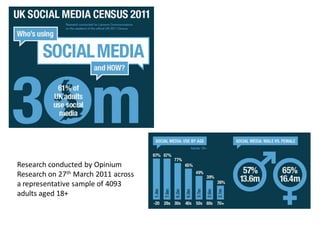
Research conducted by Opinium
Research on 27th March 2011 across
a representative sample of 4093
adults aged 18+
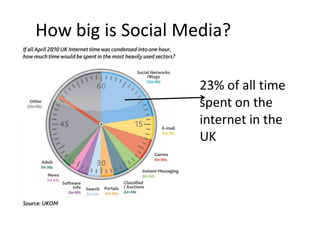
How big is Social Media?

                    23% of all time
                    spent on the
                    internet in the
                    UK
Why do I need it?
• Successful social media marketing builds social
  proof.
 64% are more likely to trust information coming
  from ‘people like me’ – ie someone they trust.
                          The Edelman Trust Barometer
Why do I need it?
• Millions are active on Social Media...
 Your competitors are already there...
 Your customers are already there...


“If you’re not there yet you should be...”
                                       Newsweek, Feb, 2009
Why do I need it?
• Because 93% of Social Media Users believe a
  company should have a presence in Social
  Media.
 However, that doesn’t mean that 93% of users
  think companies should treat Social Media as
  another channel for broadcasting......
Monologue v Dialogue
• This is why Social Media is set to replace email
  as a major marketing channel.
 It’s about two-way communication.
 Do your newsletters allow for dialogue?


 Social Media is dialogue not monologue
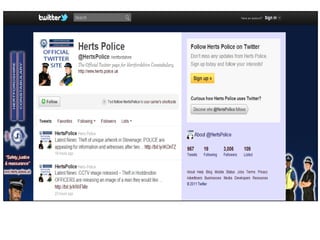
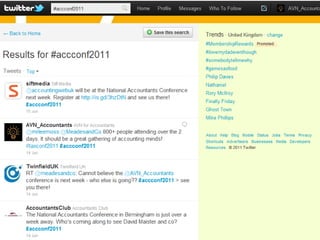
Twitter
•   Established 5 years
•   Micro-blogging site (140 characters per tweet)
•   “An information network”
•   175,000,000 registered users worldwide
•   370,000 new sign-ups daily
•   95,000,000 tweets per day
•   Use to engage with others
Twitter
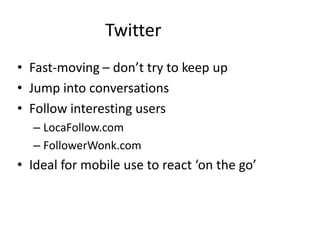
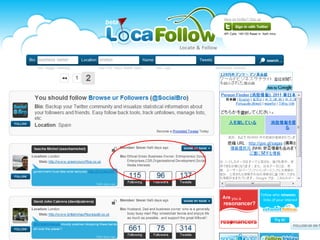
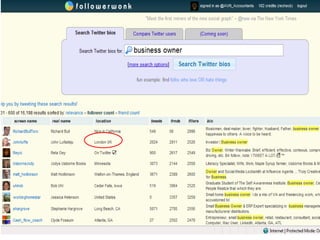
• Fast-moving – don’t try to keep up
• Jump into conversations
• Follow interesting users
  – LocaFollow.com
  – FollowerWonk.com
• Ideal for mobile use to react ‘on the go’
Facebook
•   Established 7 years
•   Sharing site – friends, news, updates, photos
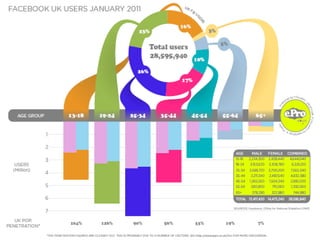
•   500,000,000 active users worldwide
•   1,500,000 active businesses with Pages…
•   …with 5,300,000,000 ‘Fans’
•   30,000,000,000 pieces of content shared each
    month
Facebook

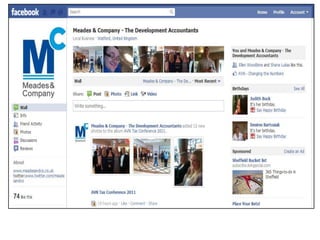
• Simplest way for a business to have a
  Facebook presence
• Add info, wall postings, photos, team news
• Interact with ‘fans’ and send them messages
• Create and share events
• Share YouTube videos
• Link to your website and other useful links
Facebook
• How many team members do you have?
• Average Facebook user has 130 friends
• How many of them fall into your target
  audience?
• If they all ‘Like’ your company page, their
  friends will also see this on their News Feeds.
Page Analytics
LinkedIn
•   Established 8 years
•   Largest professional online network
•   100,000,000+ members worldwide
•   1,500,000 Company profiles
•   5,000,000+ UK members
•   877,000 groups
Profile Tips
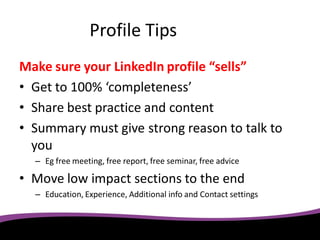
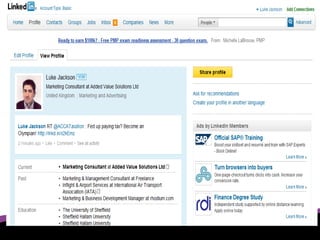
Make sure your LinkedIn profile “sells”
• Get to 100% ‘completeness’
• Share best practice and content
• Summary must give strong reason to talk to
  you
  – Eg free meeting, free report, free seminar, free advice

• Move low impact sections to the end
  – Education, Experience, Additional info and Contact settings
Connect

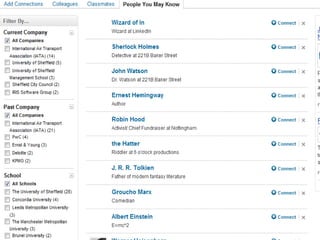
• Find people you already know
  – Friends
  – Clients
  – University classmates
  – Contacts from previous employment
• Upload your Outlook contacts
  – Select which ones you’d like to connect with
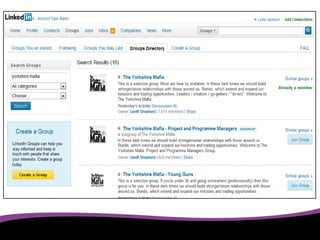
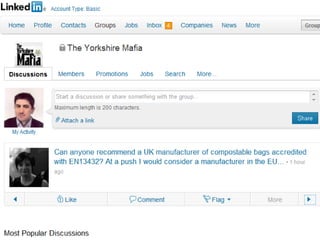
Groups
• LinkedIn has a limit of 50 groups per user
  – Only join those you can keep up with
• Interact with other users but don’t spam
• Useful groups:
  – Institute groups
  – Local networking groups
  – Groups for business owners
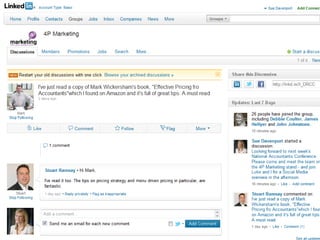
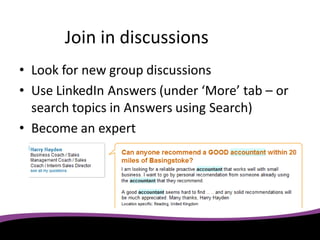
Join in discussions
• Look for new group discussions
• Use LinkedIn Answers (under ‘More’ tab – or
  search topics in Answers using Search)
• Become an expert
Advanced Search


• Search for clients using keywords and locations
  Eg, “owner+building” within 30 miles of your postcode will
  return LinkedIn users that own a building company.
• Ask for introductions through contacts or
  groups
  LinkedIn shows you your current relationship to 2nd or 3rd tier
  contacts – and it’s polite to ask!
Recommendations

• Use the rule of reciprocity (or “give and you
  shall receive”) (change settings to hide quid pro quo recommendations)
• Ask favourite contacts
• Ask clients when they say ‘Thanks’
• Get the team asking for recommendations
   (make it a competition with a prize for the most)

• Use them beyond LinkedIn (website, proposals, brochures)
Tips for Success
Manage your accounts
• Integration is the key
• Free Social Media tools to manage accounts
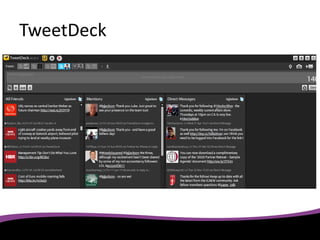
  – Tweetdeck
  – Hootsuite
• Manage multiple accounts in one place
TweetDeck
Add Social Media links to
         your website
•   Make it easy for people to find you
•   Image links work best
•   Put them on the homepage
•   Put them on every page if possible!

Tip: add links to all your team members’ email footers
                            too!
Keep updating
•   Social Media moves quickly
•   Don’t answer quickly and your competitor will
•   Make sure your information is current
•   Diarise time each week to post updates
• Allocate to several trusted team members

    Tip: consider implementing a social media policy
Social Media Policy
“Be conscious when mixing your business and personal lives.
  Online, your personal and business personas are likely to
  intersect. The Company respects the free speech rights of all
  of its associates, but you must remember that customers,
  colleagues and supervisors often have access to the online
  content you post. Keep this in mind when publishing
  information online that can be seen by more than friends
  and family, and know that information originally intended
  just for friends and family can be forwarded on.”
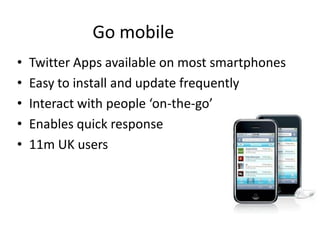
Go mobile
•   Twitter Apps available on most smartphones
•   Easy to install and update frequently
•   Interact with people ‘on-the-go’
•   Enables quick response
•   11m UK users
Track progress
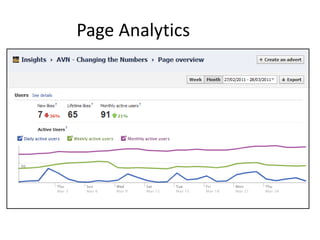
• Measure key stats
  – e.g. Number of followers, tweets, mentions, ‘likes’
• Use analytics to find out
  – Number of leads generated through Social Media
  – Number of new clients won
• Update weekly and share with the team
  - Know what works best for you
Golden Rules of Engagement
 Be active
 Be interesting
 Be genuine
 Be humble
 Have FUN!

Business Builder Forum July 2011

  • 1.
    Business Builder Forum 6th July 2011 Welcome Rachel Girling – Meades & Company
  • 2.
    Morning agenda 07.45 Arrival 08.00Registration, breakfast and networking 08.20 Welcome: Rachel Girling,Client Manager at Meades & Company 08.30 Guest Speaker:Luke Jackson, Marketing Consultant at AVN Ltd 09.30 Q & A 09.45 Close and networking 10.00 Stadium tour with former Watford FC player Neil Price
  • 3.
    • Your event •Feedback essential • Networking
  • 4.
    Social Media -exploiting the tools for your business
  • 5.
  • 7.
    Research conducted byOpinium Research on 27th March 2011 across a representative sample of 4093 adults aged 18+
  • 8.
    How big isSocial Media? 23% of all time spent on the internet in the UK
  • 9.
    Why do Ineed it? • Successful social media marketing builds social proof.  64% are more likely to trust information coming from ‘people like me’ – ie someone they trust. The Edelman Trust Barometer
  • 10.
    Why do Ineed it? • Millions are active on Social Media...  Your competitors are already there...  Your customers are already there... “If you’re not there yet you should be...” Newsweek, Feb, 2009
  • 11.
    Why do Ineed it? • Because 93% of Social Media Users believe a company should have a presence in Social Media.  However, that doesn’t mean that 93% of users think companies should treat Social Media as another channel for broadcasting......
  • 12.
    Monologue v Dialogue •This is why Social Media is set to replace email as a major marketing channel.  It’s about two-way communication.  Do your newsletters allow for dialogue?  Social Media is dialogue not monologue
  • 14.
    Twitter • Established 5 years • Micro-blogging site (140 characters per tweet) • “An information network” • 175,000,000 registered users worldwide • 370,000 new sign-ups daily • 95,000,000 tweets per day • Use to engage with others
  • 15.
    Twitter • Fast-moving –don’t try to keep up • Jump into conversations • Follow interesting users – LocaFollow.com – FollowerWonk.com • Ideal for mobile use to react ‘on the go’
  • 21.
    Facebook • Established 7 years • Sharing site – friends, news, updates, photos • 500,000,000 active users worldwide • 1,500,000 active businesses with Pages… • …with 5,300,000,000 ‘Fans’ • 30,000,000,000 pieces of content shared each month
  • 23.
    Facebook • Simplest wayfor a business to have a Facebook presence • Add info, wall postings, photos, team news • Interact with ‘fans’ and send them messages • Create and share events • Share YouTube videos • Link to your website and other useful links
  • 24.
    Facebook • How manyteam members do you have? • Average Facebook user has 130 friends • How many of them fall into your target audience? • If they all ‘Like’ your company page, their friends will also see this on their News Feeds.
  • 26.
  • 28.
    LinkedIn • Established 8 years • Largest professional online network • 100,000,000+ members worldwide • 1,500,000 Company profiles • 5,000,000+ UK members • 877,000 groups
  • 29.
    Profile Tips Make sureyour LinkedIn profile “sells” • Get to 100% ‘completeness’ • Share best practice and content • Summary must give strong reason to talk to you – Eg free meeting, free report, free seminar, free advice • Move low impact sections to the end – Education, Experience, Additional info and Contact settings
  • 31.
    Connect • Find peopleyou already know – Friends – Clients – University classmates – Contacts from previous employment • Upload your Outlook contacts – Select which ones you’d like to connect with
  • 33.
    Groups • LinkedIn hasa limit of 50 groups per user – Only join those you can keep up with • Interact with other users but don’t spam • Useful groups: – Institute groups – Local networking groups – Groups for business owners
  • 37.
    Join in discussions •Look for new group discussions • Use LinkedIn Answers (under ‘More’ tab – or search topics in Answers using Search) • Become an expert
  • 38.
    Advanced Search • Searchfor clients using keywords and locations Eg, “owner+building” within 30 miles of your postcode will return LinkedIn users that own a building company. • Ask for introductions through contacts or groups LinkedIn shows you your current relationship to 2nd or 3rd tier contacts – and it’s polite to ask!
  • 39.
    Recommendations • Use therule of reciprocity (or “give and you shall receive”) (change settings to hide quid pro quo recommendations) • Ask favourite contacts • Ask clients when they say ‘Thanks’ • Get the team asking for recommendations (make it a competition with a prize for the most) • Use them beyond LinkedIn (website, proposals, brochures)
  • 40.
  • 41.
    Manage your accounts •Integration is the key • Free Social Media tools to manage accounts – Tweetdeck – Hootsuite • Manage multiple accounts in one place
  • 42.
  • 43.
    Add Social Medialinks to your website • Make it easy for people to find you • Image links work best • Put them on the homepage • Put them on every page if possible! Tip: add links to all your team members’ email footers too!
  • 44.
    Keep updating • Social Media moves quickly • Don’t answer quickly and your competitor will • Make sure your information is current • Diarise time each week to post updates • Allocate to several trusted team members Tip: consider implementing a social media policy
  • 45.
    Social Media Policy “Beconscious when mixing your business and personal lives. Online, your personal and business personas are likely to intersect. The Company respects the free speech rights of all of its associates, but you must remember that customers, colleagues and supervisors often have access to the online content you post. Keep this in mind when publishing information online that can be seen by more than friends and family, and know that information originally intended just for friends and family can be forwarded on.”
  • 46.
    Go mobile • Twitter Apps available on most smartphones • Easy to install and update frequently • Interact with people ‘on-the-go’ • Enables quick response • 11m UK users
  • 47.
    Track progress • Measurekey stats – e.g. Number of followers, tweets, mentions, ‘likes’ • Use analytics to find out – Number of leads generated through Social Media – Number of new clients won • Update weekly and share with the team - Know what works best for you
  • 48.
    Golden Rules ofEngagement  Be active  Be interesting  Be genuine  Be humble  Have FUN!