Building Resilience:
Practical Tools for Keeping Your Head
While Navigating a Changing World
This Ever Happen To You?
• Something is going to happen
• That Happening is going to be awful
• That Something is Going to Be My Fault
• (Repeat)
• Distress is Not Wanting What We Presume
is Going to Happen
Tools We Picked Up in Law School
• Taught That the Law (and You) Were Unique
• How to seek (and present) information
• How to work on your own
• How to avoid risk and crave certainty
• How to think criticially (skepticism, pessimism)
• How to compete (Get a job)
• How to Follow the Rules
What Tools Are You Using Now?
• All of the Above
• Seeking Compensation
• Seeking Clients
• Seeking Advancement
• Craving affirmation (from clients,
decisionmakers, higher-ups)
• Living in a zero-sum world- Seeking to
Avoid Blame
How Are Those Tools When
Things Don’t Go As “Planned”?
• Ever thought your way out of a painful
emotional situation?
• How Do Those Tools Work When the Pace
of Change Picks Up?
• How Do Those Tools Work in Your
Personal Life?
And The New Tools?
• “The Real Problem of humanity is the following:
we have Paleolithic emotions, medieval
institutions, and god-like technology.” – E.O.
Wilson
• An Information God and a Dopamine Dispenser
• Saps your attention, and momentarily assuages all
that discomfort.
• And often you don't even notice.
Responses to Distress
• The need to try and control it
• Strike back, numb out, bliss out
• Things get stuck in that endless cycle
What is Missing?
• The Capability to Manage Emotion
• What to Think
• Space to Consider What is Happening and How to
Respond Rather Than React
• Cooperation/Collaboration/Communication
(Listening)
• Context/Awareness
Summing This Up
• Most of us live mindlessly all of the time-
• "Everyone who drives slower than I do is an
idiot. Anyone who drives faster than I do is
a maniac." - George Carlin
• Using the Tools We Have means we don't
see the whole picture and miss what is right
in front of us
• Not there and not there to know we are not
there
One Tool to Help
• the ability to seek out, create, and actively
notice new things
• Actively notice new things -->puts you in
the present -->makes you aware of context--
• Without judging
– letting go of the illusion that we are in control
– Beginner's mind and the ability to listen or
evaluate without preconceived notions
Notice your Biases
• Never attribute to malice what can
adequately be explained by stupidity. -
Hanlon's Razor
• Whatever you are doing can be done in
many different ways
• Turn rampaging thoughts into next actions.
Business and Mindfulness
• Mindlessness is the application of
yesterday's business solutions to today's
problems
• Mindfulness is attunement to today's
demands to avoid tomorrow's problems
• If you want to change it, you have to see it
for what it really is.
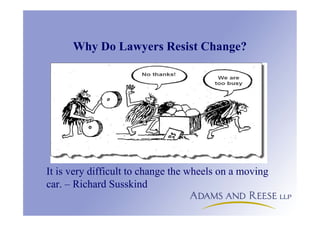
Why Do Lawyers Resist Change?
It is very difficult to change the wheels on a moving
car. – Richard Susskind
Hesitancy and Fear
• “Drive out fear. No one can put in his best performance unless
he feels secure.” – W. Edwards Deming
• Pause and Plan, Don’t React
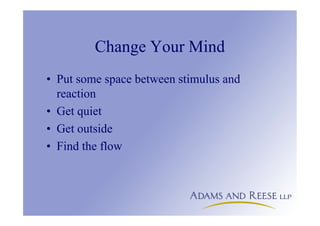
Change Your Mind
• Put some space between stimulus and
reaction
• Get quiet
• Get outside
• Find the flow
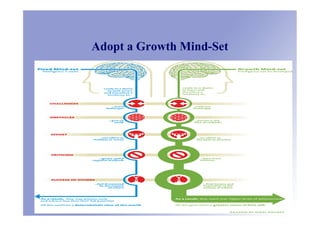
Adopt a Growth Mind-Set
A Plug For Work-Life
Integration
• Treat yourself, at work or play, the same
way
• "You must have work-life balance"
– this is mindless because we make this binary
distinction mindfully but then use it mindlessly
– you don't stop being human at work, and you
don't stop being organized or task-oriented at
home
Paradox: You Have to Ignore Technology
to Plan How to Use It
• Technology is a Distraction
• Lawyers Require Sustained Attention-
– Minimize Your Beeps and Notifications (and your Interruptions
and Meetings)
– Guard Your Attention Jealously
• It’s Not What You Read, It’s What You Ignore
The Checklist Manifesto
• Why Use Your Head as a Storage Device?
• Document a Process Well One Time, Never Have to Document it
Again (Repurpose)
• Benefits:
– Delegates
– Reduces Mistakes
– Promotes and standardizes best practices
– Stays with the organization
– Encourages revision and improvement (Productivity)
– Capable of application in other areas (Innovation)
– Rewards input and collaboration
• Accepting coaching and criticism
Two Points to Ponder
“If you can’t describe what you are doing as a
process you don’t know what you are doing.”
W. Edwards Deming
“Drive out fear. No one can put in his best
performance unless he feels secure.”
W. Edwards Deming
Why Are Computer Tools So Useful?
• External Memory (Storage and Organization)
• More Connections (Marketing, Information
Sharing)
• Communication and Publishing (Automation,
Collaboration)
Computer Technology is Just One of Your
Essential Tools (And You Need Them All)
• People
• Processes
• Computer Technology
Helpful Tech Tools
• Checklist tools
• Flow Charts and Mindmaps
• Forms and Templates
• Collaborative Tools
• Knowledge Management
Keys for Your Plan
• Own, Encourage, and Follow Through
• Provide adequate resources for the long
term
• Get Buy-In (involvement, training, rewards)
• Recruit (from within and without)
• You Have to Know What You Don’t Know
Practical Tips To Get You Started
• Any office task you do repeatedly will improve with computer technology.
• Any “How do I do this?” question can be answered by you. Not by IT, not by
anyone else.
• Before seeking (human) assistance, put your question/issue/problem in
quotations and paste it into The Google.
• If you asked it, someone else wants to know the answer, too.
• When in doubt, right click and undo.
• Study and Practice the Art of Finding (Be Your Own Librarian)
– Use the search and find functions in all programs.
– Name and organize documents according to a plan (so you can find them)
• Tag and Label
• Sort and filter
– Before closing a matter, “harvest” all information and knowledge that you
may use again, and store where you can find them.
Practical Tips For Popular Programs
• Microsoft Word
– Use Styles for numbering any multilevel list.
– Use Templates, and Automatic Tables of Contents and Authorities in Briefs
– Hyperlink and cross-reference in contracts.
– Use QuickParts and AutoText
• Microsoft Outlook
– Use Folders
– Create Rules
– Sort, Search, and Flag
• PDFs
– Create using a print driver and make them searchable.
– Bookmark
– Extract Pages
– Reduce File Size
– Batch Operations/Actions to Multiple Files
– Bate stamp electronically.
Cause for Optimism –
These Tools Enable Some Amazing Things
• Flexibility
• 24/7 Access
• Expanded Reach
• Increased Networking and Mentorship
Opportunities
• More Choices Than Ever
From “5 Things 21 Century Lawyers Should Be Thankful For in 2013, by
Nicole Black, MyCase Blog, www.mycase.com/blog/2013/11/5-things-
21st-century-lawyers-thankful-2013/
Create Space in Your Day
(Energy)
• Exercise
• Leisure Time – Flow
• Reducing Distractions
• Rest and Recovery
Create Some Space in Your Life
– Hack It
Build The Profession and
Contribute To It
• Be Generous of Your Time and Your Knowledge- Without
Expecting Anything in Return
• If You Are Taking Care of Yourself, You Will Take Care
of Others
• Build Empathy
• Get Out and Play -
http://pringlepracticeblog.blogspot.com/2015/05/in-
celebration-of-play.html
Criticisms
• Rules and Structure necessary
• Not Any Good at It- Losing My Edge
• The Impassive, Professional, “Stoic” Ideal
• There are more things, Lucilius, that
frighten us than injure us, and we suffer
more in imagination than in reality.
-Seneca
Conclusion
“Things that aren’t planned, don’t happen!”
-- C.L. Kendall
Conclusion
"I didn't come down here to change your mind
about anything, but to ease my own mind
about everything." - Todd Snider
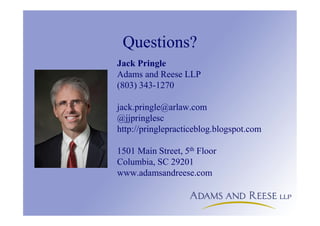
Questions?
Jack Pringle
Adams and Reese LLP
(803) 343-1270
jack.pringle@arlaw.com
@jjpringlesc
http://pringlepracticeblog.blogspot.com
1501 Main Street, 5th Floor
Columbia, SC 29201
www.adamsandreese.com
Resources
• Baba Shiv, How Do You Find Breakthrough Ideas?, Stanford Graduate
School of Business, http://www.gsb.stanford.edu/insights/baba-shiv-
how-do-you-find-breakthrough-ideas
• The Resilient Lawyer http://theanxiouslawyer.com/rl-23-jack-pringle/
• Farnham Street https://www.farnamstreetblog.com/
• One You Feed With Michael Taft http://www.oneyoufeed.net/michael-
taft/
• Tim Ferris with Brene Brown
http://fourhourworkweek.com/2015/08/28/brene-brown-on-
vulnerability-and-home-run-ted-talks/
• On Being With Ellen Langer http://www.onbeing.org/program/ellen-
langer-science-of-mindlessness-and-mindfulness/6332
• You Are Not So Smart http://youarenotsosmart.libsyn.com/062-naive-
realism-lee-ross-0
More Resources
• City Yoga http://cityyogasc.com/site/
• 10 (Ok 11) Books for Getting
Better http://pringlepracticeblog.blogspot.com/2012/08/10-okay-11-
good-books-for-getting-better.html
• 5 Must-Reads for Graduates (and everyone
else) http://pringlepracticeblog.blogspot.com/2013/05/five-must-reads-
for-graduates-and.html
More Resources
The Checklist Manifesto: How to Get Things Right, by Atul Gawande
http://www.amazon.com/Checklist-Manifesto-How-Things-Right/dp/0312430000
Smarter Than You Think: How Technology is Changing Our Minds for the Better,
by Clive Thompson
http://www.amazon.com/Smarter-Than-You-Think-Technology/dp/1594204454
Mindset: The New Psychology of Success, by Carol S. Dweck, Ph.D
http://www.amazon.com/Mindset-Psychology-Success-Carol-
Dweck/dp/0345472322
Give and Take: Why Helping Others Drives Our Success, by Adam Grant
http://www.amazon.com/Give-Take-Helping-Others-Success/dp/0143124986
Resources - Tools
Basecamp https://basecamp.com/
Camtasia http://www.camtasiastudiosoftware.com/
Evernote www.evernote.com
Freedom www.macfreedom.com
LeechBlock http://www.proginosko.com/leechblock.html
Mindmeister www.mindmeister.com
Ommwriter www.ommwriter.com
TheForm Tool www.theformtool.com
WikiSpaces www.wikispaces.com
Resources- Websites
ABA Law Technology Resource
Center http://www.americanbar.org/groups/departments_offices/legal_technology_resources.html
Attorney at Work http://www.attorneyatwork.com/
Clio http://www.goclio.com/
Law Office Guru http://legalofficeguru.com/
Law Practice Matters http://www.lawpracticematters.com/
Lawyerist http://lawyerist.com/
Legal Ease http://legalease.blogs.com/
Legal Productivity http://www.legalproductivity.com/
MyCase http://www.mycase.com/blog/
MyShingle http://myshingle.com/
Paperless Chase http://www.paperlesschase.com/
SC Bar PMAP http://www.scbar.org/MemberResources/PracticeManagementPMAP.aspx
Technolawyer http://www.technolawyer.com/

Building Resilience: Practical Tools for Keeping Your Head While Navigating a Changing World

  • 1.
    Building Resilience: Practical Toolsfor Keeping Your Head While Navigating a Changing World
  • 2.
    This Ever HappenTo You? • Something is going to happen • That Happening is going to be awful • That Something is Going to Be My Fault • (Repeat) • Distress is Not Wanting What We Presume is Going to Happen
  • 3.
    Tools We PickedUp in Law School • Taught That the Law (and You) Were Unique • How to seek (and present) information • How to work on your own • How to avoid risk and crave certainty • How to think criticially (skepticism, pessimism) • How to compete (Get a job) • How to Follow the Rules
  • 4.
    What Tools AreYou Using Now? • All of the Above • Seeking Compensation • Seeking Clients • Seeking Advancement • Craving affirmation (from clients, decisionmakers, higher-ups) • Living in a zero-sum world- Seeking to Avoid Blame
  • 6.
    How Are ThoseTools When Things Don’t Go As “Planned”? • Ever thought your way out of a painful emotional situation? • How Do Those Tools Work When the Pace of Change Picks Up? • How Do Those Tools Work in Your Personal Life?
  • 7.
    And The NewTools? • “The Real Problem of humanity is the following: we have Paleolithic emotions, medieval institutions, and god-like technology.” – E.O. Wilson • An Information God and a Dopamine Dispenser • Saps your attention, and momentarily assuages all that discomfort. • And often you don't even notice.
  • 8.
    Responses to Distress •The need to try and control it • Strike back, numb out, bliss out • Things get stuck in that endless cycle
  • 9.
    What is Missing? •The Capability to Manage Emotion • What to Think • Space to Consider What is Happening and How to Respond Rather Than React • Cooperation/Collaboration/Communication (Listening) • Context/Awareness
  • 10.
    Summing This Up •Most of us live mindlessly all of the time- • "Everyone who drives slower than I do is an idiot. Anyone who drives faster than I do is a maniac." - George Carlin • Using the Tools We Have means we don't see the whole picture and miss what is right in front of us • Not there and not there to know we are not there
  • 11.
    One Tool toHelp • the ability to seek out, create, and actively notice new things • Actively notice new things -->puts you in the present -->makes you aware of context-- • Without judging – letting go of the illusion that we are in control – Beginner's mind and the ability to listen or evaluate without preconceived notions
  • 12.
    Notice your Biases •Never attribute to malice what can adequately be explained by stupidity. - Hanlon's Razor • Whatever you are doing can be done in many different ways • Turn rampaging thoughts into next actions.
  • 13.
    Business and Mindfulness •Mindlessness is the application of yesterday's business solutions to today's problems • Mindfulness is attunement to today's demands to avoid tomorrow's problems • If you want to change it, you have to see it for what it really is.
  • 14.
    Why Do LawyersResist Change? It is very difficult to change the wheels on a moving car. – Richard Susskind
  • 15.
    Hesitancy and Fear •“Drive out fear. No one can put in his best performance unless he feels secure.” – W. Edwards Deming • Pause and Plan, Don’t React
  • 16.
    Change Your Mind •Put some space between stimulus and reaction • Get quiet • Get outside • Find the flow
  • 17.
  • 18.
    A Plug ForWork-Life Integration • Treat yourself, at work or play, the same way • "You must have work-life balance" – this is mindless because we make this binary distinction mindfully but then use it mindlessly – you don't stop being human at work, and you don't stop being organized or task-oriented at home
  • 19.
    Paradox: You Haveto Ignore Technology to Plan How to Use It • Technology is a Distraction • Lawyers Require Sustained Attention- – Minimize Your Beeps and Notifications (and your Interruptions and Meetings) – Guard Your Attention Jealously • It’s Not What You Read, It’s What You Ignore
  • 20.
    The Checklist Manifesto •Why Use Your Head as a Storage Device? • Document a Process Well One Time, Never Have to Document it Again (Repurpose) • Benefits: – Delegates – Reduces Mistakes – Promotes and standardizes best practices – Stays with the organization – Encourages revision and improvement (Productivity) – Capable of application in other areas (Innovation) – Rewards input and collaboration • Accepting coaching and criticism
  • 21.
    Two Points toPonder “If you can’t describe what you are doing as a process you don’t know what you are doing.” W. Edwards Deming “Drive out fear. No one can put in his best performance unless he feels secure.” W. Edwards Deming
  • 22.
    Why Are ComputerTools So Useful? • External Memory (Storage and Organization) • More Connections (Marketing, Information Sharing) • Communication and Publishing (Automation, Collaboration)
  • 23.
    Computer Technology isJust One of Your Essential Tools (And You Need Them All) • People • Processes • Computer Technology
  • 26.
    Helpful Tech Tools •Checklist tools • Flow Charts and Mindmaps • Forms and Templates • Collaborative Tools • Knowledge Management
  • 27.
    Keys for YourPlan • Own, Encourage, and Follow Through • Provide adequate resources for the long term • Get Buy-In (involvement, training, rewards) • Recruit (from within and without) • You Have to Know What You Don’t Know
  • 28.
    Practical Tips ToGet You Started • Any office task you do repeatedly will improve with computer technology. • Any “How do I do this?” question can be answered by you. Not by IT, not by anyone else. • Before seeking (human) assistance, put your question/issue/problem in quotations and paste it into The Google. • If you asked it, someone else wants to know the answer, too. • When in doubt, right click and undo. • Study and Practice the Art of Finding (Be Your Own Librarian) – Use the search and find functions in all programs. – Name and organize documents according to a plan (so you can find them) • Tag and Label • Sort and filter – Before closing a matter, “harvest” all information and knowledge that you may use again, and store where you can find them.
  • 29.
    Practical Tips ForPopular Programs • Microsoft Word – Use Styles for numbering any multilevel list. – Use Templates, and Automatic Tables of Contents and Authorities in Briefs – Hyperlink and cross-reference in contracts. – Use QuickParts and AutoText • Microsoft Outlook – Use Folders – Create Rules – Sort, Search, and Flag • PDFs – Create using a print driver and make them searchable. – Bookmark – Extract Pages – Reduce File Size – Batch Operations/Actions to Multiple Files – Bate stamp electronically.
  • 30.
    Cause for Optimism– These Tools Enable Some Amazing Things • Flexibility • 24/7 Access • Expanded Reach • Increased Networking and Mentorship Opportunities • More Choices Than Ever From “5 Things 21 Century Lawyers Should Be Thankful For in 2013, by Nicole Black, MyCase Blog, www.mycase.com/blog/2013/11/5-things- 21st-century-lawyers-thankful-2013/
  • 31.
    Create Space inYour Day (Energy) • Exercise • Leisure Time – Flow • Reducing Distractions • Rest and Recovery
  • 32.
    Create Some Spacein Your Life – Hack It
  • 33.
    Build The Professionand Contribute To It • Be Generous of Your Time and Your Knowledge- Without Expecting Anything in Return • If You Are Taking Care of Yourself, You Will Take Care of Others • Build Empathy • Get Out and Play - http://pringlepracticeblog.blogspot.com/2015/05/in- celebration-of-play.html
  • 34.
    Criticisms • Rules andStructure necessary • Not Any Good at It- Losing My Edge • The Impassive, Professional, “Stoic” Ideal • There are more things, Lucilius, that frighten us than injure us, and we suffer more in imagination than in reality. -Seneca
  • 35.
    Conclusion “Things that aren’tplanned, don’t happen!” -- C.L. Kendall
  • 36.
    Conclusion "I didn't comedown here to change your mind about anything, but to ease my own mind about everything." - Todd Snider
  • 37.
    Questions? Jack Pringle Adams andReese LLP (803) 343-1270 jack.pringle@arlaw.com @jjpringlesc http://pringlepracticeblog.blogspot.com 1501 Main Street, 5th Floor Columbia, SC 29201 www.adamsandreese.com
  • 38.
    Resources • Baba Shiv,How Do You Find Breakthrough Ideas?, Stanford Graduate School of Business, http://www.gsb.stanford.edu/insights/baba-shiv- how-do-you-find-breakthrough-ideas • The Resilient Lawyer http://theanxiouslawyer.com/rl-23-jack-pringle/ • Farnham Street https://www.farnamstreetblog.com/ • One You Feed With Michael Taft http://www.oneyoufeed.net/michael- taft/ • Tim Ferris with Brene Brown http://fourhourworkweek.com/2015/08/28/brene-brown-on- vulnerability-and-home-run-ted-talks/ • On Being With Ellen Langer http://www.onbeing.org/program/ellen- langer-science-of-mindlessness-and-mindfulness/6332 • You Are Not So Smart http://youarenotsosmart.libsyn.com/062-naive- realism-lee-ross-0
  • 39.
    More Resources • CityYoga http://cityyogasc.com/site/ • 10 (Ok 11) Books for Getting Better http://pringlepracticeblog.blogspot.com/2012/08/10-okay-11- good-books-for-getting-better.html • 5 Must-Reads for Graduates (and everyone else) http://pringlepracticeblog.blogspot.com/2013/05/five-must-reads- for-graduates-and.html
  • 40.
    More Resources The ChecklistManifesto: How to Get Things Right, by Atul Gawande http://www.amazon.com/Checklist-Manifesto-How-Things-Right/dp/0312430000 Smarter Than You Think: How Technology is Changing Our Minds for the Better, by Clive Thompson http://www.amazon.com/Smarter-Than-You-Think-Technology/dp/1594204454 Mindset: The New Psychology of Success, by Carol S. Dweck, Ph.D http://www.amazon.com/Mindset-Psychology-Success-Carol- Dweck/dp/0345472322 Give and Take: Why Helping Others Drives Our Success, by Adam Grant http://www.amazon.com/Give-Take-Helping-Others-Success/dp/0143124986
  • 41.
    Resources - Tools Basecamphttps://basecamp.com/ Camtasia http://www.camtasiastudiosoftware.com/ Evernote www.evernote.com Freedom www.macfreedom.com LeechBlock http://www.proginosko.com/leechblock.html Mindmeister www.mindmeister.com Ommwriter www.ommwriter.com TheForm Tool www.theformtool.com WikiSpaces www.wikispaces.com
  • 42.
    Resources- Websites ABA LawTechnology Resource Center http://www.americanbar.org/groups/departments_offices/legal_technology_resources.html Attorney at Work http://www.attorneyatwork.com/ Clio http://www.goclio.com/ Law Office Guru http://legalofficeguru.com/ Law Practice Matters http://www.lawpracticematters.com/ Lawyerist http://lawyerist.com/ Legal Ease http://legalease.blogs.com/ Legal Productivity http://www.legalproductivity.com/ MyCase http://www.mycase.com/blog/ MyShingle http://myshingle.com/ Paperless Chase http://www.paperlesschase.com/ SC Bar PMAP http://www.scbar.org/MemberResources/PracticeManagementPMAP.aspx Technolawyer http://www.technolawyer.com/