Accenture CSI Confidential Material. Do not duplicate or distribute
Learning and Knowledge Management
SPRING MVC INTRODUCTION
For a successful class, please:
• Arrive on time
• Turn all cell phones off
• Wear business formal attire
• Assist your colleagues; show respect to all individuals regardless of their skill and knowledge level
• Do not use class time to surf the net, check e-mail, or use instant messaging
• Adhere to attendance policy as directed by your local training coordinator
Ground Rules
Copyright © 2018 Accenture All Rights Reserved.
MVC - Model2 Architecture
Topic List
Introduction to Spring MVC
Context Configuration
ContextHierarchy
ViewResolvers
Copyright © 2018 Accenture All Rights Reserved.
MVC - Model2 Architecture
Topic List
Introduction to Spring MVC
Context Configuration
ContextHierarchy
ViewResolvers
Copyright © 2018 Accenture All Rights Reserved.
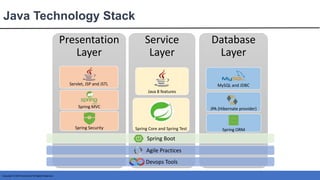
Presentation
Layer
Servlet, JSP and JSTL
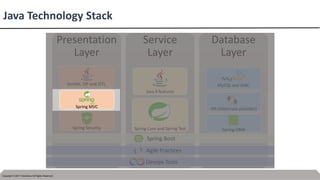
Spring MVC
Spring Security
MVC
Service
Layer
Java 8 features
Spring Core and Spring Test
Database
Layer
MySQL and JDBC
JPA (Hibernate provider)
Spring ORM
Java Technology Stack
Spring Boot
Agile Practices
Devops Tools
Copyright © 2017 Accenture All Rights Reserved.
Presentation
Layer
Servlet, JSP and JSTL
Spring MVC
Spring Security
MVC
Service
Layer
Java 8 features
Spring Core and Spring Test
Database
Layer
MySQL and JDBC
JPA (Hibernate provider)
Spring ORM
Java Technology Stack
Spring Boot
Agile Practices
Devops Tools
Copyright © 2018 Accenture All Rights Reserved.
Introduction
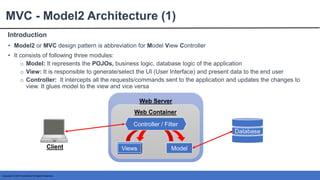
MVC - Model2 Architecture (1)
• Model2 or MVC design pattern is abbreviation for Model View Controller
• It consists of following three modules:
o Model: It represents the POJOs, business logic, database logic of the application
o View: It is responsible to generate/select the UI (User Interface) and present data to the end user
o Controller: It intercepts all the requests/commands sent to the application and updates the changes to
view. It glues model to the view and vice versa
Web Server
Web Container
Views Model
Database
Client
Controller / Filter
Copyright © 2018 Accenture All Rights Reserved.
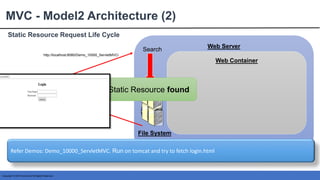
Static Resource Request Life Cycle
MVC - Model2 Architecture (2)
Client
Web Server
Web Container
File System
Search
Static Resource found
http://localhost:8080/Demo_10000_ServletMVC/
Refer Demos: Demo_10000_ServletMVC. Run on tomcat and try to fetch login.html
Copyright © 2018 Accenture All Rights Reserved.
Dynamic Resource Request Life Cycle
MVC - Model2 Architecture (3)
Client
Web Server
Web Container
File System
Search
Web Container
Resource is not found Initializer /
web.xml
Reads
Servlet/
Controller
Instance
Controller performs following:
• Receives the request parameters and does
the necessary type casting
• Creates and populates a Bean instance
• Creates DAO instance and invokes its
method by passing bean instance created
in previous step DAO
instance
Passes
Bean instance
DAO performs following:
• Retrieves the values present in the
bean instance
• Validates them against DB
• Sends the response back to controller
Database
Validates
Controller performs following:
• Receives the request parameters and
does necessary conversion
• Creates and populates a Bean instance
• Creates DAO instance and invokes its
method by passing bean instance created
in previous step
• Based on the response from DAO
controller selects a view, prepares the
response and sends back to client
Views
MSD
Submit
Refer Demos: Demo_10000_ServletMVC. Run on tomcat. Execute login.html perform following and observe:
• Give the user name: MSD, password: MSD@123 , submit and observe the generated view
• Give the user name: Test, password: MSD@123 , submit and observe the generated view
Copyright © 2018 Accenture All Rights Reserved.
MVC - Model2 Architecture
Topic List
Introduction to Spring MVC
Context Configuration
ContextHierarchy
ViewResolvers
Copyright © 2018 Accenture All Rights Reserved.
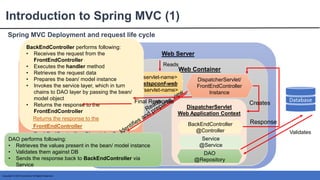
Spring MVC Deployment and request life cycle
Introduction to Spring MVC (1)
Client
Web Server
Web Container
File System
Search
Web Container
Resource is not found
Initializer /
web.xml
Reads
DispatcherServlet/
FrontEndController
Instance
<servlet-name>
cstspconf-web
</servlet-name>
cstspconf-
web
-servlet.xml
Views
DispatcherServlet
Web Application Context
Service
@Service
DAO
@Repository
BackEndController
@Controller
Front End Controller performs following:
• It reads the ServletName configured in
web.xml
• Tries to find and load the ServletName-
servlet.xml from the server’s file system
• Creates the Spring Context:
DispatcherServlet
WebApplicationContext
• Previous Step Results in the instantiation
of the BackEndController
• Based up on the result from the
BackEndController, DispatcherServlet
Identifies the view, prepares the response
and sends it back to client
BackEndController performs following:
• Receives the request from the
FrontEndController
• Executes the handler method
• Retrieves the request data
• Prepares the bean/ model instance
• Invokes the service layer, which in turn
chains to DAO layer by passing the bean/
model object
• Returns the response to the
FrontEndController
DAO performs following:
• Retrieves the values present in the bean/ model instance
• Validates them against DB
• Sends the response back to BackEndController via
Service
Database
Validates
Creates
Returns the response to the
FrontEndController
Response
Final Response
Copyright © 2018 Accenture All Rights Reserved.
Detailed Flow and Project Structure
Introduction to Spring MVC (2)
<?xml version="1.0" encoding="UTF-8"?>
<web-app xmlns:xsi........
<welcome-file-list>
<welcome-file>login.jsp</welcome-file>
</welcome-file-list>
<servlet>
<servlet-name>cstspconf-web</servlet-name>
<servlet-class>
org.springframework.web.servlet.DispatcherServlet
</servlet-class>
<load-on-startup>1</load-on-startup>
</servlet>
<servlet-mapping>
<servlet-name>cstspconf-web</servlet-name>
<!-- URL pattern to be intercepted / processed by the
DispatcherServlet -->
<url-pattern>*.html</url-pattern>
</servlet-mapping>
</web-app>
After Deployment, login.jsp will be launched as soon as
application is accessed through application root
<beans xmlns="http://www.springframework.org/schema/beans"
xmlns:context="http://www.springframework.org/schema/context"
xmlns:xsi="http://www.w3.org/2001/XMLSchema-instance"
xmlns:mvc="http://www.springframework.org/schema/mvc"
xsi:schemaLocation....>
<context:component-scan base-package="com.accenture" />
<!--adds support for MVC annotations:
1. @Valid annotation for validation
2. @RequestMapping
3. http message convertors or message
body marshalling with @RequestBody/ResponseBody -->
<mvc:annotation-driven />
</beans>
DispatcherServlet is the Front end controller
• It reads the ServletName configured in web.xml
• Tries to find and load the ServletName-
servlet.xml from the server’s file system
• Creates the Spring Context: DispatcherServlet
WebApplicationContext
• Previous Step Results in the instantiation of
the LoginController (BackEnd Controller),
LoginService and LoginDAO
the LoginController (BackEnd Controller),
LoginService and LoginDAO
@Repository
public class LoginDAO {
//In actual application hard coding will be replaced by
//Database connection and actual data from database
public String validateLogin(LoginBean loginBean){
String uName = loginBean.getUserName();
String password = loginBean.getPassword();
if(uName.equals("MSD") && password.equals("MSD@123")){
return "success";
}
else{
return "faliure";
}
}
}
@Service
public class LoginService {
@Autowired
private LoginDAO loginDAO;
public String validateLogin(LoginBean loginBean){
//Business Logic Goes here
return loginDAO.validateLogin(loginBean);
}
}
@Controller
public class LoginController {
@Autowired
private LoginService loginService;
@RequestMapping(value = "/validateLogin.html", method = RequestMethod.POST)
public ModelAndView validateLogin(@RequestParam("uName")String userName,
@RequestParam("pwd")String password) {
LoginBean loginBean = new LoginBean();
loginBean.setPassword(password); loginBean.setUserName(userName);
String returnValue = loginService.validateLogin(loginBean);
ModelAndView modelAndView = new ModelAndView();
if (returnValue.equals("success")) {
modelAndView.setViewName("success.jsp");
modelAndView.addObject("message", "Welcome: " + userName);
} else {
modelAndView.setViewName("failure.jsp");
modelAndView.addObject("errorMessage","Please Login again with valid
credentials");
}
return modelAndView;
}
}
@Controller
public class LoginController {
@RequestMapping(value = "/validateLogin.html", method = RequestMethod.POST)
public ModelAndView validateLogin(@RequestParam("uName")String userName,
@RequestParam("pwd")String password) {
ModelAndView modelAndView ...........
if (returnValue.equals("success")) {
modelAndView.setViewName("success.jsp");
modelAndView.addObject("message", "Welcome: " + userName);
} else {
modelAndView.setViewName("failure.jsp");
modelAndView.addObject("errorMessage","Please Login again with valid
credentials");} ...........
<form method="post" action="validateLogin.html">
<table>
<tr>
<td><label>Name</label></td>
<td><input type= "text" name="uName" /></td>
</tr>
<tr>
<td><label>Password</label></td>
<td><input type="password" name="pwd" /></td>
</tr>
</table> <input type="submit" value="Login"/>
</form>
BackEndController/ LoginController
performs following:
• Receives the request from the
FrontEndController/DispatcherServlet
• Executes the handler method
• Retrieves the request data
• Prepares the bean/ model instance
• Invokes the service layer, which in turn
chains to DAO layer by passing the bean/
model object
• Returns the response to the
FrontEndController/DispatcherServlet
Front End Controller performs following:
• It reads the ServletName configured in
web.xml
• Tries to find and load the ServletName-
servlet.xml from the server’s file system
• Creates the Spring Context:
DispatcherServlet
WebApplicationContext
• Previous Step Results in the instantiation
of the BackEndController
• Based up on the result from the
BackEndController, DispatcherServlet
Identifies the view, prepares the response
and sends it back to client
<h2>Login Successful</h2>
<c:out value="${message}“/>
<h2>Login Failed</h2>
<c:out value=
"${errorMessage}"/>
Refer Demos: Demo_10002_Spring_MVC. Run on tomcat. Execute login.html perform following and observe:
• Give the user name: MSD, password: MSD@123 , submit and observe the generated view
• Give the user name: Test, password: MSD@123 , submit and observe the generated view
• Observe the code written inside the Controller, Service, DAO, web.xml/initializer, login.jsp, success.jsp, failure.jsp
Copyright © 2018 Accenture All Rights Reserved.
MVC - Model2 Architecture
Topic List
Introduction to Spring MVC
Context Configuration
ContextHierarchy
ViewResolvers
Copyright © 2018 Accenture All Rights Reserved.
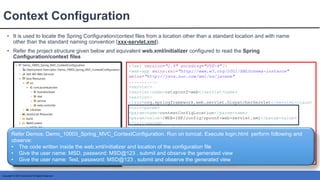
Context Configuration
• It is used to locate the Spring Configuration/context files from a location other than a standard location and with name
other than the standard naming convention (xxx-servlet.xml).
• Refer the project structure given below and equivalent web.xml/initializer configured to read the Spring
Configuration/context files
<?xml version="1.0" encoding="UTF-8"?>
<web-app xmlns:xsi="http://www.w3.org/2001/XMLSchema-instance"
xmlns="http://java.sun.com/xml/ns/javaee"
...........
<servlet>
<servlet-name>cstspconf-web</servlet-name>
<servlet-
class>org.springframework.web.servlet.DispatcherServlet</servlet-class>
<init-param>
<param-name>contextConfigLocation</param-name>
<param-value>/WEB-INF/config/spconf-web-servlet.xml</param-value>
</init-param>
<load-on-startup>1</load-on-startup>
</servlet>
<servlet-mapping>
<servlet-name>cstspconf-web</servlet-name>
<url-pattern>*.html</url-pattern>
</servlet-mapping>
</web-app>
Refer Demos: Demo_10003_Spring_MVC_ContextConfiguration. Run on tomcat. Execute login.html perform following and
observe:
• The code written inside the web.xml/initializer and location of the configuration file
• Give the user name: MSD, password: MSD@123 , submit and observe the generated view
• Give the user name: Test, password: MSD@123 , submit and observe the generated view
Copyright © 2018 Accenture All Rights Reserved.
MVC - Model2 Architecture
Topic List
Introduction to Spring MVC
Context Configuration
ContextHierarchy
ViewResolvers
Copyright © 2018 Accenture All Rights Reserved.
Introduction
Context Hierarchy (1)
• Spring MVC based application has 2 type of Web Application Contexts:
Root/Parent WebApplicationContext
o Belongs to the complete Spring MVC application
o It is good to configure common Spring Beans in the Root WebApplicationContext. example
service, dao and beans related to spring security
o In an application there can be only one Root WebApplicationContext
Servlet/Child WebApplicationContext
o Belongs to the dispatcher servlet
o A Spring MVC application can have multiple Servlet WebApplicationContext
o It is good practice to configure the presentation layer components like : controllers,
viewresolvers in the servlet context
o All the Beans configured in the root context are accessible in the child context, but not the BeanPostProcessors and
BeanFactoryPostProcessors
Copyright © 2018 Accenture All Rights Reserved.
Implementation of Context Hierarchy
Context Hierarchy (2)
<!--Registering Parent context using the context load listener-->
<listener>
<listener-class>
org.springframework.web.context.ContextLoaderListener
</listener-class>
</listener>
<context-param>
<param-name>contextConfigLocation</param-name>
<param-value>
/WEB-INF/cst-root-ctx.xml
</param-value>
</context-param>
<!--Registering Parent context using the context load listener-->
<servlet>
<servlet-name>cstspconf-web</servlet-name>
<servlet-
class>org.springframework.web.servlet.DispatcherServlet</servlet-
class>
<load-on-startup>1</load-on-startup>
</servlet>
<servlet-mapping>
<servlet-name>cstspconf-web</servlet-name>
<url-pattern>*.html</url-pattern>
</servlet-mapping>
<beans xmlns="http://www.springframework.org/schema/beans"
xmlns:context="http://www.springframework.org/schema/context"
.......>
<!-- scanning service and DAO -->
<context:component-scan base-package="com.accenture.lkm.service,
com.accenture.lkm.dao" />
</beans>
cst-root-ctx.xml
<beans xmlns="http://www.springframework.org/schema/beans"
xmlns:context="http://www.springframework.org/schema/context"
...........>
<!-- scanning just web related dependencies -->
<context:component-scan base-package="com.accenture.lkm.web" />
<mvc:annotation-driven />
</beans>
cstspconf-web-servlet.xml
web.xml
Console Logs
Refer Demos: Demo_10004_Spring_RootContext_And_ChildContext. Run on tomcat. Execute login.html perform following
and observe:
• The code written inside the web.xml/initializer, cst-root-ctx.xml, cstspconf-web-servlet.xml and location of the configuration
files
• Give the user name: MSD, password: MSD@123 , submit and observe the generated view
• Give the user name: Test, password: MSD@123 , submit and observe the generated view
• Console logs
Copyright © 2018 Accenture All Rights Reserved.
Spring MVC Deployment and request life cycle
Context Hierarchy (3)
Client
Web Server
Web Container
File System
Search
Initializer /
web.xml
Reads
DispatcherServlet/
FrontEndController
Instance
<servlet-name>
cstspconf-web
</servlet-name>
Child/DispatcherServlet
Web Application Context
BackEndController
@Controller
Database
Validates
Response
Root/Parent
Web Application
Context
cstspconf-
web
-servlet.xml
Service
@Service
DAO
@Repository
DispatcherServlet
Web Application Context
Service
@Service
DAO
@Repository
BackEndController
@Controller
Creates
Service
@Service
DAO
@Repository
Inherits
Copyright © 2018 Accenture All Rights Reserved.
MVC - Model2 Architecture
Topic List
Introduction to Spring MVC
Context Configuration
ContextHierarchy
ViewResolvers
Copyright © 2018 Accenture All Rights Reserved.
Introduction and Type of ViewResolver
ViewResolver (1)
• In Backend controller, all handler methods should return the logical view name by returning String, View or
ModelAndView
• Logical view names are mapped to actual views (.jsp, .html, template based) by the View Resolver, there by making
Spring MVC view technology agnostic
• Following are important types of view resolvers:
 UrlBasedViewResolver
 InternalResourceViewResolver
 ResourceBundleViewResolver
 XmlViewResolver
It performs view resolution for JSPs, servlets, JSTL, Tiles via prefix and suffix mapping
It is Default view resolver. It performs direct resolution of logical view names to URLs, without an explicit mapping
definition. This is appropriate to use, if logical names match the names of the view resources present in server file system
It performs view resolution for JSPs, servlets, JSTL, Tiles via explicit mapping mentioned in a .properties file
It performs view resolution for JSPs, servlets, JSTL, Tiles via explicit mapping mentioned in a .xml file
Copyright © 2018 Accenture All Rights Reserved.
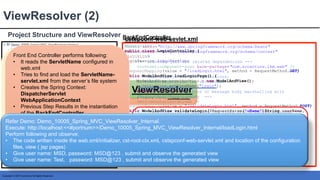
Project Structure and ViewResolver
ViewResolver (2)
How to render or Display
the views from WEB-INF
Using ViewResolver
@Controller
public class LoginController {
@Autowired
LoginService loginService;
@RequestMapping(value = "/loadLogin.html", method = RequestMethod.GET)
public ModelAndView loadLoginPage() {
ModelAndView modelAndView = new ModelAndView();
modelAndView.setViewName("login");
return modelAndView;
}
@RequestMapping(value = "/validateLogin.html", method = RequestMethod.POST)
public ModelAndView validateLogin(@RequestParam("uName")String userName,
@RequestParam("pwd")String password) {
......
ModelAndView modelAndView = new ModelAndView();
if (name.equals("success")) {
modelAndView.setViewName("success");
modelAndView.addObject("message", "Welcome: " + name);
} else.......
return modelAndView;
}
}
BackEndController
BackEndController performs following:
• Receives the request from the
FrontEndController
• Executes the handler method
• Retrieves the request data
• Prepares the bean/ model instance
• Invokes the service layer, chaining to DAO
layer by passing the bean/ model object
• Returns the response (logical view name
and model object) to the
FrontEndController
<beans xmlns="http://www.springframework.org/schema/beans"
xmlns:context="http://www.springframework.org/schema/context"
.........>
<!-- scanning just web related dependencies -->
<context:component-scan base-package="com.accenture.lkm.web" />
<!--adds support for MVC annotations:
1. @Valid annotation for validation
2. @RequestMapping
3. http message convertors or message body marshalling with
@RequestBody/ResponseBody -->
<mvc:annotation-driven />
<!-- View Resolver to resolve the views from a custom location -->
<bean class="org.springframework.web.servlet.view.
InternalResourceViewResolver">
<property name="prefix">
<value>/WEB-INF/jspViews/</value>
</property>
<property name="suffix">
<value>.jsp</value>
</property>
</bean>
</beans>
cstspconf-web-sevlet.xml
Front End Controller performs following:
• It reads the ServletName configured in
web.xml
• Tries to find and load the ServletName-
servlet.xml from the server’s file system
• Creates the Spring Context:
DispatcherServlet
WebApplicationContext
• Previous Step Results in the instantiation
of the BackEndController
• Based up on the result from the
BackEndController, DispatcherServlet
prepares the response
and sends it back to client
Identifies the view (using view resolver),
Refer Demo: Demo_10005_Spring_MVC_ViewResolver_Internal.
Execute: http://localhost:<<#portnum>>/Demo_10005_Spring_MVC_ViewResolver_Internal/loadLogin.html
Perform following and observe:
• The code written inside the web.xml/initializer, cst-root-ctx.xml, cstspconf-web-servlet.xml and location of the configuration
files, view ( jsp pages)
• Give user name: MSD, password: MSD@123 , submit and observe the generated view
• Give user name: Test, password: MSD@123 , submit and observe the generated view
Copyright © 2018 Accenture All Rights Reserved.
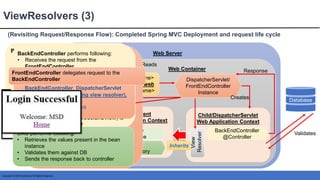
(Revisiting Request/Response Flow): Completed Spring MVC Deployment and request life cycle
ViewResolvers (3)
Client
Web Server
Web Container
File
System
Search
Initializer /
web.xml
Reads
DispatcherServlet/
FrontEndController
Instance
<servlet-name>
cstspconf-web
</servlet-name>
Child/DispatcherServlet
Web Application Context
BackEndController
@Controller
Database
Response
Root/Parent
Web Application Context
cstspconf-
web
-servlet.xml
Service
@Service
DAO
@Repository
Creates
Inherits
Service
@Service
DAO
@Repository
Resource is not found
View
Resolver
After web.xml/ initializer is read
following happens:
1 Contextloader gets executed
and it creates the Root/
Parent WebApplicationContext
2 Instance of Dispatcherservlet/
FrontEndController is created
Front End Controller performs following:
• It reads the ServletName configured in
web.xml
• Tries to find and load the ServletName-
servlet.xml from the server’s file system
• Creates the Spring Context:
DispatcherServlet
WebApplicationContext
• Previous Step Results in the instantiation
of the BackEndController and view
resolver
BackEndController performs following:
• Receives the request from the
FrontEndController
• Executes the handler method
• Prepare the ModelAndView by sending the
logical view name
• Sends the response back to the FrontEnd
Controller
• Based up on the result from the
BackEndController, DispatcherServlet
prepares the response
and sends it back to client
Identifies the view (using view resolver),
Views MSD
Submit
BackEndController performs following:
• Receives the request from the
FrontEndController
• Executes the handler method
• Retrieves the request data
• Prepares the bean/ model instance
• Invokes the service layer, chaining to DAO
layer by passing the bean/ model object
• Returns the response (ModelandView) to
the FrontEndController
DAO performs following:
• Retrieves the values present in the bean
instance
• Validates them against DB
• Sends the response back to controller
Validates
• Returns the response (ModelandView) to
the FrontEndController
• Based up on the result from the
BackEndController, DispatcherServlet
prepares the response
and sends it back to client
Identifies the view (using view resolver),
FrontEndController delegates request to the
BackEndController
Copyright © 2018 Accenture All Rights Reserved.
Thank You

Unit 38 - Spring MVC Introduction.pptx

  • 1.
    Accenture CSI ConfidentialMaterial. Do not duplicate or distribute Learning and Knowledge Management SPRING MVC INTRODUCTION
  • 2.
    For a successfulclass, please: • Arrive on time • Turn all cell phones off • Wear business formal attire • Assist your colleagues; show respect to all individuals regardless of their skill and knowledge level • Do not use class time to surf the net, check e-mail, or use instant messaging • Adhere to attendance policy as directed by your local training coordinator Ground Rules Copyright © 2018 Accenture All Rights Reserved.
  • 3.
    Copyright © 2018Accenture All Rights Reserved. MVC - Model2 Architecture Topic List Introduction to Spring MVC Context Configuration ContextHierarchy ViewResolvers
  • 4.
    Copyright © 2018Accenture All Rights Reserved. MVC - Model2 Architecture Topic List Introduction to Spring MVC Context Configuration ContextHierarchy ViewResolvers
  • 5.
    Copyright © 2018Accenture All Rights Reserved. Presentation Layer Servlet, JSP and JSTL Spring MVC Spring Security MVC Service Layer Java 8 features Spring Core and Spring Test Database Layer MySQL and JDBC JPA (Hibernate provider) Spring ORM Java Technology Stack Spring Boot Agile Practices Devops Tools
  • 6.
    Copyright © 2017Accenture All Rights Reserved. Presentation Layer Servlet, JSP and JSTL Spring MVC Spring Security MVC Service Layer Java 8 features Spring Core and Spring Test Database Layer MySQL and JDBC JPA (Hibernate provider) Spring ORM Java Technology Stack Spring Boot Agile Practices Devops Tools
  • 7.
    Copyright © 2018Accenture All Rights Reserved. Introduction MVC - Model2 Architecture (1) • Model2 or MVC design pattern is abbreviation for Model View Controller • It consists of following three modules: o Model: It represents the POJOs, business logic, database logic of the application o View: It is responsible to generate/select the UI (User Interface) and present data to the end user o Controller: It intercepts all the requests/commands sent to the application and updates the changes to view. It glues model to the view and vice versa Web Server Web Container Views Model Database Client Controller / Filter
  • 8.
    Copyright © 2018Accenture All Rights Reserved. Static Resource Request Life Cycle MVC - Model2 Architecture (2) Client Web Server Web Container File System Search Static Resource found http://localhost:8080/Demo_10000_ServletMVC/ Refer Demos: Demo_10000_ServletMVC. Run on tomcat and try to fetch login.html
  • 9.
    Copyright © 2018Accenture All Rights Reserved. Dynamic Resource Request Life Cycle MVC - Model2 Architecture (3) Client Web Server Web Container File System Search Web Container Resource is not found Initializer / web.xml Reads Servlet/ Controller Instance Controller performs following: • Receives the request parameters and does the necessary type casting • Creates and populates a Bean instance • Creates DAO instance and invokes its method by passing bean instance created in previous step DAO instance Passes Bean instance DAO performs following: • Retrieves the values present in the bean instance • Validates them against DB • Sends the response back to controller Database Validates Controller performs following: • Receives the request parameters and does necessary conversion • Creates and populates a Bean instance • Creates DAO instance and invokes its method by passing bean instance created in previous step • Based on the response from DAO controller selects a view, prepares the response and sends back to client Views MSD Submit Refer Demos: Demo_10000_ServletMVC. Run on tomcat. Execute login.html perform following and observe: • Give the user name: MSD, password: MSD@123 , submit and observe the generated view • Give the user name: Test, password: MSD@123 , submit and observe the generated view
  • 10.
    Copyright © 2018Accenture All Rights Reserved. MVC - Model2 Architecture Topic List Introduction to Spring MVC Context Configuration ContextHierarchy ViewResolvers
  • 11.
    Copyright © 2018Accenture All Rights Reserved. Spring MVC Deployment and request life cycle Introduction to Spring MVC (1) Client Web Server Web Container File System Search Web Container Resource is not found Initializer / web.xml Reads DispatcherServlet/ FrontEndController Instance <servlet-name> cstspconf-web </servlet-name> cstspconf- web -servlet.xml Views DispatcherServlet Web Application Context Service @Service DAO @Repository BackEndController @Controller Front End Controller performs following: • It reads the ServletName configured in web.xml • Tries to find and load the ServletName- servlet.xml from the server’s file system • Creates the Spring Context: DispatcherServlet WebApplicationContext • Previous Step Results in the instantiation of the BackEndController • Based up on the result from the BackEndController, DispatcherServlet Identifies the view, prepares the response and sends it back to client BackEndController performs following: • Receives the request from the FrontEndController • Executes the handler method • Retrieves the request data • Prepares the bean/ model instance • Invokes the service layer, which in turn chains to DAO layer by passing the bean/ model object • Returns the response to the FrontEndController DAO performs following: • Retrieves the values present in the bean/ model instance • Validates them against DB • Sends the response back to BackEndController via Service Database Validates Creates Returns the response to the FrontEndController Response Final Response
  • 12.
    Copyright © 2018Accenture All Rights Reserved. Detailed Flow and Project Structure Introduction to Spring MVC (2) <?xml version="1.0" encoding="UTF-8"?> <web-app xmlns:xsi........ <welcome-file-list> <welcome-file>login.jsp</welcome-file> </welcome-file-list> <servlet> <servlet-name>cstspconf-web</servlet-name> <servlet-class> org.springframework.web.servlet.DispatcherServlet </servlet-class> <load-on-startup>1</load-on-startup> </servlet> <servlet-mapping> <servlet-name>cstspconf-web</servlet-name> <!-- URL pattern to be intercepted / processed by the DispatcherServlet --> <url-pattern>*.html</url-pattern> </servlet-mapping> </web-app> After Deployment, login.jsp will be launched as soon as application is accessed through application root <beans xmlns="http://www.springframework.org/schema/beans" xmlns:context="http://www.springframework.org/schema/context" xmlns:xsi="http://www.w3.org/2001/XMLSchema-instance" xmlns:mvc="http://www.springframework.org/schema/mvc" xsi:schemaLocation....> <context:component-scan base-package="com.accenture" /> <!--adds support for MVC annotations: 1. @Valid annotation for validation 2. @RequestMapping 3. http message convertors or message body marshalling with @RequestBody/ResponseBody --> <mvc:annotation-driven /> </beans> DispatcherServlet is the Front end controller • It reads the ServletName configured in web.xml • Tries to find and load the ServletName- servlet.xml from the server’s file system • Creates the Spring Context: DispatcherServlet WebApplicationContext • Previous Step Results in the instantiation of the LoginController (BackEnd Controller), LoginService and LoginDAO the LoginController (BackEnd Controller), LoginService and LoginDAO @Repository public class LoginDAO { //In actual application hard coding will be replaced by //Database connection and actual data from database public String validateLogin(LoginBean loginBean){ String uName = loginBean.getUserName(); String password = loginBean.getPassword(); if(uName.equals("MSD") && password.equals("MSD@123")){ return "success"; } else{ return "faliure"; } } } @Service public class LoginService { @Autowired private LoginDAO loginDAO; public String validateLogin(LoginBean loginBean){ //Business Logic Goes here return loginDAO.validateLogin(loginBean); } } @Controller public class LoginController { @Autowired private LoginService loginService; @RequestMapping(value = "/validateLogin.html", method = RequestMethod.POST) public ModelAndView validateLogin(@RequestParam("uName")String userName, @RequestParam("pwd")String password) { LoginBean loginBean = new LoginBean(); loginBean.setPassword(password); loginBean.setUserName(userName); String returnValue = loginService.validateLogin(loginBean); ModelAndView modelAndView = new ModelAndView(); if (returnValue.equals("success")) { modelAndView.setViewName("success.jsp"); modelAndView.addObject("message", "Welcome: " + userName); } else { modelAndView.setViewName("failure.jsp"); modelAndView.addObject("errorMessage","Please Login again with valid credentials"); } return modelAndView; } } @Controller public class LoginController { @RequestMapping(value = "/validateLogin.html", method = RequestMethod.POST) public ModelAndView validateLogin(@RequestParam("uName")String userName, @RequestParam("pwd")String password) { ModelAndView modelAndView ........... if (returnValue.equals("success")) { modelAndView.setViewName("success.jsp"); modelAndView.addObject("message", "Welcome: " + userName); } else { modelAndView.setViewName("failure.jsp"); modelAndView.addObject("errorMessage","Please Login again with valid credentials");} ........... <form method="post" action="validateLogin.html"> <table> <tr> <td><label>Name</label></td> <td><input type= "text" name="uName" /></td> </tr> <tr> <td><label>Password</label></td> <td><input type="password" name="pwd" /></td> </tr> </table> <input type="submit" value="Login"/> </form> BackEndController/ LoginController performs following: • Receives the request from the FrontEndController/DispatcherServlet • Executes the handler method • Retrieves the request data • Prepares the bean/ model instance • Invokes the service layer, which in turn chains to DAO layer by passing the bean/ model object • Returns the response to the FrontEndController/DispatcherServlet Front End Controller performs following: • It reads the ServletName configured in web.xml • Tries to find and load the ServletName- servlet.xml from the server’s file system • Creates the Spring Context: DispatcherServlet WebApplicationContext • Previous Step Results in the instantiation of the BackEndController • Based up on the result from the BackEndController, DispatcherServlet Identifies the view, prepares the response and sends it back to client <h2>Login Successful</h2> <c:out value="${message}“/> <h2>Login Failed</h2> <c:out value= "${errorMessage}"/> Refer Demos: Demo_10002_Spring_MVC. Run on tomcat. Execute login.html perform following and observe: • Give the user name: MSD, password: MSD@123 , submit and observe the generated view • Give the user name: Test, password: MSD@123 , submit and observe the generated view • Observe the code written inside the Controller, Service, DAO, web.xml/initializer, login.jsp, success.jsp, failure.jsp
  • 13.
    Copyright © 2018Accenture All Rights Reserved. MVC - Model2 Architecture Topic List Introduction to Spring MVC Context Configuration ContextHierarchy ViewResolvers
  • 14.
    Copyright © 2018Accenture All Rights Reserved. Context Configuration • It is used to locate the Spring Configuration/context files from a location other than a standard location and with name other than the standard naming convention (xxx-servlet.xml). • Refer the project structure given below and equivalent web.xml/initializer configured to read the Spring Configuration/context files <?xml version="1.0" encoding="UTF-8"?> <web-app xmlns:xsi="http://www.w3.org/2001/XMLSchema-instance" xmlns="http://java.sun.com/xml/ns/javaee" ........... <servlet> <servlet-name>cstspconf-web</servlet-name> <servlet- class>org.springframework.web.servlet.DispatcherServlet</servlet-class> <init-param> <param-name>contextConfigLocation</param-name> <param-value>/WEB-INF/config/spconf-web-servlet.xml</param-value> </init-param> <load-on-startup>1</load-on-startup> </servlet> <servlet-mapping> <servlet-name>cstspconf-web</servlet-name> <url-pattern>*.html</url-pattern> </servlet-mapping> </web-app> Refer Demos: Demo_10003_Spring_MVC_ContextConfiguration. Run on tomcat. Execute login.html perform following and observe: • The code written inside the web.xml/initializer and location of the configuration file • Give the user name: MSD, password: MSD@123 , submit and observe the generated view • Give the user name: Test, password: MSD@123 , submit and observe the generated view
  • 15.
    Copyright © 2018Accenture All Rights Reserved. MVC - Model2 Architecture Topic List Introduction to Spring MVC Context Configuration ContextHierarchy ViewResolvers
  • 16.
    Copyright © 2018Accenture All Rights Reserved. Introduction Context Hierarchy (1) • Spring MVC based application has 2 type of Web Application Contexts: Root/Parent WebApplicationContext o Belongs to the complete Spring MVC application o It is good to configure common Spring Beans in the Root WebApplicationContext. example service, dao and beans related to spring security o In an application there can be only one Root WebApplicationContext Servlet/Child WebApplicationContext o Belongs to the dispatcher servlet o A Spring MVC application can have multiple Servlet WebApplicationContext o It is good practice to configure the presentation layer components like : controllers, viewresolvers in the servlet context o All the Beans configured in the root context are accessible in the child context, but not the BeanPostProcessors and BeanFactoryPostProcessors
  • 17.
    Copyright © 2018Accenture All Rights Reserved. Implementation of Context Hierarchy Context Hierarchy (2) <!--Registering Parent context using the context load listener--> <listener> <listener-class> org.springframework.web.context.ContextLoaderListener </listener-class> </listener> <context-param> <param-name>contextConfigLocation</param-name> <param-value> /WEB-INF/cst-root-ctx.xml </param-value> </context-param> <!--Registering Parent context using the context load listener--> <servlet> <servlet-name>cstspconf-web</servlet-name> <servlet- class>org.springframework.web.servlet.DispatcherServlet</servlet- class> <load-on-startup>1</load-on-startup> </servlet> <servlet-mapping> <servlet-name>cstspconf-web</servlet-name> <url-pattern>*.html</url-pattern> </servlet-mapping> <beans xmlns="http://www.springframework.org/schema/beans" xmlns:context="http://www.springframework.org/schema/context" .......> <!-- scanning service and DAO --> <context:component-scan base-package="com.accenture.lkm.service, com.accenture.lkm.dao" /> </beans> cst-root-ctx.xml <beans xmlns="http://www.springframework.org/schema/beans" xmlns:context="http://www.springframework.org/schema/context" ...........> <!-- scanning just web related dependencies --> <context:component-scan base-package="com.accenture.lkm.web" /> <mvc:annotation-driven /> </beans> cstspconf-web-servlet.xml web.xml Console Logs Refer Demos: Demo_10004_Spring_RootContext_And_ChildContext. Run on tomcat. Execute login.html perform following and observe: • The code written inside the web.xml/initializer, cst-root-ctx.xml, cstspconf-web-servlet.xml and location of the configuration files • Give the user name: MSD, password: MSD@123 , submit and observe the generated view • Give the user name: Test, password: MSD@123 , submit and observe the generated view • Console logs
  • 18.
    Copyright © 2018Accenture All Rights Reserved. Spring MVC Deployment and request life cycle Context Hierarchy (3) Client Web Server Web Container File System Search Initializer / web.xml Reads DispatcherServlet/ FrontEndController Instance <servlet-name> cstspconf-web </servlet-name> Child/DispatcherServlet Web Application Context BackEndController @Controller Database Validates Response Root/Parent Web Application Context cstspconf- web -servlet.xml Service @Service DAO @Repository DispatcherServlet Web Application Context Service @Service DAO @Repository BackEndController @Controller Creates Service @Service DAO @Repository Inherits
  • 19.
    Copyright © 2018Accenture All Rights Reserved. MVC - Model2 Architecture Topic List Introduction to Spring MVC Context Configuration ContextHierarchy ViewResolvers
  • 20.
    Copyright © 2018Accenture All Rights Reserved. Introduction and Type of ViewResolver ViewResolver (1) • In Backend controller, all handler methods should return the logical view name by returning String, View or ModelAndView • Logical view names are mapped to actual views (.jsp, .html, template based) by the View Resolver, there by making Spring MVC view technology agnostic • Following are important types of view resolvers:  UrlBasedViewResolver  InternalResourceViewResolver  ResourceBundleViewResolver  XmlViewResolver It performs view resolution for JSPs, servlets, JSTL, Tiles via prefix and suffix mapping It is Default view resolver. It performs direct resolution of logical view names to URLs, without an explicit mapping definition. This is appropriate to use, if logical names match the names of the view resources present in server file system It performs view resolution for JSPs, servlets, JSTL, Tiles via explicit mapping mentioned in a .properties file It performs view resolution for JSPs, servlets, JSTL, Tiles via explicit mapping mentioned in a .xml file
  • 21.
    Copyright © 2018Accenture All Rights Reserved. Project Structure and ViewResolver ViewResolver (2) How to render or Display the views from WEB-INF Using ViewResolver @Controller public class LoginController { @Autowired LoginService loginService; @RequestMapping(value = "/loadLogin.html", method = RequestMethod.GET) public ModelAndView loadLoginPage() { ModelAndView modelAndView = new ModelAndView(); modelAndView.setViewName("login"); return modelAndView; } @RequestMapping(value = "/validateLogin.html", method = RequestMethod.POST) public ModelAndView validateLogin(@RequestParam("uName")String userName, @RequestParam("pwd")String password) { ...... ModelAndView modelAndView = new ModelAndView(); if (name.equals("success")) { modelAndView.setViewName("success"); modelAndView.addObject("message", "Welcome: " + name); } else....... return modelAndView; } } BackEndController BackEndController performs following: • Receives the request from the FrontEndController • Executes the handler method • Retrieves the request data • Prepares the bean/ model instance • Invokes the service layer, chaining to DAO layer by passing the bean/ model object • Returns the response (logical view name and model object) to the FrontEndController <beans xmlns="http://www.springframework.org/schema/beans" xmlns:context="http://www.springframework.org/schema/context" .........> <!-- scanning just web related dependencies --> <context:component-scan base-package="com.accenture.lkm.web" /> <!--adds support for MVC annotations: 1. @Valid annotation for validation 2. @RequestMapping 3. http message convertors or message body marshalling with @RequestBody/ResponseBody --> <mvc:annotation-driven /> <!-- View Resolver to resolve the views from a custom location --> <bean class="org.springframework.web.servlet.view. InternalResourceViewResolver"> <property name="prefix"> <value>/WEB-INF/jspViews/</value> </property> <property name="suffix"> <value>.jsp</value> </property> </bean> </beans> cstspconf-web-sevlet.xml Front End Controller performs following: • It reads the ServletName configured in web.xml • Tries to find and load the ServletName- servlet.xml from the server’s file system • Creates the Spring Context: DispatcherServlet WebApplicationContext • Previous Step Results in the instantiation of the BackEndController • Based up on the result from the BackEndController, DispatcherServlet prepares the response and sends it back to client Identifies the view (using view resolver), Refer Demo: Demo_10005_Spring_MVC_ViewResolver_Internal. Execute: http://localhost:<<#portnum>>/Demo_10005_Spring_MVC_ViewResolver_Internal/loadLogin.html Perform following and observe: • The code written inside the web.xml/initializer, cst-root-ctx.xml, cstspconf-web-servlet.xml and location of the configuration files, view ( jsp pages) • Give user name: MSD, password: MSD@123 , submit and observe the generated view • Give user name: Test, password: MSD@123 , submit and observe the generated view
  • 22.
    Copyright © 2018Accenture All Rights Reserved. (Revisiting Request/Response Flow): Completed Spring MVC Deployment and request life cycle ViewResolvers (3) Client Web Server Web Container File System Search Initializer / web.xml Reads DispatcherServlet/ FrontEndController Instance <servlet-name> cstspconf-web </servlet-name> Child/DispatcherServlet Web Application Context BackEndController @Controller Database Response Root/Parent Web Application Context cstspconf- web -servlet.xml Service @Service DAO @Repository Creates Inherits Service @Service DAO @Repository Resource is not found View Resolver After web.xml/ initializer is read following happens: 1 Contextloader gets executed and it creates the Root/ Parent WebApplicationContext 2 Instance of Dispatcherservlet/ FrontEndController is created Front End Controller performs following: • It reads the ServletName configured in web.xml • Tries to find and load the ServletName- servlet.xml from the server’s file system • Creates the Spring Context: DispatcherServlet WebApplicationContext • Previous Step Results in the instantiation of the BackEndController and view resolver BackEndController performs following: • Receives the request from the FrontEndController • Executes the handler method • Prepare the ModelAndView by sending the logical view name • Sends the response back to the FrontEnd Controller • Based up on the result from the BackEndController, DispatcherServlet prepares the response and sends it back to client Identifies the view (using view resolver), Views MSD Submit BackEndController performs following: • Receives the request from the FrontEndController • Executes the handler method • Retrieves the request data • Prepares the bean/ model instance • Invokes the service layer, chaining to DAO layer by passing the bean/ model object • Returns the response (ModelandView) to the FrontEndController DAO performs following: • Retrieves the values present in the bean instance • Validates them against DB • Sends the response back to controller Validates • Returns the response (ModelandView) to the FrontEndController • Based up on the result from the BackEndController, DispatcherServlet prepares the response and sends it back to client Identifies the view (using view resolver), FrontEndController delegates request to the BackEndController
  • 23.
    Copyright © 2018Accenture All Rights Reserved. Thank You

Editor's Notes

  • #8 https://www.javatpoint.com/model-1-and-model-2-mvc-architecture https://en.wikipedia.org/wiki/JSP_model_2_architecture
  • #9 https://www.javatpoint.com/model-1-and-model-2-mvc-architecture https://en.wikipedia.org/wiki/JSP_model_2_architecture
  • #10 https://www.javatpoint.com/model-1-and-model-2-mvc-architecture https://en.wikipedia.org/wiki/JSP_model_2_architecture Sample container Tomcat: https://en.wikipedia.org/wiki/Apache_Tomcat
  • #12 https://docs.spring.io/spring/docs/4.2.4.RELEASE/spring-framework-reference/html/ https://docs.spring.io/spring/docs/4.2.4.RELEASE/spring-framework-reference/html/mvc.html
  • #13 https://docs.spring.io/spring/docs/4.2.4.RELEASE/spring-framework-reference/html/mvc.html A Controller method is called as handler method. These methods can have following return Types: ModelAndView : It is used when it is required to provide the name of model and view to be displayed String: It is used when it is required to provide, only, the name of the view to be displayed void: It is used when it is required when the same view has to be displayed HttpEntity<?> or ResponseEntity<?>: It is used when dealing with Spring REST Other type can be seen from the below link: https://docs.spring.io/spring/docs/4.2.4.RELEASE/spring-framework-reference/html/mvc.html On the Above Link Search for “Return Types”
  • #15 contextConfigLocation: String that is passed to indicate where context(s) can be found. The string consists potentially of multiple strings (using a comma as a delimiter) to support multiple contexts. In case of multiple context locations with beans that are defined twice, the latest location takes precedence.
  • #17  https://docs.spring.io/spring/docs/4.2.4.RELEASE/spring-framework-reference/html/ Search for: “root WebApplicationContext”
  • #19 https://docs.spring.io/spring/docs/4.2.4.RELEASE/spring-framework-reference/html/ https://docs.spring.io/spring/docs/4.2.4.RELEASE/spring-framework-reference/html/mvc.html
  • #21  Refer Section: 21.5 Resolving views from: https://docs.spring.io/spring/docs/4.2.4.RELEASE/spring-framework-reference/html/mvc.html#mvc-config-view-resolvers https://examples.javacodegeeks.com/enterprise-java/spring/mvc/spring-mvc-view-resolver-example/
  • #22 https://examples.javacodegeeks.com/enterprise-java/spring/mvc/spring-mvc-view-resolver-example/
  • #23 https://docs.spring.io/spring/docs/4.2.4.RELEASE/spring-framework-reference/html/ https://docs.spring.io/spring/docs/4.2.4.RELEASE/spring-framework-reference/html/mvc.html