
Bubble
Presented By
ARYA TS Livares Technologies Pvt Ltd
Tech&Socio-Cultural Group
PRESENTATION
TITLE
Livares Technologies Pvt Ltd
CONTENTS
● Introduction
● Application Editor
● Multi Page Apps
● Reusable Elements
● Workflow
● API
● Debugger
● Advantages
● Disadvantages
● Conclusion
● References
Tech&Socio-Cultural Group Livares Technologies Pvt Ltd
What is Bubble tool
● It is a visual programming language that lets you build web applications
without code.
● Using Bubble, you can build a fully-functional web application, such as a
marketplace, a social network, a CRM tool, both for internal and customer-
facing situations.
● The application editor is accessed in the browser. There is nothing to
download, and you can access your app from any device.
● Once an application is built on Bubble, there is no need to deploy the
application to a cloud solution.
● As soon as an app is built on Bubble, it is hosted on Bubble's cloud
infrastructure.
Tech&Socio-Cultural Group
PRESENTATION
TITLE
Livares Technologies Pvt Ltd
Application Editor
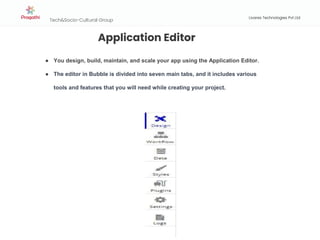
● You design, build, maintain, and scale your app using the Application Editor.
● The editor in Bubble is divided into seven main tabs, and it includes various
tools and features that you will need while creating your project.
Tech&Socio-Cultural Group
PRESENTATION
TITLE
Livares Technologies Pvt Ltd
Design tab:-This is where you design the visual appearance of the app. Draw
elements on the page, drag and resize them, and adjust their properties and
appearance.
Continue
Tech&Socio-Cultural Group
PRESENTATION
TITLE
Livares Technologies Pvt Ltd
Workflow tab:-The Workflow Tab is where you define the workflows that
program your page. The different workflows are displayed as boxes, which
represent the event.
Continue
Tech&Socio-Cultural Group
PRESENTATION
TITLE
Livares Technologies Pvt Ltd
Data tab:-The Data Tab is where you can view your data structure and modify it. You can
see the different data types that are used in your application, as well as the fields for each
of them.The 'App Data' section shows you actual data
Continue
Tech&Socio-Cultural Group
Livares Technologies Pvt Ltd
Style Tab:-The Styles Tab is where you define the different styles that elements can have in
your interface.
A Style is a shared set of properties (e.g. background colors, font size, etc.) that can be
applied to elements of a similar type (e.g. Text elements).
Tech&Socio-Cultural Group
PRESENTATION
TITLE
Livares Technologies Pvt Ltd
Plugins Tab:-Plugins are a way to extend Bubble's core functionality.
Setting Tab:-This tab lets you control your application subscription and paid add-ons.
Log Tab:-This tab is useful once your app is live, or when you are testing it in run-mode.
Tech&Socio-Cultural Group
PRESENTATION
TITLE
Livares Technologies Pvt Ltd
Element hierarchy
A Bubble page is composed of three types of components:Page,Containers/Groups,Elements
Tech&Socio-Cultural Group
Livares Technologies Pvt Ltd
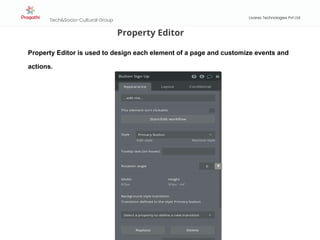
Property Editor
Property Editor is used to design each element of a page and customize events and
actions.
Tech&Socio-Cultural Group
Livares Technologies Pvt Ltd
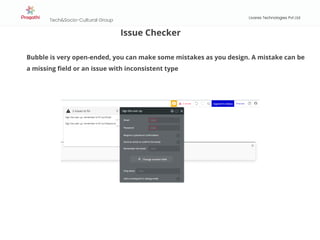
Issue Checker
Bubble is very open-ended, you can make some mistakes as you design. A mistake can be
a missing field or an issue with inconsistent type
Tech&Socio-Cultural Group
Livares Technologies Pvt Ltd
Multi-page apps
● You can create new pages in the Application Menu.
● A page can start blank or be the clone of another page.
● When a page is cloned, the entire page, including workflows will be copied
and used as the basis for the new page.
Tech&Socio-Cultural Group
Livares Technologies Pvt Ltd
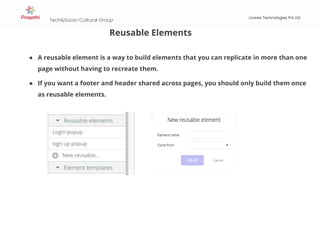
Reusable Elements
● A reusable element is a way to build elements that you can replicate in more than one
page without having to recreate them.
● If you want a footer and header shared across pages, you should only build them once
as reusable elements.
Tech&Socio-Cultural Group
Livares Technologies Pvt Ltd
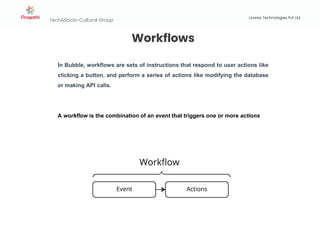
Workflows
In Bubble, workflows are sets of instructions that respond to user actions like
clicking a button, and perform a series of actions like modifying the database
or making API calls.
A workflow is the combination of an event that triggers one or more actions
Tech&Socio-Cultural Group
Livares Technologies Pvt Ltd
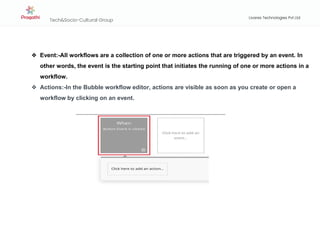
❖ Event:-All workflows are a collection of one or more actions that are triggered by an event. In
other words, the event is the starting point that initiates the running of one or more actions in a
workflow.
❖ Actions:-In the Bubble workflow editor, actions are visible as soon as you create or open a
workflow by clicking on an event.
Tech&Socio-Cultural Group
PRESENTATION
TITLE
Livares Technologies Pvt Ltd
Bubble API
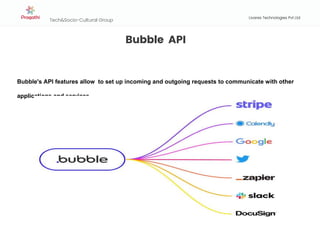
Bubble's API features allow to set up incoming and outgoing requests to communicate with other
applications and services
Tech&Socio-Cultural Group
Livares Technologies Pvt Ltd
Bubble API
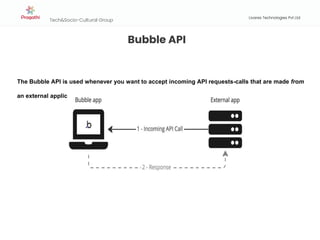
The Bubble API is used whenever you want to accept incoming API requests-calls that are made from
an external application to your Bubble app.
Tech&Socio-Cultural Group
Livares Technologies Pvt Ltd
Bubble API
Incoming requests happen when an external system, such as another application, initiates a
connection with your Bubble application. In that case, your app needs to be ready to accept that
request and know what to do with it.
Incoming requests to Bubble can do one of two things:
● Search for, Read, create, modify or delete data in your database: this is handled by the Data API.
● Run a workflow in your app: this is handled by the Workflow API.
Tech&Socio-Cultural Group
Livares Technologies Pvt Ltd
Debugger
When you access an app from the editor by clicking PREVIEW, the debugger will be automatically
activated.
When the Debugger is activated, you'll see it at the bottom of the page, with sections for the Workflow
Debugger and the Element Inspector.
Tech&Socio-Cultural Group
PRESENTATION
TITLE
Livares Technologies Pvt Ltd
Advantages of bubble
➢ Economical: You can build it yourself even if you don’t know how to code. Bubble
makes your road to software development cheaper and quicker.
➢ Agile: Using buble.io, you can complete your applications faster compared to when
you have to code everything from start.
➢ Create a versatile product:It is easy to change or update an application that’s built
with Bubble.io.
➢ Enhanced productivity:With Bubble.io, apps can be built faster
➢ Make powerful apps without tech skills
Tech&Socio-Cultural Group
PRESENTATION
TITLE
Livares Technologies Pvt Ltd
Disadvantages of bubble
➢ Bubble isn’t built for everything
➢ There’s a learning curve: If you want to enjoy the full power of Bubble.io,
you need to spend some time learning how to use it.
➢ Limited customisation
Tech&Socio-Cultural Group
PRESENTATION
TITLE
Livares Technologies Pvt Ltd
Conclusion
❏ Bubble.io is a no-code web development platform that offers a range of features
and tools to help users create custom web applications quickly and easily.
❏ Bubble.io also offers responsive design capabilities, built-in user authentication
and permission management, and analytics and tracking tools to help users create
robust applications that meet specific needs.
❏ Overall, Bubble.io is a powerful and versatile platform that can be used by
individuals, small businesses, and enterprise-level organizations to create custom
web applications without requiring technical skills or coding knowledge.
❏ If you're looking for a way to build a custom web application quickly and efficiently,
Bubble.io is definitely worth checking out.
Tech&Socio-Cultural Group
PRESENTATION
TITLE
Livares Technologies Pvt Ltd
References
● https://manual.bubble.io/
● https://www.nocode.tech/lessons/bubble-overview
OUR
CONTACT DETAILS
Livares Technologies Pvt Ltd
5th Floor, Yamuna Building
Technopark Phase III Campus
Trivandrum, Kerala, India-695581
Livares Technologies Pvt Ltd
Tech&Socio-Cultural Group
Our helpline is always open to receive any inquiry
or feedback.Please feel free to contact us
www.livares.com
contact@livares.com
@livaresofficial
www.facebook.com/livaresofficial
+91-471-2710003 | +91-471-
2710004
THANK
YOU

Bubble(No code Tool)

  • 1.
    Bubble Presented By ARYA TSLivares Technologies Pvt Ltd Tech&Socio-Cultural Group
  • 2.
    Tech&Socio-Cultural Group PRESENTATION TITLE Livares TechnologiesPvt Ltd CONTENTS ● Introduction ● Application Editor ● Multi Page Apps ● Reusable Elements ● Workflow ● API ● Debugger ● Advantages ● Disadvantages ● Conclusion ● References
  • 3.
    Tech&Socio-Cultural Group LivaresTechnologies Pvt Ltd What is Bubble tool ● It is a visual programming language that lets you build web applications without code. ● Using Bubble, you can build a fully-functional web application, such as a marketplace, a social network, a CRM tool, both for internal and customer- facing situations. ● The application editor is accessed in the browser. There is nothing to download, and you can access your app from any device. ● Once an application is built on Bubble, there is no need to deploy the application to a cloud solution. ● As soon as an app is built on Bubble, it is hosted on Bubble's cloud infrastructure.
  • 4.
    Tech&Socio-Cultural Group PRESENTATION TITLE Livares TechnologiesPvt Ltd Application Editor ● You design, build, maintain, and scale your app using the Application Editor. ● The editor in Bubble is divided into seven main tabs, and it includes various tools and features that you will need while creating your project.
  • 5.
    Tech&Socio-Cultural Group PRESENTATION TITLE Livares TechnologiesPvt Ltd Design tab:-This is where you design the visual appearance of the app. Draw elements on the page, drag and resize them, and adjust their properties and appearance. Continue
  • 6.
    Tech&Socio-Cultural Group PRESENTATION TITLE Livares TechnologiesPvt Ltd Workflow tab:-The Workflow Tab is where you define the workflows that program your page. The different workflows are displayed as boxes, which represent the event. Continue
  • 7.
    Tech&Socio-Cultural Group PRESENTATION TITLE Livares TechnologiesPvt Ltd Data tab:-The Data Tab is where you can view your data structure and modify it. You can see the different data types that are used in your application, as well as the fields for each of them.The 'App Data' section shows you actual data Continue
  • 8.
    Tech&Socio-Cultural Group Livares TechnologiesPvt Ltd Style Tab:-The Styles Tab is where you define the different styles that elements can have in your interface. A Style is a shared set of properties (e.g. background colors, font size, etc.) that can be applied to elements of a similar type (e.g. Text elements).
  • 9.
    Tech&Socio-Cultural Group PRESENTATION TITLE Livares TechnologiesPvt Ltd Plugins Tab:-Plugins are a way to extend Bubble's core functionality. Setting Tab:-This tab lets you control your application subscription and paid add-ons. Log Tab:-This tab is useful once your app is live, or when you are testing it in run-mode.
  • 10.
    Tech&Socio-Cultural Group PRESENTATION TITLE Livares TechnologiesPvt Ltd Element hierarchy A Bubble page is composed of three types of components:Page,Containers/Groups,Elements
  • 11.
    Tech&Socio-Cultural Group Livares TechnologiesPvt Ltd Property Editor Property Editor is used to design each element of a page and customize events and actions.
  • 12.
    Tech&Socio-Cultural Group Livares TechnologiesPvt Ltd Issue Checker Bubble is very open-ended, you can make some mistakes as you design. A mistake can be a missing field or an issue with inconsistent type
  • 13.
    Tech&Socio-Cultural Group Livares TechnologiesPvt Ltd Multi-page apps ● You can create new pages in the Application Menu. ● A page can start blank or be the clone of another page. ● When a page is cloned, the entire page, including workflows will be copied and used as the basis for the new page.
  • 14.
    Tech&Socio-Cultural Group Livares TechnologiesPvt Ltd Reusable Elements ● A reusable element is a way to build elements that you can replicate in more than one page without having to recreate them. ● If you want a footer and header shared across pages, you should only build them once as reusable elements.
  • 15.
    Tech&Socio-Cultural Group Livares TechnologiesPvt Ltd Workflows In Bubble, workflows are sets of instructions that respond to user actions like clicking a button, and perform a series of actions like modifying the database or making API calls. A workflow is the combination of an event that triggers one or more actions
  • 16.
    Tech&Socio-Cultural Group Livares TechnologiesPvt Ltd ❖ Event:-All workflows are a collection of one or more actions that are triggered by an event. In other words, the event is the starting point that initiates the running of one or more actions in a workflow. ❖ Actions:-In the Bubble workflow editor, actions are visible as soon as you create or open a workflow by clicking on an event.
  • 17.
    Tech&Socio-Cultural Group PRESENTATION TITLE Livares TechnologiesPvt Ltd Bubble API Bubble's API features allow to set up incoming and outgoing requests to communicate with other applications and services
  • 18.
    Tech&Socio-Cultural Group Livares TechnologiesPvt Ltd Bubble API The Bubble API is used whenever you want to accept incoming API requests-calls that are made from an external application to your Bubble app.
  • 19.
    Tech&Socio-Cultural Group Livares TechnologiesPvt Ltd Bubble API Incoming requests happen when an external system, such as another application, initiates a connection with your Bubble application. In that case, your app needs to be ready to accept that request and know what to do with it. Incoming requests to Bubble can do one of two things: ● Search for, Read, create, modify or delete data in your database: this is handled by the Data API. ● Run a workflow in your app: this is handled by the Workflow API.
  • 20.
    Tech&Socio-Cultural Group Livares TechnologiesPvt Ltd Debugger When you access an app from the editor by clicking PREVIEW, the debugger will be automatically activated. When the Debugger is activated, you'll see it at the bottom of the page, with sections for the Workflow Debugger and the Element Inspector.
  • 21.
    Tech&Socio-Cultural Group PRESENTATION TITLE Livares TechnologiesPvt Ltd Advantages of bubble ➢ Economical: You can build it yourself even if you don’t know how to code. Bubble makes your road to software development cheaper and quicker. ➢ Agile: Using buble.io, you can complete your applications faster compared to when you have to code everything from start. ➢ Create a versatile product:It is easy to change or update an application that’s built with Bubble.io. ➢ Enhanced productivity:With Bubble.io, apps can be built faster ➢ Make powerful apps without tech skills
  • 22.
    Tech&Socio-Cultural Group PRESENTATION TITLE Livares TechnologiesPvt Ltd Disadvantages of bubble ➢ Bubble isn’t built for everything ➢ There’s a learning curve: If you want to enjoy the full power of Bubble.io, you need to spend some time learning how to use it. ➢ Limited customisation
  • 23.
    Tech&Socio-Cultural Group PRESENTATION TITLE Livares TechnologiesPvt Ltd Conclusion ❏ Bubble.io is a no-code web development platform that offers a range of features and tools to help users create custom web applications quickly and easily. ❏ Bubble.io also offers responsive design capabilities, built-in user authentication and permission management, and analytics and tracking tools to help users create robust applications that meet specific needs. ❏ Overall, Bubble.io is a powerful and versatile platform that can be used by individuals, small businesses, and enterprise-level organizations to create custom web applications without requiring technical skills or coding knowledge. ❏ If you're looking for a way to build a custom web application quickly and efficiently, Bubble.io is definitely worth checking out.
  • 24.
    Tech&Socio-Cultural Group PRESENTATION TITLE Livares TechnologiesPvt Ltd References ● https://manual.bubble.io/ ● https://www.nocode.tech/lessons/bubble-overview
  • 25.
    OUR CONTACT DETAILS Livares TechnologiesPvt Ltd 5th Floor, Yamuna Building Technopark Phase III Campus Trivandrum, Kerala, India-695581 Livares Technologies Pvt Ltd Tech&Socio-Cultural Group Our helpline is always open to receive any inquiry or feedback.Please feel free to contact us www.livares.com contact@livares.com @livaresofficial www.facebook.com/livaresofficial +91-471-2710003 | +91-471- 2710004 THANK YOU