HTML5 and WAI-ARIA
HTML5 Study Groupt/ Tokyo / 18 November 2010
Bruce Lawson, Opera Software
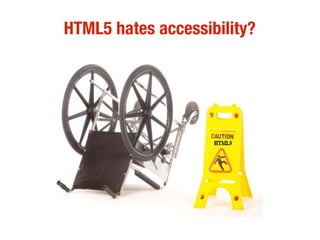
HTML5 hates accessibility?
Accessible Rich Internet Applications
WAI-ARIA is intended to be a bridging technology. It clarifies
semantics to assistive technologies when authors create
new types of objects, via style and script, that are not yet
directly supported by the language of the page.
http://www.w3.org/TR/wai-aria/complete
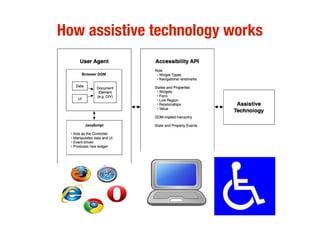
How assistive technology works
roles, states, properties
●
Role is what something is. <div role="navigation">,
“tooltip”
●
State is how something is at the moment (from pre-
defined list): aria-checked = “true”, aria-required=”true”
● Property: aria-valuenow (of a slider), aria-describedby
(points to a description)
HTML attributes don't validate in HTML4
<div role="navigation">
<input aria-required="true">
(but validate in HTML5!)
Built-in always beats bolt-on
It is not appropriate to create objects with style and script
when the host language provides a semantic element for
that type of objects.
While WAI-ARIA can improve the accessibility of these
objects, accessibility is best provided by allowing the user
agent to handle the object natively.
Remains useful for legacy content
When native semantics for a given feature become
available, it is appropriate for authors to use the native
feature and stop using WAI-ARIA for that feature. Legacy
content may continue to use WAI-ARIA
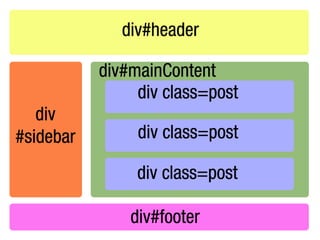
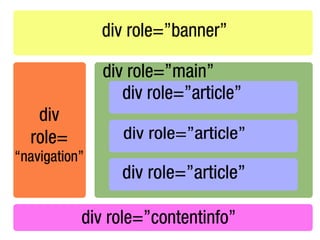
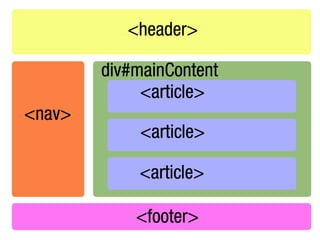
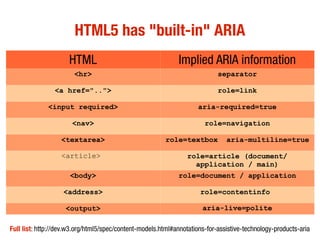
HTML5 has "built-in" ARIA
HTML Implied ARIA information
<hr> separator
<a href=".."> role=link
<input required> aria-required=true
<nav> role=navigation
<textarea> role=textbox aria-multiline=true
<article> role=article (document/
application / main)
<body> role=document / application
<address> role=contentinfo
<output> aria-live=polite
Full list: http://dev.w3.org/html5/spec/content-models.html#annotations-for-assistive-technology-products-aria
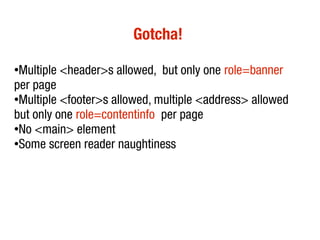
Gotcha!
●
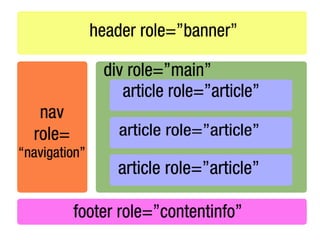
Multiple <header>s allowed, but only one role=banner
per page
●
Multiple <footer>s allowed, multiple <address> allowed
but only one role=contentinfo per page
●
No <main> element
●Some screen reader naughtiness
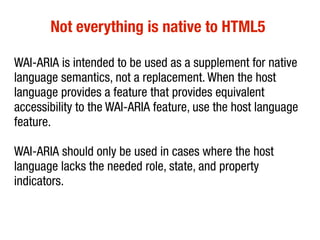
Not everything is native to HTML5
WAI-ARIA is intended to be used as a supplement for native
language semantics, not a replacement. When the host
language provides a feature that provides equivalent
accessibility to the WAI-ARIA feature, use the host language
feature.
WAI-ARIA should only be used in cases where the host
language lacks the needed role, state, and property
indicators.
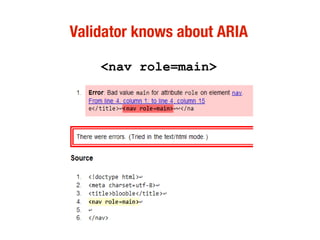
Validator knows about ARIA
<nav role=main>
Fix ARIA roles in browsers (transitional)
https://github.com/yatil/accessifyhtml5.js
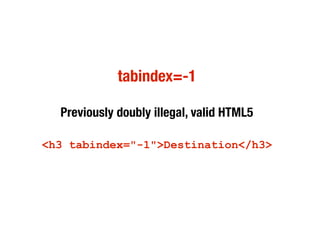
tabindex=-1
Previously doubly illegal, valid HTML5
<h3 tabindex="-1">Destination</h3>
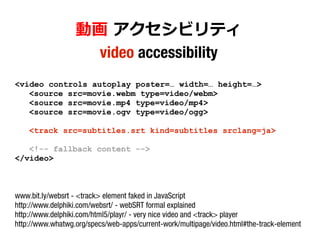
動画 アクセシビリティ
video accessibility
<video controls autoplay poster=… width=… height=…>
<source src=movie.webm type=video/webm>
<source src=movie.mp4 type=video/mp4>
<source src=movie.ogv type=video/ogg>
<track src=subtitles.srt kind=subtitles srclang=ja>
<!-- fallback content -->
</video>
www.bit.ly/websrt - <track> element faked in JavaScript
http://www.delphiki.com/websrt/ - webSRT formal explained
http://www.delphiki.com/html5/playr/ - very nice video and <track> player
http://www.whatwg.org/specs/web-apps/current-work/multipage/video.html#the-track-element
Essential reading
●
WAI-ARIA 導入(日本語訳)
http://d.hatena.ne.jp/aratako0/20090709/p1
●
HTML5 and the myth of WAI-ARIA redundance (ARIA roles
and properties not available in HTML5)
http://www.paciellogroup.com/blog/?p=585
●
ARIA spec http://www.w3.org/TR/wai-aria/complete
www.opera.com/developer
bruce.lawson@opera.com
www.brucelawson.co.uk
twitter.com/brucel

Bruce lawson-html5-aria-japan

  • 1.
    HTML5 and WAI-ARIA HTML5Study Groupt/ Tokyo / 18 November 2010 Bruce Lawson, Opera Software
  • 2.
  • 3.
    Accessible Rich InternetApplications WAI-ARIA is intended to be a bridging technology. It clarifies semantics to assistive technologies when authors create new types of objects, via style and script, that are not yet directly supported by the language of the page. http://www.w3.org/TR/wai-aria/complete
  • 4.
  • 5.
    roles, states, properties ● Roleis what something is. <div role="navigation">, “tooltip” ● State is how something is at the moment (from pre- defined list): aria-checked = “true”, aria-required=”true” ● Property: aria-valuenow (of a slider), aria-describedby (points to a description)
  • 6.
    HTML attributes don'tvalidate in HTML4 <div role="navigation"> <input aria-required="true"> (but validate in HTML5!)
  • 7.
    Built-in always beatsbolt-on It is not appropriate to create objects with style and script when the host language provides a semantic element for that type of objects. While WAI-ARIA can improve the accessibility of these objects, accessibility is best provided by allowing the user agent to handle the object natively.
  • 8.
    Remains useful forlegacy content When native semantics for a given feature become available, it is appropriate for authors to use the native feature and stop using WAI-ARIA for that feature. Legacy content may continue to use WAI-ARIA
  • 12.
    HTML5 has "built-in"ARIA HTML Implied ARIA information <hr> separator <a href=".."> role=link <input required> aria-required=true <nav> role=navigation <textarea> role=textbox aria-multiline=true <article> role=article (document/ application / main) <body> role=document / application <address> role=contentinfo <output> aria-live=polite Full list: http://dev.w3.org/html5/spec/content-models.html#annotations-for-assistive-technology-products-aria
  • 15.
    Gotcha! ● Multiple <header>s allowed,but only one role=banner per page ● Multiple <footer>s allowed, multiple <address> allowed but only one role=contentinfo per page ● No <main> element ●Some screen reader naughtiness
  • 16.
    Not everything isnative to HTML5 WAI-ARIA is intended to be used as a supplement for native language semantics, not a replacement. When the host language provides a feature that provides equivalent accessibility to the WAI-ARIA feature, use the host language feature. WAI-ARIA should only be used in cases where the host language lacks the needed role, state, and property indicators.
  • 17.
    Validator knows aboutARIA <nav role=main>
  • 18.
    Fix ARIA rolesin browsers (transitional) https://github.com/yatil/accessifyhtml5.js
  • 19.
    tabindex=-1 Previously doubly illegal,valid HTML5 <h3 tabindex="-1">Destination</h3>
  • 20.
    動画 アクセシビリティ video accessibility <videocontrols autoplay poster=… width=… height=…> <source src=movie.webm type=video/webm> <source src=movie.mp4 type=video/mp4> <source src=movie.ogv type=video/ogg> <track src=subtitles.srt kind=subtitles srclang=ja> <!-- fallback content --> </video> www.bit.ly/websrt - <track> element faked in JavaScript http://www.delphiki.com/websrt/ - webSRT formal explained http://www.delphiki.com/html5/playr/ - very nice video and <track> player http://www.whatwg.org/specs/web-apps/current-work/multipage/video.html#the-track-element
  • 21.
    Essential reading ● WAI-ARIA 導入(日本語訳) http://d.hatena.ne.jp/aratako0/20090709/p1 ● HTML5and the myth of WAI-ARIA redundance (ARIA roles and properties not available in HTML5) http://www.paciellogroup.com/blog/?p=585 ● ARIA spec http://www.w3.org/TR/wai-aria/complete
  • 22.