HTML5 and a11y
Sitting in a tree
Bruce Lawson
Biscuit and Chica photograph by Brittany Shaw. All rights reserved. Used with permission
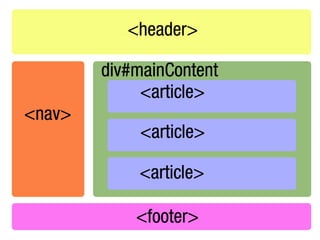
30 new elements
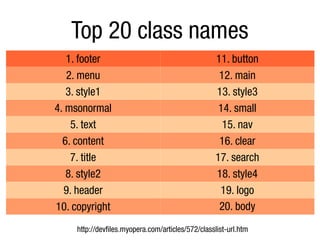
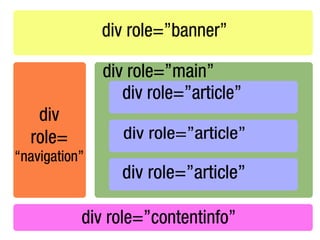
Top 20 class names
   1. footer                                       11. button
   2. menu                                          12. main
   3. style1                                       13. style3
4. msonormal                                        14. small
    5. text                                          15. nav
  6. content                                        16. clear
    7. title                                       17. search
   8. style2                                       18. style4
  9. header                                         19. logo
10. copyright                                       20. body
     http://devfiles.myopera.com/articles/572/classlist-url.htm
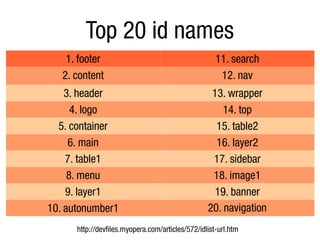
Top 20 id names
    1. footer                                        11. search
   2. content                                         12. nav
    3. header                                      13. wrapper
      4. logo                                         14. top
  5. container                                      15. table2
     6. main                                        16. layer2
    7. table1                                      17. sidebar
     8. menu                                       18. image1
    9. layer1                                       19. banner
10. autonumber1                                   20. navigation
      http://devfiles.myopera.com/articles/572/idlist-url.htm
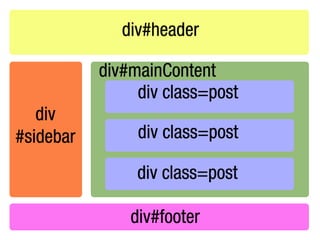
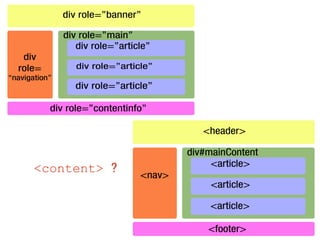
<content> ?
HTML5 forms
      standardise commonly-used
rich form elements – without JavaScript
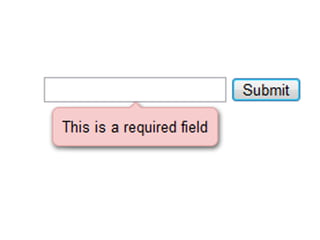
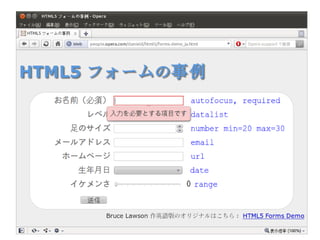
built-in validation
           (of course you should still validate on the server)

                 <input type=email>
             <input type=url required>
         <input type=range min=10 max=100>
 <input type=date min=2010-01-01 max=2010-12-31>
<input pattern="[0-9][A-Z]{3}" placeholder="9AAA">

     http://people.opera.com/brucel/demo/html5-forms-demo.html
<video> and <audio>
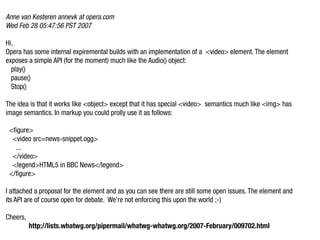
Anne van Kesteren annevk at opera.com
Wed Feb 28 05:47:56 PST 2007

Hi,
Opera has some internal expiremental builds with an implementation of a <video> element. The element
exposes a simple API (for the moment) much like the Audio() object:
  play()
  pause()
  Stop()

The idea is that it works like <object> except that it has special <video> semantics much like <img> has
image semantics. In markup you could prolly use it as follows:

 <figure>
  <video src=news-snippet.ogg>
   ...
  </video>
  <legend>HTML5 in BBC News</legend>
 </figure>

I attached a proposal for the element and as you can see there are still some open issues. The element and
its API are of course open for debate. We're not enforcing this upon the world ;-)

Cheers,
          http://lists.whatwg.org/pipermail/whatwg-whatwg.org/2007-February/009702.html
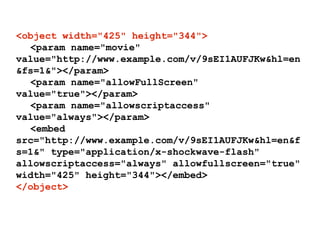
<object width="425" height="344">
  <param name="movie"
value="http://www.example.com/v/9sEI1AUFJKw&hl=en
&fs=1&"></param>
  <param name="allowFullScreen"
value="true"></param>
  <param name="allowscriptaccess"
value="always"></param>
  <embed
src="http://www.example.com/v/9sEI1AUFJKw&hl=en&f
s=1&" type="application/x-shockwave-flash"
allowscriptaccess="always" allowfullscreen="true"
width="425" height="344"></embed>
</object>
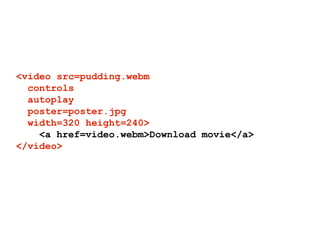
<video src=pudding.webm
  controls
  autoplay
  poster=poster.jpg
  width=320 height=240>
    <a href=video.webm>Download movie</a>
</video>
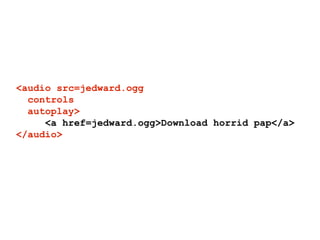
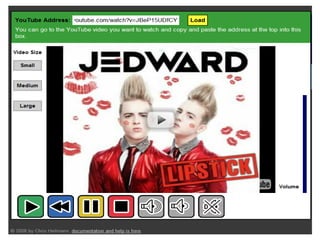
<audio src=jedward.ogg
  controls
  autoplay>
     <a href=jedward.ogg>Download horrid pap</a>
</audio>
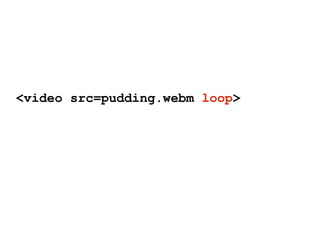
<video src=pudding.webm loop>
<audio   src=jedward.ogg   preload>
<audio   src=jedward.ogg   preload=auto>
<audio   src=jedward.ogg   preload=none>
<audio   src=jedward.ogg   preload=metadata>
powerful (simple) API
controlling <video> with JavaScript
var v = document.getElementByTagName('video')
[0];

v.play();
v.pause();
v.volume = … ;
v.currentTime = … ;
…
events fired by <video>
var v = document.getElementById('player');

v.addEventListener('loadeddata', function() { … }, true)
v.addEventListener('play', function() { … }, true)
v.addEventListener('pause', function() { … }, true)
v.addEventListener('timeupdate', function() { … }, true)
v.addEventListener('ended', function() { … }, true)
…
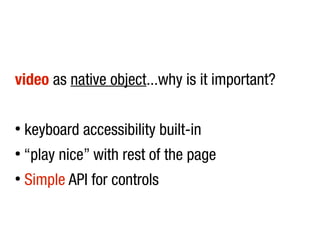
video as native object...why is it important?

●
    keyboard accessibility built-in
●
    “play nice” with rest of the page
●
    Simple API for controls
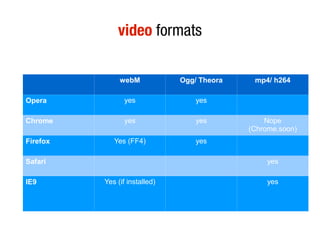
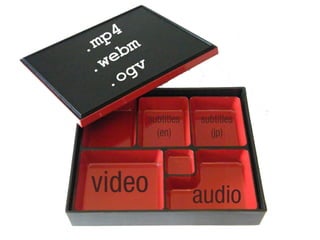
video formats

               webM            Ogg/ Theora    mp4/ h264

Opera            yes               yes

Chrome           yes               yes           Nope
                                             (Chrome.soon)
Firefox      Yes (FF4)             yes

Safari                                            yes

IE9       Yes (if installed)                      yes
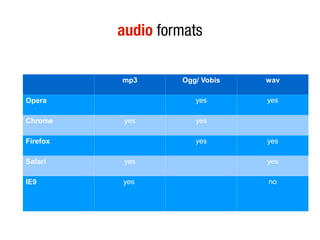
audio formats

          mp3      Ogg/ Vobis   wav

Opera                 yes       yes

Chrome     yes        yes

Firefox               yes       yes

Safari     yes                  yes

IE9       yes                   no
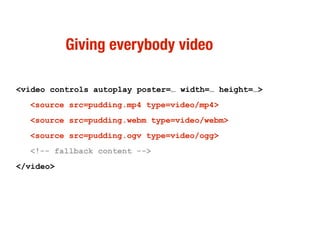
Giving everybody video

<video controls autoplay poster=… width=… height=…>
  <source src=pudding.mp4 type=video/mp4>
  <source src=pudding.webm type=video/webm>
  <source src=pudding.ogv type=video/ogg>
  <!-- fallback content -->
</video>
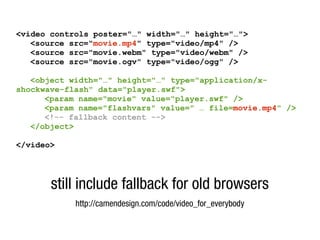
<video controls poster="…" width="…" height="…">
   <source src="movie.mp4" type="video/mp4" />
   <source src="movie.webm" type="video/webm" />
   <source src="movie.ogv" type="video/ogg" />

   <object width="…" height="…" type="application/x-
shockwave-flash" data="player.swf">
      <param name="movie" value="player.swf" />
      <param name="flashvars" value=" … file=movie.mp4" />
      <!-- fallback content -->
   </object>

</video>


       still include fallback for old browsers
            http://camendesign.com/code/video_for_everybody
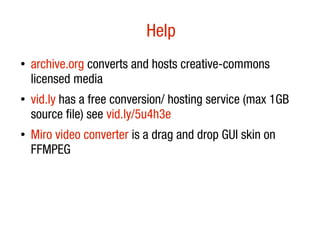
Help
●
    archive.org converts and hosts creative-commons
    licensed media
●   vid.ly has a free conversion/ hosting service (max 1GB
    source file) see vid.ly/5u4h3e
●   Miro video converter is a drag and drop GUI skin on
    FFMPEG
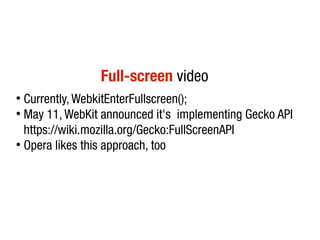
Full-screen video
●
  Currently, WebkitEnterFullscreen();
●
  May 11, WebKit announced it's implementing Gecko API
  https://wiki.mozilla.org/Gecko:FullScreenAPI
●
  Opera likes this approach, too
<video> accessibility
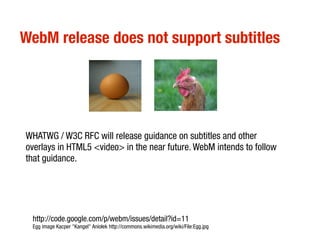
WebM release does not support subtitles


WHATWG / W3C RFC will release guidance on subtitles and other
overlays in HTML5 <video> in the near future. WebM intends to follow
that guidance.


 http://code.google.com/p/webm/issues/detail?id=11
 Egg image Kacper "Kangel" Aniołek http://commons.wikimedia.org/wiki/File:Egg.jpg
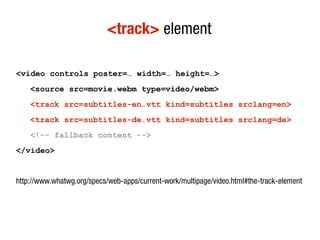
<track> element

<video controls poster=… width=… height=…>
    <source src=movie.webm type=video/webm>
    <track src=subtitles-en.vtt kind=subtitles srclang=en>
    <track src=subtitles-de.vtt kind=subtitles srclang=de>
    <!-- fallback content -->
</video>


http://www.whatwg.org/specs/web-apps/current-work/multipage/video.html#the-track-element
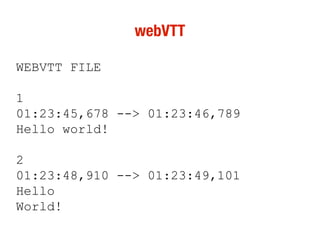
webVTT

WEBVTT FILE

1
01:23:45,678 --> 01:23:46,789
Hello world!

2
01:23:48,910 --> 01:23:49,101
Hello
World!
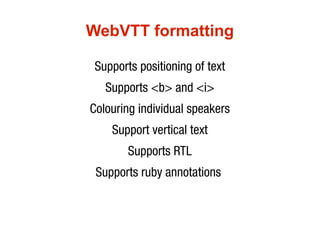
WebVTT formatting

 Supports positioning of text
   Supports <b> and <i>
Colouring individual speakers
    Support vertical text
        Supports RTL
 Supports ruby annotations
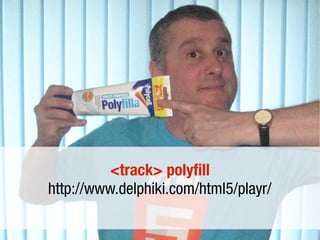
<track> polyfill
http://www.delphiki.com/html5/playr/
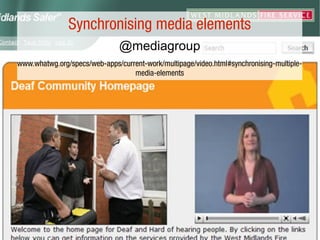
Synchronising media elements
                               @mediagroup
www.whatwg.org/specs/web-apps/current-work/multipage/video.html#synchronising-multiple-
                                  media-elements
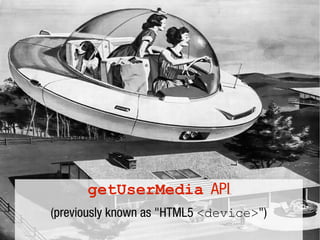
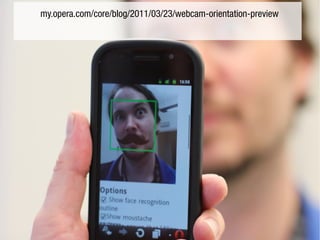
getUserMedia API
(previously known as "HTML5 <device>")
my.opera.com/core/blog/2011/03/23/webcam-orientation-preview
WebRTC is a free, open project that enables web browsers
   with Real-Time Communications (RTC) capabilities via
simple Javascript APIs. The WebRTC components have been
           optimized to best serve this purpose.

  The WebRTC initiative is a project supported by Google,
                   Mozilla and Opera.

                       http://sites.google.com/site/webrtc/
http://www.whatwg.org/specs/web-apps/current-work/complete/video-conferencing-
                     and-peer-to-peer-communication.html
All rights reserved corner

 Thanks Takara Tomy for permission to use Gigapudding
                video. Buy the pudding.
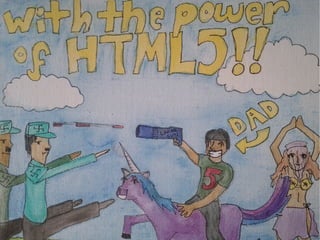
  HTML5 nazi-killing Bruce on unicorn picture by Marina
             Lawson. Buy her Dad's book.
Thanks Brittany Shaw for permission to use her Biscuit and
              Chica photo. Buy a rabbit pie.


       All others by me or (I believe) public domain.
brucel@opera.com
     @brucel

HTML5 and Accessibility sitting in a tree

  • 1.
    HTML5 and a11y Sittingin a tree Bruce Lawson
  • 4.
    Biscuit and Chicaphotograph by Brittany Shaw. All rights reserved. Used with permission
  • 5.
  • 7.
    Top 20 classnames 1. footer 11. button 2. menu 12. main 3. style1 13. style3 4. msonormal 14. small 5. text 15. nav 6. content 16. clear 7. title 17. search 8. style2 18. style4 9. header 19. logo 10. copyright 20. body http://devfiles.myopera.com/articles/572/classlist-url.htm
  • 8.
    Top 20 idnames 1. footer 11. search 2. content 12. nav 3. header 13. wrapper 4. logo 14. top 5. container 15. table2 6. main 16. layer2 7. table1 17. sidebar 8. menu 18. image1 9. layer1 19. banner 10. autonumber1 20. navigation http://devfiles.myopera.com/articles/572/idlist-url.htm
  • 11.
  • 12.
    HTML5 forms standardise commonly-used rich form elements – without JavaScript
  • 13.
    built-in validation (of course you should still validate on the server) <input type=email> <input type=url required> <input type=range min=10 max=100> <input type=date min=2010-01-01 max=2010-12-31> <input pattern="[0-9][A-Z]{3}" placeholder="9AAA"> http://people.opera.com/brucel/demo/html5-forms-demo.html
  • 16.
  • 17.
    Anne van Kesterenannevk at opera.com Wed Feb 28 05:47:56 PST 2007 Hi, Opera has some internal expiremental builds with an implementation of a <video> element. The element exposes a simple API (for the moment) much like the Audio() object: play() pause() Stop() The idea is that it works like <object> except that it has special <video> semantics much like <img> has image semantics. In markup you could prolly use it as follows: <figure> <video src=news-snippet.ogg> ... </video> <legend>HTML5 in BBC News</legend> </figure> I attached a proposal for the element and as you can see there are still some open issues. The element and its API are of course open for debate. We're not enforcing this upon the world ;-) Cheers, http://lists.whatwg.org/pipermail/whatwg-whatwg.org/2007-February/009702.html
  • 18.
    <object width="425" height="344"> <param name="movie" value="http://www.example.com/v/9sEI1AUFJKw&hl=en &fs=1&"></param> <param name="allowFullScreen" value="true"></param> <param name="allowscriptaccess" value="always"></param> <embed src="http://www.example.com/v/9sEI1AUFJKw&hl=en&f s=1&" type="application/x-shockwave-flash" allowscriptaccess="always" allowfullscreen="true" width="425" height="344"></embed> </object>
  • 19.
    <video src=pudding.webm controls autoplay poster=poster.jpg width=320 height=240> <a href=video.webm>Download movie</a> </video>
  • 20.
    <audio src=jedward.ogg controls autoplay> <a href=jedward.ogg>Download horrid pap</a> </audio>
  • 21.
  • 22.
    <audio src=jedward.ogg preload> <audio src=jedward.ogg preload=auto> <audio src=jedward.ogg preload=none> <audio src=jedward.ogg preload=metadata>
  • 24.
  • 25.
    controlling <video> withJavaScript var v = document.getElementByTagName('video') [0]; v.play(); v.pause(); v.volume = … ; v.currentTime = … ; …
  • 26.
    events fired by<video> var v = document.getElementById('player'); v.addEventListener('loadeddata', function() { … }, true) v.addEventListener('play', function() { … }, true) v.addEventListener('pause', function() { … }, true) v.addEventListener('timeupdate', function() { … }, true) v.addEventListener('ended', function() { … }, true) …
  • 27.
    video as nativeobject...why is it important? ● keyboard accessibility built-in ● “play nice” with rest of the page ● Simple API for controls
  • 29.
    video formats webM Ogg/ Theora mp4/ h264 Opera yes yes Chrome yes yes Nope (Chrome.soon) Firefox Yes (FF4) yes Safari yes IE9 Yes (if installed) yes
  • 30.
    audio formats mp3 Ogg/ Vobis wav Opera yes yes Chrome yes yes Firefox yes yes Safari yes yes IE9 yes no
  • 31.
    Giving everybody video <videocontrols autoplay poster=… width=… height=…> <source src=pudding.mp4 type=video/mp4> <source src=pudding.webm type=video/webm> <source src=pudding.ogv type=video/ogg> <!-- fallback content --> </video>
  • 32.
    <video controls poster="…"width="…" height="…"> <source src="movie.mp4" type="video/mp4" /> <source src="movie.webm" type="video/webm" /> <source src="movie.ogv" type="video/ogg" /> <object width="…" height="…" type="application/x- shockwave-flash" data="player.swf"> <param name="movie" value="player.swf" /> <param name="flashvars" value=" … file=movie.mp4" /> <!-- fallback content --> </object> </video> still include fallback for old browsers http://camendesign.com/code/video_for_everybody
  • 33.
    Help ● archive.org converts and hosts creative-commons licensed media ● vid.ly has a free conversion/ hosting service (max 1GB source file) see vid.ly/5u4h3e ● Miro video converter is a drag and drop GUI skin on FFMPEG
  • 34.
    Full-screen video ● Currently, WebkitEnterFullscreen(); ● May 11, WebKit announced it's implementing Gecko API https://wiki.mozilla.org/Gecko:FullScreenAPI ● Opera likes this approach, too
  • 35.
  • 37.
    WebM release doesnot support subtitles WHATWG / W3C RFC will release guidance on subtitles and other overlays in HTML5 <video> in the near future. WebM intends to follow that guidance. http://code.google.com/p/webm/issues/detail?id=11 Egg image Kacper "Kangel" Aniołek http://commons.wikimedia.org/wiki/File:Egg.jpg
  • 38.
    <track> element <video controlsposter=… width=… height=…> <source src=movie.webm type=video/webm> <track src=subtitles-en.vtt kind=subtitles srclang=en> <track src=subtitles-de.vtt kind=subtitles srclang=de> <!-- fallback content --> </video> http://www.whatwg.org/specs/web-apps/current-work/multipage/video.html#the-track-element
  • 39.
    webVTT WEBVTT FILE 1 01:23:45,678 -->01:23:46,789 Hello world! 2 01:23:48,910 --> 01:23:49,101 Hello World!
  • 40.
    WebVTT formatting Supportspositioning of text Supports <b> and <i> Colouring individual speakers Support vertical text Supports RTL Supports ruby annotations
  • 41.
  • 42.
    Synchronising media elements @mediagroup www.whatwg.org/specs/web-apps/current-work/multipage/video.html#synchronising-multiple- media-elements
  • 43.
  • 44.
  • 45.
    WebRTC is afree, open project that enables web browsers with Real-Time Communications (RTC) capabilities via simple Javascript APIs. The WebRTC components have been optimized to best serve this purpose. The WebRTC initiative is a project supported by Google, Mozilla and Opera. http://sites.google.com/site/webrtc/ http://www.whatwg.org/specs/web-apps/current-work/complete/video-conferencing- and-peer-to-peer-communication.html
  • 47.
    All rights reservedcorner Thanks Takara Tomy for permission to use Gigapudding video. Buy the pudding. HTML5 nazi-killing Bruce on unicorn picture by Marina Lawson. Buy her Dad's book. Thanks Brittany Shaw for permission to use her Biscuit and Chica photo. Buy a rabbit pie. All others by me or (I believe) public domain.
  • 48.