March 22, 2023
Brisbane MuleSoft Meetup Group
Anypoint Code Builder | Pushing logs to Splunk
2
● 5:00 PM - Registration / Networking
● 5:15 PM – Welcome and Introduction
● 5:20 PM - Pushing logs to Splunk by Anutosh Konda
● 5:55 PM - Food, drinks, and networking
● 6:10 PM - Anypoint Code Builder by Nicholas Ip
● 6:45 PM - Q&A and wrap-up
Agenda
Organizers, Sponsors, and Speakers
Introductions
4
Ryan Andal
MuleSoft Ambassador | Architect
| TOGAF® 9 | AWS | Azure |
Associate Manager - MuleSoft at
Capgemini
Organizers
Feel welcome to reach out and connect with our event organizers
Nicholas Ip
Senior Consultant at MuleSoft
Fuguo Wei
Principal Integration Architect at
Cloudwerx | MuleSoft Mentor |
MuleSoft Meetup Leader
Brian Fraser
MuleSoft Ambassador and
Meetup Leader | Senior
Integration Consultant and
Manager at Capgemini
5
Capgemini
Capgemini SE is a multinational
information technology services
and consulting company,
headquartered in Paris
Sponsors
Feel welcome to reach out and connect with our event organizers 
6
● MuleSoft Certified Integration/Platform Architect-6x MuleSoft Cert|3x Dell Boomi Cert|3x IBM
Cert|3x API Academy Cert|2x AWS Cert|2x Sun Cert |1x Oracle CE|1xCert Scrum
Master|1xMSFT Azure|1x Solace CSC
● Currently working with the Australian Government Department of Health and Aged Care as a
Senior Technical Consultant MuleSoft
● He is a competent IT professional with over 15 years of experience in software integration
technologies
Speakers
Anutosh Konda
7
● Currently working at MuleSoft, a Salesforce company, as a Senior Consultant
● He is a well rounded IT professional with over 25 years of experience in software architecture
and software development
Speakers
Nicholas Ip
Integration with MuleSoft APIs
9
● Logs must be consistent, reliable and easily accessible so that it can be used for monitoring
and troubleshooting any production issues.
● MuleSoft Anypoint Platform has its own logging mechanism to store application logs.
● It has a limitation of storing the logs of 100 MB in size or for a duration of 30 days.
● To overcome this limitation we need to push the logs to some external tools.
● This external tool can be AWS ELK, Splunk, Datadog or any other storage like a database or
File system using CloudHub Management APIs
● Today we will see MuleSoft integration with Splunk using the HTTP/S appender of log4j2.xml.

CloudHub Logs Limitation
10
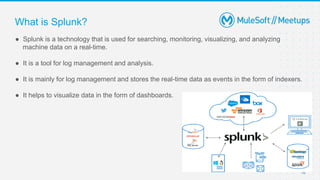
● Splunk is a technology that is used for searching, monitoring, visualizing, and analyzing
machine data on a real-time.
● It is a tool for log management and analysis.
● It is mainly for log management and stores the real-time data as events in the form of indexers.
● It helps to visualize data in the form of dashboards.
What is Splunk?
11
● Enhanced GUI with dashboards.
● Faster troubleshooting with instant results.
● Best suited for root cause analysis.
● Get access to create dashboards, graphs, and alerts.
● Investigate and search for specific results.
● Monitor business metrics for informed decision making.
● Better log management from multiple sources.
● Accepts data in multiple formats.
● Can create one central repository for Splunk data collected from multiple sources.
Benefits of Splunk
12
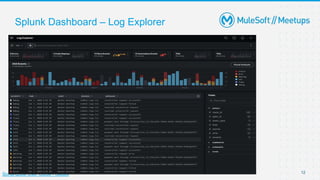
Splunk Dashboard – Log Explorer
SonarQube User Guide - Issues
13
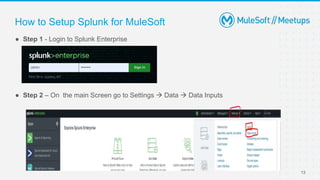
● Step 1 - Login to Splunk Enterprise
● Step 2 – On the main Screen go to Settings  Data  Data Inputs
How to Setup Splunk for MuleSoft
14
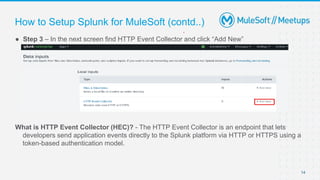
● Step 3 – In the next screen find HTTP Event Collector and click “Add New”
What is HTTP Event Collector (HEC)? - The HTTP Event Collector is an endpoint that lets
developers send application events directly to the Splunk platform via HTTP or HTTPS using a
token-based authentication model.
How to Setup Splunk for MuleSoft (contd..)
15
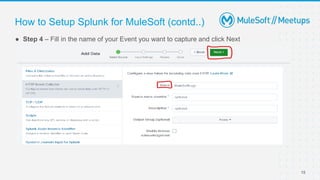
● Step 4 – Fill in the name of your Event you want to capture and click Next
How to Setup Splunk for MuleSoft (contd..)
16
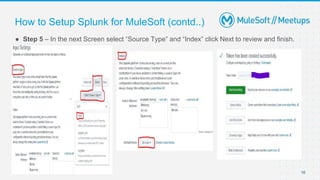
● Step 5 – In the next Screen select “Source Type” and “Index” click Next to review and finish.
How to Setup Splunk for MuleSoft (contd..)
17
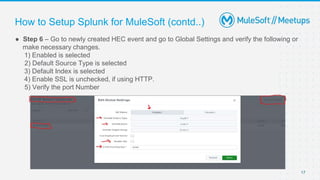
● Step 6 – Go to newly created HEC event and go to Global Settings and verify the following or
make necessary changes.
1) Enabled is selected
2) Default Source Type is selected
3) Default Index is selected
4) Enable SSL is unchecked, if using HTTP.
5) Verify the port Number
How to Setup Splunk for MuleSoft (contd..)
18
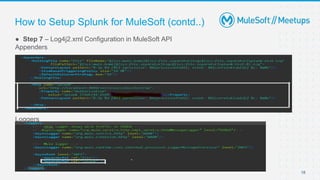
● Step 7 – Log4j2.xml Configuration in MuleSoft API
Appenders
Loggers
How to Setup Splunk for MuleSoft (contd..)
19
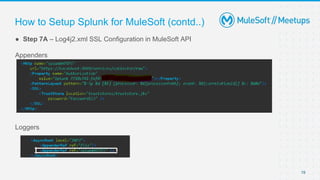
● Step 7A – Log4j2.xml SSL Configuration in MuleSoft API
Appenders
Loggers
How to Setup Splunk for MuleSoft (contd..)
20
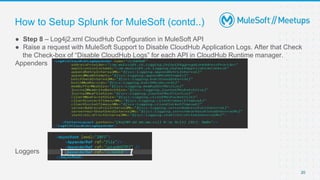
● Step 8 – Log4j2.xml CloudHub Configuration in MuleSoft API
● Raise a request with MuleSoft Support to Disable CloudHub Application Logs. After that Check
the Check-box of “Disable CloudHub Logs” for each API in CloudHub Runtime manager.
Appenders
Loggers
How to Setup Splunk for MuleSoft (contd..)
Q&A time!
21
Introduce yourself to your neighbor
Networking time
Introduce yourself to your neighbor
Networking time
Anypoint Code BuilderBeta - Basics
Presented : Nicholas Ip
Declaimer
Please note Anypoint Code Builder is still in Beta stage at the
moment, all presentation presented are from the Public Beta of
Anypoint Code Builder.
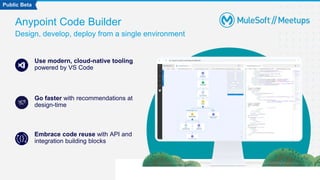
Anypoint Code Builder
Design, develop, deploy from a single environment
Use modern, cloud-native tooling
powered by VS Code
Go faster with recommendations at
design-time
Embrace code reuse with API and
integration building blocks
Public Beta
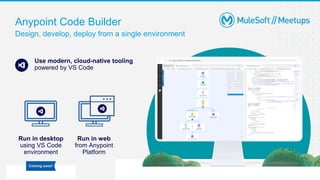
Anypoint Code Builder
Design, develop, deploy from a single environment
Use modern, cloud-native tooling
powered by VS Code
Run in desktop
using VS Code
environment
Run in web
from Anypoint
Platform
Coming soon!
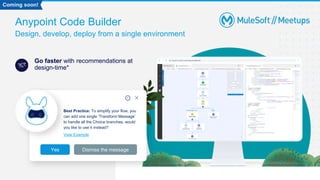
Anypoint Code Builder
Design, develop, deploy from a single environment
Go faster with recommendations at
design-time*
Best Practice: To simplify your flow, you
can add one single ‘Transform Message’
to handle all the Choice branches, would
you like to use it instead?
View Example
Yes Dismiss the message
Coming soon!
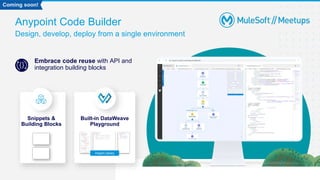
Anypoint Code Builder
Design, develop, deploy from a single environment
Embrace code reuse with API and
integration building blocks
Snippets &
Building Blocks
Built-in DataWeave
Playground
Import Library
Coming soon!
Anypoint Code Builder
features and use cases
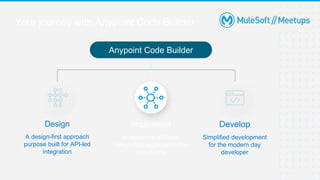
Your journey with Anypoint Code Builder
Design
A design-first approach
purpose built for API-led
integration
Implement
A seamless API and
Integration implementation
experience
Develop
Simplified development
for the modern day
developer
Anypoint Code Builder
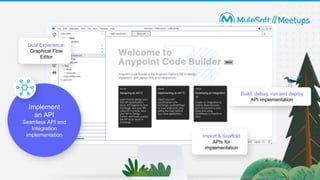
Build, debug, run and deploy
API implementation
Import & Scaffold
APIs for
implementation
Dual Experience:
Graphical Flow
Editor
Implement
an API
Seamless API and
Integration
implementation
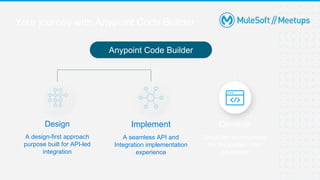
Your journey with Anypoint Code Builder
Design
A design-first approach
purpose built for API-led
integration
Implement
A seamless API and
Integration implementation
experience
Develop
Simplified development
for the modern day
developer
Anypoint Code Builder
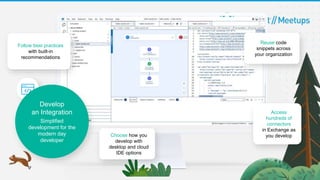
Follow best practices
with built-in
recommendations
Access
hundreds of
connectors
in Exchange as
you develop
Choose how you
develop with
desktop and cloud
IDE options
Develop
an Integration
Simplified
development for the
modern day
developer
Reuse code
snippets across
your organization
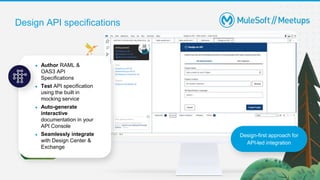
Design API specifications
● Author RAML &
OAS3 API
Specifications
● Test API specification
using the built in
mocking service
● Auto-generate
interactive
documentation in your
API Console
● Seamlessly integrate
with Design Center &
Exchange
Design-first approach for
API-led integration
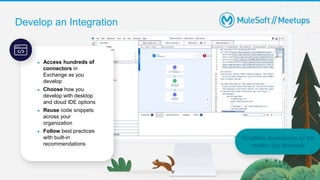
Develop an Integration
● Access hundreds of
connectors in
Exchange as you
develop
● Choose how you
develop with desktop
and cloud IDE options
● Reuse code snippets
across your
organization
● Follow best practices
with built-in
recommendations
Simplified development for the
modern day developer
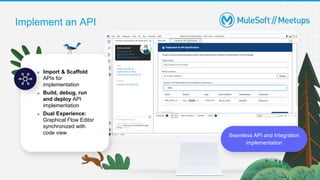
Implement an API
Seamless API and Integration
implementation
● Import & Scaffold
APIs for
implementation
● Build, debug, run
and deploy API
implementation
● Dual Experience:
Graphical Flow Editor
synchronized with
code view
Anypoint Code Builder
Open BETA
How can I participate
in Anypoint Code
Builder activities?
DEMO
Q&A time!
41
42
● Share:
○ Tweet using the hashtag #MuleSoftMeetups
○ Invite your network to join: https://meetups.mulesoft.com/brisbane/
● Feedback:
○ Fill out the survey feedback and suggest topics for upcoming events
○ Contact MuleSoft at meetups@mulesoft.com for ways to improve the program
● Connect:
○ Join our Brisbane MuleSoft Meetup Group LinkedIn Page:
https://www.linkedin.com/groups/14198755/
What’s next?
Thank you

Brisbane MuleSoft Meetup 2023-03-22 - Anypoint Code Builder and Splunk Logging.pptx

  • 1.
    March 22, 2023 BrisbaneMuleSoft Meetup Group Anypoint Code Builder | Pushing logs to Splunk
  • 2.
    2 ● 5:00 PM- Registration / Networking ● 5:15 PM – Welcome and Introduction ● 5:20 PM - Pushing logs to Splunk by Anutosh Konda ● 5:55 PM - Food, drinks, and networking ● 6:10 PM - Anypoint Code Builder by Nicholas Ip ● 6:45 PM - Q&A and wrap-up Agenda
  • 3.
    Organizers, Sponsors, andSpeakers Introductions
  • 4.
    4 Ryan Andal MuleSoft Ambassador| Architect | TOGAF® 9 | AWS | Azure | Associate Manager - MuleSoft at Capgemini Organizers Feel welcome to reach out and connect with our event organizers Nicholas Ip Senior Consultant at MuleSoft Fuguo Wei Principal Integration Architect at Cloudwerx | MuleSoft Mentor | MuleSoft Meetup Leader Brian Fraser MuleSoft Ambassador and Meetup Leader | Senior Integration Consultant and Manager at Capgemini
  • 5.
    5 Capgemini Capgemini SE isa multinational information technology services and consulting company, headquartered in Paris Sponsors Feel welcome to reach out and connect with our event organizers 
  • 6.
    6 ● MuleSoft CertifiedIntegration/Platform Architect-6x MuleSoft Cert|3x Dell Boomi Cert|3x IBM Cert|3x API Academy Cert|2x AWS Cert|2x Sun Cert |1x Oracle CE|1xCert Scrum Master|1xMSFT Azure|1x Solace CSC ● Currently working with the Australian Government Department of Health and Aged Care as a Senior Technical Consultant MuleSoft ● He is a competent IT professional with over 15 years of experience in software integration technologies Speakers Anutosh Konda
  • 7.
    7 ● Currently workingat MuleSoft, a Salesforce company, as a Senior Consultant ● He is a well rounded IT professional with over 25 years of experience in software architecture and software development Speakers Nicholas Ip
  • 8.
  • 9.
    9 ● Logs mustbe consistent, reliable and easily accessible so that it can be used for monitoring and troubleshooting any production issues. ● MuleSoft Anypoint Platform has its own logging mechanism to store application logs. ● It has a limitation of storing the logs of 100 MB in size or for a duration of 30 days. ● To overcome this limitation we need to push the logs to some external tools. ● This external tool can be AWS ELK, Splunk, Datadog or any other storage like a database or File system using CloudHub Management APIs ● Today we will see MuleSoft integration with Splunk using the HTTP/S appender of log4j2.xml. CloudHub Logs Limitation
  • 10.
    10 ● Splunk isa technology that is used for searching, monitoring, visualizing, and analyzing machine data on a real-time. ● It is a tool for log management and analysis. ● It is mainly for log management and stores the real-time data as events in the form of indexers. ● It helps to visualize data in the form of dashboards. What is Splunk?
  • 11.
    11 ● Enhanced GUIwith dashboards. ● Faster troubleshooting with instant results. ● Best suited for root cause analysis. ● Get access to create dashboards, graphs, and alerts. ● Investigate and search for specific results. ● Monitor business metrics for informed decision making. ● Better log management from multiple sources. ● Accepts data in multiple formats. ● Can create one central repository for Splunk data collected from multiple sources. Benefits of Splunk
  • 12.
    12 Splunk Dashboard –Log Explorer SonarQube User Guide - Issues
  • 13.
    13 ● Step 1- Login to Splunk Enterprise ● Step 2 – On the main Screen go to Settings  Data  Data Inputs How to Setup Splunk for MuleSoft
  • 14.
    14 ● Step 3– In the next screen find HTTP Event Collector and click “Add New” What is HTTP Event Collector (HEC)? - The HTTP Event Collector is an endpoint that lets developers send application events directly to the Splunk platform via HTTP or HTTPS using a token-based authentication model. How to Setup Splunk for MuleSoft (contd..)
  • 15.
    15 ● Step 4– Fill in the name of your Event you want to capture and click Next How to Setup Splunk for MuleSoft (contd..)
  • 16.
    16 ● Step 5– In the next Screen select “Source Type” and “Index” click Next to review and finish. How to Setup Splunk for MuleSoft (contd..)
  • 17.
    17 ● Step 6– Go to newly created HEC event and go to Global Settings and verify the following or make necessary changes. 1) Enabled is selected 2) Default Source Type is selected 3) Default Index is selected 4) Enable SSL is unchecked, if using HTTP. 5) Verify the port Number How to Setup Splunk for MuleSoft (contd..)
  • 18.
    18 ● Step 7– Log4j2.xml Configuration in MuleSoft API Appenders Loggers How to Setup Splunk for MuleSoft (contd..)
  • 19.
    19 ● Step 7A– Log4j2.xml SSL Configuration in MuleSoft API Appenders Loggers How to Setup Splunk for MuleSoft (contd..)
  • 20.
    20 ● Step 8– Log4j2.xml CloudHub Configuration in MuleSoft API ● Raise a request with MuleSoft Support to Disable CloudHub Application Logs. After that Check the Check-box of “Disable CloudHub Logs” for each API in CloudHub Runtime manager. Appenders Loggers How to Setup Splunk for MuleSoft (contd..)
  • 21.
  • 22.
    Introduce yourself toyour neighbor Networking time
  • 23.
    Introduce yourself toyour neighbor Networking time
  • 24.
    Anypoint Code BuilderBeta- Basics Presented : Nicholas Ip
  • 25.
    Declaimer Please note AnypointCode Builder is still in Beta stage at the moment, all presentation presented are from the Public Beta of Anypoint Code Builder.
  • 26.
    Anypoint Code Builder Design,develop, deploy from a single environment Use modern, cloud-native tooling powered by VS Code Go faster with recommendations at design-time Embrace code reuse with API and integration building blocks Public Beta
  • 27.
    Anypoint Code Builder Design,develop, deploy from a single environment Use modern, cloud-native tooling powered by VS Code Run in desktop using VS Code environment Run in web from Anypoint Platform Coming soon!
  • 28.
    Anypoint Code Builder Design,develop, deploy from a single environment Go faster with recommendations at design-time* Best Practice: To simplify your flow, you can add one single ‘Transform Message’ to handle all the Choice branches, would you like to use it instead? View Example Yes Dismiss the message Coming soon!
  • 29.
    Anypoint Code Builder Design,develop, deploy from a single environment Embrace code reuse with API and integration building blocks Snippets & Building Blocks Built-in DataWeave Playground Import Library Coming soon!
  • 30.
  • 31.
    Your journey withAnypoint Code Builder Design A design-first approach purpose built for API-led integration Implement A seamless API and Integration implementation experience Develop Simplified development for the modern day developer Anypoint Code Builder
  • 32.
    Build, debug, runand deploy API implementation Import & Scaffold APIs for implementation Dual Experience: Graphical Flow Editor Implement an API Seamless API and Integration implementation
  • 33.
    Your journey withAnypoint Code Builder Design A design-first approach purpose built for API-led integration Implement A seamless API and Integration implementation experience Develop Simplified development for the modern day developer Anypoint Code Builder
  • 34.
    Follow best practices withbuilt-in recommendations Access hundreds of connectors in Exchange as you develop Choose how you develop with desktop and cloud IDE options Develop an Integration Simplified development for the modern day developer Reuse code snippets across your organization
  • 35.
    Design API specifications ●Author RAML & OAS3 API Specifications ● Test API specification using the built in mocking service ● Auto-generate interactive documentation in your API Console ● Seamlessly integrate with Design Center & Exchange Design-first approach for API-led integration
  • 36.
    Develop an Integration ●Access hundreds of connectors in Exchange as you develop ● Choose how you develop with desktop and cloud IDE options ● Reuse code snippets across your organization ● Follow best practices with built-in recommendations Simplified development for the modern day developer
  • 37.
    Implement an API SeamlessAPI and Integration implementation ● Import & Scaffold APIs for implementation ● Build, debug, run and deploy API implementation ● Dual Experience: Graphical Flow Editor synchronized with code view
  • 38.
  • 39.
    How can Iparticipate in Anypoint Code Builder activities?
  • 40.
  • 41.
  • 42.
    42 ● Share: ○ Tweetusing the hashtag #MuleSoftMeetups ○ Invite your network to join: https://meetups.mulesoft.com/brisbane/ ● Feedback: ○ Fill out the survey feedback and suggest topics for upcoming events ○ Contact MuleSoft at meetups@mulesoft.com for ways to improve the program ● Connect: ○ Join our Brisbane MuleSoft Meetup Group LinkedIn Page: https://www.linkedin.com/groups/14198755/ What’s next?
  • 43.