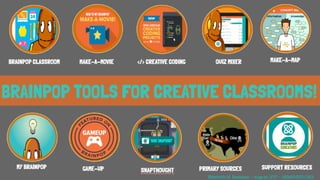
BRAINPOP TOOLS FOR CREATIVE
CLASSROOMS!
MAKE-A-MOVIEBRAINPOP CLASSROOM MAKE-A-MAP
SNAPTHOUGHT SUPPORT RESOURCES
QUIZ MIXER
MY BRAINPOP
</> CREATIVE CODING
GAME-UP PRIMARY SOURCES
Elizabeth H. Eastman - August 2017 - MIMSHISD.ORG
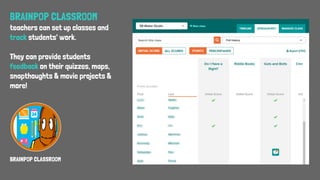
BRAINPOP CLASSROOM
BRAINPOP CLASSROOM
teachers can set up classes and
track students' work.
They can provide students
feedback on their quizzes, maps,
snapthoughts & movie projects &
more!
BRAINPOP CLASSROOM
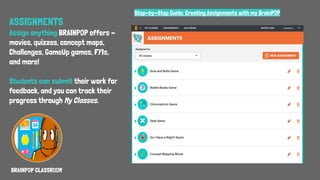
ASSIGNMENTS
Assign anything BRAINPOP offers -
movies, quizzes, concept maps,
Challenges, GameUp games, FYIs,
and more!
Students can submit their work for
feedback, and you can track their
progress through My Classes.
Step-by-Step Guide: Creating Assignments with my BrainPOP
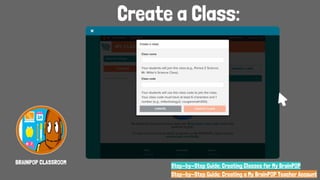
Create a Class:
BRAINPOP CLASSROOM
Step-by-Step Guide: Creating a My BrainPOP Teacher Account
Step-by-Step Guide: Creating Classes for My BrainPOP
MY BRAINPOP
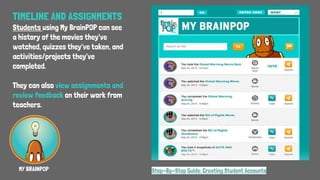
TIMELINE AND ASSIGNMENTS
Students using My BrainPOP can see
a history of the movies they've
watched, quizzes they've taken, and
activities/projects they've
completed.
They can also view assignments and
review feedback on their work from
teachers.
Step-By-Step Guide: Creating Student Accounts
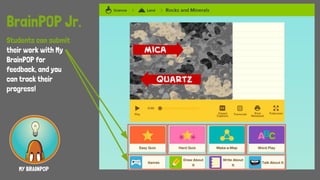
BrainPOP Jr.
Students can submit
their work with My
BrainPOP for
feedback, and you
can track their
progress!
MY BRAINPOP
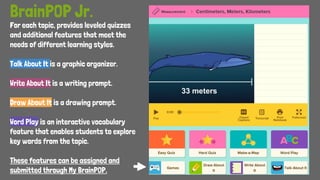
For each topic, provides leveled quizzes
and additional features that meet the
needs of different learning styles.
Talk About It is a graphic organizer.
Write About It is a writing prompt.
Draw About It is a drawing prompt.
Word Play is an interactive vocabulary
feature that enables students to explore
key words from the topic.
These features can be assigned and
submitted through My BrainPOP.
BrainPOP Jr.
BrainPOP
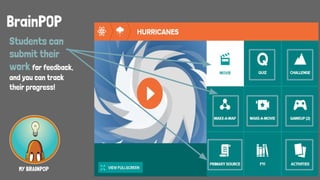
Students can
submit their
work for feedback,
and you can track
their progress!
MY BRAINPOP
QUIZ MIXER
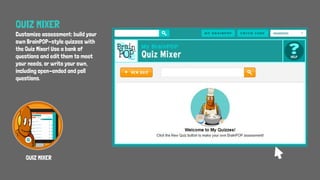
Customize assessment: build your
own BrainPOP-style quizzes with
the Quiz Mixer! Use a bank of
questions and edit them to meet
your needs, or write your own,
including open-ended and poll
questions.
QUIZ MIXER
Quiz Mixer
QUIZ MIXER Step-By-Step Guide: Create a Custom Quiz with Quiz Mixer
Prompt text:
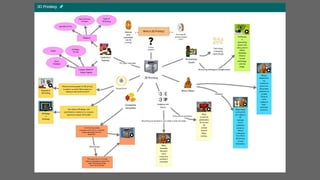
What is/are [Topic]?
Build a concept map to visually represent
your answer.
Use the supplied keywords, images or take
pictures from key parts of the movie. You can
also add your own nodes. Connect the nodes
with links.
Assignment Prompt
MAKE-A-MAP
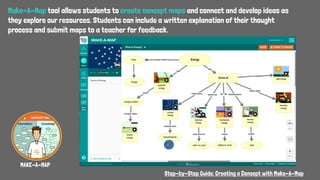
Make-A-Map tool allows students to create concept maps and connect and develop ideas as
they explore our resources. Students can include a written explanation of their thought
process and submit maps to a teacher for feedback.
MAKE-A-MAP
Step-by-Step Guide: Creating a Concept with Make-A-Map
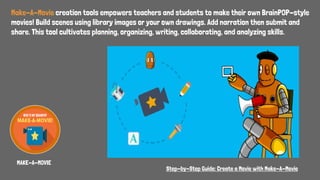
Make-A-Movie creation tools empowers teachers and students to make their own BrainPOP-style
movies! Build scenes using library images or your own drawings. Add narration then submit and
share. This tool cultivates planning, organizing, writing, collaborating, and analyzing skills.
MAKE-A-MOVIE
Step-by-Step Guide: Create a Movie with Make-A-Movie
Readable version of original document
Image of “original”
Primary Sources
Source Analysis Guide
[Collaborative]
PRIMARY SOURCES
Students can experience content first hand by challenging them to examine and interpret relevant
primary sources, from up-close images of Pluto and its moons to audio clips of Mahatma Gandhi.
Archival newspapers, essays, documents, photographs and video clips related to BrainPOP topics to
help students experience the history they’re learning about.
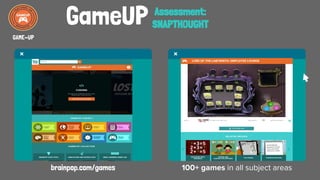
GameUP
brainpop.com/games 100+ games in all subject areas
GAME-UP
Assessment:
SNAPTHOUGHT
SNAPTHOUGHT
Students can describe their thinking, make
predictions, and draw conclusions at chosen
points in the game.
These reflections can be submitted to a teacher
for feedback!
With SnapThought,
available on select GameUp
titles, students can
capture and reflect on key
moments in game play.
Step-By-Step Guide: SnapThought on Game-UP
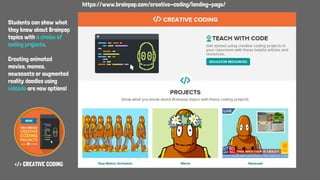
</> CREATIVE CODING
https://www.brainpop.com/creative-coding/landing-page/
Students can show what
they know about Brainpop
topics with a choice of
coding projects.
Creating animated
movies, memes,
newscasts or augmented
reality doodles using
vidcode are new options!
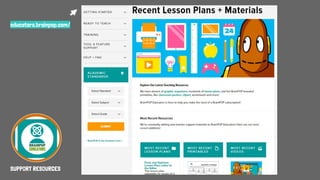
SUPPORT RESOURCES
educators.brainpop.com/
Hello! I am Elizabeth H. Eastman!
Find & contact me on…
Twitter
Pinterest
Google+
Slideshare
Blog
MIMS Maker Studio
LinkedI
n

BrainPOP Tools for Creative Classrooms!

  • 1.
    BRAINPOP TOOLS FORCREATIVE CLASSROOMS! MAKE-A-MOVIEBRAINPOP CLASSROOM MAKE-A-MAP SNAPTHOUGHT SUPPORT RESOURCES QUIZ MIXER MY BRAINPOP </> CREATIVE CODING GAME-UP PRIMARY SOURCES Elizabeth H. Eastman - August 2017 - MIMSHISD.ORG
  • 2.
    BRAINPOP CLASSROOM BRAINPOP CLASSROOM teacherscan set up classes and track students' work. They can provide students feedback on their quizzes, maps, snapthoughts & movie projects & more!
  • 3.
    BRAINPOP CLASSROOM ASSIGNMENTS Assign anythingBRAINPOP offers - movies, quizzes, concept maps, Challenges, GameUp games, FYIs, and more! Students can submit their work for feedback, and you can track their progress through My Classes. Step-by-Step Guide: Creating Assignments with my BrainPOP
  • 4.
    Create a Class: BRAINPOPCLASSROOM Step-by-Step Guide: Creating a My BrainPOP Teacher Account Step-by-Step Guide: Creating Classes for My BrainPOP
  • 5.
    MY BRAINPOP TIMELINE ANDASSIGNMENTS Students using My BrainPOP can see a history of the movies they've watched, quizzes they've taken, and activities/projects they've completed. They can also view assignments and review feedback on their work from teachers. Step-By-Step Guide: Creating Student Accounts
  • 6.
    BrainPOP Jr. Students cansubmit their work with My BrainPOP for feedback, and you can track their progress! MY BRAINPOP
  • 7.
    For each topic,provides leveled quizzes and additional features that meet the needs of different learning styles. Talk About It is a graphic organizer. Write About It is a writing prompt. Draw About It is a drawing prompt. Word Play is an interactive vocabulary feature that enables students to explore key words from the topic. These features can be assigned and submitted through My BrainPOP. BrainPOP Jr.
  • 8.
    BrainPOP Students can submit their workfor feedback, and you can track their progress! MY BRAINPOP
  • 9.
    QUIZ MIXER Customize assessment:build your own BrainPOP-style quizzes with the Quiz Mixer! Use a bank of questions and edit them to meet your needs, or write your own, including open-ended and poll questions. QUIZ MIXER
  • 10.
    Quiz Mixer QUIZ MIXERStep-By-Step Guide: Create a Custom Quiz with Quiz Mixer
  • 11.
    Prompt text: What is/are[Topic]? Build a concept map to visually represent your answer. Use the supplied keywords, images or take pictures from key parts of the movie. You can also add your own nodes. Connect the nodes with links. Assignment Prompt MAKE-A-MAP
  • 12.
    Make-A-Map tool allowsstudents to create concept maps and connect and develop ideas as they explore our resources. Students can include a written explanation of their thought process and submit maps to a teacher for feedback. MAKE-A-MAP Step-by-Step Guide: Creating a Concept with Make-A-Map
  • 14.
    Make-A-Movie creation toolsempowers teachers and students to make their own BrainPOP-style movies! Build scenes using library images or your own drawings. Add narration then submit and share. This tool cultivates planning, organizing, writing, collaborating, and analyzing skills. MAKE-A-MOVIE Step-by-Step Guide: Create a Movie with Make-A-Movie
  • 15.
    Readable version oforiginal document Image of “original” Primary Sources Source Analysis Guide [Collaborative] PRIMARY SOURCES Students can experience content first hand by challenging them to examine and interpret relevant primary sources, from up-close images of Pluto and its moons to audio clips of Mahatma Gandhi. Archival newspapers, essays, documents, photographs and video clips related to BrainPOP topics to help students experience the history they’re learning about.
  • 16.
    GameUP brainpop.com/games 100+ gamesin all subject areas GAME-UP Assessment: SNAPTHOUGHT
  • 17.
    SNAPTHOUGHT Students can describetheir thinking, make predictions, and draw conclusions at chosen points in the game. These reflections can be submitted to a teacher for feedback! With SnapThought, available on select GameUp titles, students can capture and reflect on key moments in game play. Step-By-Step Guide: SnapThought on Game-UP
  • 18.
    </> CREATIVE CODING https://www.brainpop.com/creative-coding/landing-page/ Studentscan show what they know about Brainpop topics with a choice of coding projects. Creating animated movies, memes, newscasts or augmented reality doodles using vidcode are new options!
  • 19.
  • 20.
    Hello! I amElizabeth H. Eastman! Find & contact me on… Twitter Pinterest Google+ Slideshare Blog MIMS Maker Studio LinkedI n