BPM Migration
Framework
RAHUL UPADHYE
Topics
BPM Investment Areas
BPMS Component Stack
BPM Migration – Affected Components
Migration Framework
Using the Framework
The Migration Scenario
Advantages of the Framework
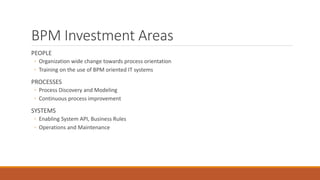
BPM Investment Areas
PEOPLE
◦ Organization wide change towards process orientation
◦ Training on the use of BPM oriented IT systems
PROCESSES
◦ Process Discovery and Modeling
◦ Continuous process improvement
SYSTEMS
◦ Enabling System API, Business Rules
◦ Operations and Maintenance
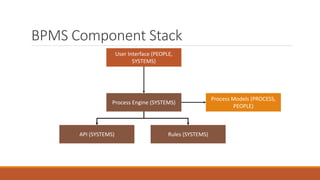
BPMS Component Stack
User Interface (PEOPLE,
SYSTEMS)
Process Models (PROCESS,
PEOPLE)
Process Engine (SYSTEMS)
API (SYSTEMS) Rules (SYSTEMS)
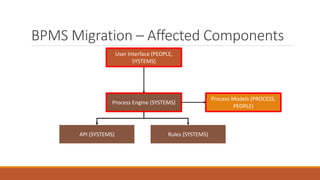
BPMS Migration – Affected Components
User Interface (PEOPLE,
SYSTEMS)
Process Models (PROCESS,
PEOPLE)
Process Engine (SYSTEMS)
API (SYSTEMS) Rules (SYSTEMS)
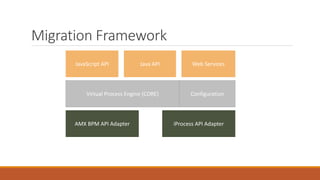
Migration Framework
JavaScript API
ConfigurationVirtual Process Engine (CORE)
AMX BPM API Adapter iProcess API Adapter
Java API Web Services
Migration Framework
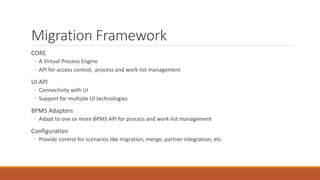
CORE
◦ A Virtual Process Engine
◦ API for access control, process and work-list management
UI API
◦ Connectivity with UI
◦ Support for multiple UI technologies
BPMS Adapters
◦ Adapt to one or more BPMS API for process and work-list management
Configuration
◦ Provide control for scenarios like migration, merge, partner integration, etc.
Using the Framework
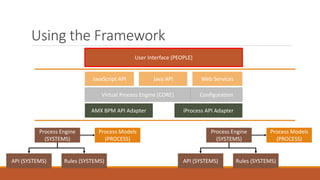
User Interface (PEOPLE)
Process Models
(PROCESS)
Process Engine
(SYSTEMS)
API (SYSTEMS) Rules (SYSTEMS)
Process Models
(PROCESS)
Process Engine
(SYSTEMS)
API (SYSTEMS) Rules (SYSTEMS)
JavaScript API
ConfigurationVirtual Process Engine (CORE)
AMX BPM API Adapter iProcess API Adapter
Java API Web Services
The Migration Scenario
The User interface lists processes from both BPMS’s
New Process instances are created only on the new BPMS
Tasks are listed from both BPMS, so old cases can be serviced
Advantages of the Framework
Processes can be migrated one by one
Old cases continue to be serviced until completion
The UI is reused almost entirely, makes User buy-in easier
The testing of migrated processes can be automated
Other Possibilities
Following possibilities are opened up with the framework
◦ Using a common work client for multiple Workflow systems
◦ Integrating partner workflow systems
◦ Working on tasks offline
◦ Mobile applications for BPMS
Thank You
Feedback – rahulupadhye@yahoo.com
Connect - http://in.linkedin.com/pub/rahul-upadhye/0/908/56b/

BPM Migration - Managing the Change

  • 1.
  • 2.
    Topics BPM Investment Areas BPMSComponent Stack BPM Migration – Affected Components Migration Framework Using the Framework The Migration Scenario Advantages of the Framework
  • 3.
    BPM Investment Areas PEOPLE ◦Organization wide change towards process orientation ◦ Training on the use of BPM oriented IT systems PROCESSES ◦ Process Discovery and Modeling ◦ Continuous process improvement SYSTEMS ◦ Enabling System API, Business Rules ◦ Operations and Maintenance
  • 4.
    BPMS Component Stack UserInterface (PEOPLE, SYSTEMS) Process Models (PROCESS, PEOPLE) Process Engine (SYSTEMS) API (SYSTEMS) Rules (SYSTEMS)
  • 5.
    BPMS Migration –Affected Components User Interface (PEOPLE, SYSTEMS) Process Models (PROCESS, PEOPLE) Process Engine (SYSTEMS) API (SYSTEMS) Rules (SYSTEMS)
  • 6.
    Migration Framework JavaScript API ConfigurationVirtualProcess Engine (CORE) AMX BPM API Adapter iProcess API Adapter Java API Web Services
  • 7.
    Migration Framework CORE ◦ AVirtual Process Engine ◦ API for access control, process and work-list management UI API ◦ Connectivity with UI ◦ Support for multiple UI technologies BPMS Adapters ◦ Adapt to one or more BPMS API for process and work-list management Configuration ◦ Provide control for scenarios like migration, merge, partner integration, etc.
  • 8.
    Using the Framework UserInterface (PEOPLE) Process Models (PROCESS) Process Engine (SYSTEMS) API (SYSTEMS) Rules (SYSTEMS) Process Models (PROCESS) Process Engine (SYSTEMS) API (SYSTEMS) Rules (SYSTEMS) JavaScript API ConfigurationVirtual Process Engine (CORE) AMX BPM API Adapter iProcess API Adapter Java API Web Services
  • 9.
    The Migration Scenario TheUser interface lists processes from both BPMS’s New Process instances are created only on the new BPMS Tasks are listed from both BPMS, so old cases can be serviced
  • 10.
    Advantages of theFramework Processes can be migrated one by one Old cases continue to be serviced until completion The UI is reused almost entirely, makes User buy-in easier The testing of migrated processes can be automated
  • 11.
    Other Possibilities Following possibilitiesare opened up with the framework ◦ Using a common work client for multiple Workflow systems ◦ Integrating partner workflow systems ◦ Working on tasks offline ◦ Mobile applications for BPMS
  • 12.
    Thank You Feedback –rahulupadhye@yahoo.com Connect - http://in.linkedin.com/pub/rahul-upadhye/0/908/56b/

Editor's Notes

  • #4 The PEOPLE area is arguably the larger and more difficult to reuse in a BPM Migration Scenario. The Migration Framework attempts to minimize the impact to this area.
  • #5 User Interface has a PEOPLE investment component. The knowledge and skill of working this UI is what they carry to work everyday. Any change to the UI affects the PEOPLE investment directly. Constructing the User Interface also has a SYSTEMS investment component. Process Models, the PROCESS investment, form the core knowledge and differentiator for an enterprise. PEOPLE carry knowledge about processes. Process Engine, API (interfacing to underlying systems used as part of automated steps in a process) and Rules (also used at decision points within processes) form the SYSTEMS investment.
  • #6 Migrating a BPMS affects the following largely. The User Interface needs to be redone for the new BPMS Process Models and implementation need to be migrated to the new BPMS The following can largely be reused based on how the old solution was designed API to other IT systems Business Rules
  • #7 Adds a Virtual Process Engine between the UI and BPMS Process Engine depicted in the previous slide. The advantage of doing this is that the BPMS can be isolated from the UI and hence changed with little effect on end-users The framework provides multiple technology avenues to support various UI technologies The BPMS adapters enable UI to work seamlessly with one or more BPMS’s simultaneously
  • #11 Automated Testing of migrated processes is possible. The messages between the UI and process engine can be captured and replayed on the new processes. E.g. this can be done via the Java API using something like jUnit.