2013 © Trivadis
BASEL BERN BRUGG LAUSANNE ZÜRICH DÜSSELDORF FRANKFURT A.M. FREIBURG I.BR. HAMBURG MÜNCHEN STUTTGART WIEN
2013 © Trivadis
Boost your Oracle RAC manageability
with Policy-Managed Databases
Ludovico CALDARA
Oracle ACE, Senior Consultant
Trivadis AG
Datum
Ansicht > Kopf und Fusszeile
1
2013 © Trivadis
AGENDA
1. Admin vs Policy Management
2. Server Pools
3. Databases and services
4. Practical tips
5. Conclusion
Datum
Ansicht > Kopf und Fusszeile
2
2013 © Trivadis
About Ludovico Caldara
Datum
Ansicht > Kopf und Fusszeile
3
■ 14 Years DBA (started with 7.3.4)
▪ I do it everywhere (also on Windows)
■ RAC ATTACK Ninja & writer
■ IOUG RAC SIG Board member
■ OCP (11g, 12c, MySQL) & OCE
■ Moved recently from Italy to Switzerland
■ http://www.ludovicocaldara.net
■ @ludodba
■ ludovicocaldara
2013 © Trivadis
Trivadis is a market leader in IT consulting, system integration,
solution engineering and the provision of IT services focusing
on and technologies in Switzerland,
Germany and Austria.
We offer our services in the following strategic business fields:
Trivadis Services takes over the interacting operation of your IT systems.
Our company
O P E R A T I O N
Date
Trivadis – the company
2013 © Trivadis
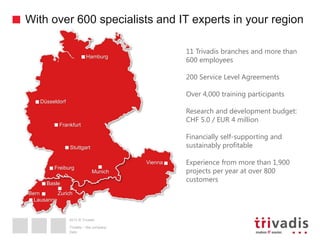
With over 600 specialists and IT experts in your region
5
11 Trivadis branches and more than
600 employees
200 Service Level Agreements
Over 4,000 training participants
Research and development budget:
CHF 5.0 / EUR 4 million
Financially self-supporting and
sustainably profitable
Experience from more than 1,900
projects per year at over 800
customers
Hamburg
Düsseldorf
Frankfurt
Freiburg
Munich
Vienna
Basle
ZurichBern
Lausanne
5
Stuttgart
Trivadis – the company
Date
2013 © Trivadis
Datum
Ansicht > Kopf und Fusszeile
Admin vs Policy Management
6
2013 © Trivadis
Admin-managed databases
Datum
Ansicht > Kopf und Fusszeile
7
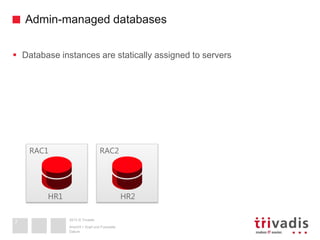
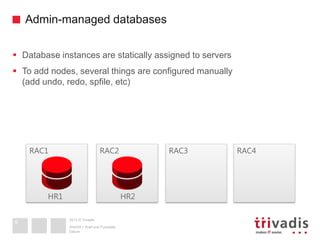
 Database instances are statically assigned to servers
RAC1 RAC2
HR1 HR2
2013 © Trivadis
Admin-managed databases
Datum
Ansicht > Kopf und Fusszeile
8
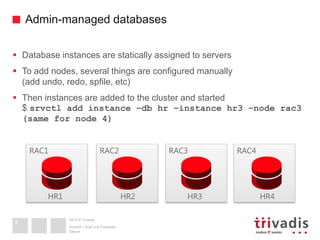
 Database instances are statically assigned to servers
 To add nodes, several things are configured manually
(add undo, redo, spfile, etc)
RAC1 RAC2
HR1 HR2
RAC3 RAC4
2013 © Trivadis
Admin-managed databases
Datum
Ansicht > Kopf und Fusszeile
9
 Database instances are statically assigned to servers
 To add nodes, several things are configured manually
(add undo, redo, spfile, etc)
 Then instances are added to the cluster and started
$ srvctl add instance –db hr –instance hr3 –node rac3
(same for node 4)
RAC1 RAC2
HR1 HR2
RAC3 RAC4
HR3 HR4
2013 © Trivadis
Admin-managed databases
Datum
Ansicht > Kopf und Fusszeile
10
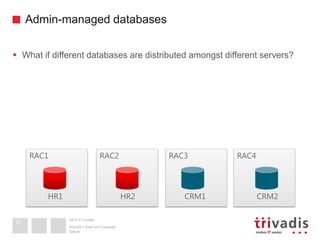
 What if different databases are distributed amongst different servers?
RAC3 RAC4RAC1 RAC2
HR1 HR2 CRM1 CRM2
2013 © Trivadis
Admin-managed databases
Datum
Ansicht > Kopf und Fusszeile
11
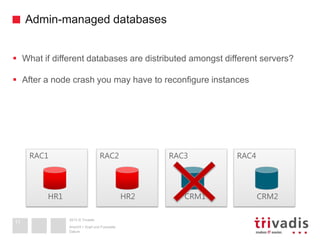
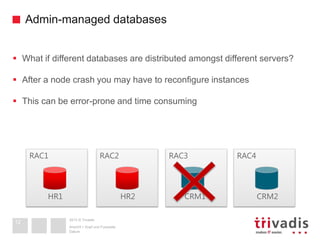
 What if different databases are distributed amongst different servers?
 After a node crash you may have to reconfigure instances
RAC3 RAC4RAC1 RAC2
HR1 HR2 CRM1 CRM2
2013 © Trivadis
Admin-managed databases
Datum
Ansicht > Kopf und Fusszeile
12
 What if different databases are distributed amongst different servers?
 After a node crash you may have to reconfigure instances
 This can be error-prone and time consuming
RAC3 RAC4RAC1 RAC2
HR1 HR2 CRM1 CRM2
2013 © Trivadis
Admin-managed databases
Datum
Ansicht > Kopf und Fusszeile
13
 What if different databases are distributed amongst different servers?
 After a node crash you may have to reconfigure instances
 This can be error-prone and time consuming
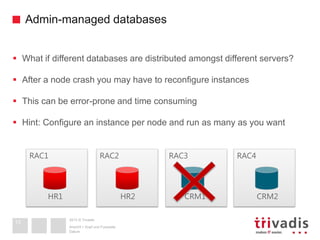
 Hint: Configure an instance per node and run as many as you want
RAC3 RAC4RAC1 RAC2
HR1 HR2 CRM1 CRM2
2013 © Trivadis
Policy-managed databases
Datum
Ansicht > Kopf und Fusszeile
14
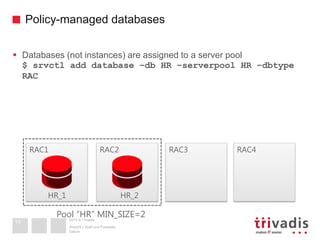
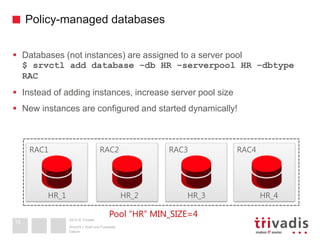
 Databases (not instances) are assigned to a server pool
$ srvctl add database –db HR –serverpool HR –dbtype
RAC
RAC3 RAC4RAC1 RAC2
HR_1 HR_2
Pool “HR” MIN_SIZE=2
2013 © Trivadis
Policy-managed databases
Datum
Ansicht > Kopf und Fusszeile
15
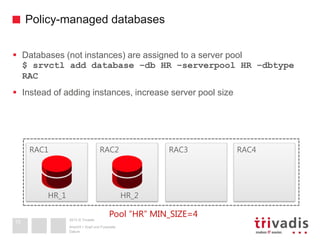
 Databases (not instances) are assigned to a server pool
$ srvctl add database –db HR –serverpool HR –dbtype
RAC
 Instead of adding instances, increase server pool size
RAC3 RAC4RAC1 RAC2
HR_1 HR_2
Pool “HR” MIN_SIZE=4
2013 © Trivadis
Policy-managed databases
Datum
Ansicht > Kopf und Fusszeile
16
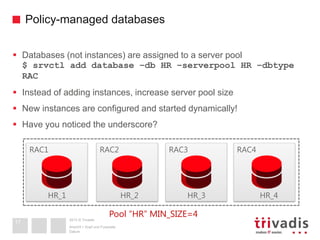
 Databases (not instances) are assigned to a server pool
$ srvctl add database –db HR –serverpool HR –dbtype
RAC
 Instead of adding instances, increase server pool size
 New instances are configured and started dynamically!
RAC3 RAC4RAC1 RAC2
HR_1 HR_2
Pool “HR” MIN_SIZE=4
HR_3 HR_4
2013 © Trivadis
Policy-managed databases
Datum
Ansicht > Kopf und Fusszeile
17
 Databases (not instances) are assigned to a server pool
$ srvctl add database –db HR –serverpool HR –dbtype
RAC
 Instead of adding instances, increase server pool size
 New instances are configured and started dynamically!
 Have you noticed the underscore?
RAC3 RAC4RAC1 RAC2
HR_1 HR_2
Pool “HR” MIN_SIZE=4
HR_3 HR_4
2013 © Trivadis
Policy-managed databases
Datum
Ansicht > Kopf und Fusszeile
18
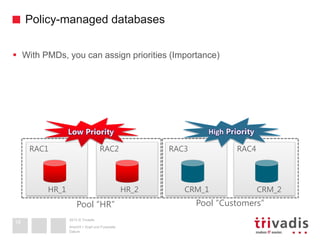
 With PMDs, you can assign priorities (Importance)
RAC3 RAC4RAC1 RAC2
HR_1 CRM_1 CRM_2HR_2
Pool “HR” Pool “Customers”
2013 © Trivadis
Policy-managed databases
Datum
Ansicht > Kopf und Fusszeile
19
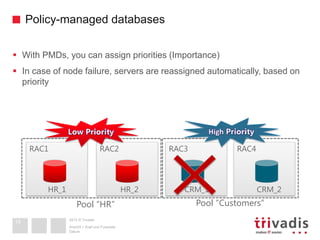
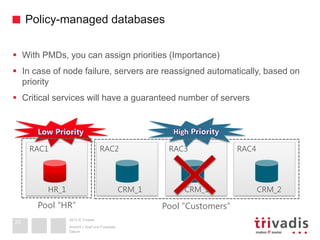
 With PMDs, you can assign priorities (Importance)
 In case of node failure, servers are reassigned automatically, based on
priority
RAC3 RAC4RAC1 RAC2
HR_1 CRM_1 CRM_2HR_2
Pool “HR” Pool “Customers”
2013 © Trivadis
Policy-managed databases
Datum
Ansicht > Kopf und Fusszeile
20
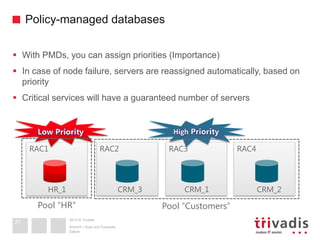
 With PMDs, you can assign priorities (Importance)
 In case of node failure, servers are reassigned automatically, based on
priority
 Critical services will have a guaranteed number of servers
RAC3 RAC4RAC1 RAC2
HR_1 CRM_1 CRM_2
Pool “HR” Pool “Customers”
CRM_1
2013 © Trivadis
Policy-managed databases
Datum
Ansicht > Kopf und Fusszeile
21
 With PMDs, you can assign priorities (Importance)
 In case of node failure, servers are reassigned automatically, based on
priority
 Critical services will have a guaranteed number of servers
RAC3 RAC4RAC1 RAC2
HR_1 CRM_1 CRM_2
Pool “HR” Pool “Customers”
CRM_3
2013 © Trivadis
Datum
Ansicht > Kopf und Fusszeile
Server Pools
22
2013 © Trivadis
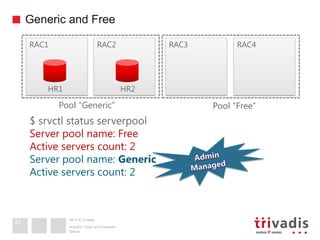
Generic and Free
Datum
Ansicht > Kopf und Fusszeile
23
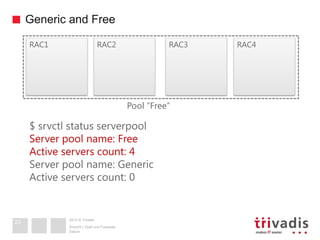
RAC3 RAC4RAC1 RAC2
$ srvctl status serverpool
Server pool name: Free
Active servers count: 4
Server pool name: Generic
Active servers count: 0
Pool “Free”
2013 © Trivadis
Generic and Free
Datum
Ansicht > Kopf und Fusszeile
24
RAC3 RAC4RAC1 RAC2
$ srvctl status serverpool
Server pool name: Free
Active servers count: 2
Server pool name: Generic
Active servers count: 2
HR1 HR2
Pool “Generic” Pool “Free”
2013 © Trivadis
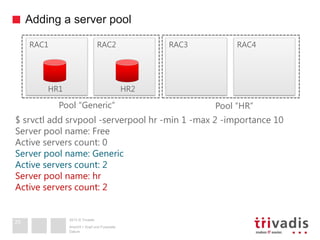
Adding a server pool
Datum
Ansicht > Kopf und Fusszeile
25
RAC3 RAC4RAC1 RAC2
HR1 HR2
Pool “Generic” Pool “HR”
$ srvctl add srvpool -serverpool hr -min 1 -max 2 -importance 10
Server pool name: Free
Active servers count: 0
Server pool name: Generic
Active servers count: 2
Server pool name: hr
Active servers count: 2
2013 © Trivadis
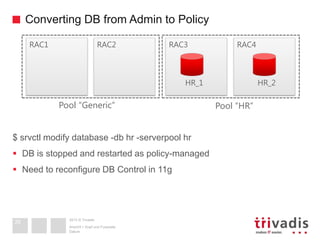
Converting DB from Admin to Policy
Datum
Ansicht > Kopf und Fusszeile
26
RAC3 RAC4RAC1 RAC2
HR_1 HR_2
Pool “Generic” Pool “HR”
$ srvctl modify database -db hr -serverpool hr
 DB is stopped and restarted as policy-managed
 Need to reconfigure DB Control in 11g
2013 © Trivadis
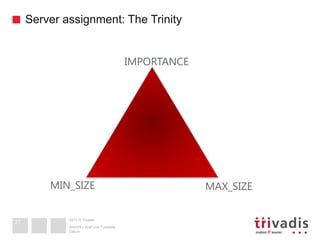
Server assignment: The Trinity
Datum
Ansicht > Kopf und Fusszeile
27
MIN_SIZE MAX_SIZE
IMPORTANCE
2013 © Trivadis
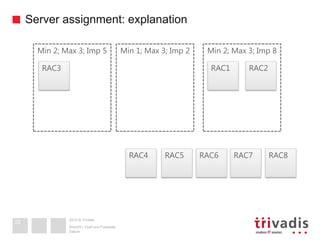
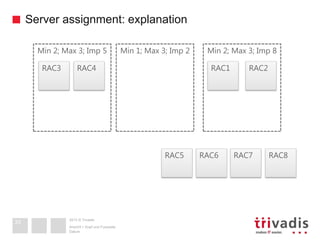
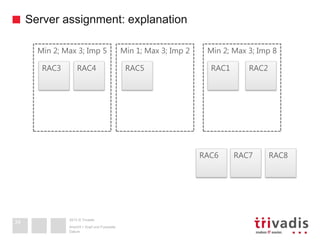
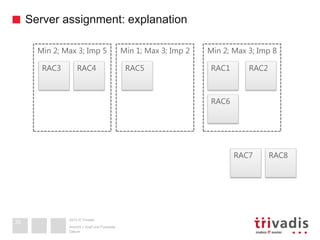
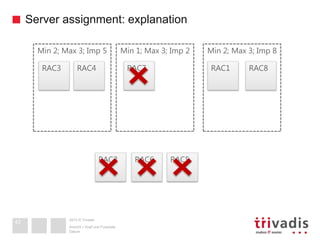
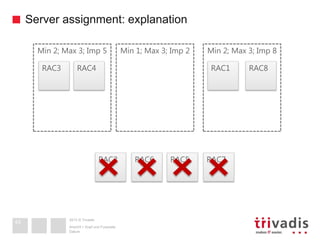
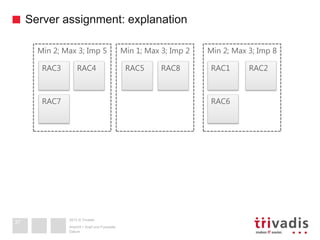
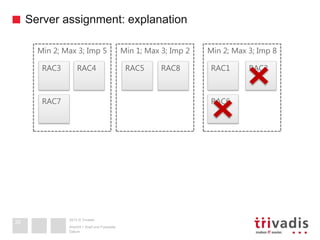
Server assignment: explanation
Datum
Ansicht > Kopf und Fusszeile
28
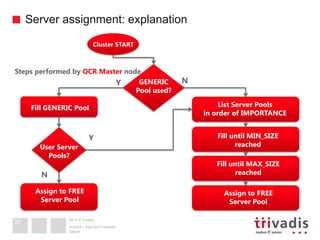
List Server Pools
in order of IMPORTANCE
Fill until MIN_SIZE
reached
Cluster START
GENERIC
Pool used?
Fill until MAX_SIZE
reached
Assign to FREE
Server Pool
Fill GENERIC Pool
User Server
Pools?
Assign to FREE
Server Pool
Steps performed by OCR Master node
Y N
Y
N
2013 © Trivadis
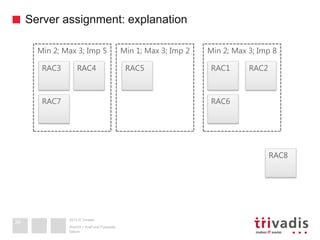
Server assignment: explanation
Datum
Ansicht > Kopf und Fusszeile
29
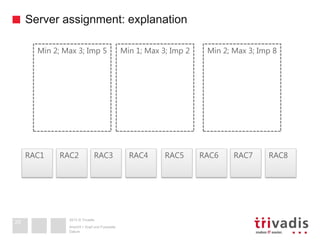
RAC3 RAC4RAC1 RAC2 RAC7 RAC8RAC5 RAC6
Min 2; Max 3; Imp 5 Min 1; Max 3; Imp 2 Min 2; Max 3; Imp 8
2013 © Trivadis
Server assignment: explanation
Datum
Ansicht > Kopf und Fusszeile
30
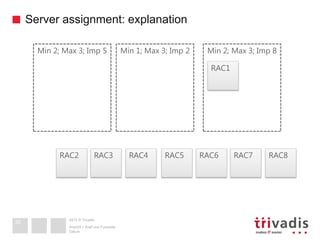
RAC3 RAC4RAC2 RAC7 RAC8RAC5 RAC6
Min 2; Max 3; Imp 5
RAC1
Min 1; Max 3; Imp 2 Min 2; Max 3; Imp 8
2013 © Trivadis
Server assignment: explanation
Datum
Ansicht > Kopf und Fusszeile
31
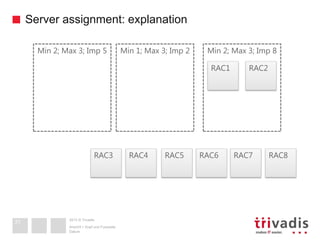
RAC3 RAC4 RAC7 RAC8RAC5 RAC6
Min 2; Max 3; Imp 5
RAC1 RAC2
Min 1; Max 3; Imp 2 Min 2; Max 3; Imp 8
2013 © Trivadis
Server assignment: explanation
Datum
Ansicht > Kopf und Fusszeile
32
RAC4 RAC7 RAC8RAC5 RAC6
Min 2; Max 3; Imp 5
RAC3 RAC1 RAC2
Min 1; Max 3; Imp 2 Min 2; Max 3; Imp 8
2013 © Trivadis
Server assignment: explanation
Datum
Ansicht > Kopf und Fusszeile
33
RAC7 RAC8RAC5 RAC6
Min 2; Max 3; Imp 5
RAC3 RAC4 RAC1 RAC2
Min 1; Max 3; Imp 2 Min 2; Max 3; Imp 8
2013 © Trivadis
Server assignment: explanation
Datum
Ansicht > Kopf und Fusszeile
34
RAC7 RAC8RAC6
Min 2; Max 3; Imp 5
RAC3 RAC4 RAC1 RAC2
Min 1; Max 3; Imp 2 Min 2; Max 3; Imp 8
RAC5
2013 © Trivadis
Server assignment: explanation
Datum
Ansicht > Kopf und Fusszeile
35
RAC7 RAC8
Min 2; Max 3; Imp 5
RAC3 RAC4 RAC1 RAC2
Min 1; Max 3; Imp 2 Min 2; Max 3; Imp 8
RAC5
RAC6
2013 © Trivadis
Server assignment: explanation
Datum
Ansicht > Kopf und Fusszeile
36
RAC8
Min 2; Max 3; Imp 5
RAC3 RAC4 RAC1 RAC2
Min 1; Max 3; Imp 2 Min 2; Max 3; Imp 8
RAC5
RAC6RAC7
2013 © Trivadis
Server assignment: explanation
Datum
Ansicht > Kopf und Fusszeile
37
Min 2; Max 3; Imp 5
RAC3 RAC4 RAC1 RAC2
Min 1; Max 3; Imp 2 Min 2; Max 3; Imp 8
RAC5
RAC6RAC7
RAC8
2013 © Trivadis
Server assignment: explanation
Datum
Ansicht > Kopf und Fusszeile
38
Min 2; Max 3; Imp 5
RAC3 RAC4 RAC1 RAC2
Min 1; Max 3; Imp 2 Min 2; Max 3; Imp 8
RAC5
RAC6RAC7
RAC8
2013 © Trivadis
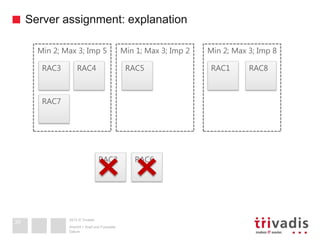
Server assignment: explanation
Datum
Ansicht > Kopf und Fusszeile
39
Min 2; Max 3; Imp 5
RAC3 RAC4 RAC1
RAC2
Min 1; Max 3; Imp 2 Min 2; Max 3; Imp 8
RAC5
RAC6
RAC7
RAC8
2013 © Trivadis
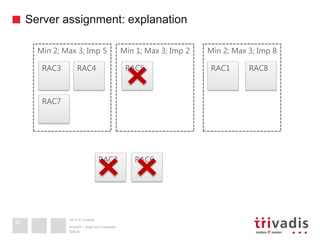
Server assignment: explanation
Datum
Ansicht > Kopf und Fusszeile
40
Min 2; Max 3; Imp 5
RAC3 RAC4 RAC1
RAC2
Min 1; Max 3; Imp 2 Min 2; Max 3; Imp 8
RAC5
RAC6
RAC7
RAC8
2013 © Trivadis
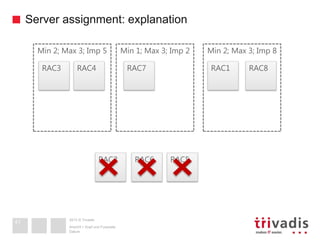
Server assignment: explanation
Datum
Ansicht > Kopf und Fusszeile
41
Min 2; Max 3; Imp 5
RAC3 RAC4 RAC1
RAC2
Min 1; Max 3; Imp 2 Min 2; Max 3; Imp 8
RAC6
RAC7 RAC8
RAC5
2013 © Trivadis
Server assignment: explanation
Datum
Ansicht > Kopf und Fusszeile
42
Min 2; Max 3; Imp 5
RAC3 RAC4 RAC1
RAC2
Min 1; Max 3; Imp 2 Min 2; Max 3; Imp 8
RAC6
RAC7 RAC8
RAC5
2013 © Trivadis
Server assignment: explanation
Datum
Ansicht > Kopf und Fusszeile
43
Min 2; Max 3; Imp 5
RAC3 RAC4 RAC1
RAC2
Min 1; Max 3; Imp 2 Min 2; Max 3; Imp 8
RAC5RAC6
RAC8
RAC7
2013 © Trivadis
Server assignment: explanation
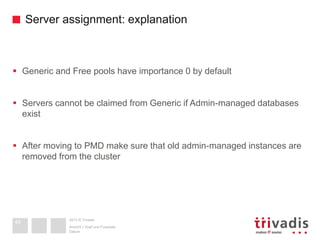
 Generic and Free pools have importance 0 by default
 Servers cannot be claimed from Generic if Admin-managed databases
exist
 After moving to PMD make sure that old admin-managed instances are
removed from the cluster
Datum
Ansicht > Kopf und Fusszeile
44
2013 © Trivadis
What-IF
 CRSCTL:
$ crsctl eval modify serverpool ora.crm -attr
"MIN_SIZE=4,MAX_SIZE=4" –f
[…]
Resource 'ora.hr.payroll.svc' (1/1) will be in
state [OFFLINE]
Server 'rac4' will be moved from pools [ora.hr]
to pools [ora.crm]
Resource 'ora.hr.db' (2/1) will be in state [OFFLINE]
Datum
Ansicht > Kopf und Fusszeile
45
2013 © Trivadis
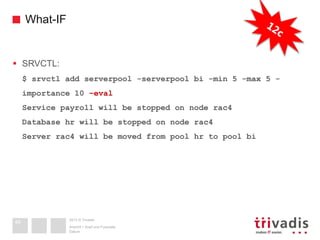
What-IF
 SRVCTL:
$ srvctl add serverpool -serverpool bi -min 5 -max 5 -
importance 10 –eval
Service payroll will be stopped on node rac4
Database hr will be stopped on node rac4
Server rac4 will be moved from pool hr to pool bi
Datum
Ansicht > Kopf und Fusszeile
46
2013 © Trivadis
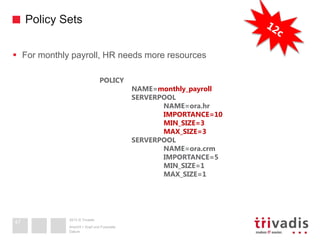
Policy Sets
 For monthly payroll, HR needs more resources
Datum
Ansicht > Kopf und Fusszeile
47
POLICY
NAME=monthly_payroll
SERVERPOOL
NAME=ora.hr
IMPORTANCE=10
MIN_SIZE=3
MAX_SIZE=3
SERVERPOOL
NAME=ora.crm
IMPORTANCE=5
MIN_SIZE=1
MAX_SIZE=1
2013 © Trivadis
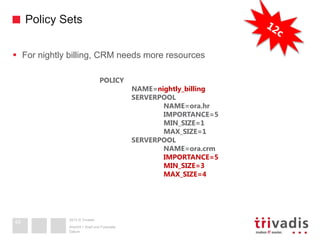
Policy Sets
 For nightly billing, CRM needs more resources
Datum
Ansicht > Kopf und Fusszeile
48
POLICY
NAME=nightly_billing
SERVERPOOL
NAME=ora.hr
IMPORTANCE=5
MIN_SIZE=1
MAX_SIZE=1
SERVERPOOL
NAME=ora.crm
IMPORTANCE=5
MIN_SIZE=3
MAX_SIZE=4
2013 © Trivadis
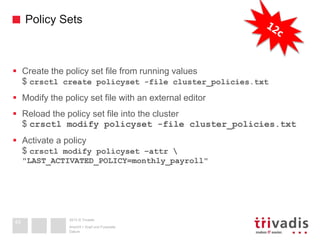
Policy Sets
 Create the policy set file from running values
$ crsctl create policyset -file cluster_policies.txt
 Modify the policy set file with an external editor
 Reload the policy set file into the cluster
$ crsctl modify policyset -file cluster_policies.txt
 Activate a policy
$ crsctl modify policyset –attr 
"LAST_ACTIVATED_POLICY=monthly_payroll"
Datum
Ansicht > Kopf und Fusszeile
49
2013 © Trivadis
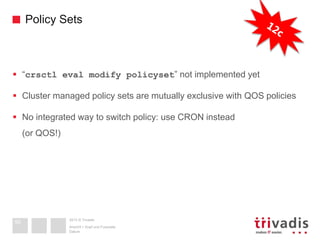
Policy Sets
 “crsctl eval modify policyset” not implemented yet
 Cluster managed policy sets are mutually exclusive with QOS policies
 No integrated way to switch policy: use CRON instead
(or QOS!)
Datum
Ansicht > Kopf und Fusszeile
50
2013 © Trivadis
Child Server Pools
 Divide Server pools in sub groups (child pools)
 Cannot be created with srvctl, only crsctl
 They do not work with policy-managed Databases!
 You may try them and see funny errors! 
Datum
Ansicht > Kopf und Fusszeile
51
2013 © Trivadis
Datum
Ansicht > Kopf und Fusszeile
Databases and services
52
2013 © Trivadis
Database behavior: admin managed
Datum
Ansicht > Kopf und Fusszeile
53
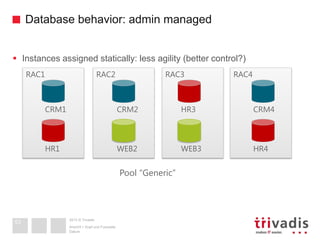
 Instances assigned statically: less agility (better control?)
RAC3 RAC4RAC1 RAC2
HR3 CRM4CRM2
Pool “Generic”
CRM1
WEB3 HR4WEB2HR1
2013 © Trivadis
Database behavior: policy managed
Datum
Ansicht > Kopf und Fusszeile
54
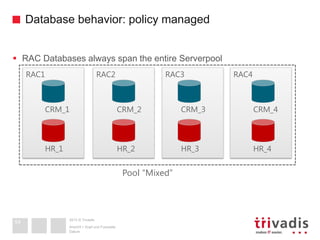
 RAC Databases always span the entire Serverpool
RAC3 RAC4RAC1 RAC2
CRM_3 CRM_4CRM_2
Pool “Mixed”
CRM_1
HR_3 HR_4HR_2HR_1
2013 © Trivadis
Database behavior
Datum
Ansicht > Kopf und Fusszeile
55
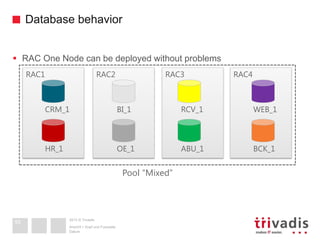
 RAC One Node can be deployed without problems
RAC3 RAC4RAC1 RAC2
RCV_1 WEB_1BI_1
Pool “Mixed”
CRM_1
ABU_1 BCK_1OE_1HR_1
2013 © Trivadis
Database behavior
Datum
Ansicht > Kopf und Fusszeile
56
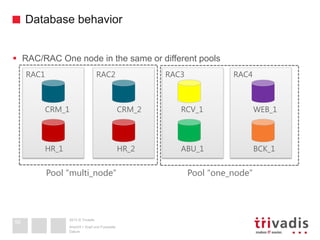
 RAC/RAC One node in the same or different pools
RAC3 RAC4RAC1 RAC2
RCV_1 WEB_1
Pool “multi_node”
ABU_1 BCK_1
CRM_2CRM_1
HR_2HR_1
Pool “one_node”
2013 © Trivadis
Database behavior
 If you consolidate many databases, use Instance Caging to manage
CPU contention (CPU_COUNT)
 If DB are concurring also for other resources, implement QOS
 QOS needs Policy-management and it’s the Oracle way to manage
inter-database resources
 For intra-database resources, Resource Mgr is the way
 Multitenant consolidation + RM to manage PDB resources
Datum
Ansicht > Kopf und Fusszeile
57
2013 © Trivadis
Services
Datum
Ansicht > Kopf und Fusszeile
58
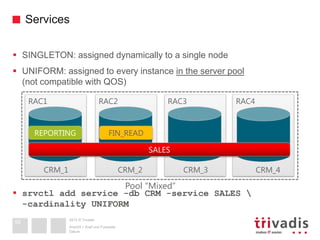
 SINGLETON: assigned dynamically to a single node
 UNIFORM: assigned to every instance in the server pool
(not compatible with QOS)
 srvctl add service -db CRM -service SALES 
-cardinality UNIFORM
RAC3 RAC4RAC1 RAC2
CRM_3 CRM_4CRM_2
Pool “Mixed”
CRM_1
SALES
REPORTING FIN_READ
2013 © Trivadis
Services
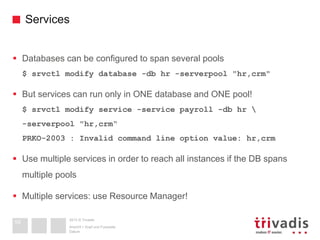
 Databases can be configured to span several pools
$ srvctl modify database -db hr -serverpool "hr,crm"
 But services can run only in ONE database and ONE pool!
$ srvctl modify service -service payroll -db hr 
-serverpool "hr,crm“
PRKO-2003 : Invalid command line option value: hr,crm
 Use multiple services in order to reach all instances if the DB spans
multiple pools
 Multiple services: use Resource Manager!
Datum
Ansicht > Kopf und Fusszeile
59
2013 © Trivadis
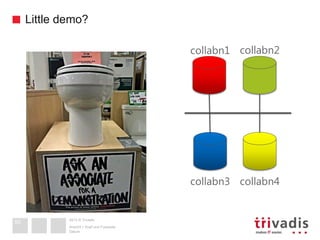
Little demo?
Datum
Ansicht > Kopf und Fusszeile
60
collabn1 collabn2
collabn3 collabn4
2013 © Trivadis
Datum
Ansicht > Kopf und Fusszeile
Practical tips
61
2013 © Trivadis
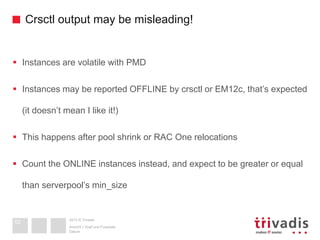
Crsctl output may be misleading!
 Instances are volatile with PMD
 Instances may be reported OFFLINE by crsctl or EM12c, that’s expected
(it doesn’t mean I like it!)
 This happens after pool shrink or RAC One relocations
 Count the ONLINE instances instead, and expect to be greater or equal
than serverpool’s min_size
Datum
Ansicht > Kopf und Fusszeile
62
2013 © Trivadis
Centralize the diagnostic_dest!
 With local FS, you may not find the right instance, at the right time, on
the right host
 Use a CFS, e.g. ACFS if it’s available for your platform
 ACFS? Then take care of resource dependencies
Datum
Ansicht > Kopf und Fusszeile
63
2013 © Trivadis
Datum
Ansicht > Kopf und Fusszeile
Conclusion
64
2013 © Trivadis
We love it!!
 Server failures do not affect critical services
 Very fast instance provisioning
 Proven agility and scaling
 Easy administration
 Requirement for QOS and GDS (as of 12.1.0.1)
 Oracle recommends it!
Datum
Ansicht > Kopf und Fusszeile
65
vistaICO.com
2013 © Trivadis
well… not always!
 Some combinations of features don’t work
 Can’t choose different cardinalities for services or DBs
 Stopped instances reported OFFLINE when pools shrink!
 EM12c is not always reactive when pools resize
 Other features need attention when pools expand (GG, DG)
Datum
Ansicht > Kopf und Fusszeile
66
vistaICO.com
2013 © Trivadis
BASEL BERN BRUGG LAUSANNE ZÜRICH DÜSSELDORF FRANKFURT A.M. FREIBURG I.BR. HAMBURG MÜNCHEN STUTTGART WIEN
2013 © Trivadis
Thank you!
Ludovico Caldara
Oracle ACE, Senior Consultant
Trivadis AG
ludovico.caldara@trivadis.com
Datum
Ansicht > Kopf und Fusszeile

Boost your Oracle RAC manageability with Policy-Managed Databases

  • 1.
    2013 © Trivadis BASELBERN BRUGG LAUSANNE ZÜRICH DÜSSELDORF FRANKFURT A.M. FREIBURG I.BR. HAMBURG MÜNCHEN STUTTGART WIEN 2013 © Trivadis Boost your Oracle RAC manageability with Policy-Managed Databases Ludovico CALDARA Oracle ACE, Senior Consultant Trivadis AG Datum Ansicht > Kopf und Fusszeile 1
  • 2.
    2013 © Trivadis AGENDA 1.Admin vs Policy Management 2. Server Pools 3. Databases and services 4. Practical tips 5. Conclusion Datum Ansicht > Kopf und Fusszeile 2
  • 3.
    2013 © Trivadis AboutLudovico Caldara Datum Ansicht > Kopf und Fusszeile 3 ■ 14 Years DBA (started with 7.3.4) ▪ I do it everywhere (also on Windows) ■ RAC ATTACK Ninja & writer ■ IOUG RAC SIG Board member ■ OCP (11g, 12c, MySQL) & OCE ■ Moved recently from Italy to Switzerland ■ http://www.ludovicocaldara.net ■ @ludodba ■ ludovicocaldara
  • 4.
    2013 © Trivadis Trivadisis a market leader in IT consulting, system integration, solution engineering and the provision of IT services focusing on and technologies in Switzerland, Germany and Austria. We offer our services in the following strategic business fields: Trivadis Services takes over the interacting operation of your IT systems. Our company O P E R A T I O N Date Trivadis – the company
  • 5.
    2013 © Trivadis Withover 600 specialists and IT experts in your region 5 11 Trivadis branches and more than 600 employees 200 Service Level Agreements Over 4,000 training participants Research and development budget: CHF 5.0 / EUR 4 million Financially self-supporting and sustainably profitable Experience from more than 1,900 projects per year at over 800 customers Hamburg Düsseldorf Frankfurt Freiburg Munich Vienna Basle ZurichBern Lausanne 5 Stuttgart Trivadis – the company Date
  • 6.
    2013 © Trivadis Datum Ansicht> Kopf und Fusszeile Admin vs Policy Management 6
  • 7.
    2013 © Trivadis Admin-manageddatabases Datum Ansicht > Kopf und Fusszeile 7  Database instances are statically assigned to servers RAC1 RAC2 HR1 HR2
  • 8.
    2013 © Trivadis Admin-manageddatabases Datum Ansicht > Kopf und Fusszeile 8  Database instances are statically assigned to servers  To add nodes, several things are configured manually (add undo, redo, spfile, etc) RAC1 RAC2 HR1 HR2 RAC3 RAC4
  • 9.
    2013 © Trivadis Admin-manageddatabases Datum Ansicht > Kopf und Fusszeile 9  Database instances are statically assigned to servers  To add nodes, several things are configured manually (add undo, redo, spfile, etc)  Then instances are added to the cluster and started $ srvctl add instance –db hr –instance hr3 –node rac3 (same for node 4) RAC1 RAC2 HR1 HR2 RAC3 RAC4 HR3 HR4
  • 10.
    2013 © Trivadis Admin-manageddatabases Datum Ansicht > Kopf und Fusszeile 10  What if different databases are distributed amongst different servers? RAC3 RAC4RAC1 RAC2 HR1 HR2 CRM1 CRM2
  • 11.
    2013 © Trivadis Admin-manageddatabases Datum Ansicht > Kopf und Fusszeile 11  What if different databases are distributed amongst different servers?  After a node crash you may have to reconfigure instances RAC3 RAC4RAC1 RAC2 HR1 HR2 CRM1 CRM2
  • 12.
    2013 © Trivadis Admin-manageddatabases Datum Ansicht > Kopf und Fusszeile 12  What if different databases are distributed amongst different servers?  After a node crash you may have to reconfigure instances  This can be error-prone and time consuming RAC3 RAC4RAC1 RAC2 HR1 HR2 CRM1 CRM2
  • 13.
    2013 © Trivadis Admin-manageddatabases Datum Ansicht > Kopf und Fusszeile 13  What if different databases are distributed amongst different servers?  After a node crash you may have to reconfigure instances  This can be error-prone and time consuming  Hint: Configure an instance per node and run as many as you want RAC3 RAC4RAC1 RAC2 HR1 HR2 CRM1 CRM2
  • 14.
    2013 © Trivadis Policy-manageddatabases Datum Ansicht > Kopf und Fusszeile 14  Databases (not instances) are assigned to a server pool $ srvctl add database –db HR –serverpool HR –dbtype RAC RAC3 RAC4RAC1 RAC2 HR_1 HR_2 Pool “HR” MIN_SIZE=2
  • 15.
    2013 © Trivadis Policy-manageddatabases Datum Ansicht > Kopf und Fusszeile 15  Databases (not instances) are assigned to a server pool $ srvctl add database –db HR –serverpool HR –dbtype RAC  Instead of adding instances, increase server pool size RAC3 RAC4RAC1 RAC2 HR_1 HR_2 Pool “HR” MIN_SIZE=4
  • 16.
    2013 © Trivadis Policy-manageddatabases Datum Ansicht > Kopf und Fusszeile 16  Databases (not instances) are assigned to a server pool $ srvctl add database –db HR –serverpool HR –dbtype RAC  Instead of adding instances, increase server pool size  New instances are configured and started dynamically! RAC3 RAC4RAC1 RAC2 HR_1 HR_2 Pool “HR” MIN_SIZE=4 HR_3 HR_4
  • 17.
    2013 © Trivadis Policy-manageddatabases Datum Ansicht > Kopf und Fusszeile 17  Databases (not instances) are assigned to a server pool $ srvctl add database –db HR –serverpool HR –dbtype RAC  Instead of adding instances, increase server pool size  New instances are configured and started dynamically!  Have you noticed the underscore? RAC3 RAC4RAC1 RAC2 HR_1 HR_2 Pool “HR” MIN_SIZE=4 HR_3 HR_4
  • 18.
    2013 © Trivadis Policy-manageddatabases Datum Ansicht > Kopf und Fusszeile 18  With PMDs, you can assign priorities (Importance) RAC3 RAC4RAC1 RAC2 HR_1 CRM_1 CRM_2HR_2 Pool “HR” Pool “Customers”
  • 19.
    2013 © Trivadis Policy-manageddatabases Datum Ansicht > Kopf und Fusszeile 19  With PMDs, you can assign priorities (Importance)  In case of node failure, servers are reassigned automatically, based on priority RAC3 RAC4RAC1 RAC2 HR_1 CRM_1 CRM_2HR_2 Pool “HR” Pool “Customers”
  • 20.
    2013 © Trivadis Policy-manageddatabases Datum Ansicht > Kopf und Fusszeile 20  With PMDs, you can assign priorities (Importance)  In case of node failure, servers are reassigned automatically, based on priority  Critical services will have a guaranteed number of servers RAC3 RAC4RAC1 RAC2 HR_1 CRM_1 CRM_2 Pool “HR” Pool “Customers” CRM_1
  • 21.
    2013 © Trivadis Policy-manageddatabases Datum Ansicht > Kopf und Fusszeile 21  With PMDs, you can assign priorities (Importance)  In case of node failure, servers are reassigned automatically, based on priority  Critical services will have a guaranteed number of servers RAC3 RAC4RAC1 RAC2 HR_1 CRM_1 CRM_2 Pool “HR” Pool “Customers” CRM_3
  • 22.
    2013 © Trivadis Datum Ansicht> Kopf und Fusszeile Server Pools 22
  • 23.
    2013 © Trivadis Genericand Free Datum Ansicht > Kopf und Fusszeile 23 RAC3 RAC4RAC1 RAC2 $ srvctl status serverpool Server pool name: Free Active servers count: 4 Server pool name: Generic Active servers count: 0 Pool “Free”
  • 24.
    2013 © Trivadis Genericand Free Datum Ansicht > Kopf und Fusszeile 24 RAC3 RAC4RAC1 RAC2 $ srvctl status serverpool Server pool name: Free Active servers count: 2 Server pool name: Generic Active servers count: 2 HR1 HR2 Pool “Generic” Pool “Free”
  • 25.
    2013 © Trivadis Addinga server pool Datum Ansicht > Kopf und Fusszeile 25 RAC3 RAC4RAC1 RAC2 HR1 HR2 Pool “Generic” Pool “HR” $ srvctl add srvpool -serverpool hr -min 1 -max 2 -importance 10 Server pool name: Free Active servers count: 0 Server pool name: Generic Active servers count: 2 Server pool name: hr Active servers count: 2
  • 26.
    2013 © Trivadis ConvertingDB from Admin to Policy Datum Ansicht > Kopf und Fusszeile 26 RAC3 RAC4RAC1 RAC2 HR_1 HR_2 Pool “Generic” Pool “HR” $ srvctl modify database -db hr -serverpool hr  DB is stopped and restarted as policy-managed  Need to reconfigure DB Control in 11g
  • 27.
    2013 © Trivadis Serverassignment: The Trinity Datum Ansicht > Kopf und Fusszeile 27 MIN_SIZE MAX_SIZE IMPORTANCE
  • 28.
    2013 © Trivadis Serverassignment: explanation Datum Ansicht > Kopf und Fusszeile 28 List Server Pools in order of IMPORTANCE Fill until MIN_SIZE reached Cluster START GENERIC Pool used? Fill until MAX_SIZE reached Assign to FREE Server Pool Fill GENERIC Pool User Server Pools? Assign to FREE Server Pool Steps performed by OCR Master node Y N Y N
  • 29.
    2013 © Trivadis Serverassignment: explanation Datum Ansicht > Kopf und Fusszeile 29 RAC3 RAC4RAC1 RAC2 RAC7 RAC8RAC5 RAC6 Min 2; Max 3; Imp 5 Min 1; Max 3; Imp 2 Min 2; Max 3; Imp 8
  • 30.
    2013 © Trivadis Serverassignment: explanation Datum Ansicht > Kopf und Fusszeile 30 RAC3 RAC4RAC2 RAC7 RAC8RAC5 RAC6 Min 2; Max 3; Imp 5 RAC1 Min 1; Max 3; Imp 2 Min 2; Max 3; Imp 8
  • 31.
    2013 © Trivadis Serverassignment: explanation Datum Ansicht > Kopf und Fusszeile 31 RAC3 RAC4 RAC7 RAC8RAC5 RAC6 Min 2; Max 3; Imp 5 RAC1 RAC2 Min 1; Max 3; Imp 2 Min 2; Max 3; Imp 8
  • 32.
    2013 © Trivadis Serverassignment: explanation Datum Ansicht > Kopf und Fusszeile 32 RAC4 RAC7 RAC8RAC5 RAC6 Min 2; Max 3; Imp 5 RAC3 RAC1 RAC2 Min 1; Max 3; Imp 2 Min 2; Max 3; Imp 8
  • 33.
    2013 © Trivadis Serverassignment: explanation Datum Ansicht > Kopf und Fusszeile 33 RAC7 RAC8RAC5 RAC6 Min 2; Max 3; Imp 5 RAC3 RAC4 RAC1 RAC2 Min 1; Max 3; Imp 2 Min 2; Max 3; Imp 8
  • 34.
    2013 © Trivadis Serverassignment: explanation Datum Ansicht > Kopf und Fusszeile 34 RAC7 RAC8RAC6 Min 2; Max 3; Imp 5 RAC3 RAC4 RAC1 RAC2 Min 1; Max 3; Imp 2 Min 2; Max 3; Imp 8 RAC5
  • 35.
    2013 © Trivadis Serverassignment: explanation Datum Ansicht > Kopf und Fusszeile 35 RAC7 RAC8 Min 2; Max 3; Imp 5 RAC3 RAC4 RAC1 RAC2 Min 1; Max 3; Imp 2 Min 2; Max 3; Imp 8 RAC5 RAC6
  • 36.
    2013 © Trivadis Serverassignment: explanation Datum Ansicht > Kopf und Fusszeile 36 RAC8 Min 2; Max 3; Imp 5 RAC3 RAC4 RAC1 RAC2 Min 1; Max 3; Imp 2 Min 2; Max 3; Imp 8 RAC5 RAC6RAC7
  • 37.
    2013 © Trivadis Serverassignment: explanation Datum Ansicht > Kopf und Fusszeile 37 Min 2; Max 3; Imp 5 RAC3 RAC4 RAC1 RAC2 Min 1; Max 3; Imp 2 Min 2; Max 3; Imp 8 RAC5 RAC6RAC7 RAC8
  • 38.
    2013 © Trivadis Serverassignment: explanation Datum Ansicht > Kopf und Fusszeile 38 Min 2; Max 3; Imp 5 RAC3 RAC4 RAC1 RAC2 Min 1; Max 3; Imp 2 Min 2; Max 3; Imp 8 RAC5 RAC6RAC7 RAC8
  • 39.
    2013 © Trivadis Serverassignment: explanation Datum Ansicht > Kopf und Fusszeile 39 Min 2; Max 3; Imp 5 RAC3 RAC4 RAC1 RAC2 Min 1; Max 3; Imp 2 Min 2; Max 3; Imp 8 RAC5 RAC6 RAC7 RAC8
  • 40.
    2013 © Trivadis Serverassignment: explanation Datum Ansicht > Kopf und Fusszeile 40 Min 2; Max 3; Imp 5 RAC3 RAC4 RAC1 RAC2 Min 1; Max 3; Imp 2 Min 2; Max 3; Imp 8 RAC5 RAC6 RAC7 RAC8
  • 41.
    2013 © Trivadis Serverassignment: explanation Datum Ansicht > Kopf und Fusszeile 41 Min 2; Max 3; Imp 5 RAC3 RAC4 RAC1 RAC2 Min 1; Max 3; Imp 2 Min 2; Max 3; Imp 8 RAC6 RAC7 RAC8 RAC5
  • 42.
    2013 © Trivadis Serverassignment: explanation Datum Ansicht > Kopf und Fusszeile 42 Min 2; Max 3; Imp 5 RAC3 RAC4 RAC1 RAC2 Min 1; Max 3; Imp 2 Min 2; Max 3; Imp 8 RAC6 RAC7 RAC8 RAC5
  • 43.
    2013 © Trivadis Serverassignment: explanation Datum Ansicht > Kopf und Fusszeile 43 Min 2; Max 3; Imp 5 RAC3 RAC4 RAC1 RAC2 Min 1; Max 3; Imp 2 Min 2; Max 3; Imp 8 RAC5RAC6 RAC8 RAC7
  • 44.
    2013 © Trivadis Serverassignment: explanation  Generic and Free pools have importance 0 by default  Servers cannot be claimed from Generic if Admin-managed databases exist  After moving to PMD make sure that old admin-managed instances are removed from the cluster Datum Ansicht > Kopf und Fusszeile 44
  • 45.
    2013 © Trivadis What-IF CRSCTL: $ crsctl eval modify serverpool ora.crm -attr "MIN_SIZE=4,MAX_SIZE=4" –f […] Resource 'ora.hr.payroll.svc' (1/1) will be in state [OFFLINE] Server 'rac4' will be moved from pools [ora.hr] to pools [ora.crm] Resource 'ora.hr.db' (2/1) will be in state [OFFLINE] Datum Ansicht > Kopf und Fusszeile 45
  • 46.
    2013 © Trivadis What-IF SRVCTL: $ srvctl add serverpool -serverpool bi -min 5 -max 5 - importance 10 –eval Service payroll will be stopped on node rac4 Database hr will be stopped on node rac4 Server rac4 will be moved from pool hr to pool bi Datum Ansicht > Kopf und Fusszeile 46
  • 47.
    2013 © Trivadis PolicySets  For monthly payroll, HR needs more resources Datum Ansicht > Kopf und Fusszeile 47 POLICY NAME=monthly_payroll SERVERPOOL NAME=ora.hr IMPORTANCE=10 MIN_SIZE=3 MAX_SIZE=3 SERVERPOOL NAME=ora.crm IMPORTANCE=5 MIN_SIZE=1 MAX_SIZE=1
  • 48.
    2013 © Trivadis PolicySets  For nightly billing, CRM needs more resources Datum Ansicht > Kopf und Fusszeile 48 POLICY NAME=nightly_billing SERVERPOOL NAME=ora.hr IMPORTANCE=5 MIN_SIZE=1 MAX_SIZE=1 SERVERPOOL NAME=ora.crm IMPORTANCE=5 MIN_SIZE=3 MAX_SIZE=4
  • 49.
    2013 © Trivadis PolicySets  Create the policy set file from running values $ crsctl create policyset -file cluster_policies.txt  Modify the policy set file with an external editor  Reload the policy set file into the cluster $ crsctl modify policyset -file cluster_policies.txt  Activate a policy $ crsctl modify policyset –attr "LAST_ACTIVATED_POLICY=monthly_payroll" Datum Ansicht > Kopf und Fusszeile 49
  • 50.
    2013 © Trivadis PolicySets  “crsctl eval modify policyset” not implemented yet  Cluster managed policy sets are mutually exclusive with QOS policies  No integrated way to switch policy: use CRON instead (or QOS!) Datum Ansicht > Kopf und Fusszeile 50
  • 51.
    2013 © Trivadis ChildServer Pools  Divide Server pools in sub groups (child pools)  Cannot be created with srvctl, only crsctl  They do not work with policy-managed Databases!  You may try them and see funny errors!  Datum Ansicht > Kopf und Fusszeile 51
  • 52.
    2013 © Trivadis Datum Ansicht> Kopf und Fusszeile Databases and services 52
  • 53.
    2013 © Trivadis Databasebehavior: admin managed Datum Ansicht > Kopf und Fusszeile 53  Instances assigned statically: less agility (better control?) RAC3 RAC4RAC1 RAC2 HR3 CRM4CRM2 Pool “Generic” CRM1 WEB3 HR4WEB2HR1
  • 54.
    2013 © Trivadis Databasebehavior: policy managed Datum Ansicht > Kopf und Fusszeile 54  RAC Databases always span the entire Serverpool RAC3 RAC4RAC1 RAC2 CRM_3 CRM_4CRM_2 Pool “Mixed” CRM_1 HR_3 HR_4HR_2HR_1
  • 55.
    2013 © Trivadis Databasebehavior Datum Ansicht > Kopf und Fusszeile 55  RAC One Node can be deployed without problems RAC3 RAC4RAC1 RAC2 RCV_1 WEB_1BI_1 Pool “Mixed” CRM_1 ABU_1 BCK_1OE_1HR_1
  • 56.
    2013 © Trivadis Databasebehavior Datum Ansicht > Kopf und Fusszeile 56  RAC/RAC One node in the same or different pools RAC3 RAC4RAC1 RAC2 RCV_1 WEB_1 Pool “multi_node” ABU_1 BCK_1 CRM_2CRM_1 HR_2HR_1 Pool “one_node”
  • 57.
    2013 © Trivadis Databasebehavior  If you consolidate many databases, use Instance Caging to manage CPU contention (CPU_COUNT)  If DB are concurring also for other resources, implement QOS  QOS needs Policy-management and it’s the Oracle way to manage inter-database resources  For intra-database resources, Resource Mgr is the way  Multitenant consolidation + RM to manage PDB resources Datum Ansicht > Kopf und Fusszeile 57
  • 58.
    2013 © Trivadis Services Datum Ansicht> Kopf und Fusszeile 58  SINGLETON: assigned dynamically to a single node  UNIFORM: assigned to every instance in the server pool (not compatible with QOS)  srvctl add service -db CRM -service SALES -cardinality UNIFORM RAC3 RAC4RAC1 RAC2 CRM_3 CRM_4CRM_2 Pool “Mixed” CRM_1 SALES REPORTING FIN_READ
  • 59.
    2013 © Trivadis Services Databases can be configured to span several pools $ srvctl modify database -db hr -serverpool "hr,crm"  But services can run only in ONE database and ONE pool! $ srvctl modify service -service payroll -db hr -serverpool "hr,crm“ PRKO-2003 : Invalid command line option value: hr,crm  Use multiple services in order to reach all instances if the DB spans multiple pools  Multiple services: use Resource Manager! Datum Ansicht > Kopf und Fusszeile 59
  • 60.
    2013 © Trivadis Littledemo? Datum Ansicht > Kopf und Fusszeile 60 collabn1 collabn2 collabn3 collabn4
  • 61.
    2013 © Trivadis Datum Ansicht> Kopf und Fusszeile Practical tips 61
  • 62.
    2013 © Trivadis Crsctloutput may be misleading!  Instances are volatile with PMD  Instances may be reported OFFLINE by crsctl or EM12c, that’s expected (it doesn’t mean I like it!)  This happens after pool shrink or RAC One relocations  Count the ONLINE instances instead, and expect to be greater or equal than serverpool’s min_size Datum Ansicht > Kopf und Fusszeile 62
  • 63.
    2013 © Trivadis Centralizethe diagnostic_dest!  With local FS, you may not find the right instance, at the right time, on the right host  Use a CFS, e.g. ACFS if it’s available for your platform  ACFS? Then take care of resource dependencies Datum Ansicht > Kopf und Fusszeile 63
  • 64.
    2013 © Trivadis Datum Ansicht> Kopf und Fusszeile Conclusion 64
  • 65.
    2013 © Trivadis Welove it!!  Server failures do not affect critical services  Very fast instance provisioning  Proven agility and scaling  Easy administration  Requirement for QOS and GDS (as of 12.1.0.1)  Oracle recommends it! Datum Ansicht > Kopf und Fusszeile 65 vistaICO.com
  • 66.
    2013 © Trivadis well…not always!  Some combinations of features don’t work  Can’t choose different cardinalities for services or DBs  Stopped instances reported OFFLINE when pools shrink!  EM12c is not always reactive when pools resize  Other features need attention when pools expand (GG, DG) Datum Ansicht > Kopf und Fusszeile 66 vistaICO.com
  • 67.
    2013 © Trivadis BASELBERN BRUGG LAUSANNE ZÜRICH DÜSSELDORF FRANKFURT A.M. FREIBURG I.BR. HAMBURG MÜNCHEN STUTTGART WIEN 2013 © Trivadis Thank you! Ludovico Caldara Oracle ACE, Senior Consultant Trivadis AG ludovico.caldara@trivadis.com Datum Ansicht > Kopf und Fusszeile