The Browser Object Model
(BOM)
The API of JavaScript’s browser
host environment
SE-2840
Dr. Mark L. Hornick
1
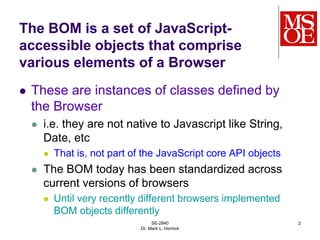
The BOM is a set of JavaScript-
accessible objects that comprise
various elements of a Browser
 These are instances of classes defined by
the Browser
 i.e. they are not native to Javascript like String,
Date, etc
 That is, not part of the JavaScript core API objects
 The BOM today has been standardized across
current versions of browsers
 Until very recently different browsers implemented
BOM objects differently
SE-2840
Dr. Mark L. Hornick
2
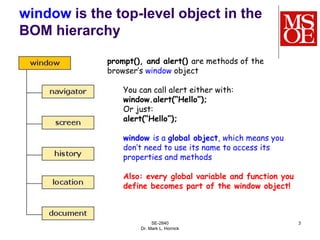
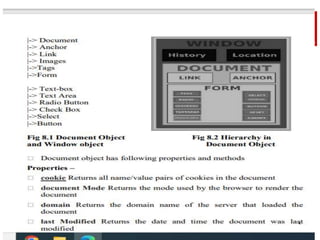
window is the top-level object in the
BOM hierarchy
SE-2840
Dr. Mark L. Hornick
3
prompt(), and alert() are methods of the
browser’s window object
You can call alert either with:
window.alert(“Hello”);
Or just:
alert(“Hello”);
window is a global object, which means you
don’t need to use its name to access its
properties and methods
Also: every global variable and function you
define becomes part of the window object!
4
SE-2840
Dr. Mark L. Hornick
5
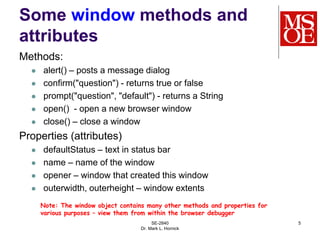
Some window methods and
attributes
Methods:
 alert() – posts a message dialog
 confirm("question") - returns true or false
 prompt("question", "default") - returns a String
 open() - open a new browser window
 close() – close a window
Properties (attributes)
 defaultStatus – text in status bar
 name – name of the window
 opener – window that created this window
 outerwidth, outerheight – window extents
Note: The window object contains many other methods and properties for
various purposes – view them from within the browser debugger
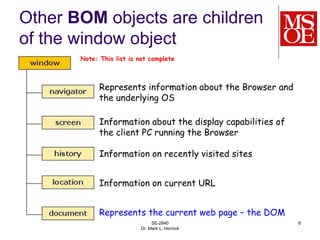
Other BOM objects are children
of the window object
SE-2840
Dr. Mark L. Hornick
6
Represents information about the Browser and
the underlying OS
Information about the display capabilities of
the client PC running the Browser
Information on recently visited sites
Information on current URL
Represents the current web page – the DOM
Note: This list is not complete
SE-2840
Dr. Mark L. Hornick
7
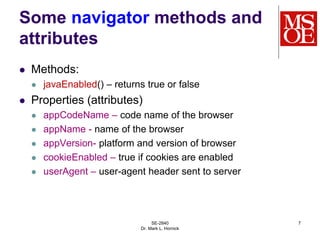
Some navigator methods and
attributes
 Methods:
 javaEnabled() – returns true or false
 Properties (attributes)
 appCodeName – code name of the browser
 appName - name of the browser
 appVersion- platform and version of browser
 cookieEnabled – true if cookies are enabled
 userAgent – user-agent header sent to server
SE-2840
Dr. Mark L. Hornick
8
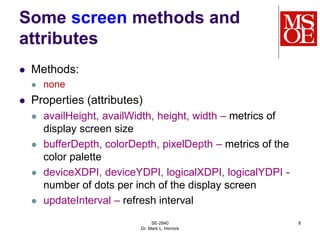
Some screen methods and
attributes
 Methods:
 none
 Properties (attributes)
 availHeight, availWidth, height, width – metrics of
display screen size
 bufferDepth, colorDepth, pixelDepth – metrics of the
color palette
 deviceXDPI, deviceYDPI, logicalXDPI, logicalYDPI -
number of dots per inch of the display screen
 updateInterval – refresh interval
SE-2840
Dr. Mark L. Hornick
9
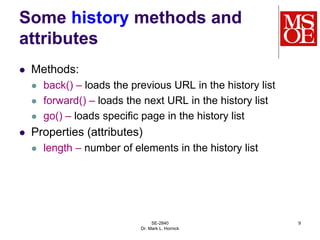
Some history methods and
attributes
 Methods:
 back() – loads the previous URL in the history list
 forward() – loads the next URL in the history list
 go() – loads specific page in the history list
 Properties (attributes)
 length – number of elements in the history list
SE-2840
Dr. Mark L. Hornick
10
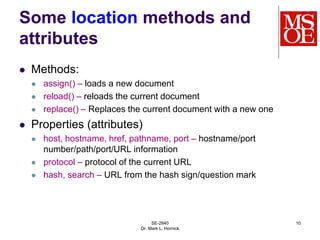
Some location methods and
attributes
 Methods:
 assign() – loads a new document
 reload() – reloads the current document
 replace() – Replaces the current document with a new one
 Properties (attributes)
 host, hostname, href, pathname, port – hostname/port
number/path/port/URL information
 protocol – protocol of the current URL
 hash, search – URL from the hash sign/question mark
Main headaches with BOM
Differences between browsers
 Implementations of respective BOM models and
the functions or attributes supported by the
respective objects
 Each new release of IE or Firefox has new
features supported
 Not every feature available in one browser will be
supported in the other
Encouraging news:
 IE and Firefox are complying with standards more
than ever
SE-2840
Dr. Mark L. Hornick
11

BOM.ppt

  • 1.
    The Browser ObjectModel (BOM) The API of JavaScript’s browser host environment SE-2840 Dr. Mark L. Hornick 1
  • 2.
    The BOM isa set of JavaScript- accessible objects that comprise various elements of a Browser  These are instances of classes defined by the Browser  i.e. they are not native to Javascript like String, Date, etc  That is, not part of the JavaScript core API objects  The BOM today has been standardized across current versions of browsers  Until very recently different browsers implemented BOM objects differently SE-2840 Dr. Mark L. Hornick 2
  • 3.
    window is thetop-level object in the BOM hierarchy SE-2840 Dr. Mark L. Hornick 3 prompt(), and alert() are methods of the browser’s window object You can call alert either with: window.alert(“Hello”); Or just: alert(“Hello”); window is a global object, which means you don’t need to use its name to access its properties and methods Also: every global variable and function you define becomes part of the window object!
  • 4.
  • 5.
    SE-2840 Dr. Mark L.Hornick 5 Some window methods and attributes Methods:  alert() – posts a message dialog  confirm("question") - returns true or false  prompt("question", "default") - returns a String  open() - open a new browser window  close() – close a window Properties (attributes)  defaultStatus – text in status bar  name – name of the window  opener – window that created this window  outerwidth, outerheight – window extents Note: The window object contains many other methods and properties for various purposes – view them from within the browser debugger
  • 6.
    Other BOM objectsare children of the window object SE-2840 Dr. Mark L. Hornick 6 Represents information about the Browser and the underlying OS Information about the display capabilities of the client PC running the Browser Information on recently visited sites Information on current URL Represents the current web page – the DOM Note: This list is not complete
  • 7.
    SE-2840 Dr. Mark L.Hornick 7 Some navigator methods and attributes  Methods:  javaEnabled() – returns true or false  Properties (attributes)  appCodeName – code name of the browser  appName - name of the browser  appVersion- platform and version of browser  cookieEnabled – true if cookies are enabled  userAgent – user-agent header sent to server
  • 8.
    SE-2840 Dr. Mark L.Hornick 8 Some screen methods and attributes  Methods:  none  Properties (attributes)  availHeight, availWidth, height, width – metrics of display screen size  bufferDepth, colorDepth, pixelDepth – metrics of the color palette  deviceXDPI, deviceYDPI, logicalXDPI, logicalYDPI - number of dots per inch of the display screen  updateInterval – refresh interval
  • 9.
    SE-2840 Dr. Mark L.Hornick 9 Some history methods and attributes  Methods:  back() – loads the previous URL in the history list  forward() – loads the next URL in the history list  go() – loads specific page in the history list  Properties (attributes)  length – number of elements in the history list
  • 10.
    SE-2840 Dr. Mark L.Hornick 10 Some location methods and attributes  Methods:  assign() – loads a new document  reload() – reloads the current document  replace() – Replaces the current document with a new one  Properties (attributes)  host, hostname, href, pathname, port – hostname/port number/path/port/URL information  protocol – protocol of the current URL  hash, search – URL from the hash sign/question mark
  • 11.
    Main headaches withBOM Differences between browsers  Implementations of respective BOM models and the functions or attributes supported by the respective objects  Each new release of IE or Firefox has new features supported  Not every feature available in one browser will be supported in the other Encouraging news:  IE and Firefox are complying with standards more than ever SE-2840 Dr. Mark L. Hornick 11