Chapter 7
IoT Physical Devices & Endpoints
Bahga & Madisetti, © 2015
Book website: http://www.internet-of-things-book.com
Outline
• Basic building blocks of an IoT Device
• Exemplary Device: Raspberry Pi
• Raspberry Pi interfaces
• Programming Raspberry Pi with Python
• Other IoT devices
Bahga & Madisetti, © 2015
Book website: http://www.internet-of-things-book.com
What is an IoT Device
• A "Thing" in Internet of Things (IoT) can be any object that has a
unique identifier and which can send/receive data (including user
data) over a network (e.g., smart phone, smart TV, computer,
refrigerator, car, etc. ).
• IoT devices are connected to the Internet and send information
about themselves or about their surroundings (e.g. information
sensed by the connected sensors) over a network (to other devices or
servers/storage) or allow actuation upon the physical
entities/environment around them remotely.
Bahga & Madisetti, © 2015
Book website: http://www.internet-of-things-book.com
IoT Device Examples
• A home automation device that allows remotely monitoring the
status of appliances and controlling the appliances.
• An industrial machine which sends information abouts its operation
and health monitoring data to a server.
• A car which sends information about its location to a cloud-based
service.
• A wireless-enabled wearable device that measures data about a
person such as the number of steps walked and sends the data to a
cloud-based service.
Bahga & Madisetti, © 2015
Book website: http://www.internet-of-things-book.com
Basic building blocks of an IoT Device
• Sensing
• Sensors can be either on-board the IoT device or attached to the device.
• Actuation
• IoT devices can have various types of actuators attached that allow taking
• actions upon the physical entities in the vicinity of the device.
• Communication
• Communication modules are responsible for sending collected data to other
devices or cloud-based servers/storage and receiving data from other devices
and commands from remote applications.
• Analysis & Processing
• Analysis and processing modules are responsible for making sense of the
collected data.
Bahga & Madisetti, © 2015
Book website: http://www.internet-of-things-book.com
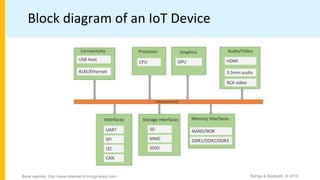
Block diagram of an IoT Device
Bahga & Madisetti, © 2015
Book website: http://www.internet-of-things-book.com
Exemplary Device: Raspberry Pi
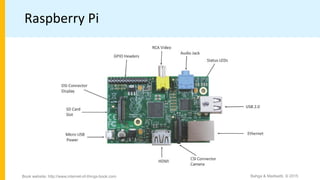
• Raspberry Pi is a low-cost mini-computer with the physical size of a
credit card.
• Raspberry Pi runs various flavors of Linux and can perform almost all
tasks that a normal desktop computer can do.
• Raspberry Pi also allows interfacing sensors and actuators through
the general purpose I/O pins.
• Since Raspberry Pi runs Linux operating system, it supports Python
"out of the box".
Bahga & Madisetti, © 2015
Book website: http://www.internet-of-things-book.com
Exemplary Device: Raspberry Pi
• Raspberry Pi is a low-cost mini-computer with the physical size of a
credit card.
• Raspberry Pi runs various flavors of Linux and can perform almost all
tasks that a normal desktop computer can do.
• Raspberry Pi also allows interfacing sensors and actuators through
the general purpose I/O pins.
• Since Raspberry Pi runs Linux operating system, it supports Python
"out of the box".
Bahga & Madisetti, © 2015
Book website: http://www.internet-of-things-book.com
Raspberry Pi
Bahga & Madisetti, © 2015
Book website: http://www.internet-of-things-book.com
Linux on Raspberry Pi
• Raspbian
• Raspbian Linux is a Debian Wheezy port optimized for Raspberry Pi.
• Arch
• Arch is an Arch Linux port for AMD devices.
• Pidora
• Pidora Linux is a Fedora Linux optimized for Raspberry Pi.
• RaspBMC
• RaspBMC is an XBMC media-center distribution for Raspberry Pi.
• OpenELEC
• OpenELEC is a fast and user-friendly XBMC media-center distribution.
• RISC OS
• RISC OS is a very fast and compact operating system.
Bahga & Madisetti, © 2015
Book website: http://www.internet-of-things-book.com
Raspberry Pi GPIO
Bahga & Madisetti, © 2015
Book website: http://www.internet-of-things-book.com
Raspberry Pi Interfaces
• Serial
• The serial interface on Raspberry Pi has receive (Rx) and transmit (Tx) pins
for communication with serial peripherals.
• SPI
• Serial Peripheral Interface (SPI) is a synchronous serial data protocol used
for communicating with one or more peripheral devices.
• I2C
• The I2C interface pins on Raspberry Pi allow you to connect hardware
modules. I2C interface allows synchronous data transfer with just two pins -
SDA (data line) and SCL (clock line).
Bahga & Madisetti, © 2015
Book website: http://www.internet-of-things-book.com
Raspberry Pi Example:
Interfacing LED and switch with Raspberry Pi
Bahga & Madisetti, © 2015
Book website: http://www.internet-of-things-book.com
from time import sleep
import RPi.GPIO as GPIO
GPIO.setmode(GPIO.BCM)
#Switch Pin
GPIO.setup(25, GPIO.IN)
#LED Pin
GPIO.setup(18, GPIO.OUT)
state=false
def toggleLED(pin):
state = not state
GPIO.output(pin, state)
while True:
try:
if (GPIO.input(25) == True):
toggleLED(pin)
sleep(.01)
except KeyboardInterrupt:
exit()
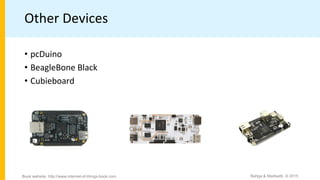
Other Devices
Bahga & Madisetti, © 2015
Book website: http://www.internet-of-things-book.com
• pcDuino
• BeagleBone Black
• Cubieboard

Chapter-7_raspberryPi.pdf

  • 1.
    Chapter 7 IoT PhysicalDevices & Endpoints Bahga & Madisetti, © 2015 Book website: http://www.internet-of-things-book.com
  • 2.
    Outline • Basic buildingblocks of an IoT Device • Exemplary Device: Raspberry Pi • Raspberry Pi interfaces • Programming Raspberry Pi with Python • Other IoT devices Bahga & Madisetti, © 2015 Book website: http://www.internet-of-things-book.com
  • 3.
    What is anIoT Device • A "Thing" in Internet of Things (IoT) can be any object that has a unique identifier and which can send/receive data (including user data) over a network (e.g., smart phone, smart TV, computer, refrigerator, car, etc. ). • IoT devices are connected to the Internet and send information about themselves or about their surroundings (e.g. information sensed by the connected sensors) over a network (to other devices or servers/storage) or allow actuation upon the physical entities/environment around them remotely. Bahga & Madisetti, © 2015 Book website: http://www.internet-of-things-book.com
  • 4.
    IoT Device Examples •A home automation device that allows remotely monitoring the status of appliances and controlling the appliances. • An industrial machine which sends information abouts its operation and health monitoring data to a server. • A car which sends information about its location to a cloud-based service. • A wireless-enabled wearable device that measures data about a person such as the number of steps walked and sends the data to a cloud-based service. Bahga & Madisetti, © 2015 Book website: http://www.internet-of-things-book.com
  • 5.
    Basic building blocksof an IoT Device • Sensing • Sensors can be either on-board the IoT device or attached to the device. • Actuation • IoT devices can have various types of actuators attached that allow taking • actions upon the physical entities in the vicinity of the device. • Communication • Communication modules are responsible for sending collected data to other devices or cloud-based servers/storage and receiving data from other devices and commands from remote applications. • Analysis & Processing • Analysis and processing modules are responsible for making sense of the collected data. Bahga & Madisetti, © 2015 Book website: http://www.internet-of-things-book.com
  • 6.
    Block diagram ofan IoT Device Bahga & Madisetti, © 2015 Book website: http://www.internet-of-things-book.com
  • 7.
    Exemplary Device: RaspberryPi • Raspberry Pi is a low-cost mini-computer with the physical size of a credit card. • Raspberry Pi runs various flavors of Linux and can perform almost all tasks that a normal desktop computer can do. • Raspberry Pi also allows interfacing sensors and actuators through the general purpose I/O pins. • Since Raspberry Pi runs Linux operating system, it supports Python "out of the box". Bahga & Madisetti, © 2015 Book website: http://www.internet-of-things-book.com
  • 8.
    Exemplary Device: RaspberryPi • Raspberry Pi is a low-cost mini-computer with the physical size of a credit card. • Raspberry Pi runs various flavors of Linux and can perform almost all tasks that a normal desktop computer can do. • Raspberry Pi also allows interfacing sensors and actuators through the general purpose I/O pins. • Since Raspberry Pi runs Linux operating system, it supports Python "out of the box". Bahga & Madisetti, © 2015 Book website: http://www.internet-of-things-book.com
  • 9.
    Raspberry Pi Bahga &Madisetti, © 2015 Book website: http://www.internet-of-things-book.com
  • 10.
    Linux on RaspberryPi • Raspbian • Raspbian Linux is a Debian Wheezy port optimized for Raspberry Pi. • Arch • Arch is an Arch Linux port for AMD devices. • Pidora • Pidora Linux is a Fedora Linux optimized for Raspberry Pi. • RaspBMC • RaspBMC is an XBMC media-center distribution for Raspberry Pi. • OpenELEC • OpenELEC is a fast and user-friendly XBMC media-center distribution. • RISC OS • RISC OS is a very fast and compact operating system. Bahga & Madisetti, © 2015 Book website: http://www.internet-of-things-book.com
  • 11.
    Raspberry Pi GPIO Bahga& Madisetti, © 2015 Book website: http://www.internet-of-things-book.com
  • 12.
    Raspberry Pi Interfaces •Serial • The serial interface on Raspberry Pi has receive (Rx) and transmit (Tx) pins for communication with serial peripherals. • SPI • Serial Peripheral Interface (SPI) is a synchronous serial data protocol used for communicating with one or more peripheral devices. • I2C • The I2C interface pins on Raspberry Pi allow you to connect hardware modules. I2C interface allows synchronous data transfer with just two pins - SDA (data line) and SCL (clock line). Bahga & Madisetti, © 2015 Book website: http://www.internet-of-things-book.com
  • 13.
    Raspberry Pi Example: InterfacingLED and switch with Raspberry Pi Bahga & Madisetti, © 2015 Book website: http://www.internet-of-things-book.com from time import sleep import RPi.GPIO as GPIO GPIO.setmode(GPIO.BCM) #Switch Pin GPIO.setup(25, GPIO.IN) #LED Pin GPIO.setup(18, GPIO.OUT) state=false def toggleLED(pin): state = not state GPIO.output(pin, state) while True: try: if (GPIO.input(25) == True): toggleLED(pin) sleep(.01) except KeyboardInterrupt: exit()
  • 14.
    Other Devices Bahga &Madisetti, © 2015 Book website: http://www.internet-of-things-book.com • pcDuino • BeagleBone Black • Cubieboard