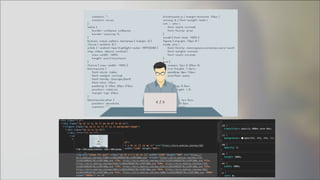
模糊也是一種美
Kewang & SimonAllen
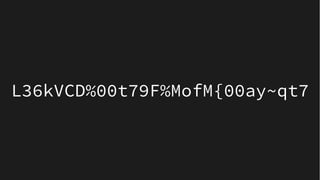
L36kVCD%00t79F%MofM{00ay~qt7
Kewang
● 王慕羣 Kewang
● Java / JavaScript
● HBase / PostgreSQL / MongoDB / ElasticSearch
● Git / DevOps
●
熱愛開源
LinkedinLinkedin kewangtwkewangtw
SlideShareSlideShare kewangkewang
GmailGmail cpckewangcpckewang
FacebookFacebook Kewang 的資訊進化論Kewang 的資訊進化論
devopsday taipeidevopsday taipei '17'17
hadoopconhadoopcon '14 '15'14 '15
mopconmopcon '14'14
jcconfjcconf '16 '17 '18'16 '17 '18
modernwebmodernweb '18 '19'18 '19
GitHubGitHub kewangkewang
FunlidayFunliday kewangkewang
6
首先
7
要感謝 gslin
8
9
Agenda
● Kewang (server)
– What is BlurHash ?
– How to upload photo ?
– BlurHash encode
10
Agenda
● Kewang (server)
– What is BlurHash ?
– How to upload photo ?
– BlurHash encode
● SimonAllen (client)
– Lazy loading
– React component
– BlurHash decode
11
DEMO
12
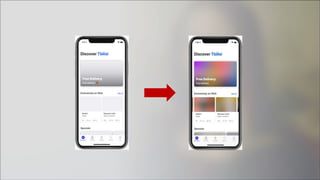
What is BlurHash ?
13
What is BlurHash ?
14
What is BlurHash ?
● 別讓你的 designer 笑你笨
15
What is BlurHash ?
● 別讓你的 designer 笑你笨
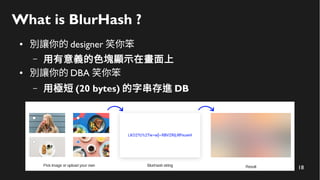
– 用有意義的色塊顯示在畫面上
16
What is BlurHash ?
● 別讓你的 designer 笑你笨
– 用有意義的色塊顯示在畫面上
● 別讓你的 DBA 笑你笨
17
What is BlurHash ?
● 別讓你的 designer 笑你笨
– 用有意義的色塊顯示在畫面上
● 別讓你的 DBA 笑你笨
– 用極短 (20 bytes) 的字串存進 DB
18
What is BlurHash ?
● 別讓你的 designer 笑你笨
– 用有意義的色塊顯示在畫面上
● 別讓你的 DBA 笑你笨
– 用極短 (20 bytes) 的字串存進 DB
19
How to upload photo ?
20
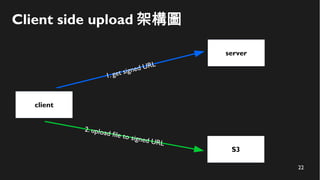
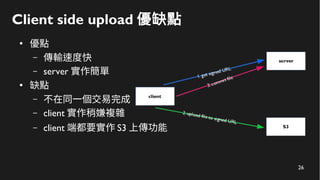
Client side upload 架構圖
client
server
S3
21
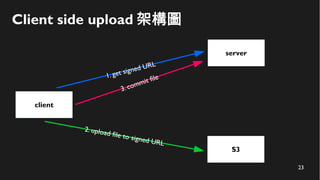
Client side upload 架構圖
client
server
S3
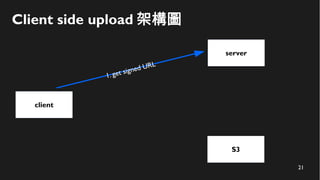
1. get signed URL
22
Client side upload 架構圖
client
server
S3
1. get signed URL
2. upload file to signed URL
23
Client side upload 架構圖
client
server
S3
1. get signed URL
2. upload file to signed URL
3. commit file
24
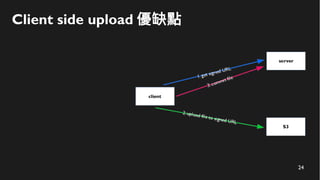
Client side upload 優缺點
25
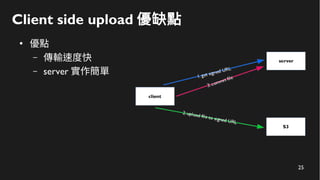
Client side upload 優缺點
●
優點
– 傳輸速度快
– server 實作簡單
26
Client side upload 優缺點
●
優點
– 傳輸速度快
– server 實作簡單
●
缺點
– 不在同一個交易完成
– client 實作稍嫌複雜
– client 端都要實作 S3 上傳功能
27
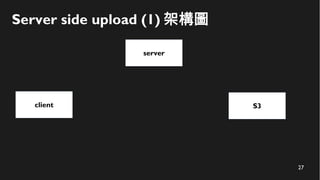
Server side upload (1) 架構圖
client
server
S3
28
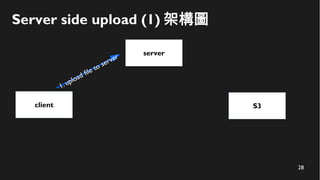
Server side upload (1) 架構圖
client
server
S3
1. upload file to server
29
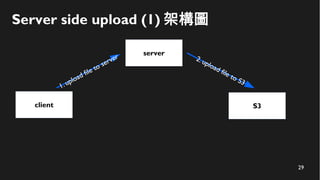
Server side upload (1) 架構圖
client
server
S3
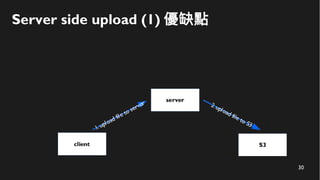
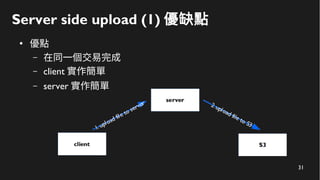
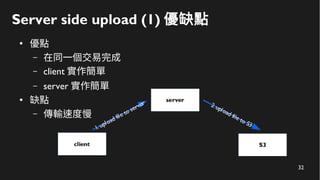
1. upload file to server 2. upload file to S3
30
Server side upload (1) 優缺點
31
Server side upload (1) 優缺點
●
優點
– 在同一個交易完成
– client 實作簡單
– server 實作簡單
32
Server side upload (1) 優缺點
●
優點
– 在同一個交易完成
– client 實作簡單
– server 實作簡單
●
缺點
– 傳輸速度慢
33
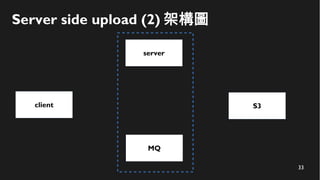
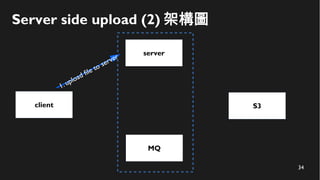
Server side upload (2) 架構圖
client
server
S3
MQ
34
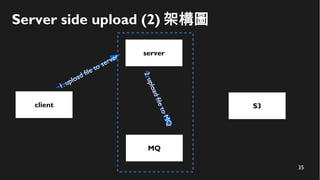
Server side upload (2) 架構圖
client
server
S3
1. upload file to server
MQ
35
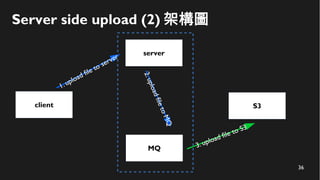
Server side upload (2) 架構圖
client
server
S3
1. upload file to server
2.uploadfiletoMQ
MQ
36
Server side upload (2) 架構圖
client
server
S3
1. upload file to server
2.uploadfiletoMQ
MQ 3. upload file to S3
37
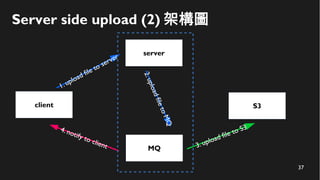
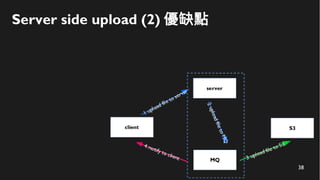
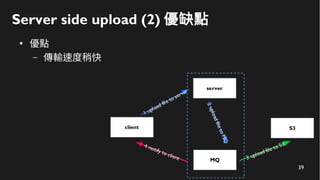
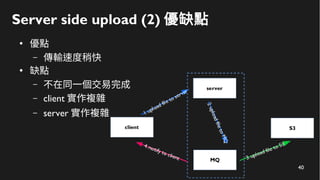
Server side upload (2) 架構圖
client
server
1. upload file to server
2.uploadfiletoMQ
MQ 3. upload file to S34. notify to client
S3
38
Server side upload (2) 優缺點
39
Server side upload (2) 優缺點
●
優點
– 傳輸速度稍快
40
Server side upload (2) 優缺點
●
優點
– 傳輸速度稍快
●
缺點
– 不在同一個交易完成
– client 實作複雜
– server 實作複雜
41
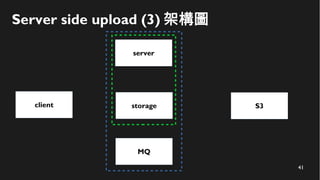
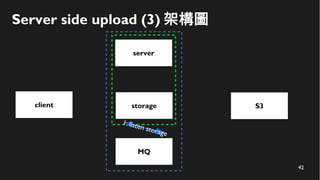
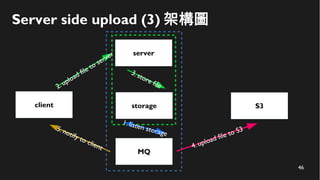
Server side upload (3) 架構圖
client
server
S3
MQ
storage
42
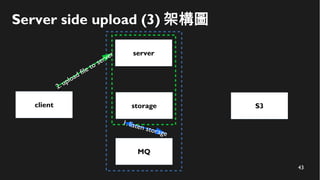
Server side upload (3) 架構圖
client
server
S3
MQ
storage
1. listen storage
43
Server side upload (3) 架構圖
client
server
S3
MQ
storage
1. listen storage
2.upload file to server
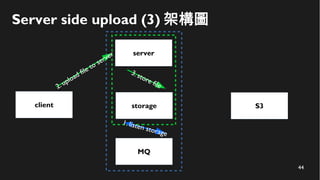
44
Server side upload (3) 架構圖
client
server
S3
MQ
storage
3. store file
1. listen storage
2.upload file to server
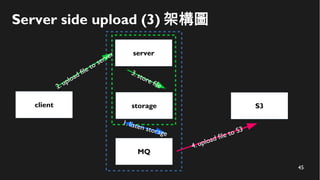
45
Server side upload (3) 架構圖
client
server
S3
MQ
4. upload file to S3
storage
3. store file
1. listen storage
2.upload file to server
46
Server side upload (3) 架構圖
client
server
S3
MQ
4. upload file to S35. notify to client
storage
3. store file
1. listen storage
2.upload file to server
47
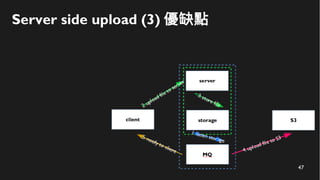
Server side upload (3) 優缺點
48
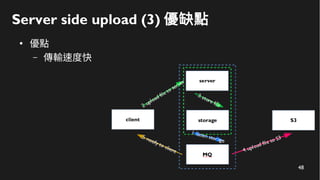
Server side upload (3) 優缺點
●
優點
– 傳輸速度快
49
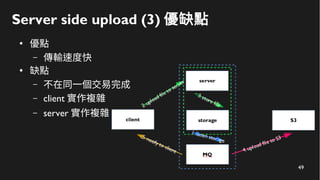
Server side upload (3) 優缺點
●
優點
– 傳輸速度快
●
缺點
– 不在同一個交易完成
– client 實作複雜
– server 實作複雜
50
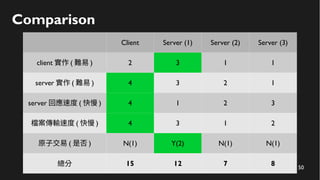
Comparison
Client Server (1) Server (2) Server (3)
client 實作 ( 難易 ) 2 3 1 1
server 實作 ( 難易 ) 4 3 2 1
server 回應速度 ( 快慢 ) 4 1 2 3
檔案傳輸速度 ( 快慢 ) 4 3 1 2
原子交易 ( 是否 ) N(1) Y(2) N(1) N(1)
總分 15 12 7 8
51
Choose one ?
52
Choose one ?
It's up to you.
53
BlurHash encode
54
55
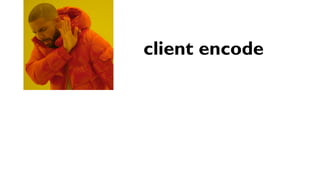
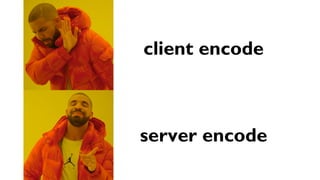
client encode
56
client encode
server encode
57
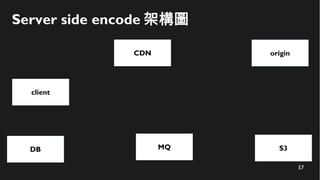
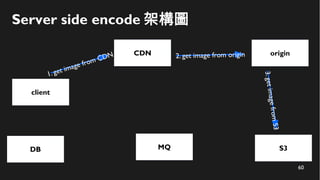
Server side encode 架構圖
client
CDN
S3MQ
origin
DB
58
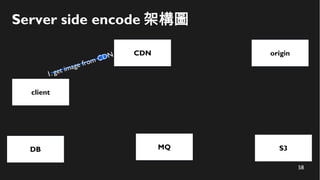
Server side encode 架構圖
client
CDN
S3
1. get image from CDN
MQ
origin
DB
59
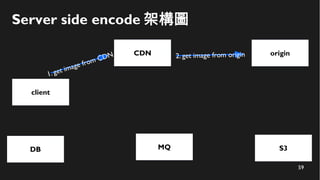
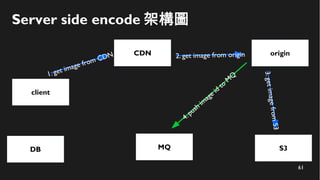
Server side encode 架構圖
client
CDN
S3
1. get image from CDN
MQ
origin2. get image from origin
DB
60
Server side encode 架構圖
client
CDN
S3
1. get image from CDN
MQ
origin2. get image from origin
3.getimagefromS3
DB
61
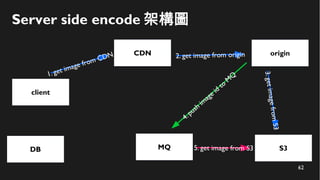
Server side encode 架構圖
client
CDN
S3
1. get image from CDN
MQ
origin2. get image from origin
4.push
im
age id
to
M
Q
3.getimagefromS3
DB
62
Server side encode 架構圖
client
CDN
S3
1. get image from CDN
MQ 5. get image from S3
origin2. get image from origin
4.push
im
age id
to
M
Q
3.getimagefromS3
DB
63
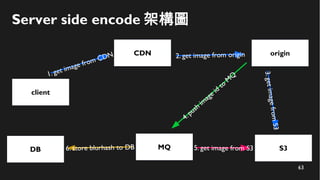
Server side encode 架構圖
client
CDN
S3
1. get image from CDN
MQ 5. get image from S36. store blurhash to DB
origin2. get image from origin
4.push
im
age id
to
M
Q
3.getimagefromS3
DB
64
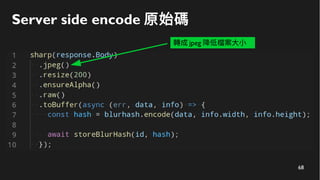
Server side encode 原始碼
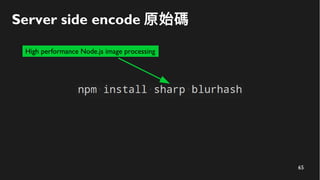
65
Server side encode 原始碼
High performance Node.js image processing
66
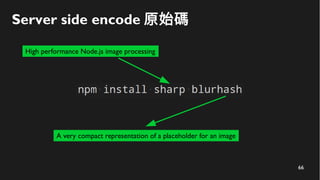
Server side encode 原始碼
High performance Node.js image processing
A very compact representation of a placeholder for an image
67
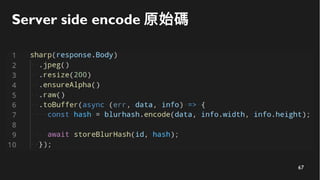
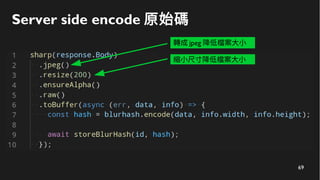
Server side encode 原始碼
68
Server side encode 原始碼
轉成 jpeg 降低檔案大小
69
Server side encode 原始碼
轉成 jpeg 降低檔案大小
縮小尺寸降低檔案大小
70
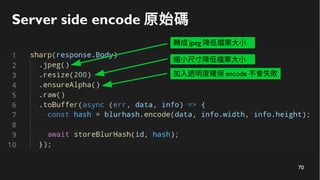
Server side encode 原始碼
轉成 jpeg 降低檔案大小
縮小尺寸降低檔案大小
加入透明度確保 encode 不會失敗
71
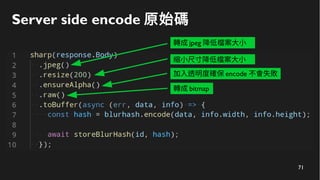
Server side encode 原始碼
轉成 jpeg 降低檔案大小
縮小尺寸降低檔案大小
加入透明度確保 encode 不會失敗
轉成 bitmap
72
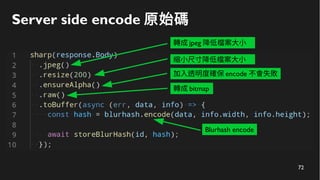
Server side encode 原始碼
轉成 jpeg 降低檔案大小
縮小尺寸降低檔案大小
加入透明度確保 encode 不會失敗
轉成 bitmap
Blurhash encode
73
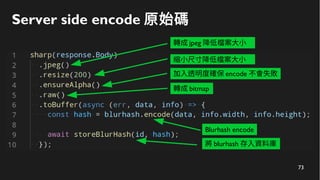
Server side encode 原始碼
轉成 jpeg 降低檔案大小
縮小尺寸降低檔案大小
加入透明度確保 encode 不會失敗
轉成 bitmap
Blurhash encode
將 blurhash 存入資料庫
74
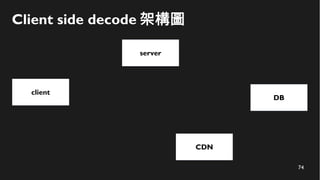
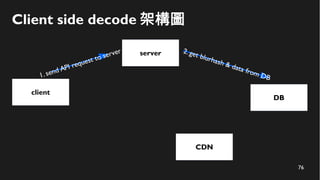
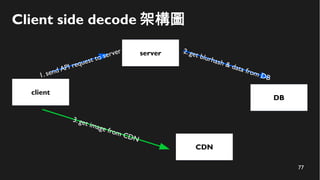
Client side decode 架構圖
client
server
CDN
DB
75
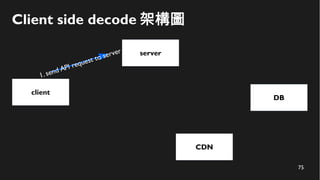
Client side decode 架構圖
client
server
1. send API request to server
CDN
DB
76
Client side decode 架構圖
client
server
1. send API request to server
CDN
DB
2. get blurhash & data from DB
77
Client side decode 架構圖
client
server
1. send API request to server
CDN
DB
2. get blurhash & data from DB
3. get image from CDN
78
後端結束換前端
模糊也是一種美
Funliday | SimonAllen, Kewang
SimonAllen
• React.js、Vue.js 、Node.js
• Funliday - Front end Developer
• Upper 小聚點共同工作空間 - 進駐成員
談到 blurhash 前
談到 blurhash 前
一定要先談談 img lazy load
什麼是 img lazy load ?
什麼是 img lazy load ?
• 延緩載入圖片的時機
• 僅載當下瀏覽器畫面所需(可見)圖片
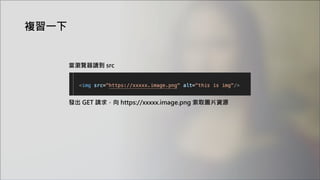
發出 GET 請求,向 https://xxxxx.image.png 索取圖片資源
複習一下
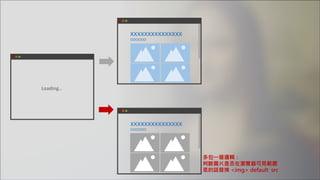
當瀏覽器讀到 src
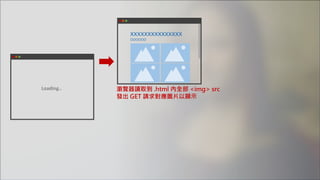
Loading..
xxxxxxxxxxxxxxx
OOOOOO
瀏覽器讀取到 .html 內全部 <img> src
發出 GET 請求對應圖片以顯示
xxxxxxxxxxxxxxx
OOOOOO
Loading..
xxxxxxxxxxxxxxx
OOOOOO
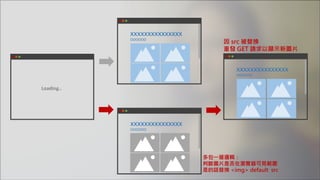
多包一層邏輯:
判斷圖片是否在瀏覽器可見範圍
是的話替換 <img> default src
xxxxxxxxxxxxxxx
OOOOOO
xxxxxxxxxxxxxxx
OOOOOO
Loading..
xxxxxxxxxxxxxxx
OOOOOO
多包一層邏輯:
判斷圖片是否在瀏覽器可見範圍
是的話替換 <img> default src
因 src 被替換
重發 GET 請求以顯示新圖片
xxxxxxxxxxxxxxx
OOOOOO
xxxxxxxxxxxxxxx
OOOOOO
xxxxxxxxxxxxxxx
OOOOOO
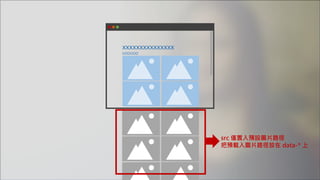
src 僅置入預設圖片路徑
把預載入圖片路徑放在 data-* 上
xxxxxxxxxxxxxxx
OOOOOO
xxxxxxxxxxxxxxx
OOOOOO
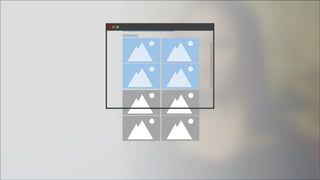
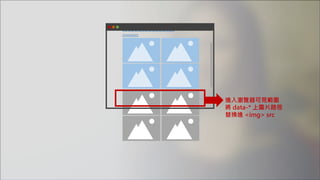
進入瀏覽器可見範圍
將 data-* 上圖片路徑
替換進 <img> src
xxxxxxxxxxxxxxx
OOOOOO
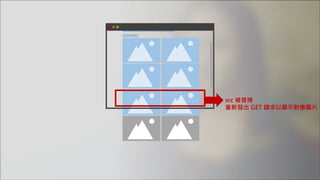
src 被替換
重新發出 GET 請求以顯示對應圖片
為什麼要 img lazy load ?
• 減少頻寬的浪費
• 提升瀏覽器載入時間
• 提升使用者體驗
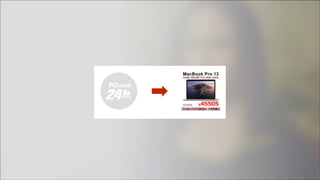
PCHOME
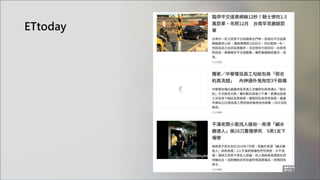
ETtoday
Medium
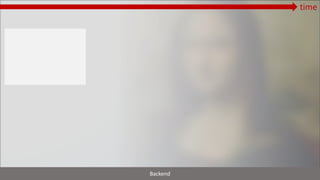
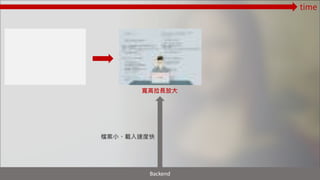
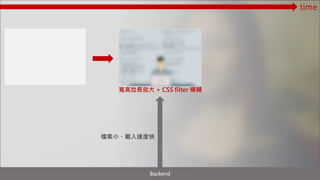
灰底色塊 模糊圖片 實際圖片
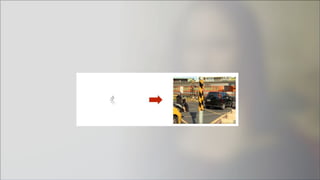
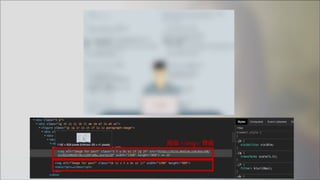
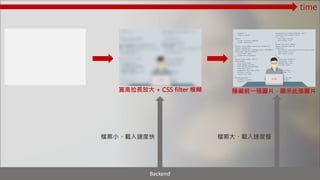
兩個 <img> 標籤
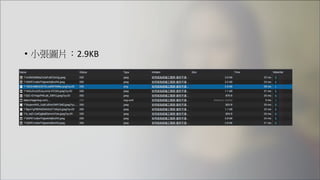
• 小張圖片:2.9KB
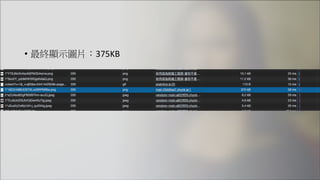
• 最終顯示圖片:375KB
time
Backend
寬高拉長放大
檔案小、載入速度快
time
Backend
寬高拉長放大 + CSS filter 模糊
檔案小、載入速度快
time
Backend
寬高拉長放大 + CSS filter 模糊
檔案小、載入速度快
time
Backend
檔案大、載入速度慢
隱藏前一張圖片,顯示此張圖片
如何實作 img lazy load
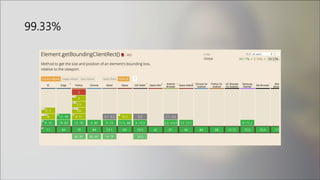
1. scroll event + getBoundingClientRect API
• 優點
瀏覽器支援度好、IE 支援度好
• 缺點
需要計算
不斷監聽捲動事件、效能較差
99.33%
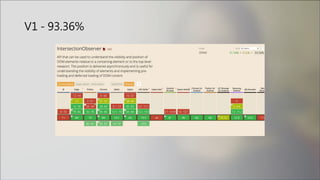
2. Intersection Observer API - V1
• 優點
API 用法簡易
沒有 scroll event + getBoundingClientRect 的效能問題
• 缺點
無法支援 IE…但是有 polyfill 可以擴充
V1 - 93.36%
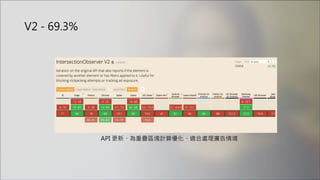
V2 - 69.3%
API 更新、為重疊區塊計算優化、適合處理廣告情境
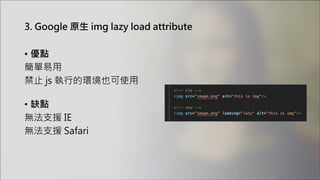
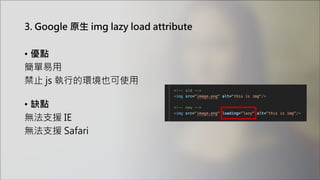
3. Google 原生 img lazy load attribute
• 優點
簡單易用
禁止 js 執行的環境也可使用
• 缺點
無法支援 IE
無法支援 Safari
3. Google 原生 img lazy load attribute
• 優點
簡單易用
禁止 js 執行的環境也可使用
• 缺點
無法支援 IE
無法支援 Safari
69.89%
可以期待
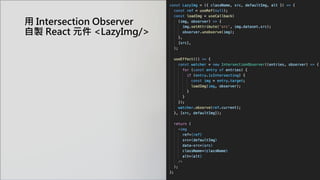
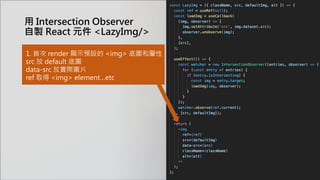
用 Intersection Observer
自製 React 元件 <LazyImg/>
1. 首次 render 顯示預設的 <img> 底圖和屬性
src 放 default 底圖
data-src 放實際圖片
ref 取得 <img> element…etc
用 Intersection Observer
自製 React 元件 <LazyImg/>
用 Intersection Observer
自製 React 元件 <LazyImg/>
1. 首次 render 顯示預設的 <img> 底圖和屬性
src 放 default 底圖
data-src 放實際圖片
ref 取得 <img> element…etc
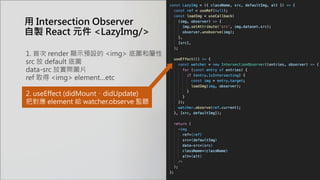
2. useEffect (didMount、didUpdate)
把對應 element 給 watcher.observe 監聽
用 Intersection Observer
自製 React 元件 <LazyImg/>
1. 首次 render 顯示預設的 <img> 底圖和屬性
src 放 default 底圖
data-src 放實際圖片
ref 取得 <img> element…etc
2. useEffect (didMount、didUpdate)
把對應 element 給 watcher.observe 監聽
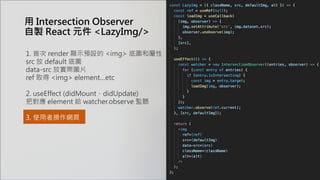
3. 使用者操作網頁
用 Intersection Observer
自製 React 元件 <LazyImg/>
1. 首次 render 顯示預設的 <img> 底圖和屬性
src 放 default 底圖
data-src 放實際圖片
ref 取得 <img> element…etc
2. useEffect (didMount、didUpdate)
把對應 element 給 watcher.observe 監聽
3. 使用者操作網頁
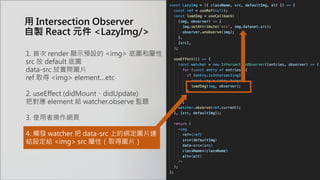
4. 觸發 watcher 把 data-src 上的綁定圖片連
結設定給 <img> src 屬性(取得圖片)
1. 首次 render 顯示預設的 <img> 底圖和屬性
src 放 default 底圖
data-src 放實際圖片
ref 取得 <img> element…etc
2. useEffect (didMount、didUpdate)
把對應 element 給 watcher.observe 監聽
3. 使用者操作網頁
4. 觸發 watcher 把 data-src 上的綁定圖片連
結設定給 <img> src 屬性(取得圖片)
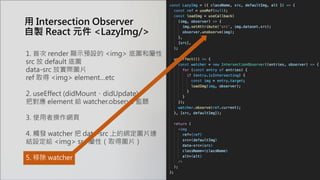
5. 移除 watcher
用 Intersection Observer
自製 React 元件 <LazyImg/>
拉回正題
為什麼要用 Blurhash ?
「讓你家的設計師和後端工程師開心一點 」
出自 blurhash 官網
• Does your designer cry every time you load their beautifully designed
screen, and it is full of empty boxes because all the images have not
loaded yet?
• Does your database engineer cry when you want to solve this by trying
to cram little thumbnail images into your data to show as placeholders?
「讓你家的設計師和後端工程師開心一點 」
• Does your designer cry every time you load their beautifully designed
screen, and it is full of empty boxes because all the images have not
loaded yet?
• Does your database engineer cry when you want to solve this by trying
to cram little thumbnail images into your data to show as placeholders?
單調:載入圖片時不要空白
麻煩:產縮小底圖給前端填充
出自 blurhash 官網

如何解析 Blurhash 圖片
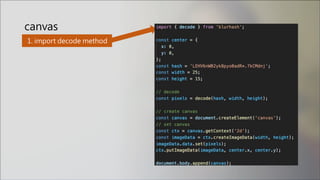
npm install --save blurhash
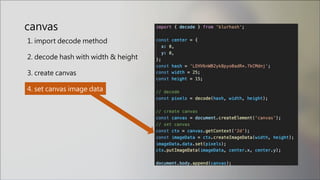
1. import decode method
canvas
canvas
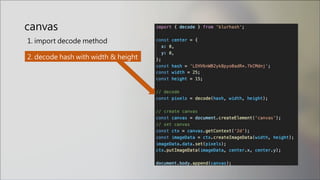
1. import decode method
2. decode hash with width & height
canvas
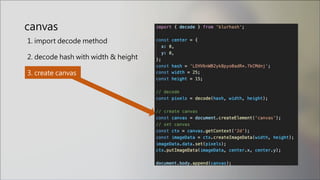
1. import decode method
2. decode hash with width & height
3. create canvas
1. import decode method
2. decode hash with width & height
3. create canvas
4. set canvas image data
canvas
canvas
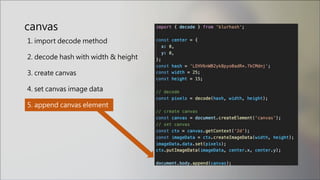
1. import decode method
2. decode hash with width & height
3. create canvas
4. set canvas image data
5. append canvas element
canvas
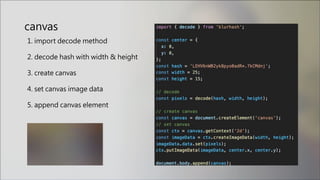
1. import decode method
2. decode hash with width & height
3. create canvas
4. set canvas image data
5. append canvas element
雷點
• 寬高參數時,注意小數點
• 寬高給小一點,建議不超過 40
不想 render<canvas/> 到頁面上?
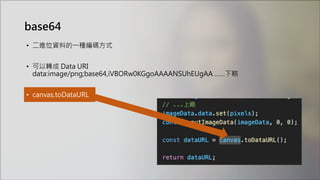
轉 blob 或 base64
• 二進位資料的一種編碼方式
base64
• 二進位資料的一種編碼方式
• 可以轉成 Data URI
data:image/png;base64,iVBORw0KGgoAAAANSUhEUgAA ……下略
base64
• 二進位資料的一種編碼方式
• 可以轉成 Data URI
data:image/png;base64,iVBORw0KGgoAAAANSUhEUgAA ……下略
• canvas.toDataURL
base64
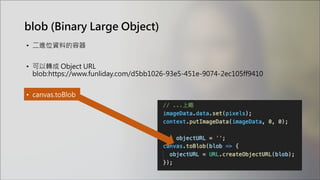
blob (Binary Large Object)
• 二進位資料的容器
blob (Binary Large Object)
• 二進位資料的容器
• 可以轉成 Object URL
blob:https://www.funliday.com/d5bb1026-93e5-451e-9074-2ec105ff9410
blob (Binary Large Object)
• 二進位資料的容器
• 可以轉成 Object URL
blob:https://www.funliday.com/d5bb1026-93e5-451e-9074-2ec105ff9410
• canvas.toBlob
blob (Binary Large Object)
• 二進位資料的容器
• 可以轉成 Object URL
blob:https://www.funliday.com/d5bb1026-93e5-451e-9074-2ec105ff9410
• canvas.toBlob
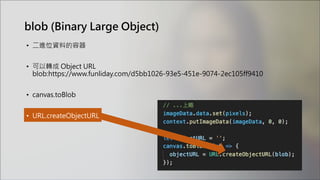
• URL.createObjectURL
blob (Binary Large Object)
• 二進位資料的容器
• 可以轉成 Object URL
blob:https://www.funliday.com/d5bb1026-93e5-451e-9074-2ec105ff9410
• canvas.toBlob
• URL.createObjectURL
• 視情況 URL.revokeObjectURL
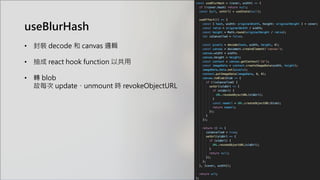
useBlurHash
• 封裝 decode 和 canvas 邏輯
• 抽成 react hook function 以共用
• 轉 blob
故每次 update、unmount 時 revokeObjectURL
預期目標
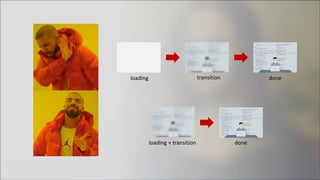
img lazy load 用與不用 blurhash 的效果是?
transition
loading + transition
loading
done
done
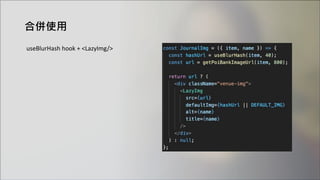
合併使用
useBlurHash hook + <LazyImg/>
最終效果
• 優點
節省一次圖片 GET request
增加使用者體驗
• 缺點
blurhash 模糊相對 Web CSS filter 模糊不夠細緻
多花費 client 算力 (自行斟酌)
我
參考資料
• blurhash github
https://github.com/woltapp/blurhash
• sharp
https://sharp.pixelplumbing.com/
• react-blurhash issues
https://github.com/woltapp/react-blurhash/issues/3
• Hacker News
https://news.ycombinator.com/item?id=22374825
• Native image lazy-loading for the web
https://web.dev/native-lazy-loading/
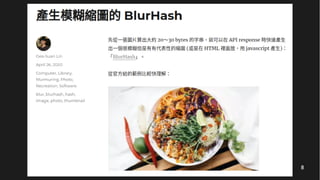
• 產生模糊縮圖的 BlurHash - Gea-Suan Lin's BLOG
https://reurl.cc/yZ2DNM
• HTML5筆記:Object URL - 黑暗執行緒
https://blog.darkthread.net/blog/html5-object-url/
• [WebAPIs] Blob, File 和 FileReader - pjchender
https://pjchender.github.io/2018/02/06/webapis-blob-file-%E5%92%8C-filereader/
END
Funliday
• 最棒的旅遊規劃工具、社群
• 支援 APP、Web 跨平台操作
• 評分 4.5 顆星以上
• 合計 100 萬次下載、160萬筆自建行程
• 自有景點資料庫

模糊也是一種美 - 從 BlurHash 探討前後端上傳圖片架構