WIDGETS FOR THE S60 PLATFORM Allan Bezerra Pesquisador  Senior Internet & Services Platform – INdT/Forum Nokia © 2008  Nokia   V1-Filename.ppt / YYYY-MM-DD / Initials
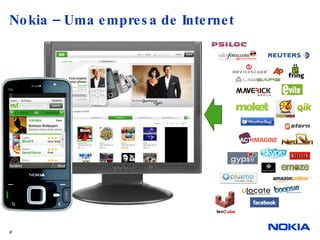
Nokia – Uma empresa de Internet ten Cube
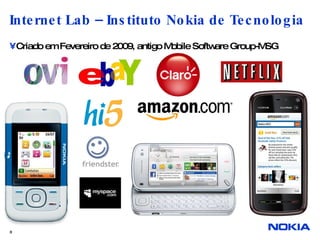
Internet Lab – Instituto Nokia de Tecnologia Criado em Fevereiro de 2009, antigo Mobile Software Group-MSG
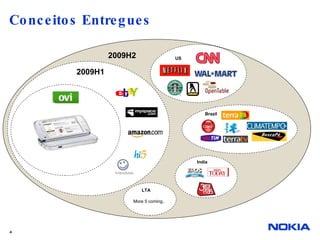
Conceitos Entregues LTA 2009H2 More 5 coming.. 2009H1 India US Brazil
INTRODUCTION
WRT Widget Definition Standalone Web applications running without a browser application; Behaviour defined using JavaScript™–no compilation or linking needed; Consists of a few files defining appearance (icon), layout, and behavior; Accesses a URL like a normal Web application to get data from the Web serve;
S60 Web Runtime A library providing APIs for widget developers Menu creation URL access Data download from URL Access to some device properties Access to several S60 Platform Services (since WRT 1.1) Based on open-source Web technologies Empowered by Web Browser for S60 Several widgets can be executed at the same time Due to physical limitations of the screen, only a single widget is on the foreground
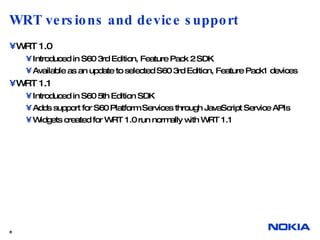
WRT versions and device support WRT 1.0 Introduced in S60 3rd Edition, Feature Pack 2 SDK Available as an update to selected S60 3rd Edition, Feature Pack1 devices WRT 1.1 Introduced in S60 5th Edition SDK Adds support for S60 Platform Services through JavaScript Service APIs Widgets created for WRT 1.0 run normally with WRT 1.1
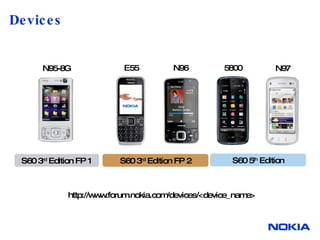
Devices S60 3 rd  Edition FP 2 S60 5 th  Edition N97 5800 N96 E55 S60 3 rd  Edition FP 1 N95-8G http://www.forum.nokia.com/devices/<device_name>
WIDGET PROGRAMMING BASICS
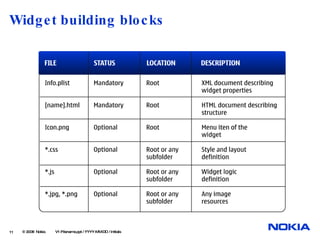
Widget building blocks  © 2008  Nokia   V1-Filename.ppt / YYYY-MM-DD / Initials
Deployment At least two mandatory files (manifest and main HTML files) are required Files are packed into a .zip package The package extension is changed to .wgz The package is transferred to the device with some of the following methods Bluetooth, e-mail, or other communication method USB cable or memory card Web Browser for S60 By double-clicking it on PC after connecting the device with PC Suite  © 2008  Nokia   V1-Filename.ppt / YYYY-MM-DD / Initials
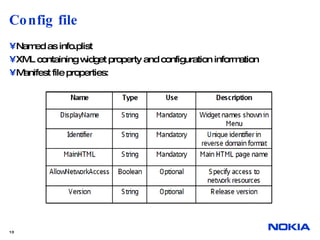
Config file Named as info.plist XML containing widget property and configuration information Manifest file properties:
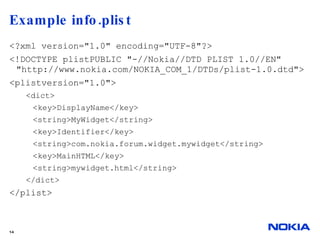
Example info.plist  <?xml version=&quot;1.0&quot; encoding=&quot;UTF-8&quot;?> <!DOCTYPE plistPUBLIC &quot;-//Nokia//DTD PLIST 1.0//EN&quot; &quot;http://www.nokia.com/NOKIA_COM_1/DTDs/plist-1.0.dtd&quot;> <plistversion=&quot;1.0&quot;> <dict> <key>DisplayName</key> <string>MyWidget</string> <key>Identifier</key> <string>com.nokia.forum.widget.mywidget</string> <key>MainHTML</key> <string>mywidget.html</string> </dict> </plist>
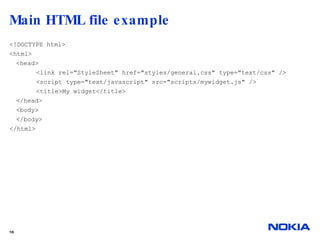
Main HTML file  There Name must match the name defined in info.plist properties Contains information for structuring a widget Define the document inside <html> tags External style and code files are referenced inside <style> and <script> tags in the head part of the HTML file Body part defines widget’s UI structure
Main HTML file example  <!DOCTYPE html> <html> <head> <link rel=&quot;StyleSheet&quot; href=&quot;styles/general.css&quot; type=&quot;text/css&quot; /> <script type=&quot;text/javascript&quot; src=&quot;scripts/mywidget.js&quot; /> <title>My widget</title> </head> <body>  </body> </html>
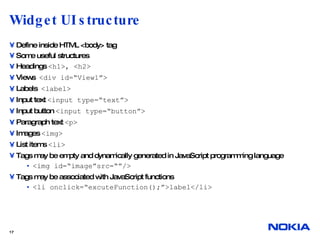
Widget UI structure  Define inside HTML <body> tag Some useful structures Headings  <h1>, <h2> Views  <div id=“View1”> Labels  <label> Input text  <input type=“text”> Input button  <input type=“button”> Paragraph text  <p> Images  <img> List items  <li> Tags may be empty and dynamically generated in JavaScript programming language <img id=“image”src=“”/> Tags may be associated with JavaScript functions <li onclick=“excuteFunction();”>label</li>
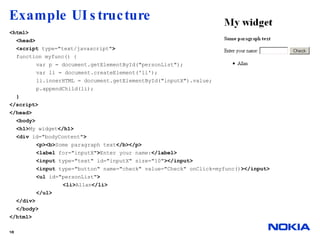
Example UI structure <html> <head> <script  type=&quot;text/javascript&quot; > function myfunc() { var p = document.getElementById(&quot;personList&quot;); var li = document.createElement('li'); li.innerHTML = document.getElementById(&quot;inputX&quot;).value; p.appendChild(li); } </script> </head> <body> <h1> My widget </h1> <div  id=&quot;bodyContent&quot; > <p><b> Some paragraph text </b></p> <label  for=&quot;inputX&quot; > Enter your name: </label> <input  type=&quot;text&quot; id=&quot;inputX&quot; size=&quot;10&quot; ></input> <input  type=&quot;button&quot; name=&quot;check&quot; value=&quot;Check&quot; onClick=myfunc() ></input> <ul  id=&quot;personList&quot; > <li> Allan </li> </ul> </div> </body>  </html>
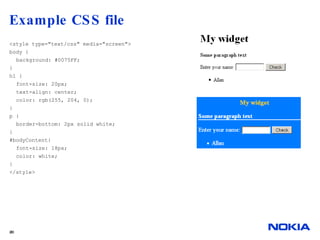
CSS files Web Without proper style and layout, widget looks quite boring Controls style and layout of widget contents Recommended: Keep the style information separated from the markup elements (recommendation) If CSS file is not provided, style information can be embedded within the HTML file Define the style for UI component Body background image Heading text font, alignment, colour List style Visibility (for example, in case of several views, all other except the default view are hidden) Set display property to none
Example CSS file  <style type=&quot;text/css&quot; media=&quot;screen&quot;> body { background: #0075FF; } h1 { font-size: 20px; text-align: center; color: rgb(255, 204, 0); } p { border-bottom: 2px solid white; } #bodyContent{ font-size: 18px; color: white; } </style>
UI in mobile devices Screen sizes are smaller than those available on desktop devices Screen sizes vary between devices Prefer relative units in CSS to specify the characteristics of screen elements Some devices support screen rotation Some devices are touch-enabled Widget can have different CSS files for touch and non-touch devices UI for touch interaction can provide clickable HTML elements large enough to select with a finger
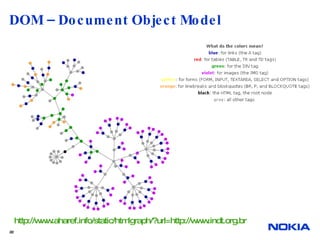
DOM – Document Object Model http://www.aharef.info/static/htmlgraph/?url=http://www.indt.org.br
DOM – Document Object Model Allows dynamic access of HTML document objects in JavaScript Object properties such as visibility (display) can be changed Objects are identified by using IDs given in the HTML file Get access to an object document.getElementById(“bodyContent”) Change style properties (visibility in this case) document.getElementById(“bodyContent”).style.display= “none”; Define image file dynamically document.getElementById(“image”).setAttribute('src', “image1.jpg”);
JavaScript External Implements widget behaviour UI interactions Communication functionality (URL access, etc.) Dynamic construction of UI elements JavaScript functions are associated with tags Functions are assigned with certain attributes (for example, onClick) causing the function to be called <input type=&quot;button&quot; name=&quot;check&quot; value=&quot;Check&quot; onClick=myfunc()></input> When the button is clicked,  myfunc()  function will be called. Based on the function result, DOM may be used to change HTML object properties
Icons  Widget may have an icon in the Application Menu and any other icons needed Application icon is named as icon.png Recommended size for application icon is 88x88 pixels Icon must be a PNG (Portable Networking Graphics) format Application icon is not needed, in which case the widget icon is a default S60 application icon
DEVELOPMENT TOOLS
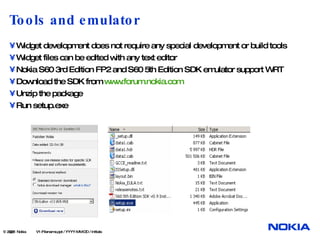
Tools and emulator Widget development does not require any special development or build tools Widget files can be edited with any text editor Nokia S60 3rd Edition FP2 and S60 5th Edition SDK emulator support WRT Download the SDK from  www.forum.nokia.com Unzip the package Run setup.exe  © 2008  Nokia   V1-Filename.ppt / YYYY-MM-DD / Initials
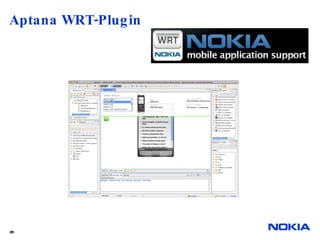
Aptana WRT-Plugin
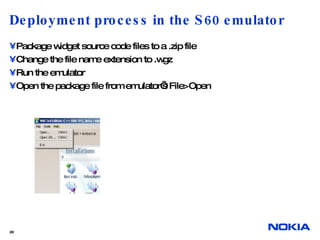
Deployment process in the S60 emulator Package widget source code files to a .zip file Change the file name extension to .wgz Run the emulator Open the package file from emulator’s File>Open
Summary Widgets are Web applications running without a browser application Development is fast and relatively easy, because no compilation or linking is needed Developer must know at least the basics of XML, HTML, JavaScript, DOM, and CSS Widgets allows you to easily develop and deploy nice-looking applications
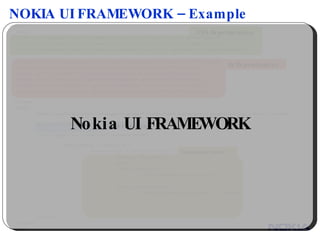
NOKIA UI FRAMEWORK – Example <html> <head> <link rel=&quot;stylesheet&quot; href=&quot;../themes/nokia/base.css&quot; type=&quot;text/css&quot; media=&quot;screen&quot;> <link rel=&quot;stylesheet&quot; href=&quot;../themes/nokia/rating.css&quot; type=&quot;text/css&quot; media=&quot;screen&quot;> <link rel=&quot;stylesheet&quot; href=&quot;../themes/custom-theme/ui.all.css&quot; type=&quot;text/css&quot; media=&quot;screen&quot;> <script src=&quot;../lib/jquery/jquery.js&quot; type=&quot;text/javascript&quot; charset=&quot;utf-8&quot;></script> <script src=&quot;../src/core.js&quot; type=&quot;text/javascript&quot; charset=&quot;utf-8&quot;></script> <script src=&quot;../src/dom.js&quot; type=&quot;text/javascript&quot; charset=&quot;utf-8&quot;></script> <script src=&quot;../src/util.js&quot; type=&quot;text/javascript&quot; charset=&quot;utf-8&quot;></script> <script src=&quot;../src/widget.js&quot; type=&quot;text/javascript&quot; charset=&quot;utf-8&quot;></script> <script src=&quot;../src/rating.js&quot; type=&quot;text/javascript&quot; charset=&quot;utf-8&quot;></script> </head> <body> <embed type=&quot;application/x-systeminfo-widget&quot; hidden=&quot;yes&quot; style=&quot;position:absolute;top:-1000px;&quot;></embed> <div id=&quot;rating01&quot;></div> <script type=&quot;text/javascript&quot; charset=&quot;utf-8&quot;> window.onload = function() { window.rating1 = new Nokia.Rating({ element: '#rating01', value: 2, create: function() { console.log(&quot;Rating: create.&quot;); }, change: function(value) { console.log(&quot;Rating: change - &quot; + value); } }); }; </script> </body> </html> HTML Component Nokia UI FRAMEWORK CSS Dependencies JS Dependencies Component Create

WRT Introduction P11 2009

  • 1.
    WIDGETS FOR THES60 PLATFORM Allan Bezerra Pesquisador Senior Internet & Services Platform – INdT/Forum Nokia © 2008 Nokia V1-Filename.ppt / YYYY-MM-DD / Initials
  • 2.
    Nokia – Umaempresa de Internet ten Cube
  • 3.
    Internet Lab –Instituto Nokia de Tecnologia Criado em Fevereiro de 2009, antigo Mobile Software Group-MSG
  • 4.
    Conceitos Entregues LTA2009H2 More 5 coming.. 2009H1 India US Brazil
  • 5.
  • 6.
    WRT Widget DefinitionStandalone Web applications running without a browser application; Behaviour defined using JavaScript™–no compilation or linking needed; Consists of a few files defining appearance (icon), layout, and behavior; Accesses a URL like a normal Web application to get data from the Web serve;
  • 7.
    S60 Web RuntimeA library providing APIs for widget developers Menu creation URL access Data download from URL Access to some device properties Access to several S60 Platform Services (since WRT 1.1) Based on open-source Web technologies Empowered by Web Browser for S60 Several widgets can be executed at the same time Due to physical limitations of the screen, only a single widget is on the foreground
  • 8.
    WRT versions anddevice support WRT 1.0 Introduced in S60 3rd Edition, Feature Pack 2 SDK Available as an update to selected S60 3rd Edition, Feature Pack1 devices WRT 1.1 Introduced in S60 5th Edition SDK Adds support for S60 Platform Services through JavaScript Service APIs Widgets created for WRT 1.0 run normally with WRT 1.1
  • 9.
    Devices S60 3rd Edition FP 2 S60 5 th Edition N97 5800 N96 E55 S60 3 rd Edition FP 1 N95-8G http://www.forum.nokia.com/devices/<device_name>
  • 10.
  • 11.
    Widget building blocks © 2008 Nokia V1-Filename.ppt / YYYY-MM-DD / Initials
  • 12.
    Deployment At leasttwo mandatory files (manifest and main HTML files) are required Files are packed into a .zip package The package extension is changed to .wgz The package is transferred to the device with some of the following methods Bluetooth, e-mail, or other communication method USB cable or memory card Web Browser for S60 By double-clicking it on PC after connecting the device with PC Suite © 2008 Nokia V1-Filename.ppt / YYYY-MM-DD / Initials
  • 13.
    Config file Namedas info.plist XML containing widget property and configuration information Manifest file properties:
  • 14.
    Example info.plist <?xml version=&quot;1.0&quot; encoding=&quot;UTF-8&quot;?> <!DOCTYPE plistPUBLIC &quot;-//Nokia//DTD PLIST 1.0//EN&quot; &quot;http://www.nokia.com/NOKIA_COM_1/DTDs/plist-1.0.dtd&quot;> <plistversion=&quot;1.0&quot;> <dict> <key>DisplayName</key> <string>MyWidget</string> <key>Identifier</key> <string>com.nokia.forum.widget.mywidget</string> <key>MainHTML</key> <string>mywidget.html</string> </dict> </plist>
  • 15.
    Main HTML file There Name must match the name defined in info.plist properties Contains information for structuring a widget Define the document inside <html> tags External style and code files are referenced inside <style> and <script> tags in the head part of the HTML file Body part defines widget’s UI structure
  • 16.
    Main HTML fileexample <!DOCTYPE html> <html> <head> <link rel=&quot;StyleSheet&quot; href=&quot;styles/general.css&quot; type=&quot;text/css&quot; /> <script type=&quot;text/javascript&quot; src=&quot;scripts/mywidget.js&quot; /> <title>My widget</title> </head> <body> </body> </html>
  • 17.
    Widget UI structure Define inside HTML <body> tag Some useful structures Headings <h1>, <h2> Views <div id=“View1”> Labels <label> Input text <input type=“text”> Input button <input type=“button”> Paragraph text <p> Images <img> List items <li> Tags may be empty and dynamically generated in JavaScript programming language <img id=“image”src=“”/> Tags may be associated with JavaScript functions <li onclick=“excuteFunction();”>label</li>
  • 18.
    Example UI structure<html> <head> <script type=&quot;text/javascript&quot; > function myfunc() { var p = document.getElementById(&quot;personList&quot;); var li = document.createElement('li'); li.innerHTML = document.getElementById(&quot;inputX&quot;).value; p.appendChild(li); } </script> </head> <body> <h1> My widget </h1> <div id=&quot;bodyContent&quot; > <p><b> Some paragraph text </b></p> <label for=&quot;inputX&quot; > Enter your name: </label> <input type=&quot;text&quot; id=&quot;inputX&quot; size=&quot;10&quot; ></input> <input type=&quot;button&quot; name=&quot;check&quot; value=&quot;Check&quot; onClick=myfunc() ></input> <ul id=&quot;personList&quot; > <li> Allan </li> </ul> </div> </body> </html>
  • 19.
    CSS files WebWithout proper style and layout, widget looks quite boring Controls style and layout of widget contents Recommended: Keep the style information separated from the markup elements (recommendation) If CSS file is not provided, style information can be embedded within the HTML file Define the style for UI component Body background image Heading text font, alignment, colour List style Visibility (for example, in case of several views, all other except the default view are hidden) Set display property to none
  • 20.
    Example CSS file <style type=&quot;text/css&quot; media=&quot;screen&quot;> body { background: #0075FF; } h1 { font-size: 20px; text-align: center; color: rgb(255, 204, 0); } p { border-bottom: 2px solid white; } #bodyContent{ font-size: 18px; color: white; } </style>
  • 21.
    UI in mobiledevices Screen sizes are smaller than those available on desktop devices Screen sizes vary between devices Prefer relative units in CSS to specify the characteristics of screen elements Some devices support screen rotation Some devices are touch-enabled Widget can have different CSS files for touch and non-touch devices UI for touch interaction can provide clickable HTML elements large enough to select with a finger
  • 22.
    DOM – DocumentObject Model http://www.aharef.info/static/htmlgraph/?url=http://www.indt.org.br
  • 23.
    DOM – DocumentObject Model Allows dynamic access of HTML document objects in JavaScript Object properties such as visibility (display) can be changed Objects are identified by using IDs given in the HTML file Get access to an object document.getElementById(“bodyContent”) Change style properties (visibility in this case) document.getElementById(“bodyContent”).style.display= “none”; Define image file dynamically document.getElementById(“image”).setAttribute('src', “image1.jpg”);
  • 24.
    JavaScript External Implementswidget behaviour UI interactions Communication functionality (URL access, etc.) Dynamic construction of UI elements JavaScript functions are associated with tags Functions are assigned with certain attributes (for example, onClick) causing the function to be called <input type=&quot;button&quot; name=&quot;check&quot; value=&quot;Check&quot; onClick=myfunc()></input> When the button is clicked, myfunc() function will be called. Based on the function result, DOM may be used to change HTML object properties
  • 25.
    Icons Widgetmay have an icon in the Application Menu and any other icons needed Application icon is named as icon.png Recommended size for application icon is 88x88 pixels Icon must be a PNG (Portable Networking Graphics) format Application icon is not needed, in which case the widget icon is a default S60 application icon
  • 26.
  • 27.
    Tools and emulatorWidget development does not require any special development or build tools Widget files can be edited with any text editor Nokia S60 3rd Edition FP2 and S60 5th Edition SDK emulator support WRT Download the SDK from www.forum.nokia.com Unzip the package Run setup.exe © 2008 Nokia V1-Filename.ppt / YYYY-MM-DD / Initials
  • 28.
  • 29.
    Deployment process inthe S60 emulator Package widget source code files to a .zip file Change the file name extension to .wgz Run the emulator Open the package file from emulator’s File>Open
  • 30.
    Summary Widgets areWeb applications running without a browser application Development is fast and relatively easy, because no compilation or linking is needed Developer must know at least the basics of XML, HTML, JavaScript, DOM, and CSS Widgets allows you to easily develop and deploy nice-looking applications
  • 31.
    NOKIA UI FRAMEWORK– Example <html> <head> <link rel=&quot;stylesheet&quot; href=&quot;../themes/nokia/base.css&quot; type=&quot;text/css&quot; media=&quot;screen&quot;> <link rel=&quot;stylesheet&quot; href=&quot;../themes/nokia/rating.css&quot; type=&quot;text/css&quot; media=&quot;screen&quot;> <link rel=&quot;stylesheet&quot; href=&quot;../themes/custom-theme/ui.all.css&quot; type=&quot;text/css&quot; media=&quot;screen&quot;> <script src=&quot;../lib/jquery/jquery.js&quot; type=&quot;text/javascript&quot; charset=&quot;utf-8&quot;></script> <script src=&quot;../src/core.js&quot; type=&quot;text/javascript&quot; charset=&quot;utf-8&quot;></script> <script src=&quot;../src/dom.js&quot; type=&quot;text/javascript&quot; charset=&quot;utf-8&quot;></script> <script src=&quot;../src/util.js&quot; type=&quot;text/javascript&quot; charset=&quot;utf-8&quot;></script> <script src=&quot;../src/widget.js&quot; type=&quot;text/javascript&quot; charset=&quot;utf-8&quot;></script> <script src=&quot;../src/rating.js&quot; type=&quot;text/javascript&quot; charset=&quot;utf-8&quot;></script> </head> <body> <embed type=&quot;application/x-systeminfo-widget&quot; hidden=&quot;yes&quot; style=&quot;position:absolute;top:-1000px;&quot;></embed> <div id=&quot;rating01&quot;></div> <script type=&quot;text/javascript&quot; charset=&quot;utf-8&quot;> window.onload = function() { window.rating1 = new Nokia.Rating({ element: '#rating01', value: 2, create: function() { console.log(&quot;Rating: create.&quot;); }, change: function(value) { console.log(&quot;Rating: change - &quot; + value); } }); }; </script> </body> </html> HTML Component Nokia UI FRAMEWORK CSS Dependencies JS Dependencies Component Create