How to use Blogs@VT
   This quick tutorial will help you create your own blog using the Innovation Space’s “Blogs@VT”
service. Blogs@VT allows you to easily create your own Wordpress blog in four short steps. Let’s
get started.
Step 1
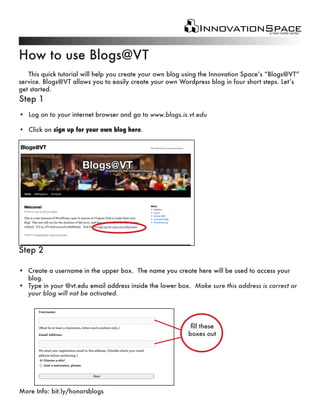
• Log on to your internet browser and go to www.blogs.is.vt.edu

• Click on sign up for your own blog here.


Step 2

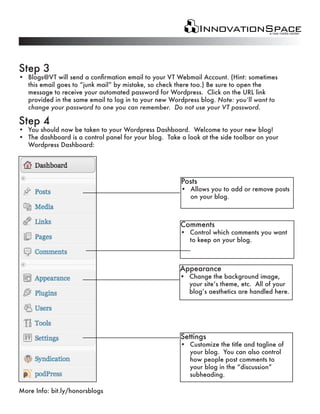
• Create a username in the upper box. The name you create here will be used to access your
  blog.
• Type in your @vt.edu email address inside the lower box. Make sure this address is correct or
  your blog will not be activated.


                                                           fill these
                                                          boxes out


More Info: bit.ly/honorsblogs
Step 3
• Blogs@VT will send a confirmation email to your VT Webmail Account. (Hint: sometimes
  this email goes to “junk mail” by mistake, so check there too.) Be sure to open the
  message to receive your automated password for Wordpress. Click on the URL link
  provided in the same email to log in to your new Wordpress blog. Note: you’ll want to
  change your password to one you can remember. Do not use your VT password.

Step 4
• You should now be taken to your Wordpress Dashboard. Welcome to your new blog!
• The dashboard is a control panel for your blog. Take a look at the side toolbar on your
  Wordpress Dashboard:


                                                       Posts
                                                       • Allows you to add or remove posts
                                                         on your blog.


                                                       Comments
                                                       • Control which comments you want
                                                         to keep on your blog.


                                                       Appearance
                                                       • Change the background image,
                                                         your site’s theme, etc. All of your
                                                         blog’s aesthetics are handled here.


                                                       Settings
                                                       • Customize the title and tagline of
                                                         your blog. You can also control
                                                         how people post comments to
                                                         your blog in the “discussion”
                                                         subheading.

More Info: bit.ly/honorsblogs

Blogging 101, VT HRC

  • 1.
    How to useBlogs@VT This quick tutorial will help you create your own blog using the Innovation Space’s “Blogs@VT” service. Blogs@VT allows you to easily create your own Wordpress blog in four short steps. Let’s get started. Step 1 • Log on to your internet browser and go to www.blogs.is.vt.edu • Click on sign up for your own blog here. Step 2 • Create a username in the upper box. The name you create here will be used to access your blog. • Type in your @vt.edu email address inside the lower box. Make sure this address is correct or your blog will not be activated. fill these boxes out More Info: bit.ly/honorsblogs
  • 2.
    Step 3 • Blogs@VTwill send a confirmation email to your VT Webmail Account. (Hint: sometimes this email goes to “junk mail” by mistake, so check there too.) Be sure to open the message to receive your automated password for Wordpress. Click on the URL link provided in the same email to log in to your new Wordpress blog. Note: you’ll want to change your password to one you can remember. Do not use your VT password. Step 4 • You should now be taken to your Wordpress Dashboard. Welcome to your new blog! • The dashboard is a control panel for your blog. Take a look at the side toolbar on your Wordpress Dashboard: Posts • Allows you to add or remove posts on your blog. Comments • Control which comments you want to keep on your blog. Appearance • Change the background image, your site’s theme, etc. All of your blog’s aesthetics are handled here. Settings • Customize the title and tagline of your blog. You can also control how people post comments to your blog in the “discussion” subheading. More Info: bit.ly/honorsblogs