Early Warning System
Live your life. Create your destiny.
Objectives
•Define what the EWS is
•Know limitations, advantages and considerations
•access the tool
•Create the rule
Live your life. Create your destiny.
Definition
Definition
• The Early Warning System is a rule-driven
communication tool
• Instructors use it to send email notification messages to
Students and their Observers
• Rules are created by Instructors and can be based on a
test score, calculated column, due date or Course access
Live your life. Create your destiny.
Limitations, advantages and considerations
 It is limited to the set rule
 Rules can be changed
 It fore warns students
Live your life. Create your destiny.
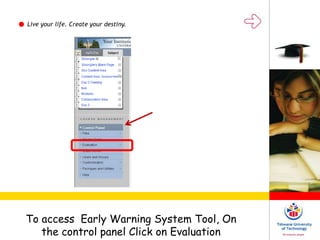
To access Early Warning System Tool, On
the control panel Click on Evaluation
Live your life. Create your destiny.
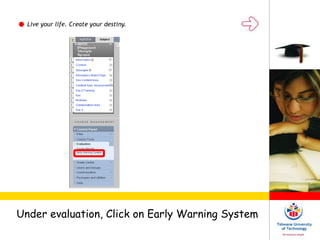
Under evaluation, Click on Early Warning System
Live your life. Create your destiny.
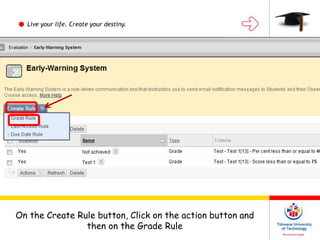
On the Create Rule button, Click on the action button and
then on the Grade Rule
Live your life. Create your destiny.
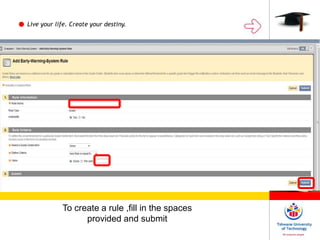
To create a rule ,fill in the spaces
provided and submit
Live your life. Create your destiny.
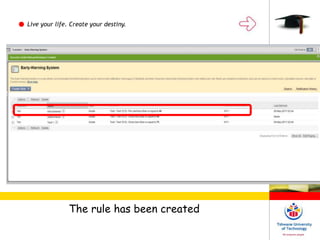
The rule has been created
Discussion of how the tools support Good Teaching
practices
Live your life. Create your destiny.
Activity

Blackboard training - Early warning system

  • 1.
    Early Warning System Liveyour life. Create your destiny.
  • 2.
    Live your life.Create your destiny. Objectives •Define what the EWS is •Know limitations, advantages and considerations •access the tool •Create the rule
  • 3.
    Live your life.Create your destiny. Definition Definition • The Early Warning System is a rule-driven communication tool • Instructors use it to send email notification messages to Students and their Observers • Rules are created by Instructors and can be based on a test score, calculated column, due date or Course access
  • 4.
    Live your life.Create your destiny. Limitations, advantages and considerations  It is limited to the set rule  Rules can be changed  It fore warns students
  • 5.
    Live your life.Create your destiny. To access Early Warning System Tool, On the control panel Click on Evaluation
  • 6.
    Live your life.Create your destiny. Under evaluation, Click on Early Warning System
  • 7.
    Live your life.Create your destiny. On the Create Rule button, Click on the action button and then on the Grade Rule
  • 8.
    Live your life.Create your destiny. To create a rule ,fill in the spaces provided and submit
  • 9.
    Live your life.Create your destiny. The rule has been created
  • 11.
    Discussion of howthe tools support Good Teaching practices Live your life. Create your destiny. Activity