How to Manage ERP
Implementation Risks
BizTech Presentation
March 25, 2015
www.biztechmasters.com
1-888-666-1745
AGENDA
• Introduction
• Key Implementation Steps
• Lessons Learned-Common Issues
• ERP Implementation Disasters in the News
• Recommendations – Mitigating Risks
• Q & A
© Copyright 2015 2
Introduction
• BizTech Risk & Security
• Attendees
– How this presentation can help you in your
current situation
© Copyright 2015 3
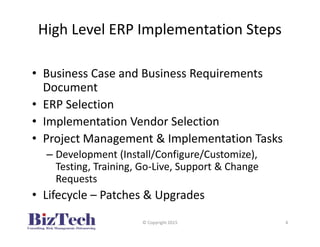
High Level ERP Implementation Steps
© Copyright 2015 4
• Business Case and Business Requirements
Document
• ERP Selection
• Implementation Vendor Selection
• Project Management & Implementation Tasks
– Development (Install/Configure/Customize),
Testing, Training, Go-Live, Support & Change
Requests
• Lifecycle – Patches & Upgrades
Case Studies – Common Issues
© Copyright 2015 5
• ERP Implementations reviews and audits at
clients and through research
• Categorized lesson learned/Issues observed
based on Issue area – next slide.
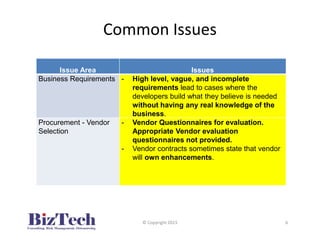
Common Issues
Issue Area Issues
Business Requirements - High level, vague, and incomplete
requirements lead to cases where the
developers build what they believe is needed
without having any real knowledge of the
business.
Procurement - Vendor
Selection
- Vendor Questionnaires for evaluation.
Appropriate Vendor evaluation
questionnaires not provided.
- Vendor contracts sometimes state that vendor
will own enhancements.
© Copyright 2015 6
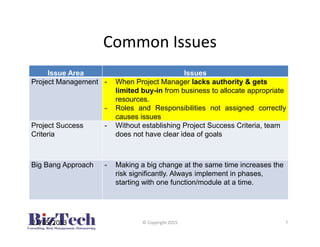
Common Issues
Issue Area Issues
Project Management - When Project Manager lacks authority & gets
limited buy-in from business to allocate appropriate
resources.
- Roles and Responsibilities not assigned correctly
causes issues
Project Success
Criteria
- Without establishing Project Success Criteria, team
does not have clear idea of goals
Big Bang Approach - Making a big change at the same time increases the
risk significantly. Always implement in phases,
starting with one function/module at a time.
21/05/2013 © Copyright 2015 7
Common Issues
Issue Area Issues
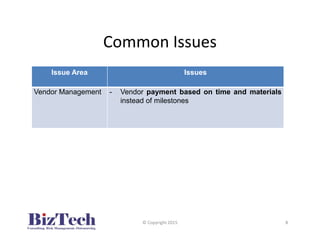
Vendor Management - Vendor payment based on time and materials
instead of milestones
© Copyright 2015 8
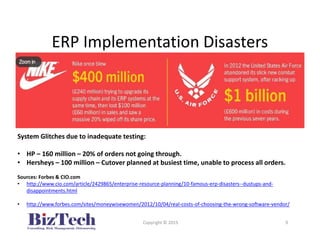
ERP Implementation Disasters
Copyright © 2015 9
System Glitches due to inadequate testing:
• HP – 160 million – 20% of orders not going through.
• Hersheys – 100 million – Cutover planned at busiest time, unable to process all orders.
Sources: Forbes & CIO.com
• http://www.cio.com/article/2429865/enterprise-resource-planning/10-famous-erp-disasters--dustups-and-
disappointments.html
• http://www.forbes.com/sites/moneywisewomen/2012/10/04/real-costs-of-choosing-the-wrong-software-vendor/
Recommendations
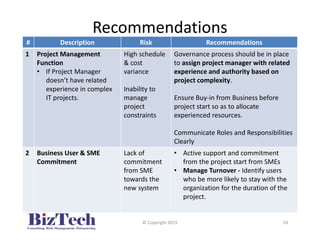
# Description Risk Recommendations
1 Project Management
Function
• If Project Manager
doesn’t have related
experience in complex
IT projects.
High schedule
& cost
variance
Inability to
manage
project
constraints
Governance process should be in place
to assign project manager with related
experience and authority based on
project complexity.
Ensure Buy-in from Business before
project start so as to allocate
experienced resources.
Communicate Roles and Responsibilities
Clearly
2 Business User & SME
Commitment
Lack of
commitment
from SME
towards the
new system
• Active support and commitment
from the project start from SMEs
• Manage Turnover - Identify users
who be more likely to stay with the
organization for the duration of the
project.
© Copyright 2015 10
Recommendations
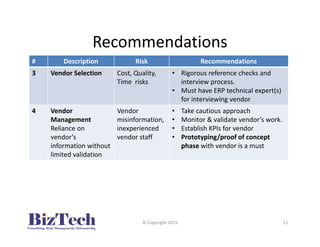
# Description Risk Recommendations
3 Vendor Selection Cost, Quality,
Time risks
• Rigorous reference checks and
interview process.
• Must have ERP technical expert(s)
for interviewing vendor
4 Vendor
Management
Reliance on
vendor’s
information without
limited validation
Vendor
misinformation,
inexperienced
vendor staff
• Take cautious approach
• Monitor & validate vendor’s work.
• Establish KPIs for vendor
• Prototyping/proof of concept
phase with vendor is a must
© Copyright 2015 11
Recommendations
# Description Risk Recommendations
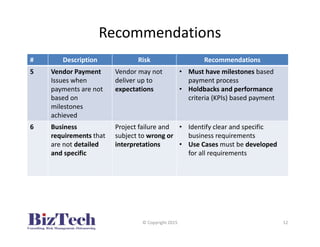
5 Vendor Payment
Issues when
payments are not
based on
milestones
achieved
Vendor may not
deliver up to
expectations
• Must have milestones based
payment process
• Holdbacks and performance
criteria (KPIs) based payment
6 Business
requirements that
are not detailed
and specific
Project failure and
subject to wrong or
interpretations
• Identify clear and specific
business requirements
• Use Cases must be developed
for all requirements
© Copyright 2015 12
Recommendations (Contd.)
# Description Risk Recommendations
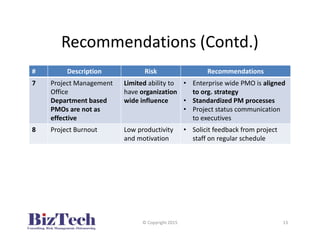
7 Project Management
Office
Department based
PMOs are not as
effective
Limited ability to
have organization
wide influence
• Enterprise wide PMO is aligned
to org. strategy
• Standardized PM processes
• Project status communication
to executives
8 Project Burnout Low productivity
and motivation
• Solicit feedback from project
staff on regular schedule
© Copyright 2015 13
Recommendations
# Description Risk Recommendations
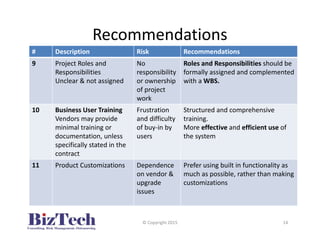
9 Project Roles and
Responsibilities
Unclear & not assigned
No
responsibility
or ownership
of project
work
Roles and Responsibilities should be
formally assigned and complemented
with a WBS.
10 Business User Training
Vendors may provide
minimal training or
documentation, unless
specifically stated in the
contract
Frustration
and difficulty
of buy-in by
users
Structured and comprehensive
training.
More effective and efficient use of
the system
11 Product Customizations Dependence
on vendor &
upgrade
issues
Prefer using built in functionality as
much as possible, rather than making
customizations
© Copyright 2015 14
Recommendations
# Description Risk Recommendations
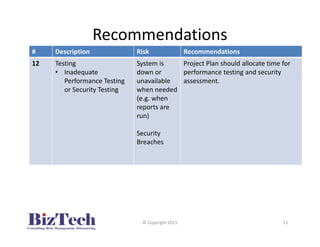
12 Testing
• Inadequate
Performance Testing
or Security Testing
System is
down or
unavailable
when needed
(e.g. when
reports are
run)
Security
Breaches
Project Plan should allocate time for
performance testing and security
assessment.
© Copyright 2015 15
Conclusion
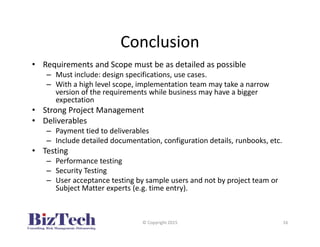
• Requirements and Scope must be as detailed as possible
– Must include: design specifications, use cases.
– With a high level scope, implementation team may take a narrow
version of the requirements while business may have a bigger
expectation
• Strong Project Management
• Deliverables
– Payment tied to deliverables
– Include detailed documentation, configuration details, runbooks, etc.
• Testing
– Performance testing
– Security Testing
– User acceptance testing by sample users and not by project team or
Subject Matter experts (e.g. time entry).
© Copyright 2015 16
Q & A
• Questions & Answers
– Additional Questions?
– Need help with ERP Audits or advice during ERP
implementations/upgrades? Contact:
• www.biztechmasters.com
• 1-888-666-1745
• Al Abbas, Practice Director
aabbas@biztechmasters.com
© Copyright 2015 17

BizTech-How to Manage ERP Implementation Risks

  • 1.
    How to ManageERP Implementation Risks BizTech Presentation March 25, 2015 www.biztechmasters.com 1-888-666-1745
  • 2.
    AGENDA • Introduction • KeyImplementation Steps • Lessons Learned-Common Issues • ERP Implementation Disasters in the News • Recommendations – Mitigating Risks • Q & A © Copyright 2015 2
  • 3.
    Introduction • BizTech Risk& Security • Attendees – How this presentation can help you in your current situation © Copyright 2015 3
  • 4.
    High Level ERPImplementation Steps © Copyright 2015 4 • Business Case and Business Requirements Document • ERP Selection • Implementation Vendor Selection • Project Management & Implementation Tasks – Development (Install/Configure/Customize), Testing, Training, Go-Live, Support & Change Requests • Lifecycle – Patches & Upgrades
  • 5.
    Case Studies –Common Issues © Copyright 2015 5 • ERP Implementations reviews and audits at clients and through research • Categorized lesson learned/Issues observed based on Issue area – next slide.
  • 6.
    Common Issues Issue AreaIssues Business Requirements - High level, vague, and incomplete requirements lead to cases where the developers build what they believe is needed without having any real knowledge of the business. Procurement - Vendor Selection - Vendor Questionnaires for evaluation. Appropriate Vendor evaluation questionnaires not provided. - Vendor contracts sometimes state that vendor will own enhancements. © Copyright 2015 6
  • 7.
    Common Issues Issue AreaIssues Project Management - When Project Manager lacks authority & gets limited buy-in from business to allocate appropriate resources. - Roles and Responsibilities not assigned correctly causes issues Project Success Criteria - Without establishing Project Success Criteria, team does not have clear idea of goals Big Bang Approach - Making a big change at the same time increases the risk significantly. Always implement in phases, starting with one function/module at a time. 21/05/2013 © Copyright 2015 7
  • 8.
    Common Issues Issue AreaIssues Vendor Management - Vendor payment based on time and materials instead of milestones © Copyright 2015 8
  • 9.
    ERP Implementation Disasters Copyright© 2015 9 System Glitches due to inadequate testing: • HP – 160 million – 20% of orders not going through. • Hersheys – 100 million – Cutover planned at busiest time, unable to process all orders. Sources: Forbes & CIO.com • http://www.cio.com/article/2429865/enterprise-resource-planning/10-famous-erp-disasters--dustups-and- disappointments.html • http://www.forbes.com/sites/moneywisewomen/2012/10/04/real-costs-of-choosing-the-wrong-software-vendor/
  • 10.
    Recommendations # Description RiskRecommendations 1 Project Management Function • If Project Manager doesn’t have related experience in complex IT projects. High schedule & cost variance Inability to manage project constraints Governance process should be in place to assign project manager with related experience and authority based on project complexity. Ensure Buy-in from Business before project start so as to allocate experienced resources. Communicate Roles and Responsibilities Clearly 2 Business User & SME Commitment Lack of commitment from SME towards the new system • Active support and commitment from the project start from SMEs • Manage Turnover - Identify users who be more likely to stay with the organization for the duration of the project. © Copyright 2015 10
  • 11.
    Recommendations # Description RiskRecommendations 3 Vendor Selection Cost, Quality, Time risks • Rigorous reference checks and interview process. • Must have ERP technical expert(s) for interviewing vendor 4 Vendor Management Reliance on vendor’s information without limited validation Vendor misinformation, inexperienced vendor staff • Take cautious approach • Monitor & validate vendor’s work. • Establish KPIs for vendor • Prototyping/proof of concept phase with vendor is a must © Copyright 2015 11
  • 12.
    Recommendations # Description RiskRecommendations 5 Vendor Payment Issues when payments are not based on milestones achieved Vendor may not deliver up to expectations • Must have milestones based payment process • Holdbacks and performance criteria (KPIs) based payment 6 Business requirements that are not detailed and specific Project failure and subject to wrong or interpretations • Identify clear and specific business requirements • Use Cases must be developed for all requirements © Copyright 2015 12
  • 13.
    Recommendations (Contd.) # DescriptionRisk Recommendations 7 Project Management Office Department based PMOs are not as effective Limited ability to have organization wide influence • Enterprise wide PMO is aligned to org. strategy • Standardized PM processes • Project status communication to executives 8 Project Burnout Low productivity and motivation • Solicit feedback from project staff on regular schedule © Copyright 2015 13
  • 14.
    Recommendations # Description RiskRecommendations 9 Project Roles and Responsibilities Unclear & not assigned No responsibility or ownership of project work Roles and Responsibilities should be formally assigned and complemented with a WBS. 10 Business User Training Vendors may provide minimal training or documentation, unless specifically stated in the contract Frustration and difficulty of buy-in by users Structured and comprehensive training. More effective and efficient use of the system 11 Product Customizations Dependence on vendor & upgrade issues Prefer using built in functionality as much as possible, rather than making customizations © Copyright 2015 14
  • 15.
    Recommendations # Description RiskRecommendations 12 Testing • Inadequate Performance Testing or Security Testing System is down or unavailable when needed (e.g. when reports are run) Security Breaches Project Plan should allocate time for performance testing and security assessment. © Copyright 2015 15
  • 16.
    Conclusion • Requirements andScope must be as detailed as possible – Must include: design specifications, use cases. – With a high level scope, implementation team may take a narrow version of the requirements while business may have a bigger expectation • Strong Project Management • Deliverables – Payment tied to deliverables – Include detailed documentation, configuration details, runbooks, etc. • Testing – Performance testing – Security Testing – User acceptance testing by sample users and not by project team or Subject Matter experts (e.g. time entry). © Copyright 2015 16
  • 17.
    Q & A •Questions & Answers – Additional Questions? – Need help with ERP Audits or advice during ERP implementations/upgrades? Contact: • www.biztechmasters.com • 1-888-666-1745 • Al Abbas, Practice Director aabbas@biztechmasters.com © Copyright 2015 17