8/30/2014
1
BizTalk – Message
Schemas
AboorvaRaja Ramar
BizTalk Tutor
CONTENTS
• XML schema in BizTalk Server
• BizTalk Schema Editor
• Document Schemas
• Envelop Schemas
• Property Schemas
• Flat File schemas
• Best Practices
8/30/2014
2
OVERVIEW OF SCHEMA
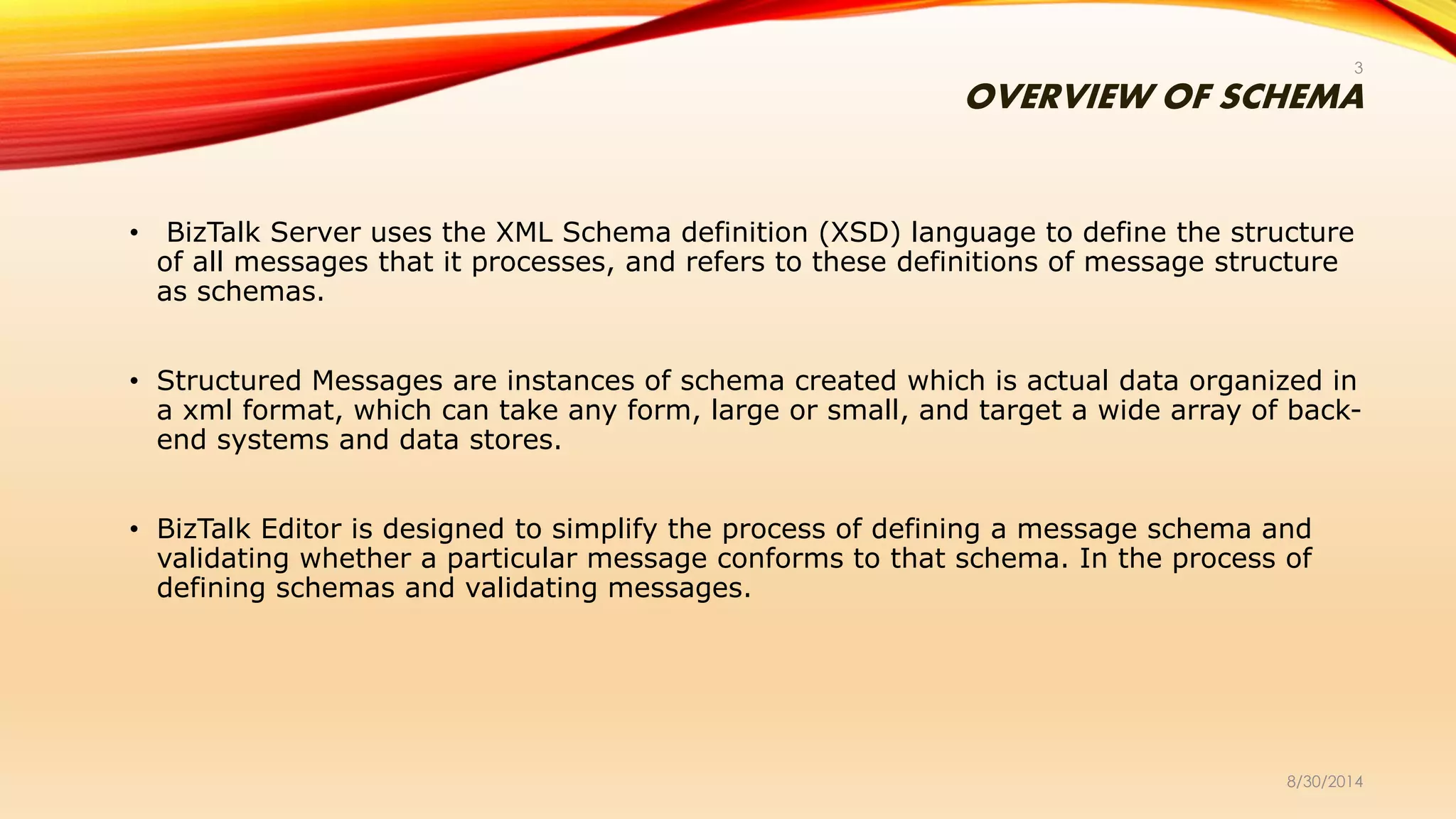
• BizTalk Server uses the XML Schema definition (XSD) language to define the structure
of all messages that it processes, and refers to these definitions of message structure
as schemas.
• Structured Messages are instances of schema created which is actual data organized in
a xml format, which can take any form, large or small, and target a wide array of back-
end systems and data stores.
• BizTalk Editor is designed to simplify the process of defining a message schema and
validating whether a particular message conforms to that schema. In the process of
defining schemas and validating messages.
8/30/2014
3
XML SCHEMA AND XML INSTANCE
8/30/2014
4
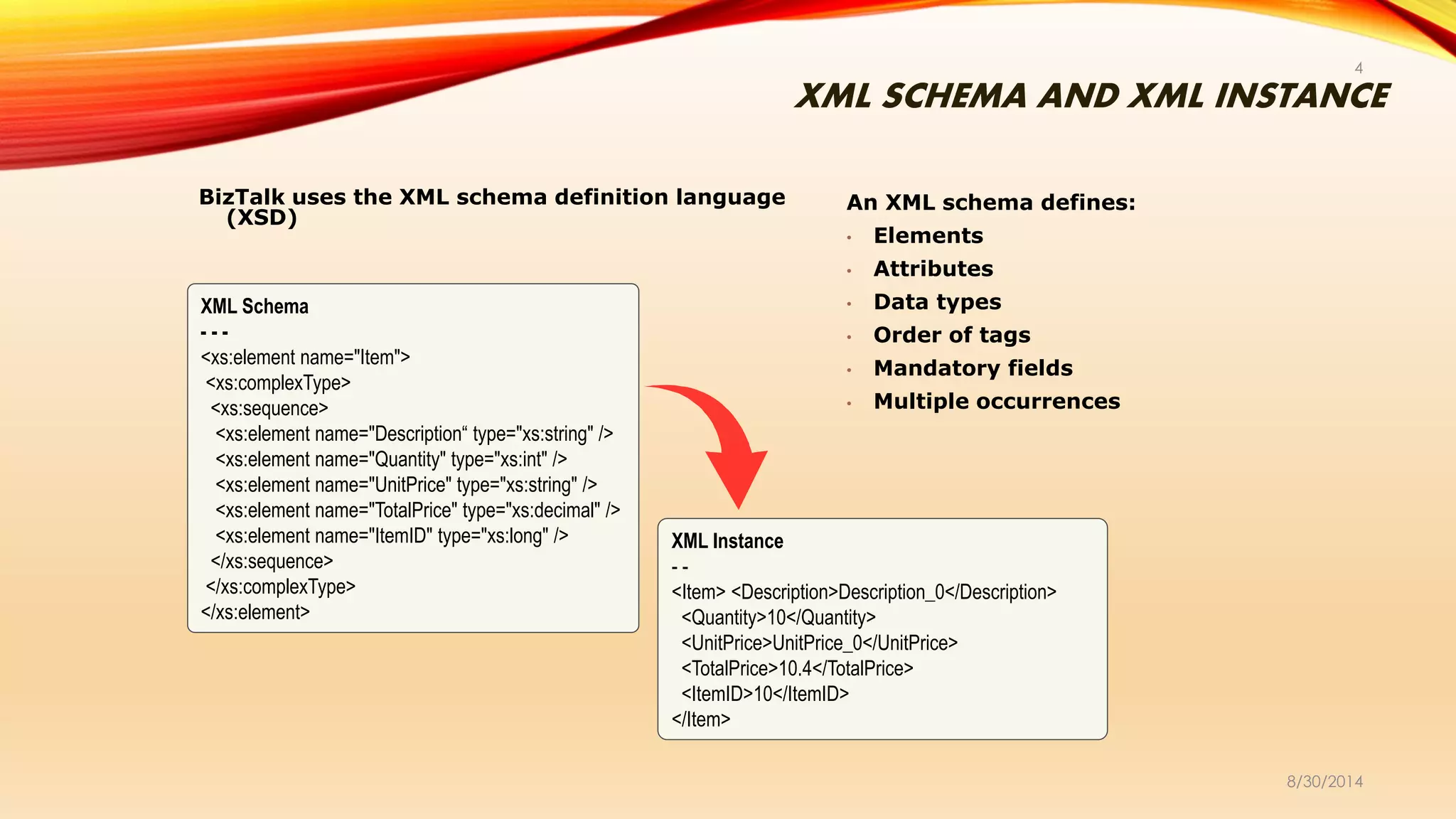
BizTalk uses the XML schema definition language
(XSD)
An XML schema defines:
• Elements
• Attributes
• Data types
• Order of tags
• Mandatory fields
• Multiple occurrences
XML Schema
- - -
<xs:element name="Item">
<xs:complexType>
<xs:sequence>
<xs:element name="Description“ type="xs:string" />
<xs:element name="Quantity" type="xs:int" />
<xs:element name="UnitPrice" type="xs:string" />
<xs:element name="TotalPrice" type="xs:decimal" />
<xs:element name="ItemID" type="xs:long" />
</xs:sequence>
</xs:complexType>
</xs:element>
XML Instance
- -
<Item> <Description>Description_0</Description>
<Quantity>10</Quantity>
<UnitPrice>UnitPrice_0</UnitPrice>
<TotalPrice>10.4</TotalPrice>
<ItemID>10</ItemID>
</Item>
ABOUT SCHEMA
8/30/2014
5
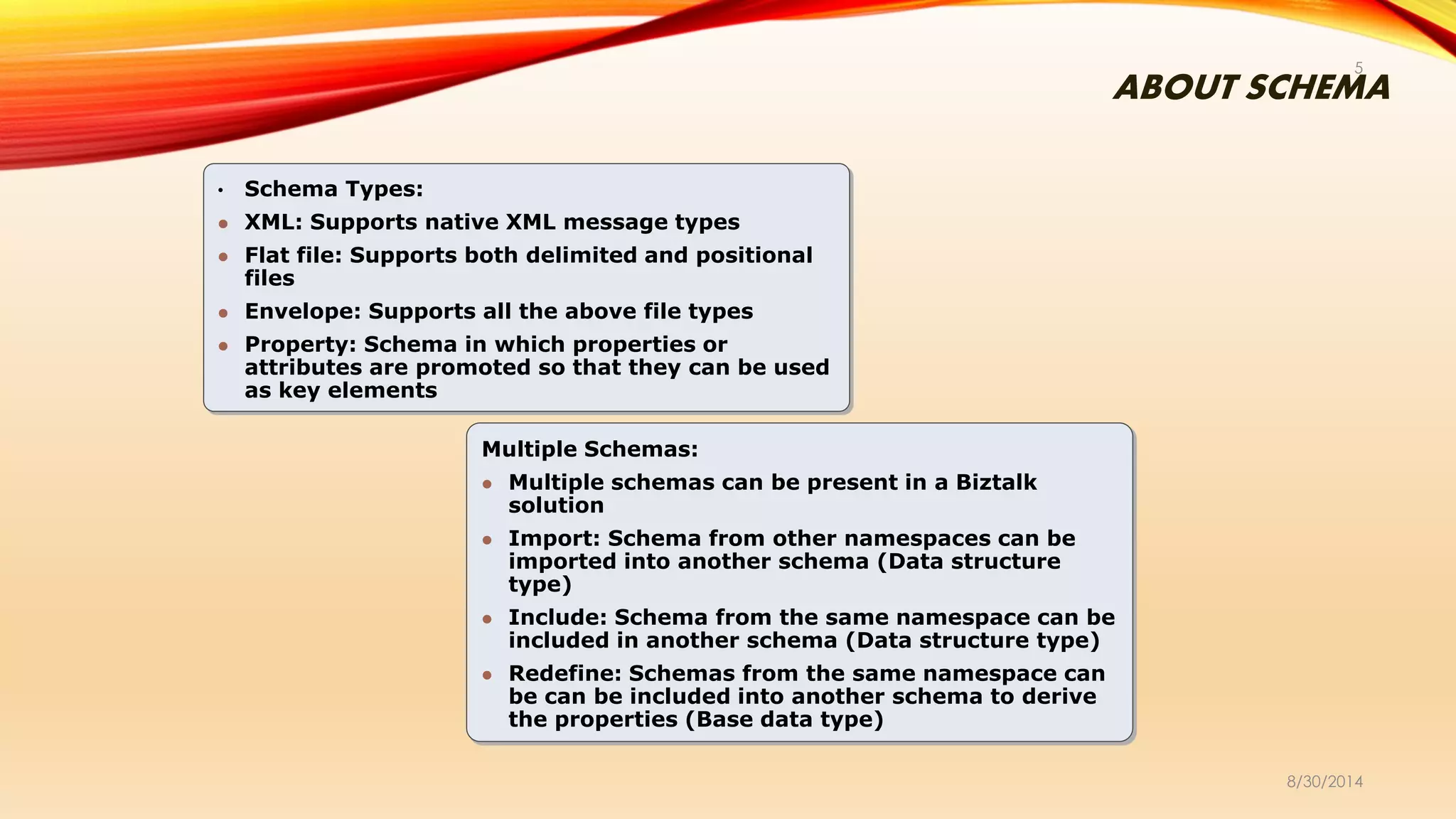
• Schema Types:
 XML: Supports native XML message types
 Flat file: Supports both delimited and positional
files
 Envelope: Supports all the above file types
 Property: Schema in which properties or
attributes are promoted so that they can be used
as key elements
Multiple Schemas:
 Multiple schemas can be present in a Biztalk
solution
 Import: Schema from other namespaces can be
imported into another schema (Data structure
type)
 Include: Schema from the same namespace can be
included in another schema (Data structure type)
 Redefine: Schemas from the same namespace can
be can be included into another schema to derive
the properties (Base data type)
CREATING BIZTALK XML SCHEMAS
8/30/2014
6
• Schema creation steps:
 Create schema from scratch using BizTalk Editor
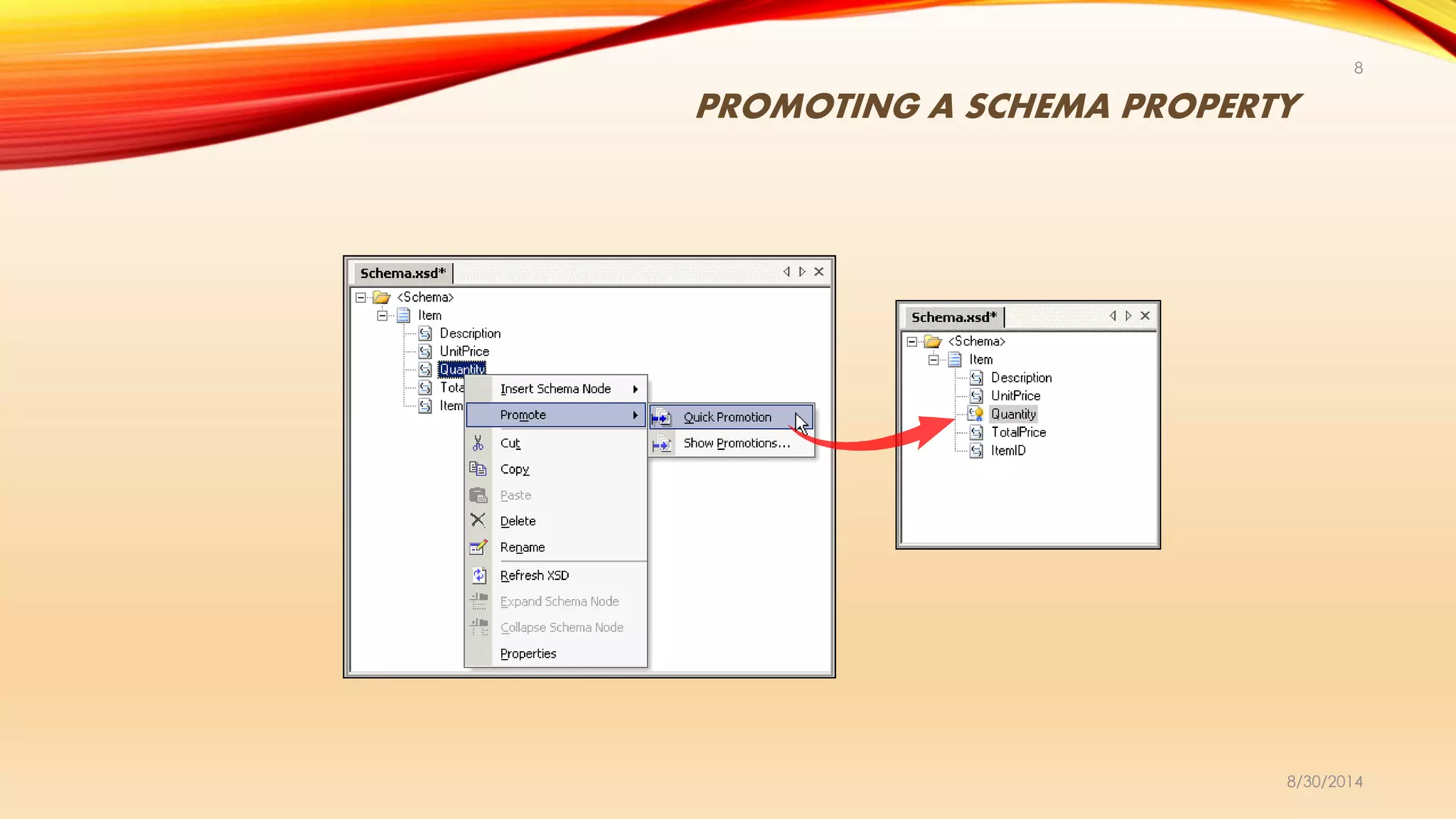
 Promoting a schema property
 Validating a schema
 Generate an instance message from schema
 Building a Schema Project
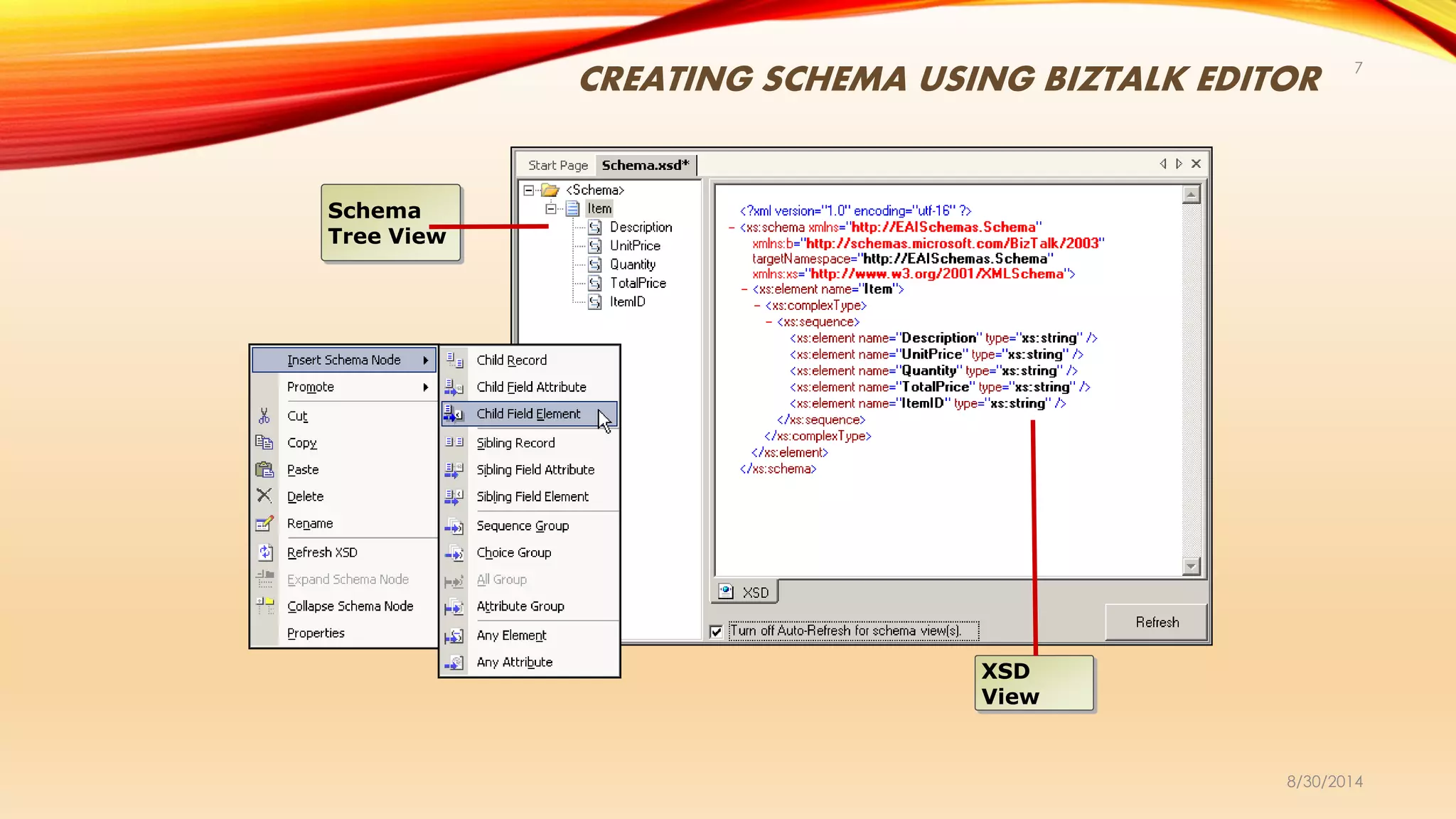
CREATING SCHEMA USING BIZTALK EDITOR
8/30/2014
7
Schema
Tree View
XSD
View
PROMOTING A SCHEMA PROPERTY
8/30/2014
8
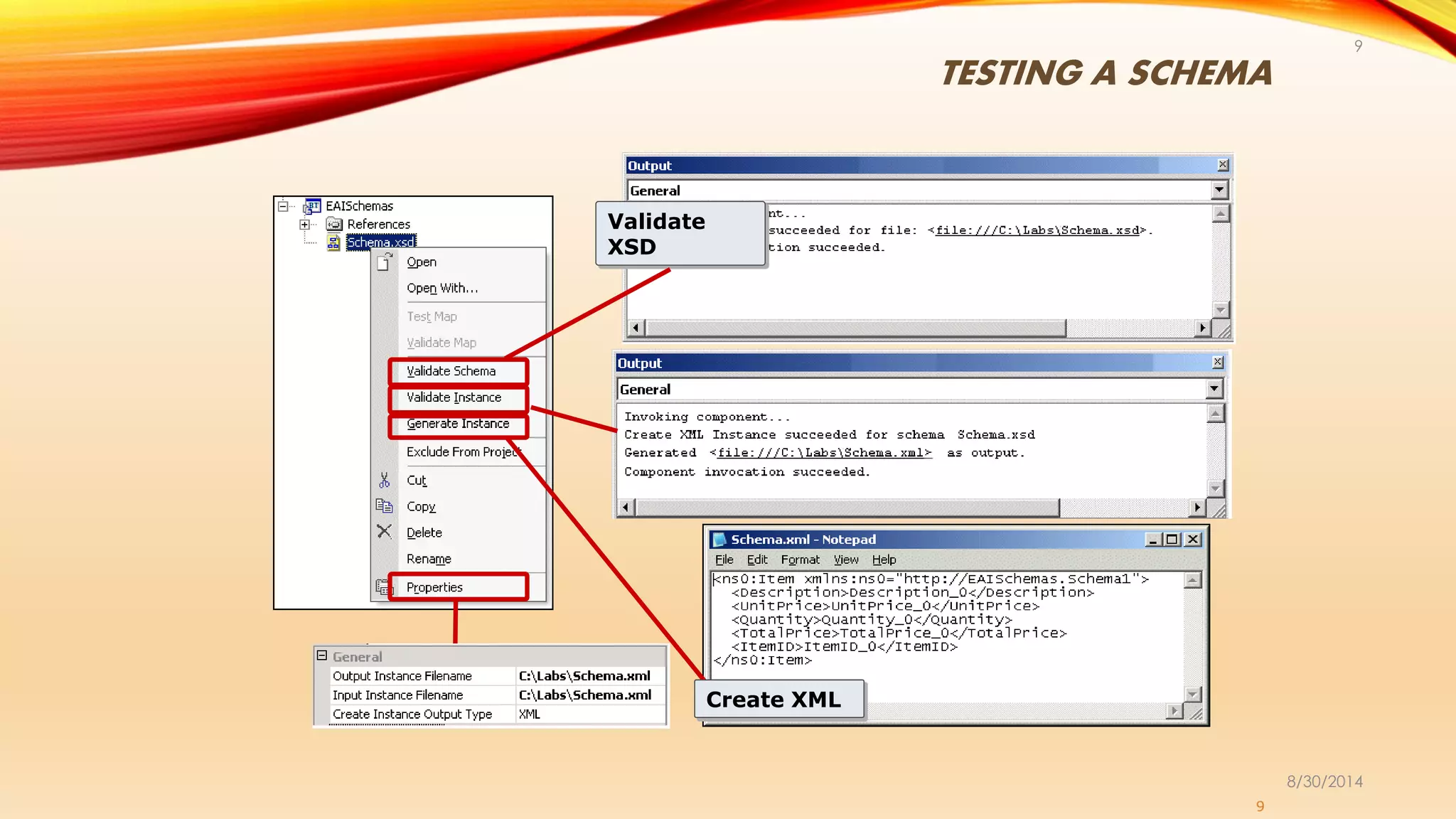
TESTING A SCHEMA
8/30/2014
9
9
Validate
XSD
Create XMLCreate XML
CREATING SCHEMA AND INSTANCE
8/30/2014
10
• Validate Schema: --
• In Solution Explorer, right-click the schema that you want to validate, and then click Validate
Schema.
• In the Output window, view the results. Success and error messages are displayed in this window.
• Validate Instance:--
• In Solution Explorer, right-click the schema, and then click Properties. The <Schema file
name.xsd> Property Pages dialog box opens.
• If necessary, in the <Schema file name.xsd> Property Pages dialog box, expand the General
section of the General tab by clicking its plus (+) icon.
• In the Input Instance Filename property value field, either type the name of a file or use the ellipsis
(...) button at the right end of the value field to browse for a file that contains the instance message to
be validated against the schema, and then click OK.
• In Solution Explorer, right-click the schema name, and then click Validate Instance.
• In the Output window, view the results. Success and error messages are displayed in this window.
• Generate Instance:--
• In Solution Explorer, right-click the schema for which you want to generate an instance message, and
then click Generate Instance.
• In the Output window, view the results. Success and error messages are displayed in this window.
BUILDING A SCHEMA PROJECT
8/30/2014
11
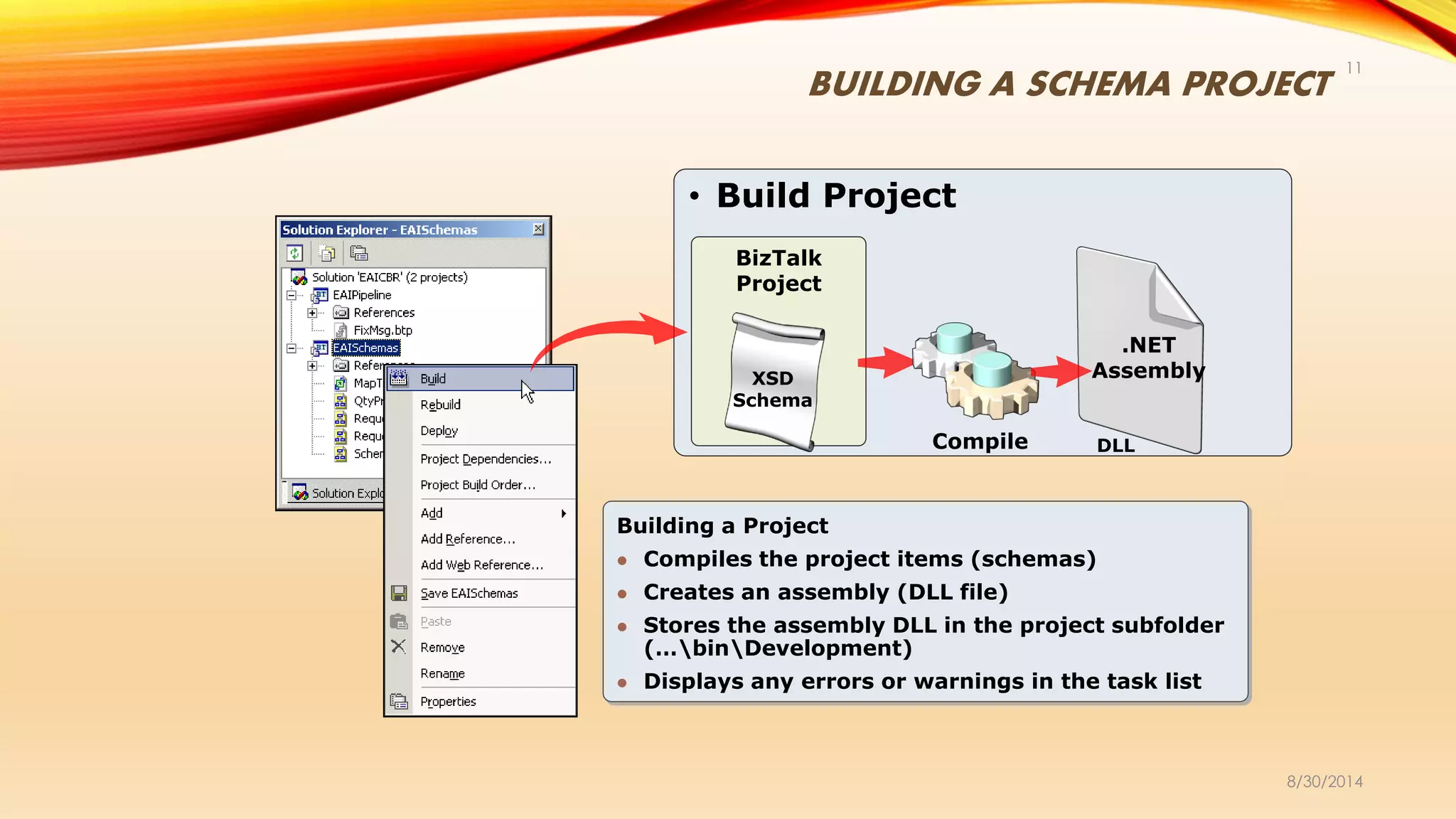
• Build Project
BizTalk
Project
XSD
Schema
Compile
.NET
Assembly
DLL
Building a Project
 Compiles the project items (schemas)
 Creates an assembly (DLL file)
 Stores the assembly DLL in the project subfolder
(…binDevelopment)
 Displays any errors or warnings in the task list
DOCUMENT SCHEMAS
8/30/2014
12
• An XML Schema described the structure of an XML document.
• A document schema is like any regular schema.
• A document schema is used to define a message. It is a definition on an Xml
message with optional extensions for flat files, EDI file, etc that enable the parsers to
convert the native format into Xml.
ENVELOPE SCHEMAS
8/30/2014
13
• XML Envelope can be used to combine multiple XML documents into single, valid
XML instance message. Without an envelope to wrap multiple documents within a
single root tag, an XML instance message containing multiple documents would not
qualify as well- formed XML.
• You can create an envelope schema in all of the same ways that you can create
an XML schema for a business document.
• To define a schema as an envelope schema, you need to set the Envelope
property of the Schema node to the value Yes.
PROPERTY SCHEMAS
8/30/2014
14
• A property schema enables you to define promoted properties in a common location and
have them referenced by other schemas.
• A property schemas can have namespace but not record or attributes.
• Elements define in the property schema have a name and type.
Promoted property Vs Distinguished fields
• In BizTalk you can promote a property as either distinguished or promoted properties.
Distinguished fields
• In general use distinguished fields if you want to just use them in Orchestration.
• No restriction in filed length.
• No participation in routing
• No separate property schema
Promoted Properties
• These are generally used with routing (send port filters), tracking, correlation etc.
• Field restriction (255)
• Separate property schema
FLAT FILE SCHEMAS
8/30/2014
15
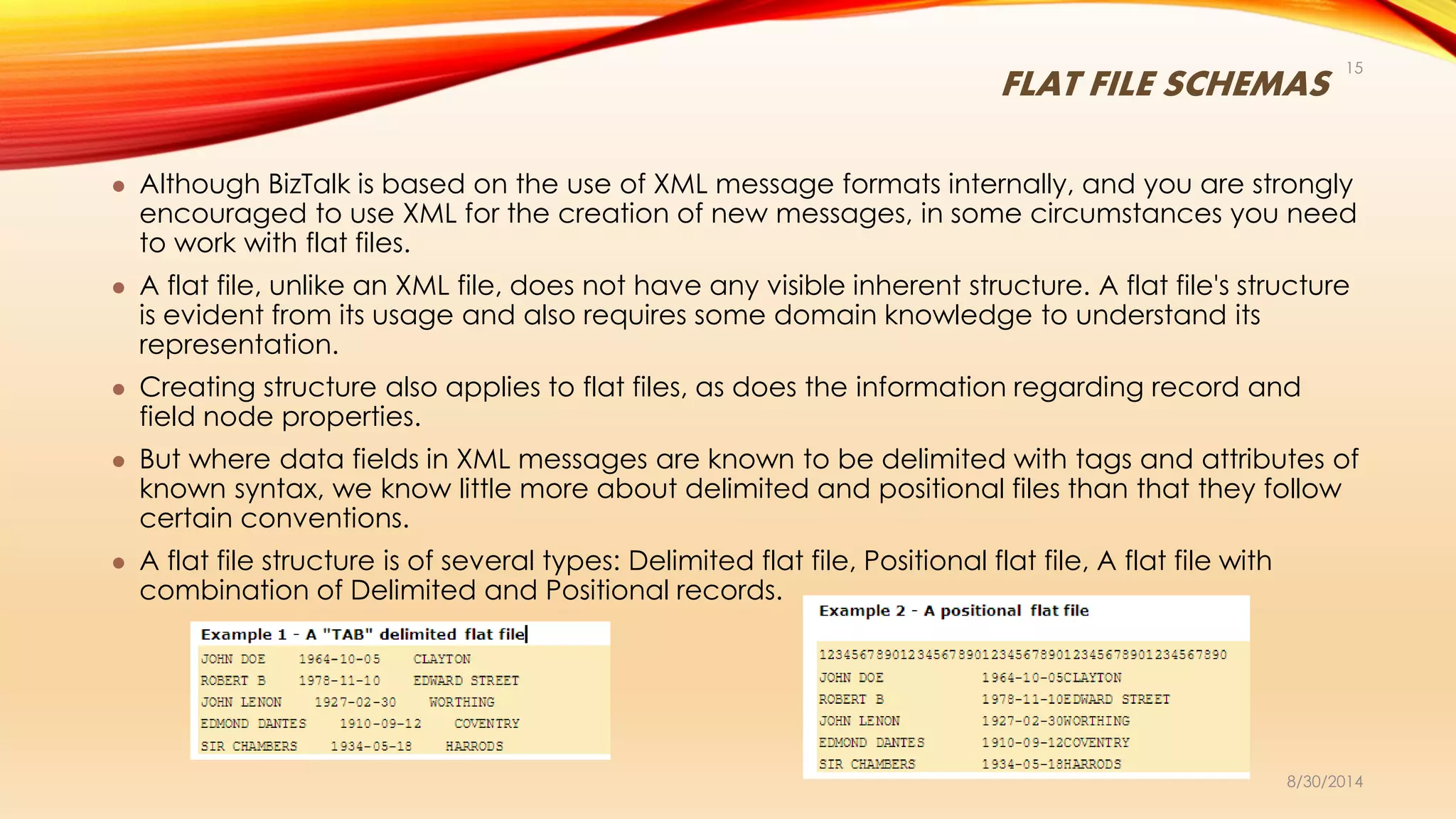
 Although BizTalk is based on the use of XML message formats internally, and you are strongly
encouraged to use XML for the creation of new messages, in some circumstances you need
to work with flat files.
 A flat file, unlike an XML file, does not have any visible inherent structure. A flat file's structure
is evident from its usage and also requires some domain knowledge to understand its
representation.
 Creating structure also applies to flat files, as does the information regarding record and
field node properties.
 But where data fields in XML messages are known to be delimited with tags and attributes of
known syntax, we know little more about delimited and positional files than that they follow
certain conventions.
 A flat file structure is of several types: Delimited flat file, Positional flat file, A flat file with
combination of Delimited and Positional records.
BEST PRACTICES
8/30/2014
16
 Always assign a unique root name for each schema
 Use versioning information in the root node name
 Promote only the properties needed for content based routing
 Use distinguished fields only when required in an orchestration
 Test the validity of a schema by using a known document instance
 Included schemas must be from the same namespace
 Imported schemas must be from different namespaces
8/30/2014
17
8/30/2014
18

BizTalk Server- Schema

  • 1.
  • 2.
    CONTENTS • XML schemain BizTalk Server • BizTalk Schema Editor • Document Schemas • Envelop Schemas • Property Schemas • Flat File schemas • Best Practices 8/30/2014 2
  • 3.
    OVERVIEW OF SCHEMA •BizTalk Server uses the XML Schema definition (XSD) language to define the structure of all messages that it processes, and refers to these definitions of message structure as schemas. • Structured Messages are instances of schema created which is actual data organized in a xml format, which can take any form, large or small, and target a wide array of back- end systems and data stores. • BizTalk Editor is designed to simplify the process of defining a message schema and validating whether a particular message conforms to that schema. In the process of defining schemas and validating messages. 8/30/2014 3
  • 4.
    XML SCHEMA ANDXML INSTANCE 8/30/2014 4 BizTalk uses the XML schema definition language (XSD) An XML schema defines: • Elements • Attributes • Data types • Order of tags • Mandatory fields • Multiple occurrences XML Schema - - - <xs:element name="Item"> <xs:complexType> <xs:sequence> <xs:element name="Description“ type="xs:string" /> <xs:element name="Quantity" type="xs:int" /> <xs:element name="UnitPrice" type="xs:string" /> <xs:element name="TotalPrice" type="xs:decimal" /> <xs:element name="ItemID" type="xs:long" /> </xs:sequence> </xs:complexType> </xs:element> XML Instance - - <Item> <Description>Description_0</Description> <Quantity>10</Quantity> <UnitPrice>UnitPrice_0</UnitPrice> <TotalPrice>10.4</TotalPrice> <ItemID>10</ItemID> </Item>
  • 5.
    ABOUT SCHEMA 8/30/2014 5 • SchemaTypes:  XML: Supports native XML message types  Flat file: Supports both delimited and positional files  Envelope: Supports all the above file types  Property: Schema in which properties or attributes are promoted so that they can be used as key elements Multiple Schemas:  Multiple schemas can be present in a Biztalk solution  Import: Schema from other namespaces can be imported into another schema (Data structure type)  Include: Schema from the same namespace can be included in another schema (Data structure type)  Redefine: Schemas from the same namespace can be can be included into another schema to derive the properties (Base data type)
  • 6.
    CREATING BIZTALK XMLSCHEMAS 8/30/2014 6 • Schema creation steps:  Create schema from scratch using BizTalk Editor  Promoting a schema property  Validating a schema  Generate an instance message from schema  Building a Schema Project
  • 7.
    CREATING SCHEMA USINGBIZTALK EDITOR 8/30/2014 7 Schema Tree View XSD View
  • 8.
    PROMOTING A SCHEMAPROPERTY 8/30/2014 8
  • 9.
  • 10.
    CREATING SCHEMA ANDINSTANCE 8/30/2014 10 • Validate Schema: -- • In Solution Explorer, right-click the schema that you want to validate, and then click Validate Schema. • In the Output window, view the results. Success and error messages are displayed in this window. • Validate Instance:-- • In Solution Explorer, right-click the schema, and then click Properties. The <Schema file name.xsd> Property Pages dialog box opens. • If necessary, in the <Schema file name.xsd> Property Pages dialog box, expand the General section of the General tab by clicking its plus (+) icon. • In the Input Instance Filename property value field, either type the name of a file or use the ellipsis (...) button at the right end of the value field to browse for a file that contains the instance message to be validated against the schema, and then click OK. • In Solution Explorer, right-click the schema name, and then click Validate Instance. • In the Output window, view the results. Success and error messages are displayed in this window. • Generate Instance:-- • In Solution Explorer, right-click the schema for which you want to generate an instance message, and then click Generate Instance. • In the Output window, view the results. Success and error messages are displayed in this window.
  • 11.
    BUILDING A SCHEMAPROJECT 8/30/2014 11 • Build Project BizTalk Project XSD Schema Compile .NET Assembly DLL Building a Project  Compiles the project items (schemas)  Creates an assembly (DLL file)  Stores the assembly DLL in the project subfolder (…binDevelopment)  Displays any errors or warnings in the task list
  • 12.
    DOCUMENT SCHEMAS 8/30/2014 12 • AnXML Schema described the structure of an XML document. • A document schema is like any regular schema. • A document schema is used to define a message. It is a definition on an Xml message with optional extensions for flat files, EDI file, etc that enable the parsers to convert the native format into Xml.
  • 13.
    ENVELOPE SCHEMAS 8/30/2014 13 • XMLEnvelope can be used to combine multiple XML documents into single, valid XML instance message. Without an envelope to wrap multiple documents within a single root tag, an XML instance message containing multiple documents would not qualify as well- formed XML. • You can create an envelope schema in all of the same ways that you can create an XML schema for a business document. • To define a schema as an envelope schema, you need to set the Envelope property of the Schema node to the value Yes.
  • 14.
    PROPERTY SCHEMAS 8/30/2014 14 • Aproperty schema enables you to define promoted properties in a common location and have them referenced by other schemas. • A property schemas can have namespace but not record or attributes. • Elements define in the property schema have a name and type. Promoted property Vs Distinguished fields • In BizTalk you can promote a property as either distinguished or promoted properties. Distinguished fields • In general use distinguished fields if you want to just use them in Orchestration. • No restriction in filed length. • No participation in routing • No separate property schema Promoted Properties • These are generally used with routing (send port filters), tracking, correlation etc. • Field restriction (255) • Separate property schema
  • 15.
    FLAT FILE SCHEMAS 8/30/2014 15 Although BizTalk is based on the use of XML message formats internally, and you are strongly encouraged to use XML for the creation of new messages, in some circumstances you need to work with flat files.  A flat file, unlike an XML file, does not have any visible inherent structure. A flat file's structure is evident from its usage and also requires some domain knowledge to understand its representation.  Creating structure also applies to flat files, as does the information regarding record and field node properties.  But where data fields in XML messages are known to be delimited with tags and attributes of known syntax, we know little more about delimited and positional files than that they follow certain conventions.  A flat file structure is of several types: Delimited flat file, Positional flat file, A flat file with combination of Delimited and Positional records.
  • 16.
    BEST PRACTICES 8/30/2014 16  Alwaysassign a unique root name for each schema  Use versioning information in the root node name  Promote only the properties needed for content based routing  Use distinguished fields only when required in an orchestration  Test the validity of a schema by using a known document instance  Included schemas must be from the same namespace  Imported schemas must be from different namespaces
  • 17.
  • 18.