BioStatFlow –© INRA DJ 2014
PMFB –UMR 1332, INRA, F-33140 Villenave d’Ornon
djacob@bordeaux.inra.fr
http://biostatflow.org
BioStatFlow –© INRA DJ 2014
BioStatFlow is a web application designed for the analysis of "omics", including
metabolomics, data with statistical methods. It deals with the analysis of data sets
generated from experiments.
Omics experiments yield large amounts of data, too much to be interpreted by the human
eye. A combination of multivariate and univariate data analyses are therefore essential to
extract and visualize the information of interest. Biologists need to gain basic knowledge
about the statistics employed to critically contribute to and evaluate their experimental
design, protocols, and results.
Nevertheless, there is still a lack of useful, fast, and easy online statistical tools for those
who are not experts in statistics. BioStatFlow has been developed to meet this need.
A web-based tool for Statistical Analysis
BioStatFlow –© INRA DJ 2014
Motivation of the design of BioStatFlow
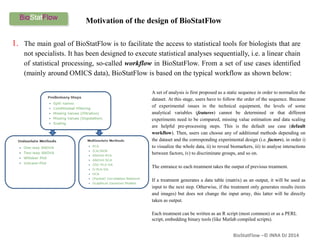
1. The main goal of BioStatFlow is to facilitate the access to statistical tools for biologists that are
not specialists. It has been designed to execute statistical analyses sequentially, i.e. a linear chain
of statistical processing, so-called workflow in BioStatFlow. From a set of use cases identified
(mainly around OMICS data), BioStatFlow is based on the typical workflow as shown below:
A set of analysis is first proposed as a static sequence in order to normalize the
dataset. At this stage, users have to follow the order of the sequence. Because
of experimental issues in the technical equipment, the levels of some
analytical variables (features) cannot be determined or that different
experiments need to be compared, missing value estimation and data scaling
are helpful pre-processing steps. This is the default use case (default
workflow). Then, users can choose any of additional methods depending on
the dataset and the corresponding experimental design (i.e. factors), in order i)
to visualize the whole data, ii) to reveal biomarkers, iii) to analyse interactions
between factors, iv) to discriminate groups, and so on.
The entrance to each treatment takes the output of previous treatment.
If a treatment generates a data table (matrix) as an output, it will be used as
input to the next step. Otherwise, if the treatment only generates results (texts
and images) but does not change the input array, this latter will be directly
taken as output.
Each treatment can be written as an R script (most common) or as a PERL
script, embedding binary tools (like Matlab compiled scripts).
BioStatFlow –© INRA DJ 2014
http://biostatflow.org/doc/pg?id=tutorial:startTutorial:
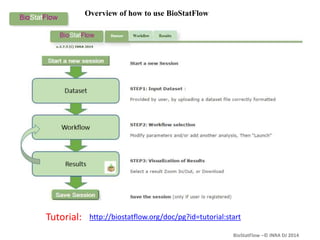
Overview of how to use BioStatFlow
BioStatFlow –© INRA DJ 2014
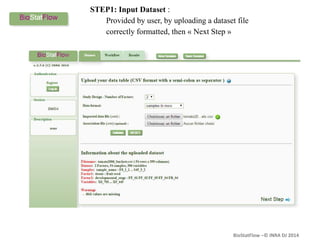
STEP1: Input Dataset :
Provided by user, by uploading a dataset file
correctly formatted, then « Next Step »
BioStatFlow –© INRA DJ 2014
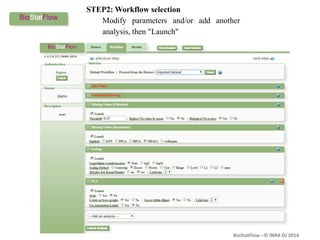
STEP2: Workflow selection
Modify parameters and/or add another
analysis, then "Launch"
BioStatFlow –© INRA DJ 2014
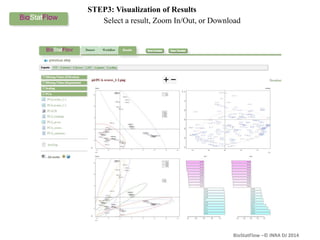
STEP3: Visualization of Results
Select a result, Zoom In/Out, or Download
BioStatFlow –© INRA DJ 2014
2. BioStatFlow allows bioinformaticians to easily integrate a new method of statistical
analysis in a workflow, or even create their own workflows. Thus, the analysis scripts and
the workflow definition files are stored in separate catalogs of the application; some
configuration files enabling integration without modify the application source code.
Motivation of the design of BioStatFlow
BioStatFlow –© INRA DJ 2014
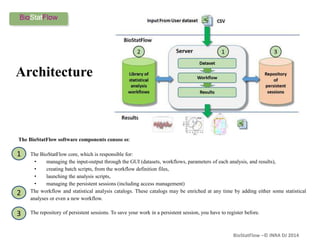
The BioStatFlow software components consist of:
1. The BioStatFlow core, which is responsible for:
• managing the input-output through the GUI (datasets, workflows, parameters of each analysis, and results),
• creating batch scripts, from the workflow definition files,
• launching the analysis scripts,
• managing the persistent sessions (including access management)
2. The workflow and statistical analysis catalogs. These catalogs may be enriched at any time by adding either some statistical
analyses or even a new workflow.
3. The repository of persistent sessions. To save your work in a persistent session, you have to register before.
Architecture
1
2
3
BioStatFlow –© INRA DJ 2014
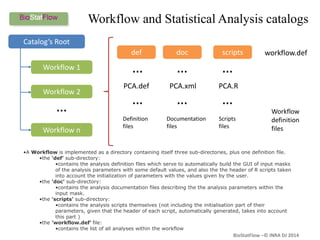
Workflow and Statistical Analysis catalogs
Catalog’s Root
Workflow 1
Workflow 2
Workflow n
…
def doc scripts
PCA.def PCA.xml PCA.R
…
…
…
…
…
…
Definition
files
Documentation
files
Scripts
files
workflow.def
Workflow
definition
files
•A Workflow is implemented as a directory containing itself three sub-directories, plus one definition file.
•the ‘def’ sub-directory:
•contains the analysis definition files which serve to automatically build the GUI of input masks
of the analysis parameters with some default values, and also the the header of R scripts taken
into account the initialization of parameters with the values given by the user.
•the 'doc' sub-directory:
•contains the analysis documentation files describing the the analysis parameters within the
input mask.
•the 'scripts' sub-directory:
•contains the analysis scripts themselves (not including the initialisation part of their
parameters, given that the header of each script, automatically generated, takes into account
this part )
•the 'workflow.def‘ file:
•contains the list of all analyses within the workflow
BioStatFlow –© INRA DJ 2014
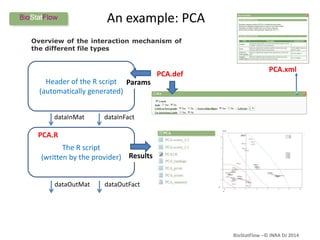
PCA.def
Header of the R script
(automatically generated)
The R script
(written by the provider)
dataInMat dataInFact
dataOutMat dataOutFact
PCA.R
Params
Results
PCA.xml
An example: PCA
Overview of the interaction mechanism of
the different file types
BioStatFlow –© INRA DJ 2014
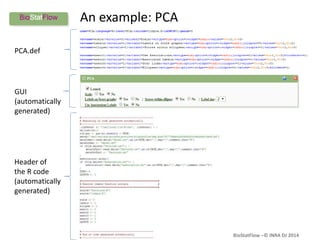
An example: PCA
PCA.def
GUI
(automatically
generated)
Header of
the R code
(automatically
generated)
BioStatFlow –© INRA DJ 2014
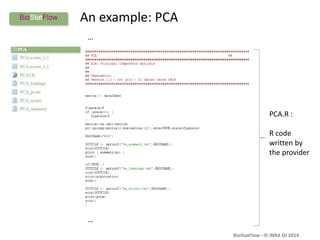
An example: PCA
…
…
PCA.R :
R code
written by
the provider
BioStatFlow –© INRA DJ 2014
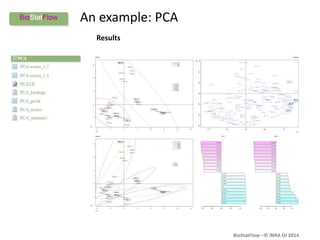
An example: PCA
Results
BioStatFlow –© INRA DJ 2014
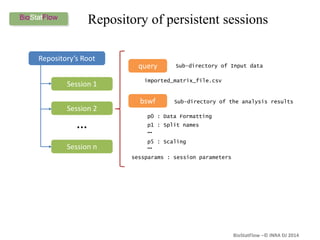
Repository of persistent sessions
Repository’s Root
Session 1
Session 2
Session n
…
query
bswf
imported_matrix_file.csv
p0 : Data Formatting
p1 : Split names
Sub-directory of Input data
Sub-directory of the analysis results
p5 : Scaling
…
…
sessparams : session parameters
BioStatFlow –© INRA DJ 2014
3. BioStatFlow helps disseminate the results of statistical analyzes by saving them in a
persistent session so that they can be fully restored. One can thus provide the session
identifier when publishing results (see the tutorial).
To disseminate your data and their associated statistical analysis, communicate the URL formed as:
http://biostatflow.org/view/<SESSION ID>
Motivation of the design of BioStatFlow
BioStatFlow –© INRA DJ 2014
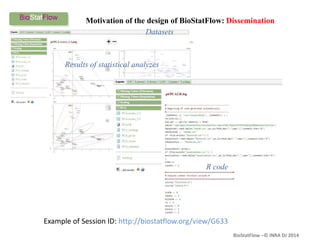
Example of Session ID: http://biostatflow.org/view/G633
Results of statistical analyzes
Motivation of the design of BioStatFlow: Dissemination
Datasets
R code
BioStatFlow –© INRA DJ 2014
Some Links
A Spotlight on BioStatFlow in MetaboNews
http://www.metabonews.ca/Feb2015/MetaboNews_Feb2015.htm#spotlight
BioStatFlow is available online:
http://biostatflow.org
A Tutorial on BioStatFlow
http://biostatflow.org/doc/pg?id=tutorial:start
BioStatFlow –© INRA DJ 2014
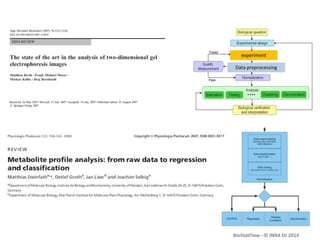
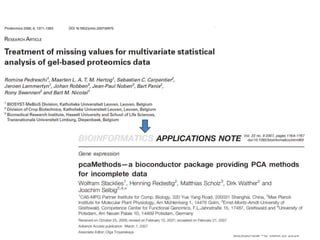
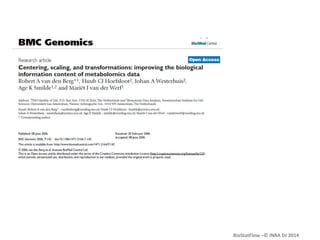
Some references
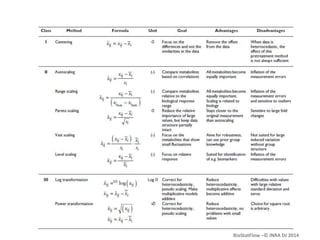
BioStatFlow –© INRA DJ 2014
experiment
Data preprocessing
BioStatFlow –© INRA DJ 2014

Biostatflow

  • 1.
    BioStatFlow –© INRADJ 2014 PMFB –UMR 1332, INRA, F-33140 Villenave d’Ornon djacob@bordeaux.inra.fr http://biostatflow.org
  • 2.
    BioStatFlow –© INRADJ 2014 BioStatFlow is a web application designed for the analysis of "omics", including metabolomics, data with statistical methods. It deals with the analysis of data sets generated from experiments. Omics experiments yield large amounts of data, too much to be interpreted by the human eye. A combination of multivariate and univariate data analyses are therefore essential to extract and visualize the information of interest. Biologists need to gain basic knowledge about the statistics employed to critically contribute to and evaluate their experimental design, protocols, and results. Nevertheless, there is still a lack of useful, fast, and easy online statistical tools for those who are not experts in statistics. BioStatFlow has been developed to meet this need. A web-based tool for Statistical Analysis
  • 3.
    BioStatFlow –© INRADJ 2014 Motivation of the design of BioStatFlow 1. The main goal of BioStatFlow is to facilitate the access to statistical tools for biologists that are not specialists. It has been designed to execute statistical analyses sequentially, i.e. a linear chain of statistical processing, so-called workflow in BioStatFlow. From a set of use cases identified (mainly around OMICS data), BioStatFlow is based on the typical workflow as shown below: A set of analysis is first proposed as a static sequence in order to normalize the dataset. At this stage, users have to follow the order of the sequence. Because of experimental issues in the technical equipment, the levels of some analytical variables (features) cannot be determined or that different experiments need to be compared, missing value estimation and data scaling are helpful pre-processing steps. This is the default use case (default workflow). Then, users can choose any of additional methods depending on the dataset and the corresponding experimental design (i.e. factors), in order i) to visualize the whole data, ii) to reveal biomarkers, iii) to analyse interactions between factors, iv) to discriminate groups, and so on. The entrance to each treatment takes the output of previous treatment. If a treatment generates a data table (matrix) as an output, it will be used as input to the next step. Otherwise, if the treatment only generates results (texts and images) but does not change the input array, this latter will be directly taken as output. Each treatment can be written as an R script (most common) or as a PERL script, embedding binary tools (like Matlab compiled scripts).
  • 4.
    BioStatFlow –© INRADJ 2014 http://biostatflow.org/doc/pg?id=tutorial:startTutorial: Overview of how to use BioStatFlow
  • 5.
    BioStatFlow –© INRADJ 2014 STEP1: Input Dataset : Provided by user, by uploading a dataset file correctly formatted, then « Next Step »
  • 6.
    BioStatFlow –© INRADJ 2014 STEP2: Workflow selection Modify parameters and/or add another analysis, then "Launch"
  • 7.
    BioStatFlow –© INRADJ 2014 STEP3: Visualization of Results Select a result, Zoom In/Out, or Download
  • 8.
    BioStatFlow –© INRADJ 2014 2. BioStatFlow allows bioinformaticians to easily integrate a new method of statistical analysis in a workflow, or even create their own workflows. Thus, the analysis scripts and the workflow definition files are stored in separate catalogs of the application; some configuration files enabling integration without modify the application source code. Motivation of the design of BioStatFlow
  • 9.
    BioStatFlow –© INRADJ 2014 The BioStatFlow software components consist of: 1. The BioStatFlow core, which is responsible for: • managing the input-output through the GUI (datasets, workflows, parameters of each analysis, and results), • creating batch scripts, from the workflow definition files, • launching the analysis scripts, • managing the persistent sessions (including access management) 2. The workflow and statistical analysis catalogs. These catalogs may be enriched at any time by adding either some statistical analyses or even a new workflow. 3. The repository of persistent sessions. To save your work in a persistent session, you have to register before. Architecture 1 2 3
  • 10.
    BioStatFlow –© INRADJ 2014 Workflow and Statistical Analysis catalogs Catalog’s Root Workflow 1 Workflow 2 Workflow n … def doc scripts PCA.def PCA.xml PCA.R … … … … … … Definition files Documentation files Scripts files workflow.def Workflow definition files •A Workflow is implemented as a directory containing itself three sub-directories, plus one definition file. •the ‘def’ sub-directory: •contains the analysis definition files which serve to automatically build the GUI of input masks of the analysis parameters with some default values, and also the the header of R scripts taken into account the initialization of parameters with the values given by the user. •the 'doc' sub-directory: •contains the analysis documentation files describing the the analysis parameters within the input mask. •the 'scripts' sub-directory: •contains the analysis scripts themselves (not including the initialisation part of their parameters, given that the header of each script, automatically generated, takes into account this part ) •the 'workflow.def‘ file: •contains the list of all analyses within the workflow
  • 11.
    BioStatFlow –© INRADJ 2014 PCA.def Header of the R script (automatically generated) The R script (written by the provider) dataInMat dataInFact dataOutMat dataOutFact PCA.R Params Results PCA.xml An example: PCA Overview of the interaction mechanism of the different file types
  • 12.
    BioStatFlow –© INRADJ 2014 An example: PCA PCA.def GUI (automatically generated) Header of the R code (automatically generated)
  • 13.
    BioStatFlow –© INRADJ 2014 An example: PCA … … PCA.R : R code written by the provider
  • 14.
    BioStatFlow –© INRADJ 2014 An example: PCA Results
  • 15.
    BioStatFlow –© INRADJ 2014 Repository of persistent sessions Repository’s Root Session 1 Session 2 Session n … query bswf imported_matrix_file.csv p0 : Data Formatting p1 : Split names Sub-directory of Input data Sub-directory of the analysis results p5 : Scaling … … sessparams : session parameters
  • 16.
    BioStatFlow –© INRADJ 2014 3. BioStatFlow helps disseminate the results of statistical analyzes by saving them in a persistent session so that they can be fully restored. One can thus provide the session identifier when publishing results (see the tutorial). To disseminate your data and their associated statistical analysis, communicate the URL formed as: http://biostatflow.org/view/<SESSION ID> Motivation of the design of BioStatFlow
  • 17.
    BioStatFlow –© INRADJ 2014 Example of Session ID: http://biostatflow.org/view/G633 Results of statistical analyzes Motivation of the design of BioStatFlow: Dissemination Datasets R code
  • 18.
    BioStatFlow –© INRADJ 2014 Some Links A Spotlight on BioStatFlow in MetaboNews http://www.metabonews.ca/Feb2015/MetaboNews_Feb2015.htm#spotlight BioStatFlow is available online: http://biostatflow.org A Tutorial on BioStatFlow http://biostatflow.org/doc/pg?id=tutorial:start
  • 19.
    BioStatFlow –© INRADJ 2014 Some references
  • 20.
    BioStatFlow –© INRADJ 2014 experiment Data preprocessing
  • 21.
  • 22.
  • 23.