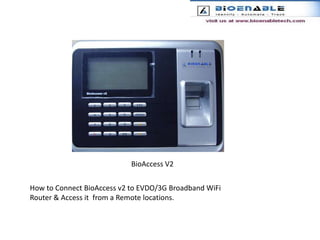
BioAccess V2How to Connect BioAccess v2 to EVDO/3G Broadband WiFi Router & Access it  from a Remote locations.
IndexINTRODUCTIONPACKAGEFEATURESSPECIFICATIONDATA FLOW DIAGRAMHOW  BIOACCESS  V2  IS  CONNECTEDSOFTWARE  INSTALLATION
INTRODUCTIONBio Access v2 offers the fastest fingerprint identification and verification speed in the industry and features intelligent fingerprint recognition technology for the first time. Bio Access v2 come with Fast TCP/IP network communication as well as popular USB Flash Disk function to download/upload users and attendance logs. It can be used in offices as well as at factories, construction sites and service industry.
PACKAGE     LAN CABLEBIOACCESS V2POWER ADAPTERLAN CABLELan cablePOWER  ADAPTERBIOACCESS V2
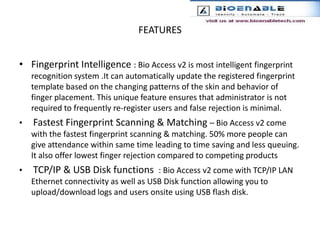
FEATURESFingerprint Intelligence : Bio Access v2 is most intelligent fingerprint recognition system .It can automatically update the registered fingerprint template based on the changing patterns of the skin and behavior of finger placement. This unique feature ensures that administrator is not required to frequently re-register users and false rejection is minimal.Fastest Fingerprint Scanning & Matching – Bio Access v2 come with the fastest fingerprint scanning & matching. 50% more people can give attendance within same time leading to time saving and less queuing. It also offer lowest finger rejection compared to competing productsTCP/IP & USB Disk functions  : Bio Access v2 come with TCP/IP LAN Ethernet connectivity as well as USB Disk function allowing you to upload/download logs and users onsite using USB flash disk.
BACK PANEL VIEWPower  supplySerial interfaceRS232LAN port
SPECIFICATIONUser capacity     	    -    500 user(3 fingerprint per user) with cardTransaction capacity      - 50,000 LogsIdentification speed  	     - < 1 Sec sensor                               - OpticalLCD screen  	                     -128 x 64 Graphical Blue LCD with white charactersLanguage  	                     -EnglishVoice  	                     -High definition voiceOther functions  	     -Name Display; Alarm for punch, RingCommunication mode  	TCP/IP (Ethernet), USB DiskPower            	     -5V DCBattery Backup  	    -4 hoursSize  	                    - 188 x 139 x 50
Data  flow   diagram
Data  flow  from  v2  to router through LAN connectionLAN connectionCDMA networkCDMA  NETWORKThe  data  transmitted from   router to  BTS  through CDMAnetwork serverData  can be access on server   through  The  CDMAnetwork
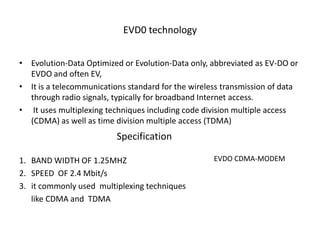
EVD0 technologyEvolution-Data Optimized or Evolution-Data only, abbreviated as EV-DO or EVDO and often EV, It is a telecommunications standard for the wireless transmission of data through radio signals, typically for broadband Internet access. It uses multiplexing techniques including code division multiple access (CDMA) as well as time division multiple access (TDMA)BAND WIDTH OF 1.25MHZSPEED  OF 2.4 Mbit/sit commonly used  multiplexing techniques       like CDMA and  TDMA         SpecificationEVDO CDMA-MODEM
Net accessing through wifiUsb  modem  is  connectedEthernet cable connected
Server sectionIn the  server section user required a software    to  extract  incoming dataA0attendance system  be commonly used serversection
SOFTWARE  INSTALLATIONINSERT   A0 SOFTWARE  CD  INTO  CD-DRIVEClick  on nextClick  on next
Click on finishDate Base  installation
Configuring A1 software
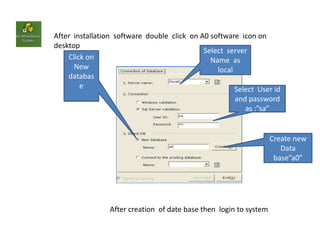
After  installation  software  double  click  on A0 software  icon on  desktopSelect  serverName  as localClick onNew database  Select  User idand password as :”sa”Create new  Data base”a0”After creation  of date base then  login to system
Communication between  machine  and  softwareClick on  terminal management
Click on add /Modify
Select   following  settingsClick  on next
Click on nextClick on ok
Registered  data  in device
Contact usBioEnable Technologies Pvt. Ltd.2nd Floor, The Avenue, Pune-Solapur Road, Hadapsar,landmark: Opp. Mega Center Pune 411028, MH, India Tollfree: 1800-209-2131 (only from India)International Sales: +91-9326170554 or +91-9373336478Others call : +91-20- 26810214Fax: +91-20-30225587email:sales@bioenabletech.com (Sales Worldwide)support@bioenabletech.com (Support Worldwide)accounts@bioenabletech.com (Accounts Worldwide)

Bioaccess V2

  • 1.
    BioAccess V2How toConnect BioAccess v2 to EVDO/3G Broadband WiFi Router & Access it from a Remote locations.
  • 2.
    IndexINTRODUCTIONPACKAGEFEATURESSPECIFICATIONDATA FLOW DIAGRAMHOW BIOACCESS V2 IS CONNECTEDSOFTWARE INSTALLATION
  • 3.
    INTRODUCTIONBio Access v2offers the fastest fingerprint identification and verification speed in the industry and features intelligent fingerprint recognition technology for the first time. Bio Access v2 come with Fast TCP/IP network communication as well as popular USB Flash Disk function to download/upload users and attendance logs. It can be used in offices as well as at factories, construction sites and service industry.
  • 4.
    PACKAGE LAN CABLEBIOACCESS V2POWER ADAPTERLAN CABLELan cablePOWER ADAPTERBIOACCESS V2
  • 5.
    FEATURESFingerprint Intelligence :Bio Access v2 is most intelligent fingerprint recognition system .It can automatically update the registered fingerprint template based on the changing patterns of the skin and behavior of finger placement. This unique feature ensures that administrator is not required to frequently re-register users and false rejection is minimal.Fastest Fingerprint Scanning & Matching – Bio Access v2 come with the fastest fingerprint scanning & matching. 50% more people can give attendance within same time leading to time saving and less queuing. It also offer lowest finger rejection compared to competing productsTCP/IP & USB Disk functions : Bio Access v2 come with TCP/IP LAN Ethernet connectivity as well as USB Disk function allowing you to upload/download logs and users onsite using USB flash disk.
  • 6.
    BACK PANEL VIEWPower supplySerial interfaceRS232LAN port
  • 7.
    SPECIFICATIONUser capacity - 500 user(3 fingerprint per user) with cardTransaction capacity - 50,000 LogsIdentification speed - < 1 Sec sensor - OpticalLCD screen -128 x 64 Graphical Blue LCD with white charactersLanguage -EnglishVoice -High definition voiceOther functions -Name Display; Alarm for punch, RingCommunication mode TCP/IP (Ethernet), USB DiskPower -5V DCBattery Backup -4 hoursSize - 188 x 139 x 50
  • 8.
    Data flow diagram
  • 9.
    Data flow from v2 to router through LAN connectionLAN connectionCDMA networkCDMA NETWORKThe data transmitted from router to BTS through CDMAnetwork serverData can be access on server through The CDMAnetwork
  • 10.
    EVD0 technologyEvolution-Data Optimizedor Evolution-Data only, abbreviated as EV-DO or EVDO and often EV, It is a telecommunications standard for the wireless transmission of data through radio signals, typically for broadband Internet access. It uses multiplexing techniques including code division multiple access (CDMA) as well as time division multiple access (TDMA)BAND WIDTH OF 1.25MHZSPEED OF 2.4 Mbit/sit commonly used multiplexing techniques like CDMA and TDMA SpecificationEVDO CDMA-MODEM
  • 11.
    Net accessing throughwifiUsb modem is connectedEthernet cable connected
  • 12.
    Server sectionIn the server section user required a software to extract incoming dataA0attendance system be commonly used serversection
  • 13.
    SOFTWARE INSTALLATIONINSERT A0 SOFTWARE CD INTO CD-DRIVEClick on nextClick on next
  • 14.
    Click on finishDateBase installation
  • 15.
  • 16.
    After installation software double click on A0 software icon on desktopSelect serverName as localClick onNew database Select User idand password as :”sa”Create new Data base”a0”After creation of date base then login to system
  • 17.
    Communication between machine and softwareClick on terminal management
  • 18.
  • 19.
    Select following settingsClick on next
  • 20.
  • 21.
    Registered data in device
  • 22.
    Contact usBioEnable TechnologiesPvt. Ltd.2nd Floor, The Avenue, Pune-Solapur Road, Hadapsar,landmark: Opp. Mega Center Pune 411028, MH, India Tollfree: 1800-209-2131 (only from India)International Sales: +91-9326170554 or +91-9373336478Others call : +91-20- 26810214Fax: +91-20-30225587email:sales@bioenabletech.com (Sales Worldwide)support@bioenabletech.com (Support Worldwide)accounts@bioenabletech.com (Accounts Worldwide)