Bill Redirect Scale
                   and
       Multiply the weight received
               by 2 or by 3
                           Documentation: 09/11/2008


       Use this documentation with the product : Bill Redirect 5.0J and more


Software configuration and integration service
                   It's free, fast, and efficient !
           Submit your case to info@billproduction.com
               and receive a customized answer !


              Our Internet site: http://www.billproduction.com/

                       Email: info@BillProduction.com
Step #1
         Download and install Bill Redirect software
     http://www.billproduction.com/Bill_COMtoKB.ZIP


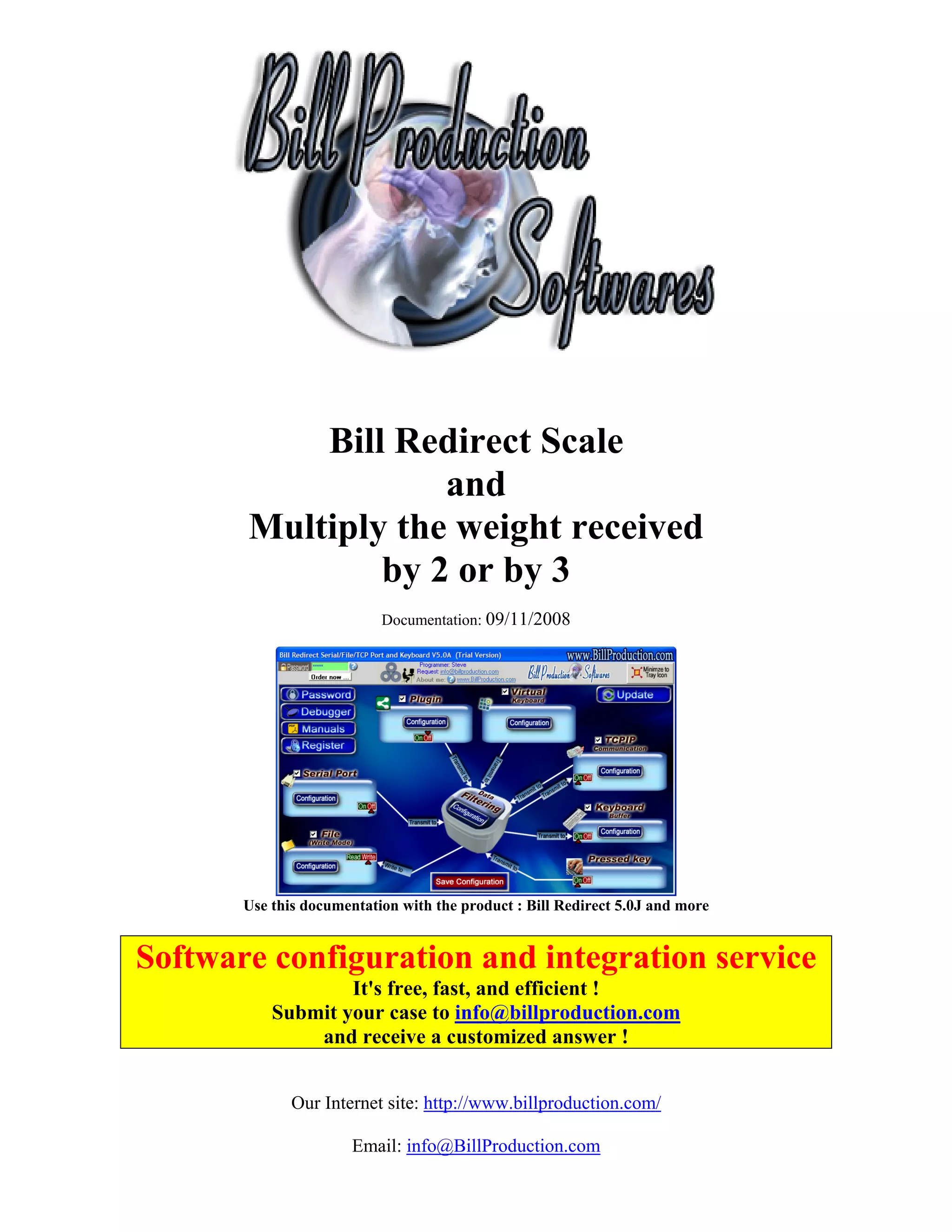
                           Step #2


Disable all except the Serial Port and Keyboard Buffer section.
        Set to OFF Serial Port and Pressed key switch.
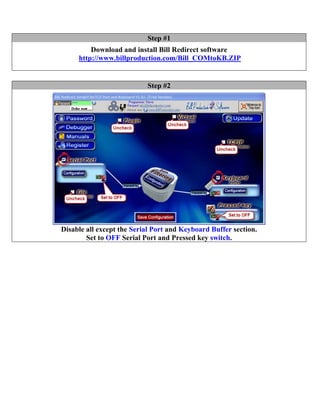
Step #3


                Click on button: Configuration.
 Enter the Serial Port Number where your Scale is connected.

Serial Port Configuration: Enter the configuration of your Scale

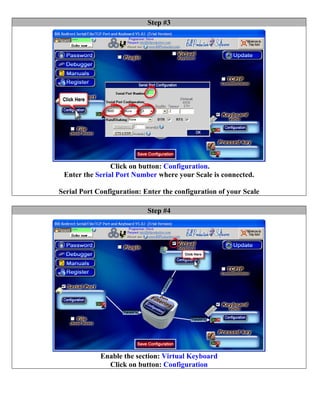
                            Step #4


             Enable the section: Virtual Keyboard
               Click on button: Configuration
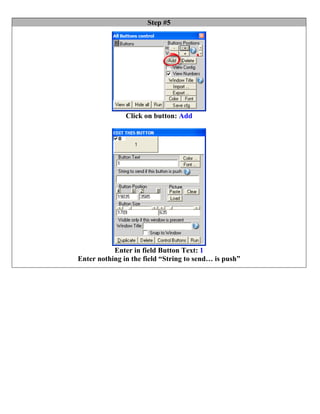
Step #5


               Click on button: Add


           Enter in field Button Text: 1
Enter nothing in the field “String to send… is push”
Step #6


                     Click on button: Add


               Enter in field Button Text: Multiply by 2
Enter in field “String to send… is push”: {TX_BUTTON_TXT[0,2]}
Step #7


                     Click on button: Add


               Enter in field Button Text: Multiply by 3
Enter in field “String to send… is push”: {TX_BUTTON_TXT[0,3]}

                 To create a menu like this one:
Step #8


                          Click on button: Configuration


                               Click on button: Add


                         Enter in this field: {SERIAL_RX}


                                 Enter in this field:
{MULTIPLY[{RX_DATA,{BUTTON_TXT[00]},]}{ASCII:13}{ASCII:10}
         Or to receive the value in a predefine format you can use this syntax:
     {MULTIPLY[{RX_DATA,{BUTTON_TXT[00]},#.##]}{ASCII:13}{ASCII:10}
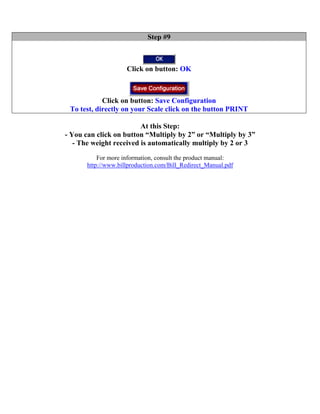
Step #9


                     Click on button: OK


            Click on button: Save Configuration
 To test, directly on your Scale click on the button PRINT

                         At this Step:
- You can click on button “Multiply by 2” or “Multiply by 3”
   - The weight received is automatically multiply by 2 or 3
           For more information, consult the product manual:
       http://www.billproduction.com/Bill_Redirect_Manual.pdf

Bill redirect multiply

  • 1.
    Bill Redirect Scale and Multiply the weight received by 2 or by 3 Documentation: 09/11/2008 Use this documentation with the product : Bill Redirect 5.0J and more Software configuration and integration service It's free, fast, and efficient ! Submit your case to info@billproduction.com and receive a customized answer ! Our Internet site: http://www.billproduction.com/ Email: info@BillProduction.com
  • 2.
    Step #1 Download and install Bill Redirect software http://www.billproduction.com/Bill_COMtoKB.ZIP Step #2 Disable all except the Serial Port and Keyboard Buffer section. Set to OFF Serial Port and Pressed key switch.
  • 3.
    Step #3 Click on button: Configuration. Enter the Serial Port Number where your Scale is connected. Serial Port Configuration: Enter the configuration of your Scale Step #4 Enable the section: Virtual Keyboard Click on button: Configuration
  • 4.
    Step #5 Click on button: Add Enter in field Button Text: 1 Enter nothing in the field “String to send… is push”
  • 5.
    Step #6 Click on button: Add Enter in field Button Text: Multiply by 2 Enter in field “String to send… is push”: {TX_BUTTON_TXT[0,2]}
  • 6.
    Step #7 Click on button: Add Enter in field Button Text: Multiply by 3 Enter in field “String to send… is push”: {TX_BUTTON_TXT[0,3]} To create a menu like this one:
  • 7.
    Step #8 Click on button: Configuration Click on button: Add Enter in this field: {SERIAL_RX} Enter in this field: {MULTIPLY[{RX_DATA,{BUTTON_TXT[00]},]}{ASCII:13}{ASCII:10} Or to receive the value in a predefine format you can use this syntax: {MULTIPLY[{RX_DATA,{BUTTON_TXT[00]},#.##]}{ASCII:13}{ASCII:10}
  • 8.
    Step #9 Click on button: OK Click on button: Save Configuration To test, directly on your Scale click on the button PRINT At this Step: - You can click on button “Multiply by 2” or “Multiply by 3” - The weight received is automatically multiply by 2 or 3 For more information, consult the product manual: http://www.billproduction.com/Bill_Redirect_Manual.pdf