BHAGWANT UNIVERSITY
SUBMITTED TO
ANDROID APP DEVELOPMENT
ABHISHEK CHOUDHARY
HOD (CSE)
Bhagwant University
Ajmer
SUBMITTED BY
SURAJ KUMAR SINGH
CSE
4th Year / VIII sem
Bhagwant University
Contents
 Android?
 Features of Android
 Why Learn Android
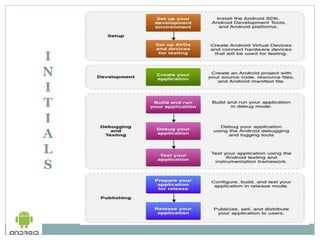
 Initials About android
 Requirement
 About Android SDK
 Set up Eclipse and AVD
 Project Explorer
 Android App Development
 Advantages and Disadvantages
 Application of Android
 Conclusion
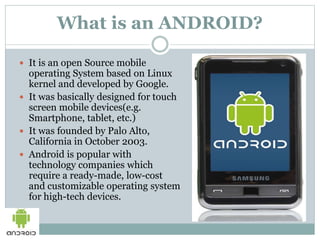
What is an ANDROID?
 It is an open Source mobile
operating System based on Linux
kernel and developed by Google.
 It was basically designed for touch
screen mobile devices(e.g.
Smartphone, tablet, etc.)
 It was founded by Palo Alto,
California in October 2003.
 Android is popular with
technology companies which
require a ready-made, low-cost
and customizable operating system
for high-tech devices.
Features of Android
 Interface
 Applications
 Memory Management
 Hardware
Why To Learn Android
 New Technology
 Faster to develop
 Easy to implement ideas
 Available almost in Every hand
 Creates Job Opportunity
I
N
I
T
I
A
L
S
Requirements
Hardware
 Processor P4
 RAM 2 GB
 HDD 40 GB
 Keyboard
 Mouse
 Android Device
Software
• Android SDK
Skills
• JAVA
• XML
• SQL
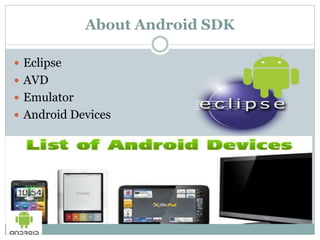
About Android SDK
 Eclipse
 AVD
 Emulator
 Android Devices
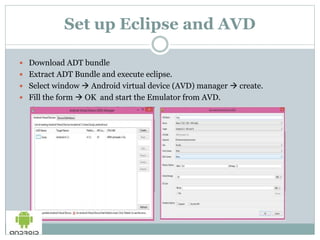
Set up Eclipse and AVD
 Download ADT bundle
 Extract ADT Bundle and execute eclipse.
 Select window  Android virtual device (AVD) manager  create.
 Fill the form  OK and start the Emulator from AVD.
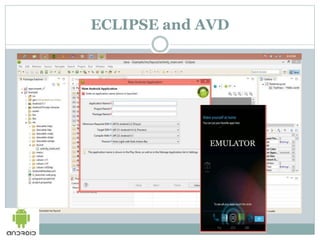
ECLIPSE and AVD
EMULATOR
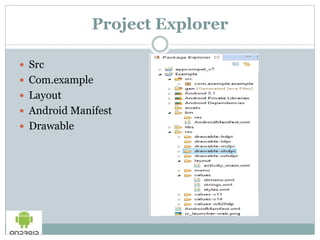
Project Explorer
 Src
 Com.example
 Layout
 Android Manifest
 Drawable
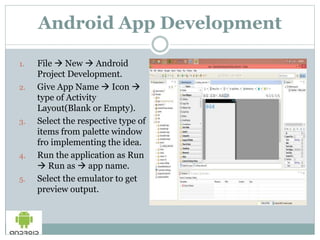
Android App Development
1. File  New  Android
Project Development.
2. Give App Name  Icon 
type of Activity
Layout(Blank or Empty).
3. Select the respective type of
items from palette window
fro implementing the idea.
4. Run the application as Run
 Run as  app name.
5. Select the emulator to get
preview output.
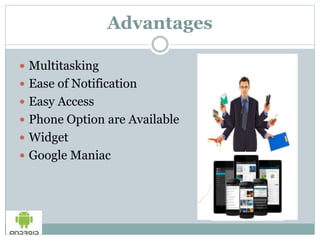
Advantages
 Multitasking
 Ease of Notification
 Easy Access
 Phone Option are Available
 Widget
 Google Maniac
Disadvantage
 Continuous Internet Connection
 Advertising
Application of Android
 Utility and Productivity Assistance
 Organizers and Time Management Option
 Entertainment Zone
 Office Tools
Conclusion
 Apart from the several advantage and disadvantage,
development of an android application from an eclipse is a
fast and efficient method to develop it. It provides the
feature such as multitasking, ease of notification, varieties
of widgets and application mail are available on it which
can be implemented according to your use.
 Since, it is an upcoming technology so, learning to develop
an android app is a best way to get chance get improve your
future.
BHAGWANT UNIVERSITY
BHAGWANT UNIVERSITY

BHAGWANT UNIVERSITY

  • 1.
    BHAGWANT UNIVERSITY SUBMITTED TO ANDROIDAPP DEVELOPMENT ABHISHEK CHOUDHARY HOD (CSE) Bhagwant University Ajmer SUBMITTED BY SURAJ KUMAR SINGH CSE 4th Year / VIII sem Bhagwant University
  • 2.
    Contents  Android?  Featuresof Android  Why Learn Android  Initials About android  Requirement  About Android SDK  Set up Eclipse and AVD  Project Explorer  Android App Development  Advantages and Disadvantages  Application of Android  Conclusion
  • 3.
    What is anANDROID?  It is an open Source mobile operating System based on Linux kernel and developed by Google.  It was basically designed for touch screen mobile devices(e.g. Smartphone, tablet, etc.)  It was founded by Palo Alto, California in October 2003.  Android is popular with technology companies which require a ready-made, low-cost and customizable operating system for high-tech devices.
  • 4.
    Features of Android Interface  Applications  Memory Management  Hardware
  • 5.
    Why To LearnAndroid  New Technology  Faster to develop  Easy to implement ideas  Available almost in Every hand  Creates Job Opportunity
  • 6.
  • 7.
    Requirements Hardware  Processor P4 RAM 2 GB  HDD 40 GB  Keyboard  Mouse  Android Device Software • Android SDK Skills • JAVA • XML • SQL
  • 8.
    About Android SDK Eclipse  AVD  Emulator  Android Devices
  • 9.
    Set up Eclipseand AVD  Download ADT bundle  Extract ADT Bundle and execute eclipse.  Select window  Android virtual device (AVD) manager  create.  Fill the form  OK and start the Emulator from AVD.
  • 10.
  • 11.
    Project Explorer  Src Com.example  Layout  Android Manifest  Drawable
  • 12.
    Android App Development 1.File  New  Android Project Development. 2. Give App Name  Icon  type of Activity Layout(Blank or Empty). 3. Select the respective type of items from palette window fro implementing the idea. 4. Run the application as Run  Run as  app name. 5. Select the emulator to get preview output.
  • 13.
    Advantages  Multitasking  Easeof Notification  Easy Access  Phone Option are Available  Widget  Google Maniac
  • 14.
    Disadvantage  Continuous InternetConnection  Advertising
  • 15.
    Application of Android Utility and Productivity Assistance  Organizers and Time Management Option  Entertainment Zone  Office Tools
  • 16.
    Conclusion  Apart fromthe several advantage and disadvantage, development of an android application from an eclipse is a fast and efficient method to develop it. It provides the feature such as multitasking, ease of notification, varieties of widgets and application mail are available on it which can be implemented according to your use.  Since, it is an upcoming technology so, learning to develop an android app is a best way to get chance get improve your future.