
Benefit Realisation Management 
Bruce Levitan 
Head of Business Improvement 
MMU
Agenda 
• Building Benefit maps 
Benefit mapping 
• Using BRM in projects 
Stakeholder Analysis 
Risk identification 
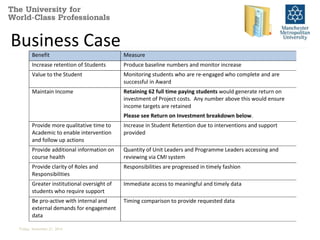
Business Case 
Prioritisation 
Product Catalogues
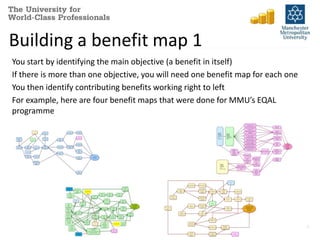
Building a benefit map 1 
You start by identifying the main objective (a benefit in itself) 
If there is more than one objective, you will need one benefit map for each one 
You then identify contributing benefits working right to left 
For example, here are four benefit maps that were done for MMU’s EQAL 
programme 
3
Building a benefit map 1 
The objective is placed at the far right, in an ellipse 
4 
Increased 
enrolments
Building a benefit map 2 
Identify the main supporting benefits 
Benefits should always be written in the form: 
[improvement + object] e.g. “increased revenue” 
More new 
applicants 
Better 
applicant 
conversion 
More quality 
time with 
applicants 
PM-BRM 5 
More 
focused 
advice 
Increased 
enrolments
Building a benefit map 3 
Working from right to left, identify supporting benefits for one “area” 
Less 
applicant 
frustration 
Better 
customer 
service 
Improved 
image 
More new 
applicants 
Better 
applicant 
conversion 
More quality 
time with 
applicants 
More 
focused 
advice 
Increased 
enrolments 
Fewer errors 
Friday, November 21, 2014 PM-BRM 6
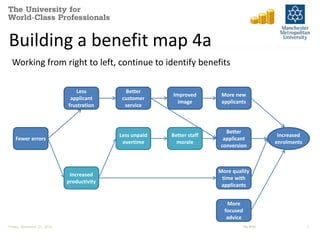
Building a benefit map 4a 
Working from right to left, continue to identify benefits 
Fewer errors 
Less 
applicant 
frustration 
Increased 
productivity 
Better 
customer 
service 
Less unpaid 
overtime 
Improved 
image 
Better staff 
morale 
More new 
applicants 
Better 
applicant 
conversion 
More quality 
time with 
applicants 
More 
focused 
advice 
Increased 
enrolments 
Friday, November 21, 2014 PM-BRM 7
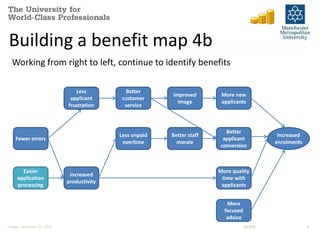
Building a benefit map 4b 
Working from right to left, continue to identify benefits 
Fewer errors 
Less 
applicant 
frustration 
Increased 
productivity 
Easier 
application 
processing 
Better 
customer 
service 
Less unpaid 
overtime 
Improved 
image 
Better staff 
morale 
More new 
applicants 
Better 
applicant 
conversion 
More quality 
time with 
applicants 
More 
focused 
advice 
Increased 
enrolments 
Friday, November 21, 2014 PM-BRM 8
Building a benefit map 4c 
Working from right to left, continue to identify benefits 
Fewer errors 
Less 
applicant 
frustration 
Increased 
productivity 
Easier 
application 
processing 
Better MI on 
applications 
/enrolments 
Better 
customer 
service 
Less unpaid 
overtime 
Improved 
image 
Better staff 
morale 
More new 
applicants 
Better 
applicant 
conversion 
More quality 
time with 
applicants 
More 
focused 
advice 
Increased 
enrolments 
Friday, November 21, 2014 PM-BRM 9
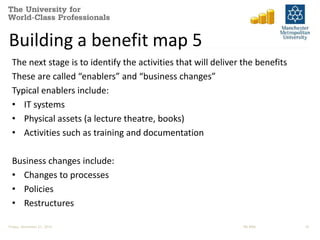
Building a benefit map 5 
The next stage is to identify the activities that will deliver the benefits 
These are called “enablers” and “business changes” 
Typical enablers include: 
• IT systems 
• Physical assets (a lecture theatre, books) 
• Activities such as training and documentation 
Business changes include: 
• Changes to processes 
• Policies 
• Restructures 
Friday, November 21, 2014 PM-BRM 10
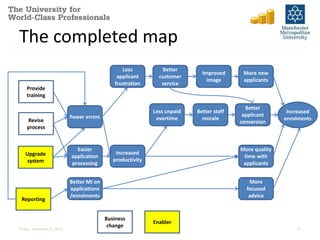
The completed map 
Fewer errors 
Less 
applicant 
frustration 
Provide 
training 
Revise enrolments 
process 
Increased 
productivity 
Easier 
application 
processing 
Better MI on 
applications 
/enrolments 
Better 
customer 
service 
Less unpaid 
overtime 
Improved 
image 
Better staff 
morale 
More new 
applicants 
Better 
applicant 
conversion 
More quality 
time with 
applicants 
More 
focused 
advice 
Increased 
Upgrade 
system 
Reporting 
Business 
change 
Enabler 
Friday, November 21, 2014 11
Areas where BRM helps PM 
Stakeholder Analysis 
Risk identification 
Business Case 
Prioritisation 
Product Catalogues 
Friday, November 21, 2014 PM-BRM 12
Stakeholder Analysis 
1. Helps identify stakeholders by asking the question “who will be 
impacted by this benefit?” 
Management reporting: SPMI, 
Executive 
Corporate risk: SPMI 
Retention: students, Finance, 
Faculties 
Satisfaction: students, academic 
staff, non-academic staff 
Friday, November 21, 2014 PM-BRM 13
Stakeholder Analysis 
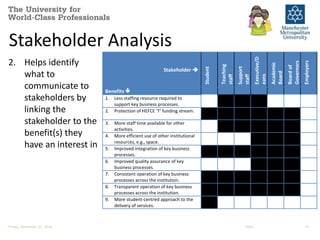
2. Helps identify 
what to 
communicate to 
stakeholders by 
linking the 
stakeholder to the 
benefit(s) they 
have an interest in 
Stakeholder  
Student 
Teaching 
staff 
Support 
staff 
Executive/D 
eans 
Academic 
Board 
Board of 
Governors 
Employers 
Benefits  
1. Less staffing resource required to 
support key business processes. 
2. Protection of HEFCE ‘T’ funding stream. 
3. More staff time available for other 
activities. 
4. More efficient use of other institutional 
resources, e.g., space. 
5. Improved integration of key business 
processes. 
6. Improved quality assurance of key 
business processes. 
7. Consistent operation of key business 
processes across the institution. 
8. Transparent operation of key business 
processes across the institution. 
9. More student-centred approach to the 
delivery of services. 
10. Ability to deliver key external 
requirements, e.g., the HEAR. 
11. Improved personalisation of timetabling 
Friday, November 21, 2014 ESRA 14 
information. 
12. Better information on changes to
Risk identification 
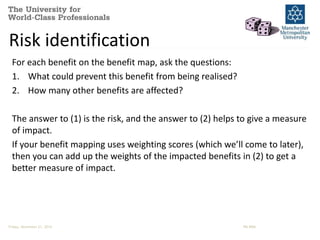
For each benefit on the benefit map, ask the questions: 
1. What could prevent this benefit from being realised? 
2. How many other benefits are affected? 
The answer to (1) is the risk, and the answer to (2) helps to give a measure 
of impact. 
If your benefit mapping uses weighting scores (which we’ll come to later), 
then you can add up the weights of the impacted benefits in (2) to get a 
better measure of impact. 
Friday, November 21, 2014 PM-BRM
Risk Analysis – example 
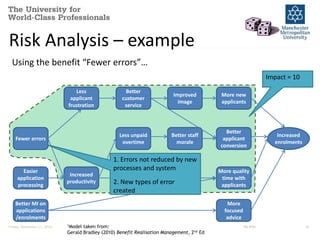
Using the benefit “Fewer errors”… 
Friday, November 21, 2014 1Model taken from: PM-BRM 16 
Gerald Bradley (2010) Benefit Realisation Management, 2nd Ed 
Fewer errors 
Less 
applicant 
frustration 
Increased 
productivity 
Easier 
application 
processing 
Better MI on 
applications 
/enrolments 
Less unpaid 
overtime 
Better staff 
morale 
Better 
customer 
service 
Improved 
image 
More new 
applicants 
Better 
applicant 
conversion 
More quality 
time with 
applicants 
More 
focused 
advice 
Increased 
enrolments 
1. Errors not reduced by new 
processes and system 
2. New types of error 
created 
Impact = 10
Business Case 
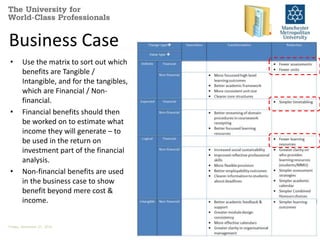
• Use the matrix to sort out which 
benefits are Tangible / 
Intangible, and for the tangibles, 
which are Financial / Non-financial. 
• Financial benefits should then 
be worked on to estimate what 
income they will generate – to 
be used in the return on 
investment part of the financial 
analysis. 
• Non-financial benefits are used 
in the business case to show 
benefit beyond mere cost & 
income. 
Friday, November 21, 2014
Business Case 
Item Cost / Income (£ ) Recurring cost / Income (£) 
COSTS: 
Timetabling system 350,000 35,000 
VLE (Moodle) 500,000 40,000 
Timetabling staff 250,000 
E-Learning Support Officers 250,000 
Total costs: 850,000 575,000 
SAVINGS: 
Timetabling savings 35,000 
Fewer learning resources 20,000 
Fewer assessments/units 150,000 
Total savings 205,000 
Overall cost: 850,000 370,000 
Friday, November 21, 2014
Business Case 
Benefit Measure 
Increase retention of Students Produce baseline numbers and monitor increase 
Value to the Student Monitoring students who are re-engaged who complete and are 
Friday, November 21, 2014 
successful in Award 
Maintain Income Retaining 62 full time paying students would generate return on 
investment of Project costs. Any number above this would ensure 
income targets are retained 
Please see Return on Investment breakdown below. 
Provide more qualitative time to 
Academic to enable intervention 
and follow up actions 
Increase in Student Retention due to interventions and support 
provided 
Provide additional information on 
course health 
Quantity of Unit Leaders and Programme Leaders accessing and 
reviewing via CMI system 
Provide clarity of Roles and 
Responsibilities 
Responsibilities are progressed in timely fashion 
Greater institutional oversight of 
students who require support 
Immediate access to meaningful and timely data 
Be pro-active with internal and 
external demands for engagement 
data 
Timing comparison to provide requested data
Prioritisation 
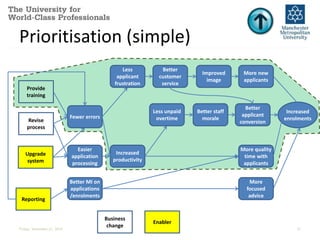
Two approaches: 
• Simpler approach is to assess which changes enable most benefits – 
this is done by adding business change requirements and enablers to a 
benefit map. 
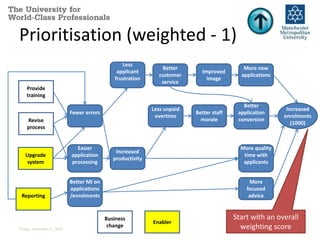
• More complex example is to add weighting scores to benefits, and then 
by association to business changes and their enablers: this will give a 
numerical score that can be used to prioritise changes (and enablers). 
Friday, November 21, 2014 PM-BRM
Prioritisation (simple) 
Fewer errors 
Less 
applicant 
frustration 
Provide 
training 
Revise enrolments 
process 
Increased 
productivity 
Easier 
application 
processing 
Better MI on 
applications 
/enrolments 
Better 
customer 
service 
Less unpaid 
overtime 
Improved 
image 
Better staff 
morale 
More new 
applicants 
Better 
applicant 
conversion 
More quality 
time with 
applicants 
More 
focused 
advice 
Increased 
Upgrade 
system 
Reporting 
Business 
change 
Enabler 
Friday, November 21, 2014 21
Prioritisation (weighted - 1) 
Fewer errors 
Less 
applicant 
frustration 
Increased 
productivity 
Easier 
application 
processing 
Better MI on 
applications 
/enrolments 
Better 
customer 
service 
Less unpaid 
overtime 
Improved 
image 
Better staff 
morale 
More new 
applications 
Better 
application 
conversion 
More quality 
time with 
applicants 
More 
focused 
advice 
Provide 
training 
Revise 
process 
Upgrade 
system 
Reporting 
Business 
change 
Enabler 
Increased 
enrolments 
(1000) 
Start with an overall 
weighting score 
Friday, November 21, 2014 22
Prioritisation (weighted - 2) 
Fewer errors 
Less 
applicant 
frustration 
Increased 
productivity 
Easier 
application 
processing 
Better MI on 
applications 
/enrolments 
Better 
customer 
service 
Less unpaid 
overtime 
Improved 
image 
Better staff 
morale 
More new 
applications 
(400) 
Better 
application 
conversion 
(300) 
More quality 
time with 
applicants 
(200) 
More 
focused 
advice(100) 
Provide 
training 
Revise 
process 
Upgrade 
system 
Reporting 
Business 
change 
Enabler 
40% 
30% 
Increased 
enrolments 
20% 
(1000) 
10% 
Add % contribution & 
add appropriate score 
to supporting benefits 
Friday, November 21, 2014 23
Prioritisation (weighted - 3) 
Fewer errors 
Less 
applicant 
frustration 
Increased 
productivity 
Easier 
application 
processing 
Better MI on 
applications 
/enrolments 
Better 
customer 
service 
Less unpaid 
overtime 
Improved 
image 
Better staff 
morale 
100% 
More new 
applications 
(400) 
60% 
Better 
application 
conversion 
(300) 
More quality 
time with 
applicants 
(200) 
More 
focused 
advice(100) 
Provide 
training 
Revise 
process 
Upgrade 
system 
Reporting 
Business 
change 
Enabler 
40% 
30% 
Increased 
enrolments 
20% 
(1000) 
10% 
40% 
80% 
20% 
100% 
Continue to work 
back from right to left 
Friday, November 21, 2014 24
Prioritisation (weighted - 4) 
Fewer errors 
(540) 
Less 
applicant 
frustration 
(400) 
100% 
100% 
50% 
Increased 
productivity 
(280) 
30% 
Easier 
application 
processing 
(140) 
Better MI on 
applications 
/enrolments 
(140) 
100% 100% 100% 
Better 
customer 
service (580) 
Less unpaid 
overtime 
(120) 
Improved 
image (400) 
Better staff 
morale (120) 
More new 
applications 
(400) 
60% 
Better 
application 
conversion 
(300) 
More quality 
time with 
applicants 
(200) 
More 
focused 
advice(100) 
Provide 
training (108) 
Revise 
process (300) 
Upgrade 
system (218) 
Reporting 
(194) 
50% 
Business 
change 
Enabler 
40% 
30% 
Increased 
enrolments 
20% 
(1000) 
10% 
40% 
100% 
80% 
20% 
100% 
10% 
20% 
40% 
60% 
40% 
100% 
Friday, November 21, 2014 25
Prioritisation 
Two approaches: 
• Using the “simple approach”: 
– Provide training = 11 benefits supported 
– Revise process = 12 benefits supported 
– Upgrade system = 12 benefits supported 
– Reporting = 13 benefits supported 
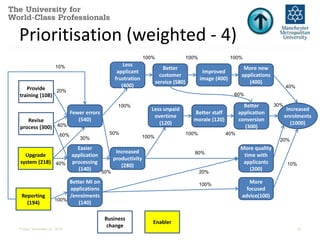
• Using the “weighted approach”: 
– Provide training = 108 
– Revise process = 300 
– Upgrade system = 218 
– Reporting = 194 
• So they both have the same “least” option, but differ on the “most”! 
Which is best? Neither – they are basis for discussion! 
Friday, November 21, 2014 PM-BRM
Product Catalogues 
• Product (and requirement) catalogues can be linked to benefits via the 
benefit map, and these can help inform acceptance criteria and user 
tests. 
• For example “Reporting” is linked to “Fewer errors” and “Better MI on 
customers and sales”, so acceptance criteria can include Reports on : 
– error rates 
– types of error 
– source of error 
– applicants (broken down by demographics, age, ethnicity, etc.) 
– enrolments (broken down by demographics, location, A levels, etc.) 
• Exercise: 
– Identify some acceptance criteria for the remaining enabler and one of the 
business changes 
Friday, November 21, 2014 PM-BRM
The end 
• Contact details: 
Bruce Levitan: b.levitan@mmu.ac.uk 
Friday, November 21, 2014 PM-BRM

Benefit Realisation Management

  • 1.
    Benefit Realisation Management Bruce Levitan Head of Business Improvement MMU
  • 2.
    Agenda • BuildingBenefit maps Benefit mapping • Using BRM in projects Stakeholder Analysis Risk identification Business Case Prioritisation Product Catalogues
  • 3.
    Building a benefitmap 1 You start by identifying the main objective (a benefit in itself) If there is more than one objective, you will need one benefit map for each one You then identify contributing benefits working right to left For example, here are four benefit maps that were done for MMU’s EQAL programme 3
  • 4.
    Building a benefitmap 1 The objective is placed at the far right, in an ellipse 4 Increased enrolments
  • 5.
    Building a benefitmap 2 Identify the main supporting benefits Benefits should always be written in the form: [improvement + object] e.g. “increased revenue” More new applicants Better applicant conversion More quality time with applicants PM-BRM 5 More focused advice Increased enrolments
  • 6.
    Building a benefitmap 3 Working from right to left, identify supporting benefits for one “area” Less applicant frustration Better customer service Improved image More new applicants Better applicant conversion More quality time with applicants More focused advice Increased enrolments Fewer errors Friday, November 21, 2014 PM-BRM 6
  • 7.
    Building a benefitmap 4a Working from right to left, continue to identify benefits Fewer errors Less applicant frustration Increased productivity Better customer service Less unpaid overtime Improved image Better staff morale More new applicants Better applicant conversion More quality time with applicants More focused advice Increased enrolments Friday, November 21, 2014 PM-BRM 7
  • 8.
    Building a benefitmap 4b Working from right to left, continue to identify benefits Fewer errors Less applicant frustration Increased productivity Easier application processing Better customer service Less unpaid overtime Improved image Better staff morale More new applicants Better applicant conversion More quality time with applicants More focused advice Increased enrolments Friday, November 21, 2014 PM-BRM 8
  • 9.
    Building a benefitmap 4c Working from right to left, continue to identify benefits Fewer errors Less applicant frustration Increased productivity Easier application processing Better MI on applications /enrolments Better customer service Less unpaid overtime Improved image Better staff morale More new applicants Better applicant conversion More quality time with applicants More focused advice Increased enrolments Friday, November 21, 2014 PM-BRM 9
  • 10.
    Building a benefitmap 5 The next stage is to identify the activities that will deliver the benefits These are called “enablers” and “business changes” Typical enablers include: • IT systems • Physical assets (a lecture theatre, books) • Activities such as training and documentation Business changes include: • Changes to processes • Policies • Restructures Friday, November 21, 2014 PM-BRM 10
  • 11.
    The completed map Fewer errors Less applicant frustration Provide training Revise enrolments process Increased productivity Easier application processing Better MI on applications /enrolments Better customer service Less unpaid overtime Improved image Better staff morale More new applicants Better applicant conversion More quality time with applicants More focused advice Increased Upgrade system Reporting Business change Enabler Friday, November 21, 2014 11
  • 12.
    Areas where BRMhelps PM Stakeholder Analysis Risk identification Business Case Prioritisation Product Catalogues Friday, November 21, 2014 PM-BRM 12
  • 13.
    Stakeholder Analysis 1.Helps identify stakeholders by asking the question “who will be impacted by this benefit?” Management reporting: SPMI, Executive Corporate risk: SPMI Retention: students, Finance, Faculties Satisfaction: students, academic staff, non-academic staff Friday, November 21, 2014 PM-BRM 13
  • 14.
    Stakeholder Analysis 2.Helps identify what to communicate to stakeholders by linking the stakeholder to the benefit(s) they have an interest in Stakeholder  Student Teaching staff Support staff Executive/D eans Academic Board Board of Governors Employers Benefits  1. Less staffing resource required to support key business processes. 2. Protection of HEFCE ‘T’ funding stream. 3. More staff time available for other activities. 4. More efficient use of other institutional resources, e.g., space. 5. Improved integration of key business processes. 6. Improved quality assurance of key business processes. 7. Consistent operation of key business processes across the institution. 8. Transparent operation of key business processes across the institution. 9. More student-centred approach to the delivery of services. 10. Ability to deliver key external requirements, e.g., the HEAR. 11. Improved personalisation of timetabling Friday, November 21, 2014 ESRA 14 information. 12. Better information on changes to
  • 15.
    Risk identification Foreach benefit on the benefit map, ask the questions: 1. What could prevent this benefit from being realised? 2. How many other benefits are affected? The answer to (1) is the risk, and the answer to (2) helps to give a measure of impact. If your benefit mapping uses weighting scores (which we’ll come to later), then you can add up the weights of the impacted benefits in (2) to get a better measure of impact. Friday, November 21, 2014 PM-BRM
  • 16.
    Risk Analysis –example Using the benefit “Fewer errors”… Friday, November 21, 2014 1Model taken from: PM-BRM 16 Gerald Bradley (2010) Benefit Realisation Management, 2nd Ed Fewer errors Less applicant frustration Increased productivity Easier application processing Better MI on applications /enrolments Less unpaid overtime Better staff morale Better customer service Improved image More new applicants Better applicant conversion More quality time with applicants More focused advice Increased enrolments 1. Errors not reduced by new processes and system 2. New types of error created Impact = 10
  • 17.
    Business Case •Use the matrix to sort out which benefits are Tangible / Intangible, and for the tangibles, which are Financial / Non-financial. • Financial benefits should then be worked on to estimate what income they will generate – to be used in the return on investment part of the financial analysis. • Non-financial benefits are used in the business case to show benefit beyond mere cost & income. Friday, November 21, 2014
  • 18.
    Business Case ItemCost / Income (£ ) Recurring cost / Income (£) COSTS: Timetabling system 350,000 35,000 VLE (Moodle) 500,000 40,000 Timetabling staff 250,000 E-Learning Support Officers 250,000 Total costs: 850,000 575,000 SAVINGS: Timetabling savings 35,000 Fewer learning resources 20,000 Fewer assessments/units 150,000 Total savings 205,000 Overall cost: 850,000 370,000 Friday, November 21, 2014
  • 19.
    Business Case BenefitMeasure Increase retention of Students Produce baseline numbers and monitor increase Value to the Student Monitoring students who are re-engaged who complete and are Friday, November 21, 2014 successful in Award Maintain Income Retaining 62 full time paying students would generate return on investment of Project costs. Any number above this would ensure income targets are retained Please see Return on Investment breakdown below. Provide more qualitative time to Academic to enable intervention and follow up actions Increase in Student Retention due to interventions and support provided Provide additional information on course health Quantity of Unit Leaders and Programme Leaders accessing and reviewing via CMI system Provide clarity of Roles and Responsibilities Responsibilities are progressed in timely fashion Greater institutional oversight of students who require support Immediate access to meaningful and timely data Be pro-active with internal and external demands for engagement data Timing comparison to provide requested data
  • 20.
    Prioritisation Two approaches: • Simpler approach is to assess which changes enable most benefits – this is done by adding business change requirements and enablers to a benefit map. • More complex example is to add weighting scores to benefits, and then by association to business changes and their enablers: this will give a numerical score that can be used to prioritise changes (and enablers). Friday, November 21, 2014 PM-BRM
  • 21.
    Prioritisation (simple) Fewererrors Less applicant frustration Provide training Revise enrolments process Increased productivity Easier application processing Better MI on applications /enrolments Better customer service Less unpaid overtime Improved image Better staff morale More new applicants Better applicant conversion More quality time with applicants More focused advice Increased Upgrade system Reporting Business change Enabler Friday, November 21, 2014 21
  • 22.
    Prioritisation (weighted -1) Fewer errors Less applicant frustration Increased productivity Easier application processing Better MI on applications /enrolments Better customer service Less unpaid overtime Improved image Better staff morale More new applications Better application conversion More quality time with applicants More focused advice Provide training Revise process Upgrade system Reporting Business change Enabler Increased enrolments (1000) Start with an overall weighting score Friday, November 21, 2014 22
  • 23.
    Prioritisation (weighted -2) Fewer errors Less applicant frustration Increased productivity Easier application processing Better MI on applications /enrolments Better customer service Less unpaid overtime Improved image Better staff morale More new applications (400) Better application conversion (300) More quality time with applicants (200) More focused advice(100) Provide training Revise process Upgrade system Reporting Business change Enabler 40% 30% Increased enrolments 20% (1000) 10% Add % contribution & add appropriate score to supporting benefits Friday, November 21, 2014 23
  • 24.
    Prioritisation (weighted -3) Fewer errors Less applicant frustration Increased productivity Easier application processing Better MI on applications /enrolments Better customer service Less unpaid overtime Improved image Better staff morale 100% More new applications (400) 60% Better application conversion (300) More quality time with applicants (200) More focused advice(100) Provide training Revise process Upgrade system Reporting Business change Enabler 40% 30% Increased enrolments 20% (1000) 10% 40% 80% 20% 100% Continue to work back from right to left Friday, November 21, 2014 24
  • 25.
    Prioritisation (weighted -4) Fewer errors (540) Less applicant frustration (400) 100% 100% 50% Increased productivity (280) 30% Easier application processing (140) Better MI on applications /enrolments (140) 100% 100% 100% Better customer service (580) Less unpaid overtime (120) Improved image (400) Better staff morale (120) More new applications (400) 60% Better application conversion (300) More quality time with applicants (200) More focused advice(100) Provide training (108) Revise process (300) Upgrade system (218) Reporting (194) 50% Business change Enabler 40% 30% Increased enrolments 20% (1000) 10% 40% 100% 80% 20% 100% 10% 20% 40% 60% 40% 100% Friday, November 21, 2014 25
  • 26.
    Prioritisation Two approaches: • Using the “simple approach”: – Provide training = 11 benefits supported – Revise process = 12 benefits supported – Upgrade system = 12 benefits supported – Reporting = 13 benefits supported • Using the “weighted approach”: – Provide training = 108 – Revise process = 300 – Upgrade system = 218 – Reporting = 194 • So they both have the same “least” option, but differ on the “most”! Which is best? Neither – they are basis for discussion! Friday, November 21, 2014 PM-BRM
  • 27.
    Product Catalogues •Product (and requirement) catalogues can be linked to benefits via the benefit map, and these can help inform acceptance criteria and user tests. • For example “Reporting” is linked to “Fewer errors” and “Better MI on customers and sales”, so acceptance criteria can include Reports on : – error rates – types of error – source of error – applicants (broken down by demographics, age, ethnicity, etc.) – enrolments (broken down by demographics, location, A levels, etc.) • Exercise: – Identify some acceptance criteria for the remaining enabler and one of the business changes Friday, November 21, 2014 PM-BRM
  • 28.
    The end •Contact details: Bruce Levitan: b.levitan@mmu.ac.uk Friday, November 21, 2014 PM-BRM

Editor's Notes

  • #15 and success – i.e. the second of the three areas outlined on the previous slide