
Using Xcode


1    iabdulrazzaq@outlook.com   Eng. Abdulrazzaq Alnajjar
Setting Up Your Project in Xcode


2               iabdulrazzaq@outlook.com   Eng. Abdulrazzaq Alnajjar
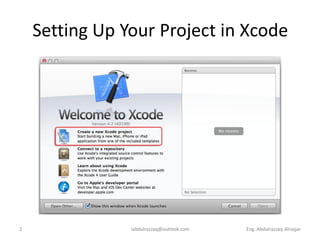
Setting Up Your Project in Xcode
•   create a new project.
•   Connect with existing projects.
•   Open user guide.
•   Go to developer.apple.com.


3                    iabdulrazzaq@outlook.com   Eng. Abdulrazzaq Alnajjar
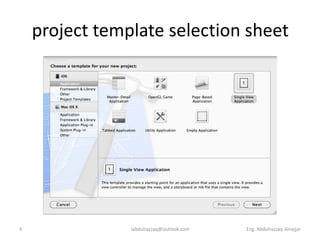
project template selection sheet


4               iabdulrazzaq@outlook.com   Eng. Abdulrazzaq Alnajjar
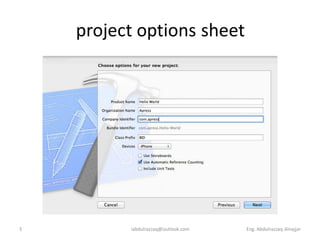
project options sheet


5         iabdulrazzaq@outlook.com   Eng. Abdulrazzaq Alnajjar
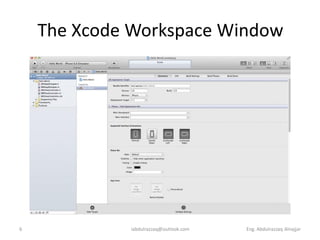
The Xcode Workspace Window


6            iabdulrazzaq@outlook.com   Eng. Abdulrazzaq Alnajjar
The Xcode Workspace Window
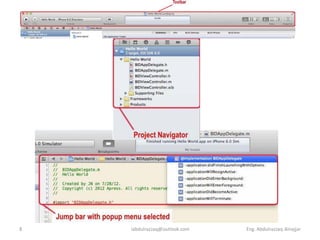
•   The Toolbar
•   The Navigator View
•   The Jump Bar
•   The Utility Pane
•   Interface Builder
•   New Compiler and Debugger


7                 iabdulrazzaq@outlook.com   Eng. Abdulrazzaq Alnajjar
8   iabdulrazzaq@outlook.com   Eng. Abdulrazzaq Alnajjar
DemoWindow
    The Xcode Workspace


9         iabdulrazzaq@outlook.com   Eng. Abdulrazzaq Alnajjar
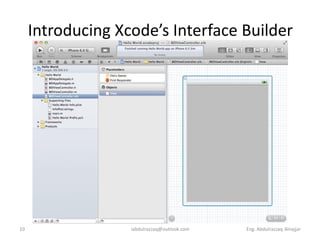
Introducing Xcode’s Interface Builder


10                 iabdulrazzaq@outlook.com   Eng. Abdulrazzaq Alnajjar
What’s in the Nib File?
• It is the right place to add the objects that
  make up your application’s user interface.
          When you create objects in Interface Builder, they’ll be
     instantiated in your program when that nib file is loaded
• Every nib file starts off with the same two
  icons:
         • File’s Owner:
         • First Responder
     These two are created automatically and
     cannot be deleted.
11                           iabdulrazzaq@outlook.com   Eng. Abdulrazzaq Alnajjar
File’s Owner & First Responder
• File’s Owner represents the object that loaded the
  nib file from disk. In other words, File’s Owner is
  the object that “owns” this copy of the nib file.
• First Responder is the object with which the user
  is currently interacting.
     First Responder icon gives you a convenient way to
     communicate with whatever control or other object is
     the current first responder, without needing to write
     code to determine which control or view that might
     be.


12                    iabdulrazzaq@outlook.com   Eng. Abdulrazzaq Alnajjar
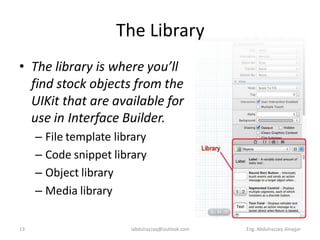
The Library
• The library is where you’ll
  find stock objects from the
  UIKit that are available for
  use in Interface Builder.
     – File template library
     – Code snippet library
     – Object library
     – Media library

13                      iabdulrazzaq@outlook.com   Eng. Abdulrazzaq Alnajjar
The Library
• File template library: contains a collection of file
  templates to add a new file to your project.
• Code snippet library: features a collection of
  code snippets you can drag into your source code
  files.
• Object library: is filled with reusable objects,
  such as text fields, labels, sliders, buttons, and
  just about any object you would ever need to
  design your iOS interface.
• Media library: is for all your media, including
  pictures, sounds, and movies.
14                   iabdulrazzaq@outlook.com   Eng. Abdulrazzaq Alnajjar
Demo View
     Adding a Label to the


15         iabdulrazzaq@outlook.com   Eng. Abdulrazzaq Alnajjar
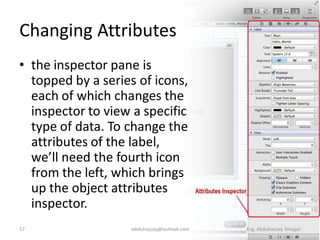
Changing Attributes
• the inspector pane is
  topped by a series of icons,
  each of which changes the
  inspector to view a specific
  type of data. To change the
  attributes of the label,
  we’ll need the fourth icon
  from the left, which brings
  up the object attributes
  inspector.
17                 iabdulrazzaq@outlook.com   Eng. Abdulrazzaq Alnajjar
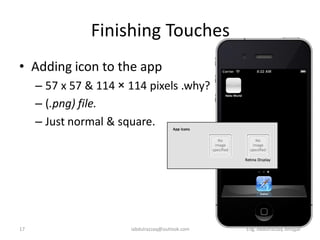
Finishing Touches
• Adding icon to the app
     – 57 x 57 & 114 × 114 pixels .why?
     – (.png) file.
     – Just normal & square.


17                     iabdulrazzaq@outlook.com   Eng. Abdulrazzaq Alnajjar
Demo app
     Adding icon to the


18       iabdulrazzaq@outlook.com   Eng. Abdulrazzaq Alnajjar

Beginning iOS6 Development CH02 Using Xcode

  • 1.
    Using Xcode 1 iabdulrazzaq@outlook.com Eng. Abdulrazzaq Alnajjar
  • 2.
    Setting Up YourProject in Xcode 2 iabdulrazzaq@outlook.com Eng. Abdulrazzaq Alnajjar
  • 3.
    Setting Up YourProject in Xcode • create a new project. • Connect with existing projects. • Open user guide. • Go to developer.apple.com. 3 iabdulrazzaq@outlook.com Eng. Abdulrazzaq Alnajjar
  • 4.
    project template selectionsheet 4 iabdulrazzaq@outlook.com Eng. Abdulrazzaq Alnajjar
  • 5.
    project options sheet 5 iabdulrazzaq@outlook.com Eng. Abdulrazzaq Alnajjar
  • 6.
    The Xcode WorkspaceWindow 6 iabdulrazzaq@outlook.com Eng. Abdulrazzaq Alnajjar
  • 7.
    The Xcode WorkspaceWindow • The Toolbar • The Navigator View • The Jump Bar • The Utility Pane • Interface Builder • New Compiler and Debugger 7 iabdulrazzaq@outlook.com Eng. Abdulrazzaq Alnajjar
  • 8.
    8 iabdulrazzaq@outlook.com Eng. Abdulrazzaq Alnajjar
  • 9.
    DemoWindow The Xcode Workspace 9 iabdulrazzaq@outlook.com Eng. Abdulrazzaq Alnajjar
  • 10.
    Introducing Xcode’s InterfaceBuilder 10 iabdulrazzaq@outlook.com Eng. Abdulrazzaq Alnajjar
  • 11.
    What’s in theNib File? • It is the right place to add the objects that make up your application’s user interface. When you create objects in Interface Builder, they’ll be instantiated in your program when that nib file is loaded • Every nib file starts off with the same two icons: • File’s Owner: • First Responder These two are created automatically and cannot be deleted. 11 iabdulrazzaq@outlook.com Eng. Abdulrazzaq Alnajjar
  • 12.
    File’s Owner &First Responder • File’s Owner represents the object that loaded the nib file from disk. In other words, File’s Owner is the object that “owns” this copy of the nib file. • First Responder is the object with which the user is currently interacting. First Responder icon gives you a convenient way to communicate with whatever control or other object is the current first responder, without needing to write code to determine which control or view that might be. 12 iabdulrazzaq@outlook.com Eng. Abdulrazzaq Alnajjar
  • 13.
    The Library • Thelibrary is where you’ll find stock objects from the UIKit that are available for use in Interface Builder. – File template library – Code snippet library – Object library – Media library 13 iabdulrazzaq@outlook.com Eng. Abdulrazzaq Alnajjar
  • 14.
    The Library • Filetemplate library: contains a collection of file templates to add a new file to your project. • Code snippet library: features a collection of code snippets you can drag into your source code files. • Object library: is filled with reusable objects, such as text fields, labels, sliders, buttons, and just about any object you would ever need to design your iOS interface. • Media library: is for all your media, including pictures, sounds, and movies. 14 iabdulrazzaq@outlook.com Eng. Abdulrazzaq Alnajjar
  • 15.
    Demo View Adding a Label to the 15 iabdulrazzaq@outlook.com Eng. Abdulrazzaq Alnajjar
  • 16.
    Changing Attributes • theinspector pane is topped by a series of icons, each of which changes the inspector to view a specific type of data. To change the attributes of the label, we’ll need the fourth icon from the left, which brings up the object attributes inspector. 17 iabdulrazzaq@outlook.com Eng. Abdulrazzaq Alnajjar
  • 17.
    Finishing Touches • Addingicon to the app – 57 x 57 & 114 × 114 pixels .why? – (.png) file. – Just normal & square. 17 iabdulrazzaq@outlook.com Eng. Abdulrazzaq Alnajjar
  • 18.
    Demo app Adding icon to the 18 iabdulrazzaq@outlook.com Eng. Abdulrazzaq Alnajjar