PYTHON
BEGIN WITH
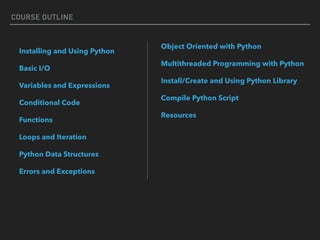
COURSE OUTLINE
Installing and Using Python
Basic I/O
Variables and Expressions
Conditional Code
Functions
Loops and Iteration
Python Data Structures
Errors and Exceptions
Object Oriented with Python
Multithreaded Programming with Python
Install/Create and Using Python Library
Compile Python Script
Resources
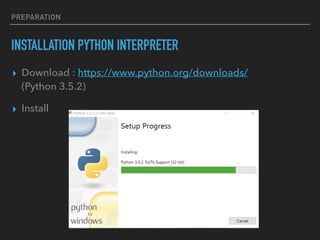
INSTALLATION PYTHON INTERPRETER
▸ Download : https://www.python.org/downloads/

(Python 3.5.2)
▸ Install
PREPARATION
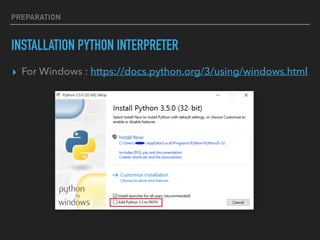
INSTALLATION PYTHON INTERPRETER
▸ For Windows : https://docs.python.org/3/using/windows.html
PREPARATION
INSTALLATION PYTHON INTERPRETER
▸ Install Location (Widows) :
PREPARATION
C:User<name>ProgramsAppDataLocalProgramsPythonPython35-32
▸ Install Location (OSX)
/usr/bin/python
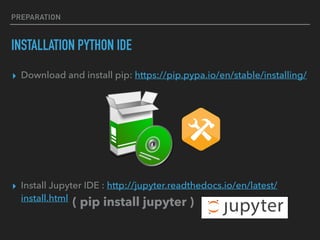
INSTALLATION PYTHON IDE
▸ Download and install pip: https://pip.pypa.io/en/stable/installing/


▸ Install Jupyter IDE : http://jupyter.readthedocs.io/en/latest/
install.html
PREPARATION
( pip install jupyter )
RUN JUPYTER
PREPARATION
Jupyter: http://localhost:8888
>> jupyter-notebook
Goto : localhost:8888
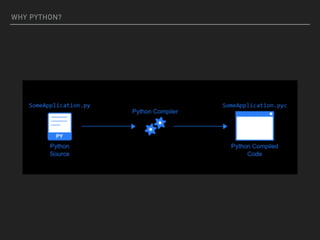
WHY PYTHON?
WHY PYTHON?
WHY PYTHON?
WHY PYTHON?
Cross Platform
BASIC I/O
BASIC I/O
“ Hello World “
> text = input(“Enter text”)
> x = int(input(“Enter text”))
> print(“hello”)
> print(10)
> print(text)
> print(“{}”.format(x))
> print(“%s”.%(x))
Input
Output
Input()
print()
VARIABLES AND EXPRESSIONS
> pi = pi + 1
> number += 1
> text = text + “haha”
> n = 2 + 2 * 2 - 5
n ?
Dynamics Variable
Expression
> a = 1
> a = “1”
> a = 1.0
> a = f()
VARIABLES AND EXPRESSIONS
Variable types
boolean : True/False
float : 0.1
int : 100
string : “hello”
VARIABLES AND EXPRESSIONS
>> type()
VARIABLES AND EXPRESSIONS
Quiz Time “ Let me introduce myself “
FRIST NAME:
LAST NAME:
AGE:
GENDER:
TEL:
WEIGHT (KG.):
HEIGHT (CM.) :
MY NAME IS ________________.
I AM _________ YEARS OLD.
I AM A _________.
MY PHONE NO. IS ______________.
MY WEIGHT IS ________________KG. (~_________ LB.)
MY HEIGHT IS ________________CM. (~__________M.)
Input:
Output:
10 Min. Q1
*1 kg = 2.205 lb
CONDITIONAL CODE
CONDITIONAL CODE
Syntax
if <condition> :
statment(s)
elif <condition> :
statment(s)
else :
statment(s)
Comparators
> , < , >= , <=, not, !=
Operators
A & B , A and B
A | B , A or B
Syntax
short if
x = <true> if <condition> else <false>
CONDITIONAL CODE
Example
if (5 > 10) | (10 > 15) & ( 1 != 1) :
print(False)
elif (10 > 5) & (not(False)):
print(True)
else:
print(NULL)
Example (short if)
x = 5 if 5 > 10 else 10
CONDITIONAL CODE
Quiz Time “ What is my BMI level ?“
FRIST NAME:
LAST NAME:
AGE:
GENDER:
TEL:
WEIGHT (KG.):
HEIGHT (CM.) :
MY NAME IS ________________.
I AM _________ YEARS OLD.
I AM A _________.
MY PHONE NO. IS ______________.
MY WEIGHT IS ________________KG. (~_________ LB.)
MY HEIGHT IS ________________CM. (~__________M.)
MY BMI IS : __________________.
Input:
Output:
5 Min. Q2
*1 kg ~ 2.205 lb
LOOPS AND ITERATION
LOOPS AND ITERATION
range

#generate number
range(5) ==> [0,1,2,3,4]

range(0,10,2) ==> [0,2,4,6,8]

range(0,10,5) ==> [0,5]
LOOPS AND ITERATION
enumerate
#generate index i start from 0
for i, n in enumerate(<iterator object>):

statement(s)
Example
for i, n in enumerate(range(0,10,5)):

pow = n ** i
print(pow)
1

5
LOOPS AND ITERATION
Syntax
for…
for n in <iterator object>:

statement(s)


while..
while(<conditions>):

statement(s)

Examples
for…
for n in range(10):

print(n ** n)

while..
while(True):

break

for n in <iterator object>:

…….
LOOPS AND ITERATION
break
#exit loop
for n in <iterator object>:

break
continue
#next loop
for n in <iterator object>:

continue
pass
#pass
while True

pass
LOOPS AND ITERATION
Syntax
for…
for n in <iterator object>:

statement(s)

while..
while(<conditions>):

statement(s)

range

#generate index number
range(5) ==> [0,1,2,3,4]

range(0,10,2) ==> [0,2,4,6,8]
enumerate
#generate index i start from 0
for i, n in enumerate(<iterator object>):

statement(s)
break
#exit loop
for n in <iterator object>:

break
continue
#next loop
for n in <iterator object>:

continue
FUNCTION
FUNCTIONS
Syntax
def <function name>(args) :
statement(s)
def <function name>(args) :
statement(s)
return <value>
def <function name>(args) :
statement(s)
yield <value>
return
return 0

return 1
g = make_generator()
print(g)
0
FUNCTIONS
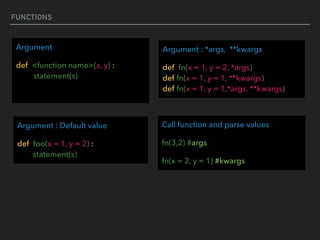
Argument
def <function name>(x, y) :

statement(s)
Argument : Default value
def foo(x = 1, y = 2) :

statement(s)
Call function and parse values
fn(3,2) #args
fn(x = 2, y = 1) #kwargs
Argument : *args, **kwargs
def fn(x = 1, y = 2, *args)

def fn(x = 1, y = 1, **kwargs)

def fn(x = 1, y = 1,*args, **kwargs)
FUNCTIONS
Return
def <function name>(x, y) :
statement(s)
return value
Return
def <function name>(x, y) :
statement(s)
return value1, value2,…
Return values
x , y = minmax(x,y)
Example
def add(x, y) :
a = x + y
return a
Example
def minmax(x, y) :

if x == y:

return None, None
mi = x if x < y else y

ma = x if x > y else y
return mi, ma
FUNCTIONS
Example
def BMI(weight=None, height =None):
bmi = weight / (height ** 2)
return bmi
bmi = BMI(10,1.67)
FUNCTIONS
#Variable scope
r = 1

for a in range(10):

r = 3

for i in range(5):

r = 8
print(r) ????
#Variable scope
a = 5

def var():

print(a)

var() ????
#Variable scope
a = 5

def var():

a += 5

print(a)

var() ????
FUNCTIONS
#Variable scope
a = 5

def var():

global a

a += 5

print(a)

var() ????
“UnboundLocalError: local variable 'a' referenced before assignment“
FUNCTIONS
Quiz Time
10 Min. Q3
“ What is my BMI level? : Function Version“
F1 : getInfo() #get user information and return informations


F2 : BMI(…. , ……) #calculate and return BMI level

F3 : showInfo(…,….,…,..) #display summary information

# get information, calculate BMI and display of N users
F4 : getNInfo(n)
FUNCTIONS
#main program
import bmi
bmi.getInfo()

bmi.BMI(weight,height)

bmi.showInfo()
#External function

#bmi.py
def getInfo():

………

def BMI(weight,height):

……..

def showInfo(….,..,.…):

………
#main program
from bmi import bmi
bmi.getInfo()

bmi.BMI(weight,height)

bmi.showInfo()
# External module function

# bmi/bmi.py
def getInfo():

………

def BMI(weight,height):

……..

def showInfo(….,..,.…):

………
PYTHON DATA STRUCTURES
- LIST
- TUPLE

- SET

- DICT

- FILE
PYTHON DATA STRUCTURES
List
[1,2,3,4,5,6,7,8,9,10]
_list = [1, ”A”, [1], 1.0] #multiple type in one list object
a = _list[0] #access one element
b = _list[0:3] #access multiple elements
_list.append(10) #add new element
_list.pop(), _list.pop(index) #remove using index
_list.remove(value) #remove using value
PYTHON DATA STRUCTURES
Using Lists as Stacks
stack = [3, 4, 5]

stack.append(6)

stack.append(7)

print(stack)


stack.pop()

print(stack)


stack.pop()

stack.pop()

print(stack)
PYTHON DATA STRUCTURES
Using Lists as Queues
from collections import deque
queue = deque(["Eric", "John", "Michael"])

queue.append("Terry") 

queue.append("Graham") 

queue.popleft() 

queue.popleft() 

print(queue)
PYTHON DATA STRUCTURES
Add element
squares = []
for x in range(10):

squares.append(x**2)
print(squares)
PYTHON DATA STRUCTURES
Generate list
squares = [x**2 for x in range(10)]
squares = list(map(lambda x: x**2, range(10)))
map
map( lambda <> , <>, <input>) #~ short for
PYTHON DATA STRUCTURES
Nested List
matrix = [
[1, 2, 3, 4],
[5, 6, 7, 8],
[9, 10, 11, 12],
]
PYTHON DATA STRUCTURES
Access Nested List
for i in matrix:
for j in i:
print(j)
1

2

3

4

5

6

7

8

9

10

11

12
PYTHON DATA STRUCTURES
Transpose List
list(zip(*matrix))
[(1, 5, 9), (2, 6, 10), (3, 7, 11), (4, 8, 12)]
len() #find size of list
len([1,2,3,4,5,6,7,8,9])
9
PYTHON DATA STRUCTURES
sum(), min(), max()
a = [1,2,3,4,5,6,7,8,9,10]

print(sum(a), min(a), max(a))
55 1 10
sorted
a = [10,2,3,4,5,6,7,8,9,1]

print(sorted(a))
[1, 2, 3, 4, 5, 6, 7, 8, 9, 10]
PYTHON DATA STRUCTURES
Concat List
a = [1,2,3,4]

b = [5,6,7,8,9]

c = a + b
print(c)
[1,2,3,4,5,6,7,8,9]
PYTHON DATA STRUCTURES
del #remove list or elements list
a = [-1, 1, 66.25, 333, 333, 1234.5]
del a[0]

del a[2:4]

del a[:]

del a #remove variable “a” from memory
FUNCTIONS
Quiz Time
10 Min. Q4
“ STATISTICS Time“
1. Loop for get 10 numbers from input and insert to list
2. Create function for calculate: 

- Mean (Average) 

- Min

- Max

- Variance #calculate from the equation only
3. Show values
http://www.mathsisfun.com/data/standard-deviation.html
PYTHON DATA STRUCTURES
Tuple #sequence data
(1,2,3,4,5,6,7,8,9,10)
_tuple = 4,5,6,[1],"hello" #multiple type in one Tuple object
a = _tuple[0] #access one element
b = _tuple[0:3] #access multiple elements
_tuple.count(x) #count number of x in tuple
_tuple.index(x) #find index of x in tuple
_tuple[0] = 1 #cannot edit element value in tuple
PYTHON DATA STRUCTURES
Concat Tuple
a = 1,2,3,4,5,6,[1],”hello"
a += tuple([100])
print(a)
(1, 2, 3, 4, 5, 6, [1], 'hello', 100)
PYTHON DATA STRUCTURES
List to Tuple
t = tuple([1,2,3,4,5,6])
print(t)
(1, 2, 3, 4, 5, 6)
print format using tuple
print(“%s > %s ” %(50,10) )
50 > 10
PYTHON DATA STRUCTURES
Sets
{'apple', 'orange', 'apple', 'pear', 'orange', 'banana'}
_set = {'apple', 'orange', 'apple', 'pear', 'orange', 'banana'}
#multiple type in one set object
a = _set.pop() #get first element of set
_set.remove(x) #remove element x
_set.add(x) #add new element
len(_set) #get size of set
PYTHON DATA STRUCTURES
_set.intersection(a) #get intersect element on set a
_set.issubset(a) #Is subset of set a?
_set.difference(a) #get difference element from set a
_set.union(a) #get union element with set a
PYTHON DATA STRUCTURES
Sets
a = {'apple', 'orange', 'apple', 'pear', 'orange', ‘banana'}

print(a)
{'apple', 'orange', 'banana', 'pear'}
a = set(“ABCDEFG”)

print(a)
{'E', 'B', 'A', 'F', 'G', 'C', 'D'}
PYTHON DATA STRUCTURES
a = set([4,5,1,2,3])

print(a)
{1, 2, 3, 4, 5} #element will be sorted automatically
a = set([4,5,1,2,3])

b = set([4,5,1])

print(a.intersection(b))
{1, 4, 5}
PYTHON DATA STRUCTURES
Quiz Time
5 Min. Q5
“ Like Number “
Similarity?
PYTHON DATA STRUCTURES
Quiz Time
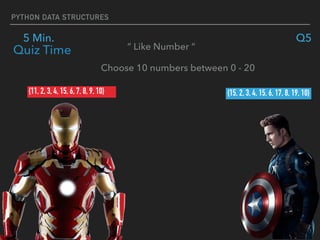
5 Min. Q5
“ Like Number “
{11, 2, 3, 4, 15, 6, 7, 8, 9, 10} {15, 2, 3, 4, 15, 6, 17, 8, 19, 10}
Choose 10 numbers between 0 - 20
PYTHON DATA STRUCTURES
Quiz Time
5 Min. Q5
“ Like Number “
PYTHON DATA STRUCTURES
Quiz Time
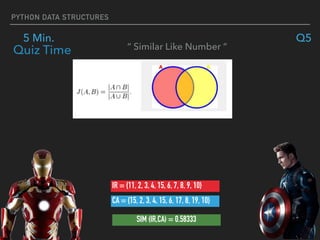
5 Min. Q5
“ Similar Like Number “
IR = {11, 2, 3, 4, 15, 6, 7, 8, 9, 10}
CA = {15, 2, 3, 4, 15, 6, 17, 8, 19, 10}
SIM (IR,CA) = 0.58333
PYTHON DATA STRUCTURES
Quiz Time
5 Min. Q5
“ Like Number “
1. Get two set of numbers(10 numbers) from two users.
2. Create function for calculate Jaccard similarity
3. Display the similarity.
PYTHON DATA STRUCTURES
Dict
{'apple' : 0, 'orange' : 1, 'pear' : ‘Hello'} #key, value structure
_dict = {'apple' : 0, 'orange' : 1, 'pear' : ‘Hello'} #multiple type in
one dict object
_dict.pop() #get first element of dict
_dict.keys() #get all key of dict
_dict.values() #get all value of dict
_dict[index] = x #add new element to dict (key,value)
len(_dict) #get size of dict
PYTHON DATA STRUCTURES
a = {'apple' : 0, 'orange' : 1, 'pear' : ‘Hello'}

print(a[‘apple’])
0
a = {'apple' : 0, 'orange' : 1, 'pear' : ‘Hello'} for k in a:

print(a[k])
0

1

‘hello’
PYTHON DATA STRUCTURES
a = {'apple' : 0, 'orange' : 1, 'pear' : ‘Hello'} 

print(a.values())
dict_values([0, 1, 'Hello'])
a = {'apple' : 0, 'orange' : 1, 'pear' : ‘Hello'}

print(a.keys())
dict_keys(['apple', 'orange', 'pear'])
PYTHON DATA STRUCTURES
File
f = open(<filename>,’r’) #open file for read
f = open(<filename>,’w’) #open file for write new
f = open(<filename>,’a’) #open file for write append
f.readline() #read next line
f.readlines() #read all lines
f.close() #read all lines
PYTHON DATA STRUCTURES
file.txt

My name is python.

I am a programmer.

I have no life.
with open(“file.txt” , ’r’) as f:

first = f.readline()

for line in f:

print(line)
My name is Python.
I am a programmer.
I have no life.
PYTHON DATA STRUCTURES
file.txt

My name is python.

I am a programmer.

I have no life.
with open(“file.txt” , ’r’) as f:

lines = f.readlines()

print(lines)
['My name is Python.n', 'I am a programmer.n', 'I have no life.']
PYTHON DATA STRUCTURES
with open(“write.txt” , ’w’) as f:

f.write(“Hellon”)
write.txt


Hello
with open(“write.txt” , ’a’) as f:

f.write(“Worldn”)

write.txt


Hello

World
PYTHON DATA STRUCTURES
file.txt

My name is python.

I am a programmer.

I have no life.
f = open(“file.txt” , “r”)

lines = f.readlines()

print(lines)

f.close()
['My name is Python.n', 'I am a programmer.n', 'I have no life.']
PYTHON DATA STRUCTURES
String
str = “hello world” #create string
len(str) #get string length
str[i:j] # get string from index i to index j - 1
str[i] #get character at index i
str.replace(str1,str2) #replace str1 with str2 in string str
https://docs.python.org/2/library/string.html
str.splite(sep) #split string by string sep
PYTHON DATA STRUCTURES
str = “Hello world”
print(len(str))
11
str = “Hello world”
print(str[0:3])
Hel
PYTHON DATA STRUCTURES
str = “Hello world”
print(str.replace(“o”,”_”))
Hell_ w_rld
str = “Hello world”
print(str.split(“ ”))
['Hello', 'world']
PYTHON DATA STRUCTURES
Quiz Time
10 Min. Q6
“ Word Count “
file.txt


My name is python

I am a programmer

I have no life
I : 2

my : 1

name : 1

is : 1

……..
1. Use dictionary structure to store words and count number
each word in the document.
2. Show output , by using print command to show values in

dictionary Ex. print(dict).
ERROR AND EXCEPTION
ERROR AND EXCEPTION
ERROR AND EXCEPTION
try:
...
except SomeException:
e = sys.exc_info()[1]
print(e)
https://docs.python.org/3/library/exceptions.html
ERROR AND EXCEPTION
import sys
try:
str = "hello"
print(str[100])
except:
tb = sys.exc_info()[1]
print(tb)
https://docs.python.org/3/library/exceptions.html
string index out of range
ERROR AND EXCEPTION
Input validation
while(True):
try:
n = int(input("age : "))
break
except:
print("Age is invalid, please try agian.")
https://docs.python.org/3/library/exceptions.html
VARIABLES AND EXPRESSIONS
Quiz Time “ Input validation “
FRIST NAME:
LAST NAME:
AGE:
GENDER:
TEL:
WEIGHT (KG.):
HEIGHT (CM.) :
5 Min. Q7
Create function for validate input value
OBJECT ORIENTED WITH PYTHON
class ClassName:
'Optional class documentation string'
class_suite
https://www.tutorialspoint.com/python/python_classes_objects.htm
1. The class has a documentation string, which can be accessed 

via ClassName.__doc__.
2. The class_suite consists of all the component statements defining class members, 

data attributes and functions
OBJECT ORIENTED WITH PYTHON
https://www.tutorialspoint.com/python/python_classes_objects.htm
class Employee:
'Common base class for all employees'
empCount = 0 

def __init__(self, name, salary):
self.name = name
self.salary = salary
Employee.empCount += 1

def displayCount(self):
print("Total Employee %d") % Employee.empCount
OBJECT ORIENTED WITH PYTHON
https://www.tutorialspoint.com/python/python_classes_objects.htm
Creating Instance Objects


emp1 = Employee("Zara", 2000)

emp2 = Employee("Manni", 5000)
Accessing Attributes


emp1.displayEmployee()
emp2.displayEmployee()
print "Total Employee %d" % Employee.empCount
OBJECT ORIENTED WITH PYTHON
https://www.tutorialspoint.com/python/python_classes_objects.htm
Class Inheritance


class SubClassName (ParentClass1[, ParentClass2, ...]):
'Optional class documentation string'
class_suite
OBJECT ORIENTED WITH PYTHON
https://www.tutorialspoint.com/python/python_classes_objects.htm
class Parent:
parentAttr = 100
def __init__(self):

print(“Calling parent constructor”)

def parentMethod(self):

print(‘Calling parent method’)

def setAttr(self, attr):

Parent.parentAttr = attr
def getAttr(self):

print(“Parent attribute :", Parent.parentAttr)
class Child(Parent):
def __init__(self):
print(“Calling child constructor”)
def childMethod(self):
print(‘Calling child method’)
Accessing


c = Child() # instance of child

c.childMethod() 

c.parentMethod() 

c.setAttr(200) 

c.getAttr()
OBJECT ORIENTED WITH PYTHON
https://www.tutorialspoint.com/python/python_classes_objects.htm
Overriding Methods
class Parent: 

def myMethod(self):

print 'Calling parent method'

class Child(Parent):

def myMethod(self):

print 'Calling child method'
c = Child() # instance of child
c.myMethod() # child calls overridden method
OBJECT ORIENTED WITH PYTHON
https://www.tutorialspoint.com/python/python_classes_objects.htm
Data Hiding


class JustCounter:

__secretCount = 0 #add double underscore prefix
def count(self):

self.__secretCount += 1

print self.__secretCount
counter = JustCounter()

counter.count()

counter.count()

print counter.__secretCount
AttributeError: JustCounter instance has no attribute '__secretCount'
PYTHON DATA STRUCTURES
Quiz Time
10 Min. Q8
“ My Car“
Create class of a car
MULTITHREADED PROGRAMMING
Background Executor
thread.start_new_thread ( function, args[, kwargs] )
import thread

import time
# Define a function for the thread

def print_time( threadName, delay):

count = 0

while count < 5:

time.sleep(delay)

count += 1

print "%s: %s" % ( threadName, time.ctime(time.time()) )
# Create two threads as follows

try:

thread.start_new_thread( print_time, ("Thread-1", 2, ) )

thread.start_new_thread( print_time, ("Thread-2", 4, ) )

except:

print "Error: unable to start thread"
while 1:

pass
MULTITHREADED PROGRAMMING
Parallele Processing
p = Pool(<Number of Executor>)

p.map(<function>,data)
from multiprocessing import Pool
def f(x):

return x*x


p = Pool(5)

ans = p.map(f, [1, 2, 3])
[1, 4, 9]
- Use it if you have more than one/two cores on your computer and

more data point, overhead will occur when start new thread
INSTALL/CREATE AND USING PYTHON LIBRARY
INSTALL/CREATE AND USING
PYTHON LIBRARY
INSTALL/CREATE AND USING PYTHON LIBRARY
“ pip install <packet name> ”
install via pip
Ex. pip install pickle
pickle.dump()

pickle.load()
INSTALL/CREATE AND USING PYTHON LIBRARY
“ python setup.py install ”
install via source code
https://github.com/tomerfiliba/rpyc
INSTALL/CREATE AND USING PYTHON LIBRARY
Using library
import <packet name>
from <packet folder name> import <packet name>
import time

t = time.time()
from date time import datetime

dt = datetime.now()
INSTALL/CREATE AND USING PYTHON LIBRARY
Where is library install path
import sys
sys.path
import time

t = time.time()
from date time import datetime

dt = datetime.now()
INSTALL/CREATE AND USING PYTHON LIBRARY
Remote Python Call
pip install rpyc or download add install via
“python setup.py install”
def printMe(text) printMe(text)
INSTALL/CREATE AND USING PYTHON LIBRARY
import rpyc

from rpyc.utils.server import ThreadedServer
class MyService(rpyc.Service):

def exposed_add(self, a, b):

return a + b
def exposed_sub(self, a, b):

return a - b
def exposed_mul(self, a, b):

return a * b
def exposed_div(self, a, b):

return a / b
def foo(self):

print “foo"


if __name__ == "__main__":

server = 

ThreadedServer(MyService, port = 12345)
server.start()
client slide
import rpyc
import rpyc
conn = rpyc.connect("localhost", 12345)

x = conn.root.add(4,7)

print(x)
server slide
COMPILE PYTHON SCRIPT
1. Goto source code directory
2. “ python -m compile all . “
Save time when load to execute again.

Begin with Python

  • 1.
  • 2.
    COURSE OUTLINE Installing andUsing Python Basic I/O Variables and Expressions Conditional Code Functions Loops and Iteration Python Data Structures Errors and Exceptions Object Oriented with Python Multithreaded Programming with Python Install/Create and Using Python Library Compile Python Script Resources
  • 3.
    INSTALLATION PYTHON INTERPRETER ▸Download : https://www.python.org/downloads/
 (Python 3.5.2) ▸ Install PREPARATION
  • 4.
    INSTALLATION PYTHON INTERPRETER ▸For Windows : https://docs.python.org/3/using/windows.html PREPARATION
  • 5.
    INSTALLATION PYTHON INTERPRETER ▸Install Location (Widows) : PREPARATION C:User<name>ProgramsAppDataLocalProgramsPythonPython35-32 ▸ Install Location (OSX) /usr/bin/python
  • 6.
    INSTALLATION PYTHON IDE ▸Download and install pip: https://pip.pypa.io/en/stable/installing/


 ▸ Install Jupyter IDE : http://jupyter.readthedocs.io/en/latest/ install.html PREPARATION ( pip install jupyter )
  • 7.
    RUN JUPYTER PREPARATION Jupyter: http://localhost:8888 >>jupyter-notebook Goto : localhost:8888
  • 8.
  • 9.
  • 10.
  • 11.
  • 12.
  • 13.
    BASIC I/O “ HelloWorld “ > text = input(“Enter text”) > x = int(input(“Enter text”)) > print(“hello”) > print(10) > print(text) > print(“{}”.format(x)) > print(“%s”.%(x)) Input Output Input() print()
  • 14.
  • 15.
    VARIABLES AND EXPRESSIONS >pi = pi + 1 > number += 1 > text = text + “haha” > n = 2 + 2 * 2 - 5 n ? Dynamics Variable Expression > a = 1 > a = “1” > a = 1.0 > a = f()
  • 16.
    VARIABLES AND EXPRESSIONS Variabletypes boolean : True/False float : 0.1 int : 100 string : “hello”
  • 17.
  • 18.
    VARIABLES AND EXPRESSIONS QuizTime “ Let me introduce myself “ FRIST NAME: LAST NAME: AGE: GENDER: TEL: WEIGHT (KG.): HEIGHT (CM.) : MY NAME IS ________________. I AM _________ YEARS OLD. I AM A _________. MY PHONE NO. IS ______________. MY WEIGHT IS ________________KG. (~_________ LB.) MY HEIGHT IS ________________CM. (~__________M.) Input: Output: 10 Min. Q1 *1 kg = 2.205 lb
  • 19.
  • 20.
    CONDITIONAL CODE Syntax if <condition>: statment(s) elif <condition> : statment(s) else : statment(s) Comparators > , < , >= , <=, not, != Operators A & B , A and B A | B , A or B Syntax short if x = <true> if <condition> else <false>
  • 21.
    CONDITIONAL CODE Example if (5> 10) | (10 > 15) & ( 1 != 1) : print(False) elif (10 > 5) & (not(False)): print(True) else: print(NULL) Example (short if) x = 5 if 5 > 10 else 10
  • 22.
    CONDITIONAL CODE Quiz Time“ What is my BMI level ?“ FRIST NAME: LAST NAME: AGE: GENDER: TEL: WEIGHT (KG.): HEIGHT (CM.) : MY NAME IS ________________. I AM _________ YEARS OLD. I AM A _________. MY PHONE NO. IS ______________. MY WEIGHT IS ________________KG. (~_________ LB.) MY HEIGHT IS ________________CM. (~__________M.) MY BMI IS : __________________. Input: Output: 5 Min. Q2 *1 kg ~ 2.205 lb
  • 23.
  • 24.
    LOOPS AND ITERATION range
 #generatenumber range(5) ==> [0,1,2,3,4]
 range(0,10,2) ==> [0,2,4,6,8]
 range(0,10,5) ==> [0,5]
  • 25.
    LOOPS AND ITERATION enumerate #generateindex i start from 0 for i, n in enumerate(<iterator object>):
 statement(s) Example for i, n in enumerate(range(0,10,5)):
 pow = n ** i print(pow) 1
 5
  • 26.
    LOOPS AND ITERATION Syntax for… forn in <iterator object>:
 statement(s)
 
 while.. while(<conditions>):
 statement(s)
 Examples for… for n in range(10):
 print(n ** n)
 while.. while(True):
 break
 for n in <iterator object>: for n in <iterator object>:
 …….
  • 27.
    LOOPS AND ITERATION break #exitloop for n in <iterator object>:
 break continue #next loop for n in <iterator object>:
 continue pass #pass while True
 pass
  • 28.
    LOOPS AND ITERATION Syntax for… forn in <iterator object>:
 statement(s)
 while.. while(<conditions>):
 statement(s)
 range
 #generate index number range(5) ==> [0,1,2,3,4]
 range(0,10,2) ==> [0,2,4,6,8] enumerate #generate index i start from 0 for i, n in enumerate(<iterator object>):
 statement(s) break #exit loop for n in <iterator object>:
 break continue #next loop for n in <iterator object>:
 continue
  • 29.
  • 30.
    FUNCTIONS Syntax def <function name>(args): statement(s) def <function name>(args) : statement(s) return <value> def <function name>(args) : statement(s) yield <value> return return 0
 return 1 g = make_generator() print(g) 0
  • 31.
    FUNCTIONS Argument def <function name>(x,y) :
 statement(s) Argument : Default value def foo(x = 1, y = 2) :
 statement(s) Call function and parse values fn(3,2) #args fn(x = 2, y = 1) #kwargs Argument : *args, **kwargs def fn(x = 1, y = 2, *args)
 def fn(x = 1, y = 1, **kwargs)
 def fn(x = 1, y = 1,*args, **kwargs)
  • 32.
    FUNCTIONS Return def <function name>(x,y) : statement(s) return value Return def <function name>(x, y) : statement(s) return value1, value2,… Return values x , y = minmax(x,y) Example def add(x, y) : a = x + y return a Example def minmax(x, y) :
 if x == y:
 return None, None mi = x if x < y else y
 ma = x if x > y else y return mi, ma
  • 33.
    FUNCTIONS Example def BMI(weight=None, height=None): bmi = weight / (height ** 2) return bmi bmi = BMI(10,1.67)
  • 34.
    FUNCTIONS #Variable scope r =1
 for a in range(10):
 r = 3
 for i in range(5):
 r = 8 print(r) ???? #Variable scope a = 5
 def var():
 print(a)
 var() ???? #Variable scope a = 5
 def var():
 a += 5
 print(a)
 var() ????
  • 35.
    FUNCTIONS #Variable scope a =5
 def var():
 global a
 a += 5
 print(a)
 var() ???? “UnboundLocalError: local variable 'a' referenced before assignment“
  • 36.
    FUNCTIONS Quiz Time 10 Min.Q3 “ What is my BMI level? : Function Version“ F1 : getInfo() #get user information and return informations 
 F2 : BMI(…. , ……) #calculate and return BMI level
 F3 : showInfo(…,….,…,..) #display summary information
 # get information, calculate BMI and display of N users F4 : getNInfo(n)
  • 37.
    FUNCTIONS #main program import bmi bmi.getInfo()
 bmi.BMI(weight,height)
 bmi.showInfo() #Externalfunction
 #bmi.py def getInfo():
 ………
 def BMI(weight,height):
 ……..
 def showInfo(….,..,.…):
 ……… #main program from bmi import bmi bmi.getInfo()
 bmi.BMI(weight,height)
 bmi.showInfo() # External module function
 # bmi/bmi.py def getInfo():
 ………
 def BMI(weight,height):
 ……..
 def showInfo(….,..,.…):
 ………
  • 38.
  • 39.
    PYTHON DATA STRUCTURES -LIST - TUPLE
 - SET
 - DICT
 - FILE
  • 40.
    PYTHON DATA STRUCTURES List [1,2,3,4,5,6,7,8,9,10] _list= [1, ”A”, [1], 1.0] #multiple type in one list object a = _list[0] #access one element b = _list[0:3] #access multiple elements _list.append(10) #add new element _list.pop(), _list.pop(index) #remove using index _list.remove(value) #remove using value
  • 41.
    PYTHON DATA STRUCTURES UsingLists as Stacks stack = [3, 4, 5]
 stack.append(6)
 stack.append(7)
 print(stack)
 
 stack.pop()
 print(stack)
 
 stack.pop()
 stack.pop()
 print(stack)
  • 42.
    PYTHON DATA STRUCTURES UsingLists as Queues from collections import deque queue = deque(["Eric", "John", "Michael"])
 queue.append("Terry") 
 queue.append("Graham") 
 queue.popleft() 
 queue.popleft() 
 print(queue)
  • 43.
    PYTHON DATA STRUCTURES Addelement squares = [] for x in range(10):
 squares.append(x**2) print(squares)
  • 44.
    PYTHON DATA STRUCTURES Generatelist squares = [x**2 for x in range(10)] squares = list(map(lambda x: x**2, range(10))) map map( lambda <> , <>, <input>) #~ short for
  • 45.
    PYTHON DATA STRUCTURES NestedList matrix = [ [1, 2, 3, 4], [5, 6, 7, 8], [9, 10, 11, 12], ]
  • 46.
    PYTHON DATA STRUCTURES AccessNested List for i in matrix: for j in i: print(j) 1
 2
 3
 4
 5
 6
 7
 8
 9
 10
 11
 12
  • 47.
    PYTHON DATA STRUCTURES TransposeList list(zip(*matrix)) [(1, 5, 9), (2, 6, 10), (3, 7, 11), (4, 8, 12)] len() #find size of list len([1,2,3,4,5,6,7,8,9]) 9
  • 48.
    PYTHON DATA STRUCTURES sum(),min(), max() a = [1,2,3,4,5,6,7,8,9,10]
 print(sum(a), min(a), max(a)) 55 1 10 sorted a = [10,2,3,4,5,6,7,8,9,1]
 print(sorted(a)) [1, 2, 3, 4, 5, 6, 7, 8, 9, 10]
  • 49.
    PYTHON DATA STRUCTURES ConcatList a = [1,2,3,4]
 b = [5,6,7,8,9]
 c = a + b print(c) [1,2,3,4,5,6,7,8,9]
  • 50.
    PYTHON DATA STRUCTURES del#remove list or elements list a = [-1, 1, 66.25, 333, 333, 1234.5] del a[0]
 del a[2:4]
 del a[:]
 del a #remove variable “a” from memory
  • 51.
    FUNCTIONS Quiz Time 10 Min.Q4 “ STATISTICS Time“ 1. Loop for get 10 numbers from input and insert to list 2. Create function for calculate: 
 - Mean (Average) 
 - Min
 - Max
 - Variance #calculate from the equation only 3. Show values http://www.mathsisfun.com/data/standard-deviation.html
  • 52.
    PYTHON DATA STRUCTURES Tuple#sequence data (1,2,3,4,5,6,7,8,9,10) _tuple = 4,5,6,[1],"hello" #multiple type in one Tuple object a = _tuple[0] #access one element b = _tuple[0:3] #access multiple elements _tuple.count(x) #count number of x in tuple _tuple.index(x) #find index of x in tuple _tuple[0] = 1 #cannot edit element value in tuple
  • 53.
    PYTHON DATA STRUCTURES ConcatTuple a = 1,2,3,4,5,6,[1],”hello" a += tuple([100]) print(a) (1, 2, 3, 4, 5, 6, [1], 'hello', 100)
  • 54.
    PYTHON DATA STRUCTURES Listto Tuple t = tuple([1,2,3,4,5,6]) print(t) (1, 2, 3, 4, 5, 6) print format using tuple print(“%s > %s ” %(50,10) ) 50 > 10
  • 55.
    PYTHON DATA STRUCTURES Sets {'apple','orange', 'apple', 'pear', 'orange', 'banana'} _set = {'apple', 'orange', 'apple', 'pear', 'orange', 'banana'} #multiple type in one set object a = _set.pop() #get first element of set _set.remove(x) #remove element x _set.add(x) #add new element len(_set) #get size of set
  • 56.
    PYTHON DATA STRUCTURES _set.intersection(a)#get intersect element on set a _set.issubset(a) #Is subset of set a? _set.difference(a) #get difference element from set a _set.union(a) #get union element with set a
  • 57.
    PYTHON DATA STRUCTURES Sets a= {'apple', 'orange', 'apple', 'pear', 'orange', ‘banana'}
 print(a) {'apple', 'orange', 'banana', 'pear'} a = set(“ABCDEFG”)
 print(a) {'E', 'B', 'A', 'F', 'G', 'C', 'D'}
  • 58.
    PYTHON DATA STRUCTURES a= set([4,5,1,2,3])
 print(a) {1, 2, 3, 4, 5} #element will be sorted automatically a = set([4,5,1,2,3])
 b = set([4,5,1])
 print(a.intersection(b)) {1, 4, 5}
  • 59.
    PYTHON DATA STRUCTURES QuizTime 5 Min. Q5 “ Like Number “ Similarity?
  • 60.
    PYTHON DATA STRUCTURES QuizTime 5 Min. Q5 “ Like Number “ {11, 2, 3, 4, 15, 6, 7, 8, 9, 10} {15, 2, 3, 4, 15, 6, 17, 8, 19, 10} Choose 10 numbers between 0 - 20
  • 61.
    PYTHON DATA STRUCTURES QuizTime 5 Min. Q5 “ Like Number “
  • 62.
    PYTHON DATA STRUCTURES QuizTime 5 Min. Q5 “ Similar Like Number “ IR = {11, 2, 3, 4, 15, 6, 7, 8, 9, 10} CA = {15, 2, 3, 4, 15, 6, 17, 8, 19, 10} SIM (IR,CA) = 0.58333
  • 63.
    PYTHON DATA STRUCTURES QuizTime 5 Min. Q5 “ Like Number “ 1. Get two set of numbers(10 numbers) from two users. 2. Create function for calculate Jaccard similarity 3. Display the similarity.
  • 64.
    PYTHON DATA STRUCTURES Dict {'apple': 0, 'orange' : 1, 'pear' : ‘Hello'} #key, value structure _dict = {'apple' : 0, 'orange' : 1, 'pear' : ‘Hello'} #multiple type in one dict object _dict.pop() #get first element of dict _dict.keys() #get all key of dict _dict.values() #get all value of dict _dict[index] = x #add new element to dict (key,value) len(_dict) #get size of dict
  • 65.
    PYTHON DATA STRUCTURES a= {'apple' : 0, 'orange' : 1, 'pear' : ‘Hello'}
 print(a[‘apple’]) 0 a = {'apple' : 0, 'orange' : 1, 'pear' : ‘Hello'} for k in a:
 print(a[k]) 0
 1
 ‘hello’
  • 66.
    PYTHON DATA STRUCTURES a= {'apple' : 0, 'orange' : 1, 'pear' : ‘Hello'} 
 print(a.values()) dict_values([0, 1, 'Hello']) a = {'apple' : 0, 'orange' : 1, 'pear' : ‘Hello'}
 print(a.keys()) dict_keys(['apple', 'orange', 'pear'])
  • 67.
    PYTHON DATA STRUCTURES File f= open(<filename>,’r’) #open file for read f = open(<filename>,’w’) #open file for write new f = open(<filename>,’a’) #open file for write append f.readline() #read next line f.readlines() #read all lines f.close() #read all lines
  • 68.
    PYTHON DATA STRUCTURES file.txt
 Myname is python.
 I am a programmer.
 I have no life. with open(“file.txt” , ’r’) as f:
 first = f.readline()
 for line in f:
 print(line) My name is Python. I am a programmer. I have no life.
  • 69.
    PYTHON DATA STRUCTURES file.txt
 Myname is python.
 I am a programmer.
 I have no life. with open(“file.txt” , ’r’) as f:
 lines = f.readlines()
 print(lines) ['My name is Python.n', 'I am a programmer.n', 'I have no life.']
  • 70.
    PYTHON DATA STRUCTURES withopen(“write.txt” , ’w’) as f:
 f.write(“Hellon”) write.txt 
 Hello with open(“write.txt” , ’a’) as f:
 f.write(“Worldn”)
 write.txt
 
 Hello
 World
  • 71.
    PYTHON DATA STRUCTURES file.txt
 Myname is python.
 I am a programmer.
 I have no life. f = open(“file.txt” , “r”)
 lines = f.readlines()
 print(lines)
 f.close() ['My name is Python.n', 'I am a programmer.n', 'I have no life.']
  • 72.
    PYTHON DATA STRUCTURES String str= “hello world” #create string len(str) #get string length str[i:j] # get string from index i to index j - 1 str[i] #get character at index i str.replace(str1,str2) #replace str1 with str2 in string str https://docs.python.org/2/library/string.html str.splite(sep) #split string by string sep
  • 73.
    PYTHON DATA STRUCTURES str= “Hello world” print(len(str)) 11 str = “Hello world” print(str[0:3]) Hel
  • 74.
    PYTHON DATA STRUCTURES str= “Hello world” print(str.replace(“o”,”_”)) Hell_ w_rld str = “Hello world” print(str.split(“ ”)) ['Hello', 'world']
  • 75.
    PYTHON DATA STRUCTURES QuizTime 10 Min. Q6 “ Word Count “ file.txt
 
 My name is python
 I am a programmer
 I have no life I : 2
 my : 1
 name : 1
 is : 1
 …….. 1. Use dictionary structure to store words and count number each word in the document. 2. Show output , by using print command to show values in
 dictionary Ex. print(dict).
  • 76.
  • 77.
    ERROR AND EXCEPTION try: ... exceptSomeException: e = sys.exc_info()[1] print(e) https://docs.python.org/3/library/exceptions.html
  • 78.
    ERROR AND EXCEPTION importsys try: str = "hello" print(str[100]) except: tb = sys.exc_info()[1] print(tb) https://docs.python.org/3/library/exceptions.html string index out of range
  • 79.
    ERROR AND EXCEPTION Inputvalidation while(True): try: n = int(input("age : ")) break except: print("Age is invalid, please try agian.") https://docs.python.org/3/library/exceptions.html
  • 80.
    VARIABLES AND EXPRESSIONS QuizTime “ Input validation “ FRIST NAME: LAST NAME: AGE: GENDER: TEL: WEIGHT (KG.): HEIGHT (CM.) : 5 Min. Q7 Create function for validate input value
  • 81.
    OBJECT ORIENTED WITHPYTHON OBJECT ORIENTED WITH PYTHON
  • 82.
    OBJECT ORIENTED WITHPYTHON class ClassName: 'Optional class documentation string' class_suite https://www.tutorialspoint.com/python/python_classes_objects.htm 1. The class has a documentation string, which can be accessed 
 via ClassName.__doc__. 2. The class_suite consists of all the component statements defining class members, 
 data attributes and functions
  • 83.
    OBJECT ORIENTED WITHPYTHON https://www.tutorialspoint.com/python/python_classes_objects.htm class Employee: 'Common base class for all employees' empCount = 0 
 def __init__(self, name, salary): self.name = name self.salary = salary Employee.empCount += 1
 def displayCount(self): print("Total Employee %d") % Employee.empCount
  • 84.
    OBJECT ORIENTED WITHPYTHON https://www.tutorialspoint.com/python/python_classes_objects.htm Creating Instance Objects 
 emp1 = Employee("Zara", 2000)
 emp2 = Employee("Manni", 5000) Accessing Attributes 
 emp1.displayEmployee() emp2.displayEmployee() print "Total Employee %d" % Employee.empCount
  • 85.
    OBJECT ORIENTED WITHPYTHON https://www.tutorialspoint.com/python/python_classes_objects.htm Class Inheritance
 
 class SubClassName (ParentClass1[, ParentClass2, ...]): 'Optional class documentation string' class_suite
  • 86.
    OBJECT ORIENTED WITHPYTHON https://www.tutorialspoint.com/python/python_classes_objects.htm class Parent: parentAttr = 100 def __init__(self):
 print(“Calling parent constructor”)
 def parentMethod(self):
 print(‘Calling parent method’)
 def setAttr(self, attr):
 Parent.parentAttr = attr def getAttr(self):
 print(“Parent attribute :", Parent.parentAttr) class Child(Parent): def __init__(self): print(“Calling child constructor”) def childMethod(self): print(‘Calling child method’) Accessing 
 c = Child() # instance of child
 c.childMethod() 
 c.parentMethod() 
 c.setAttr(200) 
 c.getAttr()
  • 87.
    OBJECT ORIENTED WITHPYTHON https://www.tutorialspoint.com/python/python_classes_objects.htm Overriding Methods class Parent: 
 def myMethod(self):
 print 'Calling parent method'
 class Child(Parent):
 def myMethod(self):
 print 'Calling child method' c = Child() # instance of child c.myMethod() # child calls overridden method
  • 88.
    OBJECT ORIENTED WITHPYTHON https://www.tutorialspoint.com/python/python_classes_objects.htm Data Hiding 
 class JustCounter:
 __secretCount = 0 #add double underscore prefix def count(self):
 self.__secretCount += 1
 print self.__secretCount counter = JustCounter()
 counter.count()
 counter.count()
 print counter.__secretCount AttributeError: JustCounter instance has no attribute '__secretCount'
  • 89.
    PYTHON DATA STRUCTURES QuizTime 10 Min. Q8 “ My Car“ Create class of a car
  • 90.
  • 91.
  • 92.
    MULTITHREADED PROGRAMMING Background Executor thread.start_new_thread( function, args[, kwargs] ) import thread
 import time # Define a function for the thread
 def print_time( threadName, delay):
 count = 0
 while count < 5:
 time.sleep(delay)
 count += 1
 print "%s: %s" % ( threadName, time.ctime(time.time()) ) # Create two threads as follows
 try:
 thread.start_new_thread( print_time, ("Thread-1", 2, ) )
 thread.start_new_thread( print_time, ("Thread-2", 4, ) )
 except:
 print "Error: unable to start thread" while 1:
 pass
  • 93.
    MULTITHREADED PROGRAMMING Parallele Processing p= Pool(<Number of Executor>)
 p.map(<function>,data) from multiprocessing import Pool def f(x):
 return x*x
 
 p = Pool(5)
 ans = p.map(f, [1, 2, 3]) [1, 4, 9] - Use it if you have more than one/two cores on your computer and
 more data point, overhead will occur when start new thread
  • 94.
    INSTALL/CREATE AND USINGPYTHON LIBRARY INSTALL/CREATE AND USING PYTHON LIBRARY
  • 95.
    INSTALL/CREATE AND USINGPYTHON LIBRARY “ pip install <packet name> ” install via pip Ex. pip install pickle pickle.dump()
 pickle.load()
  • 96.
    INSTALL/CREATE AND USINGPYTHON LIBRARY “ python setup.py install ” install via source code https://github.com/tomerfiliba/rpyc
  • 97.
    INSTALL/CREATE AND USINGPYTHON LIBRARY Using library import <packet name> from <packet folder name> import <packet name> import time
 t = time.time() from date time import datetime
 dt = datetime.now()
  • 98.
    INSTALL/CREATE AND USINGPYTHON LIBRARY Where is library install path import sys sys.path import time
 t = time.time() from date time import datetime
 dt = datetime.now()
  • 99.
    INSTALL/CREATE AND USINGPYTHON LIBRARY Remote Python Call pip install rpyc or download add install via “python setup.py install” def printMe(text) printMe(text)
  • 100.
    INSTALL/CREATE AND USINGPYTHON LIBRARY import rpyc
 from rpyc.utils.server import ThreadedServer class MyService(rpyc.Service):
 def exposed_add(self, a, b):
 return a + b def exposed_sub(self, a, b):
 return a - b def exposed_mul(self, a, b):
 return a * b def exposed_div(self, a, b):
 return a / b def foo(self):
 print “foo" 
 if __name__ == "__main__":
 server = 
 ThreadedServer(MyService, port = 12345) server.start() client slide import rpyc import rpyc conn = rpyc.connect("localhost", 12345)
 x = conn.root.add(4,7)
 print(x) server slide
  • 101.
  • 102.
    COMPILE PYTHON SCRIPT 1.Goto source code directory 2. “ python -m compile all . “ Save time when load to execute again.