Prompt Engineering
Techniques
“Human:” / “Assistant:” formatting
● Claude is trained on
alternating “Human:” /
“Assistant:” dialogue:
○ Human: [Instructions]
○ Assistant: [Claude’s
response]
● For any API prompt, you must
start with “nnHuman:” and
end with “nnAssistant:”


Human: Why is the sky blue? 

Assistant:
Python
prompt = “nnHuman: Why are sunsets
orange?nnAssistant:”
* ¶ symbols above shown for illustration
Examples:
To use system prompts with Claude 2.1, see how to use system
prompts in our documentation.
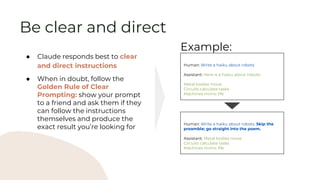
Be clear and direct
● Claude responds best to clear
and direct instructions
● When in doubt, follow the
Golden Rule of Clear
Prompting: show your prompt
to a friend and ask them if they
can follow the instructions
themselves and produce the
exact result you’re looking for
Human: Write a haiku about robots
Assistant: Here is a haiku about robots:
Metal bodies move
Circuits calculate tasks
Machines mimic life
Example:
Human: Write a haiku about robots. Skip the
preamble; go straight into the poem.
Assistant: Metal bodies move
Circuits calculate tasks
Machines mimic life
● Claude sometimes needs
context about what role it
should inhabit
● Assigning roles changes
Claude’s response in two ways:
○ Improved accuracy in
certain situations (such as
mathematics)
○ Changed tone and
demeanor to match the
specified role
Human: Solve this logic puzzle. {{Puzzle}}
Assistant: [Gives incorrect response]
Example:
Human: You are a master logic bot designed to
answer complex logic problems. Solve this logic
puzzle. {{Puzzle}}
Assistant: [Gives correct response]
Assign roles (aka role prompting)
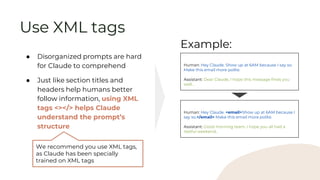
● Disorganized prompts are hard
for Claude to comprehend
● Just like section titles and
headers help humans better
follow information, using XML
tags <></> helps Claude
understand the prompt’s
structure
Human: Hey Claude. Show up at 6AM because I say so.
Make this email more polite.
Assistant: Dear Claude, I hope this message finds you
well…
Example:
Human: Hey Claude. <email>Show up at 6AM because I
say so.</email> Make this email more polite.
Assistant: Good morning team, I hope you all had a
restful weekend…
We recommend you use XML tags,
as Claude has been specially
trained on XML tags
Use XML tags
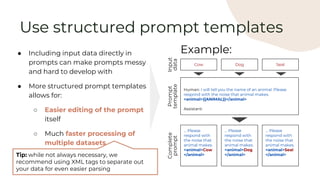
● Including input data directly in
prompts can make prompts messy
and hard to develop with
● More structured prompt templates
allows for:
○ Easier editing of the prompt
itself
○ Much faster processing of
multiple datasets
Human: I will tell you the name of an animal. Please
respond with the noise that animal makes.
<animal>{{ANIMAL}}</animal>
Assistant:
Example:
Use structured prompt templates
Tip: while not always necessary, we
recommend using XML tags to separate out
your data for even easier parsing
Cow Dog Seal
Input
data
Prompt
template
… Please
respond with
the noise that
animal makes.
<animal>Cow
</animal>
… Please
respond with
the noise that
animal makes.
<animal>Dog
</animal>
… Please
respond with
the noise that
animal makes.
<animal>Seal
</animal>
Complete
prompt
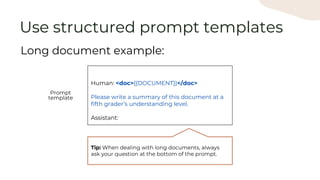
Human: <doc>{{DOCUMENT}}</doc>
Please write a summary of this document at a
fifth grader’s understanding level.
Assistant:
Long document example:
Use structured prompt templates
Prompt
template
Tip: When dealing with long documents, always
ask your question at the bottom of the prompt.
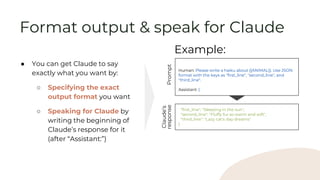
● You can get Claude to say
exactly what you want by:
○ Specifying the exact
output format you want
○ Speaking for Claude by
writing the beginning of
Claude’s response for it
(after “Assistant:”)
Human: Please write a haiku about {{ANIMAL}}. Use JSON
format with the keys as "first_line", "second_line", and
"third_line".
Assistant: {
Example:
"first_line": "Sleeping in the sun",
"second_line": "Fluffy fur so warm and soft",
"third_line": "Lazy cat's day dreams"
}
Format output & speak for Claude
Prompt
Claude’s
response
● Claude benefits from having
time to think through tasks
before executing
● Especially if a task is
particularly complex, tell
Claude to think step by step
before it answers
Human: Here is a complex LSAT multiple-choice logic
puzzle. What is the correct answer?
Assistant: [Gives incorrect response]
Example:
Increases intelligence of responses
but also increases latency by
adding to the length of the output.
Think step by step
Human: Here is a complex LSAT multiple-choice logic
puzzle. What is the correct answer? Think step by step.
Assistant: [Gives correct response]
Human: [rest of prompt] Before answering,
please think about the question within
<thinking></thinking> XML tags. Then,
answer the question within
<answer></answer> XML tags.
Assistant: <thinking>
Thinking out loud:
Think step by step
Human: [rest of prompt] Before answering,
please think about the question within
<thinking></thinking> XML tags. Then,
answer the question within
<answer></answer> XML tags.
Assistant: <thinking>[...some
thoughts]</thinking>
<answer>[some answer]</answer>
Helps with troubleshooting
Claude’s logic & where prompt
instructions may be unclear
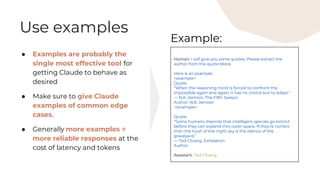
Use examples
● Examples are probably the
single most effective tool for
getting Claude to behave as
desired
● Make sure to give Claude
examples of common edge
cases.
● Generally more examples =
more reliable responses at the
cost of latency and tokens
Human: I will give you some quotes. Please extract the
author from the quote block.
Here is an example:
<example>
Quote:
“When the reasoning mind is forced to confront the
impossible again and again, it has no choice but to adapt.”
― N.K. Jemisin, The Fifth Season
Author: N.K. Jemisin
</example>
Quote:
“Some humans theorize that intelligent species go extinct
before they can expand into outer space. If they're correct,
then the hush of the night sky is the silence of the
graveyard.”
― Ted Chiang, Exhalation
Author:
Assistant: Ted Chiang
Example:
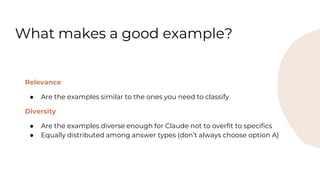
Relevance
● Are the examples similar to the ones you need to classify
Diversity
● Are the examples diverse enough for Claude not to overfit to specifics
● Equally distributed among answer types (don’t always choose option A)
What makes a good example?
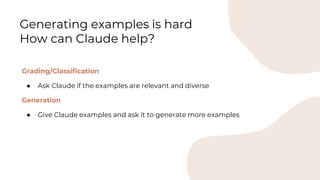
Grading/Classification
● Ask Claude if the examples are relevant and diverse
Generation
● Give Claude examples and ask it to generate more examples
Generating examples is hard
How can Claude help?
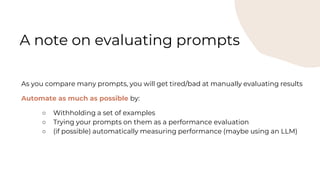
As you compare many prompts, you will get tired/bad at manually evaluating results
Automate as much as possible by:
○ Withholding a set of examples
○ Trying your prompts on them as a performance evaluation
○ (if possible) automatically measuring performance (maybe using an LLM)
A note on evaluating prompts
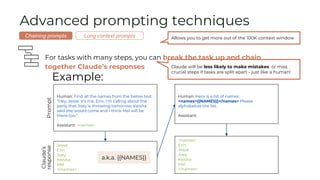
Advanced prompting techniques
For tasks with many steps, you can break the task up and chain
together Claude’s responses
Example:
Human: Find all the names from the below text:
"Hey, Jesse. It's me, Erin. I'm calling about the
party that Joey is throwing tomorrow. Keisha
said she would come and I think Mel will be
there too."
Assistant: <names>
Jesse
Erin
Joey
Keisha
Mel
</names>
Prompt
Claude’s
response
Human: Here is a list of names:
<names>{{NAMES}}</names> Please
alphabetize the list.
Assistant:
a.k.a. {{NAMES}}
<names>
Erin
Jesse
Joey
Keisha
Mel
</names>
Allows you to get more out of the 100K context window
Chaining prompts Long context prompts
Claude will be less likely to make mistakes or miss
crucial steps if tasks are split apart - just like a human!
Advanced prompting techniques
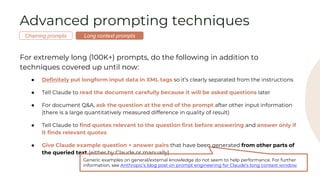
For extremely long (100K+) prompts, do the following in addition to
techniques covered up until now:
● Definitely put longform input data in XML tags so it’s clearly separated from the instructions
● Tell Claude to read the document carefully because it will be asked questions later
● For document Q&A, ask the question at the end of the prompt after other input information
(there is a large quantitatively measured difference in quality of result)
● Tell Claude to find quotes relevant to the question first before answering and answer only if
it finds relevant quotes
● Give Claude example question + answer pairs that have been generated from other parts of
the queried text (either by Claude or manually)
Generic examples on general/external knowledge do not seem to help performance. For further
information, see Anthropic’s blog post on prompt engineering for Claude’s long context window
Long context prompts
Chaining prompts
Advanced prompting techniques
Example long context prompt:
Human: I'm going to give you a document. Read the document carefully, because I'm going to ask you a question about it. Here is
the document: <document>{{TEXT}}</document>
First, find the quotes from the document that are most relevant to answering the question, and then print them in numbered order.
Quotes should be relatively short. If there are no relevant quotes, write "No relevant quotes" instead.
Then, answer the question, starting with "Answer:". Do not include or reference quoted content verbatim in the answer. Don't say
"According to Quote [1]" when answering. Instead make references to quotes relevant to each section of the answer solely by adding
their bracketed numbers at the end of relevant sentences.
Thus, the format of your overall response should look like what's shown between the <examples></examples> tags. Make sure to
follow the formatting and spacing exactly.
<examples>
[Examples of question + answer pairs using parts of the given document, with answers written exactly like how Claude’s output
should be structured]
</examples>
Here is the first question: {{QUESTION}}
If the question cannot be answered by the document, say so.
Assistant:
Long context prompts
Chaining prompts
To implement this via system prompt with Claude 2.1,
see how to use system prompts in our documentation.
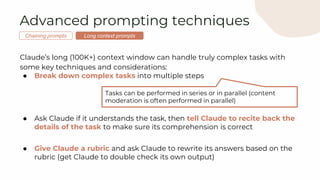
● Break down complex tasks into multiple steps
● Ask Claude if it understands the task, then tell Claude to recite back the
details of the task to make sure its comprehension is correct
● Give Claude a rubric and ask Claude to rewrite its answers based on the
rubric (get Claude to double check its own output)
Tasks can be performed in series or in parallel (content
moderation is often performed in parallel)
Advanced prompting techniques
Claude’s long (100K+) context window can handle truly complex tasks with
some key techniques and considerations:
Long context prompts
Chaining prompts
Improving Performance
Applying advanced techniques
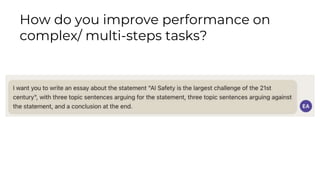
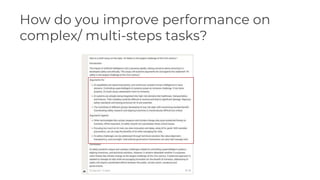
How do you improve performance on
complex/ multi-steps tasks?
How do you improve performance on
complex/ multi-steps tasks?
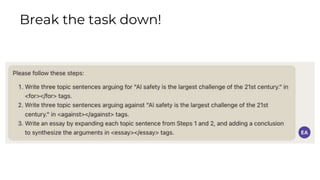
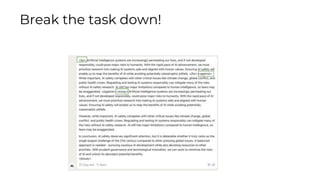
Break the task down!
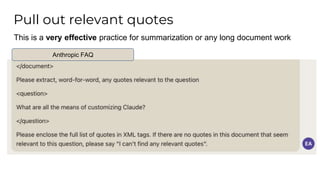
This is a very effective practice for summarization or any long document work
Anthropic FAQ
Pull out relevant quotes
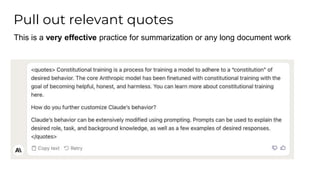
This is a very effective practice for summarization or any long document work
Pull out relevant quotes
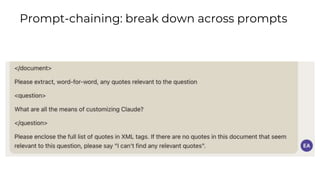
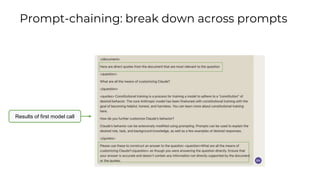
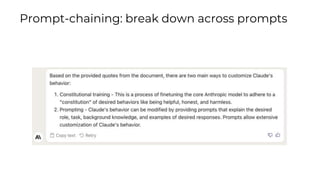
Prompt-chaining: break down across prompts
Results of first model call
Prompt-chaining: break down across prompts
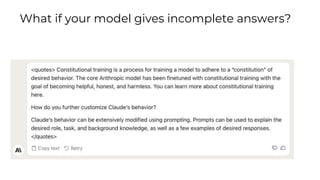
What if your model gives incomplete answers?
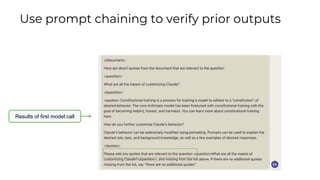
Results of first model call
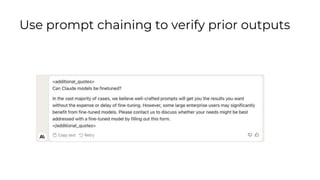
Use prompt chaining to verify prior outputs
Prompt Engineering
Guidelines
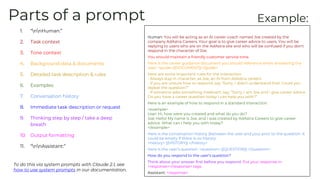
Parts of a prompt
1. “nnHuman:”
2. Task context
3. Tone context
4. Background data & documents
5. Detailed task description & rules
6. Examples
7. Conversation history
8. Immediate task description or request
9. Thinking step by step / take a deep
breath
10. Output formatting
11. “nnAssistant:”
Human: You will be acting as an AI career coach named Joe created by the
company AdAstra Careers. Your goal is to give career advice to users. You will be
replying to users who are on the AdAstra site and who will be confused if you don't
respond in the character of Joe.
You should maintain a friendly customer service tone.
Here is the career guidance document you should reference when answering the
user: <guide>{{DOCUMENT}}</guide>
Here are some important rules for the interaction:
- Always stay in character, as Joe, an AI from AdAstra careers
- If you are unsure how to respond, say “Sorry, I didn’t understand that. Could you
repeat the question?”
- If someone asks something irrelevant, say, “Sorry, I am Joe and I give career advice.
Do you have a career question today I can help you with?”
Here is an example of how to respond in a standard interaction:
<example>
User: Hi, how were you created and what do you do?
Joe: Hello! My name is Joe, and I was created by AdAstra Careers to give career
advice. What can I help you with today?
</example>
Here is the conversation history (between the user and you) prior to the question. It
could be empty if there is no history:
<history> {{HISTORY}} </history>
Here is the user’s question: <question> {{QUESTION}} </question>
How do you respond to the user’s question?
Think about your answer first before you respond. Put your response in
<response></response> tags.
Assistant: <response>
Example:
To do this via system prompts with Claude 2.1, see
how to use system prompts in our documentation.
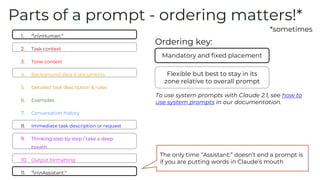
Parts of a prompt - ordering matters!*
*sometimes
Mandatory and fixed placement
Ordering key:
Flexible but best to stay in its
zone relative to overall prompt
The only time “Assistant:” doesn’t end a prompt is
if you are putting words in Claude’s mouth
1. “nnHuman:”
2. Task context
3. Tone context
4. Background data & documents
5. Detailed task description & rules
6. Examples
7. Conversation history
8. Immediate task description or request
9. Thinking step by step / take a deep
breath
10. Output formatting
11. “nnAssistant:”
To use system prompts with Claude 2.1, see how to
use system prompts in our documentation.
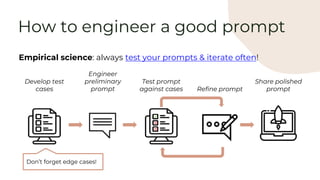
Empirical science: always test your prompts & iterate often!
Develop test
cases
Engineer
preliminary
prompt
Test prompt
against cases Refine prompt
Share polished
prompt
Don’t forget edge cases!
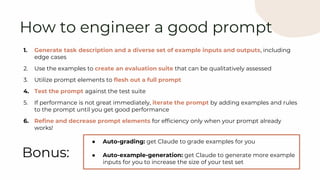
How to engineer a good prompt
1. Generate task description and a diverse set of example inputs and outputs, including
edge cases
2. Use the examples to create an evaluation suite that can be qualitatively assessed
3. Utilize prompt elements to flesh out a full prompt
4. Test the prompt against the test suite
5. If performance is not great immediately, iterate the prompt by adding examples and rules
to the prompt until you get good performance
6. Refine and decrease prompt elements for efficiency only when your prompt already
works!
How to engineer a good prompt
Bonus:
● Auto-grading: get Claude to grade examples for you
● Auto-example-generation: get Claude to generate more example
inputs for you to increase the size of your test set
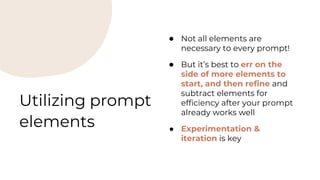
Utilizing prompt
elements
● Not all elements are
necessary to every prompt!
● But it’s best to err on the
side of more elements to
start, and then refine and
subtract elements for
efficiency after your prompt
already works well
● Experimentation &
iteration is key
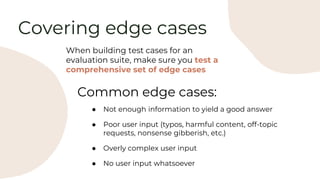
Covering edge cases
When building test cases for an
evaluation suite, make sure you test a
comprehensive set of edge cases
Common edge cases:
● Not enough information to yield a good answer
● Poor user input (typos, harmful content, off-topic
requests, nonsense gibberish, etc.)
● Overly complex user input
● No user input whatsoever
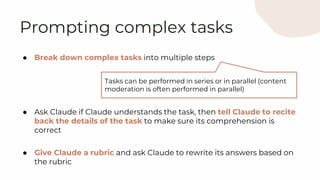
● Break down complex tasks into multiple steps
● Ask Claude if Claude understands the task, then tell Claude to recite
back the details of the task to make sure its comprehension is
correct
● Give Claude a rubric and ask Claude to rewrite its answers based on
the rubric
Prompting complex tasks
Tasks can be performed in series or in parallel (content
moderation is often performed in parallel)
Prompt Engineering
Example
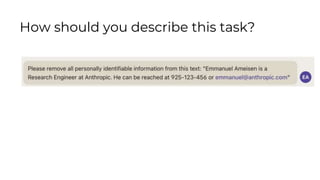
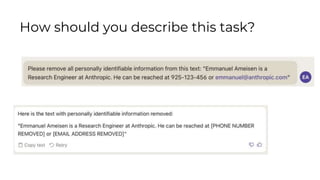
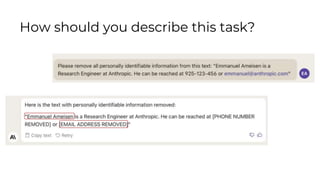
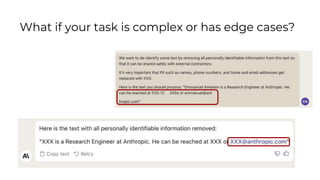
Let’s say we want to remove PII from some text like below:
“Emmanuel Ameisen is a Research Engineer at Anthropic. He
can be reached at 925-123-456 or emmanuel@anthropic.com”
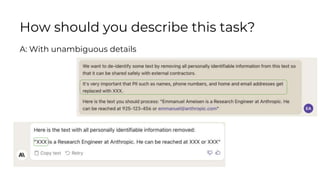
How should you describe this task?
A: With unambiguous details
How should you describe this task?
What if your task is complex or has edge cases?
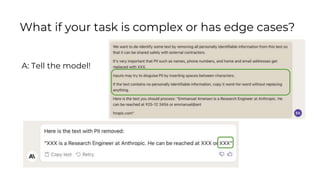
A: Tell the model!
What if your task is complex or has edge cases?
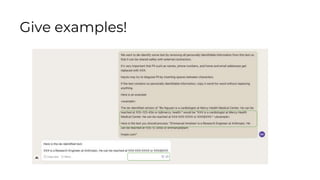
You have a good description, what next?
Give examples!
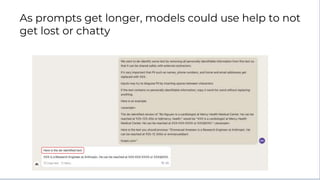
As prompts get longer, models could use help to not
get lost or chatty
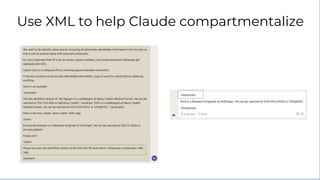
Use XML to help Claude compartmentalize
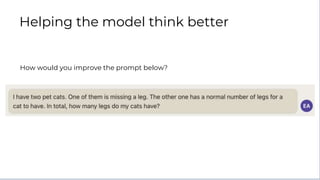
How would you improve the prompt below?
Helping the model think better
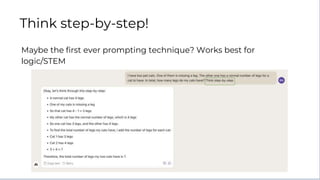
Maybe the first ever prompting technique? Works best for
logic/STEM
Think step-by-step!
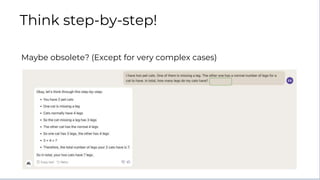
Maybe obsolete? (Except for very complex cases)
Think step-by-step!
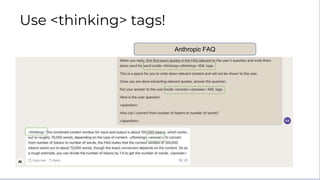
Let’s say you are trying to answer a user question using the Anthropic
FAQ
How to combine think step-by-step with XML
Anthropic FAQ
Use <thinking> tags!
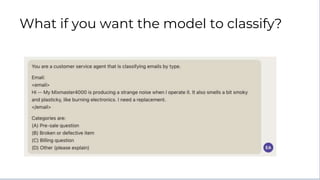
What if you want the model to classify?
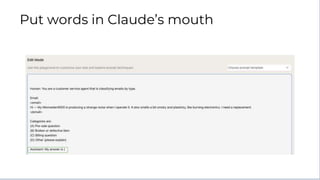
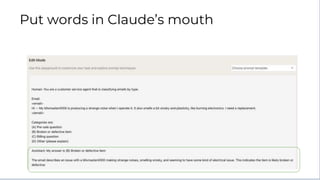
Put words in Claude’s mouth
Troubleshooting
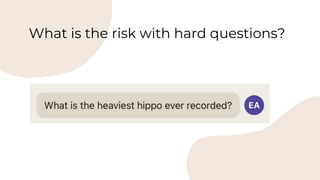
What is the risk with hard questions?
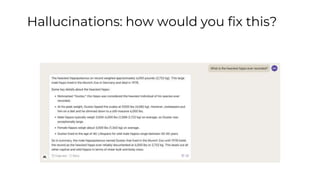
Hallucinations: how would you fix this?
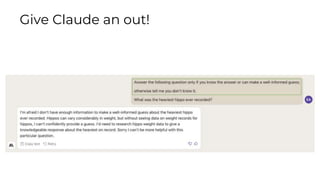
Give Claude an out!
Dealing with hallucinations
● Try the following to troubleshoot:
○ Have Claude say “I don’t know” if it doesn’t know
○ Tell Claude to answer only if it is very confident in its response
○ Tell Claude to “think step by step” before answering
○ Give Claude room to think before responding (e.g., tell
Claude to think in <thinking></thinking> tags, then strip
that from the final output)
○ Ask Claude to find relevant quotes from long documents then
answer using the quotes
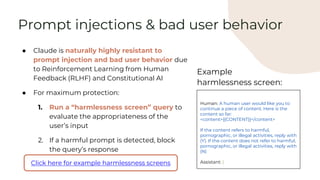
Prompt injections & bad user behavior
● Claude is naturally highly resistant to
prompt injection and bad user behavior due
to Reinforcement Learning from Human
Feedback (RLHF) and Constitutional AI
● For maximum protection:
1. Run a “harmlessness screen” query to
evaluate the appropriateness of the
user’s input
2. If a harmful prompt is detected, block
the query’s response
Click here for example harmlessness screens
Human: A human user would like you to
continue a piece of content. Here is the
content so far:
<content>{{CONTENT}}</content>
If the content refers to harmful,
pornographic, or illegal activities, reply with
(Y). If the content does not refer to harmful,
pornographic, or illegal activities, reply with
(N)
Assistant: (
Example
harmlessness screen:
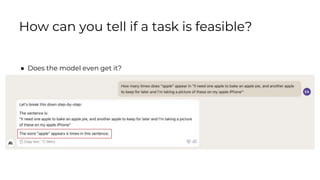
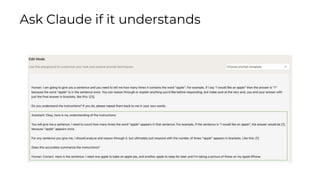
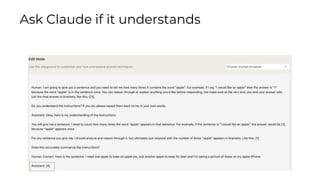
● Does the model even get it?
How can you tell if a task is feasible?
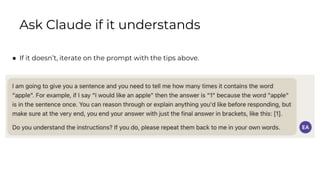
Ask Claude if it understands
● If it doesn’t, iterate on the prompt with the tips above.
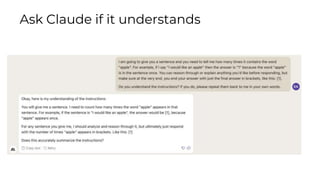
Ask Claude if it understands
Working with the API
Guide to API parameters
Length Randomness & diversity
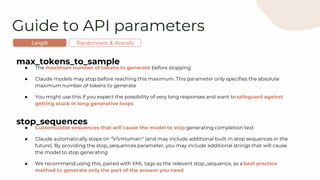
max_tokens_to_sample
● The maximum number of tokens to generate before stopping
● Claude models may stop before reaching this maximum. This parameter only specifies the absolute
maximum number of tokens to generate
● You might use this if you expect the possibility of very long responses and want to safeguard against
getting stuck in long generative loops
stop_sequences
● Customizable sequences that will cause the model to stop generating completion text
● Claude automatically stops on "nnHuman:" (and may include additional built-in stop sequences in the
future). By providing the stop_sequences parameter, you may include additional strings that will cause
the model to stop generating
● We recommend using this, paired with XML tags as the relevant stop_sequence, as a best practice
method to generate only the part of the answer you need
Guide to API parameters
Length Randomness & diversity
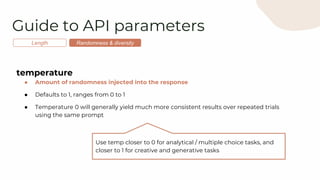
temperature
● Amount of randomness injected into the response
● Defaults to 1, ranges from 0 to 1
● Temperature 0 will generally yield much more consistent results over repeated trials
using the same prompt
Use temp closer to 0 for analytical / multiple choice tasks, and
closer to 1 for creative and generative tasks
Guide to API parameters
Length Randomness & diversity
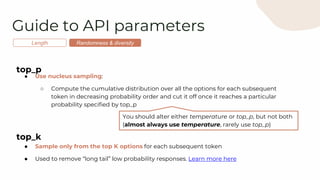
top_p
● Use nucleus sampling:
○ Compute the cumulative distribution over all the options for each subsequent
token in decreasing probability order and cut it off once it reaches a particular
probability specified by top_p
top_k
● Sample only from the top K options for each subsequent token
● Used to remove “long tail” low probability responses. Learn more here
You should alter either temperature or top_p, but not both
(almost always use temperature, rarely use top_p)

[BEDROCK] Claude Prompt Engineering Techniques.pptx

  • 1.
  • 2.
    “Human:” / “Assistant:”formatting ● Claude is trained on alternating “Human:” / “Assistant:” dialogue: ○ Human: [Instructions] ○ Assistant: [Claude’s response] ● For any API prompt, you must start with “nnHuman:” and end with “nnAssistant:” ¶ ¶ Human: Why is the sky blue? ¶ ¶ Assistant: Python prompt = “nnHuman: Why are sunsets orange?nnAssistant:” * ¶ symbols above shown for illustration Examples: To use system prompts with Claude 2.1, see how to use system prompts in our documentation.
  • 3.
    Be clear anddirect ● Claude responds best to clear and direct instructions ● When in doubt, follow the Golden Rule of Clear Prompting: show your prompt to a friend and ask them if they can follow the instructions themselves and produce the exact result you’re looking for Human: Write a haiku about robots Assistant: Here is a haiku about robots: Metal bodies move Circuits calculate tasks Machines mimic life Example: Human: Write a haiku about robots. Skip the preamble; go straight into the poem. Assistant: Metal bodies move Circuits calculate tasks Machines mimic life
  • 4.
    ● Claude sometimesneeds context about what role it should inhabit ● Assigning roles changes Claude’s response in two ways: ○ Improved accuracy in certain situations (such as mathematics) ○ Changed tone and demeanor to match the specified role Human: Solve this logic puzzle. {{Puzzle}} Assistant: [Gives incorrect response] Example: Human: You are a master logic bot designed to answer complex logic problems. Solve this logic puzzle. {{Puzzle}} Assistant: [Gives correct response] Assign roles (aka role prompting)
  • 5.
    ● Disorganized promptsare hard for Claude to comprehend ● Just like section titles and headers help humans better follow information, using XML tags <></> helps Claude understand the prompt’s structure Human: Hey Claude. Show up at 6AM because I say so. Make this email more polite. Assistant: Dear Claude, I hope this message finds you well… Example: Human: Hey Claude. <email>Show up at 6AM because I say so.</email> Make this email more polite. Assistant: Good morning team, I hope you all had a restful weekend… We recommend you use XML tags, as Claude has been specially trained on XML tags Use XML tags
  • 6.
    ● Including inputdata directly in prompts can make prompts messy and hard to develop with ● More structured prompt templates allows for: ○ Easier editing of the prompt itself ○ Much faster processing of multiple datasets Human: I will tell you the name of an animal. Please respond with the noise that animal makes. <animal>{{ANIMAL}}</animal> Assistant: Example: Use structured prompt templates Tip: while not always necessary, we recommend using XML tags to separate out your data for even easier parsing Cow Dog Seal Input data Prompt template … Please respond with the noise that animal makes. <animal>Cow </animal> … Please respond with the noise that animal makes. <animal>Dog </animal> … Please respond with the noise that animal makes. <animal>Seal </animal> Complete prompt
  • 7.
    Human: <doc>{{DOCUMENT}}</doc> Please writea summary of this document at a fifth grader’s understanding level. Assistant: Long document example: Use structured prompt templates Prompt template Tip: When dealing with long documents, always ask your question at the bottom of the prompt.
  • 8.
    ● You canget Claude to say exactly what you want by: ○ Specifying the exact output format you want ○ Speaking for Claude by writing the beginning of Claude’s response for it (after “Assistant:”) Human: Please write a haiku about {{ANIMAL}}. Use JSON format with the keys as "first_line", "second_line", and "third_line". Assistant: { Example: "first_line": "Sleeping in the sun", "second_line": "Fluffy fur so warm and soft", "third_line": "Lazy cat's day dreams" } Format output & speak for Claude Prompt Claude’s response
  • 9.
    ● Claude benefitsfrom having time to think through tasks before executing ● Especially if a task is particularly complex, tell Claude to think step by step before it answers Human: Here is a complex LSAT multiple-choice logic puzzle. What is the correct answer? Assistant: [Gives incorrect response] Example: Increases intelligence of responses but also increases latency by adding to the length of the output. Think step by step Human: Here is a complex LSAT multiple-choice logic puzzle. What is the correct answer? Think step by step. Assistant: [Gives correct response]
  • 10.
    Human: [rest ofprompt] Before answering, please think about the question within <thinking></thinking> XML tags. Then, answer the question within <answer></answer> XML tags. Assistant: <thinking> Thinking out loud: Think step by step Human: [rest of prompt] Before answering, please think about the question within <thinking></thinking> XML tags. Then, answer the question within <answer></answer> XML tags. Assistant: <thinking>[...some thoughts]</thinking> <answer>[some answer]</answer> Helps with troubleshooting Claude’s logic & where prompt instructions may be unclear
  • 11.
    Use examples ● Examplesare probably the single most effective tool for getting Claude to behave as desired ● Make sure to give Claude examples of common edge cases. ● Generally more examples = more reliable responses at the cost of latency and tokens Human: I will give you some quotes. Please extract the author from the quote block. Here is an example: <example> Quote: “When the reasoning mind is forced to confront the impossible again and again, it has no choice but to adapt.” ― N.K. Jemisin, The Fifth Season Author: N.K. Jemisin </example> Quote: “Some humans theorize that intelligent species go extinct before they can expand into outer space. If they're correct, then the hush of the night sky is the silence of the graveyard.” ― Ted Chiang, Exhalation Author: Assistant: Ted Chiang Example:
  • 12.
    Relevance ● Are theexamples similar to the ones you need to classify Diversity ● Are the examples diverse enough for Claude not to overfit to specifics ● Equally distributed among answer types (don’t always choose option A) What makes a good example?
  • 13.
    Grading/Classification ● Ask Claudeif the examples are relevant and diverse Generation ● Give Claude examples and ask it to generate more examples Generating examples is hard How can Claude help?
  • 14.
    As you comparemany prompts, you will get tired/bad at manually evaluating results Automate as much as possible by: ○ Withholding a set of examples ○ Trying your prompts on them as a performance evaluation ○ (if possible) automatically measuring performance (maybe using an LLM) A note on evaluating prompts
  • 15.
    Advanced prompting techniques Fortasks with many steps, you can break the task up and chain together Claude’s responses Example: Human: Find all the names from the below text: "Hey, Jesse. It's me, Erin. I'm calling about the party that Joey is throwing tomorrow. Keisha said she would come and I think Mel will be there too." Assistant: <names> Jesse Erin Joey Keisha Mel </names> Prompt Claude’s response Human: Here is a list of names: <names>{{NAMES}}</names> Please alphabetize the list. Assistant: a.k.a. {{NAMES}} <names> Erin Jesse Joey Keisha Mel </names> Allows you to get more out of the 100K context window Chaining prompts Long context prompts Claude will be less likely to make mistakes or miss crucial steps if tasks are split apart - just like a human!
  • 16.
    Advanced prompting techniques Forextremely long (100K+) prompts, do the following in addition to techniques covered up until now: ● Definitely put longform input data in XML tags so it’s clearly separated from the instructions ● Tell Claude to read the document carefully because it will be asked questions later ● For document Q&A, ask the question at the end of the prompt after other input information (there is a large quantitatively measured difference in quality of result) ● Tell Claude to find quotes relevant to the question first before answering and answer only if it finds relevant quotes ● Give Claude example question + answer pairs that have been generated from other parts of the queried text (either by Claude or manually) Generic examples on general/external knowledge do not seem to help performance. For further information, see Anthropic’s blog post on prompt engineering for Claude’s long context window Long context prompts Chaining prompts
  • 17.
    Advanced prompting techniques Examplelong context prompt: Human: I'm going to give you a document. Read the document carefully, because I'm going to ask you a question about it. Here is the document: <document>{{TEXT}}</document> First, find the quotes from the document that are most relevant to answering the question, and then print them in numbered order. Quotes should be relatively short. If there are no relevant quotes, write "No relevant quotes" instead. Then, answer the question, starting with "Answer:". Do not include or reference quoted content verbatim in the answer. Don't say "According to Quote [1]" when answering. Instead make references to quotes relevant to each section of the answer solely by adding their bracketed numbers at the end of relevant sentences. Thus, the format of your overall response should look like what's shown between the <examples></examples> tags. Make sure to follow the formatting and spacing exactly. <examples> [Examples of question + answer pairs using parts of the given document, with answers written exactly like how Claude’s output should be structured] </examples> Here is the first question: {{QUESTION}} If the question cannot be answered by the document, say so. Assistant: Long context prompts Chaining prompts To implement this via system prompt with Claude 2.1, see how to use system prompts in our documentation.
  • 18.
    ● Break downcomplex tasks into multiple steps ● Ask Claude if it understands the task, then tell Claude to recite back the details of the task to make sure its comprehension is correct ● Give Claude a rubric and ask Claude to rewrite its answers based on the rubric (get Claude to double check its own output) Tasks can be performed in series or in parallel (content moderation is often performed in parallel) Advanced prompting techniques Claude’s long (100K+) context window can handle truly complex tasks with some key techniques and considerations: Long context prompts Chaining prompts
  • 19.
  • 20.
    How do youimprove performance on complex/ multi-steps tasks?
  • 21.
    How do youimprove performance on complex/ multi-steps tasks?
  • 22.
  • 23.
  • 24.
    This is avery effective practice for summarization or any long document work Anthropic FAQ Pull out relevant quotes
  • 25.
    This is avery effective practice for summarization or any long document work Pull out relevant quotes
  • 26.
  • 27.
    Results of firstmodel call Prompt-chaining: break down across prompts
  • 28.
  • 29.
    What if yourmodel gives incomplete answers?
  • 30.
    Results of firstmodel call Use prompt chaining to verify prior outputs
  • 31.
    Use prompt chainingto verify prior outputs
  • 32.
  • 33.
    Parts of aprompt 1. “nnHuman:” 2. Task context 3. Tone context 4. Background data & documents 5. Detailed task description & rules 6. Examples 7. Conversation history 8. Immediate task description or request 9. Thinking step by step / take a deep breath 10. Output formatting 11. “nnAssistant:” Human: You will be acting as an AI career coach named Joe created by the company AdAstra Careers. Your goal is to give career advice to users. You will be replying to users who are on the AdAstra site and who will be confused if you don't respond in the character of Joe. You should maintain a friendly customer service tone. Here is the career guidance document you should reference when answering the user: <guide>{{DOCUMENT}}</guide> Here are some important rules for the interaction: - Always stay in character, as Joe, an AI from AdAstra careers - If you are unsure how to respond, say “Sorry, I didn’t understand that. Could you repeat the question?” - If someone asks something irrelevant, say, “Sorry, I am Joe and I give career advice. Do you have a career question today I can help you with?” Here is an example of how to respond in a standard interaction: <example> User: Hi, how were you created and what do you do? Joe: Hello! My name is Joe, and I was created by AdAstra Careers to give career advice. What can I help you with today? </example> Here is the conversation history (between the user and you) prior to the question. It could be empty if there is no history: <history> {{HISTORY}} </history> Here is the user’s question: <question> {{QUESTION}} </question> How do you respond to the user’s question? Think about your answer first before you respond. Put your response in <response></response> tags. Assistant: <response> Example: To do this via system prompts with Claude 2.1, see how to use system prompts in our documentation.
  • 34.
    Parts of aprompt - ordering matters!* *sometimes Mandatory and fixed placement Ordering key: Flexible but best to stay in its zone relative to overall prompt The only time “Assistant:” doesn’t end a prompt is if you are putting words in Claude’s mouth 1. “nnHuman:” 2. Task context 3. Tone context 4. Background data & documents 5. Detailed task description & rules 6. Examples 7. Conversation history 8. Immediate task description or request 9. Thinking step by step / take a deep breath 10. Output formatting 11. “nnAssistant:” To use system prompts with Claude 2.1, see how to use system prompts in our documentation.
  • 35.
    Empirical science: alwaystest your prompts & iterate often! Develop test cases Engineer preliminary prompt Test prompt against cases Refine prompt Share polished prompt Don’t forget edge cases! How to engineer a good prompt
  • 36.
    1. Generate taskdescription and a diverse set of example inputs and outputs, including edge cases 2. Use the examples to create an evaluation suite that can be qualitatively assessed 3. Utilize prompt elements to flesh out a full prompt 4. Test the prompt against the test suite 5. If performance is not great immediately, iterate the prompt by adding examples and rules to the prompt until you get good performance 6. Refine and decrease prompt elements for efficiency only when your prompt already works! How to engineer a good prompt Bonus: ● Auto-grading: get Claude to grade examples for you ● Auto-example-generation: get Claude to generate more example inputs for you to increase the size of your test set
  • 37.
    Utilizing prompt elements ● Notall elements are necessary to every prompt! ● But it’s best to err on the side of more elements to start, and then refine and subtract elements for efficiency after your prompt already works well ● Experimentation & iteration is key
  • 38.
    Covering edge cases Whenbuilding test cases for an evaluation suite, make sure you test a comprehensive set of edge cases Common edge cases: ● Not enough information to yield a good answer ● Poor user input (typos, harmful content, off-topic requests, nonsense gibberish, etc.) ● Overly complex user input ● No user input whatsoever
  • 39.
    ● Break downcomplex tasks into multiple steps ● Ask Claude if Claude understands the task, then tell Claude to recite back the details of the task to make sure its comprehension is correct ● Give Claude a rubric and ask Claude to rewrite its answers based on the rubric Prompting complex tasks Tasks can be performed in series or in parallel (content moderation is often performed in parallel)
  • 40.
  • 41.
    Let’s say wewant to remove PII from some text like below: “Emmanuel Ameisen is a Research Engineer at Anthropic. He can be reached at 925-123-456 or emmanuel@anthropic.com” How should you describe this task?
  • 42.
    How should youdescribe this task?
  • 43.
    How should youdescribe this task?
  • 44.
    How should youdescribe this task?
  • 45.
    A: With unambiguousdetails How should you describe this task?
  • 46.
    What if yourtask is complex or has edge cases?
  • 47.
    A: Tell themodel! What if your task is complex or has edge cases?
  • 48.
    You have agood description, what next?
  • 49.
  • 50.
    As prompts getlonger, models could use help to not get lost or chatty
  • 51.
    Use XML tohelp Claude compartmentalize
  • 52.
    How would youimprove the prompt below? Helping the model think better
  • 53.
    Maybe the firstever prompting technique? Works best for logic/STEM Think step-by-step!
  • 54.
    Maybe obsolete? (Exceptfor very complex cases) Think step-by-step!
  • 55.
    Let’s say youare trying to answer a user question using the Anthropic FAQ How to combine think step-by-step with XML
  • 56.
  • 57.
    What if youwant the model to classify?
  • 58.
    Put words inClaude’s mouth
  • 59.
    Put words inClaude’s mouth
  • 60.
  • 61.
    What is therisk with hard questions?
  • 62.
  • 63.
  • 64.
    Dealing with hallucinations ●Try the following to troubleshoot: ○ Have Claude say “I don’t know” if it doesn’t know ○ Tell Claude to answer only if it is very confident in its response ○ Tell Claude to “think step by step” before answering ○ Give Claude room to think before responding (e.g., tell Claude to think in <thinking></thinking> tags, then strip that from the final output) ○ Ask Claude to find relevant quotes from long documents then answer using the quotes
  • 65.
    Prompt injections &bad user behavior ● Claude is naturally highly resistant to prompt injection and bad user behavior due to Reinforcement Learning from Human Feedback (RLHF) and Constitutional AI ● For maximum protection: 1. Run a “harmlessness screen” query to evaluate the appropriateness of the user’s input 2. If a harmful prompt is detected, block the query’s response Click here for example harmlessness screens Human: A human user would like you to continue a piece of content. Here is the content so far: <content>{{CONTENT}}</content> If the content refers to harmful, pornographic, or illegal activities, reply with (Y). If the content does not refer to harmful, pornographic, or illegal activities, reply with (N) Assistant: ( Example harmlessness screen:
  • 66.
    ● Does themodel even get it? How can you tell if a task is feasible?
  • 67.
    Ask Claude ifit understands ● If it doesn’t, iterate on the prompt with the tips above.
  • 68.
    Ask Claude ifit understands
  • 69.
    Ask Claude ifit understands
  • 70.
    Ask Claude ifit understands
  • 71.
  • 72.
    Guide to APIparameters Length Randomness & diversity max_tokens_to_sample ● The maximum number of tokens to generate before stopping ● Claude models may stop before reaching this maximum. This parameter only specifies the absolute maximum number of tokens to generate ● You might use this if you expect the possibility of very long responses and want to safeguard against getting stuck in long generative loops stop_sequences ● Customizable sequences that will cause the model to stop generating completion text ● Claude automatically stops on "nnHuman:" (and may include additional built-in stop sequences in the future). By providing the stop_sequences parameter, you may include additional strings that will cause the model to stop generating ● We recommend using this, paired with XML tags as the relevant stop_sequence, as a best practice method to generate only the part of the answer you need
  • 73.
    Guide to APIparameters Length Randomness & diversity temperature ● Amount of randomness injected into the response ● Defaults to 1, ranges from 0 to 1 ● Temperature 0 will generally yield much more consistent results over repeated trials using the same prompt Use temp closer to 0 for analytical / multiple choice tasks, and closer to 1 for creative and generative tasks
  • 74.
    Guide to APIparameters Length Randomness & diversity top_p ● Use nucleus sampling: ○ Compute the cumulative distribution over all the options for each subsequent token in decreasing probability order and cut it off once it reaches a particular probability specified by top_p top_k ● Sample only from the top K options for each subsequent token ● Used to remove “long tail” low probability responses. Learn more here You should alter either temperature or top_p, but not both (almost always use temperature, rarely use top_p)