Management: We can define management in many ways like,
“Manage Man Tactfully” or Management is an art of getting things
done by others.
However, for the purpose of Management Information System,
management comprises the process and activity that a manager does
in the operation of their organization, i.e., to plan, organize, direct and
control operations.
Management
Data is an individual unit that contains raw materials
which do not carry any specific meaning.
Information is a group of data that collectively carries
a logical meaning. Data doesn't depend on
information.
Data and Information
Management Information System (MIS) is an integrated man/machine
system for providing information to hold up the operations, management
and decision making functions in an organization.
G.B. Davis
A formal method of collecting timely information in a presentable form in
order to facilitate effective decision making and implementation, in order to
carry out organisational operations for the purpose of achieving the
organisational goals.
Walter I. Kennevan
Giving an overall picture of the company and
acting as a communication and planning tool
Why MIS
Companies are able to highlight their strengths and
weaknesses due to the presence of revenue reports,
employees performance record etc. The identification of
these aspects can help the company improve their business
processes and operations
Why MIS
Information is considered to be an important asset
for any company in the modern competitive world.
The consumer buying trends and behaviors can be
predicted by the analysis of sales and revenue
reports from each operating region of the company.
Why MIS
The availability of the customer data and
feedback can help the company to align their
business processes according to the needs of the
customers. The effective management of
customer data can help the company to
perform direct marketing and promotion
activities
Why MIS
DSS
● A decision support system (DSS) is a computerized system
that gathers and analyzes data, synthesizing it to
produce comprehensive information reports.
● A decision support system differs from an ordinary
operations application, whose function is just to collect
data.
● Decision support systems allow for more informed
decision-making, timely problem-solving, and improved
efficiency in dealing with issues or operations,
planning, and even management
Components of DSS can be categorized as:
● Inputs: Records, Data factors, numbers, and characteristics
for analyzing.
● User Knowledge and Expertise: To run the proper functioning
and provide inputs, the user must know how to use the system.
● User Interface: DSS should support model construction and
model analysis by providing a well-structured user interface.
● Decisions: Based on user requirements, results are generated
by the Decision Support System.
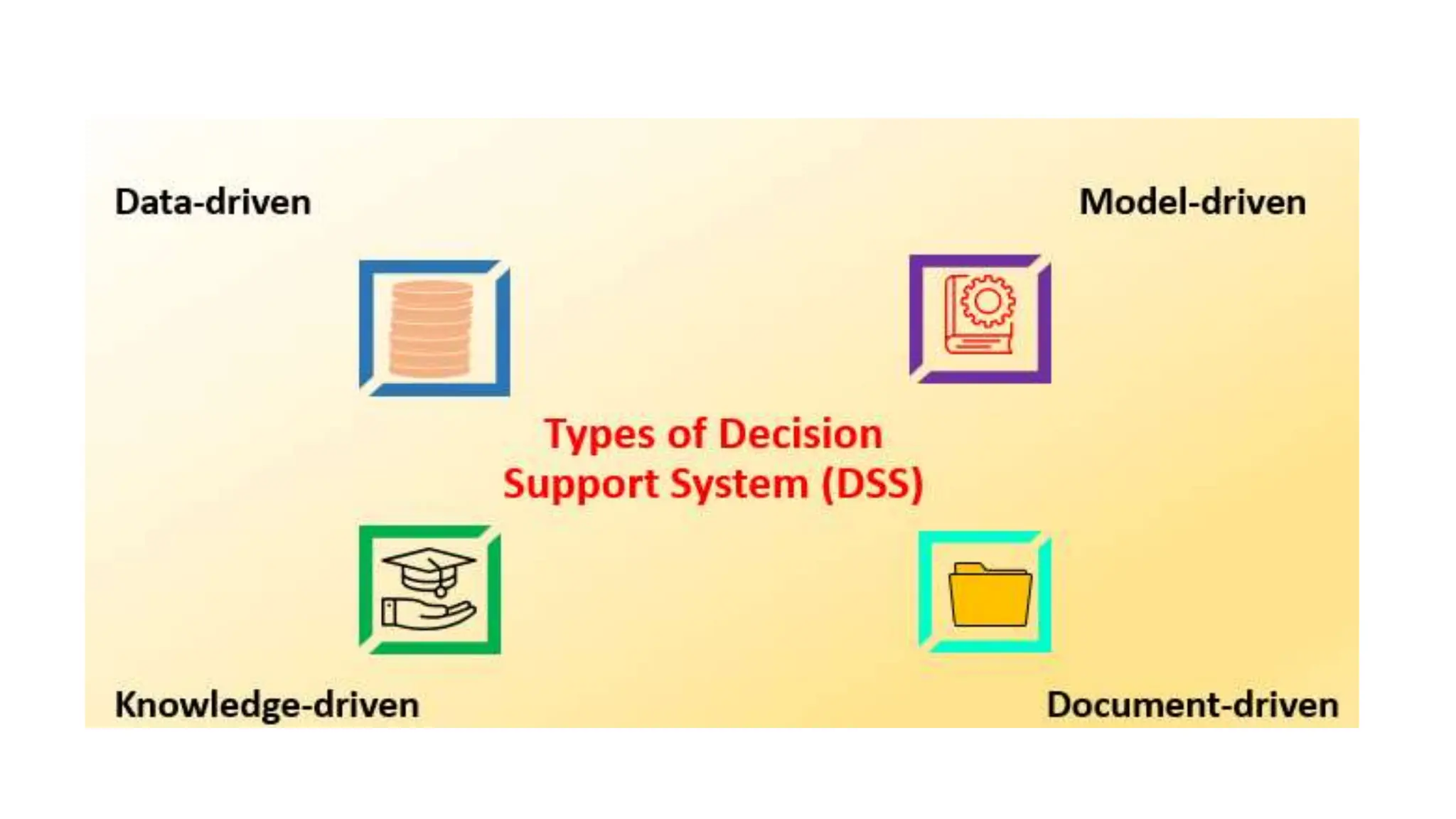
Types of dss
● 1. Data-driven
● Decision Support System includes file drawer systems,
data analytics systems, analytical information systems,
data storage systems and emphasizes access and
manipulation of large structured data databases.
● 2. Model-driven
● Decision Support System model comes from a variety of
fields or specialties and could include accounting
models, financial models, representative models,
optimization models, etc.
Types of dss
● 3. Knowledge-driven
● This Knowledge-driven focuses on knowledge and advise
managers to take action on the basis of a certain knowledge
base analysis. Predefined facts, Stored procedures, rules,
and limitations are also referred to solve problems. It also
has special expertise in problem-solving and is closely
associated with data mining.
● 4. Document-driven
● This system helps managers obtain and manage unstructured
documents and web pages by integrating a range of storage
and processing technologies to provide a complete review of
documents and analysis.
A system is “an orderly grouping of
interdependent components linked together
according to a plan to achieve a specific
goal.”
What is a System?
Constraints of a System
A system must have three basic constraints −
● A system must have some structure and behavior
which is designed to achieve a predefined objective.
● Interconnectivity and interdependence must exist
among the system components.
Interdependence
Interdependence means how the components of
a system depend on one another. For proper
functioning, the components are coordinated
and linked together according to a specified
plan. The output of one subsystem is the
required by other subsystem as input.
Interaction
It is defined by the manner in which the
components operate with each other.
For example, in an organization, purchasing
department must interact with production
department and payroll with personnel
department.
Integration
Integration is concerned with how a system
components are connected together. It
means that the parts of the system work
together within the system even if each part
performs a unique function.
Central Objective
The objective of system must be central. It may be real
or stated. It is not uncommon for an organization to
state an objective and operate to achieve another.
The users must know the main objective of a computer
application early in the analysis for a successful design
and conversion.
Types of Systems-Physical or Abstract Systems
● Physical systems are tangible entities. We can touch and feel them.
Physical System may be static or dynamic in nature. For example,
desks and chairs are the physical parts of computer centre which are
static. A programmed computer is a dynamic system in which
programs, data, and applications can change according to the user's
needs.
● Abstract systems are non-physical entities or conceptual that may be
formulas, representation or model of a real system.
Open and Closed system
● An open system must interact with its environment. It receives inputs
from and delivers outputs to the outside of the system. For example, an
information system which must adapt to the changing environmental
conditions.
● A closed system does not interact with its environment. It is isolated
from environmental influences. A completely closed system is rare in
reality.
Adaptive and Non Adaptive System
● Adaptive System responds to the change in the environment in a way to
improve their performance and to survive. For example, human beings,
animals.
● Non Adaptive System is the system which does not respond to the
environment. For example, machines.
Deterministic and Probabilistic System
● Deterministic system operates in a predictable manner and the interaction
between system components is known with certainty. For example, two
molecules of hydrogen and one molecule of oxygen makes water.
● Probabilistic System shows uncertain behaviour. The exact output is not
known. For example, Weather forecasting, mail delivery.
Man-made information systems
● Formal Information System: It is based on the flow of information in the form
of memos, instructions, etc., from top level to lower levels of management.
● Informal Information System: This is employee based system which solves
the day to day work related problems.
● Computer Based System: This system is directly dependent on the computer
for managing business applications. For example, automatic library system,
railway reservation system, banking system, etc.
 The system-development life cycle enables
users to transform a newly-developed project
into an operational one.
 The System Development Life Cycle, "SDLC"
for short, is a multistep, iterative process,
structured in a methodical way. This process
is used to model or provide a framework for
technical and non-technical activities to
deliver a quality system which meets or
exceeds a business"s expectations or manage
decision-making progression.
The purpose of an SDLC methodology is to provide
IT Project Managers with the tools to help ensure
successful implementation of systems that satisfy
University strategic and business objectives.
The documentation provides a mechanism to ensure
that executive leadership, functional managers and
users sign-off on the requirements and
implementation of the system. The process provides
University Project Managers with the visibility of
design, development, and implementation status
needed to ensure delivery on time and within budget.
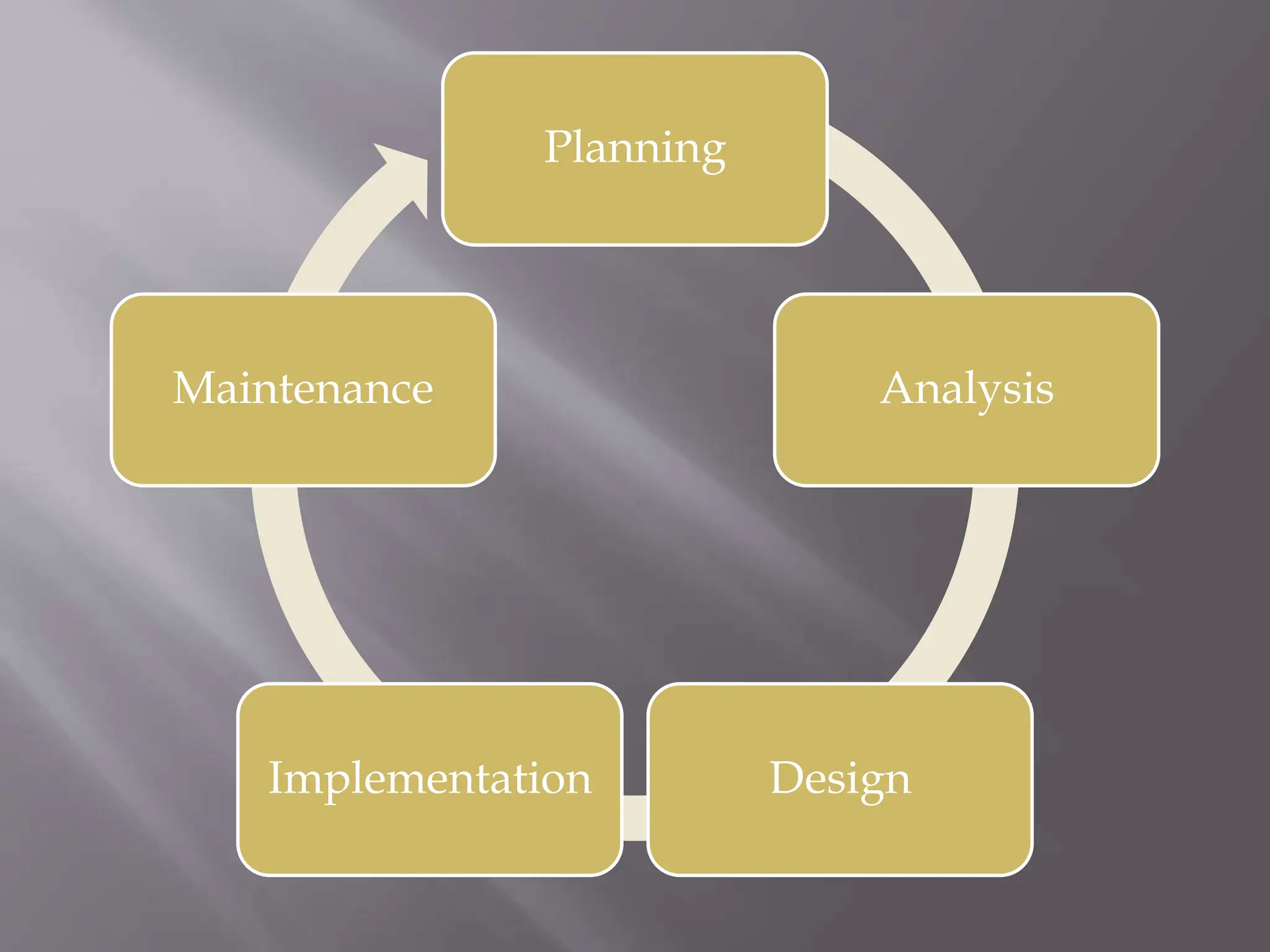
Planning
Analysis
Design
Implementation
Maintenance
 Define the problem and scope of existing system.
 Overview the new system and determine its
objectives.
 Confirm project feasibility and produce the
project Schedule.
 During this phase, threats, constraints,
integration and security of system are also
considered.
 A feasibility report for the entire project is
created at the end of this phase.
 Gather, analyze, and validate the information.
 Define the requirements and prototypes for new
system.
 Evaluate the alternatives and prioritize the
requirements.
 Examine the information needs of end-user and
enhances the system goal.
 A Software Requirement Specification (SRS)
document, which specifies the software, hardware,
functional, and network requirements of the
system is prepared at the end of this phase.
 Includes the design of application, network,
databases, user interfaces, and system interfaces.
 Transform the SRS document into logical structure,
which contains detailed and complete set of
specifications that can be implemented in a
programming language.
 Create a contingency, training, maintenance, and
operation plan.
 Review the proposed design. Ensure that the final
design must meet the requirements stated in SRS
document.
 Finally, prepare a design document which will be
used during next phases.
 Implement the design into source code through
coding.
 Combine all the modules together into training
environment that detects errors and defects.
 A test report which contains errors is prepared
through test plan that includes test related
tasks such as test case generation, testing
criteria, and resource allocation for testing.
 Integrate the information system into its
environment and install the new system.
 Include all the activities such as phone support or
physical on-site support for users that is required
once the system is installing.
 Implement the changes that software might
undergo over a period of time, or implement any
new requirements after the software is deployed at
the customer location.
 It also includes handling the residual errors and
resolve any issues that may exist in the system
even after the testing phase.
 Maintenance and support may be needed for a
longer time for large systems and for a short time
for smaller systems.

bdms unit importants in MBA 3 rd sem in marketingem

  • 1.
    Management: We candefine management in many ways like, “Manage Man Tactfully” or Management is an art of getting things done by others. However, for the purpose of Management Information System, management comprises the process and activity that a manager does in the operation of their organization, i.e., to plan, organize, direct and control operations. Management
  • 5.
    Data is anindividual unit that contains raw materials which do not carry any specific meaning. Information is a group of data that collectively carries a logical meaning. Data doesn't depend on information. Data and Information
  • 6.
    Management Information System(MIS) is an integrated man/machine system for providing information to hold up the operations, management and decision making functions in an organization. G.B. Davis A formal method of collecting timely information in a presentable form in order to facilitate effective decision making and implementation, in order to carry out organisational operations for the purpose of achieving the organisational goals. Walter I. Kennevan
  • 7.
    Giving an overallpicture of the company and acting as a communication and planning tool Why MIS
  • 8.
    Companies are ableto highlight their strengths and weaknesses due to the presence of revenue reports, employees performance record etc. The identification of these aspects can help the company improve their business processes and operations Why MIS
  • 9.
    Information is consideredto be an important asset for any company in the modern competitive world. The consumer buying trends and behaviors can be predicted by the analysis of sales and revenue reports from each operating region of the company. Why MIS
  • 10.
    The availability ofthe customer data and feedback can help the company to align their business processes according to the needs of the customers. The effective management of customer data can help the company to perform direct marketing and promotion activities Why MIS
  • 13.
    DSS ● A decisionsupport system (DSS) is a computerized system that gathers and analyzes data, synthesizing it to produce comprehensive information reports. ● A decision support system differs from an ordinary operations application, whose function is just to collect data. ● Decision support systems allow for more informed decision-making, timely problem-solving, and improved efficiency in dealing with issues or operations, planning, and even management
  • 15.
    Components of DSScan be categorized as: ● Inputs: Records, Data factors, numbers, and characteristics for analyzing. ● User Knowledge and Expertise: To run the proper functioning and provide inputs, the user must know how to use the system. ● User Interface: DSS should support model construction and model analysis by providing a well-structured user interface. ● Decisions: Based on user requirements, results are generated by the Decision Support System.
  • 17.
    Types of dss ●1. Data-driven ● Decision Support System includes file drawer systems, data analytics systems, analytical information systems, data storage systems and emphasizes access and manipulation of large structured data databases. ● 2. Model-driven ● Decision Support System model comes from a variety of fields or specialties and could include accounting models, financial models, representative models, optimization models, etc.
  • 18.
    Types of dss ●3. Knowledge-driven ● This Knowledge-driven focuses on knowledge and advise managers to take action on the basis of a certain knowledge base analysis. Predefined facts, Stored procedures, rules, and limitations are also referred to solve problems. It also has special expertise in problem-solving and is closely associated with data mining. ● 4. Document-driven ● This system helps managers obtain and manage unstructured documents and web pages by integrating a range of storage and processing technologies to provide a complete review of documents and analysis.
  • 22.
    A system is“an orderly grouping of interdependent components linked together according to a plan to achieve a specific goal.” What is a System?
  • 23.
    Constraints of aSystem A system must have three basic constraints − ● A system must have some structure and behavior which is designed to achieve a predefined objective. ● Interconnectivity and interdependence must exist among the system components.
  • 24.
    Interdependence Interdependence means howthe components of a system depend on one another. For proper functioning, the components are coordinated and linked together according to a specified plan. The output of one subsystem is the required by other subsystem as input.
  • 25.
    Interaction It is definedby the manner in which the components operate with each other. For example, in an organization, purchasing department must interact with production department and payroll with personnel department.
  • 26.
    Integration Integration is concernedwith how a system components are connected together. It means that the parts of the system work together within the system even if each part performs a unique function.
  • 27.
    Central Objective The objectiveof system must be central. It may be real or stated. It is not uncommon for an organization to state an objective and operate to achieve another. The users must know the main objective of a computer application early in the analysis for a successful design and conversion.
  • 28.
    Types of Systems-Physicalor Abstract Systems ● Physical systems are tangible entities. We can touch and feel them. Physical System may be static or dynamic in nature. For example, desks and chairs are the physical parts of computer centre which are static. A programmed computer is a dynamic system in which programs, data, and applications can change according to the user's needs. ● Abstract systems are non-physical entities or conceptual that may be formulas, representation or model of a real system.
  • 29.
    Open and Closedsystem ● An open system must interact with its environment. It receives inputs from and delivers outputs to the outside of the system. For example, an information system which must adapt to the changing environmental conditions. ● A closed system does not interact with its environment. It is isolated from environmental influences. A completely closed system is rare in reality.
  • 30.
    Adaptive and NonAdaptive System ● Adaptive System responds to the change in the environment in a way to improve their performance and to survive. For example, human beings, animals. ● Non Adaptive System is the system which does not respond to the environment. For example, machines.
  • 31.
    Deterministic and ProbabilisticSystem ● Deterministic system operates in a predictable manner and the interaction between system components is known with certainty. For example, two molecules of hydrogen and one molecule of oxygen makes water. ● Probabilistic System shows uncertain behaviour. The exact output is not known. For example, Weather forecasting, mail delivery.
  • 32.
    Man-made information systems ●Formal Information System: It is based on the flow of information in the form of memos, instructions, etc., from top level to lower levels of management. ● Informal Information System: This is employee based system which solves the day to day work related problems. ● Computer Based System: This system is directly dependent on the computer for managing business applications. For example, automatic library system, railway reservation system, banking system, etc.
  • 37.
     The system-developmentlife cycle enables users to transform a newly-developed project into an operational one.  The System Development Life Cycle, "SDLC" for short, is a multistep, iterative process, structured in a methodical way. This process is used to model or provide a framework for technical and non-technical activities to deliver a quality system which meets or exceeds a business"s expectations or manage decision-making progression.
  • 38.
    The purpose ofan SDLC methodology is to provide IT Project Managers with the tools to help ensure successful implementation of systems that satisfy University strategic and business objectives. The documentation provides a mechanism to ensure that executive leadership, functional managers and users sign-off on the requirements and implementation of the system. The process provides University Project Managers with the visibility of design, development, and implementation status needed to ensure delivery on time and within budget.
  • 40.
  • 41.
     Define theproblem and scope of existing system.  Overview the new system and determine its objectives.  Confirm project feasibility and produce the project Schedule.  During this phase, threats, constraints, integration and security of system are also considered.  A feasibility report for the entire project is created at the end of this phase.
  • 42.
     Gather, analyze,and validate the information.  Define the requirements and prototypes for new system.  Evaluate the alternatives and prioritize the requirements.  Examine the information needs of end-user and enhances the system goal.  A Software Requirement Specification (SRS) document, which specifies the software, hardware, functional, and network requirements of the system is prepared at the end of this phase.
  • 43.
     Includes thedesign of application, network, databases, user interfaces, and system interfaces.  Transform the SRS document into logical structure, which contains detailed and complete set of specifications that can be implemented in a programming language.  Create a contingency, training, maintenance, and operation plan.  Review the proposed design. Ensure that the final design must meet the requirements stated in SRS document.  Finally, prepare a design document which will be used during next phases.
  • 44.
     Implement thedesign into source code through coding.  Combine all the modules together into training environment that detects errors and defects.  A test report which contains errors is prepared through test plan that includes test related tasks such as test case generation, testing criteria, and resource allocation for testing.  Integrate the information system into its environment and install the new system.
  • 45.
     Include allthe activities such as phone support or physical on-site support for users that is required once the system is installing.  Implement the changes that software might undergo over a period of time, or implement any new requirements after the software is deployed at the customer location.  It also includes handling the residual errors and resolve any issues that may exist in the system even after the testing phase.  Maintenance and support may be needed for a longer time for large systems and for a short time for smaller systems.