Basic MS-DOS
Course:-B.B.A.-II
Subject: Computer Applications in
Management
Unit:-1
History
 MS-DOS 1.0 was released in August 1981, and was
updated until April 1994 when it was replaced by
Windows 95
 All versions of windows still contain some type of
DOS, in windows 95 and 98 you can go to run and
type command to get to DOS prompt, in NT, 2000,
and XP you can type CMD and get DOS.
Basic Structure
 Most DOS commands use the same structure
 Command Source Destination /Switch
 The switch will give options to the command
 Example COPY A:file.txt c: /v
 /v will verify if the file copied correctly
MS-DOS Prompt
 The prompt in MS-DOS displays your current
directory
 C:doscommands> means you are in that directory,
and any command you use will apply to the current
directory unless you specify a different one.
DOS Naming
 The file name cannot be longer then 8 characters, and
extensions cannot be longer then 3 characters.
 Characters like * + = |  [ ] : ; “ < > , ? / cannot be
used in DOS names.
Basic Commands CD
 CD- Change directory
 You use this command when you want to change the
directory.
 Example: CD C:DOS will bring you to the dos folder
Basic Commands CD..
 CD.. - brings you to the previous directory.
 Example: if you are in C:DOSFOLDER
 CD.. Will bring you to C:DOS
Basic Commands COPY
 COPY will copy the file from one location to another
 Example COPY A:file.txt c: will copy the file from
a: to c:
Basic Command XCOPY
 XCOPY can move files, directories, and whole drives
from one location to another, It is more powerful then
the copy command, and has a lot of switches.
Basic Commands DIR
 DIR will display the contents of the folder
Basic Command DEL
 DEL will delete a file or an empty directory from the
drive
Basic Command EDIT
 EDIT will open a text file
Basic Commands MOVE
 MOVE will move the file or directory from one
location to another
 Example: MOVE a:file.txt c:file.txt will move the
file to the c: drive
Basic Commands REN
 REN will rename the file
 Example : REN file.txt myfile.txt will rename the
file.txt to myfile.txt
Basic Commands MD
 CMD is used to make a directory (folder) in MS-
DOS.
 Example: MD myfolder will make a folder called
myfolder in current directory
Basic Commands DELTREE
 DELTREE command will delete the folder and all of
its contents, including other folders.
 Example: DELTREE C:myfolder will delete the
folder and all the contents.
Basic Command TREE
 TREE shows you all of the folders and files in current
directory like explorer in windows.
Basic Commands CLS
 CLS Will clear the contents of the screen
Attributes
 Attributes are the properties of a file such as hidden,
read-only, archive or system file.
 In MS-DOS you can view/change attributes with the
attrib command.
 Example: attrib +r file.txt will make the file read-
only.
The Help Switch /?
 You can use the help switch with any command. It
will give you the command structure, and the
availible switches.
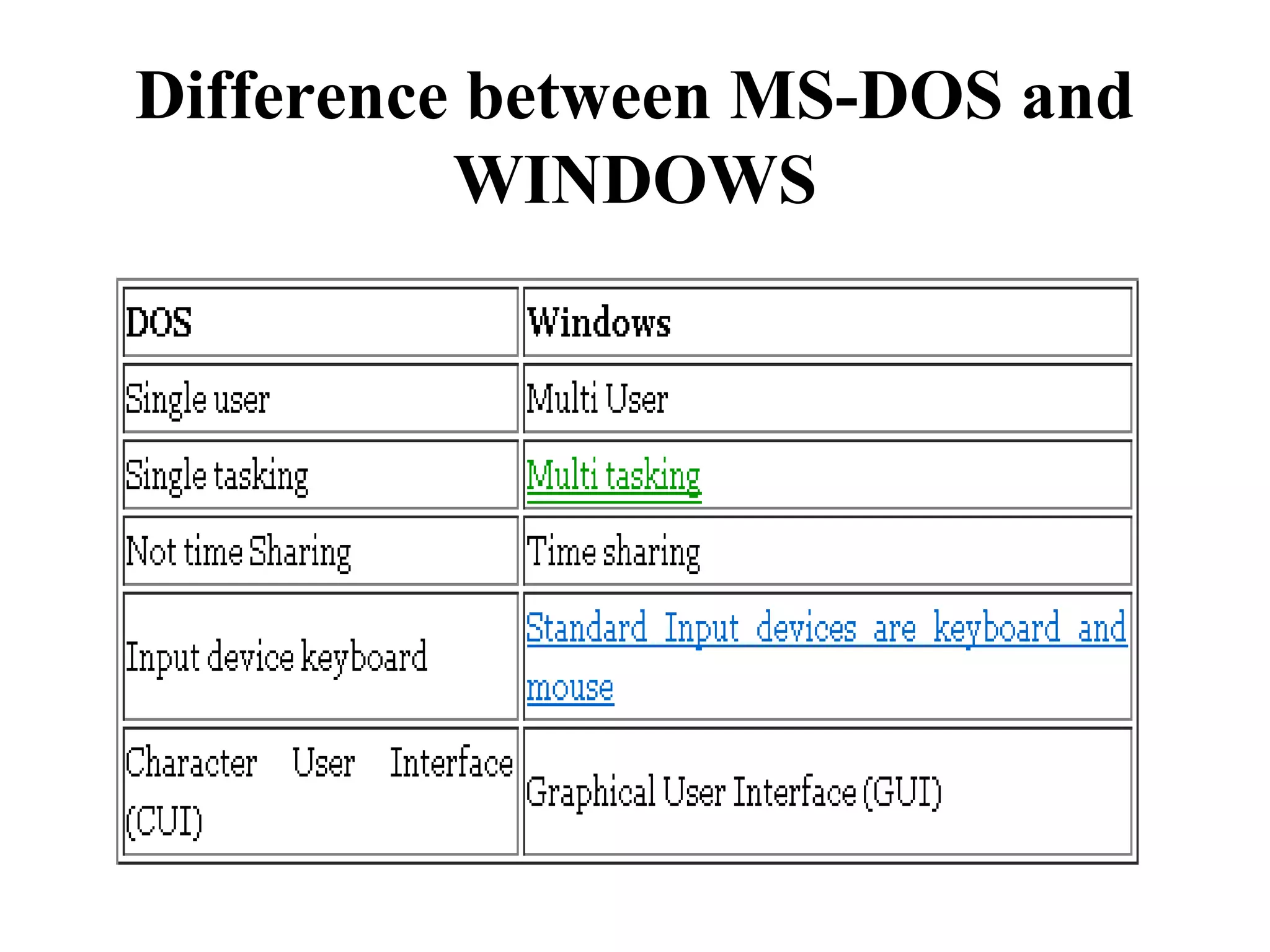
Difference between MS-DOS and
WINDOWS
References
1. http://www.indiaprwire.com/pressrelease/books/2010112969999.htm
2. http://www.wileyindia.com/business-books/business-management-
textbooks/computer-applications-in-management.html

Bba ii cam u i-operating system concept