Basics of Android
Under the Guidence of
Mr. Devashish Kumar
BY:
Shivam Gupta
ssgupta3062000@gmail.com
TCA1755020
BCA(MAWT)
IInd Semester
I-Nurture,TMU
CONTENTS
i. What is Android????
ii. Origin of Android…
iii. Why Android App’s ???
iv. Android Versions ??
v. Android archetecture.
vi. Challenges of Android in app development.
vii. Limitations.
What is Android????
 Android is Linux based Operating System.
 Developed by Google for Smart Phones and Tablets.
 Written in Java and C++ programming language.
 Open Source Software.
 GUI based operating system.
 Android specially developed for applications.There are more
than 400,000 app in market.
Origin of Android
 Android was founded in Palo Alto, California in
October 2003 by Andy Rubin ,Rich Miner , Nick
Sears and Chris White who works at GOOGLE to
develop.
 Android was purchased by the GOOGLE in
August 2005 for 50 MILLONS$.
Why Android App’s
 Andriod comes into use due to a variety of reasons:
1. Ease of use
2. Building new services
3. Creating new bussiness
4. Providing games and other content.
5. Run Multiple app at the same time.
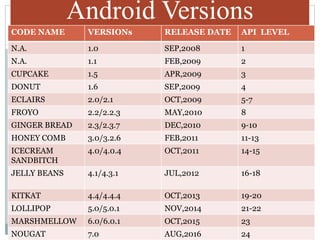
Android Versions
CODE NAME VERSIONs RELEASE DATE API LEVEL
N.A. 1.0 SEP,2008 1
N.A. 1.1 FEB,2009 2
CUPCAKE 1.5 APR,2009 3
DONUT 1.6 SEP,2009 4
ECLAIRS 2.0/2.1 OCT,2009 5-7
FROYO 2.2/2.2.3 MAY,2010 8
GINGER BREAD 2.3/2.3.7 DEC,2010 9-10
HONEY COMB 3.0/3.2.6 FEB,2011 11-13
ICECREAM
SANDBITCH
4.0/4.0.4 OCT,2011 14-15
JELLY BEANS 4.1/4.3.1 JUL,2012 16-18
KITKAT 4.4/4.4.4 OCT,2013 19-20
LOLLIPOP 5.0/5.0.1 NOV,2014 21-22
MARSHMELLOW 6.0/6.0.1 OCT,2015 23
NOUGAT 7.0 AUG,2016 24
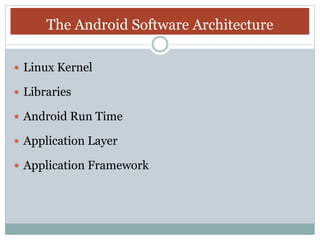
The Android Software Architecture
 Linux Kernel
 Libraries
 Android Run Time
 Application Layer
 Application Framework
Linux Kernel
Device Drivers
Memory Management
Process Management
Networking
Libraries
C/C++ libraries.
Interface through Java.
Surface manager –Handling UI Windows.
2D and 3D graphics.
Media codes , SQLlite, Browser engine.
Application Framework
 API interface.
 Activity manager- manages application life cycle.
 All application are written in java programming.
 API’s
A. Data Structure
B. Utilities
C. File Access
D. Network Access
E. Graphics
API????
 API stands for Application Programming Interface.
 All features of android are available to developer
through API’s written in Java language.
 Few API’s are:-
1. View system-> It is used to build an application UI,
including list ,buttons and menu.
Challenges of Android
 Building App’s for a Multi -screen World.
 Getting Performance Right.
 Keeping Your Code and Server secure.
 Remaining compatible with Older platformVersions.
 Understanding the market usages.
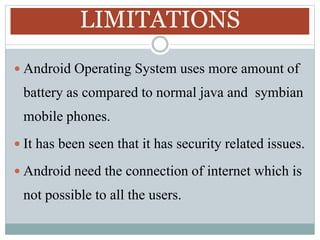
LIMITATIONS
 Android Operating System uses more amount of
battery as compared to normal java and symbian
mobile phones.
 It has been seen that it has security related issues.
 Android need the connection of internet which is
not possible to all the users.
References:-
 www.w3schools.com
 www.slideshare.com
 www.androiddeveloper.com
Basics of Android Part-1

Basics of Android Part-1

  • 1.
    Basics of Android Underthe Guidence of Mr. Devashish Kumar BY: Shivam Gupta ssgupta3062000@gmail.com TCA1755020 BCA(MAWT) IInd Semester I-Nurture,TMU
  • 2.
    CONTENTS i. What isAndroid???? ii. Origin of Android… iii. Why Android App’s ??? iv. Android Versions ?? v. Android archetecture. vi. Challenges of Android in app development. vii. Limitations.
  • 3.
    What is Android???? Android is Linux based Operating System.  Developed by Google for Smart Phones and Tablets.  Written in Java and C++ programming language.  Open Source Software.  GUI based operating system.  Android specially developed for applications.There are more than 400,000 app in market.
  • 4.
    Origin of Android Android was founded in Palo Alto, California in October 2003 by Andy Rubin ,Rich Miner , Nick Sears and Chris White who works at GOOGLE to develop.  Android was purchased by the GOOGLE in August 2005 for 50 MILLONS$.
  • 5.
    Why Android App’s Andriod comes into use due to a variety of reasons: 1. Ease of use 2. Building new services 3. Creating new bussiness 4. Providing games and other content. 5. Run Multiple app at the same time.
  • 6.
    Android Versions CODE NAMEVERSIONs RELEASE DATE API LEVEL N.A. 1.0 SEP,2008 1 N.A. 1.1 FEB,2009 2 CUPCAKE 1.5 APR,2009 3 DONUT 1.6 SEP,2009 4 ECLAIRS 2.0/2.1 OCT,2009 5-7 FROYO 2.2/2.2.3 MAY,2010 8 GINGER BREAD 2.3/2.3.7 DEC,2010 9-10 HONEY COMB 3.0/3.2.6 FEB,2011 11-13 ICECREAM SANDBITCH 4.0/4.0.4 OCT,2011 14-15 JELLY BEANS 4.1/4.3.1 JUL,2012 16-18 KITKAT 4.4/4.4.4 OCT,2013 19-20 LOLLIPOP 5.0/5.0.1 NOV,2014 21-22 MARSHMELLOW 6.0/6.0.1 OCT,2015 23 NOUGAT 7.0 AUG,2016 24
  • 7.
    The Android SoftwareArchitecture  Linux Kernel  Libraries  Android Run Time  Application Layer  Application Framework
  • 8.
    Linux Kernel Device Drivers MemoryManagement Process Management Networking
  • 9.
    Libraries C/C++ libraries. Interface throughJava. Surface manager –Handling UI Windows. 2D and 3D graphics. Media codes , SQLlite, Browser engine.
  • 10.
    Application Framework  APIinterface.  Activity manager- manages application life cycle.  All application are written in java programming.  API’s A. Data Structure B. Utilities C. File Access D. Network Access E. Graphics
  • 11.
    API????  API standsfor Application Programming Interface.  All features of android are available to developer through API’s written in Java language.  Few API’s are:- 1. View system-> It is used to build an application UI, including list ,buttons and menu.
  • 12.
    Challenges of Android Building App’s for a Multi -screen World.  Getting Performance Right.  Keeping Your Code and Server secure.  Remaining compatible with Older platformVersions.  Understanding the market usages.
  • 13.
    LIMITATIONS  Android OperatingSystem uses more amount of battery as compared to normal java and symbian mobile phones.  It has been seen that it has security related issues.  Android need the connection of internet which is not possible to all the users.
  • 14.