What is Unix ?
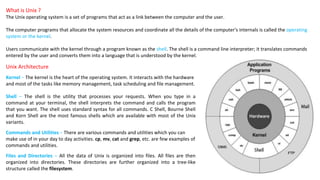
The Unix operating system is a set of programs that act as a link between the computer and the user.
The computer programs that allocate the system resources and coordinate all the details of the computer's internals is called the operating
system or the kernel.
Users communicate with the kernel through a program known as the shell. The shell is a command line interpreter; it translates commands
entered by the user and converts them into a language that is understood by the kernel.
Unix Architecture
Kernel − The kernel is the heart of the operating system. It interacts with the hardware
and most of the tasks like memory management, task scheduling and file management.
Shell − The shell is the utility that processes your requests. When you type in a
command at your terminal, the shell interprets the command and calls the program
that you want. The shell uses standard syntax for all commands. C Shell, Bourne Shell
and Korn Shell are the most famous shells which are available with most of the Unix
variants.
Commands and Utilities − There are various commands and utilities which you can
make use of in your day to day activities. cp, mv, cat and grep, etc. are few examples of
commands and utilities.
Files and Directories − All the data of Unix is organized into files. All files are then
organized into directories. These directories are further organized into a tree-like
structure called the filesystem.
1. To check calendar :
$ cal
2. Listing Directories and Files
$ Ls –l
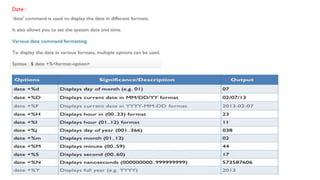
Date :
3. Who is Logged in?
Sometime you might be interested to know who is logged in to the computer at the same time.
There are three commands available to get you this information, based on how much you wish to
know about the other users: users, who, and w.
4. Display Content of a File
You can use the cat command to see the content of a file.
$ cat filename
• You can display the line numbers by using the -b option along with the cat command
• The syntax to combine 2 files is -
cat file1 file2 > newfilename
• Append data into a file
cat file1 file2 > >file3 [Here content of file1 and file2 is appended in file3]
5. Deleting Files
The 'rm' command removes files from the system without confirmation.
6. Moving files
Suppose we want to move the file "sample2" to location /home/Documents mv sample2 /home/Documents
7. For renaming file:
8. Creating Directories
9. Removing Directories
10. Renaming Directory
10. The 'Man' command
Man stands for manual which is a reference book of a Linux operating
system.
Delete a directory (recursively*): rmdir -R directory-name
*All files and subdirectories are deleted

Basic Commands-part1.pptx

  • 1.
    What is Unix? The Unix operating system is a set of programs that act as a link between the computer and the user. The computer programs that allocate the system resources and coordinate all the details of the computer's internals is called the operating system or the kernel. Users communicate with the kernel through a program known as the shell. The shell is a command line interpreter; it translates commands entered by the user and converts them into a language that is understood by the kernel. Unix Architecture Kernel − The kernel is the heart of the operating system. It interacts with the hardware and most of the tasks like memory management, task scheduling and file management. Shell − The shell is the utility that processes your requests. When you type in a command at your terminal, the shell interprets the command and calls the program that you want. The shell uses standard syntax for all commands. C Shell, Bourne Shell and Korn Shell are the most famous shells which are available with most of the Unix variants. Commands and Utilities − There are various commands and utilities which you can make use of in your day to day activities. cp, mv, cat and grep, etc. are few examples of commands and utilities. Files and Directories − All the data of Unix is organized into files. All files are then organized into directories. These directories are further organized into a tree-like structure called the filesystem.
  • 2.
    1. To checkcalendar : $ cal 2. Listing Directories and Files $ Ls –l
  • 3.
  • 4.
    3. Who isLogged in? Sometime you might be interested to know who is logged in to the computer at the same time. There are three commands available to get you this information, based on how much you wish to know about the other users: users, who, and w. 4. Display Content of a File You can use the cat command to see the content of a file. $ cat filename • You can display the line numbers by using the -b option along with the cat command • The syntax to combine 2 files is - cat file1 file2 > newfilename • Append data into a file cat file1 file2 > >file3 [Here content of file1 and file2 is appended in file3] 5. Deleting Files The 'rm' command removes files from the system without confirmation. 6. Moving files Suppose we want to move the file "sample2" to location /home/Documents mv sample2 /home/Documents
  • 5.
    7. For renamingfile: 8. Creating Directories 9. Removing Directories 10. Renaming Directory 10. The 'Man' command Man stands for manual which is a reference book of a Linux operating system. Delete a directory (recursively*): rmdir -R directory-name *All files and subdirectories are deleted