GlobalLogic
Embedded Starter
Kit
Prerequisites
Training 00
Bare Metal
Trainings
Contents
 Install ST-Link driver
 Install Keil uVision IDE
 Install STM32 CubeMx
19.10.2021 14:02 Bare Metal – Training 00 2
Assignments and Goals
• Prepare all HW and SH for trainings
19.10.2021 14:02 Bare Metal – Training 00 3
Install ST-Link driver
Use following link to download and install driver
https://www.st.com/en/development-tools/stsw-link009.html
To install the driver, run stlink_winusb_install.bat in administrator mode, before connecting any ST-Link to the PC.
19.10.2021 14:02 Bare Metal – Training 00 4
Install ST-Link driver
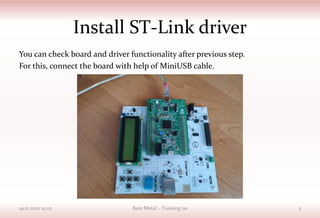
You can check board and driver functionality after previous step.
For this, connect the board with help of MiniUSB cable.
19.10.2021 14:02 Bare Metal – Training 00 5
Install ST-Link driver
Open Control panel – Device Manager.
You should see ST-Link Debug in place
19.10.2021 14:02 Bare Metal – Training 00 6
Install Keil uVision IDE
• NOTE! Keil uVision installation would take big amount of Internet traffic!
• Download Keil uVision from following link
https://files.mycloud.com/home.php?brand=webfiles&seuuid=900687654d
8477a358f566e092157604&name=MDK_ARM_5.24a___Legacy_Suppor
MDK5.24a folder
19.10.2021 14:02 Bare Metal – Training 00 7
Install Keil uVision IDE
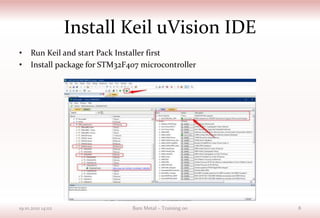
• Run Keil and start Pack Installer first
• Install package for STM32F407 microcontroller
19.10.2021 14:02 Bare Metal – Training 00 8
Install STM32 CubeMx
• NOTE! STM32 CubeMx installation would take big amount of Internet
traffic!
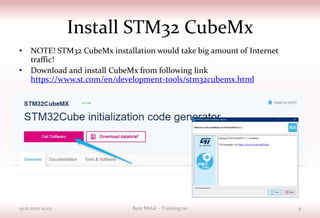
• Download and install CubeMx from following link
https://www.st.com/en/development-tools/stm32cubemx.html
19.10.2021 14:02 Bare Metal – Training 00 9
Install STM32 CubeMx
• STM32 CubeMx requires special Java version. You can find it with
following link
https://files.mycloud.com/home.php?brand=webfiles&seuuid=42fd
15f78080bb7b4709da446b607224&name=jre-8u201-windows-x64
19.10.2021 14:02 Bare Metal – Training 00 10
Install STM32 CubeMx
• NOTE! For first time project, CubeMx would
download additional data from the Internet
19.10.2021 14:02 Bare Metal – Training 00 11
Ready To Go!
• Now you are ready to start your first project
with Embedded Starter Kit from
GlobalLogic!
19.10.2021 14:02 Bare Metal – Training 00 12

Bare metal training_00_prerequisites

  • 1.
  • 2.
    Contents  Install ST-Linkdriver  Install Keil uVision IDE  Install STM32 CubeMx 19.10.2021 14:02 Bare Metal – Training 00 2
  • 3.
    Assignments and Goals •Prepare all HW and SH for trainings 19.10.2021 14:02 Bare Metal – Training 00 3
  • 4.
    Install ST-Link driver Usefollowing link to download and install driver https://www.st.com/en/development-tools/stsw-link009.html To install the driver, run stlink_winusb_install.bat in administrator mode, before connecting any ST-Link to the PC. 19.10.2021 14:02 Bare Metal – Training 00 4
  • 5.
    Install ST-Link driver Youcan check board and driver functionality after previous step. For this, connect the board with help of MiniUSB cable. 19.10.2021 14:02 Bare Metal – Training 00 5
  • 6.
    Install ST-Link driver OpenControl panel – Device Manager. You should see ST-Link Debug in place 19.10.2021 14:02 Bare Metal – Training 00 6
  • 7.
    Install Keil uVisionIDE • NOTE! Keil uVision installation would take big amount of Internet traffic! • Download Keil uVision from following link https://files.mycloud.com/home.php?brand=webfiles&seuuid=900687654d 8477a358f566e092157604&name=MDK_ARM_5.24a___Legacy_Suppor MDK5.24a folder 19.10.2021 14:02 Bare Metal – Training 00 7
  • 8.
    Install Keil uVisionIDE • Run Keil and start Pack Installer first • Install package for STM32F407 microcontroller 19.10.2021 14:02 Bare Metal – Training 00 8
  • 9.
    Install STM32 CubeMx •NOTE! STM32 CubeMx installation would take big amount of Internet traffic! • Download and install CubeMx from following link https://www.st.com/en/development-tools/stm32cubemx.html 19.10.2021 14:02 Bare Metal – Training 00 9
  • 10.
    Install STM32 CubeMx •STM32 CubeMx requires special Java version. You can find it with following link https://files.mycloud.com/home.php?brand=webfiles&seuuid=42fd 15f78080bb7b4709da446b607224&name=jre-8u201-windows-x64 19.10.2021 14:02 Bare Metal – Training 00 10
  • 11.
    Install STM32 CubeMx •NOTE! For first time project, CubeMx would download additional data from the Internet 19.10.2021 14:02 Bare Metal – Training 00 11
  • 12.
    Ready To Go! •Now you are ready to start your first project with Embedded Starter Kit from GlobalLogic! 19.10.2021 14:02 Bare Metal – Training 00 12