Introduction: Game-based learning and accessibility Game-based learning is gaining acceptance (Educational videogames seem to have potential) However,  it is difficult to integrate videogames in the classroom due to several factors E.g. instructors ignore what is going on in the game Effective approach: integrate the games in Learning Management Systems Accessibility  is also an important issue in this concern that has not been properly addressed yet Education is a universal right 11% children from 6-14 years old have some level of impairment (US Census Bureau 2007)
Introduction: approaching accessibility in game-based learning Awareness about accessibility in games is still scarce Related to the problem of the  high development   cost Involves complex technical support (text-to-speech synthesis, voice recognition, etc.) Constraint which is especially relevant in education where budget is limited Authoring tools  can be the appropriate vehicle for introducing accessibility in educational videogames In-built accessibility-oriented services (e.g. a configurable text-to-speech module) will  reduce the cost dramatically Force the game designer to start thinking about accessibility from the design stage ( increase of awareness ) Facilitates the introduction of accessibility in existing games ( promotes reuse and maintenance ) Objective for this work: Introduce accessibility in the <e-Adventure> game authoring tool However, the support for accessibility in current game   authoring tools is almost inexistent
Accessibility in Videogames: design issues Choose the game genre carefully Promote reflexion instead of action Genres where visual effects are not crucial E.g.: point-and-click adventure games Common adaptations carried out in games Adjustment of contrast and color settings Audible sonars to detect enemies Provide relevant information through multiple channels Support for adapted game-pads Etc.
Accessibility in Videogames: design issues II Design the game without binding actions to specific interaction mechanisms Adapting the game requires information about the user (e.g. visual, mobility and hearing requirements) Multiple alternatives In e-learning courses it makes sense that the LMS stores information about the impairments of the student and delivers them to the game when this is launched Consider not only information about the user but also about the environment E.g.: In a noisy environment anybody could be completely deaf
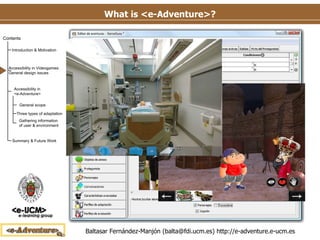
What is <e-Adventure>? Authoring tool  for  point-and-click   adventure games Low-cost Instructor-oriented Instructors are involved directly in the development process Education-specific features Performance tracking & assessment In-game adaptation behavior Integration with LMSs Several applications in diverse fields. E.g. medical field (Moreno-Ger et al. 2008, Torrente et al. 2009)
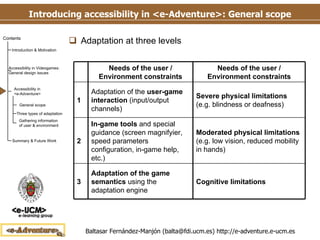
Introducing accessibility in <e-Adventure>: General scope Adaptation at three levels 3 2 1 Cognitive limitations Moderated physical limitations  (e.g. low vision, reduced mobility in hands) Severe physical limitations  (e.g. blindness or deafness) Needs of the user / Environment constraints Adaptation of the game semantics  using the adaptation engine In-game tools  and special guidance (screen magnifyier, speed parameters configuration, in-game help, etc.) Adaptation of the  user-game interaction  (input/output channels) Needs of the user / Environment constraints
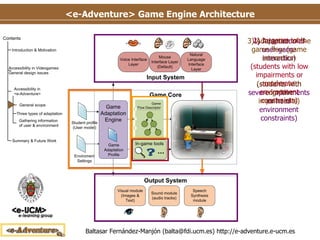
<e-Adventure> Game Engine Architecture 1) Adaptation of user-game interaction (students with severe impairments or hard environment constraints) 2) In-game tools (students with low impairments or moderate environment constraints) 3) Adaptation of the game flow (game semantics) (students with cognitive impairments)
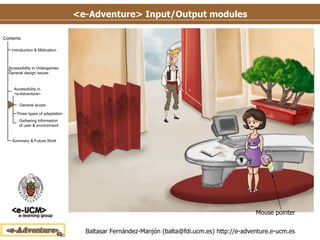
<e-Adventure> Input/Output modules Input/Output modules summary Mouse Interface The interaction mechanism by default Point-and-click: demands the ability of seeing objects and characters on the scene (sense of view) and move the mouse Mouse pointer
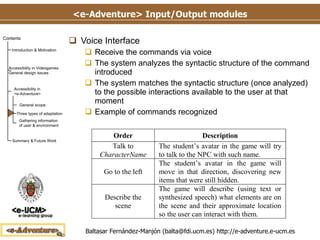
<e-Adventure> Input/Output modules Voice Interface Receive the commands via voice The system analyzes the syntactic structure of the command introduced The system matches the syntactic structure (once analyzed) to the possible interactions available to the user at that moment Example of commands recognized
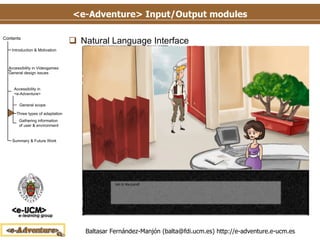
<e-Adventure> Input/Output modules Natural Language Interface Works like the Voice Interface but receiving the commands through the keyboard The system analyzes the syntactic structure of the sentence introduced The system matches the syntactic structure (once analyzed) to the possible interactions available to the user at that moment
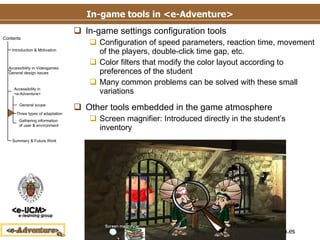
In-game tools in <e-Adventure> In-game settings configuration tools Configuration of speed parameters, reaction time, movement of the players, double-click time gap, etc. Color filters that modify the color layout according to preferences of the student Many common problems can be solved with these small variations Other tools embedded in the game atmosphere Screen magnifier: Introduced directly in the student’s inventory
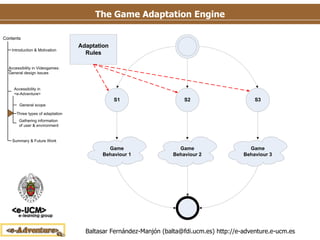
The Game Adaptation Engine Feature already integrated in the <e-Adventure> platform Based on a set of rules following the pattern  Condition->Effect When the condition is met (defined over external or internal variables) the effect is triggered, which modifies the game behavior With this mechanism we can, for instance Avoid a complex task for a student with cognitive impairments Provide alternative paths of diverse difficulty Change the initial scene Etc.
The Game Adaptation Engine
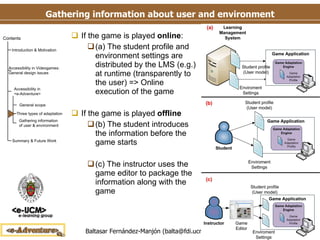
Gathering information about user and environment If the game is played  online : (a) The student profile and environment settings are distributed by the LMS (e.g.) at runtime (transparently to the user) => Online execution of the game If the game is played  offline (b) The student introduces the information before the game starts (c) The instructor uses the game editor to package the information along with the game
Summary & Future Work Summary Although game-based learning is on the rise, if educational games are to be used in real courses  accessibility  must be addressed The first barrier to overcome in the development of accessible educational games is the  extra development cost  it implies  An effective approach to reduce the cost is to produce  authoring tools with in-built accessibility features Contribution Introduction of accessibility in the <e-Adventure> educational game authoring tool Future work Polish the technology and release it to the public for testing Connection with Learning Management Systems needs futher development (limitations of current LMS)
Thank you! Any Question? Baltasar Fernández-Manjón [email_address] http://www.e-ucm.es/people/balta Don’t forget to try out the <e-Adventure> platform! http://e-adventure.e-ucm.es

Balta Mtdl09

  • 1.
  • 2.
    Introduction: Game-based learningand accessibility Game-based learning is gaining acceptance (Educational videogames seem to have potential) However, it is difficult to integrate videogames in the classroom due to several factors E.g. instructors ignore what is going on in the game Effective approach: integrate the games in Learning Management Systems Accessibility is also an important issue in this concern that has not been properly addressed yet Education is a universal right 11% children from 6-14 years old have some level of impairment (US Census Bureau 2007)
  • 3.
    Introduction: approaching accessibilityin game-based learning Awareness about accessibility in games is still scarce Related to the problem of the high development cost Involves complex technical support (text-to-speech synthesis, voice recognition, etc.) Constraint which is especially relevant in education where budget is limited Authoring tools can be the appropriate vehicle for introducing accessibility in educational videogames In-built accessibility-oriented services (e.g. a configurable text-to-speech module) will reduce the cost dramatically Force the game designer to start thinking about accessibility from the design stage ( increase of awareness ) Facilitates the introduction of accessibility in existing games ( promotes reuse and maintenance ) Objective for this work: Introduce accessibility in the <e-Adventure> game authoring tool However, the support for accessibility in current game authoring tools is almost inexistent
  • 4.
    Accessibility in Videogames:design issues Choose the game genre carefully Promote reflexion instead of action Genres where visual effects are not crucial E.g.: point-and-click adventure games Common adaptations carried out in games Adjustment of contrast and color settings Audible sonars to detect enemies Provide relevant information through multiple channels Support for adapted game-pads Etc.
  • 5.
    Accessibility in Videogames:design issues II Design the game without binding actions to specific interaction mechanisms Adapting the game requires information about the user (e.g. visual, mobility and hearing requirements) Multiple alternatives In e-learning courses it makes sense that the LMS stores information about the impairments of the student and delivers them to the game when this is launched Consider not only information about the user but also about the environment E.g.: In a noisy environment anybody could be completely deaf
  • 6.
    What is <e-Adventure>?Authoring tool for point-and-click adventure games Low-cost Instructor-oriented Instructors are involved directly in the development process Education-specific features Performance tracking & assessment In-game adaptation behavior Integration with LMSs Several applications in diverse fields. E.g. medical field (Moreno-Ger et al. 2008, Torrente et al. 2009)
  • 7.
    Introducing accessibility in<e-Adventure>: General scope Adaptation at three levels 3 2 1 Cognitive limitations Moderated physical limitations (e.g. low vision, reduced mobility in hands) Severe physical limitations (e.g. blindness or deafness) Needs of the user / Environment constraints Adaptation of the game semantics using the adaptation engine In-game tools and special guidance (screen magnifyier, speed parameters configuration, in-game help, etc.) Adaptation of the user-game interaction (input/output channels) Needs of the user / Environment constraints
  • 8.
    <e-Adventure> Game EngineArchitecture 1) Adaptation of user-game interaction (students with severe impairments or hard environment constraints) 2) In-game tools (students with low impairments or moderate environment constraints) 3) Adaptation of the game flow (game semantics) (students with cognitive impairments)
  • 9.
    <e-Adventure> Input/Output modulesInput/Output modules summary Mouse Interface The interaction mechanism by default Point-and-click: demands the ability of seeing objects and characters on the scene (sense of view) and move the mouse Mouse pointer
  • 10.
    <e-Adventure> Input/Output modulesVoice Interface Receive the commands via voice The system analyzes the syntactic structure of the command introduced The system matches the syntactic structure (once analyzed) to the possible interactions available to the user at that moment Example of commands recognized
  • 11.
    <e-Adventure> Input/Output modulesNatural Language Interface Works like the Voice Interface but receiving the commands through the keyboard The system analyzes the syntactic structure of the sentence introduced The system matches the syntactic structure (once analyzed) to the possible interactions available to the user at that moment
  • 12.
    In-game tools in<e-Adventure> In-game settings configuration tools Configuration of speed parameters, reaction time, movement of the players, double-click time gap, etc. Color filters that modify the color layout according to preferences of the student Many common problems can be solved with these small variations Other tools embedded in the game atmosphere Screen magnifier: Introduced directly in the student’s inventory
  • 13.
    The Game AdaptationEngine Feature already integrated in the <e-Adventure> platform Based on a set of rules following the pattern Condition->Effect When the condition is met (defined over external or internal variables) the effect is triggered, which modifies the game behavior With this mechanism we can, for instance Avoid a complex task for a student with cognitive impairments Provide alternative paths of diverse difficulty Change the initial scene Etc.
  • 14.
  • 15.
    Gathering information aboutuser and environment If the game is played online : (a) The student profile and environment settings are distributed by the LMS (e.g.) at runtime (transparently to the user) => Online execution of the game If the game is played offline (b) The student introduces the information before the game starts (c) The instructor uses the game editor to package the information along with the game
  • 16.
    Summary & FutureWork Summary Although game-based learning is on the rise, if educational games are to be used in real courses accessibility must be addressed The first barrier to overcome in the development of accessible educational games is the extra development cost it implies An effective approach to reduce the cost is to produce authoring tools with in-built accessibility features Contribution Introduction of accessibility in the <e-Adventure> educational game authoring tool Future work Polish the technology and release it to the public for testing Connection with Learning Management Systems needs futher development (limitations of current LMS)
  • 17.
    Thank you! AnyQuestion? Baltasar Fernández-Manjón [email_address] http://www.e-ucm.es/people/balta Don’t forget to try out the <e-Adventure> platform! http://e-adventure.e-ucm.es