Bakus-Naur Form
What is it?
• A formal, mathematical way to
  describe a language

• It describes the grammar of a
  language, so that there is no
  disagreement or ambiguity as to what
  is allowed

• How ….?
Production Rules
• Symbol := alternative1 | alternative 2 …
• alternative1 := subsymbol1 | terminal

• Terminals are the end of the line, they
  terminate the production process.

• The language described is the set of
  all the strings you can produce by
  following the production rules
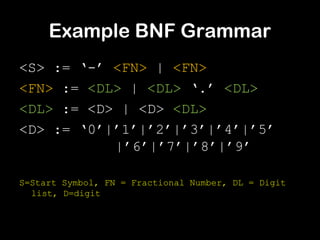
Example BNF Grammar
<S> := ‘-’ <FN> | <FN>
<FN> := <DL> | <DL> ‘.’ <DL>
<DL> := <D> | <D> <DL>
<D> := ‘0’|’1’|’2’|’3’|’4’|’5’
           |’6’|’7’|’8’|’9’

S=Start Symbol, FN = Fractional Number, DL = Digit
  list, D=digit
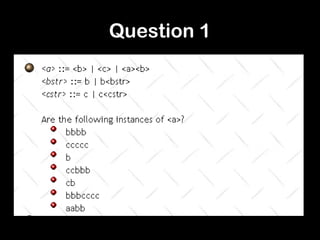
Question 1
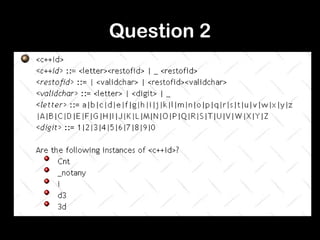
Question 2
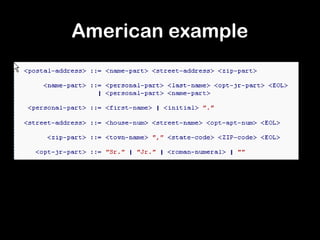
American example
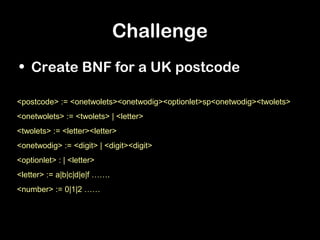
Challenge
• Create BNF for a UK postcode

<postcode> := <onetwolets><onetwodig><optionlet>sp<onetwodig><twolets>
<onetwolets> := <twolets> | <letter>
<twolets> := <letter><letter>
<onetwodig> := <digit> | <digit><digit>
<optionlet> : | <letter>
<letter> := a|b|c|d|e|f …….
<number> := 0|1|2 ……
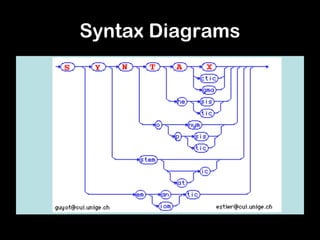
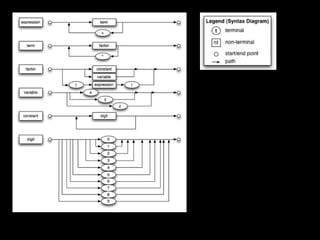
Syntax Diagrams
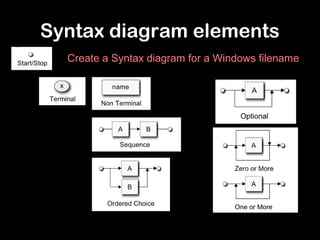
Syntax diagram elements
  Create a Syntax diagram for a Windows filename
Bakus naur form

Bakus naur form

  • 1.
  • 2.
    What is it? •A formal, mathematical way to describe a language • It describes the grammar of a language, so that there is no disagreement or ambiguity as to what is allowed • How ….?
  • 3.
    Production Rules • Symbol:= alternative1 | alternative 2 … • alternative1 := subsymbol1 | terminal • Terminals are the end of the line, they terminate the production process. • The language described is the set of all the strings you can produce by following the production rules
  • 4.
    Example BNF Grammar <S>:= ‘-’ <FN> | <FN> <FN> := <DL> | <DL> ‘.’ <DL> <DL> := <D> | <D> <DL> <D> := ‘0’|’1’|’2’|’3’|’4’|’5’ |’6’|’7’|’8’|’9’ S=Start Symbol, FN = Fractional Number, DL = Digit list, D=digit
  • 5.
  • 6.
  • 7.
  • 8.
    Challenge • Create BNFfor a UK postcode <postcode> := <onetwolets><onetwodig><optionlet>sp<onetwodig><twolets> <onetwolets> := <twolets> | <letter> <twolets> := <letter><letter> <onetwodig> := <digit> | <digit><digit> <optionlet> : | <letter> <letter> := a|b|c|d|e|f ……. <number> := 0|1|2 ……
  • 9.
  • 10.
    Syntax diagram elements Create a Syntax diagram for a Windows filename