PCS2 (BACKUP PROCEDURE)


General info about WinRescue(backup software)

    Win Rescue can backup registry, windows configuration files and any other files. You
    can choose any type of backup.

    Step by Step Backup


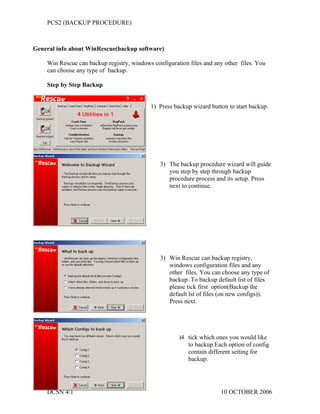
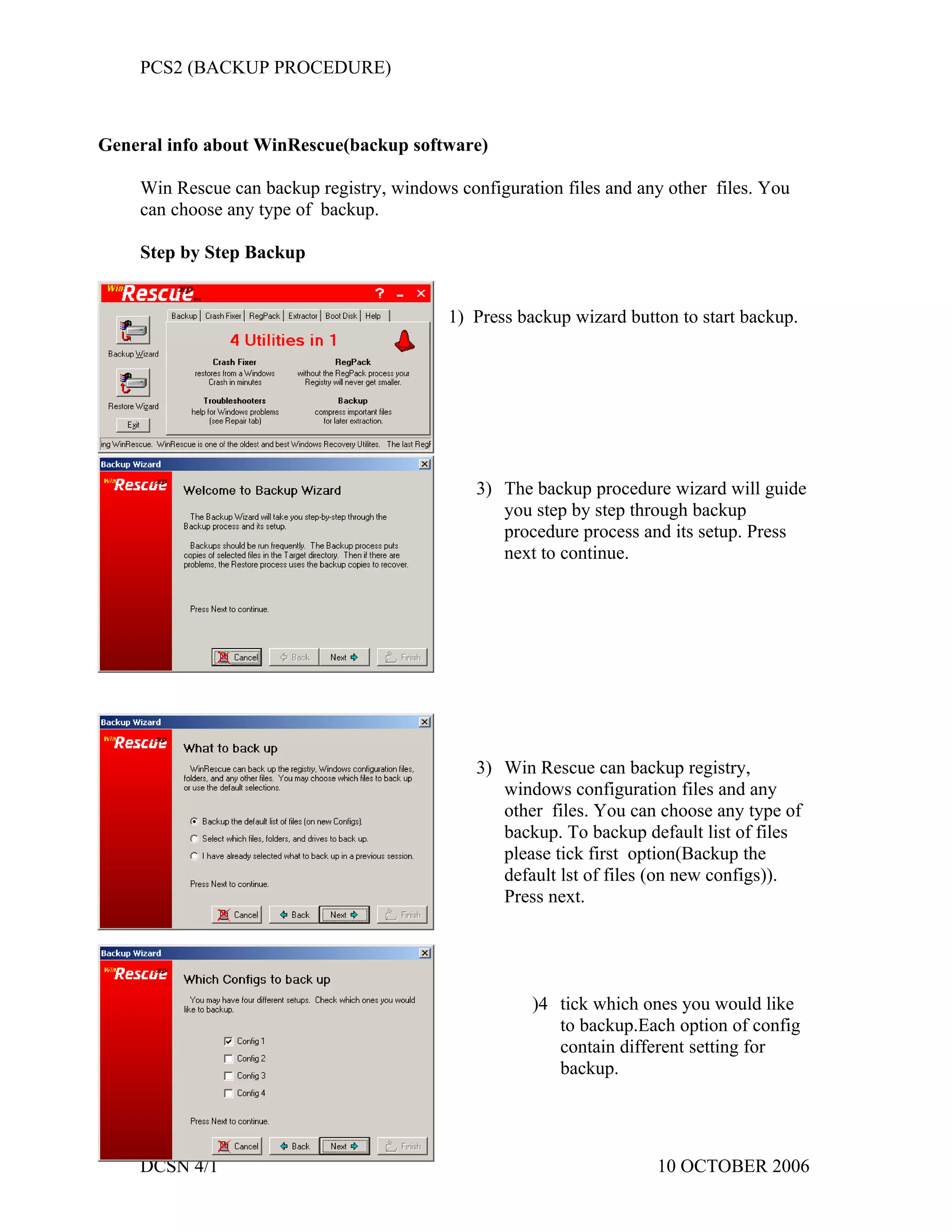
                                           1) Press backup wizard button to start backup.


                                               3) The backup procedure wizard will guide
                                                  you step by step through backup
                                                  procedure process and its setup. Press
                                                  next to continue.


                                               3) Win Rescue can backup registry,
                                                  windows configuration files and any
                                                  other files. You can choose any type of
                                                  backup. To backup default list of files
                                                  please tick first option(Backup the
                                                  default lst of files (on new configs)).
                                                  Press next.


                                                      )4 tick which ones you would like
                                                         to backup.Each option of config
                                                         contain different setting for
                                                         backup.


    DCSN 4/1                                                          10 OCTOBER 2006
PCS2 (BACKUP PROCEDURE)


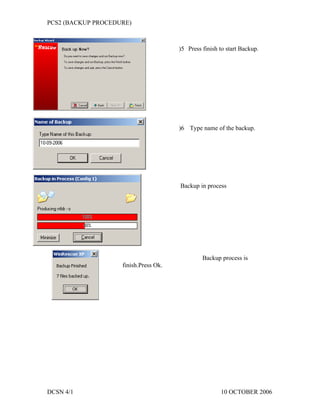
                                       )5 Press finish to start Backup.


                                       )6 Type name of the backup.


                                       Backup in process


                                                Backup process is
                    finish.Press Ok.


DCSN 4/1                                               10 OCTOBER 2006
PCS2 (BACKUP PROCEDURE)


.


                        BACKUP PROCEDURE

                          PREPARED TO :
                  SIR MOHD ZULFIKAR B. ABD KADIR

                          PREPARED BY:
                 MIOR HASHIM EFFENDY B. MIOR JANI


                         10 OCTOBER 2006


                              DCSN 4/1


    DCSN 4/1                                        10 OCTOBER 2006

Backup Procedures Backup Registry

  • 1.
    PCS2 (BACKUP PROCEDURE) Generalinfo about WinRescue(backup software) Win Rescue can backup registry, windows configuration files and any other files. You can choose any type of backup. Step by Step Backup 1) Press backup wizard button to start backup. 3) The backup procedure wizard will guide you step by step through backup procedure process and its setup. Press next to continue. 3) Win Rescue can backup registry, windows configuration files and any other files. You can choose any type of backup. To backup default list of files please tick first option(Backup the default lst of files (on new configs)). Press next. )4 tick which ones you would like to backup.Each option of config contain different setting for backup. DCSN 4/1 10 OCTOBER 2006
  • 2.
    PCS2 (BACKUP PROCEDURE) )5 Press finish to start Backup. )6 Type name of the backup. Backup in process Backup process is finish.Press Ok. DCSN 4/1 10 OCTOBER 2006
  • 3.
    PCS2 (BACKUP PROCEDURE) . BACKUP PROCEDURE PREPARED TO : SIR MOHD ZULFIKAR B. ABD KADIR PREPARED BY: MIOR HASHIM EFFENDY B. MIOR JANI 10 OCTOBER 2006 DCSN 4/1 DCSN 4/1 10 OCTOBER 2006