Backbone.js
What it is, what it does, and why we use it at Usable.
Backbone.js
• Not a magic bullet.
• Not tiny once you make it useful (139kb).
• Not perfect, some things are hard.
• Not suitable for some applications.
Backbone.js
• MVC - Model,View, Controller
• (Backbone.js calls the controller a Router)
• Collections, Sync, History, and more
• Underscore.js, json2.js, jQuery (or Zepto)
Backbone.js
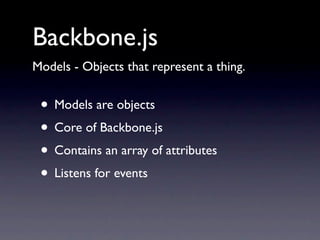
Models - Objects that represent a thing.


 • Models are objects
 • Core of Backbone.js
 • Contains an array of attributes
 • Listens for events
Backbone.js
Models - Objects that represent a thing.

var Cat = Backbone.Model.extend({

      defaults: {
           name: ‘Cat’,
           breed: 'Moggy',
           colour: ‘Ginger’,
           legs: 4
      },

      initialize: function(data) {

      },
});
Backbone.js
Using a model - Getting attributes.

var Purrkins = new Cat({
    name: ‘Purrkins’,
});


console.log(Purrkins.get(“breed”)); //Moggy


console.log(Purrkins.get(“colour”)); //Ginger


console.log(Purrkins.get(“name”)); //Purrkins
Backbone.js
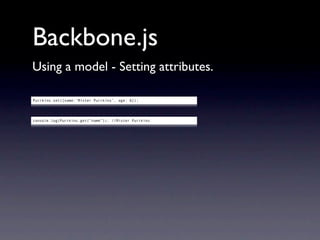
Using a model - Setting attributes.

Purrkins.set({name:‘Mister Purrkins’, age: 6});


console.log(Purrkins.get(“name”)); //Mister Purrkins
Backbone.js
Using a model - Saving.


 • Saving a model is easy
 • Backbone Sync
 • Restful interface - GET, POST, PUT, DELETE
 • Up to you to write the server side stuff
Backbone.js
Using a model - Saving to an API.

var Cat = Backbone.Model.extend({

      url: ‘/api/cat/’,

      defaults: {
           name: ‘Cat’,
           breed: 'Moggy',
           colour: ‘Ginger’,
           legs: 4
      },

      initialize: function(data) {

      },
});
Backbone.js
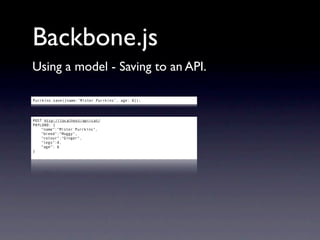
Using a model - Saving to an API.

Purrkins.save({name:‘Mister Purrkins’, age: 6});


POST http://localhost/api/cat/
PAYLOAD: {
    "name":"Mister Purrkins",
    "breed":"Moggy",
    "colour":"Ginger",
    "legs":4,
    “age”: 6
}
Backbone.js
Using a model - Validating.


 • Should you just save everything?
 • Models need to be validated
 • No helper functions for validation
 • Underscore.js provides some
Backbone.js
Using a model - Validating before saving.

var Cat = Backbone.Model.extend({

      url: ‘/api/cat/’,

      defaults: {
           name: ‘Cat’,
           breed: 'Moggy',
           colour: ‘Ginger’,
           legs: 4
      },

      initialize: function(data) {

      },

      validate: function(attrs) {
           var errors = {};
           if (attrs.age < 5) {
               errors.age = ‘Must be below 5’;
           }
           if (!_.isEmpty(errors)) {
               errors.invalid = true;
               return errors;
           }
      },

});
Backbone.js
Using a model - Validating before saving.

Purrkins.save(
    {age: 6},
    success: function(){ console.log(‘Kitty saved’); },
    error: function(model,error){
        if (error.invalid==true) {
            $.each(_.keys(error), function(i,el){
                console.log(el+”:”+error[el]);
            });
        } else {
            console.log(“Error status: ”+error.status);
            console.log(“Error response: ”+error.responseText);
        }
    }
);


age:Must be below 5
Backbone.js
Using a model - API errors.

Purrkins.save(
    {age: 4},
    success: function(){ console.log(‘Kitty saved’); },
    error: function(model,error){
        if (error.invalid==true) {
            $.each(_.keys(error), function(i,el){
                console.log(el+”:”+error[el]);
            });
        } else {
            console.log(“Error status: ”+error.status);
            console.log(“Error response: ”+error.responseText);
        }
    }
);


Error status: 500
Error response: Internal Server Error - Database not found
Backbone.js
Collections - Groups of objects.


 • Collections are ‘arrays’ of models
 • Add, push, shift, pop, unshift, etc
 • Built on Underscore.js
 • Filter, sort, etc
Backbone.js
Collections - Groups of objects.

var Glaring = Backbone.Collection.extend({

      model: Cat

});


Collective noun for a group of cats: a glaring
Backbone.js
Using a collection - Adding models.

var CrazyCatLady = new Glaring([
    {id: 1, name: ‘Purrkins’, legs: 3},
    {id: 2, name: ‘Napoleon’, colour:‘Tabby’},
    {id: 3, name: ‘Josey’, colour:‘Tabby’, legs: 100},
    {id: 4, name: ‘Coco’, breed:‘Siamese’, colour:‘Chocolate’},
    {id: 5, name: ‘Charlie’},
]);


console.log(CrazyCatLady.get(2).get(“name”)); //Napoleon


CrazyCatLady.add({id: 6, name: ‘Augustus’});


console.log(CrazyCatLady.get(6).get(“name”)); //Augustus
Backbone.js
Using a collection - Underscore.js rocks.

var TabbyCats = CrazyCatLady.where({colour: “Tabby”);


console.log(TabbyCats); //Napoleon, Josey


var fourorfivelegs = CrazyCatLady.filter(function(Cat){
    var legs = cat.get(“legs”);
    return (legs > 3 && legs < 6);
});


console.log(fourorfivelegs); //Napoleon, Coco, Charlie, Augustus


var names = CrazyCatLady.pluck(“name”);


console.log(names); //Purrkins, Napoleon, Josey, Coco, Charlie, Augustus
Backbone.js
Views - Displaying a model.


 • Views are not HTML
 • Views are a description of a model
 • The HTML code comes from templates
 • Works with any template system
Backbone.js
Views - Displaying a model.

var Catview = Backbone.View.extend({

      initialize: function() {
         _.bindAll( this, 'render' )
      },

      render: function() {

           this.$el.html(templates.catview(this.model.toJSON()));

           return this;

      },

});


var c = new Catview({model: CrazyCatLady.get(1) });
$(‘div#cat’).html(c.render().el);
Backbone.js
Views - Displaying a collection.


 • Collections can have views
 • Actually a view containing views
 • Nested? Sort of.
 • Think in terms of partials/blocks
Backbone.js
Views - Displaying a collection.

var CatRowView = Backbone.View.extend({

  tagName:     "div",

  initialize: function() {
     _.bindAll( this, 'render' )
     this.model.bind('change', this.render, this);
  },

  render: function() {

       this.$el.html(templates.catrowview(this.model.toJSON()));
       return this;

  },
});
Backbone.js
Views - Displaying a collection.

var CatListView = Backbone.View.extend({

  initialize: function(data) {

       this.collection = data.collection;

       this.collection.bind('add', this.addOne, this);
       this.collection.bind('all', this.render, this);

       this.collection.each(this.addOne);

  },

  render: function() {

  },

  addOne: function(cat) {
     var view = new CatRowView({model:cat});
     $("div#cats").append(view.render().el);
  },
});
Backbone.js
Views - Displaying a collection.

var catslisting = new CatListView({collection: CrazyCatLady});


CatListView

   CatRowView   -   Purrkins
   CatRowView   -   Napoleon
   CatRowView   -   Josey
   CatRowView   -   Coco
   CatRowView   -   Charlie
   CatRowView   -   Augustus
Backbone.js
Views - Binding events.


 • Views are not just about displaying things
 • Binding events to View elements
 • Stuff happens when you click things
 • Or double click, press a key, whatever
Backbone.js
Views - Binding events.

var Catview = Backbone.View.extend({

      initialize: function() {
         _.bindAll( this, 'render' )
      },

      events: {
         "click a.edit": "edit",
      },

      render: function() {

           this.$el.html(templates.catview(this.model.toJSON()));
           return this;

      },

      edit: function(){
        app.navigate('#/cats/'+this.model.id, true);
      }

});
Backbone.js
Routing - Backbone.js’ controller.

var Router = Backbone.Router.extend({

      routes: {

           “/cats”: “cats”,
           “/cats/:catid”: “catview”,
           “*path”: “default”,

      },

      cats: function(){
          //Something to do with cats
      },
      catview: function(catid){
          //Something to do with a specific cat
      },
      default: function(path){
          //Everything else
      }

});
Backbone.js
Routing - Backbone.js’ controller.

 cats: function(){
     var catlisting = new CatList({ collection: CrazyCatLady });
     $('div#content').html(catlisting.render().el);

 },


 catview: function(id){
     var catview = new CatView({ model: CrazyCatLady.get(id) });
     $('div#content').html(catview.render().el);

 },


 default: function(path){
     var template = path.substr(1); //strip the initial /
     if (template=='') { template = 'base'; }
     ui.display(path, template);
 },
Backbone.js
History - Handling hashchange events

Backbone.history.start();


Important notes:

• Must start after the router object.
• Must start after the HTML is done. Wrap it in
your favourite flavour of jQuery.ready();
• If you can get pushState to work, tell me how.
Backbone.js
Who’s using it?


 • UsableHQ (that’s me!)
 • Foursquare, Stripe, DocumentCloud
 • LinkedIn, Basecamp, AirBnB (for mobile)
 • Flow, Wunderkit, Khan Academy
“Don’t let the perfect be the enemy of the good.”
                                             Voltaire
Chris Neale
Technical Director, UsableHQ


    chris@usablehq.com


        @usablehq
      or @onion2k

Backbone.js

  • 1.
    Backbone.js What it is,what it does, and why we use it at Usable.
  • 2.
    Backbone.js • Not amagic bullet. • Not tiny once you make it useful (139kb). • Not perfect, some things are hard. • Not suitable for some applications.
  • 3.
    Backbone.js • MVC -Model,View, Controller • (Backbone.js calls the controller a Router) • Collections, Sync, History, and more • Underscore.js, json2.js, jQuery (or Zepto)
  • 4.
    Backbone.js Models - Objectsthat represent a thing. • Models are objects • Core of Backbone.js • Contains an array of attributes • Listens for events
  • 5.
    Backbone.js Models - Objectsthat represent a thing. var Cat = Backbone.Model.extend({ defaults: { name: ‘Cat’, breed: 'Moggy', colour: ‘Ginger’, legs: 4 }, initialize: function(data) { }, });
  • 6.
    Backbone.js Using a model- Getting attributes. var Purrkins = new Cat({ name: ‘Purrkins’, }); console.log(Purrkins.get(“breed”)); //Moggy console.log(Purrkins.get(“colour”)); //Ginger console.log(Purrkins.get(“name”)); //Purrkins
  • 7.
    Backbone.js Using a model- Setting attributes. Purrkins.set({name:‘Mister Purrkins’, age: 6}); console.log(Purrkins.get(“name”)); //Mister Purrkins
  • 8.
    Backbone.js Using a model- Saving. • Saving a model is easy • Backbone Sync • Restful interface - GET, POST, PUT, DELETE • Up to you to write the server side stuff
  • 9.
    Backbone.js Using a model- Saving to an API. var Cat = Backbone.Model.extend({ url: ‘/api/cat/’, defaults: { name: ‘Cat’, breed: 'Moggy', colour: ‘Ginger’, legs: 4 }, initialize: function(data) { }, });
  • 10.
    Backbone.js Using a model- Saving to an API. Purrkins.save({name:‘Mister Purrkins’, age: 6}); POST http://localhost/api/cat/ PAYLOAD: { "name":"Mister Purrkins", "breed":"Moggy", "colour":"Ginger", "legs":4, “age”: 6 }
  • 11.
    Backbone.js Using a model- Validating. • Should you just save everything? • Models need to be validated • No helper functions for validation • Underscore.js provides some
  • 12.
    Backbone.js Using a model- Validating before saving. var Cat = Backbone.Model.extend({ url: ‘/api/cat/’, defaults: { name: ‘Cat’, breed: 'Moggy', colour: ‘Ginger’, legs: 4 }, initialize: function(data) { }, validate: function(attrs) { var errors = {}; if (attrs.age < 5) { errors.age = ‘Must be below 5’; } if (!_.isEmpty(errors)) { errors.invalid = true; return errors; } }, });
  • 13.
    Backbone.js Using a model- Validating before saving. Purrkins.save( {age: 6}, success: function(){ console.log(‘Kitty saved’); }, error: function(model,error){ if (error.invalid==true) { $.each(_.keys(error), function(i,el){ console.log(el+”:”+error[el]); }); } else { console.log(“Error status: ”+error.status); console.log(“Error response: ”+error.responseText); } } ); age:Must be below 5
  • 14.
    Backbone.js Using a model- API errors. Purrkins.save( {age: 4}, success: function(){ console.log(‘Kitty saved’); }, error: function(model,error){ if (error.invalid==true) { $.each(_.keys(error), function(i,el){ console.log(el+”:”+error[el]); }); } else { console.log(“Error status: ”+error.status); console.log(“Error response: ”+error.responseText); } } ); Error status: 500 Error response: Internal Server Error - Database not found
  • 15.
    Backbone.js Collections - Groupsof objects. • Collections are ‘arrays’ of models • Add, push, shift, pop, unshift, etc • Built on Underscore.js • Filter, sort, etc
  • 16.
    Backbone.js Collections - Groupsof objects. var Glaring = Backbone.Collection.extend({ model: Cat }); Collective noun for a group of cats: a glaring
  • 17.
    Backbone.js Using a collection- Adding models. var CrazyCatLady = new Glaring([ {id: 1, name: ‘Purrkins’, legs: 3}, {id: 2, name: ‘Napoleon’, colour:‘Tabby’}, {id: 3, name: ‘Josey’, colour:‘Tabby’, legs: 100}, {id: 4, name: ‘Coco’, breed:‘Siamese’, colour:‘Chocolate’}, {id: 5, name: ‘Charlie’}, ]); console.log(CrazyCatLady.get(2).get(“name”)); //Napoleon CrazyCatLady.add({id: 6, name: ‘Augustus’}); console.log(CrazyCatLady.get(6).get(“name”)); //Augustus
  • 18.
    Backbone.js Using a collection- Underscore.js rocks. var TabbyCats = CrazyCatLady.where({colour: “Tabby”); console.log(TabbyCats); //Napoleon, Josey var fourorfivelegs = CrazyCatLady.filter(function(Cat){ var legs = cat.get(“legs”); return (legs > 3 && legs < 6); }); console.log(fourorfivelegs); //Napoleon, Coco, Charlie, Augustus var names = CrazyCatLady.pluck(“name”); console.log(names); //Purrkins, Napoleon, Josey, Coco, Charlie, Augustus
  • 19.
    Backbone.js Views - Displayinga model. • Views are not HTML • Views are a description of a model • The HTML code comes from templates • Works with any template system
  • 20.
    Backbone.js Views - Displayinga model. var Catview = Backbone.View.extend({ initialize: function() { _.bindAll( this, 'render' ) }, render: function() { this.$el.html(templates.catview(this.model.toJSON())); return this; }, }); var c = new Catview({model: CrazyCatLady.get(1) }); $(‘div#cat’).html(c.render().el);
  • 21.
    Backbone.js Views - Displayinga collection. • Collections can have views • Actually a view containing views • Nested? Sort of. • Think in terms of partials/blocks
  • 22.
    Backbone.js Views - Displayinga collection. var CatRowView = Backbone.View.extend({ tagName: "div", initialize: function() { _.bindAll( this, 'render' ) this.model.bind('change', this.render, this); }, render: function() { this.$el.html(templates.catrowview(this.model.toJSON())); return this; }, });
  • 23.
    Backbone.js Views - Displayinga collection. var CatListView = Backbone.View.extend({ initialize: function(data) { this.collection = data.collection; this.collection.bind('add', this.addOne, this); this.collection.bind('all', this.render, this); this.collection.each(this.addOne); }, render: function() { }, addOne: function(cat) { var view = new CatRowView({model:cat}); $("div#cats").append(view.render().el); }, });
  • 24.
    Backbone.js Views - Displayinga collection. var catslisting = new CatListView({collection: CrazyCatLady}); CatListView CatRowView - Purrkins CatRowView - Napoleon CatRowView - Josey CatRowView - Coco CatRowView - Charlie CatRowView - Augustus
  • 25.
    Backbone.js Views - Bindingevents. • Views are not just about displaying things • Binding events to View elements • Stuff happens when you click things • Or double click, press a key, whatever
  • 26.
    Backbone.js Views - Bindingevents. var Catview = Backbone.View.extend({ initialize: function() { _.bindAll( this, 'render' ) }, events: { "click a.edit": "edit", }, render: function() { this.$el.html(templates.catview(this.model.toJSON())); return this; }, edit: function(){ app.navigate('#/cats/'+this.model.id, true); } });
  • 27.
    Backbone.js Routing - Backbone.js’controller. var Router = Backbone.Router.extend({ routes: { “/cats”: “cats”, “/cats/:catid”: “catview”, “*path”: “default”, }, cats: function(){ //Something to do with cats }, catview: function(catid){ //Something to do with a specific cat }, default: function(path){ //Everything else } });
  • 28.
    Backbone.js Routing - Backbone.js’controller. cats: function(){ var catlisting = new CatList({ collection: CrazyCatLady }); $('div#content').html(catlisting.render().el); }, catview: function(id){ var catview = new CatView({ model: CrazyCatLady.get(id) }); $('div#content').html(catview.render().el); }, default: function(path){ var template = path.substr(1); //strip the initial / if (template=='') { template = 'base'; } ui.display(path, template); },
  • 29.
    Backbone.js History - Handlinghashchange events Backbone.history.start(); Important notes: • Must start after the router object. • Must start after the HTML is done. Wrap it in your favourite flavour of jQuery.ready(); • If you can get pushState to work, tell me how.
  • 30.
    Backbone.js Who’s using it? • UsableHQ (that’s me!) • Foursquare, Stripe, DocumentCloud • LinkedIn, Basecamp, AirBnB (for mobile) • Flow, Wunderkit, Khan Academy
  • 31.
    “Don’t let theperfect be the enemy of the good.” Voltaire
  • 32.
    Chris Neale Technical Director,UsableHQ chris@usablehq.com @usablehq or @onion2k