#GlobalAzureGreece
#GlobalAzure
George - Chrysovalantis Grammatikos
MCSA : Cloud Platform, MS Dynamics 365 | Microsoft Azure MVP
E-mail : george@cloudopszone.com
Blog: https://cloudopszone.com
Microsoft Community Wiki Profile: George Chrysovaladis Grammatikos
Tech Community Profile: George Chrysovalantis Grammatikos
An introduction to Azure Service Bus with a short demo
combining Service Bus Queues and Azure Logic Apps.
Intro to Azure Service Bus
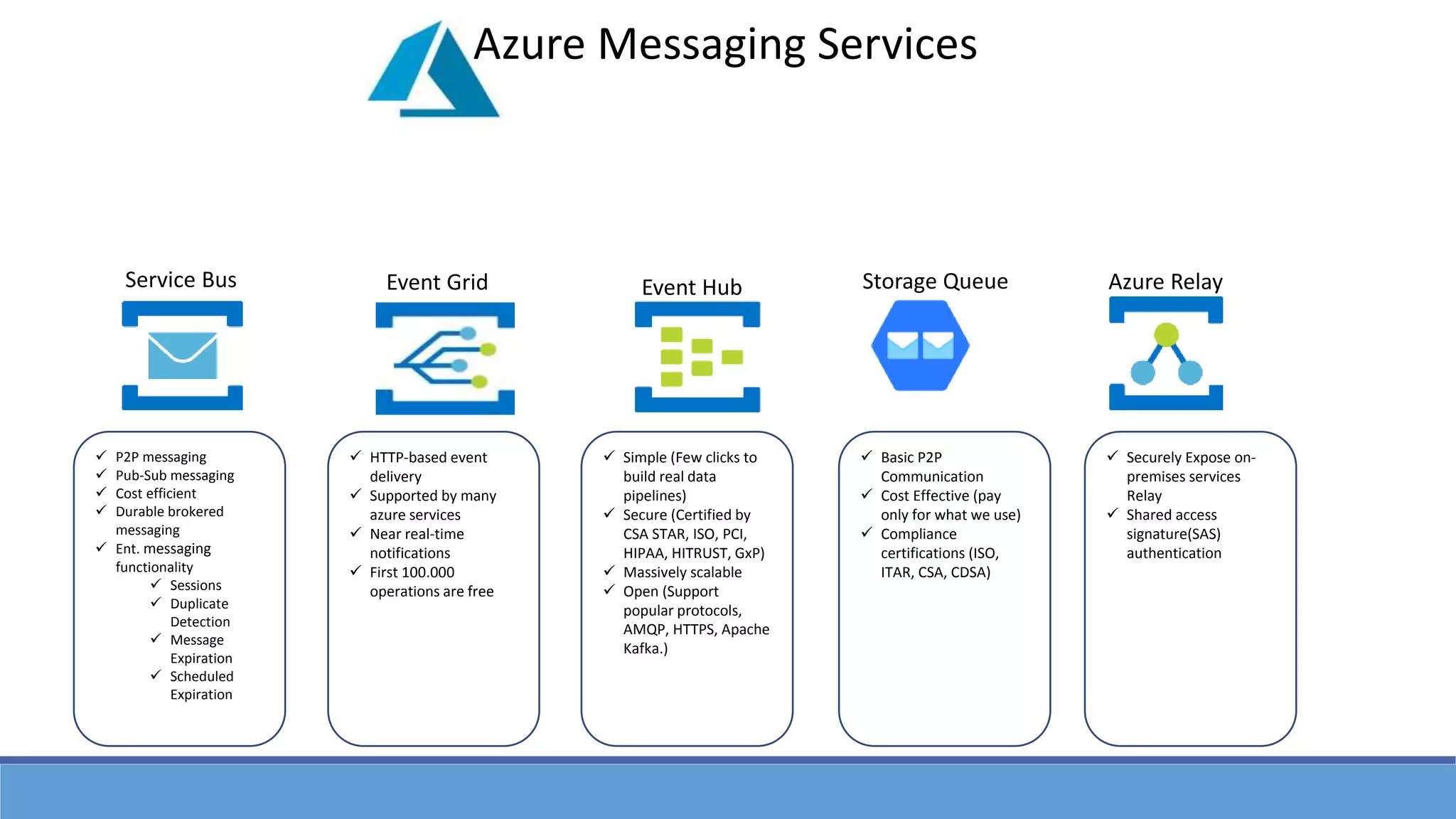
Azure Messaging Services
Service Bus Event Grid Event Hub Storage Queue
 Basic P2P
Communication
 Cost Effective (pay
only for what we use)
 Compliance
certifications (ISO,
ITAR, CSA, CDSA)
 Simple (Few clicks to
build real data
pipelines)
 Secure (Certified by
CSA STAR, ISO, PCI,
HIPAA, HITRUST, GxP)
 Massively scalable
 Open (Support
popular protocols,
AMQP, HTTPS, Apache
Kafka.)
 HTTP-based event
delivery
 Supported by many
azure services
 Near real-time
notifications
 First 100.000
operations are free
 P2P messaging
 Pub-Sub messaging
 Cost efficient
 Durable brokered
messaging
 Ent. messaging
functionality
 Sessions
 Duplicate
Detection
 Message
Expiration
 Scheduled
Expiration
 Securely Expose on-
premises services
Relay
 Shared access
signature(SAS)
authentication
Azure Relay
Messaging in real life
Healthcare Financial Logistics
Telecommunications Public Sector
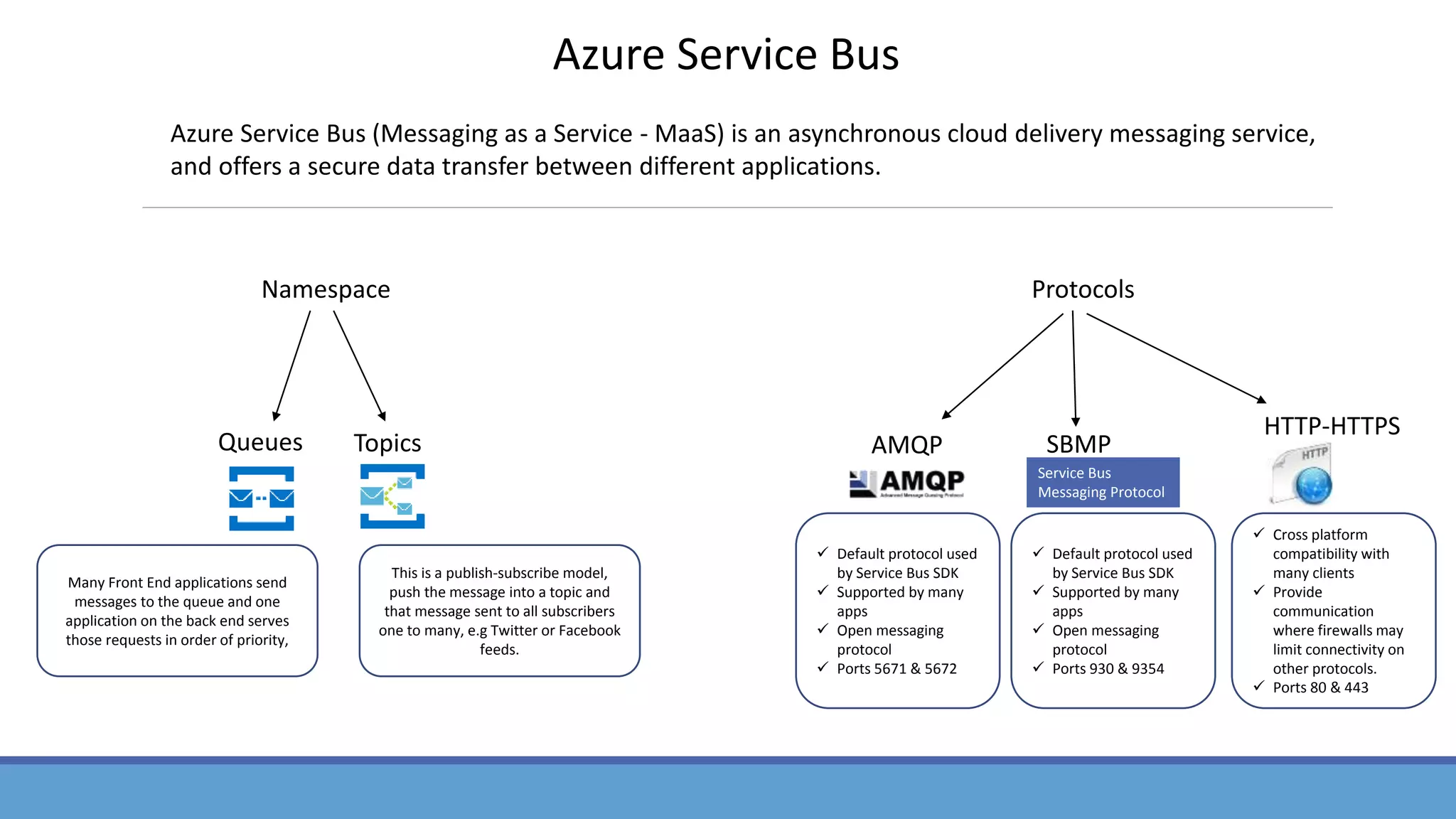
Azure Service Bus
Azure Service Bus (Messaging as a Service - MaaS) is an asynchronous cloud delivery messaging service,
and offers a secure data transfer between different applications.
Namespace
Queues Topics
Protocols
AMQP
HTTP-HTTPS
Many Front End applications send
messages to the queue and one
application on the back end serves
those requests in order of priority,
This is a publish-subscribe model,
push the message into a topic and
that message sent to all subscribers
one to many, e.g Twitter or Facebook
feeds.
 Cross platform
compatibility with
many clients
 Provide
communication
where firewalls may
limit connectivity on
other protocols.
 Ports 80 & 443
 Default protocol used
by Service Bus SDK
 Supported by many
apps
 Open messaging
protocol
 Ports 5671 & 5672
SBMP
 Default protocol used
by Service Bus SDK
 Supported by many
apps
 Open messaging
protocol
 Ports 930 & 9354
Service Bus
Messaging Protocol
Enterprise Service Bus
“An enterprise service bus (ESB) implements a communication system between mutually interacting
software applications in a service-oriented architecture (SOA). It represents a software architecture for
distributed computing, and is a special variant of the more general client-server model, wherein any
application may behave as server or client.”
Source: wikipedia
Enterprise Service Bus (ESB)
Queue
Service Bus
Namespace
Message Sender Message Receiver
Web App
Mobile App
Service App
Service or App
Azure Service Bus Queue
 P2P messaging
 First In, First Out (FIFO) processing
Subscription
01
Service Bus
Namespace
Message Sender Message Receiver
Web App
Mobile App
Service App
Service or App 01
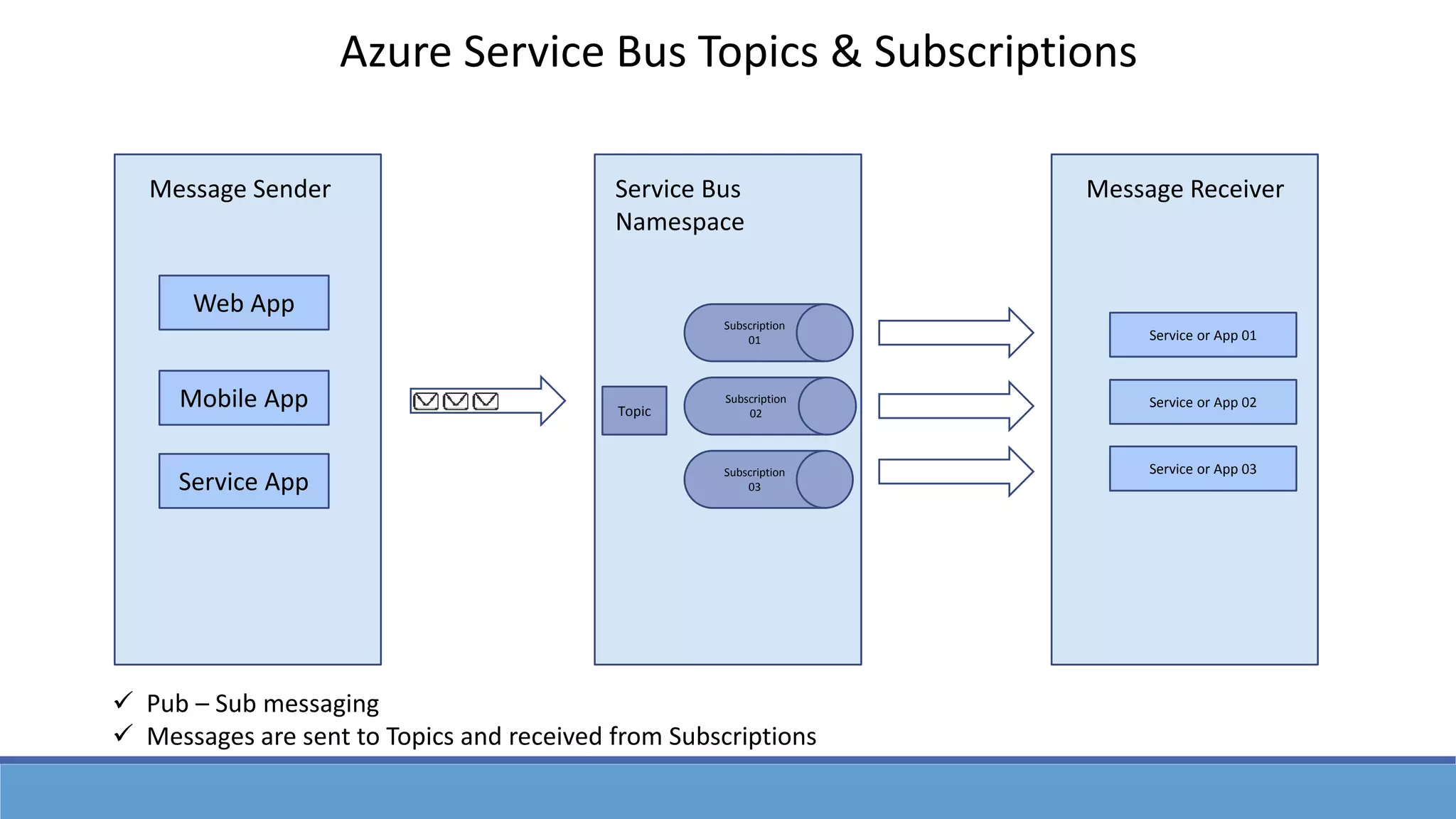
Azure Service Bus Topics & Subscriptions
Subscription
02
Subscription
03
Topic
Service or App 02
Service or App 03
 Pub – Sub messaging
 Messages are sent to Topics and received from Subscriptions
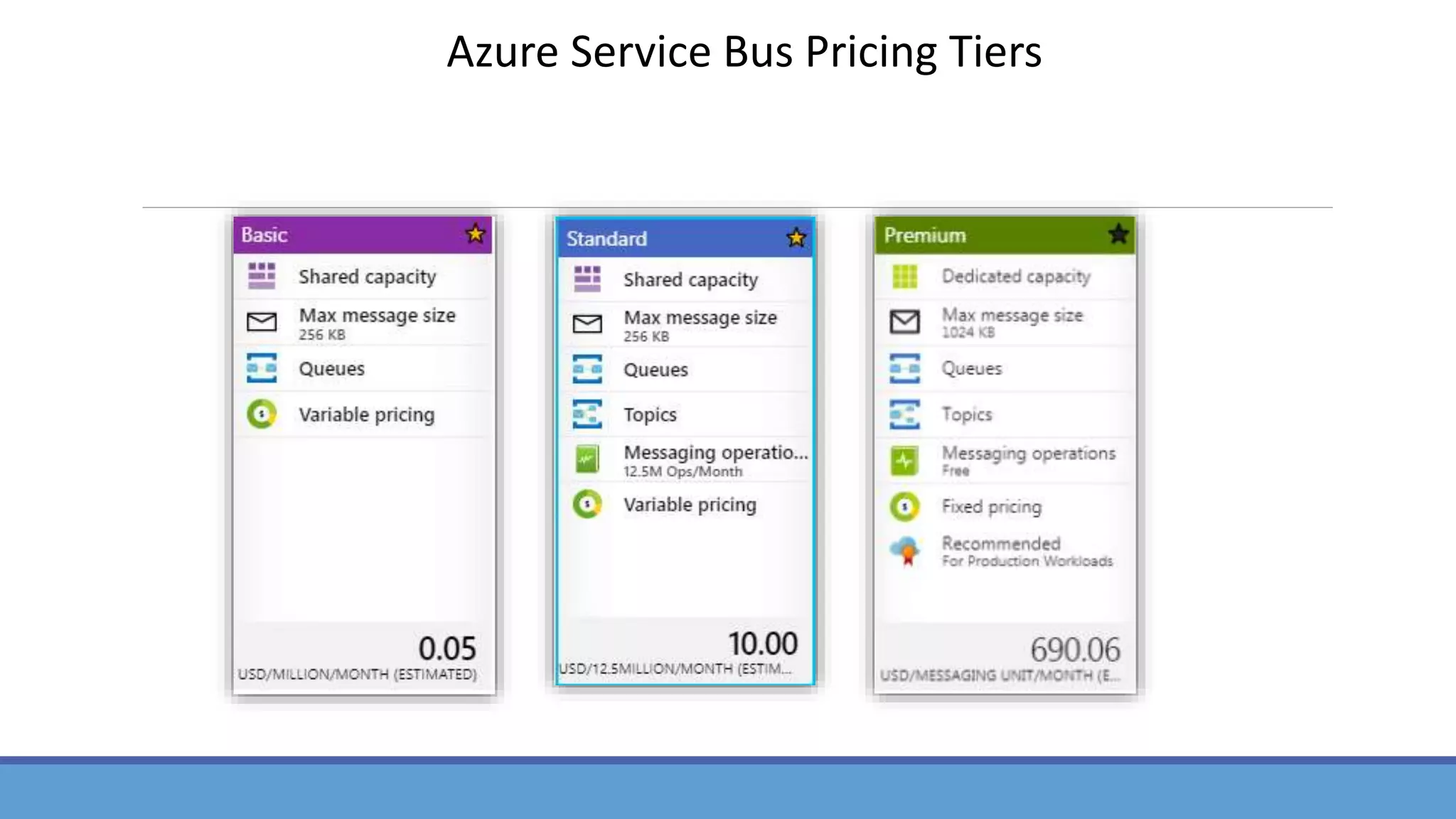
Azure Service Bus Pricing Tiers
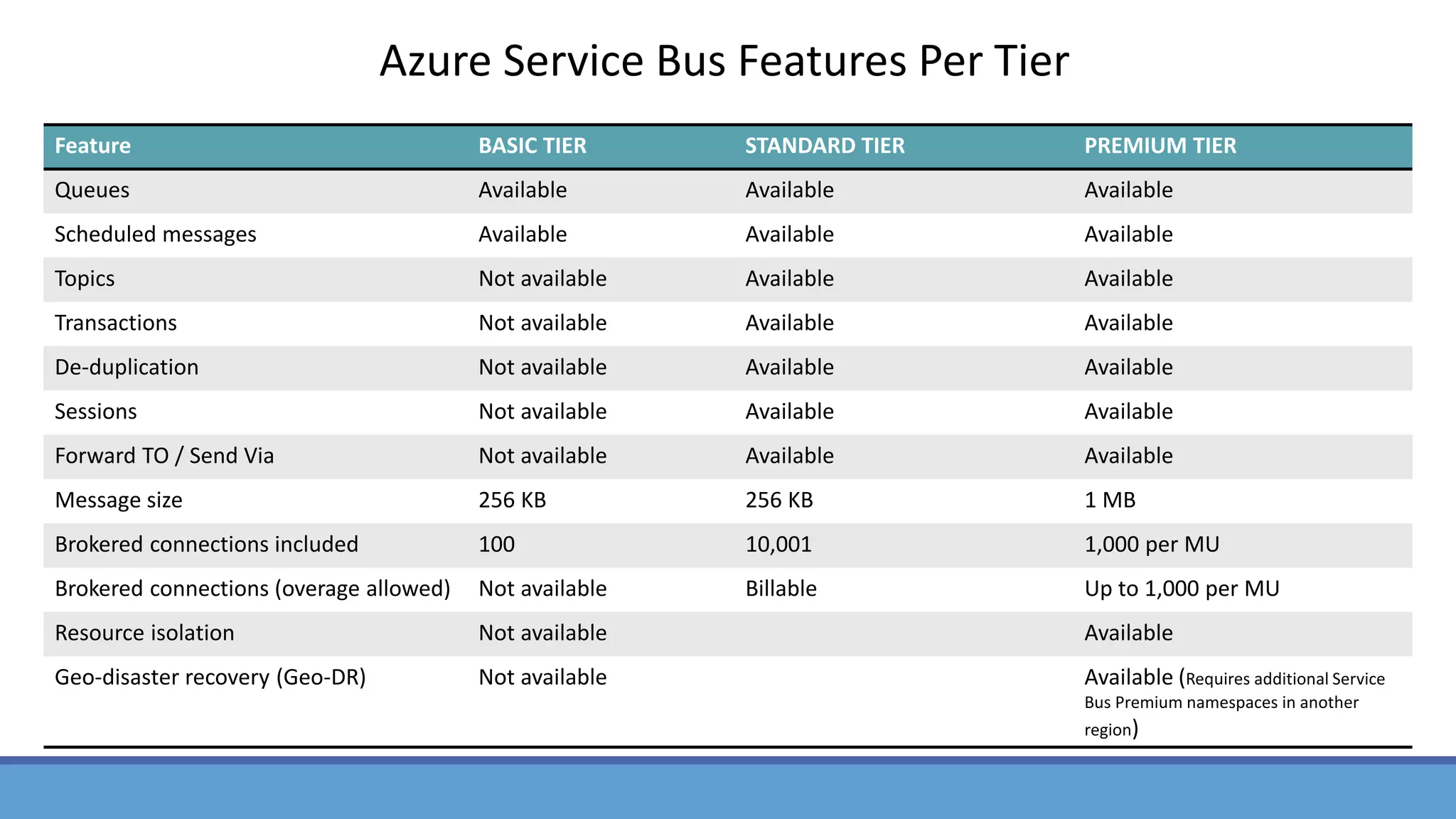
Feature BASIC TIER STANDARD TIER PREMIUM TIER
Queues Available Available Available
Scheduled messages Available Available Available
Topics Not available Available Available
Transactions Not available Available Available
De-duplication Not available Available Available
Sessions Not available Available Available
Forward TO / Send Via Not available Available Available
Message size 256 KB 256 KB 1 MB
Brokered connections included 100 10,001 1,000 per MU
Brokered connections (overage allowed) Not available Billable Up to 1,000 per MU
Resource isolation Not available Available
Geo-disaster recovery (Geo-DR) Not available Available (Requires additional Service
Bus Premium namespaces in another
region)
Azure Service Bus Features Per Tier
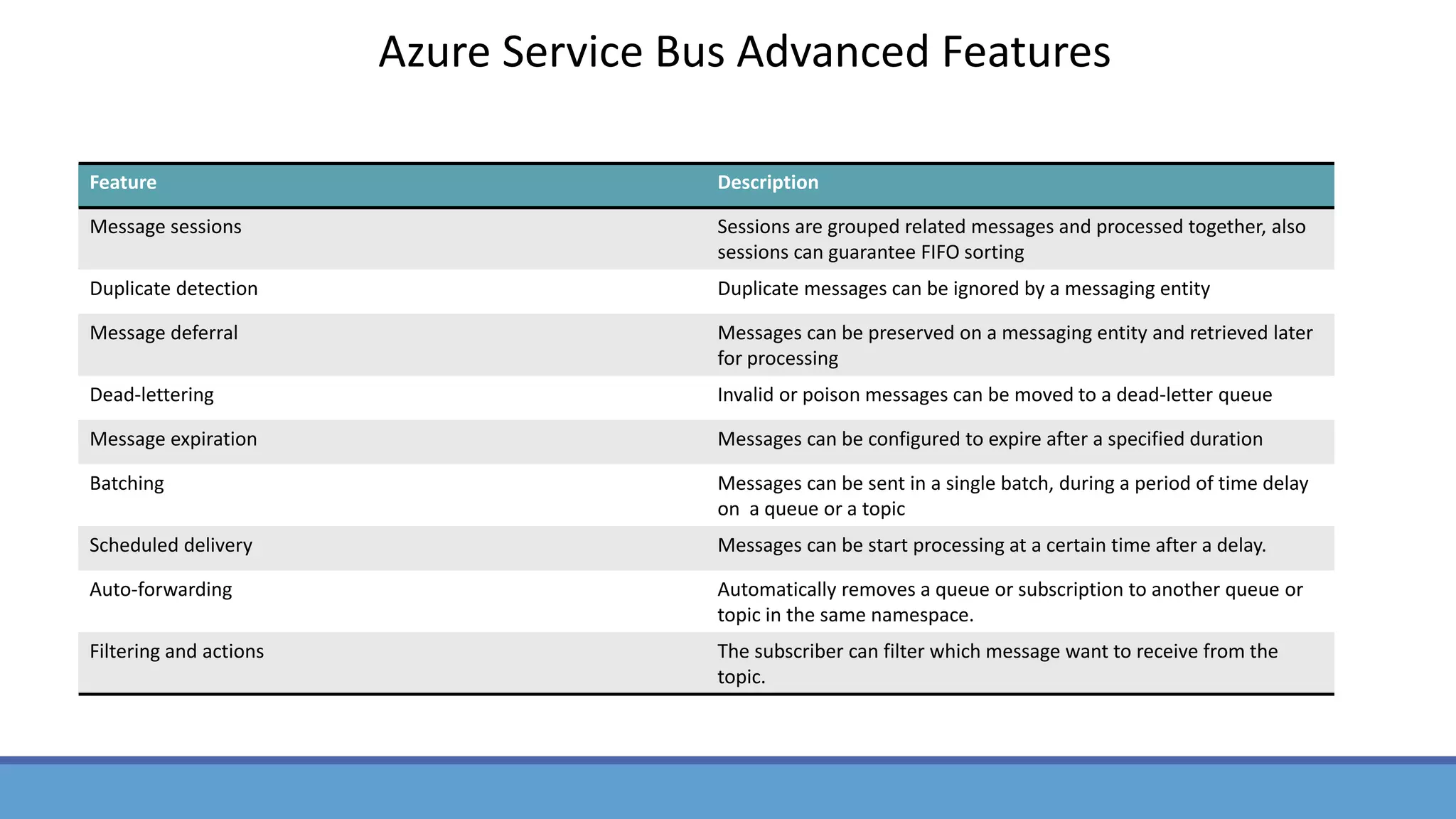
Feature Description
Message sessions Sessions are grouped related messages and processed together, also
sessions can guarantee FIFO sorting
Duplicate detection Duplicate messages can be ignored by a messaging entity
Message deferral Messages can be preserved on a messaging entity and retrieved later
for processing
Dead-lettering Invalid or poison messages can be moved to a dead-letter queue
Message expiration Messages can be configured to expire after a specified duration
Batching Messages can be sent in a single batch, during a period of time delay
on a queue or a topic
Scheduled delivery Messages can be start processing at a certain time after a delay.
Auto-forwarding Automatically removes a queue or subscription to another queue or
topic in the same namespace.
Filtering and actions The subscriber can filter which message want to receive from the
topic.
Azure Service Bus Advanced Features
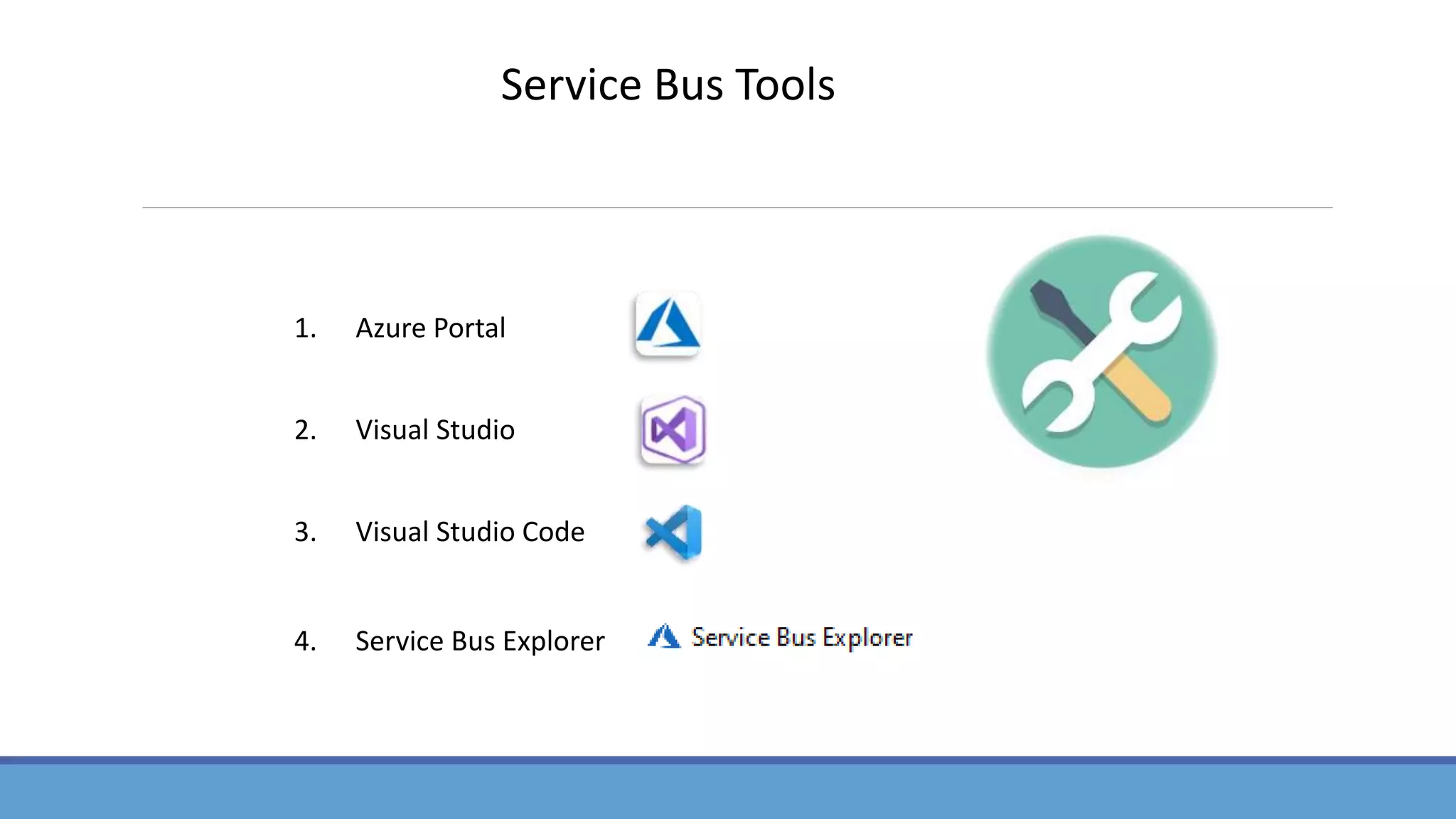
Service Bus Tools
1. Azure Portal
2. Visual Studio
3. Visual Studio Code
4. Service Bus Explorer
To keep in the mind…
 Think what do you want to do before decide what is the appropriate Service Bus .Net SDK
 It is a wise option to select AMQP protocol
 Use concurrent operations
 Use multiple queues/Topics
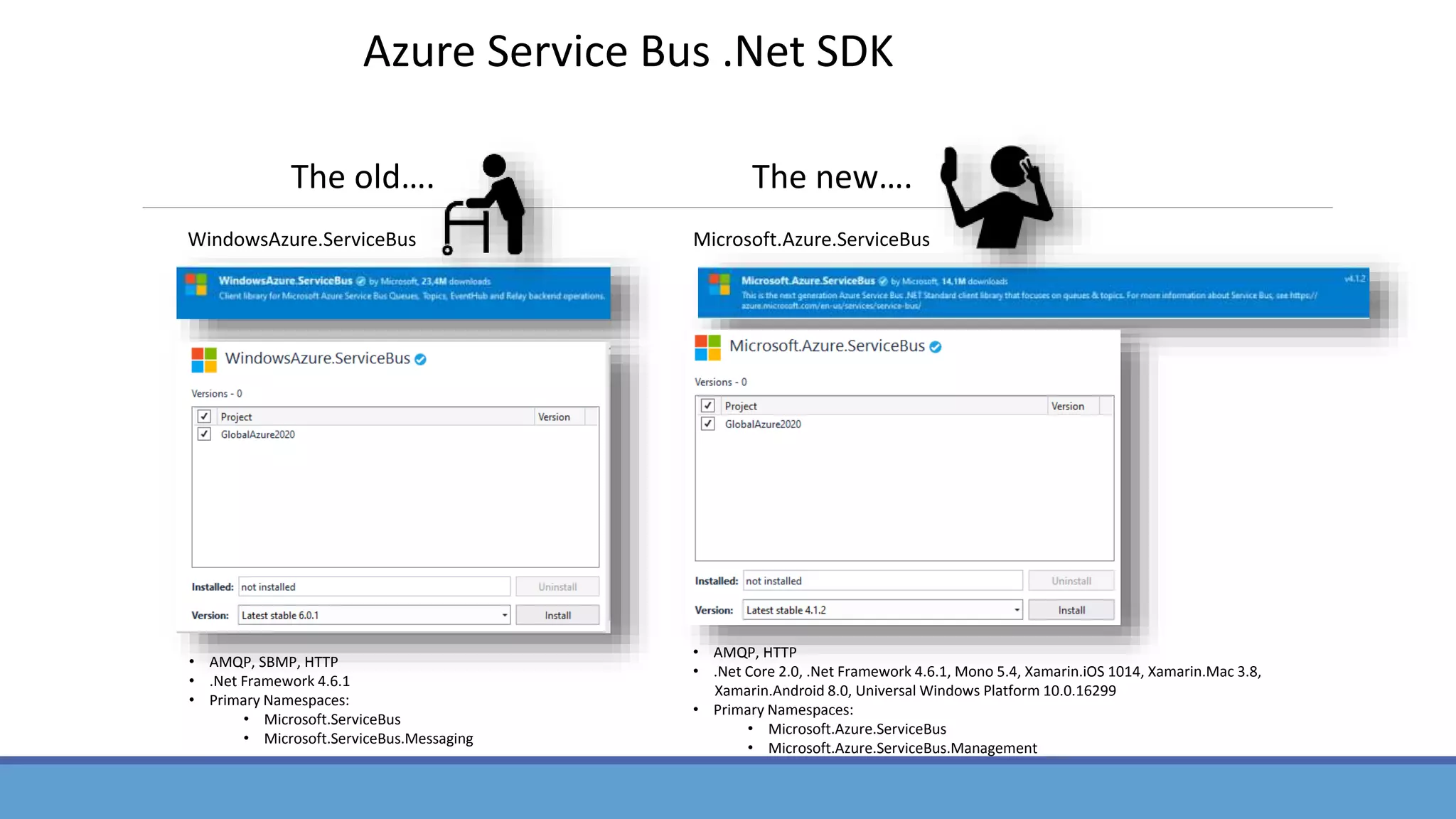
Azure Service Bus .Net SDK
WindowsAzure.ServiceBus Microsoft.Azure.ServiceBus
The old…. The new….
• AMQP, SBMP, HTTP
• .Net Framework 4.6.1
• Primary Namespaces:
• Microsoft.ServiceBus
• Microsoft.ServiceBus.Messaging
• AMQP, HTTP
• .Net Core 2.0, .Net Framework 4.6.1, Mono 5.4, Xamarin.iOS 1014, Xamarin.Mac 3.8,
Xamarin.Android 8.0, Universal Windows Platform 10.0.16299
• Primary Namespaces:
• Microsoft.Azure.ServiceBus
• Microsoft.Azure.ServiceBus.Management
var messageOne = new Message(body);
var messageTwo = new Message(body);
var sendFirstMessageTask =
queueClient.SendAsync(messageOne).ContinueWith(_ =>
{
Console.WriteLine("Sent message #1");
});
var sendSecondMessageTask =
queueClient.SendAsync(messageTwo).ContinueWith(_ =>
{
Console.WriteLine("Sent message #2");
});
await Task.WhenAll(sendFirstMessageTask,
sendSecondMessageTask);
Console.WriteLine("All messages sent");
Microsoft.Azure.ServiceBus SDK
var messageOne = new BrokeredMessage(body);
var messageTwo = new BrokeredMessage(body);
var sendFirstMessageTask =
queueClient.SendAsync(messageOne).ContinueWith(_ =>
{
Console.WriteLine("Sent message #1");
});
var sendSecondMessageTask =
queueClient.SendAsync(messageTwo).ContinueWith(_ =>
{
Console.WriteLine("Sent message #2");
});
await Task.WhenAll(sendFirstMessageTask,
sendSecondMessageTask);
Console.WriteLine("All messages sent");
WindowsAzure.ServiceBus SDK
Concurrentoperations
Usually operations like send, receive, or delete, takes time. To reduce this latency it is best practice to use
Concurrent operations, because with that way we can increase the number of operations.
Multiple queues/Topics
If we cannot predict the application load we can use multiple messaging entities,
More than one queues or topics.
Hotel Web
App
Topic
{Orders}
Restaurant
Bar
Spa /
Hammam
Order Processing
01
Order Processing
02
Order Processing
03
Demo
Thank You
Coming next…
Building low code/no
code services with Azure

Intro to Azure Service Bus

  • 1.
  • 2.
    George - ChrysovalantisGrammatikos MCSA : Cloud Platform, MS Dynamics 365 | Microsoft Azure MVP E-mail : george@cloudopszone.com Blog: https://cloudopszone.com Microsoft Community Wiki Profile: George Chrysovaladis Grammatikos Tech Community Profile: George Chrysovalantis Grammatikos An introduction to Azure Service Bus with a short demo combining Service Bus Queues and Azure Logic Apps. Intro to Azure Service Bus
  • 3.
    Azure Messaging Services ServiceBus Event Grid Event Hub Storage Queue  Basic P2P Communication  Cost Effective (pay only for what we use)  Compliance certifications (ISO, ITAR, CSA, CDSA)  Simple (Few clicks to build real data pipelines)  Secure (Certified by CSA STAR, ISO, PCI, HIPAA, HITRUST, GxP)  Massively scalable  Open (Support popular protocols, AMQP, HTTPS, Apache Kafka.)  HTTP-based event delivery  Supported by many azure services  Near real-time notifications  First 100.000 operations are free  P2P messaging  Pub-Sub messaging  Cost efficient  Durable brokered messaging  Ent. messaging functionality  Sessions  Duplicate Detection  Message Expiration  Scheduled Expiration  Securely Expose on- premises services Relay  Shared access signature(SAS) authentication Azure Relay
  • 4.
    Messaging in reallife Healthcare Financial Logistics Telecommunications Public Sector
  • 5.
    Azure Service Bus AzureService Bus (Messaging as a Service - MaaS) is an asynchronous cloud delivery messaging service, and offers a secure data transfer between different applications. Namespace Queues Topics Protocols AMQP HTTP-HTTPS Many Front End applications send messages to the queue and one application on the back end serves those requests in order of priority, This is a publish-subscribe model, push the message into a topic and that message sent to all subscribers one to many, e.g Twitter or Facebook feeds.  Cross platform compatibility with many clients  Provide communication where firewalls may limit connectivity on other protocols.  Ports 80 & 443  Default protocol used by Service Bus SDK  Supported by many apps  Open messaging protocol  Ports 5671 & 5672 SBMP  Default protocol used by Service Bus SDK  Supported by many apps  Open messaging protocol  Ports 930 & 9354 Service Bus Messaging Protocol
  • 6.
    Enterprise Service Bus “Anenterprise service bus (ESB) implements a communication system between mutually interacting software applications in a service-oriented architecture (SOA). It represents a software architecture for distributed computing, and is a special variant of the more general client-server model, wherein any application may behave as server or client.” Source: wikipedia Enterprise Service Bus (ESB)
  • 7.
    Queue Service Bus Namespace Message SenderMessage Receiver Web App Mobile App Service App Service or App Azure Service Bus Queue  P2P messaging  First In, First Out (FIFO) processing
  • 8.
    Subscription 01 Service Bus Namespace Message SenderMessage Receiver Web App Mobile App Service App Service or App 01 Azure Service Bus Topics & Subscriptions Subscription 02 Subscription 03 Topic Service or App 02 Service or App 03  Pub – Sub messaging  Messages are sent to Topics and received from Subscriptions
  • 9.
    Azure Service BusPricing Tiers
  • 10.
    Feature BASIC TIERSTANDARD TIER PREMIUM TIER Queues Available Available Available Scheduled messages Available Available Available Topics Not available Available Available Transactions Not available Available Available De-duplication Not available Available Available Sessions Not available Available Available Forward TO / Send Via Not available Available Available Message size 256 KB 256 KB 1 MB Brokered connections included 100 10,001 1,000 per MU Brokered connections (overage allowed) Not available Billable Up to 1,000 per MU Resource isolation Not available Available Geo-disaster recovery (Geo-DR) Not available Available (Requires additional Service Bus Premium namespaces in another region) Azure Service Bus Features Per Tier
  • 11.
    Feature Description Message sessionsSessions are grouped related messages and processed together, also sessions can guarantee FIFO sorting Duplicate detection Duplicate messages can be ignored by a messaging entity Message deferral Messages can be preserved on a messaging entity and retrieved later for processing Dead-lettering Invalid or poison messages can be moved to a dead-letter queue Message expiration Messages can be configured to expire after a specified duration Batching Messages can be sent in a single batch, during a period of time delay on a queue or a topic Scheduled delivery Messages can be start processing at a certain time after a delay. Auto-forwarding Automatically removes a queue or subscription to another queue or topic in the same namespace. Filtering and actions The subscriber can filter which message want to receive from the topic. Azure Service Bus Advanced Features
  • 12.
    Service Bus Tools 1.Azure Portal 2. Visual Studio 3. Visual Studio Code 4. Service Bus Explorer
  • 13.
    To keep inthe mind…  Think what do you want to do before decide what is the appropriate Service Bus .Net SDK  It is a wise option to select AMQP protocol  Use concurrent operations  Use multiple queues/Topics
  • 14.
    Azure Service Bus.Net SDK WindowsAzure.ServiceBus Microsoft.Azure.ServiceBus The old…. The new…. • AMQP, SBMP, HTTP • .Net Framework 4.6.1 • Primary Namespaces: • Microsoft.ServiceBus • Microsoft.ServiceBus.Messaging • AMQP, HTTP • .Net Core 2.0, .Net Framework 4.6.1, Mono 5.4, Xamarin.iOS 1014, Xamarin.Mac 3.8, Xamarin.Android 8.0, Universal Windows Platform 10.0.16299 • Primary Namespaces: • Microsoft.Azure.ServiceBus • Microsoft.Azure.ServiceBus.Management
  • 15.
    var messageOne =new Message(body); var messageTwo = new Message(body); var sendFirstMessageTask = queueClient.SendAsync(messageOne).ContinueWith(_ => { Console.WriteLine("Sent message #1"); }); var sendSecondMessageTask = queueClient.SendAsync(messageTwo).ContinueWith(_ => { Console.WriteLine("Sent message #2"); }); await Task.WhenAll(sendFirstMessageTask, sendSecondMessageTask); Console.WriteLine("All messages sent"); Microsoft.Azure.ServiceBus SDK var messageOne = new BrokeredMessage(body); var messageTwo = new BrokeredMessage(body); var sendFirstMessageTask = queueClient.SendAsync(messageOne).ContinueWith(_ => { Console.WriteLine("Sent message #1"); }); var sendSecondMessageTask = queueClient.SendAsync(messageTwo).ContinueWith(_ => { Console.WriteLine("Sent message #2"); }); await Task.WhenAll(sendFirstMessageTask, sendSecondMessageTask); Console.WriteLine("All messages sent"); WindowsAzure.ServiceBus SDK Concurrentoperations Usually operations like send, receive, or delete, takes time. To reduce this latency it is best practice to use Concurrent operations, because with that way we can increase the number of operations.
  • 16.
    Multiple queues/Topics If wecannot predict the application load we can use multiple messaging entities, More than one queues or topics. Hotel Web App Topic {Orders} Restaurant Bar Spa / Hammam Order Processing 01 Order Processing 02 Order Processing 03
  • 17.
  • 18.
  • 19.
    Coming next… Building lowcode/no code services with Azure