Azure Logic Apps The new workflow engine
David Schneider @fiddi
SharePoint Saturday Zurich 26.5.2018
@Kraftwert Impact Hub Zurich
Thanks to our Sponsors <3
About me
• David Schneider
• isolutions (CTO & Barcelona)
• MVP for Office Server and Services
• https://twitter.com/fiddi
• https://www.linkedin.com/in/david-schneider
• https://www.davidschneider.blog
• https://www.sharepointcommunity.ch
Azure Logic Apps
• Configuration-first integration
services
• Integration Platform as a Service
(IPaaS)
• Automate business processes
• Integrate Cloud and on-premises
systems
• No code designer for rapid
creation but also a code view for
developers
• Use with custom API apps of your
own
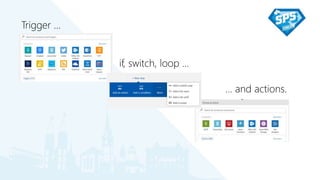
Trigger …
if, switch, loop …
… and actions.
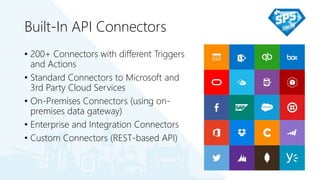
Built-In API Connectors
• 200+ Connectors with different Triggers
and Actions
• Standard Connectors to Microsoft and
3rd Party Cloud Services
• On-Premises Connectors (using on-
premises data gateway)
• Enterprise and Integration Connectors
• Custom Connectors (REST-based API)
For everthing else
Azure Functions
• Serverless functions in
C#, F#, JavaScript,
etc.
• Implement code-
based microservices
• Different trigger, input
and output bindings
• Synchronous and
asynchronous
execution
Azure Service Bus
• Message based
integration of
applications
• Decoupling of
applications
• Protection against
service failure
API Apps
• Use Swagger
framework
• Hosted on Azure or
elsewhere
• Simple
authentication
• Bring in existing APIs
written with .NET,
PHP, Node.js, Java or
Python
Demo:
Convert Document to PDF
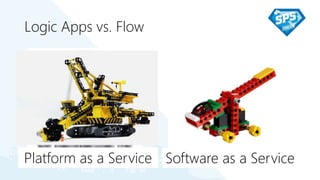
Logic Apps vs. Flow
Platform as a Service Software as a Service
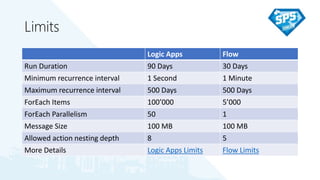
Limits
Logic Apps Flow
Run Duration 90 Days 30 Days
Minimum recurrence interval 1 Second 1 Minute
Maximum recurrence interval 500 Days 500 Days
ForEach Items 100’000 5’000
ForEach Parallelism 50 1
Message Size 100 MB 100 MB
Allowed action nesting depth 8 5
More Details Logic Apps Limits Flow Limits
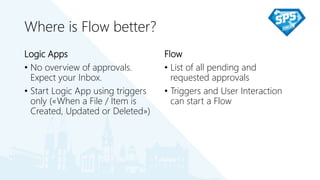
Where is Flow better?
Logic Apps
• No overview of approvals.
Expect your Inbox.
• Start Logic App using triggers
only («When a File / Item is
Created, Updated or Deleted»)
Flow
• List of all pending and
requested approvals
• Triggers and User Interaction
can start a Flow
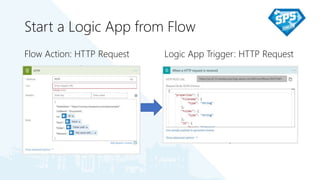
Start a Logic App from Flow
Flow Action: HTTP Request Logic App Trigger: HTTP Request
Demo:
Start a Logic App from Flow
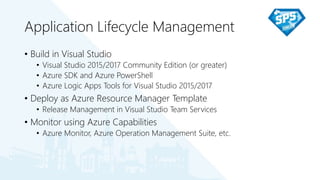
Application Lifecycle Management
• Build in Visual Studio
• Visual Studio 2015/2017 Community Edition (or greater)
• Azure SDK and Azure PowerShell
• Azure Logic Apps Tools for Visual Studio 2015/2017
• Deploy as Azure Resource Manager Template
• Release Management in Visual Studio Team Services
• Monitor using Azure Capabilities
• Azure Monitor, Azure Operation Management Suite, etc.
Demo:
Build and Deploy a Logic App like a Pro
Cognitive Services
• Easy to Interact with Cognitive Services
• Text Analytics, LUIS
• Computer Vision, Custom Vision, Face API
• Content Moderator
• Video Indexer
• Bing Search
Demo:
Not Bacon
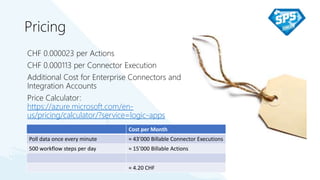
Pricing
CHF 0.000023 per Actions
CHF 0.000113 per Connector Execution
Additional Cost for Enterprise Connectors and
Integration Accounts
Price Calculator:
https://azure.microsoft.com/en-
us/pricing/calculator/?service=logic-apps
Cost per Month
Poll data once every minute ≈ 43’000 Billable Connector Executions
500 workflow steps per day ≈ 15’000 Billable Actions
≈ 4.20 CHF
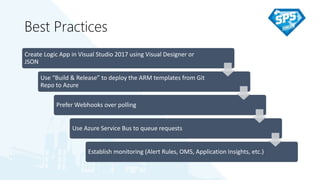
Best Practices
Create Logic App in Visual Studio 2017 using Visual Designer or
JSON
Use “Build & Release” to deploy the ARM templates from Git
Repo to Azure
Prefer Webhooks over polling
Use Azure Service Bus to queue requests
Establish monitoring (Alert Rules, OMS, Application Insights, etc.)
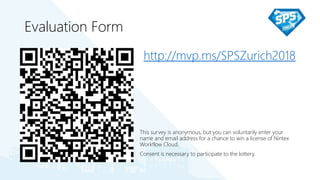
Evaluation Form
http://mvp.ms/SPSZurich2018
This survey is anonymous, but you can voluntarily enter your
name and email address for a chance to win a license of Nintex
Workflow Cloud.
Consent is necessary to participate to the lottery.
Thank you for attending!

SPS Zurich 2018 - Azure Logic Apps: the new workflow engine

  • 1.
    Azure Logic AppsThe new workflow engine David Schneider @fiddi SharePoint Saturday Zurich 26.5.2018 @Kraftwert Impact Hub Zurich
  • 2.
    Thanks to ourSponsors <3
  • 3.
    About me • DavidSchneider • isolutions (CTO & Barcelona) • MVP for Office Server and Services • https://twitter.com/fiddi • https://www.linkedin.com/in/david-schneider • https://www.davidschneider.blog • https://www.sharepointcommunity.ch
  • 4.
    Azure Logic Apps •Configuration-first integration services • Integration Platform as a Service (IPaaS) • Automate business processes • Integrate Cloud and on-premises systems • No code designer for rapid creation but also a code view for developers • Use with custom API apps of your own
  • 5.
    Trigger … if, switch,loop … … and actions.
  • 6.
    Built-In API Connectors •200+ Connectors with different Triggers and Actions • Standard Connectors to Microsoft and 3rd Party Cloud Services • On-Premises Connectors (using on- premises data gateway) • Enterprise and Integration Connectors • Custom Connectors (REST-based API)
  • 7.
    For everthing else AzureFunctions • Serverless functions in C#, F#, JavaScript, etc. • Implement code- based microservices • Different trigger, input and output bindings • Synchronous and asynchronous execution Azure Service Bus • Message based integration of applications • Decoupling of applications • Protection against service failure API Apps • Use Swagger framework • Hosted on Azure or elsewhere • Simple authentication • Bring in existing APIs written with .NET, PHP, Node.js, Java or Python
  • 8.
  • 9.
    Logic Apps vs.Flow Platform as a Service Software as a Service
  • 10.
    Limits Logic Apps Flow RunDuration 90 Days 30 Days Minimum recurrence interval 1 Second 1 Minute Maximum recurrence interval 500 Days 500 Days ForEach Items 100’000 5’000 ForEach Parallelism 50 1 Message Size 100 MB 100 MB Allowed action nesting depth 8 5 More Details Logic Apps Limits Flow Limits
  • 11.
    Where is Flowbetter? Logic Apps • No overview of approvals. Expect your Inbox. • Start Logic App using triggers only («When a File / Item is Created, Updated or Deleted») Flow • List of all pending and requested approvals • Triggers and User Interaction can start a Flow
  • 12.
    Start a LogicApp from Flow Flow Action: HTTP Request Logic App Trigger: HTTP Request
  • 13.
    Demo: Start a LogicApp from Flow
  • 14.
    Application Lifecycle Management •Build in Visual Studio • Visual Studio 2015/2017 Community Edition (or greater) • Azure SDK and Azure PowerShell • Azure Logic Apps Tools for Visual Studio 2015/2017 • Deploy as Azure Resource Manager Template • Release Management in Visual Studio Team Services • Monitor using Azure Capabilities • Azure Monitor, Azure Operation Management Suite, etc.
  • 15.
    Demo: Build and Deploya Logic App like a Pro
  • 16.
    Cognitive Services • Easyto Interact with Cognitive Services • Text Analytics, LUIS • Computer Vision, Custom Vision, Face API • Content Moderator • Video Indexer • Bing Search
  • 17.
  • 18.
    Pricing CHF 0.000023 perActions CHF 0.000113 per Connector Execution Additional Cost for Enterprise Connectors and Integration Accounts Price Calculator: https://azure.microsoft.com/en- us/pricing/calculator/?service=logic-apps Cost per Month Poll data once every minute ≈ 43’000 Billable Connector Executions 500 workflow steps per day ≈ 15’000 Billable Actions ≈ 4.20 CHF
  • 19.
    Best Practices Create LogicApp in Visual Studio 2017 using Visual Designer or JSON Use “Build & Release” to deploy the ARM templates from Git Repo to Azure Prefer Webhooks over polling Use Azure Service Bus to queue requests Establish monitoring (Alert Rules, OMS, Application Insights, etc.)
  • 20.
    Evaluation Form http://mvp.ms/SPSZurich2018 This surveyis anonymous, but you can voluntarily enter your name and email address for a chance to win a license of Nintex Workflow Cloud. Consent is necessary to participate to the lottery.
  • 21.
    Thank you forattending!

Editor's Notes

  • #8 Extensible. Build your own logic
  • #9 Convert new Documents to PDF
  • #10 Flow is for Power User, Build Simple Stuff, Right in the Browser Logic Apps is for mission critical solutions, browser and visual studio, developer Export von Flow und Import als Logic App
  • #13 Define a JSON Schema and pass the information about the selected SharePoint Item as Body
  • #14 Start a Logic App from Flow
  • #16 Build and Deploy a Logic App using VSTS Release Management
  • #17 Text Analytics: Sentiment, Key Phrases, Language LUIS: Intent, Entities Computer Vision: Analyze Image, Detect Image, OCR Custom Vision: Predect Tags Face API: Delect Faces Content Moderator: Porn erkennen, Gesichter erkennen, Text erkennen Video Indexer: Transcript Video Bing Search: News Aricle
  • #18 Not Bacon
  • #20 Use existing dev tool chain