Migrating to the Isolated worker
process in Azure Functions
Callon Campbell
Microsoft MVP | Azure
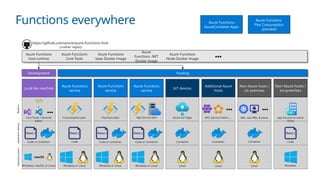
@flying_maverick
About me
Callon Campbell
Azure Architect | Developer
Adastra
Microsoft MVP | Azure
 20 years enterprise development with Microsoft technologies – .NET
(C#), Azure, ASP.NET, Desktop, SQL, and Mobile
 Passionate about serverless and cloud-native application
development, with focus on app migration and modernization, app
integration and data analytics
 Blogging at https://TheFlyingMaverick.com
 Speaker at community events and meetups
 Organizer of “Canada’s Technology Triangle .NET User Group” in
Kitchener, Ontario
Agenda  Overview of serverless
 Different hosting models
 Preparing for .NET 8
 Demos
 Wrap-up
 Q&A
Azure Functions
Run code when events occur
Event-driven scaling
No infrastructure management
Consumption pricing with free grant
Platform
Application
delivery
Operating
system
Azure Functions
service
Code or container
App Service plan
Windows or Linux
Azure Functions
service
Code
Consumption plan
Windows or Linux
Non-Azure hosts /
on-premises
Code
App Service on Azure
Stack
Windows
Additional Azure
hosts
Container
AKS, Service Fabric, …
●●●
Linux
Non-Azure hosts /
on-premises
Container
Linux
●●●
K8s, raw VMs, & more
Development Hosting
IoT devices
Container
Azure IoT Edge
Linux
Local dev machine
Code or container
Core Tools + favorite
editor
Windows, macOS, or Linux
●●●
+
https://github.com/azure/azure-functions-host
(+other repos)
Azure Functions
host runtime
Azure Functions
Core Tools
Azure Functions
base Docker image
Azure
Functions .NET
Docker image
Azure Functions
Node Docker image
●●●
Azure Functions
service
Premium plan
Windows or Linux
Code or container
Functions everywhere Azure Functions
AzureContainer Apps
Azure Functions
Flex Consumption
(preview)
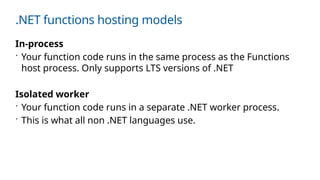
.NET functions hosting models
In-process
 Your function code runs in the same process as the Functions
host process. Only supports LTS versions of .NET
Isolated worker
 Your function code runs in a separate .NET worker process.
 This is what all non .NET languages use.
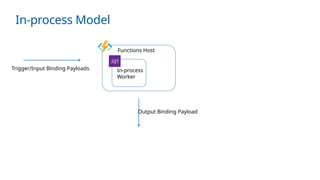
In-process Model
Trigger/Input Binding Payloads
Output Binding Payload
Functions Host
In-process
Worker
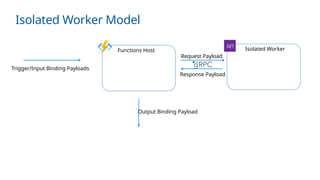
Isolated Worker Model
Trigger/Input Binding Payloads
Output Binding Payload
Functions Host Isolated Worker
Request Payload
Response Payload
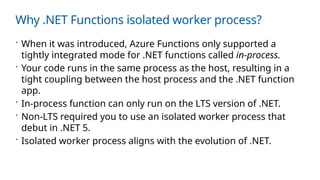
Why .NET Functions isolated worker process?
 When it was introduced, Azure Functions only supported a
tightly integrated mode for .NET functions called in-process.
 Your code runs in the same process as the host, resulting in a
tight coupling between the host process and the .NET function
app.
 In-process function can only run on the LTS version of .NET.
 Non-LTS required you to use an isolated worker process that
debut in .NET 5.
 Isolated worker process aligns with the evolution of .NET.
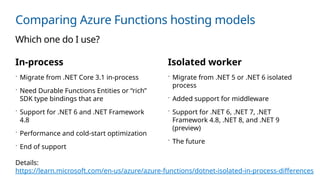
Comparing Azure Functions hosting models
In-process
 Migrate from .NET Core 3.1 in-process
 Need Durable Functions Entities or “rich”
SDK type bindings that are
 Support for .NET 6 and .NET Framework
4.8
 Performance and cold-start optimization
 End of support
Isolated worker
 Migrate from .NET 5 or .NET 6 isolated
process
 Added support for middleware
 Support for .NET 6, .NET 7, .NET
Framework 4.8, .NET 8, and .NET 9
(preview)
 The future
Which one do I use?
Details:
https://learn.microsoft.com/en-us/azure/azure-functions/dotnet-isolated-in-process-differences
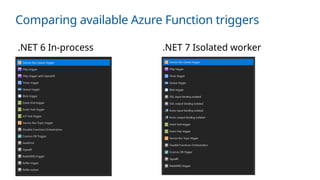
Comparing available Azure Function triggers
.NET 6 In-process .NET 7 Isolated worker
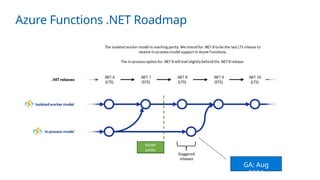
Azure Functions .NET Roadmap
GA: Aug
2024
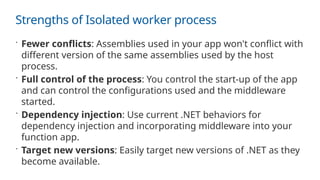
Strengths of Isolated worker process
 Fewer conflicts: Assemblies used in your app won't conflict with
different version of the same assemblies used by the host
process.
 Full control of the process: You control the start-up of the app
and can control the configurations used and the middleware
started.
 Dependency injection: Use current .NET behaviors for
dependency injection and incorporating middleware into your
function app.
 Target new versions: Easily target new versions of .NET as they
become available.
Demo
Creating Azure Function app using Isolated worker process
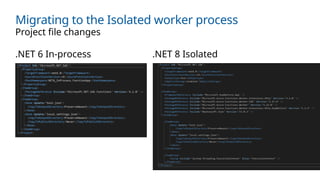
Migrating to the Isolated worker process
.NET 6 In-process .NET 8 Isolated
Project file changes
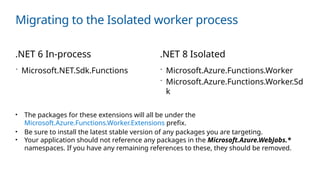
Migrating to the Isolated worker process
.NET 6 In-process .NET 8 Isolated
• The packages for these extensions will all be under the
Microsoft.Azure.Functions.Worker.Extensions prefix.
• Be sure to install the latest stable version of any packages you are targeting.
• Your application should not reference any packages in the Microsoft.Azure.WebJobs.*
namespaces. If you have any remaining references to these, they should be removed.
 Microsoft.NET.Sdk.Functions  Microsoft.Azure.Functions.Worker
 Microsoft.Azure.Functions.Worker.Sd
k
Migrating to the Isolated worker process
Code changes: new Program.cs
file
In-process Isolated worker
[FunctionName("Function1")] [Function("Function1")]
Code changes: Function
attribute
Migrating to the Isolated worker process
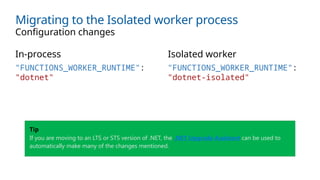
In-process Isolated worker
Configuration changes
"FUNCTIONS_WORKER_RUNTIME":
"dotnet"
"FUNCTIONS_WORKER_RUNTIME":
"dotnet-isolated"
Tip
If you are moving to an LTS or STS version of .NET, the .NET Upgrade Assistant can be used to
automatically make many of the changes mentioned.
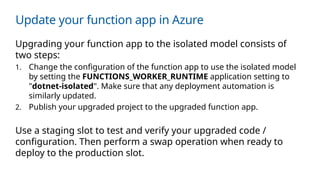
Update your function app in Azure
Upgrading your function app to the isolated model consists of
two steps:
1. Change the configuration of the function app to use the isolated model
by setting the FUNCTIONS_WORKER_RUNTIME application setting to
"dotnet-isolated". Make sure that any deployment automation is
similarly updated.
2. Publish your upgraded project to the upgraded function app.
Use a staging slot to test and verify your upgraded code /
configuration. Then perform a swap operation when ready to
deploy to the production slot.
Demo
Migrating an Azure Function app to Isolated worker process
What we covered
 Comparison of in-process and isolated worker processes.
 Benefits of the isolated worker process and migration path.
 Migration to .NET 8 with isolated worker.
Closing
 The isolated worker is in position to tackle things that can’t be
done with the in-process model.
 Support ends for the in-process model on November 10, 2026.
 Begin planning your migration to the isolated worker model in
advance of this date.
References
 Azure functions runtime versions overview
 Develop C# class library functions using Azure Functions | Micro
soft Learn
 .NET on Azure Functions – September 2024 roadmap update
 .NET Upgrade Assistant
 Support ends for the in-process model on November 10, 2026
 Azure Functions Flex Consumption high scale vnet
networking (microsoft.com)
Let’s Connect
https://LinkedIn.com/in/CallonCampbell
@flying_maverick
Callon@CloudMavericks.ca
https://GitHub.com/CallonCampbell
Thanks for joining
Time for Q&A

Migrating to the Isolated worker process in Azure Functions .pptx

  • 1.
    Migrating to theIsolated worker process in Azure Functions Callon Campbell Microsoft MVP | Azure @flying_maverick
  • 2.
    About me Callon Campbell AzureArchitect | Developer Adastra Microsoft MVP | Azure  20 years enterprise development with Microsoft technologies – .NET (C#), Azure, ASP.NET, Desktop, SQL, and Mobile  Passionate about serverless and cloud-native application development, with focus on app migration and modernization, app integration and data analytics  Blogging at https://TheFlyingMaverick.com  Speaker at community events and meetups  Organizer of “Canada’s Technology Triangle .NET User Group” in Kitchener, Ontario
  • 3.
    Agenda  Overviewof serverless  Different hosting models  Preparing for .NET 8  Demos  Wrap-up  Q&A
  • 4.
    Azure Functions Run codewhen events occur Event-driven scaling No infrastructure management Consumption pricing with free grant
  • 5.
    Platform Application delivery Operating system Azure Functions service Code orcontainer App Service plan Windows or Linux Azure Functions service Code Consumption plan Windows or Linux Non-Azure hosts / on-premises Code App Service on Azure Stack Windows Additional Azure hosts Container AKS, Service Fabric, … ●●● Linux Non-Azure hosts / on-premises Container Linux ●●● K8s, raw VMs, & more Development Hosting IoT devices Container Azure IoT Edge Linux Local dev machine Code or container Core Tools + favorite editor Windows, macOS, or Linux ●●● + https://github.com/azure/azure-functions-host (+other repos) Azure Functions host runtime Azure Functions Core Tools Azure Functions base Docker image Azure Functions .NET Docker image Azure Functions Node Docker image ●●● Azure Functions service Premium plan Windows or Linux Code or container Functions everywhere Azure Functions AzureContainer Apps Azure Functions Flex Consumption (preview)
  • 6.
    .NET functions hostingmodels In-process  Your function code runs in the same process as the Functions host process. Only supports LTS versions of .NET Isolated worker  Your function code runs in a separate .NET worker process.  This is what all non .NET languages use.
  • 7.
    In-process Model Trigger/Input BindingPayloads Output Binding Payload Functions Host In-process Worker
  • 8.
    Isolated Worker Model Trigger/InputBinding Payloads Output Binding Payload Functions Host Isolated Worker Request Payload Response Payload
  • 9.
    Why .NET Functionsisolated worker process?  When it was introduced, Azure Functions only supported a tightly integrated mode for .NET functions called in-process.  Your code runs in the same process as the host, resulting in a tight coupling between the host process and the .NET function app.  In-process function can only run on the LTS version of .NET.  Non-LTS required you to use an isolated worker process that debut in .NET 5.  Isolated worker process aligns with the evolution of .NET.
  • 10.
    Comparing Azure Functionshosting models In-process  Migrate from .NET Core 3.1 in-process  Need Durable Functions Entities or “rich” SDK type bindings that are  Support for .NET 6 and .NET Framework 4.8  Performance and cold-start optimization  End of support Isolated worker  Migrate from .NET 5 or .NET 6 isolated process  Added support for middleware  Support for .NET 6, .NET 7, .NET Framework 4.8, .NET 8, and .NET 9 (preview)  The future Which one do I use? Details: https://learn.microsoft.com/en-us/azure/azure-functions/dotnet-isolated-in-process-differences
  • 11.
    Comparing available AzureFunction triggers .NET 6 In-process .NET 7 Isolated worker
  • 12.
    Azure Functions .NETRoadmap GA: Aug 2024
  • 13.
    Strengths of Isolatedworker process  Fewer conflicts: Assemblies used in your app won't conflict with different version of the same assemblies used by the host process.  Full control of the process: You control the start-up of the app and can control the configurations used and the middleware started.  Dependency injection: Use current .NET behaviors for dependency injection and incorporating middleware into your function app.  Target new versions: Easily target new versions of .NET as they become available.
  • 14.
    Demo Creating Azure Functionapp using Isolated worker process
  • 15.
    Migrating to theIsolated worker process .NET 6 In-process .NET 8 Isolated Project file changes
  • 16.
    Migrating to theIsolated worker process .NET 6 In-process .NET 8 Isolated • The packages for these extensions will all be under the Microsoft.Azure.Functions.Worker.Extensions prefix. • Be sure to install the latest stable version of any packages you are targeting. • Your application should not reference any packages in the Microsoft.Azure.WebJobs.* namespaces. If you have any remaining references to these, they should be removed.  Microsoft.NET.Sdk.Functions  Microsoft.Azure.Functions.Worker  Microsoft.Azure.Functions.Worker.Sd k
  • 17.
    Migrating to theIsolated worker process Code changes: new Program.cs file In-process Isolated worker [FunctionName("Function1")] [Function("Function1")] Code changes: Function attribute
  • 18.
    Migrating to theIsolated worker process In-process Isolated worker Configuration changes "FUNCTIONS_WORKER_RUNTIME": "dotnet" "FUNCTIONS_WORKER_RUNTIME": "dotnet-isolated" Tip If you are moving to an LTS or STS version of .NET, the .NET Upgrade Assistant can be used to automatically make many of the changes mentioned.
  • 19.
    Update your functionapp in Azure Upgrading your function app to the isolated model consists of two steps: 1. Change the configuration of the function app to use the isolated model by setting the FUNCTIONS_WORKER_RUNTIME application setting to "dotnet-isolated". Make sure that any deployment automation is similarly updated. 2. Publish your upgraded project to the upgraded function app. Use a staging slot to test and verify your upgraded code / configuration. Then perform a swap operation when ready to deploy to the production slot.
  • 20.
    Demo Migrating an AzureFunction app to Isolated worker process
  • 21.
    What we covered Comparison of in-process and isolated worker processes.  Benefits of the isolated worker process and migration path.  Migration to .NET 8 with isolated worker.
  • 22.
    Closing  The isolatedworker is in position to tackle things that can’t be done with the in-process model.  Support ends for the in-process model on November 10, 2026.  Begin planning your migration to the isolated worker model in advance of this date.
  • 23.
    References  Azure functionsruntime versions overview  Develop C# class library functions using Azure Functions | Micro soft Learn  .NET on Azure Functions – September 2024 roadmap update  .NET Upgrade Assistant  Support ends for the in-process model on November 10, 2026  Azure Functions Flex Consumption high scale vnet networking (microsoft.com)
  • 24.
  • 25.

Editor's Notes

  • #4 Quick overview of Azure Functions - Run code based on an event (http, storage account, cosmos db, event grid, service bus and many more) - Don’t have to worry about infrastructure, that’s handled for you. - It will scale from not running to 1000s of instances and back down as needed. - As it scales you only pay for what you use.
  • #5 Functions is open source – runtime, core tools, docker images. Run it locally, its exactly what you see in the cloud. Very easy to get going and publish. Publish to Azure Functions services – consumption, app service, and premium (best of both worlds) There is also other places to run functions – Raspberry Pi, Kubernetes cluster, or on non-azure hosts and on-prem.
  • #7 Your function code runs in the same process as the Functions host process. Only supports LTS versions of .NET
  • #8 Your function code runs in a separate .NET worker process. This is what all non .NET languages use.
  • #9 - However, this integration also requires a tight coupling between the host process and the .NET function. - This means that you're in-process functions can only run on version of .NET with Long Term Support (LTS).  - To enable you to run on non-LTS version of .NET, you can instead choose to run in an isolated worker process. This process isolation lets you develop functions that use current .NET releases not natively supported by the Functions runtime, including .NET Framework. - It offers a rich dependency injection model, full control over main() and app dependencies, improved reliability, additional features like invocation middleware, and more. - The isolated worker process in functions is now aligned with how the .NET ecosystem has evolved.
  • #10 For .NET, Azure Functions supports both in-process and isolated (out-of-process) execution models. Choose in-process if you are upgrading from .NET Core 3.1 Azure Functions or if you are looking for features, such as Durable Functions, that are currently only available to in-process apps. Isolated function apps provide more control of the function worker process and greater compatibility with libraries.
  • #12 If you’re using the in-process model, you can continue to use this for a while its supported on LTS branch, but as you can see all new .NET versions will be targeting the isolated process.
  • #13 Support for middleware which can help with exception handling, stamping common HTTP response headers, and more. 
  • #15 The following changes are required in the .csproj XML project file: Set the value of PropertyGroup.TargetFramework to net8.0. Set the value of PropertyGroup.AzureFunctionsVersion to v4. Add the following OutputType element to the PropertyGroup:   <OutputType>Exe</OutputType>   Add the following new ItemGroup:   <ItemGroup> <Using Include="System.Threading.ExecutionContext" Alias="ExecutionContext" /> </ItemGroup>
  • #16 In Function class: Remove and sort usings Rename "FunctionName" to "Function" Remove "using Microsoft.Azure.WebJobs;" Add "using Microsoft.Azure.Functions.Worker;"