Azure Data Engineer Interview Questions By ScholarHat
1.
Top 50 AzureData Engineer Interview
Questions
Azure Data Engineer Interview Questions
Azure Data Engineer is responsible for designing, implementing, and optimizing data solutions
using Microsoft Azure's cloud services. They work with tools like Azure Data Factory,
Databricks, and SQL Database to build scalable data pipelines and ensure secure, efficient data
management.
In the Azure Tutorial, we provide you with the Top 50 Azure Data Engineer Interview Questions
and Answers that will help you prepare for Azure tech interviews and help you improve and
enhance your knowledge. Here, we will categorize the Top 50 Azure Data Engineer Interview
Questions into ways that are Beginners, Intermediate, and Experienced, which will be very
helpful.
2.
Top 20 AzureData Engineers Interview Questions and
Answers For Beginners
Ques-1. What is an Azure Data Engineer?
An Azure Data Engineer is responsible for designing, implementing, and managing cloud-
based data solutions using Microsoft Azure. They work on data ingestion, storage,
processing, and security.
Ques-2. What is Azure Data Factory?
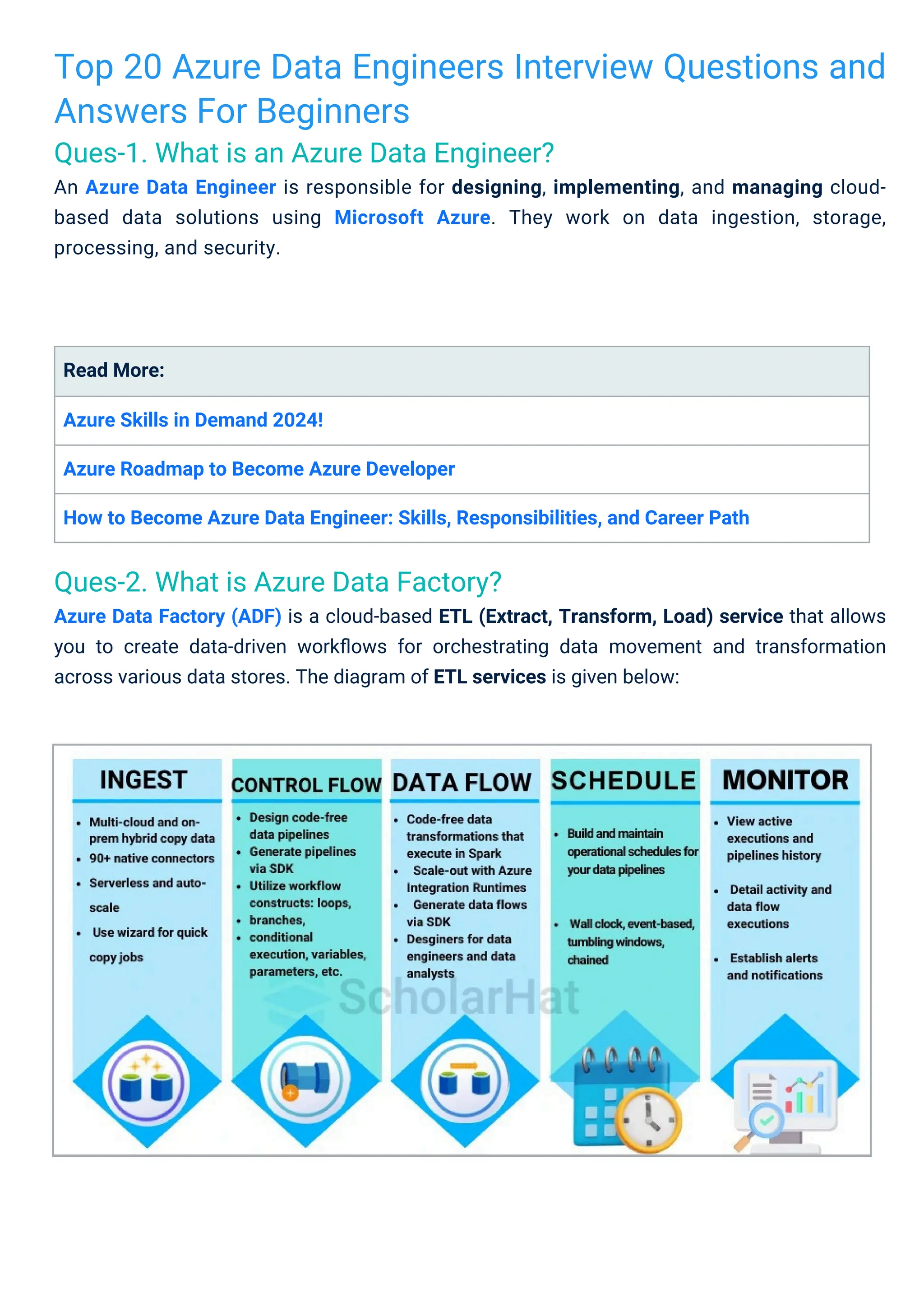
Azure Data Factory (ADF) is a cloud-based ETL (Extract, Transform, Load) service that allows
you to create data-driven workflows for orchestrating data movement and transformation
across various data stores. The diagram of ETL services is given below:
Read More:
Azure Skills in Demand 2024!
Azure Roadmap to Become Azure Developer
How to Become Azure Data Engineer: Skills, Responsibilities, and Career Path
3.
Ques-3. What isAzure Data Lake?
Azure Data Lake is a scalable cloud storage service for big data analytics. It stores vast
amounts of structured and unstructured data and integrates with tools like Databricks
and Synapse for processing. It provides hierarchical storage, strong security, and cost-
effective storage tiers for efficient data management.
Ques-6. What are Azure Databricks?
Azure Databricks is an Apache Spark-based analytics platform optimized for Azure. It allows
data engineers to build large-scale data pipelines, conduct real-time analytics, and collaborate
in a cloud environment.
Ques-4. How does Azure Data Lake work?
Azure Data Lake works by providing a cloud-based, scalable storage system that can handle
vast amounts of data, both structured and unstructured. Here’s how it functions:
Ques-5. How would you ingest data in Azure?
Data can be ingested using various services like Azure Data Factory, Azure Event Hubs, or
Azure IoT Hub. ADF is commonly used for batch processing, while Event Hubs are suited
for real-time data streams.
1. Data Ingestion: You can ingest data from various sources like databases, IoT devices, or
on-premises systems using services like Azure Data Factory or Event Hubs.
2. Storage: Data is stored in its raw format within Azure Data Lake Storage, which supports
hierarchical file systems for easy organization and management.
3. Data Processing: Data can be processed using analytics tools like Azure Databricks,
HDInsight (Hadoop, Spark), and Azure Synapse Analytics, allowing users to run complex
queries, machine learning models, or transform the data.
4. Security and Access Control: Azure Data Lake integrates with Azure Active Directory for
role-based access control (RBAC) and provides encryption for data both at rest and in
transit.
5. Scalability: The service automatically scales to handle increasing data volumes without
manual intervention, making it suitable for large-scale analytics and data science tasks.
4.
Ques-8. What isPolyBase in Azure Synapse Analytics?
PolyBase allows you to query external data in Azure Synapse Analytics by using T-SQL,
enabling access to data stored in sources like Azure Blob Storage, Data Lake, and even other
databases.
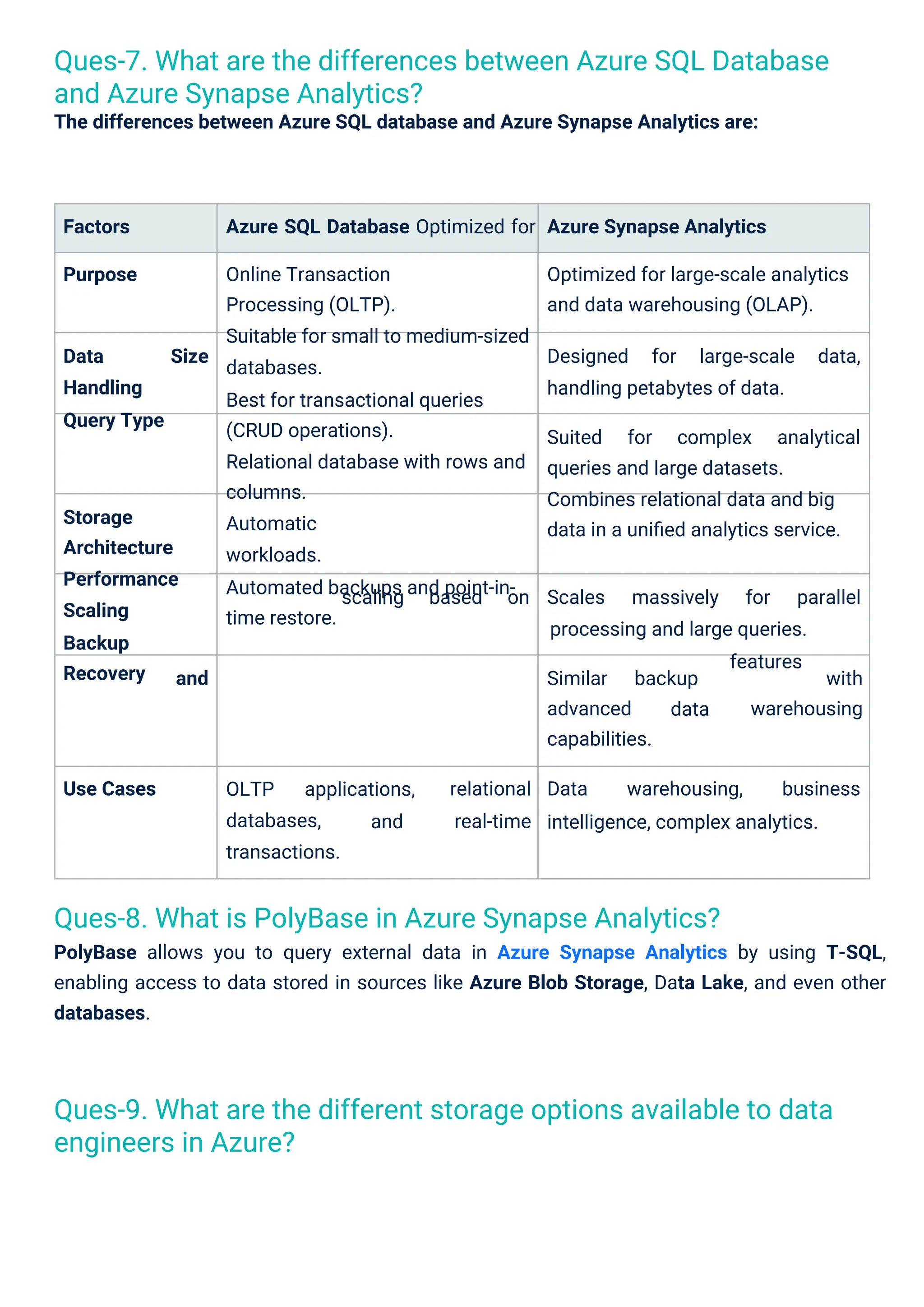
Ques-7. What are the differences between Azure SQL Database
and Azure Synapse Analytics?
The differences between Azure SQL database and Azure Synapse Analytics are:
Ques-9. What are the different storage options available to data
engineers in Azure?
OLTP
databases,
transactions.
applications,
and
Factors
Purpose
Azure SQL Database Optimized for
Online Transaction
Processing (OLTP).
Suitable for small to medium-sized
databases.
Best for transactional queries
(CRUD operations).
Relational database with rows and
columns.
Automatic
workloads.
Automated backups and point-in-
time restore.
Azure Synapse Analytics
Optimized for large-scale analytics
and data warehousing (OLAP).
Data
Handling
Query Type
Size Designed for large-scale data,
handling petabytes of data.
Suited for complex analytical
queries and large datasets.
Combines relational data and big
data in a unified analytics service.
Storage
Architecture
Performance
Scaling
Backup
Recovery
scaling based on Scales massively for parallel
processing and large queries.
features
and Similar
advanced
capabilities.
backup with
warehousing
data
Use Cases relational
real-time
Data warehousing, business
intelligence, complex analytics.
5.
The difference betweenAzure Blob Storage and Azure Data Lake Storage are:
Data pipelines in Azure can be monitored using built-in tools like Azure Monitor, Azure Log
Analytics, or Data Factory's Monitoring and Alerts feature.
Factors Azure Blob Storage Azure Data Lake Storage
Purpose General-purpose object storage
for unstructured data.
Optimized for big data analytics with
the hierarchical namespace.
Hierarchical namespace (file system-
like structure).
Big data workloads (analytics, data
lakes, machine learning).
Data Structure Flat
storage).
General
backups, logs, etc.).
namespace (object
Target Use-Case storage (media,
Integration with
Analytics
Limited direct integration with
big data tools.
Seamlessly integrates with
Azure
Databricks, HDInsight, and Synapse
Analytics.
Higher costs due to enhanced features
for analytics and hierarchical structure.
Cost Typically lower for general-
purpose storage.
Security Encryption is at rest, in transit,
and integrated with Azure AD.
Same encryption but with advanced
data management for analytics.
A Databricks cluster is a set of virtual machines that run Apache Spark. Clusters are used for
processing big data workloads, and they can auto-scale to meet data engineering demands.
Azure offers Blob Storage, Azure Data Lake Storage, Azure SQL Database, and Cosmos DB,
among others. Each has its use case based on scalability, data type, and cost.
Ques-12. What is a Data Bricks Cluster?
Ques-10. How do you monitor data pipelines in Azure?
Ques-11. What is the difference between Azure Blob Storage and
Azure Data Lake Storage?
6.
Ques-15. What isCosmos DB?
Azure Cosmos DB is a globally distributed, multi-model database service designed for scalable,
high-availability applications. It supports various data models like key values, documents, and
graphs.
Ques-14. What are Azure Managed Disks?
Azure Managed Disks are storage services that automatically manage storage based on the
size and performance required by your application. You don’t need to worry about underlying
infrastructure management.
Ques-13. How do you handle data security in Azure?
Azure offers multiple layers of security, including encryption (at rest and in transit), role-based
access control (RBAC), and integration with Azure Active Directory for authentication.
Ques-16. What are Linked Services in Azure Data Factory?
Linked Services in ADF are connections to external data sources (e.g., SQL Server, Blob
Storage). They define the connection strings and credentials for accessing data during pipeline
execution.
Ques-17. How do you create a data pipeline in Azure Data Factory?
A data pipeline in ADF consists of activities (e.g., copy, transform) that define the workflow for
moving data between linked services. Pipelines can be scheduled and monitored for
automation.
7.
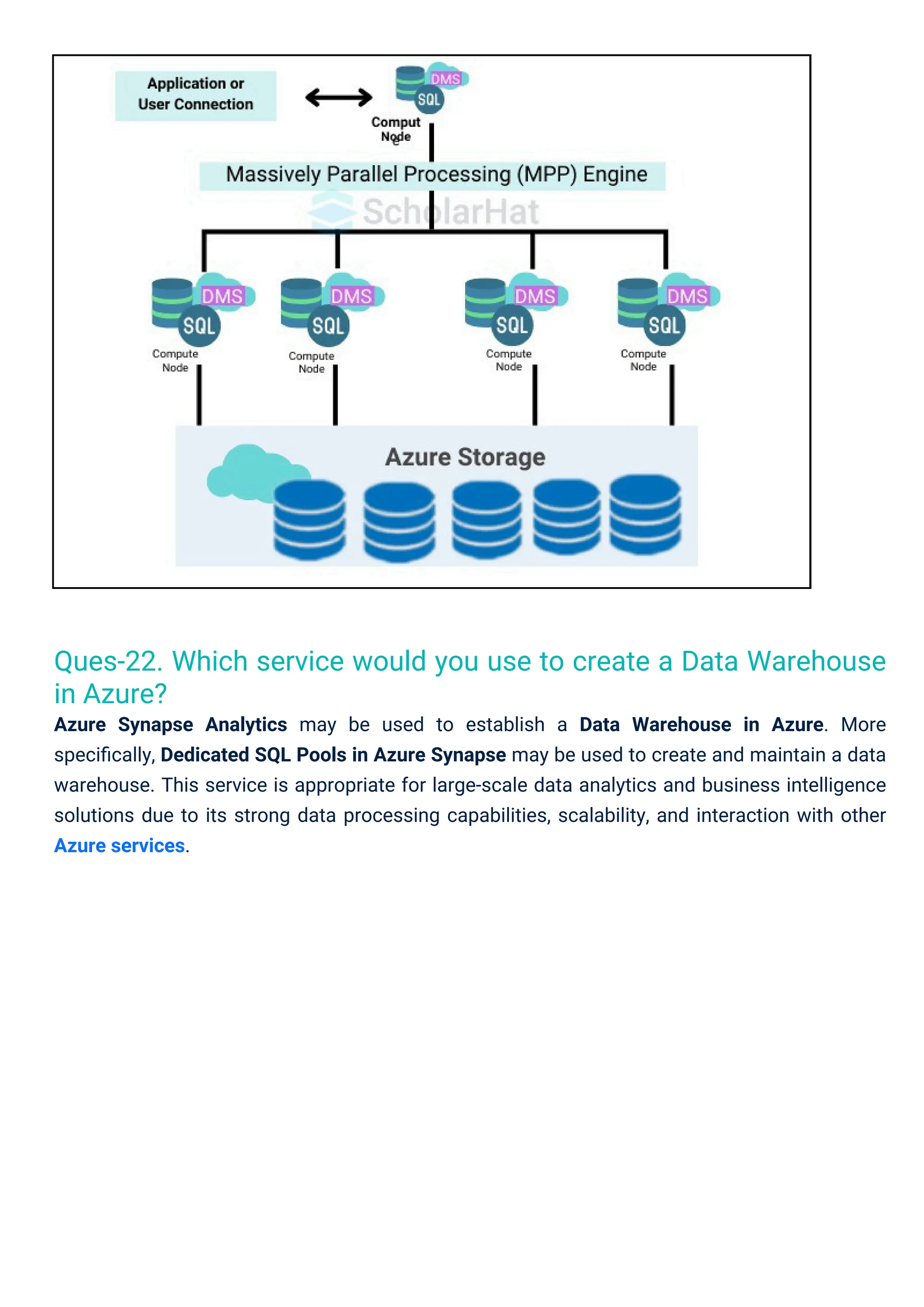
Ques-21. What areDedicated SQL Pools?
Dedicated SQL Pools are a feature of Azure Synapse Analytics designed for high-performance
data warehousing, enabling users to efficiently store and analyze large volumes of data using
Massively Parallel Processing (MPP). They offer elastic scalability and integration with various
Azure services for comprehensive analytics.
Ques-19. What is an Azure Data Warehouse?
Azure Data Warehouse (now called Azure Synapse Analytics) is a cloud-based service
designed to run complex analytical queries over large amounts of data, providing high-
performance computing for data analysis.
Ques-18. What are the key benefits of using Azure Synapse
Analytics?
Azure Synapse Analytics integrates big data and data warehousing into a single platform,
allowing for unified analytics. It also provides flexibility in using both SQL and Spark for
analytics.
Ques-20. How do you optimize data storage costs in Azure?
Data storage costs can be optimized by selecting the right storage tier (hot, cool, or archive),
minimizing redundant data, using data compression, and archiving infrequently accessed data
in lower-cost storage solutions like Blob or Data Lake.
Massively Parallel Processing (MPP): Enables fast query execution across multiple nodes.
Elastic Scalability: Allows independent scaling of compute and storage resources.
Robust Security: Includes encryption, Azure Active Directory authentication, and access
control.
T-SQL Querying: Users can utilize familiar SQL syntax for data management and analysis.
Top 15 Azure Data Engineer Interview Questions and
Answers for Intermediate Learners
8.
Ques-22. Which servicewould you use to create a Data Warehouse
in Azure?
Azure Synapse Analytics may be used to establish a Data Warehouse in Azure. More
specifically, Dedicated SQL Pools in Azure Synapse may be used to create and maintain a data
warehouse. This service is appropriate for large-scale data analytics and business intelligence
solutions due to its strong data processing capabilities, scalability, and interaction with other
Azure services.
9.
Ques-25. What isReserved Capacity in Azure?
Reserved Capacity in Azure allows customers to pre-purchase resources for specific services
over a one- or three-year term, resulting in significant cost savings compared to pay-as-you-go
Ques-23. How do you implement real-time analytics in Azure?
Real-time analytics in Azure can be implemented using Azure Stream Analytics or Azure
Event Hubs to ingest and process streaming data in real-time. This data can then be
transformed and analyzed, with results sent to visualization tools like Power BI or stored in
Azure Data Lake for further analysis.
Ques-24. What is the purpose of Delta Lake in Azure Databricks?
Delta Lake is an open-source storage layer that brings ACID transactions, scalable metadata
handling, and data versioning to big data workloads in Azure Databricks. It ensures data
reliability and consistency while allowing data engineers to manage large volumes of data
effectively and perform time travel queries.
10.
PolyBase is atechnology in Azure Synapse Analytics that enables users to query and manage
external data stored in Azure Blob Storage or Azure Data Lake using T-SQL, allowing for
seamless integration of structured and unstructured data. It simplifies data access by
eliminating the need to move data into the database for analysis, facilitating hybrid data
management.
Seamless Integration: Allows querying of external data sources alongside data stored in
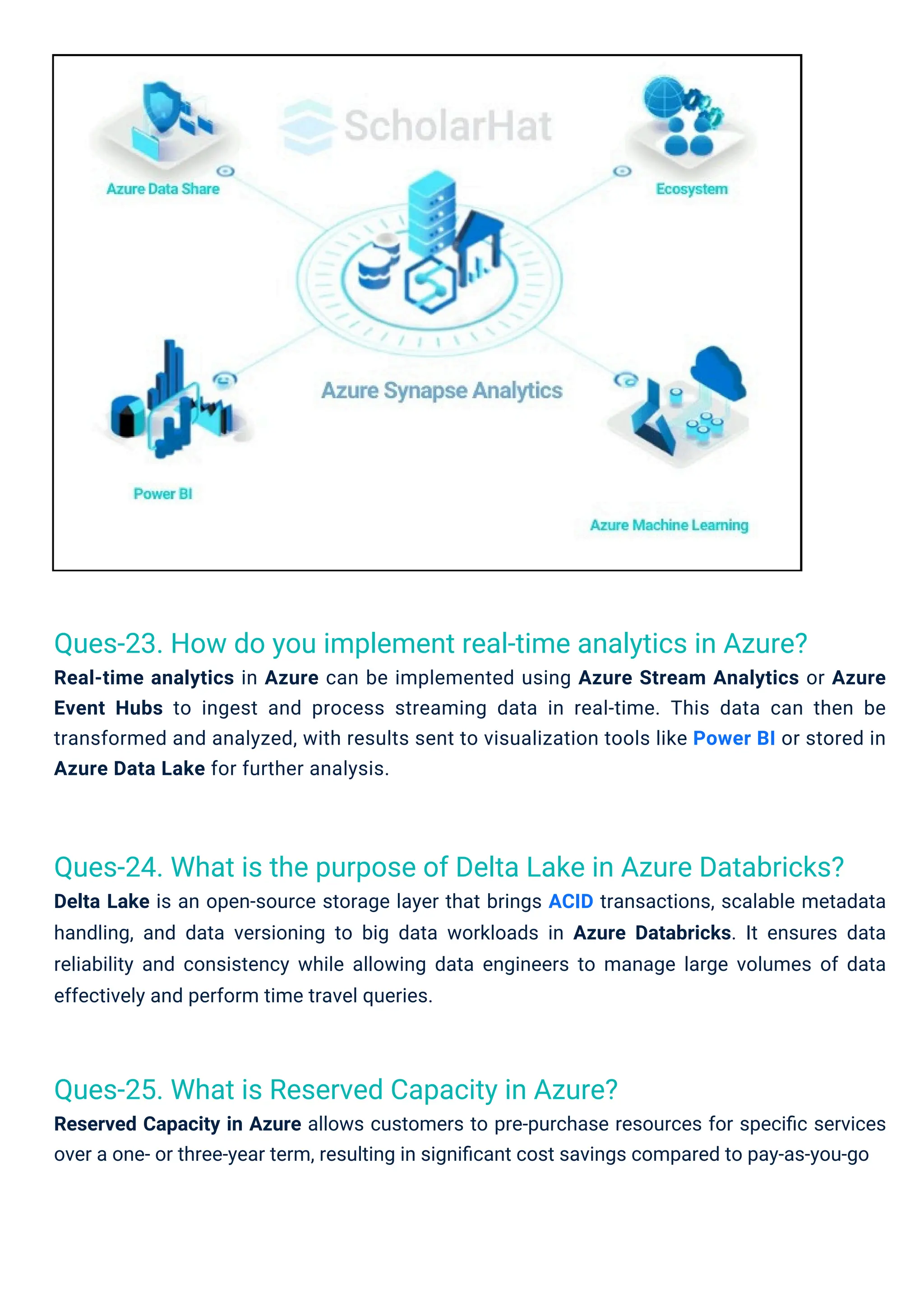
the data warehouse.
pricing. This option provides predictable budgeting and ensures resource availability for
consistent workloads.
Dynamic data masking plays several important responsibilities in data security. It limits
access to sensitive data to a certain group of people.
Dynamic Data Masking (DDM): This limits sensitive data exposure by masking it in real-
time for users without proper access while allowing authorized users to view the original
data.
Static Data Masking: Creates a copy of the database with sensitive data replaced by
masked values, which is useful for non-production environments and testing.
Custom Masking Functions: Allows users to define specific masking rules and patterns
based on their business requirements.
Integration with Azure SQL Database: DDM can be applied directly within Azure SQL
Database and Azure Synapse Analytics to protect sensitive data seamlessly.
Role-Based Access Control (RBAC): Works in conjunction with RBAC to ensure that only
authorized users can access sensitive data without masking.
Ques-27. What is Polybase?
Ques-26. What data masking features are available in Azure?
11.
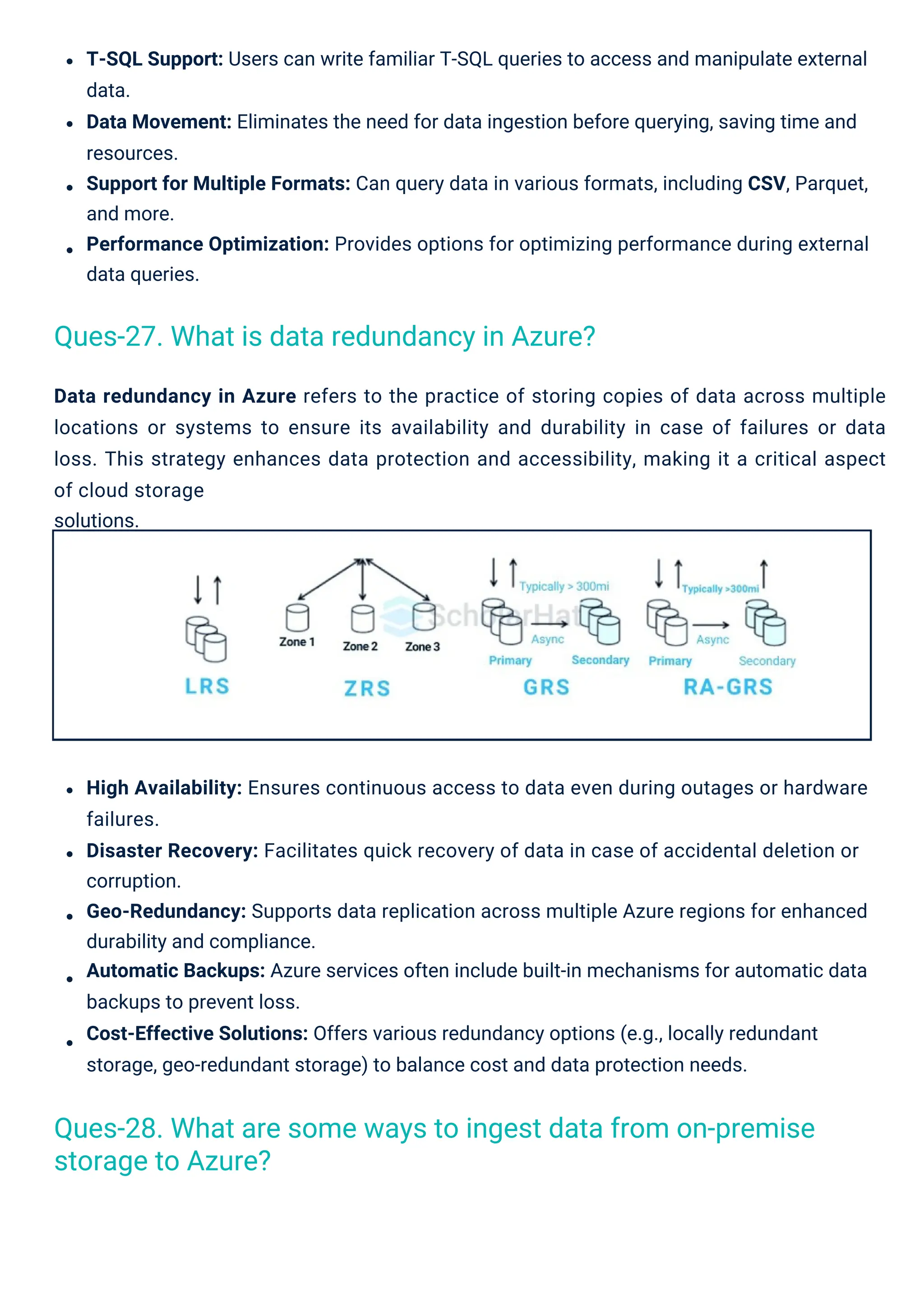
Data redundancy inAzure refers to the practice of storing copies of data across multiple
locations or systems to ensure its availability and durability in case of failures or data
loss. This strategy enhances data protection and accessibility, making it a critical aspect
of cloud storage
solutions.
High Availability: Ensures continuous access to data even during outages or hardware
failures.
Disaster Recovery: Facilitates quick recovery of data in case of accidental deletion or
corruption.
Geo-Redundancy: Supports data replication across multiple Azure regions for enhanced
durability and compliance.
Automatic Backups: Azure services often include built-in mechanisms for automatic data
backups to prevent loss.
Cost-Effective Solutions: Offers various redundancy options (e.g., locally redundant
storage, geo-redundant storage) to balance cost and data protection needs.
T-SQL Support: Users can write familiar T-SQL queries to access and manipulate external
data.
Data Movement: Eliminates the need for data ingestion before querying, saving time and
resources.
Support for Multiple Formats: Can query data in various formats, including CSV, Parquet,
and more.
Performance Optimization: Provides options for optimizing performance during external
data queries.
Ques-27. What is data redundancy in Azure?
Ques-28. What are some ways to ingest data from on-premise
storage to Azure?
12.
Here are thekey features of a multi-model database:
Unified Storage: Manage structured, semi-structured, and unstructured data in one
system.
Flexible Querying: Use various query languages and APIs for different data models.
Improved Development: Reduces the need for multiple databases, streamlining
development.
Multi-model databases are database management systems that support multiple data models
(e.g., relational, document, key-value, graph) within a single platform. This allows users to store
and manage diverse data types seamlessly, enabling flexible querying and simplifying
application development.
Here are some ways to ingest data from on-premises storage to Azure in short bullet points:
Azure Data Factory: Create data pipelines to move data to Azure services with support for
various sources.
Azure Data Box: A physical device is used to transfer large amounts of data securely by
shipping it to Azure.
Azure Import/Export Service: Import and export data to/from Azure Blob Storage using
hard drives.
Azure Logic Apps: Automate workflows for data movement between on-premises and
cloud services with predefined connectors.
Azure Data Gateway: Connect on-premises data sources to Azure services securely,
enabling real-time access.
Ques-29. What are multi-model databases?
13.
Data Relationships: Easilymodel complex relationships between different data types.
Scalability: Designed to scale horizontally to handle large volumes of data.
Azure Cosmos DB synthetic partition key is a feature that allows users to create a composite
partition key by combining multiple properties of an item in a container. This improves data
distribution, reduces hotspots, and enhances query performance by optimizing how data is
partitioned across the system.
Composite Key Creation: Combines multiple properties to form a single logical key.
Enhanced Performance: Reduces hotspots for better read and write operations.
Flexibility: Users can define keys based on specific access patterns.
Dynamic Partitioning: Adapts to changes in data distribution over time.
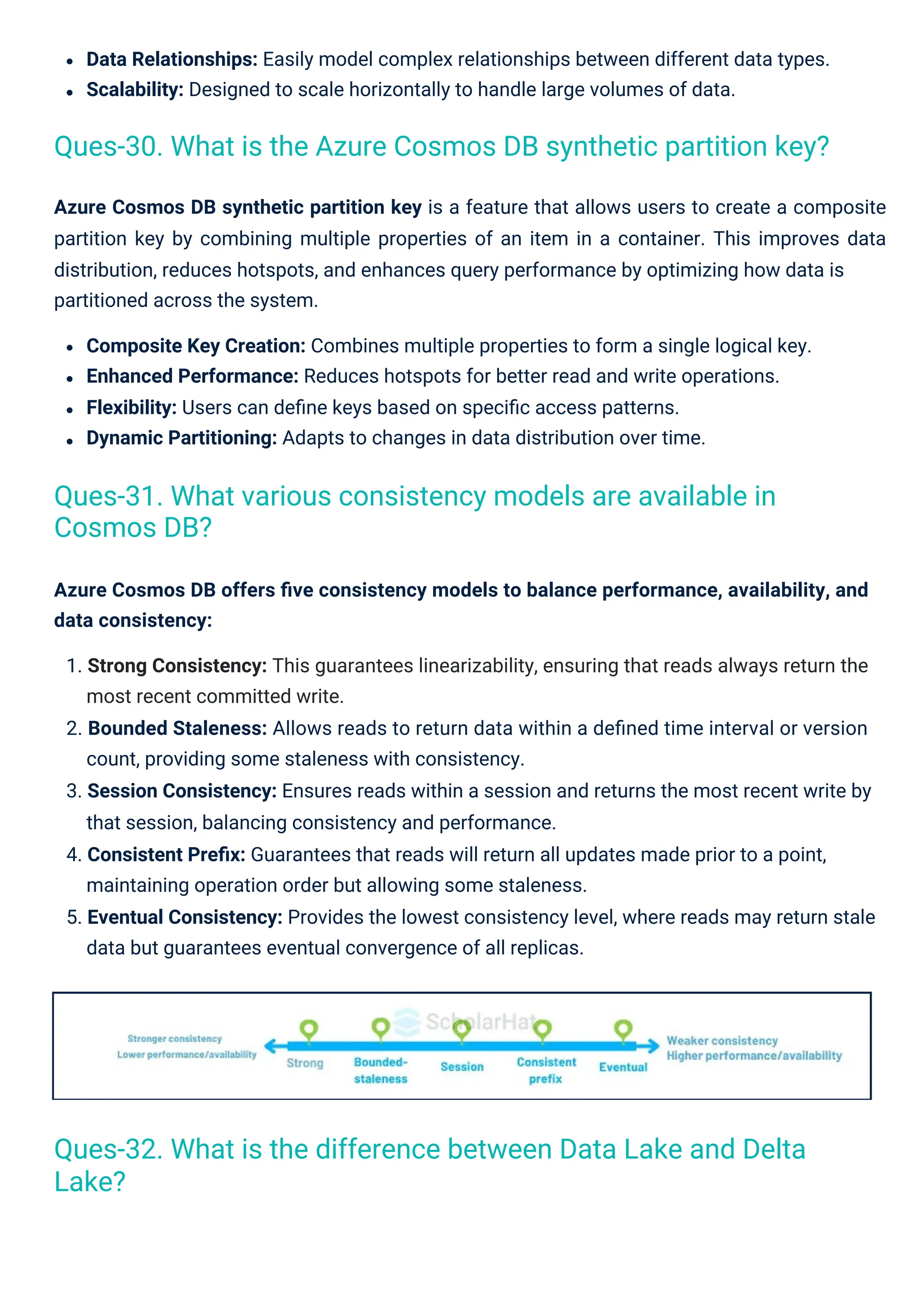
Azure Cosmos DB offers five consistency models to balance performance, availability, and
data consistency:
1. Strong Consistency: This guarantees linearizability, ensuring that reads always return the
most recent committed write.
2. Bounded Staleness: Allows reads to return data within a defined time interval or version
count, providing some staleness with consistency.
3. Session Consistency: Ensures reads within a session and returns the most recent write by
that session, balancing consistency and performance.
4. Consistent Prefix: Guarantees that reads will return all updates made prior to a point,
maintaining operation order but allowing some staleness.
5. Eventual Consistency: Provides the lowest consistency level, where reads may return stale
data but guarantees eventual convergence of all replicas.
Ques-31. What various consistency models are available in
Cosmos DB?
Ques-32. What is the difference between Data Lake and Delta
Lake?
Ques-30. What is the Azure Cosmos DB synthetic partition key?
14.
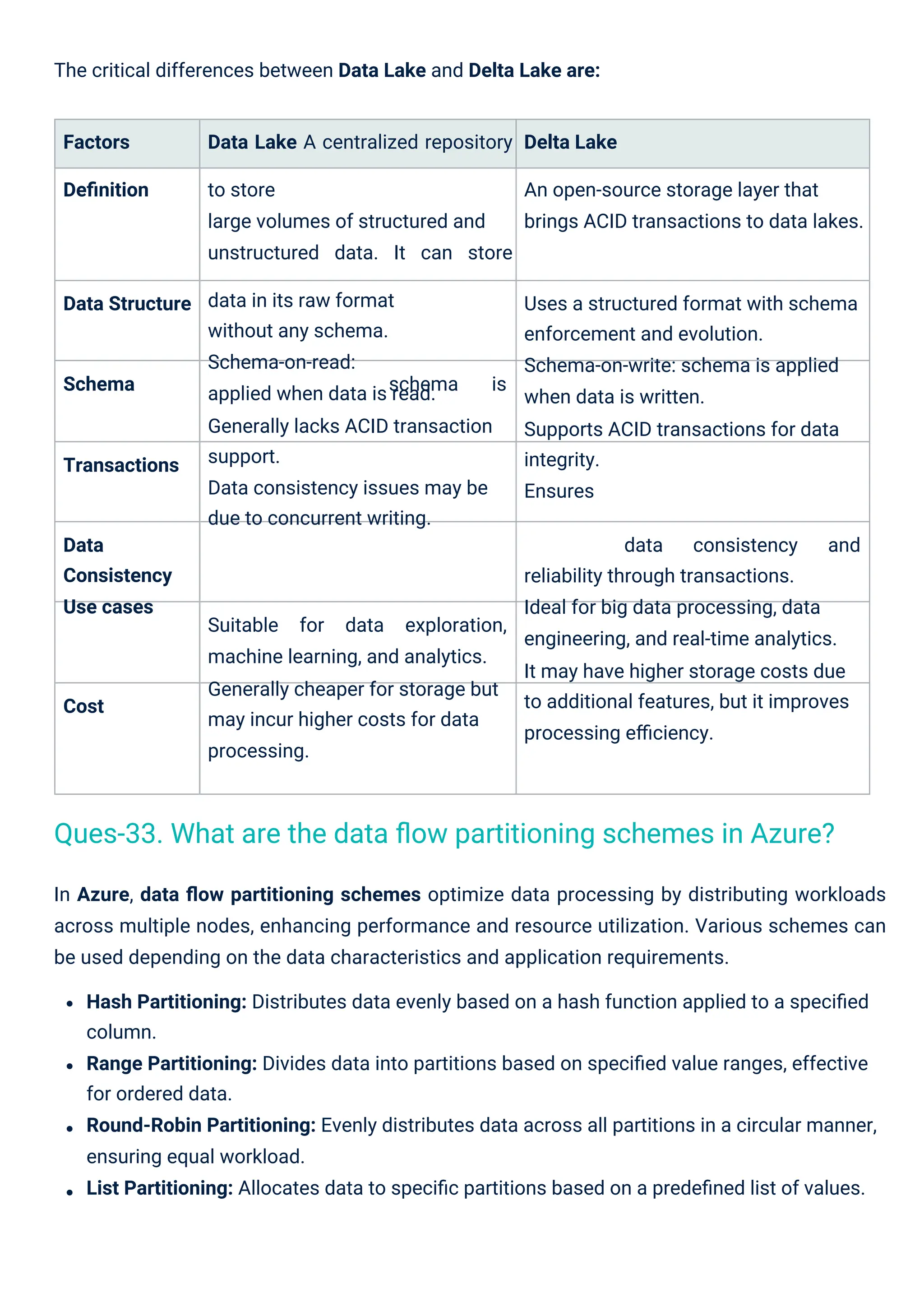
The critical differencesbetween Data Lake and Delta Lake are:
Factors
Definition
Data Lake A centralized repository
to store
large volumes of structured and
unstructured data. It can store
data in its raw format
without any schema.
Schema-on-read:
applied when data is read.
Generally lacks ACID transaction
support.
Data consistency issues may be
due to concurrent writing.
Delta Lake
An open-source storage layer that
brings ACID transactions to data lakes.
Data Structure Uses a structured format with schema
enforcement and evolution.
Schema-on-write: schema is applied
when data is written.
Supports ACID transactions for data
integrity.
Ensures
Schema schema is
Transactions
Data
Consistency
Use cases
data consistency and
reliability through transactions.
Ideal for big data processing, data
engineering, and real-time analytics.
It may have higher storage costs due
to additional features, but it improves
processing efficiency.
Suitable
machine learning, and analytics.
Generally cheaper for storage but
may incur higher costs for data
processing.
for data exploration,
Cost
In Azure, data flow partitioning schemes optimize data processing by distributing workloads
across multiple nodes, enhancing performance and resource utilization. Various schemes can
be used depending on the data characteristics and application requirements.
Hash Partitioning: Distributes data evenly based on a hash function applied to a specified
column.
Range Partitioning: Divides data into partitions based on specified value ranges, effective
for ordered data.
Round-Robin Partitioning: Evenly distributes data across all partitions in a circular manner,
ensuring equal workload.
List Partitioning: Allocates data to specific partitions based on a predefined list of values.
Ques-33. What are the data flow partitioning schemes in Azure?
15.
Trigger execution inAzure Data Factory allows for the automatic initiation of data pipelines
based on specific events, schedules, or conditions. This feature enhances automation and
ensures timely data processing for integration and transformation tasks.
Scheduled Triggers: Start pipelines at predefined intervals or specific times.
Event-Based Triggers: Initiate pipelines in response to data changes or external events.
Pipeline Triggers: Trigger one pipeline upon the completion of another, enabling complex
workflow orchestration.
Mapping Dataflows in Azure Data Factory is a visual data transformation feature that enables
users to design and execute data transformations without writing code. This user-friendly
interface simplifies the creation of complex data workflows for integrating and manipulating
data from various sources.
Composite Partitioning: Combines multiple partitioning schemes (e.g., hash and range) for
enhanced performance on complex queries.
Visual Interface: Drag-and-drop components to build data transformation workflows
easily.
Comprehensive Transformations: Supports a wide range of operations, including joins,
aggregations, and filtering.
Integration: Connects to various data sources and sinks, facilitating seamless data
movement.
Scalability: Leverages Azure's infrastructure to efficiently process large volumes of data.
Ques-35. What are Mapping Dataflows?
Ques-34. What is the trigger execution in Azure Data Factory?
Top 15 Azure Data Engineer Interview Questions and
Answers for Experienced Learners
16.
Ques-36. What arethe differences between Azure Data Lake
Storage Gen1 and Gen2?
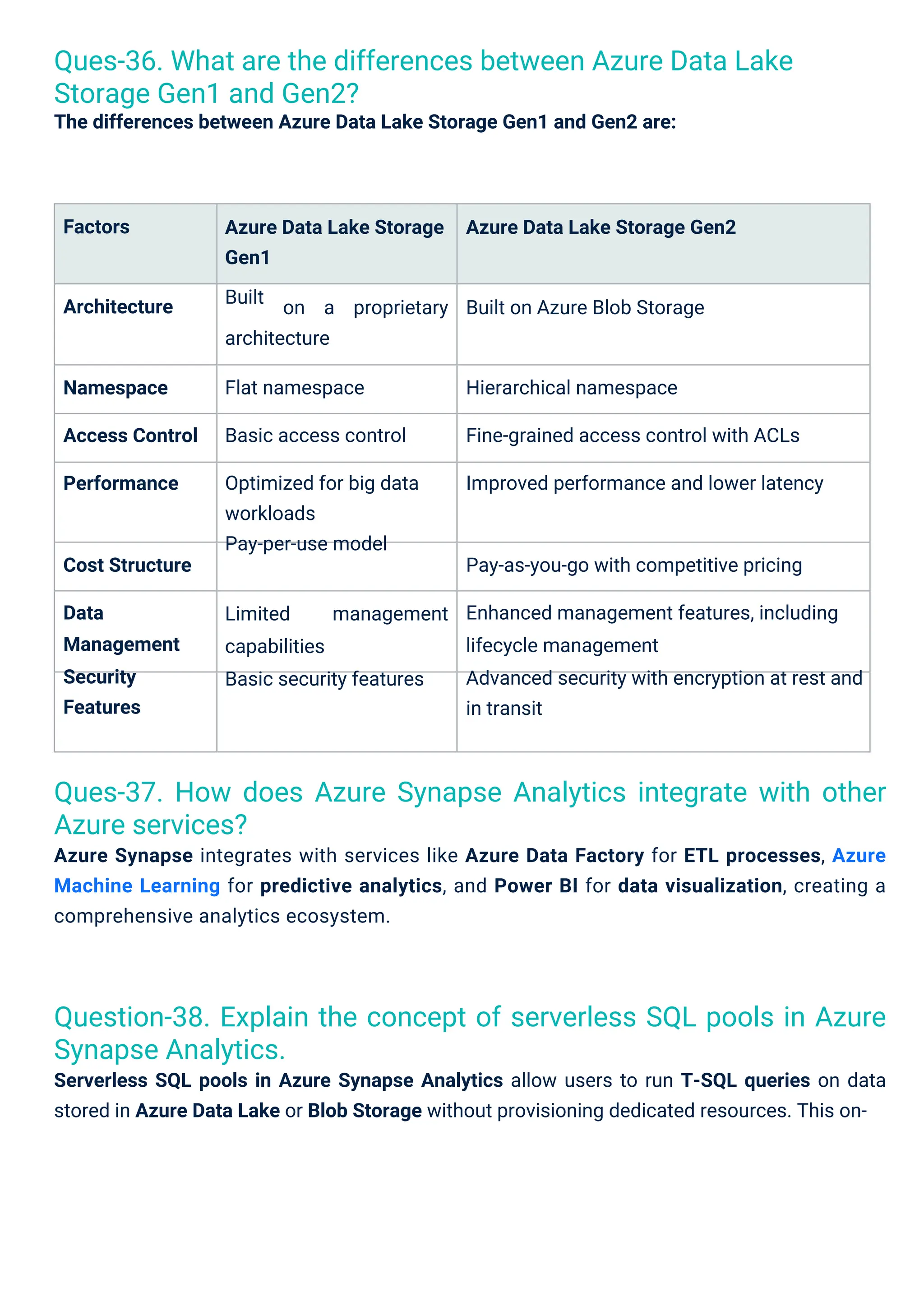
The differences between Azure Data Lake Storage Gen1 and Gen2 are:
Ques-37. How does Azure Synapse Analytics integrate with other
Azure services?
Azure Synapse integrates with services like Azure Data Factory for ETL processes, Azure
Machine Learning for predictive analytics, and Power BI for data visualization, creating a
comprehensive analytics ecosystem.
Question-38. Explain the concept of serverless SQL pools in Azure
Synapse Analytics.
Serverless SQL pools in Azure Synapse Analytics allow users to run T-SQL queries on data
stored in Azure Data Lake or Blob Storage without provisioning dedicated resources. This on-
Factors
Architecture
Cost Structure
Data
Management
Security
Features
Namespace
Access Control
Performance
Azure Data Lake Storage
Gen1
Built
Azure Data Lake Storage Gen2
on a proprietary Built on Azure Blob Storage
architecture
Flat namespace
Basic access control
Optimized for big data
workloads
Pay-per-use model
Hierarchical namespace
Fine-grained access control with ACLs
Improved performance and lower latency
Pay-as-you-go with competitive pricing
Enhanced management features, including
lifecycle management
Advanced security with encryption at rest and
in transit
Limited
capabilities
Basic security features
management
17.
Some key strategiesto optimize performance in Azure SQL Database:
Indexing: Create and maintain appropriate indexes to speed up query performance and
reduce data retrieval times.
Query Optimization: Analyze and rewrite queries to improve execution plans and reduce
resource consumption.
Elastic Pools: Use elastic pools to manage and allocate resources across multiple
databases, optimizing performance for variable workloads.
Here are the benefits of using Azure Data Factory for data movement in short bullet points:
Unified Interface: Provides a single platform for data integration, allowing users to manage
and orchestrate data workflows easily.
Wide Data Source Support: Connects to various data sources, both on-premises and in the
cloud, facilitating seamless data movement.
Scalability: Automatically scales resources to handle large volumes of data efficiently,
accommodating growing workloads.
Scheduled Workflows: Supports scheduling and event-based triggers for automated data
movement, ensuring timely processing.
Monitoring and Debugging: Offers built-in monitoring tools to track data flows, identify
bottlenecks, and troubleshoot issues.
demand querying model is cost-effective, scalable, and easy to use for analyzing large
datasets.
On-Demand Querying: Execute queries directly on data without ingestion into a data
warehouse.
Pay-Per-Query Pricing: Costs are incurred based on the amount of data processed,
allowing for budget control.
Integration: Easily integrates with services like Power BI and Azure Data Factory for
enhanced analytics.
Scalability: Automatically scales resources based on query demands, accommodating
varying workloads.
Ques-40. How can you optimize performance in Azure SQL
Database?
Ques-39. What are the benefits of using Azure Data Factory for
data movement?
18.
Here’s a conciseapproach to implementing data encryption in Azure, presented in bullet
points:
Automatic Tuning: Enable automatic tuning features to automatically identify and
implement performance enhancements, such as creating missing indexes or removing
unused ones. Partitioning: Implement table partitioning to improve query performance and
manage large
datasets more efficiently.
Connection Management: Optimize connection pooling and limit the number of concurrent
connections to reduce overhead.
Azure Stream Analytics is a real-time analytics service that enables the processing and
analysis of streaming data from various sources, such as IoT devices and social media. It
provides immediate insights and actions, making it essential for applications requiring real-
time decision-making.
Roles of Azure Stream Analytics in Real-Time Data Processing:
Real-Time Analytics: Processes and analyzes streaming data to deliver immediate
insights and facilitate quick decision-making.
Event Processing: Supports complex event processing (CEP) to identify patterns,
anomalies, and trends in real-time data streams.
Integration: Seamlessly integrates with Azure services like Azure Event Hubs and Azure
Data Lake for efficient data ingestion and storage.
Scalable Processing: Automatically scales resources to accommodate fluctuating data
loads, ensuring reliable processing of large volumes.
Output Options: Delivers processed results to various destinations, including Azure Blob
Storage, Azure SQL Database, and Power BI for visualization.
SQL-like Language: Utilizes SQL-like query language for easy data manipulation, making it
accessible to users familiar with SQL.
Ques-41. What is the role of Azure Stream Analytics in real-time
data processing?
Ques-42. Describe how you would implement data encryption in
Azure.
1. Data at Rest Encryption:
19.
Azure Key Vault:Store and manage cryptographic keys, implementing access controls and
key rotation policies.
Role-Based Access Control (RBAC): Manage user access to resources, ensuring only
authorized users access encrypted data.
Access Policies: Restrict access to encryption keys in Azure Key Vault.
Azure Synapse Analytics (formerly SQL Data Warehouse) supports big data analytics through
features like integrated Apache Spark pools, serverless SQL capabilities, and support for
unstructured data through Azure Data Lake integration.
TLS/SSL: Use Transport Layer Security to encrypt data between clients and Azure services.
VPN Gateway: Establish secure connections to Azure resources, encrypting data over the
internet.
Azure ExpressRoute: Create private connections with optional encryption for added
security.
Azure Storage Service Encryption (SSE): Automatically encrypts data in Azure Blob
Storage, Files, Queue, and Table Storage using managed or customer-managed keys.
Transparent Data Encryption (TDE): Encrypts SQL Database data and log files
automatically without application changes.
Azure Disk Encryption: Encrypts virtual machine disks using BitLocker (Windows) or DM-
Crypt (Linux).
Compliance Standards: Ensure encryption practices meet industry regulations (e.g., GDPR,
HIPAA).
Azure Security Center: Monitor security configurations and receive alerts about
encryption-related issues.
3. Key Management:
4. Data Access Controls:
2. Data in Transit Encryption:
5. Compliance and Monitoring:
Ques-43. What are Azure Data Warehouse features that support
big data analytics?
20.
Ques-45. Explain theconcept of data lineage in Azure Data Factory.
Data lineage in Azure Data Factory refers to the tracking and visualization of the flow of data
from source to destination, providing insights into data transformations, dependencies, and
data quality throughout the pipeline.
Ques-47. How can you implement data retention policies in Azure?
Data retention policies can be implemented using Azure Blob Storage lifecycle management to
automatically delete or move data after a specified time period, ensuring compliance and
efficient storage management.
Ques-49. How do you ensure data quality in your Azure data
pipelines?
Ques-46. What are the different types of triggers available in
Azure Data Factory?
Azure Data Factory supports scheduled triggers for time-based executions, event-based
triggers for responding to changes in data, and manual triggers for on-demand executions.
Ques-44. How do you handle schema changes in Azure Data
Factory?
Schema changes can be managed using the schema drift feature, allowing Data Factory to
adapt to changes dynamically. Additionally, parameterization and metadata-driven
approaches can help manage schema changes effectively.
Ques-48. What is Azure Cosmos DB’s multi-model capability, and
why is it important?
Azure Cosmos DB’s multi-model capability allows it to natively support various data models,
including document, key-value, graph, and column family. This flexibility enables developers to
choose the most suitable data model for their applications.
21.
Read More:
Top 50Azure Interview Questions and Answers
Top 50 Azure Administrator Interview Questions and Answers
Azure Functions can be used to process data in real-time as it arrives in Azure Event Hubs or
Service Bus, performing lightweight transformations or triggering data workflows in Azure
Data Factory based on events.
In conclusion, we have covered the Top 50 Azure Data Engineer Interview Questions and
Answers. This will surely help you to prepare for an interview and definitely enhance your
knowledge. This article will help everyone, whether you are a fresher or you are experienced.
For mastering Azure, you can consider Microsoft Azure Cloud Architect and Azure DevOps
Training will help you in your career growth.
Data quality can be ensured by implementing validation checks, using data profiling tools,
setting up alerts for anomalies, and establishing data cleansing processes within the data
pipeline.
Ques-50. Describe a scenario where you would use Azure
Functions in a data engineering context.
Conclusion